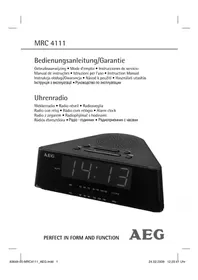
MRC 4111 - Radio AEG - Free user manual and instructions
Find the device manual for free MRC 4111 AEG in PDF.



| Product type | Clock radio |
| Brand | AEG |
| Model | MRC 4111 |
| Power supply | 230-240 V ~ 50 Hz, 3 W |
| Backup battery | 9 V block (not included) |
| Net weight | 0.4 kg |
| Frequency ranges | FM 88-108 MHz / AM 530-1600 kHz |
| Protection class | II |
| Main functions | Radio and buzzer alarm, Snooze, Sleep timer, LED display |
| Controls | Rotary volume, band selector, tuning |
| Antenna | Flexible FM antenna |
| Cleaning | Unplug, damp cloth without detergent |
| Safety | Do not expose to water, do not open, keep dry |
| Reparability | Repairs by specialist only |
Frequently Asked Questions - MRC 4111 AEG
User questions about MRC 4111 AEG
0 question about this device. Answer the ones you know or ask your own.
Ask a new question about this device
Download the instructions for your Radio in PDF format for free! Find your manual MRC 4111 - AEG and take your electronic device back in hand. On this page are published all the documents necessary for the use of your device. MRC 4111 by AEG.
USER MANUAL MRC 4111 AEG
D-47906 Kempen/Germany
Characteristicas techniques
Gamma di frequenza: ....UKW / FM 88,0 ~ 108,0 MHz
...MW/AM530\~1600kHz
General Safety Instructions
Read the operating instructions carefully before putting the appliance into operation and keep the instructions including the warranty, the receipt and, if possible, the box with the internal packing. If you give this device to other people, please also pass on the operating instructions.
- To avoid the risk of fire or an electric shock, you should not expose the device to rain or moisture. Consequently, do not use the device in the immediate vicinity of water - for example near a bath tub, a swimming pool or in a damp cellar.
- Use the device only for the intended purpose.
- Only connect the device at a properly installed plug socket. Pay attention that the specified voltage corresponds to the voltage of the plug socket.
- When using external mains supply, pay attention to the correct polarity and voltage. Always place the batteries in the correct direction.
- Assemble the device in such a way that the available ventilation openings are not covered.
- Never open the housing of the device. Incorrect repairs can constitute a considerable risk for the user. Should the device become damaged, in particular the mains supply cable, do not operate the device any longer, but rather have it repaired by an expert. Check the mains supply cable regularly for damage.
- For safety reasons a broken or damaged mains lead may only be replaced by an equivalent lead from the manufacturer, our customer service department or a similar quality ed person.
- If the device is not used for a longer period, remove the plug connector from the plug socket or take out the batteries.
These symbols may be found on the machine and are intended to indicate the following:

The lightning symbol should advise the user of parts in the inside of the device which carry dangerously high voltage levels.
The symbol with an exclamation mark should advise the user of important operation or maintenance instructions in the accompanying documentation.
Children and Frail Individuals
- In order to ensure your children's safety, please keep all packaging (plastic bags, boxes, polystyrene etc.) out of their reach.

WARNING!
Caution! Do not allow small children to play with the foil as there is a danger of suffocation!
- This device is not intended to be used by individuals (including children) who have restricted physical, sensory or mental abilities and/or insufficient knowledge and/or experience, unless they are supervised by an individual who is responsible for their safety or have received instructions on how to use the device.
- Children should be supervised at all times in order to ensure that they do not play with the device.
Symbols in these Instructions for Use
Important information for your safety is specially marked. It is essential to comply with these instructions in order to avoid accidents and prevent damage to the machine:

WARNING:
This warns you of dangers to your health and indicates possible injury risks.

CAUTION: This refers to possible hazards to the machine or other objects.

NOTE: This highlights tips and information.
Special Safety Instructions
- Do not use the device in locations that are extremely hot, cold, dusty or moist.
- Select a suitable location for the radio recorder, such as a dry, flat, non-slip surface on which it is easy to operate the machine.
- Ensure that the radio recorder is sufficiently ventilated!
- Do not cover any ventilation slits with objects such as magazines, tablecloths, curtains etc.
- Never touch the mains plug or lead with wet hands.
- Keep the mains lead away from heaters.
- Never put a heavy object on the electric lead.
50 English
- Keep the device away from vases, baths, wash basins etc. If liquid enters the device this may cause serious damage.
Overview of the Components
1 Set minutes (MIN)
Hour function key (HR)
3 Function key for delayed switch-off (SLEEP)
4 Function key (SNOOZE)
5 Loudspeaker
6 Throw-out aerial (FM)
7 Mains lead
8 Alarm (AL) function button
9 Time setting function key (TIME)
10 Volume control (BUZZ. OFF
11 Band selection switch (AM/FM)
12 Regulator (TUNING)
13 Frequency display, Station scale
14 Battery compartment
15 LED display
16 LED for activated alarm function (AUTO)
17 Function switch (ON/OFF/AUTO)
Putting into function
Insert the plug into a properly installed 230V,50Hz power socket.
Radio station tuning
- Turn the band selector switch (11) to the FM or AM position, depending on which frequency band you wish to hear.
$$ \mathrm {U K W} = \mathrm {F M}, \text {M e d i u m} \quad \text {W a v e} = \mathrm {A M}. $$
- Move the function switch (17) to the ON position.
- Turn the tuning control in order to tune in to a station. The station scale shows the frequency that has been set.
- If reception is too weak, change the position of the dipole antenna in order to improve the reception.
- An aerial is integrated into the device for the reception of AM stations. The device can be aligned to the station by changing its position.
English
Volume
The desired volume can be sent using the VOL regulator (10).
Setting of the Clock (24 h)
Hours: Press the TIME key (9) and the HR key (2) simultaneously.
Minutes: Press the TIME key (9) and the MIN key (1) simultaneously.
Switch-off
The device is switched off if the function switch (17) is in the "OFF" position.
Alarm function
Setting of the Alarm (24 h)
Hours: Press the AL key (8) and the HR key (2) simultaneously.
Minutes: Press the AL key (8) and the MIN key (1) simultaneously.
Radio alarm
Once the alarm times are set and a radio station has been selected, shift the function selector (17) to "AUTO". A dot lights up in the display next to "AUTO" (16).
I NOTE:
As soon as the alarm time is reached, the radio is switched on. The selected radio station plays at the set volume.
Buzzer alarm
- If you would not like to be woken up by the radio, turn the volume control (10) to the "BUZZ. OFF" position until it locks in place.
Instead of the radio, the buzzer goes off when the alarm time is reached.
Turning off the Alarm
In order to turn off the alarm, move the function switch (17) to the OFF position.
52 English
Automatic Alarm Interval
The automatically set alarm function can be shut off for approximately 9 minutes with the SNOOZE key (4).
Delayed Shut-Off
The delayed switch-off function can be used when the switch is in the positions AUTO or OFF.
- If the SLEEP button (3) is pressed the radio is switched off after 59 minutes. The switch-off time can be adjusted by pressing the SLEEP and the HR button (2) or the MIN button (1) at the same time.
- This function can be cancelled with the SNOOZE key (4).
Inserting the batteries
(not supplied)
If there is a power cut or the mains plug has been removed from the power socket, the settings will be retained if the power reserve batteries are inserted.
- Open the battery compartment on the underside.
- Connect a 9 V, E compound battery to the supply connection. Please ensure the correct polarity.
- Close the battery compartment again.
- If the device is not used for a prolonged period of time, please take the batteries out in order to prevent leakage of battery acid.
CAUTION:
Batteries are not to be disposed of together with domestic wastes. Dispose of the used batteries at the relevant collection bin or at your dealer's.
WARNING:
Do not expose the batteries to high temperatures or direct sunlight. Never throw batteries into the fire. There is a danger of explosion!
Cleaning
- Remove the plug before cleaning.
- Clean the appliance with a slightly humid cloth without any additives.
- Do not dip the appliance in water.
English
53
Technical Data
Model: MRC 4111
Power supply: 230-240 V, 50 Hz
Power consumption: 3 W
Battery power reserve: 9 V-Block
Protection class: II
Net weight: 0.4 kg
Radio section:
Frequency ranges: VHF / FM 88,0 ~ 108,0 MHz
...MW/AM530\~1600kHz
This device has been tested according to all relevant current CE guidelines, such as electromagnetic compatibility and low voltage directives, and has been constructed in accordance with the latest safety regulations.
Subject to technical changes without prior notice!
Meaning of the "Dustbin" Symbol
Protect our environment: do not dispose of electrical equipment in the domestic waste.
Please return any electrical equipment that you will no longer use to the collection points provided for their disposal.
This helps avoid the potential effects of incorrect disposal on the environment and human health.
This will contribute to the recycling and other forms of reutilisation of electrical and electronic equipment.
Information concerning where the equipment can be disposed of can be obtained from your local authority.
54 Jezyk polski
Regulatorem glosnosci VOL (10)UNCTO 10000000000000000000000000000000000000000000000000000000000000000000
YKX = FM, cepei xBni = AM
2.ПереклочьперемкayФунки(17)В поцю ON.
3. Поверніт bе рулготор част, со образи пошипу Bam paiooctanцio. Lka na paioctanii (13) noka3yecчactotn nouHaOci 3 neBHoro pibHIO.
4.Якwo npinom 3aHaTo Cna6Kn,3mHItb nOJKeHHaHTeHN Ha TaKe,de npinom 6yDe KpaumM.
5. Дли пииму санць в дiana30hi AM в пилад Intergobан aHTeHa. Пплад можна opicHTyBaTN ha paioctanii nobopoTOM habkoLo OCI.
YkpaIHcbka
Cnla 3Byky
Bn mojete peryIIOBaTn cnIy 3Byky peYJrTopom VOL (10).
BcTaHOBHeHHa cay (24 h)
TOnHH:HaTnCHiB OndHocHo KnaBiIe TIME (9) i KnaBiIe HR (2).
XbHINH: HATNCiTb OndHocHO KlaBiw TIME (9) i KlaBiw MIN (1).
BnKJIoueHn npuJaNy
PnlaBnKJIoueHO, kIoo KnaBiiw fynKci (17) nepeBeDeHO B no3nziO ,OFF".
Функця 6удньнka
BcTaHOBHeHHaCy CnHany 6yDnIbHnka (24 h)
TOnHH: HATnCHiB OndHocHo KnaBiU AL (8) i KnaBiU HR (2).
XBnHn: HATNCiTb OndHocHo KnaBiw AL (8) i KnaBiw MIN (1).
Paio-6yndnIbHnK
BctahOBiTb yac cnpaIIOBaHHa 6yDnIbHnka i paioCTaHciO, nicra zboRo nepeBeDiTB KnaBiiu fynKci (17) B no3nciO AUTO. Ha dinCnIeI 3acBiITbcr KpanKa HABKOLO 3HaKa fynKciAUTO" (16).
BKA3IBKA:
KoHn HAcTyuNtB BCTaHOBHeHn Bam uac dJa cnpaOBAHHa 6yDnIbHnKa, BKIOHTbcra pao. PAdioctaHcui i cnila 3Byky 6ydyb ti, 10 BCTaHOBHeHi Bamn.
CnHn6yDnIbHnKa-3ymep
- YKIO Bn He xoye IPOKnaTncB iD paioocnHany, NOBepHITb peryIaTOp cnnn 3Byky VOL (10) B no3nio BUZZ. OFF"do KInz, nOKn He nouyTe KlaaHaHH.
3amictpaioocnHaBac, BCTaHOBeHn Bamn npolyha cHnA- 3ymep.
BnKJIIOUeHHcHrHany 3ymepy
Lio6 BnKnHouHTn CnHn 3ymepy, cnid nepeCTaBnTn nepemKau FynKci (17) B no3nIO OFF.
YkpaIHcbka
ABTomatnHaФyHKi86yDnIbHnka3iHTepBaIamn
ABTOMaTHNO BCTaHOBNeHa yHKiIg 6yIINbHnka MoKe TmUaCOBO BnKJIIOuATNcKlaBiIeM SNOOZE (4) Ha iTePbaJ npN6n3Ho 9 XBnIH.
BnKJIIOUeHHa 3 BiIcTpoUKOIO
3aIIIaEMO 3a co6OIO npaBO HaTexHiYi3MiH!
Yka3bIbaet Ha BO3MOxHHyO ONaCHOCTb Ira N3deJn I dpyHX OkpyKaHOuNX npedmetOB.

6 PpOBoJIoUHaaHTeHHa (FM)
7
Ceteboi
ka6eJIb
8ФункционьнанКногксгнтpeBOrn(AL)
9ФункционьнгКногпа nporpaMMNPOBaHnBpeMeHn (TIME)
10 Perynatop rpoMkoCTn (BUZZ. OFF VOL)
11 PepeKluoyatEnb Dnana30HOB (AM/FM)
12
Perynatop
(TUNING)
13 Poka3aTeIb cactoTbi, LkaIa hactpoKn
14
OTCEK
6atapeek
DnCnnei
15
CBETODIOHbI
16 CBeToIIOHbI INHINKaTOp BkInOueHn8 6yInJbHnKa (AUTO)
17Функиональны поеклочаел (ON/OFF/AUTO)
BkIIOUeHne
BCTaBbTe cTeByIO BnIKy B po3eTKy C hAnpJKeHHeM cTeN 230 B, 50 Tc, yCTaHOBJIeHHyo B COOTBETCTBnC npeDnncAHnA M.
Hactpoika ha paadnoctanuio
- YctahOBHTe nepeKIOHateIb dHaana3oHOB (11) B noJooKeHne FM nIi AM, B 3aBnCIMOCTn OT Bbl6paHHoro dHaana3OHa.
YKB = FM, CpeДнHe BОЛны = AM.
- YctaHOBInTe FyHKUOnHHb InepeKluOaTeJIb (17) B noLoXeHne ON.
- Дли посяк радиocтанци поворачьite perулготop тонера.Шка пeredатунka пaka3ыBaET COOTBETCTByIOUYU qactOTy.
84 Pycckn




- Characteristicas techniques
- General Safety Instructions
- Children and Frail Individuals
- WARNING!
- Symbols in these Instructions for Use
- WARNING:
- Special Safety Instructions
- English
- Overview of the Components
- Putting into function
- Radio station tuning
- English
- Volume
- Switch-off
- Alarm function
- Radio alarm
- I NOTE:
- Buzzer alarm
- Turning off the Alarm
- English
- Automatic Alarm Interval
- Delayed Shut-Off
- Inserting the batteries
- CAUTION:
- Cleaning
- Technical Data
- Meaning of the "Dustbin" Symbol
- Jezyk polski
- YkpaIHcbka
- Cnla 3Byky
- BcTaHOBHeHHa cay (24 h)
- BnKJIoueHn npuJaNy
- Функця 6удньнka
- BcTaHOBHeHHaCy CnHany 6yDnIbHnka (24 h)
- Paio-6yndnIbHnK
- BKA3IBKA:
- CnHn6yDnIbHnKa-3ymep
- BnKJIIOUeHHcHrHany 3ymepy
- ABTomatnHaФyHKi86yDnIbHnka3iHTepBaIamn
- BnKJIIOUeHHa 3 BiIcTpoUKOIO
- BkIIOUeHne
- Hactpoika ha paadnoctanuio
- Pycckn
Brand : AEG
Model : MRC 4111
Category : Radio