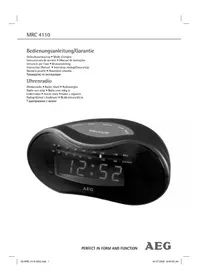
MRC 4110 - Radio AEG - Free user manual and instructions
Find the device manual for free MRC 4110 AEG in PDF.



| Type de produit | Radio réveil |
| Marque | AEG |
| Modèle | MRC 4110 |
| Alimentation | 230-240 V, 50 Hz |
| Pile de secours | Bloc 9 V (non incluse) |
| Poids net | 0,35 kg |
| Gamme FM | 88,0 – 108,0 MHz |
| Gamme AM | 540 – 1600 kHz |
| Affichage | LED |
| Fonctions principales | Réveil radio, réveil buzzer, snooze, arrêt différé (sleep) |
| Commutation bande | FM/AM |
| Antenne FM | Antenne flexible |
| Antenne AM | Antenne intégrée |
| Réglage du volume | Régulateur rotatif |
| Haut-parleurs | Intégrés |
| Classe de protection | II |
| Nettoyage | Chiffon légèrement humide, sans détergent |
| Sécurité | Ne pas exposer à l'humidité ; ne pas ouvrir le boîtier ; débrancher avant nettoyage |
| Mise au rebut | Ne pas jeter avec les ordures ménagères ; déposer en déchetterie |
Frequently Asked Questions - MRC 4110 AEG
User questions about MRC 4110 AEG
0 question about this device. Answer the ones you know or ask your own.
Ask a new question about this device
Download the instructions for your Radio in PDF format for free! Find your manual MRC 4110 - AEG and take your electronic device back in hand. On this page are published all the documents necessary for the use of your device. MRC 4110 by AEG.
USER MANUAL MRC 4110 AEG
Overview of the Components.. Page 3
Instruction Manual. Page 26
Technical Data Page 28
Język polski
Spis tresci
PykoBODCTBO no 3KcNpyatau.. cTp. 38
TexHnueckne daHHbIe .ctp. 40
D-47906 Kempen/Germany

8 Touche minutes (MIN)
Gamas de frequência: ....UKW / FM 88,0 ~ 108,0 MHz. .MW / AM 540 ~ 1600 kHz
Stille inn tiden (24 h)
Timer: Trykk pa TIME-knappen (2) og samtidig pa HOUR-knappen (4).
Minutter: Trykk pa TIME-knappen (2) og samtidig pa MIN-knappen (8).
Stille inn vekketiden (24 h)
Timer: Trykk pa ALARM-knappen (1) og samtidig pa HOUR-knappen (4).
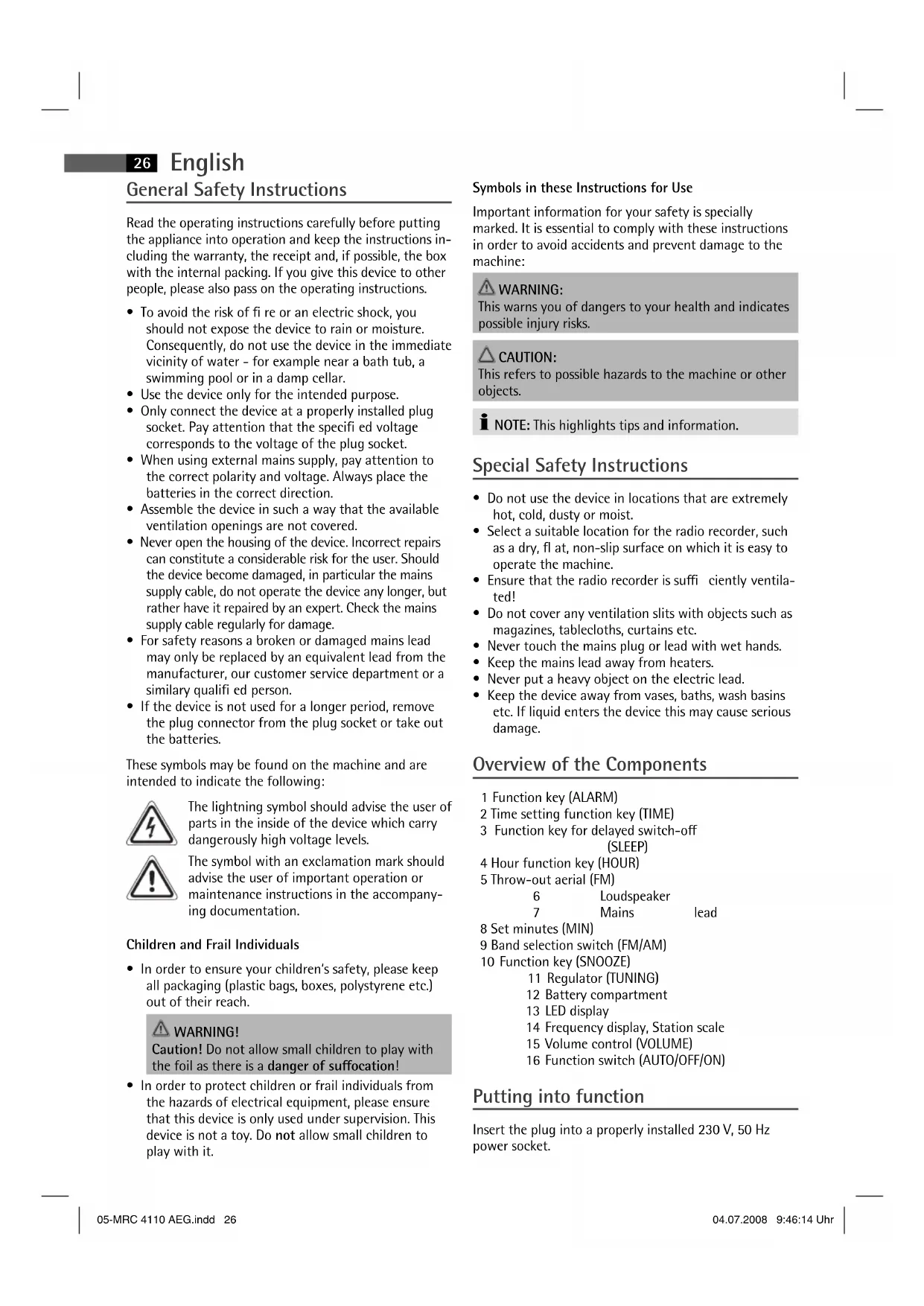
General Safety Instructions
Read the operating instructions carefully before putting the appliance into operation and keep the instructions including the warranty, the receipt and, if possible, the box with the internal packing. If you give this device to other people, please also pass on the operating instructions.
- To avoid the risk of fire or an electric shock, you should not expose the device to rain or moisture. Consequently, do not use the device in the immediate vicinity of water - for example near a bath tub, a swimming pool or in a damp cellar.
- Use the device only for the intended purpose.
- Only connect the device at a properly installed plug socket. Pay attention that the specified voltage corresponds to the voltage of the plug socket.
- When using external mains supply, pay attention to the correct polarity and voltage. Always place the batteries in the correct direction.
- Assemble the device in such a way that the available ventilation openings are not covered.
- Never open the housing of the device. Incorrect repairs can constitute a considerable risk for the user. Should the device become damaged, in particular the mains supply cable, do not operate the device any longer, but rather have it repaired by an expert. Check the mains supply cable regularly for damage.
- For safety reasons a broken or damaged mains lead may only be replaced by an equivalent lead from the manufacturer, our customer service department or a similar qualified person.
- If the device is not used for a longer period, remove the plug connector from the plug socket or take out the batteries.
These symbols may be found on the machine and are intended to indicate the following:

The lightning symbol should advise the user of parts in the inside of the device which carry dangerously high voltage levels.

The symbol with an exclamation mark should advise the user of important operation or maintenance instructions in the accompanying documentation.
Children and Frail Individuals
In order to ensure your children's safety, please keep all packaging (plastic bags, boxes, polystyrene etc.) out of their reach.

WARNING!
Caution! Do not allow small children to play with the foil as there is a danger of suffocation!
- In order to protect children or frail individuals from the hazards of electrical equipment, please ensure that this device is only used under supervision. This device is not a toy. Do not allow small children to play with it.
Symbols in these Instructions for Use
Important information for your safety is specially marked. It is essential to comply with these instructions in order to avoid accidents and prevent damage to the machine:

WARNING:
This warns you of dangers to your health and indicates possible injury risks.

CAUTION:
This refers to possible hazards to the machine or other objects.

NOTE: This highlights tips and information.
Special Safety Instructions
- Do not use the device in locations that are extremely hot, cold, dusty or moist.
- Select a suitable location for the radio recorder, such as a dry, fl at, non-slip surface on which it is easy to operate the machine.
- Ensure that the radio recorder is sufficiently ventilated!
- Do not cover any ventilation slits with objects such as magazines, tablecloths, curtains etc.
- Never touch the mains plug or lead with wet hands.
- Keep the mains lead away from heaters.
- Never put a heavy object on the electric lead.
- Keep the device away from vases, baths, wash basins etc. If liquid enters the device this may cause serious damage.
Overview of the Components
1 Function key (ALARM)
2 Time setting function key (TIME)
3 Function key for delayed switch-off (SLEEP)
4 Hour function key (HOUR)
5 Throw-out aerial (FM)
6
Loudspeaker
7
Mains
lead
8 Set minutes (MIN)
9 Band selection switch (FM/AM)
10 Function key (SNOOZE)
11 Regulator (TUNING)
12 Battery compartment
13 LED display
14 Frequency display, Station scale
15 Volume control (VOLUME)
16 Function switch (AUTO/OFF/ON)
Putting into function
Insert the plug into a properly installed 230V,50Hz power socket.
Radio station tuning
- Turn the band selector switch (9) to the FM or AM position, depending on which frequency band you wish to hear.
$$ \mathrm {U K W} = \mathrm {F M}, \text {M e d i u m W a v e} = \mathrm {A M}. $$
-
Move the function switch (16) to the ON position.
-
Function of the tuning control (11): turn the tuning control in order to tune in to a station. The station scale shows the frequency that has been set.
- If reception is too weak, change the position of the dipole antenna in order to improve the reception.
- An aerial is integrated into the device for the reception of AM stations. The device can be aligned to the station by changing its position.
Volume
The desired volume can be sent using the VOLUME regulator (15).
Setting of the Clock (24 h)
Hours: Press the TIME key (2) and the HOUR key (4) simultaneously.
Minutes: Press the TIME key (2) and the MIN key (8) simultaneously.
Setting of the Alarm (24 h)
Hours: Press the ALARM key (1) and the HOUR key (4) simultaneously.
Minutes: Press the ALARM key (1) and the MIN key (8) simultaneously.
Radio alarm
Once the alarm times are set and a radio station has been selected, shift the function selector (16) to "AUTO". The symbol lights up in the display (13).
I NOTE:
As soon as the alarm time is reached, the radio is switched on. The selected radio station plays at the set volume.
Buzzer alarm
If you would not like to be woken up by the radio, turn the volume control (15) to the position until it locks in place.
Instead of the radio, the buzzer goes off when the alarm time is reached.
Turning off the Alarm
In order to turn off the alarm, move the function switch (16) to the OFF position.
Automatic Alarm Interval
The automatically set alarm function can be shut off for approximately 8 minutes with the SNOOZE key (10).
Switch-off
The device is switched off if the function switch (16) is in the "OFF" position.
Delayed Shut-Off
The delayed switch-off function can be used when the switch is in the positions AUTO or OFF.
- If the SLEEP button (3) is pressed the radio is switched off after 59 minutes. The switch-off time can be adjusted by pressing the SLEEP and the HOUR button (4) or the MIN button (8) at the same time.
- This function can be cancelled with the SNOOZE key (10).
Inserting the batteries
(not supplied)
If there is a power cut or the mains plug has been removed from the power socket, the settings will be retained if the power reserve batteries are inserted.
- Open the battery compartment on the underside.
- Connect a 9V E compound battery to the supply connection. Please ensure the correct polarity.
- Close the battery compartment again.
- If the device is not used for a prolonged period of time, please take the batteries out in order to prevent leakage of battery acid.
CAUTION:
Batteries are not to be disposed of together with domestic wastes. Dispose of the used batteries at the relevant collection bin or at your dealer's.
WARNING:
Do not expose the batteries to high temperatures or direct sunlight. Never throw batteries into the fire. There is a danger of explosion!
Cleaning
- Remove the plug before cleaning.
- Clean the appliance with a slightly humid cloth without any additives.
- Do not dip the appliance in water.
28 English
Technical Data
Model: MRC 4110
Power supply: 230-240 V, 50 Hz
Power consumption:
Battery power reserve: 9 V-Block
Protection class: II
Net weight: 0.35 kg
Radio section:
Frequency ranges: VHF / FM 88,0 ~ 108,0 MHz
This device has been tested according to all relevant current CE guidelines, such as electromagnetic compatibility and low voltage directives, and has been constructed in accordance with the latest safety regulations.
Subject to technical changes without prior notice!

Meaning of the "Dustbin" Symbol
Protect our environment: do not dispose of electrical equipment in the domestic waste.
Please return any electrical equipment that you will no longer use to the collection points provided for their disposal.
This helps avoid the potential effects of incorrect disposal on the environment and human health.
This will contribute to the recycling and other forms of reutilisation of electrical and electronic equipment.
Information concerning where the equipment can be disposed of can be obtained from your local authority.
Kmitoctovere Rozsahy: .VKV / FM 88,0 108,0 MHz
SV/AM540\~1600kHz
3nHaKeiMOryT HaxOHTbCn Ha Kopnyce n ObaaHOT BaWe BHHMaHHe Ha CneDyUoee:


CIMBON "MOJINH" yKa3bIbaeT Ha To, YTO BHTpN 3JIeKTPoPnBoppa HMeOTcA DetaII HaxOJaUHeCE NOD ONaChbIM, BBICOKIM HaprKeHEm.
CmBON "BOcknuaTeNbHb3HaK" 6paauaet BaWe BHNMaHHe Ha BaXHbIe pImeuaHnB COnpOBoDnteHbHbIX DOkUMeHTax No NlB3oBaHHo nTexocMToPy 3NeKTponpnpopa.
DeTN Hnua HykdaHouHueNecsB nPnHcMoTpe
- Ⅲ coobpaKeHn 6e3oNaChOCTn DnA DeTeH He octaBnIte neKaTa b yApakOBky (PiactKOBbIe MeuKN, KapTOH, nenonlaT n.T.d.) 6e3 npncMOTpa.
PNEyIpyEJKDEHNE!
He no3BOJnIte DeTm HrpaTb C nOJIIN3THIOHOBOI nIeHKO. OnaCHOCTb ydyuB!
- UTO6bI 3aunHbTeTei n Dpynx NmU, HyKdaOuXcB B yXoJe n PnncMOTpe, OT nopaKeHHN 3NeKTPOTOKOM, CneJnte 3a Tem, UTO6bI np6Op He BKJIouvAnC8 Be3 npNCMOTpa. 3TOT np6Op - He ngpyuHa. He DoNyckaIte K Hemy DeTei.
CHMBOLI npHMeHReMbIe B DaHHOM pyKOBOcTBe NOJIb3OBaTeJIa
BaXhIbe peKOMeHdaunnOBecneueHnBaUeB63oNaChOCTn 063HaueHbIO Oco6eHHOMy.ObraTeJIbHO CNeUyTe 3TNM peKOMeHdaunrM, YTO6bI ppeOTbpaTNTb HeCuaCTHb CnyaH NIN NIONOMKy H3DeJIH:
PENEYTNPEKDEHNE:
IpeDynpexKaetobnacHocTINJN3dOpOBbHBO3MOXHOM pncke npuyehn TpaBmbl.
BHIMAHINE:
Yka3bIbaeHa Bo3MOKHyO ONaCHOCTb IINH3DeJIIN HpyrNX OKpyKaIOxN INpeDMETOB.
I I PIMEYAHNE: Daet coBeTbI INHOpMaZNUO.
CneuaHbHbIe yka3aHnI NO TexHnHe 6e3OpacHOCTN
He yctaHaBnBaIte H3dEne B CnIbHO ropuHX, XoIoNbIX ININ BLaKHBIX MecTAX.
- Poiobepne 3TOro POxOraee MeTo, TaKOBbIM RnIeTc cyXa, IIOCKa H NcckoB3Ka NOBepxHOCTb, C XopoUIM DOCTyNOM K H3dEINIO.
CneIte 3a TEM, yTo6bIb6bIa oBecepeHaIOCTaTOHAR BENTINRAUNI N3dENIA!
He 3aKpbBaIte BENTHINUHOHHbE OTBepCTNa KaKIMN-JINBO npeDMeTAM, KAK HApnMpem Ra3eTAMN, DeKopatNBbIMn CaJFeTKAM, 3aHaBeCMAH N T.D.
He npkacaiteb mokpbim pykam K cetebomy Hhpy nn wtenceIIO.
CeteBoi uHyp He doJKeH kacatbca 6aTapeoToTJIeHnA.
- Hn B Koem cnuyae He cTaBte Ha ceTeBoH uHyp TAnKeIbIe npedmetbl.
-ДеркпгИЗделп NOДаьше OT BA3 CцБетAMN,BAHHы,pyKOMOинka n.T.D.EcINI BOa NOJaET B N3dELINE,30MOKeT PnBecTN K cepbe3HbIM NocleDCTBnM.
O63op detanei npnbopa
1ФyHKUHOHAbHaK HONKa(ALARM)
2ФункионьняКногплрогрмпованя
BpeMeHn (TIME)
3ФyHKUHOHaJIbHaKHOIIKa BbIKIQUeHnC
(SLE)
4 Khonka yacob (HOUR)
5 Ppobolouhna aHTehHa (FM)
6
Диhamnki
Cetebo
ka6eJb
8 KhoNka MmHyT (MIN)
9IpeekuoyateJIb dHaana3oHOB (FM/AM)
10Функиональног Кногka(SNOOZE)
11 PerynTop (TUNING)
12 Otcek 6arapeek
13 CBeToDnOdHbI HncPJIeN
14 NokaataBbHacTObI,IIkaHa HacTpoKn
15 Perynatop romKoctn (VOLUME)
16 0yHKnOHaJIbHbI
(AUTO/OFF/ON)
BkIIOueHne
BCTaBtBe CTeByIO BnIKy B po3eTKy C HAnpRKeHEm CetN 230B,50Tq,yCTaHOBNeHHyIO B COOTBETCTBnC npedncaHnMn.
HactpoHa ha padnoctaunho
- YctaHOBHTe nepeKIOHouateIb Dnana3OHOB (9) B NOIOKeHHe FM IIMAM, B 3aBNCMOCTOn OT bIbpaHrO Dnana3OHa.
$$ \mathrm {Y K B} = \mathrm {F M}, \mathrm {C p e d n h i e} \mathrm {B O N H b l} = \mathrm {A M}. $$
- YctaHOBHTe FyHKUONHHb IpeKluOaTeIb (16) B NOJIOKeHne ON.
3.Функшретулповг Тонера(11):Дгнonska paHocTahmno nobopaUMBaTe peYrAToP TOnhepa.LKana nepedaTuHaKa NaKa3bIbAe COOTBeCTByOuYo 占ACTOTy. - Ecn npnem cnskom cna6b, To nnyyuehen npema nomeHrTe NOJIOKeHHe BblDnHXoAHTeHbI.
5.Плппема padионеpeдачв днанадоhe CB (AM)Вцentр BCtpoeHa aHTehHa.N3MeHЯ nOLOKeHne npbopa,MOKHO HAcTpOHTb erHa paDnOCTaHcIO.
PerynipOBKa rPOMKoCTN
Pn nmooun perynatopa VOLUME (15) oTpeynpyTe rpoMKoCTb 3Byka.
IporpammpoBaHne BpeMeHH (24 yaca)
HaxMMTe OJHOBpeMeHHo KhoNKn "TIME" (2) n "HOUR" (4).
MnHyTbI: HaxMMTe OJHOBpeMeHNO KHOJIKN "TIME" (2) n MIN" (8).
IporpammnoBaHne 6yDnJIbHNka (24 yaca)
Yacbl: HaxMMTe OJHOBpeMeHHo KhoNKn "ALARM" (1) n"HOUR" (4).
MnHytbi: HaxMMTe OJHOBpeMeHHo KhoNKn "ALARM" (1) n MIN" (8).
BydunbHnK C BKNIOueHHeM paIHO
Iocne nporpammmpoBaHn6ydnbHnka n Bb6opa paanocTaHnnpeBnHbTe yHKnHOHaNbHbN nepeKlOaTeIb (16)B noLoKeHne "AUTO".Ha dnCnnee (13) noRBAETCA CBETAUINCA CnMBON.
I PIMMEUHNE:
Kak TolbKO HAcTaHET BpMa BRKIOUeHH6yDnBnKa, BKIOHTcpaIIO.PpHcEM BKNIOHTcHa HAcTpoEHHyO 3apaHee paIOCTaHcIIO C yctaHOBJIeHHo3apaHee rPOMKoCTbIO.
pepeKnHouaTeIb6yUdbHcBKnIOHeHEm 3ymMepa
BKnIOueHHe 6yDnJIbHNka c paDIOnpHEMHNKOM MOKHO 3aMeHHTb Ha dpyroI peKIM, IINr 3TO rpoBepHIne perynpOBky rpmkOCTN VOLUME" (15) Do noNoKeHHaTAK YTObI YeTKO NOyCTBOBaT uENQK.
KaKToJIbKOHaCTaHETBpeMBAKIOUeHn6yDINbHnka, BMeCTo CnIHana paIIOCTAHn pa3dAcTcTOHaIbHbI CNrHaJ.
OTMeHa cHnHa 6yDnBnHa
IINOTMEHbCnHana6yDnBnKa yCTaHOBnTe
FHKUHOHaBbHnepeKluOaTeNb(16)BNOIOKeHHe OFF.
Буднлбнк с abTomatнкои HHTepBaJbHorO BKNIOHEN
Пи ПOMOИ NKHONKIN "SNOOZE" (10) IMeETc BO3MOHOCb BbIKIOHTb 6yINbHNK INPM. Ha 8 MHyT.
BbIKIIOUeHnE
3NeKtponpnpop BbKIOUeH,ecn fyHKUHOHaIbHbI nepeKIOuATeIb (16) HaxoDITcB nOIOKeHH "OFF"
BbKluoyenHe c 3aepKko
PeknM BbIKHoueHHc 3aepKkO INcnoBsyETcT OIbKO bnoXeHH npeKlHouaTeHa "AUTO"nn "OFF".
Пипимоши haKaTЯн Ha KhoNky SLEEP (3) paINO BbKIOUaETcA uepe3 59 MInHy. BpeMa BbKIOUeHn MOxHO peYINPOBaTb,HaKIMma OJHOBpeMeHNo KhoNk "SLEEP" HOUR"(4) nIN MIN"(8).
Hakatne KhoNKn "SNOOZE"(10) BbIKHOaet 3OT peKIM.
BctabJIeHne 6aTapeek
(6aTapeKn B KOMIIeKT NocTbKn HbXoIaT)
Ha cnyuai c6oEB B 3eKtpocetn Hn Ecn CTeBaBnIka 6ydt BbHyta n3 po3ETKN, BCTaBHeHhBe 6aTapeHKn CnyKaT pe3epBOM XOJa YacOB N COxpaHr IporpamMPOBaHne.
40
Pycckn
- OTKpoTe OTCEK dIaTaapeek, pacnOIOKeHHbHa HIXHHei CTOpOHe.
- PocoeHHte 9-N BOnbTOByo 6aTapeHky K pa3bemy. CoBIOdaIe NOIpaHOCTb.
- 3akpoTe OTCEK INI 6atapeek O6paTHO.
- Ecn 3nEeKpnpn6op DOnrOe Bpem He HcNoIb3yETBbHbTe BaTapeHKn H3 Hero, YTObbl PpeD0TBpaHTb"BBTEKAHHe"UeIOHn HNx.
BHIMAHNE:
He bIbopaBbAte baataeKn B domaunH Mycop. Ioxaanycta cdaite oTpaobanhble baataeKn Ha cneunaBbHn PyHKT npHema HnB Tropoby Toky.
A
PENEYIPPEXHEHIE:
He noDBepraTe 6atapeKn CmblHomy HarpBeBy nIN BO3deIcTBIO npAmbix cOnHeuHbIX nyueH. HnKOrda He 6pocaiTe 6atapeKn BOrHOh.CyIecCTByET onaHocTb B3pbBa!
UcTka n yxOa
-ПередчИСТКОВБИНТБЕВИNTKYи3po3ETKN.
IpoptpTe 3neKtpnpn6op CnEgKa BlaXHO TpNko6e3 KaNX-NIO MOOUX CpeCTB.
HnB Kcem Cnyae He norpykaite 3JIeKtpnpbOpb B BOy.
TexHnueckne daHHbIe
MoIeIb: MRC 4110
3JIeKTPoNTaHHe: 230-240B,50T
IotpebHemar MOUHOCTb:
BatapeKa pe3epBHO xOa: 9V-6NoHa
Klacc 3aunrbl:
Bec HeTo: 0,35 Kr
PdAnOpnpHmNHK:
ДианasoнычacтOT: ..UKW/FM88,0~108,0MHz...MW/AM540~1600kHz
3To H3eJIeHHe npoJIo BCE Heo6xOdMble n AkTyAInbHbIe npOBepKn, npEINHCnHbIe DnpeKTHBOI CE, K npIM. Ha 3JeKTPoMaHRHTHyO COBMecTUMOCtB N COOTBeTCTBHe Tpe6oBaHnR M K Hn3KOBoJbTHOH TEXHKe, OHO BbINO TaKKe CCKHOpyPOBaHO IN NOcTPOeHO C yYeTOM NOcNeDHNX Tpe6oBaHn No TEXHKe 6e3OnaCHOCTN.
MbOCTaBnem3aCobO npaBOHaTeXnueckneHMeHeHnI
GARANTIE-KARTE




- Język polski
- Spis tresci
- Stille inn tiden (24 h)
- Stille inn vekketiden (24 h)
- General Safety Instructions
- Children and Frail Individuals
- WARNING!
- Symbols in these Instructions for Use
- WARNING:
- CAUTION:
- Special Safety Instructions
- Overview of the Components
- Putting into function
- Radio station tuning
- Volume
- Setting of the Clock (24 h)
- Setting of the Alarm (24 h)
- Radio alarm
- I NOTE:
- Buzzer alarm
- Turning off the Alarm
- Automatic Alarm Interval
- Switch-off
- Delayed Shut-Off
- Inserting the batteries
- (not supplied)
- Cleaning
- English
- Technical Data
- Meaning of the "Dustbin" Symbol
- DeTN Hnua HykdaHouHueNecsB nPnHcMoTpe
- PNEyIpyEJKDEHNE!
- CHMBOLI npHMeHReMbIe B DaHHOM pyKOBOcTBe NOJIb3OBaTeJIa
- PENEYTNPEKDEHNE:
- BHIMAHINE:
- CneuaHbHbIe yka3aHnI NO TexHnHe 6e3OpacHOCTN
- O63op detanei npnbopa
- BkIIOueHne
- HactpoHa ha padnoctaunho
- PerynipOBKa rPOMKoCTN
- IporpammpoBaHne BpeMeHH (24 yaca)
- IporpammnoBaHne 6yDnJIbHNka (24 yaca)
- BydunbHnK C BKNIOueHHeM paIHO
- I PIMMEUHNE:
- pepeKnHouaTeIb6yUdbHcBKnIOHeHEm 3ymMepa
- OTMeHa cHnHa 6yDnBnHa
- Буднлбнк с abTomatнкои HHTepBaJbHorO BKNIOHEN
- BbIKIIOUeHnE
- BbKluoyenHe c 3aepKko
- BctabJIeHne 6aTapeek
- Pycckn
- BHIMAHNE:
- PENEYIPPEXHEHIE:
- UcTka n yxOa
- TexHnueckne daHHbIe
- GARANTIE-KARTE
Brand : AEG
Model : MRC 4110
Category : Radio