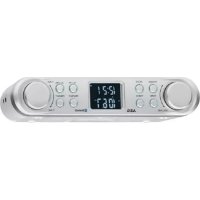
KRC 4350 BT - Radio AEG - Free user manual and instructions
Find the device manual for free KRC 4350 BT AEG in PDF.


| Product type | Under-cabinet radio with Bluetooth |
| Brand | AEG |
| Model | KRC 4350 BT |
| Color | Black (estimated) |
| Power supply | 220-240 V~, 50 Hz |
| Power consumption | 4 W |
| Protection class | II |
| Backup batteries | 2 x 1.5 V, type AA/R6 |
| Net weight | 0.58 kg |
| Dimensions (W x D x H) | Approx. 300 x 150 x 100 mm (estimated) |
| Radio reception | FM 87.5 - 108 MHz |
| Bluetooth | Version 2.0 + EDR, frequencies 2.402-2.480 GHz |
| Bluetooth protocols | A2DP, AVRCP |
| Bluetooth range | Up to 15 m (depending on environment) |
| Station memory | 30 presets |
| Alarm functions | 6 alarms (beep or radio), alarm reminder (Snooze) |
| Sleep timer | 15 / 30 / 45 / 60 / 75 / 90 minutes |
| Kitchen timer | Up to 99 min 59 s |
| Auxiliary input | AUX-IN jack (3.5 mm) |
| Headphone output | Headphone jack (3.5 mm) |
| Mounting | Under-cabinet with included mounting plate |
| Display | LCD screen with backlight |
| Cleaning | Soft dry cloth |
| Repairability | Intervention by an authorized professional only |
Frequently Asked Questions - KRC 4350 BT AEG
User questions about KRC 4350 BT AEG
0 question about this device. Answer the ones you know or ask your own.
Ask a new question about this device
Download the instructions for your Radio in PDF format for free! Find your manual KRC 4350 BT - AEG and take your electronic device back in hand. On this page are published all the documents necessary for the use of your device. KRC 4350 BT by AEG.
USER MANUAL KRC 4350 BT AEG
Overview of the Components
Sendefrequency: 2,402-2,480 GHz
(Piles non fournies)
SA = Samedi, SU = Dimanche
Portee: 15 metres environ
SA = Sabado, SU = Domingo
Alimentación
Thank you for selecting our product. We hope that you will enjoy use of the appliance.
Symbols in these Instructions for Use
Important information for your safety is specially marked. It is essential to comply with these instructions in order to avoid accidents and prevent damage to the machine

WARNING:
This warns you of dangers to your health and indicates possible injury risks.

CAUTION:
This refers to possible hazards to the machine or other objects.

NOTE:
This highlights tips and information.
General Safety Instructions
Read the operating instructions carefully before putting the appliance into operation and keep the instructions including the warranty, the receipt and, if possible, the box with the internal packing. If you give this device to other people, please also pass on the operating instructions.
- To avoid the risk of fire or an electric shock, you should not expose the device to rain or moisture. Consequently, do not use the device in the immediate vicinity of water - for example near a bath tub, a swimming pool or in a damp cellar.
- Do not use the device in extremely hot, cold, dusty or damp places.
- Only use the device for private use and the intended purpose. This device is not intended for commercial use.
- Ensure that the power cord is not kinked, trapped or brought into contact with heat sources.
- Ensure that the power cord does not present a tripping hazard.
- Never touch the power plug or the cable with wet hands.
- Only connect the device at a properly installed plug socket. Pay attention that the specified voltage corresponds to the voltage of the plug socket.
The power cord must always be easily accessible.
Always insert the batteries correctly. - Do not cover up any ventilation openings with objects such as newspapers, tablecloths, curtains, etc.
- This appliance shall not be exposed to dripping or splashing water and that no object filled with liquids such as vases shall be placed on apparatus.
- Exposed ignition sources such as burning candles may not be placed onto the device.
- Never open the housing of the device. Incorrect repairs 13 can constitute a considerable risk for the user. Should they
English
35
device become damaged, in particular the mains supply cable, do not operate the device any longer, but rather have it repaired by an expert. Check the mains supply cable regularly for damage.
- For safety reasons a broken or damaged mains lead may only be replaced by an equivalent lead from the manufacturer, our customer service department or a similar qualified person.
- If the device is not used for a longer period, remove the plug connector from the plug socket or take out the batteries.
These symbols may be found on the machine and are intended to indicate the following:
The lightning symbol should advise the user of parts in the inside of the device which carry dangerously high voltage levels.
The symbol with an exclamation mark should advise the user of important operation or maintenance instructions in the accompanying documentation.
Children and Frail Individuals
In order to ensure your children's safety, please keep all packaging (plastic bags, boxes, polystyrene etc.) out of their reach.

WARNING!
Caution! Do not allow small children to play with the foil as there is a danger of suffocation!
This device is not intended to be used by individuals (including children) who have restricted physical, sensory or mental abilities and/or insufficient knowledge and/or experience, unless they are supervised by an individual who is responsible for their safety or have received instructions on how to use the device.
Children should be supervised at all times in order to ensure that they do not play with the device.
Overview of the Components
1 VOLUME control (Volume)
2 FUNC button (Function)
3 POWER button (on/standby)
4 MODE button
5 TIMER button
6 Mounting plate
7 SNZ/SLP button (Snoopze/Sleep timer)
8 AL-/M- button (Alarm time/Preset location down)
AL+/M+ button (Alarm time/Preset location up)
10 PRESET button
11 TUNE+/TUNE-control
12 AUX-IN jack
13 Headphone jack
n4 Stands
36 English
15 Speakers
16 Battery compartment
17 LCD display
Rear side (not shown)
Power cord
Wire antenna
Sub-structure assembly instructions
If you don't want to use the device as a standalone appliance, then please assemble it as follows:
- Remove all objects from the cupboard and anything which is fragile in the adjacent cupboards.
- For the installation the cupboard must fulfil the following conditions:
Thickness of the cupboard floor between 16mm and 20mm .
- The wall mounting of the cupboard must be stable and anchored firmly in the wall with at least 2 screws.
- Important! Do not install the device above a cooker!
- When installing the device it must be ensured that there is a power socket within reach.
- The mains socket must be within easy reach, so that the plug can be quickly removed in an emergency.
- Important! Do not connect the device to the mains power supply until after installation!
- The device cannot be installed under cupboards under which there is a lighting strip.
- For mounting, you may need the following supplies: Reamer or nail, screwdriver, measuring tape, adhesive tape, scissors, safety goggles.
Supplied mounting accessories
4 Screws (if necessary, check the battery compartment)
1 Drilling template
CAUTION:
- Please adhere to the dimensions stated in the installation instructions.
- You should use only the installation accessories supplied.
Installation
- Stick the template to the bottom of the wall cabinet with adhesive tape. With the help of a gimlet or nail pierce it crosses at the attachment points and use it to mark the holes.
- Remove the mounting plate (2) from the device. To do so, firmly press the mounting plate backwards.
- Remove the template and fit the mounting plate with the 4 screws below the cabinet.
CAUTION:
-
Use a screwdriver and not a cordless screwdriver.
If you use different screws or if the thickness of the cabinet floor is too small, the screws may push through the cabinet floor. -
Now hang the radio onto the mounting plate and push it backwards until it clicks into place.
Start-up of the device / Introduction
Read the operating instructions thoroughly before the start-up!
If applicable, remove the protective film from the display.
Location
- Fold out the stands (14).
- Select a suitable location for the device. Suitable would be an even, non-slip surface on which you can easily operate the device.
- Ensure that the device is adequately ventilated.
Inserting the power reserve batteries (Batteries not included)
In case of a power failure or if the power plug of the device is disconnected from the outlet, then the settings will be retained if the power reserve batteries have been inserted.
- Open the battery compartment on the bottom.
- Insert 2 AA/R6 1.5 V type batteries. Pay attention to the correct polarity (see bottom of battery compartment)!
- Close the battery compartment again.
- If the device is not used for a long period of time, then remove the batteries from the device to prevent the battery acid from leaking.
WARNING:
The batteries shall not be exposed to excessive heat such as sunshine, fire or the like. Danger of explosion!
CAUTION:
- Different battery types or new and used batteries may not be used together.
- Batteries do not belong in the household waste. Dispos of spent batteries at the designated collection points or at the dealer.
Rower supply
Insert the plug into a properly installed 230V 50Hz power socket. 1-1 0:00 will appear on the display. Please ensure that the mains voltage corresponds to the information on the type plate.
If you have not inserted any reserve batteries, the preset time will get lost as soon as the power supply has been interrupted.
Switching the Device on/off (3)
Switch the device to the standby mode with the POWER button (the date display will appear). If this button is pre- once more, the device switches on again.
Headphone jack (13)
For headphone operation, use a headphone set with a 1.5 mm stereo jack plug plugged into the headphone jack.
The speakers are switched off.
NOTE:
After about 10 minutes, the device will automatically switch to standby.
Volume adjusting
The desired volume can be sent using the VOLUME regulator (1).
TUNE+/TUNE-control (11)
The TUNE control is used for different settings.
NOTE:
The TUNE control is a push switch. Turn the push switch until a "click" can be heard. Hold it down in the respective direction of rotation until the desired setting has been made.
Display brightness
The backlight of the display will automatically turn off between 11pm and 5 am.
Setting of the Clock (in Standby Mode)
- You make adjustments using the TUNE+/TUNE-control (11).
Always confirm your settings with the PRESET button (10).
Scanning stations
Tune into the desired station with the TUNE+/TUNE- control (11). If you keep the control pressed in one direction, then the device will search to the next, or previous radio station. The display will show the respective frequency.
- If there is interference on the received station, try to improve the reception by rotating, winding or unwinding the wire antenna.
NOTE: Changing the display format
You may optionally also use the 12-hour display for the time display. If you want to use this display format, we recommend that you set the time in the afternoon. With the 12-hour display, "PM" will appear in the display for t afternoon.
-
Turn the TUNE regulator in direction TUNE+.
-
Press the PRESET button (10). You may now perform the settings in turn for the minutes and the hours.
Setting the date (in standby mode)
- You make adjustments using the TUNE+/TUNE-control (11).
Always confirm your settings with the PRESET button (10).
Presetting radio stations
The device can preset up to 30 radio stations. To preset a station, follow the steps below:
- Search for a station as described in "Scanning stations".
- Press the PRESET button (10). The display will show MEMORY and the respective preset location will begin to flash.
- Use the AL + / M + (9) and AL-/M- (8) buttons to choose the preset location for the corresponding station.
- Press the PRESET button again. The station will be preset. The MEMORY indicator and the preset location will disappear.
Recalling preset radio stations
- Choose the preset location with the AL + / M + (9) and AL-/M- (8) buttons.
Automatic station scan
When holding down the PRESET button (10) for approx. 3 seconds, the device will start the automatic station scan searching the entire frequency range automatically for stations. The stations found will be stored on the preset locations 1-30 in ascending order.
- Select the date display by pushing the MODE button (4) The year display shows in the year indicator (YEAR).
- Press the PRESET button (10). You can now consecutively adjust the settings for the date (DATE), the month (MONTH), and the year (YEAR). The setting for the weekdays changes automatically.
MO = Monday, TU = Tuesday, WD = Wednesday, TH = Thursday, FR = Friday, SA = Saturday, SU = Sunday
NOTE:
The scan will only stop after all 30 preset locations have been filled.
The order cannot be changed once set.
38 English Bluetooth Function
Bluetooth involves a technology for wireless radio connection of devices over a short distance. Devices with Bluetooth standard are transmitting between 2.402 and 2.480GHz in the ISM band (Industrial, Scientific and Medical). Interference can be caused for example by WLAN-networks, DAB radios, cordless phones, or microwave ovens which work on the same frequency band.
This device offers you the possibility to use a Bluetooth-enabled device. The functional radius is limited to approx. 15 metres depending on the surroundings and the unit used. If your playing device supports the A2DP profile (Advanced Audio Distribution Profile) and has a music-player function, then you can also wirelessly transfer music to the device. The A2DP profile involves a multi-vendor Bluetooth profile. By streaming, stereo-audio signals are wirelessly transferred between the playing device (source) and the receiving device. To be able to remotely control the source, the playback device must support the AVRCP profile (Audio Video Remote Control Profile).
Due to the different device manufacturers, models, and software versions, a full functionality cannot be guaranteed.
Logging on devices (Pairing)
Before you listen to music via the unit, you must pair the devices.
- Ensure, that the Bluetooth function is activated in your player (e.g. mobile phone). For this, refer to the operation manual of your player.
- Press the FUNC button (2) repeatedly, until - - - - bt is shown on the display. The lines in the display will flash These signal that the device is in pairing mode.
- Chose the Bluetooth menu in your player and register the device in your player. For this, refer to the operation manual of your player. The device "KRC 4350 BT" will show in your player as a selection.
NOTE: Only one playback device may be connected to the device at one time. If the device is already connected to another playback device, then the device will not appear in the BT selection menu.
- Now enter the password "0000" in your player, depending on the device manufacturers, model, and software version.
If pairing has been performed successfully, then the notificaTUNE+ (11) tion -ON - bt will appear in the display. For the further Press to skip to the next song and the following songs. procedure, please refer to the user manual of the playback unit. If possible, adjust the volume of the external unit to a comfortable level.
NOTE:
Depending on the device manufacturer, you need to perform the registration (PAIRING) again to connect the devices.
- In case of problems with the registration of a replay device, deactivate the WiFi-/ and mobile data function in your playback device.
- The Bluetooth compatibility cannot be ensured for devices (e.g. mobile phones) getting released in the future.
To ensure an optimal connection, make sure that the battery of your player is completely charged.
Some of the mobile phone brands have an energy-saving mode. Deactivate the energy-saving mode as it can otherwise result in problems during the data transfer through Bluetooth.
To be able to transfer audio data, Bluetooth needs to stay activated in your player Observe the operation manual of your player.
- If a mobile phone on which you are playing music receives a call, the music will be interrupted. The notification "CALL bt" will appear in the display. Accept the call on your mobile phone. The sound will be played back through the radio. At the bottom of the radio there is a small hole for the microphone. Speak towards the microphone or transfer the call to your mobile phone. When doing this, please refer to the fade-in on the display of your mobile phone. After you have ended the call, the devices are connected to each other again and playback continues.
Description of the operating buttons for Bluetooth
NOTE:
Your Bluetooth playback device has to support the following functions.
PRESET (10)
You can pause and continue music playback. Press again to continue playback.
TUNE-(11)
Press 1x = Restart of the song from the beginning.
- Press 2x = Skip to the previous song.
Press 3x = Skip to the song before the previous song.
TUNE+ (11)
Press to skip to the next song and the following songs.
Setting the Alarm Time
You can set up to six alarms. As follows:
- Turn off the device with the POWER button (3).
- Press the AL + / M+ button (9), --: -- AL1 appears on the display. If you press the AL + / M+ button again, --: -- A will appear on the display etc.
-
After you have decided on an alarm time, select the alarm signal with the TUNE+/TUNE-control.
-
With regard to the alarm, you can choose between buzzer and radio.
= Upon reaching the alarm time, a buzzer will sound.
= When the alarm time has been reached, the selected radio station will play at its previously set volume.
- Press the PRESET button (10). The minute display will start to flash.
- Perform the adjustment with the TUNE+/TUNE-control (11). Confirm the entry with the PRESET button. The hour display will start to flash.
- Set the hours with the TUNE+/TUNE- control and confirm with the PRESET button.
6a. If you have selected the radio as the alarm signal, choose the desired radio station location with the TUNE+/TUNEP control. Then, press the PRESET button.
Snoopze function
The automatic alarm can be switched off using the SNZ/SLP2. button (7) for approx. 5 minutes. The symbol " will flash on the display. 3.
Switch off the buzzer
In order to switch off the alarm until the following day please press the POWER button.
Disabling the alarm
- Press the AL + / M+ button (9) until the alarm time that you want to deactivate is shown.
- Select the display --: -- with the TUNE+/TUNE-control (11). The alarm time has been deactivated.
Delayed Shut-Off
You can use the function for delayed power-off with radio operation. The unit is switched off automatically when the selected time is reached.
-
Select the time after which the unit is switched off by repeatedly pressing the SNZ/SLP button (7). The following selections can be made: 90, 75, 60, 45, 30 and 15 minute. The display SLEEP will appear behind the time.
-
This function can be cancelled with the SNZ/SLP button (7).
Timer Function
You can use this function to e.g. have an overview of a specific cooking time. The maximum time that can be set is 99 minutes, 59 seconds. The previously set time is stored.
L2 You can adjust the settings with the TUNE+/TUNE-control (11).
Always confirm your settings with the PRESET button (10).
- Press the TIMER button (5) 1 × . The previously set time and TMR will appear in the display.
- Press the PRESET button (10). You can now adjust the setting for the seconds and the minutes in turn.
- Turn the TUNE control in the direction TUNE+, to activate the function.
- As soon as the display has run to zero, a buzzer will sound. Press any key to turn off the buzzer.
NOTE:
To stop the function early, turn the control in the direction TUNE+ once more.
AUX IN socket
To connect analogue replay devices. Via this socket you can see also hear the sound of other playback devices such as MP3 players, CD players etc. through the loudspeakers.
- Please connect the external device with a 3.5mm stereo jack plug to the AUX-IN socket (12).
- Turn on the device with the POWER button (3). Press the FUNC button (2) repeatedly until "AUd" is shown.
- Through the loudspeakers you can hear the playback of the sound from the external device; with the VOLUME control (1) you can change the volume.
4.4. For the remaining procedure please see the operating instructions of the external sound source.
NOTE:
- Adjust the volume of the external device to a comfortable level.
After ca. 10 minutes without signal, the device will automatically switch to standby.
Cleaning
CAUTION:
- Do not dip the appliance in water.
- Do not use a wire brush or other abrasive objects.
- Do not use any caustic or abrasive cleaning agents.
Remove the plug before cleaning.
Clean the appliance with a slightly humid cloth without any additives.
40 English Troubleshooting
| Fault Cause Solution | ||
| Unit cannot be operated. | Unit crashes and "hangs". | Disconnect from the mains for around 5 seconds. Then switch the unit on again. |
| No audio signal via the Bluetooth connection | The device is not registered with the audio source. | Check whether a connection exists. Reregister the device with the audio source if necessary. |
| Volume too low Inc | ease the volume on the device. | |
| Increase the volume on the audio source. | ||
| Device cannot be connected | Pairing does not work | Check whether the audio source supports the A2DP protocol. |
| Audio source is switched off | Switch on the audio source | |
| Bluetooth is switch off at the audio source. | Switch on the Blue- tooth function in the audio source. | |
| Bluetooth version is not supported. | Use a different play- back unit. | |
Disposal
Meaning of the "Dustbin" Symbol
Protect our environment: do not dispose of electrical equipment in the domestic waste.
Please return any electrical equipment that you will no longer use to the collection points provided for their disposal.
This helps avoid the potential effects of incorrect disposal on the environment and human health.
This will contribute to the recycling and other forms of reutilisation of electrical and electronic equipment.
Information concerning where the equipment can be disposed of can be obtained from your local authority.
Technical Data
Model: KRC 4350 BT
Power supply: 220-240 V~, 50 Hz
Power consumption: 4 W
Protection class:
Battery Power reserve: 2x 1.5 V, Type AA, R6
Net weight: 0.58 kg
Radio section
Frequency ranges: FM 87.5 ~ 108 MHz
Bluetooth
Bluetooth support: V2.0 + EDR
Range: approx. 15 metres
Transmission frequency: 2.402-2.480 GHz
Protocols: .A2DP/AVRCP
We reserve the right to make technical and design changes in the course of our ongoing product development.
This device has been tested according to all relevant current CE guidelines, such as electromagnetic compatibility and low voltage directives, and has been constructed in accordance with the latest safety regulations.
Instrukcje obstugi
CTC Clatronic Sp. z o.o
BukopncToByIe pyHy, a He MexaHIsObaHy BUKpyTky.
KuO BnKOpNCbByBaTn IHwi Upynn a6o AkuO dHoaKn Mae 3aMaany TOBunHy, Upynn MoKytbpOnTu II Hacpi3b.
Tenep nobicbte paio Ha moHTaxHy nlaCTnHy Ta npntucHiTb II H3ad, 06 BOHa 3aΦikCybaIacra Ha Micui.
Ihctpykci3 MOHTaxy Ha OCHOBY
KUo He 6axaete BnKOpncTOByBAtn npncptpi k ABTOHm Hnn pnilad, 3MOHTyIte Ioro HAcTyHm YHOM:
BnmiB Cpi npedmetn 3 wadkn i Bci lamki npedmetn i3 cyciHix wafok.
- LlaФка NOBnHb BiINOBiTaTN OINcaHIM HIXyE BIMOraM DЯ BCTaHOBJIeHHB HiI pInCTpOHO: P
TOBUNHANIXXHBOi CTINKNUaΦKNIOBUNHaMaTn16-20MM.
HactiHHe KpInIeHHHaФKn NOBHHe 6yTu CTiKm i WapKa NOBHHa KpiINTcB HadiHo Do CTiH N OHaMeh-We 3a DonOMorOo 2 rBHTIB.
Baxnbo! He BCTaHOBIOIe npncpti HaBapnlbHOIO NOBepxHeo!
- Pered BCTaHOBJIeHHnmpcTpoIO nepeBipTe, y mexaxdoCAxHocTi po3eTa.
- Po3eTka NOBUNHa 6yTu B MExkax DocAkhOcTi, Uo6 y HAd3BnuaHoi CNTyaui MoXHa 6yIIO WBNko BnHrTa N TeKepe i3 po3eTKn.
Baxnbo! He BMkaTe npucptpiy po3eTKy do noro BCTaHOBJEHHa
- Pnucpii He cni BCTaHOBNIOBaTH Bwaqci, nIaKOIO npoxoINTb OCBITNIOBaJIbHa CMyra.
-Дя MOHTyBaHHa NOTpi6He OONcaHE HnKHe npJaAa:3 3eHKepe a6o cBax, BnKpyTa, pyNeTka, IInnKa cTpiKa, HoJ KniCi Ta 3axNCHI OkyIaPn.
PpuaaHnMOHTaxy,0o odaetbcra
4 rBnHTn (Akuo noTpi6Ho, nepeBipTe 6aTaepHnx BiDcik) 1wa6JIOH dNra CBepdniHH
yB4A.
-Дотримутecь po3MipIB,Зa3нayeHHB iHCTpyKciJx 3i BCTaHOBJeHHI.
CniBnKOpncToByBaTn Nlue npnaDnA DnA MoHTaXy, 10doaetbca.
BctaHOBJIeHHH
HaKneTe IINKOIO CTpiKIO IO 7a6IOH Ha HIXHO CTIH KY HAcTIHHOI 7aФKN.3a DonOMoIO CBePdna a6O cBra X npOKoiITb XpectIKn Ha ToKax KpInJeHHI i N03HaHTe OTBOpN.
ПлгOTOBКаdo yBIMKHeHHn npncTpOIO/ O3HaHOMJIeHHN
- Perh Hix yBIMKHyTn npCTpi, yBaXHO npOHTaTe IH-3 ctpyKu3 eKcnnyataqii!
3Himitb 3axuCy nIIBKy 3 ducnier, kUO BOHa HaBha.
Po3TaUyBaHHa
BunHItb CtiKu (14).
Obepitb Micce, npuaThe nla BCTaHOBnHn npncTPOIO. HbOro npdaTHa pIBha, HeCN3bKa NOBepxHa, Ha kii MoXHa JERKO KepyBaTu npuctpoem.
3a6e3neuTe eefekTnBHy BeHTnlaio npncTroIO.
BctabJIeHHa 6aTapeNOK pe3epBHorO KINBHeHHA
(6aTapeKHe DoaIObCra)
Ypa3i BmMKHeHHr XnBHeHH Ta RkUO BnIka XnBHeHH Bn3IaRHeHa 3 po3eTK, HanaWtYBaHH 36epiraTmMyTbcR, AKUO BCTaBHeHi BaatapeKn pe3epBHoro XnBHeHH.
- BiikpnTe 6aTapeuHn BiCicK y HxKHi qactnHi npu- CTPOIO.
- BCTaBte 2 6aTapeuKu TnNy AA/R6 Hanpyro1o 1,5 B. 3BepHITb yBaIy Ha npabunbHy nOJIpaHicTb DnB. Ha dHi 6aTapeHoro BiDcKiY)!
- 3akpiIte6atapeHmBiDcik.
- RaKIO npncptiH He BnKOpNCTOByBaTmEmTbcra NpOTHROM TpNBaIoro Yacy, BnIMtB 6TaapeuKn 3 npNCTpoU, Uo6 3anobirtn BuTIkaHHIO KcNLOTn 3 6TaapeuKn.
NONEPEJXEHHA
He nidaabaTe 6aTapeuKn Dii knxocb iHTeHcNBHX Dxpepe n eheprii: coHnHO rCbitla, BOrHIO nn oNdiHoro. lChye pnsnk noxekj uB6yxy!
YBAGA.
He moxha pa30m BnKOpncTObyBaTu 6aTapeuKn pi3Hnx TnniB a6o HOBI 6aTapeuKn pa30m 3i cTapuTu.
- BaTapeKn He BiHocrTbCra Do no6yToBOro CMITRA. BnKndaTe BaTapeKn y CneuaJIbHnx NyHKtax 360py a60y npOdaBcra.
56 YkpaIHcbka
KnBJIeHHH
PiKIOHTb WTeKeP Do HaleXHM YHOM BCTAHOBJeHOI po3eKn 230B,50Tc.Ha DnCnNei BiO6pa3ntbca IHnKaui j"1-10:00'PepeBipTe, Hn Happyra B Mepeksi BiNoBiJa e IHΦopMa-zi, 3aHaueHn Ha TaBnUci 3 TexHnHMx xapaKTepcNTkAmn.
- Y pa3i BiCyTHOCTI pe3epBbHx 6BaTapeNOK HanaTObaHnYac 6yde Btpaeho Y BnnaKy 3600 XNBHeHH.
- HaTnCHiB KhONkY PRESET (10). Tenep MoXHa nocni- ⅡOBHO 3MiHIOBaTu HAJIaWtYBaHHa (DATE), Micra 4. (MONTH) Ta pOKy (YEAR). DeHb TnxHra 3MiHIOeTbcra ab- - TOMaTHUHO.
MO = nohe, dinok, TU = biBTopok, WD = cepe _ da, TH = yetbep, FR = π^ anthinu, SA = cybota, SU = hedin
YBIMKHeHHBAUMKHeHHHnPncTpOIO(3)
3a donomoro khonkPOWER yBIMKhitpexum ouikyBaH-donomoro KHONKO MODE (4). Ha n pncptoi (Ha ekpani 3'ABNTbc data). Raio zu KHONKY HATNCHTUe pa3, npncptpi yBIMKHeTbca 3HOBY. Po3'em nna HabyuHnKIB (13)
IIPMITKA.
PpN6Jn3HoYepe3 10xbuHnH npuHa, aBTOMaTHNO nepeIeB pexHM oikyBaHH.
3MiHa iHdNkaTopa BIDO6paXeHHA
IepexoHTn mix pi3HmM nOKaXyKamHa ekpaHi MoxHa 3a -DonomorOIO KONKN MODE (4).
Po3'EMdHnHaBMyHnKIB (13)
BukopncTOByTe HabyuHnKu 3 3,5-MM cTepeopo3'emOM, nIeEHaHnM do po3'Emy dJa HabyuHnKB YHOMOBci 6yJe BUMKHeHO.
PerylTop TUNE+/TUNE- (11)
Peryntop TUNE BnKOpncTOByeTbCnIpa3Hnx HanaaHTyBaHb.
I IPIPIMITKA.
Perylantop TUNE ABNE cO6oK HONky. NObepTaTe KHO Ky, nOKn He NoCyETe KnaaHn. YTrpMnyTe peryIaTOp y BiINOBiHOMy HanpRMI o6ePaHHN, nOKn He 3po6Ne IOTpi6He HanaHTyBaHH.
HanautyBaHHaVolume
KhoNkoIO VOLUME peryIaTOpOM cnIy 3Byky (1) Bu moKe-Te o6paTu rYHicTb, Ioo Bam noo6aeTbcra.
Ackpabictb dncnne
-ⅡCByBaHHIcNJIeHOABTomTuHOBUMKaETbcaHa nepiO bI 23do5roHn.
HanaWtYBaHH roDHHMka (B pexKMI oikyBaHH)
- HanaWtyBaHHa 3diHCHIObTa peYrIaTOpOM TUNE+/ TUNE-(11).
3aBxnnPiTbepJxuYteHaIaHTyBaHHKHOKNKOIO PRESET(10).
IINPMITKA.3MiHaΦopMaTy BiO6paXeHHA
IodatkoBO MoXHa BnKOpNCTOByBaTn 12-0HNHm FOpMaT BiO6paXeHHa cay. Hkuo BN XOyTe BnKOpNCTOByBaTn cei FOpMaT, peKOMEnIOBaHO BCTaHOBNIbAtn cAc y NOnydeH. Y 12-0HNHOMy Fopmati nicna NOnydnHa eKpah6ynde BiO6paXaTnca Hannc "PM"
-
PpOBePHiTb peYIaTOp TUNE y HnIpaMky TUNE+.
-
HatncihItb KhoNky PRESET (10). Tenepe no cep3i moxHa HanaWtByBatn 3haueHHXxBuINH i rOHN.
BcTaHOBJIeHHaTn(yYePROBOMypeKmI)
-
HanaWtyBaHHa 3diuChIOITbca peYyIaTOpOM TUNE+/ TUNE-(11).
3aBxnniTBepeJyTe HanaTuBaHHKHOKOIO PRESET (10). -
Hatnckaoun KhoNky MODE (4), o6epitb pexim BiO-6paKeHH naTn. Pik BiOobpaXaεTbcn Ha iHnkaToPi pOKy (YEAR).
PpocnyxobvbaHnpaio
Ponuk CTanui
Haatayteca Ha notpiHy cTAnu 3a donomoro pe- rtyatopa TUNE+/TUNE-(11).Kuo ytpnmybnt pernytop HATCHyTM B ODHOMy Hanpmi, npncpti 3diChOBa- tme nowk hactynho iH nonepeHboi paioctanii. Ha dncnnei 3'ABNTbcra BiINOBiHa cactota.
- RaKuo CnHnA CTaHnO TpMMyEbC3 NpeWkoDAMN, cnpoByTe NOKpaunTn PnINOM WnAXOM NOBepTaHH, 3MTyBaHHa a0 p03MTyBaHHa aHTeHH.
PonepeHc BCTaHOBJIeHNpaioctauni
Pnncpi Moze 3anam'atatn do 30 paioctaui. Ioo haana- WtByaTu cTauIO, DToPMyTEcB HBeDeHnx HxKue dii.
- BiDnHaNdiTb cTaHciO, AKNiCaHO B po3diJI "PiouyK cTaH
- HaTnchHtB KhONkpy PRESET (10).Ha dncnJIe3'ABNTbca IHdkaia "MEMORY," biINOBiDhe noTOUHe 3NaueHHa no-He 6IImaTu.
- 3a donomoroo knonoK AL+/M+ (9) i AL-/M- (8) Bn6epitb Micce3haxoxjxehnB iDnOBiHOi cTahui.
- 3HOBy HATNCHTb KONKY PRESECTaHua 6yDe BCTaHOBHeHa. ByuTy bIio6paXaTnc bIndkaTop MEMORY i BCTaHOBHe He 3HaueHHcTaHci.
BuknK BCtAHOBHeHoi paIOCTaHcii
- 3a donomorok knonok AL+/M+ (9) i AL-/M- (8) Bn6epitb BCTaHOBJeH cy CTauio.
ABTomatuHnNoWyK cTaHcii
KuHaTnChyTu yTpmyBaTu KONky PRESET (10) npi6Jn3HO npoTgrom 3 cekyH, npucpiip o3noye abTomuHnn noyck ctaHui NO BcOMy diana3OHy cactot. BiHaJeHi ctaHci 6yde 36epexeHo Ha BiBedeHnx no3nix 1-30 y 3poCTaOCHy MopdKy.

PIMMITKA.
CkaHyBaHHa 3yHnHtbcra TInbKn nicJra 3anOBHeHHBcix 30 no3uui na'ati.
BcTaHOBHeHnIopAIOKHEMOXJINBO3MiHN.
ФункцьBluetooth
Bluetooth 3actocobye Texhonorio 6e3dpoToboro
padi03b'3ky i3 npncToPMn Ha KopoTKi BiDCTani. Ipnctpoi
i3 fynkciieo Bluetooth BnKopncTOByIOb YacToTy 2,402 i
2,480ITu y diana3oHi ISM (Industrial, Scientific and Medical)
(npomncObi, HaykoB i MeunHi). NpepuKoN MoKyTB 6yTN
cnpuHHeH, HapnKnad, CnHnAmn Mepex WLAN, pao
DAB, 6e3dpoTobmN TelefoHAM, MikPOxBnIbOBmN neaAM, Aki npauOIOB T TOMy J Diana3oHi YacOT.
Cen npncptpi 3a6e3neyu MEKnBicTB BkOpNCtAHH HINX npncptpoiB Bluetooth. Padiyc ii oMexeHO do np6bl.15 M 3aJExHO BiOToUeHHI BkOpNCTOBaHOro BnPo6y.
AioDistribution Profile) i Mae yHKIO BIDTBOpENHaMnK,MOxHa TAKOX 6e3dpoTOBm CnOCoBm NpeHecn My3uHi fain Ha npCTpi. IpOphiA2DP BkOpncTOBye npOipIn Bluetooth KINkoX MapOK. IOTOKOM cTepeoayiocn HAnI nepeDaiobc4 6e3dpoTOBm CnOCoBm MIX npCTpoE M BiTBOpeHHa (Jxepeno) i npCTpoE-MTPMByaem. Lio6 MoxHa 6yNo dNCTaHcHIO oBnpatn Dxepeno CNHany, npC tpi BIDTBOpEHMa e niTpIMyBaTu npOphiAVRCP(Audio Video Remote Control Profile)(npOphiNpybta DCNTAHUHO ro KepyBaHHa ayIOBiDeOpNPcTPOAMn).
Mn He MoXeMo rapaHTyBaTn NOBHOI cyHKUioHaJIbHOCTi, OckInbKn icHyE 6aTaTO BpuO6HKn IB npucTpoIB, MoJeI i BepCii nporpamHoro 3a6e3neueHH.
Pecctpaia npctpoio (cnapeHHa)
Iepu HIX MOxHa 6yde cnyxatn My3Nky Ha Bnpo6i, npncTpoi cnid cnapTu.
ITPIMITKA.
IopnilaB OoHocm MoHaPiEHyBaTn TInbKn OIN npnilad BiTBOpEHn. Raio npnilaBy Bxe iD'edHaHO IHsni npnilad BiTBOpEHn, notpi6hni npilad He 6yde BiO6paXaTncs y cnccky Bn6bopy BT.
- Tenep BBeiTb napoB "0000" Ha nporpaBayi 3 ypaxyBaHHM Bnpo6Hnka npictpo, MoDeni i Bepci II nporpaMHO Horo 3a6e3neueHHa.
Y pa3i BdaIoro BCTaHOBJIeHnHa nap Ha ekpaH 3'ABITbcra NoBIOMJHn" -ON-bT'NoaJIbwi iHcTpkyuKaIte B noC6HNY KOpNCtYBaHa npicToPO BIITbOpeHH. RaIO MoKJIBO, BCTaHOBITb NOpi6Hn pIBeH rUHOCti Ha 3OBHIHbOMy npucTpoI.
PIMMITKA.
3aJIeKHO BID BnObHnKa npucTpoIO nnI nIeHaHH npucTpoIO MOKe 3HaIo6BnTnCn 3HOBy BnKOHaTu peec-ctpaio (PAIRING).
- Y pa3i HeBdaIoi peecTpaui BiITbOpIOUOro npnlaDy BmKHiTb Ha HbOMy dyHKUIO WiFi/MoibNHI daHI.
Mn He MoXeMo rapaHTyBaTn Cymichicb i3 Bluetooth dnn npncTroB (Hanpukna, nna MobinbHnx Tepeohib), kni BnDyTb Ha pINHOK y MaN6yTHbOMy.
- 36363636363636363636363636363636363636363636363636363636363636363636363636363636363636363636363636363
- OkpemimojmoiMoibhnxTelefoHIBnITpmyotb yHKciio 3aoaJxehnHa eKeTpoeHepri. BumKHiB zuo yHKciio, ockibkn BOHa Moke npin3Becn Do npo6Me Mn nepeaui daHnx uepe3 Bluetooth.
Lio6 nepeaBatau ayioaHi, cIi yBMkHyTn Bluetooth Ha nporpaBau. YntaTe noci6Hk KopncTyBaA nporpaBau.
KUIO MOJIbHNI pIcTPI, Ha KOMy BiITBOpIOeTb Ca My3Nka, OTPMMyE BnKJNK, BiITBOpEHHa 6yde nepePbAHO. Ha ekpaHI 3'ABNTbCra NOiOMJeHHa "CALL bt" PnIMtB BxIDH N3BiHOK. 3ByK 6yde BiITBOpOBaTuC aYeep3 paio. 3Hn3y Ha paio E malenbKn OTBip dJa MIKPOFOHa. TOBOpBT B mIKPOoOH aO bnepeBeIDtB d3BiHok Ha MOJIbHNI TeNefoH. Pid Yac cboRo 3BepHiTb YBaHy Ha KNONKY nocTyNOBO r iDCuJeHH 3ByuHHe Ha ekpaHI MOJIbHOro TenefoHy. Picr 3aBepWeHH BnKJNky pIncTPOI 3HOBY 3'EDHaOTbcr OINH 3 OHNm, i BiITBOpEHn IPODOBXHTCbA.
Onnc po6oqux Khoonok gn Bluetooth
I PIMMITKA.
Baw biTbOpUOHy npuad i3 Bluetooth Mae niTpmyBaTu Taki fynkui.
PRESET (10)
- YneBHITbcra, 0o Ha nporpaBaui (HanpNKlaIa, Ha Mo6inbHomy TelefoHi) yBMKHeHO fYHKuio Bluetooth. HntaiT nocibnK KopncTyBaHa nporpaBaua.
- Hatackai Te KhoNky FUNC (2), donokn Ha dncnnei He 3'ABuTBca iHdkaia "-- -- bflHii Ha ekpani 6ydyb MiroTITN. BOH O3HaAIOb peKm poBOn B napi.
- Bn6epiB MeHIO Bluetooth Ha nporpaBau i 3apeecTpynt Ha nporpaBau npncTpii. YntaTe NocicbHK KopnctyBa
PpncTpo. Pnpctiin "KRC 4350 BT" BiO6paXaTUMetbCaynHka Ta npoOBxKeHHB iTbOpEHHMy3uKn. HaTNCHTb
Ha nporpaBayi RK Bn6paHn NyHKT.
ue pa3, npoDOBXkTN BiTbOpEHnA.
58 YkpaHcbka
TUNE- (11)
1HaTnCHeHHra = po3noUHae BiTbOpEHn nichi 3 noaTKy.
2 HancheHHn = nponyckaHHn do nonepedhboi nicHi.
3HaTnCHeHHn= npOnyckaHHn do nichi neped nonepeHbO nichEIO.
TUNE+ (11)
HaTnCHiTb, 06 nponyCTnTu Do HactynHO' nichi Ta HactynHnx 3a HeIO niceHB.
HanaatyBaHH6yDnIbHnka
BukloueHHa 3 BiDcTpoQkoIO
PiJ vac po6oTn paio moKHa BnKOpncTaTn yHKcIO BiIknAHeHOro BmKHeHH JKNBHeHH. Bnpio BmKHeTbcra aBTOMaTHUHO, KOJI NaCTaHe BCTaHOBNeHHuac.
HaTnckaIte KnaBiyu SNZ/SLP, uo6 BcTaHOBunu cac nicJyAkoRO BuPi6 BmKHeTBc8 (7).MoxHa Bn6paTu Taki3HaueHHa:90,75,60,45,30i15 xBUNH. Ipeed cImuCaCOM Ha DnCJIeI 3'ABNTbCInHdkatop SLEEP.
LIO cyHKIO MOxHa BiDiMHn HaTNCyBaHHm KnaBlaSNZ/SLP (7).
CnpaobByBaHH 6yDnIbHnKa MoXHa HanaW TyBaTu Do Wee Tn paizB. IaI cybO rno nToPi6HO Take:
- BmKHTb npnlaK hONKOPO POWER (3).
-
HaTnCHiTB KhONky AL+/M+(9),Ha nCnnei 3'ABNTbcn HAnc AL1.Ypa3i NOBtOPHOro HATNCKaHHKhONKn AL+, M+Ha ekpani 3'ABNTbcn Hanne-":-AL2" i T.
3.Пинавш piueHn npo yac 6yduNbHnka,obepiTb cnr- Han 6yduNbHnka peryIaTOpom TUNE+/TUNE-. -
6yDnBHKa MoXHa Bn6paTn 3ByKOBn CnHaJ (4) afo paio
= i3 IOCAHHeHHaM Yacy, BCTaHOBJIeHOrO dIb6yDnblbHKa, npo3ByHTb 3BYKOBu CNrHaJ.
= Koli DiIe Yac 6yDnIbHnKa, NOUHeTbcB BiITBOpEHn CnHaLy BnBpaHOi CTaHci Ha Haneped 3aDaHi rYHoCTi.
- Hatachitb KhoNky PREsE T (10). NouHe MepexTiTu ducnnne XBNH.
- BnkoHaTe HanaTuBaHHa 3a DonomoroOp peryIaTopa TUNE+/TUNE- (11).PiTBePdItb BCTaHOBJeHe 3NaueHnKhONKOo PRESET. NoHHe MEPextiTn ducnneJ rOHN.
- BctaHObITb rOIMHy peRyIaTOpOM TUNE+/TUNE-Ta niID TBepiB BcTaHOBJIeHe 3HaehHH KhoNkoIO PRESET.
6a. RaKuo Bn6paHO paio Ta cunHai 6yDnIbHnka, oBepiTb noTpiHy paioctaHIO peryIaTOpom TUNE+/TUNE- .PiCna zuoro HATNCHTb KONky PRESET.
PexkIM NOBTOpeHHaCnHaNy
Функью abTomatuHOro 6dunlBuHnka MoxHa BmKHyTN 3a ДОПOMOROЮ KhoNKn SNZ/SLP (7) npu6n3Ho Ha 5xbuInH. eKpaHI 6yIe MroTITn No3HaKzW.
BmKHeHHpeKmMy nobTopeHn cnHaNy
LIO6 BIMKHyTN 6yDINbHnK IO HAcTyNHO NO HnCHITb KhoNKy POWER.
BumKHeHH 6yDnIbHnka
- HatackaiTe KhoNky AL+/M+ (9), noKn He 6yde nokaahn yac 6yduNbHka, kKn NoTpi6HO BUMKHYtN.
- 06epitb dncnne -pepyntopom TUNE+/TUNE-(11). Yac 6yduNbHka BmKHeHO.
Функця таймера
3a Donomoroi uei yHKui MOKHa, HapnKnaI, HanaWtBaTnpunctpi Ha Yac npiroTOyBAHH KOHKpeTHOI ctpabn. MaCmMaBnYac, kN MoXHa BCTaHOBHTn, CTAHOBHTb 99 XBNH59ceynd.PaHlwe BCTaHOBHeHn Yac 36epiraetcbr.
HanaTyBaTu napaMeTpnu moXHa peryIaTOpom TUNE+/ TUNE-(11).
3abxdi niTBePjkyTe npaMeTpHaTnCKaHHM KhoNk PRESET (10).
- HaTnCHITb KONky TIMER (5) Odn pa3. Ha DnCnnei 3'ABNTbcpaHie 3ancaHn yac Ta IHnkaTop TMR.
- HATNCHTb KONky PRESET (10). Tenep MoXHa no cep3i HanaIToBvBaTn 3HaueHH XBUNH Ta cKyHd.
- NopephiTb peryIaTOp TUNE y Hanpami TUNE+, uo6 ybi- MKHyTN fYHKUIO.
- Koln nokaHnk dncnleio 3MeHHNTbcra do Hyn, npo3ByuHTb 3ByKOBn cnHaJL. LIO6 BmKHyTu 3ByKOBn cnHaJ, HaTNCiTb 6yDb-ky KONKy.
I NPMMITKA.
IIO6 nepeuacno 3ynnHnTn 1O cyHKciio, ue pa3 nobepHiTB peryIaTOp y Hanpami TUNE+.
AUX IN rhi3do
Ii nkiKIOHnHaHAnorOBHX 3ByKOIBT BOpOBAJbHnx npnaib. Ypee3 ue H13o Bu moKeTe clyxatau che3 dInhamiknBky iHnix 3ByKOIBT BOpOBAJbHnx npnaiaB Tnny nporpaBaiv MP3, nporpabaiv KOMNAKT DnCKIB CD ta iHnx.
1.ПдклчтбЗвковдьогаьнnpиад3aДONOMOTOctepeofoHuyoro wTekepa3,5 MMdo rhi3daAUXIN (12).
2. Ybimkhnyb npucptpi KhoNkoPOWER (3).HaTnckaTe KhoNky FUNC (2),doKHe 3'BAuTBcHAnUC "AUd"
3. Yepez dHnAmikn Bn moKeTe cnyxatn BiTbOpOBaHH 3Byky 3 nIKNoeHoro npnaNy, rYhIcTb kKOro Bn moKeTe peryIOBaTu KhoNkoVOLUME (1).
4. NoidaIbIi IHCTpyKuBnMOKeTe OTrMaTn 3 IHCTpyKuO6cNyroBvBaHHnI npnaIb, Aki Bn nIKIOUaTe.
NPIMITKA.
IocTabe peryIaTOp ryHocTi niKIOHeHO rpuNaIy Ha pBeHb, 0E npneHMn dJIa ClyxAHJ.
- Y pa3i BiicyTHOCTi CnHany npOTAROM 10 XbNINH npINaI abTOMaTHNO nepeJe y peKIM OUYKaBaHH.
YnueHHa
YBAGA.
He 3aHypioTe npucTpiy BOy.
He BnKOpNCbOByTe DpoTHy UtiKy uHsi a6pa3uBHi MaTepiAn.
He BnKOpNCTOByIe HIAKnx IaKnx Yn a6pa3NBHX MNHnx 3acO6iB.
- NpeepuueHHB M BnMIb wTekep i3 po3eTK.
- YnctbTe npncTpi 3nerka BONoroIO raHcIPO KO 6e3 6yBra TeXHiNl 3MiHN y npocci po3po6Kn npOkykTy. Kx 3ac06iB.
Mn 36epiraeMo 3a co6oIO npaBO Ha BHeceHHra 3mH y Dn3aH
TexhiuH3miHn y npoeci po3po6kn npoynkTy.
YcyHeHH HeCnpabHocTei
Yactota npeepaabaHn: 2,402-2,480 T
Протokол: .A2DP/AVRCP
Bupi6 nepeBipeHO BiINoBIHO ycix IIIOuHx Hopm PaN E-Bponn, HapnPKnaI dIpeKNTNB 0Io eJeKtpomarHiTHoi cymic-Hocti I Hn3bKOBoJIbTHnx npucTpoIB, i pO3pObeNo 3 doTpumAHnHm ocTaHHIX npaBnI be3neKn.
60
Pycckn
PykoBoDCTBO no 3KcPnyatau
Blaorapum 3a nokynkhy hawero n3dieny. Mbl haneemc, yTO BbC yD0BOJIbCTBnEM 6yTe TONb3OBAtbcnM.
CnMBOJI npIMeHReMbI B DaHHOM pyKOBoDCTBE NOJb-3OBaTeJIa
Baxhble peKomeHdaun Inna o6ecneueHna BaWe 6e3onac Hoctn no6o3haueHb nO oc6eHHOMy. O6raTeIbHo cJeDyI Te 3Tm peKomeHdaunam, YTObl ppeOTbpaNTb HeCuaCThbn ClyuaynnnoJONOMkyN3dJIIN:

IPEyIpyKdEHHe:
PpeynpexkaetobnacHocTINIa3DopOBbNBO3MOK-HOM pncke nolnyehn TpaBMbl.

BHIMAHNE:
Yka3bIbaeHa BO3MOxHyIO ONaCHOCTb IJI N3DeJIIN IN DpyTNX OKpyKaIOUIX PpeIMeTOB.

ПРИМЕЧАЦА:
Jaet COBtBu INHΦopMaIIO.
06uhe yka3aHnno texHnke 6e3oNaChOCTn
Ipeed Hauanom 3Kcnnyataun npubopa BnHMaTeIbHo npOuHTaTe npuaaraemyIO uHCTpykuio NO 3Kcnnyataunu COxpaHnte ee BHaexHom MecTe, Bmecte C rapaHTnHbIM TaHOHOM, KaccOBbIM YekOM N, PO BO3MOXHOCTN, KapTOHHoKOPO6kOc yNAKOBOyHbIM MaTePnAonOM. Ecn daete KOMyJIo6o nonol30BaTbcra npubopom, O8ra3aTeIbHo daIte BnpuDauy DaHHyIO HCTpykuio NO 3Kcnnyataun.
- 4To6bI npEIOBpATnTb pNCK BO3HNIKHOBEHIN NOXapa IIN NopaxeHIN 3JNEKTPOTOKOM, 3aPeeuaeTCN 3KcNpyaTIPOBaTB 3JNEKTPOPNpNbOpBbI NOJ NOxJDem INI BBO BnAxBIX MeCTax. 3aPeeuaeTCBKnUOaTb 3JNEKTPOPNpNbOpBbI B HENOCpeDCTBeHHo 6JIIN3OCTN K BOe (HaNPUM.: B BaHHOI KOMHATE, 6accEnHe, BlaNxHOM IOBaJIe).
He npimehnTe yctpoinCTBO B 3KCTpeMaJIbHO ropauHx, XOIOHNbIX, 3aIJIeHHbIX INIIN BJaXHbIX MecTAX. - Ncnoj3yntye yctpoiCTBO TOnbKO BInuHbIX CeJIaX, CoTlacHO yKa3aHHOMy PpeHa3HaueHHe.3To yCTpoiCTBO He npeHa3HaueHo dIg KOMMepeCKOr npImeHHeN.
- Y6eIITecb, TTO UHyp 3JIeKTpOuNTaHnHe He nepeHyT, He 3aUenIIeH n He KOHTaKTpyET C NCTOCHNkAmn TeNla.
- PnoBepbTe, yTo shyHp 3JeKtpOnuTaHnHa He co3daeT onaCHOCTb CNOTbIKAHnA.
He npikacaiTecb BnaXhblm pykam K BuIke n shHpy 3neKtponntAHJ.
BknioaHte 3nEeKtpponp6obpToIbKO Bpo3eTKu,ycTaHOBHeHHbIE B COOTBETCTBUN CO BCEMN IpeDnncAHnMRNCneHTe 3a Tem,HTo6bHaHnpJxKeHne CETnCOBnaJaIO C HnnpJxHeHem NITAHNA 3nEeKtpponp6opa.
Hyp 3neKtponntaHnI dOJxhen 6bItb Bcerda IerkoDoCTyneH.
BctabnIte 6aTapeuKn npabunbHO.
He nepekepbaiBaIte BEHTnlauOHHbIe OTBepCTnI NOctoPOnHHmnpEaMeTAMn,HaNPUMep Ra3eToN,CKaTePbIO, TOpOIN.
He donyckaIte Bo3deIeCTBna Ha ycTpoIcTBo npOIntO nn paCnblIReMoB ODbI, He CTaBbTe Ha ycTpoIcTBo cocCydbIC BODoHanpIMep Ba3bl.
VCTOCHNKOTKpbITOROORH,Hnnpimeprpoaue CBeHN HeDOLXHBpaCNOJARatbCaHa yCTPOIcTBe.
HnB KOem Cnyae He BCKpbBaIte 3JKeKtpoPnp6Op. HnpoeccnoHaIbHbI pEmOH TpeDCTabIeT 60lbWyo OnacHOCTb DnA Notpe6ntela. Ecn 3JKeKtpoPnp6Op Bbl WeI n3 CTPOB, BOCO6EHNOCTu n3 3a DeΦeKta cTeBOrO Whyp, 60nbIe erO He BKIOUaTb, a 3daTb Ha pEmOH KBAIIHcNUPOBAHOMy CneuaNNCTy. PeryIraHpo npOBePnIte CTeBOw HHP Ha OTCYCTBHe NOBpexDeHIn.
- 7To6bI npedotBpaTntb HeecactHbI cnuyaH,OnyckaetC83aMeHATb DeΦeKTHbI CTeBOH uHyp TOnbKO Ha paBHO3HaHbI Ha 3aBOe-H3rOBoNTeJI,HaWem cepBcHOM ZeHTpe NnOBpaTnBwncb K KBaHnФuNpOBaHHOMcNeuaNCTy.
EcIn 3neKtponpnp6op DOnIroe BpeMa He nCnoJb3yeTcA, OTKIOHHTe eO O T cETn N BbIHbTe 6aTaapeKn.
3Tu HAKLeiKMOrT HAXOINTbCa Ha KOpnyce n o6paaIOT Baue BHNMaHHe Ha CNeDyUoUee:
CIMBOJ "MOHnra" yka3bIbaeT Ha TO, YTO BHYTpN 3JIeKTPponpnbopa IMeIoTc DeTaTI HAXOJaUHeeca NOD OAnchbIM, BbICOKM HApPaxeHNEM.
CnBON "BOCKNluaTeIbHbI 3HaK" o6paa- et BaIe BnImaHne Ha BaXHbI npImeHaHH B COpOBoDHTeIbHbIX DOkUMeHTax IIONoJIb- 3OBAHnIO IN TexOCMTopy 3NeKTpOnpnp6opa.
TeHn Hnua HykdaouneecB npncmOTpe
13 coo6paKeHn 6e30nacHOCTn dIaTeHe oCTaBnaTte neKaTa b yNaKOBky (PiactNKOBbIe MeuKn, KapTOH, NeHONpACT n T.d.) 6e3 npncmToPa.

PNEyIpyKDEHNE!
He no3BolnaIte deTAM nIgPaTb c NOINaTHnJIeHOBOI nIeHko. Onacnoctb ydyu7a!
3TOT npnbop He npedHa3Hauen IINI NOb3ObaHnIuCaMn (BkIOUaJeTei) C ORpaHueHHbIMN FIn3NuEcKIMN, CEHCOPHBIMN INI YMCCTBeHHbIMN CNOcO6HOCTMa INI IINIaMn, HE INMeIOUIMN ONbITA INIIN Heo6XoDMbIX 3HaHn. NckIoUeHHe COCTABJIOT Cnyan, KOrda OHI HAXOJATC NOI pncmOTpOM IINCA, OTBeTCTBEHHORO 3a INX 6e30NaCHOCtB, INI KOrDa OT eTORO IINCA NOnyHehbl Yka-3aHnI PO NOnb3OBaHnIO npnbopom.
Heo6xoJIMO npncMaTpnbTa 3a DeTbMn, YTO6bl y6eDNTbCBA TOM, YTO OHN He INrpaOT C pnp6opom.
063op detalei npnbopa
1 Perynatop VOLUME (rpomkoctb)
2 KhoIka FUNC (dyHKun)
3 Khonka POWER (BkIouheHne/Jdyupei pejkm)
4 Khoinka MODE
5 Khonka TIMER
6 MoTataXHa nlaCTnHa
7 KhoNka SNZ/SLP (TaMep Snoze/Sleep - noBTopeHne cnHaJa/OTKJIIOHeHne)
8 KhoNka AL-/M-(BpeMaI OdaHcINHaJa NpeDynpeKJeHNr /npeDyCtAHOBJIeHNa B nAMrTn CTaHUN, BHn3)
9 KhoNka AL+/M+ (Bpemnoa nua cna hana npdynpexJeHHn/npedyctaHOBHeHHa B naTn CTaHn, BBepx)
10 Khonka PRESET
11 Perjntop TUNE+/TUNE-
12 THe3do AUX-IN
13 He3do dnaHayuHnKo
14 NpOcTaBKn
15Динhamkn
16 OTeK 6aTaapeek
17 XXK-dincnpnei
I P N I M E U A H N A:
Oprahom ynpablen TUNE ABnAetcna HaxmHno nepeKlouaTeIb. NobepHnte ero do cbluMoro "UeJka" YdepXnBaIte ero HaxaTbIM B OnpedeJeHHOM HappaBHeHN BpaeHn DO HacTpoKn Ha HyxHyo BelenyHy.
BbInonHnTe HactpoiKy opraHOM ynpaBneHnTUNE+/ TUNE-(11).
Bcerda noTBePkaTe HacTpoKy KhoNkoI PRESET (10).
I INPMUEAHN: N3MeHeHne foPmTa 3KpaHa
Дя отобрахени Врemeи Bbl можete Долнпельно NCNoIb3OBaTb 12-TnucobOи ФормТ ekpaHa.Есл Bbl xOTHTe ero nCNoIb3OBaTb, Mbl peKomeHdYem Bam HacTpINBaTbВрЯВ noJIdeH.ВэTOВрЯНа ekpaHе NOBNTcanometka"PM."
1.ПовернitepeperylaTOp TUNE HanpaBneHn TUNE+.
- Haxmte KhoNky PREsT (10). Tenepb Bbl MoXeT npoDJIKNtB HaCTpaNBaTb BpeMa ChauJa MHyTbl, 3aTeM Yacbl.
HactponKa daTbI (B dExkypHom peKmme)
-
BbINOJIHnTe HacTpOy opraHOM ynpaBHeHr TUNE+/ TUNE-(11).
Bcerda noTBePkaaTe HacToKy KhoKoPRESET (10). -
Bb6epnte oTo6paKeHne DaTbHaKaTneM KhoNku MODE (4).Iod 6ydt Noka3aH Ha COOTBeTCTByUoUeM HnDnKaTope (YEAR).
Haxmte KhoNky PRESET (10). Tenepb moKHO noocne- doBaTeNbHO HacTpOuTb DaTy (DATE), MeCra (MONTH) n roa (YEAR). HacTpOka dHei HeeJin MeHaetcABToMa-tuYeCKn.
MO = noHedenbhnk, TU = BTOPhnk, WD = cpeda,
TH = yetbepr, FR = nanthiza,
SA = cy 6 6 0 ta, SU = Bockpecehe
U3MeHeHne uHdkaTopa OTo6paKeHH
Bbl moxe nepeknioaTbcac oDnHoro 3KpaHa Ha npyroC nOMObu KhoNk MODE (4).
THe3doDnHayuHKnOB(13)
I npocnyuBaHnuepe3 HayuHKnCneNyET NcNoB3oBaTb HayuHKnC pa3beMOM 3,5 MM, KOtOpb CneNyET BCTaBnTB B rHe3d.ΓpOMKOrOBopnteN npn 3TOM 6ydyT OT-KJIOHeHbl.
PerynpOBKa ypOBn rPOMKocTn
Heo6xoDnmby ypoBeH rpoMkoCTm MOxHO yCTaHOBntb pe-ryrIaTOpom VOLUME (1).
Apkoctb ducnneA
IocBeTka dncnneA BtOMaTnueeKn BbIKIOuaeTcH Na nepoD ot 23:00 (11 cacob Beepa) do 05:00 (5 cacob ytpa).
Pycckn
63
PpocnykBaHne paHno
Ponck ctaHcui
HactpoTeCb Ha HyKHyOp paNoctaHcHIO opraHom ynpabHeTUNE+/TUNE-(11).Ecnn DepxKaTB erO haXkTaBIM B OdHOM n3 HaprabHeHn, To yCTpoNcTBO HaNe nonCK cIeMyUeHn IINI ppeBldUeH paNoctaHcHn. H dncnlee NOKa3bBaETCAOTBeTCTByUOaJyactota.
B cnyuae nomex npn npneMe ctaHcun nonpo6yute yny IHTb npnem BpaueHem, CMaTbIBaHEm nn pa3MaTbI-BAHNEM aHTeHHoro npoBOda.
Hactpoika n coxpaheHne paDnocTaHcni
YcTPOIcTBMOKET3aONMHHTbdo30paHIOCTAHn.ДЯ NaHACTPOIKN COXPAHEHnCTAHnBbINOHHTe CNeDyUoee
- BbINHHTe NOCK CTaHcH, KaK ONuCaHO B pa3JeNe "PONCK CTaHcH."
- HaxMnte KONky PRESET (10). Ha dncnnee noBNTuHnDnkaunr MEMORY, u COOTBeTCTByIOUee 3aDaHHoeNNOJXeHHe NaHT MuaTb.
- Khoŋkamn AL+/M+ (9) n AL-/M- (8) BBi6epnte 3aHaHHoHe rapaHTnpyeTc DeiCTBne BceX φyHKm. NOJIOXEHNE DnHaiDeHHO CTAHm.
- Choba haxmnte KhoNky PRESET. CtaHn6yJeT coxpe HeHa. INdkaunr MEMORY n 3aDaHHoe noJoxeHne Nye3HyT.
He rapaHTnpyeTcA DeIcTBnB BCEX yHKm.
BbI3OB coXpaHeHHbIX cTaHcM
- BbIbepuTe 3aJaHHoe noJIOXeHne KHOJIkaMn AL+/M+ (9) n AL-/M- (8).
ABTomatueckn nonck cTaHcni
Pn Haxatnn u ydepXaHn KhONKn PREsT (10) B TeueHne npMepHO 3 cekynd yctpOcTBo HauHET aBtOMaTnueckn nonCK BCex CTaHcuN BO BCEM DuaNa3OHe YacToT. CtaHcnn 6dyT coxpaHrbcra B 3aDaHHbIX NonoXeHnx O T 1 do 30 B; nopAKe Bo3pactHaHn.
I INPIMEYAHNA:
- CkaHnpoBaHne 3aBepwaeTcTa TOnbKO nOcNe 3aNoJIHe HnBCEX 30 npEdbapnteBHO HAcTpoEHbIx CTaHcN.
- Iocne HacTpoKn 3OT nopAdoK He nImMeHReTcA.
Iotppe6nemmaMoUHocb: 4BT
Klacc 3aunrbl:
Pe3ep MoUHocTu 6aTapeKn: 2x1,5B,TtN AA,R6
Bec Herto: 0,58 K
PapnoepMHNK Dnaa30hbyyactOT: FM 87,5 ~ 108 M
Bluetooth
ПоджkaBluetooth: V2.0+EDR
Дистанця: ..mpm.15metpoB
Yactota: 2,402-2,480
IpoToKoJIbI: .A2DP/AVRCP
CoxpaheNo npabo Ha TexHnueckne IN KOHCTpyKUIOHHbIe N3-MeHeHn B pAMkax IpoDOnXaIOSeiC pa3pa6OToN npOdyKa-Ta.
3To n3dJIeHHe npoJNo BCE Heo6xOaMbIe n AkTyIbHbIe npOBepKn, npEtnuCaHbIe dIpeKTHBOI CE, K npIM. Ha 3JeKTPomarHHTHyIO COBMeCTmOCt b N COOTBeTcTBne Tpe6oBaHNr M K H3KOBoJbTHOI TexHKe, OHO 6blIO TaKke CkOHCTpyuPoBaHO IN NOcTpoEHO C yYeTOM NocJeDHNX Tpe6oBaHNIo TEXHKe 6e3OnaCHOCTN.
-
1
-
1
-
1
GARANTIE-KARTE




- Alimentación
- Symbols in these Instructions for Use
- WARNING:
- CAUTION:
- NOTE:
- General Safety Instructions
- English
- Children and Frail Individuals
- WARNING!
- Overview of the Components
- English
- Rear side (not shown)
- Sub-structure assembly instructions
- Supplied mounting accessories
- Installation
- Start-up of the device / Introduction
- Location
- Rower supply
- Switching the Device on/off (3)
- Headphone jack (13)
- Volume adjusting
- TUNE+/TUNE-control (11)
- Display brightness
- Setting of the Clock (in Standby Mode)
- Scanning stations
- NOTE: Changing the display format
- Setting the date (in standby mode)
- Presetting radio stations
- Recalling preset radio stations
- Automatic station scan
- English Bluetooth Function
- Logging on devices (Pairing)
- Description of the operating buttons for Bluetooth
- PRESET (10)
- TUNE-(11)
- TUNE+ (11)
- Setting the Alarm Time
- Snoopze function
- Switch off the buzzer
- Disabling the alarm
- Delayed Shut-Off
- Timer Function
- AUX IN socket
- Cleaning
- English Troubleshooting
- Disposal
- Meaning of the "Dustbin" Symbol
- Technical Data
- Bluetooth
- Instrukcje obstugi
- Ihctpykci3 MOHTaxy Ha OCHOBY
- PpuaaHnMOHTaxy,0o odaetbcra
- yB4A.
- BctaHOBJIeHHH
- ПлгOTOBКаdo yBIMKHeHHn npncTpOIO/ O3HaHOMJIeHHN
- Po3TaUyBaHHa
- BctabJIeHHa 6aTapeNOK pe3epBHorO KINBHeHHA
- NONEPEJXEHHA
- YBAGA.
- YkpaIHcbka
- KnBJIeHHH
- YBIMKHeHHBAUMKHeHHHnPncTpOIO(3)
- IIPMITKA.
- 3MiHa iHdNkaTopa BIDO6paXeHHA
- Po3'EMdHnHaBMyHnKIB (13)
- PerylTop TUNE+/TUNE- (11)
- I IPIPIMITKA.
- HanautyBaHHaVolume
- Ackpabictb dncnne
- HanaWtYBaHH roDHHMka (B pexKMI oikyBaHH)
- IINPMITKA.3MiHaΦopMaTy BiO6paXeHHA
- BcTaHOBJIeHHaTn(yYePROBOMypeKmI)
- PpocnyxobvbaHnpaio
- Ponuk CTanui
- PonepeHc BCTaHOBJIeHNpaioctauni
- BuknK BCtAHOBHeHoi paIOCTaHcii
- ABTomatuHnNoWyK cTaHcii
- PIMMITKA.
- ФункцьBluetooth
- Pecctpaia npctpoio (cnapeHHa)
- ITPIMITKA.
- Onnc po6oqux Khoonok gn Bluetooth
- I PIMMITKA.
- YkpaHcbka
- TUNE- (11)
- HanaatyBaHH6yDnIbHnka
- BukloueHHa 3 BiDcTpoQkoIO
- PexkIM NOBTOpeHHaCnHaNy
- BmKHeHHpeKmMy nobTopeHn cnHaNy
- BumKHeHH 6yDnIbHnka
- Функця таймера
- I NPMMITKA.
- AUX IN rhi3do
- NPIMITKA.
- YnueHHa
- 60
- Pycckn
- PykoBoDCTBO no 3KcPnyatau
- CnMBOJI npIMeHReMbI B DaHHOM pyKOBoDCTBE NOJb-3OBaTeJIa
- IPEyIpyKdEHHe:
- BHIMAHNE:
- ПРИМЕЧАЦА:
- 06uhe yka3aHnno texHnke 6e3oNaChOCTn
- TeHn Hnua HykdaouneecB npncmOTpe
- PNEyIpyKDEHNE!
- 063op detalei npnbopa
- I P N I M E U A H N A:
- I INPMUEAHN: N3MeHeHne foPmTa 3KpaHa
- HactponKa daTbI (B dExkypHom peKmme)
- U3MeHeHne uHdkaTopa OTo6paKeHH
- THe3doDnHayuHKnOB(13)
- PerynpOBKa ypOBn rPOMKocTn
- Apkoctb ducnneA
- PpocnykBaHne paHno
- Ponck ctaHcui
- Hactpoika n coxpaheHne paDnocTaHcni
- BbI3OB coXpaHeHHbIX cTaHcM
- ABTomatueckn nonck cTaHcni
- I INPIMEYAHNA:
- GARANTIE-KARTE
Brand : AEG
Model : KRC 4350 BT
Category : Radio