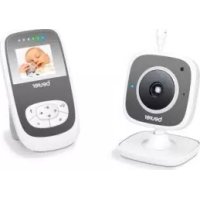
JBY 84 - Baby monitors BEURER - Free user manual and instructions
Find the device manual for free JBY 84 BEURER in PDF.



| Product type | Analog baby monitor |
| Brand | Beurer |
| Model | JBY 84 |
| Units | Parent unit and baby unit |
| Technology | Analog (864 MHz) |
| Range | 800 meters in open field |
| Channels | 2 selectable channels |
| Pilot tones | 16 tones to reduce interference |
| Power supply | Mains adapter (6 V / 650 mA) or rechargeable/AAA batteries |
| Rechargeable batteries included | 3 Ni-MH AAA 600 mAh batteries |
| Parent unit battery life (rechargeable) | Approximately 16 hours |
| Baby unit battery life (rechargeable) | Approximately 22 hours |
| Charging time (device off) | Approximately 10 hours |
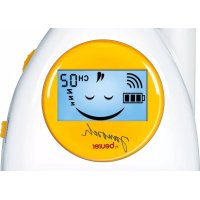
| Display | LCD screen with battery indicator, sound level and baby emotion |
| Sound sleep function | Yes, backlight turns off when no sound |
| Range indicator | Audible and visual signal when connection is lost |
| Microphone sensitivity adjustment | Yes, on the baby unit |
| Volume adjustment | Yes, on the parent unit |
| Dimensions | 6 x 4 x 11 cm per unit |
| Total weight | 398 g |
| Belt clip | Yes, on both units |
| Cleaning | Soft dry cloth, do not use abrasive cleaners |
| Safety | Do not place in the crib, minimum distance of 2 m, keep out of reach of children |
| Replacement batteries | Ref. 163.378 (3 x AAA Ni-MH 1.2 V) |
| Warranty | Compliant with R&TTE directive 1999/5/EC |
Frequently Asked Questions - JBY 84 BEURER
User questions about JBY 84 BEURER
0 question about this device. Answer the ones you know or ask your own.
Ask a new question about this device
Download the instructions for your Baby monitors in PDF format for free! Find your manual JBY 84 - BEURER and take your electronic device back in hand. On this page are published all the documents necessary for the use of your device. JBY 84 by BEURER.
USER MANUAL JBY 84 BEURER
Thank you for choosing one of our products. Our name stands for high-quality, thoroughly tested products for the applications in the areas of heat, weight, blood pressure, body temperature, pulse, gentle therapy, massage and air. Please read these instructions for use carefully and keep them for later use, be sure to make them accessible to other users and observe the information they contain.
Best regards,
Your Beurer Team
Items included in the package
- Parent unit
- Baby unit
- 2 adapter plugs : Out 6 V / 650 mA
- Ni-MH-Akkus (3 x 1.2 V, AAA) 600 mAh
These operating instructions
Explanation of symbols
The following symbols are used in the operating instructions and on the type plate:

WARNING
Warning of risks of injury or health hazards.

CAUTION
Safety information about possible damage to appliance/accessories.

Note
Important information.
1. Getting to know your appliance
Functions of the device
This analogue baby monitor enables you to be in contact with your baby at all times while you carry out activities in other rooms or in the garden. Two different channels and 16 pilot tones minimise interference and guarantee high transmission quality.
The device has the following functions:
- noise monitor,
- illuminated displays that show whether the baby is asleep or awake,
-
LCD dimming when there is no noise transmission,
16 pilot tones and 2 channels with various frequencies, -
800 m range with a clear view,
- acoustic and optical range control,
- battery level indicator,
- belt clip and hanger function.
2. Proper use
- Only use the device to monitor your baby when you are unable to directly supervise the baby yourself. It is not a substitute for your personal and responsible care!
- The device is only intended for domestic /private use, not for commercial use.
- This device is not intended for use by persons (including children) with restricted physical, sensory or mental capabilities and/or by persons lacking the required understanding of the equipment and how it is used, unless they are supervised by a person who is responsible for their safety or they are given instructions on how to use the device.
- Any improper use can be dangerous.
3. Important information
Safety information

WARNING
- Always position the device and power cord out of the reach of children. The power cord may cause strangulation or injury to children.
- Keep small parts out of the reach of children.
- Keep children away from the packaging materials. Risk of suffocation.
- Never place the baby monitor in the cot on within the child's reach.
- Make sure that cables are not accessible to your child.
- Place the baby monitor 2m away from your baby, in order to minimise the possibility of electrosmog pollution and noise pollution.
- Before using the baby monitor, always ensure that it is functioning correctly and that it has sufficiently charged batteries if using battery operation.
- Danger of explosion if using the wrong batteries!
-
Never touch the plug contacts with sharp or metallic objects.
-
Never submerge the device in water.
- Never rinse it in running water.
- Never use the device in proximity to moisture.
- Do not cover the baby monitor with a towel or cover.
- Only use the power supply units included with the delivery.
- The plug-in power unit must be operated only from a power supply as specified on it.
- Do not pull, screw up or bend the mains cable.
- Disconnect the adapter plug from the mains when the device is not in use.
- The device and the adapter plug should not come into contact with hot surfaces or sharp-edged objects.
- Do not use any attachments that are not recommended or offered as accessories by the manufacturer.
General notes
- Repairs may only be performed by Customer Service or authorized dealers. Before making a claim, please check the batteries first and replace them if necessary.
- Under no circumstances should you open or repair the device yourself, as
faultless functionality could no longer be guaranteed thereafter. Failure to comply will result in voiding of the warranty.
- Should you still have questions on using our appliances, please contact our customer service.
Notes on the use of batteries

WARNING
- Batteries can be extremely dangerous if swallowed. Keep batteries and all device parts out of the reach of small children. If a battery is swallowed, seek medical assistance immediately.
- Batteries should not be charged or reactivated with any other means, nor should they be taken apart, thrown in the fire or short-circuited.
- Batteries can contain poisonous substances that are damaging to health and the environment. Therefore, batteries must be disposed of in accordance with the applicable legal regulations. Never dispose of batteries in the normal household waste.

CAUTION
- Leaking batteries can damage the device. If you do not use the device for an extended period of time, remove the batteries from the battery compartment.
- If a battery has leaked, wear protective gloves to clean the battery compartment using a dry cloth.
4. Appliance description

Note
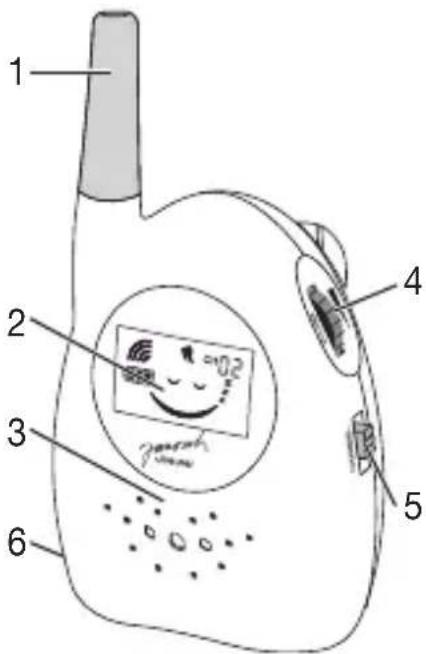
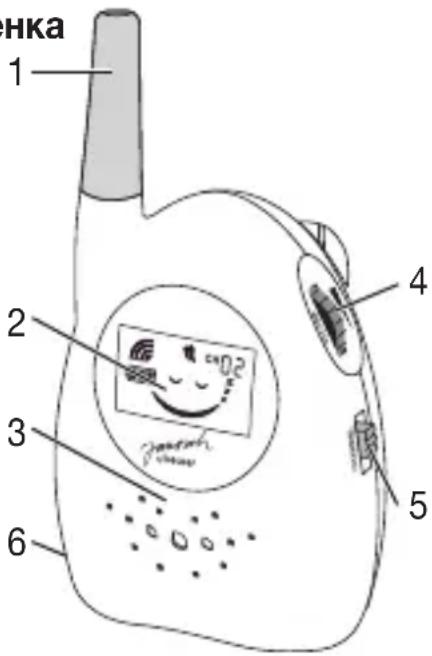
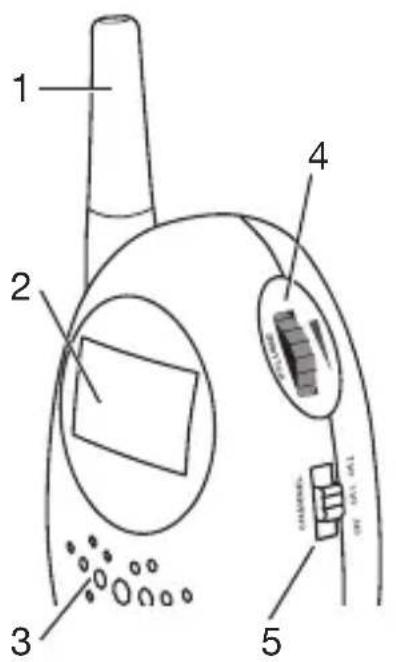
In order to distinguish more easily between the baby unit and parent unit, the baby unit has a yellow antenna and the parent unit has a white antenna.
Baby unit
1 Antenna (yellow)
2 Display
3 Microphone
4 Sensitivity regulator
5 On/off/ channel changer
6 Power supply socket
Parent unit
1 Antenna (white)
2 Display
3 Speaker
4 Volume control
5 On / off / channel changer
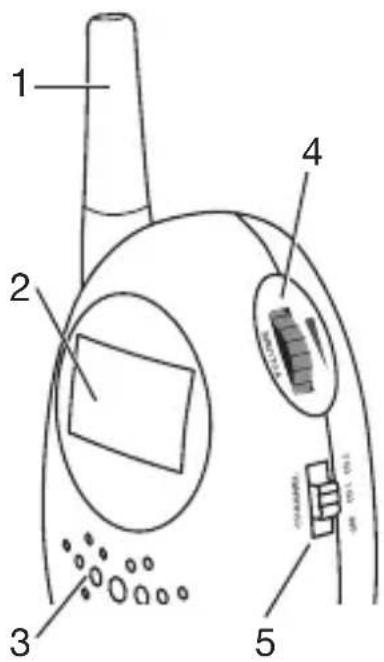
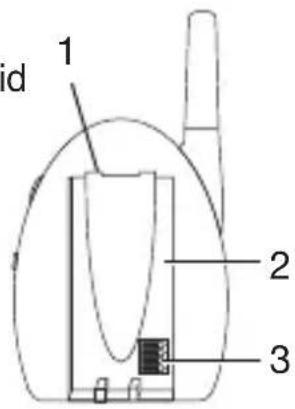
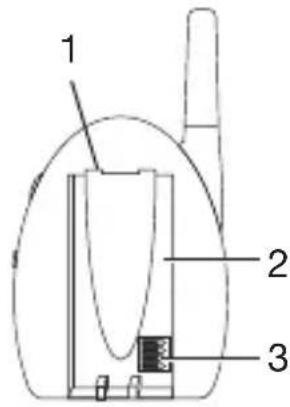
Baby unit / Parent unit
1 Belt clip
2 Battery compartment lid
3 Pilot tone changer (in battery compartment)
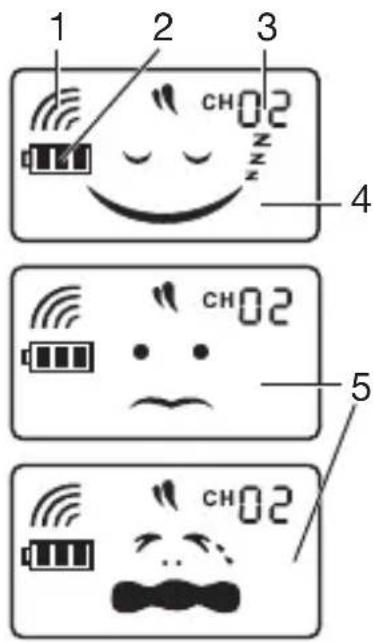
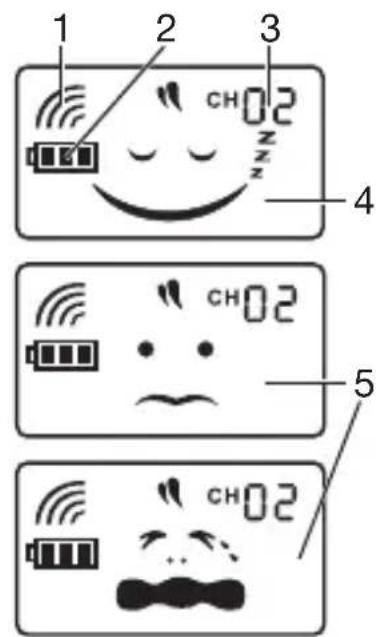
Display
1 Range control
2 Battery level indicator
3 Channel indicator
4 Baby emotion: Baby is asleep
5 Baby is awake (different displays)
5. Start-up
Setting the pilot tone
Using the pilot tone changer in the battery compartment, you can choose between a total of 16 pilot tones. Ensure that the same setting is selected for both the parent and baby units, otherwise a connection cannot be established.

Note
Change the pilot tone settings if there is interference from other devices such as baby monitors or radios.
You can choose to operate the units using either the included rechargeable batteries, disposable batteries or the power supply unit.
Please note that only the types of battery shown can be charged. The negative battery
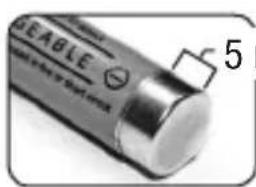
mm
terminal must be stripped to approx. 5 mm (= without insulation).
Replacement batter
ies (3× 1.2V AAA can be obtained from the specified service address using the order number 163.378.
Rechargeable battery operation / disposable battery operation
- Pull the battery compartment lid off from the bottom.
- Insert the included rechargeable batteries or 3 × 1.5V type AAA batteries the correct way round.
- Close the battery compartment lid.
- The power supply unit must be connected in order to charge the batteries. The battery level indicator shows that the device is charging. As soon as the batteries are charged, the battery symbol appears complete in the display.
- The charging process lasts for approx. 10 hours when the device is switched off.

Note
Preparing the device for first use
- Before the first use, the batteries should be fully charged. The charging process lasts for approx. 10 hours. The device offers an operation period of approx. 16 / 22 hours after this.
- You will get the maximum capacity from your battery if you charge it at least once every 6 months. To do this, disconnect the device from the mains and run the
battery down through normal use. Then fully charge the battery up again.
- The maximum battery capacity can only be reached after it has been charged several times and is dependent on many factors (battery state, ambient temperature, means and frequency of charging etc.).

Note
Observe the battery level indicator in the display and replace the batteries in good time.
Mains operation
Using the adapter plug, connect the units to a socket.
6. Operation
- Position the transmitter so that it is in a raised position at a distance of 2m from your baby.
- Switch the transmitter on using the on / off / channel changer and select one of the two channels.
- The display will begin to light up and the selected channel is displayed.
- Switch the receiver on by selecting the same channel as that set on the transmit
ter. The display will begin to light up and the selected channel is displayed. Check the connection between the two devices - the devices should not be more than a metre away from each other, or this may create feedback.
- If the transmitter is not transmitting any sound, the symbol 'baby is asleep' appears and the backlighting automatically switches to energy saving mode.
- If the transmitter is transmitting sounds, the symbols for 'baby is awake' appear and the backlighting automatically switches on.
- If the connection between the two devices is cut off, an acoustic signal sounds on the receiver and the symbol for range control appears.

Note
Using the optical noise level monitor in the child's room, the device can also be used by those with hearing impairments or the deaf.
You can attach the devices to your belt using the belt clip or hang them on the wall using suitable fixing materials.
7. Settings
Noise sensitivity (Baby unit)
Push the switch for microphone sensitivity ('Sensitivity') up or down in order to set the desired noise sensitivity. If you have it set to high sensitivity, the baby unit transmits all noises.
Volume (Parent unit)
Push the volume control ('Volume') up or down in order to increase or reduce the receiver volume on the parent unit.

Note
There is no noise transmission if you turn the volume control all the way down.
8. Useful information about the baby monitor
- Position the receiver and transmitter upright in order to ensure optimal transmission quality.
- Battery operation of the baby monitor minimises electrosmog from electrical and magnetic alternating fields.
- You can increase the range of the baby monitor by positioning the baby unit as
high up as possible near a door or window and ensuring that the batteries are not too weak.
- Other radio waves can interfere with the transmission of the baby monitor. Therefore, do not position the baby monitor near devices such as microwaves, WLAN etc. The following other factors can interfere with the baby monitor's transmission or shorten its range: Furniture, walls, houses, trees, environmental factors (such as fog, rain).
9. Changing the batteries
The devices have a battery level indicator in the display. If the batteries are too weak, the devices switch off automatically and you should change the batteries.

Note
When changing the batteries, use batteries of the same type, make and capacity. Always change all batteries at the same time. Use batteries free from heavy metals.
10. Care and storage
The service life of the device depends on its careful handling:

CAUTION
- Remove the batteries if the device is not in use for an extended period.
- Protect the devices from knocks, damp, dust, chemicals, drastic changes in temperature, electromagnetic fields and nearby sources of heat (ovens, heaters).
- After use, before cleaning and changing any accessory parts, the power unit should always be disconnected.
- If dirty, wipe the device with a soft, dry cloth.
- Clean the devices with a dry cloth.
- Do not use any abrasive cleaning products.
11. In the event of problems
| Faults Action | |
| Displays do not illuminate after switching on. | Check whether · the relevant adapter plug is pro- perly plugged in, · the batteries are charged/not too weak, · the batteries have been cor- rectly inserted. |
| Noacoustic signal is transmitted by the receiver. | Check that ·the transmitter is switched on, ·the same pilot tone setting was selected on the transmitter, ·the same channel was selected on the transmitter, ·fully charged rechargeable batteries/disposable batteries that are not too weak are inserted in the transmitter, ·the maximum range has not been exceeded. |
| You cannot hear your baby or no noise is being transmitted. | Ensure that the volume control is not turned all the way down. |
| You can hear other radio communications. | As this baby monitor uses analogue radio technology, other radio communications can cause interference. If this happens, switch to another channel or change the pilot tone setting. |
| Battery does not charge | A battery has been inserted which is not suitable for this device. See 5. Initial use |
| Faults Action | |
| Connection is always breaking up and there is interference. | Check whether another technical device such as a microwave is positioned between the receiver and the transmitter. Reposition the devices if necessary. |
| Devices will not switch on. | Change the batteries or connect the devices to the mains adapter plug. |
12. Disposal
Batteries do not belong in household waste. As a consumer, you are required by law to recycle used batteries. You can recycle your old batteries at public collection points in your community or wherever the same batteries are sold.
Note: Batteries containing pollutant substances are marked as follows:
Pb = Battery contains lead, Cd = Battery contains cadmium, Hg = Battery con
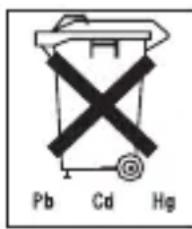
tains mercury.
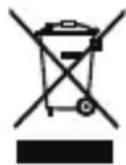
In the interests of the environment, the device (including its batteries) cannot be disposed of in normal household waste at the end of its service life. Disposal can take place at respective collection points in your
country. Observe the local regulations for material disposal.
The appliance should be disposed of according to Regulation 2002/96/EC-WEEE (Waste Electrical and Electronic Equipment). In case of queries, please contact the municipal authorities responsible for waste disposal in your area.
13. Technical details
| Analogue technology | |
| Frequency 864 MHz | |
| Dimensions 6 x 4 x 11 cm | |
| Weight 398 g | |
| Range | 800 m bei freier Sicht |
| Average period of use from one battery charge | ~ 16 hours par-ent unit ~ 22 hours baby unit |
| Charge time for bat-teries when device is switched off | approx. 10 hours |
| Charge time for bat-teries when device is switched on | approx. 20 hours |
| Excess charge pro-tection for batteries | Yes |
Devices can be operated using rechargeable/disposable batteries or power supply unit.
We hereby guarantee that this product complies with the European R&TTE Directive 1999/5/EC.
Please contact the specified service address to obtain further information, such as the CE Declaration of Conformity.
FRANÇAIS
Chere cliente, cher client,
I P E D O C T E P E X E H N E!
IpeDynpexKeHne 6 onaCHOCTx TpaBMPOBaHnI INI ONaCHOCTX Ira BaWero 3dOpOBbY.
BHUMAHNE!
IpeDynpexKdEHNe O BO3MOxHbIX NOBpeXdEHnX np6opa/ npHaJNeXHOCTeN.
Uka3aHne
Yka3aHne Ha BaxKHyIO INΦopMaζIIO.
1.ДляЗнakOMCTBa
Функцип пибopa
3Ta aHaIorOBa paINO-HraHn PO3BO-
JrEe Bam B IIO6oM MOMENT 6bITb PraDM C
pe6eHKOM, DaXe ecIn Bbl HaxOINTeCb B
dpynx NOMEUeHNx INN B caNy. Dba pa3-
JIuHbIX KaHana n 16 NIIOT-CnIHaNOB CBO-
dT K MmHmMy HeNCnPabHOCTn N OBe-
CneuBAIoT BbICOKOE KauEcTBO NepeDaun.
Pn6op ochaen cJeDyUoMm FyHKzmaM:
KOHTpOJIb 3ByKOB,
- ДИСПЛЕМ C ПОДСВЕТКОМ, ПOKАЗБИВАЮШМ, СПИТ ребенок ИЛN HeT,
- JKK-dncnne C 3aTeMHeHem npo OTCyTCTBn npepaH 3ByKOB,
16 nIIOr-CnIHAnOB u 2 KaHaja c pa3- JInuHbIMN YactOTaMn,
paIyuc DeIcTBn800M npn cBo6oHoi BnIMOCTn,
akyctuneckn n ONTneckn KOHTpOlb paunyca deiCTBna, - INHdNKaTOP COCTOHNbBaTapeeK,
- NOYCHOI 3aXIM I BO3MOXHOCTb IOBBeWUNBaHnI.
2. Исторбоваиме по Настонуему <|im_start|>assistant 2. Исторбоваиме по Настонуему <|im_start|>assistant 2. Исторбоваиме по Настонуему <|im_start|>assistant 2. Исторбоваиме по Настонуему <|im_start|>assistant 2. Исторбоваиме по Настонуему <|im_start|>assistant 2. Исторбоваиме поНастонуему <|im_start|>assistant 2. Исторбоваиме поНастонуему <|im_start|>assistant 2. Исторбоваиме поНастонуему <|im_start|>assistant 2. Исторбоваиме поНастонуему <|im_start|>assistant 2. Исторбоваиме поНастонуему <|im_start|>assistant 2.IcnoJb3OBaHne IO Ha3Ha-ueHnIO
- Пибор педназанчehн только дя
- HabIoDEHЯ 3a МладeHцamN B TOT
- Moment, korда Вы He можete следпь
- 3a НIM HeNoCpeICTBeHNO. Oh He cmo-
- ket 3aMeHHT BaWe ЛИhoe писуT-
- CTBVE И He CHImaET C Bac OTBeTCTBeH-
- HOCTn!
- Прибор пedingанauthен Дд домшero/чacterноги NCIOЛьЗОВаня,ИСПОЛьЗОВане рпбopa в КOMМерчecкux целяхзапpeшени.
-Данньи пибор He npedHa3HaueHдяИСПОЛьЗOBAHЯ ЛцamN(B T. Y. DeTbMn)
C O rpaHnueHHbIMN φn3nueCKnIMN, CeH-COPHbIMN nIIN yMCTBeHHbIMN CnOCO6-HOCTaMn nIIN C HeIOCTaTKOM ONbITa N/ nIIN 3HaHnIN, 3a NCKJIIOUeHNEm CnyuaeB, KOrda OHn HaxoJrTcR NOI NOCToRHHbIM NpICMOTPOM OTBETCTBeHHbIX 3a HNX IInC INI INI NOUYHnN OT HNX YKa3aHnY, KaK POnb3OBaTbcR pIn6OpOM.
- Лобoe пимеенье He no Ha3HaueHIO MOKET 6bITb ONaCHbIM.
3. Baxhble yka3aHn
Yka3aHnI NO TexHnke 6e3OnaCHOCTN

ПЕДОCTЕРЖЕΗΝΕ
HnkOrda He octabJnTe np6op n npoBODa B DOCTyHOM DJIaDeTei MeCTe. PpOBoDa YBJIOTcI NOTeHuaIbHbIM NCTOCHKOM DeTCKNX TpaBM nn OnaCHOCTn ydyuWeHna.
XpaHnTe MeJkne npEmdetbIB HeNoctyn-HOM IJIa DeTei MeCTe.
He donyckaTe nonaHaHne ynaKOBOHoro MaTePnAna B pyKn DeTei. Ipo3nt OnaCHOCTb ydyBja.
Hukorda He yctaHaBnBaIte paNHO HnIO B DeTCKoK KPOBaTKe NIN B 3OHe DocraeMoCTNa Wawero pe6eHka.
CneIte 3a Tem, yTo6bI npOBoJa He HaxoJIncB B 30He DoCraEMocTn pe6eHka.
- PacnoJoxKe paIHO-Ha pacCToHn 2 M OT MJaHeuca, 3TO MNHMn3i-pyET 3JIeKTPOCMOr N WymOBbIe NOMEXN.
- Ipeed Naayalom NcnoJb30BaHnra paAnOHn y6eInTeCb B TOM, qTO np6Opbl cyHKUHOHyOT 6e3ynpueHo, n qTO aKKymJIaTOpbl/6aTaapeKn DOCTaTOH0 3apXKeHbI (ecn np6Opbl pa6OtaHOT OT 6aTaapeek).
- Пи ИСПОЛБЗОВАнн HeпразИльНых aKKуМУЛТОРВ/6aTapeeK cyцEcTByeT onaCHOCTb B3рьIBa!
- HNkoIa He KacaITeCb KOHTaKTOB ITeKepa OCTpbIMN NIN MTeaJIInueCKIMN PpeMToMn.
Hikorda He norpykaTe npnbopbB B Ody. He npomBaIte nx nopnpoTOHOn BOOn.
3aPpeucaetcIncnoIb3OBAHne npnbopa B6n3N nCTOCHKOB BJaXHOCTN.
He hakpbBaIte paHIO-HaHIO pOJOTeHcEM nn OJeAOM.
- IcnoIb3yIe ToIbKO CeTeBble aIaTepbl, BXOJaUne B KOMJIeKT NocTaBKn.
- Блok петаши мохно Incnoь30BaTb Tольков сепс наразженьем, KOTopoeyka3aHO Ha HeM.
He TAHNTe, He nepeKpyuBaIte N He nepereN6aITe coeINHTeNbHbI Ka6eJIb.
- Ecnn npnbop He nCnOJb3yETcra, cneNyET OTCOeINHHTb OT cEtN cTeBOaIaNTep.
- I36eRaiTe KOHTaKTa npnbopa n ceTeBOrO aIaNTepa C rOpAUMn NOBepx-HoCTaMn NJI ppeIMTaMn C OCTpbIMN yIaMn.
He nCnoJb3yIte DOONHHTeJIbHbIe DeTaN, He peKOMeHNIOBaHHbIe N3ROTOBNTeIeM IIN He npedlaRaembIe IM B KaueCTBe pInHaJIeXHOCTeI.
06uhe yka3aHna
3aIpeuaeTc3apKaTb nIpeaKTHBUNPOBaTb 6aTaapeKn INhIMN CNoC06amn,pa36npaTb nx, 6pOcaTb B OROHb nIIN 3aMbikatb HApOpOTko. Ipeed nped-RAJIeHNEM IpTeH3n IpoBepbTe n pIn Heo6xOJMOCTn 3aMeHInTe aKKyMjA-Topbl/6aTaapeKn.
HnB Koem clyuae He OTKpbBaIte npnbOp n He peMOHTnpUte erO camoCToTeIbHo, NockoJIbky HndexKHOCTb yHKcIOHINPOBaHnB TaKOM clyuae 60JbWe He rapaHTnpyetc. HecobIoJeHne 3Tnx Tpe6OBaHn BEdET K NoTepe rapaHTm.
- Пи ВОЗнКовени BОпрocов по ИСПОЛБЗOBAHИО рпбopa обрацайТecьВ СЕРВИСHBИ ΚЕНТ.
Yka3aHnno o6paueHnO c aKKymyIaTopamn 6aTapeiKamn

PPEIOCTEPEXHEHNE
- Akkymлары/6aTapeйк Moут 6bITb Onachbl ДджИЗн Иprn INx IpoIraTbIbA Hn. Akkymлары/6aTapeйк nДpyгп чаTN npIbopa cIeIyET xpaHNTb B HeIoCЯRaEMOM Дд MaJIeHbKnx DeTei MeCTe. ПрnporIaTbIbAHn Akkymларopa/6aTapeйк cIeIyET HemeIeHNO O6paTITbcr KВpaCy.
3aPpeuaeTc3apJkaTb nIpeakTNBnPoBaTb 6aTapeKn INbIMN cNoC06amn,pa36npaTb nx, 6pOcaTb B OROH b IIN 3aMbikTa HAKOPOTko. - Akkymлары/6aTapeикн Moryt copejxakTBЯOBNTbIe BeIecTBA,HaHocIuIe BpeI 3dOpOBbIO n OkpykaIOUSeI CpeIe. TOrmy npn yTNIN3aIuN aKKymJrTOPOB/6aTapeek CJIeDyET CO6IIOdaTb COOTBETCTByIOUne DeIcTBYIOUne IpaBnla. HIKORda He Bbl6pacbIBaIte aKKymJrTOpbI/6aTapeiKn B O6bIHbIbObTOBOm Mycop.

BHIMAHHE
Pa3pJxHbIe aKKymyJIaTOpbl/6aTapeKIMoYrIOBpeiNb np6Op. EcIn BblIITeIbHOe BpeMa He IcNoJIb3YeTe np6Op,
BbIhTe aKKMyJrTOpbI/6aTapeeKn n3 OTceKa dJa 6aTapeek.
- Пи Вытеканн Akkyмлгета/6aTapeик, Наденьт e 3aunthbie nepuATkn n Ouchnte otcek Дя 6aTapeek cyxon Tprnkoi.
4.Описане пибopa

yKa3aHne
TTo6bI IerYe pa3nUaTb 6LoKn dIy pe6eHka n dIy poDHTeJe, Ha 6loKe dIy pe6eHka yCTaHOBHeHa JKeITaY aHTeHna, a Ha 6loKe dIy poDHTeJe - 6eJa.
Блok за peбени.
1 AHTeHHa (KeIeTae)
2 Ducnnnei
3 MnkpofoH
4 PerjIaTOp UyBCTBn-TeJbHOCTN
5 IpeeknO- yaTeIb BKIOUeHn/ BbIKIOUe-Hna KaHa-JOB
6 THe3do 6Ioka nITaHnIa
Блok за ровтелей
1 AnteHa (6eJa)
2 DnCnnne
3 HAMK
4 PeryjTOp rPOMKocTN
5 PepeKIOUaTeIb BKIOUeHn/ByIKIOUeHN KaHaIob
Блok Ддpeбенka /Блok Ддрдтел
1 POnCHoN 3aXKIM
2 KpbiIka oTceKa dJa 6aTaapeek
3 IpeeklouateIb nIOT-CnHaNOB (B OTCeKe dJa 6aTapeek)
Ducnnei
1 KoHTpoJIb paInuCa DeICTBnA
2 INHdNkaTop COCTOHN 6aTaapeek
3 INHДИΚaTOp KaHaJIOB
4 ΘMOUЯ Mla- DeHua: MlaJeHeu CnNT
5 Pe6eHok He cNIT (n3MeHraIouzaer nHdI-KaZna)
5. BbOДВэКсплуataцио
HactpoKa nIIOr-CnRHaNoB
C nOMOuIIO nepeKJIouaTeJI nnIOT-CnHAIOB B OTCeKE IJN 6BaTapeEe Bbl MoXeTe C NOMOuIIO IN3MeHEnI NOLOXeHNI peKJIouaTeJI Bbl6paTb OIN H3 16 NNOT-CnHAIOB.CJeDyET yDOCTOBepITbcra,HTO BV 6IOKe IJNPONTeJI IN 6IOKe IJN PEBENKa BB16paHO OINHaKOBoE NOLOXeHne nepeKJIouaTeJI,B PPOTNBOM CInyae HeBO3-MoXHO yCTaHOBtB CB3b.

yKa3aHne
I3MeHnTe HAcTPOkN PnIOT-CnHAnOB,ecn npneMy MeaIoT DpyrNe pnpOpbl (Haepmep,paNo-HaHn,paNo).
9. 3aMeHa aKKymyIaTOpOB/ 6aTaapeek
Ha nucnpejx npnbopob ectb nHdkaTOp cOCToHn6bTaapeek. EcIn aKKymyJrTOpbI CnIshKOM cIabie, npnbopbl aBToMaTNUeCKN BbIKNoUaOTcra, a AKMyJrTOpbI/6aTapeiKn cJeNyET 3aMeHHTb.

yKa3aHne
Pn KaXdo3aMeHe 6aTapeek nCNoIb-3yInTe aKKymyJrTOpb/6aTapeKn OndHOro TUna,
ODHOMAPKNIOHOHMOUHOCTN.AKKyMyJLANTOpbl/6aTapeKIN BcERda CNEdyET MeHrTb ONDOBpeMeHHo.IcnoJIb3yIte aKKymJITOPbl/6aTapeKIN 6e3 cOepXaHHaTJeJIbIX MTeJIIOB.
10. yxod n xpaheHne
Cpok clyk6bl npnbopa 3aBncnt OT do6pocOBecTHoro o6paueHna.

BHIMAHNE
- Ecnn npnbop dInntelbHoe BpeM He NcnoJb3yeTcR, BbIHbTe aKKymyIaTOpbI/ 6aTapeiKn.
- Пиборы седует пedeoxpaнть OT ydapOB,ВлжноCTи,пblIN,XIMIKaTOB, cnIbHbIX KOJIe6aHm TeMnepaTypbl,ЗЛeK-TPOMaHHTbIX NOJIe N He YcTaHaBn-BaTb Ix B6JIu3N nCTOuHnKOB Tepla (neu, paNaTopbl OTOnJIeHnA).
- После кадою Истolyвань, под Кадой Oчистони под Кадой 3ameho npHaJekHocTeH HeO6-XODIMO BbITaHyTb 6JOK NITaHnI N3 pO3eTKN.
- Пртпг Te 3aря3HeHHbI np6Op mR-Ko, cyxOJ caJIΦeTKoJ.
OuHCTnTe npnbOpbl cyxoi caIpeKoI
He nCnoB3yIte a6pa3nBhble YnCTaIne cpeDCTBa.
PpOIOJXHtBHOCTb \~ 16 yacOB, 6IOK IJIy IcNoJIb3OBAHnI npI pOHTeJIeI
ODHON 3aRpy3Ke aKKymyIaTOpOB
Bpema 3arpy3kn aKKymyIaTOPOB
Pn BbIKJIOUeHHOM np6ope ok. 10 yac
Bpem3arpy3kn
aKKymyIaTOPOB npn BKJIoueHHOM
πριδopeok.20vac.
3auiNTa
aKKyMnyTopa OT
peepaJa Da
Bo3MOxHo nCNoJb3OBAHnI np60pa c aKKymyIaTOpamN, 6aTapeiKamN nn 6IoKOM NITaHnI.
HacToaIIMMbI rapaHTnpyem,HTO daH-Hoe n3dJIne COOTBeTCTByeET EBpOneICKoI dIpeKTInBe R&TTE (IupeKTInBa EC noCpeDCTBam paINOCBraN IN TeLEKOMMHyNKaUHOHHOMY OKOHeuHOMy O6OpyIDOBaHIO)1999/5/EC.
O6paTntecb B cepBnchbl n eHTp no yka3aHHOMy aDpecy dIra noluyehn nOppo6HbIX CBeHeH -HaPnPmep, O COOTBeCTBnN DnpeKtUBaM EC.
14. rapaHTnA
Mbl npedocTabnem rapaHTnIO Ha depeKtbl MaepnaOB n3rOToBnEHn 3TOro np6opa Ha cpoK 24 meca ca dHn npodaxn chee3 po3HNuHyTO CeTb.
TapaHTnHe pacnpoctpaHreTc:
- Ha Clyuyan yuep6a, Bbl3BaHHoro HnpaBnIbHbIM IcNoJIb3OBaHHeM,
- Ha 6bICTpon3HaUINBaIOUneCyaCTN (6aTapeiKu),
- Ha DepeKtbl, O KOTOpbIX NOKyNaTeJIb 3HaJI B MOMeHT NOKyPkN,
- Ha cnyuany co6cTBeHHoB BnHbI NOKyNaTeJr.
ToBap cepTnФицирован: BndeO-, paIIO-HaHINДЯ KOHTPOMJ 3a DeTbMn -“BCU MIPATEKC NPOCC DE.AB 02.B04117 cpoK DeIcTBnA C11.02.2011 no 10.02.2014rr.
Cpok 3Kcnpnyatau nn3dennr: ot 3 do 5 let.
Φnma n3rTOBNTeJIb:
Boinep m6x,
CoΦπnHrep wTpaccce 218,
89077-YM,RepaHna
Φnma-IMnopTeP:
OOO BOUPEP, 109451 r.
MockBa, yI. IpeepBa 62,
kopn.2, oΦnc 3
CepBnchbI ueHtp:
109451 r. MockBa,
yI.IpeepBa, 62, kOpn.2
Tei(ΦaKc) 495-658 54 90
bts-service@ctdz.ru
Даразпожи
Iopnnscb npoabua
山Tamn mara3nHa
Iopnnscb nokynatela

AB02
P OLSKI
Szanowski Klienci,
(Waste Electrical and Electronic Equipment). W razie pytan lub wata