Digital SR200 - Baby monitors TOMY - Free user manual and instructions
Find the device manual for free Digital SR200 TOMY in PDF.



| Brand | Tomy |
| Model | Digital SR200 |
| Product type | Baby monitor |
| Parent unit power supply | Rechargeable Ni-MH battery 750 mAh, 3.6 V (included) |
| Baby unit power supply | Mains via adapter 100-240 V ~ 50/60 Hz, output 5 V, 350 mA |
| Range | Up to 300 m in open field (optimal conditions) |
| Operating frequency | 2.4 GHz (DSSS technology) |
| Volume adjustment | 7 levels (0 = mute to 7 = maximum) |
| Sound level light display | LEDs reacting to sounds |
| Sound Activation Mode | Monitors only sounds above a preset threshold |
| Locate function | Locate parent unit from baby unit (3 presses on baby unit's ON/OFF button) |
| Belt clip | Battery compartment cover acts as belt clip |
| Alarms | Loss of contact (continuous beep) and low battery (3 beeps) |
| Warranty | 2 years against manufacturing defects (upon presentation of receipt) |
| Care and cleaning | Do not immerse; clean with dry cloth; unplug before cleaning |
| Safety | Indoor use only; do not substitute for adult supervision; keep out of reach of children |
| Recycling | Battery and product should not be disposed of with household waste |
Frequently Asked Questions - Digital SR200 TOMY
User questions about Digital SR200 TOMY
0 question about this device. Answer the ones you know or ask your own.
Ask a new question about this device
Download the instructions for your Baby monitors in PDF format for free! Find your manual Digital SR200 - TOMY and take your electronic device back in hand. On this page are published all the documents necessary for the use of your device. Digital SR200 by TOMY.
USER MANUAL Digital SR200 TOMY
natural_image
Two white TOMY Digital devices with speaker grille and control buttons, no visible text or symbols on the devices themselves.Digital SR200
Baby Monitor • Écoute-bébé • Baby-Monitor • Babyphone
text_image
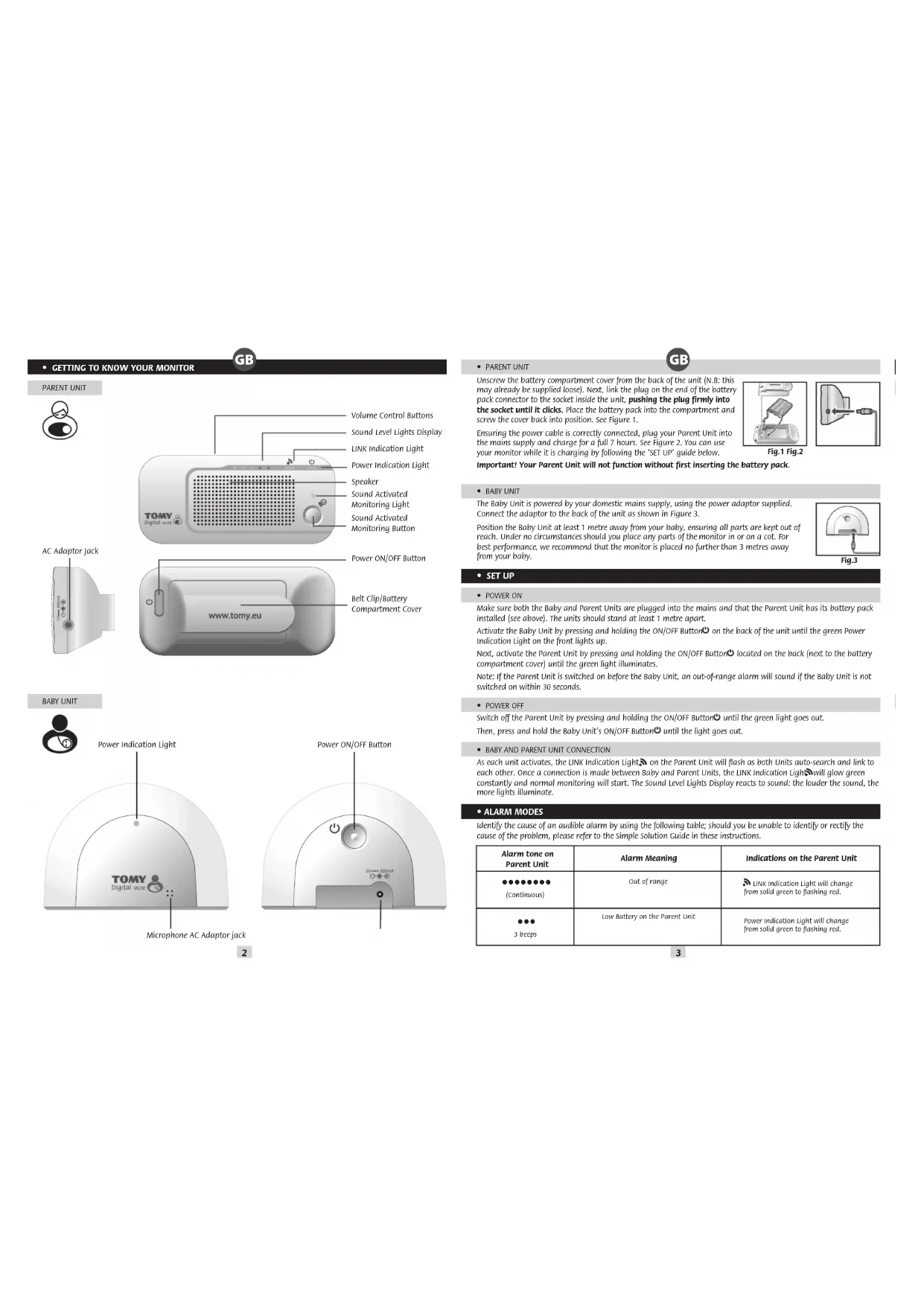
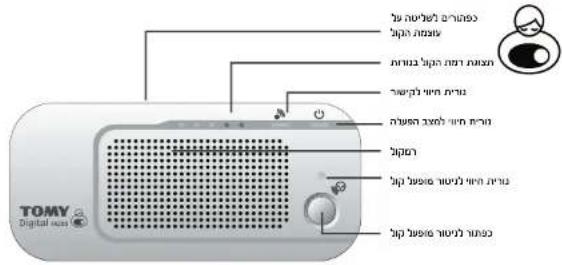
Volume Control Buttons Sound Level Lights Display LINK Indication Light Power Indication Light Speaker Sound Activated Monitoring Light Sound Activated Monitoring Button AC Adaptor Jack www.tomy.eu Power ON/OFF Button Belt Clip/Battery Compartment CoverBABY UNIT
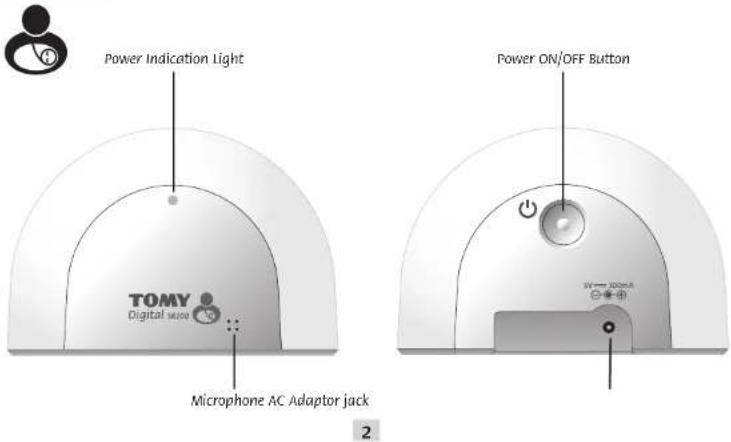
text_image
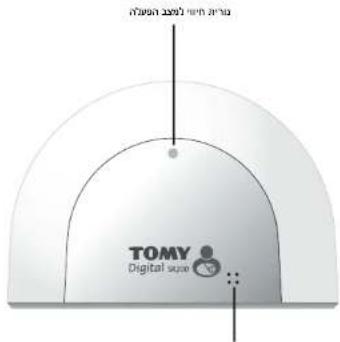
Power Indication Light TOMY Digital mouse Microphone AC Adaptor jack Power ON/OFF Button 2GB
• PARENT UNIT
Unscrew the battery compartment cover from the back of the unit (N.B: this may already be supplied loose). Next, link the plug on the end of the battery pack connector to the socket inside the unit, pushing the plug firmly into the socket until it clicks. Place the battery pack into the compartment and screw the cover back into position. See Figure 1.
Ensuring the power cable is correctly connected, plug your Parent Unit into the mains supply and charge for a full 7 hours. See Figure 2. You can use your monitor while it is charging by following the 'SET UP' guide below.
Important! Your Parent Unit will not function without first inserting the battery pack.
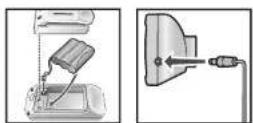
Fig.1 Fig.2
• BABY UNIT
The Baby Unit is powered by your domestic mains supply, using the power adaptor supplied. Connect the adaptor to the back of the unit as shown in Figure 3.
Position the Baby Unit at least 1 metre away from your baby, ensuring all parts are kept out of reach. Under no circumstances should you place any parts of the monitor in or on a cot. For best performance, we recommend that the monitor is placed no further than 3 metres away from your baby.
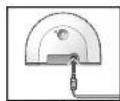
Fig.3
- SET UP
POWER ON
Make sure both the Baby and Parent Units are plugged into the mains and that the Parent Unit has its battery pack installed (see above). The units should stand at least 1 metre apart.
Activate the Baby Unit by pressing and holding the ON/OFF Button on the back of the unit until the green Power Indication Light on the front lights up.
Next, activate the Parent Unit by pressing and holding the ON/OFF Button ^① located on the back (next to the battery compartment cover) until the green light illuminates.
Note: If the Parent Unit is switched on before the Baby Unit, an out-of-range alarm will sound if the Baby Unit is not switched on within 30 seconds.
- POWER OFF
Switch off the Parent Unit by pressing and holding the ON/OFF Button until the green light goes out. Then, press and hold the Baby Unit's ON/OFF Button until the light goes out.
• BABY AND PARENT UNIT CONNECTION
As each unit activates, the LINK Indication Lights on the Parent Unit will flash as both Units auto-search and link to each other. Once a connection is made between Baby and Parent Units, the LINK Indication Lights will glow green constantly and normal monitoring will start. The Sound Level Lights Display reacts to sound: the louder the sound, the more lights illuminate.
• ALARM MODES
Identify the cause of an audible alarm by using the following table; should you be unable to identify or rectify the cause of the problem, please refer to the Simple Solution Guide in these instructions.
| Alarm tone on Parent Unit | Alarm Meaning | Indications on the Parent Unit |
| ●●●●●●●●(Continuous) | Out of range | Link Indication light will change from solid green to flashing red. |
| ●●●3 keeps | Low Battery on the Parent Unit | Power Indication light will change from solid green to flashing red. |
3
• FEATURES AND FUNCTIONS
GBCD
• VOLUME CONTROL
Adjust the volume from zero (mute) to level 7 (max) by using the Volume Control Buttons on the Parent Unit. A short press on the (+) or (-) buttons will increase or decrease the volume by one level.
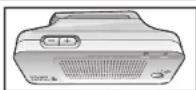

• SOUND LEVEL LIGHTS DISPLAY
The Sound Level Lights Display on your Parent Unit reacts to the sounds of your baby. The louder your baby, the more lights illuminate on the display. You can lower the volume of the Parent Unit while still watching out for baby, ideal for when you're relaxing or entertaining.
• SOUND ACTIVATED MONITORING
For those quiet moments or when your baby is a little older, you may not want to hear every sound in your baby's room. Your Baby Monitor has a Sound Activated Monitoring mode, a feature that only captures sounds above a pre-set threshold, for example a cry rather than a gurgle.
Select Sound Activated Monitoring by pressing the button on the Parent Unit. The Parent Unit will mute 10 seconds after your baby settles. Every time your baby's sounds rise above the threshold, this feature will be interrupted instantly and normal sound monitoring will continue until your baby settles again. To revert to normal monitoring mode, press the button again.
• PAGING
Locate a lost Parent Unit by pressing the ON/OFF Button on the Baby Unit 3 times in quick succession and the Parent Unit will sound a 3-minute long alarm. To silence the alarm, press any button on the Parent Unit. Please note that the paging feature will only work when both units are switched ON and monitoring as normal.
• BELT CLIP
The Parent Unit's battery cover serves as a belt clip for you to attach to your belt or waist band. The belt clip also serves as a stand for tabletop use.
• CARING FOR YOUR MONITOR
Do not immerse any parts in liquid. Do not place in direct sunlight. Periodically examine product for signs of damage to electrical parts and do not use until damage has been properly repaired.
• GUARANTEE
We guarantee your monitor against manufacturing defects for 2 years from the date of purchase on production of a valid receipt. In the first instance of a manufacturing defect, we recommend that you return your monitor to its place of purchase. If this does not satisfactorily resolve your problem, please visit our website for further advice. Full terms and conditions can be also found on our website: www.tomy.eu
• TECHNICAL SPECIFICATIONS
- Batteries: Parent Unit - Rechargeable 750mAh 3.6V Ni-MH battery (included).
- Power Supply: Mains adaptor rating: PRI: 100-240V\~50/60Hz SEC: 5V=350mA
- Operating Range: 300m in optimum 'open field' conditions.
- Operating Temperature: 0 - 50°C.
- Frequencies: 2410\~2475GHz.
• SAFETY INFORMATION
IMPORTANT! This monitor is restricted for indoor use only! The Tomy Baby Monitor is designed to help you monitor your child and is not a substitute for adult supervision. This product is not a toy. Always keep electrically operated items and their cables out of reach of babies and younger children. Under no circumstances should you place any part of your monitor in or on a cot. Ensure all wiring is positioned safely so that children cannot become entangled and that no trip hazard is created. Under no circumstances should the adaptors supplied with this monitor be used with any other equipment. No other adaptors than those supplied should be used with your monitor. Be careful not to position the adaptor where a child is likely to use it as a step. Putting weight on the adaptor while it is plugged in could damage the unit or cause injury to your child. It is normal for chargers to become hot during use - take care when handling, allow heat to disperse. DO NOT COVER. Disconnect charger if the product will not be used for several days. To prevent a shock hazard, please disconnect from power supply before cleaning. The rechargeable battery within the Parent Unit should be recycled. Do not dispose in normal waste. Do not attempt to dismantle any part of this product.
• BATTERY SAFETY
Charging, removal and replacement of battery pack should be carried out by an adult or under adult supervision. Unplug the adaptor cord before replacing batteries. Use only the supplied battery pack or replacement battery pack available by contacting Tomy Webcare. Please note that the guarantee becomes void if you use any other battery pack. Clean all contact surfaces before installing the supplied battery pack. Take special care to ensure battery pack is inserted correctly, observing (+) and (-) polarity marks on battery and product. Do not short circuit the contacts in the battery compartment or the battery pack terminals. Remove the battery pack and unplug the pigtail of the battery pack when storing the product for a long period of time or when the battery is dead. Dispose of exhausted battery packs safely, and never dispose of batteries in a fire. Remove exhausted batteries from product. Do not mix old (used) and new batteries or batteries of different types, e.g. rechargeable and alkaline or batteries of different makes/brands. Remove batteries from product after use or if storing for long periods. Only use batteries of the same or equivalent type to those recommended.
Removal and recharging of rechargeable batteries should be carried out by an adult or under adult supervision. Do not attempt to recharge non-rechargeable batteries.

Help the environment by disposing of your product and packaging responsibly. The wheelie bin symbols indicate the product and batteries must not be disposed of in the domestic waste as they contain substances which can be damaging to the environment and health. Please use designated collection points or recycling facilities when disposing of the item or batteries.
• SIMPLE SOLUTION GUIDE
Should your monitor not be operating as expected, the information listed below should be adequate to resolve your problems; alternatively a more comprehensive guide can be found on our website: www.tomy.eu
• FREQUENTLY ASKED QUESTIONS
Q. Why is my monitor not holding its charge or switching ON?
A. The Parent Unit's battery has not been correctly connected. Remove the battery cover and push the connector plug firmly into its socket.
Q. Does my Parent Unit need to be switched on or off whilst charging?
A. Either. Your Parent Unit will charge while switched ON or OFF. However, charging the unit when switched ON will allow you to monitor your baby while charging.
Q. Will I hear the out-of-range and low battery alarms even when the volume on my monitor is set to zero (mute)?
A. Yes, alarms are unaffected by the volume controls.
Q. Can I use my monitor abroad?
You can use your monitor in the country it was purchased and anywhere in the EU. Although your monitor may function correctly in other countries, its operating frequency may affect (or be affected by) other devices and could be illegal. Tomy cannot accept any liability for use outside of the country in which you purchased your monitor or the EU.
Q. Can my monitor coexist with WI-FI and other 2.4GHz devices?
A. Your Tomy SR Monitor operates on a 2.4GHz frequency using Direct-Sequence Spread Spectrum (DSSS) technology designed to coexist with WI-FI and similar wireless digital equipment. However, if multiple 2.4GHz devices are operating in close proximity, some interference is inevitable.
• FAULT FINDING
GB
| PROBLEM | POSSIBLE CAUSE | SOLUTION | PAGE |
| My Parent Unit will not switch ON. | The rechargeable battery supplied has not been installed correctly. | Insert the battery as instructed within this booklet or the Quick Start Guide. Once installed, place the Parent Unit on charge and leave for several minutes before switching ON. | 3 |
| The rechargeable battery may be below the critical voltage to activate your monitor. | Place the Parent Unit on charge and leave for several minutes before switching ON. | ||
| Mains power is not connected correctly. | Check the power cable connections (including wall socket). | ||
| My Baby Unit will not switch ON. | Mains power is not connected correctly. | Check the power cable connections (including wall socket). | 3 |
| The Power ON/OFF Button is not being held long enough. | Press and hold the Baby Unit's Power ON/OFF Button until the Power Indication Light illuminates. | ||
| There is a continuous beeping noise from the Parent Unit. | Loss of contact alarm. | Make sure that the Baby Unit is switched ON. | 3 |
| Make sure the Parent Unit is adequately powered and move it nearer to the Baby Unit. | |||
| An alarm beeps 3 times every minute from the Parent Unit. | Low battery in the Parent Unit. | Place the Parent Unit on charge. | 3 |
| I cannot hear anything through my Parent Unit. And/or its sound is only intermittent. | Volume on Parent Unit is set too low. | Increase Parent Unit volume. | 4 |
| Units are set to Sound Activated Monitoring mode. | Refer to the Sound Activated Monitoring section. | ||
| Parent Unit is switched ON, but the sound level lights and audio are all off. | Units are set to Sound Activated Monitoring mode. | Refer to the Sound Activated Monitoring section. | 4 |
| I hear a high-pitched noise. | Units are too close together. | Move units apart. | 3 |
| Volume is too high. | Decrease volume. | ||
| Power Indication Light on the Parent Unit is blinking red. | Low battery. | Place the Parent Unit on charge. | 3 |
| Battery life after charging is becoming shorter. | As with any rechargeable battery, it has a finite life and may need replacing. | Please visit our website for replacement parts. www.tomy.eu | 5 |
| I cannot hear the baby's sound clearly because of static. | Radio waves from other devices may be affecting your monitor. | This product has Auto-Channel Selection feature. If you experience static sound, place the Parent Unit closer to the Baby Unit. If this does not solve the problem, move your Parent Unit away from other 2-AGHz devices such as microwave ovens, wireless phones or a wireless access point. | 3 |
6
7
• FAMILIARISEZ-VOUS AVEC VOTRE ECOUTE-BEBE
UNITÉ PARENT
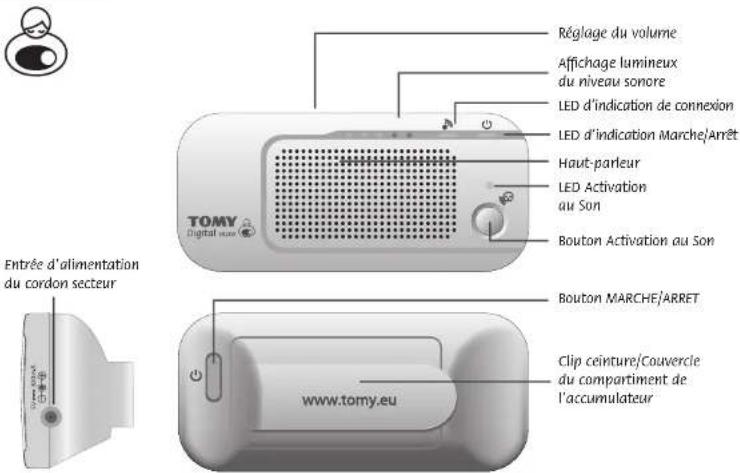
- 2017, 18: 19:30, 19:31, 19:32, 19:33, 19:34, 19:35, 19:36, 19:37, 19:38, 19:39, 19:40, 19:41, 19:42, 19:43, 19:44, 19:45, 19:46, 19:47, 19:48, 19:49, 19:50, 19:51, 19:52, 19:53, 19:54, 19:55, 19:56, 19:57, 19:58, 19:59, 19:60, 19:61, 19:62, 19:63, 19:64, 19:65, 19:66, 19:67, 19:68, 19:69, 19:70, 19:71, 19:72, 19:73, 19:74, 19:75, 19:76, 19:77, 19:78, 19:79, 19:80, 19:81, 19:82, 19:83, 19:84, 19:85, 19:86, 19:87, 19:88, 19:89, 19:90, 19:91, 19:92, 19:93, 19:94, 19:95, 19:96, 19:97, 19:98, 19:99, 20.
•
The person who is doing his wife and his wife will be married at the time of marriage. The woman who is doing his wife and his wife will be married at the time of marriage.
•
- 100,000,000,000,000,000,000,000,000,000,000,000,000,000,000,000,000,000,000,000,000,000,000,000,000,000,
- Let me be a person who is, if you can do it, let me be a person who is, if you can do it, let me be a person who is, if you can do it, let me be a person who is, if you can do it, let me be a person who is, if you can do it, let me be a person who is, if you can do it, let me be a person who is, if you can do it, let me be a person who is, if you can do it, let me are
•
The image is too blurry to recognize any text content.
text_image
TOMY Digital audio control unit: 100 MHz control unit: 100 MHz control unit: 100 MHz control unit: 100 MHz control unit: 100 MHz control unit: 100 MHz control unit: 100 MHz control unit: 100 MHz control unit: 100 MHz control unit: 100 MHz control unit: 100 MHz control unit: 100 MHz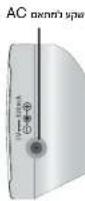

The image is too blurry to recognize any text content.
text_image
TOMY Digital displayהכלה AC

text_image
control unit 3V → 100mA67
GB Colour and contents may vary.
F Les couleurs et les détails peuvent varier.
NL De kleuren en inhoud kunnen verschillen.
D Abweichungen in Farbe oder Details möglich.
El color y el contenido pueden variar de las ilustraciones.
Colori e contenuto possono variare rispetto alla confezione.
RU Цвет и содержание могут меняться.
A. قد ي Clubs اللون وامعتويات
GR Χρώμα και γκς μετα λητά.
HE
GB PLEASE RETAIN FOR FUTURE REFERENCE
F PRIERE DE CONSERVER A TITRE D'INFORMATION
NL BEWAREN TER INFORMATIE AUB
D DIESE ANGABE BITTE AUFBEWAHREN
E CONSERVE LA DIRECCION PARA FUTURAS CONSULTAS
CONSERVARE PER FUTURE REFERENZE
RU ПОЖАЛУЙСТА, СОХРАНИТЕ ДЛЯ ДАЛЬНЕЙШЕГО ИСПОЛЬЗОВАНИЯ
A
يَرْجِى الاحنغاظ بهONE النشرة لل kilograms إلىها في المستقبل.
GR ΠΑΡΑΚΑΛΩ ΚΡΑΤΗΣΤΕ ΤΟ ΓΙΑ ΠΕΡΙΣΣΟΤΕΡΕΣ ΠΛΗΡΟΦΟΡΙΕΣ
HE.

GB Important Notice: This Tomy Baby Monitor is designed to help you monitor your child and is not intended as a substitute for adult supervision.
F Avis important : Cet écoute-bébé de Tomy est conçu pour vous aider à surveiller votre enfant mais ne doit en aucun cas se substituer à la surveillance d'un adulte.
NL Belangrijke mededeling: Deze Tomy Baby Monitor is ontworpen om u te helpen toezicht te houden op uw kind en is niet bedoeld om te worden gebruikt in plaats van toezicht door een volwassene.
Wichtiger Hinweis: Dieses Tomy Babyphone soll Ihnen helfen, Ihr Kind zu überwachen und ist nicht als Ersatz für die Beaufsichtigung durch Erwachsene gedacht.
E Aviso Importante: Este Monitor de Bebé Tomy está diseñado para ayudar a supervisar a su niño y no es un substituto de la supervisión adulta.
AVVERTENZA IMPORTANTE: questo monitor Tomy è progettato per aiutarti a supervisionare il tuo bambino ma non si può sostituire alla supervisione di un adulto.
Важная информация: Радионяня Тому предназначена для того, чтобы помочь вам следить за ребенком и не заменяет собой присмотр взрослых.
A ملاحظة هامة: لقد تم تصميم جهاز نومي لراقبة الطفال لساعدتك في مراقبة طفلك وليس المنفصول منه أن يكون بدبلً للإشراف بواسطة شخص بالغ.
38 Σημαντική Ειδοποίηση: Αυτή η συσκευή Παρακολούθησης Μωρού της Τomy είναι σχεδιασμένη για να σας βοηθήσει να παρακολουθείτε το παιδί σας και δεν προορίζεται ως υποκατάστατο της επίβλεψης από ενήλικο.
He. כרְשׁה מַעָה לֶלְרִי, אַתְבּוֹם, אַתְבּוֹם, אַתְבּוֹם, אַתְבּוֹם, אַתְבּוֹם, אַתְבּוֹם, אַתְבּוֹם, אַתְבּוֹם, הַעָה לֶלְרִי, אַתְבּוֹם, אַתְבּוֹם, אַתְבּוֹם, אַתְבּוֹם, אַתְבּוֹם, אַתְבּוֹן, אַתְבּוֹן, אַתְבּוֹן, אַתְבּוֹן, אַתְבּוֹן, אַתְבּוֹן, אַתְבּוֹן, אַתְבּוֹן, הַעָה לֶלְרִי, אַתְבּוֹן, אַתְבּוֹן, אַתְבּוֹן, אַתְבּוֹן, אַתְבּוֹן, הַע'
TOMY®
TOMY Webcare
For all enquiries, please visit our on-line consumer support service at...