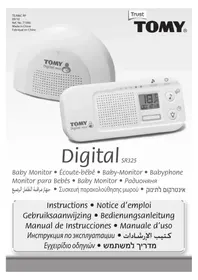
Digital SR325 - Baby monitors TOMY - Free user manual and instructions
Find the device manual for free Digital SR325 TOMY in PDF.



| Product type | Baby monitor |
| Brand | Tomy |
| Model | Digital SR325 |
| Parent unit power supply | Rechargeable Ni-MH battery 750 mAh, 3.6 V (included) + mains adapter 5 V / 350 mA |
| Baby unit power supply | Mains via adapter (100-240 V, 5 V / 350 mA) |
| Range | 300 m in open field |
| Frequency | 2470-2475 GHz |
| Main features | Audio monitoring, sound level light display, sound-activated monitoring, two-way talk, nightlight, lullabies, timer, temperature display, parent unit locator |
| Display | LCD on parent unit (sound level, temperature, timer display, etc.) |
| Nightlight | Integrated in baby unit, soft colors |
| Lullabies | 3 built-in lullabies (Brahms, Sleep baby, Rock-a-bye Baby) |
| Volume control | 0 (mute) to 7 on parent unit |
| Belt clip | Yes, integrated into the battery cover |
| Locator | Parent unit locator function via baby unit |
| Warranty | 2 years against manufacturing defects |
| Care | Clean with a dry cloth, do not immerse, do not expose to sunlight |
| Safety | Indoor use only, do not substitute for adult supervision, keep out of reach of children |
| Spare parts | Replacement battery available via Tomy Webcare |
Frequently Asked Questions - Digital SR325 TOMY
User questions about Digital SR325 TOMY
0 question about this device. Answer the ones you know or ask your own.
Ask a new question about this device
Download the instructions for your Baby monitors in PDF format for free! Find your manual Digital SR325 - TOMY and take your electronic device back in hand. On this page are published all the documents necessary for the use of your device. Digital SR325 by TOMY.
USER MANUAL Digital SR325 TOMY
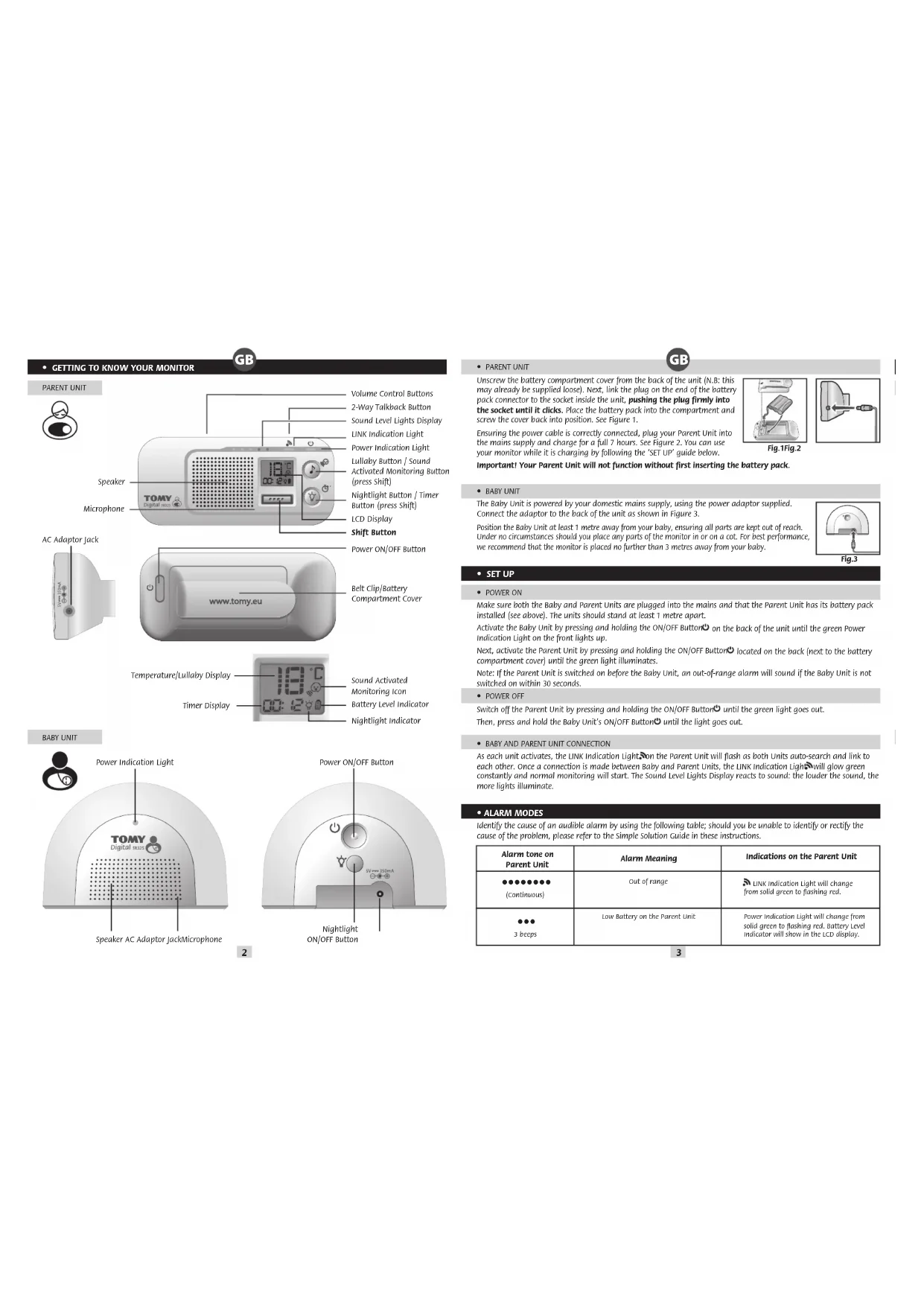
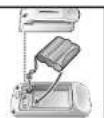
Unscrew the battery compartment cover from the back of the unit (N.B: this may already be supplied loose). Next, link the plug on the end of the battery pack connector to the socket inside the unit, pushing the plug firmly into the socket until it clicks. Place the battery pack into the compartment and screw the cover back into position. See Figure 1.
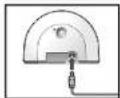
Ensuring the power cable is correctly connected, plug your Parent Unit into the mains supply and charge for a full 7 hours. See Figure 2. You can use your monitor while it is charging by following the 'SET UP' guide below.
Important! Your Parent Unit will not function without first inserting the battery pack.
GB
BABY UNIT
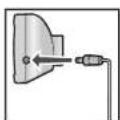
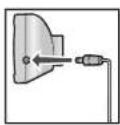
The Baby Unit is powered by your domestic mains supply, using the power adaptor supplied. Connect the adaptor to the back of the unit as shown in figure 3.
Position the Baby Unit at least 1 metre away from your baby, ensuring all parts are kept out of reach. Under no circumstances should you place any parts of the monitor in or on a cot. For best performance, we recommend that the monitor is placed no further than 3 metres away from your baby.

Fig.1Fig.2
- SET UP
- POWER ON
Make sure both the Baby and Parent Units are plugged into the mains and that the Parent Unit has its battery pack installed (see above). The units should stand at least 1 metre apart.
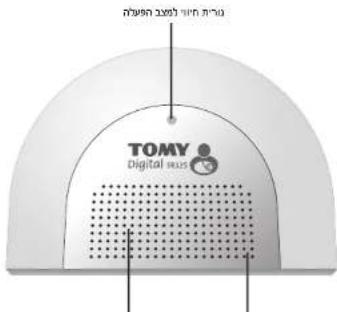
Activate the Baby Unit by pressing and holding the ON/OFF Button on the back of the unit until the green Power Indication Light on the front lights up.
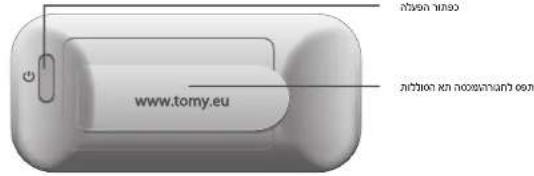
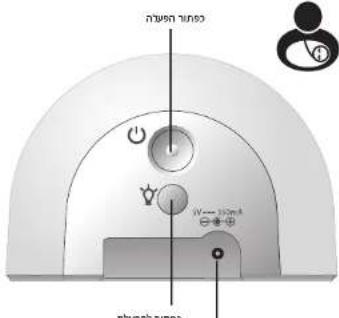
Next, activate the Parent Unit by pressing and holding the ON/OFF Button located on the back (next to the battery compartment cover) until the green light illuminates.
Note: If the Parent Unit is switched on before the Baby Unit, an out-of-range alarm will sound if the Baby Unit is not switched on within 30 seconds.
- POWER OFF
Switch off the Parent Unit by pressing and holding the ON/OFF Button until the green light goes out. Then, press and hold the Baby Unit's ON/OFF button until the light goes out.
BABY AND PARENT UNIT CONNECTION
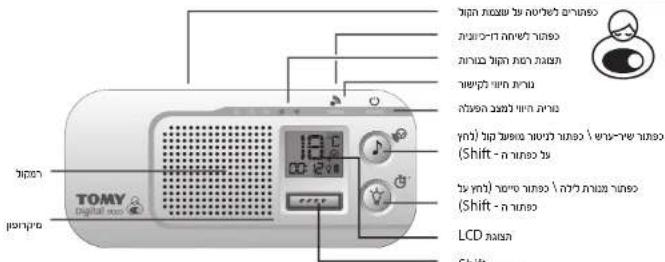
As each unit activates, the LINK Indication Light on the Parent Unit will flash as both Units auto-search and link to each other. Once a connection is made between Baby and Parent Units, the LINK Indication Light will glow green constantly and normal monitoring will start. The Sound Level Lights Display reacts to sound: the louder the sound, the more lights illuminate.
- ALARM MODES
Identify the cause of an audible alarm by using the following table; should you be unable to identify or rectify the cause of the problem, please refer to the Simple Solution Guide in these instructions.
| Alarm tone on Parent Unit | Alarm Meaning | Indications on the Parent Unit |
| (Continuous) | Out of range | LINK Indication light will change from solid green to flashing red. |
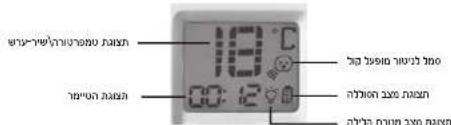
| 3 beeps | Low Battery on the Parent Unit | Power indication Light will change from solid green to flashing red. Battery level indicator will show in the LCD display. |
3
FEATURES AND FUNCTIONS
VOLUME CONTROL
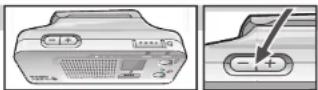
Adjust the volume from zero (mute) to level 7 (max) by using the volume Control Buttons on the Parent Unit. A short press on the (+) or (-) buttons will increase or decrease the volume by one level.
- SOUND LEVEL LIGHTS DISPLAY
The Sound Level Lights Display on your Parent Unit reacts to the sounds of your baby. The louder your baby, the more lights illuminate on the display. You can lower the volume of the Parent Unit while still watching out for baby, ideal for when you're relaxing or entertaining.
SOUND ACTIVATED MONITORING
For those quiet moments or when your baby is a little older, you may not want to hear every sound in your baby's room. Your Baby Monitor has a Sound Activated Monitoring mode, a feature that only captures sounds above a pre-set threshold, for example a cry rather than a gurgle.
Select Sound Activated Monitoring by pressing the Shift Button and the button on the Parent Unit.
The Parent Unit will mute 10 seconds after your baby settles. Every time your baby's sounds rise above the threshold, this feature will be interrupted instantly and normal sound monitoring will continue until your baby settles again. The Sound Activated Monitoring Icon will show on the Parent Unit's LCD Display. To revert to normal monitoring mode, press the Shift button and the button again.
2-WAY TALKBACK
For that little extra reassurance and convenience, your monitor has a 2-Way Talkback feature that allows you to speak to your baby or to someone attending to your baby. Press and hold down the button on the top of the Parent Unit to activate and speak to your baby.
NIGHTLIGHT
Your Baby Unit has a soft glow lightlight that can be activated by pressing the button on your Baby Unit or remotely from your Parent Unit. The Lightlight icon will show on the Parent Unit's LCD Display.
To switch off the Nightlight, press the button on your Baby Unit or on the Parent Unit.
LULLABY
Press the Parent Unit's Lullaby Button to activate the Lullaby feature. Initially, lullaby #1 will be played and the Parent Unit's LCD Display will show (1). Press the Lullaby Button repeatedly to toggle between lullaby #1 (Brahms Lullaby), #2 (Sleep Baby Sleep), #3 (Rock-a-bye Baby) and OFF.
- TIMER
Use the Timer on the Parent Unit's LCD Display to keep track of the interval between feeds, doses of medication, how long your child has been asleep and so on. Start the Timer by pressing the Shift Button l and the Timer Button l on the Parent Unit. Repeat to switch off. For the first minute, the Timer will count in seconds. After that, it will count in minutes.
TEMPERATURE DISPLAY
You can remotely track your baby's room temperature using this feature. The room temperature is displayed on the Parent Unit's LCD Display.
PAGING
Locate a lost Parent Unit by pressing the ON/OFF button on the Baby Unit 3 times in quick succession and the Parent Unit will sound a 3-minute long alarm. To silence the alarm, press any button on the Parent Unit. Please note that the paging feature will only work when both units are switched ON and monitoring as normal.
BELTCLIP
The Parent Unit's battery cover serves as a belt clip for you to attach to your belt or waist band. The belt clip also serves as a stand for tabletop use.
CARING FOR YOUR MONITOR
Do not immerse any parts in liquid. Do not place in direct sunlight. Periodically examine product for signs of damage to electrical parts and do not use until damage has been properly repaired.


4

GUARANTEE
We guarantee your monitor against manufacturing defects for 2 years from the date of purchase on production of a valid receipt. In the first instance of a manufacturing defect, we recommend that you return your monitor to its place of purchase. If this does not satisfactorily resolve your problem, please visit our website for further advice. Full terms and conditions can be also found on our website: www.tomy.eu
TECHNICAL SPECIFICATIONS
-
Batteries: Parent Unit - Rechargeable 750mAh 3.6V Ni-MH battery (included).
-
Power Supply: Mains adaptor rating: PRI: 100-240V~50/60Hz SEC: 5Vmax 350mA
-
Operating Range: 300m in optimum 'open field' conditions.
-Operating temperature: 0 - 50^ - Frequencies:2410-2475GHz
SAFETY INFORMATION
IMPORTANT! This monitor is restricted for indoor use only! The Tomy Baby Monitor is designed to help you monitor your child and is not a substitute for adult supervision. This product is not a toy. Always keep electrically operated items and their cables out of reach of babies and younger children. Under no circumstances should you place any part of your monitor in or on a cot. Ensure all wiring is positioned safely so that children cannot become entangled and that no trip hazard is created. Under no circumstances should the adaptors supplied with this monitor be used with any other equipment. No other adaptors than those supplied should be used with your monitor. Be careful not to position the adaptor where a child is likely to use it as a step. Putting weight on the adaptor while it is plugged in could damage the unit or cause injury to your child. It is normal for chargers to become hot during use - take care when handling, allow heat to disperse. DO NOT COVER. Disconnect charger if the product will not be used for several days. To prevent a shock hazard, please disconnect from power supply before cleaning. The rechargeable battery within the Parent Unit should be recycled. Do not dispose in nonnormal waste. Do not attempt to dismantle any part of this product.
BATTERY SAFETY
Charg, r a t. n p available by contacting Tomy Wcare. Plese note that the guarantee becomes vaid if you use any other battery pack. Clean all contact surfaces before installing the supplied battery pack. Take special care to ensure battery pack is inserted correctly, observing (+) and (-) polarity marks on battery and product. Do not short circuit the contacts in the battery compartment or the battery pack terminals. Remove the battery pack and unplug the pigtail of the battery pack when storing the product for a long period of time or when the battery is dead. Disperse of exhausted battery packs safely, and never dispose of batteries in a fire. Remove exhausted batteries from product. Do not mix old (used) and new batteries or batteries of different types, e.g. rechargeable and alkaline or batteries of different makes/brands. Remove batteries from product after use or if storing for long periods. Only use batteries of the same or equivalent type to those recommended. Removal and recharging of rechargeable batteries should be carried out by an adult or under adult supervision. Do not attempt to recharge non-rechargeable batteries.

Help the environment by disposing of your product and packaging responsibly. The wheele bin symbols indicate the product and batteries must not be disposed of in the domestic waste as they contain substances which can be damaging to the environment and health. Please use designated collection points or recycling facilities when disposing of the item or batteries.
- SIMPLE SOLUTION GUIDE
Should your monitor not be operating as expected, the information listed below should be adequate to resolve your problems; alternatively a more comprehensive guide can be found on our website: www.tomy.eu.
FREQUENCTLY ASKED QUESTIONS
Q. Why is my monitor not holding its charge or switching ON?
A. The Parent Unit's battery has not been correctly connected. Remove the battery cover and push the connector plug firmly into its socket.
Q. Does my Parent Unit need to be switched on or off whilst charging?
A. Either. Your Parent Unit will charge while switched ON or OFF. However, charging the unit when switched ON will allow you to monitor your baby while charging.

GB
Q. I have measured the temperature of my baby's room using another device and I get a different reading than that on my monitor - why?
A. The temperature measuring device within your Tomy monitor is designed to give you an indication of the baby's room temperature to within a small tolerance of +1^ or -1^ . Other devices will also have a similar tolerance.
Q. Can I use my monitor abroad?
A. You can use your monitor in the country it was purchased and anywhere in the EU. Although your monitor may function correctly in other countries, its operating frequency may affect (or be affected by) other devices and could be illegal. Tomy cannot accept any liability for use outside of the country in which you purchased your monitor or the EU.
Q. Can my monitor coexist with Wi-Fi and other 2.4GHz devices?
A. Your Torry SR Monitor operates on a 2.4GHz frequency using Direct-Sequence Spread Spectrum (DSSS) technology designed to coexist with Wi-Fi and similar wireless digital equipment. However, if multiple 2.4GHz devices are operating in close proximity, some interference is inevitable.
- FAULT FINDING
| PROBLEM | POSSIBLE CAUSE | SOLUTION | PAGE |
| My Parent Unit will not switch ON. | The rechargeable battery supplied has not been installed correctly. | Insert the battery as instructed within this booklet or the Quick Start Guide. Once installed, place the Parent Unit on charge and leave for several minutes before switching ON. | 3 |
| The rechargeable battery may be below the critical voltage to activate your monitor. | Place the Parent Unit on charge and leave for several minutes before switching ON. | ||
| Mains power is not connected correctly. | Check the power cable connections (including wall socket). | ||
| My Baby Unit will not switch ON. | Mains power is not connected correctly. | Check the power cable connections (including wall socket). | 3 |
| The Power ON/OFF button is not being held long enough. | Press and hold the Baby Unit's Power ON/OFF button until the Power Indication Light illuminates. | ||
| There is a continuous beeping noise from the Parent Unit. | Loss of contact alarm. | Make sure that the Baby Unit is switched ON. | 3 |
| Make sure the Parent Unit is adequately powered and move it nearer to the Baby Unit. | |||
| An alarm beeps 3 times every minute from the Parent Unit. | Low battery in the Parent Unit. | Place the Parent Unit on charge. | 3 |
| I cannot hear anything through my Parent Unit. And/or its sound is only intermittent. | Volume on Parent Unit is set too low. | Increase Parent Unit volume. | 4 |
| Units are set to Sound Activated Monitoring mode. | Refer to the Sound Activated Monitoring section. | ||
| Parent Unit is switched ON, but the sound level lights and audio are all off. | Units are set to Sound Activated Monitoring mode. | Refer to the Sound Activated Monitoring section. | 4 |
| I hear a high-pitched noise. | Units are too close together. | Move units apart. | 3 |
| volume is too high. | Decrease volume. | ||
| Power Indication Light on the Parent Unit is blinking red. | Low battery. | Place the Parent Unit on charge. | 3 |
| Battery life after charging is becoming shorter. | As with any rechargeable battery, it has a finite life and may need replacing. | Please visit our website for replacement parts. www.tomy.eu | 5 |
| I cannot hear the baby's sound clearly because of static. | Radio waves from other devices may be affecting your monitor. | This product has Auto-channel selection feature. If you experience static sound, place the Parent Unit closer to the Baby Unit. If this does not solve the problem, move your Parent Unit away from other 2-4GHz devices such as microwave ovens, wireless phones or a wireless access point. | 3 |
6
7

FAMILJARISEZ VOUS AVEC VOTRE ECOUTE-BEBE
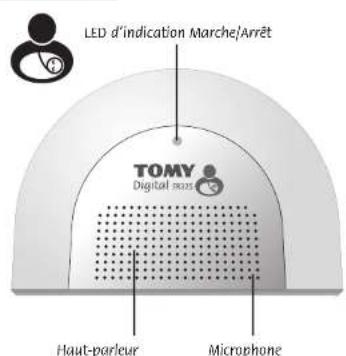

UNITE PARENT
PROBLEEMOPILOSSINGSGIDS
DcKbBnBnBnBnBnBnBnBnBnBnBnBnBnBnBnBnBnBnBnBnBnBnBnBnBnBnBnBnBnBnBnBnBnBnBnBnBnBnBnBnBnBnBnBnBnBnBnBnBnBnB
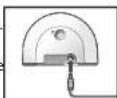
Puc.3
HACTPOIKA
BKNIOUOYEHNE
YbDnBcB TOM,TOPOdntbnckn HTeckkn b60kno npocoeHHe K Cetn 3neKpOtnaHn H B POnTeBckn 60k BCTABHeBA6TApae (cm,BhIe) 50Kn DNOxHb HAXoDbH PaCtOHH He MeHee I MetpApyr ODPyra. AKTHBpyte TEckkn 60k noyn HApKTHn UyepKnaHHa KHONK BKL/BblC c3aHne tOPOHb 60ka, nKaHa nepehdN naHHe He aZorponctaneHH eBcToeMHdu HHNAtok pHTAH.
Daeene aktnkpyte Pdokntbckn 6nok nyetm kayma H ydepnmba H KNOB Bkl/8blOcPacnonoKeHHo Ha 3aehn ctope 6noka (pdaom C kpbikou bataepHoro oTCbKa), noka he 3aropntcr 3eennb CBeTOIOBDh HINKATOP. PnpMueHAn: PpaBIOKHeHN Pdokntbckr Oka panBahe Detckoro, ecln Detckm 6nok He 6ydet PNDKIOeH B TceHHe 30 cekHy, npo3ayuH npdypndtbelh ciHnA
BbIKIOUCHHE
BbIIOHnue PoiDHTbckbn6NOKnyTEM HAKATINu NHApKbAHmN KHONK BIK/BlIO, nOKHe NOraCHeT eBemHb CBeTOIDHn INHkDAtok.
3aTeHAXMMTEupeKnBaeKKnKByBkN/BlbKHOHaTcKOM6nOKe,NOKaHe noracHcETCBToNDHmHnDnKATOp.
CBA3b MEKdy DETCKIM IPONTIEbCKIM ELOKOM
NocnA kTHBAMoPNDtBNKcO NOETKOB, KOTbNObOgOCTyPOeTBAIPOBETYANTONOWCK COeHINDCHpYrC pAOYROM, HoPNDtBNKcOM BNOKE SABOPRTCBETODMOHm HINKAPATC HINK, KOTnIOHO MEJy DcKIMn POdInTeBcKmN bNOkMn PNOHOTd eCoaHHeHMe, CBETODHOHm HINKATOP CbH, 6yEDT NOCTAHHO RopTe 3eHbMn, O3aHau, PAoTDHOHm PabotAe B HOPMlHM oekimme. CEBTOBOH INHAKATOp ypo8h 38ka peHpyet 38 hcyck cemFPMcH 38yk.TenpeHINKATOp
PNEUYPEXDAIOUNE CUNHAJIbI
Onopenerne pnynnohy zkybooro cunrana pno nmoiou chznoyou taobniocb. Ecnb Hb meokote onopenerntb kmy uptyahtn pnynnohy npobmbl, obaipmttecb k p432yEpykobodtro noomka npocb tpueienoh.
39
HHOPMALIAIPOTEXHIMEBE3ONACHOCTN
BAKHOI pAnHn paAnHOH npAnHaHHe TOnbKO nOHNBOA HOBnneHM PAoHnHOH Toy npAnHaHHea HONKO TOnTO, 0ToBnNoOMoB BAM cNepiB Ta peBekOM, OH He aMENeT coBn noHooenH bnpmCtPOB3PcOxBbI.1NMeJe He npAnHaHHeHO HApRg. BcERpaDpKte NpEeKTHpeKme TeANn KABEMn BHE DOCAReMaOCT MAneBHX DTeJ. He yTaHauBaJIeHT NkAKMe TAeYPAOHN BHI dETeKNOKPoBAtK. 8SyBeITcB, 0TO BCPODaPACNOXeHKBeEcoaON, TAK, 0TO DeTn E CMORY ATGNTATCb, HET ONaCHOTCH OTKIOHCHEN. He IcNpOByTE BNOH NtAHNAOT PAOHN A C NOBMy APyHM o6OpDyAOHN. He IcNpOByTE pAOHN HApTHe BNOH NpTAHNA HCMNKeTA NoCTABKn. BO H3eBaeHn NpONMOK NteCNbIXb NoBpEKHN He HadaaNBHeT N aNDIOKHeHHN BNOK NtAHNA? 3APdABYe cYPToA TpoN mncnBOAHIN MOryT HapReBaTcB- OpaAsaTIeCB c NMM OCPoKHO, PAITE OCTbY. HE HAKPiBAITE PoDITnBckN kIETCKN 6NoIKIOTKAIeZIARHOe YcPOrTOBc, ECNI HoBCOaPeAE TnoBbOtaH NsienenIE HeNnEHNHEKNKO DHE. Bo I3eBaeHn NpApKaEHn 3NeKTPrHecKM TOKOM OTKIOHaiye HADNEe O BNOA HnepyDyOBKn. AkkyMnTIPbO pOAnbEeBO 6NoKA NpOEaKnt PpepeAotBo. He IbopBaJIaBE Xc C obuNNBM MycOPOM. He nIbTAeBc DEMOHTPoBaB kAAkeNHOb cuaTcN ENDNKamOCOTERTbHO.
630BAAHBEATAPEN
3aepnA, h3BvneHn kna 3aMeHb batape n dnKbO c0pEeBcM. OTOeHNHte npoB o aDantepa, nppeJe mehBbTaepae. NcNobyIe ToBko BxOJyDnB o KOMnBtke BApTeo.
6Opatate BHHAMHHe HTo, 4TO rapaHTMa TcHOBTN HeDeiBCTBnHIO, eCNB Bb IcNbnkye Te DpyTne batape. OOnuAitae BOePbXHOCTb KOANTAOB ppeKe, neyCtAHABINBaBbXOJyBO KOMnKNT Batapeo. CofNOJaTe Oocyo octopoxhoCTb, YTObe ObceHnbpapmBho NOONKeHBe batape, CcoNIOBAI 3AnHKOII ANPOCHTH (+) nHa batapae n Hn3denn. BbInBe Taepae n 10coeMHTe ee noHIOB bIBO, eCNy UcYPOITBO Byed xpanHtCB TcTeHNeBO RDPoRr BPEMeHN Hnn, eCNb PAeepn PAPDnAcb. BbIMMAITE BwUeDNE H3 CP08
batape n 3ycPoTBe. Hc BoMeaJIe CTape (HCNObbHbHne HIO HOse Batape paes Pa3bHX TINOB, HANPMep, nepe3aPKaEMBE nIeONOHyIe, INsBatape paasPnO3BDnTeEN/ToproBxM Mapok. IVcnNo3Byte batapen TOBko OOnHAKOBoro IN anHOrnHORo peKOMeDyE Mtna BbIMMAITE batape n 3UYPOITCbA noCne HcNOnb3OBAHn IN Cnyae DnHTBnHO XpAHEAE. IV3NeueHne Hn3PpAe nepe3aPKaEMBXaPaeon DOKHa
OcUeTbcBbTcBnTO KBO 3pOChmYcEBoHE. HneTpAEe.

YNYK3KPYTE BWEHJIEE HcTPOB BAPENEGONCHM CIO6OAM. KaterOPWCKN ANPUEAETC B6PCATBAPEN EBOHJ NAOBtTeTcEb 06 OOKPKAYUeCpeDE, YTNIMYNV TYPONCTBOI NTATENTHO YNAKOBBBAERero.CUMBOB MyCOPHORo NKHA KONECHKAYK3BAIBOT HA YCTPOINCTBX MNTABAPENK, KOTOPSE HeJIbIbBpOcBbBvBMeCTe CDMAAHMMMYOCOPM, TAK KAOHN CODEPZMT BECAETCb, KOTOPSE MONTHYANETBE IPD OKPKAYUeCpeDE INH 3DPDOBIO.
RUBO
- PYKOBOCTBO NONCKA INPOCTbIX PEWEHIM
B ciuyae ecn paonHHe pa6oTcTOnKbM o6paO, INHpOmaun, npECTaBHeHHa HKe, OOnKa TPOOMOy peuHTb
ACTO3ADABAEMBIEBOINPOCbl
B. Noyemy Moi moHTop He depKMT 3apRd mN BbIKIOUaETc?
O. 8aTaepa MoHOTOPA 6bIba NooCoDAHHeNe He npaaBnBHO.ChAMHTe KpUkY oTcEka TaapEn. KoppeKTHO coedmHTNEtienCbe Taepa n CTHEDM HNPTOn MOHOTPA. ZAKPOTEK pKmHpy NpIKPVTyTe.
B.BoBpem3apAKn PoDnTeBckn 6nOK dONKeH 6bTb BKNIOeH mN BBKIOeH?
O.IIbO3H3A8yBAPnHHTOB. POJIeTbckBkN 60BcEyJ3aRapKbTcKa BKO BKNIOCHOHOM, TAK IN B KINIOCHOHOM COCTHOHN, OJANHO, C BKNIOCHEHMI BNOKOM BO EPMF a3pIKdY, Bbl cMOXETe CTeDnTb A CBOHM pEOCHKM
B. Byder cn Cn hnepe npndpntn Bn Hn o BxOe3 a pAaC yDCTHBA nnn Hn nK3Km 3aqrde 6atapre, enypoBeyrpnokotu paoHOnHHNBygYtacHTBNHn HbI (6be32yHn peKMH)
O.Da, npdpnypeintenbHc Hn He 3aBcHt OT nMaHeHy ypoBHa rpoMKoCTn.
B. Mory nI nCnONb3ObaP aDnHOHIO 3a rpaHmue?
O. Bb MoKeTe MCnNoB3aB pAdHNO B Ctpane ee npno6peTHeH H Ma TeppTropm EC. XToA padHOHAA MOKeT pAnBnHBO yFHKNHOHPoBaBt BpyrXn CtpAnx, ee paoaH aactoT MeKOT nobNTB (MnMoKET 6bTb NpdeBpHTyA bnnHIO) DpyrXn YcTPOCTB, nE eCnNoB3oBAHne MOKeT BbTb He3AOKHbM. ToMe HEcET OBeTcBEHHOCTM 3a MCnNoB3oBAHne padHOHAA 3a PpDJIeAMi CtpAnb, K BoTPOP OHb pNo6peTHe, nIc EC.
B. MoXeT m paHONHOHr cyHKUHOHmPoBaTa npaPAnEnbO c WI-Fl n dpyrUm 2.4GHz yctpOHTBaMn?
O.PaHnHbTOMy pa0bTaet ha cactote 2.4Gf, Hcnohby (DSSS) TeXNOHIO, papaobatoHHY CteuHbHO, cyo6b fyHKnHIOHPoBaT aapnIbnHeC WFI-HpyrIM cBpOBoHm UINPPOBIM OOpbyOBn OOpbyOBn OOpbyOBn OOpbyOBn OOpbyOBn OOpbyOBn OOpbyOBn OOpbyOBn OOpbyOBn OOpbyOBn OOpbyOBn OOpbyOBn OOpbyOBn OOpbyOBn OOpbyOBn OOpbyOBn OOpbyOBn OOpbyOBn OOpbyOBn OOpbyOBn OOpbyOBN OOpbyOBN OOpbyOBN OOpbyOBN OOpbyOBN OOpbyOBN OOpbyOBN OOpbyOBN OOpbyOBN OOpbyOBN OOpbyOBN OOpbyOBN OOpbyOBN OOpbyOBN OOpbyOBN OOpbyOBN OOpbyOBN OOpbyOBN OOpbyOBN OOpbyOBN OOpbyOB
- NONGK HENCIPABHOCTEIN
| HEICNIPABHOCTb | BO3MOKHA HAPIHIMHA | YCTPAHEHIME | CINHIL |
| Podmitelbckn bokn He bOKIOHAETCH. | Bxdoaiaa B KOMPLKT 6atapcr yctahonbHa He ppaalbHno. | Bctabte 6batapeo KaK OINCAHO A HNCTpyuHN HIN B pykoAOCTe H N BCTPOO CTAYIpy. Tioce lyctahonbKa bapar, noctabte Podmitelbckn 6bok HA zopadky u octabte erho HA HcckolbKO MHTYT npexkJe, Yen BIKNOHTb. | 39 |
| 3apzic 6batapcr MOKT 6b1b Hmke Kprrntnecofo HAPRAKNNH, YTObU BIKNUHTb PdAONHNO. | Pocabte Podmitelbckn 6bok HA zopadky u octabte erho HA HcckolbKO MHTYT npexkJe, Yen BIKNOHTb. | ||
| 3eKtPOPTAMHIE NOCDOCENHNO HEBEPHO. | Piopaepte coocdHNCHE Kabela nTANAH (BKNIOHAA HACTEHNY POSETK). | ||
| DeTCKn bokn He bOKIOAETCH. | 3eKtPOPTAMHIE NOCDOCENHNO HEBEPHO. | Piopaepte coocdHNCHE Kabela nTANAH (BKNIOHAA HACTEHNY POSETK). | 39 |
| HedocatoHNO doHrOg DeyepKBANACB KHONKA BKL/BblKT. | HaMATEy E ydeprnBaTe KNOHy BKl/BblKT Ha dctckom 6bok, noka h c3aogptcBa CBTDOHNHn HNDKAKOT PNTAHNA. | ||
| Podmitelbckn bokn bokn He bOKIOAETCH. | PiDynpckJauoQni CaHnH NoTcRPN KOANTa. | Y6cDMTCB B TOM, YTO DeTCKn 6bok kXIOChE. | 39 |
| Y6bDfTeB T ToR, YTO Podmitelbckn 6bok NIOyAeT, qOtaTaoHn HINATN, H IepemecHe Iero e BLOKe K, DcTeCKy 6bok. | |||
| Podmitelbckn bokn bokn He bOKIOAETCH. | HIsKm Zapd 6atapcr Na Poditelbck Kom 6boke | PiOCTABTE Podmitelbckn 6bok HA zopadky. | 39 |
| HINCHNHe CnBbUy Ucpz3 Poditelbckn bokn. | CNIKOM HN3Ky ypoBEnb TropKMOTn Hn Poditelbckn 6bok. | YBeLHbTe ypoBEnb TropKMOTn Hn Poditelbckn 6bok. | |
| Podmitelbckn bokn bokn HINCHN, HIOyBKMOTn ypoBn HPOMKOCTN H BOCPOMBDEHn 3BkU2 BIXIOVHn. | Hn 6bokax yctanobien peKHM, AKTBAUZHI NTOCOOM. | O6paTHeB K paZdApy «AkhTBAUZHI yCTPOIcTB TOLOCOM. | 40 |
| Podmitelbckn bokn bokn HINCHN, OHyBKMOTn HPOBn HPOMKOCTN H BOCPOMBDEHn 3BkU2 BIXIOVHn. | Hn 6bokax yctanobien peKHM «AkhTBAUZHI yCTPOIcTB TOLOCOM. | O6paTHeB K paZdApy «AkhTBAUZHI yCTPOIcTB TOLOCOM. | 40 |
| Podmitelbckn bokn bokn HINCHN, OHyBKMOTn HPOBn HPOKOM 6boke MUIAET KpAChBM. | 6bokn HAXODATCNiKOM 6bik30 DpyK K DpyTu. | YBeLHbTe paCSTOnHne MeJdy 6bokAM. | 39 |
| YUpaBn TropKMOTN CNIKOM BvCOKMA. | YMeHNbHIne TropKMOTb. | ||
| CBeTDAIOHn HINDIKATOP NITAHN Hn Poditelbckn 6boke MUIAET KpAChBM. | Batapea PaPrajekha. | PiOCTABTE Poditelbckn 6bok HA zopadky. | 39 |
| He cTbUy pe6bHKa qteKn 3-3a POMEx. | PADIOBONHn DpyToro yctPOCTBn MOYr BmNt Ha 6aboty padmoHnHn. | DaHNn padpoHnHn ACNPOyET dyHnHn AOtomATmNECKOrb GbUbOpa KaHana. Ecsn Bn CbIbUHTe NOMeXn, NOMeCTe TPOJIMKOKN 6bok BLOKe K DeTcKOMy. Ecsn 3tn DeTcTBn Hne PseWn pOboHn NHPOMOHTB, NHPOMOHTB, NHPOMOHTB, NHPOMOHTB, NHPOMOHTB, NHPOMOHTB, NHPOMOHTB, NHPOMOHTB, NHPOMOHTB, NHPOMOHTB, NHPOMOHTB, NHPOMOHTB, NHPOMOHTB, NHPOMOHTB, NHPOMOHTB, NVPOMOHTB, NVPOMOHTB, NVPOMOHTB, NVPOMOHTB, NVPOMOHTB, NVPOMOHTB, NVPOMOHTB, NVPOMOHTB, NVPOMOHTB, NVPOMOHTB, NVPOMOHTB, NVPOMOHTB, NVPOMOHTB, NVPOMOHTB, NVPOM0T, NVPOM0T, NVPOM0T, NVPOM0T, NVPOM0T, NVPOM0T, NVPOM0T, NVPOM0T, NVPOM0T, NVPOM0T, NVPOM0T, NVPOM0T, NVPOM0T, NVPOM0T, NVPOM0T, NVPOM0T, NVPOM0T, NVP0T, NVP0T, NVP0T, NVP0T, NVP0T, NVP0T, NVP0T, NVP0T, NVP0T, NVP0T, NVP0T, NVP0T, NVP0T, NVP0T, NVP0T, NVP0T, NVP0T, NVP0T, NVP0T, NVP0T, NPP0T, NPP0T, NPP0T, NPP0T, NPP0T, NPP0T, NPP0T, NPP0T, NPP0T, NPP0T, NPP0T, NPP0T, NPP0T, NPP0T, NPP0T, NPP0T, NPP0T, NPP0T, NPP0T, NPP0T, NTP0T, NTP0T, NTP0T, NTP0T, NTP0T, NTP0T, NTP0T, NTP0T, NTP0T, NTP0T, NTP0T, NTP0T, NTP0T, NTP0T, NTP0T, NTP0T, NTP0T, NTP0T, NTP0T, NTP0T, NPP0T, NPP0T, NPP0T, NPP0T, NPP0T, NPP0T, NPP0T, NPP0T, NPP0T, NPP0T, NPP0T, NPP0T, NPP0T, NPP0T, NPP0T, NPP0T, NPP0T, NPP0T, NPP0T, Npp0T, NPP0T, NPP0T, NPP0T, NPP0T, NPP0T, NPP0T, NPP0T, NPP0T, NPP0T, NPP0T, NPP0T, NPP0T, NPP0T, NPP0T, NPP0T, NPP0T, NPP0T, NPP0T, NPP0T, NCCOM, NPP0T, NPP0T, NPP0T, NPP0T, NPP0T, NPP0T, NPP0T, NPP0T, NPP0T, NPP0T, NPP0T, NPP0T, NPP0T, NPP0T, NPP0T, NPP0T, NPP0T, NPP0T, NPP0T, NPP0t, NPP0T, NPP0T, NPP0T, NPP0T, NPP0T, NPP0T, NPP0T, NPP0T, NPP0T, NPP0T, NPP0T, NPP0T, NPP0T, NPP0T, NPP0T, NPP0T, NPP0T, NPP0T, NPP0T, NPP0TG, NPP0T, NPP0T, NPP0T, NPP0T, NPP0T, NPP0T, NPP0T, NPP0T, NPP0T, NPP0T, NPP0T, NPP0T, NPP0T, NPP0T, NPP0T, NPP0T, NPP0T, NPP0T, NPP0T, NPP0TT, NPP0T, NPP0T, NPP0T, NPP0T, NPP0T, NPP0T, NPP0T, NPP0T, NPP0T, NPP0T, NPP0T, NPP0T, NPP0T, NPP0T, NPP0T, NPP0T, NPP0T, NPP0T, NPP0T, NPP0TI, NPP0T, NPP0T, NPP0T, NPP0T, NPP0T, NPP0T, NPP0T, NPP0T, NPP0T, NPP0T, NPP0T, NPP0T, NPP0T, NPP0T, NPP0T, NPP0T, NPP0T, NPP0T, NPP0T, NPP0TD, NPP0T, NPP0T, NPP0T, NPP0T, NPP0T, NPP0T, NPP0T, NPP0T, NPP0T, NPP0T, NPP0T, NPP0T, NPP0T, NPP0T, NPP0T, NPP0T, NPP0T, NPP0T, NPP0T, NPP0TA, NPP0T, NPP0T, NPP0T, NPP0T, NPP0T, NPP0T, NPP0T, NPP0T, NPP0T, NPP0T, NPP0T, NPP0T, NPP0T, NPP0T, NPP0T, NPP0T, NPP0T, NPP0T, NPP0T, NPP0TC, NPP0T, NPP0T, NPP0T, NPP0T, NPP0T, NPP0T, NPP0T, NPP0T, NPP0T, NPP0T, NPP0T, NPP0T, NPP0T, NPP0T, NPP0T, NPP0T, NPP0T, NPP0T, NPP0T, NPP0TM, NPP0T, NPP0T, NPP0T, NPP0T, NPP0T, NPP0T, NPP0T, NPP0T, NPP0T, NPP0T, NPP0T, NPP0T, NPP0T, NPP0T, NPP0T, NPP0T, NPP0T, NPP0T, NPP0T, NPP0TF, NPP0T, NPP0T, NPP0T, NPP0T, NPP0T, NPP0T, NPP0T, NPP0T, NPP0T, NPP0T, NPP0T, NPP0T, NPP0T, NPP0T, NPP0T, NPP0T, NPP0T, NPP0T, NPP0T, NPP0TX, NPP0TX, NPP0TX, NPP0TX, NPP0TX, NPP0TX, NPP0TX, NPP0TX, NPP0TX, NPP0TX, NPP0TX, NPP0TX, NPP0TX, NPP0TX, NPP0TX, NPP0TX, NPP0TX, NPP0TX, NPP0TX, NPP0TX, NPP0T, NPP0T, NPP0T, NPP0T, NPP0T, NPP0T, NPP0T, NPP0T, NPP0T, NPP0T, NPP0T, NPP0T, NPP0T, NPP0T, NPP0T, NPP0T, NPP0T, NPP0T, NPP0T, NPP0TO, NPP0TO, NPP0TO, NPP0TO, NPP0TO, NPP0TO, NPP0TO, NPP0TO, NPP0TO, NPP0TO, NPP0TO, NPP0TO, NPP0TO, NPP0TO, NPP0TO, NPP0TO, NPP0TO, NPP0TO, NPP0TO, NPP0TO, NPP0TX, NPP0TX, NPP0TX, NPP0TX, NPP0TX, NPP0TX, NPP0TX, NPP0TX, NPP0TX, NPP0TX, NPP0TX, NPP0TX, NPP0TX, NPP0TX, NPP0TX, NPP0TX, NPP0TX, NPP0TX, NPP0TX, NPP0TO, NPP0TO, NPP0TO, NPP0TO, NPP0TO, NPP0TO, NPP0TO, NPP0TO, NPP0TO, NPP0TO, NPP0TO, NPP0TO, NPP0TO, NPP0TO, NPP0TO, NPP0TO, NPP0TO, NPP0TO, NPP0TO, NPP0T, NPP0TO, NPP0TO, NPP0TO, NPP0TO, NPP0TO, NPP0TO, NPP0TO, NPP0TO, NPP0TO, NPP0TO, NPP0TO, NPP0TO, NPP0TO, NPP0TO, NPP0TO, NPP0TO, NPP0TO, NPP0TO, NPP0TX, NPP0TO, NPP0TO, NPP0TO, NPP0TO, NPP0TO, NPP0TO, NPP0TO, NPP0TO, NPP0TO, NPP0TO, NPP0TO, NPP0TO, NPP0TO, NPP0TO, NPP0TO, NPP0TO, NPP0TO, NPP0TO, NPP0TX, NPP0T, NPP0TO, NPP0TO, NPP0TO, NPP0TO, NPP0TO, NPP0TO, NPP0TO, NPP0TO, NPP0TO, NPP0TO, NPP0TO, NPP0TO, NPP0TO, NPP0TO, NPP0TO, NPP0TO, NPP0TO, NPP0TO, NPP0T, NPP0TX, NPP0TO, NPP0TO, NPP0TO, NPP0TO, NPP0TO, NPP0TO, NPP0TO, NPP0TO, NPP0TO, NPP0TO, NPP0TO, NPP0TO, NPP0TO, NPP0TO, NPP0TO, NPP0TO, NPP0TO, NPP0TO, NPP0T, NPP0 TX, NPP0TO, NPP0TO, NPP0TO, NPP0TO, NPP0TO, NPP0TO, NPP0TO, NPP0TO, NPP0TO, NPP0TO, NPP0TO, NPP0TO, NPP0TO, NPP0TO, NPP0TO, NPP0TO, NPP0TO, NPP0TO, NPP0TO, NPP0TT, NPP0TO, NPP0TO, NPP0TO, NPP0TO, NPP0TO, NPP0TO, NPP0TO, NPP0TO, NPP0TO, NPP0TO, NPP0TO, NPP0TO, NPP0TO, NPP0TO, NPP0TO, NPP0TO, NPP0TO, NPP0TO, NPP0TO, NPP0 TO, NPP0TO, NPP0TO, NPP0TO, NPP0TO, NPP0TO, NPP0TO, NPP0TO, NPP0TO, NPP0TO, NPP0TO, NPP0TO, NPP0TO, NPP0TO, NPP0TO, NPP0TO, NPP0TO, NPP0TO, NPP0TO, NPP0TO, NPP0To, NPP0TO, NPP0TO, NPP0TO, NPP0TO, NPP0TO, NPP0TO, NPP0TO, NPP0TO, NPP0TO, NPP0TO, NPP0TO, NPP0TO, NPP0TO, NPP0TO, NPP0TO, NPP0TO, NPP0TO, NPP0TO, NPP0TO, NPP0TG, NPP0TO, NPP0TO, NPP0TO, NPP0TO, NPP0TO, NPP0TO, NPP0TO, NPP0TO, NPP0TO, NPP0TO, NPP0TO, NPP0TO, NPP0TO, NPP0TO, NPP0TO, NPP0TO, NPP0TO, NPP0TO, NPP0TO, NPP0TH, NPP0TO, NPP0TO, NPP0TO, NPP0TO, NPP0TO, NPP0TO, NPP0TO, NPP0TO, NPP0TO, NPP0TO, NPP0TO, NPP0TO, NPP0TO, NPP0TO, NPP0TO, NPP0TO, NPP0TO, NPP0TO, NPP0TO, NPP0TOP, NPP0TO, NPP0TO, NPP0TO, NPP0TO, NPP0TO, NPP0TO, NPP0TO, NPP0TO, NPP0TO, NPP0TO, NPP0TO, NPP0TO, NPP0TO, NPP0TO, NPP0TO, NPP0TO, NPP0TO, NPP0TO, NPP0TO, NPP0to, NPP0TO, NPP0TO, NPP0TO, NPP0TO, NPP0TO, NPP0TO, NPP0TO, NPP0TO, NPP0TO, NPP0TO, NPP0TO, NPP0TO, NPP0TO, NPP0TO, NPP0TO, NPP0TO, NPP0TO, NPP0TO, NPP0TO, NPP0TD, NPP0TO, NPP0TO, NPP0TO, NPP0TO, NPP0TO, NPP0TO, NPP0TO, NPP0TO, NPP0TO, NPP0TO, NPP0TO, NPP0TO, NPP0TO, NPP0TO, NPP0TO, NPP0TO, NPP0TO, NPP0TO, NPP0TO, NPP0TC, NPP0TO, NPP0TO, NPP0TO, NPP0TO, NPP0TO, NPP0TO, NPP0TO, NPP0TO, NPP0TO, NPP0TO, NPP0TO, NPP0TO, NPP0TO, NPP0TO, NPP0TO, NPP0TO, NPP0TO, NPP0TO, NPP0TO, NPP0TA, NPP0TO, NPP0TO, NPP0TO, NPP0TO, NPP0TO, NPP0TO, NPP0TO, NPP0TO, NPP0TO, NPP0TO, NPP0TO, NPP0TO, NPP0TO, NPP0TO, NPP0TO, NPP0TO, NPP0TO, NPP0TO, NPP0TO, NPP07, NPP0TO, NPP0TO, NPP0TO, NPP0TO, NPP0TO, NPP0TO, NPP0TO, NPP0TO, NPP0TO, NPP0TO, NPP0TO, NPP0TO, NPP0TO, NPP0TO, NPP0TO, NPP0TO, NPP0TO, NPP0TO, NPP0TO, NPP0TI, NPP0TO, NPP0TO, NPP0TO, NPP0TO, NPP0TO, NPP0TO, NPP0TO, NPP0TO, NPP0TO, NPP0TO, NPP0TO, NPP0TO, NPP0TO, NPP0TO, NPP0TO, NPP0TO, NPP0TO, NPP0TO, NPP0TO, NPP0NO,TNPP0TO, NPP0TO, NPP0TO, NPP0TO, NPP0TO, NPP0TO, NPP0TO, NPP0TO, NPP0TO, NPP0TO, NPP0TO, NPP0TO, NPP0TO, NPP0TO, NPP0TO, NPP0TO, NPP0TO, NPP0TO, NPP0TO, NPP0TO, NCPOHOTN TIOFII TIOFII TIOFII TIOFII TIOFII TIOFII TIOFII TIOFII TIOFII TIOFII TIOFII TIOFII TIOFII TIOFII TIOFII TIOFII TIOFII TIOFII TIOFII TIOFII TIOFII TIOFII TIOFII TIOFII TIOFII TIOFIFN TIOFII TIOFII TIOFII TIOFII TIOFII TIOFII TIOFII TIOFII TIOFII TIOFII TIOFII TIOFII TIOFII TIOFII TIOFII TIOFII TIOFII TIOFII TIOFII TIOFII TIOFII TIOFII TIOFII TIOFII TIOfII TIOFII TIOFII TIOFII TIOFII TIOFII TIOFII TIOFII TIOFII TIOFII TIOFII TIOFII TIOFII TIOFII TIOFII TIOFII TIOFII TIOFII TIOFII TIOFII TIOFII TIOFII TIOFII TIOFII TIOFII TIOfI TIOFII TIOFII TIOFII TIOFII TIOFII TIOFII TIOFII TIOFII TIOFII TIOFII TIOFII TIOFII TIOFII TIOFII TIOFII TIOFII TIOFII TIOFII TIOFII TIOFII TIOFII TIOFII TIOFII TIOFII TIOFIV TIOFII TIOFII TIOFII TIOFII TIOFII TIOFII TIOFII TIOFII TIOFII TIOFII TIOFII TIOFII TIOFII TIOFII TIOFII TIOFII TIOFII TIOFII TIOFII TIOFII TIOFII TIOFII TIOFII TIOFII TIOF II TIOFII TIOFII TIOFII TIOFII TIOFII TIOFII TIOFII TIOFII TIOFII TIOFII TIOFII TIOFII TIOFII TIOFII TIOFII TIOFII TIOFII TIOFII TIOFII TIOFII TIOFII TIOFII TIOFII TIOFII TIOFIII TIOFII TIOFII TIOFII TIOFII TIOFII TIOFII TIOFII TIOFII TIOFII TIOFII TIOFII TIOFII TIOFII TIOFII TIOFII TIOFII TIOFII TIOFII TIOFII TIOFII TIOFII TIOFII TIOFII TIOFII TIOFIL TIOFII TIOFII TIOFII TIOFII TIOFII TIOFII TIOFII TIOFII TIOFII TIOFII TIOFII TIOFII TIOFII TIOFII TIOFII TIOFII TIOFII TIOFII TIOFII TIOFII TIOFII TIOFII TIOFII TIOFII TIOFⅡ TIOFII TIOFⅡ TIOFⅡ TIOFⅡ TIOFⅡ TIOFⅡ TIOFⅡ TIOFⅡ TIOFⅡ TIOFⅡ TIOFⅡ TIOFⅡ TIOFⅡ TIOFⅡ TIOFⅡ TIOFⅡ TIOFⅡ TIOFⅡ TIOFⅡ TIOFⅡ TIOFⅡ TIOFⅢ TIOFⅡ TIOFⅡ TIOFⅡ TIOFⅡ TIOFⅡ TIOFⅡ TIOFⅡ TIOFⅡ TIOFⅡ TIOFⅡ TIOFⅡ TIOFⅡ TIOFⅡ TIOFⅡ TIOFⅡ TIOFⅡ TIOFⅡ TIOFⅡ TIOFⅡ TIOFⅫ TIOFⅡ TIOFⅡ TIOFⅡ TIOFⅡ TIOFⅡ TIOFⅡ TIOFⅡ TIOFⅡ TIOFⅡ TIOFⅡ TIOFⅡ TIOFⅡ TIOFⅡ TIOFⅡ TIOFⅡ TIOFⅡ TIOFⅡ TIOFⅡ TIOFⅡ TIOF⅙ TIOFⅡ TIOFⅡ TIOFⅡ TIOFⅡ TIOFⅡ TIOFⅡ TIOFⅡ TIOFⅡ TIOFⅡ TIOFⅡ TIOFⅡ TIOFⅡ TIOFⅡ TIOFⅡ TIOFⅡ TIOFⅡ TIOFⅡ TIOFⅡ TIOFⅡ TIOF⅓ TIOFⅡ TIOFⅡ TIOFⅡ TIOFⅡ TIOFⅡ TIOFⅡ TIOFⅡ TIOFⅡ TIOFⅡ TIOFⅡ TIOFⅡ TIOFⅡ TIOFⅡ TIOFⅡ TIOFⅡ TIOFⅡ TIOFⅡ TIOFⅡ TIOFⅡ TIOFⅅ TIOFⅡ TIOFⅡ TIOFⅡ TIOFⅡ TIOFⅡ TIOFⅡ TIOFⅡ TIOFⅡ TIOFⅡ TIOFⅡ TIOFⅡ TIOFⅡ TIOFⅡ TIOFⅡ TIOFⅡ TIOFⅡ TIOFⅡ TIOFⅡ TIOFⅡ TIOFⅱ TIOFⅡ TIOFⅡ TIOFⅡ TIOFⅡ TIOFⅡ TIOFⅡ TIOFⅡ TIOFⅡ TIOFⅡ TIOFⅡ TIOFⅡ TIOFⅡ TIOFⅡ TIOFⅡ TIOFⅡ TIOFⅡ TIOFⅡ TIOFⅡ TIOFⅡ TIOFⅩ TIOFⅡ TIOFⅡ TIOFⅡ TIOFⅡ TIOFⅡ TIOFⅡ TIOFⅡ TIOFⅡ TIOFⅡ TIOFⅡ TIOFⅡ TIOFⅡ TIOFⅡ TIOFⅡ TIOFⅡ TIOFⅡ TIOFⅡ TIOFⅡ TIOFⅡ TIOFⅬ TIOFⅡ TIOFⅡ TIOFⅡ TIOFⅡ TIOFⅡ TIOFⅡ TIOFⅡ TIOFⅡ TIOFⅡ TIOFⅡ TIOFⅡ TIOFⅡ TIOFⅡ TIOFⅡ TIOFⅡ TIOFⅡ TIOFⅡ TIOFⅡ TIOFⅡ TIOFⅧ TIOFⅡ TIOFⅡ TIOFⅡ TIOFⅡ TIOFⅡ TIOFⅡ TIOFⅡ TIOFⅡ TIOFⅡ TIOFⅡ TIOFⅡ TIOFⅡ TIOFⅡ TIOFⅡ TIOFⅡ TIOFⅡ TIOFⅡ TIOFⅡ TIOFⅡ TIOFⅦ TIOFⅡ TIOFⅡ TIOFⅡ TIOFⅡ TIOFⅡ TIOFⅡ TIOFⅡ TIOFⅡ TIOFⅡ TIOFⅡ TIOFⅡ TIOFⅡ TIOFⅡ TIOFⅡ TIOFⅡ TIOFⅡ TIOFⅡ TIOFⅡ TIOFⅡ TIOFⅨ TIOFⅡ TIOFⅡ TIOFⅡ TIOFⅡ TIOFⅡ TIOFⅡ TIOFⅡ TIOFⅡ TIOFⅡ TIOFⅡ TIOFⅡ TIOFⅡ TIOFⅡ TIOFⅡ TIOFⅡ TIOFⅡ TIOFⅡ TIOFⅡ TIOFⅡ TIOF⅚ TIOFⅡ TIOFⅡ TIOFⅡ TIOFⅡ TIOFⅡ TIOFⅡ TIOFⅡ TIOFⅡ TIOFⅡ TIOFⅡ TIOFⅡ TIOFⅡ TIOFⅡ TIOFⅡ TIOFⅡ TIOFⅡ TIOFⅡ TIOFⅡ TIOFⅡ TIOF⅗ TIOFⅡ TIOFⅡ TIOFⅡ TIOFⅡ TIOFⅡ TIOFⅡ TIOFⅡ TIOFⅡ TIOFⅡ TIOFⅡ TIOFⅡ TIOFⅡ TIOFⅡ TIOFⅡ TIOFⅡ TIOFⅡ TIOFⅡ TIOFⅡ TIOFⅡ TIOF⅕ TIOFⅡ TIOFⅡ TIOFⅡ TIOFⅡ TIOFⅡ TIOFⅡ TIOFⅡ TIOFⅡ TIOFⅡ TIOFⅡ TIOFⅡ TIOFⅡ TIOFⅡ TIOFⅡ TIOFⅡ TIOFⅡ TIOFⅡ TIOFⅡ TIOFⅡ TIOF⅑ TIOFⅡ TIOFⅡ TIOFⅡ TIOFⅡ TIOFⅡ TIOFⅡ TIOFⅡ TIOFⅡ TIOFⅡ TIOFⅡ TIOFⅡ TIOFⅡ TIOFⅡ TIOFⅡ TIOFⅡ TIOFⅡ TIOFⅡ TIOFⅡ TIOFⅡ TIOFⅣ TIOFⅡ TIOFⅡ TIOFⅡ TIOFⅡ TIOFⅡ TIOFⅡ TIOFⅡ TIOFⅡ TIOFⅡ TIOFⅡ TIOFⅡ TIOFⅡ TIOFⅡ TIOFⅡ TIOFⅡ TIOFⅡ TIOFⅡ TIOFⅡ TIOFⅡ TIOFⅤ TIOFⅡ TIOFⅡ TIOFⅡ TIOFⅡ TIOFⅡ TIOFⅡ TIOFⅡ TIOFⅡ TIOFⅡ TIOFⅡ TIOFⅡ TIOFⅡ TIOFⅡ TIOFⅡ TIOFⅡ TIOFⅡ TIOFⅡ TIOFⅡ TIOFⅡ TIOFⅲ TIOFⅡ TIOFⅡ TIOFⅡ TIOFⅡ TIOFⅡ TIOFⅡ TIOFⅡ TIOFⅡ TIOFⅡ TIOFⅡ TIOFⅡ TIOFⅡ TIOFⅡ TIOFⅡ TIOFⅡ TIOFⅡ TIOFⅡ TIOFⅡ TIOFⅡ TIOFⅹ TIOFⅡ TIOFⅡ TIOFⅡ TIOFⅡ TIOFⅡ TIOFⅡ TIOFⅡ TIOFⅡ TIOFⅡ TIOFⅡ TIOFⅡ TIOFⅡ TIOFⅡ TIOFⅡ TIOFⅡ TIOFⅡ TIOFⅡ TIOFⅡ TIOFⅡ TIOFⅳ TIOFⅡ TIOFⅡ TIOFⅡ TIOFⅡ TIOFⅡ TIOFⅡ TIOFⅡ TIOFⅡ TIOFⅡ TIOFⅡ TIOFⅡ TIOFⅡ TIOFⅡ TIOFⅡ TIOFⅡ TIOFⅡ TIOFⅡ TIOFⅡ TIOFⅡ TIOF⅜ TIOFⅡ TIOFⅡ TIOFⅡ TIOFⅡ TIOFⅡ TIOFⅡ TIOFⅡ TIOFⅡ TIOFⅡ TIOFⅡ TIOFⅡ TIOFⅡ TIOFⅡ TIOFⅡ TIOFⅡ TIOFⅡ TIOFⅡ TIOFⅡ TIOFⅡ TIOFⅭ TIOFⅡ TIOFⅡ TIOFⅡ TIOFⅡ TIOFⅡ TIOFⅡ TIOFⅡ TIOFⅡ TIOFⅡ TIOFⅡ TIOFⅡ TIOFⅡ TIOFⅡ TIOFⅡ TIOFⅡ TIOFⅡ TIOFⅡ TIOFⅡ TIOFⅡ TIOF⅊ TIOFⅡ TIOFⅡ TIOFⅡ TIOFⅡ TIOFⅡ TIOFⅡ TIOFⅡ TIOFⅡ TIOFⅡ TIOFⅡ TIOFⅡ TIOFⅡ TIOFⅡ TIOFⅡ TIOFⅡ TIOFⅡ TIOFⅡ TIOFⅡ TIOFⅡ TIOF⅛ TIOFⅡ TIOFⅡ TIOFⅡ TIOFⅡ TIOFⅡ TIOFⅡ TIOFⅡ TIOFⅡ TIOFⅡ TIOFⅡ TIOFⅡ TIOFⅡ TIOFⅡ TIOFⅡ TIOFⅡ TIOFⅡ TIOFⅡ TIOFⅡ TIOFⅡ TIOFⅇ TIOFⅡ TIOFⅡ TIOFⅡ TIOFⅡ TIOFⅡ TIOFⅡ TIOFⅡ TIOFⅡ TIOFⅡ TIOFⅡ TIOFⅡ TIOFⅡ TIOFⅡ TIOFⅡ TIOFⅡ TIOFⅡ TIOFⅡ TIOFⅡ TIOFⅡ TIOF⅃ TIOFⅡ TIOFⅡ TIOFⅡ TIOFⅡ TIOFⅡ TIOFⅡ TIOFⅡ TIOFⅡ TIOFⅡ TIOFⅡ TIOFⅡ TIOFⅡ TIOFⅡ TIOFⅡ TIOFⅡ TIOFⅡ TIOFⅡ TIOFⅡ TIOFⅡ TIOF⅐ TIOFⅡ TIOFⅡ TIOFⅡ TIOFⅡ TIOFⅡ TIOFⅡ TIOFⅡ TIOFⅡ TIOFⅡ TIOFⅡ TIOFⅡ TIOFⅡ TIOFⅡ TIOFⅡ TIOFⅡ TIOFⅡ TIOFⅡ TIOFⅡ TIOFⅡ TIOF⅒ TIOFⅡ TIOFⅡ TIOFⅡ TIOFⅡ TIOFⅡ TIOFⅡ TIOFⅡ TIOFⅡ TIOFⅡ TIOFⅡ TIOFⅡ TIOFⅡ TIOFⅡ TIOFⅡ TIOFⅡ TIOFⅡ TIOFⅡ TIOFⅡ TIOFⅡ TIOF⅀ TIOFⅡ TIOFⅡ TIOFⅡ TIOFⅡ TIOFⅡ TIOFⅡ TIOFⅡ TIOFⅡ TIOFⅡ TIOFⅡ TIOFⅡ TIOFⅡ TIOFⅡ TIOFⅡ TIOFⅡ TIOFⅡ TIOFⅡ TIOFⅡ TIOFⅡ TIOFⅪ TIOFⅡ TIOFⅡ TIOFⅡ TIOFⅡ TIOFⅡ TIOFⅡ TIOFⅡ TIOFⅡ TIOFⅡ TIOFⅡ TIOFⅡ TIOFⅡ TIOFⅡ TIOFⅡ TIOFⅡ TIOFⅡ TIOFⅡ TIOFⅡ TIOFⅡ TIOF⅖ TIOFⅡ TIOFⅡ TIOFⅡ TIOFⅡ TIOFⅡ TIOFⅡ TIOFⅡ TIOFⅡ TIOFⅡ TIOFⅡ TIOFⅡ TIOFⅡ TIOFⅡ TIOFⅡ TIOFⅡ TIOFⅡ TIOFⅡ TIOFⅡ TIOFⅡ TIOF⅘ TIOFⅡ TIOFⅡ TIOFⅡ TIOFⅡ TIOFⅡ TIOFⅡ TIOFⅡ TIOFⅡ TIOFⅡ TIOFⅡ TIOFⅡ TIOFⅡ TIOFⅡ TIOFⅡ TIOFⅡ TIOFⅡ TIOFⅡ TIOFⅡ TIOFⅡ TIOFⅼ TIOFⅡ TIOFⅡ TIOFⅡ TIOFⅡ TIOFⅡ TIOFⅡ TIOFⅡ TIOFⅡ TIOFⅡ TIOFⅡ TIOFⅡ TIOFⅡ TIOFⅡ TIOFⅡ TIOFⅡ TIOFⅡ TIOFⅡ TIOFⅡ TIOFⅡ TIOFⅽ TIOFⅡ TIOFⅡ TIOFⅡ TIOFⅡ TIOFⅡ TIOFⅡ TIOFⅡ TIOFⅡ TIOFⅡ TIOFⅡ TIOFⅡ TIOFⅡ TIOFⅡ TIOFⅡ TIOFⅡ TIOFⅡ TIOFⅡ TIOFⅡ TIOFⅡ TIOFⅶ TIOFⅡ TIOFⅡ TIOFⅡ TIOFⅡ TIOFⅡ TIOFⅡ TIOFⅡ TIOFⅡ TIOFⅡ TIOFⅡ TIOFⅡ TIOFⅡ TIOFⅡ TIOFⅡ TIOFⅡ TIOFⅡ TIOFⅡ TIOFⅡ TIOFⅡ TIOFⅥ TIOFⅡ TIOFⅡ TIOFⅡ TIOFⅡ TIOFⅡ TIOFⅡ TIOFⅡ TIOFⅡ TIOFⅡ TIOFⅡ TIOFⅡ TIOFⅡ TIOF⅙ TIOFⅡ TIOFⅡ TIOFⅡ TIOFⅡ TIOFⅡ TIOFⅡ TIOFⅫ TIOFⅡ TIOFⅫ TIOFⅡ TIOFⅫ TIOFⅫ TIOFⅫ TIOFⅫ TIOFⅫ TIOFⅫ TIOFⅫ TIOFⅫ TIOFⅫ TIOFⅫ TIOFⅫ TIOFⅫ TIOFⅫ TIOFⅫ TIOFⅫ TIOFⅫ TIOFⅫ TIOFⅫ TIOFⅫ TIOFⅫ TIOFⅱTIDOITG | NTPDIAH |

m = 311
| 48 | ||
| 48 | ||
| 48 | ||
| 48 | ||
| 48 | ||
| 48 | ||
| 48 | ||

(a-aa) Ni-MH [g] 3.6 acln, g] 750 kj, qunl bokly akk kajr -yjnni kai nang hllh jayil gila 350MA 5a 5p190:100-240
"gao Jia 300: jai jui
50-0
2410~2475
aolll ologto
aay aay ayy gaa yag aalh jay aay aay aay aay aay aay aay aay aay aay aay aay aay aay aay aay aay aay aay aay aay aay aay aay aay aay aay aay aay aay aay aay aay aay aay aay aay aay aay aay aay aay aay aay aay aay aay aay aay aay
1 1
y 1
al lglge oolrnnn rlll aal y paae gaaa ean ane ae nne aen annn nn ene ae
L 1

1jL1jJ2
J 1
.ww.comy.eu:
2011年/1月27日
1
aal lal jal jal jal aal 1al 1al 1al 1al 1al 1al 1al
J 1
Jaae aae ae aee
1
1-1g20 1+
100000000000000000000000000000000000000000000
s#i j#i j#i j#i j#i
1
y
13g 1
2.4 1 Jn jyI yjyI Jn LgJyWl FI aaii i yjyI g yjyI j
a a a a a a a a a a a a a a a a a a a a a a a a a a a a a a a a a a a a a a
jshift 1
aee aee eae eae eae eae eae eae eae eae eae eae eae eae eae eae eae eae eae eae eae
1 1 j Shift

y
V
y
LCD 1
a 100
sing
a a a a a a a a a a a a a a a a a a a a a a a a a a a a a a a a a a a a a a a a a a a a a a a a a a
中
g jd 1 1 1 1 1 1 1 1 1 1 1 1 1 1 1 1 1 1 1 1 1 1 1 1 1 1 1
1
j1+2j,j
LCD 1
Oeannn
y y
glllgl
1
y
y 2
aaiiie 1
e 1
1
www.tomy.eu/jyjysjynlgejleLgU

S AOB = S COD + S BOC - S BOC

Jus 15y 10000000000000000000000000000000000000000000000
dellal 1
alid bjg 10a
aill 1000000000000000000000000000000000000000000000

Jdally idd
y 1
a a a a a a a a a a a a a a a a a a a a a a a a a a a a a a a a
E. XpiaZetai n SuKeun Fovea mu v a eivai evpyonoiuev n anevepyooinieyn kata in opiction;
A. Kai ta do. H Suoiouei Fovéa oac B foqiortiê ov evi eavay oeyoynoyn i an evoynoynoyn i Oartóo, n foiption tnc ouocuokr ot aviv eevoynoynoyn 80 ac emptépiye va napakououeite to mopoe oac evio pctetai.
E. Mertpaia Tg Bepokpaa Tou duaiou Toupuu ou puyxupotovvtaac aanoukeui Kaipikou bokopetekit k tui aour quut oukuei napakowohnouj mu - yiat
A. O mjuaviojoc eptonoyk Bepkoqaiaac mea ot oukeui napakokootheoic aoc Tomy elva oxediaquevoac oac
delta iia evdei nTc npekopkaiaotou dwiatou tou mpuoi oac me ia ukrpi anokkai ton +1Cn-1C.AAe c oukeue exyau enionnpapouia onkoiin.
where ' pair' is the ' from' string that we want to insert, then ' into' is the ' from' string that we want to add. The pair 'in' and 'out' are always the same. For example, if you want to insert a letter in the CD from a source word, you can simply insert it in the CD from a source word.
nne nnnnne nnnnne nnnnne nnnnne nnnnne nnnnne nnnnne nnnnne nnnnne nnnnne nnnnne nnnnne nnnnne nnnnne nnnnne nnnnne nnnnne nnnnne nnnnne nnnnne nnnnne nnnnne nnnnne nnnnne nnnnne nannnee
pnnn nnnn nn no ynnn nn nnnn nn nnnn nn nnnn
aannnnnne nnnnne nnnnne nnnnne nnnnne nnnnne nnnnne nnnnne nnnnne nnnnne nnnnne nnnnne nnnnne nnnnne nnnnne nnnnne nnnnne nnnnne nnnnne nnnnne nnnnne nnnnne nnnnne nnnnne nnnnne nnnnne
mnnn nne nee
2000000000000000000000000000000000
nnoyn (1)nnnnnnn 100e nnnn nn nnnn nnnn
(Rock-a-bye Baby) 3' on, (Sleep Baby Sleep) 2' on (omma en- y) 1' on en- y
201
n nn nnnn nn nnnnnnnnnnnnnnnnnnnnnnnnnnnnnnnnnnnnnnnnnnnnnnnnnnnnnnnnnnnnnnnnnnnnnnnnnnnnnnnnnnnnnnnnnnnnnnnnn
nne nnnn nn nnnn nn nnnn nn nnnn nn nnnn nn nnnn nn nnnn nn nnnn nn nnnn nn nnnn nn nnnn nn nnnn nn nnnn nn nnnn nn nnnn nn nnnn nn nnnn nn nnnn nn nnnn nn nnnn nn nnnn nn nnnn nn nnnn nn nnnn nn nnnn nn nnnn
mnnn
mnnn nne LCD-n nann nn nnnn 1000, pnnn nn nnnn nn nnnn nn nnnn nn nnnn nn nnnn
3 3 3 3 3 3 3 3 3 3 3 3 3 3 3 3 3 3 3 3 3 3 3 3 3
nne nnnn nnnn nn nnnn nnnn nnnn nnnn nnnn nnnn nnnn nnnn nnnn nnnn nnnn nnnn nnnn nnnn nnnn nnnn nnnn nnnn nnnn nnnn nnnn nnnn nnnn nnnn nnnn nnnn nnnn nnnn nnnn nnnn nnnn nnnn nnnn nnnn
P
59
HE
DQ
n nnnn nnnn nnnn nnnn nnnn nnnn nnnn nnnn nnnn nnnn nnnn nnnn nnnn nnnn nnnn nnnn nnnn nnnn nnnn nnnn nnnn nnnn nnnn nnnn nnnn nnnn nnnn nnnn nnnn nnnn nnnn nnnn nnnn nnn
1mm2
pnn nnn
3 3 3 3 3 3 3 3 3 3 3 3 3 3 3 3 3 3 3 3 3 3 3 3 3 3 3 3 3 3 3 3 3 3 3 3 3 3 3 3 3 3 3 3 3 3 3 3 3
3
图12-1
nannnnn nannnnn nn annnnn nannnnn nannnnn nannnnn nannnnn nannnnn nannnnn nannnnn nannnnn nannnnn nannnnn nannnnn nannnnn nannnnn nannnnn nannnnn nannnnn nannnnn nannnnn nannnnn nannnnn nannnnn nannnnn nannnnn nannnnn nannnnn nennnnn nannnnn nannnnn nannnnn nannnnn nannnnn nannnnn nannnnn nannnnn nannnnn nannnnn nannnnn nannnnn nannnnn nannnnn nannnnn nannnnn nannnnn nannnnn nannnnn nannnnn nannnnn nannnnn nannnnn nannnnn namm
mian
mnnnne nnnnne nnnnne nnnnne nnnnne nnnnne nnnnne nnnnne nnnnne nnnnne nnnnne nnnnne nnnnne nnnnne nnnnne nnnnne nnnnne nnnnne nnnnne nnnnne nnnnne nnnnne nnnnne nnnnne nnnnne nnnnne
mnnn nnnn nn nnnn nnnn nnnn
P 10000000000000000000000000000000000000000000000000000000000
A
| mua ahaa ahaa | maa ahaa ahaa | maa ahaa ahaa |
| ### | ### | ### |
| ### | ### | ### |
60
HE
yipnynnnn
MINIATP
AC
pnnn nnnn nn
61
TE/M6C RP 09/10
Ref.No.71496
Made in China
Fabrique en Chine
CE Tomy UK Ltd.,Totton, Hants. SO40 3SA, England.
Tomy France, Parc d'Affaires International, BP 358, 74166 Archamps Cedex.
Crea Fancy, Assesteenweg 117C, B-1740 Ternat.
Tomy Deutschland, Niederlassung der TOMY UK Ltd., Messezentrum, Halle 12.2 Stand P 17a, 90471 Nurnberg.

Colour and contents may vary.
Les couleurs et les détails peuvent varier.
1 De kleuren en inhoud können verschillen.
Abweichungen in Farbe oder Details möglich.
El color y el contenido puede variar de las ilustraciones.
Colori e contento possono variate rispetto alla confezione.
LBeTncoepKaHHeMOryTMeHrTaC
A
Xpwa kai yK s eTaa nta.
nunenrnnnnnnnn
65 PLEASE RETAIN FOR FUTURE REFERENCE
PRIERE DE CONSERVER A TITRE D'INFORMATION
BEWAREN TER INFORMATIE AUB
9 DIESE ANGABE BITTE AUFBEWAHREN
CONSERVE LA DIRECCION PARA FUTURAS CONSULTAS
CONSERVARE PER FUTURE REFERENZE
TOXAKIYNCTA, COXPAHNTE DIAJILHEUEIRO CIOJIb3OBAHIN
A
PAPAKAAKPATHSTETOIAIPEIEOTEPESNAHPOOPIE
HB TnV3 19770070
Important Notice: This Tomy Baby Monitor is designed to help you monitor your child and is not intended as a substitute for adult supervision.
Avis important : Cet ecoute-bébe de Tomy est concu pour vous aider à surveiller votre enfant mais ne doit en aucun cas se substituer à la surveillance d'un adulte.
Belangrijke mededeling: Deze Tomy Baby Monitor is ontworpen om u te helpen toezicht te houden op uw kind en is Niet bedoeld om te worden gebruikt in plaats van toezicht door een volwassene.
Wichtiger Hinweis: Dieses Tomy Babyphone soll Ihnen halten, Ihr Kind zu überwachen und ist nicht als Ersatz für die Beaufsichtigung durch Erwachsene gedacht.
Aviso Important: Este Monitor de Bebe Tomy está diseado para ayudar a supervisor a su nio y no es un substituto de la supervi sion adulta.
AVERTENZA IMPORTANTE: Anything monitored by the company is subject to the law of the country and not to the law of the state.
BaxnHa HOpmaa: PaHIOHr Tomy npedHa3HaeHa dIra TORO, YTO6bI NOMOy Bam CneIITb 3a pe6eHKOM n He 3aMeHReT co6oI npICMOTp B3POCJIbIX.
A. 1000000000000000000000000000000000000000000000000000
Sημavriki Eidooino: Autn n ouakeun Papakoouθonc Mpuou Tnc Tomy eivai oxediaouevn yia va oac bonnoe i va napakolouthei to naidi ocakai dev npoopicetai woc unokataoatao tnc eniβaeync afohiko.
100
TOMY
TOMY Webcare
For all enquiries, please visit our on-line consumer support service at...