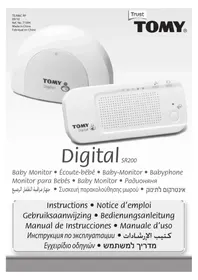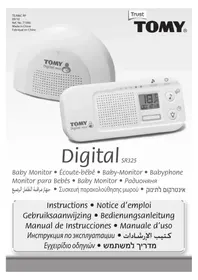
DIGITAL TD300 - Baby monitor TOMY - Free user manual and instructions
Find the device manual for free DIGITAL TD300 TOMY in PDF.



| Product type | Digital baby monitor |
| Brand | TOMY |
| Model | DIGITAL TD300 |
| Parent unit power supply | Rechargeable Ni-MH battery 2.4 V 850 mAh (included) + mains adapter 230 V~50 Hz / 6 V = 300 mA |
| Baby unit power supply | 4 x 1.5 V AA/LR6 batteries (not included) or mains adapter |
| Range | 350 m in open field (optimal conditions) |
| Frequency | 1880-1900 MHz |
| Operating temperature | 0 to 50 °C |
| Temperature display | Yes, in increments of 2 °C (e.g., 26, 28°C) |
| Sound level display | LED bar |
| Sound activation | Yes, pre-set threshold (triggers on crying/screaming) |
| Walkie-talkie function | Yes, from parent unit |
| Nightlight | Yes, soft glow on baby unit, remote control |
| Parent unit locator | Yes, by pressing 3 times on baby unit |
| Belt clip / wall mount | Yes, clip included with dual orientation |
| Independent nightlight operation | Yes, without monitoring (red button) |
| Warranty | 2 years manufacturing defects |
| Maintenance | Do not immerse, avoid direct sunlight, check regularly |
| Safety | Baby unit at least 1 m from child, cables out of reach, adapter not interchangeable |
| Batteries | Removal/replacement by adult, do not mix types, recycle |
Frequently Asked Questions - DIGITAL TD300 TOMY
User questions about DIGITAL TD300 TOMY
0 question about this device. Answer the ones you know or ask your own.
Ask a new question about this device
Download the instructions for your Baby monitor in PDF format for free! Find your manual DIGITAL TD300 - TOMY and take your electronic device back in hand. On this page are published all the documents necessary for the use of your device. DIGITAL TD300 by TOMY.
USER MANUAL DIGITAL TD300 TOMY
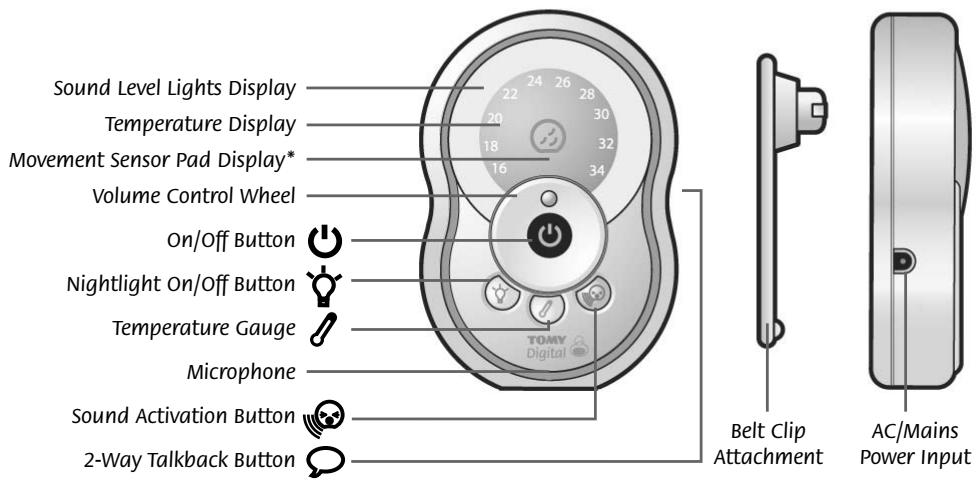
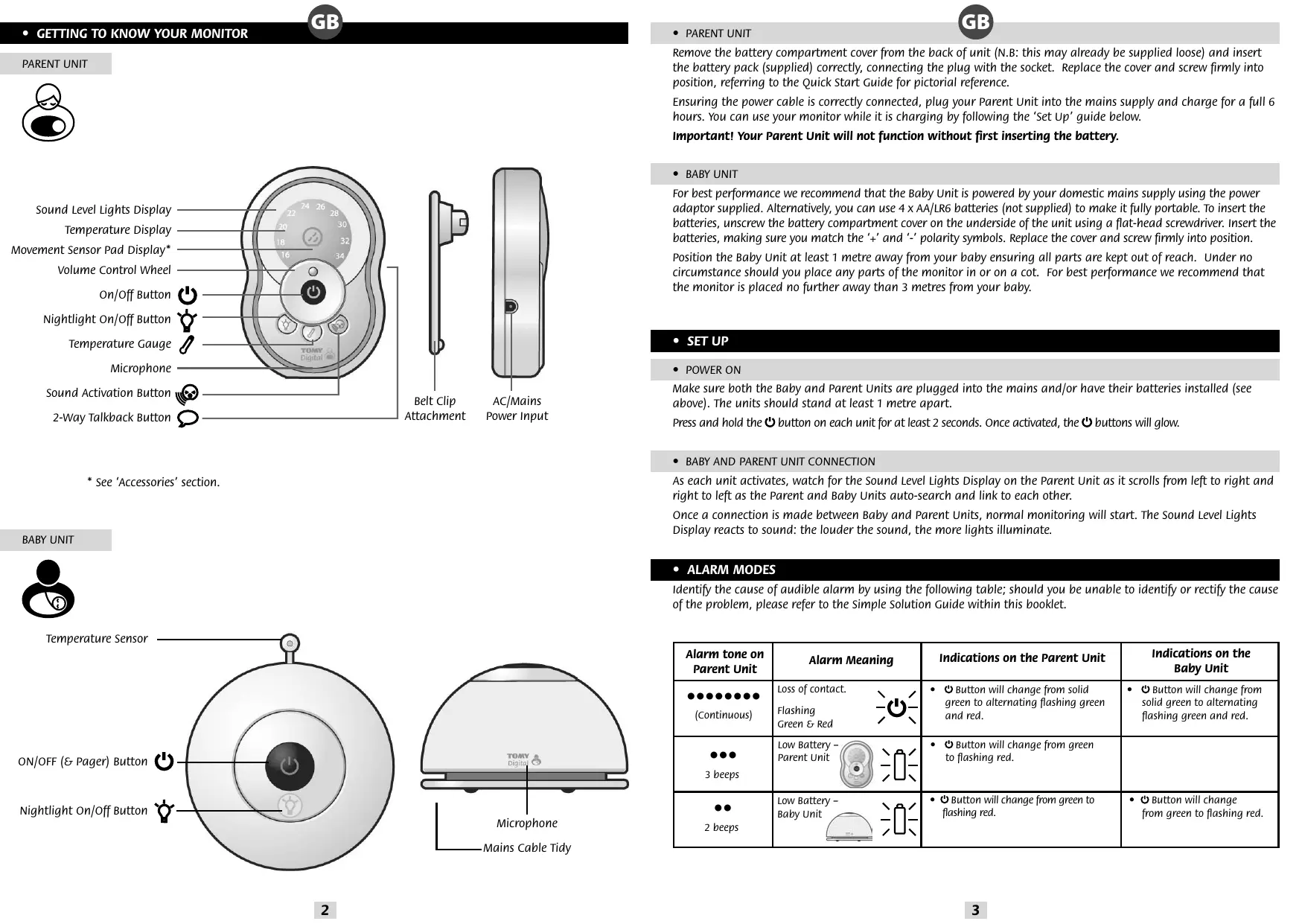
* See 'Accessories' section.
BABY UNIT

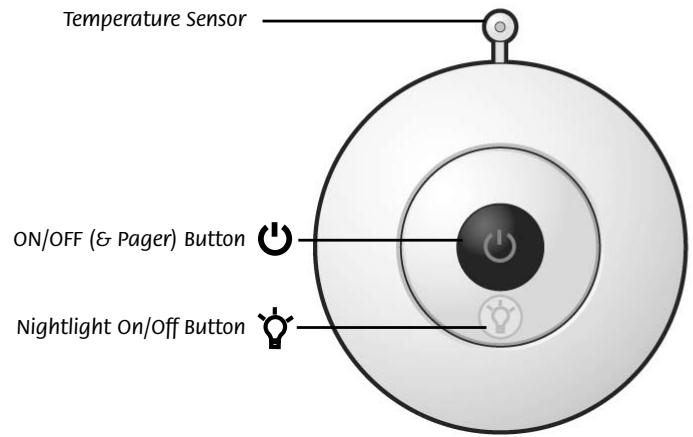
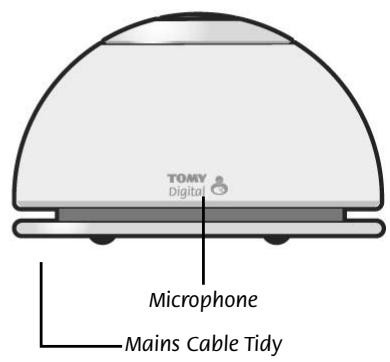
- PARENT UNIT
Remove the battery compartment cover from the back of unit (N.B: this may already be supplied loose) and insert the battery pack (supplied) correctly, connecting the plug with the socket. Replace the cover and screw firmly into position, referring to the Quick Start Guide for pictorial reference.
Ensuring the power cable is correctly connected, plug your Parent Unit into the mains supply and charge for a full 6 hours. You can use your monitor while it is charging by following the 'Set Up' guide below.
Important! Your Parent Unit will not function without first inserting the battery.
- BABY UNIT
For best performance we recommend that the Baby Unit is powered by your domestic mains supply using the power adaptor supplied. Alternatively, you can use 4 x AA/LR6 batteries (not supplied) to make it fully portable. To insert the batteries, unscrew the battery compartment cover on the underside of the unit using a flat-head screwdriver. Insert the batteries, making sure you match the ^+ and - polarity symbols. Replace the cover and screw firmly into position.
Position the Baby Unit at least 1 metre away from your baby ensuring all parts are kept out of reach. Under no circumstance should you place any parts of the monitor in or on a cot. For best performance we recommend that the monitor is placed no further away than 3 metres from your baby.
- SET UP
- POWER ON
Make sure both the Baby and Parent Units are plugged into the mains and/or have their batteries installed (see above). The units should stand at least 1 metre apart.
Press and hold the button on each unit for at least 2 seconds. Once activated, the buttons will glow.
- BABY AND PARENT UNIT CONNECTION
As each unit activates, watch for the Sound Level Lights Display on the Parent Unit as it scrolls from left to right and right to left as the Parent and Baby Units auto-search and link to each other.
Once a connection is made between Baby and Parent Units, normal monitoring will start. The Sound Level Lights Display reacts to sound: the louder the sound, the more lights illuminate.
- ALARM MODES
Identify the cause of audible alarm by using the following table; should you be unable to identify or rectify the cause of the problem, please refer to the Simple Solution Guide within this booklet.
| Alarm tone on Parent Unit | Alarm Meaning | Indications on the Parent Unit | Indications on the Baby Unit |
| (Continuous) | Loss of contact. Flashing Green & Red | • Button will change from solid green to alternating flashing green and red. | • Button will change from solid green to alternating flashing green and red. |
| 3 beeps | Low Battery - Parent Unit | • Button will change from green to flashing red. | |
| 2 beeps | Low Battery - Baby Unit | • Button will change from green to flashing red. | • Button will change from green to flashing red. |
FEATURES AND FUNCTIONS
VOLUME CONTROL
Adjust the volume from zero (mute) to level 10 (max) by moving the thumb wheel clockwise to increase or anticlockwise to decrease.
- SOUND LEVEL LIGHTS DISPLAY
The Sound Level Lights Display on your Parent Unit reacts to the sounds of your baby. The louder your baby, the more lights illuminate on the display. You can lower the volume of the Parent Unit whilst still watching out for baby, ideal for when you're relaxing or entertaining.
- SOUND ACTIVATED MONITORING
For those quiet moments or when your baby is a little older you may not want to hear every sound in your baby's room. Your Baby Monitor has a Sound Activated Monitoring mode, a feature that only captures sounds above a preset threshold, for example a cry rather than a gurgle.
Select Sound Activated Monitoring by pressing the button on the Parent Unit. The Parent Unit will mute 15 seconds after your baby settles. Every time your baby's sounds rise above the threshold this feature will be interrupted instantly and normal sound monitoring will continue until your baby settles again.
2-WAY TALKBACK
For that little extra reassurance and convenience, your monitor has a 2-Way Talkback feature that allows you to speak to your baby. Press and hold down the button on the side of the Parent Unit to activate and speak to your baby.
TEMPERATURE GAUGE
To check the ambient temperature of your baby's room simply press and hold the button on your Parent Unit. The Sound Sensitive Light Display shall be temporarily suspended and replaced with the ambient temperature in your baby's room. Please note the temperature gauge is marked in 2^ intervals. Should the ambient temperature fall in-between intervals then the lights above and below will illuminate (e.g for 27^ the 26^ and 28^ lights will illuminate).
- NIGHTLIGHT

Your Baby Unit has a soft glow Nightlight that can be activated by pressing the button on your Baby Unit or remotely from your Parent Unit.
To extend the Baby Unit's battery life the Nightlight will only operate for 5 minutes at a time. For unlimited use switch to mains power using the adaptor provided.
To switch off the Nightlight, press the button on your Baby Unit or on the Parent Unit.
To use the Nightlight without monitoring, please refer to the 'Independent Nightlight' section within this booklet.

PAGING
Locate a lost Parent Unit by pressing the button on the Baby Unit 3 times in quick succession and the Parent Unit will sound a 1-minute long alarm. To silence the alarm, press any button on the Parent Unit. Please note that the paging feature will only work when both units are switched ON and monitoring as normal.
BELTCLIP
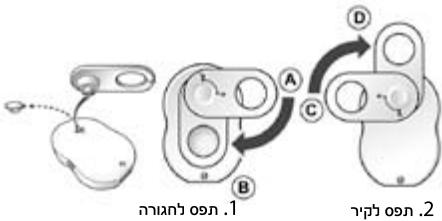
Locate the rubber cover on the back of the Parent Unit and the belt clip attachment supplied. Remove and carefully store the rubber cover,
then line up the belt clip's guiding pins (image 1), insert the clip in Position A and turn 90 degrees in a clockwise direction to position B. Alternatively, the belt clip can be orientated so that you can wall mount or hang your Parent Unit.
In which case, line up the belt clip's guiding pins (image 2), insert the clip in position ⑥ and turn 90 degrees in a clockwise direction to position ① .
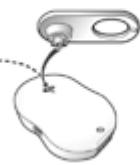

1. Belt Clip
2. Wall Mount
As your baby grows older you can use the Nightlight without monitoring and without the need for the Parent Unit.
With the Baby Unit switched OFF, press and hold the button and the Nightlight will illuminate. The button will glow red (instead of the usual green), indicating that the monitor is not switched ON. Press the button again to switch off.
- ACCESSORIES; TOMY'S MOVEMENT SENSOR PAD MONITOR AND ADDITIONAL PARENT UNITS
For extra reassurance Tomy's Movement Sensor Pad Monitor and/or an additional Parent Unit from either the Tomy Digital or Digital Plus models can be added to your Monitor. For further details please visit our website: www.tomy.eu
CARING FOR YOUR MONITOR
Do not immerse any parts in liquids. Do not place in direct sunlight. Periodically examine product for signs of damage to electrical parts and do not use until damage has been properly repaired. Always remove batteries from the Baby Unit if using the mains adaptor for long periods of time.
GUARANTEE
We guarantee your monitor against manufacturing defects for 2 years from the date of purchase on production of a valid receipt. In the first instance of a manufacturing defect, we recommend that you return your monitor to its place of purchase. If this does not satisfactorily resolve your problem, please refer to www.tomy.eu for further advice. Full terms and conditions can be found on our website: www.tomy.eu
-
TECHNICAL SPECIFICATIONS
-
Power Supply: Mains adaptor rating: PRI: 230V~50Hz SEC: 6V = 300mA.
- Batteries: Parent Unit - Rechargeable 850mAh 2.4V Ni-MH battery (included).
Baby Unit - Requires 4 x 1.5V AA (LR6) batteries.
- Operating Range: 350m in optimum 'open field' conditions.
- Operating Temperature: 0 - 50^
- Frequencies: 1880 1900MHz
SAFETY INFORMATION
The Tomy Baby Monitor is designed to help you monitor your child and is not a substitute for adult supervision. This product is not a toy. Always keep electrically operated items and their cables out of reach of babies and younger children. Under no circumstances should you place any part of your monitor in or on a cot. Ensure all wiring is positioned safely so that children cannot become entangled and that no trip hazard is created. Under no circumstances should the adaptors supplied with this monitor be used with any other equipment. No other adaptors than those supplied should be used with your monitor. Be careful not to position the adaptor where a child is likely to use it as a step. Putting weight on the adaptor while it is plugged in could damage the unit or cause injury to your child. It is normal for chargers to become hot during use - take care when handling, allow heat to disperse. DO NOT COVER. Disconnect charger if the product will not be used for several days. To prevent a shock hazard, please disconnect from power supply before cleaning. The rechargeable battery within the Parent Unit should be recycled. Do not dispose in normal waste. Do not attempt to dismantle any part of this product.
BATTERY SAFETY
Removal and replacement of batteries should be carried out by an adult or under adult supervision. Take special care to ensure batteries are inserted correctly, observing (+) and (-) polarity marks on battery and product. Do not short circuit the contacts in the battery compartment or the battery terminals. Remove exhausted batteries from product. Do not mix old (used) and new batteries or batteries of different types, e.g. rechargeable and alkaline or batteries of different makes/brands. Dispose of exhausted batteries safely, and never dispose of batteries in a fire. Remove batteries from product after use or if storing for long periods. Only use batteries of the same or equivalent type to those recommended.
Removal and recharging of rechargeable batteries should be carried out by an adult or under adult supervision. If you are using rechargeable batteries within the Baby Unit, they must be removed from the monitor before recharging. Do not attempt to recharge non-rechargeable batteries.

Help the environment by disposing of your product and packaging responsibly. The wheelie bin symbols indicate the product and batteries must not be disposed of in the domestic waste as they contain substances which can be damaging to the environment and health. Please use designated collection points or recycling facilities when disposing of the item or batteries.
- SIMPLE SOLUTION GUIDE
Should your monitor not be operating as expected, the information listed below should be adequate to resolve your problems; alternatively a more comprehensive guide can be found on our website: www.tomy.com.eu
Frequently ASKED QUESTIONS
Q. Does my Parent Unit need to be switched on or off whilst charging?
A. Either, your Parent Unit will charge whilst switched on or off, however charging the unit whilst switched on will allow you to monitor your baby whilst charging.
Q. I have measured the temperature of my baby's room using another device and I get a different reading than that of my monitor- why?
A. The temperature measuring device within your Tomy monitor is designed to give you an indication of the baby's room temperature to within a small tolerance of +1^ or -1^ . Other devices will also have a similar tolerance.
Q. Can I use my monitor abroad?
A. You can use your monitor in the country it was purchased and anywhere in the EU. Although your monitor may function correctly in other countries, its operating frequency may affect (or be affected by) other devices and could be illegal. Tomy cannot accept any liability for use outside of the country in which you purchased your monitor or the EU.
- FAULT FINDING

| PROBLEM | POSSIBLE CAUSE | SOLUTION | PAGE |
| My Parent Unit will not switch ON. | The rechargeable battery (supplied) has not been installed correctly. | Insert the battery as instructed within this booklet or the Quick Start Guide. Once installed place the Parent Unit on charge and leave for several minutes before switching ON. | 3 |
| The rechargeable battery maybe below the critical voltage to activate your monitor. | Place the Parent Unit on charge and leave for several minutes before switching ON. | ||
| Mains power is not connected correctly. | Check the power cable connections (including wall socket). | ||
| My Baby Unit will not switch ON? | Mains power is not connected correctly. | Check the power cable connections (including wall socket). | 3 |
| Battery insertion and/or battery life issues. | Check the batteries have adequate charge and are correctly installed. | ||
| Button is not being held long enough. | Press and hold the Baby Unit's button until it illuminates. | ||
| The Nightlight is active but I cannot connect with the Parent Unit. | The Nightlight is being operated independently of the Baby Unit's monitoring function (which is an intended feature). | Switch the Nightlight OFF by pressing the button then reactivate the Baby Unit's main function by pressing and holding the button. | 4 |
| There is a continuous beeping noise. | Loss of contact alarm. | Ensure both units are adequately powered. | 3 |
| Bring both units closer together and repeat the 'Set-Up' instructions. | |||
| There is a 2 x beep alarm every minute. | Low battery in Baby Unit. | Replace batteries. | 3 |
| Or. Switch to mains (AC) using the adaptor supplied. | |||
| There is a 3 x beep alarm every minute. | Low battery in Parent Unit. | Recharge batteries. | 3 |
| I cannot hear anything through my Parent Unit. And/or: It's only intermittent. | Volume on Parent Unit is set too low. | Increase Parent Unit volume. | 4 |
| Units are out of range. | Move units closer. | ||
| Units are set to Sound Activated mode. | Refer to Sound Activated Monitoring within this instruction booklet. | ||
| My Parent Unit makes a continuous beeping noise. | Units are not connecting. | Ensure both units are adequately powered and then follow the 'Set-Up' guide within this booklet. | 3 |
| My Parent Unit makes a random beep-beep every minute or so. | One or both of the Units are running low on battery power. | Identify the low battery condition and either recharge/replace batteries or switch to mains power. | 3 |
| High pitched noise. | Units are too close together. | Move units apart. | 4 |
| Volume too high. | Decrease volume. | ||
| Nightlight keeps switching off. | The Nightlight is designed to switch off automatically after 5 minutes to conserve battery life. | For continual use please switch to mains power. | 4 |
| Battery life after charging is becoming shorter. | As with any rechargeable battery it has a finite life and may need replacing. | Please visit our website for replacement parts: www.tomy.eu | 5 |
UNITE PARENT

*Voir paragraphe "Accessoires"
UNITE BÉBÉ

- QUESTIONS FREPONENTES
- LUZ NOCTURNA INDEPENDIENTE
Baxho! Baw poNDteNbckn 6nok He 3apa6oTaet, ecnn CHaayana He BCTaBtB aKKymyIaTOp.
- DETCKM BLOK
ДяdoctиженhaHnyuxx xapaKtepncTik peKomeHdyem noKIOUaTb Detckn 6Iok K domaHne 3JneKTPOcpe3 6Iok nITAHIN NOCTABJIeTcB KOMIIeKTe. A YTO6bl CSeIaTb 6Iok NOnHOCTbIO nepeHoCbIM, Bbl MOKeTe IcNoJIb3OBA Tb 4 bataeKN TnA/LR6 (He noCTabJIOTc). YTO6bl BCTaBtB 6aTaapeiKn, OTBnHTnte KpbIshy AkkymlyaTOPHOrO OTeKa B HIXHNe Yactn 6Ioka pRn NOMoUs OTBeptTK (BNT C PNOCKo ROnOBko). BCTaBbTe 6bataeKn, Co6IIOda NOLPnoCTb. UCTaHObITE Ha MeTo i HaDeXHO 3aBnHTnte KpbIshy.
PacnojaraTe Detckn 6Iok Ha paocToHnn KaK MnHmym 1 M ot pe6eHka, y6ednBwincb, cyTO Bce DetaII HaxoJrTaC BHe erO DoCraetaMocTn. Hn npi KaKnx o6ctOarTeBCTbax He NOMEuaTe HNKaKne YacTn paDIOHOHN Ha/B KPOBaTky.ДЯdoCTNKeHnHaNluyuXx XapaKtepncSTK peKOMeHNdyem pa3MeUaTb paDIOHOHN He daJIe e 3 MeTpOB ot pe6eHka.
- HACTPOIKA
BKJIIOUeHNE
Y6eDNTecb, YTOPOJNTeBcKmI DTeCKM 6LoK BKnOChyHeB I Cetb N/Unn PntaOTcT O7aTapei (CM. Bblse). BLOKINdoJIHbCToAHTb Ha paCtOAHN KAK MInHMym 1 Mdpyr OT dpgamma.
Haxmte n ydepzmbaTe KhoKny Ha kaxdom 6loke B teueHne 2 cekyHd MInHmym. Iocne aKTnBaun KHonka HauHET CBeTnBcA.
- COEДИЕНЕ POДИТЕЛБСКОТУ ANDETCKOTO BLOKOB
Iocne BkIouenH 60x 6IokOB orHn CBETOBOTO INHINKATOPA 3BYKA poNTeBckoro 6Ioka 6dyT 6erTaB cIeBa HnpaBo n Cnpaba HaIeBO, noka poNTeBckm I neTkM 6IOK BeyT ABTOONCK N IOKnJIIOuaOTc Dpyr K dpyru.
Korda poDntenbckn n dTeTckn 6LoK CBxkyTc npy r c dpyrom, paDnoHraHauchet fYHKcuHOHPoBaTb.
CBETOBOH INHДИКATOP 3BYKA pearnpyeT ha 3Byk: quemrpoMue 3Byk, Tem6oIbIeJaMnOueK 3aRopntcra.
- PEXKMBI CUNTHAJIH3AUHN
PnunHy 3ByKOBOrO CnHana MoJHo OnpedEnIb No npuBedeHHo HNKe Ta6nIe; ecIn Bb He MOpKeTe OnpedEnIb nIy UcTpaHnTb PnunHy npo6JIembl, noXaanyIcTa, cm. pa3dJe «IpocIbIe peSeHnra» B 3OM 6yKnIe.
| Звковой с韫нал на ровittел升降ом 6локe | Прочина с韫нala | Индikацяна на ровittel升降ом 6лоke | Индikацяна на DETСКOM 6лоke |
| (ненерыВнь) | ПOTERPСВЯЗМУGAIOUSYЗLENEHБИКРACHNБ | KHONKA ΜИЗМЕНITЦВETС NOCTОПHHORO 3ZELEHORO на мигаIOUSYЗLENEHБ. | KHONKA ΜИЗМЕНITЦВETС NOCTОПHHORO 3ZELEHORO на мигаIOUSYЗLENEHБ. |
| 3 с韫нala | HN3KЛЗAPД 6разеу ровittел升降ом 6лоka. | KHONKA ΜСМENITЦВETС 3ZELEHORO на мигаIOUSYКРACHNБ. | |
| 2 с韫нala | HN3KЛЗAPД 6разeу детSCKOrO 6лоka. | KHONKA ΜСМENITЦВETС 3ZELEHORO на мигаIOUSYКРACHNБ. | KHONKA ΜСМENITЦВETС 3ZELEHORO на мигаIOUSYКРACHNБ. |
- PEGYJINPOBKA TPGMOKOCTN
PeryIaTOp rIpomKocTn OT hynr (HET 3Byka) do 10 (MaKcImaJIbHaJ rIpomKocTb) - no YacobOJ cTpeKe (rgoMue) npotNB aCobOB CTpeKN (TniSe).
- CBETOBOI INDIKATOP 3BYKA
CBETOBOI INHДIKATOP 3BYKA poNTeBcKOro 6LoKa pearnpyet ha 3ByKn, KOtOpbIe n3daet BaMmaJIbI. Yem 60JIee WymHO BeTeC6a pe6eHOK, Tem 60JIbe NAMNoeK 3aRopntc Ha DCnCIpe. Bbl MoJte yMeHbWITb rPOMKoCTb poNTeBcKOrO 6LoKa, He Tepra CBa3N C pe6eHkOM - InealbHo DnI O'TbIxa IIN PnPema roCTeI.
AKTIBALUNKOHTPONI3BYKY

Korda pe6eHOK BeTeT Ce6a TINX OIN EcIN OH yJKe NIOpOc, Bam MoKet 6bITb He HJxHO CbIbAaTb KaJbDy 3BYK B DeTcKo. BpaioHNe ImeETcpeKIM AKTIBAUIN KOHTPOJIY IO 3BYKY, t.e. nepeJaOTc TOnbKO 3ByKn rPOMue OnpeDeJeHHoro yOpBHe - HanpImep, Pna, Ho He ryKaHbe.
AKTIBALI KONTOJI NO 3BYK BKNIOUaETcna HaxaTne M KONIKn Ha poduTeNbckOM 6Noke. Pekim BKIOUHTcyepe 15 cekynd nocle toro, kak baw pe6eHOK ycnokoNTcra. KaKdbi pa3, Korda n3daBaemble MaJIbWOM 3Bykn npebblaaOT onpeJeHnhB yOBoH sbMa, 3ta fynkCnHHeMeJIneHNO ppebIbaeTcR nHaunHaETc o6bUHbI peKIM KOHTPOJI, noka pe6eHOK He ycNOKoNTc CHOBa.
BByTOPOHHRA CB3b
- NOICK HENCPABHOCTEIN

a a a a a a a a a a a a a a a a a a a a a a a a a a a a a a a a a a a a a a a a a a a a a a a a a a a a a a a a a a a a a a a a a a a a a a a a a a a a a a a a a a a a
aJbJI aJdLW
Jl 10000000000000000000000000000000000000000000000000000000000000000000000000000000
JLdAaBbJg jn no 100000000000000000000000000000000000000000000000000000000000000000
g j g j g j g j g j g j g j g j g j g j g j g j g j g j g j g j g j g j g j g j g j g j g j g j g j g j g j g j g j g j g j g j g j g j g j g j g j g j g j g j g j g j g j g j g j g j g j g j g j g j g j

1JgJ
Lgogo 1c Xgagawy JlJbJbSg:llSLuO Jt aIe Iy Laoa oJgll Ologell JdA. gagll y 8 Jggl ksl lal y www.tomy.eu :jgolnL
15 22
J 1 J 1 J 1 J 1 J 1 J 1 J 1 J 1 J 1 J 1 J 1 J 1 J 1 J 1 J 1 J 1 J 1 J 1 J 1 J 1 J 1 J 1 J 1 J 1 J 1 J 1 J 1 J 1 J 1 J 1 J 1 J 1 J 1 J 1 J
1+g 1
J 1 J 1 J 1 J 1 J 1 J 1 J 1 J 1 J 1 J 1 J 1 J 1 J 1 J 1 J 1 J 1 J 1 J 1 J 1 J 1 J 1 J 1 J 1 J 1 J 1 J 1 J 1 J 1 J 1 J 1 J 1 J 1 J 1 J 1 J
a 90 a a a a a a a a a a a a a a a a a a a a a a a a a a a a a a a a a a a a a a a a a a a a a a a a a a a a a a a a aaa
Jai:uiu yuiu juii
1 1 1 1 1 1 1 1 1 1 1 1 1 1 1 1 1 1 1 1 1 1 1 1 1 1 1 1 1 1 1 1 1 1 1
aL21g21c1g2g4531g20aejajgjgjg:LaL
Lo! LlUaLlaIg/9 10000000000000000000000000000000000000000000000000000000000000000000000000000000000000000000000000000
aaijlaia
8g aIgSgSgSgSgSgSgSgSgSgSgSgSgSgSgSgSgSgSgSgSgSgSgSgSgSgSgSgSgSgSgSgSgSgSgSgSgSgSgSgSgSgSgSgSgSgSgSgSgSgSg
Jla
eLg 10000000000000000000000000000000000000000000000000000000000000000000000000000000
a:all lalgl
300=6:(Lg250-25230:1y85
.()Ni-MH 2.4 850 a 850a 850a 850a 850a 850a 850a 850a 850a 850a 850a 850a 850a 850a 850a 850a 850a 850a 850a 850a 850a 850
gaiil bui
a 10 gssll (s) j aas
gssall sgsaasaae aee
aaii aie iie 1sac slaj LdL cllb ig gla sla jal LcSe. gnrlll lalab gaggge gaggggagaae gaae gaae gaae gaae gaae gaae gaae gaae gaae gaae gaae gaae gaae gaae gaae gaae gaae gaae gaae gaae gaae gaae gaae gaae gaae gaae gaae gaae gaae gaae gaae gaae gaae gaaa

wJyJIi:abWiiIa
gagllab a jgs gggg. gsssslllalb aegy g sgsa uj yj yj Lc gaae g gaae gaae gaae gaae gaae gaae gaae gaae gaae gaae gaae gaae gaae gaae gaae gaae gaae gaae gaae gaae gaae gaae gaae gaae gaae gaae gaae gaae gaae gaae gaae gaae gaae gaae
g 11111111111111111111111111111
a
aaii aiee eae eae eae eae eae eae eae eae eae eae eae eae eae eae eae eae eae eae eae eae eae eae eae eae eae eae eae eae eae eae eae eae eae eae eae eae eae eae eae eae eae eae eae eae eae eae eae eae eae eae eee
yJUJIg
1 1 1 1 1 1 1 1 1 1 1 1 1 1 1 1 1 1 1 1 1 1 1 1 1 1 1 1 1 1 1 1 1 1 1 1 1 1 1 1 1 1 1 1 1 1 1 1
Jooa 0 a o a a a a a a a a a a a a a a a a a a a a a a a a a a a a a a a a a a a
aLgall gglgllgllgllgllgllgllgllgllgllgll
LcSg. aLoS cLcLw wdoa aIbI JyJyJyJyJyJyJyJyJyJyJyJyJyJyJyJyJyJyJyJyJy
aaii i 1111111111111111
J111111111111111111111111111
JJI JIJI 0
J 1 J 1 J 1 J 1 J 1 J 1 J 1 J 1 J 1 J 1 J 1 J 1 J 1 J 1 J 1 J 1 J 1 J 1 J 1 J 1 J 1 J 1 J 1 J 1 J 1 J 1 J 1 J 1 J 1 J 1 J 1 J 1 J 1 J 1 J
△LsOgPcLgA
gj 3 2 g jalal 10000000000000000000000000000000000000000000000000000
1
1
JJJ JJJ
J 1
1 1
Jg21 0000000000000000000000000000
a a a a a a a a a a a a a a a a a a a a a a a a a a a a a a a a a
Jll Loga 1jI JlaJIg JlaJIaJI
sLLa 1000000000000000000000000000000000000000000000000
aii1jglgajcslqJLsGgJGLC
JxIgL
a 1
SLL 1
nnnnn nnnn nn nnnn nnnn nnnn nnnn nnnn nnnn nnnn nnnn nnnn nnnn nnnn nnnn nnnn nnnn nnnn nnnn nnnn nnnn nnnn nnnn nnnn nnnn nnnn nnnn nnnn nnnn nnnn nnnn nnnn nnnn nnnn nnnn nnnn nnnn
nann09n
n nnnn nn nnnnnnnnnnnnnnnnnnnnnnnnnnnnnnnnnnnnnnnnnnnnnnnnnnnnnnnnnnnnnnnnnnnnnnnnnnnnnnnnnnnnnnnnnnnnnnnnnnnnnnnnnnnnnnnnnnnnnnnnnnnnnnnn nn n nn n nn n nn n nn n nn n nn n nn n nn n nn n nn n nn n nn n nn n nn n nn n nn n nn n nn n nn n nn n nn n nn n nn n nn n nn n nn n nn n nn n nn n nn n nn n nn n nn n nn n nn n nn n nn n nn n nn n nn n nn n nn n nn n nn n nn n nn n nn n nn n nn n nn
n
n nn nnnnnnnnnnnnnnnnnnnnnnnnnnnnnnnnnnnnnnnnnnnnnnnnnnnnnnnnnnnnnnnnnnnnnnnnnnnnnnnnnnnnnnnnnnnnnnn
y 1
nniin ninn nnnn nn nnnn nnnn nnnn
y 100000000000000000000000000000000000000000000000000000000000000000000
D
n nnnn nn nnnn nnnn nnnn nnnn nnnn nnnn nnnn nnnn nnnn nnnn nnnn nnnn nnnn nnnn nnnn nnnn nnnn nnnn nnnn nnnn nnnn nnnn nnnn nnnn nnnn nnnn nnnn nnnn nnnn nnnn nnnn nnnn nnnn nnnn
#
nnn nn nnnn nn nnnn nn nnnn nn nnnn nn nnnn nn nnnn nn nnnn nn nnnn nn nnnn nn nnnn nn nnnn nn nnnn nn nnnn nn nnnn nn nnnn nn nnnn nn nnnn nn nnnn nn nnnn nn nnnn nn nnnn nn nnnn nn nnnn nn nnnn nn nnnn nn
www.tomy.eu:
D
300=SEC:6,50n"PRI:230:nni nnnn nn nnnn nnnn - (ni) 2.4 Ni-MH 850 nnnn nnnn nnnn nnnn .AA LR6 1.5 nnnn 4 nnnn - nnnn nnnn .ninnn nnnn nnnn 350 nnnn nnnn nnnn .n 50-0 nnnn nnnn nnnn .n 1900-1880
nni
nennnnn nnnnnnnnnnnnnnnnnnnnnnnnnnnnnnnnnnnnnnnnnnnnnnnnnnnnnnnnnnnnnnnnnnnnnnnnnnnnnnnnnnnnnnn
#
nnnnnnnnnnnnnnnnnnnnnnnnnnnnnnnnnnnnnnnnnnnnnnnnnnnnnnnnnnnnnnnnnnnnnnnnnnnnnnnnnnnnnnnnnnnnnnnnnnnnnnnnnnnnnnnnnnnnnnnnnnnnnnn

-
y 1
15 1

111-17 111
y nnnn nn nnnn nn nnnn nn nnnn nn nnnn nn nnnn nn nnnn nn nnnn nn nnnn nn nnnn nn nnnn nn nnnn nn nnnn nn nnnn nn nnnn nn nnnn nn nnnn nn nnnn nn nnnn nn nnnn nn nnnn nn nnnn nn nnnn nn nnnn nn nnnn nn nnnn

y 1
27 n nn nnnn nn nnnn nn nnnnnnnnnnnnnnnnnnnnnnnnnnnnnnnnnnnnnnnnnnnnnnnnnnnnnnnnnnnnnnnnnnnnnnnnnnnnnnnnnnnnnnnnnnnnnnnnnnnnnnnnnnnnnnnnnnnnnnnnnnnnnnnnnnnnnnnnnnnnnnnnnnnnn

n nnnnnnnnnnnnnnnnnnnnnnnnnnnnnnnnnnnnnnnnnnnnnnnnnnnnnnnnnnnnnnnnnnnnnnnnnnnnnnnnnnnnnnnnnnnnnnnnnnnnnnnnnnnnnnnnnnnnnnnnnnnnnnnnnnnn nn nannn nannn nannn nannn nannn nannn nannn nannn nannn nannn nannn nannn nannn nannn nannn nannn nannn nannn nannn nannn nannn nannn nannn nannn nannn nannn nannn nannn nannn nannn nannn nannn nannn nannn nn ann
n nn nnnnnnnnnnnnnnnnnnnnnnnnnnnnnnnnnnnnnnnnnnnnnnnnnnnnnnnnnnnnnnnnnnnnnnnnnnnnnnnnnnnnnnnnnnnnnnnnnnnnnnnnnnnnnnnnnnn
mnnnnn nn nnnnnnnnnnnnnnnnnnnnnnnnnnnnnnnnnnnnnnnnnnnnnnnnnnnnnnnnnnnnnnnnnnnnnnnnnnnnnnnnnnnnnnnnnnnnnnnnnnnnnnnnnnnnn
n nn nnnnnnnnnnnnnnnnnnnnnnnnnnnnnnnnnnnnnnnnnnnnnnnnnnnnnnnnnnnnnnnnnnnnnnnnnnnnnnnnnnnnnnnnnnnnnnnnnnnnnnnnn
nion nDn Dn nn nnn nnn
n
(1) AA/LR6 4-wnnnn nn nnnnnnnnnnnnnnnnnnnnnnnnnnnnnnnnnnnnnnnnnnnnnnnnnnnnnnnnnnnnnnnnn
nion n 1nnnnnnnnnnnnnnnnnnnnnnnnnnnnnnnnnnnnnnnnnnnnnnnnnnnnnnnnnnnnnnnnnnnnnnnnnnnnnnnnnnnnnnnnnnnnnnnnnnnnnnnnnn
.(-),(+)
n nn nnnnnnnnnnnnnnnnnnnnnnnnnnnnnnnnnnnnnnnnnnnnnnnnnnnnnnnnnnnnnnnnnnnnnnnnnnnnnnnnnnnnnnnnnnnnnnnnnnnnnnnnn
3 1 1
nTm·
nir nnnn nn (y) nnnn nn nnnnnnnnnnnnnnnnn
n nn nnnnnnnnnnnnnnnnnnnnnnnnnnnnnnnnnnnnnnnnnnnnnnnnnnnnnnnnnnnnnnnnnnnnnnnnnnnnnnnnnnnnnnnnnnnnnnnnnnnnnnnnnnnnn
nntnnn nnnn
unon nn nnnn nn nnnn nn nnnn nn nnnn nn nnnn nn nnnn nn nnnn nn nnnn nn nnnn nn nnnn nn nnnn nn nnnn nn nnnn nn nnnn nn nnnn nn nnnn nn nnnn nn nnnn nn nnnn nn nnnn nn nnnn nn nnnn nn nnnn nn nnnn nn
Jitn
nnnnnnnnnnnnnnnnnnnnnnnnnnnnnnnnnnnnnnnnnnnnnnnnnnnnnnnnnnnnnnnnnnnnnnnnn
ynnn
n nn nnnnnnnnnnnnnnnnnnnnnnnnnnnnnnnnnnnnnnnnnnnnnnnnnnnnnnnnnnnnnnnnnnnnnnnnnnnnnnnnnnnnnnnnnnnnnnnnnnn
For all enquiries, please visit our on-line consumer support service at...