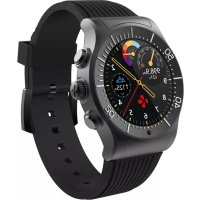
ZeSport - Smartwatch MYKRONOZ - Free user manual and instructions
Find the device manual for free ZeSport MYKRONOZ in PDF.



| Product type | Connected watch (smartwatch) |
| Brand | MyKronoz |
| Model | ZeSport |
| Screen | Color TFT touchscreen 1.3 inches, 240x240 pixels |
| Battery | Li-ion 350 mAh, standby 3 days, talk time 2h, GPS 7h, charge 1h30 to 2h |
| Sensors | Tri-axial accelerometer, optical heart rate sensor, UV, altimeter, barometer, temperature |
| Water resistance | IP66 |
| Operating temperature | -10°C to +60°C |
| Connectivity | Bluetooth 4.0 BLE and Bluetooth Classic |
| Compatibility | Android 4.3+ with Bluetooth 4.0 BLE, iOS |
| System | ZeSport App (iOS/Android) |
| Warranty | International 1 year |
| Main functions | Activity tracking, sleep, GPS, notifications, calls, customizable watch faces |
| Box contents | ZeSport watch, charging dock, USB cable |
| Care and cleaning | Clean with a soft dry cloth. Avoid chemicals. IP66 water resistant, rinse with fresh water after salt exposure. |
| Safety | Contains strong magnets. Can interfere with pacemakers, credit cards, and magnetic objects. Consult a doctor if you wear a medical device. |
| General information | Manual available at www.mykronoz.com. Support: www.mykronoz.com/support |
Frequently Asked Questions - ZeSport MYKRONOZ
User questions about ZeSport MYKRONOZ
0 question about this device. Answer the ones you know or ask your own.
Ask a new question about this device
Download the instructions for your Smartwatch in PDF format for free! Find your manual ZeSport - MYKRONOZ and take your electronic device back in hand. On this page are published all the documents necessary for the use of your device. ZeSport by MYKRONOZ.
USER MANUAL ZeSport MYKRONOZ
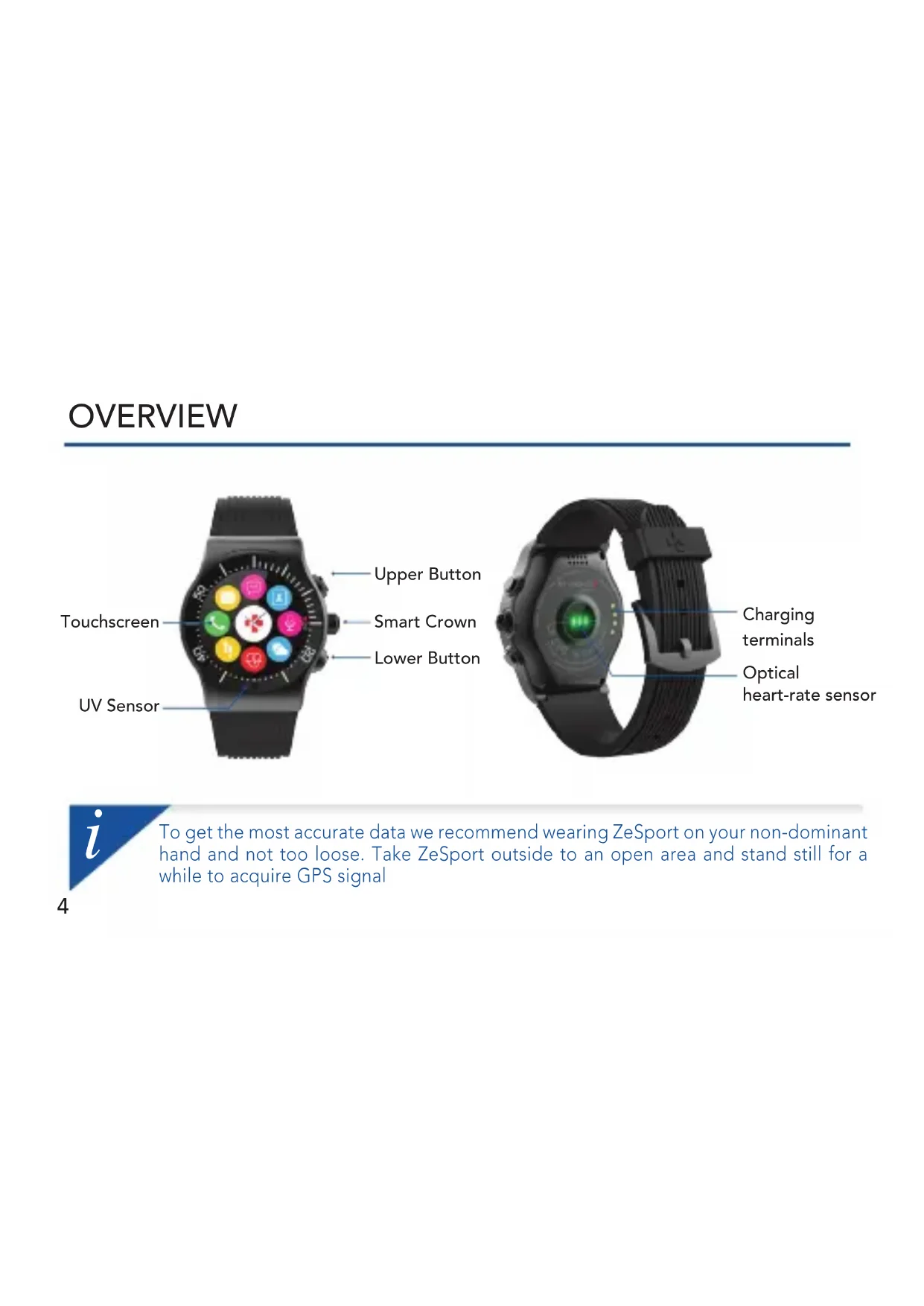
Optical heart-rate sensor
i
To get the most accurate data we recommend wearing ZeSport on your non-dominant hand and not too loose. Take ZeSport outside to an open area and stand still for a while to acquire GPS signal
■Swipe up or down, right or left: Navigate through displays and menus
ITap: Select an item
UPPER BUTTON SMART CROWN LOWER BUTTON
IPress x1:
Select a sport mode
■Press x1 while recording:
Start, pause or resume a sport session
Press x1:
Confirm
■Turn clockwise:
Swipe up, Volume +
■Turn anti-clockwise:
Swipe down, Volume -
IPress x1:
Return to watch face menu
■Press + Hold:
Power ON/OFF
■Press + Hold 10 seconds:
Reset
i
If you want to change your ZeSport watch face, press firmly on the current watch face, swipe left or right to go through the different watch faces available and tap on the one you want to select and use
1. CHARGING
natural_image
Technical line drawing of a smartwatch with labeled parts (no text or symbols present)Charge ZeSport for two hours before your first use
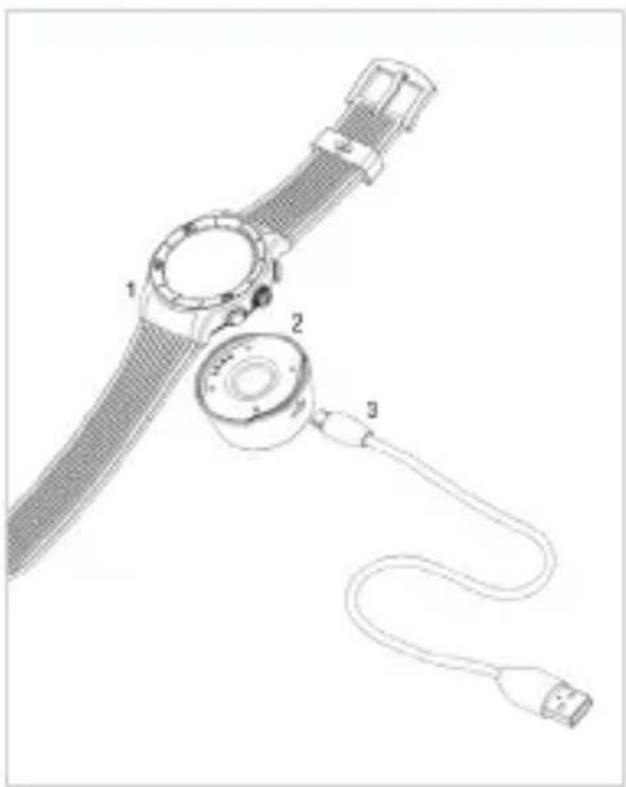
- Put the charging cradle beneath the watch
- Make sure the pins on the cradle fit correctly onto the charging terminals on the back of ZeSport
- Connect the charging cradle with the USB cable
- Plug the big end of the USB cable to a power source
- A battery indicator will fill to indicate charging is in progress. Once ZeSport is charged, the battery indicator will be full
l
A full charge takes 2 hours. Unplug the cable after ZeSport is fully charged.
When the battery level gets low, a low battery indicator will appear
2. PAIRING
Download ZeSport app from the App store or the Google Play Store
System Requirements
iOS 8+
iPhone 4s, 5, 5c, 5s, 6, 6 Plus, 7 & newer, iPad (3rd, 4th and 5th gen), iPad Mini, iPod touch (5 gen) / iOS 8+
Android
Select Android 4.3 + devices that support Bluetooth 4.0
Visit www.mykronoz.com to get the latest compatibility list.

text_image
Available on the App Store
text_image
ANDROID APP ON Google" playi
ZeSport will sync the notifications of SMS, emails, social networks, calendar events, and personal life reminders once ZeSport App has been successfully installed on your smartphone. Please note some features will not work unless ZeSport App has been installed on your smartphone
Step 1 : Pairing through the application (Bluetooth Low Energy - BLE)
- Enable Bluetooth on your mobile device
- Open ZeSport App on your mobile device. Sign up if you are a new member or Log in with your existing account. After entering your personal information, tap Set up
- Make sure ZeSport is nearby and select ZeSport in the list of devices
- You will receive a pairing request on your mobile device. Press Pair to accept it.
- When ZeSport is successfully paired, you will be notified on ZeSport and on your mobile device's screen
This operation will allow you to synchronize time, date, activity and sleep data, reminders and notifications.
If pairing fails repeat the same steps. Pairing is a one-time process. If you want to pair your ZeSport with another account, you first need to unpair from the current one. On ZeSport App, go to Settings > Set up ZeSport > Unpair. Tap Set up ZeSport to pair a new device
Step 2 : Manual Pairing (Bluetooth Classic)
- Go to your mobile device's Bluetooth settings and select ZeSport in the list of devices
- When ZeSport is successfully paired, you will be notified on your smartphone and on the watch itself.
This operation will allow you to make and receive calls with ZeSport

You can also pair ZeSport to your smartphone directly from the watch. Go to ZeSport shortcuts, click on Bluetooth and select your mobile device in the list.
3. TECH SPECS
Dimensions 54.6*45.9*14.5mm
Weight 70 gr
Bluetooth 3.0 + 4.0 BLE
GPS
Battery type Li-ion 350 mAh
Talk time 2 hours
Standby time up to 3 days / 7 hours in GPS mode
Charging time 1:30 to 2 hours
Display TFT Color Touchscreen 1.3 inches/240*240 pixels
Sensor 3-axis accelerometer, optical HR sensor, UV, altimeter, barometer, temperature
Operating temperature -10°C to +60°C
Water resistance IP66
International warranty 1 year

If you have any question or require assistance regarding our product, please visit www.mykronoz.com/support/
ZeSport
- FRANÇAIS -
natural_image
Technical line drawing of a smartwatch with labeled parts (no text or symbols present)Configurations requises
iOS 8+
iPhone 4s, 5, 5c, 5s, 6, 6 Plus, 7 & sup, iPad (3ème, 4ème et 5ème gen), iPad Mini, iPod touch (5e gen)
Android
text_image
Available on the App Store
text_image
ANDROID APP ON Google" playi
Dimensions 54.6*45.9*14.5mm
Poids 70 gr
Bluetooth 3.0 + 4.0 BLE
GPS
natural_image
Technical illustration of a smartwatch with labeled parts (1, 2, 3), showing a strap and cable connection (no text or symbols beyond labels)text_image
Available on the App Store
text_image
ANDROID APP ON Google" playi
natural_image
Technical illustration of a smartwatch with labeled parts (1, 2, 3), showing a strap and cable connection (no text or symbols beyond labels)text_image
Available on the App Store
text_image
ANDROID APP ON Google" playi
natural_image
Technical line drawing of a smartwatch with labeled parts (no text or symbols present)text_image
Available on the App Store
text_image
ANDROID APP ON Google" playi
natural_image
Technical line drawing of a smartwatch with labeled parts (1, 2, 3), showing internal components and wiring (no text or symbols beyond labels)text_image
Available on the App Store
text_image
ANDROID APP ON Google" playi
natural_image
Technical line drawing of a smartwatch with labeled parts (1, 2, 3), showing internal components and wiring (no text or symbols beyond labels)text_image
Available on the App Store
text_image
ANDROID APP ON Google" playi
natural_image
Technical illustration of a smartwatch with labeled parts (1, 2, 3), showing a strap and cable connection (no text or symbols beyond labels)text_image
Available on the App Store
text_image
ANDROID APP ON Google" playi
natural_image
Technical line drawing of a smartwatch with labeled parts (no text or symbols present)text_image
Available on the App Store
text_image
ANDROID APP ON Google" playi
natural_image
Technical line drawing of a smartwatch with labeled parts (no text or symbols present)natural_image
Technical line drawing of a smartwatch with labeled parts (no text or symbols present)text_image
Available on the App Store
text_image
ANDROID APP ON Google" playi
natural_image
Technical line drawing of a smartwatch with labeled parts (1, 2, 3), showing internal components and wiring (no text or symbols beyond labels)natural_image
Diagram of a smartwatch with labeled parts (1, 2, 3) showing internal components and cable connection (no text or symbols beyond labels)text_image
Available on the App Store
text_image
ANDROID APP ON Google" playi
■ Connecting the charging cable improperly may cause serious damage to the device. Any damage caused by misuse is not covered by the warranty. Unplug the cable after ZeSport is fully charged.
■ZeSport unit and charging dock contain strong magnets that may interfere with pacemakers, credit cards, watches and other magnet-sensitive objects. If you use a pacemaker or any other electronic medical device, please consult your physician before wearing or handling ZeSport.
This product is not a medical device and should not be used to diagnose or treat any medical condition.
ABOUT THIS MANUAL
The features of ZeSport and the contents of the user manual are subject to change. To get the latest instructions on how to use this product, please refer to the online user manual available on www.mykronoz.com
SUPPORT
If you have any question or require assistance regarding our product, please visit www.mykronoz.com/support/
ATTENTION
Before using the device, read these instructions carefully.
BATTERY
- ZeSport has one built-in battery. Do not disassemble the battery on your own. KRONOZ LLC is not responsible for any damage or personal injury caused by the removal of the battery or any component.
This device is not waterproof so keep it away from all sources of heat or humidity. Do not use it near sink or other wet areas. Do not immerse the product in any liquid other than water. Do not immerse the product in salt water. Do not swim wearing this product. Do not use the product underwater. - Charge the battery in a cool, ventilated room. Excessive temperature during charging could cause heat, smoke, fire or deformation of the battery or even explosion.
- Avoid excessive temperatures. Do not expose this device to excessive smoke, dust sand, or direct sunlight for an extended period of time.
- Do not open, crush, bend, deform, puncture or shred secondary cells or batteries. In the event of a battery break or leak, prevent battery liquid contact with skin or eyes. If this happens, immediately flush the areas with water (do not rub the eye) or seek medical help.
Do not short-circuit. Short-circuiting can occur when a metallic object, such as coins, causes direct connection of positive and negative terminals of the battery. Short-circuiting may damage the battery.
- Do not use batteries that have been damaged or have been exhausted.
- Keep the batteries out of children's reach and in a safe place to prevent danger.
Do not dispose of batteries in fire as they may cause explosion. Dispose of used batteries in accordance with your local regulations (such as recycling). Do not dispose as household waste.
Use only the USB cable supplied to charge this battery. Do not charge for more than 24 hours.
- KRONOZ LLC is not responsible for any damage caused by improper use of the device.
REGULATORY NOTICES
USA

FCC STATEMENT
This device complies with Part 15 of the FCC Rules. Operation is subject to the following two conditions: (1) This device may not cause harmful interference, and (2) This device must accept any interference received, including interference that may cause undesired operation.
CAUTIONS
Changes or modifications not expressly approved by the party responsible for compliance could void the user's authority to operate this equipment.
FCC NOTICE
This equipment complies within the limits of a Class B digital device, pursuant to part 15 of the FCC Rules. These limits are designed to provide reasonable protection against radio and TV interference in residential areas. However, even during normal operation, this equipment may cause TV or radio interference. If this equipment does cause harmful interference to radio or television reception, which can be determined by turning the equipment off and on, the user is encouraged to try one or more of the following corrective measures:
• Reposition the receiving antenna.
- Increase the distance between the equipment and receiver.
- Connect the equipment into an outlet on a circuit different from which the receiver is connected.
- Consult the dealer or an experienced radio/TV technician for help.
FCC ID: 2AA7D-ZEST1
CANADA
INDUSTRY CANADA (IC) STATEMENT
This device complies with Industry Canada license-exempt RSS standard(s). Operation is subject to the following two conditions: (1) this device may not cause interference, and (2) this device must accept any interference, including interference that may cause undesired operation of the device.
Declaration of conformity with regard to the EU Directive 1999/5/EC.
Kronoz LLC hereby declares that this device is in compliance with the essential requirements and other relevant provisions of the R&TTE Directive 1999/5/EC. The complete declaration of conformity is available on request via our customer service: support@mykronoz.com
DISPOSAL AND RECYCLING INFORMATION
After the implementation of the European Directive 2012/19/EU in the national legal system, the following applies: Electrical and electronic devices may not be disposed of with domestic waste. Consumers are obliged by law to return electrical and electronic devices at the end of their service lives to the public collecting points set up for this purpose or point of sale. Details to this are defined by the national law of the respective country. This symbol on the product, the instruction manual or the package indicates that a product is subject to these regulations. By recycling, reusing the materials or other forms of utilizing old devices, you are making an important contribution to protecting our environment.
©2017 Kronoz LLC, all rights reserved. Kronoz LLC, Avenue Louis-Casai 18 - 1209 Geneva - Switzerland All brands or product names are or may be trademarks of their respective owners. Pictures and specifications are not contractual. Les marques citées sont des marques déposées par leur fabricant respectif. Photos et caractéristiques non contractuelles. Designed in Switzerland - Made in China

text_image
SCAN FOR MORE LANGUAGES
text_image
QR code image containing encoded data, no visible human-readable textScansionare per ottenere più lingue Digitalizar para obtermais línguas Escanear para obtener más idiomas Scannen, um anderen Sprachen erhalten Scan om meer talen te krijgen Daha fazla dil almak için tarama Skanowanie, aby uzyskać więcej języków için scanare pentru a obține mai multe limbi сканирование, чтобы получить больше языков 请扫描二维码以获取更多语言翻译。 掃描QR碼獲得更多的語言 より多くの言語を取得するためにスキャン สแกนเพื่อให้ได้ภาษามากขึ้น 더 많은 언어를 얻기 위해 검색
OR VISIT www.mykronoz.com/support/ TO DOWNLOAD OUR MULTI-LANGUAGE USER MANUAL
MYXKRONOZ MORE THAN TIME
www.mykronoz.com