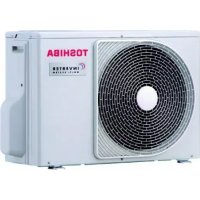
RAS5M34UAVE1 - Air-conditioner TOSHIBA - Free user manual and instructions
Find the device manual for free RAS5M34UAVE1 TOSHIBA in PDF.



| Brand | Toshiba |
| Model | RAS5M34UAVE1 |
| Product type | Split air conditioner |
| Power supply | 220-240 V ~ 50 Hz |
| Rated power | Not specified in the manual |
| Dimensions (indoor unit) | Approximately 800 x 300 x 250 mm |
| Dimensions (outdoor unit) | Approximately 800 x 600 x 300 mm |
| Weight (indoor unit) | Approximately 10 kg |
| Weight (outdoor unit) | Approximately 30 kg |
| Refrigerant | Not specified |
| Operating modes | Auto, Cool, Heat, Dry, Fan, Hi-POWER, ECO, Quiet, Night Comfort, One-Touch |
| Fan speed | Auto, Low, Medium, High |
| Air flow direction | Automatic sweep and manual louver position |
| Timer | ON, OFF, Daily, Sleep (1/3/5/9h) |
| Remote controller | Wireless with possible wired function |
| Auto restart function | Yes (after power failure) |
| Auto clean | Yes (Auto Clean mode after Cool/Dry) |
| Air filter | Washable, FILTER indicator |
| Operating conditions (Cool) | Outdoor: -10°C to 46°C, Indoor: 21°C to 32°C |
| Operating conditions (Heat) | Outdoor: -15°C to 24°C, Indoor: below 28°C |
| Remote controller batteries | 2 AAA batteries (LR03) |
| Maintenance | Clean the filter every 2 weeks approximately, do not use solvents |
| Safety protection | Automatic stop in case of error, 3-minute protection, earthing mandatory |
Frequently Asked Questions - RAS5M34UAVE1 TOSHIBA
User questions about RAS5M34UAVE1 TOSHIBA
0 question about this device. Answer the ones you know or ask your own.
Ask a new question about this device
Download the instructions for your Air-conditioner in PDF format for free! Find your manual RAS5M34UAVE1 - TOSHIBA and take your electronic device back in hand. On this page are published all the documents necessary for the use of your device. RAS5M34UAVE1 by TOSHIBA.
USER MANUAL RAS5M34UAVE1 TOSHIBA
For general public use
Indoor unit
RAS-B10, 13, 16, 22N3KV2 Series
RAS-M07, 24N3KV2 Series
Outdoor unit
RAS-10, 13, 16, 22N3AV2 Series
RAS-M14GAV-E
RAS-M18UAV-E
RAS-3M18SAV-E
RAS-4M23SAV-E
RAS-3M26UAV-E
RAS-4M27UAV-E
RAS-5M34UAV-E1
ENGLISH
ESPANOL
FRANÇAIS
ITALIANO
DEUTSCH
PORTUGUES
POLSKI
ČESKY
PYCCKN
HRVATSKI
MAGYAR
TÜRKÇE
NEDERLANDS
EAAHNIKA
SVENSKA
SUOMI
NORSK
DANSK
ROMÁNA
БылгAPСКИ
EESTI
LATVISKI
SLOVENCINA
SLOVENŠČINA
LIETUVIU
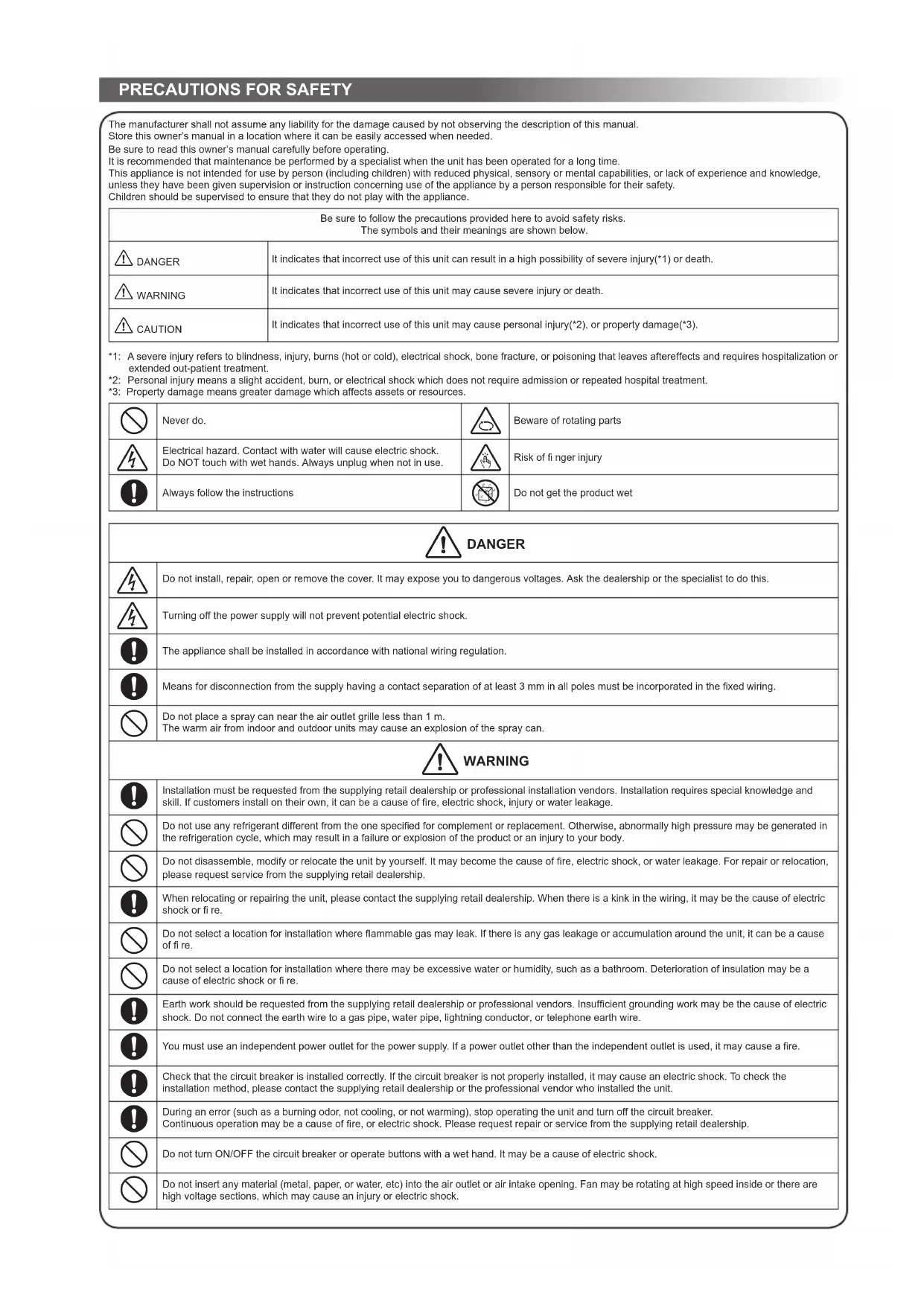
The manufacturer shall not assume any liability for the damage caused by not observing the description of this manual. Store this owner's manual in a location where it can be easily accessed when needed.
Be sure to read this owner's manual carefully before operating.
It is recommended that maintenance be performed by a specialist when the unit has been operated for a long time. This appliance is not intended for use by person (including children) with reduced physical, sensory or mental capabilities, or lack of experience and knowledge, unless they have been given supervision or instruction concerning use of the appliance by a person responsible for their safety. Children should be supervised to ensure that they do not play with the appliance.
| Be sure to follow the precautions provided here to avoid safety risks. The symbols and their meanings are shown below. | |
| DANGER | It indicates that incorrect use of this unit can result in a high possibility of severe injury(*1) or death. |
| WARNING | It indicates that incorrect use of this unit may cause severe injury or death. |
| CAUTION | It indicates that incorrect use of this unit may cause personal injury(*2), or property damage(*3). |
1: A severe injury refers to blindness, injury, burns (hot or cold), electrical shock, bone fracture, or poisoning that leaves aftereffects and requires hospitalization or extended out-patient treatment.
2: Personal injury means a slight accident, burn, or electrical shock which does not require admission or repeated hospital treatment.
*3: Property damage means greater damage which affects assets or resources.
| Never do. | Beware of rotating parts |
| Electrical hazard. Contact with water will cause electric shock. Do NOT touch with wet hands. Always unplug when not in use. | Risk of fi nger injury |
| Always follow the instructions | Do not get the product wet |
| Do not install, repair, open or remove the cover. It may expose you to dangerous voltages. Ask the dealership or the specialist to do this. | |
| Turning off the power supply will not prevent potential electric shock. | |
| The appliance shall be installed in accordance with national wiring regulation. | |
| Means for disconnection from the supply having a contact separation of at least 3 mm in all poles must be incorporated in the fixed wiring. | |
| Do not place a spray can near the air outlet grille less than 1 m. The warm air from indoor and outdoor units may cause an explosion of the spray can. |
| Installation must be requested from the supplying retail dealership or professional installation vendors. Installation requires special knowledge and skill. If customers install on their own, it can be a cause of fire, electric shock, injury or water leakage. | |
| Do not use any refrigerant different from the one specified for complement or replacement. Otherwise, abnormally high pressure may be generated in the refrigeration cycle, which may result in a failure or explosion of the product or an injury to your body. | |
| Do not disassemble, modify or relocate the unit by yourself. It may become the cause of fire, electric shock, or water leakage. For repair or relocation, please request service from the supplying retail dealership. | |
| When relocating or repairing the unit, please contact the supplying retail dealership. When there is a kink in the wiring, it may be the cause of electric shock or fire. | |
| Do not select a location for installation where flammable gas may leak. If there is any gas leakage or accumulation around the unit, it can be a cause of fire. | |
| Do not select a location for installation where there may be excessive water or humidity, such as a bathroom. Deterioration of insulation may be a cause of electric shock or fire. | |
| Earth work should be requested from the supplying retail dealership or professional vendors. Insufficient grounding work may be the cause of electric shock. Do not connect the earth wire to a gas pipe, water pipe, lightning conductor, or telephone earth wire. | |
| You must use an independent power outlet for the power supply. If a power outlet other than the independent outlet is used, it may cause a fire. | |
| Check that the circuit breaker is installed correctly. If the circuit breaker is not properly installed, it may cause an electric shock. To check the installation method, please contact the supplying retail dealership or the professional vendor who installed the unit. | |
| During an error (such as a burning odor, not cooling, or not warming), stop operating the unit and turn off the circuit breaker. Continuous operation may be a cause of fire, or electric shock. Please request repair or service from the supplying retail dealership. | |
| Do not turn ON/OFF the circuit breaker or operate buttons with a wet hand. It may be a cause of electric shock. | |
| Do not insert any material (metal, paper, or water, etc) into the air outlet or air intake opening. Fan may be rotating at high speed inside or there are high voltage sections, which may cause an injury or electric shock. | |
| When the air-conditioning unit does not cool or warm, there may be a leakage of refrigerant. Please consult the supplying retail dealership. The refrigerant used in the air-conditioning unit is safe. It will not leak under normal operating conditions but if it leaks into the room and contacts a heat source such as a heater, or stove, it may cause a harmful reaction. | |
| When water or other foreign substances enter the internal parts, stop operating the unit immediately and turn off the circuit breaker. Operating the unit continuously may cause fire or electric shock. Please contact the supplying retail dealership for repair. | |
| Do not clean the inside of the air-conditioning unit yourself. Please request internal cleaning of the air-conditioning unit from the supplying retail dealership. Incorrect cleaning may cause breakage of resin parts or insulation defects of electrical parts, causing water leakage, electric shock or fire. | |
| Do not damage or modify the power cable. Do not connect the cable midway, or use a multiple outlet extension cord that is shared by other devices. Failure to do so may cause fire. | |
| Do not place heavy objects on the power cable, expose it to heat, or pull it. To do so may cause electrical shock or fire. | |
| Do not expose your body directly to cool air for a long time. | |
| Do not insert your finger or any article into the air inlet/outlet. | |
| CAUTION | |
| Ensure that drained water is discharged. When the discharging water process is not sufficient, water may leak, causing water damage to furniture. To check that the installation method used is correct, please contact the supplying retail dealership or the professional vendor who installed the unit. | |
| If the indoor unit piping outlet is exposed due to relocation, close the opening, Touching internal electrical parts may cause injury or electric shock. | |
| Do not wash the main air-conditioning unit with water. It may cause an electric shock. | |
| Do not place any containers such as a vase containing fluid on the unit. It might cause water to enter the unit and deteriorate the electrical insulation, causing an electric shock. | |
| When using the unit in a closed room, or operating with other combustion appliances, make sure to open a window occasionally for ventilation. Insufficient ventilation may cause suffocation due to a lack of oxygen. | |
| Do not use combustion appliances in the direct flow of the air from the air-conditioning unit. Poor combustion of a combustion appliance may cause suffocation. | |
| Avoid operating for long periods in a high humidity environment (over 80%) such as with the windows or doors open. There may be condensation on the indoor unit and droplets may fall onto the furniture. | |
| When the unit won't be used for a long time, turn off the main switch or the circuit breaker. | |
| At least once a year check if the mounting table of the outdoor unit is damaged or not. If a damaged state is ignored, the unit may fall or over-turn, causing an injury. | |
| Stand on a sturdy ladder when attaching/detaching the front panel/air filter/air cleaning filter. Failure to do so may cause a fall or injury. | |
| Do not stand on the outdoor unit or place anything on the unit. It may be the cause of injury due to falling or over-turning. Any damage to the unit may cause an electric shock or fire. | |
| Do not place anything around the outdoor unit or allow fallen leaves to accumulate around it. If there are fallen leaves, small animals could enter and contact internal electrical parts, causing a failure or fire. | |
| Do not place animals and plants in places where wind from the air-conditioning unit flows directly. It may have a negative influence on the animal or plant. | |
| Do not use for special applications such as storage of food or animals, or to display plants, precision devices, or art objects. Do not use on ships or in other vehicles. It may cause a failure in the air-conditioning unit. In addition, it may damage these items. | |
| Do not place other electrical appliances or furniture under the unit. Water droplets might fall, causing damage or failure. | |
| When performing maintenance, you must stop operating the unit and turn off the circuit breaker. Since the fan inside may be rotating at high speed, it may cause an injury. | |
| After the front panel/air filter is cleaned, wipe away any water and allow to dry. If water remains, it may cause an electric shock. | |
| Once the front panel is removed, do not touch the metal parts (aluminum fins, etc.) of the unit. It may cause an injury. | |
| When you hear thunder and there might be a lightning strike, stop operating the unit and disconnect the circuit breaker. If lightning strikes, it may cause a failure. | |
- Batteries for remote control unit:
- Should be inserted with correct polarity (+) and (-).
- Should not be recharged.
- Do not use batteries for which the "Recommended usage period" has expired.
- Do not keep used batteries inside the remote control unit.
- Do not mix different types of batteries, or mix new batteries with old ones.
- Do not directly solder the batteries.
- Do not short-circuit, disassemble, heat, or throw batteries into a fire. If batteries are not disposed of correctly, they may burst or be the cause of fluid leakage, resulting in burns or injuries. If touching the fluid, wash thoroughly with water. If it touches devices, wipe off to avoid direct contact.
- Do not place within reach of small children. If a battery is swallowed, consult a doctor immediately.
- When you press CLOCK · CHECK · FILTER · and RESET · button, do not let any foreign substances enter and remain inside of the remote control.
1INDOOR UNIT DISPLAY

2 PREPARATION BEFORE USE
Preparing Filters
- Open the air inlet grille and remove the air filters.
- Attach the filters. (see detail in the accessory sheet).
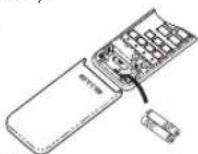
Loading Batteries (when use wireless operation.)
- Remove the slide cover.
- Insert 2 new batteries (AAA type) following the (+) and (-) positions
Clock Setup
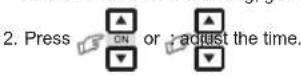
- Push aox by tip of the pencil. If timer indication is flashing, go to the next step 2.
- Press Set the time
Remote Control Reset
Push RESET by tip of the pencil or
1. Remove the batteries.
2. Press
3. Insert the batteries.
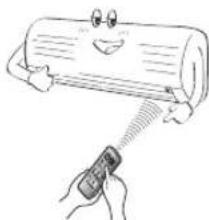
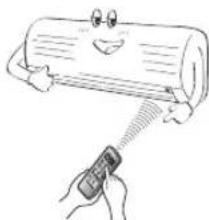
3 AIR FLOW DIRECTION
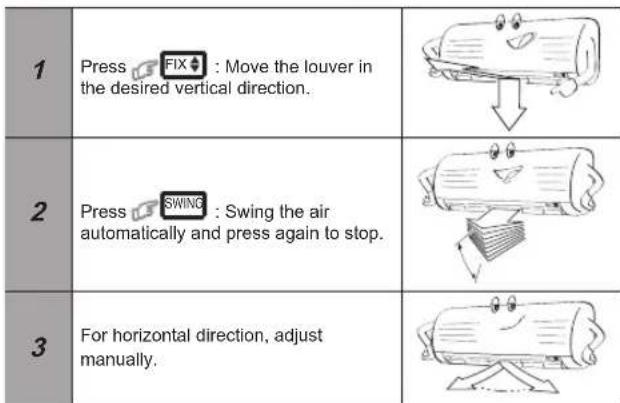
Note:
- Do not move the louver manually by others.
- The louver may automation positioning by some operation mode.
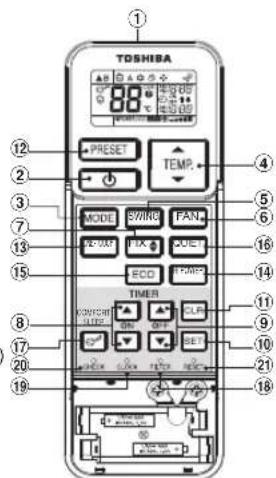
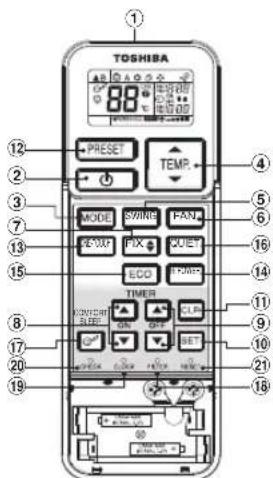
4 REMOTE CONTROL
(1) Infrared signal emitter
(2) Start/Stop button
3 Mode select button (MODE)
(4) Temperature button (TEMP)
(5) Fan speed button (FAN)
⑥ Swing lower button (SWING)
7 Set louver button (FIX)
8 On timer button (ON)
Off timer button (OFF)
Setup button (SET)
Clear button (CLR)
12 Memory and Preset button (PRESET)
13 One-Touch button (ONE-TOUCH)
14 High power button (Hi-POWER)
Economy button (ECO)
6 Quiet button (QUIET)
7 Comfort sleep button (COMFORT SLEEP)
18 Filter reset button (FILTER)
19 Set clock button (CLOCK)
2 Check button (CHECK)
② Reset button (RESET)
Note:
- The provided Remote Controller is a wireless type, which also can be used as a wire. Please see "How to Connect The Remote Controller for Wired Operation", located in installation instruction, in case of wired control is required.
- In wire operation, remote controller will return to initial condition (PRESET, TIMER and CLOCK will return to initial condition) when user shutdown power supply of Air conditioner.
5 ONE-TOUCH
Press the "ONE-TOUCH" button for fully automated operation that is customized to the typical consumer preferences in your region of the world. The customized settings control temperature air flow strength, air flow direction and other settings to provide you alternate contact with "ONE-TOUCH" of the button. If you prefer other settings you can select from the many other operating functions of your Toshiba unit.
Press Start the operation.
To automatically select cooling or heating operation
- Press MODE : Select A.
- Press TEXP.
- Press FAN : Select AUTO, LOW-LOW+
- Press MODE : Select Cool or Heat .
- Press Temp: Set the desired temperature.
Cooling: Min. 17^ , Heating: Max. 30^
- Press FAN : Select AUTO, LOW-LOW+ MED, MED+ or HIGH
8 DRY OPERATION
For dehumidifi cation, a moderate cooling performance is controlled automatically.
- Press MODE: Select Dry
- Press Set the desired temperature.
To automatically control room temperature and airflow for faster cooling or heating operation (except in DRY mode)
Press HFOE1: Start and stop the operation.
10 ECO OPERATION
To automatically control room to save energy (except in DRY mode)
Press ECO: Start and stop the operation.
Note: Cooling operation; the set temperature will increase automatically 1 degree/hour for 2 hours (maximum 2 degrees increase).
For heating operation the set temperature will decrease.
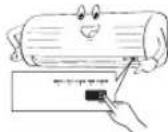
11 TEMPORARY OPERATION
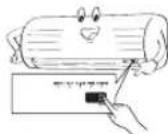
In case of the misplaced or discharged remote control - Pressing the RESET button, the unit can start or stop without using the remote control.
Operation mode is set on AUTOMATIC operation, preset temperature is 25^ and fan operation is automatic speed.
12 TIMER OPERATION
Set the timer when the air conditioner is operating.
| Setting the ON Timer | Setting the OFF Timer | |
| 1 | Press SET : Set the desired ON timer. | Press Setthe desired OFF timer. |
| 2 | Press SET : Set the timer. | Press SET : Set the timer. |
| 3 | Press CLR : Cancel the timer. | Press CLR : Cancel the timer. |
Daily timer allows the user to set both the ON & OFF timers and will be activated on a daily basis.
| 1 | Press Set On timer. | 3 | Press SET. |
| 2 | Press Set Off timer. | 4 | Press SET button during the (or) mark flashing. |
- During the every day timer is activating, both arrows ( ) are indicated.
Note:
- Keep the remote control in accessible transmission to the indoor unit; otherwise, the time lag of up to 15 minutes will occur.
- The setting will be saved for the next same operation.
13 PRESET OPERATION
Set your preferred operation for future use. The setting will be memorized by the unit for future operation (except airflow direction).
- Select your preferred operation.
- Press and hold PRESET for 3 seconds to memorize the setting. The mark displays.
- Press PRESET : Operate the preset operation.
To automatically restart the air conditioner after the power failure (Power of the unit must be on.)
Setting
- Press and hold the RESET button on the Indoor unit for 3 seconds to set the operation. (3 beep sound and OPERATION lamp blink 5 time/sec for 5 seconds)
- Press and hold the RESET button on the indoor unit for 3 seconds to cancel the operation. (3 beep sound but OPERATION lamp does not blink)
- In case of ON timer or OFF timer are set, AUTO RESTART OPERATION does not activate.
15 QUIET OPERATION
To operate at super low fan speed for quiet operation (except in DRY mode)
Press:Start and stop the operation.
Note: Under certain conditions, QUIET operation may not provide adequate cooling due to low sound features.
For comfortable sleep, automatically control air flow and automatically turn OFF.
Press : Select 1,3,5 or 9 hrs for OFF timer operation.
Note: The cooling operation, the set temperature will increase automatically 1 degree/hour for 2 hours (maximum 2 degrees increase). For heating operation, the set temperature will decrease.
17 MAINTENANCE
Firstly, turn off the circuit breaker.
Filter Reset
FILTER lamp lights on; the filter must be cleaned.
To turn off the lamp, push the RESET button on the indoor unit or the FILTER button on the remote control.
Indoor Unit and Remote Control
- Clean the indoor unit and the remote control with a wet cloth when needed.
- No benzine, thinner, polishing powder or chemically-treated duster.
To protect bad smell caused by the humidity in the indoor unit.
- If the button is pressed once during "Cool" or "Dry" mode, the fan will continue to run for other 30 minutes, then it will turn off automatically. This will reduce the moisture in the indoor unit.
- To stop the unit immediately, press the more 2 times within 30 seconds.
- Three-minute protection feature: To prevent the unit from being activated for 3 minutes when suddenly restarted or switched to ON.
- Preheating operation: Warm up the unit for 5 minutes before blowing warm air.
- Warm air control: When the room temperature reaches the set temperature, the fan speed is automatically reduced and the outdoor unit will stop.
- Automatic defrosting: Fans will stop during defrost operation.
- Heating capacity: Heat is absorbed from outdoor and released into the room. When the outdoor temperature is too low, use another recommended heating apparatus in combination with the air condit
- Consideration for accumulated snow: Select the position for outdoor unit where it will not be subjected to snow drifts, accumulation of leaves or other seasonal debris.
- Some minor cracking sound may occur when unit operating. This is normal because the cracking sound may be caused by expansion/ contraction of plastic.
Note: Item 2 to 6 for Heating model
Air conditioner operating conditions
| Temp. Operation | Outdoor Temperature Room Temperature | |
| Heating -15°C ~ 24°C Less | than 28°C | |
| Cooling -10°C ~ 46°C | 21°C ~ 32°C | |
| Dry | -10°C ~ 46°C | 17°C ~ 32°C |
20 TROUBLESHOOTING (CHECK POINT)
| The unit does not operate. | Cooling or Heating is abnormally low. |
| • The power main switch is turned off. • The circuit breaker is activated to cut off the power supply. • Stoppage of electric current ON timer is set. | • The fi iters are blocked with dust. • The temperature has been set improperly. • The windows or doors are opened. • The air inlet or outlet of the outdoor unit is blocked. • The fan speed is too low. • The operation mode is DRY. |
21 REMOTE CONTROL A-B SELECTION
To separate using of remote control for each indoor unit in case of 2 air conditioners are installed nearly.
Remote Control B Setup.
- Press RESET button on the indoor unit to turn the air conditioner ON.
- Point the remote control at the indoor unit.
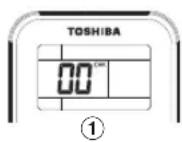
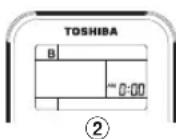
- Push and hold check button on the Remote Control by the tip of the pencil. "00" will be shown on the display.
- Press MODE during pushing "B" will show on the display and "00" will disappear and the air conditioner will turn OFF. The Remote Control B is memorized.
Note: 1. Repeat above step to reset Remote Control to be A.
- Remote Control A has not "A" display
- Default setting of Remote Control from factory is A.
10 STROMSPARMODUS (ECO)
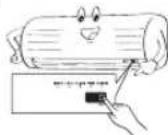
11 PABOTA B PEXUMAX TEMPORARY
B cnyuae noTepn nybTa DY nn pa3pRKn 6aTapeek B nyIe
Hakaa KhoNy RESET, MoXHO 6a3 NOMOUI nyIbTa DHaayatb HNIOCTAOHBNT paBOy YcTPOYCTBA.
PaobonpexkHmyctaHOBnHeABTOMATINHECKYOp pa0y, npdcytaHOBnHaTe TMnepatypoc coCTaBnE25°C,aBeHTnIaTOPpaOToB pexnme ABOTMATINHECKONKOPOCTN.
12 PABOTA B PEXKIME TAIMEPA
YCTaHOBky TaHMepe CnEpyET PpOIN3BODmTB BO BpEmra6oTb KOHNIOHepa.
| Hасторікta таймера влкноуенners (ON) | Hасторікta таймера влкноуенners (OFF) | |
| 1 | Hаши're коньу | Hаши're коньу |
| ON | OFF | |
| aусян'tе hyхhoe aprem'taаймера влкноуенners (ON). | bveя'mа таймера bvlknoуенners (OFF). | |
| 2 | Hаши're коньу | Hаши're коньу |
| SET | NET | |
| dду уstанов� таймера. | dду уstанов� таймера. | |
| 3 | Hаши're коньу | Hаши're коньу |
| SLR | SLR | |
| dду ot themselves peshmira таймера. | dду ot themselves peshmira таймера. | |
ExeHneBHL taimep MeosnBorret noIbO batEny taohBHTb o6a taimepa BkIIOUeHNs BIKIIOUeHNs AKTMBNPyETcE exeHNEHO
HacTpoKa exeDHeBb TaMepa
| 1 | Hа KMЛТЕ КНУК Tаймера akilichev. ON - устаньerte вору 2 | 3 | Hа KMЛТЕ KНУК SET |
| 2 | Hа KMЛТЕ KНУК Tаймера bukluyног OFF - устаньerte вору 4 | 4 | Hа KMЛТЕ KНУК SET orda hydret MHTATb CHMBOT ( MNT ) . |
KordaakTNBnPOBaH exeJeHBeHbI TaHMeP, OTo6paKaJTOc o6e cTpeKn (1).
PpmeaHne:
PnybT DY DOnKeH HAXOJITcB aH paccrOHH, PNHEMOM DN NEpepaHn CHHa h BAHTpeHH 6Nk, B nPOTHBHOM CNYae MOKET IMeTb MecTo 3aepKpKa cpaBtBAHHdINNTBHOCTbIO do 15 MHVT.
- 3Ta hactpoika 6yndet coxpaheha dny cneyuioe ananormuoh onepaum.
13 PA5OTA B PEXKIME IPEBAPITEJbHbIX YCTAHOBOK
YCTAHOBITE XEJAEMBI PEXHM, KOTOPBIM NOCNECTBNB BII MOKETE BOCNIO3BOBATCB. Hactpoika 6yder coxpaneha B nAMTNI YCTPOHCTBA DnI HcNOb3BOAHm pni nocnepdyoune paOBe (3a ICKNQHHeH MHNPAHNEH NNOTOKA BO3Dyxa)
- BbIbepeTe JxJeaembl pexmM.
2.HaKMMTEHyepKHNBAITEKHOKNY PRESET HAKATOB TceHHe 3 cekynd DnA COxPAHENH NACTPOKN.OTOBpaNTcNMBONP
3.HaXMMTe KHNKIPRESET:ДЯн haYana pa6oTbI B pexHMe npedapnteBbIx yCTAHOBOK.
14 ABTOMATMUECKN IOBTOPHBI NYCK
IraabTOMaTHeCKrO NOBtOPHOro Iycka KOHNiHOHePA NoCne nepepbBa B noJaHe NITAHnA (NITAHme yCTPOJCTBA DoNkHO 6bTT BKNHOHeo.)
HactpoKa
1.HaKMMTE HyepxNBAeTe KHOKY RESET HA BHytpenHem 6nKe B TceHHe3 CHKYN, YO6BHa HAcTPOb peXm pa6oTB. (YcPoICrBO mAdct 3BvKOBbIX CNHAna, INHkATOp OPERATION 6ydt Me TaCCKopocTb0 5pa3/B cekyHdy B TceHHe3 5ceKHy).
2. HaxMMTE u depxKBAe TE KONky RESET h BHTpeHHem bIOKe B THeHMe 3 cekyHd, qTObI oTMENHt peKMM paBOtB. (ycTPOINCTBO nAdCT 3BkyOBHX cnHana,a uNdkatop OPERATION He ydtet MRtaB) Ecnu yctahOBnEH TaIImeB BKIOHEHNA Nn BkIKIOUEHVA,peKMM ABOTMATUeCKNI IOBTOPHbI NYCK HE BKNHOaETcA.
15 PABOTA B PEXMME QUIET (BECUYMHBiN)
ДяразыВбсуMHOM pexmme CоeHb Hn3KoN cKopoctbIO BpaueHnA BEHTMTopa (KpOme pexmMa DRY (cUka))
HaxMMTe KhoNky QUET:JaHaayana nOCTaHOBKn pa6oTbI.
PnmeuHne: B HeKoToBx yncOBnRax pa6Ota B pexHMe QIET (ECEUyMHbI) MOKet He oBeCnBuBaTb DOCTaOHOrO OxNaXKeHnR H3-3a Hn3kNx 3ByKOBx XapAKTEpCTNk.
16 PABOTA B PEXKIME COMFORT SLEEP (KOMΦOPTHBI COH)
IIN3KOHOMM3HEPMBPEKIMMEOKJDAHNAABTOMATWNECKNI KOHTPOJIb NOTOKA BO3DyXA ABTOMATNNECKN OTKJKAeTCR.
COMFORT
HaKMMTe KONky !:nBbIbopa1,3,5nn9uocB KaueCTBe 3aueHnIra pabotb BpeXmte TaMeepa BkKnUoHemn(OFF).
PnmeHHe: BoBpemra pabotb bpekmme oxlanckdneHn HacptoKa TmepaTpyb 6ydtYbeynHbATcB AOTmatNHecknHa 1rpaDy/C yac B TceHene 2 YacOB (MakCMMaHbOe yBeynHue 2 rpaDyca).Jna paBoTaB b pekmhe oboRpeBa HacptoKa Tmepatpyb 6ydtYmehuAtcb.
17 TEXHnueECKOE OBCJyXnBAHHe
CHaHaIa BbKJIIOUHTe ABtOMaTWNeckBbKJIIOUHTeB.
IpeyeycTaHOBKaΦnIbTpap
ECNI 3a0paetcN HINKATOP FNIBTPA, He6bXoHMo NpOuBecTn OHTKy FInbtpa. TOb6bl KIOHNTI NaNY, HaxMITE KONKY RESET Ha BHTpeHHem 6nKe INN KONKY FILTER h nyte By
BHTpeHHM 6nok n nynbT D
Korda notpebyetc, noHCTNE BHTpeHHn bok nnybT Dy BnaXho TKaHbK.
He MCnoB3yTe 6eH3nH,pa3bABtTeB,poNHPoBaIbHbN NOPoWk INM XMMueckn 6pb6oTaHHbe cpeCTBa Iy danaenHn BnIn.
18 OXJAXDEHNA CNU
IpypeIOBpaueHHeO6pa3oBAHHHeHnpTHorO 3aNaXa, Bb3bBaEMOrO BnaxHoCTbIO BHTPNBHYPTeHrero 6noka
- Ecnn OINH pa3 HaxaTb KHONKY B peXIMME "OxnaJeHHe" nIN "CyuKa", BEHTNITATOP 6yET npODIaKtBe pAOBtA B TeneHHe NocJeHyoHux 30 MInHT, a 3aTeM ABOTAMUeCKn BblkIOuMTc. 3To CHN3T BnAIXHOCT Bo BHytpeHem 6Noke.
2.ДПМОМЕТANьHоO octaHOBKN 6nOKa HaxMNTe 6onee 2 pa3 B TeYehme 30 cekyHd.
19ФУHKUIMИNXMCNOLHEHNE
YHKUNI TPEXMHNHYOaHbI: IyrapeoTbpaeHHa3nycKa yctpOHTBa T 1eHHNE 3 MMHy npH HeMeHHHOH OTOBOP Hcye Kocne paBoTbHnPi pN yctahOBKe BkIIHOHATEN NIOJHOH ON (BkIOHOH)
2.Падотова Карев:HarpeBaet yctpoiBTO B TeHEne 5MHyT nepeI nOpaJeHien TenoIoro BOxDya.
3. YnpaBneHMe npaueh TenoRo Baoyxa: KOra TeMa nepaTpya BHyTpIn NOMeUHeNIOocTHINHTYCTAHOBNEHNOI TEMNepaTybl, CKoPoCTb pexHMa BEHTINPOBaHn ABToMaTNUeCKn CHMkaETc, HApNyXbH bIok NepeCTaET pa60tAb.
4.ABtOMATUNHECKOpaRMAOPKBAHNAHE:BO BpEIMonePAaMn pa3MOPAKBaHNAHBEHTNITOPOCTAHABNBAOTC.
5. HarpeBatenbHa noteHuaana: Tenno ot6npaetcchapkyn H otdaetc B nomeueHme. Pnp cnHsKOM HsKoH npyKHOH Temepatype nCnOJbSyHe BmecTe c KOHNuOpemop dpyroe peKoMeHdoBaHHoe HarpeBatenbHo 6obpyoDaBHae.
6. 3aMeHAneOHOTcENBHO HAKANNbIAUIOcRc CHera; DnA HApXyHOrO Bnoka cnEpyET BbIbOpaTakoe NOJIOKeHNE, BkTOpOM OH He ByTeN OINBPeKHe NNIIMHM CKONIIHmRCHera, IMCTBeB INIpyrTO MyCopa.
70BpE8pa50b6nka 803MOeH 3eHaHTENbHbI 3yKNOTpeCKBaHmR.
70TO HOPMaJIbHO,NOTOMYTO pNHHIO NOTpeCKBaIOJEO 3yKa MoKET 6bITb
pacuHneHc/KeTneIAHnKtA.
PnmeHne:YHKbco 2 no 6OTHOCTK MoeIN nHaRpeBaHn
YcnoBna pa6o7b KoHnmohepa
| Temnepatypa pexim | Hapuykhaj Temnepatypa | KoMHaTHaY Temnepatypa |
| Harpovahme | -15°C ~ 24°C | Hnke 28°C |
| Oxnajdkhme | -10°C ~ 46°C | 21°C ~ 32°C |
| Cuzka | -10°C ~ 46°C | 17°C ~ 32°C |
20 YCTPAHEHNE HENOLADOK (OPNEHTNPB)
PHOSPHATE MEDI.MEDI+JILI
HIG
Coda
Inte postavku
8 SUHO HLADENJE
Za odvlazivanje, umjerena snaga hladenja automatski se kontrolira.
- Pritisnite tipku
MODE
C Oda
Berite Suhi radi
- Pritisnite tipku
TEMP.
: Nam
stite zeijenu temperaturu.
9 RAD PRI VELIKOJ SNAZI
Za automatisko kontrliranje sobne temperature i struje zraka za brze hlaidenje ili grijanje (osim u rezimu SUHO)
Pritisnite tipku
VFR
Za
ključ
vanje i iskligu
10 EKONOMICAN RAD
m = 311
7 HUTO/FUTO UZEMMOD
- Nyomja meg a

9 HOOGVERMOGENSWERKING
11 TijDELIJK WERKING
18 SJALVTVATT (ENDAST VID TORR OCH SVAL-DRIFT)
HaTnCHTe HESET C Bbpxa Ha MoNHB mN
1.CbaneTe batepnaTa
2. HatncheTe 3. Noctabete bateyta.
3 NOCOKA HA Bb3dUWHNIA NOTOK
| 1 | Нат生态系统 FIX: Памсетete Вертул范围内 вending on hot NHN in hot Bax noceka. | |
| 2 | Нат生态系统 SWING: завретete велатуно вьдуна. Нат生态系统 OTHOB, за сpenete. | |
| 3 | Настойтete рычнохорозонтailing noceka. |
3a6eJekka:
He ce onnTBAe PBHNO da nPbEMCTBaTE BENTNAUHOHNHnO TBOp.
BENTNauHOHNHT OTBOP MOKe da ce NOnuHOHPa ABToMaTHNoHO 3a npedctoarpeKIM Ha pa6Ota.
4 ΦYHKLIMN HAДNCTAHLCIOHHOTO YNPABJIENHE
V3TOYHMK HA HHPaaypeOBEH CMHN
(2) Byton 3a nycxhahe/cnnpahe
(3) ByToH 3a 3600 HApexMM (MODE)
④ ByToH 3a TempePaTpyTa(TEMP)
(5) ByToH 3a ckOpocTHa Ha BeHTnHaTopo (FAN)
⑥ ByTON 3a JIOJNEEHa Xany3nTe (SWING)
7 BytoH 3a HAcTPOKa Ha BcHTMaAIOHHN OToB (FIX)
8 Byton Ha TaMepa 3a BkHouBaHe (ON)
(9) ByToH Ha TaIMepa 3a NkIIOUbaHe (OFF)
10 ByToH 3a HactpouKmTe (SET)
(1) ByTOH 3a H3MCTBAHE (CLR)
12 BYTOH 3a 3aAMETRABAHE 3a PDEBAPYTeHO
3anaMeTeHn HactpoKn (PRESET)
13 ByToH 3a HAcTpoBHaBe cepHO HAtmCxAe ONE-TOUCH
(14) ByToH 3a BnCOKa MoUHOCr (Hi-POWER)
(14) Byton 3a eheprocnctraBaHe (ECO)
6 ByToH 3a TMxa pa60ta (QUIET)
77. ByToH 3a KOMΦopTeH cBn (COMFORT SLEEP)
18 ByToH 3a pecTapTnpaHe Ha qmntbpa (FILTER)
(9) ByToH 3a HAcTpoHnKa Ha YacOBHnKa (CLOCK)
(20) Bytoh 3a KOHTpon (CHECK)
(2) Byton 3a Hynipane (RESET)
3a6eJexka:
IpeoocTabeHOTOn DnCTaHNOHNO ynpabneHHe e 63KHHo NcbIo Taka MoXe da ce 3n03n3Ba c Ka6en.Ako Bn E neoo6xqHMoO npypanHe C Ka6en,MOra,BnKTe,KaKa da ce CbPke DnCTaHNOH NOypanHe 3a paOta C Ka6enB HIncTpyuHnTe 3a MOHTAK.
- Pnpapbota c kabn DmctanHMOHTo ynpBnHe Me 0e C BpHE B npBpaHauHbCbTOHMe (PRESET (TIPEBAPTEJIHA HACTPOIKA). TIMER (TAMMEP)N CLOCK (ACOBHNI) 0e Ce BpHT B pBpOHaHIO CbCToHMe), KOratoNotpeBcTeNT INKIOHcyEINKTPO3AQPBAHBOHETO H KNIMMATNa.
5 ONE-TOUCH
HaTnchete 6yToHa "ONE-TOUCH" 3a n3zIIO aBOMATUH epeKHM Ha pa6oTa, KOTo E 6uHa HAcTPOe H K M TINMHITE pPeDNOHTAHN HA NOTpe6TeNTe BBaWnA perNoH OT cBETA. PpeBaPHTeHNHe HAcTPOKn KOHpOpiNATcNATA INOCOKaHa Hb3dYnHn IOTok, KaTK O npyRn napAMrpn Ca NOctBnHcE hDoHn HAtnckae Ha 6yToHa "ONE-TOUCH". Ako ppeDnHTate dpyr HAcTPOKn, Bue moKete da n36epete OT mHoroto pa60THn Ha BaWmT ypeToshiba.
HaTmchete 1003:CTapTnpaTe ABToMaTHnHpeKIM Ha pa6ota.
6 ABTOMATUHEP PAXIM HA PABOTA
3a aBToMaTuH H36Op Ha oxJaXaJHa He HnH 3aTOnnJHe
- Hatnche MODE : u36pepeA.
2.HatncheTe TEMP:HaCTpoIteXeNaHata TemnepaTpa.
3.HatncheFAN:MsepeTeAUTO,LOW-LOW+MED,MED+HIGHS.
7 PEXKIM OXJAXDAHE / 3ATONJIHRE
1.HaTnCHeTe MODE: n36peTe Cool, mIn Heat.
2. HatncheTe TEND: hactpoite XeenaHata TemnepaTpya. OxJAAKDAHE: MHN. 17^ ,Healing:MAc 30°C
3.HATCHETEFAN:HabepeteAUTO,LOWLOW+MED,MED+WOWHIGH.
8 PEKIM HA MEKO N3CYUABAHE
3aHcyyuBaHaPeXKIMbT Ha yMepeHO OxJaKeHe ce KOHTpOInpa ABTOMATNHO.
- HATNCHETE MODE : n36pepe Dry
- HataChete : hataTe kenaHata TemnepaTpa.
9 PEKM Hi-POWER
3aJa KOHTPONIPATE ATOMATNHO CTAHATA TEMNEPATy N Bb4dyuHnna NOTOK 3aNo-6bp30 OxNAJDAHE INI 3aTOnJIHe (C INKIOHcHHe H a pexnM MEKO IN3CYUBAHE)
HaTnCHeTe TPCKER:Iycka n cnpa pekma.
10 PEXKUM ECO
3a da KOHTpOIpate ABTomATuHc CnecTBAHcTo Ha eHeprna (C nKIOUeHne HapexkIM MEKO V3CYUABAHE)
Hattchete ECO: Nycka n cnmpa pexima.
3a6eJekka: PekkM OxnaXdane; 36bpaHata Tempepatya ue ce yebnHaba abToMaTHNo c no 1 rpaDyc/Hac 3a 2 Haca (MaKcHym 2 rpaDyca yebnHneHa).
3a pexkM OTONNEHnE 36paHATA TEMNepaTpaI ce HAMANPA.
11 BPEMEHEH PEXKIM HA PABOTA
BcnyaHa3ry6eHOHnHe3apeEHO DuctaHNOHOynpaBneHHe:
HaTHCHETE RESET 6yTOHa, yCTPOIcTBOTO MOKe Da 3aONUHr INn da cnp da paoBn 6e Da nINON3BaTe DInCTAHUMHOHTO YpNDABHeNIE.
- PekHMbT ha pa60ta e harnaceh ha ABOTMATUHOO, npedabapitHe 3azaedHa Tmemepatya 25^ infan BEHTINATOpBt pa60Ta ha ABOTMATuHa CKopct.
12 PEXKIM HA PABOTA HA TANMEPA
HactpoTe TaIMepe,doKATO KIMMaTnKbT pa60tn.
| BKJIQUBAHE Ha Taimepa | ИЗКЛЮВАЕ Ha Taimepa | |
| 1 | Hаtmсichte | Наберete кенист Тадмог на вимпаве. |
| 2 | Hаtmсichte | SET : Наслое ТAIMЕР. |
| 3 | Hаtmсichte | SET : Наслое ТAIMЕР. SLR : Oпшених Сларь Ha Taimepa. |
IeBnHmT aTneMop 3OBONBA Ha nOte6BeITa Na cHaTPON TaMeRHe 3a BKIOUBAHE & N3KIOUBAHE u ce 6Je de AKTHINpuBa BCKeJ Den.
HacpoBaHe Ha BCEKnDHeBHHa TaIMepe
- PnBpeMe Ha pa6oTa Ha BCEKnDHeBHnT TaMep, DBeTe CTrpEiK (1, 1) ca noka3aH.
3a6eJekka:
Д. Довский Достigatedу ВОЕТСЕСССССССССССССССССССССССССССССССССССССССССССССССССССССССССССССССССССССССССССССССССССССССССССCS
Hactpoikata 6e 6bde 3anaMeTeHa 3a noCneDbaua TaKaBa onepaunr
13 PEXKIM HA IPEBBAPITEJIHO 3AADAEHN HACTPOIKN (PRESET)
Hactpoitte Baunite npedBapntenHO 3aJaehn HactpoHH 3a 6bdeea yontope6a. HactpoHHte 6bDat anamatehen OypeHa 3a 6bdeua pa60ta (cNkouHeHne Ha noCOKata Ha BdyuHnnotok).
1.ИЗбетe BaIMTe npEDNoHTaHn HAcTpoKn
2. HataHCTe H3aPbXte PRESET 3a 3ceKyuHn, 3a da ce 3aametT HactpoKnTe.HaDcnnpe Ce noBraMapkepa P
3.HaTnchePreSET:Pa6otaBpeKIMHa npEaBapNTeHIO 3aIaDeHn HAcTpoIKN.
14 ABTOMATNUHOPECTAPTINPAHE
3a da pectapnpate ABTOMaTHHO KIMMaTHKa cIeJ cIIpaHe Ha TOKa (KIMMaTHkbT Tp8BaDa e BKNouEH)
HactpoKa
- HATINCHETe n3aapbxtte RESET 6ytoha hBaTpeHnata hact 3a 3 cekyHN,3a da hactpontepekimaHa paobta.(ue yyeTe 3 ptn 3bya 6bn,a namnata ha fyHKuNTA PEKKM HA PA6OTA ue mira 5 ptn/cek.3a 5 cekyHN)
- HATINHETE H3aBbXtRESET BYTOHa HbHuHATA YACT 3a 3CekyHn, 3a da, TMeHNITE PekMHa Ha paboTA. (ue yyeTe 3 nTn CnHana Bm, Ho lamnata Ha pHyKUNrTa PEXKM HA PAEOTA HMa Da mHa.)
- ABOTMATUHO PECTAPTIPAHE He ce akTmbpa B cnuyai, ye e 3aaden TaHmep 3a BKIOUBAHE nn N3KIOUBAHE.
15 TNX PEXKIM HA PABOTA
3a da pa60Tu BeHTnIATOpbT Ha MHoro Hncka ckopocT B Tnx pexkM (C nKIOHHeHnHa pexkMEKO I3CYUBAHE)
HaTnCHeTe QUIET:Iycka n cnpa pejxma.
3a6eJekka: Pnp onpepehen ycnoBn, pexHmbT Tnx MoKe Ja He oCnHpyn aEKNBtHO OXnKdAHe 3apAn kNTbHNTe CmCTemn 3a HNCKO HBO Ha 3BykA.
16 PEXKIM KOMΦOPTEH CbH (COMFORT SLEEP)
3a da neCTnTe eHepTn,doKaTO cNITe,ynpabraBaIte aBtOMaTHO Bb3dyuHHoNOTOKnABTOMaTHO N3KIOUHYAHTE KIMMaTHaKA.
HATNCHE T :I36peTe 1,3,5nn94aca pa60ta Ha TaIMepa 3a N3KIOUBAHe.
3a6eJekka: PnpeKMM HxOxAkDaHe, n36paHATA TempePaTpy ige ce yBENuHbA bAToMaTHUHO c 1 rpaDyc/ucac 3a 2 Yaca (MAKcIMyM 2 rpaDyca yBENHeH) 3a peKMM OTpIeHne N36paHATA TempePaTpy ige ce HAMnBa.
17 IOIDPbJXKA
IbpoN3KIOUeTe ABOTMATuHnna IpekcbaN.
NouchBaHe Ha qnItpnte
Jannata FILTER Cbetn;ΦnntbptTprba da ce noctn. 3a da nKIOHne Kpykata, HATNHcTe 6yToHa "RESET" BbyxBytpewHHM moynnn 6yToHa "FILTER"OT dNCTAHMOHHTO npypanHeH.
Bbtpewha qact n dctaunnoHNO ynpabneHne
- PnI Heo6xOaIMoCT NoiCtTe BbTpEiHaT auct N dNCTaHcMOHOTO ynpabJIeHne C bnaKeH npcaJ.
He 3n0n7a8te 6e3nn, p3apeiTeni, pe6cTeBa 3a noIipapae IIN nnmmneckp TpeTepapnnapaen.
18 PEXIM HA CAMOTOCHIBAHE (CAMO 3A PEXIMN OXJIAXDAHE IN 3CYJABAHE)
3a da n36erHene no7a Mnpn3ma, npnHHHeHa oBnaraT aBB bBtpewnMoyn
1.Ako BytohB eHaTnCHa BeHNbX npn peKMM OxnaJaHae HIN 3cYuBaHaBe, BHeTHnATOpBtJe npOblxN da pa60Tu 3a oue 30 MMHTu, cned TOBA ue CE hKnIOUy ABToMaTmUHO. TOBA ue HAMAN BnArata BBB BtpeuHMoMOnyI.
2.3a cnpeyepBepHara,HaTCHeTe NOBHeOT 2 nTnB pAMKITE Ha 30 cekyHn.
19 PEXKIM HA PABOTA INIPOIN3BOJNTENHOCT
- TpIMMHHTHa 3aunHtA: 3aJa npeIaNsIte yCTPOINCTBOTo OT BKIOUBAHe 3a 3MnH, pN BHe3aHNO pecTAPtnPAne INB KBIIOUBAHE.
- PpeBapntenHn HarpBaHe: 3atOnnHe Ha ypea 3a 5 MmHytn npedn da 3aynx TaonbN Bb3dyX.
- KOnTpOnPiPHe Ha TonIIa Bb3dyx: KOrato Temnepatypata B NOMeueHneHTo DOCTNHe npEdBapntEnHO 3aJaDeHata Temnepatypa, CKOpocTHa Na BEHTInaTopa aBtOMaTHuHO ige Ce HamaH N BbHnHaTa Yacct Ige cnpe da pa6oTH.
- ATOmatuHPOa3Mpa3raBaHe: BENTnIaTOpTe ⅢcnpaT da pa6oTnOBpeMe Ha Ipoueca Ha pa3Mpa3raBaHe.
- TOnnHnHa MoUHcCT: TOnnHnHaTe Ce NoTbIa OToBbN H Ce pa3npedEe B NOMeUHeHTo. Ako BbHnHaTe TempeArye a TBpDe HNuCKa, INoJ3BaTe Dpyr npenOpbYHTeH ype3 a OTonJIeHne B KOMbHnauC KINMAtika.
6.Cb6paekhen3a HATpynAH CHR:MOHTPAIe BbHUNHATAcH MaRCTO, KOETO HE 03BONBAH PATyPNAHE To HCHJNTCA. - Moze da ce noBn nek Wm no Bpe Me Ha pa60ta Ha yCTPOIcTBOTo. To3n Wm e HopMaJIe H nIDBa O T pa3uHpRABaHTo/CBbAHeTo Ha JIaTMcata.
3a6enexka: P0nucu 2 do 6 3a moedena 3a otonnehe
YcNoBnHa pa6oTa Ha KInMaTnKa
20 VEAD (CHECK POINT)
21 KAUGJUHTIMIPULDI A-B VALIK
20 RIESENIE PROBLEMOV (KONTROLNY BOD)
| Information according to EMC Directive 2004/108/EC | |
| (Name of the manufacturer) TOSHIBA CARRIER (THAILAND) CO., LTD. | |
| (Address, city, country) 144/9 MOO 5, BANGKADI INDUSTRIAL PARK, TIVANON ROAD, TAMBOL BANGKADI, AMPHUR MUANG, PATHUMTHANI 12000, THAILAND. | |
| (Name of the Importer/Distributor in EU) TOSHIBA CARRIER UK LTD. | |
| (Address, city, country) Porsham Close, Belliver Industrial Estate, PLYMOUTH, Devon, PL6 7DB. United Kingdom |