
RAS-13UKP2L - Air conditioner TOSHIBA - Free user manual and instructions
Find the device manual for free RAS-13UKP2L TOSHIBA in PDF.


| Type | Split type air conditioner |
| Indoor unit dimensions (W x H x D) | 790 mm x 275 mm x 208 mm |
| Outdoor unit dimensions (W x H x D) | 780 mm x 538 mm x 300 mm |
| Indoor unit weight | 10 kg |
| Outdoor unit weight | 37 kg |
| Power supply | 220 V ~ 60 Hz |
| Cooling capacity | 3.70 kW |
| Cooling current (indoor/outdoor) | 0.15 A / 5.66 A |
| Cooling power (indoor/outdoor) | 30 W / 1240 W |
| Operating modes | Auto, Cool, Dry, Fan only, Hi POWER |
| Remote control | Included with AAA batteries |
| Filters | Zeolite filter and Purifying filter included |
| Timer functions | ON timer, OFF timer, combined timer, every day timer |
| Air flow direction | Vertical auto louver (remote control), horizontal manual |
| Auto restart function | Yes (can be set via TEMPORARY button) |
| Operating temperature range (cooling) | Indoor: 21-32°C, Outdoor: 15-43°C |
| Operating temperature range (dry) | Indoor: 17-32°C, Outdoor: 15-43°C |
| Protection features | Three-minute restart delay, overload protection |
| Display panel indicators | Hi POWER lamp, FILTER lamp, FAN-ONLY lamp, TIMER lamp, OPERATION lamp |
| Optional replacement filters | Zeolite filter (RB-A604DE), Purifying filter (RB-A602SE) |
Frequently Asked Questions - RAS-13UKP2L TOSHIBA
User questions about RAS-13UKP2L TOSHIBA
0 question about this device. Answer the ones you know or ask your own.
Ask a new question about this device
Download the instructions for your Air conditioner in PDF format for free! Find your manual RAS-13UKP2L - TOSHIBA and take your electronic device back in hand. On this page are published all the documents necessary for the use of your device. RAS-13UKP2L by TOSHIBA.
USER MANUAL RAS-13UKP2L TOSHIBA
CLIMATISEUR (MODELE SEPARE)
KLIMAGERÄT (GETEILTE AUSFÜHRUNG)
CONDIZIONATORE D'ARIA (TIPO SCOMPONIBILE)
For general public use
natural_image
Line drawing of an air conditioner with a remote control unit emitting sound waves (no text or symbols)RAS-07UKP-ES/RAS-07UA-ES
RAS-10UKP-ES/RAS-10UA-ES
RAS-13UKP-ES/RAS-13UA-ES
RAS-07UKP-E/RAS-07UA-E
RAS-10UKP-E/RAS-10UA-E
RAS-13UKP-E/RAS-13UA-E
RAS-10UKP2L /RAS-10UA2L
RAS-13UKP2L /RAS-13UA2L
Indoor Unit Outdoor Unit
Thank you very much for purchasing TOSHIBA Air Conditioner. Please read this owner's manual carefully before using your Air Conditioner.
WERKING MET HOOG VERMOGEN (Hi POWER) 10
TEMPORARY FUNCTIE 16
ONDERHOUD 17
WERKING EN PRESTATIES AIRCONDITIONING .... 19
PROBLEMEN EN OORZAKEN 20
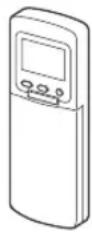
Remote control Remote
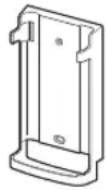
control holder
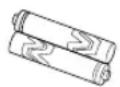
Batteries (two)
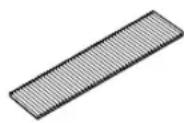
Zeolite filter
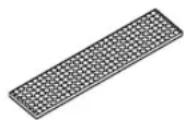
Purifying filter
PRECAUTIONS FOR SAFETY
DANGER
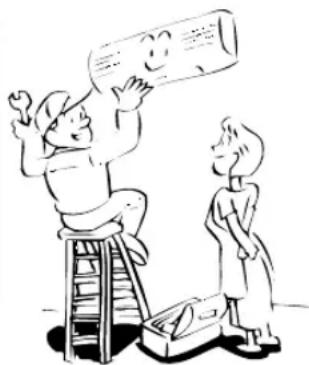
- DO NOT ATTEMPT TO INSTALL THIS UNIT BY YOURSELF. THIS UNIT REQUIRES QUALIFIED INSTALLER.
- DO NOT ATTEMPT TO REPAIR THE UNIT BY YOURSELF. THIS UNIT HAS NO COMPONENTS WHICH YOU CAN REPAIR.
- OPENING OR REMOVING THE COVER WILL EXPOSE YOU TO DANGEROUS VOLTAGES.
- TURNING OFF THE POWER SUPPLY WILL NOT PREVENT POTENTIAL ELECTRIC SHOCK.
natural_image
Illustration of two people on a ladder and one standing, holding a large cylindrical object (no text or symbols present)WARNING
WARNING ABOUT INSTALLATION
- Make sure to ask a dealer or a store specialized in electric work to install the air conditioner.
If the air conditioner is imperfectly installed by yourself, it may cause some problems such as water leak, electric shock, fire, and so on. - Ground the air conditioner without fail.
Do not connect the ground wire to gas pipe, water pipe, lightning rod or ground wire of telephone. If the air conditioner is imperfectly grounded, it may cause electric shock.
natural_image
Illustration of two cats reacting to a large cylindrical object with motion lines (no text or symbols)CAUTION
TO DISCONNECT THE APPLIANCE FROM THE MAIN POWER SUPPLY This appliance must be connected to the main power supply by means of a circuit breaker or a switch with a contact separation of at least 3 mm.
WARNING ABOUT OPERATION
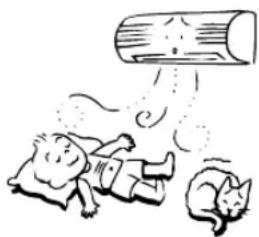
- Avoid cooling the room too strong or exposing the human body to cool wind for a long time, because it is bad for the health.
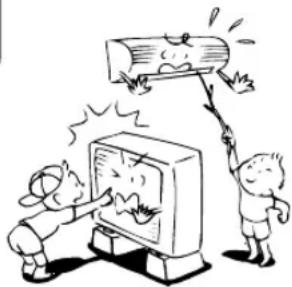
- Do not insert fingers and sticks into the air outlet and air inlet to avoid getting injured and damaging the machine, because there are fans running at a high speed inside both the air inlet and air outlet.
- When you are aware of something abnormal with the air conditioner (smells something scorching, cools weak, etc.), immediately turn off the main switch, the circuit breaker, from the main power supply to stop the air conditioner, and make contact with the dealer. If the air conditioner is continuously operated with something abnormal, it may cause machine failure, electric shock, fire, and so on.
- Do not spill water or other liquid on the indoor unit. If the unit is wet, it may cause an electric shock.
natural_image
Cartoon illustration of two children reacting to a TV screen with a broken log above them (no text or symbols present)WARNING ABOUT MOVEMENT AND REPAIR
- Do not move nor repair any unit by yourself.
Since there is high voltage inside the unit, you may get an electric shock when removing the cover and main unit. - When moving the air conditioner for re-installing in another place, ask the dealer to do it. If it is imperfectly installed, it may cause electric shock or fire.
natural_image
Simple line drawing of a person shouting while holding a phone to their ear (no text or symbols)CAUTION
CAUTIONS ABOUT INSTALLATION
•Certainly lay the drain hose for perfect draining.
Wrong drainage may cause flooding in the house and getting furniture wet.
- Make sure to connect the air conditioner to an exclusive power supply of the rated voltage; otherwise, the unit may break down or cause a fire.
- Do not install the unit in a place where inflammable gas may leak. If inflammable gas accumulates around the unit, it may cause a fire.
CAUTIONS ABOUT OPERATION
- Carefully read this manual before starting the air conditioner. The manual includes many important things for daily operation.
- Do not use this air conditioner for other purposes such as preserving food, precision instruments, art objects, breeding animals, growing potted plants, etc. Do not install this air conditioner in a special-purpose room such as a ship or any kind of vehicle, otherwise it deteriorates the machine performance.
- Avoid exposing potted plants and animals to wind of the air conditioner, because it badly affects the health and growing of them.
- When the air conditioner is used in a closed room, be careful of sufficient ventilation of the room. Poor ventilation causes oxygen shortage.
- Do not touch operation button with wet finger; otherwise, you may get an electric shock.
- Do not place any combustion appliance in a place where it is directly exposed to wind of the air conditioner; otherwise, it may cause imperfect combustion.
- When the air conditioner won't be used for a considerably long time, turn off the main switch or the circuit breaker, for safety. Disconnection from the power supply prevents the unit from lightning and power source surge.
- Do not put a vessel with water such as a vase on the unit, because water may possibly sink into the unit and will bring about electric shock because of deterioration in electric insulation.
- Check the concrete blocks, etc. underneath the outdoor unit occasionally. If the base is left damaged or deteriorated, the unit may topple over and inflict an injury on a person as the worst case.
- Do not wash the unit with water. It may cause an electric shock.
- Do not use alcohol, benzene, thinner, glass cleaner, polishing powder, etc. for cleaning the unit, because they deteriorate or damage the air conditioner.
- When cleaning the unit, make sure to turn off the main switch or circuit breaker beforehand for preventing you from getting injured by the electric fan running inside.
For details of cleaning method, refer to "Maintenance" on page 17 and 18. - Do not put anything on the outdoor unit nor step onto it. If you do so, it may not only topple over the unit but also injure yourself.
•To make the air conditioner demonstrate its original performance, operate it within the range of the operating temperature specified in the instructions. Otherwise it may malfunction, break down or water may leak from the unit.

natural_image
Cartoon illustration of seven different scenes: a computer monitor, a bottle with a surprised face, a TV with a smiling face, a man climbing a log, a person reacting with surprise, a man holding a book, a child with flowers, and a child running away from the phone (no text or symbols present)PARTS NAME
Outdoor unit
①Drain hose, refrigerant connecting pipe and electric wires
②Air inlet (Side and rear)
③Air outlet
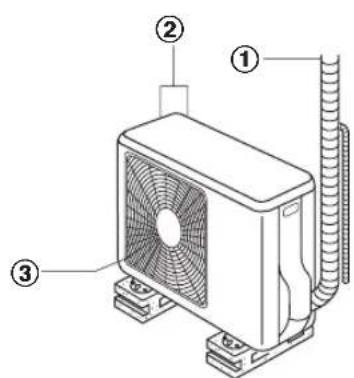
(07 class)
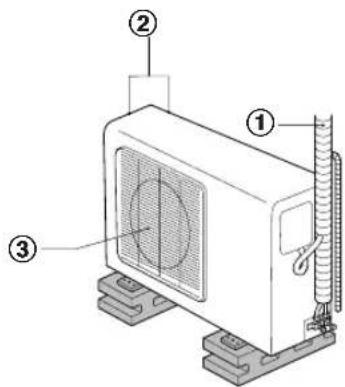
(10-13 class)
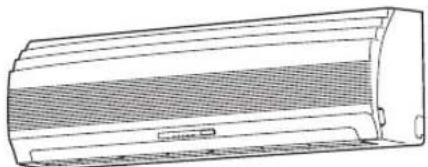
Indoor unit
④Room temperature sensor
⑤Front panel
⑥Air inlet grille
⑦Air filter
⑧Air outlet
⑨Horizontal air flow louver
⑩ Vertical air flow louver
⑪ Display panel
⑫ Infrared signal receiver
⑬ Remote control
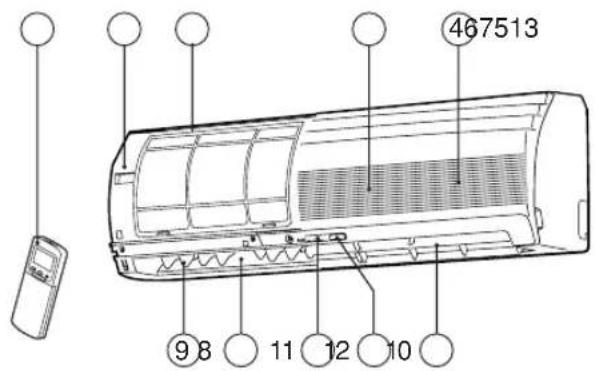
NAMES AND FUNCTIONS OF INDICATORS AND CONTROLS ON INDOOR UNIT
Display panel
The operating conditions are indicated below.
①Hi POWER lamp (Green)
②FILTER lamp (Orange)
③FAN-ONLY lamp (Orange)
④TIMER lamp (Yellow)
⑤OPERATION lamp (Green/*Orange)
The operation lamps flash rapidly (five times per second), when safety protection features come into operation.
* When the auto restart function is in operation, the OPERATION lamp is orange.
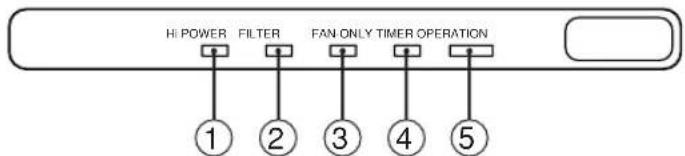
flowchart
graph TD
    A["HI POWER"] --> B["1"]
    C["FILTER"] --> D["2"]
    E["FAN ONLY TIMER OPERATION"] --> F["3"]
    G[" "] --> H["4"]
    I[" "] --> J["5"]
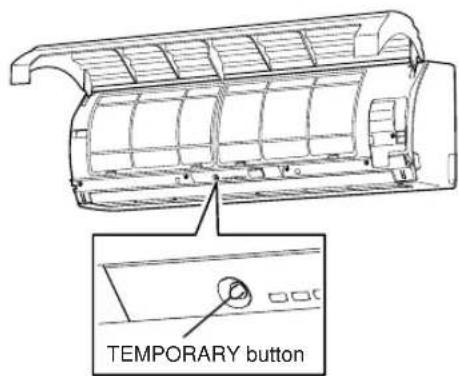
TEMPORARY button
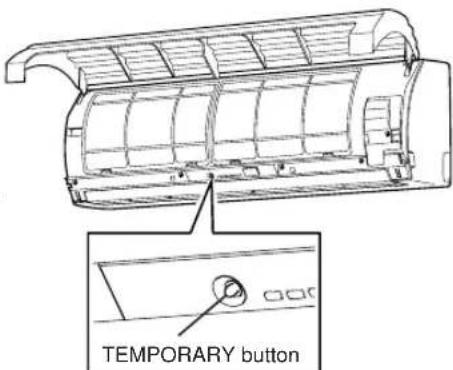
If you misplace or lose the remote control or its batteries are exhausted, push the TEMPORARY button.
- Open the air inlet grille to push the TEMPORARY button. You can lift the grille up to an angle wherever it will remain fixed. Do not lift the grille any further when it stops with a clicking sound.
- Push the TEMPORARY button to start the air conditioner. Push this button once again to stop it.
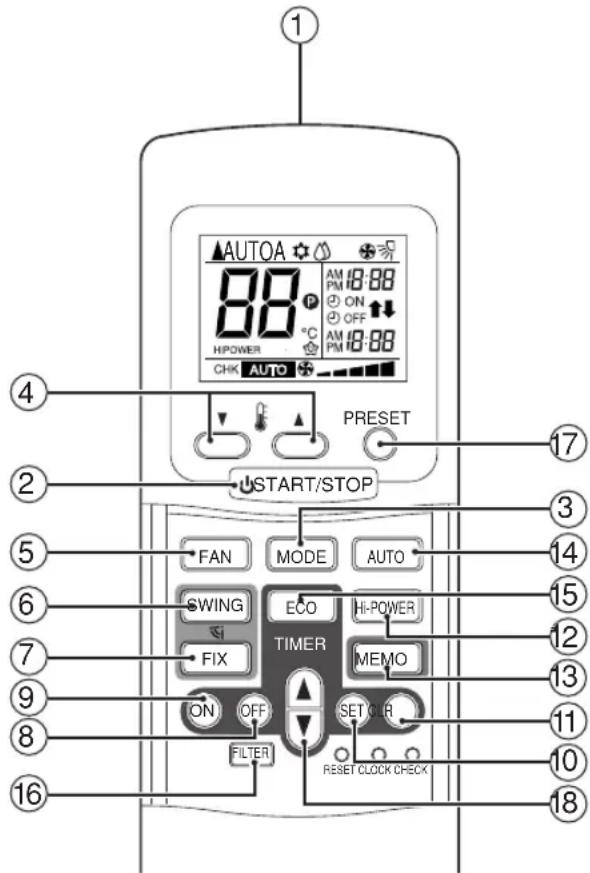
REMOTE CONTROL AND ITS FUNCTIONS
①Infrared signal emitter
Transmits a signal to the indoor unit.
②START/STOP button
Press the button to start operation.
(A receiving beep is heard.)
Press the button again to stop operation.
(A receiving beep is heard.)
If no receiving sound is heard from the indoor unit, press the button twice.
③Mode select button (MODE)
Press this button to select a mode.
Each time you press the button, a mode is
selected in a sequence that goes from A : Auto
changeover control, ⚙ : Cool, ⚠ Dry,
: Fan only, and back to A.
(A receiving beep is heard.)
④Temperature button ( )
▲...... The set temperature is increased up to 30 °C.
▼...... The set temperature is dropped down to 17 °C.
(A receiving beep is heard.)
⑤Fan speed button (FAN)
Press this button to select fan speed. When you select AUTO, the fan speed is automatically adjusted according to the room temperature.
You can also manually select the desired fan speed from among five settings.
(LOW —, LOW⁺ —, MED —)
MED+ , HIGH
(A receiving beep is heard.)
⑥Auto louver button (SWING)
Press this button to swing the louver.
(A receiving beep is heard.)
Press the FIX button to stop the louver swinging.
(A receiving beep is heard.) (see page 13.)
⑦Set louver button (FIX)
Press this button to adjust the air flow direction.
(A receiving beep is heard.) (see page 13.)
⑧Off timer button (OFF)
Press this button to set the OFF timer.
⑨On timer button (ON)
Press this button to set the ON timer.
⑩Reserve button (SET)
Press this button to reserve time settings.
(A receiving beep is heard.)
⑪ Cancel button (CLR)
Press this button to cancel ON timer and OFF timer. (A receiving beep is heard.)
⑫High power button (Hi POWER)
Press this button to start the high power operation. (see page 15.)
⑬ Memory button (MEMO)
Press this button to stand by memorizing the settings.
Press the button again for more than 3 seconds to memorize the setting indicated on the remote control and Pmark is indicated. ( see page 12.)
⑭Automatic operation button (AUTO)
Press this button to operate the air conditioner automatically.
(A receiving beep is heard.) (see page 15.)
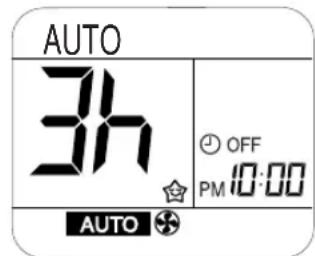
⑮ ECO timer button (ECO)
Press this button to start the ECO timer (OFF timer) operation.
You can select the OFF timer time from among four settings (1,3,5 or 9 hours). (see page 15.)
⑯FILTER button
Press this button to turn off the filter cleaning lamp on the indoor unit.
Press this button after cleaning the air filter.
(see page 17.)
⑰PRESET button
Press this button to operate the air conditioner according to settings memorized by the MEMO button. (see page 12.)
⑱ TIMER button
Use this button to change the clock, ON timer, and OFF timer times.
To forward the time, press the "TIMER" button.
To set back the time, press the "TIMER 🔊" button.
NAMES AND FUNCTIONS OF INDICATIONS ON REMOTE CONTROL
Display
All indications, except for clock time indication, are indicated by pressing the START/STOP button.
①Transmission mark
This transmission mark (▲) indicates when the remote control transmits signals to the indoor unit.
②Mode display
Indicates the current operation mode.
(AUTO : Automatic control, A : Auto changeover control, ⚙ : Cool, ⏱ : Dry, ⚙️ Fan only)
③Temperature display
Indicates the temperature setting (17°C to 30°C).
When you set the operating mode to Ⓧ : Fan only, no temperature setting is indicated.
④ Louver operation display
Indicates the louver positioning and operation.
Five selectable positions -☐, ☐, ☐, ☐, ☐ Automatic -☐ Swing ☐
⑤FAN speed display
Indicates the selected fan speed. AUTO or one of five fan speed levels

can be indicated.
Indicates AUTO when the operating mode is either AUTO or ⚙ : Dry.
⑥TIMER and clock time display
The time set for timer operation or clock time is indicated.
The present time is always indicated except for TIMER operation.
⑦Hi POWER display
Indicates when the Hi POWER operation starts.
Press the Hi POWER button to start and press it again to stop the operation.
⑧ P (MEMORY) display
Flashes for 3 seconds when the MEMO button is pressed during operation.
P mark is indicated when keeping the button depressed for more than 3 seconds while the mark is flashing.
Press another button to turn off the mark.
⑨ ECO TIMER display
Indicates when the ECO TIMER is in operation.
Each time you press the ECO button, the display changes in the sequence of 1,3,5 or 9h.
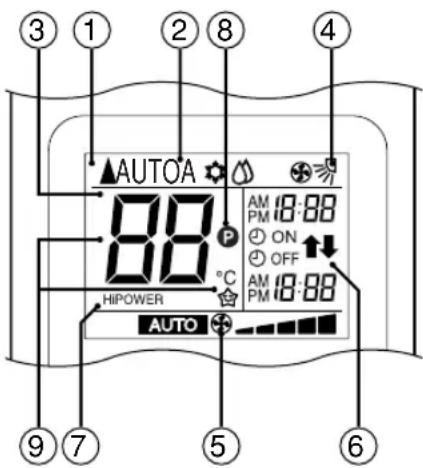
• In the illustration, all indications are indicated for explanation. During operation, only the relevant indications will be indicated on the remote control.
PREPARATION AND CHECK BEFORE USE
Loading the remote control batteries.
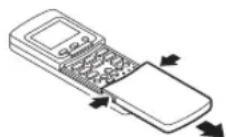
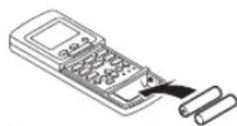
①Remove the cover, and insert the batteries.
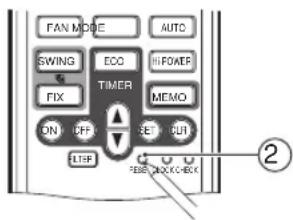
②Press the RESET button.
The clock display flashes.
Adjust the clock.
Place back the cover.
Batteries
- To replace the batteries, use two new batteries (AAA type).
• In normal use, the batteries will last about one year. - Replace the batteries if there is no receiving beep from the indoor unit or when the air conditioner cannot be operated using the remote control.
- To avoid malfunctions by battery leakage, remove the batteries when not using the remote control for more than one month.
- Slide off the cover while pressing the sides.
- Battery replacement
Be careful not to reverse the (+) position and the (−) position.
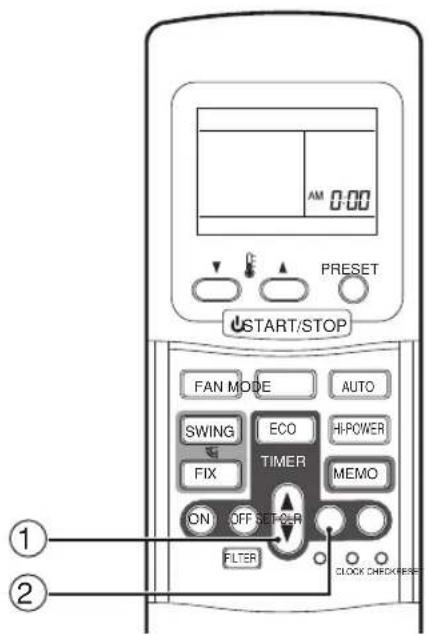
Setting the clock
Before you start operating the air conditioner, set the clock of the remote control using the procedures given in this section. The clock panel on the remote control will indicate the time regardless of whether the air conditioner is in use or not.
Initial setting
When batteries are inserted in the remote control, the clock panel will indicate AM 0:00 and will flash.
① TIMER

Press the TIMER button to set the current time.
Each press of the TIMER button changes the time in one minute steps.
Pressing the TIMER button continually changes the time in ten minute steps.
②SET

Press the SET Ⓗ button.
The current time is indicated and the clock starts.
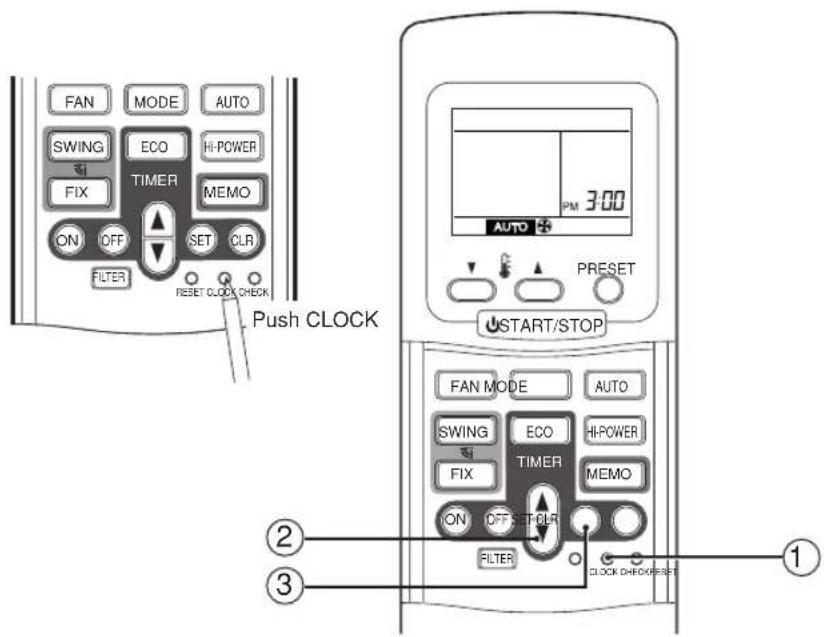
Clock adjusting
①CLOCK button
Press the CLOCK button. The CLOCK display flashes.
②TIMER

Press the TIMER button to set the current time.
Each press of the TIMER button changes the time by one minute. Pressing the TIMER button continually changes the time by ten minutes.
③SET

Press the SET Ⓗ button. The current time is indicated and the clock starts.
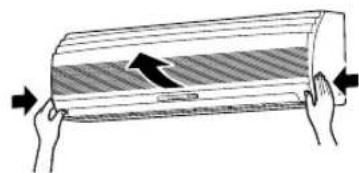
Preparing the filters
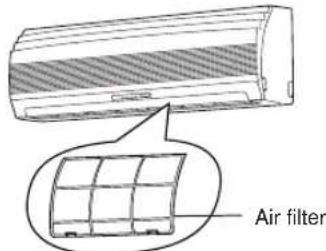
①Open the air inlet grille, and remove the air filters.
② Attach the supplied Zeolite filter and Purifying filter.
natural_image
Diagram of two hands holding a rectangular object with a hatched fill and an arrow indicating direction (no text or symbols)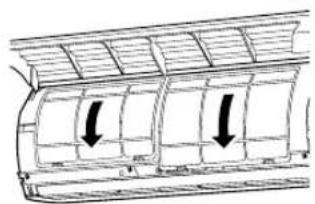
natural_image
Diagram of a car air vent with two downward arrows indicating airflow direction (no text or labels)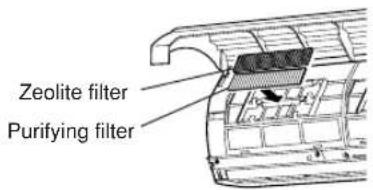
HANDLING THE REMOTE CONTROL
CAUTION
- The air conditioner will not operate if curtains, doors or other materials block the signals from the remote control to the indoor unit.
- Prevent any liquid from falling into the remote control.
Do not expose the remote control to direct sunlight or heat. - If the infrared signal receiver on the indoor unit is exposed to direct sunlight, the air conditioner may not function properly.
Use curtains to prevent the sunlight from reaching the receiver. - If the room using the air conditioner has fluorescent lighting with electronic starters, signals may not be properly received. If you are planning to use such fluorescent lamps, consult your local dealer.
- If other electrical appliances react to the remote control, move these appliances or consult your local dealer.
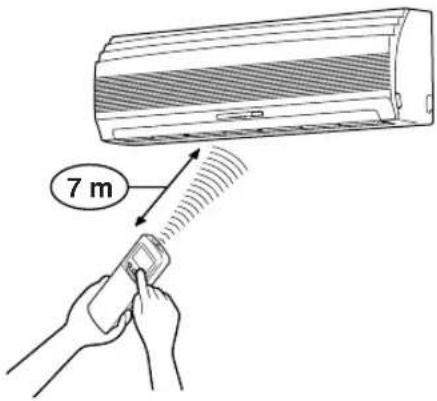
Location of the remote control
- Keep the remote control where its signals can reach the receiver of the indoor unit (a distance of 7m is allowed).
- When you select the timer operation, the remote control automatically transmits a signal to the indoor unit at the specified time.
If you keep the remote control in a position that hinders proper signal transmission, a time lag of up to 15 minutes may occur.
Remote control holder
Installing the remote control holder
- Before you actually install the remote control holder on a wall or pillar, check whether the remote control signals can be received by the indoor unit.
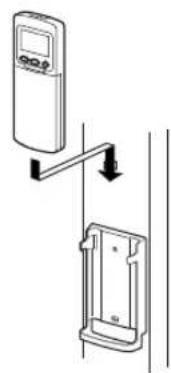
Mounting and removing the remote control
- To mount the remote control, hold it parallel to the remote control holder and push it in fully. To remove the remote control, slide the remote control upwards and out from the holder.
natural_image
Line drawing of a rectangular air conditioner unit with mesh insulation and ventilation slots (no text or symbols)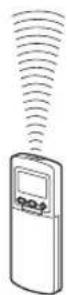
natural_image
Diagram showing a device mounted on a wall with an attached bracket, no text or symbols present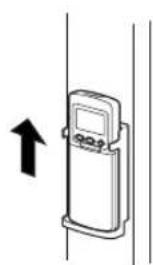
natural_image
Simple line drawing of a medical device with an upward arrow, no text or symbols presentAUTOMATIC OPERATION
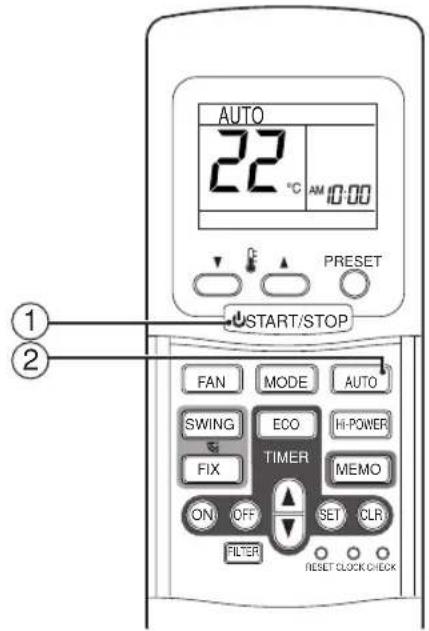
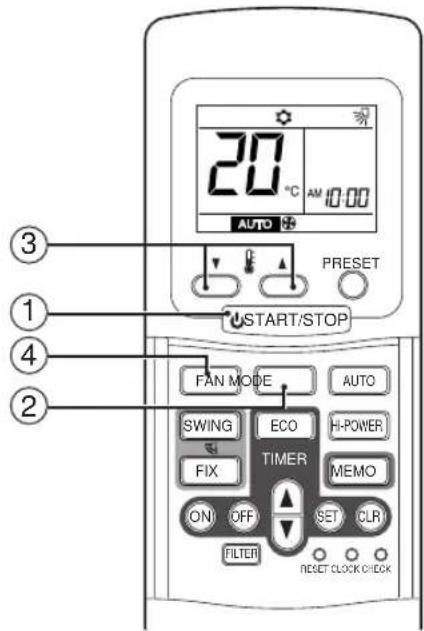
When you set the air conditioner in AUTO mode, it will automatically select cooling or fan only operation depending on the room temperature. (see page 15.)
In addition, fan speed and louver are automatically controlled.
Start
①START/STOP button
Press this button to start the air conditioner.
②AUTO button (AUTO)
Press AUTO button.
- The OPERATION lamp (green) on the display panel of the indoor unit lights. The operating mode is selected in accordance with the room temperature and operation starts after approximately 3 minutes.
- If the AUTO mode is uncomfortable, you can select the desired conditions manually.
Temperature, fan speed and louver position can be changed.
When fan speed or louver position is changed, MODE is also changed from AUTO to A.
At the same time, fan speed and louver positioning indications are indicated.
Stop
START/STOP button
Press this button again to stop the air conditioner.
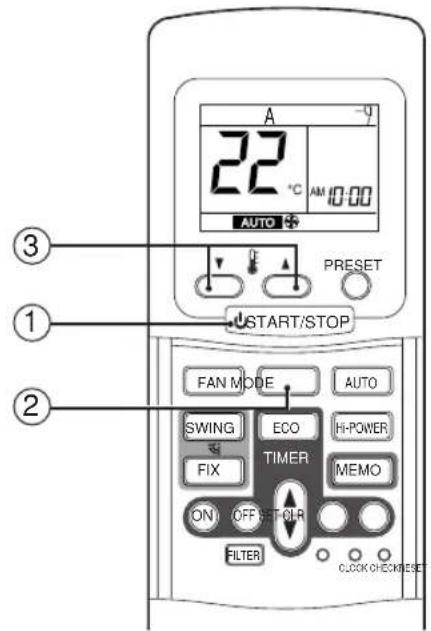
When you set the air conditioner in A mode or switch over from AUTO operation because of some settings change, it will automatically select cooling or fan only operation depending on the room temperature.
(see page 15.)
Start
①START/STOP button
Press this button to start the air conditioner.
② Mode select button (MODE)
Select A.
③Temperature button ( )
Set the desired temperature.
- The OPERATION lamp (green) on the display panel of the indoor unit lights. The operating mode is selected in accordance with the room temperature and operation starts after approximately 3 minutes.
- When you select the A mode, it is unnecessary to set the fan speed. The FAN speed display will show AUTO and the fan speed will be automatically controlled.
- If the A mode is uncomfortable, you can select the desired conditions manually.
Stop
START/STOP button
Press this button again to stop the air conditioner.
Press this button to start the air conditioner.
②Mode select button (MODE)
Select Cool or Fan only .
③Temperature button ()
Set the desired temperature.
Cooling 21°C or higher.
When the air conditioner is in FAN ONLY operation, the temperature display is not indicated.
④Fan speed button (FAN)
Select one of "AUTO" LOW → LOW + —, MED → —
MED + , HIGH
- The OPERATION lamp (green) on the display panel of the indoor unit goes on. And operation starts after approximately 3 minutes. (if you select FAN ONLY mode, the unit will start immediately.)
•The ⚙: Fan only mode does not control temperature. Therefore, perform only steps ①, ② and ④ to select this mode.
Stop
START/STOP button
Press this button again to stop the air conditioner.
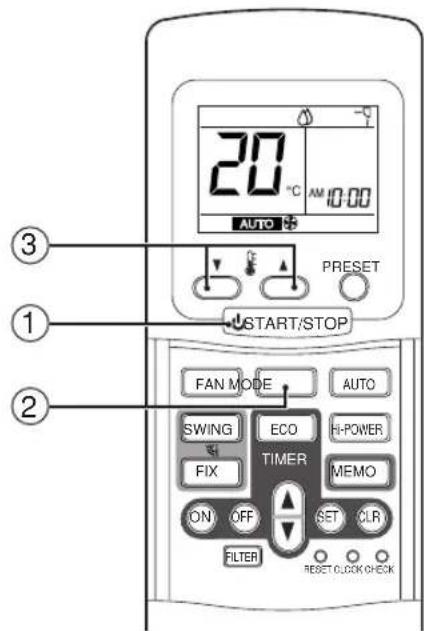
DRY OPERATION
Start
①START/STOP button
Press this button to start the air conditioner.
②Mode select button (MODE)
Select DRY
③Temperature button ()
Set the desired temperature.
•The fan speed display indicates AUTO.
- The OPERATION lamp (green) on the display panel of the indoor unit lights, and operation starts after approximately 3 minutes.
Stop
START/STOP button
Press this button again to stop the air conditioner.
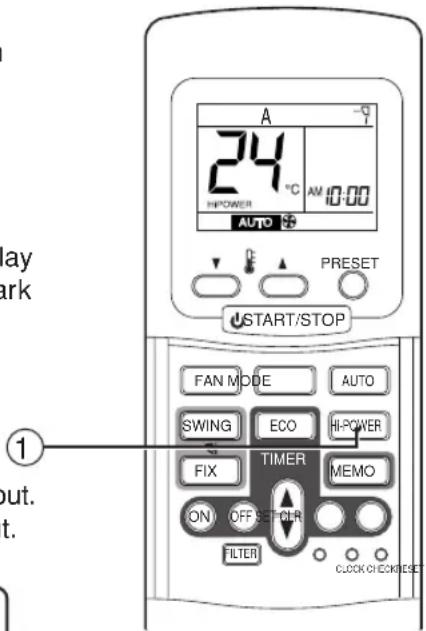
Hi POWER OPERATION
High power (Hi POWER)
- The Hi POWER (high power operation) mode automatically controls room temperature, air flow and operation mode so that the room is quickly cooled in summer. (see page 15.)
Setting Hi POWER mode
①Hi POWER button
Press the Hi POWER button. The Hi POWER lamp (green) on the display panel of the indoor unit lights up. At the same time, the "Hi POWER" mark on the remote control is indicated.
Canceling Hi POWER mode
①Hi POWER button
Press the Hi POWER button once again.
The Hi POWER lamp on the display panel of the indoor unit lights goes out. At the same time, the "Hi POWER" mark on the remote control goes out.
CAUTION
The Hi POWER mode cannot be activated in the DRY and FAN ONLY operation and when the ON TIMER operation is reserved.
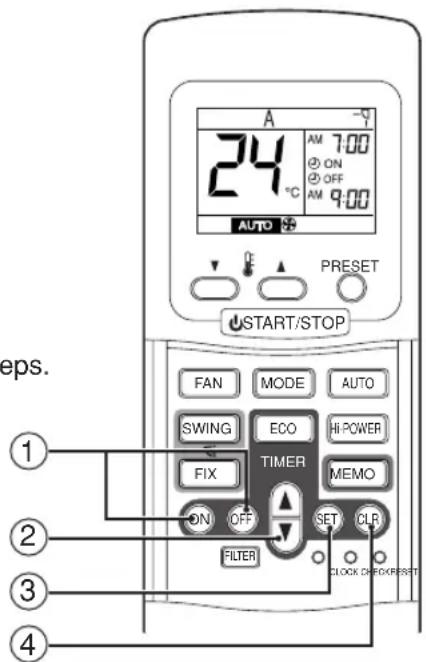
TIMER OPERATION
ON timer and OFF timer
Setting TIMER
①ON/OFF TIMER button
Press the ON or OFF TIMER buttons as required.
- The previous timer setting is displayed and flashes along with ON/OFF TIMER display.
②TIMER button
Press the TIMER button.
Set the timer to the desired time.
Each press of the TIMER button changes the time in ten minute steps.
Pressing the TIMER button continually changes the time in one hour steps.
③SET SET button
Press the SET 📋 button to set the timer.
The timer time is indicated and the timer starts.
④CLR button
Press the CLR Ⓞ button to cancel the timer setting.
CAUTION
- When you select the timer operation, the remote control automatically transmits the timer signal to the indoor unit at the specified time. Therefore, keep the remote control in a location where it can transmit the signal to the indoor unit properly.
- If you do not press the SET Ⓗ button within 30 seconds after setting the time, the setting will be cancelled.
Once you select the timer operation mode, the settings are saved in the remote control.
Thereafter, the air conditioner will start operating under the same conditions when you simply press the ON/OFF button of the remote control.
If the clock display is flashing, you cannot set the timer.
Follow the instructions in the section "SETTING THE CLOCK" on page 6 to set the clock, and then set the timer.
Combined timer (Setting both ON and OFF timers simultaneously)
OFF timer → ON timer
(Operation → Stop → Operation)
This feature is useful when you want to stop the air conditioner after you go to sleep, and start it again in the morning when you wake up or you return home.
Example:
To stop the air conditioner and start it again next morning.
Setting combined TIMER
(1) Press the OFF Ⓗ button.
(2) Press the TIMER 🔊 button to adjust the OFF timer.
(3) Press the ON Ⓞ button.
(4) Press the TIMER 🔊 button to adjust the ON timer.
(5) Press the SET Ⓗ button.
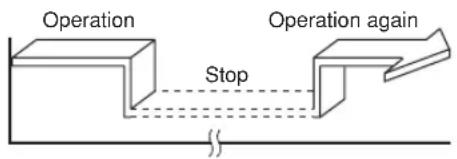
flowchart
graph LR
    A["Operation"] --> B["Stop"]
    B --> C["Operation again"]
ON timer → OFF timer
(Stop → Operation → Stop)
You can use this setting to start the air conditioner when you wake up and stop it when you leave the house. Example:
To start the air conditioner next morning and stop it.
Setting combined TIMER
(1) Press the ON Ⓞ button.
(2) Press the TIMER button to adjust the ON timer.
(3) Press the OFF Ⓗ button.
(4) Press the TIMER 🔊 button to adjust the OFF timer.
(5) Press the SET Ⓗ button.
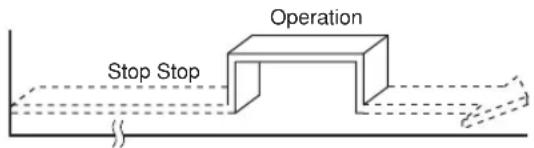
- Either ON or OFF timer function which is closer to the current time, is activated first.
- If the same time is set for both ON and OFF timers, no timer operation is performed. Also, the air conditioner may stop operating.
Every day combined timer (setting both ON and OFF timer simultaneously and activate every day.)
This feature is useful when you want to use combined timer at the same time every day.
Setting combined TIMER
(1) Press the ON Ⓞ button.
(2) Press the TIMER 🔊 button to adjust the ON timer.
(3) Press the OFF OFF button.
(4) Press the TIMER 🔊 button to adjust the OFF timer.
(5) Press the SET Ⓗ button.
(6) After step (5), an arrow mark (↑ or ↓) flashes for about 3 seconds and during this flashing, press the SET Ⓜ button.
- During the every day timer is activating, both arrows ( ↑ , ↓ are indicated.
Cancel the timer operation
Press the CLR button.
Clock display
During the TIMER operation (ON-OFF, OFF-ON, OFF timer) clock display is disappeared so as to show the setting time. To see the present time, press SET button briefly and the present time is displayed about 3 seconds.
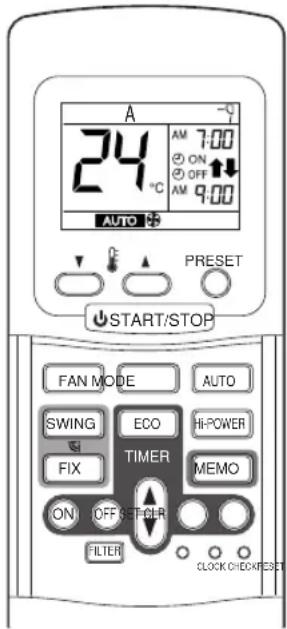
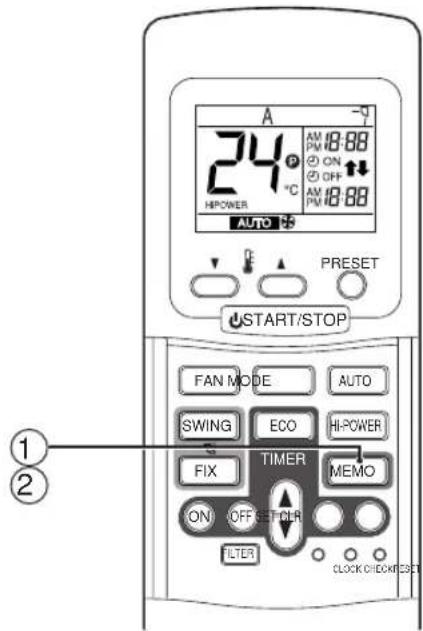
Memorize the frequently used operation setting by the MEMO button for convenience.
Start the air conditioner in the operation mode which you want the remote control to memorize.
Press the button as follows while the air conditioner is in operation.
①MEMO button
Press this button briefly to standby memorizing the setting.
All the icons currently displayed except for the clock display and
P mark flashes.
②MEMO button
Press and hold the MEMO button for more than 3 seconds while the display flashes.
The Pnark is indicated and the setting is memorized.
- If you do not press the MEMO button within 3 seconds or if you press another button, the MEMORY setting is cancelled.
- Operation modes which can be memorized with the MEMO button are MODE, Temperature, FAN, TIMER and Hi POWER.
To operate the air conditioner with the setting memorized by the MEMO button.
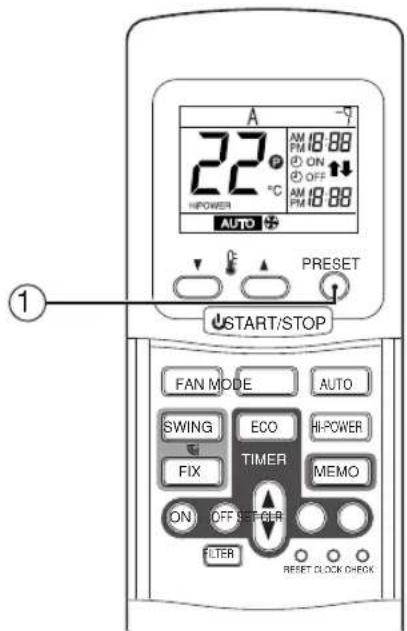
①PRESET button
Press the PRESET button. The setting memorized with the MEMO button will be indicated and the air conditioner operates with regards to the setting.
•The OPERATION lamp (green) on the display panel of the indoor unit goes on, and operation starts after approximately 3 minutes.
- Initial setting:
MODE : AUTO
Temperature : 22
ADJUSTING AIR FLOW DIRECTION
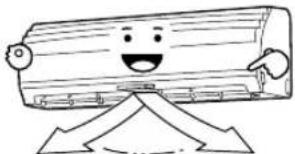
- Adjust the air flow direction properly. Otherwise, it might cause discomfort and make the room temperature uneven.
- Adjust the vertical air flow using the remote control.
- Adjust the horizontal air flow manually.
Adjust the vertical air flow
The air conditioner automatically adjusts the vertical air flow direction in accordance with the operating conditions when AUTO or A mode is selected. In case of A mode, the auto louver icon (−♀) is indicated in the remote control display.
To set the air flow direction you desire
Perform this function when the air conditioner is in operation.
①FIX button
Keep pressing or pressing briefly the FIX button on the remote control to move the louver in the desired direction. Louver position (-, -, -, -, -, -) is indicated in the remote control display.
- Change the vertical air flow louver direction within the range indicated.
- In subsequent operations, the vertical air flow is automatically set in the direction to which you adjusted the louver using the FIX button.

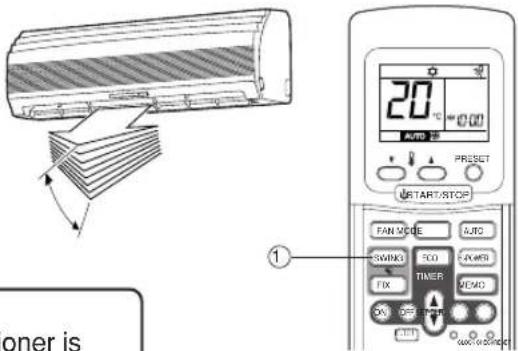
To automatically swing the air flow direction
Perform this function when the air conditioner is in operation.
①SWING button
Press the SWING button on the remote control, swing icon (☐) is indicated in the remote control display.
- To stop the function, press the FIX button.
- To change the swing direction, press the FIX button and press the SWING button again.
CAUTION
- The FIX and SWING buttons will be disabled when the air conditioner is not in operation (including when the ON TIMER is set).
- Do not operate the air conditioner for long hours with the air flow direction set downward during the cooling or dry operation. Otherwise, condensation may occur on the surface of the vertical air flow louver and cause dew dripping.
- Do not move the vertical air flow louver manually. Always use the FIX button. If you move the louver manually, it may malfunction during operation. If the louver malfunctions, stop the air conditioner once, and restart.
- When the air conditioner is started immediately after it was stopped, the vertical air flow louver might not move for 10 seconds or so.
Adjust the horizontal air flow Preparation:
•Take hold of the lever on the horizontal air flow louver and move them to adjust the air flow direction as required.
- You can adjust the air flow at the left, center, and right locations of the grilles.
natural_image
Cartoon illustration of a smiling wooden log character with arms and legs, standing on a platform (no text or symbols)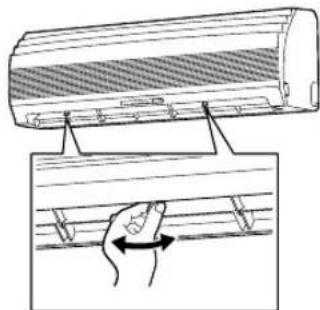
This air conditioner is equipped with an Automatic restarting facility which allows the air conditioner to resume the set operating conditions in the event of a supply power shutdown without the use of the remote control. The operation will resume without warning three minutes after the power is restored.
INFORMATION
The AUTO RESTART OPERATION is not set to work on shipment from the factory, and so it is necessary to set it to function as required.
HOW TO SET THE AUTO RESTART
To set the auto restart function, proceed as follows:
The power supply to the unit must be on the function will not set if the power is off.
To enable the auto restart function, push the TEMPORARY button continually for 3 seconds.
The air conditioner will acknowledge the setting and beep 3 times. The system will now restart automatically.
The above auto restart settings can be carried out:
(1) When the air conditioner is in stand-by (not running).
Push the TEMPORARY button for more than 3 seconds.
•The air conditioner starts to operate.
The green lamp will be indicated.
- About 3 seconds after, the air conditioner beeps 3 times.
The lamp will change from green to orange.
•The air conditioner is operating.
If the air conditioner is not required to run at this time, push the
TEMPORARY button once more or use the remote control to stop the air conditioner.
(2) When the air conditioner is in operation.
Push the TEMPORARY button for more than 3 seconds.
•The air conditioner stops operating.
The green lamp goes off.
•The air conditioner beeps 3 times 3 seconds later, after pushing the button.
•The air conditioner stops.
If the air conditioner is not required to stop at this time, use the remote control to restart the air conditioner.
During the subsequent operation, the orange lamp is indicated.
- The auto restart operation will not accept an instruction if timer operation with the remote control is selected.
- The louver swing (AUTO) operation will not resume, after restarting the air conditioner by the AUTO RESTART OPERATION.
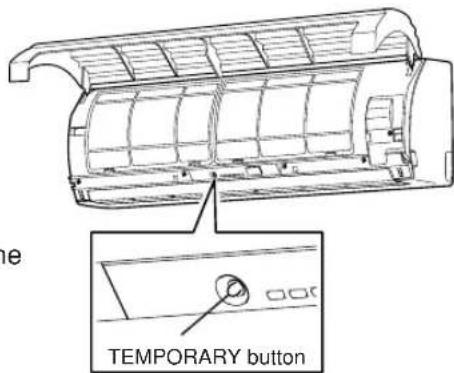
HOW TO CANCEL THE AUTO RESTART
To cancel the auto restart operation, proceed as follows:
Repeat the setting procedure: the air conditioner will acknowledge the instruction and beep three times.
The air conditioner will now require to be manually restarted with the remote control after the main supply is turned off.
Cancellation is carried out:
(1) When the air conditioner is in stand-by (not running).
Push the TEMPORARY button for more than 3 seconds.
•The air conditioner starts to operate.
The orange lamp will be indicated.
- About 3 seconds after, the air conditioner beeps 3 times.
The lamp will change from orange to green.
•The air conditioner is operating.
If the air conditioner is not required to run at this time, push the
TEMPORARY button once more or use remote control to stop the air conditioner.
(2) When the air conditioner is in operation.
Push the TEMPORARY button for more than 3 seconds.
•The air conditioner stops operating.
The orange lamp is turned off.
- About 3 seconds after, the air conditioner beeps 3 times.
•The air conditioner stops.
If the air conditioner is not required to stop at this time, use the remote control to restart the air conditioner.
During subsequent operation, the green lamp is indicated.
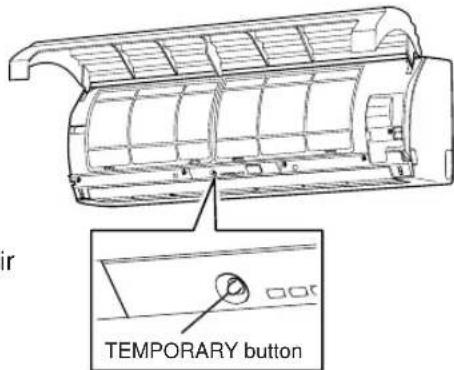
HOW THE AIR CONDITIONER WORKS
Automatic Operation
- The air conditioner selects and operates in one of the operating modes of cooling or fan only, depending on the room temperature.
- If the AUTO mode is uncomfortable, you can select the desired conditions manually.
| Room temperature in operation | Operating condition | |
| The set temperature +1°C or higher (in case that the room is hot) | Cooling operation | Performs the cooling operation at a temperature 1°C higher than the setting. |
| The set temperature -1°C to +1°C | Fan only operation | Performs the fan only operation (low speed) while monitoring the room temperature. When the room temperature changes, the air conditioner will select the cooling mode. |
Hi POWER operation
When you press the Hi POWER button during cooling or A operation, the air conditioner will start the following operation.
•Cooling operation
Performs the cooling operation lower than the setting temperature.
When the room temperature is above the setting temperature, air flow is directed downward. In addition, fan speed is high*. Once room temperature is within 1irc C of the setting temperature, air flow is returned to its regular direction to cool the entire room with maximum efficiency.
* Noise level raises in accordance with fan speed.
ECO timer operation
When you press the ECO button during cooling or A operation, the air conditioner will start the following operation. The fan speed will be automatically controlled.
•Cooling operation ( )

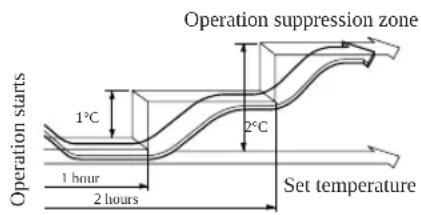
In the operation suppression zone, where capacity is kept to the minimum, overcooling is prevented by raising the temperature setting by 1irc C after 1 hour and by 2irc C after 2 hours of operation.
The room temperature is thus regulated between the operation suppression zone and the set temperature.
DRY operation (∅)
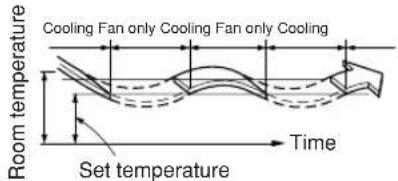
The dry mode will automatically select the cooling dry operation based on the difference between the set temperature and the actual room temperature.
•Cooling dry operation
This operation is performed when the room temperature is higher than the set temperature.
The temperature is regulated while dehumidifying by repeated turning on and off of the cooling operation or fan only operation.
The fan speed display will indicate AUTO and low speed will be used.
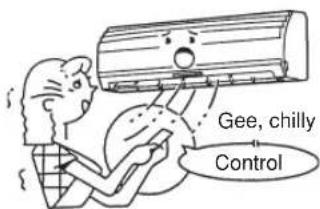
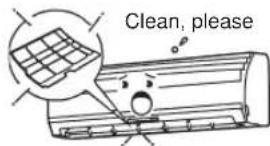
Maintain room temperature at comfortable level Clean air filters
The clogged air filters impairs the performance of the air conditioner. Clean them once two weeks.
Never open doors and windows more often than necessary
To keep cool air in the room, never open doors and windows more often than necessary.
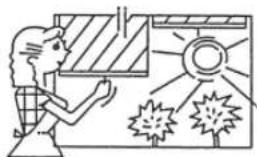
Window curtains
In cooling, close the curtains to avoid direct sunlight.
Use the timer effectively
Set the timer for the desired operating time.
Get uniform circulation of room air
Adjust air flow direction for even circulation of room air.
natural_image
Illustration of a person observing a window with sun and explosion effects (no text or symbols)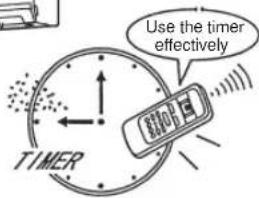

Blows upward
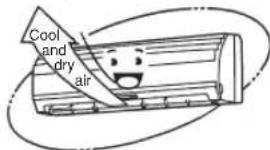
Air flow adjustment
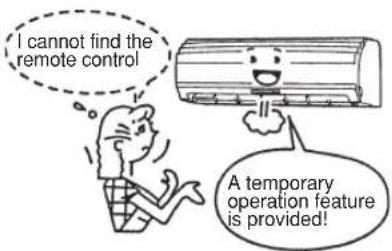
TEMPORARY OPERATION
TEMPORARY operation
This function is used to operate the unit temporarily in case you misplace the remote control or its batteries are exhausted.
- Push the TEMPORARY button to start the air conditioner.
- While the substitute operation is set, the remote control operation is disabled.
- Continue to press the button for 10 seconds to start the cooling operation.
Air filter reset
When the FILTER lamp on the air conditioner is indicated, it is time for cleaning. (The lamp will start to indicate, after every 1000 hours of operation.)
•The FILTER lamp will go out when the TEMPORARY button is pushed.
- The FILTER lamp will also go out when the FILTER button on the remote control is pressed. (see page 4.)
MAINTENANCE
WARNING
Before you clean the air conditioner, be sure to turn off the circuit breaker, or main power switch.
Cleaning of indoor unit and remote control
CAUTION
- Use a dry cloth to wipe the indoor unit and remote control.
- A cloth dampened with cold water may be used on the indoor unit if it is very dirty.
- Never use a damp cloth on the remote control.
- Do not use a chemically-treated duster for wiping or leave such materials on the unit for long. It may damage or fade the surface of the unit.
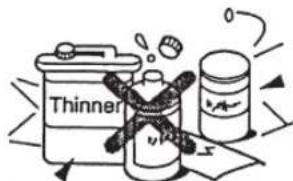
- Do not use benzine, thinner, polishing powder, or similar solvents for cleaning.
These may cause the plastic surface to crack or deform.
If you will not use the unit for at least 1 month
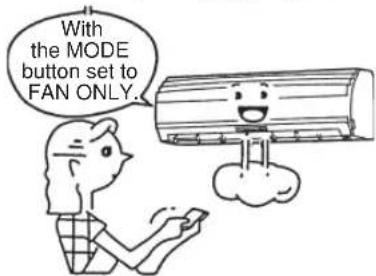
(1) Operate the air conditioner in FAN ONLY mode for about half a day to dry the inside of the unit.
(2) Stop the air conditioner and turn off the circuit breaker.
(3) Remove the batteries from the remote control.
Check before operation
CAUTION
- Check that the air filters are installed.
- Check that the air outlet or inlet of the outdoor unit is not blocked.
Cleaning the air filter
Clean the air filters every 2 weeks.
If the air filters are covered with dust, the performance of the air conditioner will deteriorate.
Clean the air filters as often as possible.
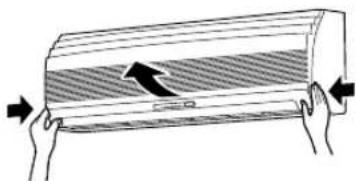
1 Open the air inlet grille.
Lift the air inlet grille up to the horizontal position.
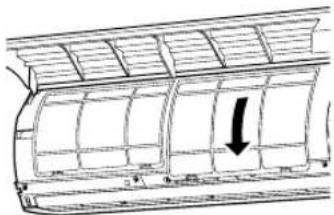
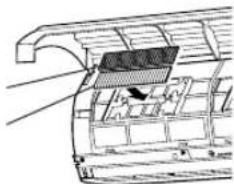
2 Take hold of the left and right handles of the air filter and lift it up slightly, then pull it downward to take it out from the filter holder.
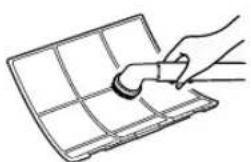
3 Use a vacuum cleaner to remove the dust from the filters or wash them with water.
If you wash the air filters, dry them in the shade.
natural_image
Line drawing of a hand holding a small object over a grid-patterned surface (no text or symbols)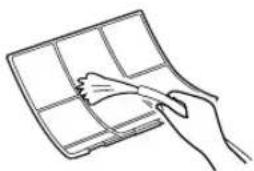
natural_image
Line drawing of a hand holding a grid-like object (no text or symbols)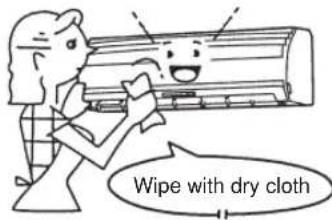
FAN ONLY operation
natural_image
Diagram of two hands holding a rectangular object with a shaded band and an arrow indicating direction (no text or symbols)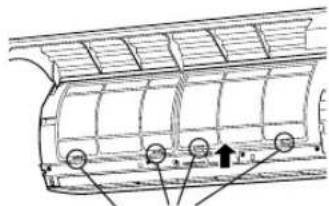
Filter holder
natural_image
Diagram of a car air vent with a black arrow indicating airflow direction (no text or symbols)4 Insert the upper portion of air filter confirming to fit its right and left edges on the indoor unit until it is firmly set.
5 Close the air inlet grille. * If the FILTER lamp on the indoor unit is indicated, press the FILTER button on the remote control or the TEMPORARY button on the indoor unit to turn off the lamp.
natural_image
Diagram of a vehicle's front panel with a black arrow pointing to the side panel (no text or symbols present)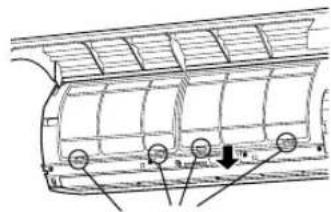
natural_image
Technical line drawing of a vehicle rear panel with mounting holes and a downward arrow indicating a component (no text or symbols present)Filter holder
Cleaning the air inlet grille
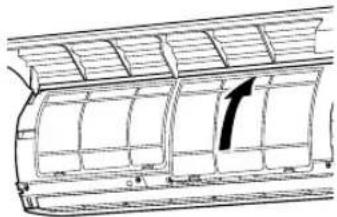
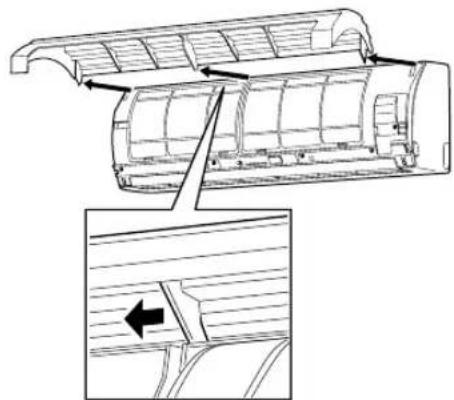
(1) Remove the air inlet grille. Hold the two sides of the air inlet grille and open upwards. Move the center arm to the left and remove the grille.
(2) Wash it with water using a soft sponge or towel. (Do not use metallic scrubbing brush or other hard brushes.) • Use of such hard objects will cause scratches on the surface of the grille, and the metal coating to peel off. • If very dirty, clean the air inlet grille with a neutral detergent for kitchen use, and rinse it off with water.
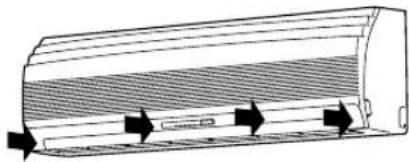
(3) Wipe out water from the air inlet grille and dry it. (4) Fit the left and right arms of the air inlet grille to the shafts on the two sides of the air conditioner and push in completely, and then push in the center arm. (5) Check that the center arm has been completely inserted and close the air inlet grille. •Push the arrow locations (four) at the bottom of the air inlet grille to check whether the grille is completely closed.
natural_image
Technical diagram of a car air duct assembly with an inset showing a side view of the duct (no text or labels present)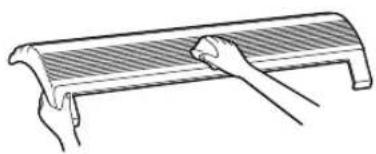
natural_image
Line drawing of two hands holding a curved object (no text or symbols)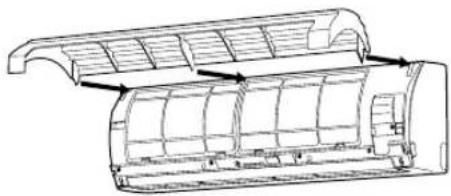
natural_image
Technical line drawing of a mechanical component with internal ribs and mounting holes (no text or symbols)INFORMATION
Zeolite filter
- Expose the Zeolite filter to the sun for six hours once every 6 months.
- If the filter is dusty, clean it with a vacuum cleaner.
- The deodorant performance of the filter will drop if they are very dirty with tobacco smoke, etc. due to extended use.
It is recommended to replace the filter once every 3 years.
Optional: Zeolite filter (RB-A604DE)
natural_image
Diagram of a wall-mounted air conditioner unit with heat exchangers and cooling fins (no text or symbols)Zeolite Filter
Purifying Filter
natural_image
Technical line drawing of a car interior showing structural components and airflow direction (no text or labels)Purifying filter
- Clean the Purifying filter once every 2 weeks.
- If the filter is dusty, clean it with a vacuum cleaner.
- It is recommended to replace the filter once every 3 months so as to keep the purifying performance.
When it is very dirty, replace it with new one event though the period of use is within 3 months.
Optional: Purifying filter (RB-A602SE)
AIR CONDITIONER OPERATIONS AND PERFORMANCE
Three-minute protection feature
A protection feature prevents the air conditioner from being activated for approximately 3 minutes when it is restarted immediately after operation or when the power supply switch is set to on. This will protect the machine.
Power failure
Power failure during operation will stop the unit completely.
- The OPERATION lamp (green) on the indoor unit will start flashing when power is restored.
- To restart operation, push the START/STOP button on the remote control.
- Lightning or a car wireless telephone operating nearby may cause the unit to malfunction. Turn the power supply switch to off and then to on. Push the START/STOP button on the remote control to restart.
Air conditioner operating conditions
For proper performance, operate the air conditioner under the following temperature conditions:
| Cooling operation | Outdoor temperature: 15°C to 43°C |
| Room temperature: 21°C to 32°C | |
| CAUTIONRoom relative humidity – less than 80%. If the air conditioner operates in excess of this figure, the surface of the air conditioner may attract condensation. | |
| Dry operation | Outdoor temperature: 15°C to 43°C |
| Room temperature: 17°C to 32°C |
If the air conditioner is used in conditions other than above, safety protection features may come into operation.
TROUBLES AND CAUSES
CAUTION
If any of the following conditions occur, stop the air conditioner immediately, set to off the main power switch and contact the dealer:
- The indicator lamps blink at short intervals (5 Hz). Reset the circuit breaker 2 to 3 minutes after the power main switch is turned off. Despite the above-mentioned resetting the lamps still continue going on and off.
- Switch operation are erratic.
- The main power fuse often blows out, or the circuit breaker is often activated.
- Foreign matter or water has fallen inside the air conditioner.
- Any other unusual condition is observed.
Before you ask for servicing or repairs, check the following points.
Inoperative
•The power main switch is turned off.
- The circuit breaker is activated to cut off the power supply.
•The main power fuse has blown out.
- Stoppage of electric current.
•The batteries in the remote control are exhausted.
- ON timer is set.
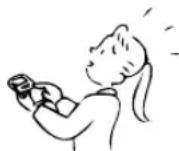
Poor cooling performance
•The air inlet or outlet of the outdoor unit is blocked.
- Doors or windows are opened.
•The air filter is clogged with dust.
•The louver is not at the correct position.
•The fan speed is set to low.
•The air conditioner is set in the DRY mode.
•The set temperature is too high.
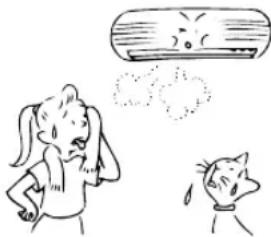
natural_image
Cartoon illustration of a girl reacting to a crying face while another girl appears surprised (no text or symbols)Before you ask for servicing or repairs, check the following points.
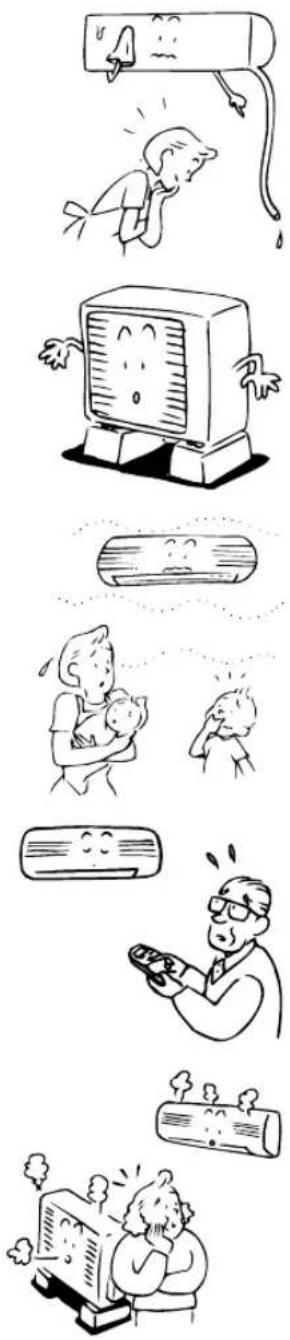
The back of indoor unit is dewed.
- Dewdrops on the back of the indoor unit are automatically collected and drained out.
Indoor unit or outdoor unit makes a strange noise.
- When temperature sharply changes, the indoor or outdoor unit occasionally makes a strange noise (like tit-tack noise or flowing noise) because of expansion/contraction of parts or change of refrigerant flow.
The room air is smelly.
A bad odor comes from the air conditioner.
- Smells impregnated in the wall, carpet, furniture, clothing, or furs, are coming out.
The OPERATION lamp goes on and off.
- The lamp goes on and off 1 Hz when power is restored after a power failure, or when the power main switch is set to on. Reset the circuit breaker to ON.
A white mist of chilled air is generated from the indoor unit.
•The indoor unit in cooling operation occasionally steams.
SPECIFICATIONS
| Type | Split type | ||||
| Model | Indoor Unit | Outdoor Unit | Indoor Unit | Outdoor Unit | |
| RAS-07UKP-ES | RAS-07UA-ES | RAS-10UKP-ES | RAS-10UA-ES | ||
| Power supply | 50Hz, 220-240 V~ | 50Hz, 220-240 V~ | |||
| Cooling capacity (kW) CAPA. | 2.10 ~ 2.20 | 2.65 ~ 2.70 | |||
| Cooling Amps (A) AMP. | 0.15 – 0.15 | 2.70 – 2.72 | 0.15 – 0.15 | 3.65 – 3.60 | |
| Cooling Watts (W) WATT. | 30 – 30 | 570 – 610 | 30 – 30 | 740 – 800 | |
| Dimension Height | Width (mm) | 790 | 770 | 790 | 770 |
| Height (mm) | 275 | 530 | 275 | 530 | |
| Depth (mm) | 208 | 200 | 208 | 200 | |
| Net weight (kg) | 10 | 26 | 10 | 29 | |
- The specifications may be subject to change without notice for purpose of improvement. The specified air-conditioning capabilities are based on the data determined under the following conditions:
For cooling
| Air-inlet temperature °C | |||
| Indoor coil assembly | Outdoor coil assembly | ||
| Dry bulb | Wet bulb | Dry bulb | Wet bulb |
| 27 | 19 | 35 | 24 |
| Type | Split type | ||
| Model | Indoor Unit | Outdoor Unit | |
| RAS-13UKP-ES | RAS-13UA-ES | ||
| Power supply | 50Hz, 220-240 V~ | ||
| Cooling capacity (kW) CAPA. | 3.70 ~ 3.75 | ||
| Cooling Amps (A) AMP. | 0.15 – 0.15 | 5.66 – 5.53 | |
| Cooling Watts (W) WATT. | 30 – 30 | 1220 – 1260 | |
| Dimension Height | Width (mm) | 790 | 780 |
| Height (mm) | 275 | 538 | |
| Depth (mm) | 208 | 300 | |
| Net weight (kg) | 10 | 39 | |
- The specifications may be subject to change without notice for purpose of improvement. The specified air-conditioning capabilities are based on the data determined under the following conditions:
For cooling
| Air-inlet temperature °C | |||
| Indoor coil assembly | Outdoor coil assembly | ||
| Dry bulb | Wet bulb | Dry bulb | Wet bulb |
| 27 | 19 | 35 | 24 |
SPECIFICATIONS
| Type | Split type | ||||
| Model | Indoor Unit | Outdoor Unit | Indoor Unit | Outdoor Unit | |
| RAS-07UKP-E | RAS-07UA-E | RAS-10UKP-E | RAS-10UA-E | ||
| Power supply | 50Hz, 220-240 V~ | 50Hz, 220-240 V~ | |||
| Cooling capacity (kW) CAPA. | 2.10 ~ 2.20 | 2.65 ~ 2.70 | |||
| Cooling Amps (A) AMP. | 0.15 – 0.15 | 3.08 – 3.10 | 0.15 – 0.15 | 3.65 – 3.60 | |
| Cooling Watts (W) WATT. | 30 – 30 | 650 – 680 | 30 – 30 | 770 – 820 | |
| Dimension Height | Width (mm) | 790 | 660 | 790 | 770 |
| Height (mm) | 275 | 530 | 275 | 530 | |
| Depth (mm) | 208 | 240 | 208 | 200 | |
| Net weight (kg) | 10 | 28 | 10 | 29 | |
- The specifications may be subject to change without notice for purpose of improvement. The specified air-conditioning capabilities are based on the data determined under the following conditions:
For cooling
| Air-inlet temperature °C | |||
| Indoor coil assembly | Outdoor coil assembly | ||
| Dry bulb | Wet bulb | Dry bulb | Wet bulb |
| 27 | 19 | 35 | 24 |
| Type | Split type | ||
| Model | Indoor Unit | Outdoor Unit | |
| RAS-13UKP-E | RAS-13UA-E | ||
| Power supply | 50Hz, 220-240 V~ | ||
| Cooling capacity (kW) CAPA. | 3.70 ~ 3.75 | ||
| Cooling Amps (A) AMP. | 0.15 – 0.15 | 5.66 – 5.53 | |
| Cooling Watts (W) WATT. | 30 – 30 | 1220 – 1260 | |
| Dimension Height | Width (mm) | 790 | 780 |
| Height (mm) | 275 | 538 | |
| Depth (mm) | 208 | 300 | |
| Net weight (kg) | 10 | 37 | |
- The specifications may be subject to change without notice for purpose of improvement. The specified air-conditioning capabilities are based on the data determined under the following conditions:
For cooling
| Air-inlet temperature °C | |||
| Indoor coil assembly | Outdoor coil assembly | ||
| Dry bulb | Wet bulb | Dry bulb | Wet bulb |
| 27 | 19 | 35 | 24 |
SPECIFICATIONS
| Type | Split type | ||
| Model | Indoor Unit | Outdoor Unit | |
| RAS-10UKP2L | RAS-10UA2L | ||
| Power supply | 60Hz, 220 V~ | ||
| Cooling capacity (kW) CAPA. | 2.68 | ||
| Cooling Amps (A) AMP. | 0.15 – 0.15 | 2.65 | |
| Cooling Watts (W) WATT. | 30 – 30 | 790 | |
| Dimension Height | Width (mm) | 790 | 770 |
| Height (mm) | 275 | 530 | |
| Depth (mm) | 208 | 200 | |
| Net weight (kg) | 10 | 29 | |
- The specifications may be subject to change without notice for purpose of improvement. The specified air-conditioning capabilities are based on the data determined under the following conditions:
For cooling
| Air-inlet temperature °C | |||
| Indoor coil assembly | Outdoor coil assembly | ||
| Dry bulb | Wet bulb | Dry bulb | Wet bulb |
| 27 | 19 | 35 | 24 |
| Type | Split type | ||
| Model | Indoor Unit | Outdoor Unit | |
| RAS-13UKP2L | RAS-13UA2L | ||
| Power supply | 60Hz, 220 V~ | ||
| Cooling capacity (kW) CAPA. | 3.70 | ||
| Cooling Amps (A) AMP. | 0.15 – 0.15 | 5.66 | |
| Cooling Watts (W) WATT. | 30 – 30 | 1240 | |
| Dimension Height | Width (mm) | 790 | 780 |
| Height (mm) | 275 | 538 | |
| Depth (mm) | 208 | 300 | |
| Net weight (kg) | 10 | 37 | |
- The specifications may be subject to change without notice for purpose of improvement. The specified air-conditioning capabilities are based on the data determined under the following conditions:
For cooling
| Air-inlet temperature °C | |||
| Indoor coil assembly | Outdoor coil assembly | ||
| Dry bulb | Wet bulb | Dry bulb | Wet bulb |
| 27 | 19 | 35 | 24 |
TROUBLES AND CAUSES (Concerning Remote Control)
Before you ask for servicing or repairs, check the following points.
| Setting Change Is Impossible | ||
| Symptoms | Causes | Reason and Disposal |
| The fan speed cannot be changed. | Check whether the MODE indicated on the display is “AUTO”.AUTO | When the automatic mode is selected, the air conditioner automatically selects the fan speed. |
| Check whether the MODE indicated on the display is “💡:DRY”.💡:DRY | When dry operation is selected, the air conditioner automatically selects the fan speed. The fan speed can be selected during “💡 COOL” and “💡 FAN ONLY”. | |
| The Display Never Goes On | ||
| Symptoms | Causes | Reason |
| The temperature display does not go on. | Check whether the MODE indicated on the display is “💡: FAN ONLY”.💡FAN ONLY | The temperature cannot be set during fan only operation. |
| The Display Goes Off | ||
| Symptoms | Causes | Reason |
| The indication on the display disappears after a lapse of time. | Check whether the timer operation has come to an end when the OFF TIMER is indicated on the display. | The air conditioner stops since the setting time elapsed. |
| The TIMER display goes off after a certain period of time. | Check whether the timer operation has started when the ON TIMER is indicated on the display.ON | When the time reaches the setting time for the ON timer operation, the air conditioner starts to operate automatically and the ON timer display goes off. |
| The Signal Receiving Tone Does Not Sound | ||
| Symptoms | Causes | Reason |
| No receiving tone sounds from the indoor unit even when the START/STOP button is pushed. | ·Check whether the signal trans- mitter of the remote control is properly directed to the receiver of the indoor unit when the START/ STOP button is pushed. | Direct the signal transmitter of the remote control to the receiver of the indoor unit, and then repeatedly press the START/STOP button. |

- PRECAUTIONS FOR SAFETY
- DANGER
- WARNING
- WARNING ABOUT INSTALLATION
- CAUTION
- WARNING ABOUT OPERATION
- WARNING ABOUT MOVEMENT AND REPAIR
- CAUTIONS ABOUT INSTALLATION
- CAUTIONS ABOUT OPERATION
- PARTS NAME
- Outdoor unit
- Indoor unit
- NAMES AND FUNCTIONS OF INDICATORS AND CONTROLS ON INDOOR UNIT
- Display panel
- TEMPORARY button
- REMOTE CONTROL AND ITS FUNCTIONS
- ①Infrared signal emitter
- ②START/STOP button
- ③Mode select button (MODE)
- ④Temperature button ( )
- ⑤Fan speed button (FAN)
- ⑥Auto louver button (SWING)
- ⑦Set louver button (FIX)
- ⑧Off timer button (OFF)
- ⑨On timer button (ON)
- ⑩Reserve button (SET)
- ⑪ Cancel button (CLR)
- ⑫High power button (Hi POWER)
- ⑬ Memory button (MEMO)
- ⑭Automatic operation button (AUTO)
- ⑮ ECO timer button (ECO)
- ⑯FILTER button
- ⑰PRESET button
- ⑱ TIMER button
- NAMES AND FUNCTIONS OF INDICATIONS ON REMOTE CONTROL
- Display
- ①Transmission mark
- ②Mode display
- ③Temperature display
- ④ Louver operation display
- ⑤FAN speed display
- ⑥TIMER and clock time display
- ⑦Hi POWER display
- ⑧ P (MEMORY) display
- ⑨ ECO TIMER display
- PREPARATION AND CHECK BEFORE USE
- Loading the remote control batteries.
- ①Remove the cover, and insert the batteries.
- ②Press the RESET button.
- Batteries
- - Battery replacement
- Setting the clock
- Initial setting
- ① TIMER
- ②SET
- Clock adjusting
- ①CLOCK button
- ②TIMER
- ③SET
- Preparing the filters
- HANDLING THE REMOTE CONTROL
- Location of the remote control
- Remote control holder
- Installing the remote control holder
- Mounting and removing the remote control
- AUTOMATIC OPERATION
- Start
- ①START/STOP button
- ②AUTO button (AUTO)
- Stop
- START/STOP button
- ② Mode select button (MODE)
- ③Temperature button ( )
- DRY OPERATION
- Hi POWER OPERATION
- High power (Hi POWER)
- Setting Hi POWER mode
- ①Hi POWER button
- Canceling Hi POWER mode
- TIMER OPERATION
- ON timer and OFF timer
- Setting TIMER
- ①ON/OFF TIMER button
- ②TIMER button
- ③SET SET button
- ④CLR button
- Combined timer (Setting both ON and OFF timers simultaneously)
- OFF timer → ON timer
- (Operation → Stop → Operation)
- Setting combined TIMER
- ON timer → OFF timer
- (Stop → Operation → Stop)
- Every day combined timer (setting both ON and OFF timer simultaneously and activate every day.)
- Cancel the timer operation
- Clock display
- ①MEMO button
- ②MEMO button
- ①PRESET button
- ADJUSTING AIR FLOW DIRECTION
- Adjust the vertical air flow
- To set the air flow direction you desire
- ①FIX button
- To automatically swing the air flow direction
- ①SWING button
- Adjust the horizontal air flow Preparation:
- INFORMATION
- HOW TO SET THE AUTO RESTART
- HOW TO CANCEL THE AUTO RESTART
- HOW THE AIR CONDITIONER WORKS
- ECO timer operation
- DRY operation (∅)
- •Cooling dry operation
- Maintain room temperature at comfortable level Clean air filters
- Never open doors and windows more often than necessary
- Window curtains
- Use the timer effectively
- Get uniform circulation of room air
- TEMPORARY OPERATION
- Air filter reset
- MAINTENANCE
- Cleaning of indoor unit and remote control
- If you will not use the unit for at least 1 month
- Check before operation
- Cleaning the air filter
- Cleaning the air inlet grille
- Zeolite filter
- Purifying filter
- AIR CONDITIONER OPERATIONS AND PERFORMANCE
- Three-minute protection feature
- Power failure
- Air conditioner operating conditions
- TROUBLES AND CAUSES
- Inoperative
- Poor cooling performance
- The back of indoor unit is dewed.
- Indoor unit or outdoor unit makes a strange noise.
- The room air is smelly.
- A bad odor comes from the air conditioner.
- The OPERATION lamp goes on and off.
- A white mist of chilled air is generated from the indoor unit.
- TROUBLES AND CAUSES (Concerning Remote Control)
Brand : TOSHIBA
Model : RAS-13UKP2L
Category : Air conditioner