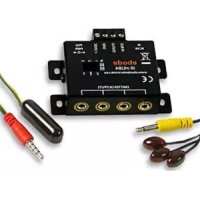
IR Link Pro Mini - Remote control EBODE - Free user manual and instructions
Find the device manual for free IR Link Pro Mini EBODE in PDF.



| Product Type | Infrared Extension System (IR extender) |
| Brand | ebode |
| Model | IR Link Pro Mini |
| Power Supply | 230 VAC / 50 Hz, 12 VDC 100 mA via included power adapter |
| Power Consumption | 100 mA (max) |
| Receiver Dimensions | 35 x 10 x 10 mm |
| Cable Length | 3 m (1 m from hub to emitters) |
| Number of Emitters Included | 2 (built into hub) |
| Connector | 3.5 mm mono jack for additional emitters |
| Infrared Technology | eIR2x™ for noise immunity (direct light, CFL, plasma/LCD/LED screens) |
| Operating Distance | 4 to 7 meters between remote control and receiver |
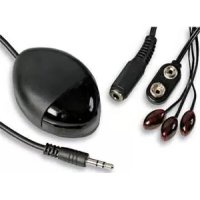
| Kit Contents | IR receiver, hub with 2 built-in emitters, power adapter |
| Compatibility | Most IR devices, except high frequency (e.g., Bang & Olufsen) |
| Installation | Attach with double-sided adhesive tape on the IR sensor of devices |
| Maintenance | Clean with a dry cloth; avoid moisture and liquids |
| Safety Precautions | Use only the supplied adapter; do not disassemble; avoid short circuit |
| Warranty | Does not cover damage due to incorrect use or opening of the product |
| Power Type | Mains (no batteries) |
| Intended Use | Indoor only |
Frequently Asked Questions - IR Link Pro Mini EBODE
User questions about IR Link Pro Mini EBODE
0 question about this device. Answer the ones you know or ask your own.
Ask a new question about this device
Download the instructions for your Remote control in PDF format for free! Find your manual IR Link Pro Mini - EBODE and take your electronic device back in hand. On this page are published all the documents necessary for the use of your device. IR Link Pro Mini by EBODE.
USER MANUAL IR Link Pro Mini EBODE
IR Link series - Extend your remote!
IR Link M – Control your A/V gear behind closed cabinet doors

User guide 3

Please check our website www.ebodeelectronics.eu
for the latest version of this manual.
Contents of the kit / Lieferumfang / Inhoud van de set / Innehäll / Contenu du kit / Contenido del paquete / Conteudo do kit / Dotazione del kit
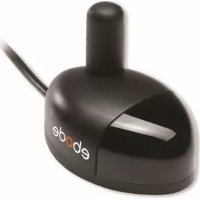
1x IR Link Mini Surface Mount Receiver, Including double-side stick pad
1 IRHUB1A with attached 2 IR Emitters and extra 3.5mm jack for Emitter output expansion.
1 12VDC Power supply


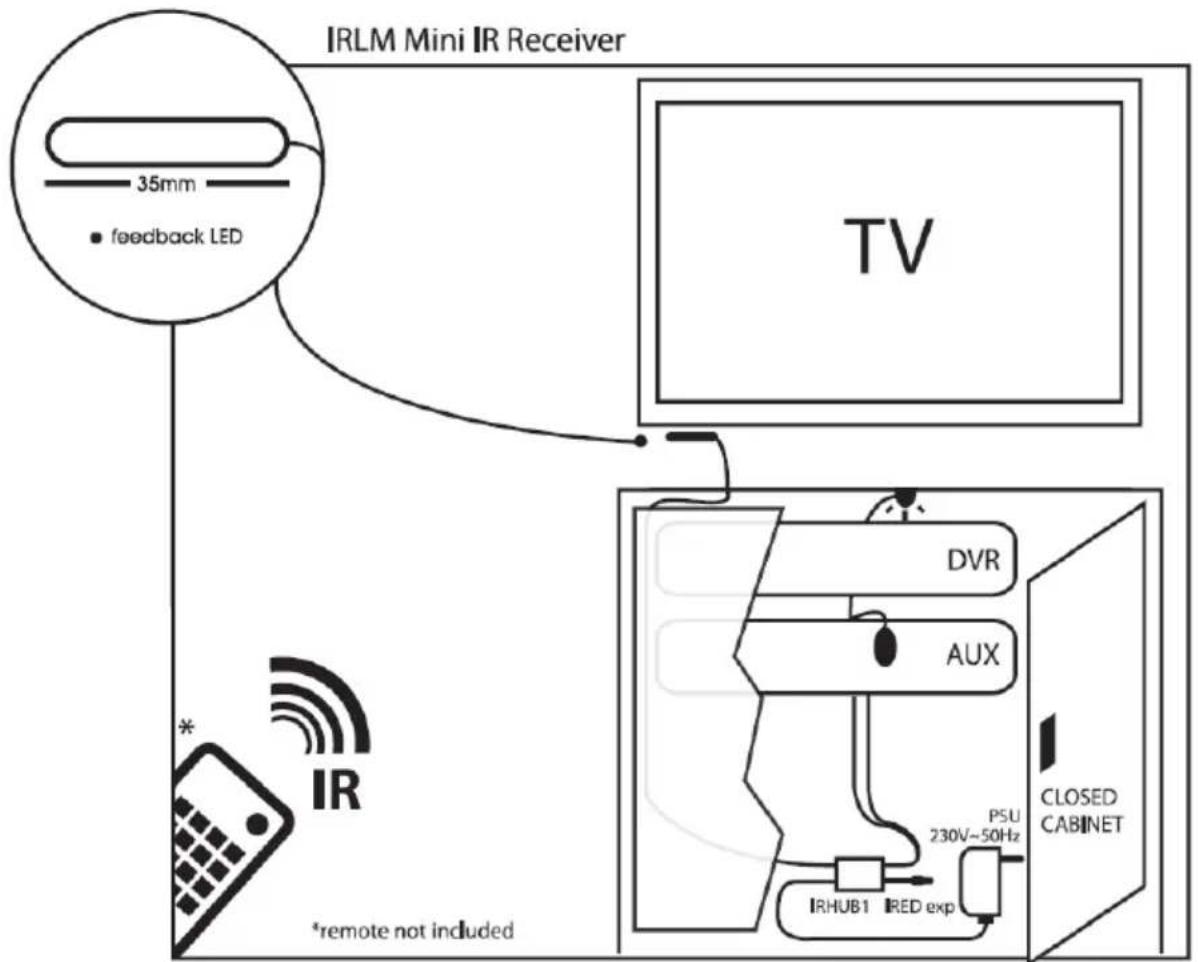
Example of where to install your ebode IR Link M
CONTENTS
- Conformity of Use
- Introduction
- Set content
- How does the ebode IR Link M work?
- Are there circumstances where the ebode IR Link M will not work?
- Installing the ebode IR Link M
- Operation
- How to avoid and solve possible problems
- Technical information
1. Conformity of Use
For carefree and safe use of this product, please read this manual and safety information carefully and follow the instructions. The unit is registered as a device that does not cause or suffer from radio-frequency interference. It is CE approved and it conforms with the Low Voltage Directory. The safety and installation instructions must be observed. Technical manipulation of the product or any changes to the product are forbidden, due to security and approval issues. Please take care to set up the device correctly - consult your user guide. Young children should use the device only under adult supervision. No guarantee or liability will be accepted for any damage caused due to incorrect use of the equipment supplied, other than indicated in this owner's manual.
SAFETYWARNINGS
- To prevent short circuits, this product (except if specified for outdoor usage) should only be used inside and only in dry spaces. Do not expose the components to rain or humidity.
- Only connect the adapter to the mains after checking whether the mains voltage is the same as the values on the rating labels. Never connect an adapter or power cord when it is damaged. In that case, contact your supplier. If there is any danger of a thunderstorm, it is a good precaution to unplug the power supply from the mains network in order to protect it from lightning. The same applies if the system is to be out of action for any length of time.
- Avoid strong mechanical tear and wear, extreme ambient temperatures, strong vibrations and atmospheric humidity.
- Do not disassemble any part of the product: no user-serviceable parts are inside. The product should only be repaired or serviced by qualified and authorized service personnel. Defected pieces must be replaced by original (spare) parts.
In case of improper usage or if you have opened, altered and repaired the product yourself, all guarantees expire. The supplier does not accept responsibility in the case of improper usage of the product or when the product is used for purposes other than specified. The supplier does not accept responsibility for additional damage other than covered by the legal product responsibility.
2. Introduction
Thank you for purchasing the ebode IR Link M. Our ebode proprietary eIR 2^TM (pronounce Irex) Technology guarantees a high level of immunity for InfraRed noise of direct sunlight, CFL lighting and Flat Panel TV's (including Plasma, LCD and LED). It provides accurate reproduction of the latest generation InfraRed codes that are used in remote controls of, for instance, Set-Top Boxes and Media Players (incl. RC5/6, RCMM, XMP).
The ebode IR Link M is an InfraRed extender system that allows full InfraRed remote control operation of A/V components located behind closed cabinet doors or other concealed and/or out-of-sight locations. The ebode IR Link M uses power from the mains (no battery required).
An InfraRed Extender in general consists of an IR (InfraRed) capture device, the Receiver, a distribution circuit/connecting block, the Hub, and finally the IR LED output, the Emitter, which flashes the IR signal to the A/V component.
3. Set content
The ebode IR Link M consists of 3 parts
1 IRLM Mini Surface Mount Receiver
1 IRHUB1A with 2IREDB IR Emitters attached for control of up to 2 devices.
1 12VDC Power supply
4. How does the ebode IR Link M work?
The IRLM Receiver receives IR signals from your remote controls. It then amplifies the remote control signal and passes it to the attached Emitters. The small Emitters each contain an IR transmitting LED and blink visibly when remote commands are passed. They allow control of IR remote controlled audio/video components (such as your A/V Receiver, DVR, satellite box, cable tuner, etc.) and are attached to the IR sensor "window" on such components by a self adhesive film. When a handheld remote control is operated and aimed at the ebode IR Link M, the IR commands will be passed to the controlled equipment. The Mini Receiver can be positioned outside of the cabinet, for instance close or attached to your flat panel, but always within line of sight of your hand held remote control.
5. Are there conditions where the ebode IR Link M will not work?
Most brands and models of IR controlled equipment are usable with your ebode IR Link M, with some exceptions like those using high frequency IR carriers, such as Bang & Olufsen (ask your dealer).
6. Installing the ebode IR Link M
The Hub sockets are colour coded for easy plug & play installation of the IR Receiver and IRED Emitters, which have coloured jacks.
Step 1: Place the ebode IR Link M IR Receiver in any convenient location so that the InfraRed beam from your remote control has a direct view to the front of the unit (within range of the device (4-7 meters)). The Receiver can be fixed to the surface by using the double side tape pad.
Step 2: Install the small Emitters onto your controlled components, using the following procedure: Remove the paper backing from one of the Emitters, exposing the adhesive surface. Apply the Emitter directly onto the centre of the sensor "window" on one of

your components.
Note: The IR Emitters have self-adhesive tape on the back. Use this to stick them onto the IR eye of your equipment. This should be done very carefully and precisely. Test the position of the IR Emitters first, before you finally stick them onto the eye.
Connect additional IRED Emitters to the corresponding jack of the Hub, and install the small Emitters onto your controlled components as per the procedure above.
Tech Tip: By using a flashlight to shine on the display of your Audio/Video device, you can easily see where to place the emitters.
Step 3: Run the wire of the IR Receiver through the back of your cabinet and plug the jack into the correct socket of the Hub.
Step 4: Plug the power supply adapter into the little Hub power connection.
ATTENTION: If you are only using one appliance, then you do not need to use the additional IR Emitters. Never remove it from the wire! Just dress up the wire and leave close to the Hub.
TIP2: If you want to control more appliances, you can purchase an extra IR Emitters (IRED series) and plug this into the other connection.
7. Operation
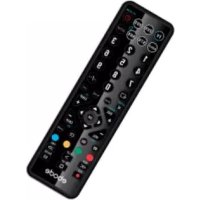
Point your original remote control at the IRLM Receiver. As soon as you press a button, the Receiver captures the IR command, converts it into a low voltage signal, and transmits it to the ebode IRHUB1. This unit converts the signal into an IR message back, in order to control the selected A/V source.
8. How to avoid and solve possible problems
Although the ebode IR Link M is equipped with proprietary eIR™ (pronounced Irex) Technology, which guarantees a high level of immunity of InfraRed noise from direct sunlight, CFL lighting and Flat Panel TV's (including Plasma, LCD and LED), in rare cases, the IRLM IR Receiver may have to be moved to a different location if the unit is picking up unexpected interference. This interference may, in severe cases, prevent the system from working. You can identify interference when the InfraRed Emitters are lit or blinking, even when you're not using a remote control transmitting at the time.
After repositioning, check to see if the ebode IR Link M operates the satellite Receiver or other components. If the ebode IR Link M still does not work, reposition the IRED Emitter(s). It may not be located directly over the component's InfraRed receiving "window". Consult the owner's manual of the unit or the manufacturer for the exact location of the InfraRed "window". If the ebode IR Link M does not work at all, please check all the connections.
Do you still have questions? Please refer to www.ebodeelectronics.eu
9. Technical information
Power Supply: 230V 50Hz 12VDC 100mA; 2.1mm
IR emitting diode cable: 2 IR LEDs
Cable length: 3 m total, 1 m from HUB to IR LEDs, and/or 3.5 mm mono jack plug
Receiver dimensions: 35 × 10 × 10 ~mm

Bedienungsanleitung
INHALT
DECLARATION OF CONFORMITY
Hereby, ebode electronics, declares that this ebode IR Link M is in compliance with the essential requirements and other relevant provisions of the following Directives:
Directive 2004/108/EC of the European Parliament and of the Council of 15 December 2004 on the approximation of the laws of the Member States relating to electromagnetic compatibility
Directive 2006/95/EC of the European Parliament and of the Council of 12 December 2006 on the harmonization of the laws of Member States relating to electrical equipment designed for use within certain voltage limits
Directive 2002/95/EC of the European Parliament and of the Council of 27 January 2003 on the restriction of the use of certain hazardous substances in electrical and electronic equipment
Directive 2005/32/EC of the European Parliament and of the Council of 6 July 2005 establishing a framework for the setting of eco design requirements for energy-using
Technical data and copies of the original Declaration of Conformity are available and can be obtained from ebode electronics: PB 25, NL-4264ZG, the Netherlands.
CE
User Information for Consumer Products Covered by EU Directive 2002/96/EC on Waste Electric and Electronic Equipment (WEEE)
This document contains important information for users with regards to the proper disposal and recycling of ebode products. Consumers are required to comply with this notice for all electronic products bearing the following symbol:
Environmental Information for Customers in the European Union
European Directive 2002/96/EC requires that the equipment bearing this symbol on the product and/or its packaging must not be disposed of with unsorted municipal waste. The symbol indicates that this product should be disposed of separately from regular household waste streams.
It is your responsibility to dispose of this and other electric and electronic equipment via designated collection facilities appointed by the government or local authorities. Correct disposal and recycling will help prevent potential negative consequences to the environment and human health.
For more detailed information about the disposal of your old equipment, please contact your local authorities, waste disposal service, or the shop where you purchased the product.
ebode
www.ebodeelectronics.eu


- Contents of the kit / Lieferumfang / Inhoud van de set / Innehäll / Contenu du kit / Contenido del paquete / Conteudo do kit / Dotazione del kit
- Example of where to install your ebode IR Link M
- CONTENTS
- Conformity of Use
- SAFETYWARNINGS
- Introduction
- Set content
- How does the ebode IR Link M work?
- Are there conditions where the ebode IR Link M will not work?
- Installing the ebode IR Link M
- Operation
- How to avoid and solve possible problems
- Technical information
- Bedienungsanleitung
- INHALT
- DECLARATION OF CONFORMITY
- CE
- User Information for Consumer Products Covered by EU Directive 2002/96/EC on Waste Electric and Electronic Equipment (WEEE)
- Environmental Information for Customers in the European Union
- ebode
Brand : EBODE
Model : IR Link Pro Mini
Category : Remote control