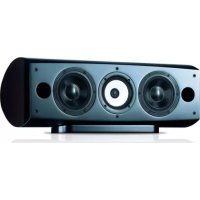
S8EXW - Loudspeaker PIONEER - Free user manual and instructions
Find the device manual for free S8EXW PIONEER in PDF.



| Product type | 3-way column speaker, bass-reflex, magnetic shielding |
| Brand and model | Pioneer S8EXW (EX series) |
| Dimensions (W x H x D) | 263 mm x 723 mm x 387 mm |
| Weight | 28 kg |
| Nominal impedance | 6 Ω |
| Frequency response | 34 Hz – 100 kHz |
| Sensitivity | 88.5 dB (2.83 V) |
| Maximum input power | 160 W |
| Drivers | 2 woofer 16 cm cone, midrange 14 cm cone / tweeter 3 cm dome (CST) |
| Technologies | Coherent Source Transducer (CST), ceramic graphite diaphragm, magnesium alloy, LDMC magnetic circuit |
| Connectors | Dual binding posts (HF/LF) for mono, bi-wiring or bi-amping |
| Included accessories | Decoupling spikes (3), cork pads (3), anti-slip pads (2 large + 4 small), foam plugs A and B (2), speaker base, grille, screws, washers, instruction manual |
| Care and cleaning | Clean with a dry cloth; if necessary, damp cloth with diluted neutral detergent; do not use thinner, benzene or wax |
| Safety | Use with amplifier 6–16 Ω; do not expose to water or excessive heat; do not install at height or on unstable surface; 28 kg weight requires two people |
| Spare parts and repairability | Contact an authorized dealer; do not disassemble; warranty may be affected by improper use |
| General information | Collaboration with Air Studios; EX series design inspired by TAD series; lacquered finish |
Frequently Asked Questions - S8EXW PIONEER
User questions about S8EXW PIONEER
0 question about this device. Answer the ones you know or ask your own.
Ask a new question about this device
Download the instructions for your Loudspeaker in PDF format for free! Find your manual S8EXW - PIONEER and take your electronic device back in hand. On this page are published all the documents necessary for the use of your device. S8EXW by PIONEER.
USER MANUAL S8EXW PIONEER
Register your product at: http://www.pioneerelectronics.com (US) http://www.pioneerelectronics.ca (Canada)
Thank you for buying this Pioneer product.
Please read through these operating instructions so you will know how to operate your model properly.
After you have finished reading the instructions, put them away in a safe place for future reference.
Contents
Before you start
What's in the box
About the EX series
Technology behind the S-8EX 4
CST....4
Ceramic Graphite Diaphragm....4
Magnesium Alloy Diaphragm 4
Bass Drivers....4
Bass Enclosure Construction 4
Crossover Networks 5
Collaboration with Air Studios 5
Installation and Placement
How to install 6
When installing directly on the floor....6
Using the furnished speaker base 6
Using the Pioneer Speaker Stand CP-7EX....7
Choosing Where To Place The Speaker Systems .....7
Connections
Connecting to an amplifier....8
Connecting the cables....8
Single-Wire Connections....9
Bi-Wire Connections 9
Bi-Amplification Connections....10
Other Information
Using the foam plugs....11
Using foam plugs A only....11
Using both foam plugs A and B....11
Attaching/Removing the Grille Cover....11
Cleaning the speaker cabinet....11
Specifications 12
For U.S. model


Dear Customer:
Selecting fine audio equipment such as the unit you've just purchased is only the start of your musical enjoyment. Now it's time to consider how you can maximize the fun and excitement your equipment offers. This manufacturer and the Electronic Industries Association's Consumer Electronics Group want you to get the most out of your equipment by playing it at a safe level. One that lets the sound come through loud and clear without annoying blaring or distortion-and, most importantly, without affecting your sensitive hearing.
Sound can be deceiving. Over time your hearing "comfort level" adapts to higher volumes of sound. So what sounds "normal" can actually be loud and harmful to your hearing. Guard against this by setting your equipment at a safe level BEFORE your hearing adapts.
To establish a safe level:
- Start your volume control at a low setting.
- Slowly increase the sound until you can hear it comfortably and clearly, and without distortion.
Once you have established a comfortable sound level:
- Set the dial and leave it there.
Taking a minute to do this now will help to prevent hearing damage or loss in the future. After all, we want you listening for a lifetime.
We Want You Listening For A Lifetime
Used wisely, your new sound equipment will provide a lifetime of fun and enjoyment. Since hearing damage from loud noise is often undetectable until it is too late, this manufacturer and the Electronic Industries Association's Consumer Electronics Group recommend you avoid prolonged exposure to excessive noise. This list of sound levels is included for your protection.
Decibel
Level Example
30 Quiet library, soft whispers
40 Living room, refrigerator, bedroom away from traffic
50 Light traffic, normal conversation, quiet office
60 Air conditioner at 20 feet, sewing machine
70 Vacuum cleaner, hair dryer, noisy restaurant
80 Average city traffic, garbage disposals, alarm clock at two feet.
THE FOLLOWING NOISES CAN BE DANGEROUS UNDER CONSTANT EXPOSURE
90 Subway, motorcycle, truck traffic, lawn mower
100 Garbage truck, chain saw, pneumatic drill
120 Rock band concert in front of speakers,
thunderclap
140 Gunshot blast, jet plane
180 Rocket launching pad
Information courtesy of the Deafness Research Foundation.


S001_En
Before you start
- The nominal impedance of this speaker system is 6 Ω. Connect the speaker system to an amplifier with a load impedance ranging from 6 Ω to 16 Ω (a model with "6 Ω – 16 Ω" displayed on the speaker output terminals).
In order to prevent damage to the speaker system resulting from input overload, please observe the following precautions: - Do not supply power to the speaker system in excess of the maximum permissible input.
- When using a graphic equalizer to emphasize loud sounds in the high-frequency range, do not use excessive amplifier volume.
- Do not try to force a low-powered amplifier to produce loud volumes of sound (the amplifier's harmonic distortion will be increased, and you may damage the speaker).
Caution: installation
- When placing this unit, ensure that it is firmly secured and avoid areas where it may be likely to fall and cause injury in the event of a natural disaster (such as an earthquake).
- Do not attach these speakers to the wall or ceiling. They may fall off and cause injury.
- Do not install your speakers overhead on the ceiling or wall. If improperly attached, the speaker grille can fall and cause damage or personal injury.
- Switch off and unplug your AV equipment and consult the instructions when connecting up components. Make sure you use the correct connecting cables.
Caution: in use
- Do not place the speaker on an unstable surface. It could present a hazard if it falls, as well as damaging the equipment.
- Do not use the speaker to output distorted sound for long periods of times. This can result in a fire hazard.
- Do not sit or stand on the speaker, or let children play on the speaker.
- Do not put large or heavy objects on top of the speaker.
- Do not place magnetic objects such as screwdrivers or iron parts near the tweeter or midrange. Since the speakers use strong magnets, the objects may be attracted, causing injury or damaging the diaphragm.
For U.S. model
WARNING: Handling the cord on this product or cords associated with accessories sold with the product will expose you to chemicals listed on proposition 65 known to the State of California and other governmental entities to cause cancer and birth defect or other reproductive harm.
Wash hands after handling
D36-P4 A En
For European model
If you want to dispose this product, do not mix it with general household waste. There is a separate collection system for used electronic products in accordance with legislation that requires proper treatment, recovery and recycling.
Private households in the member states of the EU, in Switzerland and Norway may return their used electronic products free of charge to designated collection facilities or to a retailer (if you purchase a similar new one).
For countries not mentioned above, please contact your local authorities for the correct method of disposal.
By doing so you will ensure that your disposed product undergoes the necessary treatment, recovery and recycling and thus prevent potential negative effects on the environment and human health. K058
What's in the box
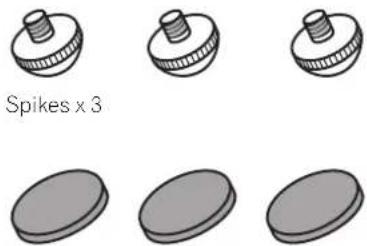
Cork pads x 3
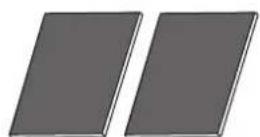
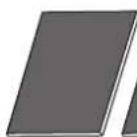
Large non-skid pads x 2
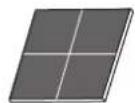
Small non-skid pads x 4
natural_image
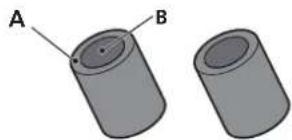
Two cylindrical objects labeled A and B, shown from different angles (no text or symbols beyond labels)Foam plugs (A,B) × 2
natural_image
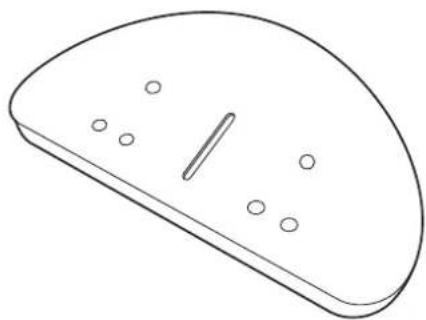
Simple line drawing of a computer mouse with a handle and circular indentations (no text or symbols)Speaker base x 1
Washers x 2
Spring washer x 1
Screw (M5 x L40) x 1
Screws (M6 × L35) × 6
Grille x 1
Operating instructions
About the EX series
The EX series, incorporating the abundant technological know-how behind Pioneer's flagship TAD speaker series, was developed with the goal of creating the ultimate speaker possible in its price range.
The design and production of the EX series result from an international effort that represents the finest in Pioneer's speaker technology.
Technology behind the S-8EX
CST
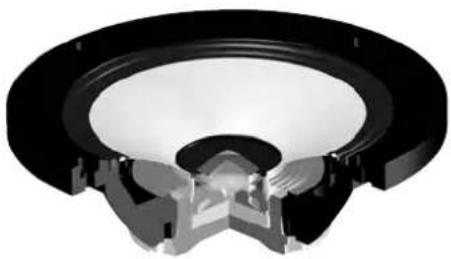
The core driver of the system is the Coherent Source Transducer (CST), which draws on the technology used in TAD. The tweeter diaphragm is mounted concentrically within the apex of the midrange cone and provides a point source of sound from 400 Hz to 100 kHz. The CST ensures a perfect spectral balance between the direct and reflected sounds that arrive at the listener's ears, providing a more consistent sound throughout the listening room and improved imaging capability.
natural_image
3D rendering of a speaker component with visible sound waves and central hub (no text or symbols)Ceramic Graphite Diaphragm
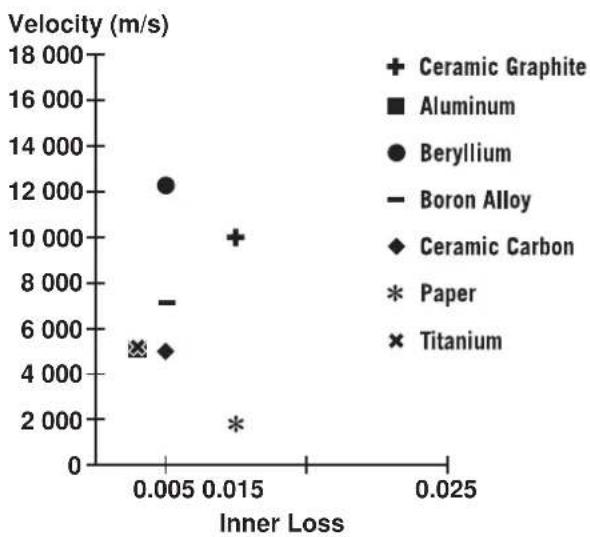
The CST's tweeter features a ceramic graphite diaphragm that provides top-level strength and dampening characteristics that are practically unrivaled by any other available materials currently used in high-end audio speaker systems. Ceramic graphite's lightness and exceptional strength combine to create speakers whose diaphragm resonance can be pushed far beyond their audible range.
scatter
| Material | Inner Loss | Velocity (m/s) | | ---------------- | ---------- | -------------- | | Ceramic Graphite | 0.015 | 10000 | | Aluminum | 0.005 | 7000 | | Beryllium | 0.005 | 12000 | | Boron Alloy | 0.015 | 5000 | | Ceramic Carbon | 0.005 | 5000 | | Paper | 0.015 | 2000 | | Titanium | 0.005 | 5000 |Magnesium Alloy Diaphragm
The CST's midrange features a magnesium alloy diaphragm whose characteristic lightness and high inner loss provide excellent transience and minimal coloration of midrange sounds.
Bass Drivers
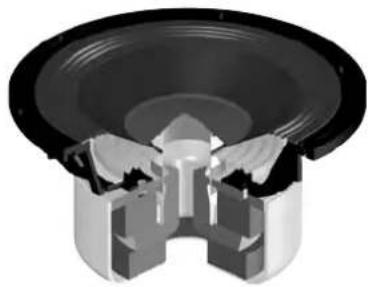
The bass driver pictured below serves as the foundation of the S-8EX speaker system. The driver's strength is the result of the Aramid/Carbon composite material, originally created during the development of the S-1EX, that is used in its diaphragm. Pioneer's exclusive LDMC magnetic circuit technology has been incorporated in order to preserve linearity from low to high output levels and minimize distortion.
natural_image
Cross-sectional diagram of a speaker into a socket (no text or symbols)Bass Enclosure Construction
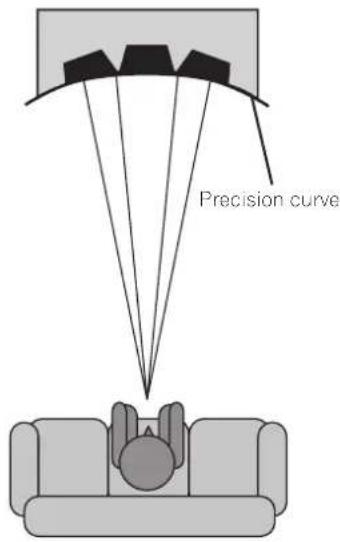
The unique form of the S-8EX is based upon logical necessity. In order to synchronize the arrival time of sound from the CST and the two bass drivers, each driver is mounted upon a baffle that serves to create a highly delicate curve known as the "precision curve" (see illustration below). Made of up to 65 mm thick MDF (Medium Density Fiberboard), this baffle is, moreover, strong enough to contain the force of the drivers. Additionally, the bass port has been carved out of an extremely thick block of MDF, resulting in the reduction of wind noise for clear, deep bass.
Crossover Networks
The crossover networks use only the finest components. Air cored coils, noninductive resistors, and film capacitors in the signal path are all carefully chosen and optimized for the CST driver to provide the greatest transparency to the signal. The bass drivers use silicon steel plate core inductors that minimize distortion and loss during energy transfer. All components are connected directly to their respective wiring materials, instead of a printed circuit-board, allowing for minimal loss and maximum performance.
Collaboration with Air Studios
Since its establishment by George Martin in 1969, London, England's Air Studios has earned unequivocal respect from scores of artists who recognize it as the world's premier recording studio. The Air Studios seal that was awarded to the S-8EX indicates that these speakers are capable of producing the high-quality sound demanded by the world's top-class sound creators.

AIR STUDIOS
Installation and Placement
How to install
Select a desired installation setup from the following.
When installing directly on the floor
Use the furnished spikes when installing the speaker directly on a floor surface.
Installation
1 Twist the spikes into the threads of the three threaded metal inserts (M6) embedded in the bottom of the speaker, and screw down securely.
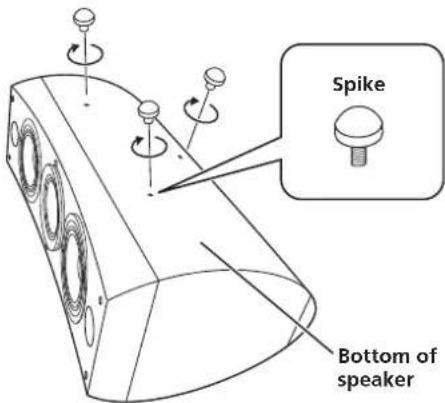
2 Set the cork pads in the positions where the points of the three spikes will strike when the speaker is set down.
3 Set the speaker on top of the cork pads.
If you do not use the cork pads when placing the speakers, the spikes may cause damage to the floor. If you plan on using the spikes we highly recommend to use the cork pads.

Important
- As this unit weighs some 28 kg, it is very dangerous to try and set the spike nut while tilting the speaker. Be sure to place the unit on a soft area (such as a blanket) so that it does not damage the floor, and carry out the installation with at least two people.
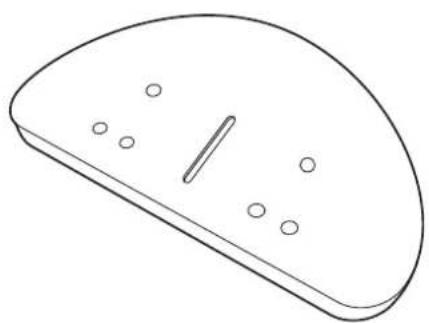
Using the furnished speaker base
When using the furnished speaker base, the use of the furnished spikes is not required.
Installation
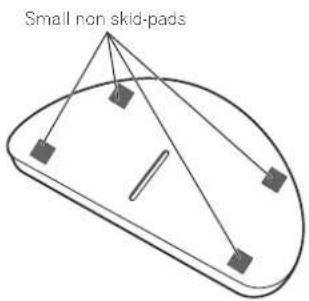
1 Affix the furnished non-skid pads (small) to the four locations on the bottom of the base.
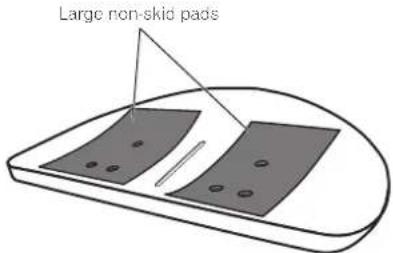
2 Affix the furnished non-skid pads (large) to the two places on the top surface of the speaker base.
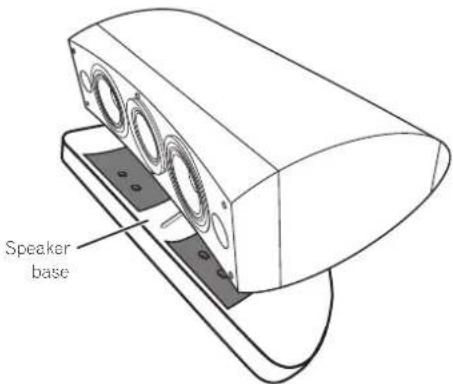
3 Place the speaker on top of the base.
Use of the furnished speaker base allows fine adjustment of the speaker angle.

Important
- When using the furnished speaker base, do not fix the speaker in position with screws. The speaker may fall and cause injury.
Using the Pioneer Speaker Stand CP-7EX
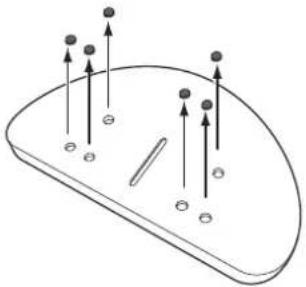
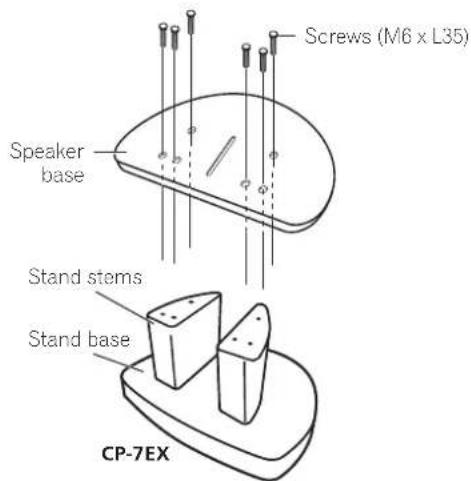
To use the CP-7EX stand, the furnished speaker base needs to be attached to the stand stems of the CP-7EX. Assemble the stands as shown below.
Installation
1 Remove the packing material from the countersunk screw holes in the speaker base.
natural_image
Diagram of a computer mouse with directional arrows and base markers (no text or symbols)2 Attach the speaker base to the stand stems of the CP-7EX.
Use only the furnished screws (M6 x L35).
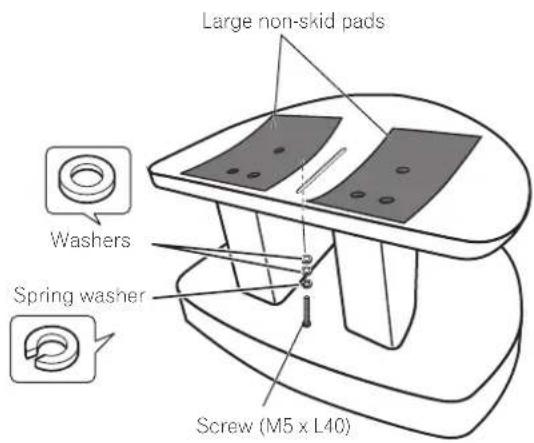
3 Affix the non-skid pads (large).
4 Using the furnished screws (M5 x L40), spring washer and washer, fasten the speaker to the stand.
To help ensure the speaker from falling, use only the provided screws to fasten the speaker system to the speaker stand. For details, consult the instructions provided with the CP-7EX speaker stand.
Choosing Where To Place The Speaker Systems
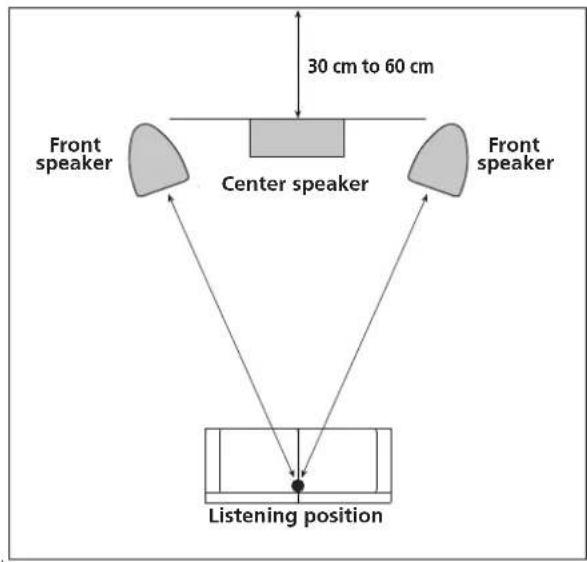
Placement within the listening room will have a great impact upon the total performance of the S-8EX speaker system in terms of bass performance, tonal accuracy, and imaging. All rooms are different and so this section is intended as a guide only. Experimentation in your room will yield optimum results.
Use the graphic below as a guide to determine optimal speaker placement.
flowchart
graph TD
    A["Center speaker"] --> B["30 cm to 60 cm"]
    C["Front speaker"] --> B
    D["Listening position"] --> B
    B --> E["Left Speaker"]
    B --> F["Right Speaker"]

Important
- Do not place the speaker where it will be in direct sunlight, and avoid positioning it near heaters and air conditioners. Doing so may cause warping and discoloration of the speaker cabinet and damage to the speaker.
- Pioneer assumes no liability whatsoever for damages resulting from assembly, improper mounting, insufficient reinforcement, misuse of the product, acts of nature, etc.
Connections
Connecting to an amplifier
This speaker does not include speaker cables used for connecting to an amplifier. Take the following factors into consideration when choosing speaker cables so that you can get the most from your speaker system:
- Use heavy-gauge speaker cable if possible, and keep the cables to the minimum necessary length.
- Cables have differing characteristics. Keep this in mind when using any cable.
- Select cables with as little resistance as possible, and make sure the cables to the speaker terminals and amp are firm and secure.
CAUTION
These speaker terminals carry HAZARDOUS LIVE voltage. To prevent the risk of electric shock when connecting or disconnecting the speaker cables, disconnect the power cord before touching any uninsulated parts. D3-4-2-2-3 A En
Connecting the cables
1 Switch off the power to your amplifier.
2 Connect the speaker cables to the input terminals (lower) on the back of the speaker. For input terminal polarity, red is positive (+) and black is negative (-).
3 Connect the other ends of the cables to the amp's speaker output terminals (for more details, refer to your amp instruction manual).
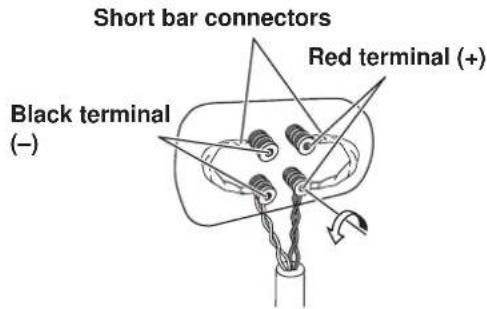
- Grasp the cap knobs on the lower input terminals and rotate them to the left (counter-clockwise), insert the speaker cable wires into the holes in the terminal posts, then tighten the knobs to secure the short bar as well as the wires.
- You can also connect the speaker's terminals with a banana plug. When using a banana plug, be sure to remove the cap at the tip of the input terminal.
• After connecting the plugs, pull lightly on the cables to make sure that the ends of the cables are securely connected to the terminals. Poor connections can create noise and interruptions in the sound. - If the cables' wires happen to be pushed out of the terminals, allowing the wires to come into contact with each other, it places an excessive additional load on the amp. This may cause the amp to stop functioning, and may even damage the amp.
Single-Wire Connections
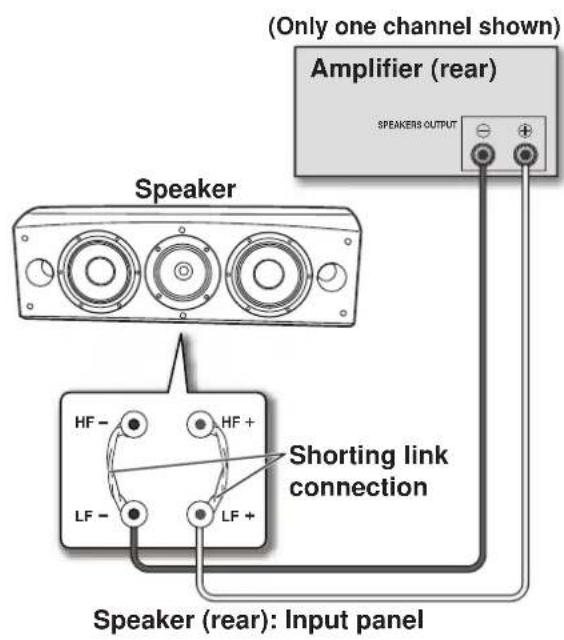
For single-wire connections, connect the mid-to-high- and low-frequency sections of the crossover network with the shorting link that was included with this unit, then connect the (+) wire from your amplifier to either red binding post and the (−) wire from your amplifier to either black binding post, as shown in below.
Bi-Wire Connections
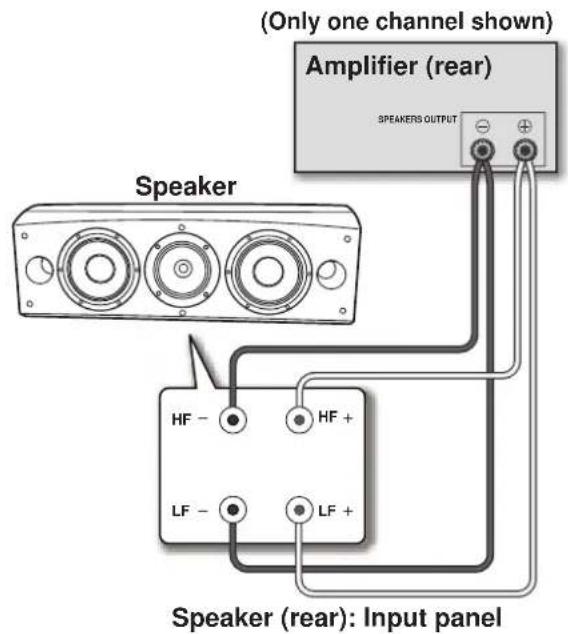
In a bi-wiring connection, you independently plug in the speaker systems running from the amp to their respective high- and low-frequency plugs. This results in the CST driver and bass drivers being independently connected directly to the amplifier, offering you the freedom to optimize the cable type for each of the drivers. Connect one set of wires to the bottom set of binding posts (bass driver-specific network). Then connect a second set of wires to the top binding posts (CST-specific network). Next, connect both sets of wires to the appropriate terminals on your amplifier. Take care to connect both (+) wires to the (+) amplifier terminals and both (−) wires to the (−) amplifier terminals, as shown below.
Bi-Amplification Connections
Bi-Amplification allows the best performance when using dedicated amplifiers for low- and mid-to-high-frequency sections. There are two possible configurations, commonly referred to as horizontal and vertical bi-amping.

Caution
Remove the shorting links before connecting speaker cables in bi-amplifications connections. Failure to do so may result in damage to your amplifiers.
Vertical Bi-Amping
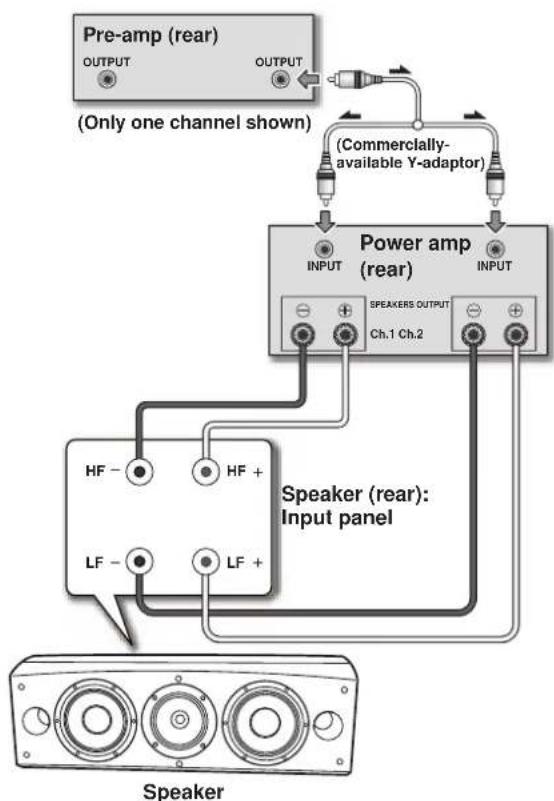
With this configuration, identical stereo amplifiers are used for each speaker system. One channel of each amplifier drives the low frequency section and the other channel drives the high frequency section, as shown below.
Connect one set of wires and amplifier channel to the bottom set of binding posts (bass driver-specific network).
Then connect a second set of wires and the other amplifier channel to the top binding posts (CST-specific network).
Take care to connect both (+) wires to the (+) amplifier terminals and both (−) wires to the (−) amplifier terminals.
flowchart
graph TD
    A["Pre-amp (rear)<br>OUTPUT"] --> B["(Only one channel shown)"]
    C["Power amp (rear)<br>INPUT"] --> D["Speaker (rear):<br>Input panel"]
    E["Speaker"] --> F["Speaker"]
    G["Commercially-available Y-adaptor"] --> H["Speaker"]
    I["HP -"] --> J["HP +"]
    K["LF -"] --> L["LF +"]
    M["Ch.1 Ch.2"] --> N["SPEAKERS OUTPUT"]
    O["CH.1 Ch.2"] --> P["SPEAKERS OUTPUT"]
Horizontal Bi-Amping
With this configuration, you may use different stereo amplifiers for the low- and mid-to-high-frequency sections of the speaker system (e.g., tube amplifiers for high frequency and solid state for low frequency). Each channel of one amplifier drives the low-frequency section of each speaker system and each channel of the other amplifier drives the mid-to-high-frequency section, as shown below.
This method requires that both amplifiers have the same gain; otherwise an imbalance will be heard between the low- and mid-to-high-frequency reproduction from the speaker system. If in doubt, please consult your local dealer.
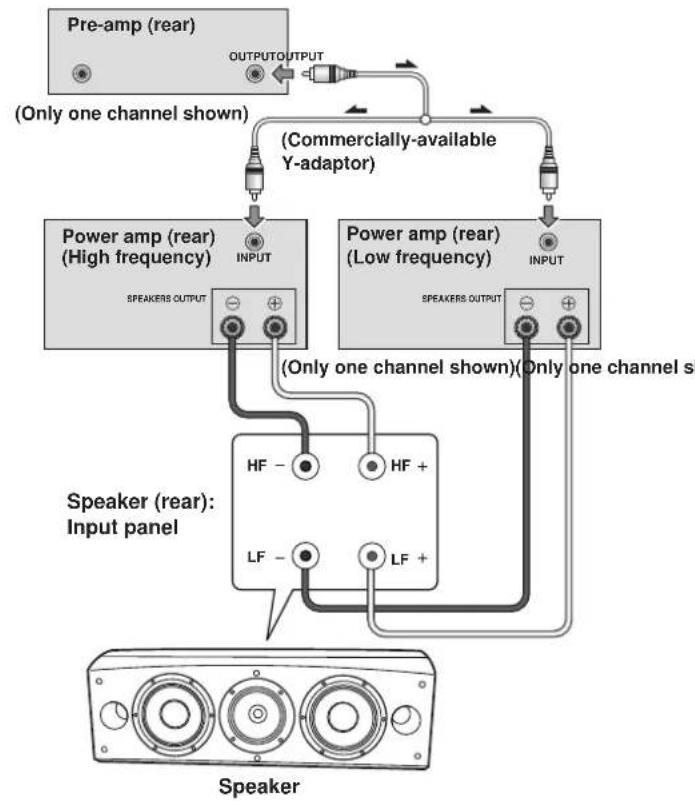
flowchart
graph TD
    A["Pre-amp (rear)"] -->|OUTPUT OUTPUT| B["(Commercially-available Y-adaptor)"]
    B --> C["Power amp (rear) (High frequency)"]
    B --> D["Power amp (rear) (Low frequency)"]
    C --> E["SPEAKERS OUTPUT"]
    D --> F["SPEAKERS OUTPUT"]
    E --> G["Speaker (rear): Input panel"]
    F --> G
    G --> H["Speaker"]
    style A fill:#f9f,stroke:#333
    style C fill:#ccf,stroke:#333
    style D fill:#ccf,stroke:#333
    style G fill:#cfc,stroke:#333
Other Information
Using the foam plugs
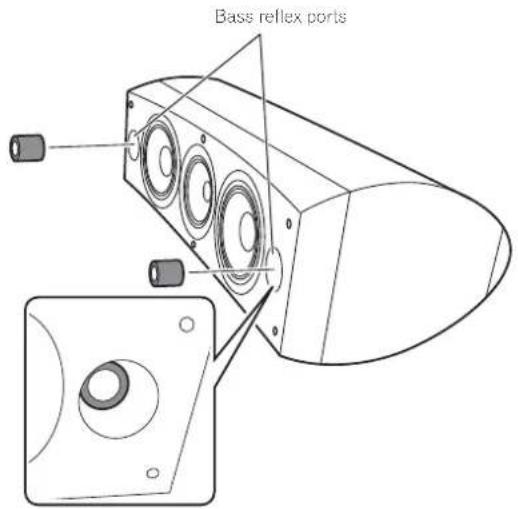
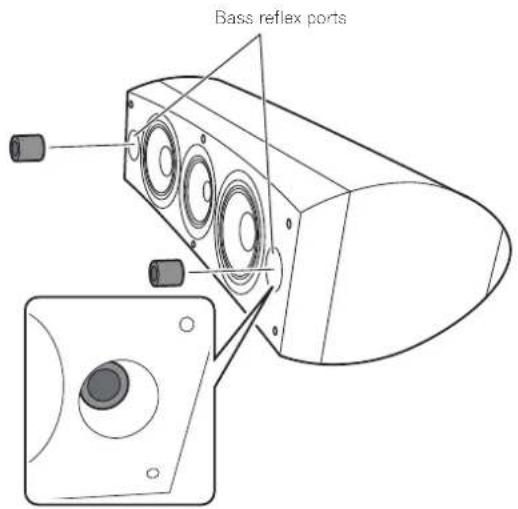
This unit is furnished with foam plugs that are useful for adjusting the volume of bass sound. To use, place the foam plugs gently into the bass reflex ports on either side of the speaker. Insert either foam plug A alone, or both foam plugs A and B to achieve the desired sound.
Using foam plugs A only
Using both foam plugs A and B
Attaching/Removing the Grille Cover
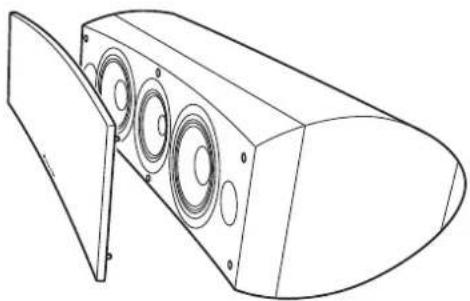
This speaker system comes with grille covers which may be attached and removed by:
1 To attach the grille cover, line up the holes on the speaker with the inserts on the grill, and press firmly.
2 To remove the grille cover, grasp the upper and lower edges of the grille cover at the left side by your hands and gently pull toward you to separate the left part of the grille cover from the speaker.
3 Then move your hands to the middle of the grille cover and again gently pull the upper and lower edges toward you to separate the middle section.
4 Finally, grasp the upper and lower edges of the grille cover at the right side and gently pull toward you to separate the remaining part of the grille cover from the speaker.
natural_image
Line drawing of a speaker chamber with three circular speakers, no text or symbols presentCleaning the speaker cabinet
With normal use, wiping with a dry cloth should be sufficient to keep the cabinet clean. If necessary, clean with a cloth dipped in a neutral cleanser diluted five or six times with water, and wrung out well. Do not use furniture wax or cleansers.
Never use thinners, benzine, insecticide sprays or other chemicals on or near this unit since these will corrode the surfaces.
Specifications
Enclosure .... Bass-reflex floorstanding type (magnetically shielded)
Configuration 3-way
Woofer 16 cm (6 5 /16 inch) cone x 2
Mid tweeter . . . . . . . . 14 cm (5 1 /2 inch) cone/3 cm (1 3 /16 inch) dome
Impedance 6Ω
Frequency response....34 Hz to 100 kHz
Sensitivity 88.5 dB (2.83 V)
Maximum input power....160 W
Exterior dimensions ..... 723 (W) mm × 263 (H) mm × 387 (D) mm
28 1/2 (W) in. × 10 3/8 (H) in. × 15 1/4 (D) in.
Weight 28 kg (61 lbs 12 oz.)
Supplied accessories
Spikes 3
Cork pads 3
Large non-skid pads....2
Small non-skid pads....4
Foam plugs (A,B) 2
Speaker base 1
Washers 2
Spring washer....1
Screw (M5 x L40) 1
Screws (M6 x L35)....6
Grille 1
Operating instructions

Note
Specifications and design subject to possible modification without notice, due to improvements.
Magnetic shielding
This speaker system is magnetically shielded. However, depending on the installation location, color distortion may occur if the speaker system is installed extremely close to the screen of a television set.
If this happens, turn off the television, then turn it on again after 15 min to 30 min. If the problem persists, place the speaker system away from the television set.

is a trademark placed on a product with Pioneer's Phase Control technology. This technology enables high-grade sound reproduction through each component by improving overall phase matching.
Published by Pioneer Corporation.
Copyright © 2008 Pioneer Corporation.
All rights reserved.
AFTER-SALES SERVICE FOR PIONEER PRODUCTS
Please contact the dealer or distributor from where you purchased the product for its after-sales service (including warranty conditions) or any other information. In case the necessary information is not available, please contact the Pioneer's subsidiaries (regional service headquarters) listed below:
PLEASE DO NOT SHIP YOUR PRODUCT TO THE COMPANIES at the addresses listed below for repair without advance contact, for these companies are not repair locations.
AMERICA
PIONEER ELECTRONICS SERVICE, INC.
P.O. BOX 1760, LONG BEACH, CA 90801-1760, U.S.A.
CUSTOMER SERVICE HOTLINE: 1 (800) 421-1404
EUROPE
PIONEER EUROPE NV
EUROPEAN SERVICE DIVISION
HAVEN 1087, KEETBERGLAAN 1, B-9120 MELSELE, BELGIUM
ASEAN
PIONEER ELECTRONICS ASIACENTRE PTE. LTD.
SERVICE DEPARTMENT
253, ALEXANDRA ROAD #04-01 SINGAPORE 159936
JAPAN AND OTHERS
PIONEER CORPORATION (HEAD OFFICE)
CUSTOMER SUPPORT CENTER
Précautions installation
natural_image
Simple line drawing of a computer mouse with a handle and circular holes (no text or symbols)Base d'enceinte x 1
Rondelles x 2
natural_image
Cross-sectional diagram of a speaker or speaker base with visible internal components (no text or symbols)natural_image
Cross-sectional diagram of a speaker into a socket (no text or symbols)natural_image
Simple line drawing of a geometric shape resembling a dome or fan with internal lines and square markers (no text or symbols)natural_image
Simple line drawing of a curved object with two rectangular panels and a triangular pointer, no text or symbols present.natural_image
Diagram of a computer mouse with arrows pointing to the screen (no text or symbols present)Bi-amplification verticale
natural_image
Line drawing of a speaker chamber with three speakers and a speaker blade (no text or symbols)Publication de Pioneer Corporation.
© 2008 Pioneer Corporation.
natural_image
Simple line drawing of a computer mouse with a slot and dot pattern (no text or symbols)natural_image
3D rendering of a speaker component with concentric rings and central hub (no text or symbols)Keramikgraphit-Membran
natural_image
Cross-sectional diagram of a speaker into a microphone (no text or labels)natural_image
Diagram of a curved surface with scattered dots and arrows indicating direction (no text or symbols)natural_image
Line drawing of a speaker chamber with three speakers and a cover (no text or symbols)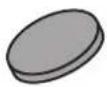
Cuscinetti in sughero x 3
natural_image
Simple line drawing of a computer mouse with a slot and dot pattern (no text or symbols)natural_image
Cross-sectional view of a speaker grille with concentric rings and central hub (no text or symbols)natural_image
Cross-sectional diagram of a speaker into a socket (no text or symbols)natural_image
Diagram of a computer mouse with arrows pointing to the screen (no text or symbols)flowchart
graph TD
    A["Preamplificatore (posteriore)"] -->|OUTPUT OUTPUT| B["Adattatore Y da acquistare separatamente"]
    C["Diffusore"] --> D["Speaker output"]
    E["Speaker output"] --> F["Speaker output"]
    G["Speaker output"] --> H["Speaker output"]
    I["Speaker output"] --> J["Speaker output"]
    K["Speaker output"] --> L["Speaker output"]
    M["Speaker output"] --> N["Speaker output"]
    O["Speaker output"] --> P["Speaker output"]
    Q["Speaker output"] --> R["Speaker output"]
    S["Speaker output"] --> T["Speaker output"]
    U["Speaker output"] --> V["Speaker output"]
    W["Speaker output"] --> X["Speaker output"]
    Y["Speaker output"] --> Z["Speaker output"]
    AA["Speaker output"] --> AB["Speaker output"]
    AC["Speaker output"] --> AD["Speaker output"]
    AE["Speaker output"] --> AF["Speaker output"]
    AG["Speaker output"] --> AH["Speaker output"]
    AI["Speaker output"] --> AJ["Speaker output"]
    AK["Speaker output"] --> AL["Speaker output"]
    AM["Speaker output"] --> AN["Speaker output"]
    AO["Speaker output"] --> AP["Speaker output"]
    AQ["Speaker output"] --> AR["Speaker output"]
    AS["Speaker output"] --> AT["Speaker output"]
    AU["Speaker output"] --> AV["Speaker output"]
    AW["Speaker output"] --> AX["Speaker output"]
    AY["Viene mostrato un solo canale"] --> AZ["Amplificatore di potenza (pannello posteriore) (alte frequenze)"]
    AZ --> BA["SPEAKERS OUTPUT"]
    AZ --> BB["INPUT"]
    BC["Viene mostrato un solo canale"] --> BD["SPEAKERS OUTPUT"]
    BD --> BE["SPEAKERS OUTPUT"]
    BF["Viene mostrato un solo canale"] --> BG["SPEAKERS OUTPUT"]
    BG --> BH["SPEAKERS OUTPUT"]
    BI["SPEAKERS OUTPUT"] --> BJ["SPEAKERS OUTPUT"]
    BK["SPEAKERS OUTPUT"] --> BL["SPEAKERS OUTPUT"]
    BM["SPEAKERS OUTPUT"] --> BN["SPEAKERS OUTPUT"]
    BO["SPEAKERS OUTPUT"] --> BP["SPEAKERS OUTPUT"]
    BQ["SPEAKERS OUTPUT"] --> BR["SPEAKERS OUTPUT"]
    BS["SPEAKERS OUTPUT"] --> BT["SPEAKERS OUTPUT"]
    BU["SPEAKERS OUTPUT"] --> BV["SPEAKERS OUTPUT"]
    BW["SPEAKERS OUTPUT"] --> BX["SPEAKERS OUTPUT"]
    BY["SPEAKERS OUTPUT"] --> BZ["SPEAKERS OUTPUT"]
    CA["SPEAKERS OUTPUT"] --> CB["SPEAKERS OUTPUT"]
    CC["SPEAKERS OUTPUT"] --> CD["SPEAKERS OUTPUT"]
    CE["SPEAKERS OUTPUT"] --> CF["SPEAKERS OUTPUT"]
    GA["SPEAKERS OUTPUT"] --> GH["SPEAKERS OUTPUT"]
    BI["SPEAKERS OUTPUT"] --> BIH["SPEAKERS OUTPUT"]
    BJ["SPEAKERS OUTPUT"] --> BJH["SPEAKERS OUTPUT"]
    BK["SPEAKERS OUTPUT"] --> BKJ["SPEAKERS OUTPUT"]
    BL["SPEAKERS OUTPUT"] --> BLH["SPEAKERS OUTPUT"]
    MA["SPEAKERS OUTPUT"] --> MB["SPEAKERS OUTPUT"]
    AN["SPEAKERS OUTPUT"] --> ANH["SPEAKERS OUTPUT"]
    AO["SPEAKERS OUTPUT"] --> AOJ["SPEAKERS OUTPUT"]
    AP["SPEAKERS OUTPUT"] --> APH["SPEAKERS OUTPUT"]
    AQ["SPEAKERS OUTPUT"] --> AQI["SPEAKERS OUTPUT"]
    AR["SPEAKERS OUTPUT"] --> ARJ["SPEAKERS OUTPUT"]
    AS["SPEAKERS OUTPUT"] --> ASH["SPEAKERS OUTPUT"]
    AT["SPEAKERS OUTPUT"] --> ATJ["SPEAKERS OUTPUT"]
    AU["SPEAKERS OUTPUT"] --> AUJ["SPEAKERS OUTPUT"]
    AV["SPEAKERS OUTPUT"] --> AW["SPEAKERS OUTPUT"]
    AX["SPEAKERS OUTPUT"] --> AXJ["SPEAKERS OUTPUT"]
    AY["SPEAKERS OUTPUT"] --> AZ["SPEAKERS OUTPUT"]
    BA["SPEAKERS OUTPUT"] --> BB["SPEAKERS OUTPUT"]
    BC["SPEAKERS OUTPUT"] --> BCJ["SPEAKERS OUTPUT"]
    BD["SPEAKERS OUTPUT"] --> BDJ["SPEAKERS OUTPUT"]
    BE["SPEAKERS OUTPUT"] --> BEJ["SPEAKERS OUTPUT"]
    BF["SPEAKERS OUTPUT"] --> BFJ["SPEAKERS OUTPUT"]
    BG["SPEAKERS OUTPUT"] --> BH[JF - HF + LF - LF + LF + LF + LF + LF + LF + LF + LF + LF + LF + LF + LF + LF + LF + LF + LF + LF + LF + LF + LF + LF + LF + LF + LF + LF + LF + LF + LF + LF + LF + LF + LF + LF + LF + LF + LF + LF + LF + LF + LF + LF + LF + LF + LF + LF + LF + LF + LF + LF + LF + LF - LF - LF - LF - LF - LF - LF - LF - LF - LF - LF - LF - LF - LF - LF - LF - LF - LF - LF - LF - LF - LF - LF - LF - LF - LF - LF - LF - LF - LF - LF - LF - LF - LF - LF - LF - LF - LF - LF - LF - LF - LF - LF - LF - LF - LF - LF - LF - LF - LF - LF-LF - LF - LF - LF - LF - LF - LF - LF - LF - LF - LF - LF - LF - LF - LF - LF - LF - LF - LF - LF - LF - LF - LF - LF - LF - LF - LF - LF - LF - LF - LF - LF - LF - LF - LF - LF - LF - LF - LF - LF - LF - LF - LF - LF - LF - LF - LF - LF - LF - LF - Leaf - Leaf - Leaf - Leaf - Leaf - Leaf - Leaf - Leaf - Leaf - Leaf - Leaf - Leaf - Leaf - Leaf - Leaf - Leaf - Leaf - Leaf - Leaf - Leaf - Leaf - Leaf - Leaf - Leaf - Leaf - Leaf - Leaf - Leaf - Leaf - Leaf - Leaf - Leaf - Leaf - Leaf - Leaf - Leaf - Leaf - Leaf - Leaf - Leaf - Leaf - Leaf - Leaf - Leaf - Leaf - Leaf - Leaf - Leaf - Leaf - Leaf - leaf
Altre informazioni
natural_image
Line drawing of a speaker chamber with three circular speakers and a flat panel (no text or symbols)Cuscinetti in sughero 3
Copyright © 2008 Pioneer Corporation.
natural_image
Simple line drawing of a computer mouse with a slot and dot pattern (no text or symbols)Luidsprekervoet x 1
Vulringen x 2
Veerring x 1
Schroef (M5 x L40) x 1
Schroeven (M6 x L35) x 6
Front x 1
Handleiding
natural_image
Cross-sectional view of a speaker component (no text or symbols visible)natural_image
Cross-sectional diagram of a speaker into a socket (no text or symbols)Crossover-netwerken
natural_image
Diagram of a computer mouse with arrows pointing to the screen (no text or symbols present)natural_image
Line drawing of a speaker chamber with three circular speakers and a flat panel (no text or symbols)Copyright © 2008 Pioneer Corporation.
natural_image
Simple line drawing of a computer mouse with a handle and circular indentations (no text or symbols)Base de altavoz x 1
Arandelas x 2
natural_image
Cross-sectional view of a speaker component with no visible text or symbolsnatural_image
Cross-sectional diagram of a speaker into a socket (no text or symbols)natural_image
Simple line drawing of a curved object with triangular supports and a central vertical line (no text or symbols)natural_image
Simple line drawing of a curved surface with two rectangular plates and a triangular pointer, no text or symbols present.natural_image
Diagram of a computer mouse with arrows pointing to the screen (no text or symbols)natural_image
Line drawing of a speaker chamber with three circular speakers and a flat panel (no text or symbols)Copyright © 2008 Pioneer Corporation.
natural_image
Simple line drawing of a computer mouse with a slot and dot pattern (no text or symbols)Base de coluna x 1
Anilhas x 2
Anilha de mola x 1
Parafuso (M5 × L40) × 1
Parafusos (M6 x L35) x 6
Grelha x 1
natural_image
Cross-sectional diagram of a speaker or speaker component (no text or symbols visible)natural_image
Cross-sectional diagram of a speaker into a socket (no text or symbols)natural_image
Diagram of a computer mouse with arrows pointing to the screen (no text or symbols)3 Afixe as almofadas anti-derrapantes (grandes).
4 Fixe a coluna à base utilizando dos parafusos fornecidos (M5 x L40), a anilha de mola e a anilha.
natural_image
Line drawing of a speaker chamber with three circular speakers and a flat panel (no text or symbols)"Copyright" © 2008 Pioneer Corporation.
natural_image
Simple line drawing of a computer mouse with a slot and dot pattern (no text or symbols)Höglalarstöd x 1
Brickor x 2
Fjäderbricka x 1
Skruv (M5 x L40) x 1
Skruvar (M6 x L35) x 6
Grill x 1
Bruksanvisning
Om EX-serien
natural_image
Cross-sectional diagram of a speaker component (no text or symbols visible)natural_image
Cross-sectional diagram of a speaker into a socket (no text or symbols)Bashöljets konstruktion
natural_image
Diagram of a computer mouse with arrows pointing to the screen (no text or symbols)natural_image
Line drawing of a speaker chamber with three circular speakers, no text or symbols presentCopyright © 2008 Pioneer Corporation.
natural_image
Simple line drawing of a computer mouse with a handle and circular indentations (no text or symbols)Højttalerfod x 1
Skiver x 2
Fjederskive x 1
Skrue (M5 × L40) × 1
Skrue (M6 x L35) x 6
Gitter x 1
Brugsanvisning
Om EX-serien
natural_image
Cross-sectional diagram of a speaker cone with visible sound waves and base components (no text or labels)natural_image
Cross-sectional diagram of a speaker into a socket (no text or symbols)natural_image
Diagram of a computer mouse with arrows pointing to the screen (no text or symbols)natural_image
Line drawing of a speaker chamber with three speakers and a cover (no text or symbols)Published by Pioneer Corporation.
Copyright © 2008 Pioneer Corporation.

Store anti-glifelt x 2
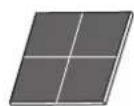
Lite anti-glifelt x 4
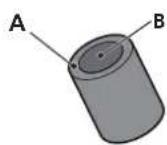
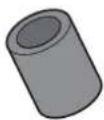
Skumplugg (A, B) × 2
natural_image
Simple line drawing of a computer mouse with a handle and circular indentations (no text or symbols)Høyttalerfot x 1
Pakning x 2
Fjærskive x 1
Skrue (M5 x L40) x 1
Skrue (M6 x L35) x 6
Grill x 1
Bruksanvisning
natural_image
3D rendering of a speaker component with visible sound waves and central hub (no text or symbols)natural_image
Cross-sectional diagram of a speaker into a socket (no text or symbols)natural_image
Diagram of a computer mouse with directional arrows and base markers (no text or symbols)3 Fest anti-glifeltene (store).
natural_image
Line drawing of a speaker chamber with three speakers and a speaker blade (no text or symbols)Store anti-glifelt....2
Lite anti-glifelt 4
Skumplugg (A, B) 2
Høyttalerfot 1
Pakning 2
Fjærskive 1
Skrue (M5 x L40) 1
Skrue (M6 x L35) 6
Grill....1
Bruksanvisning

Merk
Opphavsrett © 2008 Pioneer Corporation.
Alle rettigheter reservert.
natural_image
Simple line drawing of a computer mouse with a handle and circular indentations (no text or symbols)Kaiultimen alusta x 1
Aluslevyt x 2
Jousialuslevyt x 1
Ruuvi (M5 x L40) x 1
Ruuvit (M6 x L35) x 6
Verkko x 1
Käyttöohjeet
EX-sarjasta
natural_image
Cross-sectional view of a speaker component with no visible text or symbolsnatural_image
Cross-sectional diagram of a speaker into a socket (no text or symbols)Bassokotelon rakenne
natural_image
Diagram of a computer mouse with arrows pointing to the screen (no text or symbols)natural_image
Line drawing of a speaker chamber with three circular speakers and a flat panel (no text or symbols)Copyright-oikeudet © 2008 : Pioneer Corporation.
natural_image
Simple line drawing of a computer mouse with a slot and dot pattern (no text or symbols)natural_image
3D rendering of a speaker component with no visible text or symbolsnatural_image
Cross-sectional diagram of a speaker into a microphone (no text or labels)natural_image
Simple line drawing of a curved object with triangular elements and small squares at vertices (no text or symbols)natural_image
Diagram of a curved electronic device with two rectangular components and a triangular pointer, no text or symbols present.natural_image
Diagram of a computer mouse with arrows pointing to the screen (no text or symbols)natural_image
Line drawing of a speaker chamber with three circular speakers, no text or symbols presentИздано Pioneer Corporation.
© Pioneer Corporation, 2008.
Все права защищены.
Примечание:
natural_image
Simple line drawing of a computer mouse with a handle and circular holes (no text or symbols)natural_image
Cross-sectional view of a speaker component (no text or symbols visible)陶瓷石墨振動膜
natural_image
Cross-sectional diagram of a speaker into a socket (no text or symbols)低音揚聲器外殼構造
natural_image
Simple line drawing of a curved object with triangular supports and a central vertical line (no text or symbols)natural_image
Diagram of a device with two rectangular components and a central slot, no text or symbols present3 將揚聲器放在基座上。
natural_image
Diagram of a computer mouse with directional arrows and base markers (no text or symbols)natural_image
Technical line drawing of a speaker chamber with three circular components (no text or symbols)揚聲器機箱的維護
Published by Pioneer Corporation. Copyright © 2008 Pioneer Corporation. All rights reserved.
PIONEER ELECTRONICS (USA) INC.
P.O. BOX 1540, Long Beach, California 90801-1540, U.S.A. TEL: (800) 421-1404
PIONEER ELECTRONICS OF CANADA, INC.
300 Allstate Parkway, Markham, Ontario L3R 0P2, Canada TEL: 1-877-283-5901, 905-479-4411
PIONEER EUROPE NV
Haven 1087, Keetberglaan 1, B-9120 Melsele, Belgium TEL: 03/570.05.11
PIONEER ELECTRONICS ASIACENTRE PTE. LTD.
253 Alexandra Road, #04-01, Singapore 159936 TEL: 65-6472-7555
PIONEER ELECTRONICS AUSTRALIA PTY. LTD.
178-184 Boundary Road, Braeside, Victoria 3195, Australia, TEL: (03) 9586-6300
PIONEER ELECTRONICS DE MEXICO S.A. DE C.V.
Blvd.Manuel Avila Camacho 138 10 piso Col.Lomas de Chapultepec, Mexico,D.F. 11000 TEL: 55-9178-4270
K002_Ru
- Contents
- Before you start
- What's in the box
- About the EX series
- Installation and Placement
- Connections
- Other Information
- For U.S. model
- Dear Customer:
- To establish a safe level:
- Once you have established a comfortable sound level:
- We Want You Listening For A Lifetime
- Decibel
- Level Example
- THE FOLLOWING NOISES CAN BE DANGEROUS UNDER CONSTANT EXPOSURE
- Caution: installation
- Caution: in use
- For European model
- Technology behind the S-8EX
- CST
- Ceramic Graphite Diaphragm
- Magnesium Alloy Diaphragm
- Bass Drivers
- Bass Enclosure Construction
- Crossover Networks
- Collaboration with Air Studios
- How to install
- When installing directly on the floor
- Installation
- Important
- Using the furnished speaker base
- Using the Pioneer Speaker Stand CP-7EX
- Choosing Where To Place The Speaker Systems
- Connecting to an amplifier
- CAUTION
- Connecting the cables
- Single-Wire Connections
- Bi-Wire Connections
- Bi-Amplification Connections
- Vertical Bi-Amping
- Horizontal Bi-Amping
- Using the foam plugs
- Attaching/Removing the Grille Cover
- Cleaning the speaker cabinet
- Specifications
- Supplied accessories
- Note
- Magnetic shielding
- AFTER-SALES SERVICE FOR PIONEER PRODUCTS
- AMERICA
- EUROPE
- ASEAN
- JAPAN AND OTHERS
- Précautions installation
- Bi-amplification verticale
- Keramikgraphit-Membran
- Altre informazioni
- Crossover-netwerken
- Om EX-serien
- Bashöljets konstruktion
- Merk
- EX-sarjasta
- Bassokotelon rakenne
- Примечание:
- 陶瓷石墨振動膜
- 低音揚聲器外殼構造
- 揚聲器機箱的維護
- PIONEER EUROPE NV
Brand : PIONEER
Model : S8EXW
Category : Loudspeaker