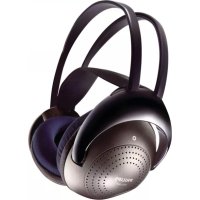
SHC2000UG - Headphones PHILIPS - Free user manual and instructions
Find the device manual for free SHC2000UG PHILIPS in PDF.

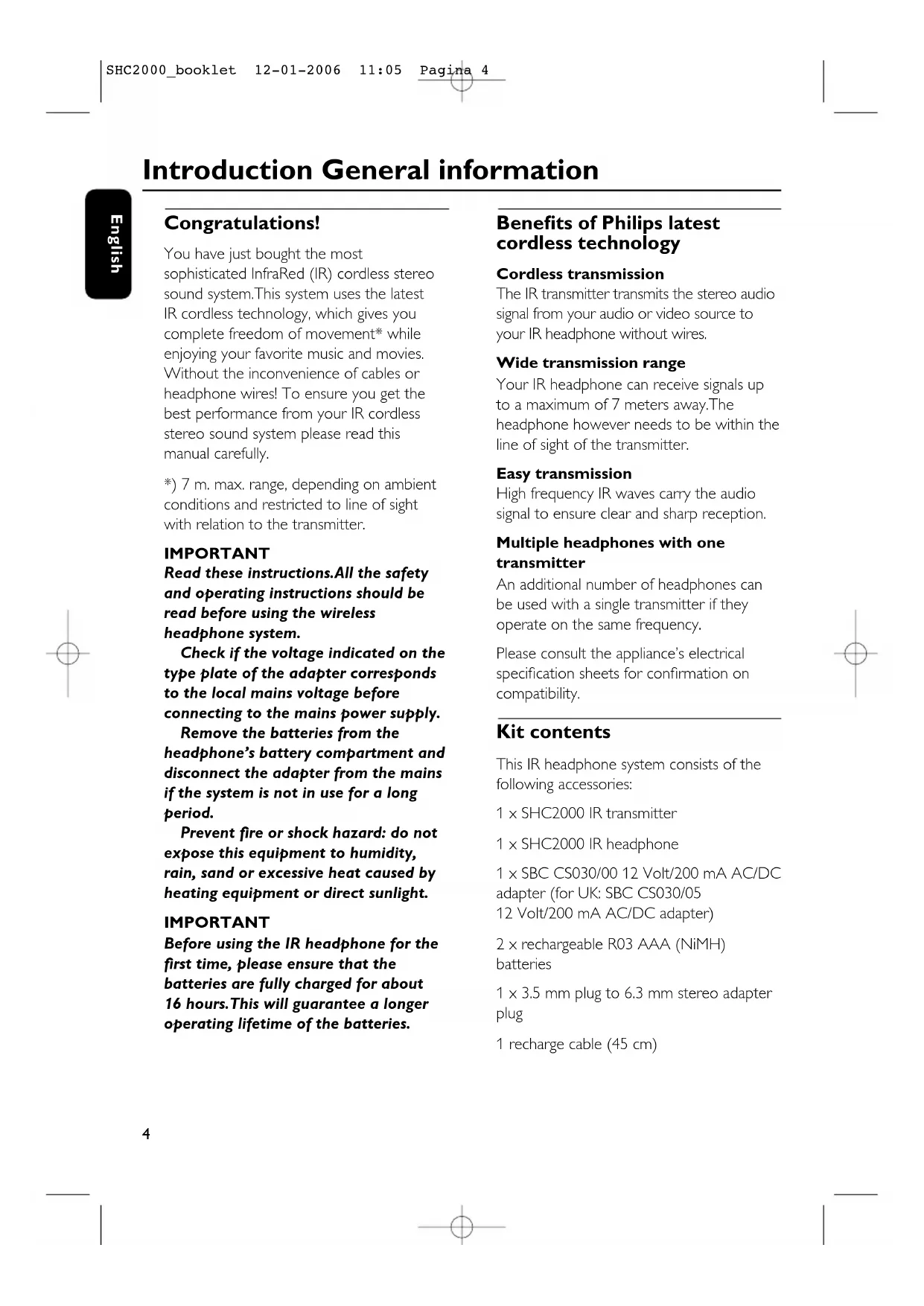


| Product Type | Wireless infrared headphone |
| Brand | Philips |
| Model | SHC2000UG |
| Transmission technology | Infrared (IR) with FM modulation |
| Effective range | Up to 7 meters (direct line of sight required) |
| Carrier frequency | 2.3 MHz (left channel), 2.8 MHz (right channel) |
| Signal-to-noise ratio | > 55 dB (A-weighted, 1 kHz) |
| Total harmonic distortion | < 1% |
| Channel separation | > 30 dB |
| Nominal input level | 300 mVrms (1 kHz sine wave) |
| Transmitter power supply | 12 V DC / 200 mA via mains adapter (SBC CS030/00) |
| Headphone power supply | 2 NiMH R03/AAA rechargeable batteries (1.2 V each) |
| Battery life | Approximately 16 hours per full charge |
| Charging time | Approximately 16 hours |
| Audio connectivity | 3.5 mm stereo jack input on transmitter (6.3 mm adapter included) |
| Main functions | Wireless listening, volume control on headphone, charging via dedicated cable |
| Recommended use | Music, TV, PC (audio source with headphone output) |
| Maintenance and cleaning | Clean with a soft slightly damp cloth; avoid alcohol, solvents, abrasive products |
| Safety precautions | Do not expose to moisture, rain, excessive heat or direct sunlight; use only the supplied adapter |
| Hearing protection | Prolonged use at high volume may damage hearing |
| Spare parts and repairability | Replaceable rechargeable batteries (NiMH R03/AAA); do not attempt to repair yourself as this voids the warranty |
| Environmental information | Recyclable packaging (cardboard, expanded polystyrene, polyethylene); used batteries and equipment must be disposed of according to local regulations |
Frequently Asked Questions - SHC2000UG PHILIPS
User questions about SHC2000UG PHILIPS
0 question about this device. Answer the ones you know or ask your own.
Ask a new question about this device
Download the instructions for your Headphones in PDF format for free! Find your manual SHC2000UG - PHILIPS and take your electronic device back in hand. On this page are published all the documents necessary for the use of your device. SHC2000UG by PHILIPS.
USER MANUAL SHC2000UG PHILIPS
Instructions for use
English 4
Mode d'emploi
Français 10
HCTpyKcHnNo HcnoA3OBaHnIO
Pycckn 88
Kasutusjuhend
Eesti keel 94
Lietosanas pamaciba
Latviešu valoda 100
Naudojimo instrukcija
Lietuviskai 106
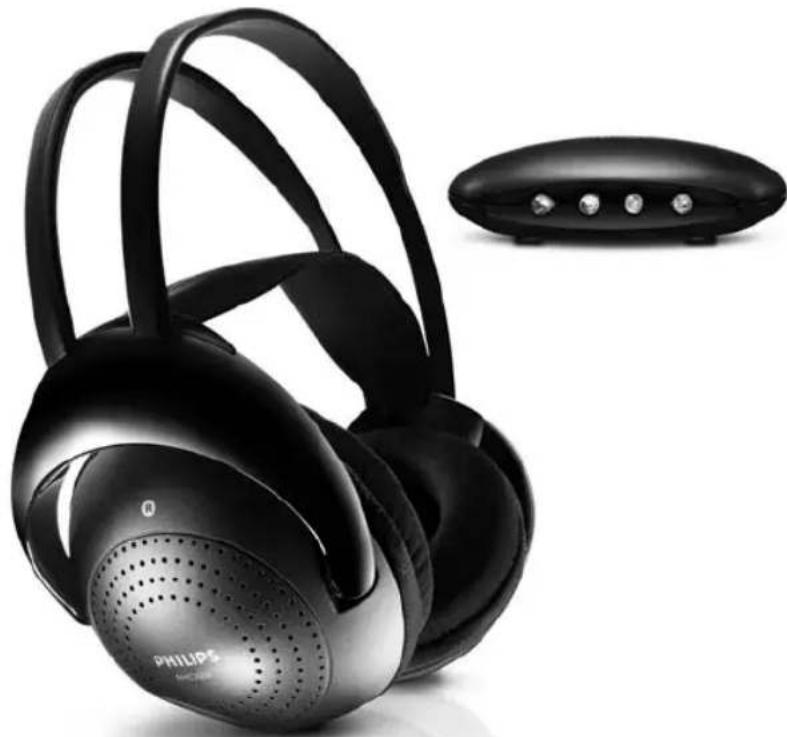
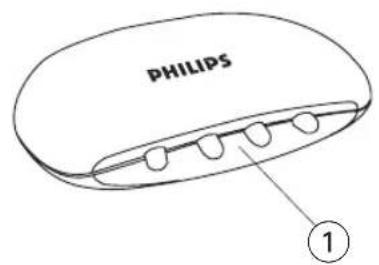
Figure 1
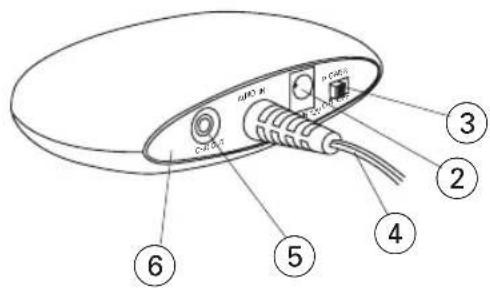
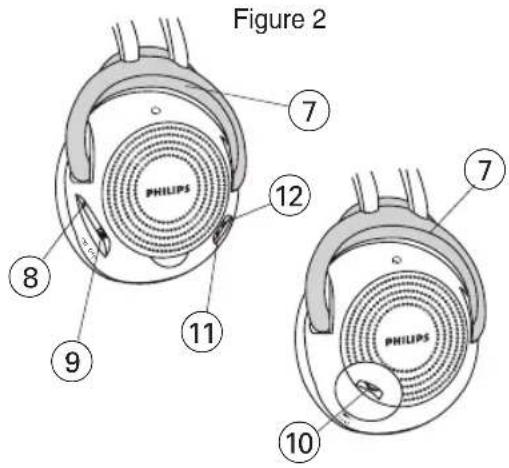
Figure 2
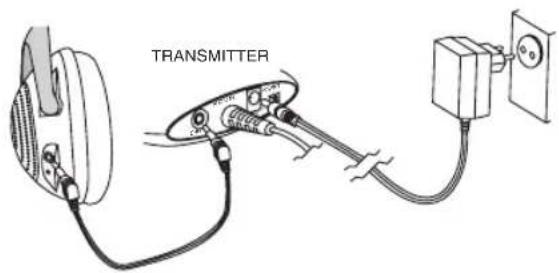
Figure 3
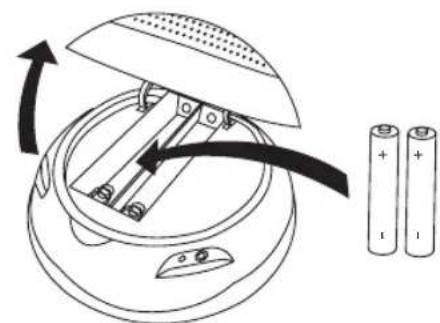
Figure 4
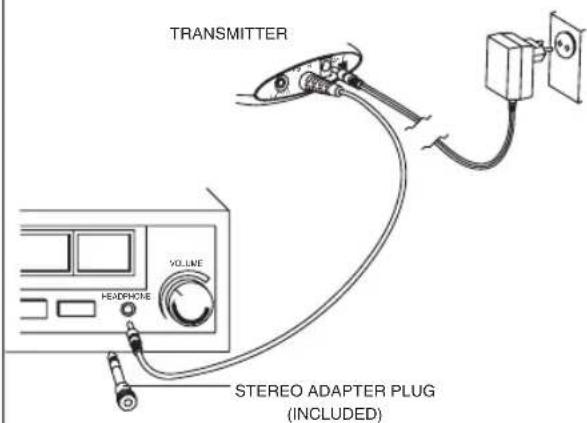
Figure 5
#
Helpline (www.p4c.philips.com)
You have just bought the most sophisticated InfraRed (IR) cordless stereo sound system. This system uses the latest IR cordless technology, which gives you complete freedom of movement* while enjoying your favorite music and movies. Without the inconvenience of cables or headphone wires! To ensure you get the best performance from your IR cordless stereo sound system please read this manual carefully.
*) 7 m. max. range, depending on ambient conditions and restricted to line of sight with relation to the transmitter.
IMPORTANT
Read these instructions. All the safety and operating instructions should be read before using the wireless headphone system.
Check if the voltage indicated on the type plate of the adapter corresponds to the local mains voltage before connecting to the mains power supply.
Remove the batteries from the headphone's battery compartment and disconnect the adapter from the mains if the system is not in use for a long period.
Prevent fire or shock hazard: do not expose this equipment to humidity, rain, sand or excessive heat caused by heating equipment or direct sunlight.
IMPORTANT
Before using the IR headphone for the first time, please ensure that the batteries are fully charged for about 16 hours. This will guarantee a longer operating lifetime of the batteries.
Benefits of Philips latest cordless technology
Cordless transmission
The IR transmitter transmits the stereo audio signal from your audio or video source to your IR headphone without wires.
Wide transmission range
Your IR headphone can receive signals up to a maximum of 7 meters away. The headphone however needs to be within the line of sight of the transmitter.
Easy transmission
High frequency IR waves carry the audio signal to ensure clear and sharp reception.
Multiple headphones with one transmitter
An additional number of headphones can be used with a single transmitter if they operate on the same frequency.
Please consult the appliance's electrical specification sheets for confirmation on compatibility.
Kit contents
This IR headphone system consists of the following accessories:
1 × SHC2000 IR transmitter
1×SHC2000IRheadphone
1 x SBC CS030/00 12 Volt/200 mA AC/DC adapter (for UK: SBC CS030/05
12 Volt/200 mA AC/DC adapter)
2× rechargeable R03 AAA (NiMH) batteries
1× 3.5mm plug to 6.3~mm stereo adapter plug
1 recharge cable (45 cm)
Controls Installation
Transmitter (figure 1)
1 IR transmitting LEDs - transmit audio signal to IR headphone.
2 DC power - connect to the 12 Volt/ 200 mA AC/DC adapter.
3 Power switch - power on/off switch.
4 3.5 mm stereo headphone audio input - connects your IR transmitter to an audio source.
5 Recharging input - connect the recharge cable to the input.
6 Controls plate
Headphone (figure 2)
7 IR sensors - to receive IR waves from the transmitter
8 Power indication - lights up when in use.
9 Power On/Off - slide the switch to the on or off position to switch the headphone on/off.
10 Volume - adjust volume to your desired listening level.
11 Recharging indicator - lights up when the recharging cable is connected between the headphone and the IR transmitter. Completely flat batteries will be fully charged after about 16 hours.
12 Recharging input (figure 3) - connect the recharging cable to the transmitter. The recharging indicator on the headphone must switch on, indicating that the headphone is being recharged.
Transmitter power supply
IMPORTANT
Use only Philips SBC CS030/00
12 Volt/200 mA AC/DC adapter.
(For UK version: SBC CS030/05
12 Volt/200 mA AC/DC adapter)
1 Make sure the adapter's rated voltage corresponds to the mains socket voltage.
2 Connect the DC connector of the AC/DC adapter to the 12 Volt DC power input connector located at the rear of the transmitter.
3 Connect the 12 Volt/200 mA AC/DC adapter to the mains socket.
- Always disconnect the AC/DC adapter if the transmitter is not to be used for a long period of time.
Installation Audio Connections
Headphone power supply IMPORTANT Only use R03/AAA NiMH batterie (preferably Philips).
1 Check if the power button of the IR headphone is in the on position.
2 Ensure the batteries are put in the battery compartment correctly according to the engraved polarity symbols.
3 To recharge the headphone's rechargeable R03/AAA NiMH batteries, first switch off the headphone.Then connect the charge cable between the headphone and the transmitter (figure 3).The recharging indicator will light up.
Note:
Completely flat batteries need approximately 16 hours to recharge.
Always remove the batteries if the headphone is not to be used for a long period of time.
Batteries contain chemical substances, so they should be disposed of properly.
Headphone battery replacement (figure 4)
IMPORTANT Only use R03/AAA NiMH batteries (preferably Philips).
1 Open the headphone's battery compartment.
2 Take out the batteries and dispose of them properly.
3 Insert new batteries. Only use R03/AAA NiMH batteries (preferably Philips).
4 Make sure the batteries are correctly inserted as indicated by the engraved symbols in the battery compartment.
5 Close the battery compartment.
IMPORTANT
Before using the IR headphone for the first time, please ensure that the batteries are fully charged for about 16 hours. This will guarantee a longer operating lifetime of the batteries.
Audio Connections
Audio Connections
Connecting the IR transmitter to a headache output of an audio source (figure 5)
1 Connect the 3.5mm stereo plug of the stereo audio cable to the headphone output of an audio source, such as TV, HiFi or PC.
In case your audio source has a 6.3mm headphone output, use the supplied 3.5mm to 6.3mm stereo adapter plug.
2 Switch on your audio source and carefully increase the volume of the audio source.
3 Switch on the headphone.
4 Adjust the volume to the desired level with the headphone volume control.
Basic operation
When the IR transmitter is connected to a headphone output of an audio source.
1 Switch on your IR transmitter and place it at the same height or slightly higher than the reception height of the IR headphone.
2 Position the LED's towards the listening area, ensuring that there are no obstacles in between transmitter and headphone.
3 Switch on the headphone.
4 Switch on your audio source and carefully increase the volume of the audio source.
5 Adjust the volume of the IR headphone to the desired level with the headphone volume control.
IMPORTANT
Because IR light travels in a straight line, place the IR transmitter at the same height, or slightly higher than the reception height of the IR headphone.
High IR light content such as sunlight and bright incandescent indoor lighting may degrade the audio signal and cause interference. If you experience such problems, simply move the system to a darker area.
Troubleshooting
If a fault occurs, first check the points listed below before taking the set for repair. If you are unable to remedy a problem by following these hints, consult your dealer or service centre.
WARNING: Under no circumstances should you try to repair the set yourself, as this would invalidate the warranty.
Problem Remedy
No sound - Check if the AC/DC adapter is fully inserted into the
AC outlet and that its DC connector is properly inserted into the 12 Volt DC input connector located at the rear of the transmitter.
- Check if the headphone's on/off switch is in the on position.
- Headphone batteries running low. (See Headphone power supply)
- Check if the audio source is switched on.
Volume not adjusted. Adjust the volume on the audio source/ headphone to a higher level.
- Make use of the SHC2000 transmitter. Some transmitters already built into other equipment may not be compatible with the SHC2000 headphone because of the advanced technologies used in the SHC2000 headphone.
Distorted sound - Headphone batteries running low. (See Headphone power supply)
- Check the volume on audio source/ headphone is not set at too high a level. Reduce the volume.
- Distance from the transmitter is too large. Move closer to the transmitter.
- Interference from fluorescent lamps/ other radio sources. Move transmitter or headphone elsewhere.
- Make use of the SHC2000 transmitter. Some transmitters already built into other equipment may not be compatible with the SHC2000 headphone because of the advanced technologies used in the SHC2000 headphone.
Troubleshooting Specifications
Maintenance - If the headphone will not be used for a longer time,
please remove the batteries to prevent leakage and corrosion.
- Only replace the batteries with R03/AAA NiMH batteries (preferably Philips).
- Do not leave the headphone near heat sources. Do not expose to direct sunlight, excessive dust, moisture, rain or any kind of mechanical shock.
- Do not use alcohol, thinner or petroleum-based substances to clean the headphone or transmitter. Use a slightly dampened chamois cloth to clean the housing.
- Do not use cleaning agents containing alcohol, spirits, ammonia or abrasives as these may harm the housing.
Hearing Safety! Continuous use at a high volume may permanently damage your hearing.
System:Infra Red (IR)
Modulation: Frequency Modulation (FM)
Effective Transmission Range: 7 meters max. range (depending on ambient conditions and restricted to line of sight with relation to the transmitter)
Input level: 300 mVrms (1 kHz sine wave)
Power supply - transmitter: 12Volt / 200 mA DC, centre positive
Power supply - headache: 2 × 1.2 V R03 (AAA) batteries (NiMH)
Carrier Frequency
(Headphone): 2.3 Mhz (L), 2.8 Mhz (R)
Signal/Noise ratio: >55 dB (1 kHz sine wave, A-weighted)
Distortion: < 1% THD
Channel separation: >30 dB
Introduction Information générale
Felicitations!
Commandes Installation
Émetteur (figure 1)
(Auriculares): 2.3 Mhz (L), 2.8 Mhz (R)
Installation Audioanschlüsse
Modulation: Frequenzmodulation (FM)
Systeme:InfraRood (IR)
Distortion: < 1% THD
Eioaywyn Tevikcs PAnpophiic
Συγχαρητήρια!
Molc ayopaoate to TIO pOnymuvo
aupato unepuOoTepeoWviko
xoooutnma.AutoTO ouTnma
Xpooiotoei TIV TEeutaiou TUIOU
aupattn texvoLoyia IR, n onoia oac
Poofoepei anolutn Eeuthetaia Kivnoeewv*
otav anolauabveTe ta ayamueva oac
ouoka koumaia kalnuatoypaikec
taivies.Tepa ta aOla kaawdia twv
akouotikw! Ia va eioTE oiyoupoi OTI TO
aupato OTEpeoowko xoooutnma IR
anodiel meTov kautepo duvato Tpanto,
biaaote PPOOEKTkA auto TO EYXEpiio.
*) eYIOtn EβEIA 7 μ, avALOyA μE TIC OuvθnkeC tou nepiBaALovTOc kai efoov UTIAPxI ONTIK n ETTaH μe Tov nOPTo.
ZHMANTIKO
Aiaβaσte autεs tic odnyieç. Θa npénei va δiaβaσeTe 6λeç tic odnyieç aoΦaλeiaç kal χρησç πipv χρησμοιησeTe to aσύρμato σιστημα akouσικων.
EeYTe av n raon nou avaepetal otyn ivakida tunou tou troofootikou avtioiexi e Tny tonikraondeltau npotou to ouvdeoe sto nlektipko diktuo.
Byalte TIC mnatapies ano Tn oNkn mataipiwvTwv akouotikwv kai anosuvdeote To rpofoobotiko ano To nkeptko diKTuo av dev npoketail va xpnouonoiote To ouotma yia eayalo xpviko diaotma.
AnotpeneTov kivduvo npkayiac n nEeKtpoanlxiac: mny EKTeTE autn Tn oukeun oEv ypaia, bpoxh, amu no unepolikn eepoToTna nou npokaleitai ano oukeuEc eepavonc n aecn nlaikn aktivobetaia.
ZHMANTIKO
Piv xpoioonoiEYia npWn
opTa akouotka IR, oac
napakaoue va povtioe wote oI
muatapiec va exouv optiotei teieiws
eni 16 nepinou wpc. Me tov tpono
auto diaophiaiizetai mua eyautepn
diapkeia zwns twnuataipiwv.
IIeovekntmuata m5 Teauaiou tuou aupaTns Texvooyia ts Philips
Aoupuatn 1eTaSooN
O TnTnOg IR mTaDiEi To
oTepeofoovko nma nxou ano Tny nyn
nxou n bivteo ota akouotika IR oac
Xwpi Tn xpnon kalwoiwv.
I X TpaHCMMHTTep SHC2000 IR
IxHayuHnKSHC2000IR
I x aanTep SBC CS030/00 12 B/200 mA nepemeh/noct
Oprahbl ynpabAeHnYcTaHOBka
2x aKKyMyAaTopHbIe 6aTapeN R03/AAA (NiMH)
1 x nepexoxo3,5 MM Ha 6,3 MM cTepeo
YcTaHOBka 3ByKObIe CoeAnHeHn
БАК ПИТАнЯ Hayшнков
BAXHOE3AMEYAHNE
Hcnoa3ynte ToaBko 6aTapeu R03/AAA NiMH (XeaaTeaBho Philips).
Iy6eNTecb TOM,TO KHOJa NITAHNA HayUHNKOB IR B NOAOKeHNBKA.
2Y6eAHTecbBTOM,yTO6aTapeu YCTaHOBAAHbIBCOOTBECTBUN C BbIRpaBnPOBaHHbIMHaOTCEKe A86aTapee CNMBOAmN
3 Aa 3apAaKn BCTpoeHHbIX B HayuHnKn 6aTapei R03/AAA NiMH noAkuOnTe Ka6eA b 3apAaKn K HayuHnKam N TpaHCMTTepy (pnc.4).
3 Anype3apAaKn 3apKaembix 6aTapei HayuHKOB R03/AAA cHaayaa BbyKIOUHTe HayuHKN. 3aTeM IOaKIOUHTe 3apAHyB KabeB K HayuHKAM N TpaHCMNTepy (Pnc.3).NHAnkaTop nepe3apAaKn 3arOpntcra
PnmeHn
Aa 3aprgkn noHocmbio ceBux 6amape mpebyemc oko1o 16 yacob.
EaHayuHnKHe 6ygym nCnoA63oBamb npoguaKmeAbHoe BpeM, ygaIme 6amapen n3 Hx.
EcaH HayuHHKHe 6ygyT HcnoAb30BaTbcn npogoxHTeAbHoe BpeMa, ygaNTe n3 Hx 6aTapen.
3aMeHa 6aTapei HayuHnKOB (pnc.4)
BAXHOE 3AMEYAHNE
Hcnoa3yTe ToaBko 6aTapeH R03/AAA NiMH (XeAaTeaBHo Philips).
OTKPOnte OTCek 6aTapeHHa HayuHnKax.
2BbHbTe 6aTapeu N Bbl6pocnte nX OAnKhblm 06pa3OM.
3 YcTaHOBnTe HOBbIe 6aTapeH. NcNoAByTe ToABko R03/AAA NiMH (KeAaTeAho Philips).
4Y6eAnTEcB TOM,HTO 6aTapeu YCTaHOBAeHbI B COOTBeTCTBnC BBIPaBNPOBaHHbIMHa OTceKe Aa 6aTapeu CnMBOAAMN
5 3aKpOTe oTaeHne Aa 6aTapei.
BAXHOE 3AMEYAHNE
Ipege nCnoA630BaHHe M HAYUHNKOB IR B nepBbI pa3 o6ecneneueBte nx noAHyIO 3apRgky B TeueHne 16 yacob. 3To yBeaunuBaet cpoK cayx6bl 6atapei.
HΦopMaunno oxpae cpebl
Bynakobke gahHoro 60pygobAHn oTCyTCTByeT n36bItoHbIMaTePhaMbl oecneuHa AERKocTB gA pa3geAehn MaTePhaAOB Ha gBe rpynnbl: KapToH n noAn3THAEH.
Bahe yctpoIcTBo H3ROTOBAeHO H3 MaTePnaAOB, KOTOpbIE MOxHO NOBTOpHO nepepa60TaTb Komnahnei, cneuaHn3npyIoueeNcB gaHHo pa6Ota. Co6AIOgaIte MeCTHbIe npabHaNo H36aBAeHNIO OT 3THX MaTePnaAOB, HCNOAb3OBaHHbIX 6aTapeH n CTaporo 06opygobAHn.
3ByKOBbIe CoeAnHeHnA
3ByKOBbIe coeAnHeHn
IIOAIAOueHHe TpaHcMnTTepa IR K BbIXOy HayuHHKOB 3ByKOBOr HCTOUYHka (pnc.5)
I OaKIOUHTe Ctepeo pa3bE M 3,5MM Ctepeo 3ByKOBOrO Ka6eA K BbIXOaY HayuHnKOB 3ByKOBOrO NCTOCHNka,Haip., TeAebn3opa,HiFi nn KOMMbIOTepa. -Ean BaII 3ByKOBoI NCTOCHNk IMeET BbIXoA DAA HayuHnKOB 6,3MM, NCPOAByTe nepexoAHNK 3,5MM Ha 6,3 MM.
2 BkauHTe 3BykoBoi NCTouHHN INoCTeNEHNO yBeAunbTe yPOBeHb.
3 BkauHHTe HayuHINKn.
4 OtperyuynTe ypoBeHb AO Heo6xoAMMOrO 3HaueHnC NOMouIkoKHTPOA yPOBnHauyHnKOB.
OchOBhble onepaun
KorTa TpaHcmntTep IR NOaKaIOueH K BbIXOaHyuHKOB 3ByKOBOrO NCTouHnKa.
I BKAIOHTe TpaHcMMTTEp IR n NOMECTnTe erO Ha OAnHaKOBOB BbICOTe Hn HeCKoAko Bblue C BBICOTOn pNEma HayuHnKOB IR.
2 HanpaBte CN, B CTOpOHy 30HbI CnyuHaHn, ObecneuN B OTCyTCTBVe npenrTCTBm MeKdy TpaHcMHTTePOM HuyuHKaM.
3 BKAIOHTe HayuHINK.
4 BkauHTe 3ByKOBoN IcToHHNK nOCTeNEHNO yBeAunbTe yPOBeHb.
5 OtperyAmpyTe ypoBHe bAo Heo6xoAMIMO 3HaueHnC NOMOIO KOHTPOAA yPOBn rPOMKocTb HayuHNKOB.
BAXHO
BcAegCTBne TOrO, yTo Ayn IR
nepemeiaotc no npamOn, nomecnte
TpaHcMTTe IR Ha oGnHaKOBoB
BbICote HAn HeCKoAbKO BbiWe C
BbICOTOn npema HayuHKnOB IR.
NCTOChNK C BBICOKHM
cogepKaHNem Ayey IR, Hanp,
CoAHeuHbIe Ayn n npKoe ocBeueHne
AAMnAmn HAKaAHBaHn, MoXeT
NOBAHrTa H 3ByKOBo CNHAA N
BbI3BaTb nomexn. Ppn BO3HHKHOBeHHN
Taknx np6Aem npocTo nepemeCTHTe
CNCTeMy B MeHee ocBeueHHoe MeTo.
YcTpaHHe HEnCnPaBHOCTe
Pn HecnpabHocTh nepeg TeM, KAc HecTH ycTpoHCTBO B peMOHT cHaaA npOBepbTe npNBegehHbIe HNKe nyHKTbl.
Eca n nomoiBIO 3THx yka3aHn Bam He ygaocb ycTpaHntb HencnpabHOCTb, CBXHTecb c Baunm gnepom nn otgeaom peMOHa.
IPEyPExKAEHHe: Hn B Koem cayae He nbITaHTecb peMOHTPOBaTb yctpoCTBO cam, T.K. 3TO aHHyAnpye rapaHTIO.
PpO6Aema YcTpaHHe
(B 3aBNCUMOCTN OT OKpykaIOUHX YCAOBNI pN Heo6XoAMOCTn 6bITb Ha OADHOI pRMOI C TpaHCMTTepOM)
HocHTeAbyacToTbI (HaywnnK): 2.3 MfU (L), 2.8 MfU (R)
OTHOUeHne CNrHaNlomExn: >55 B(IKu cHyc,A-ycnAeHne)
NcKaXeHne: <1%THD
Pa3AeEHeHne KaHaAOB: >30△5
- #
- Helpline (www.p4c.philips.com)
- IMPORTANT
- Benefits of Philips latest cordless technology
- Cordless transmission
- Wide transmission range
- Easy transmission
- Multiple headphones with one transmitter
- Kit contents
- Controls Installation
- Transmitter (figure 1)
- Headphone (figure 2)
- Transmitter power supply
- Installation Audio Connections
- Headphone power supply IMPORTANT Only use R03/AAA NiMH batterie (preferably Philips).
- Headphone battery replacement (figure 4)
- IMPORTANT Only use R03/AAA NiMH batteries (preferably Philips).
- Audio Connections
- Connecting the IR transmitter to a headache output of an audio source (figure 5)
- Basic operation
- Troubleshooting
- Problem Remedy
- Troubleshooting Specifications
- Introduction Information générale
- Felicitations!
- Commandes Installation
- Émetteur (figure 1)
- Installation Audioanschlüsse
- Eioaywyn Tevikcs PAnpophiic
- Συγχαρητήρια!
- ZHMANTIKO
- IIeovekntmuata m5 Teauaiou tuou aupaTns Texvooyia ts Philips
- Aoupuatn 1eTaSooN
- Oprahbl ynpabAeHnYcTaHOBka
- YcTaHOBka 3ByKObIe CoeAnHeHn
- БАК ПИТАнЯ Hayшнков
- BAXHOE3AMEYAHNE
- 3aMeHa 6aTapei HayuHnKOB (pnc.4)
- BAXHOE 3AMEYAHNE
- 3ByKOBbIe CoeAnHeHnA
- 3ByKOBbIe coeAnHeHn
- IIOAIAOueHHe TpaHcMnTTepa IR K BbIXOy HayuHHKOB 3ByKOBOr HCTOUYHka (pnc.5)
- OchOBhble onepaun
- BAXHO
- YcTpaHHe HEnCnPaBHOCTe
- PpO6Aema YcTpaHHe
Brand : PHILIPS
Model : SHC2000UG
Category : Headphones