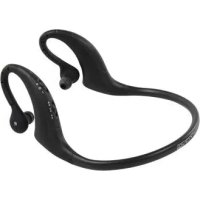
CMPBLUEHS11 - Earphones KONIG - Free user manual and instructions
Find the device manual for free CMPBLUEHS11 KONIG in PDF.



| Product type | Bluetooth stereo headset |
| Brand | Konig |
| Model | CMPBLUEHS11 |
| Power supply | Rechargeable battery via USB (5V), charging time approx. 3 hours |
| First charge | 4 hours minimum |
| Microphone | Built-in |
| Controls | Multifunction button (on/off, call), 2 push buttons (volume, track) |
| LED indicator | Red and blue |
| Default PIN code | 0000 |
| Number of paired devices | Up to 8 |
| Auto-off | After 5 minutes without connection |
| Maintenance and cleaning | Clean with a dry cloth only |
| Safety | Do not open, do not expose to water or fire |
| Warranty | No warranty in case of modification or incorrect use |
| General information | Keep the manual and packaging for future reference |
Frequently Asked Questions - CMPBLUEHS11 KONIG
User questions about CMPBLUEHS11 KONIG
0 question about this device. Answer the ones you know or ask your own.
Ask a new question about this device
Download the instructions for your Earphones in PDF format for free! Find your manual CMPBLUEHS11 - KONIG and take your electronic device back in hand. On this page are published all the documents necessary for the use of your device. CMPBLUEHS11 by KONIG.
USER MANUAL CMPBLUEHS11 KONIG
Stereo Bluetooth Sports Headset
MODE D'EMPLOI (p. 10)
Casque Stéreo Bluetooth® Sports
MANUALE (p. 19)
Cuffia stereo Bluetooth®
HASZNÁLATI UTMUTATO (o. 27.)
Sztereo Bluetooth® sport headset
MANUAL DE USO (p. 23)
Charging the headset
Before using for the firsttime, please charge the battery for a minimum of 4 hours.
If during succeeding uses you hear 3 "beep" warning tone every 20 seconds and the red LED blinks twice, it means the battery power is low and the battery needs to be charged.
The steps for charging the battery are as follows:
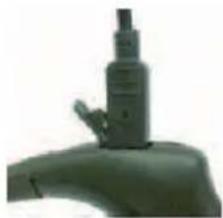
Step 1: Pull up the rubber cover of the charging port.
Step 2: Plug the USB cable into a USB port of the PC
Step 3: Connect the USB cable to the charging port of the headset.
When the red LED is on, the headset is charging
When the red LED is off, the headset is fully charged.
Step 4: It will take about 3 hours to charge the headset, when charging is done, pull out the charger.
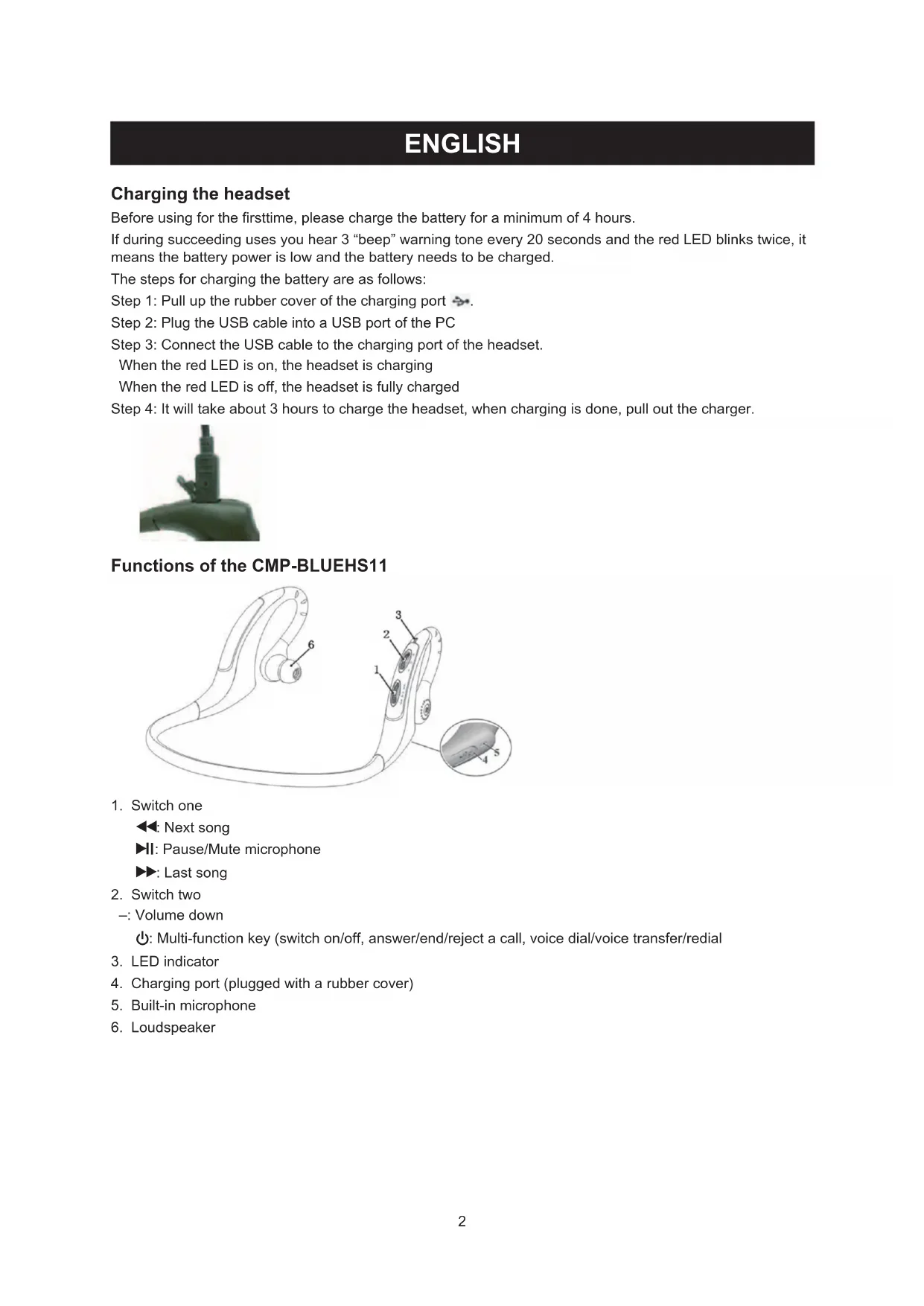
Functions of the CMP-BLUEHS11

- Switch one
Next song
II: Pause/Mute microphone
▶: Last song
- Switch two
Volume down
Multi-function key (switch on/off, answer/end/reject a call, voice dial/voice transfer/redial
- LED indicator
- Charging port (plugged with a rubber cover)
- Built-in microphone
- Loudspeaker
Usage of the CMP-BLUEHS11
1. Switching the headset on/off
| Function Operation | tion LED indicator Indication tone | ||
| Switch on the headset | Press ∅ the for 3-5 seconds, and release until the blue LED blinks | The blue LED blinks quickly in every 4 seconds4s a time | One long tone |
| Switch off the headset | Press ∅ the for 3-5 seconds, and release until the red LED blinks | The red LED blinks quickly in every 4 seconds4s a time | One long tone |
Remarks:
- The headset will switch off automatically if no device is connected after 5 minutes in order to save power.
2. Pairing the headset with Bluetooth devices
2.1. How to enter the pairing mode
| Function Operation | LED indicator Indication tone | ||
| Enter into pairing mode | First, make sure the headset is off. Press for 5-9 seconds and release until the red and blue LEDs blink alternately | The red and blue LEDs blink alternately | Two tones |
Note:
- The pairing mode will last 2 minutes. If the headset still cannot pair with any Bluetooth devices, it will automatically switch into standby mode.
2.2. Pairing the headset with a Bluetooth mobile phone
Please make sure your mobile phone has a Bluetooth function.
Specific pairing procedures may vary with different mobile phones. Please refer to your mobile phones' manual for further information. The steps are as follows:
a. Please keep the headset and mobile phone within 1 metre of each other when pairing
b. Make the headset enter the pairing mode (please refer to 2.1)
c. Switch on the Bluetooth function of the mobile phone and search for Bluetooth devices. When the search is completed, select the headset in the Bluetooth device list.
d. When prompted, enter PIN No: "0000" as the password and press "Yes" or "Confirm".
e. After pairing the devices successfully, select the headset in the Bluetooth device list and press "Connect".
f. If the connection is successful, the blue LED of the headset blinks twice every 4 seconds.
Note:
- If the pairing is not successful, please switch off headset first then try to pair them again according to the steps mentioned above.
- After pairing, the devices will remember each other.
- The headset can remember 8 paired devices, when the number of paired devices exceeds 8, the first one will be replaced. If you want to pair the headset with other devices, please pair it with the new device according to the steps above.
3. Pairing the headset with a Bluetooth transmitter
You can enjoy music wirelessly by connecting the headset with a stereo Bluetooth transmitter. See the manual of your transmitter for more details.
4. Making a call with the headset
| Function Status | of the headset Operation | |
| Voice dial Standby mode | Press | ▶for 2 seconds and release until a tone is heard |
| Redial last number Standby mode | by mode | Short press Ⓞtwice |
| Conversation mode Move switch two to + and then release (or hold) it | ||
| Volume down Conversation mode Move switch one to – and then release (or hold) it | ||
| Answer call Ringing | Short press Ⓞ | |
| Reject call Ringing | Press Ⓞ for 2 seconds and release until a tone is heard | |
| End call Conversation mode | Short press Ⓞ | |
| Voice transfer Conversat- on mode | Press Ⓞ for 2 seconds and release until a tone is heard | |
| Mute microphone Conve- rsation mode | Short press Ⓞ twice, the headset will emits 2 tones every 10 seconds | |
| Cancel mute Conversation mode (mute) | Short press Ⓞ twice | |
Remarks:
- Not all mobile phones support all the functions listed above. Please refer to your mobile phone's user manual.
- When the volume is adjusted to maximum or minimum, you will hear an indicator tone of "Ding-Dong".
- For some mobile phones, when you press the button to answer the phone, the conversation will be sent to the phone. If this happens, you can switch the call to the headset by using the conversation switch button or trough operating on the mobile phone. Please refer to your mobile phone's user manual for further information. It means you can check your phone setting and transfer the conversation back to the Bluetooth headphone.
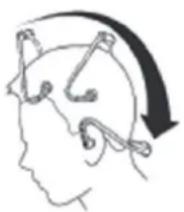
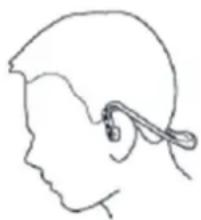
5. Wearing the headset
Hook the headset over both ears by using both hands (see picture).
6. Playing music
When the headset connects with the mobile phone or Bluetooth transmitter, you can enjoy music wirelessly through the headset.
| Function Status | of headset Operation | |
| Volume up Playing music | Move switch two to + and then release (or hold) it | |
| Volume down Playing music | Move switch two to - and then release (or hold) it | |
| Pause Pausing music | Short press▶II | |
| Play | Playing music | |
| Revert | Pause | Short press▶II |
| Last song | Playing music Move switch one to▶ and then release it | |
| Next song | Playing music Move switch one to▶ and then release it |
Remarks:
- For some mobile phones, when you play music, the music will be transmitted to the speaker of the phone. In this case you should choose "transmit the sound through Bluetooth" in the phone settings. Please refer to the manual of the phone.
- When the volume of the headset is adjusted to maximum or minimum you will hear a tone of "Ding-Dong".
- To remotely control the functions of last song / next song / pause / revert, your mobile phone needs a Bluetooth transmitter which supports AVRCP. Please refer to the manual of the mobile phone for further information.
7. LED indicator
Pairing the Bluetooth device
| LED indicator | Status of the headset |
| Red and blue LEDs blink alternately | Pairing mode |
| Blue LED blinks twice every 2 seconds | Standby mode (not connected with the Bluetooth device) |
| LED indicator Status of the headset | |
| Blue LED blinks twice every 5 seconds Standby mode (connected with the Bluetooth device) | |
| Blue LED blinks 3 times every second Ringing | |
| Blue LED blinks every 2 seconds Conversatlon mode | |
Safety precautions:

CAUTION
HISK OF ELECTRIC SHOCK DO NOT OPEN

To reduce risk of electric shock, this product should ONLY be opened by an authorized technician when service is required. Disconnect the product from mains and other equipment if a problem should occur. Do not expose the product
to water or moisture.
Maintenance:
Clean only with a dry cloth. Do not use cleaning solvents or abrasives.
Warranty:
No guarantee or liability can be accepted for any changes and modifications of the product or damage caused due to incorrect use of this product.
General:
Designs and specifications are subject to change without notice.
All logos brands and product names are trademarks or registered trademarks of their respective holders and are hereby recognized as such.
Keep this manual and packaging for future reference.
Attention:

This product is marked with this symbol. It means that used electrical and electronic products should not be mixed with general household waste. There is a separate collections system for these products.
DEUTSCH
Nabijete bateri zpusobem popsanym nize:
Description: Stereo Bluetooth Sports Headset