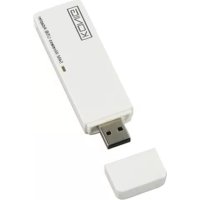
CMPWNUSB12 - Network card / adapter KONIG - Free user manual and instructions
Find the device manual for free CMPWNUSB12 KONIG in PDF.



| Product type | Wireless USB network adapter |
| Brand | Konig |
| Model | CMP-WNUSB12 |
| Wireless standard | IEEE 802.11b/g |
| Maximum data rate | 54 Mbps |
| Host interface | USB 2.0 |
| Power supply | Via USB port |
| Dimensions (approx.) | 75 x 25 x 10 mm |
| Weight (approx.) | 20 g |
| Wireless security | WEP 64/128 bits, WPA-PSK, WPA2-PSK |
| Supported operating systems | Windows 98SE, ME, 2000, XP, Vista |
| Frequency range | 2.4 GHz |
| Compliance standards | EN 60950-1, EN 50371, EN 301 489, EN 300 328 |
| Maintenance | Clean with a dry cloth. Do not use solvents. |
| Safety instructions | Do not expose to water or humidity. |
| Warranty | Warranty valid under normal use. Not responsible for modifications. |
| Included accessories | Installation CD-ROM, USB adapter, manual |
Frequently Asked Questions - CMPWNUSB12 KONIG
User questions about CMPWNUSB12 KONIG
0 question about this device. Answer the ones you know or ask your own.
Ask a new question about this device
Download the instructions for your Network card / adapter in PDF format for free! Find your manual CMPWNUSB12 - KONIG and take your electronic device back in hand. On this page are published all the documents necessary for the use of your device. CMPWNUSB12 by KONIG.
USER MANUAL CMPWNUSB12 KONIG
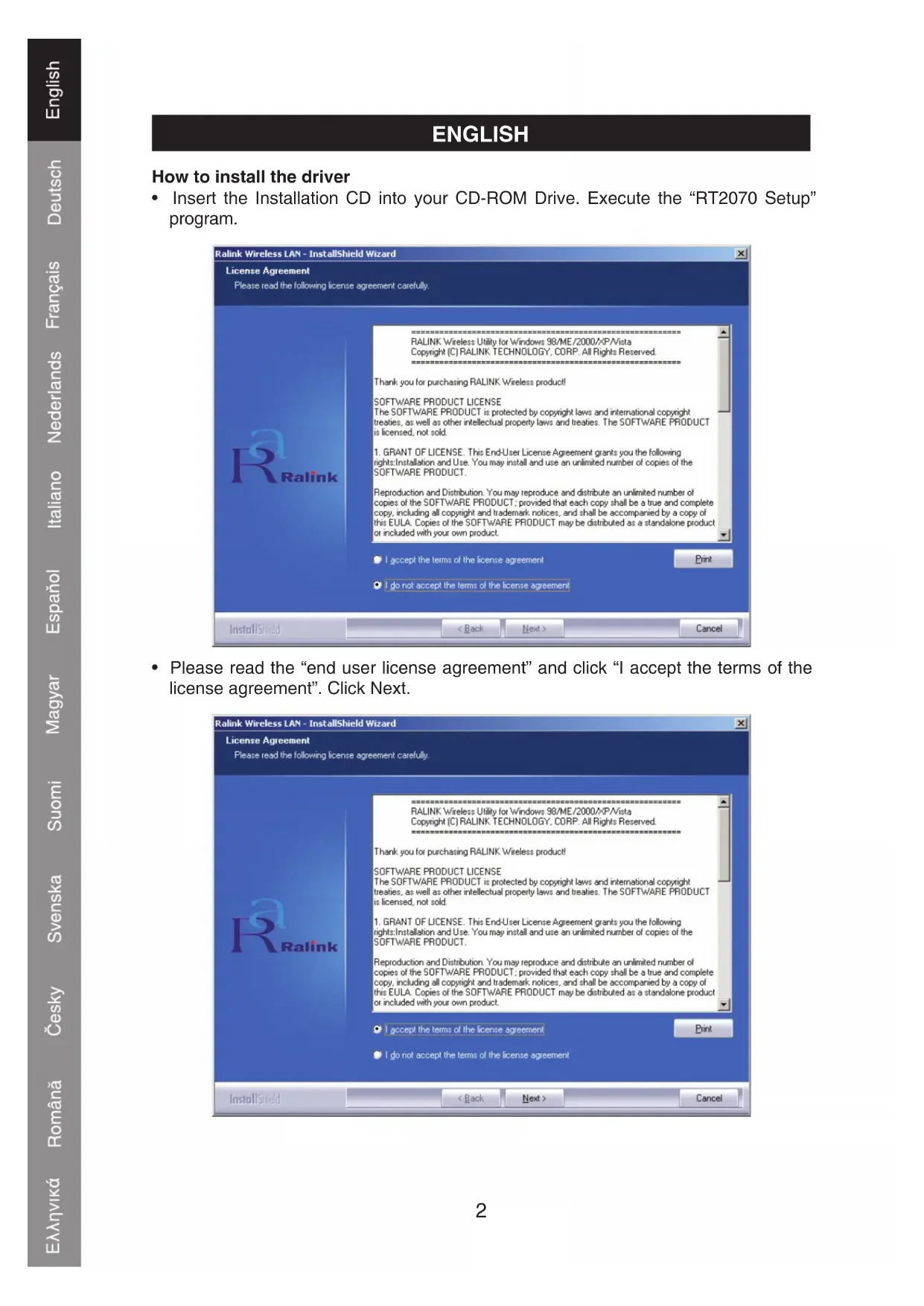
How to install the driver
- Insert the Installation CD into your CD-ROM Drive. Execute the "RT2070 Setup" program.
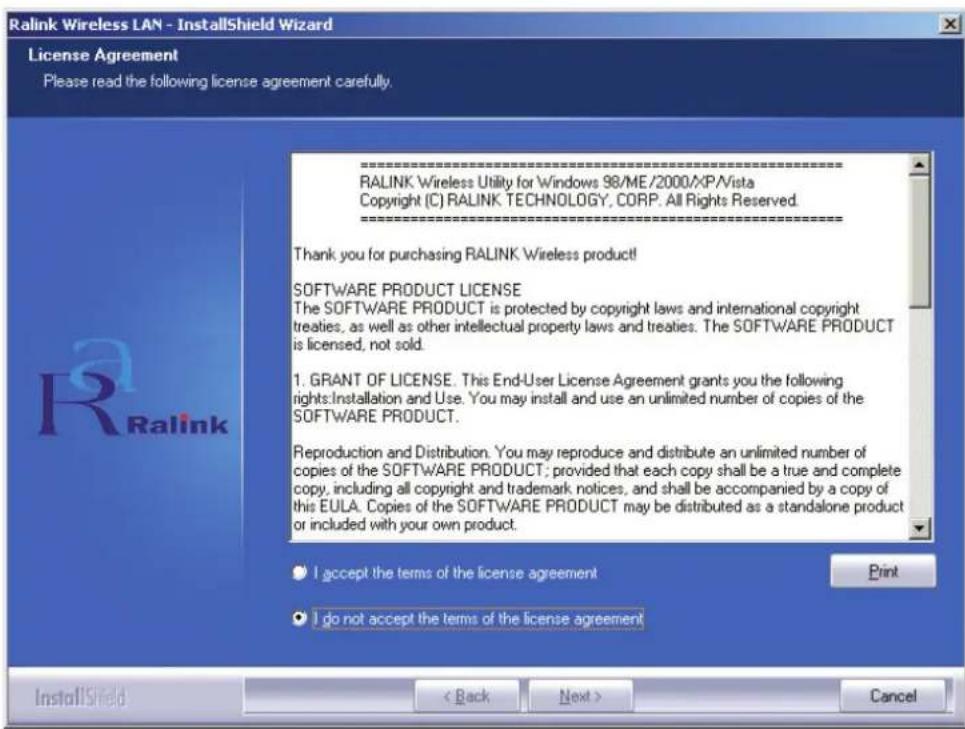
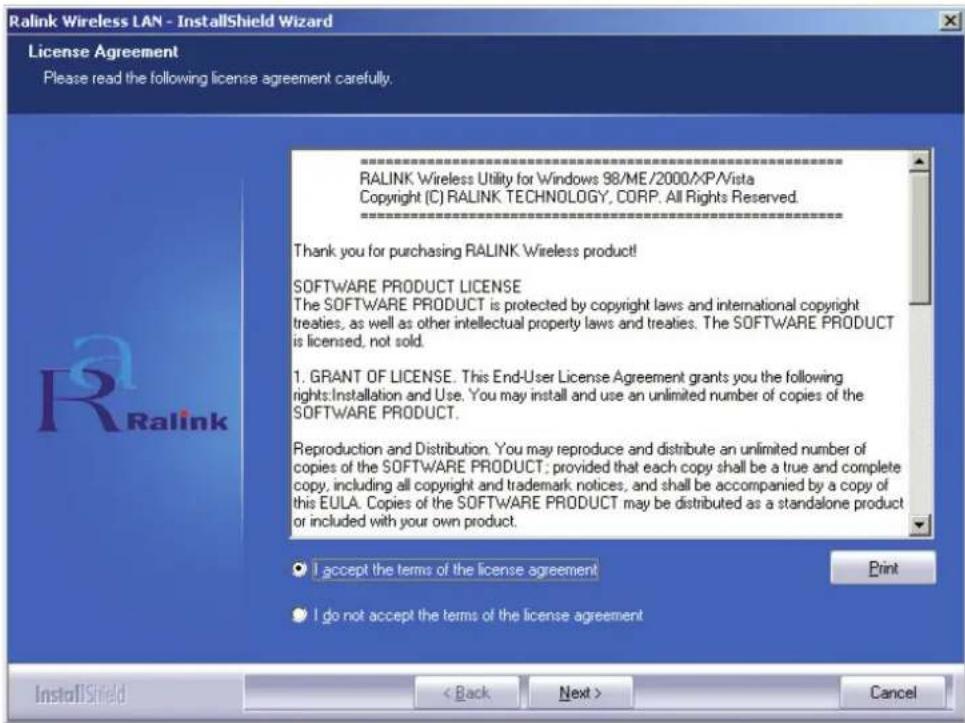
- Please read the "end user license agreement" and click "I accept the terms of the license agreement". Click Next.
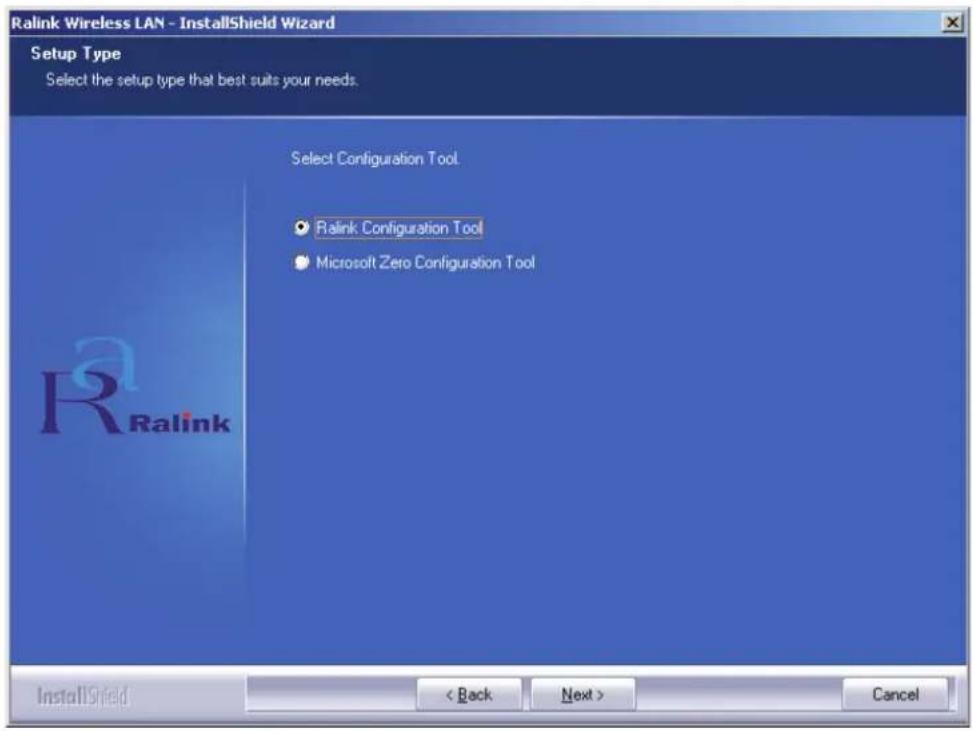
- In Windows XP, there is a "Windows Zero Configuration Tool" for you to setup the wireless adapter. You can choose to configure the adapter through the Windows Zero Configuration Tool or the Ralink Configuration Tool. It is recommended to choose the Ralink Configuration for more options.
Click "Next" to continue.
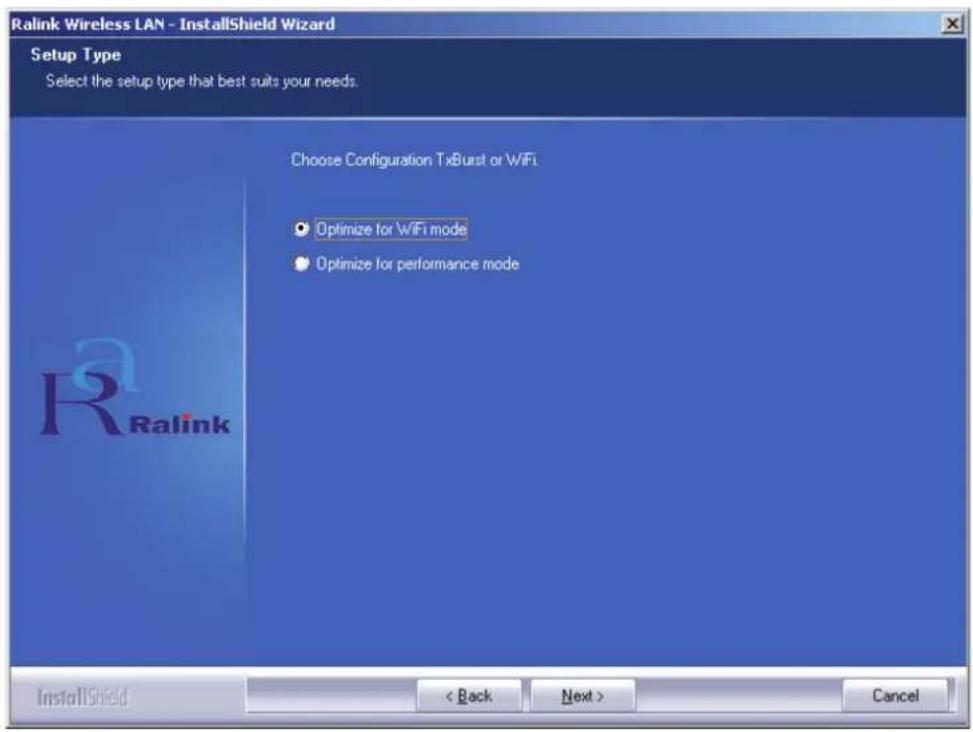
- If you need the adapter to operate with better performance, please choose the "Optimize for performance" to enable the Tx Burst mode. Or you can choose "Optimize for Wi-Fi mode" to let the adaptor run in any standard wireless network.
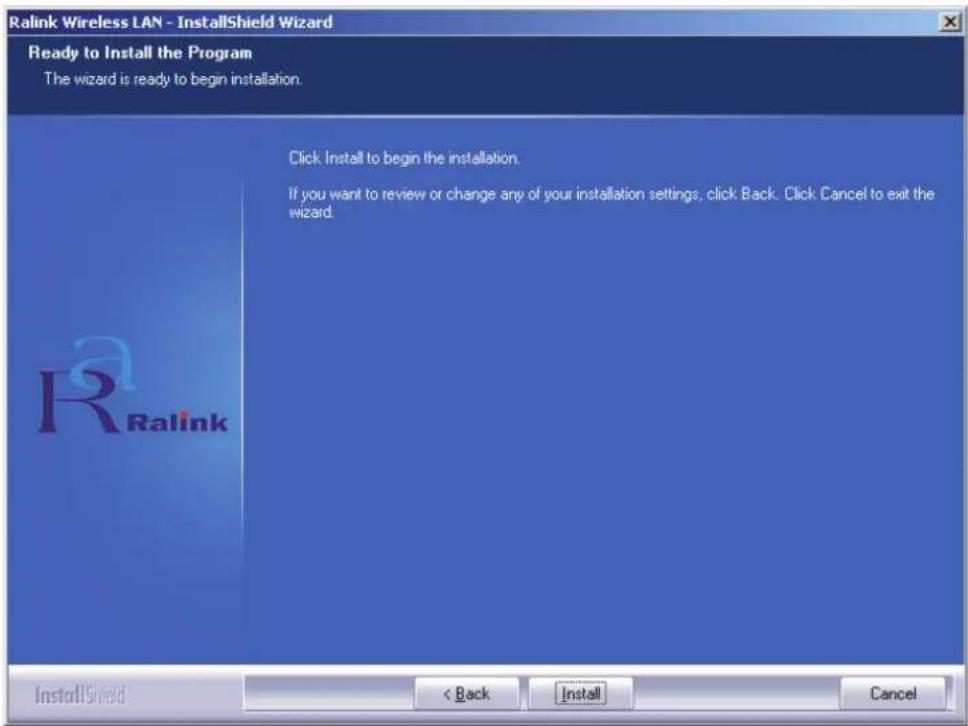
- After you've made your selection click "Next", the installation wizard starts to install the software for the adapter. Then click "Install" to start installing the utility.
- After the installation has been completed, click "Finish" on the bottom of the page to complete the installation.
Configuration of the Utility
The RT2070 Wireless Hi-Gain USB Adapter can be configured by its utility for Windows 98SE, ME, 2000, XP and Vista. This section describes how to configure your Wireless USB Adapter for wireless connectivity on your Wireless Local Area Network (WLAN) and use the data security encryption features. After the Adapter's driver and utility has been installed, the adapter's tray "Ralink" icon will appear in your system tray. It means the utility is running on your system. If the utility does not run, you can run the utility by clicking: Start>Program>Ralink Wireless>Ralink Wireless Utility>Ralink Wireless Utility. If the icon still does not appear, the driver or utility may be installed incorrectly or the adapter is unplugged, please try again.
The utility provides a complete and easy to use set of tools to:
- Display current status information
- Edit and add configured profiles
- Display current diagnostics information
Profile
Click the Profile tab of the utility and the Profile screen will appear. The Profile screen provides tools to:
- Add a Profile
- Delete a Profile
Edit a Profile
Activate a Profile
Profiles List:
The profiles list displays all the profiles and the relative settings of the profiles including Profile Name, SSID, Channel, etc.
Add/Delete/Edit Button: Click these buttons to add/delete/edit the selected profiles.
Activate Button: Click "Activate" to connect to the selected profile. When a profile is activated, the adapter will be initially connected to the profile.
Note: Do not forget to click the Apply button when you create a new profile.
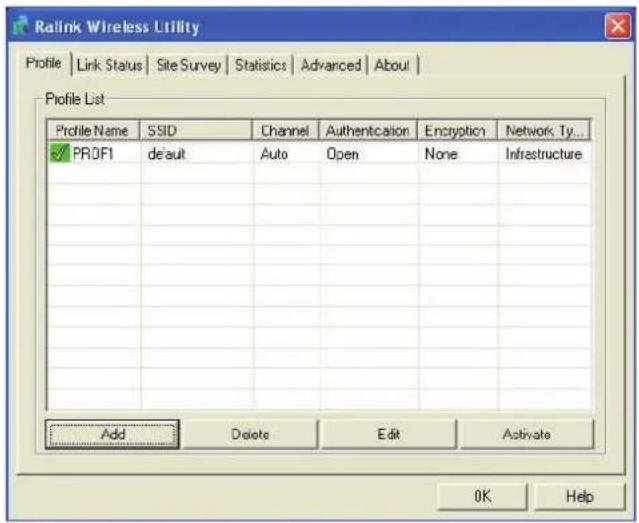
Add or Edit a Configuration Profile
To add a new configuration profile, click the Add button on the Profile Management tab. To modify a configuration profile, select the configuration from the Profile list and click Edit. The Profile Management dialog box will display a screen similar to that shown in the next figure.
1. Edit the Configuration tab
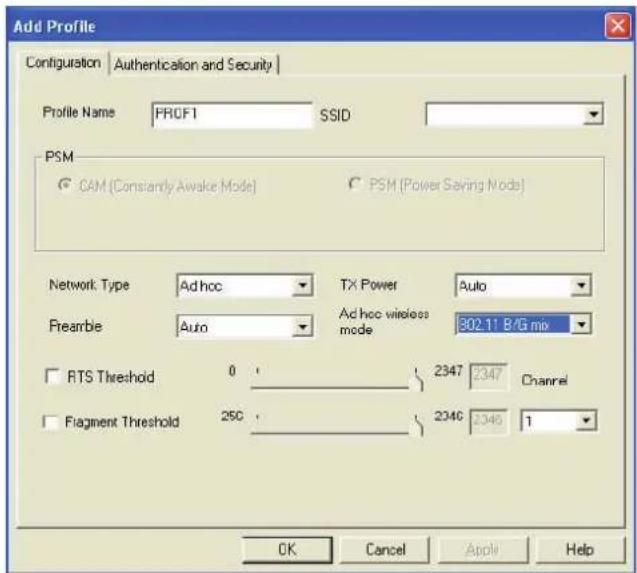
- Profile Name: Identifies the configuration profile. This name must be unique.
- SSID: The IEEE 802.11 wireless network name. This field has a maximum limit of 32 characters.
-
PSM (Power Save Mode)
-
CAM (Constantly Awake Mode) - Continuous Access Mode.
- PSM (Power Saving Mode) - Power Saving mode.
Network Type: Displays the wireless mode, either Ad-hoc or Infrastructure mode
- Preamble: Specifies the preamble setting in 802.11b. The default setting is Auto Switch (access point mode), which allows both short and long headers in the 802.11b frames. The adapter can only use short radio headers if the access point supports and uses them.
RTS Threshold: Default is 2312.
- Fragment Threshold: Default is 2312.
- Ad-hoc mode: Displays the wireless mode, either Only 802.11B or 802.11B/G mode.
- Channel: Shows the channel currently in use. This field determines which operating frequency will be used.
2. Edit the Authentication and Security tab
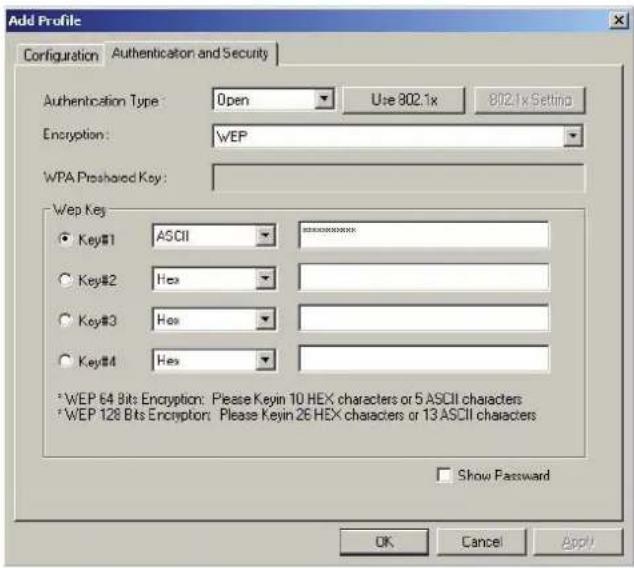
- Authentication Type: Three options, Open System, Shared-Key System or LEAP.
- 802.1x Setting: It enables when Authentication Type is set to WPA.
- Encryption: Displays which encryption type the driver is using. When you select Open System, Shared-Key System as Network Authentication, there are two options: WEP and Disabled. If you select WPA-PSK as Network Authentication, there are TKIP and AES options instead of WEP and Disabled.
- Wep Key: Key #1, Key #2, Key #3, Key #4, the Key groups. You can enter 10 hexadecimal digits (any combination of 0-9, a-f, A-F) or 5 ASCII characters for 64-bit (also called 40bits) encryption. You can enter 26 hexadecimal digits (any combination of 0-9, a-f, A-F) or 13 ASCII characters for 128-bit(also called 104bits)encryption.
Link Status
The Link Status tab displays the adapter's current status.
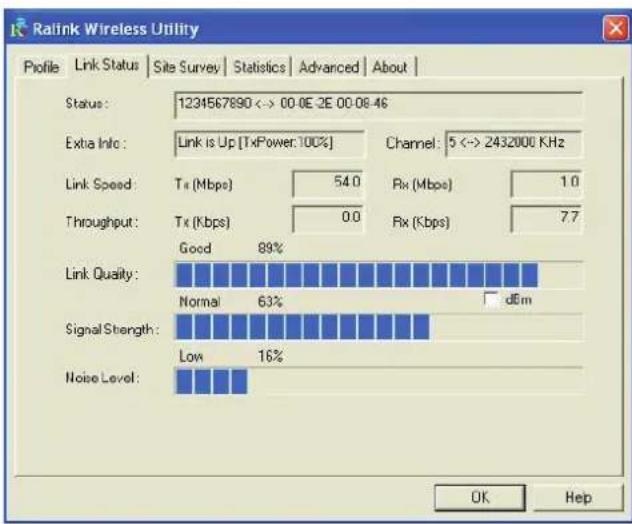
The following table describes the items found on the Network Status screen.
Status: Shows whether the station is connected to the wireless network, if not connected, display RF is closed; if connected, display AP name and BSSID.
Extra Info: Shows link status and the current channel in use.
Link Speed: Shows the current max Transfer rate, unit is Mbit/sec.
Throughput: Displays Tx and Rx rate, unit is Kbits/sec.
Link Quality: Shows the quality of the signal. dBm: If you want to know the signal strength in the unit of dBm, select this check box
Signal Strength: Shows the strength of the signal.
Noise Level: Displays the noise level in the wireless environment.
Declaration of conformity
We,
Nedis B.V.
De Tweeling 28
Declare that product:
Brand: Konig Electronic
Model: CMP-WNUSB12
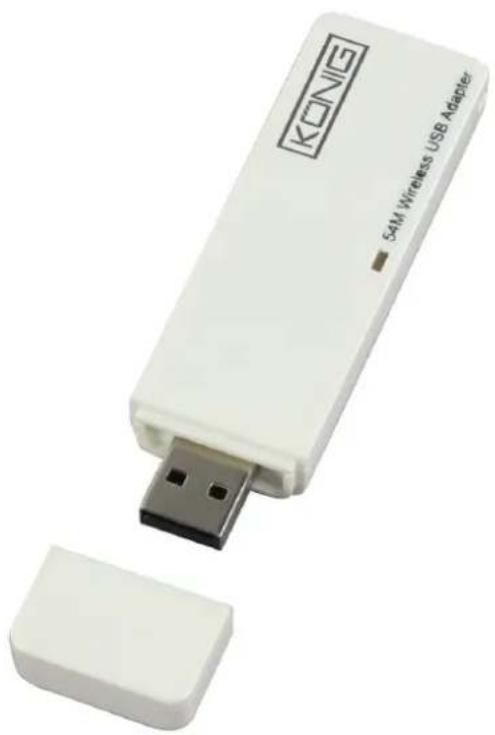
Description: Wireless LAN 54M USB dongle
Is in conformity with the following standards
EN 60950-1:2006
EN 50371:2002
En 301 489-1 V1.7.1: 2007-04
EN 301 489-17 V1.7.1: 2006-05
EN 300 328 V1.7.1: 2006-05
And complies with the requirements of the European Union Directives 1999/5/EC.
s-Hertogenbosch, 31-03-09
Mrs. J. Gilad
Purchase Director
Safety precautions:
Do not expose the product to water or moisture.
Maintenance:
Clean only with a dry cloth. Do not use cleaning solvents or abrasives.
Warranty:
No guarantee or liability can be accepted for any changes and modifications of the product or damage caused due to incorrect use of this product.
General:
Designs and specifications are subject to change without notice.
All logos brands and product names are trademarks or registered trademarks of their respective holders and are hereby recognized as such.
Keep this manual for future reference.
Attention:
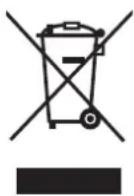
This product is marked with this symbol. It means that used electrical and electronic products should not be mixed with general household waste. There is a separate collections system for these products.
Copyright ©


CMP-WNUSB12
WLAN 54M USB DONGLE
| MANUAL | ANLEITUNG |
| MODE D'EMPLOI | GEBRUKSAANWIJZING |
| MANUALE | MANUAL DE USO |
| HASZNÁLATI UTMUTATÓ | KÄYTTÖHJE |
| BRUKSANVISNING | NÁVOD K POUžITÍ |
| MANUAL DE UTILIZARE | ΕΓXEPIΔIO XPHΞHΞ |
DEUTSCH
Pulsanti Add/Delete/Edit
La energia offers a multitude of options to be used for the construction of buildings, such as building materials, building equipment, and
Add/Delete/Edit (Hozzaadás/
Koupi Add/Delete/Edit:
NaTnOte auta ta kouuTia yia va TPOoTeOTe/DiaypaTc /ETEgpyaoteTa ouyKekpIeva TPOPIA.
Koupi Activate:
Pntote "Activate" yia va ouv0e0te oTo ouykeepievo npoip. Otav kantoio ppoip eivai evepy, toe o avtattopac 0a ouv0eapxik ae auto to npoip.
Declaration of conformity
We,
Nedis B.V.
De Tweeling 28
Declare that product:
Brand: Konig Electronic
Model: CMP-WNUSB12
Description: Wireless LAN 54M USB dongle
Is in conformity with the following standards
EN 60950-1:2006
EN 50371:2002
En 301 489-1 V1.7.1: 2007-04
EN 301 489-17 V1.7.1: 2006-05
EN 300 328 V1.7.1: 2006-05
And complies with the requirements of the European Union Directives 1999/5/EC.
's-Hertogenbosch, 31-03-09
Mrs. J. Gilad
Purchase Director
Ppoulaeic aopaaia:
Mn ekTeTeTo Tpoiov ovevpo n uypaia.
Συτήρηση:
Kaθapiəte ovo e eva steyv o koupati uqaa. Mny xpnoiopoieite diauTeç n λειavtiká.
Eyyunon:
H Eyyunon Tou Ouykekpiévou Tpoiovtoc Tauéi va Ioxuei KAI δev yivetai aTObektn Εe Tepittwon aAaync n μetatpotntc Tou Tpoiovtoc n BλaβnC Tou Tpokλθnke aTó λavθaμevn xphon Tou.
ГEVIKA:
To oxedio kai ta xapaktnpiotiká μtropouv va aaláovu vchiwiç kaia ppoediottoiən. Ola ta loyotuTkai oI ovuaicε εivai idIOKTnoia tou kataoKEuaOTn.
Ppooox:
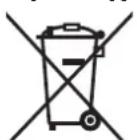
To ouyekpiévo pioov exi xaapaktnpotε i e auto to omaivei otiaetaxeiipoevec nektpikec kai nektpovikec oukeuec dev npetie va tntiouvtai oto kaalaoi axpntwv e ta utloaia atoppmuata. Ytapxie xewpioto uotnma oulloync yia teoiou eiodouc avikieva.
- How to install the driver
- Configuration of the Utility
- Profile
- Profiles List:
- Add or Edit a Configuration Profile
- Edit the Configuration tab
- Edit the Authentication and Security tab
- Link Status
- Declaration of conformity
- Safety precautions:
- Maintenance:
- Warranty:
- General:
- Attention:
- DEUTSCH
- Pulsanti Add/Delete/Edit
- Add/Delete/Edit (Hozzaadás/
- Koupi Add/Delete/Edit:
- Koupi Activate:
- Ppoulaeic aopaaia:
- Συτήρηση:
- Eyyunon:
- ГEVIKA:
- Ppooox:
Brand : KONIG
Model : CMPWNUSB12
Category : Network card / adapter