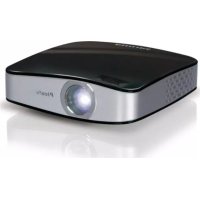
PicoPix PQ29273 - Projector PHILIPS - Free user manual and instructions
Find the device manual for free PicoPix PQ29273 PHILIPS in PDF.



| Product type | Pocket projector |
| Brand | Philips |
| Model | PicoPix PQ29273 |
| Display technology | 0.37" LCoS |
| Light source | RGB LED |
| Native resolution | 800 × 600 pixels |
| Compatible resolutions | SVGA, XGA, WXGA |
| Brightness (lit mode) | Up to 20 lumens |
| Contrast | 400:1 |
| Projected image size | 5.2 to 81 inches (diagonal) |
| Projection distance | 0.2 m to 3 m |
| Power supply | Via USB connection (5V, 1A) |
| Dimensions (W × H × D) | 88 × 25 × 88 mm |
| Weight | 0.15 kg |
| Operating temperature | 5°C to 40°C |
| Relative humidity | 20% to 80% (non-condensing) |
| Package contents | Projector, USB cable, tripod, pouch, user guide, warranty card |
| PC connection | USB 2.0 (Y-USB cable recommended) |
| Supported operating systems | Windows XP (SP2), Vista, 7 |
| Safety | Do not look directly at the LED beam; avoid condensation, heat, humidity, and dust |
| Maintenance | Protect from sunlight, heat, vibrations; do not repair yourself |
| Warranty | Warranty card included |
Frequently Asked Questions - PicoPix PQ29273 PHILIPS
User questions about PicoPix PQ29273 PHILIPS
0 question about this device. Answer the ones you know or ask your own.
Ask a new question about this device
Download the instructions for your Projector in PDF format for free! Find your manual PicoPix PQ29273 - PHILIPS and take your electronic device back in hand. On this page are published all the documents necessary for the use of your device. PicoPix PQ29273 by PHILIPS.
USER MANUAL PicoPix PQ29273 PHILIPS
Copyright © 2010 PHILIPS
Dear Customer
Thank you for purchasing our Pocket Projector.
We hope you enjoy your device and its many functions!
General Safety Information
Do not make any changes or settings that are not described in this user manual. Physical injury or damage to the device or loss of data can result from improper handling. Take note of all warning and safety notes indicated.
Setting Up the Device
Protect the device against direct sunlight, heat, large temperature fluctuations and moisture. Do not place the device in the vicinity of heaters or air conditioners. Observe the information on temperature and humidity in the technical data.
In the event that the device becomes too hot, or if you see smoke coming from the device, you must immediately disconnect the device from the USB socket. Have your device examined by trained professionals at a technical service location. To prevent the spread of fire, open flames should be kept away from the device.
Do not plug in the device in moist rooms. Never touch the mains cable or the mains connection with wet hands.
Under the following conditions, a layer of moisture can appear inside the device which can lead to malfunctions:
-
if the device is moved from a cold to a warm area;
-
after a cold room is heated;
-
when this device is placed in a damp room.
Proceed as follows to avoid any moisture build-up:
1 Seal this device in a plastic bag before moving it to another room, in order for it to adapt to room conditions.
2 Wait one to two hours before you take the device out of the plastic bag.
The device should not be used in a very dusty environment. Dust particles and other foreign objects may damage the unit.
Do not expose the device to extreme vibrations. It may damage the internal components.
Do not allow children to handle the device without supervision. The packing materials should be kept out of the hands of children.
Repairs
Do not make any repairs to the device yourself. Improper maintenance can result in injuries or damage to the device. Only have your device repaired by an authorised service centre.
Do not remove the type label from your device; this would void the warranty.
High Power LED
This device is equipped with an high power LED (Light Emitting Diode), which emits very bright light. Do not stare directly into the projector lens to avoid eyes injury or irritations.
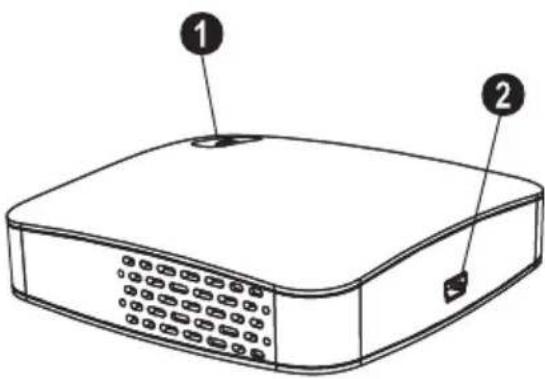
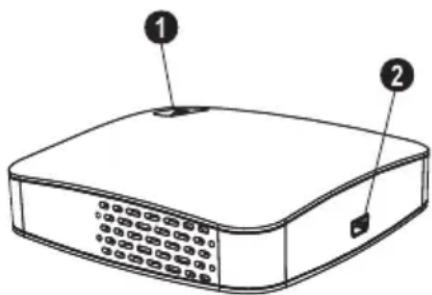
Top of the Device
Focus setting
2 Mini USB connection
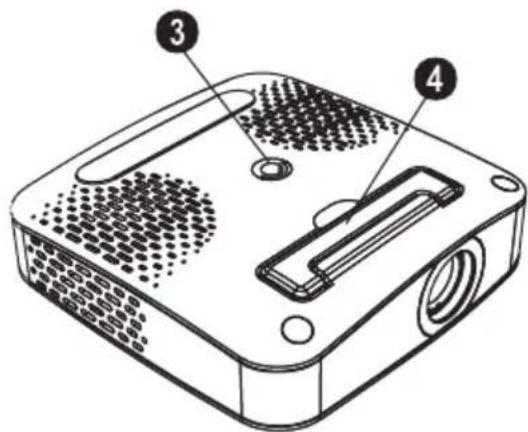
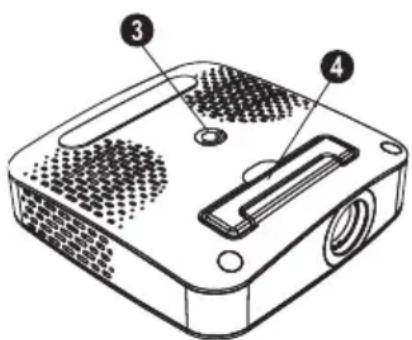
Bottom of the Device
3 Tripod socket
4 Fold-out base
2 Basic Operation
Packing Contents
Pocket Projector
USB Cable
Tripod
Pouch
User Manual
Warranty Card
Notice

Missing Package Contents
If one of the parts is missing or damaged, please contact your retailer or our customer service.
Installing the Software
1 Close all open programs and applications before beginning the installation process.
2 Connect the Pocket Projector to an available USB 2.0 port.
3 Select PicoPix 1020 viewer as drive in the Windows Explorer and start the program PicoPix viewer Install.exe with a double-click.
4 Your computer will now prepare for the installation process. Follow the instructions of the installation wizard and restart the computer.
Notice

Disconnect the Device from the Computer
Disconnect the device from the computer before restarting. The computer may try to boot from the Pocket Projector, which was recognized as a USB storage medium.
Set up the Device
1 Connect the device to your computer on two USB sockets by means of the Y-USB cable because the current consumption is 1A.
2 Start the program PicoPix viewer. In the Statusbar appears a symbol.
3 The Pocket Projector is switched on and projects the image from the computer.
Notice

Screen Resolution of the Computer
The best picture quality can be reached, if the screen resolution of the computer is set to 800 × 600 pixel.
4 Adjust the focus using the focus wheel.
5 Disconnect the USB cable from the computer if you finish the presentation to save energy and exit PicoPix viewer.
Notice

Exit the Program PicoPix viewer
1) Click on the PicoPix viewer symbol in the Windows task bar using the right mouse key.
2) Click on Exit.
Uninstalling the Software
1 Close all open programs and applications before beginning the uninstall process. Load the uninstall program by clicking on PicoPix viewer > Uninstall PicoPix viewer in the Start menu. Your computer will now prepare for the uninstall process.
2 Follow the instructions on the screen.
3 At the conclusion of the uninstall process you must restart your computer.
4 After rebooting has occurred, removal of PicoPix viewer from your computer will be complete.
Technical Data
Technology / Optical
Display technology. 0,37" LCoS
Light source RGB LED
Resolution. 800x600 pixel
Supported Resolutions .SVGA/XGA/WXGA
Brightness (Bright Mode) up to 20 lumen
Contrast ratio. 400:1
Projected image size. 5,2-81 inch
Screen distance. 0,2 m up to 3 m
Horizontal Scan Rate 31-69kHz
Vertical Scan Rate. 56-85 Hz
Power Supply via USB plug
Dimensions (× × ) . 88x25x88mm
Weight. 0,15 kg
Recommended Ambient. 5-40°C
Relative Humidity. 20-80% (non-condensing)
Minimum PC Requirements
Processor .Intel Pentium M or AMD Athlon
Clock rate 2GHz or higher
Operating System.....Windows XP Professional (SP2), Vista,Windows7
RAM. 1GB DDR SDRAM
Free Hard Drive Space 40 MB
USB Port USB 2.0
All data are provided for reference purposes only. Sagemcom reserves the right to make any changes without prior notice.

The CE marking certifies that the product meets the main requirements of the European Parliament and Council directive 1999/5/CE on telecommunications terminal equipment, regarding safety and health of users and regarding electromagnetic interference.
The declaration of compliance can be consulted on the site www.sagem-ca.at/doc
Preservation of the environment as part of a sustainable development logic is an essential concern of Sagemcom. The desire of Sagemcom is to operate systems observing the environment. The desire of Sagemcom is to operate systems observing the environment and consequently it has decided to integrate environmental performances in the life cycle of this products, from manufacturing to commissioning use and elimination.

Packaging: The presence of the logo (green dot) means that a contribution is paid to an approved national organisation to improve package recovery and recycling infrastructures to facilitate. Please respect the sorting rules set up locally for this kind of waste.
Batteries: If your product contains batteries, they must be disposed of at appropriate collection points.

Product: The crossed-out waste bin stuck on the product means that the product belongs to the family of electrical and electronic equipment. In this respect, the European regulations ask you to dispose of it selectively;
- At sales points in the event of the purchase of similar equipment.
- At the collection points made available to you locally (drop-off centre, selective collection, etc.).
In this way you can participate in the re-use and upgrading of Electrical and Electronic Equipment Waste, which can have an effect on the environment and human health.
The paper and cardboard packaging used can be disposed of as recyclable paper. Have the plastic wrapping and Styrofoam packaging recycled or dispose of it in the non-recyclable waste, depending on the requirements in your country.
Trademarks: The references mentioned in this manual are trademarks of the respective companies. The lack of the trademarks and TM does not justify the assumption that these dedicated terminologies are free trademarks. Other product names used herein are for identification purposes only and may be trademarks of their respective owners. Sagemcom disclaims any and all rights in those marks.
Neither Sagemcom nor its affiliates shall be liable to the purchaser of this product or third parties for damages, losses, costs, or expenses incurred by the purchaser or third parties as a result of accident, misuse, or abuse of this product or unauthorized modifications, repairs, or alterations to this product, or failure to strictly comply with Sagemcom operating and maintenance instructions.
Sagemcom shall not be liable for any damages or problems arising from the use of any options or any consumable materials other than those designated as original Sagemcom products or Sagemcom approved products.
Sagemcom shall not be held liable for any damage resulting from electromagnetic interference that occurs from the use of any interface cables other than those designated as Sagemcom products.
All rights reserved. No part of this publication may be reproduced, stored in a retrieval system or transmitted in any form or by any means, electronic, mechanical, photocopying, recording, or otherwise, without the prior written permission of Sagemcom. The information contained herein is designed only for use with this product. Sagemcom is not responsible, if this information is applied to other devices.
This user manual is a document that does not represent a contract.
Errors, printing errors and changes are reserved.
Copyright © 2010 PHILIPS
1 A p e rç u

Très cher client
LED haute performance
Copyright © 2010 PHILIPS
1 Panorama
Stimato cliente,
Copyright © 2010 PHILIPS
1 OverRCT
Geachte klant
Minimale systeemeisen
Processor .Intel Pentium M of AMD Athlon Processorfrequentie .2GHz of hoger Besturingsystem Windows XP Professional (SP2), Vista,Windows 7
Werkgeheugen. 1GB DDR SDRAM
Vrij geheugen. 40 MB
Copyright © 2010 PHILIPS
1 Es q u e m a
Copyright © 2010 PHILIPS
1 Descrição geral
Estimado cliente
Muito obligado por ter adquirido o/DDs no so projector de bolso.
Copyright © 2010 PHILIPS
1Översikt
Bäste kund
Tack for du bestamde dig for var pocketprojektor.
Copyright © 2010 PHILIPS
1 Yleiskuva
Arvoisa asiakas
Copyright © 2010 PHILIPS
1 Àttekintés
Tiszelt Vásárló!
Copyright © 2010 PHILIPS

1 Opis ogólny
Szanowy Kliencie!
Copyright © 2010 PHILIPS
1 Sum a r
Stimate client
Vä multumim ca ati achizitionat projectorul portabil commercializat de compania noastr.
Vä dorim sā folosiṭi cu placere aparatul dvs. si functiile sale multiple!
Copyright © 2010 PHILIPS
1 Přehléd
Vázeny zákazníku,
Dekujeme vam, ze jste si zakoupili tento kapesni Projektor.
Copyright © 2010 PHILIPS

1 Preh I'ad
Vázeny zákazník,
Dakujeme vam, ze ste si zakupili tento vreckovy Projektor.
Copyright © 2010 PHILIPS
1 Genel bakis
Sayin mächternimiz,
Program PicoPix viewer bitir
1) Sagfare tu su ile Windows-Gorev cubugu uzerinde bulunan sembolu PicoPix viewer tiklayiniz.
2) Cikis uzerine tiklayiniz.
Yazilimin kaldirilmasi
Copyright © 2010 PHILIPS
1 Π ερίληψη
Aγαπτέ πελάτη
Euxapiotoue Tou eiaégate Tov npofoa Toeimns Tns etaipias.
Sac euxopaote noaeg euxapiotes epieies toukeun kai niaoaae aeitoupyies Tns!
EviKcS odnyiec aOaAeiaC
Mny kavete puthetaicns n aalayec nou dev nepiypapovtai o'autc sc ts odnyiecs xpnons. O mnootos xeipiooos npopei va npokaleoi tpaunatouos n znue, znue os ouokeun n anwlaia deodoevww. Zmuopphiotee ie olec tic npoeidonoinoeis kal odnyieac ophialeia
Eykataaotaon tsoukeun
PooTateUoTE Tn OuKEun ano To aEoo Tou nliou, Tn ZeOtn, ano neyalec diakmuavoeis 0epuokpaoiaq kal ano tv uypaia. Mny tonoetnoete Tn oukeun kovra eepuavoeic n oukeues kaiatipouou. suuupopwoeite me tic nnpofoepiecs oxetikae Tn 0epuokpaia kal tv uypaia oTa texvika xapaktpiotika Tns oukeunsg
Av unepeepuavei n oukeun n lyacei kanyo, aphiéote auoeos to kalwio USB. PovtioTe wote va eetae ioukeun ano texviko ouvepyieo oepic. Ia va anofoyete Tnv Eanawon otiac, kpatote tn oukeun maekia ano avoixtec fooyes.
Mn ouvdeoe Tn oukeun e Uypa dwaia. Mny ayyiTe kaiwdi peuatoq n Tnv npia npoxns Bpeyeva xepia.
YIIO TIC akOaoueG ouvOKeG mOpEi va OXnHaTIOTei
DpOoOc oTO eOWTEPIKO TNS OUsKEUNs KAI VA
PiPokaAeoi DuoeiToupyie:
otav n oukeun e Taepe i ano kpuo o eepuoxpo
Copyright © 2010 PHILIPS
1 O6uHe cBeAeHnA
YBaXkaembI NOKyNaTeAb,
BoaBoe cna6o 3a Bb6op Haewero KapMaHHoro npoeKtopa.
Mbl Haedeemcra To Bbl noaynte yAOBOAbCTBne ot pa60tbc annapaTOM ero MHOROUCAehhblx fHKun!
O6uaHnΦopMaun o texHnke 6e3oNaChocTn
He BHOcHTe HNKaKINx IN3MeHEnH NHaCTPOeK, He ONHCaHHbIX B 3TOM pyKOBOAcTBe NOAb3OBAteA. HenpaBnABHoE HCNOAb3OBAHnE MOKeT PnIBEcTN K TpaBMnPoBaHNIO HA MATEpNaHbHomy yIep6y, NOBpeJAEHNIO YCTPOiCTBa HN nOTEpe DaHHbIX. Co6IAOdaIe BCE npNBBeEHHbIe IpeAnPpeAnTEAbHbIe yKa3AHn I NHCTpyKuNN No TEXHnke 6e3OnacHOCTn.
PpoceAypa HacTpoNn annapata
3TO yCTPOIcTBO INpeHa3NaHcEHO TObKO AINHANBnAaABHO HcNOAb3OBAHN. Annapa TcAeAye TcTaHOBnTb Ha NLOCKyIO YcToHnBYIO NOBepxHocTb. PaCNoAraTe BCE WHypbl N Ka6eAn TaKIM Ocbp3OM, YTO6bl HNKTO He MOR HAcTyNtB Ha HIX Nn CNOTKHytbc, 3TO NCKAIOpaET BO3MOXHOCTb TpaBMnPOBaHN AIODe N IOBpeKdEHn CaMOro annapaTa.
MecTo yCTaHOBKn YCTPOINCTBa DOAAXHO XOPOWIO npOBETPnBaTcR. He 3akpbIbAIte BeHTNAUONHbIe npope3Ha HnKHe CTOpOHe. He cTabBe YCTPOINCTBO Ha TaKne MArKne IOnkAAkN, KaK cKaTePTN NAn KObpNK. B IpOTNBOM CAYae annapaT MoKeT NepePerpTBcN BO3HnKaET ONaCHOCTb BO3ROPaHn.
3aunuauTe annapat OT nonaaHnI nprrMOr coAHeHOrO CBeta, BO3eCTBnT TaIIa, pe3KxN NpeNaIOB TemnepaTybl N BlaHn. He pa3MeuaTe aannapat B6An3n HArpeBaTeaeN KOHaUNHOpeOB BO3dYxa.CmOTpIte NHOpMaUIO O DOyCTMOn TMnepaType N BAAxHoCTN BO3dYxa B TexHHueckNX XapaKTepNCtIKax.
He onyckaIte nonaHaHn XnAkoCTe BHytpb annapata. ECan BHytpb annapata nonaa XnAkoCTb HAn NocToPOHHN IpeAMet, HEmeAAeHHO OTCoeAHnHTe erO ot USB-pa3bema n OTaainTe annapat AOnOCMOTpa KBAANHnUPoBaHHbIM CneuaHnCTam HAn B CEHTp cepBnCHORO 06CAyKHBnHAHn.
Ecan yctpOCTBO CAnIJKOM CNAbHO HArpeBaETcH Nn H3 Hero nAet AByIM, HEmeAdEHHo OTCoeAHHInTe erO ot USB-pa3bema. OTaInTe BaAs annapaT AAnOCMOTpa KBAANHnUPOBAHbIM CneuaanCTam Hn B cHTp cepBnCHOrO 06CayKnBaHN. AAn npDeOTBpaUeHn BO3rOpAHn 3anPeuAeTcN PAnHOCTb K anPapTy nCTOChNK OTKpbIToro IAmEHn.
Pn CaeAyoUx yCAOBHX BHYTPN yCTPONCBA MOKET PpONCXoADTb 3aIOTeBAHNE, YTO pNBUoANT K c6oAM B pa6ote:
eCan yCTPOINCTBO NpeHOCHTcra 3XOAOHO B TeIIOE NOMeueHHe;
-ПИнHaRpeBaHnXOAnOaHOro NOMeUeHnI;
Pn HaXoXeHnB NOMEeHn C BbICOKOB BaXHOCTbIO.
AII ppeoTbpaaeHnna 3aNoTeBaHnna co6AoDaayte cAeAyoune yKa3AHn:
1 YnakyuTe annapaB NAACTKOBBI MeWOK nepeA erO nepeCTaHOBkoB B Apyroe NOMEueHne, YTO6bI oecneHTb erO aKKAMMaTH3aUIO K APYUM YCAOBIAm.
2 IooKAnTe DaBa Yaca, npexKe yem AocTaBaTb ycToiCTBO H3 PAActIKOBOr NaKeTa.
He HcnoAob3yIte yCTPOBCTBO B CnABHO 3aNbIAeHHOM NOMEseHNN. YaCTNuI bIaI N APYrNE NOCTOPOHHE PpeAMetbl MOrT IOBpeANTb yCTPOBCTBO.
He OonyckaIte BO3eICTBna Ha yctpoIcTBO CHaBHoi Bn6paun. 3TO MOKeT npNBecTN K NOBpeXdEHNO BHyTpEHHNX KOMNHOHTOB.
He No3BOAHTe AETAM NOAB3OBATbCAnnapaTOM 6e3 npncMoTpa. He donyckaHTeTeN yynakoOByHM MaTePnAAAM.
PemOH
He nbitaTecb camoCToTeaHo pemOHtPOBaTb annapa. HenpaBnA hBm peMOHT MoKet npBecTu K TpaBMam n NobpeXeHIO annapata. Baaw annapaT moKHO pemOHtPOBaTb TOABKO B yIOANOMOeHHOM cepBUCHOM ueHTpe.
He CHIMaTe 3aBODCKOu nnbAnK c annapaTa, npu 3TOM OTMeHrIOTc rapaHTnHbIe 06raTeAbCTBa.
ONACHOCTb!

BbICOKONpOH3BOAnTeAhbHbI CBeTOAnOa
3to
yCTPOINCTBO
OchauheNo
BbICOKONPOn3BOAnTeAaHbIM
CBETOAOAOM,
n3AyuOuM OueHb APKn CBet. He cMoTpHe
PpMoB O6bEeKTHN PPOeKTopa, YTO6bl NCKAIOHTb
pa3ApaxKeHne Ia3 nnIOBpeKdEHe.
BepxHЯ cTOpOHa yCTpoiCTBa
1 Hactpoika pe3KocTn
Pa3bem MHHI-USB
HxKHa CTopoHa yCTpoiCTBa
3 LITaTINBbI BnHT
4 PackaHa HoxKa
2 OchoBhble onepaun
KoMnAeKT NOCTaBKn
KapmaHHbI npoekTop
USB-Ka6eAb
LtaHB
Cymka
PykoBOACTBO NOa3ObaTeA
FapaHTnHaKaPta
3aMeuHaHn

HenoAHbI KOMIIaEkT NOCTaBKn
EcaH OaHH H3 3THX PpeAMeTOB OTCyTCTByET HAN NOBpeKDeH, O6paHTeCb K BAWeMy NocTaBUnKy HAN B CAYK6y IOnAepKKn.
YcTaHOBKa npOrpaMMbl
1 PpeA HauaOM npoecca yCTaHOBKn 3akpoIte BCE OTKpbITbIe nporpaMMbl nPnAOXKeHna.
2 POnCoeAnHnTe KapMaHHbI npoeKTop K CBO6oAHOMy pa3bemy USB 2.0.
3 BbI6epnte B Windows-Explorer PicoPix 1020 viewer B KaueCTBe AOKaIbHOrO AnCKa N 3aNycTHTe nporpaMMy PicoPix viewer Install.exe ABOHbIM UeAukOMMbIHN.
4 BaW KOMNbIOTep 6yDeT NOADOTABNBAtbcK npoueccy yCTaHOBKn. CLeAynTe DaIbHeiShm Yka3aHnM MaCTepa yCTaHOBKn H 3aTeM nepe3arpy3nte KOMNbIOTep.
3aMeuahn

OTCOeAHHHTe yCTpOiCTBO OT KOMNbIOTepa
OTcoeAHHITe yCTPOINCTBO OT KOMNbIOTePA nepeAero nepe3arpy3koB. B IPOTNBHOM cayae KOMNBIOTep MOKeT NONbITbCBAIHOAHHTb 3aRpy3ky C KAPMaHHORO npoekTopa, KOtOpbi 6yDeT ONPeAEAH KaK USB-HaKoONTEAb.
HactpoKa yctpoiCTBa
1 PioAcoeAnHnTe yCTPOINCTBO npn NOMOuBxOaIeero B KOMNKeT NOCTABKNpa3BeTNHeAHoro USB-Ka6eAA K AByM USBPa3beMaM KOMNbIOTepa, TaK KaK IOTpe6AReMbI IN TOKcoCTaBAeT 1 A.
2 3aynctnte nporpammy PicoPix viewer. B ctpoke coCToHHN OTo6paKaetcCmBOA.
3 KapMaHHbI npoeKTop BkIoUoAeTcN npoeuPyTe H3O6paXKeHne c KOMNbIOTepa.
3aMeuHn

Pa3peweHne 3KpaHa KOMIbIOTepa
Haayuue KaueCTBO 306paXeHnAocTuraetc npu ycTaHOBe pa3peWeHnAekpHa Ha 800x600 nKceAoB.
4 YcTaHOBnTe pe3KoCTb C NOMOuH OpeyAmPOBOUHO KOaEcNka.
5 Pocae npe3eHaun OToeAHnTe USB-Ka6eAb OT KOMNbIOTepa AAn 3KOHOMN 3AekTPO3Heprnn N 3aBepseHH PicoPix viewer.
3aMeuHn

3akpoTe nporpamMy PicoPix viewer
ABTopCKoe npabo © Sagemcom Austria GmbH



PHILIPS and the PHILIPS' Shield Emblem are registered trademarks of Koninklijke Philips Electronics N.V. and are used by Sagemcom under license from Koninklijke Philips Electronics N.V.
Documents Business Unit
Headquarters: 250, route de l'Empereur
92500 Rueil-Malmaison Cedex - FRANCE
Tel: +33 (0)1 57 61 10 00 · Fax: +33 (0)1 57 61 10 01
www.sagemcom.com
Simplified Joint Stock Company · Capital 8.479.978 € · 509 448 841 RCS Nanterre
PPX1020
Booklet
253345797-C
- Dear Customer
- General Safety Information
- Setting Up the Device
- Repairs
- High Power LED
- Top of the Device
- Bottom of the Device
- Basic Operation
- Packing Contents
- Notice
- Missing Package Contents
- Installing the Software
- Disconnect the Device from the Computer
- Set up the Device
- Screen Resolution of the Computer
- Exit the Program PicoPix viewer
- Uninstalling the Software
- Technical Data
- Technology / Optical
- Minimum PC Requirements
- A p e rç u
- Très cher client
- LED haute performance
- Panorama
- Stimato cliente,
- OverRCT
- Geachte klant
- Minimale systeemeisen
- Es q u e m a
- Descrição geral
- Estimado cliente
- 1Översikt
- Bäste kund
- Yleiskuva
- Arvoisa asiakas
- Àttekintés
- Tiszelt Vásárló!
- Opis ogólny
- Szanowy Kliencie!
- Sum a r
- Stimate client
- Přehléd
- Vázeny zákazníku,
- Preh I'ad
- Vázeny zákazník,
- Genel bakis
- Sayin mächternimiz,
- Program PicoPix viewer bitir
- Yazilimin kaldirilmasi
- Π ερίληψη
- Aγαπτέ πελάτη
- EviKcS odnyiec aOaAeiaC
- Eykataaotaon tsoukeun
- O6uHe cBeAeHnA
- YBaXkaembI NOKyNaTeAb,
- O6uaHnΦopMaun o texHnke 6e3oNaChocTn
- PpoceAypa HacTpoNn annapata
- PemOH
- ONACHOCTb!
- BbICOKONpOH3BOAnTeAhbHbI CBeTOAnOa
- BepxHЯ cTOpOHa yCTpoiCTBa
- HxKHa CTopoHa yCTpoiCTBa
- OchoBhble onepaun
- KoMnAeKT NOCTaBKn
- 3aMeuHaHn
- HenoAHbI KOMIIaEkT NOCTaBKn
- YcTaHOBKa npOrpaMMbl
- 3aMeuahn
- OTCOeAHHHTe yCTpOiCTBO OT KOMNbIOTepa
- HactpoKa yctpoiCTBa
- 3aMeuHn
- Pa3peweHne 3KpaHa KOMIbIOTepa
- 3akpoTe nporpamMy PicoPix viewer
Brand : PHILIPS
Model : PicoPix PQ29273
Category : Projector