
FT 4925 - Thermometers AEG - Free user manual and instructions
Find the device manual for free FT 4925 AEG in PDF.
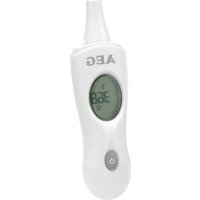



| Product Type | Infrared Thermometer |
| Brand | AEG |
| Model | FT 4925 |
| Power Supply | 1 button cell (type not specified) included |
| Main Functions | Instant body temperature measurement (ear and forehead), ambient temperature measurement, fever alarm at 38.0°C, time display |
| Measurement Units | Celsius (°C) or Fahrenheit (°F) selectable |
| Body Temperature Measurement Range | 32.0°C to 42.9°C |
| Accuracy | Not specified (typical accuracy ±0.2°C) |
| Resolution | 0.1°C / 0.1°F |
| Fever Alarm | Yes, triggered above 38.0°C |
| Measurement Methods | Ear (in the ear) and forehead (with accessory cap) |
| Care and Cleaning | Clean the probe with a clean cloth or alcohol after each use. Do not immerse in water. |
| Usage Precautions | Do not replace a medical consultation. Avoid direct sunlight exposure. Do not touch the lens with fingers. Keep the probe clean and protected from earwax, sweat, and cosmetics. |
| Storage | Store in a dry and temperate place, away from direct sunlight. |
| Included Accessories | Forehead measurement cap, storage stand |
| Screen Indicators | Measurement in progress, ear/forehead mode, fever, unit, clock, low battery, ambient temperature |
| Auto Shut-off | Yes, after a few seconds of inactivity |
Frequently Asked Questions - FT 4925 AEG
User questions about FT 4925 AEG
0 question about this device. Answer the ones you know or ask your own.
Ask a new question about this device
Download the instructions for your Thermometers in PDF format for free! Find your manual FT 4925 - AEG and take your electronic device back in hand. On this page are published all the documents necessary for the use of your device. FT 4925 by AEG.
USER MANUAL FT 4925 AEG
Operating Manual
Infrared Thermometer for Ear and Forehead Measurement
Location of Controls 3
User manual. 72
Technical
Specifications 81
Russian
Contents p.
Location of
Elements 3
Operating
Manual 117
Technical
Specifications 127
Spanish
Page contents
Location of the
controls 3
Telephone: 0033-1-4808-44 13
e-mail: contact@visiomed-lab.com
Battery disposal

Thank you very much for choosing this product. This thermometer takes temperature in seconds by measuring the heat generated by the ear or the surface skin of the forehead. It has the following advantages:
1) 4-in-1 design: Measures the ambient temperature and the body temperature in the ear or on the forehead. Furthermore, the current time is displayed. 2) Instant measurement
It provides you the reading in seconds.
3) Convenient, probe cover free and easy to use. 4) High speed accurate scan provides you precise reading of temperature. 5) Automatically converts forehead temperature display into ear temperature display with the removal of the front cover. Simple to use. 6) Alarm of fever
send out "Beep-Beep-Beep" for a long one followed by two short ones, and the "Fever" icon will go on.
7) Automatic display of memory
Every time you turn it on, the previous reading will be shown.
Icons on the Unit

your future reference!

Medical device type B
Precautions for Using the Product
It does not replace consulting a physician!
It can be cleaned with a clean cloth, paper, or alcohol. However, the entire thermometer should not be immersed in any liquid.
for a long time. For instance, in a car, under direct sunlight.
Do not touch the lens of the probe with your fingers. Do not disassemble the device by yourself.
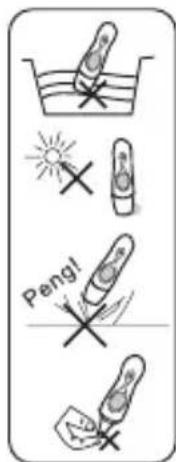
Otherwise, the infrared measurement function will be affected.
exercise or bath.
door), please wait in the new environment for about 30 minutes before measuring the new temperature.
made. It is normal that there are deviations in constant measurement between short intervals, in which case the average reading can be taken as the result.
33.8°F) in different areas of the body. Always measure the body temperature at the same time of the day.
temperature range of the device, the device will show "Err" symbol.
will be displayed on the screen; when the temperature of the measured is higher than 42.9°C , "Hi" symbol will be displayed on the screen.
Location of Controls
1 Power / Scan button 2 Display 3 Front cover / Attachment for forehead measurement 4 Stand 5 Probe 6 Battery compartment 7 Time set button
Definition of Symbols
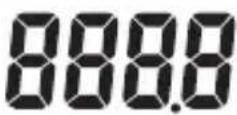

Measuring in Progress

Ear Scan Mode

Forehead Scan Mode

Fever

Celsius Scale

Fahrenheit Scale

Clock

Low Battery

Last Memorized Temperature Display
Description of LCD Display
| Display Meaning | Action | |
| 1425 250 | Display the time and environment temperature in turns while not used to measure the baby temperature. | Set the time when you use the device for the first time or when you re-install the battery. |
| 8888 | Is displayed for 1 second when the Thermometer is first turned on. | Wait for the last memoried temperature to appear. |
| 372 | Is displayed after the full display appears. Identifies the last measurement stored in the memory. | The thermometer is ready for measurement. |
| 372 | The quantity of electrical charge | Though the battery can be still used, you'd better change it as soon as possible. |
| Lo | The battery is running low. | Unless you change the battery, you can't use the product to conduct measurement. |
| H | Measured temperature too high. | When the temperature of the measured object is higher than 42.9°C. |
| Lo | Measured temperature too low. | When the temperature of the measured object is lower than 32°C. |
| Err | Ambient temperature too high or too low. | When the environment temperature scope of the device. |
| Display Meaning Action | ||
| OFF | Measurement completed | The thermometer switches off automatically. |
Time and Ambient Temperature
film between the battery and the terminal. This protects the battery from discharging during transport.
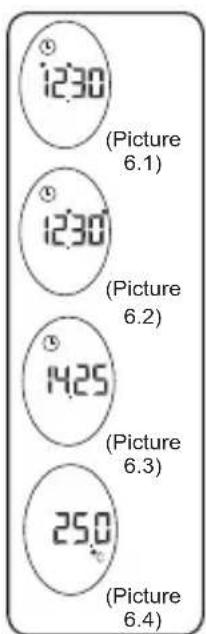
Set the time when you use the device for the first time or when you reinstall the battery. Then, the function of displaying the environmental temperature and time will automatically start up.
1) Method of setting: Press the power button to switch the thermometer on. Open the battery cap on the back, press the time
button of scan to adjust the numbers. Press the time
2) Mode of display: When time has been set, the thermometer will display the time and environmental temperature in turns while
Picture 6.3, 6.4).
Changing the Measurement Scale
The infrared thermometer can display temperature measurements in either °C or °F.
The operation to change the measurement scale between °C and °F is as follows: After all icons are displayed and when the picture "-- °C" or "F--" is displayed, press the scan button to switch between °C and °F. Wait for 3 seconds and the thermometer will automatically enter the measurement mode.
Note:
Your thermometer provides both Fahrenheit and Celsius readings in countries where the Fahrenheit units are adopted, otherwise it provides only the Celsius unit. It isn't a defect if your product can't change °C to °F.
Taking Temperature in Ear Temperature Mode
1) When the system is in the state of time/environmental temperature display, press the scan button, and the last temperature measurement will be displayed; then after "Beep-Beep", the system enters into the measurement mode. 3) Carefully pull back the ear to stretch the auditory canal. When measuring ear temperature, insert the probe into
ton of scan. One second later you will hear "Beep", and you can remove the thermometer. The measurement is completed.
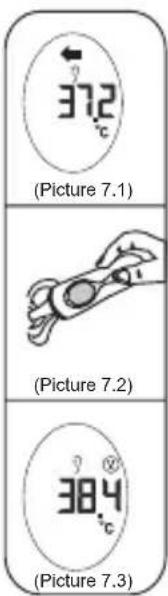
send out "Beep-Beep-Beep" a long one and two short ones, and the
Notes:
accurate.
alcohol, and conduct measurement after the water on the surface of the probe all evaporates.
Taking Temperature in Forehead Temperature Mode
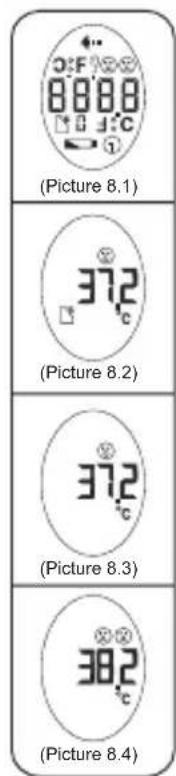
1) When the system is in the state of time / environmental temperature display, press the scan button, and the last temperature reading will be displayed. Then, the system will go
to the Picture 8.1-8.3).
2) Make sure the probe cap is on. Press the probe of the thermometer directly on the forehead. 3) Press the Scan button. One second later you will hear "Beep", and you can remove the thermometer. The measurement is completed.
thermometer will send out "Beep-Beep-Beep", a long one and two short ones, and the display will show the
Notes:
reading is for reference only since skin temperature is significantly affected by the environment.
metics, the measured temperature can't be accurate.
Battery Power and Replacement
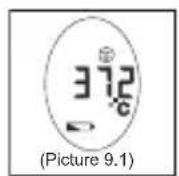
icon of low battery will appear on the lower part of the screen. Though the battery still can be used, it would be
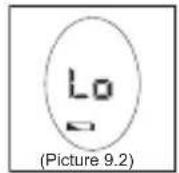
When the quantity of electric charge of the battery is lower than the minimal value, "Lo" symbols will be displayed on the screen, and battery icon flashes and the sound of "Beep"
new battery, you can not use the thermometer to conduct measurement.
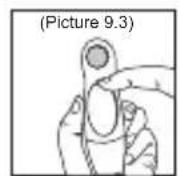
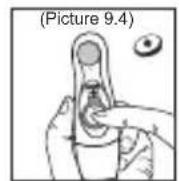
Operation of changing battery
to the Picture 9.4).
Handling of Batteries

Warning:
lowed, immediate medical assistance is crucial.
mucous membranes. Wash your hands after contact, flush your eyes with clear water and consult a physician in case symptoms persist.
Technical Specifications
| Measurement range body temperature/scan mode | |
| Measuring range room temperature | |
| Accuracy for body temperature measurement | |
| certifications according to EU directive for medical devices | CE0413 |
82 English
For questions please contact:
Representative for Europe:
93100 Montreuil, France
Phone: 0033-1-4808-44 13
e-mail: contact@visiomed-lab.com
Disposal of batteries

Your device is operated by batteries. When these batteries are

Caution:
chase.
points.
Environmental protection
Do not dispose of this device with the normal household waste.
you will contribute to environmental protection.
Product overview
Temperature measurement, display symbol "Err".
"Lo"; if the temperature is above 42.9 °C, display symbol "Hi".
Control buttons layout
1 Power/scan button 2 Display 3 Alarm/forehead temperature measurement button 4 Stand 5 Battery cover 6 Battery compartment 7 Reset button
Symbols explanation
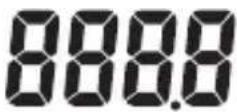
Display of measured temperature

Measurement mode selection

Measurement mode for forehead temperature

Forehead temperature measurement mode

Char




Display of the last measured temperature value
Ukrainian
Description of the device
It does not mean that you have a fever.
Precautions for use
It cannot replace a doctor's consultation!
After each use, the thermometer can be wiped with a clean cloth or paper or alcohol, however, do not immerse the entire thermometer in any liquid.
Keep the thermometer away from prolonged exposure to high temperatures. For example, do not leave it in a car under direct sunlight.
Do not touch the lens with your fingers. Do not disassemble the device yourself.
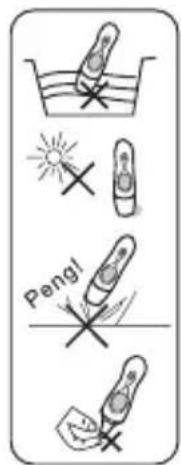
Keep the sensor clean, do not allow earwax to accumulate, and
avoid oily substances, as this may affect the measuring functions of the device.
The device is ready for use.
In a room with a street (in new conditions), wait approximately 30 minutes before measuring temperature again.
Approximately 10 seconds. During short intervals of measurement, deviations in the device readings are possible; this is a normal phenomenon. In this case, the average value should be taken as the result.
The temperature field may vary within 0.2~1 °C (32.36~33.8 °F) on different parts of the body. Always measure body temperature at the same time.
If the device is faulty, the symbol "Err" will appear on the display.
Symbol "Lo"; if the measured temperature is below 42.9 °C, the symbol "Hi" will appear.
Arrangement of elements
1 Power button / scan 2 Display 3 Probe / nozzle for temperature measurement 4 Base 5 Sensor 7 Time setting button
Symbols displayed
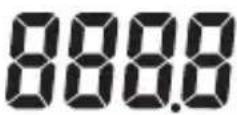
Display of readings

Temperature measurement

Ear temperature measurement mode

Body temperature measurement mode

Characteristics


- RUSSIAN
- SPANISH
- BATTERY DISPOSAL
- ICONS ON THE UNIT
- PRECAUTIONS FOR USING THE PRODUCT
- LOCATION OF CONTROLS
- DEFINITION OF SYMBOLS
- TIME AND AMBIENT TEMPERATURE
- CHANGING THE MEASUREMENT SCALE
- NOTE
- TAKING TEMPERATURE IN EAR TEMPERATURE MODE
- NOTES
- TAKING TEMPERATURE IN FOREHEAD TEMPERATURE MODE
- BATTERY POWER AND REPLACEMENT
- HANDLING OF BATTERIES
- WARNING
- TECHNICAL SPECIFICATIONS
- ENGLISH
- DISPOSAL OF BATTERIES
- ENVIRONMENTAL PROTECTION
- PRODUCT OVERVIEW
- CONTROL BUTTONS LAYOUT
- SYMBOLS EXPLANATION
- UKRAINIAN
- PRECAUTIONS FOR USE
- ARRANGEMENT OF ELEMENTS
- SYMBOLS DISPLAYED
Brand : AEG
Model : FT 4925
Category : Thermometers