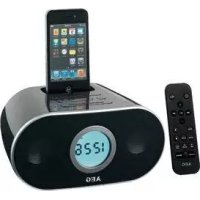
SRC 4333 IP - Radio AEG - Free user manual and instructions
Find the device manual for free SRC 4333 IP AEG in PDF.


| Product Type | Stereo clock radio with docking station for iPhone/iPod |
| Net weight | 0.68 kg |
| Mains power supply | External AC adapter 100-240 V, 50/60 Hz, output DC 5V / 2A |
| Backup batteries | 2 R03 / AAA 1.5 V batteries (not included) |
| Remote control battery | 1 CR2032 button cell (included) |
| Power consumption | 10 W |
| Radio frequency range | FM 87.5 - 108 MHz |
| Speakers | Built-in stereo |
| Main functions | FM radio, dual alarm clock, snooze, sleep timer, iPod/iPhone playback, AUX input |
| Display | LCD screen with brightness adjustment (DIMMER) |
| Time setting | Automatic via iPod/iPhone or manual (12/24 h format) |
| Radio presets | 20 FM stations |
| AUX input | 3.5 mm stereo jack (cable not included) |
| iPod/iPhone charging | Yes, while the device is plugged in |
| iPod/iPhone compatibility | Refer to the manual for compatible models |
| Maintenance | Unplug before cleaning; use a soft, damp cloth without detergent |
| Safety instructions | Do not expose to water or moisture; do not open the casing; use only the supplied adapter |
| Repairability | Have repaired only by a qualified technician |
Frequently Asked Questions - SRC 4333 IP AEG
User questions about SRC 4333 IP AEG
0 question about this device. Answer the ones you know or ask your own.
Ask a new question about this device
Download the instructions for your Radio in PDF format for free! Find your manual SRC 4333 IP - AEG and take your electronic device back in hand. On this page are published all the documents necessary for the use of your device. SRC 4333 IP by AEG.
USER MANUAL SRC 4333 IP AEG
Stereo Clock radio with Docking Station for iPhone/iPod
iPhone and iPod are trademarks of Apple Inc., registered in the USA and other countries.
PERFECT IN FORM AND FUNCTION
AEG
Deutsch
Inhalt
Location of Controls . page 3
User manual page 41
Technical Specifications . page 45
Disposal/Meaning of the "Dustbin" Symbol 46
JEZYK POLSKI
Spis tresci
Po3TaUyBaHHoprAHBKepyBaHHa..CTOp.3
ПосicontКорисьа.....CTOP.60
TexhiHxapaKTepeNCTnKn CTOp.65
PYCCKH
CopepkanHe
PacnoJoxKeHne 3JIeMeHTOB CTp. 3
PykoBOCTBO noIb3OBaTeJIa CToP. 66
Texnueckne xapaKTepeNCTIKN CTp. 72
3
Location of Controls
Po3TaUyBaHHopraHIB KepyBaHH
PacnoJIOXKeHHe 3JeMeHTOB
Batterijhouser (back-up)
Afstandsbediening
- “ ” (iPod/iPhone):

LET OP:
Reservebattery: 2x1,5V,R03,AAA
Não deixe criançasPICQUAS PICQUAS PICQUAS PICQUAS PICQUAS PICQUAS PICQUAS PICQUAS PICQUAS PICQUAS PICQUAS PICQUAS PICQUAS PICQUAS PICQUAS PICQUAS PICQUAS PICQUAS PICQUAS PICQUAS PICQUAS PICQUAS PICQUAS PICQUAS PICQUAS PICQUAS PICQUAS PICQUAS PICQUAS PICQUAS PICQUAS PICQUAS PICQUAS PICQUAS PICOUSSPICUSSPICUSSPICUSSPICUSSPICUSSPICUSSPICUSSPICUSSPICUSSPICUSSPICUSSPICUSSPICUSSPICUSSPICUSSPICUSSPICUSSPICUSSPICUSSPICUSSPICUSSPICUSSPICUSSPICUSSPICUSSPICUSSPICUSSPICUSSPICUSSPICUSSPICUSSPICUSSPICUSSPICU8
General Safety Guidelines
Before using this device, carefully read this user manual and keep it together with the Warranty Certificate, cashier receipt and if possible, the original package inclusive its interior packing. If you hand on the device to any third person, include the user manual as well.
- To avoid the risk of fire or electric shock, you should not expose the device to rain or humidity. Do not use the device near water (e.g. bathroom, swimming pool, humid cellars).
- The unit is designed solely for private use and its intended purpose. This unit is not designed for commercial use.
- Plug the device only into a properly installed socket. Be sure the device voltage corresponds to the grid voltage.
- When using external grid adaptors, pay attention to the correct polarity and voltage. Insert batteries correctly.
- Avoid covering the device's vent openings.
- Never open the device's case. Improper repairs can cause severe danger to the user. If the device or particularly the power cord is damaged, don't use the device any further and have it repaired by a qualified specialist. Check the power cord regularly for damages.
- To avoid any danger, a damaged power cord must be replaced only by the producer, its customer service or a similarly qualified person with an equal cord.
- If the device won't be used over an extended period of time, disconnect the power cord and remove the batteries.
These symbols may be found on the device and shall indicate the following:
The lightning symbol warns the user of dangerously high voltages inside the case.

The exclamation mark symbol points to important instruction or maintenance remarks in the accompanying guidelines.
Children and disabled persons
- For the safety of your children, keep any packing parts (plastic bags, cartilage, Styrofoam etc.) out of their reach.
WARNING!
Don't let small children play with foils for danger of suffocation!
- This device is not intended for use by persons (including children) with reduced physical, sensory or mental capabilities, or lack of experience and/or knowledge unless they have been given supervision or instructions concerning the use of the device by a person responsible for their safety.
Supervise children to ensure they do not play with the device.
Symbols in this user manual
Important notes for your safety are marked distinctively. Pay absolute attention to them to avoid accidents and damage to the device:
WARNING:
Warns of dangers for your health and indicates potential risks of injury.
CAUTION:
Indicates potential dangers for the device or other objects.
i NOTE:
Highlights tips and information for you.
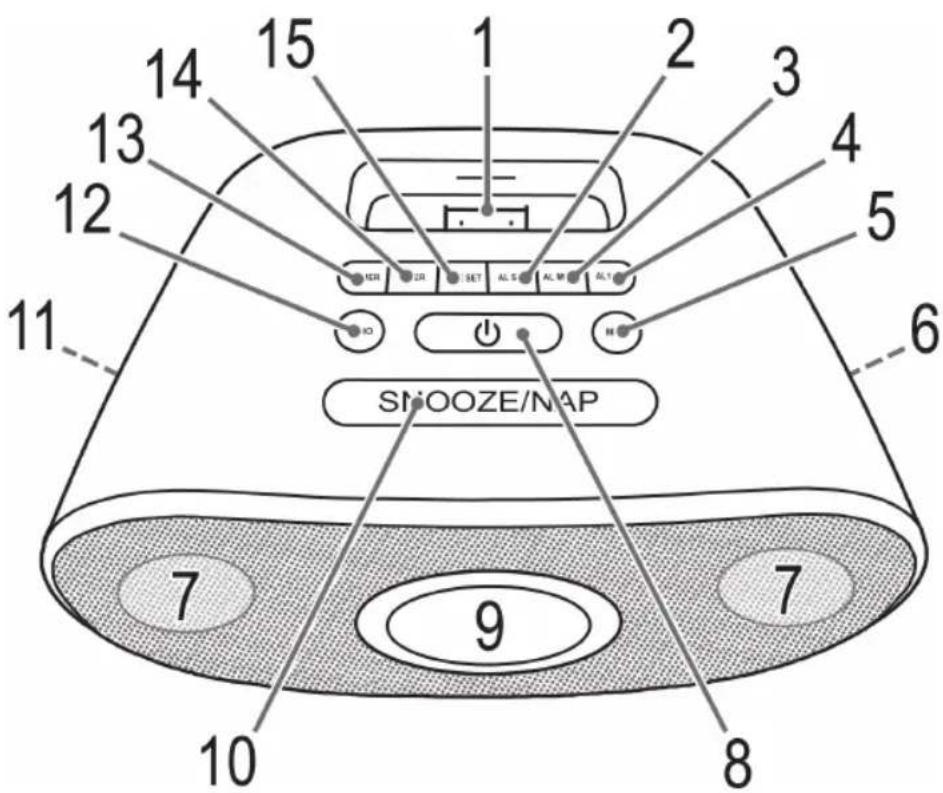
Location of Controls
1 Dock
2 ALSET button (Set alarm time)
3 AL MODE button
4 AL1/AL2 button (Alarm time)
5 MUTE button
6 VOLUME Control
7 Speaker
8 Dton
9 LCD Display
10 Alarm Interval (SNOOZE/NAP)
11 SET Frequency control
12 AUDIO operation selection button
13 DIMMER button
14 Button for delayed switch-off (TIMER)
15 TIME SET button (Set time)
Back Side (not shown)
FM wire antenna
AUX jack
DC IN input
Underside (not shown)
Battery compartment (backup)
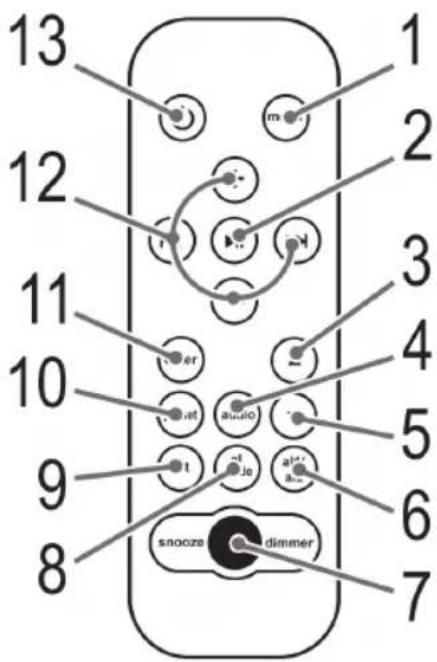
Remote Control
1 MENU button
2 II (play/pause) button
3 batton (iPod/iPhone music selection)
4 AUDIO operation selection button
5 Bttton (iPod/iPhone music selection)
6 AL1/AL2 button
7 SNOOZE/DIMMER button
8 AL MODE button
9 AL SET button
10 PRESET button
11 ENTER button
12 button (tune up)
卡 button (tune down)
+ button (Increase volume)
- button (Reduce volume)
13 button (On/Off)
First Use of the Device/Introduction
- Select a proper place for the device such as a dry, and even non slip area where you can easily operate the device.
- Make sure the device is vented sufficiently!
- If still in place, remove the protection foil from the display.
Inserting the batteries (Backup)
(Batteries are not included with the device)
In case of a power cut or if the device is unplugged, with batteries inserted, the settings will be kept.
- Open the battery compartment on the underside.
- Insert 2 R03 "AAA" batteries 1.5 V. Mind the correct polarity (indicated on the bottom of the battery case)!
- Close the battery case.
- If the device is not used for an extended period of time, remove the batteries from the device to avoid any leaking of battery acid.
CAUTION:
- Never use different battery types or new and used batteries together.
- Batteries must not be disposed of in the garbage. Please bring used batteries to competent collection centers or back to the dealer.
WARNING:
Never expose batteries to high temperatures or direct sunlight or throw batteries into fire for danger of explosion!
Power supply
- Insert the grid plug into a properly installed three prong socket with 230V, 50Hz . Connect the device with the plug connector by inserting its plug into the DC IN jack of the device.
- Make sure the grid voltage corresponds to the figures on the rating plate.
- If no backup battery is inserted, time and station settings will be deleted during a power failure or when disconnecting from mains power supply.
CAUTION:
- Only use the supplied power adaptor for this device. Do not use for other devices.
- Only use power adaptor with 5V( - C + ) , other adaptors may cause damage to the device.
NOTE:
Disconnect from mains power supply during longer periods of non-use.
Insert/Replace Battery in Remote Control
NOTE:
Where necessary, the lithium cell in the battery compartment of the remote has been fitted with a protective foil for transport. This extends the lifetime of the battery. Before initial use please remove this foil to prepare the remote for use.
The battery in the remote is a long-life lithium cell. Should the range of the remote shorten during use, follow the steps below:
- Open the battery compartment on the underside of the remote.
- Replace the cell with a battery of the same type (CR 2032). Make sure the polarity is correct.
- Close the battery compartment.
If the remote is not in use for a lengthy period of time, please remove the battery to prevent the battery acid from "leaking".
WARNING:
- Do not expose batteries to intense heat or direct sunlight. Never throw batteries onto a fire. Danger of explosion!
- Keep batteries out of the reach of children. They are not toys.
- Do not force batteries open.
- Avoid contact with metallic objects. (Rings, nails, screws etc.) Danger of short circuits!
- Short circuits may overheat or even ignite batteries. This may lead to combustion.
- When transporting the batteries, cover the terminals for your safety with an adhesive strip.
- If a battery leaks, do not rub the luid into the eyes or the skin. If acid comes into contact with the eyes, rinse with purified water and seek medical advice if symptoms persist.
CAUTION:
Do not dispose of batteries with household waste. Please take used batteries to an authorised collection point or to a dealer.
Set Current Time
You have two options for setting the time.
Automatic
Plug the iPod or iPhone onto the docking port (1). After a short time, the time set in the iPod/iPhone is shown.
Manual
iN0
The manually set time is automatically overridden as soon as an iPod/iPhone is plugged onto the docking port.
- Press the TIME SET button (15). The hours start flashing.
-
Press the buttons (2 on the RC), to set the hours. Press the TIME SET button to confirm.
-
Press the buttons to set the minutes.
- Press the TIME SET button again to save the current time setting.
NOTE:
- You can also set the time with the SET frequency control (11 on the device).
- While the time is displayed, you can select between 12 hour and 24 hour display by holding down the TIME SET button.
12 hour display shows: AM = morning,PM = afternoon
iPod/iPhone Compatibility
Due to the large variety of iPod and iPhone models and generations on the market, full compatibility cannot be guaranteed. Before connecting your iPod/iPhone, ensure that it has a compatible interface.
Full compatibility of the remote functions also cannot be guaranteed. Operate your iPod/iPhone as normal, while it sits in the docking station.
i NO
Depending on the software version of your iPhone the following error message may be displayed: "This accessory was not developed for iPhone use. It is possible that noise occurs and signal strength is reduced."
In this case press "OK"
General Operation
NOTE:
Some buttons you can find as well on the device as on the remote control.
Identical buttons effect the same function.
Switch device on/off (8/13)
By pressing the button, you can put the device into standby mode. Pressing the button again will switch the device on.
Display brightness
You can select or switch off the display brightness with the DIMMER (SNOOZE/DIMMER) button (13/7).
IOTE:
The display brightness is automatically switched off when you switch the device to Standby mode.
Volume
There are two options:
- Use the VOLUME control (6 on the device) to set the desired volume.
- By pressing the + / - buttons (12 on RC) you can adjust the desired volume.
Infrared Remote Control
For wireless control within a distance of 5m . If the distance decreases you should change the batteries. For proper operation mind a clear view between the remote control and the sensor on the device.
MUTE (5)
For immediate muting of the volume. Press the MUTE button again to cancel this function.
NOTE:
Due to technical reasons, the activated function is not displayed.
Radio Tuning
- Press the button (8/13) to switch the device on.
- Repeatedly press AUDIO button (12/4) until the display shows "FM".
- Use the SET control (11) or the buttons (12) to tune in the desired station.
- If the reception is too weak and there is interference on the channel, try to improve the reception by changing the position of the aerial and/or coil/uncoil it.
Save Radio Station
- To save the station you have found, hold down the PRESET button (10 on RC) for about 3 seconds. A preset flashes on the display (e.g. 01).
- Press the / buttons (3/5 on RC) to select a station preset between 01 and 20.
- Briefly press the PRESET button to save the radio station.
Recall Saved Radio Stations
To select the saved radio station, first press the PRESET button. Now use the / buttons to the select the storage location.
Alarm Function
You can set two alarm times; proceed as follows:
- Press the button (8/13) to switch the device off.
- Use the AL1/AL2 button (4/6) to select one or two alarm times.
- Press the ALSET button (15/9). The currently set wake-up time appears on the display. The hours flash.
- Press the buttons to set the hours. Press the ALSET button to confirm. The minutes flash.
- Set the minutes, press the buttons. Press the ALSET button to confirm.
i NOTE:
You can also set the alarm time with the SET frequency control (11 on the device).
- Now use the AL MODE button (3/8) to select how you want to be woken. The following options are available:
-BEEP" (Buzzer):
An alarm sounds when the wake-up time is reached. The volume increases slowly.
-FM" (Radio):
As soon as your set wake-up time is reached, the radio switches on. The last set channel will play. The volume increases slowly.
- (iPod/iPhone):
CAUTION:
Before plugging in the iPod/iPhone, make sure that the radio is not in iPod mode.
- If supplied with your iPod, plug the adapter onto the docking port. You can only ensure that the iPod fits correctly into the iPod port if the adapter is plugged in.
- Insert your iPod or iPhone in the dock (1).
CAUTION:
Make sure that your iPod/iPhone is plugged upright into the port. Do not bend or tilt the iPod/iPhone whilst it is plugged into the port. This may cause damage to the dock and/or the iPod/ iPhone.
- Playback from your iPod/iPhone starts in the set mode at the set alarm time. The volume increases slowly.
i NOTE:
- Follow your iPod/iPhone manual to select the desired mode.
- If no iPod/iPhone is connected the device wakes you in BUZZER mode.
NOTE:
The first or second alarm time is active when the ① or ② symbol is shown in the display.
NOTE:
The alarm volume is a factory default and cannot be adjusted.
Turn Off Alarm
Press the button to turn of the alarm until the next day.
Snoopze Function
Press the SNOOZE/NAP button (10/7) to deactivate the alarm for approx. 9 minutes.
Deactivate Alarm
To deactivate the alarm times, press the AL1/AL2 button (4/6) repeatedly until the alarm display is no longer shown.
Sleep Timer (TIMER button (14))
In ON mode, set the time for the device to automatically switch to standby mode. Select between: 15, 30, 45, 60, 75, 90 and OFF. Repeatedly press this button until the desired time is displayed. After the set time the device automatically turns off.
iNOTE:
Due to technical reasons, the activated function is not displayed.
Press the button (13) to cancel this function. The device switches to standby mode.
MusicPlaybackfromiPod/iPhone
(iPod/iPhone not supplied)
- If supplied with your iPod, plug the adapter onto the docking port. You can only ensure that the iPod fits correctly into the iPod port if the adapter is plugged in.
- Insert your iPod or iPhone into the dock (1).
CAUTION:
Make sure that your iPod/iPhone is plugged upright into the port. Do not bend or tilt the iPod/iPhone whilst it is plugged into the port. This may cause damage to the dock or the iPod/iPhone.
- Press the button (8/13) to switch the device on. Repeatedly press the AUDIO button (12/4), until "iPod" is displayed.
i NOTE:
The iPod mode can only be selected when the iPod/ iPhone is plugged in.
-
Depending on the iPod/iPhone Model, firstly release the button lock and start playing music if necessary with the button (2 on RC).
-
Follow your iPod/iPhone manual for further use of the controls.
CAUTION:
Return to radio mode before disconnecting your iPod/ iPhone from this device to avoid damages to your iPod/ iPhone.
i NOTE
If you have an incoming call when playing back music with the iPhone docked, then playback stops and you can hear the ring tone.
Description of iPod/iPhone Controls
II (2 on RC)
You can pause and continue music playback. Press again to continue playback.
(12 on RC)
Press 1x = Restart of the song from the beginning.
Press 2x = Skip to the previous song.
Press 3 × = Skip to the song before the previous song, etc. Press and hold during playback to search in reverse through the song.
(12 on RC)
Press to skip to the next song and the following songs. Press and hold during playback to search forward through the song.
MENU (1 on RC)
Press this button to bring up the iPod/iPhone Menu or to return to the previous menu.
ENTER (11 on RC)
Press this button to activate a function or to display the next menu..
(3 / 5 on RC)
Press these buttons, to scroll up/down the iPod/iPhone Menu.
iPod/iPhone Charging
Your iPod/iPhone battery is charged as soon as the iPod/ iPhone is docked. To do this, the unit must be connected to the mains.
NOTE:
- If supplied with your iPod, plug the adapter onto the docking port to ensure that the iPod sits correctly in the port.
- Not all iPod/iPhone generations support the charge mode.
NOTE:
- The duration of the charging process depends on the iPod/iPhone which is used and its operating condition.
AUX IN Jack (Rear)
Connect analogue playback device here. Connect playback devices such as MP3 player, CD player, etc. to listen to the music via the speakers.
- Connect the external device via 3.5mm stereo jack to the AUX socket.
- Now select AUX out mode with the AUDIO button (12/4).
- You will find further instructions in the manual of your external sound source.
- Listen to music playback from external playback devices via the speakers. You can use the + / - volume buttons (12 on RC) or the VOLUME control (6 on the device) to adjust the volume.
NOTE:
Set the volume of the external device to a reasonable level.
Cleaning
- Before cleaning disconnect from mains power supply.
- Clean the device with a soft damp cloth without detergents.
- Do not submerge the device in water.
Troubleshooting
| Fault Cause Solution | ||
| Device does not work | Device blocked, it "hangs" | Disconnect the mains plug for about 5 sec. Then switch the device back on. |
Technical Specifications
Model: SRC 4333 iP
Backup battery: 2x 1,5 V, R03, AAA
Net weight: .0,68 kg
Power Consumption: 10 W
External power adaptor
Input: AC 100-240 V, 50/60 Hz
Output: .DC 5V/2A
Polarity:
Protection Class:
Radio
Frequency Range: FM 87,5 ~ 108 MHz
Technical modifications reserved!
ENGLISH
This device complies with all current CE directives, such as electromagnetic compatibility and low voltage directive and is manufactured according to the latest safety regulations.
"Made for iPod" and "Made for iPhone" mean that an electronic accessory has been designed to connect specifically to iPod or iPhone and has been certified by the developer to meet Apple performance standards. Apple is not responsible for the operation of this device or its compliance with safety and regulators standards.
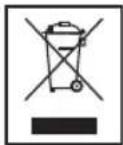
Disposal/Meaning of the "Wheelie Bin" Symbol
Take care of our environment, do not dispose of electrical appliances via the household waste.
Dispose of obsolete or defective electrical appliances via municipal collection points.
Please help to avoid potential environmental and health impacts through improper waste disposal.
You contribute to recycling and other forms of utilization of old electric and electronic appliances.
Your municipality provides you with information about collecting points.
- 10 " (IPod/Phone):
UWAGA:
3aHnHaHeB (He NOKa3aHO)
AHTeHa FM
P03'CM AUX
BxiD CIN
TnIbHa cToPoHa (He IOKa3aHO)
Bicik nla 6atapei (pe3epBa)
PnblT dncTaHcHOro KepyBaHHA
1 KhoiKa MENU
2 KhoNka II (BiTbOpeHHr/nay3a)
3 KhoNka Bn6ip My3nKn iPod/iPhone)
4 KhoNka Bn6opy yHKuA AUDIO
5 Khonka Bn6ip Myskn iPod/iPhone)
6 KhoNka AL1/AL2
7 KhoNka SNOOZE/DIMMER
8 KhoNka AL MODE
9 Khoonka AL SET
10 Khonka PRESET
11 KhoNka ENTER
12 KhoNka (noyky ynepei)
KhoNka (noyuk ha3aJ)
KhoNka + (36ijbueHHrayuHocTi)
KhoNka - (3MeHHueHHrayuHocTi)
13 Khonka(yBIMK./BMMK.)
BnKOpncTaHnI npNcTpoHO Bneppe/ O3HaNoMJIeHH
Bn6epitb nixoJae Micue I na npctpo, cyxe, pibHe i He KOB3Ke, De IerKo MOKHa ynpabTIN npctpoem.
- IpepebiTe, qI npicptiIN pOBIrtpEOETbC HaneKHNM YHOM!
- RaKIO npncpiBcTaHOBneHO, 3HiMiTb 3 DnCnpeH 3axnchy cTpiKy.
BcTaHOBJIeHH6aTapei (pe3epBHa)
(Baapei He BXoAraTb Do KOMnneKtTy NoCTaBKn)
Ypa3i npnnnHeHH JINBLeHHH npncTpOHaJauHTyBaHH6yde 36epeKeHo, KUo 6aTapeI BCTaHOBeHo.
- BiDkpiTe KpUkiy BiCiKy dIa6atapeH aTnIbHi CTOpOH BnO6y.
- BctaTe DbI 6aTapei R03 Tnny "AAA", noTyXHicTHO 1,5 B. IpeBipTe npabNlbHicTh bNoJrpHoCTi (noka3Ha Ha dHi BiDcKiy dJa 6aTapei)!
- 3aKpInTe BiDcIK dIa6batapei
- Raio npIbHe BnKOpNcOByBaTMeTbcn IpOTROM TpIBaIoro Yacy, BmIMt6batapei 3 npNCPOIO, IO6 yHnKHyTN BNTiKaHHKNCNOTN 3 6bataei.
YBAGA!
He KopnctynteciaHIMTNOM6atapea 0BOHMNTaCTapmN6atapemOHOHYacHO.
yBABA!
He ytni3yIte 6atape pa30m i3 no6yTOBm cmITAM. BnKOpNCTaHI 6atape 3daBaTe y Bi-nobiHn nyHKT npHOMy a6o nobepTaIe ix y nyHKT npHbHaHH.
NONEPEJXEHHA.
He 3aIIuIePiIDPnRMmCOHnHmIpOMiHHMa bOycepeoBuaX3BVCOKOToemnpaTPOIO. He KndaTeBaTaPeYBOrOHB-icHyc He6e3neKa Bn6bxy!
KHBneHH
PiKIOHOTb WTeKep DO HaneXHO BCTaHOBNEHOI TpIKoHTaKTHOI PO3eTKN 230 B,50 T. PiKIOHOTb PnCTPII 3a DOnOMOHO WTeKepHOI 3'EDHyBaA, NiD'EDHaBUN WTeKep DO pO3'Emy DC IN noCTIHORO cTpyMy Ha npCTpoI.
YneBHItbcra, 10 Hanpyra MepeKi BiDnObiAc 3HaueHHa HtabnHcI3TexHiHmMaHm.
3a BiDcyTHOCTi pe3epBHOI 6batapei HanaHTyBAHHra OoHHnka Ta CTaHcII 6Bye BTPaueHo y BnnaKy 360iB y NOCTaHaHHi XNBLeHHA a6o npBiDkiuOeHHi BiMpekx KINBleHH.
yBABA:
Kopntytea tibkna aadantepom KnBHeHH, 10 noctaayebpa3oM i3 uM npncTroem. He 3actocobyte do inuux npncTroib.
BnKOpncToByte TijbKn aanTepe KHBneHHa 5 B (O-C+), BNKOpncTahHn iHnx aanTepeiB MoKe noNkoDHT npncTpI.
IINPIMITKA.
BiéHyTe npicptiB MepeKj KnBneHHa, Rkso He KopncTyecr Hm DoBn npomikok acy.
BcTaHOBJIeHHra/3aImHeHHra 6aTapei B nyIbTI nuc-taHciHoro KepyBaHHra
IINPHMITKA.
3BepHb yBary Ha Te, 10 LiirieBa 6aTapey B iDciKy dIra 6aTapey y nIbTi DnCTaHcHOrO KepyBaHH NOKPHTA 3axnCHO O CTrpKoHO dN TpaHCnOpTyBaHH, de CE HeOeXiHO. Lpe npodBkye TepMin npdaTHocti 6bapei. Npeed nepuMM BkOpncTaHHM NybTa DnCTaHcHOrO KepyBaHH 3HiIMtB cTrpKy.
Batape B nyIbTi DnCTaHuiHORO KepyBaHHa MiTITb IITcBy batapeo TaIeTKOBOro TIny TpINBaIoro TepmiHy npDAtHOcti. RaIIO nI d Yac BnKOpNCTaHHa DaIbHiCTb DII NyIbTa 3MeHUnlaCb, DoTPmMyTeCb HabeDeHNx HnKHe KpOKiB.
BiKpnTe BiCik DnA 6aTapey HxHHi qactHi nyIbTa.
3amihtb 6atapeo Ha 6atapeo TaKOrO K Tnny (CR 2032).Ipebipte npabunbHicb noJapnHOcti.
3akpnTe bicik dna 6atape.
IyIyIbT He BHKOPHCTOBYBaTHMeTbCpOTaROM TpHBaIoro Yacy, BNIMtB 6aTapeo, IIO6 yHNKHyTN "BNTiKaHH" KNCIoTH 6aTaapei.

NONEPENKEHNA.
He 3aHnuaTe 6aTapei y CNEKOthomy MiCi a6oPiI IPIRMUM COHuaHIM IpOMIHbM. HiKoJIH He KUdaIte 6aTapei y BOHOb. lChyE He6e3neKa Bn6yxy!
TpmaTe 6ataeI no3a MeKamN doCkHocti dTei. He irpaikn.
He BiDkPbBaIe 6aTapei cnloio.
- YHnKaIe IX KOHTaKTy 3 MeTaJIeBIMN npEldMetAMn (raHKamH, ZbIXaMn, TBHHTaMn Ta IH.). IcHye He6e3neKa KopoTkoR OAMHaHH!
Kopotke 3aMnKaHHa MoKe npN3BecTN DO IpeperpiBaHHa 6aTapei a6o BOHMOKyTb 3aRopitncb. Lc MoKe cnpuunHHTn noKeky.
-Пид уас трансоптувань сатарей 3 MeTOH 6e3nekn 3akJIeIte II KOHTaKTN KJIeNKoI O CTPIU-KOIO.
- Kaio 6atapera noteKla, cnidkyte, oio6 pInHa He Notpainla B oui a6o Ha shkipy. Kaio KcIota Notpainla B oui, npomHte ix uHCTOBOIOHO i, KaIO CNITOMn He 3HHKHyTb, BiDpa3y 3BepHItcbdo likapra.

YBARA.
He ytni3ynte 6arapeip a30m i3 no6yTOBnM cmitTAM. BiHecitb 6aapei do ABTOPHOBOHOI TOKIN36opy a6o dno nlepa.
HaJauTyuBaHHrToDHHNka
Hac MoKHa HajaTByaTH y Da CnOco6H.
ABTomaTHUHO
Пидкючы iPod a6o iPhone do po3'Emy dOKy (1). 3a Deякий淘汰 3'ЯВNTbCЯ ac, BCTaHOBNeHn Ha iPod/iPhone.
BpyHy
IPMIMITKA.
JIKINiKIOHHTN iPod/iPhone do po3'Emy DOky, yac, BCTaHOJIeHH BpyHy, 6yJe aBTOMaTHUHO 3MlHeHO.
-
HATNCIb KHOIIky TIME SET (15).IOka3HnK TOnHH IOUHe 6JIHMaTH.
-
Lio6 BCTaHOBHTI rOINH, HATNCKaTe KHOKN (2Ha PIK).PiTBePbTe BN6ip HAITCKaHNAM KHOKN TIME SET.
- 3a donomoroIO KHONOCTaHOBITb XBUNHH.
- 3HOBy HATNCITb KHONKy TIME SET, 3o6 36epeRTn HaIaHTyBaHHa ccy.
IPMMITKA.
- YaC MoKHa TaKoK BCTaHOBHTn 3a,doNOMOIO KhoIKN peryHOBaHHaCTOTn SET (11 Ha npHcTpoi).
-ПОКИ ВIDОБРАСКAЕТБСЕС AC,МОЖHA BIV6PATA12-ROДHHHa 60 24-ROДHHHФOPMAt,HaTHCHYBHH i YTPMHyOuN KHOJIky TIME SET.
Y12-roDHHOMy fOpMaTi 3'RABIAEbCtaka iHnkaiai:
AM=do noJyH,PM=nicnoJyH
Cymichictb i3 iPod/iPhone
Y 3B'3Ky 3 BENIKIM pI3HOMaHIITAM NOKOIiHB i MoJeIe iPod i iPhone,IOCTyINHX y Mara3HHax, NOBHa CymichcTB He rapAHyETbC. IepH HIX niE'cHyBaTH iPod/iPhone, nepeBiTe cymichcTb Horo IHrepeiyCy.
TaKoK He MoKe rapaHTyBaTncb NOBHa cyMiCiHcIb 4yHKui NylbTa INCTaHcIIHOro KepyBaHHa. JkUO nOTpi6Ho, u06 iPod/iPhone npaIOBab HOpMaJIbHO, IIKIOHcITb HOrO Do IOK-CTAHII.
INPHMITKA.
B 3aJIeXHOCTi BiI Bepci IIporpamHoro 3a6e3ne-ueHH, BCTAHOBJIeHOHa iPhone, MoKyTB BiIO-6paKaTHc HAcTyIHI IOBIOMJIeHHra IPO IOMNIKn. "Lei akcecyap He npuaattn dnn BkOpncTaHHa 3 iPhone. BuKOpNCtAHH MaKe npHBecTu Do NIOBbI yMIB iNocla6JIeHH CHTHaIy."
B IbOMy BnIaNky HATnCHITb KOnIKy "OK".
3araIbHa iNΦopMaúi npo po6Oу npHcTpoU
IINPMITKA.
IeKki KhoNk icHyIOb Ra Ha npCTpoi, Ta i Ha IIyblti InctaHIIHOrO KepyBaHH.
IeHTNHI KHOKNBHKOHyOTb OHaKOBi yHKuii.
YbIMKHeHHBbIMKHeHH npncTpOIO (8/13)
KaHHTN KHOIky 0, npCTpi IpeeBpeKHM OikyBaHH. KaHHTN KHOIky 3HOBy, npCTpi yBIMKHeTcR.
Ackpabictb dncnpea
Bn6paTH a60 BmKHyTN HanaU TyBaHHra RCKpaBOcTi ekpaHa MoXHa 3a DonomOroIO KhoNk DIMMER (SNOOZE/IMMER) (13/7).

IPNMITKA.
KoH nepemkhny npncptpi y peXm oukyBaHHra, RCKpabictb dncnner BIMNkaetcbaTOMaTHNO.
IyHicTb
IChye DBi MOxNlBOcTi.
3a donomoropeyraTopaVOLUME (6 Ha npn- cTpoi) BCTaHOBiB notpiHy rHyHicTB.
- Notpi6Hy ryuHicTh MoKHHa halaHTyBaTH 3a DO-NOMORO KHOHOK +/-(12 Ha PIK).
InphiapuepBOHn nylbT dncTaHcHOro KepyBaH
BnKOpNCTOByeTbCdIg6e3DpOTOBOro ynpabHInHH npNCTPOeMaHa BIDCTaHI Do 5 M. Jkso DaJIbHiCTb II pIyIbTa 3MeHUnIacb, 3AmHITb 6aTapei. IIN HOpMaJIbHOI PObTH NpIbTa NotpiHo, UO6 MIXHm I npIMaueH Ma nPcTpoI He 6yNo nepeWkoJ.
MUTE (5)
IHa HrAHHo BmKHeHnryHocTi. Lio6 BmKHyTN UO yHKUIO, 3HOBy HaTNCiTB KONky MUTE.

NIPMITKA.
3aTexHnHn npuHn aKtNBoBaHa fYHKiIe He BiO6paKaCTbCra.
HanaStyBaHHpaio
HaTnCHiTb KhoNkU (8/13), 0o6 yBIMKHyTu npu-CTpi.
Kilbka pa3iB HATnCKa KhoNky AUDIO (12/4)do-nokn Ha ekpaH He BiO6pa3ntbcr iHnKaucir "FM".
Lio6 hanaaHTyBaTH noTpi6Hy cTaHciIO, BnKOpNCToByIte KhoNky peYnIOBaHHraCTOTn SET (11) a6o KhoNkn 12).
- RaKuo CnHaI dyKe cna6Kn i HaaBHi 3aBaDu, cnpo6yIte nokpaunT npinMaHHra CnHany Ixom 3MiHN pIoXeHH aHTEH Ta/a6o WJHXOM II 3roptAHH/posrOPTaHH.
36epeKeHHpaioctaHui
- Lio6 36epeTn 3HaJdeHcy cTaHciIO, HataNCHiB i ytpmMyTe KhoNky PRESET (10 Ha nyIbTi DnCTaHuiHO rKepyBaHH) BnpoIOBk 3 cekyHd. 3NaueHnnonepedhboRo HanaWtBuHH 6nMa c Ha ekpaHI (HaNP.01).
-
HATNCHTb KONKn (3 / 5 Ha IK), 106 Bn6paTn nonepedHc HanaTyBaHHra cTaHciB iD 01 do 20.
-
Kopotko Hatnchitb KhoNky PRESET, 0o6 3epeTn paioctaHIO.
Buklnk 36epexeHx cTaHci
Lio6 Bn6patn 3bepexehny paioctanuio, cnpuy HATNCHTb KhoNky PRESET. Lio6 Bn6patn Micue 3bepexehnna, BnKOpncTOByTe KhoNkn △/
Будуньнк
Ha npncptpo MoKHa BcTaHOBHTn Dba pi3Hi Hala- uTyBaHHa cay dla 6yDnIbHnka.
HaTnCHiB KHONKy (8/13), 0o6 BnMKHyTN npnCToiN.
3a donomoroIO KhoNkN AL1/AL2 (4/6) Bn6epiB oINH a6o Dba HanaHTyBaHHa cacy 6yDnIbHnka.
- Hatnchtb KhoNky AL. SET (15/9). Ha dncnnei 6yde bioobpaKaTncb notoHn BCTaHOBneHn 4ac 6yDnIbHnka. Bydyb 6nMaTHn rOHN.
LIO6 BCTaHOBHTN ROHNHY, HATNCKaIte KHONK/ LIO6 niTBePHTN BN6ip, HATNCHiB KHONKY AL. SET. NouHyTB 6nMaTHxXBnHHn.
3a donomoroIO KHOHO BCTaHOBtB XBNH. Lio6 niTBePdHTN Bn6ip, HATNCiTB KONKy AL. SET.

ПРИМITA.
Yac MoXHa TaKoX BCTaHOBHTn 3a DOnOMOHO KhoNkpeyIIOBaHnHa cTOTn SET (11 Ha npi- cTpoi).
3a donomoro KhoKn AL MODE (3/8) Bnoepitb cnoci npo6ykeHH.
DocTyNHi taki peKMM6yDnJIbHnIka:
-BEEP"(3ByKOBn cHan):
Y BCTaHOBLeHn Yac npo3ByuHTb 3ByKOBn CnHaI 6yDnJIbHnKa. FyuHicTb CnHaNy 6yDe nToPOx yPoCTaTn.
-FM" (Paio):
Y BCTaHOBHeHn yac yBMKHeTbca paio.
Byde BiTbOpOBaTncb OctaHHH HanaTObaHn KaHaI. TyHicTh bye De notpoxy 3pOCTaTH.
- "□" (iPod/iPhone):

YBAGA.
Ipeen iEHaHnM iPod/iPhone nepeBipTe, pao He nepebyano B peKmI iPod.
-Пикнчыаадпетер,якwo taKmdoJaEcTbCЯ do iPod,do po3'emу doky.iPod moXHa BCTaHOBHTn HaneXHM YHOM y po3'emДЯ iPod TiIbKn Todi, koni niD'edHaHo aadantep.
-Пд'энгайе iPod/iPhone до дOKу (1).
yBABA.
Ipebeipte,io6 iPod/iPhone 6yno BcTaHOBJIeHO BepTKaJIbHO B po3'Em.He HaraHaTe Ta He haxnIaIe iPod/iPhone,doNOK Bin iKluOeHn do po3'Emy.Le MoKeNoIkoDHTn DOk a6o/ta iPod/iPhone.
BiTbOpEH3 iPod/iPhone po3noHetbc3 TOrO JpeKIMy, kNk 6yNo BCTaHOBHeo dIpa peKIMy 6yDnblHnka. IyHicTh 6yDe 3pocTaH nOtpoxy.
IINPIMITKA.
- Ipo Bn6ip noTpi6Horo peKmMy uHaTaIte y noci6Hky KopncTyBaay iPod/iPhone.
- RaKuo iPod/iPhone He nID'edHaHo, 6yDnIbHnK npncTroO yBIMKHeTbcr B peXmBi BUZZER.
INPIMITKA.
- Pepue a6o npyre HanaWtyBaHHra 6dynHbNka AKTNBE, KOJI 3'ABJAEbCR CmB01 a6o
BIMKHeHH6yDnHbNHa
HaTnCHiB KONKy, 106 BmKHyTN 6yDnJIbHnK DO NaCTynHOrO dHA.
Pekn m noBtopeHHcHany
HaTnciB KhoNky SNOOZE/NAP (10/7), 0o6 BmMKHyTN 6yDnJIbHnK npn6n3Ho Ha 9 XBnInH.
BIMKHeHH6yDnJIbHnKa
LIO6BIMKHyTN6yDnIbHnK,HaTNCaIte KHOKNy AL1/AL2(4/6)KINbKa pa3iB nocinib,NOKN He 3HNKHe DnCnIe6yDnIbHnKa.
Taimep chy (KhoNka TIMER (14))
YpeKIMON BCTaHOBITb Yac, KOJI npICTpI MaE aBTOMaTHNO nepeHTN B peKIM OuykBaHH. Bn6epi3NaueHnR:15,30,45,60,75,90Ta OFF (BmK.). HaNTCKaTe 1O KNONy, DOnOKn HE BiDIOpa3ntbCnNotpi6Hn Yac. KOJI MNHe BCTaHOBJeHn Yac, pNcTPI BVMKHETbCA bTOMaTHNo.
IINPIMITKA.
3aTexHuiHn npuHH aKTHBOBaHa fYHKiHa He BiO6paKaCTbCra.
HaTnchItb KhoNky (13), 0o6 BmKHyTu nO fynK- zu. Pnpctpi nepeJeB peXm OuyBaHHa.
BiTbOpENHa My3nKn 3 iPod/iPhone
(iPod/iPhone He BxOДиь B KOMПЛЕКТ NOCTaBKN)
1.ПдклочьаanTpep,ЯкоТakнДоаeTbcado iPod,do po3'Emy doky.IPod moxHa BCTaHOBnH naneKHM ypo3'em dna iPod tiIbKn ToDi, KOJI niD'edHaO aanTpep.
2.Пд'ета ePod/PhonedoDOKy(1).
yBABA!
Ipebeipe, oio iPod/iPhone 6yIo BCTaHOBJIeHO BepTKaJIbHO B po3'Em. He haHnHaIte TaHe haxnIaTe iPod/iPhone, donOKn BIn nIKNoUeHn Do po3'Em. Lc MoKe nouKOAnTn DOK a6o/ta iPod/iPhone.
- Hatnchtb KhoNky (8/13), 06 yBIMKHytn npnctpii. KInbka pa3ib HataNcKaIte KhoNky AUDIO (12/4), DOKn He BiO6pa3ntbcra cNoBo "iPod".
IINPIMITKA.
Pexim iPod MoXHa Bn6paT NIIe KOni NiDknOuyeno iPod/iPhone.
- 3aJExHb BiD MoDeni iPod/iPhone cnepuy 3HiMItb 6IOKyBaHHa KHOK i po3noHITb BiIDTBOpEHMy3KN, Akuo Ntpi6Ho, HATNCHyBn KhoNky II (2 Ha PIK).
- Ipo BnKOpNCtAHH eIeMeHTiB ynpaBllHH nTaTe y noci6Hky KopncTyBaaya iPod/iPhone.
yB4A.
Lio6 He nouKoHn iPod/iPhone, nepu Hix BiD'cHyBaTn NOrO BiD cboRo npncTroIO, yBIMKHiTB peKm paio.
I P N M I T K A.
KIO iPhone nID'6dHaHO DO DOKy i ni d yac BiTBOpeHHMy3IKN NocTyNae BxIHn I3BiHOK, BIITBOpEHH 3yINHAcTBcA, I LyHaC BNKlNk.
Onnc eIeMeHTiB ynpabJIHH iPod/iPhone II (2 Ha PIK)
3yHnHKa Ta npoOBKeHHB iD TBOpEHMy3KN. HatncHtB ue pa3, uOb npoOBKHTN BiD TBOpEHHa
(12HaI)
1 HATNCHEHHRA = PO3NOUHAc BIDTBOPEHNAIichi 3 NOAtKy.
2HaTnCHeHHra = npOnyckaHHra do nonepeHbOi nichi.
3HaTnCHeHHra npoynckaHHra do nichi nepei nonepedhboIO nichero i T.D. HATnCHITb iyTPmMyTe niI qac BiITBOpEHHRA Ira NOnyky Ha3a.i
(12Ha\PK)
HaTnCHiB, 106 npOnyCTHn Do HAcTyNHOi nicHi Ta HAcTyNHx 3a HeIO niceHb. HatncHtB Ta yTpmyTe NiJ qac BiTbOpEHn DnI nowky BnepeD.
MENU (1 Ha PIK)
HaTnCHiB 1KONKy, 106 BiDkPHTM MeHIO iPod/ iPhone a6o NOBepHyTncb do nOpeDhboTo MeHIO.
ENTER (11 Ha ΠK)
I03B0JAE aKTHyBaTn FyHKciIO a6o BiIO6pa3HTN HAcTyNJHE MeHIO.
N(3/5Ha\PK)
LHKnOJa BnKOpNCToBYeTbCra Ia npokpyTKn Bropy/Bn3 y MeHIO iPod/iPhone.
3apdkaHH iPod/iPhone
Batapera iPod/iPhone noue 3apAkaTncb nicra nii'edhaHn iPod/iPhone do po3'emy.Длвoropnpicpi cnid nii'edHaTHdo po3etkn.
I INPIMITKA.
Aaanepdoaebcdoipod,niKIOHHTb Ioro do po3'emy doky i yneBHITcB,ioipod HaneHHM YHOM NiKIOHcHo.
He Bci nokoiHH iPod/iPhone niTpmyoTB peKIM 3apAdkaHH.
TpBAnicb 3apJdxKaHHa3aJIeKHTb BiToro, kN BnKOpNCTOByEcIPOd/iPhone, yMOB IOROBnKOpNCtAHH.
Po3'em AUX IN (33aNy)
Coi n iD'edHyetbca ananorobn npncptpi BiTbopeHH. PikouaTe taKi npctpO BtBopeHH, k MP3-nneep, CD-nneep, too, uo6 npocnyoxyBaTN My3Nky uepe3 ruyHomOBci.
1.Пд'Енайтze 3OBHинпсгпчepeЗстpeo po3'em 3,5 MMdo po3'emy AUX.
2. Bn6epiB BnXiHn peKIM AUX 3a DonomorHO KhoIKN AUDIO (12/4).
3. IoJaIbIi iHCTpyKuII MOxHa 3HaIITN B Noci6Hnky KopnctyBaay dKepeena 3OBHIuHbO rHany.
4. Порocлухову Te Myзну 3i 30bHиHix npinctpoB BiTbOpeHnuepe3 ryuHOMOBuI.ДЯ HanaStyBaHHr ryuHocTi MOxHa BnKOpNCTaTn KONKn peYlnHobHn ryuHocTi +/-(12 Ha PIK) a6o peryJrTOp VOLUME (6 Na npinctpoI).
I P N M I T K A.
BcTaHOBIb rUHICb 3OBHIuHbOro npncToPOHa pO3ymHnPiBeHb.
YnueHHa
- Ipeed TMM RK YNCTHTN PnncTpi, BiD'cHaHte Noro BID MepeXj XHBneHHA.
- YnctbTe npncptiB BOJoroIO M'RAKOHO raHcipkoHO, 6e3 3acobIB DnA YnueHHa.
He 3aHpyoIte npicTpIy y Bovdy.
UcyHeHHH HeCnpaBHOCTe
Pe3epBha 6atape: .2x 1,5 B,R03,AAA
Bara HETTO: 0,68 Kr
CnoKnBaHHn eneKTpoeHepri1 10 Bt
3oBhiHni aanTepe HnBJIeHHA
BxiD: 100-240 B 3miHHoro cTpyM, 50/60 T
BuxiD: 5 B/2 A noctiHoro ctpymy
PonpaHictb: 0-C-
Klac 3axncty: II
Papio
Diana3OH yacto: FM 87,5 ~ 108 M
TexhiH3miHMOKe 6ytn BHeceHo 6e3 nonepaJxehn!
Cen npnctpi BIDNOBida BCIM dIOChm DnpeKtmbam PaN EBpON, 3OKPema 0do eJeKTpOMarHITHOI cyMICHOCTi INpeKTHBI 0do HN3bKOI HAnpyr, Ta Bnpo6JIeH N BiINOBiHO DO OCTaHHIX BnMOr 6e3ne- KN.
I03NaKn "Made for iPod" i "Made for iPhone" 03HaJauTb, 10 eNeKtpoHHe 6bJaHaHH 6yNo BnroTOBJIeHO IIN KIOUeHHcme Do iPod a6o iPhone i ix cepTnΦIKOBaHO BnPObHKOM 5ODo BiNObiDnOCTI cTaHApTAM pOBoTN KOMNaHII Apple. Apple He Hece BiNObiDaIbHoCTI 3a poBOT npICrPoU yN Ioro BiNObiDHiCT b CTAHApTAm I HopMaM 6e3neKn.
Bxod nHTaHnI NOCT. TOKa (DC IN)
HnKHA CTOpOHa (He noka3aHa)
Otcek 6atapeek (pe3epBhbix)
DuctaHIOHOHoe ynpabJeHne (y)
1 Khoinka MENU
2 KhoNka II (BocnpOn3BeDHeHne/nay3a)
3 KhoNka AByI6Op My3bIKAJIbHOH 3aIncn B iPod/ iPhone)
4 KhoNka AUDIO(BbI6op nCTouHnka ayDno)
5 KhoNka VbI6Op My3bIKAJIbHOH 3aIncn B iPod/ iPhone)
6 Khoinka AL1/AL2
7 KhoNka SNOOZE/DIMMER
8 KhoNka AL MODE
9 Khoonka AL SET
10 Khonka PRESET
11 KhoNka ENTER
12 KhoNka (HaCtpoNka Bnepe) KhoNka (HaCtpoNka Ha3aD)
KhoNka + (yBeJIuHtB rPOMKOCTb)
KhoNka-(CHn3HTb rPOMKOCTb)
13 KhoNka 3neKtpoNTaHnA(O(BKIOHTb/BblKHO-HTb)
Haayano 3KcNpyatauyn yctpoiCTBa/ BBeJeHne
-
Правильно Вьберпе паслоносяне устю CTBA: OHO DoJHKHO 6bITb cyxHM, ydoHbIM ДЯ paBOTbI C uSTpoHCTBOM И He paCNoJaraTbcr Ha спальНOM MecTe.
-
Y6eIntecb B DoCTaTOUHOB BeHTnlauH yCTpOInCTBa!
- Iocne yctaHOBKn Ha MeCTO, CHIMITE C DnCnIe 3aunTHyIO nIeHky.
BcTabKa 3JIeKTpHueCkHX 6aTapeek (pe3epBhble) (He BXoJrT B KOMnJIeKT NOCTabKn)
B cnyuae npepbibaHn 3neKtponntaHn Hn OTKnHOyeHHy yCTpoiCTBa OT cETN, BCTaBJIeHHbIe B yCTpOICTBO 6atapeKN N03BOJrT COxpaHHTb npaMeTpbl NaCTPOIKN.
- OtkpoTe OTcEK 6aTaapeek B HnXHei YacTn yctpoiCTBa.
- BCTaBbTe 2 6aTapeiKn R03 "AAA" Ha 1,5 B. Co6IIOdaIte npabNtBuHy IOIINpHocTb (yKa3aHa Ha dHe oTceKa 6aTapeek)!
- 3aKpoTe oTcek 6aTaapeek.
- EcnH He nlaHpyetc HcNoB3ObaHne ycTpoiCTBa IInTeIbHbI CpOK, INBJeKHTe IN3 Hero6aTapeIKN, YTO6bI IN36eKaTb INo6bIX YTeueK KNCJLOTbl.
BHIMAHNE:
HnKOrDa He nCNoB3yIte CoBMeCTHO 6aTapei Kpua3HOro TnPa NII HOBbIe I NCNoB3OBAB- uHneec4 6aTapeKu.
BaTapeKHe CneDyET BbIbpaCbBaTb BMeCTe C6bITOBbIMN OTXODAMN. PoKaanyIcTa, nepeDaIte HcNoJIb3OBAHbIe 6TaapeKN B COOTBeTCTByIOUm NcHTp Ccbopa OTXoIDOB ININ BEPHNTEx PO3HNHOMY npOaBcy.
I PENEYIPPEKDEHNE:
He noDBepraTe 6aTapeKn BO3deJCTBnIO BbICOKo TEMnepaTypbl, npMOrO CONHeuHOro CBeta INIOTKpbIToro PnaMeHN H3-3a ONaCHOCTH B3pbIb!
3NeKtponHtAnHe
BCTaBBte CeTeByIO BUNKy B npaBnIbHO yCTaHOJIeHHyIO TpexNIOHCHyIO po3Etky 230 B,50Tc. IOnKIIHOHTe yCTpoINCTBO,BCTaBNU TbIpeBOI COeINHITeIB THe3IOBOI pa3bEm NOCTOARHOro TOka (DC IN) Ha yCTpoINCTBe.
- Y6eIITecB COrIaCOBaHHOCHTn HApJKeHnCETn 3JIeKTPoINTaHnN I BELINuHbI Ha 3TtKeTKe C HOMHaJIbHbIMXapaKTePNCtIKaMn.
Ecn He BCTaBHeI pe3epBHe 3eKtpnueckne 6atapeKn, HactpoKa BpeMeHn paAnocTaHcnn 6yDet NotepHa NocLe HncnpaBHOCTN BCETN 3eKtpoNTaHHN HIN OTKnUOHeHHN OT p03eKN 3eKtpoNTaHHN.
BHIMAHNE:
IcnoJb3yUte C yCTpOJCTBOM TOLbKO cTeBOa aanTep n3 KOMnJIeKTA NoCTaBKn. He npimeHnTe erO c dpyrMn npnbopamn.

BHIMAHHE:
Ipyrne aanepb3nKtpoNTaHmMOryT NOBpeNTb yCTPOINCTBO.

ПРИМЕЧАЙ:
Ha BpemdIInTeBHoro nepepbBa HcnoJb-30BaHHyCtpoNCTBa OTKHouHTe erO OT pO3eTKN 3JIeKTPoNITAHIN.
BcTaBaKa/3aMeHa 6aTapeKn B nHCTaHcHOnHHOM ynpabLeHH (Dy)

PIMMEUAHN:
Pn HeoXoHMOCTN, NtneBbI 3JeMeHT nHTaHnB O TcKe6 BaTapeKINyIbTa DY OchauaETCn3aunTHOHN PHeHKON DnA 6e3OnacHO TpaHCnOpTNPOBKn. 3To npOJNEBaET cPOK cnjKbI batapeKN. IpePeNepBOHaayhBbIM NCNoJIb3OBaHnEMCHMNTe 3Ty PHeHKY DnA NOdrotOBKn yIbTa DY K3KcnnyatauHn.
BaatapeiKa BnyIbTe Dv AByIeTcR JInTHeBbIM 3JIeMeHTOM IITaHnC 6OJbUIM CpOKOM CnyKbI. EcIN BO BpeM HcNoJIb3OBAHn COKpaTHTbCra DaJIb-HoCTb DeIcTBnIyIbTa Dv, BblOnHnTe CneDyIO-uee:
OTKpoTe OTCek 6aTapeeKN Ha HnKHeu qactn nyIbTa Dv.
3aMeHHe 3JIeMeHr NTaHn6bTapeKoToro Xe Tnna (CR 2032).Co6JIIOdaTe npaBnIbHyIO NOJARHOCTb.
3aKpoTe OTEcK 6aTapeeKN.
Ecn He npednojaraetc HcnoJb30BaHne nyIbTa Dy dnteBhbl cpoK, noKaJyIcTa, n3BLeKeIte 6atapeky dny npedotbpaueHn «YTeKn» n3 Hee KNCLOTbl.

PENEUYPPEKHEHNE:
He noDBepraIte 6atapeKu INHTECNBHOMy HArpeBy NIN BO3DeIcTBIO pRmBix CONHeYHbIX nyuei. He 6pocaiTe 6atapeKn B orOhb. OnachOCTb B3PbIBa!
-epKte 6aTapeBdaIOn OT dTeN.3To He npywn.
He pa36upaTe 6aTapeiKn.
He donyckaTe KOHTaKTA C MetaJIHueCKMn npedMeTaMn (KOJIbua, rBO3dN, BINTbI N.T.D.). OnachOCTb KOPOTKORo 3ambKaHH!
Kopotkoe 3ambikaHne MOKeT Bb3BaTb nepeRpeB n daKe Bo3ropaHne 6atapeiKn.4To CnOCO6HO npNBecTN K B3pbIBy.
- Pn TpaHcnpTnpOBKe, 3aKpoTe KneKoJ JeHToi KneMMb6aTapeeKn, YTO6bI OecneuHTb 6e3OanachOCTb.

PNEyPPEKDEHNE:
Pn yTeue H6BaTapeKn He DOnyckaTe nOJaAHn JHKIOCTN B rna3a Hn Ha Koxy. Pn nOJaAHn KcNoTbI B rna3a, IpomOnTe Hx uCToBdoH n ObaTneCb 3a MeDnHCKO NOMOuBo, eCIn OCTaHyTCa BoJe3HeHHbIe CmNTOMbl.

BHIMAHHE:
He Bb6paCbIbAaTe 6aTapeKn BMeCTe C 6bITOBbl MN OTXoDAMN. Ioxayncta, nepeaIte nCnoJIb3OBAHHBe 6aTapeKn B COOTBcTCTBYUoiu NceHTP c6opa OTXoIOB HIN BEPHITE INx PO3HNUHOMY npOdaBu.
YctahOBKa TeKyuIero BpeMeHH
CyueCTbIOT Dba cnoocoba yctaHOBKn Tekyuero BpemeHn.
ABTomatHueckn
BctaBte iPod nII iPhone B cTBIOBOHyn nopT (1). BCKope 6yJeT noka3aHO BpEMr, yCTaHOBJIeHHoe B iPod/iPhone.
Bpyuhyo

IPIMEYAHN:
YcTaHOBJIeHHoe BpyHyIO BpEma6yIeT aBTOMaTHueCKn 3MeHEno npn noKJIIOHeHn iPod/iPhone KCTbIKOBOCHOMy nOpTy.
- HaxMMTe KNONky TIME SET (15). HaHyT Mn- rTaTb Yacbl.
2.HaKMaIe KONKn 2HaNv) nla HaCTpOKn BpeMeHn. HaxMnte KONKy TIME SET - HaxmMaTe KhONKn YCTaHOBKn MHyT.
- Choba NaKMnTE KhoNky TIME SET dIa coXpaHHeHHaCTPOKN TEKUYeRO BpeMeHN.

IPIMEYAHN:
Takke MOKHO yCTaHOBnTB Bpema peryIATOPOM HAcTPOHKn YactOTb1 (11 Ha yCTPONCTBe).
Korda Bpema OTo6paKaetc, MoKHO BbI6paTb 12-ycobbl fOpMaT Hn 24-ycobbl, ydepKHBa KhoNky TIME SET.
- PnOTo6paKeHHB 12-YacOBom FOpMaTe: AM=do nOlydH,PM=noCte noLyDnH
CoBMeCTHMOCTb c iPod/iPhone
H3-3a 60nboro pa3Hoobpa3nMoDeen n NOKoIeHni iPod n iPhone Ha pbIHKe NOHaH COBMeCTNMOCTb He rapaHTnpyETc. PpeD noKDJIIOHeHEmiPod/iPhone y6eINTEcB B COBMeCTMOCt HHTepFeica.
TaKKe He rapaHTnpyeTcI nonHaCobMeCTHMOCtB cDnCTaHNoHHbIMN FyHKUARMNI. OdHaKO MOKHO 06bHuBMOBpa3OM HcNoJIb3ObaTb iPod/iPhone, KOrDa OH HAXODITCR B CTbIKOBOCHOH CTAHCIN.
IPIIMEUAHNA:
B 3aBnCmOCTn OT BepCn IporpamMHO o6e cneueHn iPhone moKeT OTo6paKaTbCra CneDyHooee coo6uHHe n6 oWn6ke:
"DaHHbIaKceccyap He 6bl pa3pa6oTaH dIa
NcNoJIb3OBAHnC iPhone.Bo3MOxHIOIHOBHeHne
WyMoB IN CHXKeHne MOUHOCTn CnHaHa".
B 3tOM cnyae, HaxMITE "OK".
TnOBbIe onepaunn
ITPIMEUAHRA:
HekotopbIe KhoIKN HaxOJITcKaK Ha yCTpOiCTBe, TaK nHa npJIbTe dY.
HNeHTnHbIe KHOIIKNa3HaueHbIOOnHaKObIM ΦyHKUaM.
BkHoueHne N BbIKHoueHne ycTpoiCTBa (8/13)
HaKaTne KHOJIKNIpeBODNT yCTPOCTBO BdeKyPbHpeKIM. NOBTOPHoe HaKaTne 3ToN KHONKINBKJIOHTYCTPOCTBO.
Apkoctb dncnne
MOxHn HAcTpOnTb INN OTKHOnuHTb AApKocTb DnCnIe KhoNkoi DIMMER (SNOOZE/DIMMER) - (13/7).
IPIIMEUYAHN:
HpkocTB dncnner aBtOMaTneCKN BbIKNoaETcnpnepexode yCtpoIcTBA BdeKypHbIpEKM.
PpOMKocTb
HMeKOTcDBe BO3MOXHOCTN:
- NcnoIb3yIte peYIaTOp rpoMkoCTn (6 Ha yctpoIcTBe) IJIH NaCTpOIKu yPOBHa rpoMkoCTn.
HaKaTnEM KHOHOK + / - 12 Ha DY) MoKHO HaCTPONTb yPOBEHb rPOMKOCTN.
HΦpaKpachoe nctaHcnoHoe ynpabJeHne (y)
Cnyknt dIg 6ecnpoBODHOrO ynpabNeHnHa dNtAHcM 5 M. Pn CnHexeHN dNCTaHcN nCneyET 3aMeHNTb 6aTapeKn. Dn npabNbHO paBOtbl oBeceYeTe OTCyTCTBnE nepeKpbITnMa MeXdy NylbTOM dNCTaHcNOHHOrO ynpabHeHn I DaTuNKOM Ha yctpOICTBe.
MUTE (5)
ДЯ HEmeJHEnHO OTKIIOUeHnrgPOMKocTn. ChOBa HaKMITE KhoNky MUTE dJa OTMeHbI DeNCTBnR 3TOJФyHKuIN.
IINPIMEUAHNA:
IToTexHnuecknM npuHnHaMe OTo6paKaetcAkTbHnpoBaHHaYHKU.
Hac troponka paadnOpnpneMHnHa
HaKMITE KONKy (8/13) DnB BKNIOHcHn yCTPOINCTBa.
- PocneIOBATEbHO HaKIMaTe KhoNky AUDIO (12/4) do OTo6paKeHn“FM”Ha nCnnee.
- HcnoIb3yIte peYIaTOp HacTpoIKN (11) IIN KHOJIKN 12) IJIa HAcTPOIKN Ha HyXHyO paAnIOCTaHcNIO.
- Pn cna6om npneMe nHn NOMexam B paHNOKahane nonpObyTe yUyUHTb npHeM 3a CuetN3MeHEnr NIOXKeHr aHTEHbI H/INe ee CBOpauBaHHaPa3BepTbBAHHa.
CoxpaHeHne paAnocTaHn
1.ДЯ coxpaHEnHaIeHHo paHIOCTaHcHn HaKMMTE KHOKNy PRESET (10 Ha DY) npIMepHo Ha 3 cekHyDbI. Ha dncnnee 6ydet MIRatb npedHacTpoiKa (HaNPmep,01).
2. Haxmte KhoNk (3/5 Ha Nv) Iy BbI-6opa npedhactpoiHa paHocTaHnO: ot 01 do 20.
3. KpaTkoBpeMeHNO HaKmTe KhoNky PRESET dIa COxpaHeHn IpeHaCTpOKn paAnocTaHcN.
Bb3OB coXpaHeHHbIX paAnocTaHcHm
ДлЯ Вьбopa paHee coXpaHeHHo paIHOCTaHcHn ChaHana HaxMITE KhoNky PRESET. 3aTeM nCNoJIb-3yIte KhoNkA▼ДлЯ Вьбopa HxKHOI npEHaCTpoiKN (MeCTa coXpaHeHH).
Функин 6удильбнka
MooHn HAcTpOHTb DBa 6yDInlbHnka; DnA 3TOrO Bbl- nonHnTe cIeDyHOoee:
HaKMnte KhoNky (8/13)ДЯВКЛIOUeHnYyCTPOIcTBA.
- IcnoIb3yIte KHOIIKy AL1/AL2 (4/6) IJIa BblOpa nepBOrO nn BToPoRo 6yDnJIbHnka.
HaKmTe KhoNky AL. SET (15/9). Ha nCnIe 6yDet NOKa3aHO yCTaHOBNeHHoe B DaHHbIMOMeHT BpEM 6yDInbHnKa. 3HaueHne YacOB 6yDet MIRatb.
HaKmaiTe KhoNkI Dnla yCTaHOBKn YacOB. HaKMITE KhoNky AL. SET nIPOITBePKeHnHaHTe MIRatb 3haueHne MNHyT.
- YctaHOBnTE MmHyTbI, HaxHMaJ KHOJIKHa- XMITE KONky AL. SET Ira noTBePKeDeHHA.
ПОНМЕЧАНЯ:
Takke MOxHOb yCTaHOBbBpeMa 6yDnIbHnKa peryIaTOpOM HAcToPmN qAcToTb1 (11 Ha yCtpoiCTBe).
3aTeM nCnoB3yIe KHONky AL MODE (3/8) dIb Bbl6opa cnOco6a onOBeueHn 6yDnIbHNKOM. MeOTc CNeDyUoune BapnaHTbI:
-BEEP" (3ymMep):
BdynblhNk HauHET 3BOHHT npn HaCTynneHHN 3aDaHHoro BpeMeHN. FpOMKoCTb 6ydet MeDHeHHO yBeJIuHBaTbcra.
-FM"paIHo):
Ipn HacTyPnEHH 3aDaHnHO B6yDnIbHnKe BpeMeHN BkIIOuHTcra paDIOnpneMHNK. Bydet BOCpON3BOIDtBCr NocJeHn N3 yCTaHOBJIeHHbIX KaHaJOB. rpoMkoCTb 6yDet MeJHeHHO yBeNnBuTaBCr.
- "□" (iPod/iPhone):
BHIMAHNE:
Ipeed noikluoyenem iPod/iPhone y6eintecb, yTO paHIOnpneMHNK He HaxoNTcB peKIme iPod.
- EcIn B KOMnIeK T noCTaBKn iPod BxOAnT aAanTe, BCTaBbTe ero B CTbIKOBouHbI nopT. IocTaTOUHO npocTo npOBepntb, YTO iPod xopoIo BOwen B nopT iPod, ecIn nOdkIIOUeH aAanTeP.
- BcTaBbTe iPod nnn iPhone B cTbIKOBOUHbI pa3bEm (1).
BHIMAHNE:
Y6eNTecb, yTo iPod/iPhone BCTaBJeH B nopT BepTKaJIbHo. He hakIoHaIte Hc rnaBe iPod/iPhone, KOrda OH noDKNoUeH KnopTy. 3To moKet nobpeiNb CTbIKoBOuHbNopT n/nn iPod/iPhone.
Bocnpon3BeHne n3 iPod/iPhone NaHcHTcB 3aHaHHom peKHeMe npn HacTyIeHnYka3aHHOrO dnybHnKa BpeMeH.ΓpOMKOCTb 6yDet MeJNeHHo yBEnuHBaTbCra.
ITIPIMEUYAHN:
CneyuTe HnCTpyKUHM n3 pykoBODCTBa iPod/iPhone dIra BbIbopaHyKHOro peKIma.
Ecnn iPod/iPhone He nodknkuhen, yctpoiCTBO OOnBeCHTO BpeMeHn 6ydnblhkaBpeKmE BUZZER.
IPIMEUYH:
IepBbHn BTOPO6yDnHbHK aKTHBnpyIOCTc, KOrda Ha dncnnee OTo6paKaetc CHMBO1
IINPIMEUAHNA:
Haayabha rpoMkoctb 6yduNbHnka 3aDaHa H3roTOBHTeMeN NO yMOUaHIO He peryInpy-etca.
BbIKJIIOUeHHe 6yIINbHnKa
HaKMMTe KHOKNyO, YTO6bI BKNIOUaTb 6yINJIbHNK Ha CLENYOUI N DEH.
ФункURA KOPOTKORA CHA
HaKMMTe KhoNky SNOOZE/NAP (10/7)ДЯ OTMHeBIO NOBESeHnI 6yDINbHnKa npIM. Ha 9 MInHyT.
OTKIIIOUeHHe 6yINJIbHnHa
UTo6bI OTMeHnTb yCTaHOBJIeHHOE B 6yDINbHNKe BpEMr, NocJeIOBaTeBHO HaKIMaIte KHOJKy AL1/AL2 (4/6), noka He nponaet H3O6paXeHne 6yDINbHnKa Ha dncnlee.
Taimep 3acbinaHn (KHonka TIMER 14)
Bo BKJIIOUCHHHOM peKmE yCTaHOBnTE BpEmI dIyABTOMaTnueckOrO nepexoJa ycTpoiCTBa BVdKypHbpeKm.Bb6epnte:15,30,45,60,75,90nn OFF (BbIKI.).PiocJeDoBaTeJbHo HaKImaTe 3Ty KONkYdo OTobpaXeHn HxKHO BpEmHn. Korda 3aKaOHHTcra 3aDaHbI nHTepBaI BpEmHn, yCTPOCTBO ABTOMaTnueckn BbIKIOuHTcra.
I P N M E U A H N I:
NoTexHnuecknmpuHnHa aKTHBnPOBaHHa 0yHKnHe OTo6paKaetc.
HaKMMTe KHOKNy (13)ДЯ OTMeHbI DaHHoN ΦYHKUHN. YcTpoiCTBO NepeKJIIOHTCnB DeJxypHbI peKIM.
BocnpOn3BeJeHne My3bIKn c iPod/ iPhone
(iPod/iPhone He BXOДNT B KOMПЛЕKT IOCTaBKN)
-
Ecnn B KOMnIeK T NOCTaBKn iPod BXoIIT aIanTep, NOkJIIOHHTe ERO K CTbIKOBOCHOMy NOpTy. DocTaTOUHO npCTo npOBepNt, YTO iPod xopoIo BOweN B nopt iPod, ecnn noDknIOueH aIanTep.
-
BCTaBbTe iPod nIi iPhone B CTbIKOBOCHbI pa3bem (1).
BHIMAHNE:
Y6eNTecb, YTO iPod/iPhone BCTaBHe N nopT BePTnKaJIbHo. He HAKIoHnIte N He CrNoBaIte iPod/iPhone, KOrda OH NOdKlUOHeN K NoPty. 3To MoKeT NOBpeDInb CTbIKOBoHbI NoPrt N/ nn iPod/iPhone.
- HaxMMTe KhoNky (8/13) Дяв BKIOUeHЯ yCTpoiCTBa. ПocneIobaTeIbHo HaxMaJIte KhoNky AUDIO(12/4) noka He 6ydet OTO6paKatbcra "iPod".
IINPIMEUAHRA:
PexHIM iPod MoXHo BbI6paTb TOnbKO npn noKloueHH iPod/iPhone.
- B 3aBnCmOCTn OT moJenn iPod/iPhone, cHa-ana ocbo6oJnte 6IoknpoBky KhoNkN n, npn Heo6xOJIMOCtN, HauHnte BocnpOn3BeJeHne My3bIK N KOJIKON II (2 Ha JY).
- CnéduyIte HNCTpyKUIM n3 pykoBOcTba iPod/ iPhone dIra IcnoJIb3OBAHn ero opraHOB ynpaB- leHnI.
BHIMAHNE:
BepHntecb BpeKIMpaIIOnpneMHnka nepeI OKIIoueHNem iPod/iPhone ot 3Toro yctpoiCTBa, YTO6blN36EkaTb NOpeXdENr iPod/iPhone.
IIPIMEUAHRA:
EcNBoBpMaBOcnpOn3BeDeHnMy3bIKHa yCTaHOBJIeHHOM B CTbIKOBOUHyn nopT iPhone noCtynaet BXoJusn TeJefoHNbY Bbl3OB,BOcnpOn3BeHne OCTaHaBInBaETCn MOxHo ycJIbIaTb BB3bIBHO CNrHaI (TeJeFOHHy 3BOHOK).
Onncanhe opraHOB ynpabJIeHnI iPod/iPhone II (2 Ha Nv)
MoXHO OCTaHOBnTb N npOdoJHnTb BOCpOu3BeDeHne My3bIKn. HaxMnte cHObA, YTO6bI npOdoJHnTb BOCpOu3BeDeHne.
(12HaNy)
HaKMMTe 1 pa3 = Bo3o6HOBLeHne BOCPON3BeDEHnC Hauana My3bIKaJIbHOJ 3aINCH.
HaKMMTe 2 pa3a = IepexoK npdeIbIyuee My3bIkaJIbHOJ 3aIHCN.
HaKMTe 3 pa3a = PepexoK My3bikalhoi 3aIncnpepe npedyueH n T.D. HaKMITE u ydepknBaHTe BO Bpemr BOCpOu3BeDeHn IOn o6paTHoro noncKa no My3bikabHbIM 3aIncm.
(12HaIy)
HaKMTe nI nepexoJa K cJeIouSei N daJIbHei-IM My3bIkaJIbHbIM 3aIINcM. HaKMTe n ydepKnBaIte BO BPEMa BOCIpOn3BeDeHnIra IIONcKaBnpeD IO My3bIkaJIbHbIM 3aIINcM.
MENU (1 ha dY)
HaKMMTe 3Ty KHOKNy DnIg OTKpbITnMaHIO iPod/ iPhone nn Bo3paueHHN K npdeBdyuMeMy MeHIO.
ENTER (11 ha y)
HaKMMTe 3Ty KONKy dIa AKTINBaunu FyHKcN INn OTo6paKeHn CJeDyUoJero MeHIO.
A(3/5Ha,
HaKImaIte 3TN KONKN DII R npOKpyTKN BBepx/BHN3 MeHIO iPod/iPhone.
3apka iPod/iPhone
AkkymyIaTOp B iPod/iPhone 3apJkaeTcR, KOrda iPod/iPhone haoDITcB CbIKOBouHOM nOpy.ДЯ 3TOrO yCTPOJCTBO DOJHKHO 6bITb NOKJIIOyeHO K cTeBOMy 3JIeKTpOHTaHIO.
I P N M E U A H N I:
- EcIn B KOMnIeK T NoCTaBKn iPod BXoNIT aadanTep, NOdkHouHTe erO B CTbIKOBouHbI nopT, YTO6bl OBeCneuHb IpaBnIbHyIO BCTaBky iPod B 3OT nOPT.
HeBce noKoJIeHnI iPod/iPhone noIDepKnBaIOTpeKm3apJdkn. - PpOdoJXHtEnbHocTb npOecca 3apAdkn 3aBncIT OT KOHKpeTHoro iPod/iPhone n ero 3KcPnyatauHOHOrO coCToHHN.
Дононтелови Геобу pa3beM AUX (c3a dn)
IodKIOHHTe K Hemy aHAnorOBoe yCTpoNCTBO BOCnpoIN3BeDeHn, HanpIMep nIeep MP3, npOnrpbIBAteJIb KOMNaKT-DnCKOB CD nT.D., YTO6bl CnywaTb My3bIKy Upe3 DInHaMnKn.
1.Подклioчnte BHeIHee ycTpoiCTBO cTepeo-ФОнчecKM WtBIpEbIM pa3beMOM 3,5 MM K rHe3doBOMy pa3beMy AUX.
2. 3aTeM BbIepeHte peKHM BocnpOn3BeDeHnA c pa3bema AUX KhoNkoAUDIO (12/4).
3.ДононтеловийсHTpyKcIMn CM.BpyKOBoCTBe BHeHrero 3ByKOBOrO hctOuHnKa.
4.CnyuataB DnHaMkax Bocnpoun3BeDeHne My3bIKN OT BHeUHero yCTpoiCTBa.MoKHO NC- NOIb3OBaTb KHNKn peYInpOBNr pOMKOCTN +/- (12 Ha DY) nHnpeyunTOp rPOMKOCTN (6 Ha yCTPOICTBE) dNHaCTPOINyPOBn rPOMKOCTN.
I P N M E U A H N R:
YCTaHOBnTe Ha npHemmbl ypoBeHb rPOMKocTb Ha BHeuHem ycToiCTbe.
72
PYCCKH
OuHCTKa
- PpeD ouHCTKOI OTKIIHOHTe OT PO3ETKN 3JIeK- TPOINHTAHIA.
OuHCTHTe yCTPOICTBO MRAKOB BIAJHOH TKaHBHO 6e3 PnIMHeHHMOUHX CpeCTB.
He norgykaTe yctpoiCTBO B BODY.
DnarHocTnKa
BheHHaandTepe3JeKtpoHTaHn
BxoD: .nepem. ToKa 100-240 B, 50/60 T
BbIXoD: .noc.TOK 5 B/2A
Ponapnoctb: -C-
Klacc 3aunrbl:
PdHnOpnEmHHK
YactoTHbI dHaana3OH: FM 87,5\~108 M
CoxpaHENo npaBO Ha TexHnueckne n3MeHeHHra!
JaHHoe yCTPOINCTBO COOTBETCTBYET BCEM TEkyuHIM DInpeKTHiBAM EbponeNCKORO co103a (CE) B uactn 3JIeKTPOMarHHTHOI COBMecTUMOCTN Hn3KOrO Ha- npRKeHnA, a IPOIN3BOIDCTBO yCTPOINCTBA BeJeTCr COrnaCHO NocJeHNM HopMaM B Oblactn 6e3OnacHOCTN.
MapknpoBka "Made for iPod" n "Made for iPhone" 03haaet, yTO 3JIeKTPoHHe npncnoc6JeHne cNeunbHO pa3pa6OtaHO dIy iPod nn iPhone, a TaKKe cepTnHcHpOBaHO pa3pa6OTnKOM Ha COOT BETCTBHe CTAHdApTAM KOMnaHHn Apple K Texnueckm XapaKTepnCTnKam. KomnaHHa Apple He Hecet OTBETCTBeHHOCTn 3a pa6Oty DaHHoro YcTPOJCTBa INI eRO COOTBeTCTBHe HOpMaM NO 6e3OnaCHOCHTN IrocydapCTBeHHbIM CTaHdApTAM.


GARANTIE-KARTE




- Deutsch
- Inhalt
- JEZYK POLSKI
- Spis tresci
- PYCCKH
- CopepkanHe
- 3
- Afstandsbediening
- LET OP:
- General Safety Guidelines
- Children and disabled persons
- WARNING!
- Symbols in this user manual
- WARNING:
- CAUTION:
- i NOTE:
- Location of Controls
- Back Side (not shown)
- Underside (not shown)
- Remote Control
- First Use of the Device/Introduction
- Inserting the batteries (Backup)
- Power supply
- NOTE:
- Insert/Replace Battery in Remote Control
- Set Current Time
- Automatic
- Manual
- iN0
- iPod/iPhone Compatibility
- i NO
- General Operation
- Switch device on/off (8/13)
- Display brightness
- IOTE:
- Volume
- Infrared Remote Control
- MUTE (5)
- Radio Tuning
- Save Radio Station
- Recall Saved Radio Stations
- Alarm Function
- Turn Off Alarm
- Snoopze Function
- Deactivate Alarm
- Sleep Timer (TIMER button (14))
- iNOTE:
- MusicPlaybackfromiPod/iPhone
- (iPod/iPhone not supplied)
- i NOTE
- Description of iPod/iPhone Controls
- II (2 on RC)
- (12 on RC)
- MENU (1 on RC)
- ENTER (11 on RC)
- (3 / 5 on RC)
- iPod/iPhone Charging
- AUX IN Jack (Rear)
- Cleaning
- Troubleshooting
- Technical Specifications
- ENGLISH
- Disposal/Meaning of the "Wheelie Bin" Symbol
- UWAGA:
- BnKOpncTaHnI npNcTpoHO Bneppe/ O3HaNoMJIeHH
- BcTaHOBJIeHH6aTapei (pe3epBHa)
- YBAGA!
- yBABA!
- NONEPEJXEHHA.
- KHBneHH
- yBABA:
- IINPIMITKA.
- BcTaHOBJIeHHra/3aImHeHHra 6aTapei B nyIbTI nuc-taHciHoro KepyBaHHra
- IINPHMITKA.
- NONEPENKEHNA.
- YBARA.
- HaJauTyuBaHHrToDHHNka
- ABTomaTHUHO
- BpyHy
- IPMIMITKA.
- IPMMITKA.
- Cymichictb i3 iPod/iPhone
- INPHMITKA.
- 3araIbHa iNΦopMaúi npo po6Oу npHcTpoU
- IINPMITKA.
- YbIMKHeHHBbIMKHeHH npncTpOIO (8/13)
- Ackpabictb dncnpea
- IPNMITKA.
- IyHicTb
- InphiapuepBOHn nylbT dncTaHcHOro KepyBaH
- NIPMITKA.
- HanaStyBaHHpaio
- 36epeKeHHpaioctaHui
- Buklnk 36epexeHx cTaHci
- Будуньнк
- ПРИМITA.
- YBAGA.
- yBABA.
- INPIMITKA.
- BIMKHeHH6yDnHbNHa
- Pekn m noBtopeHHcHany
- BIMKHeHH6yDnJIbHnKa
- Taimep chy (KhoNka TIMER (14))
- BiTbOpENHa My3nKn 3 iPod/iPhone
- yB4A.
- I P N M I T K A.
- Onnc eIeMeHTiB ynpabJIHH iPod/iPhone II (2 Ha PIK)
- (12HaI)
- (12Ha\PK)
- MENU (1 Ha PIK)
- ENTER (11 Ha ΠK)
- N(3/5Ha\PK)
- 3apdkaHH iPod/iPhone
- I INPIMITKA.
- Po3'em AUX IN (33aNy)
- YnueHHa
- UcyHeHHH HeCnpaBHOCTe
- 3oBhiHni aanTepe HnBJIeHHA
- DuctaHIOHOHoe ynpabJeHne (y)
- Haayano 3KcNpyatauyn yctpoiCTBa/ BBeJeHne
- BcTabKa 3JIeKTpHueCkHX 6aTapeek (pe3epBhble) (He BXoJrT B KOMnJIeKT NOCTabKn)
- BHIMAHNE:
- I PENEYIPPEKDEHNE:
- 3NeKtponHtAnHe
- BHIMAHHE:
- ПРИМЕЧАЙ:
- BcTaBaKa/3aMeHa 6aTapeKn B nHCTaHcHOnHHOM ynpabLeHH (Dy)
- PIMMEUAHN:
- PENEUYPPEKHEHNE:
- PNEyPPEKDEHNE:
- YctahOBKa TeKyuIero BpeMeHH
- ABTomatHueckn
- Bpyuhyo
- IPIMEYAHN:
- CoBMeCTHMOCTb c iPod/iPhone
- IPIIMEUAHNA:
- TnOBbIe onepaunn
- ITPIMEUAHRA:
- BkHoueHne N BbIKHoueHne ycTpoiCTBa (8/13)
- Apkoctb dncnne
- IPIIMEUYAHN:
- PpOMKocTb
- HΦpaKpachoe nctaHcnoHoe ynpabJeHne (y)
- IINPIMEUAHNA:
- Hac troponka paadnOpnpneMHnHa
- CoxpaHeHne paAnocTaHn
- Bb3OB coXpaHeHHbIX paAnocTaHcHm
- Функин 6удильбнka
- ПОНМЕЧАНЯ:
- ITIPIMEUYAHN:
- IPIMEUYH:
- BbIKJIIOUeHHe 6yIINbHnKa
- ФункURA KOPOTKORA CHA
- OTKIIIOUeHHe 6yINJIbHnHa
- Taimep 3acbinaHn (KHonka TIMER 14)
- I P N M E U A H N I:
- BocnpOn3BeJeHne My3bIKn c iPod/ iPhone
- IINPIMEUAHRA:
- IIPIMEUAHRA:
- Onncanhe opraHOB ynpabJIeHnI iPod/iPhone II (2 Ha Nv)
- (12HaNy)
- (12HaIy)
- MENU (1 ha dY)
- ENTER (11 ha y)
- A(3/5Ha,
- 3apka iPod/iPhone
- Дононтелови Геобу pa3beM AUX (c3a dn)
- I P N M E U A H N R:
- OuHCTKa
- BheHHaandTepe3JeKtpoHTaHn
- GARANTIE-KARTE
Brand : AEG
Model : SRC 4333 IP
Category : Radio