EQUATION TH20DM - Thermostat

TH20DM - Thermostat EQUATION - Free user manual and instructions

Find the device manual for free TH20DM EQUATION in PDF.

📄 32 pages English EN Download 💬 AI Question 11 questions ⚙️ Specs
Notice EQUATION TH20DM - page 29
Pick your language and provide your email: we'll send you a specifically translated version.
Product type Digital room thermostat
Brand EQUATION
Model TH20DM
Power supply 2 AA (LR06) 1.5 V batteries
Battery type Non-rechargeable alkaline
Temperature range 5 to 35 °C
Electrical protection IP30, Class II
Rated voltage 24-230 V~, 50-60 Hz
Rated current (resistive) 8 A
Rated current (inductive) 3 A
Action type Micro-disconnection, type 1.C
Overvoltage category II
Software class A
Energy efficiency gain 2%
Regulation class IV (according to 811/2013)
Installation Wall-mounted, height 1.2-1.5 m, away from heat sources and drafts
Boiler connection Terminals T1 and T2 (on/off), polarity-free
Main functions TPI self-learning regulation, comfort and frost protection modes, air conditioning option
Settings Setpoint temperature min 5 °C, max 35 °C; adjustable cycles/hour
Maintenance Clean with a soft dry cloth. Do not use abrasive products or solvents.
Safety Remove batteries during prolonged non-use. Do not short-circuit the contacts.
Warranty Warranty does not cover defects due to installation or misuse

Frequently Asked Questions - TH20DM EQUATION

How to install the TH20DM thermostat?
Install the thermostat on a wall away from heat sources (radiator, fireplace, sun) and drafts (window, door), at a height of 1.2 to 1.5 m. Connect the T1 and T2 terminals of the boiler (on/off type) without polarity consideration. If connecting in series to the boiler's power supply, ensure to connect the phase (L) to terminal A.
How to install the batteries?
Insert 2 AA (LR06) 1.5 V batteries into the compartment respecting polarity (+ and -). Close the cover. Use non-rechargeable alkaline batteries and do not mix new and used batteries.
How to set the setpoint temperature?
Use the buttons to increase or decrease the temperature. For optimal adjustment, start with a low temperature (18°C) and increase degree by degree until reaching the desired comfort. A higher temperature does not heat faster.
What to do if the screen does not turn on?
Check that the batteries are correctly installed (polarity) and that they are new. If the problem persists, replace the batteries with new AA batteries. If the screen remains off, contact customer service.
Can I use this thermostat with a modulating boiler?
Yes, the thermostat is compatible but with a performance reduction. The on/off control does not fully exploit modulation. For better efficiency, use a standard gas boiler (<30 kW).
How to activate frost protection mode?
Press the On/Off button for 2 seconds to enter frost protection mode. The temperature is then set to 5 °C (or the value set in PS). To exit, press again for 2 seconds.
How to reset the thermostat to factory settings?
In installer mode, set parameter PS to 1 (Reset). Factory values: minimum on/off duration 1 min, 6 cycles/hour, proportional band 1.5°, etc.
Is the thermostat compatible with a heat pump?
Yes, but you must modify the settings in installer mode: set parameter Ot to 4 min and Cr to 3 cycles/hour. Also adapt according to the heating type (oil, heat pump, pellet stove).
What is the meaning of the codes in installer mode?
Main codes: Uc (minimum on/off duration), Cr (cycles/hour), P0 (proportional band), EU (sensor calibration), He (air conditioning activation), PS (frost protection temperature), En (electric heating), PS (reset). Refer to the table in the manual.
How to maintain the thermostat?
Clean the device with a soft dry cloth. Do not use abrasive products, solvents, or water. In case of prolonged non-use, remove the batteries to prevent leakage.

User questions about TH20DM EQUATION

1 question about this device. Answer the ones you know or ask your own.

Ask a new question about this device

The email remains private: it is only used to notify you if someone responds to your question.

How do I calibrate the EQUATION TH20DM thermostat?
Frequently Asked Questions - 23/01/2026
Response Notice-Facile

Calibrating the EQUATION TH20DM thermostat involves compensating for the difference between the actual temperature of your room and the one displayed on the thermostat's LCD screen. This operation is performed via the installer mode by adjusting the ED (Sensor Calibration) parameter, which ranges from -30 to +30 with a factory value of 0. If your thermostat consistently shows a temperature 2°C warmer than reality, you need to decrease the ED parameter by 2 to compensate.

Start by measuring the actual temperature of the room where the TH20DM is installed using a reliable thermometer placed in the center of the room, away from heat sources or drafts. Wait a few minutes for the measurement to stabilize, then compare this temperature with the one displayed on the thermostat by pressing the adjustment buttons (the side buttons) which will flash the set temperature.

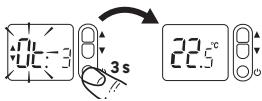
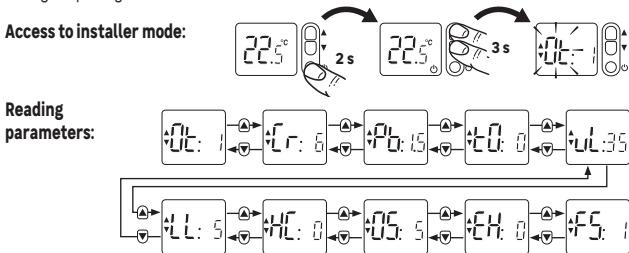
To access the installer mode of the TH20DM, press and hold one of the adjustment buttons for about 2 to 3 seconds until the screen displays the parameters in installer mode. Then navigate through the parameters (GE, Cr, Pp, ED, etc.) to reach the ED parameter corresponding to the sensor calibration. The adjustment buttons allow you to scroll through the parameters and adjust the value: if the displayed temperature is too low, increase the ED value by pressing several times; if it is too high, decrease this value.

After adjusting the ED parameter to the correct value to compensate for the measured difference (for example, from 0 to -2 if the thermostat shows 2°C too much), validate your changes by exiting the installer mode by holding the button down again for 2 seconds. The TH20DM will then return to normal operating mode with the calibration applied.

Check the effectiveness of the calibration by observing the thermostat for a few days: it should now display a temperature consistent with your reference thermometer and correctly regulate your boiler to achieve the desired thermal comfort. If the discrepancy persists, repeat the procedure by further adjusting the ED parameter until the required accuracy is achieved.

Respond (be the first)

Download the instructions for your Thermostat in PDF format for free! Find your manual TH20DM - EQUATION and take your electronic device back in hand. On this page are published all the documents necessary for the use of your device. TH20DM by EQUATION.

USER MANUAL TH20DM EQUATION

R THERMOSTAT DAMBIAINT MANUEL DIGITAL, FILAIRE. POUR CHAUIDIÈRE, INSTALLATION MURALE.
ESS TERMOSTATO DE AMBIENTE MANUAL DIGITAL, CON CABLE. PARA CALDERA DE CONTACTO SECO., INSTALYCION DE PARED.
TE REMOSTADO DE AMBIENTE MANUAL DIGITAL, COM FIO. PARA CALDEIRA, INSTALAGION DE PARDEE.
TERMOSTATO D'AMBIENTE MANUULE DIGITALE, FILARE. PER CALDAI, DA PARETE
ELIPOHIAKOS XEIPOKINTHOS EGPMOCTAETX XOPOY, ENEMYPATO. IIAEBAHTAZ, EKATAZASTAH ZTON TOXIO.

FL CYFROW REÇNY TERMOST PASKOKOWY, PRZEWOODEW DO PIEÇÖW, INSTALACZA SCIENNA.
30 TERMOSTAT MANUAL, DIGITAL, CU FIR. PENTRU BOILER, INSTALLARE PE PERETE
UAI KIMHATHNI HUI ZPOBIEN YUVNH TPEMOCTAT, DPTOPOBN. JND KOTNIIB, HACTHNIH MOHTAHX
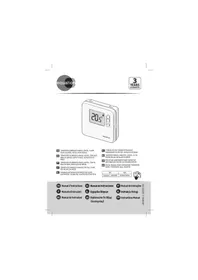
EN DIGITAL MANUAL ROOM-TEMPERATURE THERMOSTAT, WIEDR. FOR BOILERS, WALL MOUNTED.

REFEAN
TH20DM828236913276007196146

EQUATION TH20DM - 1

PexkIM BCTaHOBJIeHHJ

TEPOCTAT HANAUTOBAHNI HA 3aB0JI ynIpyABHHA3G0ABIN KOTNOJ. PEGK BCTAHAOHENII D0B8NRI 3MIHNTI 3aB0CkNI HANAUTOBAHNI, D0TPMIVOYHCb HUIEZ33AAHNEHIN 3HAHEH.

EQUATION TH20DM - PexkIM BCTaHOBJIeHHJ - 1

甲Tahnna napametpiB:

EQUATION TH20DM - PexkIM BCTaHOBJIeHHJ - 2

HanaTuBaHHnnapaMetpib::

EQUATION TH20DM - PexkIM BCTaHOBJIeHHJ - 3

The room thermostat turns the heating system on and off to obtain the desired temperature (set temperature). It detects the air temperature and compares it with the set temperature. If the room temperature is lower than the set temperature, the thermostat turns on the boiler, and turns it off when the set temperature is reached, and so on.

Energy efficiency is ensured by a self-learning TPI control algorithm, which adapts to the environment and provides tight temperature regulation with minimal energy consumption. To obtain an optimum setting, set a low temperature (18°C for example) and increase degree by degree each day to reach the temperature that suits you (comfort temperature).

The thermostat does not affect the power of the boiler, so there is no need to set a higher temperature to heat faster.

if the radiators have valves (manual or thermostatic) make sure that the radiators located in the same room as the thermostat are open.

The thermostat is compatible with modulating boilers, but with a reduction in performance.

INSTALLATION

The thermostat must be installed on a wall away from any source of heat (fireplace, radiator, sun) and drafts (window, door), at a height of 1.2m to 1.5m .

It must be connected to the inputs for a "ON/OFF" remote thermostat (T1 and T2) of a boiler, regardless of the polarity. The diagram on the label stuck in the box corresponds to the particular case of a series connection to the boiler supply. In this case, it is important to connect phase (L) to terminal 1 of the thermostat.

The installation must be carried out by a person possessing the required qualifications while respecting the national wiring standards in force.

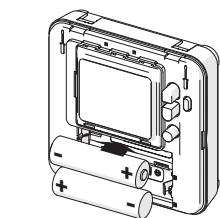
Inserting the batteries

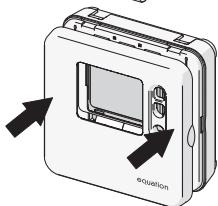
1- Insert 2 AA (LR06) 1,5V batteries in the compartment. Make sure you observe the right polarity ("+ and "-").
2- Close the cover

Important!

  • Do not let children play with batteries
  • Do not ingest batteries
  • Non-rechargeable batteries are not to be recharged;
  • Different types of batteries are not to be mixed;
  • New and used batteries are not to be mixed;
  • Batteries are to be inserted with the correct polarity;
  • Exhausted or leaking batteries are to be removed from the appliance and safely disposed of;
  • If the appliance is to be stored unused for a long period, batteries should be removed;
  • The supply terminals are not to be short-circuited.
  • The batteries must be removed from the appliance before it is scrapped.
EQUATION TH20DM - Important! - 1

EQUATION TH20DM - Important! - 2

USE

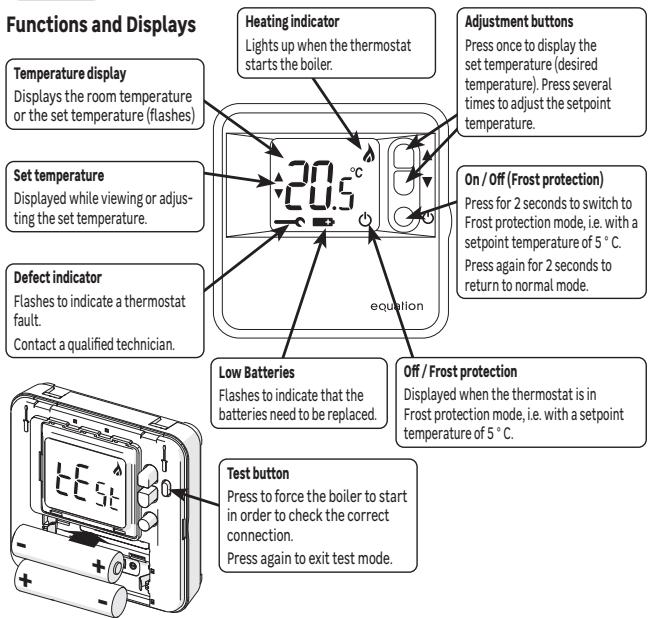
Functions and Displays

EQUATION TH20DM - Functions and Displays - 1

Installer Mode

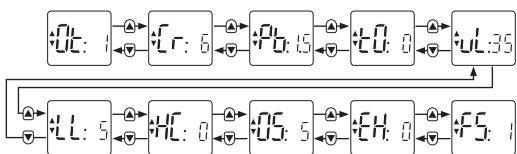
The thermostat is factory set to control a gas boiler. Installer Mode allows you to modify these factory settings respecting the above values.
EQUATION TH20DM - Installer Mode - 1

Setting parameters:

EQUATION TH20DM - Setting parameters: - 1

EQUATION TH20DM - Setting parameters: - 2

DescriptionPlage de valeursValeur d'usine
\( C_{\text{E}} \)Minimum on or off time of the boiler1,2,3,4,5 min1 min
\( C_{r} \)Number of cycles per hour3,6,9,126
\( P_{\text{S}} \)Proportional band1.5 ... 3.0°1.5°
\( E_{\text{D}} \)Probe calibration-3.0 ... +3.0°0
\( U_{\text{L}} \)Maximum set temperature21 ... 35 °C35 °C
\( L_{\text{L}} \)Minimum set temperature5 ... 21°C5 °C
\( H_{\text{E}}^{\text{C}} \)Activation of Air conditioning mode0,1 (1=Activated)0
\( F_{\text{S}}^{\text{C}} \)Temperature of frost protection mode--(Off), 5 ... 16 °C5 °C
\( E_{\text{N}} \)Electrical heating0 (<3A)/1(3A-8A)0 (<3A)
\( F_{\text{S}} \)Factory reset0/11 (reset)
ApplicationsCycles /HourMinimum ON timeParameters to be changed
Gas Boiler (<30 kW)61 minNo change
Oil Boiler - Heat pump - Pellets stove34 minParameter Ot on 4 Parameter Cr on 3
Technical data
Type of ControlIndependently mounted control for Surface mounting
Electrical protectionIP30 No protection against water ingress
CLASS II Product that does not incorporate protective earthing provision, but a double insulation as provision against electric shock
Type of Batteries2 batteries AA (LR06) 1,5 V (not supplied)
Temperature range5-35°C
ActionMicro-interrupt, Type 1.C
Rated currentRated voltage : 24-230V~ , 50-60Hz - Max rated current for Resistive load : 8A Max rated current for Inductive load : 3A
EnvironmentPollution degree = 2 (standard household conditions without conductive dust)
Regulation class (according 811/2013)Class IVRated impulse voltage2500 V
Energy efficiency gain (contribution to seasonal space heating energy efficiency)2%
Class of SoftwareClass AOvervoltage Category according IEC/EN 60730-1 II
SupplierADEO Services - 135 Rue Sadi Carnot, CS 00001, 59790 - RONCHIN - FRANCE

Warranty

The warranty does not cover problems related to improper installation, incorrect wiring or improper use.

EQUATION TH20DM - Warranty - 1

Processing waste of electronic and electric devices at life-cycle end.

This image indicates that this product must not be disposed of with unsorted home trash. A system for disposal and special processing of used electric and electronic devices, mandatory to follow, has been implemented including the right to have vendors retrieve free-of-charge used appliances upon purchase of new appliances, as well as special collection of such waste by approved organisations.

For more information on this, you can contact your store or your town hall. Proper disposal of used electric and electronic appliances ensures their adequate processing and recycling in order to avoid damage to the environment and public health as well as to preserve natural resources.


EQUATION TH20DM - Processing waste of electronic and electric devices at life-cycle end. - 1

EQUATION TH20DM - Processing waste of electronic and electric devices at life-cycle end. - 2

*Garantie 3 ans/3anos de garantia/Garantiade 3anos/ Garanzia 3 Ani / Eyuunon 3 etuw/Gwarancja 3-letnia / /Iapantia 3 pokib/Garantie 3 ani / 3-year guarantee

Made in United Kingdom - 3робноу Великобрпати!

ADEO Services - 135 Rue Sadi Carnot CS 00001 - 59790 RONCHIN - France

EQUATION TH20DM - Processing waste of electronic and electric devices at life-cycle end. - 3

TOB "Jlepya MeprHev YkpaHnA", 04201 YkpaHnA, M.KiIB, ByI. PIoJIraPHa 17A, +380 44 498 46 00.Данe пIпрЕмсТВО рпиIMаE пгетЕнЗII BiD сЮжИвачИ Bцю TObApA, a TakoJnpBoOdntb Иоу ремont, ТexИчNe I rapaHTIи He 6cIyrgObyBaHЯ TepmIn CnyK6n TObApY:5 PokIB
Manual assistant
Powered by Anthropic
Waiting for your message
Product information

Brand : EQUATION

Model : TH20DM

Category : Thermostat