
TRUSENSZ-3000 - Air purifier EDELEITZ - Free user manual and instructions
Find the device manual for free TRUSENSZ-3000 EDELEITZ in PDF.




User questions about TRUSENSZ-3000 EDELEITZ
0 question about this device. Answer the ones you know or ask your own.
Ask a new question about this device
Download the instructions for your Air purifier in PDF format for free! Find your manual TRUSENSZ-3000 - EDELEITZ and take your electronic device back in hand. On this page are published all the documents necessary for the use of your device. TRUSENSZ-3000 by EDELEITZ.
USER MANUAL TRUSENSZ-3000 EDELEITZ
Welcome to clean air with TruSens. Thank you for allowing us to join you on your journey towards wellness.
The air you breathe should be clean, no matter where you are in the room. TruSens SensorPod™, PureDirect™ Technology & DuPont™ Filtration ensure the whole room benefits from cleaner air.
SAFETY INFORMATION
PLEASE READ AND SAVE THESE INSTRUCTIONS
Unplug or disconnect the appliance from the power supply before replacing filters or UV-C emitter, or when appliance is not in use.

WARNING: To reduce the risk of fire or electric shock, do not use this fan with any solid-state speed control device.
Do not operate any purifier with a damaged cord or plug, or if the wall socket is loose. If the supply cord is damaged, it must be replaced by the manufacturer, its service agent or similarly qualified persons in order to avoid a hazard.
Do not run cord under carpeting, throw rugs, runners, or similar coverings. Do not run cord under furniture or appliances. Arrange cord away from traffic area and where it will not be tripped over.

WARNING: Skin or eye damage may result from directly viewing the light produced by the UV-C emitter in this apparatus. Unintended use of the appliance or damage to the housing may result in the escape of dangerous UV-C radiation. UV-C radiation may, even in little doses, cause harm to the eyes and skin. Always disconnect power before relamping or servicing. Replace UV-C emitter with 2415108 (for Z-2000), or 2415111 (for Z-3000), Manufactured by ACCO Brands.
- Remove all packaging, including the filter bag, before use.
- Appliances that are obviously damaged must not be operated.
- This appliance must only be connected to a wall socket outlet matching the supply plug type and rating stated on the rating plate.
- Locate air purifier near the outlet wall socket and do not use extension cords.
- This appliance can be used by children aged from 8 years and above and persons with reduced physical, sensory or mental capabilities or lack of experience and knowledge if they have been given supervision or instruction concerning use of the appliance in a safe way and understand the hazards involved.
- Children shall not play with, clean, or try to maintain the appliance.
- Replace the UV-C emitter with the model specified within this manual.
- Do not attempt to service or repair this product yourself.
- Only use the purifier and SensorPod™ with the power cable provided.
- Only clean this machine with a damp cloth, do not use solvents or bleach.
- Ensure appliance is always placed on firm level surface before operation.
- Do not block or obstruct the air intake or outlet vents.
- Do not insert fingers or other items into the air intake or outlet vents.
- When the air purifier is in standby mode the SensorPod™ is still transmitting a signal/data.
Operating Frequency
Wireless: 2462 MHz
Maximum Transmit Power (EIRP)
Wireless: 0 dBm
Antenna Gain
Wireless: 2 Dbi
Hereby, ACCO UK Ltd declares that the radio equipment types, Leitz TruSens Air Purifier Z-2000/Z-3000 are in compliance with Directive 2014/53/EU.
The full text of the EU declaration of conformity is available at the following internet address: https://declarations.accobbrands.com/.
Waste Electrical and Electronic Equipment (WEEE)
At the end of its useful life, your product is considered to be WEEE. As such, it is important to note that: WEEE is not to be disposed of as unsorted municipal waste. It is to be collected separately such that it can be disassembled so its components and materials can be recycled, reused, and recovered (burned for energy content in the production of electricity).
Public collection points have been set up by municipalities for the collection of WEEE, free of charge to you. Please return your WEEE to the collection facility nearest your home or office.
If you have difficulty locating a collection facility, the retailer that sold you the product should accept your WEEE. If you are no longer in contact with your retailer, please contact ACCO for assistance with this matter. Recycling of WEEE is geared toward protecting the environment, protecting human health, preserving raw materials, improving sustainable development, and ensuring a better supply of commodities in the European Union. This will be achieved by retrieving valuable secondary raw materials and reducing the disposal of waste. You can contribute to the success of these goals by returning your WEEE to a collection facility.
Your product is marked with the WEEE symbol (wheelie bin with an X through it). This symbol is to inform you that the WEEE is not to be disposed of as unsorted municipal waste
Leitz TruSens air purifiers also come equipped with a UV-C emitter. Upon replacement of this item (during the lifetime of the product), these must also be returned and disposed of at your local WEEE collection facility.
Further information and installation guides / videos for the UV-C emitter can be found at www.leitz.com
FEATURE HIGHLIGHTS

SensorPodTM
Remote air quality monitor that ensures cleaner air, right where you need it.

PureDirect™ Technology
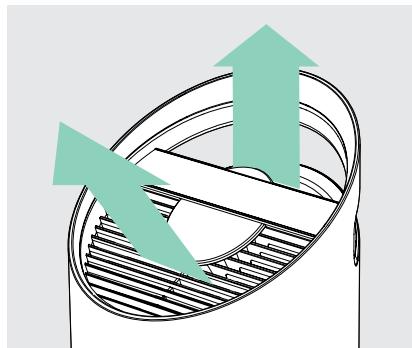
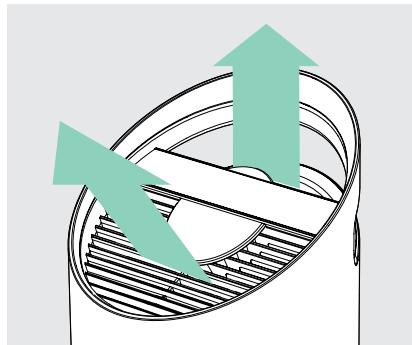
Independent lab testing confirms that two airflow streams are better than one, moving air effectively and more comfortably throughout the room.

Informs and Adapts
Colour-coded illuminated ring provides additional information by communicating air quality in real-time.

360^ Purification
DuPont™ HEPA filter captures pollutants and VOC gases/ odours from all directions. UV light kills germs and bacteria that can get trapped in the filter.

Thoughtful Execution
Exceptional functionality wrapped in a contemporary design that fits any environment.
PRODUCT OVERVIEW
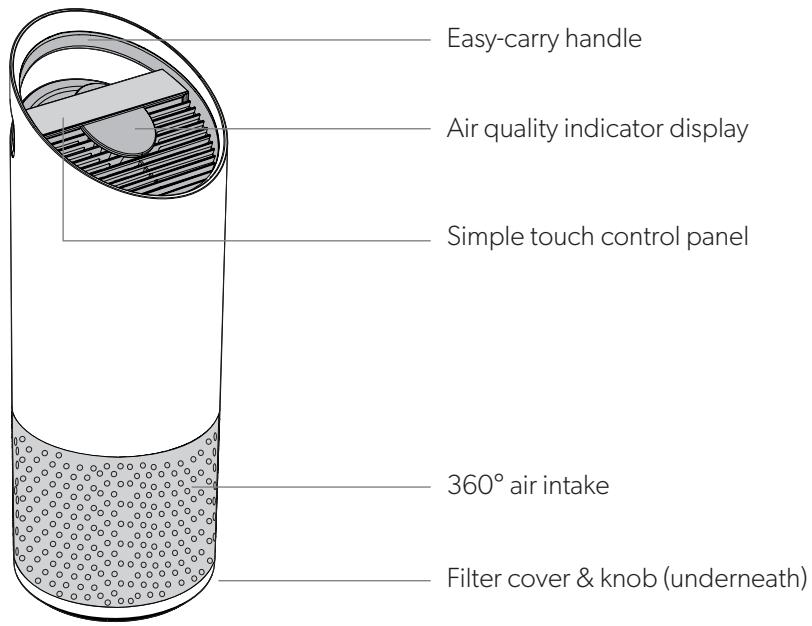
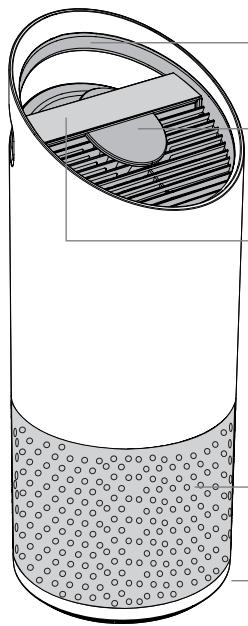
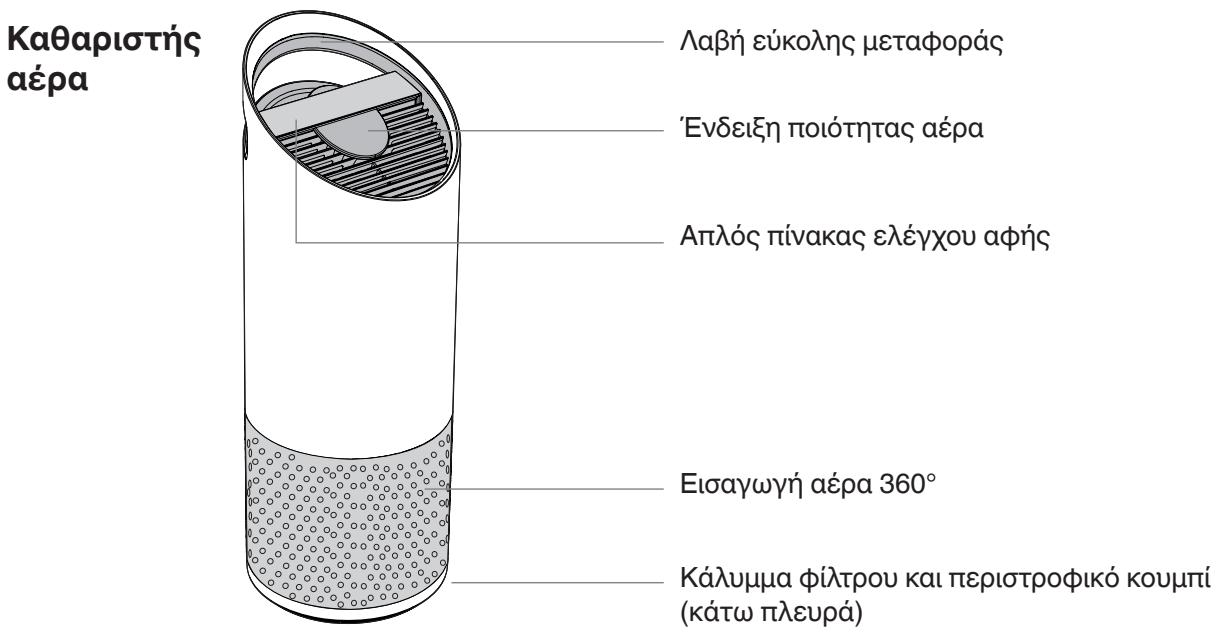
Air Purifier
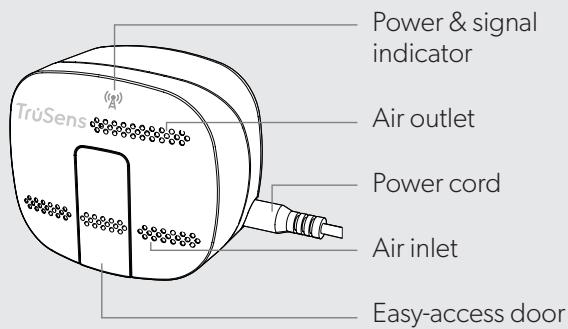
SensorPod™
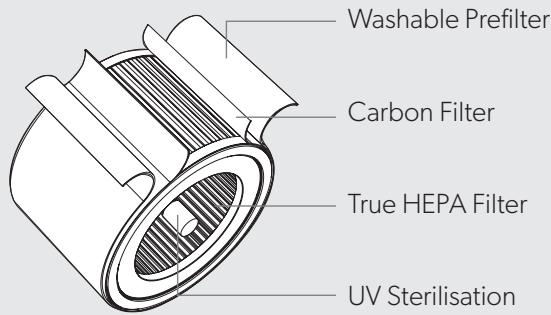
Filter & Ultraviolet Sterilisation
GETTING STARTED

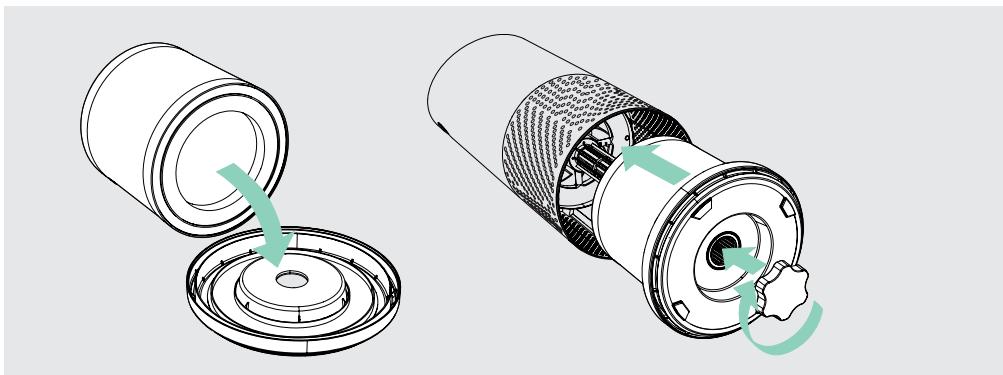
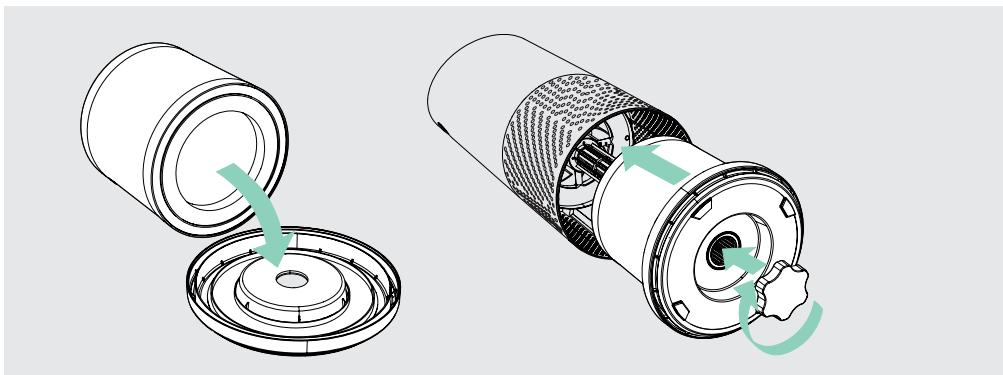
1. Remove plastic bag from filter
Unscrew the bottom cover and remove the plastic bag from the filter.
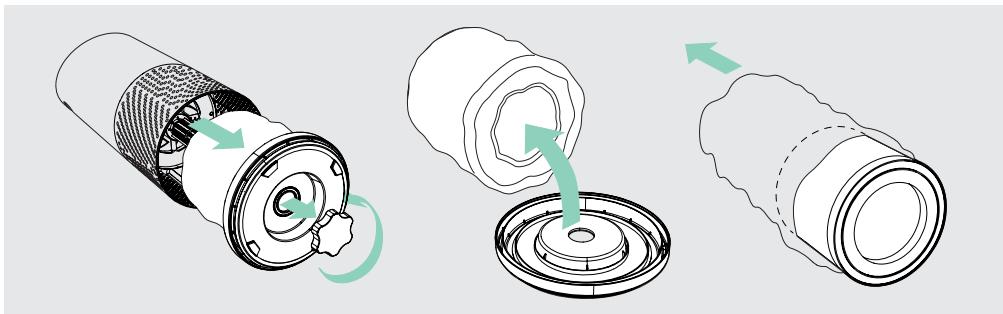
2. Re-attach filter
Secure filter on the bottom cover and replace inside the purifier.
3. Setup
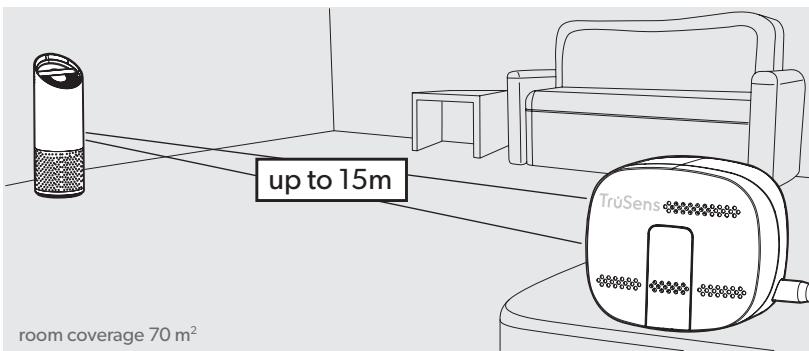
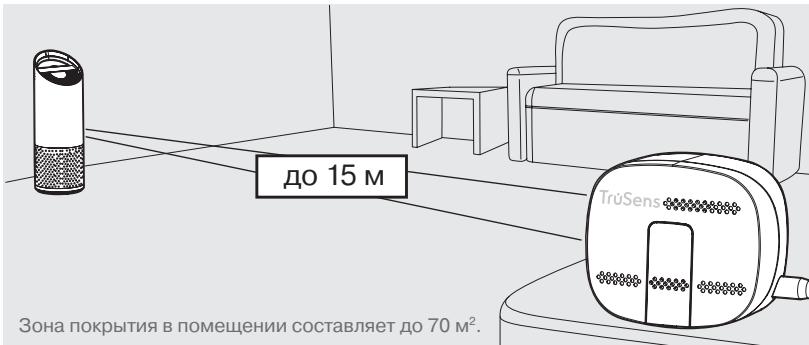
Plug-in your SensorPod™, and place upright on tabletop or counter across the room, within line of sight of the purifier.
Plug-in your air purifier unit and power on. Place the purifier on a flat surface, free from obstructions.
Signal strength may vary by location. In the rare occasion that it doesn't work – see page 18.
4. Start living with cleaner air!
The purifier will automatically adjust fan speeds based on the air quality readings from SensorPod, and proprietary PureDirect™ technology will deliver purified air throughout the room!
CONTROL PANEL


Power Button

Fan Speed Settings
Select fan speed or AUTO mode. In AUTO mode, purifier automatically adjusts fan speed based on air quality readings from SensorPod™.
(AUTO mode only available when purifier is paired with SensorPod and receiving signal)

Dimmer Mode
Display illumination turns off – for use while sleeping – without sacrificing the effectiveness of the purifier. Simply press the button again to bring back all display features.

Timer Mode
Purifier will automatically turn off after 2, 4, 8, or 12 hours. To cancel this countdown, simply press button until no timer setting is displayed.

UV Mode
UV bulb within the purifier's filter chamber is on when the symbol is white. The symbol will glow red when it is time to replace the UV bulb.
(See page 15 for replacement instructions)

Filter and UV Indicator Reset
HEPA, Carbon and UV indicators glow red when it is time for each to be replaced.
When 1 indicator is on, simply hold Reset button for 3 seconds to reset that indicator. When 2+ indicators are on, tap the Reset button to select the correct indicator (selected indicator will blink) before holding 3 seconds to reset that indicator.
(See pages 13-15 for replacement instructions. Follow above Reset button instructions after replacing filter.)
AIR QUALITY DISPLAY
Real-time Feedback
The revolutionary SensorPod™ evaluates the condition of your air by measuring both small (PM2.5) and larger (PM10) particulate matter. It calculates the overall air quality using a proprietary algorithm that is reactive to genuine increases in pollutants without overreacting to someone entering the room or settling into the couch.
The illuminated, colour-coded display communicates good, moderate or poor air quality and a numeric value provides a greater level of detail.
In AUTO mode, the purifier automatically adjusts the fan speed in response to these air quality readings.
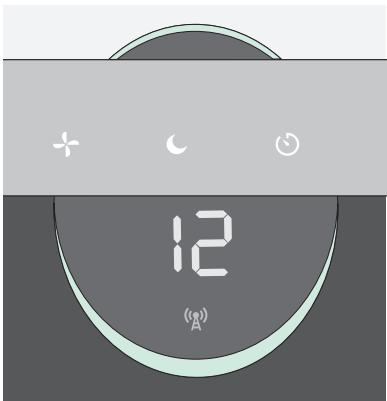
GOOD
BLUE | 0 - 50
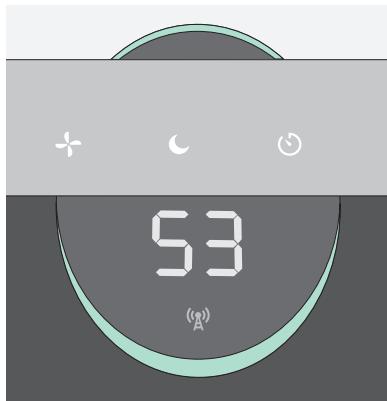
MODERATE
YELLOW | 50 - 100
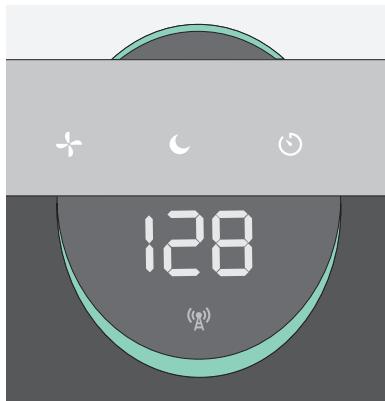
POOR
RED | 100 - 500
SPECIFICATIONS
| Air Inlet | 360° |
| Air changed 2 times per hr | 70 m² |
| Air Delivery Type | PureDirect™ |
| Sensor | SensorPod™, works up to 15 m from purifier |
| Fan Speed Settings | Whisper, 1, 2, 3, Turbo |
| Purification Levels | Washable Prefilter, Carbon, True HEPA, UV |
| Timer Settings | 2, 4, 8, 12 hr |
| Filter Change Indicators | Carbon, HEPA, UV |
| Noise | 32 - 66 dB |
| Dimensions | 263 x 263 x 726 mm |
| Weight | 5.7 kg |
| Motor Type | DC motor |
| Power Requirements | 220-240v 50/60H 0.5A |
| Power Consumption | 68 W |
| Warranty | 2 years |
Replacement Filters & UV Bulb
| 3-in-1 HEPA drum filter | 2415110 |
| Carbon filter (3-pack) | 2415109 |
| UV Bulb | 2415111 |
CARE & MAINTENANCE
Accessing the filter chamber
- Always power off the purifier by pressing the Power Button and unplugging the power cord.
- Gently place the unit on its side on the floor so that the filter chamber cover and knob are exposed.
- Turn the knob counterclockwise and remove the filter cover and 360^ HEPA filter drum (Fig. A).
REPLACING HEPA FILTER
- The HEPA indicator will glow red when it is time to change the entire HEPA drum filter.
- Gently pull the HEPA drum filter away from its place secured to the filter cover (Fig. B).
- Secure the replacement HEPA filter onto the filter cover (Fig. C).
- Gently replace the filter cover with filter drum into the filter chamber and onto the threading, and turn the knob clockwise until the knob and filter chamber cover are securely tightened (Fig. D).
- Plug-in and power on your purifier, and hold the Reset button until the red HEPA indicator turns off.
Note: HEPA drum filter (on page 12) will include 3 layers: Washable, Prefilter, Carbon and HEPA
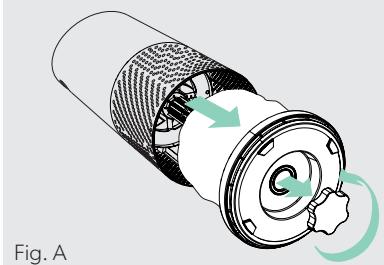
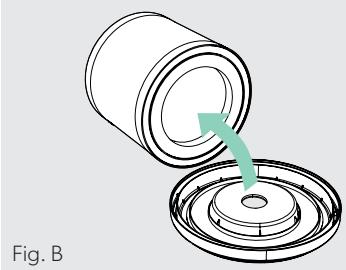
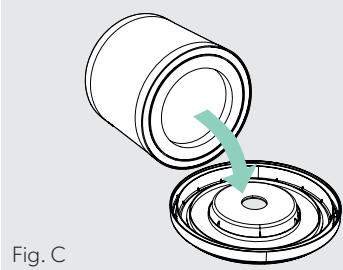
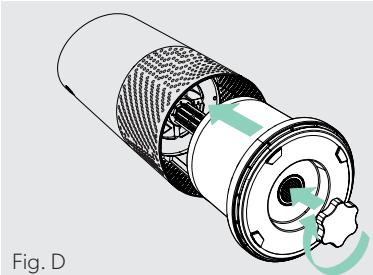
Fig. D
REPLACING CARBON FILTER
- The Carbon indicator will glow red when it is time to replace the Carbon layer.
- Gently peel away the Prefilter from the fastener strips (Fig. E).
- Gently peel away the used Carbon layer from the fastener strips (Fig. F).
- Wrap a new Carbon layer around the filter drum and attach to the same fastener strips (Fig. G).
- Replace the Prefilter by wrapping it around the Carbon layer and attach to the fastener strips (Fig. H).
- Once the purifier is powered-on, hold the Reset button until the red Carbon indicator turns off.
Note: Carbon filter 3-pack (on page 12) will cover 3 Carbon changes between replacing the entire HEPA drum filter assembly (on page 13).
WASHING THE PREFILTER
- We recommend that you visually inspect the Prefilter every month, and clean as needed. At minimum, you should hand wash the Prefilter every time you change the Carbon filter.
- Gently peel away the Washable Prefilter from the fastener strips (Fig. E).
- Gently rinse with running water – allow Prefilter to air dry before re-installing.
- Replace the Prefilter by wrapping it around the filter drum and attach to the fastener strips (Fig. H).
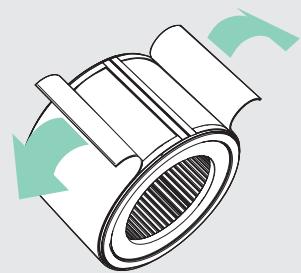
Fig. E
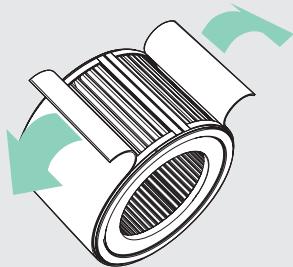
Fig. F
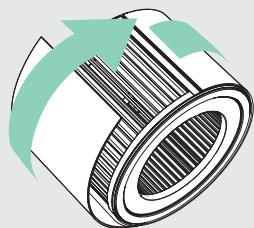
Fig. G
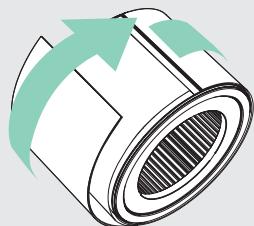
Fig. H
REPLACING UV BULB
- The indicator will glow red when it is time to replace the UV bulb.
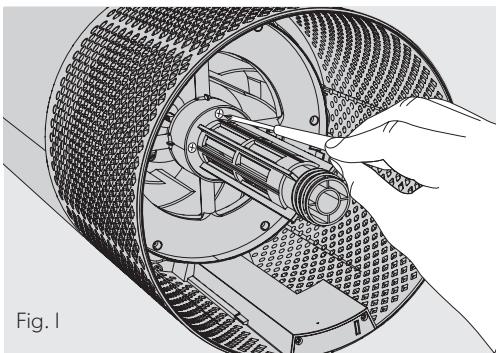
- Remove HEPA filter drum (Fig. A), and use a screwdriver to remove the 4 screws securing the UV housing (Fig. I).
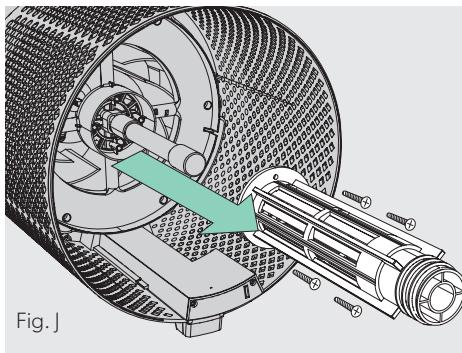
-
Gently remove the UV housing (Fig. J).
-
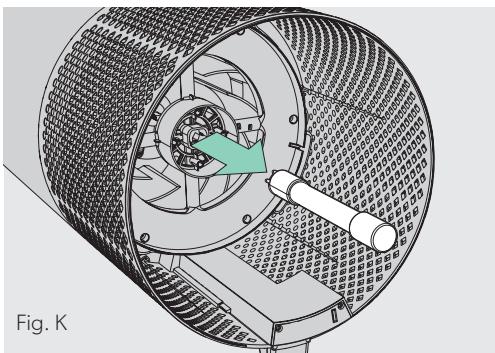
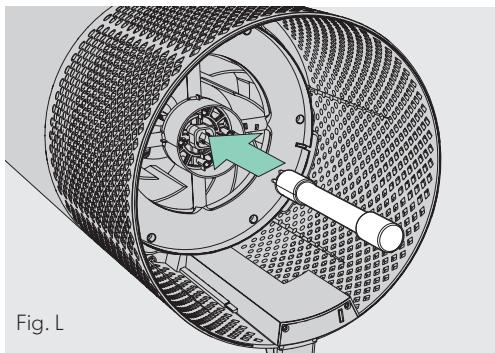
Your replacement UV bulb (on page 12) will plug directly into the same socket (Fig. L).
- Replace the UV housing and use a screwdriver to tighten the fastening screws.
-
Once the purifier is powered-on, hold the Reset button until the indicator turns white.
-
Disconnect the UV bulb from the socket within the purifier (Fig. K).
Note: Upon replacement of the UV-C emitter please dispose of at your local WEEE collection facility.
CLEANING THE SENSORPOD
Cleaning the air quality sensor
The SensorPod™ uses an infrared light to detect particulate matter, so it is important that you clean the viewing chamber every 1-2 months to remove any dust or particles that may affect the accuracy of the sensor's readings.
- Turn-off the SensorPod by unplugging the power cord.
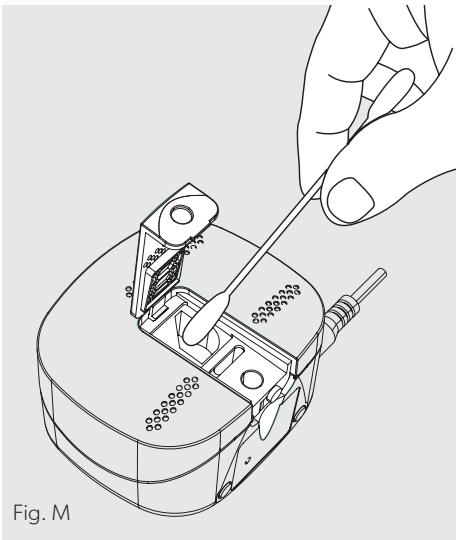
- Open the easy-access door on the front side by pulling the door up at a 90^ angle.
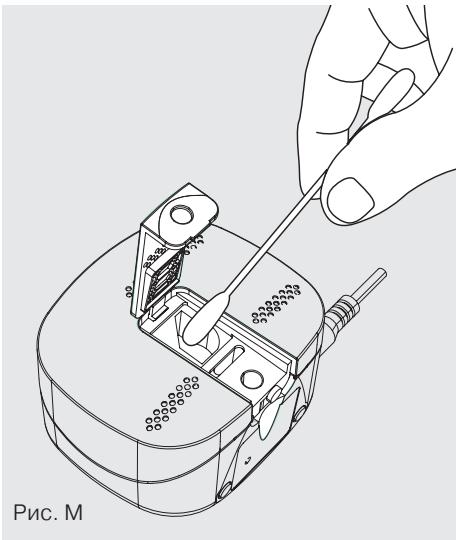
- Use a damp cotton swab to wipe the lens and intake area of the dust sensor (Fig. M).
- Use a dry cotton swab to wipe away any remaining moisture.
- Close the cover by rotating the door back down and sliding it back into place until you hear a click.
FAQ & TROUBLESHOOTING
| Where do I place the SensorPod™? | Anywhere you want to measure the air quality within the room! For optimal results, place the SensorPod™ up to 15 m away from the air purifier on a counter or table, within line of sight of the purifier. In Auto Mode, the purifier will work to distribute clean air until the SensorPod reads an acceptable level of air quality. |
| How often do I need to change the filters? | That's easy! The purifier's replacement indicators will notify you when it is time to replace the Carbon or HEPA filters, or the UV bulb. Plan on replacing the Carbon every 3-4 months, HEPA every 12-15 months, and UV bulb every 1-3 years. |
| How often do I need to wash the Prefilter? | The Prefilter captures larger particles and preserves the efficiency of the other filters, so we recommend that you visually inspect the prefilter every month and wash as needed. Another good habit is to wash the prefilter every time you replace the Carbon filter. |
| How often do I need to clean the dust sensor within SensorPod™? | For the most accurate measurement of your air quality, we'd recommend you clean the surface of the dust sensor every 1-2 months. |
| Purifier won't turn on. | Check that the power cord is connected securely to both the wall outlet and the purifier. Check if there is a power outage in the outlet by trying a nearby light or device, or by trying a working device in the same outlet. Check that the HEPA filter is fitted properly into filter chamber. Please contact us if you're still having a problem! (page 19) |
FAQ & TROUBLESHOOTING
| Purifier won’t go into Auto Mode. OR Air quality indicators are off. OR Purifier’s sensor signal indicator is blinking. | First, check that the SensorPod is plugged-in and that its light is solid. Next, check that the SensorPod is within range of the purifier (up to 15m). If both are true and the connection is still failing, see below instructions on repairing the SensorPod’s connection. |
| I’ve lost my SensorPod™! | Don’t worry! Please contact our customer support team and you can order a replacement SensorPod. Follow the easy pairing instructions below to pair your replacement SensorPod with your existing air purifier! |
Pairing SensorPod™ and Purifier
The SensorPod communicates with the purifier using radio frequency signals, and will be paired on the production line and ready for use when you open the box. In the rare event that the signal is interrupted, the purifier's sensor indicator light (g) will blink. You can repair the connection in just a few easy steps.
- Unplug the SensorPod.
- HOLD the Power Button on the purifier for 3 seconds, when you should hear two chimes.
-
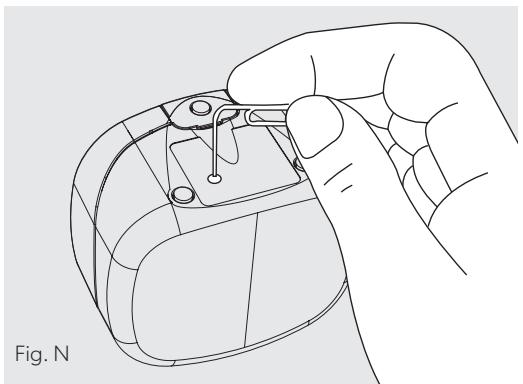
Plug-in the SensorPod and use an item with a small point (paper clip) to press and HOLD the pairing button underneath the SensorPod for 5-7 seconds (Fig. N).
-
The connection is established when the purifier's sensor indicator light is lit with no blinking, and the air quality indicators turn on.
GUARANTEE
Operation of this machine is guaranteed for two years from date of purchase, subject to normal use. Within the guarantee period, ACCO will at its own discretion either repair or replace the defective machine free of charge. Defects due to misuse or use for inappropriate purposes are not covered under the guarantee. Proof of date of purchase will be required. Repairs or alterations made by persons not authorized by ACCO will invalidate the guarantee. It is our aim to ensure that our products perform to the specifications stated. This guarantee does not affect the legal rights which consumers have under applicable national legislation governing the sale of goods.
SUPPORT
Thank you for welcoming TruSens™ into your home. Our customers are at the heart of what we do, and we strive to design products that fit your lifestyle. If you have any questions or feedback, please reach out!
Visit our website at www.leitz.com/trusens
Email us at service.uk@acco.com
Call us at 0800 279 5102
To register and activate your warranty go to www.leitz.com/register
TruSens
Purification 360^
REEMPLACEMENT DE LA LAMPE UV
https://declarations.accobbrands.com/.
Afgedankte elektrische en elektronische apparatuur (AEEA)
Bezoek once website op www.leitz.com/trusens
(EIRP) Wireless: 0 dBm
Guadagno antenna
Wireless: 2 Dbi
ADVERTENCIA: Mirar directamente a la luz producida por el emisor de UV-C de este aparato pueda causar lesiones oculares o cutáneas. El uso inadequado del aparato o los días en su carcasaSEOSEOSEOSEOSEOSEOSEOSEOSEOSEOSEOSEOSEOSEOSEOSEOSEOSEOSEOSEOSEOSEOSEOSEOSEOSEOSEOSEOSEOSEOSEOSEOSEOSEOSEOSEOSEOSEOSEOSEOSEOSEOSEOSEOSEOSEOSEOSEOSEOSEOSEOSEOSEOSEOSEOSEOSEOSEOSEOSEOSEOSEOSEOSEOSEOSEOSEOSEOSEOSEOSEOSEOSEOSEOSEOSEOSEOSEOSEOSEOSEOSEOSEOSEOSEOSEOSEOSEOSEOSEOSEOSEOSEOSEOSEOSEOSEOSEOSEOSEO SEOEO SEOEO SEOEO SEOEO SEOEO SEOEO SEOEO SEOEO SEOEO SEOEO SEOEO SEOEO SEOEO SEOEO SEOEO SEOEO SEOEO SEOEO SEOEO SEOEO SEOEO SEOEO SEOEO SEOEO SEOEO SEOEO SEOEO SEOEO SEOEO SEOEO SEOEO SEOEO SEOEO SEOEO SEOEO SEOEO SEOEO SEOEO SEOEO SEOEO SEOEO SEOEO SEOEO SEOEO SEOEO SEOEO SEOEO SEOEO SEOEO SEOEO SEOEQ SEOEO SEOEQ SEOEQ
UDSKIFTNING AF UV-PAEREN
https://declarations.accobrand.com/.
USEIN KYSYTYT KYSMYKSET JA VIANMÄRITYS
USEIN KYSYTYT KYSMYKSET JA VIANMÄRITYS
TYTO POKNY SI PRECTÉTE A USCHOVEJTE.
https://declarations.accobbrands.com/.
CASTÉ DOTAZY A RESENI PROBLEMU
CASTÉ DOTAZY A RESENI PROBLEMU
https://declarations.accobbrands.com/
Odpad z elektrickych a elektronickych zariadeni (OEEZ)
https://declarations.accobbrands.com/
(EIRP) Wireless: 0 dBm
Cástigul antenei
Wireless: 2 Dbi
Prin prezenta, ACCO UK Ltd declares a modele de echipamente radio Leitz TruSens Air Purifier Z-2000/Z-3000 respecta cerintele Directivei 2014/53/UE.
https://declarations.accobbrands.com/.
Deşeuridechipamenteelectriciscelectronice (DEEE)
Feedback in temp real
C NOJIHbIM TEKCTOM DeKlapaunu COOTBeTCTBnA EC MoXHo 03HaKOMiTbCS Ha cJeNyUoIeM caITe: https://declarations.accobbrands.com/.
Ytuiu3aun OTOXoDOb 3JeKtpnueckoro n 3JeKtpoHnHO o6OpyDobAHn (WEEE)
Iocne 3aBepseHnca cPoka 3KcPnyatau n BAsI npOyKT npInHaJLexNt K OTXoDAM 3JIeKTPnuCeCKOrOn 3JIeKTPoHHORO o6OpUdoBaHnra (WEEE).
CoOTBcETCTBeHHO, HeOBxODIMo pInHrTb BO BHIMaHHe cJeDuOuSe.
OTxoDbI 3JIeKTPnuCeCKOrO n 3JIeKTPoHHORO
obOpUdoBaHnra (WEEE) He DOLJHbI yTINIm3NuPoBaTbcra KaK HecOpTnpoBaHHbIe 6bITObIe OTxOdbI. OHN IOnJXhbl CObIPaTbC rOTdJIbHO, YTObbl INX MOXHO 6blIO pa3O6paTb n IOBTopHO nepepaBoTaTb, IOBTopHO NcONJb3OBA Tb INI peKyupeRpuPoBaTb INX KOMNoHEHTbl IMATEpnaJIbI (B KaueCTBE TOPlINBa IДЯ PerEhepaZIM 3HeprnI prn IpnOn3BOJCTBe 3JIeKTPnuCeCTBa).
MeCTbIe OprAhbl Blnactn CoZdaIIN o6UceTBeHHbIe nyHKTbI npInema yTINlbCsbIpBЯ dIra C6opA OTXoDDB3JIeKTPnuCeCKOrO n 3JIeKTPoHHORO o6OpUdoBaHnra
WEEE. YcnyrTaKnx PnykTOB 6ecnPaTHbI Dnla CdaIOxNx.
IoxaJyIcTa,IOCTaBbTe OTOxObl 3JeKtpnueeCKOrO IN 3JeKtpoHnHO o6OpUdoBaHnra (WEEE) B 6bnXauiN K BaShEmy IOMy IIN OΦiCy NpHK TpNiEMa yTnJIbCbIpBja. Ipn BV03HnKHOBeHmN TpyDnOCTe C BblrCHHeHEm MeCTOnHaxOxJdeHn PpiEMa yTnJIbCbIpBja, IpoDaBeU, IpoDaBwIn Bam yCTPoIcTBO, DOLXeH IpnHtB OTxObl 3JeKtpnueeCKOrO IN 3JeKtpoHnHO o6OpUdoBaHnra (WEEE).
Pn OTCyTCTBnC B83n C pO3HnUHbIM npOaBcOM npocm BaC CB83aTbcra C ACCO nIpyuyeHn NOMOUs BpeSeHnn 3TOrO BOnpoca.
OuNTka BO3dyxa Ha 360^
ИзгOTOBЛЕньи NO TextHOLOrnHEPA-ФиЛьТР OчицаET Bo3dYx OT 3aГряЗнEHи I ra3OB/3aPaxOB, co3ДaBaEmbIX LOC, BO BCex HapRaBJIeHnIx. ДЯ унHTOJOKeHnI ПОпАБИХВФиЛьТР MmKpO6OB И Бakтepи ИСПОЛьЗуETсЯ уЛьТраФиОЛTeВЯ Лamna.

PpOydMaHHeNcNoJIeHne
NCKJIIOHTeJIbHnaФyHKUHOHaJIbHOCTb IN COBpeMeHHa KOHCTpyKUHA, KOtOpbIe ydauHO BnIShyTcB NIO6Ou INHTepbpE.
OB3OP YCTPOICTBA
OuInCTnTeJIb B03dUxa
BbIpyckHoi BO3dYX0BOi
LHyp nHTaHn
BnyckhoI BO3DyXOBOJ
Дверцадяудб HorO IOCTyna
- YctaHOBNTe HJIbTp Ha MeCTO
3aKpeHnTe ΦnIbTp Ha HnXHeN KpbIuKe I NOMeCTnTe erO o6paTHo BHyTpb ONUCTnTeJIa.
3. Hacrpoika
ПоdkлioчиTe Kэлкгпсеско сети дистанционнь монитор каесТВа BO3duxha SensorPod.
Пocstabte moHITop SensorPod ha cToI nIi nHyIO pa6OuyIO NOBepxHocTb B npedeJax npramoBvIMMOCTn OChNTeJIa, Ho Na dpyROM KOHcE NOMEuHEnIA.
ПоdkлioчиTe OCHNTeJIb Kэлкгпсеско сети И BKlIOчNTe NITaHne.
Пocstabte OCHNTeJIb Ha pOBHyIO NOBepxHocTb, He IMeIoUyIO nppeTCTBni
- B MECTe, rIe BO3dUx MOKeT CBO6OJNo NOCTyNaTb B OUnCTnTeJb CO BCEx CTOpOH
-ИЗБЕГАЙТЕМЕСТ,ВКOTOPБИХHAHOДNTСЯПОCTЕЛьHоEбЕиЗАнавeCKN,a TaKKe ИСТОЧНИКУТЕПЛА ИЛВЛАГИ.
YpOBeHb CnHaJa MOKeT BapBnPoBaTbcra B 3aBnCmOCTn OT MeCTOnoJIoXeHna. B peKoN cIyauu, KOrDa yCTpoiCTBO He pa6oTaET, cm. CTp. 290.
4. NaHnTe Xntb C OunIeHHbIM BO3dYXOM!
OuHCTNTeIb aBtOMaTnueckn peRyInpye TaCToTy BpaIeHna BEHTNJrTOPOB B 3aBNCIMOCTN OT noka3aHn KaecCTBa BO3dyxa, NocTyNaIOUxN O T MOHITopa SensorPod, a blaarap yHnKaJIbHO TexHJOrn PureDirect™ BCE nomeueHne 6yJeT 3aONHeNo OOnIeHHbIM BO3dYXOM!

Z-3000


UV
Reset

KhoNka nHTaHn

HacrpoKn cKopocTn BeHTnJIaTopa
BbIbePnte cKOpocTb BeHTnJIaTopa nIaN aBTOMaTnueckn peXIM (AUTO).
B aBTOMaTnueckom pejKIMe oOncNTeJIb
aBTOMaTnueckn peIyInpyeT qAcTOTy BpaIeHnA
BEHTINJATOpOB B 3aBNCIMOCtN OT NOKa3aHn KaYeCTBa
BO3dUxa, NoCTyNaIOuIXoT MOHITopa SensorPod.
(ABOMATUeCKn peKIM IOCTyPeH, TOLbKO KOrDa ONUCTIeJI COPIJKeH C MOHITOpM SensorPod n IONYaET OT HERO CUNHaJ.)

Houho npekim
TEXHUNCHECKNE XAPAKTEPNUCTUKN
OuInCTKa DaTnKa KaueCTBa BO3nyxA
MoHITop SensorPodTM BbIIpJIHЯET O6hApJxHeHne
B3BeWeHHbIX B BO3dUxE TBeRdbIX c NOMOuBIO
INΦpaKpacHOrO n3IyueHnY, pO3TOMy BaXHo KaJbIe 1-2
MEcraZa OUYaTb KaMepy DaTChKa PbIi NT TBePdbIX qAcTnC
III PbIi, KOTOpbIe MOrY OTPnCaTeIbHO Cka3aTbCra Ha
TOUHOCTN POKa3AHn 3TOFO dATnKa.
1. OTKJIIOUHTe 3JIeKTPoPNTaHne MOHITOPa SensorPod, OTCOEДИHIV B IHHyp ПИТAHЯ.
2.ОткpoиTe ДверуДя удобного дocтуна на пeredнецtopoHe,поннЯВ ee по углom 90°.
3. C ПOMOьIO ВlaJxHоВ BaTHOи пIoOуКи BbITpIte ЛИнЗу И BXODHyIOобlaactьдaTчИкaNыЛи (pnc.M).
4. YdaJInte OCTaTOK BlaIgN C NOMOuC cyXoB BaTHoN paLoUcKn.
5. 3aKpoIte KpbIuKy, ONyCTINb IN 3aIbNHyB ee Ha MeCTO Do UeJIyka.
YACTO 3AДАВАБЕ BОПСБИ OTBETБI HINX,
ПОИСК И YYSTРАЕНЕ HENСПAPВHOCTЕN
https://declarations.accobrand.com/
1
Pnpovontik uIooioiOn
Exaepetikn aitoupyikotnta kai ouyxpovn oxediaon nou taipiae i o eoioodnote npiabalov.
ENIISKONHESH IPOIONTO

SensorPod™