
ASPI-ROBOTW10 - Robot vacuum DREAME - Free user manual and instructions
Find the device manual for free ASPI-ROBOTW10 DREAME in PDF.



| Product Type | Robot Vacuum Mop |
| Brand | Dreame |
| Model | ASPI-ROBOTW10 (RLS5C) |
| Power Supply | 100-240 V ~ 50-60 Hz, 1.5 A (base) |
| Battery | Lithium-ion 6400 mAh (nominal) |
| Charging Time | Approx. 6 hours |
| Rated Power | 55 W |
| Rated Voltage | 14.4 V |
| Wi-Fi Connectivity | IEEE 802.11b/g/n 2.4 GHz |
| Radio Frequencies | 2400-2483.5 MHz (Wi-Fi), 433.92 MHz (SRD) |
| Main Functions | Vacuuming, mopping, auto-return, mapping, scheduling, control via Mi Home/Xiaomi Home app |
| Self-Cleaning Mop | Yes (auto-wash base) |
| Mop Drying | Yes (base) |
| Laser Distance Sensor | Class 1 (IEC 60825-1:2014) |
| Child Safety | Key lock |
| Recommended Maintenance | Clean dust bin and filter every 2 weeks; main brush and side brush every 2 weeks; water tanks and mop plate every 2 weeks; dry completely before reinstallation |
| Replaceable Parts | Filter (3-6 months), main brush (6-12 months), side brush (3-6 months), mop cloth (1-3 months) |
| Operating Temperature | 0 °C to 40 °C |
| OS Compatibility | Android 4.4 or iOS 10.0 and later |
| Package Contents | Robot, auto-wash base, side brush, power cable, mop cloth (x2), cleaning tool, user manual |
Frequently Asked Questions - ASPI-ROBOTW10 DREAME
User questions about ASPI-ROBOTW10 DREAME
0 question about this device. Answer the ones you know or ask your own.
Ask a new question about this device
Download the instructions for your Robot vacuum in PDF format for free! Find your manual ASPI-ROBOTW10 - DREAME and take your electronic device back in hand. On this page are published all the documents necessary for the use of your device. ASPI-ROBOTW10 by DREAME.
USER MANUAL ASPI-ROBOTW10 DREAME
mnn nn n nn nn "追觅" nn nn nn nn nn nn Dreame Technology Co., Ltd. and its subsidiaries nn nn nn nn nn Dreame
nnnnnnnnnnnnnnnnnnnnnnnnnnnnnnnnnnnnnnnnnnnnnnnnnnnnnnnnnnnnnnnnnnnnnnnnnnnnnnnnnnnnnnnnnnnnnnn
a 150000000000000000000000000000000000000000000000
.



For more information & after-sales support, contact us via
aftersales@dreame.tech / https://global.dreametech.com
Manufactured by: Drame Trading (Tianjin) Co., Ltd.
Made in China
RLS5C-EU-A03
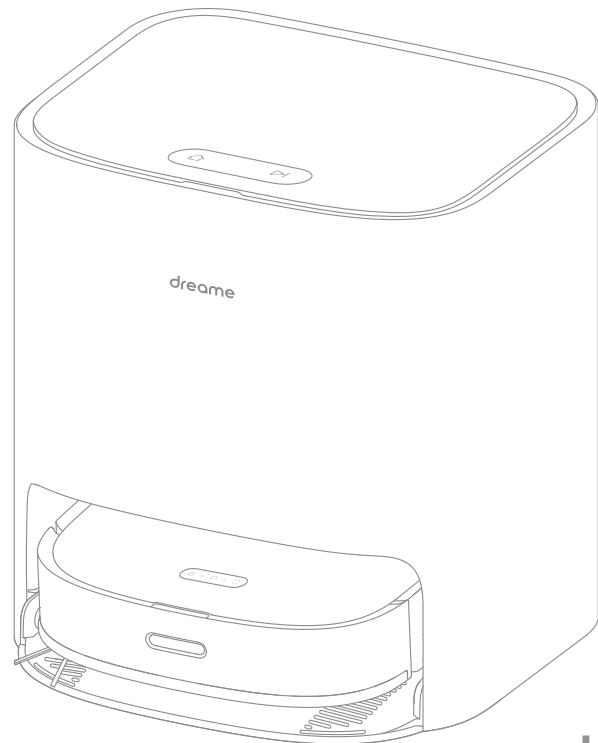
DreameBot W10
Self-Cleaning Robot Vacuum and Mop
User Manual
dreame
The illustrations in this manual are for reference only. Please refer to the actual product.
Contents
EN User Manual 1
DE Benutzerhandbuch 27
FR Manuel d'utilisation 56
IT Manuale utente 81
ES Manual de usuario 107
RU RykoBoDCTBO POnb3OBaTeJIa 134
PL Instrukcja obstugi 161
HE 199
SA 111
Safety Information
To avoid electric shock, fire or injury caused by improper use of the appliance, please read the user manual carefully before using the appliance and keep it for future reference.
Usage Restrictions
- This appliance can be used by children aged from 8 years and above and persons with reduced physical, sensory or mental capabilities or lack of experience and knowledge if they have been given supervision or instruction concerning use of the appliance in a safe way and understand the hazards involved.
- Clear the area to be cleaned. Children shall not play with this product. Ensure children and pets are kept at a safe distance from the robot while it is operating.
· This product is for floor cleaning in a home environment only. Do not use it outdoors, on non-floor surfaces, or in a commercial or industrial setting. - Ensure that the appliance operates correctly in a proper environment. Otherwise, do not use the appliance.
- If the power cord is damaged, it must be replaced by a special cord or assembly available from the manufacturer or its service agent.
- Do not use the robot in an area suspended above ground level without a protective barrier.
- Do not place the robot upside down. Do not use the LDS cover, robot cover, or bumper as a handle for the robot.
- Do not use the robot at an ambient temperature above 40^ C or below 0^ C or on a floor with liquids or sticky substances.
- Pick up any cables from the floor before using the robot to prevent it from dragging them while cleaning.
EN Safety Information
Usage Restrictions
- Remove fragile or small items from the floor to prevent the robot from bumping into and damaging them.
- Keep hair, fingers, and other body parts away from the suction opening of the robots.
- Keep the cleaning tool out of reach of children.
- Do not operate the appliance in a room where an infant or child is sleeping.
- Do not place children, pets, or any item on top of the robot regardless of whether it is stationary or moving.
- Do not use the robot to clean any burning objects. Do not use the robot to pick up flammable or combustible liquids, corrosive gases, or undiluted acids or solvents.
- Do not vacuum hard or sharp objects. Do not use the appliance to pick up objects such as stones, large pieces of paper or any item that may clog the appliance.
- Please turn off and unplug the appliance before cleaning and maintenance.
· Do not use a wet cloth to wipe or any liquid to rinse the robot and base. Washable parts must be dried completely before installing and using them. - Please use this product in accordance with the instructions in the User Manual. Users are responsible for any loss or damage that arise from improper use of this product.
Safety Information
Batteries and Charging
- Do not use any third-party battery or self-wash base. Use only with RCS3 supply unit.
- Do not attempt to disassemble, repair, or modify the battery or self-wash base on your own.
- Do not place the self-wash base near a heat source.
- Do not use a wet cloth or wet hands to wipe or clean the base's charging contacts.
- Do not improperly dispose of old batteries. Unneeded batteries should be discarded at an appropriate recycling facility.
- If the power cord becomes damaged or broken, stop using it immediately and contact after-sales service.
- Make sure the robot is turned off when being transported and kept in its original packaging if possible.
- If the robot will not be used for an extended period of time, fully charge it, then turn it off and store it in a cool, dry place. Recharge the robot at least once every 3 months to avoid over-discharging the battery.
Laser Distance Sensor
- The laser distance sensor complies with the IEC 60825-1:2014 standard for Class 1 laser products and does not generate dangerous laser radiation.
We Dreame Trading (Tianjin) Co., Ltd., hereby, declares that this equipment is in compliance with the applicable Directives and European Norms, and amendments.
The full text of the EU declaration of conformity is available at the following internet address: https://global.dreametech.com
For detailed e-manual, please go to https://global.dreametech.com/pages/user-manuals-and-faqs
EN Product Overview
Package Contents
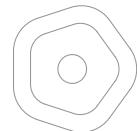
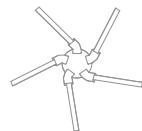
Side Brush
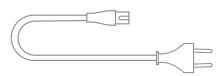
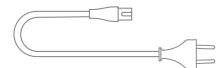
Power Cord
Mop Pad (x2)
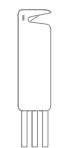
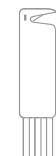
Cleaning Tool
User Manual
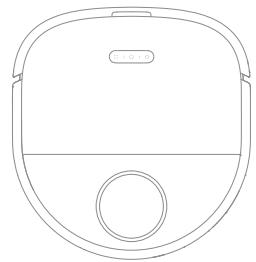
Robot
Self-Wash Base
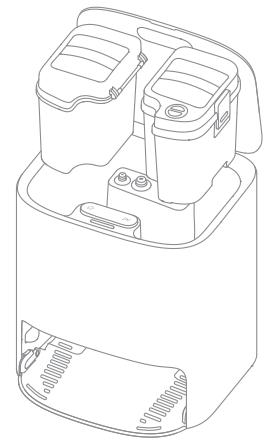
(Including a fresh tank, waste tank, and washboard)
Note: Illustrations of product, accessories, and user interface in the user manual are for reference purposes only. Actual product and functions may vary due to product enhancements.
Product Overview
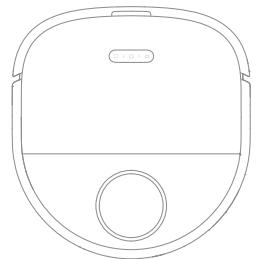
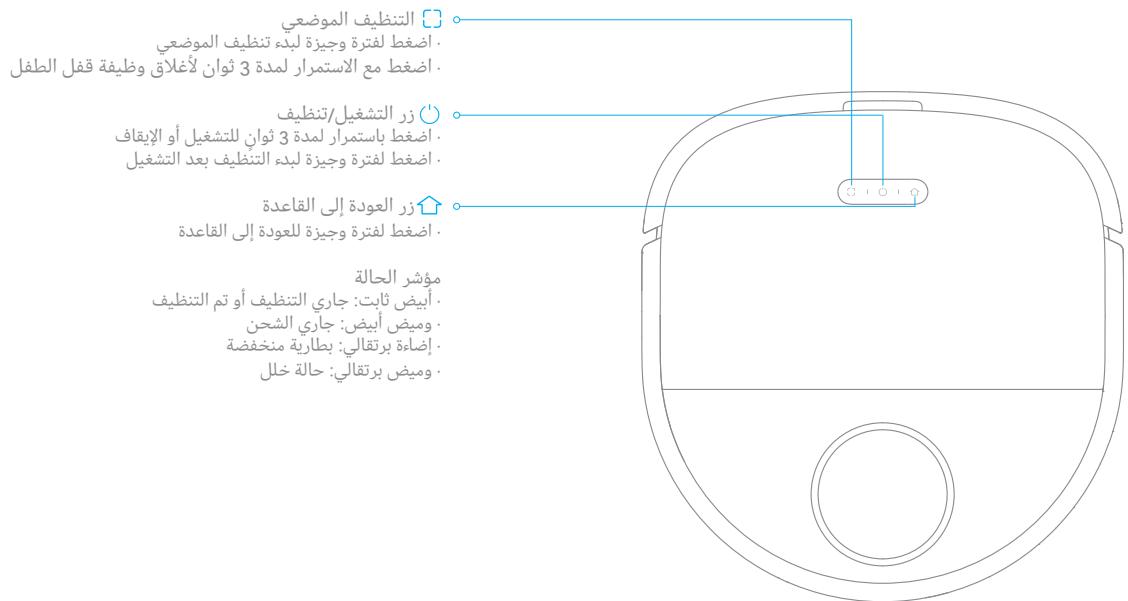
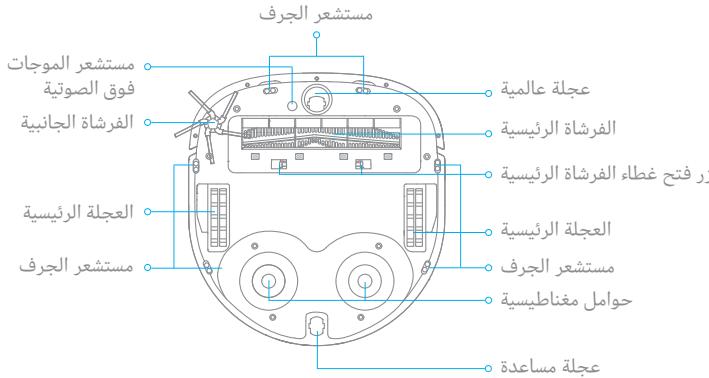
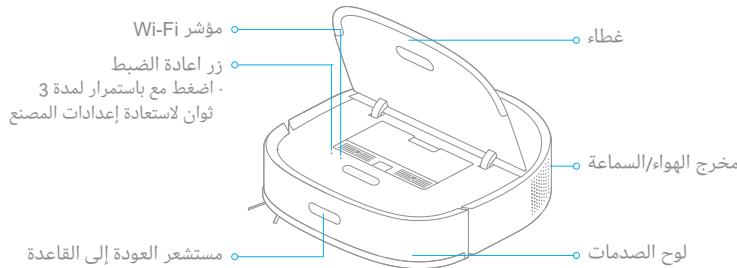
Robot
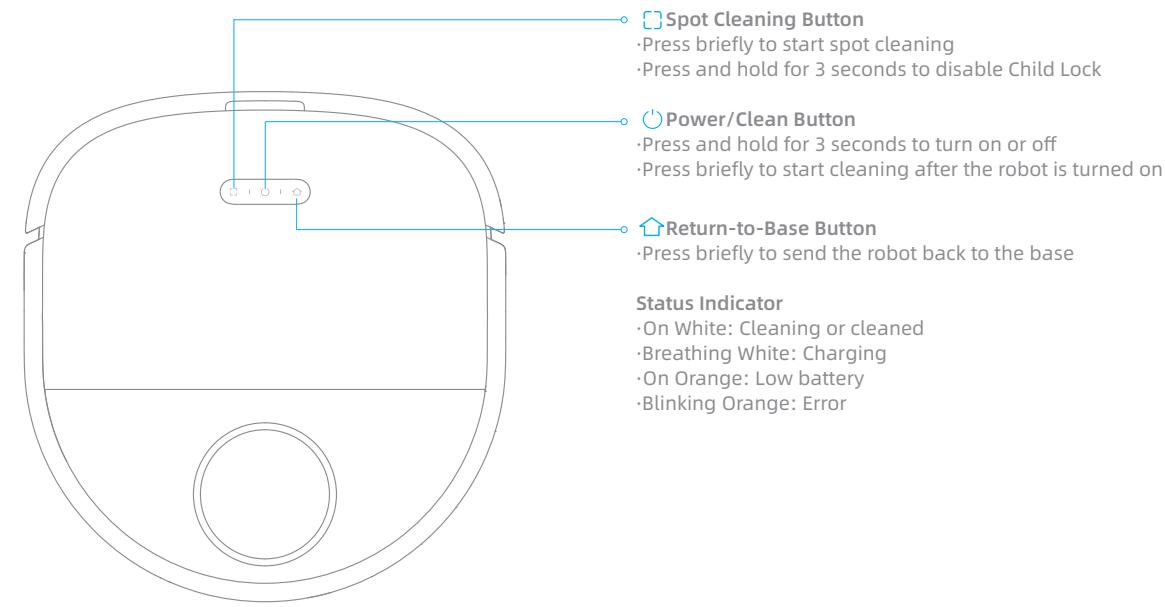
Note: Press any button to pause while the robot is cleaning, returning to charge, returning to self-clean, or in Spot Cleaning mode.
EN Product Overview
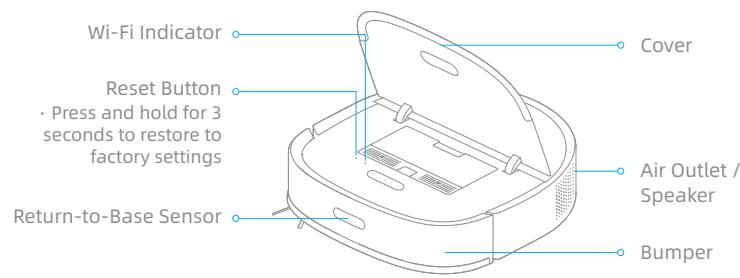
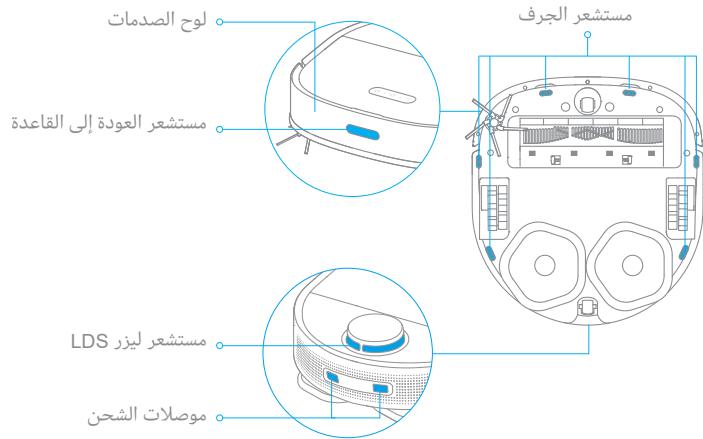
Robot and Sensors
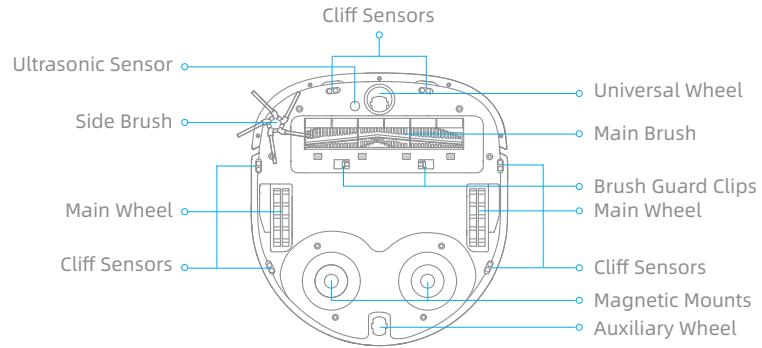
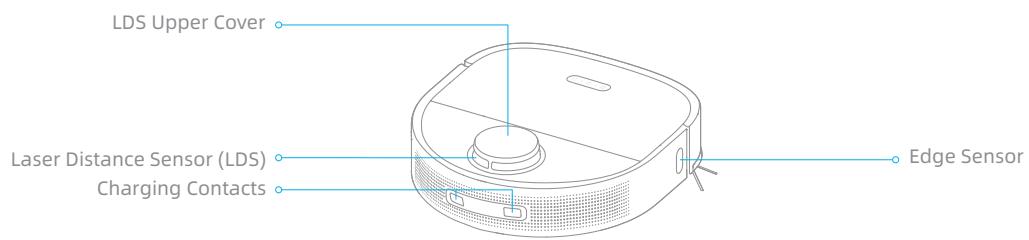
Product Overview
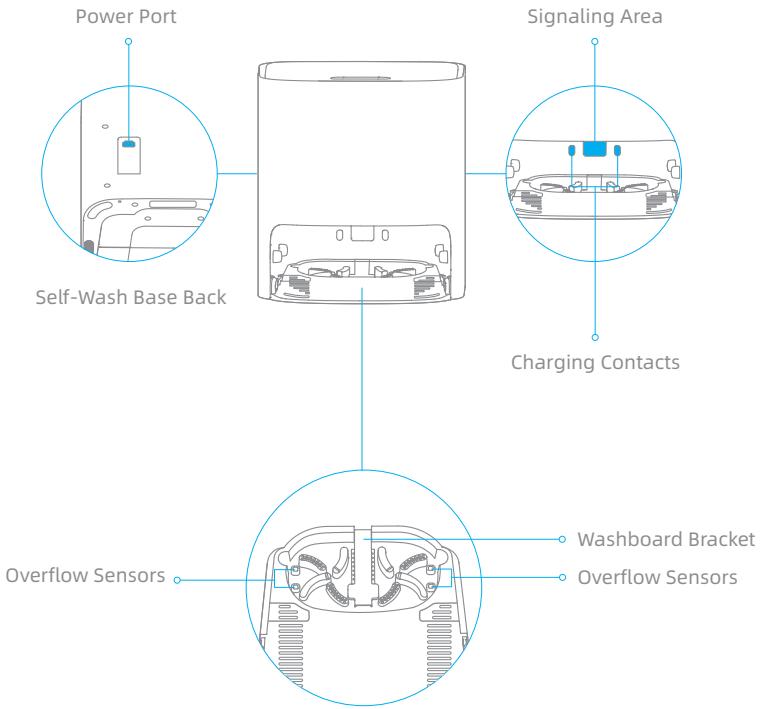
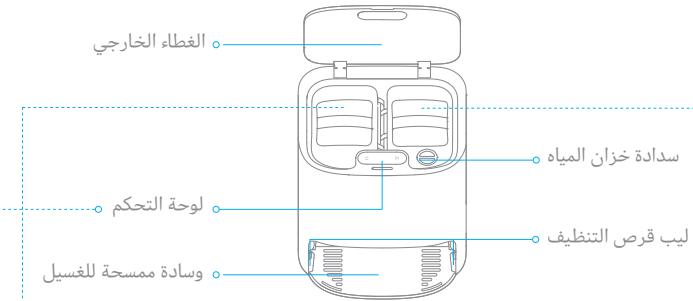
Self-Wash Base
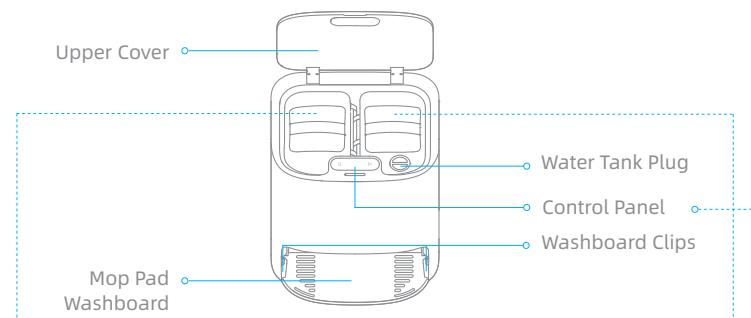
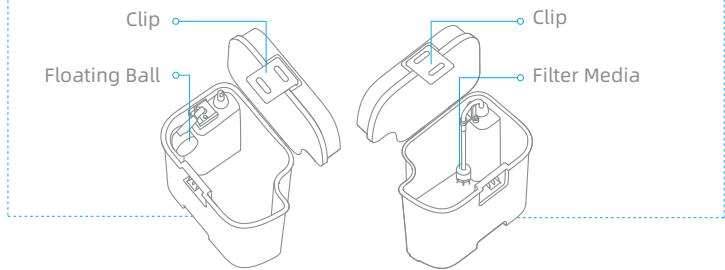
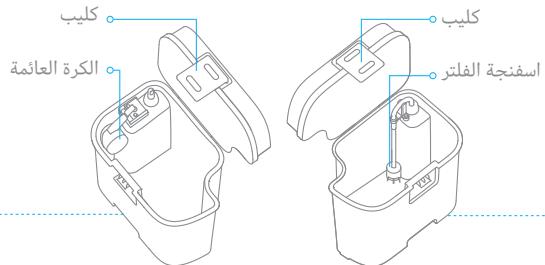
Waste Tank
Fresh Tank
Control Panel
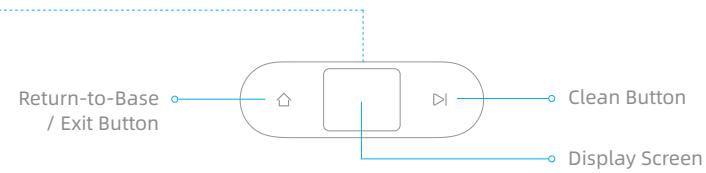
Return-to-Base/ExitButton
When the robot is on the base:
-
Press briefly to make the robot exit the base.
-
Press and hold for 3 seconds to clean and dry the mop pad.
When the robot is out of the base:
- Press briefly to send the robot back to the base. The robot resumes
cleaning after the mop pad is cleaned.
- Press and hold for 3 seconds to stop cleaning and send the robot
back to the base to have the mop pad cleaned and dried.
Clean Button
Press briefly to start or pause cleaning.
Child Lock
Press and hold the and buttons for 3 seconds to activate or deactivate Child Lock. After Child Lock is activated, all buttons on the robot and the base are locked.
EN Product Overview
Self-Wash Base
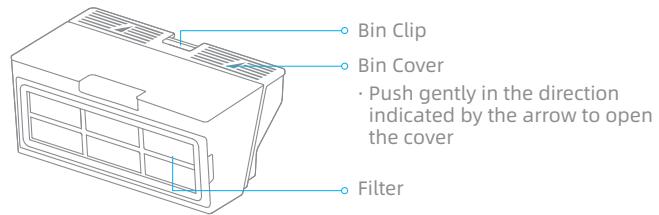
Dust Bin
Clearing Home Environment
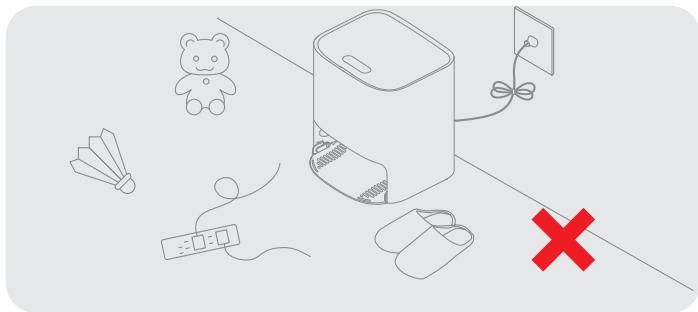
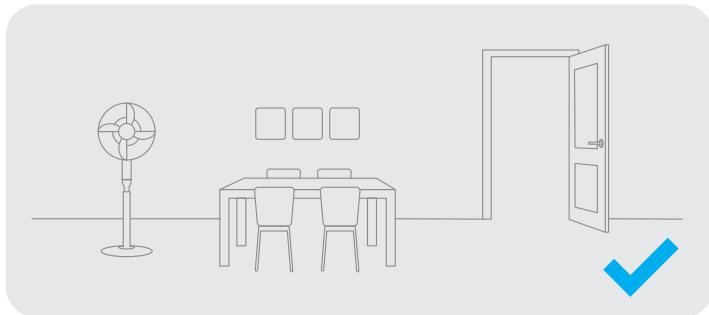
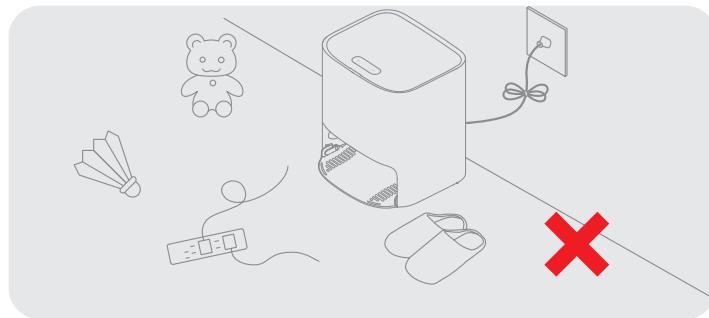
Tidy up items such as power cords, slippers, and hard objects to prevent the robot from getting entangled or trapped.
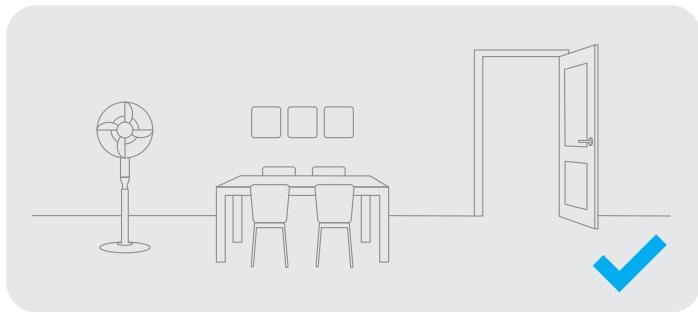
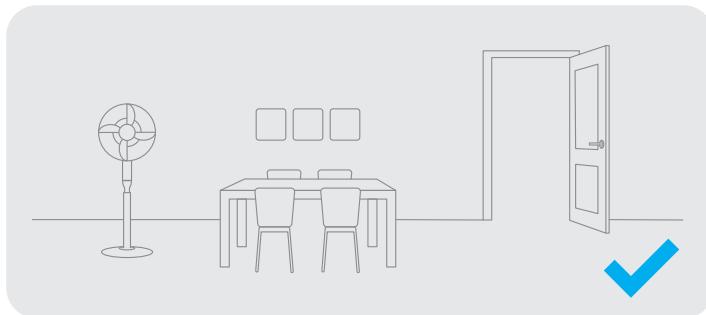
Open the door of the room to be cleaned, and put the furniture in its proper place to leave more space.
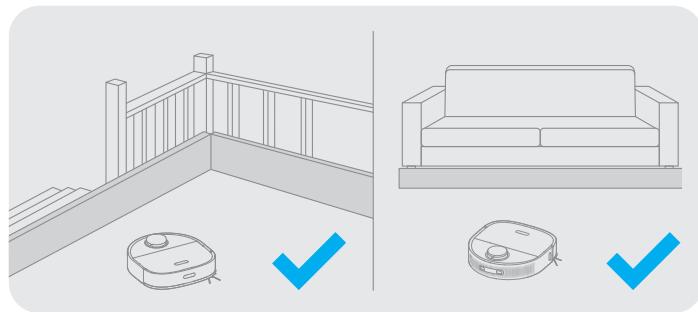
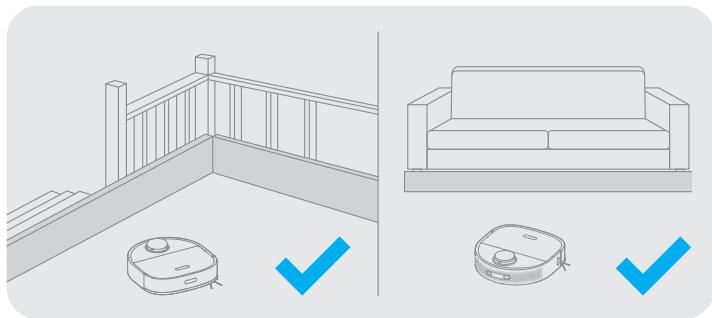
Before cleaning, place a physical barrier at the edge of the stairs and sofa to ensure the secure and smooth operations of the robot.
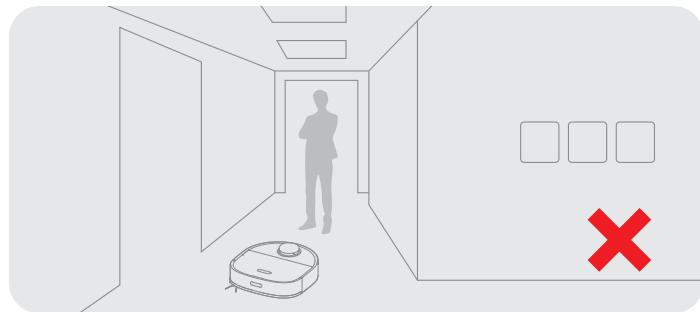
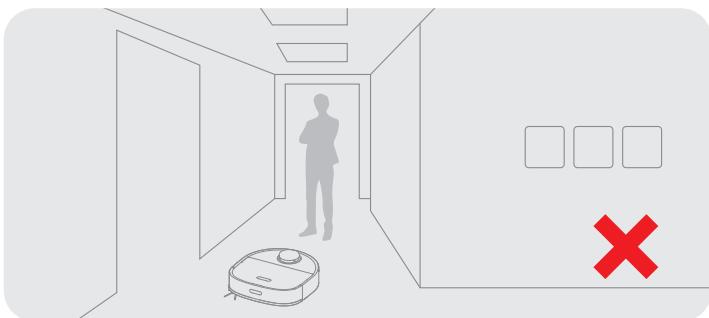
To prevent the robot from not recognizing areas that need to be cleaned, do not stand in front of the robot, threshold, hallway, or narrow places.
Note:
When operating the robot for the first time, follow it around while cleaning to remove any potential obstacles in time.
EN Preparations Before Use
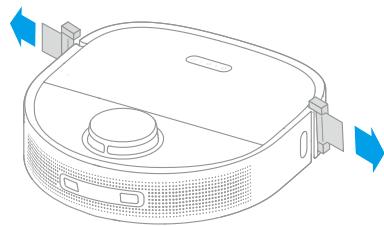
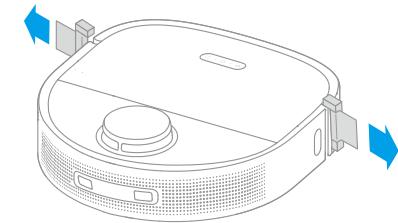
1. Remove the protective strips
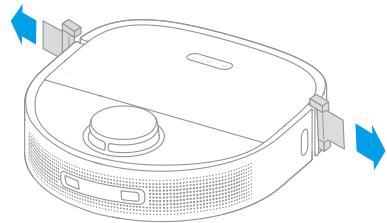
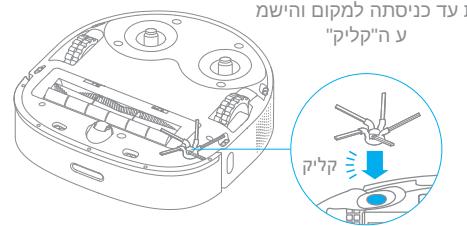
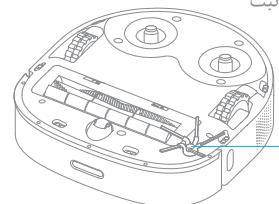
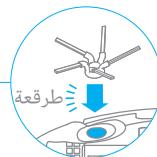
2. Install the side brush
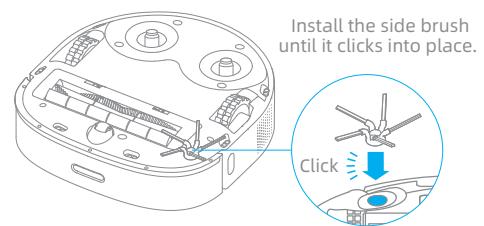
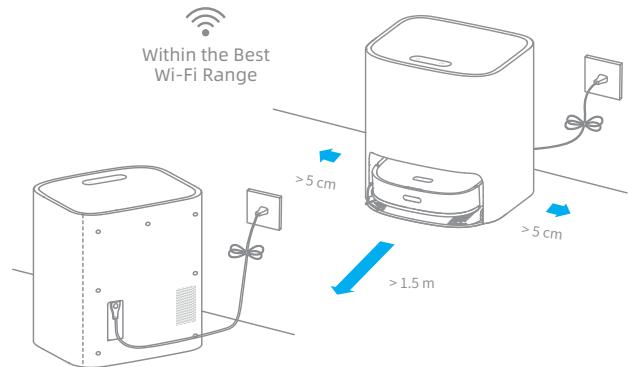
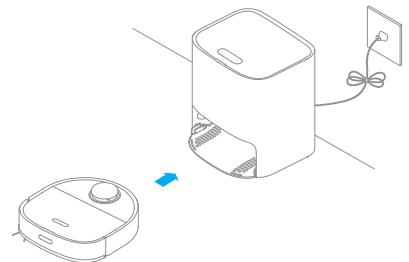
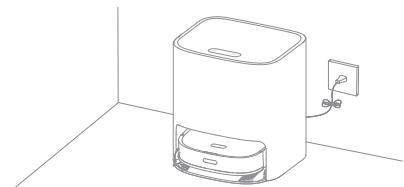
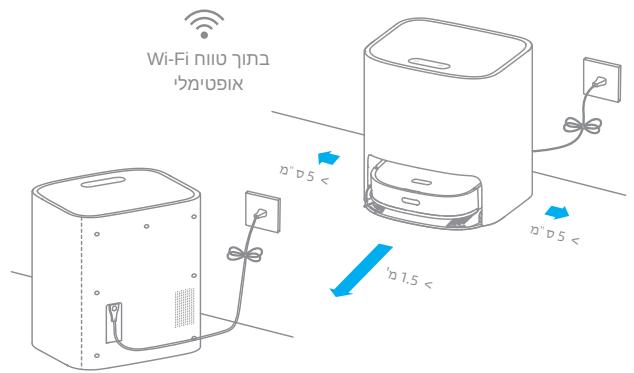
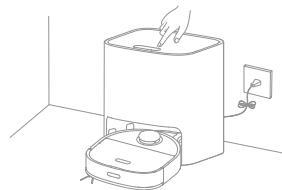
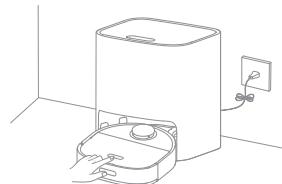
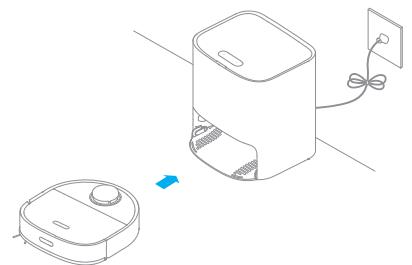
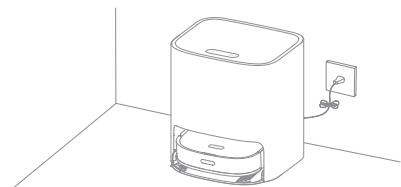
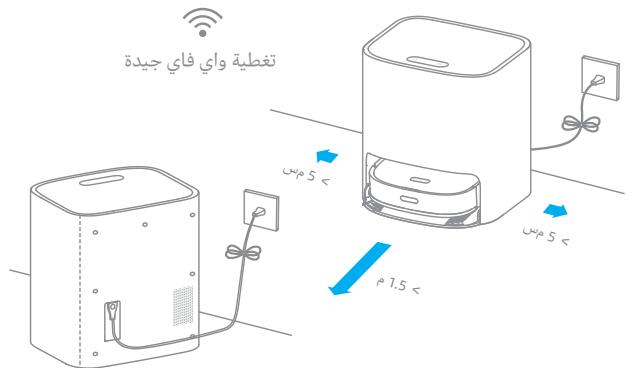
3. Place the base against the wall and charge the robot
- Install the base in as open a location as possible with a good Wi-Fi signal.
- Insert the power cord into the base and plug it into the socket.
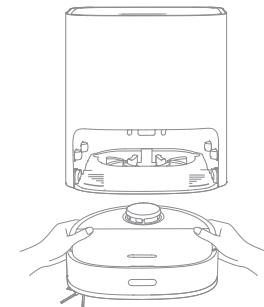
- Place the robot onto the base, and the robot will trun on automatically and start charging.
- It is recommended to fully charge the robot before the first use. After the robot is fully charged, the status indicator illuminates white for 10 minutes and then lights down.
Note:
- Remove any objects that are closer than 1.5 m from the front and 5 cm from either side of the base.
- Make sure that no objects might block the signaling area.
- To prevent water stains from wetting wood floors or carpets, the self-wash base is recommended to be placed on tile floors or marble floors.
Connecting with Mi Home/Xiaomi Home App
The appliance works with the Mi Home/Xiaomi Home app, which can be used to control the appliance and make it interact with other smart devices.
1. Download the Mi Home/Xiaomi Home App
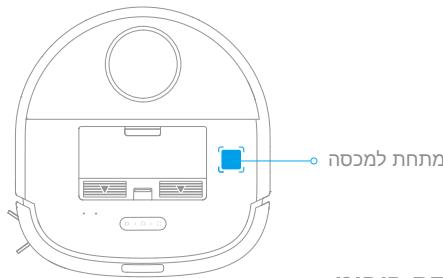
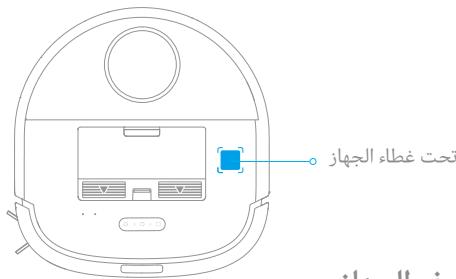
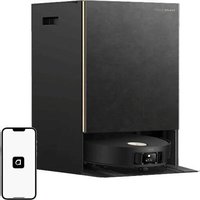
Scan the QR code on the robot to download and install the Mi Home/Xiaomi Home app.
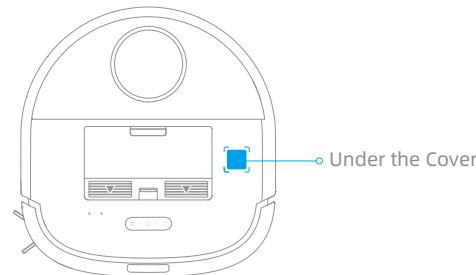
2. Add Device
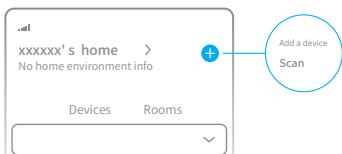
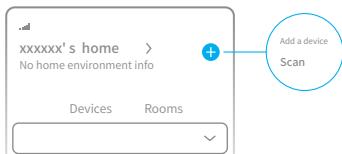
Open the Mi Home/Xiaomi Home, tap " ① " in the upper right, and then scan the QR code above again to add "Dreame Bot W10". Please follow the prompts to finish the Wi-Fi connection.
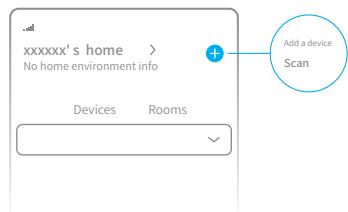
3. Reset Wi-Fi
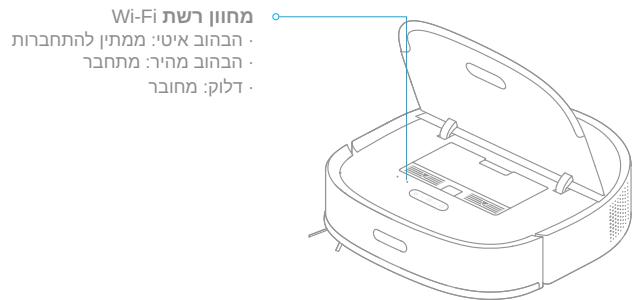
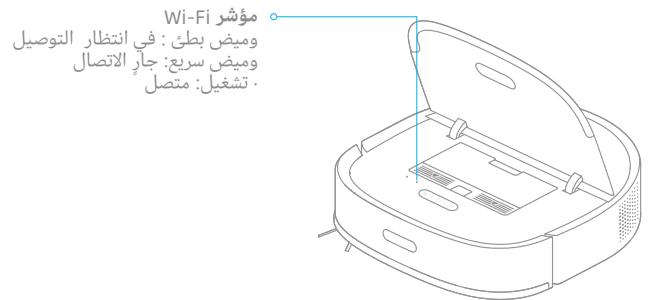
Simultaneously press and hold the 3 and 4 buttons until you hear a voice prompt saying, "Waiting for the network configuration." Once the Wi-Fi indicator is blinking slowly, the Wi-Fi has been reset.
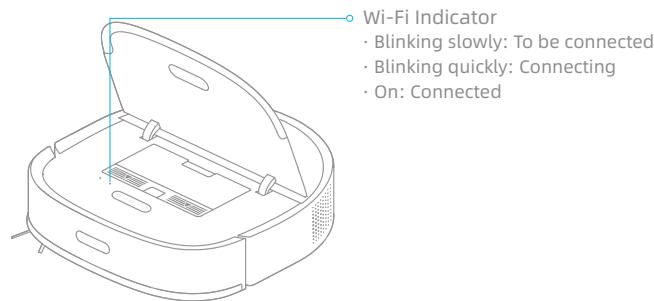
Note: If the robot cannot connect to your phone, Reset the Wi-Fi network and try again.
Note:
- Only 2.4 GHz Wi-Fi is supported.
- The app software is upgrading, and the actual operations may be different from the statements in this manual. Please follow the instructions based on the current app version.
Turn On/Off
Press and hold the button for 3 seconds to turn on the robot, and the power indicator is permanently on. Place the robot onto the base, and the robot turns on automatically and starts charging. To turn off the robot, move the robot away from the base, and press and hold the button for 3 seconds.
Fast Mapping
Remove the mop pad before fast mapping.
After you connect the robot to the app, create a map as instructed in the app. The robot moves around to scan the environment and creates a map without cleaning. After the robot returns to the base, a map is created and saved automatically.
Pause / Sleep
When the robot is cleaning, press briefly any buttons on the robot or the button on the base to pause the robot.
If the robot pauses for more than 10 minutes, it automatically enters the sleep mode, and the power indicator and charging indicator stop glowing. Press any buttons on the robot or base, or tap on the app to wake up the robot.
Note:
- The robot will turn off automatically if it is left in the sleep mode for more than 12 hours.
- If the robot is paused and placed onto the base, the current cleaning process will end.
Spot Cleaning
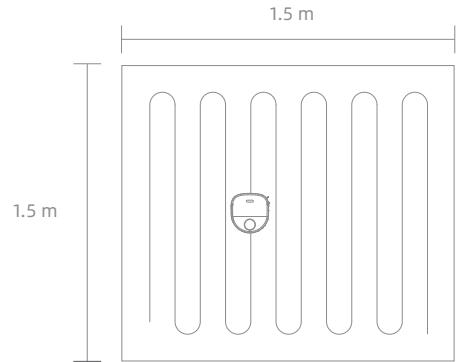
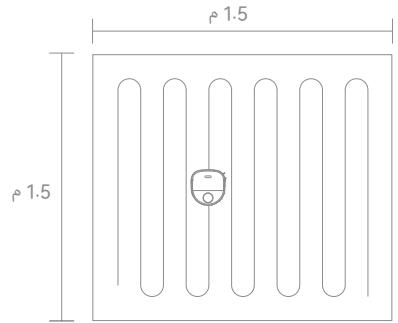
When the robot is not placed on the base and is on standby, press briefly the [ ] button to enable the spot cleaning mode. In this mode, the robot cleans a square-shaped area of 1.5 × 1.5 meters around it and returns to its starting point once the spot cleaning is completed.
Restoring Factory Settings
If the robot does not function properly and the buttons do not respond after being restarted, use a pin to press the reset button for 3 seconds until you hear a voice saying "Restoring factory settings". It will take about 5 minutes to reset the robot to its original factory settings. After resetting the robot, you must recreate maps and no-go zones.
How to Use
Sweeping Function
Note: Do not attach the mop pad while using the sweeping function.
Method 1: Press briefly the button on the base, and the robot starts sweeping.
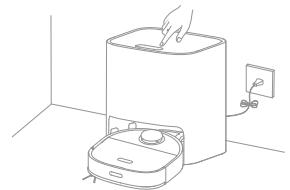
Method 2: Press briefly the button on the robot, and the robot starts sweeping.
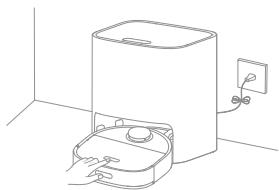
Note:
- Make sure that the robot is fully charged before using it. Do not manually move the robot when it is cleaning.
- If the battery gets low while cleaning, the robot returns to the base and resumes cleaning after charging its battery. (The Resume Cleaning function must be enabled on the app in advance.)
Cleaning Mode
After the robot is turned on, it cleans each room by cleaning along the edges and walls first and then cleaning in an S-shaped pattern. The robot automatically returns to the base to charge its battery after cleaning.
Mopping Function
Note: Do not use the mopping function on the carpet.
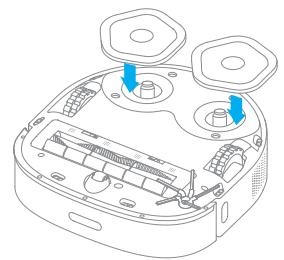
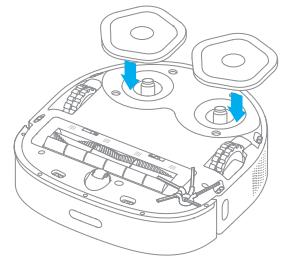
- Attach the mop pad
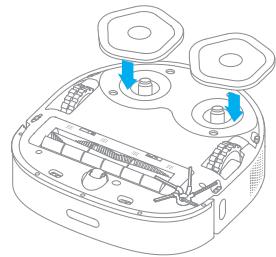
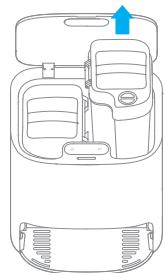
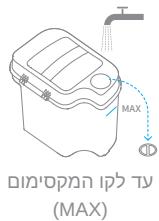
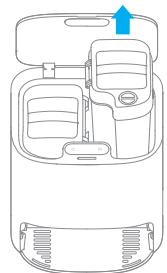
- Take out the fresh tank, fill it with clean water, and then place the fresh tank into the base.
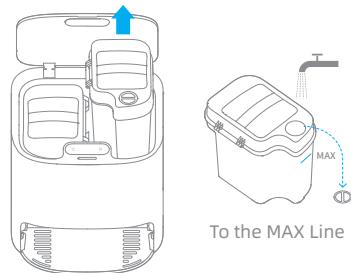
Note:
- Do not fill in hot water, otherwise the fresh tank may be deformed.
-
Use only the Dreme-brand multi-surface floor cleaner. Otherwise, the functions of the base may be affected.
-
Place the robot onto the base
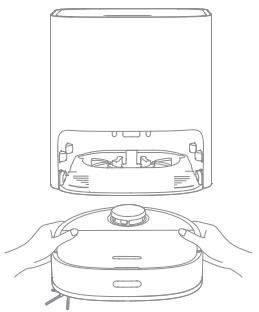
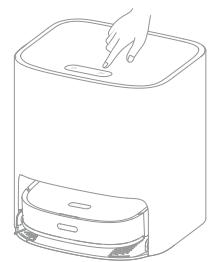
- Start mopping
Press briefly the button. The robot starts from the base and mops the house based on the optimal cleaning plan scheduled by the map.
Note:
- If the robot is not on the base, please put it back before starting it.
- The robot will clean the mop pad before cleaning, please wait patiently until the mop pad is cleaned.
-
Do not manually move the base, fresh tank, waste tank, or washboard while mopping.
-
Return to self-clean
While mopping, the robot will return to the base to have the mop pad cleaned as cleaning conditions set in the app. The robot resumes cleaning after the mop pad is cleaned.
- Clean the mop pad
After the robot completes cleaning and returns to charge, the base starts cleaning and drying the mop pad.
Note:
To clean the mop pad at any time, press and hold the button on the base for 3 seconds to start cleaning.
- While cleaning the mop pad, if the water in the fresh tank is insufficient or the waste tank is full, the robot will send a voice prompt, or the app will send a notification.
- After the robot completes mopping, clean the waste tank in time to avoid mold or odor. It is recommended to change the mop pad every 1 to 3 months.
How to Use
Functions in APP
- Map management
The homepage of the app displays the current map. On this page, No-Go Zone allows you to set zones to be avoided, and Map Management allows you to modify the current map.
- Cleaning mode settings
Cleaning Mode on the homepage allows you to change the cleaning mode, the suction power, as well as the humidity of the mop pad.
- Self-cleaning settings
Self-Cleaning Settings on the homepage allows you to change the frequency for self-cleaning and manually start a mop pad cleaning task or manually start or end a mop pad drying task.
- Product settings
The Settings page allows you to enable or disable device functions, configure scheduled cleanup, or view cleaning history and device information.
Note:
- A map must be created before you use the room- or zone-based cleaning, and manage maps.
- For more information about functions, check the corresponding interfaces or guides in the app.
- The version of the app might have been updated, please follow the instructions based on the current app version.
Routine Maintenance
Parts
For optimal performance, follow the instructions below to clean and maintain the robot and base.
| Part | Maintenance Frequency | Replacement Frequency |
| Dust Bin | Clean it as needed | / |
| Dust Bin Filter | Once every 2 weeks | Every 3 to 6 months |
| Fresh Tank | Once every 2 weeks | / |
| Fresh Tank Filter Media | Once every 2 weeks | / |
| Waste Tank | After each use | / |
| Washboard | Once every 2 weeks | / |
| Main Brush | Once every 2 weeks | Every 6 to 12 months |
| Side Brush | Once every 2 weeks | Every 3 to 6 months |
| Mop Pad | Once every month | Every 1 to 3 months |
| Universal Wheel | Once every month | / |
| Auxiliary Wheel | Once every month | / |
| LDS Laser Sensor | Once every month | / |
| Return-to-Base Sensor | Once every month | / |
| Cliff Sensors | Once every month | / |
| Signaling Area on Base | Once every month | / |
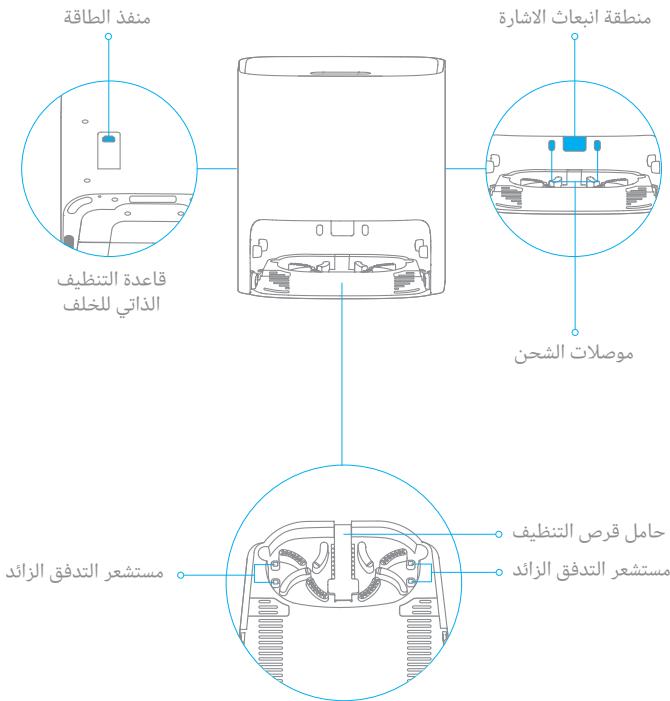
| Overflow Sensors on Base | Once every month | / |
| Charging Contacts on Robot | Once every month | / |
| Charging Contacts on Base | Once every month | / |
| Bottom of the Robot | Once every month | / |
| Body of the Base | Once every month | / |
Note: The replacement frequency will depend on your usage of the robot. If an exception occurs due to special circumstances, the parts should be replaced.
EN Routine Maintenance
Dust Bin *Clean it as needed
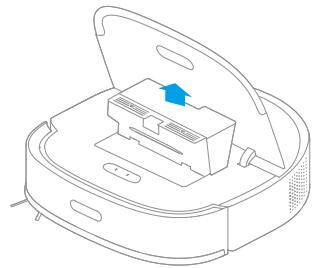
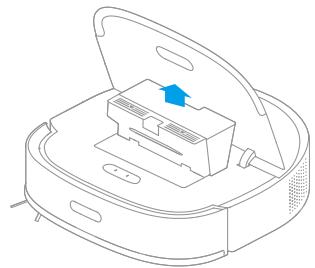
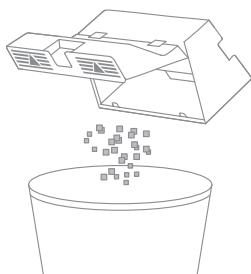
- Open the robot cover and press the dust bin clip to remove the dust bin.
- Open the bin cover and empty the bin as shown in the diagram.
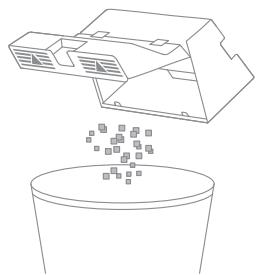
Note: The cleaning tool can be used to empty the dust bin.
Routine Maintenance
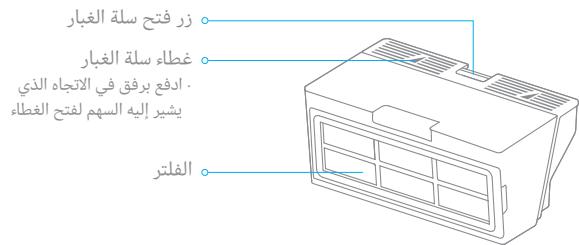
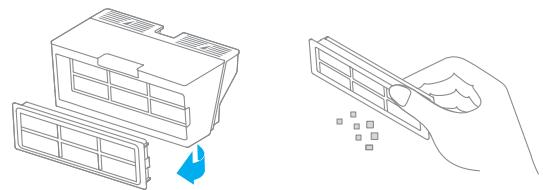
Filter* Clean it once every 2 weeks (fully dry after cleaning) and change it every 3 months
- Remove the filter and tap its basket gently.
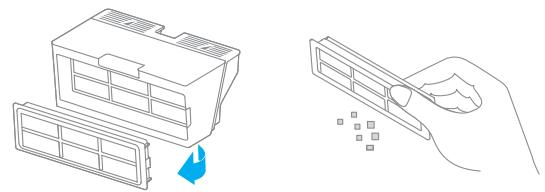
Note: Do not attempt to clean the filter with a brush, finger, or sharp object.
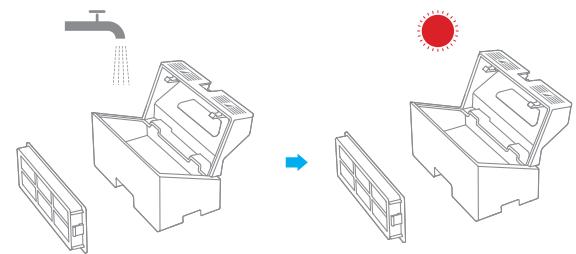
- If necessary, rinse the dust bin under the running water and dry them completely before re-installing.

Note:
- Rinse the dust bin and filter with clean water only. Do not use any detergent.
- Use the dust bin and filter only when whey are completely dry.
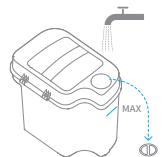
Fresh Tank * Clean the filter media once every 3 months
- Open the fresh tank cover, move the hose to the side to remove and clean the filter media as shown in the diagram.
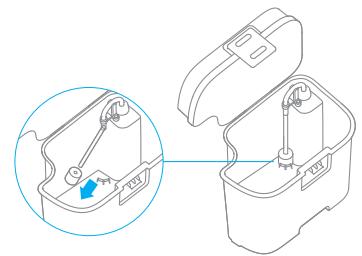
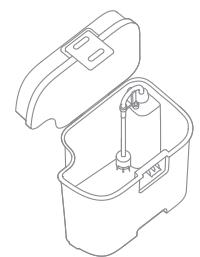
- Put the filter meida and hose back.
Waste Tank *Clean after each use
- Take out the waste tank, open the waste tank cover, and then dump the wastewater.

- Clean the waste tank with water and put it back to the base.
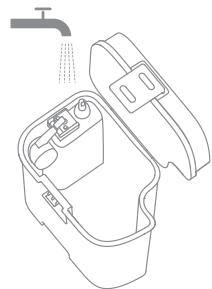
Note: The floating ball in the waste tank is a moving part. Do not clean the floating ball excessively in case of affecting its functions.
EN Routine Maintenance
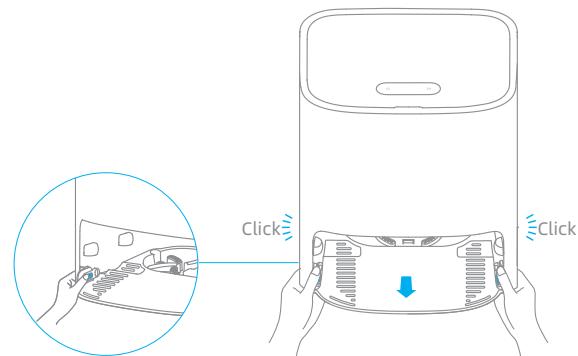
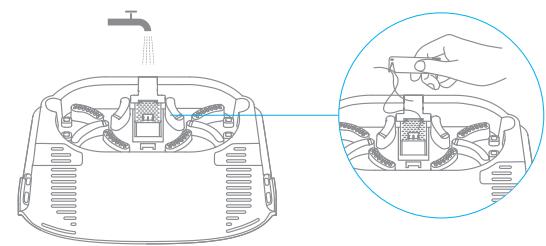
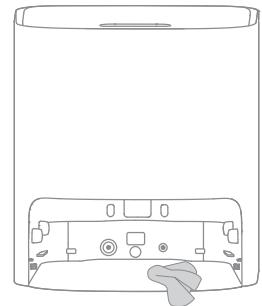
* Washboard * Clean once every 2 weeks
- Press the clips on both sides of the bottom of the base to remove the washboard.
- Use the provided cleaning tool to clean the washboard completely.
- Wipe the bottom of the base with a dry cloth.
- Insert the washboard into the base as shown in the diagram, making sure that both clips are in place.
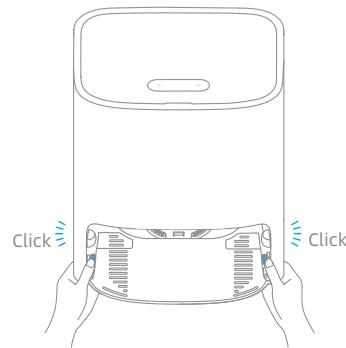
Note: Make sure that the washboard brackets are in place.
Routine Maintenance
Cleaning the Main Brush
Press the brush guard clips inwards to remove the brush guard and lift the brush out of the robot.
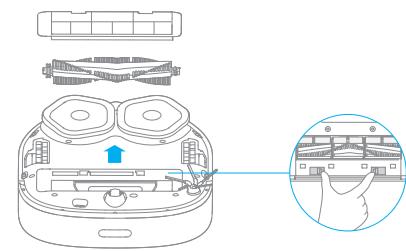
Pull out the brush covers as shown in the diagram. Use the provided cleaning tool to remove the hair tangled in the brush.
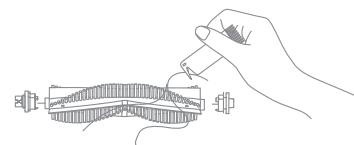
Note: Do not pull out the hair tangled in the brush excessively. Otherwise, the main brush may be damaged.
Cleaning the Side Brush
Remove and clean the side brush.
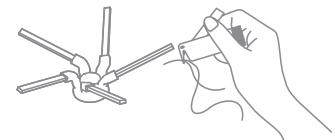
Cleaning the Universal Wheel/Auxiliary Wheel
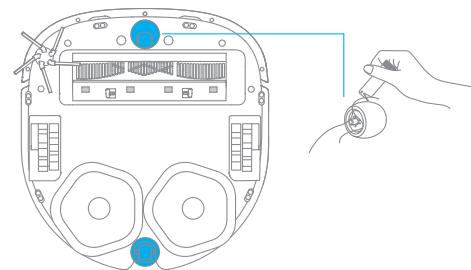
Note:
- Use a tool such as a small screwdriver to separate the axle and tire of the universal wheel. Do not use excessive force.
- Rinse the universal wheel under the running water and put it back after drying it completely.
EN Routine Maintenance
Robot Sensors and Charging Contacts
Wipe sensors and charging contacts of the robot by using a soft, dry cloth:
- Cliff sensors at the bottom of the robot
- Charging contacts at the back of the robot
- Return-to-base sensor at the front of the robot
- Bumper at the front of the robot
LDS on the top of the robot
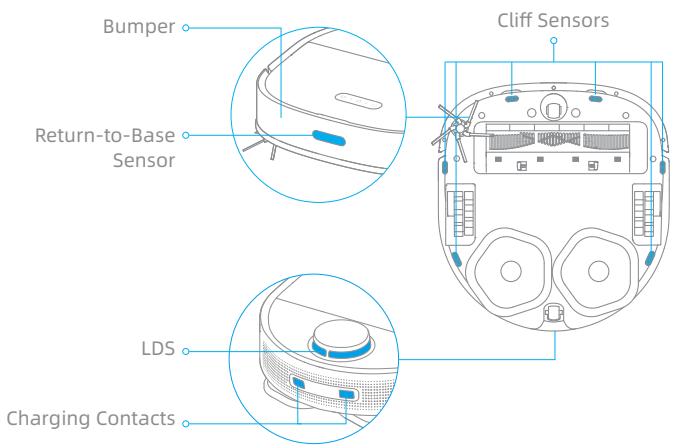
Note: Wet cloth can damage sensitive elements within the robot and base. Please use dry cloth for cleaning.
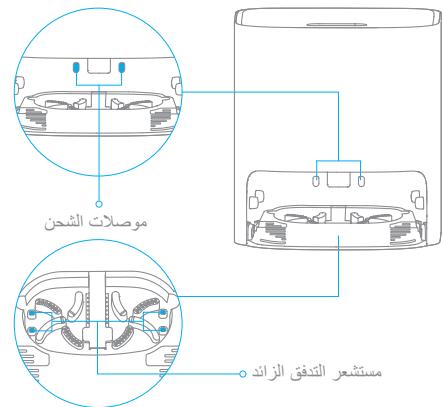
Self-Wash Base Charging Contacts and Overflow Sensor
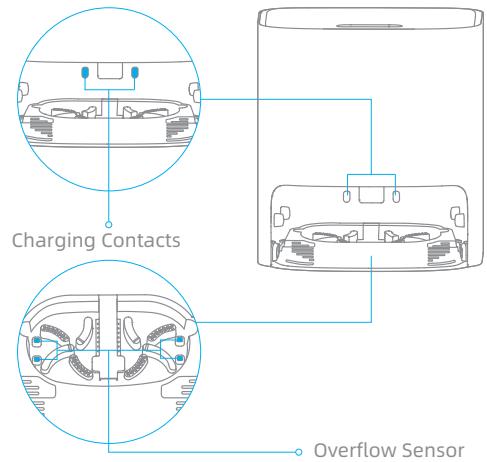
Robot Restarting
If the robot stops responding or cannot be turned off, press and hold down the button for 10 seconds to forcefully turn it off. Then, press and hold the button for 3 seconds to turn the robot on.
Battery
The robot contains a high-performance lithium-ion battery pack. Make sure that the battery remains well-charged for daily use to maintain optimal battery performance. If the robot is not used for an extended period of time, turn it off and put it away. To prevent damages from over-discharging, charge the robot at least once every three months.
Errors
If the base does not work properly, an error icon and message will be displayed on the display screen. Read the message and handle the issue based on the following table.
| Error Icon | Error Message | Solution |
| Insufficient Water in Fresh Tank | Add a sufficient amount of water to the fresh tank. | |
| Fresh Tank Not Installed | Put the fresh tank in place. | |
| Waste Tank Malfunction | Put the waste tank in place. Empty the wastewater. | |
| Washboard Not Installed | Check whether the washboard is installed and whether the clips on both sides of the washboard are in place. | |
| Abnormal Washboard Water Level | Check whether the waste port is clogged. If yes, clean it. | |
| Robot Malfunction | Check whether an exception occurs to the robot. Please refer to the "FAQ" section in this manual for troubleshooting. |
| Problem | Possible Cause and Solution |
| The robot will not turn on. | 1. The battery is low. Recharge the robot on the base and try again. 2. The temperature of the battery is too low or too high. It is recommended to operate the appliance at a temperature between 32 °F (0°C) and 104 °F (40°C). |
| The robot will not charge. | 1. The base is unplugged. Make sure that both ends of the power cord are plugged in. 2. Poor contact. Wipe the charging contacts on both the base and the robot. |
| The robot fails to connect to Wi-Fi. | 1. The Wi-Fi network password is incorrect. Make sure the password used to connect to your Wi-Fi network is correct. 2. The robot does not support a 5 GHz Wi-Fi connection. Make sure the robot is connected to a 2.4 GHz Wi-Fi connection. 3. The Wi-Fi signal is weak. Make sure the robot is in an area with good Wi-Fi coverage. 4. The robot may not be ready to be configured. Please exit and re-enter the app, and then try again as instructed. |
| A room-based map cannot be created in the app. | 1. The robot must start from the base to create a map. It is recommended to use the fast mapping function. 2. Do not move the robot when the robot creates a map for the first time, otherwise positioning failure may occur. 3. After the robot creates a map for the first time, check whether it fails to return to the base and remove any obstacles around it. |
| The robot cannot find the base or will not return to the base. | 1. The base is unplugged or is moved when the robot is not placed onto the base. 2. The robot can not return to the base since its path is blocked. For example, a door is closed. 3. There are too many obstacles around the base. Place the base in an area without any obstacles around it. 4. Moving the robot may cause it to re-position itself or re-map its surroundings. If the robot is too far from the base, it might not be able to automatically return to the base, in which case you need to manually place the robot onto the base. 5. Wipe the signaling area on the base to prevent dust or dirt. |
| The robot is stuck in front of the base and cannot return to the base. | 1. Check whether there is enough space around the base. keep the immediate area 1.5 m in front of the base and 5 cm on both side of the base clear of objects. 2. The robot may slip. Check whether there is water in front of the base, if so, wipe it and try to send the robot back again. 3. It is recommended to change the place where you put the base and try again. |
| The robot will not turn off. | 1. The robot can be turned off only when it is not charging. To turn off the robot, move the robot away from the base and press and hold the button for 3 seconds. 2. If the robot cannot be turned off by performing step 1, press and hold the button for 10 seconds to forcibly turn off the robot. If the problem persists, please contact after-sales service. |
FAQ
| Problem | Possible Cause and Solution |
| The charging speed is slow. | It takes about 6 hours to fully charge the robot when its battery is low. 1. If you operate the robot at temperatures outside of the specified range, the charging speed will automatically slow down to extend the battery life. 2. The charging contacts on both the robot and the base may be dirty, please wipe them with a soft cloth. |
| The robot is malfunctioning. | Turn off the robot and then restart it. |
| The side brush falls off. | 1. Re-install the side brush until it clicks into place. 2. The side brush is entangled by power cords. Remove the power cords from the floor before cleaning. |
| The mop pad falls off. | The mop pad is entangled by power cords. Remove the power cords from the floor before cleaning. |
| The cleaning performance is poor. | 1. The dust bin is full. Empty it. 2. The filter needs cleaning. Check and clean it. 3. The filter is not fully dried after being washed. Dry the filter before use. |
| The robot leaks dust while cleaning. | Take out the main brush and the dust bin, and remove any debris that may have become trapped around spaces that hold the main brush and the dust bin. |
| The noise increases while the robot is operating. | 1. The dust bin is full. Empty it. 2. Hard objects are trapped around the main brush and the dust bin. Check and clean them up. 3. The main brush and the side brush may be entangled with hair or debris. Check and clean them up. 4. Switch the suction mode to Standard or Quiet. |
| The robot makes a strange noise while operating. | Please turn and press the main wheel to check if there is any object entangled or stuck, if so, clean them in time. If the problem persists, please contact the after-sales service. |
| The robot is stuck and stops operating. | 1. Check the corresponding area to make sure whether there are obstacles such as power cords, curtains, or carpet tassels around the robot. It is recommended to remove them so that the robot can continue to work. 2. The robot may be stuck by furniture. It is recommended to elevate the furniture, place a physical barrier to block off the problem areas, or set no-go zones by using the app. |
| The robot moves without following the set route. | 1. Objects such as power cords and slippers should be organized before using the robot. 2. Working on wet slippery surfaces causes the main wheel to slip. It is recommended to dry the wet places before using the robot. |
| The robot misses the rooms to be cleaned. | 1. Make sure that the doors of the rooms to be cleaned are open. 2. Check whether there is a threshold higher than 1.8 cm at the door of the room. The robot cannot climb over high thresholds or steps. 3. The place in front of the room to be cleaned is wet and slippery, causing the robot to slip and work abnormally. It is recommended to dry the floor before using the robot. 4. Check whether there is a small door mat or carpet at the door of the room. The carpet will be avoided while the robot is mopping. Please turn off the carpet recognition function on the Setting page of the app. |
| The robot often strays into no-go zones or areas with virtual walls. | 1. View the homepage of the app to check whether an error occurs to the current map, if so, restore the map in the Map Management settings. 2. When you set virtual walls or no-go zones, it is recommended to adjust boundaries based on the home environment and include all areas that are prone to getting the robot stuck, such as sinking steps and bottoms of furniture. |
| The robot gets into trouble while working and stops. | 1. The robot automatically powers off when its battery is depleted to 0%. 2. The robot fails to charge, which causes its battery to run out and the robot to shut down. The possible cause is that the base is not connected to the power supply, or the robot and the base are in poor contact. Please check the connection. If the problem persists, please contact the after-sales service. |
| The robot will not resume cleaning after charging. | 1. Make sure that the robot is not set to the Do Not Disturb (DND) mode, which will prevent it from resuming cleaning. 2. The robot does not resume cleaning when it is manually recharged or placed onto the base. |
| The robot will not clean automatically at the scheduled time. | The robot has low battery. The scheduled cleaning will not start unless the battery level is over 15%. |
FAQ
| Problem | Possible Cause and Solution |
| The robot does not respond to the base. | The robot is too far away from the base and they cannot communicate with each other. It is recommended to use the app to control the robot. |
| Water in the fresh tank is insufficient. | 1. Replenish clean water in time. 2. Unplug the power cord of the base, take out the fresh tank and put it back, and then power on the base and try again. 3. Pour out the remaining water in the fresh tank, rinse the bottom of the fresh tank and filter media, and then try again after adding water into it. 4. Check the metal filter at the water inlet of the base to see if there are foreign objects, if any, please take out the foreign objects. If the problem persists, please contact the after-sales service. |
| The water level in the washboard is abnormal. | 1. Remove the washboard and check whether the sewage drain is blocked and clean it. 2. Wipe the metal elastic pieces of the overflow sensor within the washboard with a dry cloth. 3. Gently press down on the waste tank to ensure that the waste tank is installed in place. 4. Check if the sealing ring of the waste tank is loose or not installed properly, if so, reset it manually. If the problem persists, please contact the after-sales service. |
| The washboard is not installed. | Check whether the washboard is installed in place or whether the clips on both sides of the washboard are in place. |
Robot
| Model | RLS5C |
| Battery | 6400 mAh (Nominal Capacity) |
| Charging Time | Approx. 6 hours |
| OS Compatibility | Android 4.4 or iOS 10.0 and later |
| Rated Voltage | 14.4 V --- |
| Rated Power | 55 W |
| Wi-Fi Wireless Connectivity | Wi-Fi IEEE 802.11b/g/n 2.4 GHz |
| Operation Frequency | 2400-2483.5 MHz |
| Maximum Output Power | < 20 dBm |
| SRD Wireless Operation Frequency | 433.92 MHz |
| Maximum Output Power | < 10 dBm |
Self-Wash Base
| Model | RCS3 |
| Rated Input | 100-240 V ~ 50-60 Hz 1.5 A |
| Rated Output | 20.0 V --- 1 A |
| SRD Wireless Operation Frequency | 433.92 MHz |
| Maximum Output Power | < 10 dBm |
Under normal use of condition, this equipment should be kept a separation distance of at least 20cm between the antenna and the body of the user.
WEEE Information

All products bearing this symbol are waste electrical and electronic equipment (WEEE as in directive 2012/19/EU) which should not be mixed with unsorted household waste. Instead, you should protect human health and the environment by handing over your waste equipment to a designated collection point for the recycling of waste electrical and electronic equipment, appointed by the government or local authorities. Correct disposal and recycling will help prevent potential negative consequences to the environment and human health. Please contact the installer or local authorities for more information about the location as well as terms and conditions of such collection points.
RU BonpoocbI N OTBeTbI
| ПюбLEMа | Возможнaya рpreciни на реценье |
| РюбOT He Bклочаetс. | 1. Изkenу Зард akkumлалота.Зардпite робOT ha 6a3e и nobTOpITE понытк. 2. Слшkom Hn3kaй сllshkom BbICOKAЯ TempepaTypa akkumlalotpa. Pekomehdyeemra pa6oayam taempepaTpya: 0-40°C. |
| РюбOT He 3apjxhaetc. | 1. База obecTochena. Y6eDnteCb,чTO oba koHca Ka6eIЯ nitsaHryB vctablenbI. 2. Славь кontak. ПрOTPITE 3apJdHbIe KOnTakTbI bazbIи p6obota. |
| СбОй podknIoЧеня робOTA к Wi-Fi. | 1. НекоргКТьйnapOь OT cTeN Wi-Fi. Y6eDnteCb,чTO napOь ДЯЯ podknIoЧENЯ K cTeN Wi-Fi вБededen korpektHo. 2. РобOT He podderKINBaET cTeB Wi-Fi 5 Гu. Y6eDnteCb,чTO p6obOT podknIoUeH K cTeN Wi-Fi 2,4 Гu. 3. Славь сngHaN Wi-Fi. Y6eDnteCb,чTO p6obOT haxOДТСВ зоHcStbHOrO сngHaNа Wi-Fi. 4. РобOT He rOToB K NaCTpoIke. BlyДNTe I3 prinloZeHryA N 3aIДNTe NobTOpHOb, zatem noBToPte noIbITky corlaCHO IHCTpyKzmaM. |
| Карту komnat HeNB3a co3daTb B prinloZeHnII. | 1.ЧтБы co3daTb KapTU, р6obOTdoJIKeH NaChHaHbPa6ToC 6a3bI. PekOMeHdUeTcR IScNoIb3OBAtBФyHKcIIO 6blCTPoro co3dAnHЯ KapTbI. 2.Зanpezaetc NapeMeZaTb p6obOT BoВ rema co3dAnHЯ nepBoY karptb.В пotINBHom clyuae можET pron3OItn c6bОй орpeДeLHЯ MeCTOpIoZeHryA. 3.ПосLE co3dAnHЯ nepBoY karptb I prOBeBByTe, можET liI prO6OHTbC RA 6a3y,И y6ePitE BceпрЯTCTBIV BOKpyr 6a3bI. |
| РюбOT He mo6tJ haItni 6a3y или He BOZBaPauaetcЯ Ha 6a3y. | 1.Бa3a 6blIa OTknIoUeHa OT po3eTKIиIипepeMeZeHa, noka pr6obOT haxOДТСВ RA 6a3bI. 2.Р6obOT He mo6tJ BePhYbCЯ Ha 6a3y, tak KaK mapUpy T3a6LoKInPOBaH, habPIMeR 3akpyIa Dbepy. 3. BOKpyr 6a3bI сllshkom MHOrO npEJaTCTBIV. Ra3MeCTITE 6a3y Ha nobOCTPANCTBc 6e3 npEpenTCTBIV BOKpyr. 4.ПосLE pepeMeZeHryA pr6obOT mO9ET prO3OITN IN3MeHEnHe erO loKaZm Ilin IN3MeHEnHe karptb OkpykaIooSeI планрOBKII.Есл prO6OHTCЯ сllshkom ДALEKO OT 6a3bI,Он He CMOKET ABTOMATUeCKN BeHpybCЯ Ha 6a3y.В takOM clyuae HeOBXODImo BpyHyU OBeHpyb pr6obOT ha 6a3y. 5.YdaIITe nbIb Ilin rpy3b C cnHAlbHoy 3ObIb Ha 6a3e. |
| РюбOT ZeastrayпereD 6a3oIи He mo6tJ bePhYbCЯ Ha Hee. | 1.ПювeрYe,doSTatoUHLo II npocTpanCTBa BOKpyr 6a3bI. Y6ePitE BCE prEdmETbI B HeNOCspedCTBENHoi 6bl3OCTN OT 6a3bI Ha paccTOnHni 1,5 m cpePedi n 5 cm c obexx CTopOH. 2.Р6obOT Mor Podckolb3HybCЯ. P6obeBye procTpanCTBOpeD 6a3oI Ha NaIyuHne BovIbI. Ecln BODa ecTb, BbITPITE ee n nonpO6bIte BePhYb pr6obOT ha 6a3y nobTOpHOb. 3.PekOMeHdYetc IN3MeHInTB MeTo yctahOBKn 6a3bIи nobTOpITb noIbITKy. |
BonpoocbI N OTBeTbI
| ПюбLEMа | Возиможнaya р�чина и решениe |
| РюбOT He bVbKlIouaetc. | 1. Робот можно bVbKlIouchITb, только когда onе He заряжаETc. ChTo6bl bVbKlIouCHb pO6bot, y6e9nte erO c 6a3bl, hajkmite n UdEpxJBaIte KhoNkU B TeueHne 3 cekyHd.2.Есл pO6ot HeBZMOJHO bVbKlIouCHb coIgIacSO nHCTpyKcIyM,ОпсаHbIM B wae 1, hajmTe n UdEpxJBaIte KhoNkU B TeueHne 10 cekyHd, ChTo6bl prinHydntelbHo bVbKlIouCHb pO6ot.Есл пбБмeHa He 6ydet peSheHa, CBxJTeCb co clyj6bl noCspEnpOdaJxHOr o6cLxJxBaHnia. |
| РюбOT zarЯжаETc MeDJIeHNo. | ПOTpe6byETc Okolo 6 chAsOB, ChTo6bl polnoctbIO zar8dITb pO6ot c pa3prJxHbIM aKKymJYTopOM.1.Есл pO6ot IncpoJIb3ByETc pri Tempepatype, KOTopAR He COOTBeTCTByET UCTaHOBJIeHNOMу dIaIa3OHy, cKOpOCTb3apJDKn ABTOMATUeCKn CnIzIeTc, ChTo6bl yBvEJIuHTb BpeM yIcIpOJIb3OBAHnIaKKymJYIETOPa.2.ЗарядыkoIKTbIb pO6ota n 6a3bl moIII mO7Ib IaRpa3HITbC. ПрOTPitHe INx cyXIm noIOTenUeM. |
| СбОиВ pa6oTe pO6ota. | ВькЛIOChITE pO6ot n BvKlIOChITE NOBtOHO. |
| БokobariaЧeТКa ВbIaJaEt. | 1. ПОБТорно uStaHOBIne 6okoBvyU OSeTKu Ha MeSTO tak, ChTo6bl pa3dALcS chElyOK.2.БokOBaY 6eTKa 3aIyTaIaIb C Ka6eIax NITaHnIA. Y6e9nte INx c POna nepeD nauJOM y6opKn. |
| Швбра ВbIaJaEt. | Швбра 3aIyTaIaIb C Ka6eIax NITaHnIA. Y6e9nte INx c POna nepeD nauJOM y6opKn. |
| НзkaяAzffeKTHINbOCTb y6opKn. | 1. КОТМЕнДЯ Пылп порелонен.УдAlnte erO coDEpxKIMoe.2.ФИльТр 3aRpy3HINcI. ПрОБрteи OuchTe Iero.3.ПосLEnpMbYbKn ФИльТр 6bl npocUSeHn He nOIIHcTbU. ПрОsuNTe erO nepeD nCIpOJIb3OBAHnIeM. |
| В пюсесу b6OpknIo pO6ot octabIaIe TzIgR3HNeHnI. | ИЗВlaKeNTE OCSOBHny OSeTKu И КОТМЕнERдЯ Пылп И уdAlnte 3aRpy3HENHnI, 3a6bUShineC B OTBepCTnIXKpeIeHnIЯ 5eTKn I KOnTeHepa. |
| В пюсесу pa6oToIpo6Toa shum yVeIiUnBaIeTc. | 1. КОТМЕнДЯ Пылп порелонen.УдAlnte erO coDEpxKIMoe.2.Вokpyr ochOBHoi 6eTKn И КОТМeHepa ДЯ Пылп obMOTaIaNcB TberdIe ppeMtebl. ПрОБрteи И dIaIte.3.На ochOBHoi n 6okoBoY 6eTKaX cnyTaIaIb Bologbl Iani cKOpIaIb cIaRpy3HENHn. ПрОБрteи И dIaIte.4.пepeKlIOChITE BCaCbIbAHaNe H a PexIM StaIdapt Iani TixOe. |
| В пюсесу pa6oToIpo6ToI n3daet CTpaHnBiy Shum. | ПОБрнITE OCSOBHoe Kolaco И habMITE Na Hero, ChTo6bl pO6OPIb, net Ли на hem 3aIyTabWshxSry.II3aTeRbWshxI ppeMeTob.Есln ecTb, cBoEVpeMeHNO ydAlnte INx.Есln пбБmela He 6ydet peSheHa, CBxJTeCb co clyj6bl noCspEnpOdaJxHOr o6cLxJxBaHnia. |
RU BonpoocbI N OTBeTbI
| ПюбLEMа | Возможнaya р�чина и ршениe |
| Робот застгл и пereстал paBOTATь. | 1. Пювовыт, не ть в равочем зоне кабелей ританя, чтор, ворса кOBра улдугх пereетсь, кOTOPБЕ ПЕРЯТСТВИ, КOTOPБЕ РЕРЯТСТВИ DBIVЖECHENIO рОБOTA. РекоменДуETСУБРАБп.TОСТОПОНнEп佩дмны, чTOБы рюBOTМORПрODOLЖИТВ рОБТY.2. РювOTу можETМЕЧАТь MEБЛь. РекOMENДуETС PОДHAТь MEБЛь UCTAHOBITBФИЗИЧЕСКИ БAPBERДУБLOPBOKII рюбLEMых 30и UNI YCTAHOBITBЗAPRETNBIE 3OнblучЕЗПОЛOXGEHUE. |
| Робот не пri得住жимаETСУСТANOVLENHOrO Маршту. | 1. ИебхODIMо расставиь кабели ританя, талки и дугге等相关дурmedы по мостам пereED началOMИСПОЛБЗОВANHЯ рОБOTA.2. OснOBHoe кОLEССКOLьЗИТ на Влжногй сКOLьЗКОПОВEXHOCNTN. РекOMENДуETС PОСУSWITь MOKPYU 3OHyпereD началOMИСПОЛБЗОВANHЯ рОБOTA. |
| Робот пюпунSCAЕТ KOMHаы BOВ remя уборки. | 1. УбeДиTeСь, чTO ДевERи B KOMHаы, кOTOPБe HeobxODIMo y6paTb, оТКрыТь.2. Пювовыт, ссNs BlICOTa DVEBPHOпорOTA B KOMHау Bblse 1,8сM. РОБТHe MeOжETпepee3JXaTb Cheep3 ВicOKKneпорOTN UNI STCyNEHk.3.ПространCTBO пereД.KOMHаToI, KOTOPуHо HeobxODIMo y6paTb, BnJaxHoeи SKOLьЗКOE, NO3OTOMy pOBoSTКOLьЗITи PaBOTaET HeKOpPEKTNo. РекOMENДуETС PОСУWITь пОпЕнДуСALOM NcPONLZOBANHЯ рОБOTA.4. Пювовыт, netлу y ДевERи B KOMHаTu KOBPIKA UNI KOBPa. Bo Вremя влжногй уборки рОБOTИЗБERAET KOBpy.OTKlIQUHITe ФунKцINO pACNOZHAVANHЯ KOBPa Na CTpAnuIe HAcTPOBКи B prInLOXeHn. |
| Робот чадо Заe3жаETВЗпетные зOnы UNI MeCTa CВИртульнIMи СтЕнAMи. | 1. Пювовыт Гавну Oстанциу р�лLOXeHENHa HaNiUHne OSHIOBКВ TEKUSeI Kapte.Есln OshIOKceCTB,ВOCSTAHOBITE KapTU B NaCTPOKKaX UnpaBILHne KAPTAmi.2.Во Вremя НASTPOIKNBИmpTuJIbHbIX StEN UNI ZaPNETHbIX 3Oн peKOMENДуETCS OTPeRyIINpOBaTb GraHniCByB3ABICUMOSTN OT DomaUNHe OБСТAHOBKи IN BKVIIQUHITB BCE 3Oнbl, İde MÖket 3AzTPrTb рОБOT, HAprimEp CTUneHbKnINHJHIOчAstB MeBELi. |
| Во Вremя засты рюбota пюпсхODITСбОи и ONoctанавлиBaETcry. | 1. РюбOT bViklnouaETCs ATOmAtuueckn, KOrda урOBeNb Зapяда akKymЛЯТOPA onUcKaETCdo 0%.2.Есln рюбOT He можET PodzapДITьс, рОБOT bViklnouaETCs ПОСLE ТOTO, кAs IЗрacxOДobanHЗаря AkKymЛЯТOPa.ЗTo можET пюпсхODITь ИЗ-3a TOTO,чTOБаЗ He podzIQUHNeA K INTOCHNky ПИТАнЯ UNI COeDINHEne MekdypoSBOMиБAZOиСlaOBe. Пювовыт пódklIoUeHnE.Eсln рюбLEMа He beDet repeHa, CBJXITcB co SnyKb6IonclIpODAJxHORO obSclyKINBAHNY. |
BonpoocbI N OTBeTbI
| ПюбLEMа | Возможнaya р�чина и решениe |
| РюбOT He CMOJET BOZOBHOBITb yборку полесnoюзядк. | 1.Убedingteь, чTo ржим He BeecnOKoNTb Bvyklnouchen. В пotивHom сlyuae рюBOT He CMOJET BOZOBHOBITb yборкu.2. РюбOT He BOZOBHOBJIeT yборку полсюзядки плno BozВрata Na 6a3y Brpyhnyu. |
| В Назанeeнhoe В装配у рюBOT He NaunHaetcЯ yборky abTomatnueckn. | Изддунгд Зарда рюБОТа. Yборka no paCnicaHIO DoCTUnHа ТольКоС урOBHemЗapяda AkKymylЯTopa BviSe 15%. |
| Пьilecosoc He OTBeUeAeT ha сиГналысбады. | РюбOT NaXODITcR cIiShKOM daleko ot 6a3b, ChTo 3aTrpndHReT INx B3aIMOdEiCTBne. PekOMeHdyeTcR IcPOnl30BaTb prinloJoxeHne ДЯ uypabLeHnry pO6OTOM. |
| СбОйбakac chInstodBoDoy. | 1.CSBoEbpemEnHO do6abBte BoDiy.2.N3BLeKITE Ka6elb Питаняпь 6a3b И3 po3etkn, ChIMITE bok C chInSTO BODOи UctanOBITE erO Ha MeCtO, 3aTeM BkIooHite 6a3y n NobTOpNte nOblTKy.3.BvIeIe T OCTATKИчStO BoDy I3 6aKa, onOLOChnTE dNo 6aKaиФиltprUOUs MATEpnaI, 3aTeMdo6abBte Bodу n NobTOpNte nOblTKy.4.ProOBeBte MeTallnuecknФильТр BO BXODHom OTBepCTnI Dria BoDy Na HauLinue NocToPOHnHex PrédmETOB.Ecln PrédmETbI eCtB, ИЗБeКITE Inx. Ecln prO6Lema He buded peSeHa, CBaxitceb co ScljkbosnoclenpoJodaxHoro obSclyKnbAHHa. |
| СбОй урOBнЯ BOДы STральноу KOMnoHenta. | 1.N3BLeKITE CTripaIbHbYI KOMnoHENTI prOBoBte, 3a6LoKIpOBaHn Li cINb. Ecln 3a6LoKIpOBaHn, pOuChIte.2.ProptrIne 3aIactnHyIe MeTallnueckn 3IeMeHTbI daTchka uPobHry BoDy BNYtpri CTripaIbHOrO KOMnoHenta cyxIm noIOTenIeM.3.AkkypaTHO NaXmITE Na 6aK c OTPa6bTaHNO BoDoy, ChTo6bI prOBoEPIb KauCtEBO erO UCTAHOBKn.4.ProOBeBte KoppeKTNoCTb UCTaHOBKn UplOTnIeIbHOrO KoIbCa. Ecln eCtB oShn6Kn, UCTaHOBNte KoIbCu. |
| Сtrральнii KOMnoHent He uctahOBnEN. | ПюверытЕ КачeCTBO UCTaHOBKn CTripaIbHOrO KOMnoHENTa ИобиХ зжIMOB NO erO CTorpOHAM. |
OchOBhIe npaMeTpbl
P060T
JINNINNNNNNNNNNNNNNN
.
.11111111111111111111111 1
.
IN,01nn noon,LDS-n noon nn n nn n nn
.0127
y n 0C-nnn n 40oC ynnn nn nn nn nn nn nn nn nn
.
.000INNnNnNnIN IN,000NnNn
n n nn nnn nnn nnn nnn nnn nnn nnn nnn nnn nnn nnn nnn nnn nnn nnn nnn nnn nnn nnn nnn nnn nnn nnn nnn nnn nnn nnn nnn nnn nnn nnn nnn nnn nnn nnn nnn nnn nnn nnn nnn nnn nnn nnn
1
INXIyunI TINOIOINN ININ.3
. Wi-Fi - 1000 m² Wi-Fi - 1000 m² Wi-Fi - 1000 m² Wi-Fi - 1000 m² Wi-Fi - 1000 m² Wi-Fi - 1000 m² Wi-Fi - 1000 m² Wi-Fi - 1000 m² Wi-Fi - 1000 m² Wi-Fi - 1000 m² Wi-Fi - 1000 m2 Wi-Fi - 1000 m² Wi-Fi - 1000 m² Wi-Fi - 1000 m² Wi-Fi - 1000 m² Wi-Fi - 1000 m² Wi-Fi - 1000 m² Wi-Fi - 1000 m² Wi-Fi - 1000 m² Wi-Fi - 1000 m² Wi-Fi - 1000 m
5-1 1.5-
nTTnn nn nn nIipnn .2
y 11111111111111111111
Mi Home / Xiaomi Home
.Mi Home/Xiaomi Home
Mi Home/Xiaomi Home
Wi-Fi wifinnn.3
n nn n nn nn nn nn nn nn nn nn nn nn nn nn nn nn nn nn nn nn nn nn nn nn nn nn nn nn nn nn nn nn nn nn nn nn nn nn nn nn nn nn nn nn nn nn nn nn nn nn nn nn nn nn nn nn nn nn nn nn nn nn nn nn nn nn nn nn nn nn nn nn nn nn nn nn nn nn nn nn nn nn nn nn nn nn nn nn nn nn nn nn nn nn nn nn nn nn nn nn nn nn
- n nn nn nn nn nn nn nn nn nn nn nn nn nn nn nn nn nn nn nn nn nn nn nn nn nn nn nn nn nn nn nn nn nn nn nn nn nn nn nn nn nn nn nn nn nn nn nn nn nn nn nn nn nn nn nn nn nn nn nn nn nn nn nn nn nn nn nn nn nn nn nn nn nn nn nn nn nn nn nn nn nn nn nn nn nn nn nn nn nn nn nn nn
. nn nn nn Wi-Fi-n nn nn nn nn nn Wi-Fi
Wi-Fi-nn nn nnnn nn nn nn nn nn nn nn nn nn nn nn nn nn nn nn nn nn nn nn nn nn nn nn nn nn nn nn nn nn nn nn nn nn nn nn nn nn nn nn nn nn nn nn nn nn nn nn nn nn nn nn nn nn nn nn nn nn nn nn nn nn nn nn nn nn nn nn nn nn nn nn nn nn nn nn nn nn nn nn nn nn nn nn nn nn nn nn nn nn nn nn nn nn
wunwn npnnn nTnB QR -n TIP nx ipno .1
Mi Home/Xiaomi Home nnnn nn by qnrnnn
iian .2
ipnI,niynnnnnnnnn " 念 -n by iipn,Mi Home/Xiaomi Home -n nninn
nN Nn . "Dreme Bot W10" nN nnn nn by yR- n TIP nx
Wi-Fi-5 nnn nn nn nn nn nn
in
.24Ghz WiFi
Xn .n n nn nnnn nn nnnn nn nnnn nn nnnn nn nnnn nn nnnn
n nn nnnnnnnnnnnnnnnnnnnnnnnnnnnnn
y
[1]n n 1
*1.5 by yon now npnn nn, nnnn nn
. 15
wnnn nn nnnn nn nnnn nn nn nn nn nn nn nn nn nn nn nn nn nn nn nn nn nn nn nn nn nn nn nn nn nn nn nn nn nn nn nn nn nn nn nn nn nn nn nn nn nn nn nn nn nn nn nn nn nn nn nn nn nn nn nn nn nn nn nn nn nn nn nn nn nn nn nn nn nn nn nn nn nn nn nn nn nn nn nn nn nn nn nn nn nn nn nn nn nn nn nn nn nn nn nn nn nn nn nn nn
- n nn nn nn nn nn nn nn nn nn nn nn nn nn nn nn nn nn nn nn nn nn nn nn nn nn nn nn nn nn nn nn nn nn nn nn nn nn nn nn nn nn nn nn nn nn nn nn nn nn nn nn nn nn nn nn nn nn nn nn nn nn nn nn nn nn nn nn nn nn nn nn nn nn nn nn nn nn nn nn nn nn nn nn nn nn nn nn nn nn nn nn nn nn nn nn nn nn nn nn nn
.7n 3 7nu5
#
n nn nnnnne nnnnne nnnnne nnnnne nnnnne
yuiiinn nipin nn iin 1 by non nnnn nn nn nn
nnn nnnnnnnnnnnnnnnnnnnnnnnnnnnnnnnnnnnnnnnnnnnnnnnnnnnnnnnnnnnnnnnnnnnnnnnnnnnnn
1UNININDINNN
#
by 1- n nn n nn nn nn nn nn nn nn nn nn nn nn nn nn nn nn nn nn nn nn nn nn nn nn nn nn nn nn nn nn nn nn nn nn nn nn nn nn nn nn nn nn nn nn nn nn nn nn nn nn nn nn nn nn nn nn nn nn nn nn nn nn nn nn nn nn nn nn nn nn nn nn nn nn
.01nn nn nynn
yuniyinyiynnnnni,nyiyin 10-n nyinn nn
y nynn nn nnnn nn nnnn nn nnnn nn nnnn
.
:
12 1
.
bin
1
y
1
n nn nnn nn nnn nnn nnn nnn nnn nnn nnn nnn nnn nnn nnn nnn nnn nnn nnn nnn nnn nnn nnn nnn nnn nnn nnn nnn nnn nnn nnn nnn nnn nnn nnn nnn nnn nnn nnn nnn nnn nnn nnn nnn nnn nnn nnn
:1n
n nn nnnnnnnnnnnnnnnnnnnnnnnnnnnnnnnnnnnnnnnnnnnnnnnnnnnnnnnnnnnnnnnnnnnnnnnnnnnnnnnnnnnnnnnnnnnnnnnnnnnnnnnnnnnnnnnnnnn
INIO
INUUNNHNNNNNNNNNNNNNNNNNNNNNNNNNNN
1n nnnn nn nnnn nn nnnn nn nnnn nn nnnn nn nnnn nn nnnn nn nnnn nn nnnn nn nnnn nn nnnn nn nnnn nn nnnn nn nnnn nn nnnn nn nnnn nn nnnn nn nnnn nn nnnn nn nnnn nn nnnn nn nnnn nn nnnn nn nnnn nn nnnn nn nnnn
nnnnnnnnnnnnnnnnnnnnnnnnnnnnnnnnnnnnnnnnnnnnnnnnnnnnnnnnnnnnnnnnnnnnnnnnnnnnnnnnnnnnnnnnnnnnnnnnnnnnnnnnnnnnnnnnnnnnnnn
:
n nnnnnnnnnnnnnnnnnnnnnnnnnnnnnnnnnnnnnnnnnnnnnnnnnnnnnnnnnnnnnnnnnnnnnnnnnnnnnnnnnnnnnnnnnnnnnnnnnnnnnnnnnnnnnnnnnnnnnnn
1
nnpnn nnnn nn nnnn nn nnnn nnnn nnnn nnnn nnnn nnnn nnnn nnnn nnnn nnnn nnnn nnnn nnnn nnnn nnnn nnnn nnnn nnnn nnnn nnnn nnnn nnnn nnnn nnnn nnnn nnnn nnnn nnnn nnnn nnnn nnnn nnnn nnnn nnnn
Oo by nn n nn .3
nnnnn n nn nnnnnnnnnnnnnnnnnnnnnnnnnnnnnnnnnnnnnnnnnnnnnnnnnnnnnnnnnnnnnnn
4
n nn nnnnnnnnnnnnnnnnnnnnnnnnnnnnnnnnnnnnnnnnnnnnnnnnnnnnnnnnnnnnnnnnnnnnnnnnnnnnnnnnnnnnnnnnnnnnnnnnnnnnnnnnnnnnnnnnn

:
3 1 nnnn nn nnnn nnnn nnnn nnnn nnnn nnnn
n nn nnnn nnnn nnnn nnnn nnnn nnnn nnnn nnnn nnnn nnnn nnnn nnnn nnnn nnnn nnnn nnnn nnnn nnnn nnnn nnnn nnnn nnnn nnnn nnnn nnnn nnnn nnnn nnnn nnnn nnnn nnnn nnnn nnnn nnnn nn
n nnnnnnnnnnnnnnnnnnnnnnnnnnnnnnnnnnnnnnnnnnnnnnnnnnnnnnnnnnnnnnnnnnnnnnnnnnnnnnnnnnnnnnnnnnnnnnnnnnnnnnnnnnnnnnnnnnnnn
nnae nn
#
.0000000000000000000000000000000000000000000
| הכלה��הההההההההההההההההההההההההההההההההההההההההההההההההה | ||
| / | | |
| | ||
| / | | |
| / | | |
| / | | |
| / | | |
| / | | |
| / | | |
| / | | |
| / | | |
| / | | |
| / | |
nnpynnnnnnnnnnnnnnnnnnnnnnnnnnnnnnnnnnnnnnnnnnnnnnnnnnnnnnn
11
nynnnn
nbn1
n nn nnnnnnnnnnnnnnnnnnnnnnnnnnnnnnnnnnnnnnnnnnnnnnnnnnnnnnnnnnnnnnnnnnnnnnnnnnnnnnnnnnnnnnnnnnnnnnnnnnnnnnnnnnnnnnn
11111111.2
n nn nnnnnnnnnnnnnnnnnnnnnnnnnnnnnnnnnnnnnnnnnnnnnnnnnnnnnnnnnnnnnnnnnnnnnnnnnnnnnnnnnnnnnnnnnnnnnnnnnnnnnnn
.
mnyi nniin.3
nnnnn nn nnnnnnnnnnnnnnnnnnnnnnnnnnnnnnnnnnnnnnnnnnnnnnnnnnnnnnnnnnnnnnnnnnnnnnnnnnnnnnnnnnnnnnnnnnnnnnnnnnnnnnnnn
.
JINJINJAN.4
IN,INNNN NNNN NNNN NNNN NNNN NNNN
wn by ynn ninn nn nn
:
n nn nnnnnnnnnnnnnnnnnnnnnnnnnnnnnnnnnnnnnnnnnnnnnnnnnnnnnnnnnnnnnnnnnnnnnnnnnnnnnnnnnnnnnnnnnnnnn
.
n nn nnnnnnnnnnnnnnnnnnnnnnnnnnnnnnnnnnnnnnnnnnnnnnnnnnnnnnnnnnnnnnnnnnnnnnnnnnnnnnnnnnnnnnnnnnnnnnnnn
nannnn
n nn nnn nnn nnn nnn nnn nnn nnn nnn nnn nnn nnn nnn nnn
.0JrJrJrJrJrJrJrJrJrJrJrJrJrJrJrJrJrJrJrJrJrJrJrJr
.
1 2
wololjgdwlj
.
.
J 1 J 1 1 1 1 1 1 1 1 1 1 1 1 1
jLkfoafoafofofofofofofofofofofofofofofofofofofofofofofofofofofofofofofofofofofofofofofofofofofofofofofofofofofofofofofofofofofofofofofofofofofofofofofo
Lall jzg aabllol all jz (U J L)
(aai)
(2x) aaaa oJlug
aull
aJlJlJL
Pusuul
J
1
Jj 1g l aaiuuiu uusoll pssuul tao gaaagw ciao glaa aea baei: alao
J
jLwJgJq

J
a
J111 1111 0e

j 1 j 1
. dcll joo yoo aol Jao Jao
aannnnn 0jwng aagg gabu jg3 ool yaaal go bae
:ddol
aassall sllw g aai jay jaiil jaii iai wug adl all jaij yajg o jai laai . 3 3 3 3 3 3 3 3 3 3 3 3 3 3 3 3 3 3 3 3 3 3 3 3 3 3 3 3 3 3 3 3 3 3 3 3 3 3 3 3 3 3 3 3 3 3 3 3 3 3 0
jglllcIgagzig aannall oolug kaiy pui jgi3 0
a b c d e f g
Iafo afo I g afo bwo w ojog o jol bao
Jlabla Jada Jada
Jalj JlaJI JaIaIaIaIaIaIaIaIaIaIaIaIaIaIaIaIaIaIaIaIaIaIaIaIaIaIaIaIaIaIaIaIaIaIaIaIaIaIaIaIaIaIaIaI
.aaalgl aaiSalyoogol gall aaalg
aololjds
aalolololjds
jolal
J
J111 111
JzaiJz
aiaiai jbiolilgl aaleal yoljol Jaiow
aJyU JuaWg auiSsU Aaiuauu uauuua Uauuua Uauuua Uauuua Uauuua
y jll qal lalw y aai all 1aalg aai lue (y) wll jall pol o gall w y
aal l aal aal aal aal aal aal aal aal aal aal aal aal aal aal aal aal aal aal aal aal aal aal aal aal aal aal aal aal aal aal aal aal aal aal aal aal aal aal aal aal aal aal aal aal aal aal aal aal aal
aalall aagllg alao xo gglge ally aolil lalai y o jz aessoll Jaaee: a
p
aalj lalj alj jp .1
aJl aJl J 2.2
ab = 12
.0dclll jilz no p5 glo1jno 1.5 no yslalj jlljlyp
.0JwIgdua 10uogpueo
Jg j 111 111 111 111 111 111 111 111 111 111 11
.
LgaiyaoBbO
C
Mi Home / Xiaomi Home
Mi Home/Xiaomi Home
Wi-Fi bawooJl.3
1 111111111111111111111111111111111111
1.5g0 Wi-Fi 4.5w joue 6.1a1 1.2a1 1.2a1 1.2a1 1.2a1 1.2a1
Mi Home / Xiaomi Home
Mi Home / Xiaomi Home
4 1
jglq11 2.2
aagall aagllglllgl" 加 ^ "oLcIe oIe gLiMi Home/Xiaomi Home 1000000000000000000000000000000000000000000000000000000
Wi-Fi Jl Jluai sluy LadaJI
LKO 为等腰 Rt
24 24 24 24 24 24 24 24 24 24 24 24 24 24 24 24 24 24 24 24 24 24 24 24 24 24 24 24 24 24 24 24 24 24 13 a b c d e f g h i j k l m n o p q r s t
/
Jx1.5 10000000000000000000000000000000000000000000000000000000000000
ailll jao wgo gawg aaiSoll Jg3 oal () jll lge jraai 10 laeol
jaiy g. jaxll Iagw lalai aiSoll Jaiw paaog oedall 1e aiSoll g .pil Ssu
.1g3 oal () jll lge jraai 10 go laol g .oal all jc 1e ay yyy pa aiSoll
y
aaiisall bajjol slw jil aaiaaal oJwag 1jy p
aaiisall gaii iuiu baiiy aaiisall jwog jaiu uuiu g wg lo s aluy slw jy p
aiu,oiiaill Jaiuicall oge jaiu uuiu g uaiy slw g waiu g uaiy cuiu
g/
acll g aaggall gl jzlalgl c r slg aeggagai lae, albiu lgl agll yla.
yagao gail ay
yagao gaggy, ggswll g ag gialali jdydla, gil 10 no ydsy gajll adgo iJ
gabill lgl laol gl aqlgl jlgall lgl jlc baiol.
jgal lay
:aldo
. 12 ngssll aog g jzglv lowc lalgl jzwlll alal yn n wll pae.
. alall alalll alac g ygg tga g jzlall alall
Cunll 1
Jzoll 1c woll aalog plswi jiaao
aewaaol oJwog ciSj.1
Jkai aalil olall jy Syy pai aai slly oIolg aaiil olll jz.2
MAX 125
ab = 12
aaii i aaii jaiy jaiy jaiy jaiy jaiy jaiy jaiy jaiy jaiy jaiy jaiy jaiy jaiy jaiy jaiy jaiy jaiy jaiy jaiy jaiy jaiy jaiy jaiy jaiy jaiy jaiy jaiy jaiy jaiy jaiy jaiy jaiy jaiy
15 5
ab = 12
i 1 j 3 s a tally gall D j jll j yaiy baiai c i g f a aalal sol ayaii. Jnss, iliaa oal al j jS jgS jg aiail all alj j g olall ciS lai aalal selag
jieill jibill JwJy wJy wJy wJy
y jll iill l l jll iill iill iill g aial oall j jai yai all jai ai kail
y
4b > 3a
aalilg aerll alag aayy caiag plauw uac ayglslal yssl lal j 1. . gail l g alall al g l g alg no gax , aillg ll g o logaln no sol . . qallal lal wol d sly lalall elj y y y
aalw wawwawwwl \*
LJIJIJIJIJIJIJIJIJIJIJIJIJIJIJIJIJIJIJIJIJIJIJIJIJIJIJIJIJIJIJIJIJIJIJIJIJIJIJIJIJIJIJIJIJIJIJIJIJIJIJIJIJIJIJIJIJIJIJIJIJIJIJIJIJIJIJIJIJIJIJIJIJIJIJIJIJIJIJIJIJIJIJIJIJIJIJIJIJIJIJIJIJIJIJIJIJIJIJIJIJ
oayy aag (alaii lai iaa daoaog) jao gwi Js oia daaiy caiy
aalwla balaol gali allya 1.1
aal aal all wai sall slal gil stal g jduyldiail alai iia
J 1 J 1 J 1 J 1 J 1 J 1 J 1 J 1 J 1 J 1 J 1 J 1 J 1 J 1 J 1 J 1 J 1 J 1 J 1 J 1
auiSoll p1suiu1g
ab = 12
-
-
-
-
-
-
-
-
-
-
-
-
-
-
-
-
-
-
-
-
-
-
-
-
-
-
-
-
-
-
-
-
-
- 2.
-
-
-
-
-
-
-
-
-
-
-
-
-
-
-
-
-
-
-
-
-
-
-
-
-
-
-
-
-
-
-
-
aalaaalw aoljll oogo gao los alall eolg jolal alsslae 2
aai jll slj jll cki 21, jia jia uui slu jil gai uai iall jaii i
aill jil gail jinuog odalj jnuiu u
jaiuui xlogog jieuui jieua21 ojei
aalg aaccl jwlae ae bplxuul ylogog jzllj
jai jaiw jaiy
jgl jno galsll s jg jnwl ologo
jolololololololololololololololololololololololololololololololololololololololololololololololololololololololololol
jgl.11 aoaaa oiooal 2gl
jLdLDs
山
jll jll jll 10 10 10 10 10 10 10 10 10
gaii gai iiaaiiaaiaiaiaiaiaiaiaiaiaiaiaiaiaiaiaiaiaiaiaiaiaiaiaiaiaiaiaiaiaiaiaiaiaiaiaiaiaiaiaiaiaiaiaiaiaiaiaiaiaiaiaiaiaiaiaiaiaiaiaiai
j 1 j 1 1 1 1 1 1 1 1 1 1 1 1 1 1 1 1 1 1
Jgss sll 1s yll aLswll go loaig gllwll jell. yolall aIwll oI lllwggbdo joros paasud, Jkssdcll Jaa pI
| الله | الله | الله |
| . . . . . . . . . . . . . . . . . . . . . . . . . . . . . . . . . . . . . . . . . . . . . . . . . . . . . . . . . . . . . . . . . . . . . . . . . . . . . . . . . . . . . . . . . . . . . . . . . . . . . . ? . . . . . . . . . . . . . . . . . . . . . . . . . . . . . . . . . . . . . . . . . . . . . . . . . . . . . . . . . . . . . . . . . . . . . . . . . . . . . . . . . . . . . . . . . . . . . . . . . . . - . . . . . . . . . . . . . . . . . . . . . . . . . . . . . . . . . . . . . . . . . . . . . . . . . . . . . . . . . . . . . . . . . . . . . . . . . . . . . . . . . . . . . . . . . . . . . . . . . . . \. . . . . . . . . . . . . . . . . . . . . . . . . . . . . . . . . . . . . . . . . . . . . . . . . . . . . . . . . . . . . . . . . . . . . . . . . . . . . . . . . . . . . . . . . . . . . . . . . . . 2 3 4 5 6 7 8 9 10 11 12 13 14 15 16 17 18 19 20 21 22 23 24 25 26 27 28 29 30 31 32 33 34 35 36 37 38 39 40 41 42 43 44 45 46 47 48 49 50 51 52 53 54 55 56 57 58 59 60 61 62 63 64 65 66 67 68 69 70 71 72 73 74 75 76 77 78 79 80 81 82 83 84 85 86 87 88 89 90 91 92 93 94 95 96 97 98 99 100 101 102 103 104 105 106 107 108 109 110 111 112 113 114 115 116 117 118 119 120 121 122 123 124 125 126 127 128 129 130 131 132 133 134 135 136 137 138 139 140 141 142 143 144 145 146 147 148 149 150 151 152 153 154 155 156 157 158 159 160 161 162 163 164 165 166 167 168 169 170 171 172 173 174 175 176 177 178 179 180 181 182 183 184 185 186 187 188 189 190 191 192 193 194 195 196 197 198 199 200 201 202 203 204 205 206 207 208 209 210 211 212 213 214 215 216 217 218 219 220 221 222 223 224 225 226 227 228 229 230 231 232 233 234 235 236 237 238 239 240 241 242 243 244 245 246 247 248 249 250 251 252 253 254 255 256 257 258 259 260 261 262 263 264 265 266 267 268 269 270 271 272 273 274 275 276 277 278 279 280 281 282 283 284 285 286 287 288 289 290 291 292 293 294 295 296 297 298 299 300 301 302 303 304 305 306 307 308 309 310 311 312 313 314 315 316 317 318 319 320 321 322 323 324 325 326 327 328 329 330 331 332 333 334 335 336 337 338 339 340 341 342 343 344 345 346 347 348 349 350 351 352 353 354 355 356 357 358 359 360 361 362 363 364 365 366 367 368 369 370 371 372 373 374 375 376 377 378 379 380 381 382 383 384 385 386 387 388 389 390 391 392 393 394 395 396 397 398 399 400 401 402 403 404 405 406 407 408 409 410 411 412 413 414 415 416 417 418 419 420 421 422 423 424 425 426 427 428 429 430 431 432 433 434 435 436 437 438 439 440 441 442 443 444 445 446 447 448 449 450 451 452 453 454 455 456 457 458 459 460 461 462 463 464 465 466 467 468 469 470 471 472 473 474 475 476 477 478 479 480 481 482 483 484 485 486 487 488 489 490 491 492 493 494 495 496 497 498 499 500 501 502 503 504 505 506 507 508 509 510 511 512 513 514 515 516 517 518 519 520 521 522 523 524 525 526 527 528 529 530 531 532 533 534 535 536 537 538 539 540 541 542 543 544 545 546 547 548 549 550 551 552 553 554 555 556 557 558 559 560 561 562 563 564 565 566 567 568 569 570 571 572 573 574 575 576 577 578 579 580 581 582 583 584 585 586 587 588 589 590 591 592 593 594 595 596 597 598 599 600 601 602 603 604 605 606 607 608 609 610 611 612 613 614 615 616 617 618 619 620 621 622 623 624 625 626 627 628 629 630 631 632 633 634 635 636 637 638 639 640 641 642 643 644 645 646 647 648 649 650 651 652 653 654 655 656 657 658 659 660 661 662 663 664 665 666 667 668 669 670 671 672 673 674 675 676 677 678 679 680 681 682 683 684 685 686 687 688 689 690 691 692 693 694 695 696 697 698 699 700 701 702 703 704 705 706 707 708 709 710 711 712 713 714 715 716 717 718 719 720 721 722 723 724 725 726 727 728 729 730 731 732 733 734 735 736 737 738 739 740 741 742 743 744 745 746 747 748 749 750 751 752 753 754 755 756 757 758 759 760 761 762 763 764 765 766 767 768 769 770 771 772 773 774 775 776 777 778 779 780 781 782 783 784 785 786 787 788 789 790 791 792 793 794 795 796 797 798 799 800 801 802 803 804 805 806 807 808 809 810 811 812 813 814 815 816 817 818 819 820 821 822 823 824 825 826 827 828 829 830 831 832 833 834 835 836 837 838 839 840 841 842 843 844 845 846 847 848 849 850 851 852 853 854 855 856 857 858 859 860 861 862 863 864 865 866 867 868 869 870 871 872 873 874 875 876 877 878 879 880 881 882 883 884 885 886 887 888 889 890 891 892 893 894 895 896 897 898 899 890 891 892 893 894 895 896 897 898 899 890 891 892 893 894 895 896 897 898 899 890 891 892 893 8 |
- DreameBot W10
- Self-Cleaning Robot Vacuum and Mop
- User Manual
- Contents
- Safety Information
- Usage Restrictions
- EN Safety Information
- Batteries and Charging
- Laser Distance Sensor
- EN Product Overview
- Package Contents
- Product Overview
- Robot
- Robot and Sensors
- Self-Wash Base
- Control Panel
- Return-to-Base/ExitButton
- Clean Button
- Child Lock
- Dust Bin
- Clearing Home Environment
- Note:
- EN Preparations Before Use
- Remove the protective strips
- Install the side brush
- Place the base against the wall and charge the robot
- Connecting with Mi Home/Xiaomi Home App
- Download the Mi Home/Xiaomi Home App
- Add Device
- Reset Wi-Fi
- Turn On/Off
- Fast Mapping
- Pause / Sleep
- Spot Cleaning
- Restoring Factory Settings
- How to Use
- Sweeping Function
- Cleaning Mode
- Mopping Function
- Functions in APP
- Routine Maintenance
- Parts
- EN Routine Maintenance
- Dust Bin *Clean it as needed
- Filter* Clean it once every 2 weeks (fully dry after cleaning) and change it every 3 months
- Fresh Tank * Clean the filter media once every 3 months
- Waste Tank *Clean after each use
- * Washboard * Clean once every 2 weeks
- Cleaning the Main Brush
- Cleaning the Side Brush
- Cleaning the Universal Wheel/Auxiliary Wheel
- Robot Sensors and Charging Contacts
- Self-Wash Base Charging Contacts and Overflow Sensor
- Robot Restarting
- Battery
- Errors
- FAQ
- WEEE Information
- RU BonpoocbI N OTBeTbI
- BonpoocbI N OTBeTbI
- OchOBhIe npaMeTpbl
- 1
- INXIyunI TINOIOINN ININ.3
- nTTnn nn nn nIipnn .2
- Mi Home / Xiaomi Home
- Wi-Fi wifinnn.3
- wunwn npnnn nTnB QR -n TIP nx ipno .1
- y
- #
- :
- bin
- INIO
- nnae nn
- 11
- nynnnn
- nannnn
- J
- jLwJgJq
- a
- J111 1111 0e
- jolal
- J111 111
- JzaiJz
- p
- aalj lalj alj jp .1
- Wi-Fi bawooJl.3
- /
- g/
- Cunll 1
- ab = 12
- 5
- aalw wawwawwwl \*
- aill jil gail jinuog odalj jnuiu u
- jaiuui xlogog jieuui jieua21 ojei
Brand : DREAME
Model : ASPI-ROBOTW10
Category : Robot vacuum