Bot W10 Pro - Robot vacuum DREAME - Free user manual and instructions
Find the device manual for free Bot W10 Pro DREAME in PDF.


Pick your language and provide your email: we'll send you a specifically translated version.
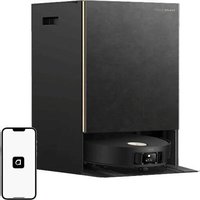
| Product Type | Robot Vacuum and Mop |
| Brand | Dreame |
| Model | Bot W10 Pro |
| Dimensions (Robot) | 350 mm diameter x 97 mm height |
| Dimensions (Auto-Empty Base) | 415 mm x 370 mm x 490 mm |
| Weight (Robot) | 4.4 kg |
| Weight (Base) | 5.2 kg |
| Power Input | 100-240V, 50/60Hz |
| Battery Capacity | 5200 mAh Lithium-ion |
| Runtime (Single Charge) | Up to 150 minutes (quiet mode) |
| Charging Time | Approximately 4 hours |
| Suction Power | 4000 Pa |
| Dustbin Capacity (Robot) | 400 ml |
| Water Tank Capacity | 180 ml (electrostatic mop pad) |
| Auto-Empty Dust Bag Capacity | 2.5 L |
| Navigation System | LiDAR mapping with SLAM |
| Cleaning Modes | Auto, Spot, Edge, Room, Zone, Custom |
| Mopping Function | Electrostatic mop with self-cleaning base |
| Auto-Empty & Self-Cleaning | Yes, base empties dustbin and washes mop |
| App Control | Dreamehome app (Wi-Fi, Bluetooth) |
| Voice Assistant | Compatible with Alexa and Google Assistant |
| Sensors | Cliff, bumper, infrared, gyroscope, optical |
| Filter Type | HEPA H13 washable |
| Maximum Noise Level | 67 dB (silent mode) |
| Warranty | 2 years |
Frequently Asked Questions - Bot W10 Pro DREAME
How often should I empty the dustbin?
The robot empties itself into the auto-empty base after each cleaning. However, you should replace the disposable dust bag in the base every 2-3 months depending on usage.
Can the robot cross thresholds or carpets?
Yes, it can climb over thresholds up to 20 mm and clean low-pile carpets. For high-pile carpets, it may struggle.
How do I reset the robot?
Press and hold the Reset button (located near the LiDAR sensor) with a pin for 5 seconds until you hear a voice prompt. Then reconnect via the app.
Why is the robot not connecting to Wi-Fi?
Ensure your Wi-Fi is 2.4 GHz (not 5 GHz) and that the robot is close to the router. Reset the robot and try again. Also, check that the app is up to date.
How do I clean the self-cleaning mop base?
Remove the dirty water tank and clean the base plate with a damp cloth. The base will wash the mop automatically, but you should manually clean the dirty water tank weekly to prevent odors.
What is the maximum area it can clean on a single charge?
With a runtime of up to 150 minutes, it can cover approximately 200 m² in standard mode before returning to charge.
How do I enable or disable the mopping function?
In the Dreamehome app, select the cleaning mode and toggle Mop mode on or off. You can also remove the mop pad if you only want vacuuming.
What should I do if the robot keeps bumping into furniture?
Check if the front bumper sensors are dirty. Clean them with a soft cloth. Also, ensure the robot’s firmware is updated in the app for better obstacle avoidance.
Can I schedule cleaning times?
Yes, you can set schedules in the app for specific days and times. You can also select specific rooms or zones for scheduled cleaning.
How do I replace the HEPA filter?
Open the top cover of the robot, remove the dustbin, and take out the filter. Replace it with a new HEPA H13 filter every 3-6 months or when the app prompts you.
User questions about Bot W10 Pro DREAME
0 question about this device. Answer the ones you know or ask your own.
Ask a new question about this device
No questions yet. Be the first to ask one.
Download the instructions for your Robot vacuum in PDF format for free! Find your manual Bot W10 Pro - DREAME and take your electronic device back in hand. On this page are published all the documents necessary for the use of your device. Bot W10 Pro by DREAME.
USER MANUAL Bot W10 Pro DREAME

Manual assistant
Powered by Anthropic
Waiting for your message
Product information
Brand : DREAME
Model : Bot W10 Pro
Category : Robot vacuum