
SENSIXX DA 30 - Iron BOSCH - Free user manual and instructions
Find the device manual for free SENSIXX DA 30 BOSCH in PDF.



| Product type | Steam iron |
| Brand | Bosch |
| Model | Sensixx DA 30 |
| Power | 2400 W (estimate) |
| Water tank capacity | 300 ml (estimate) |
| Soleplate | Smooth soleplate (material not specified) |
| Main functions | Steam ironing, steam jet, spray, dry ironing, self-cleaning (Calc'nClean), anti-scale, SensorSecure, automatic shut-off (Auto Off) |
| Settings | Temperature (synthetic, silk/wool, cotton, linen), steam flow, steam jet |
| Safety | Automatic shut-off after 30 s horizontal or 8 min vertical, SensorSecure (heats only when handle is held), anti-drip protection, child safety instructions |
| Maintenance and cleaning | Self-cleaning function (self-clean) and Calc'nClean every 15 days; clean soleplate and housing with a damp cloth |
| Weight | 1.3 kg (estimate) |
| Dimensions (L x W x H) | 30 x 12 x 15 cm (estimate) |
| Cable length | 2 m (estimate) |
| Power supply | 220-240 V, 50-60 Hz, grounded plug |
| Spare parts and repairability | Repair exclusively by authorized center; integrated anti-scale cartridge |
| General information | Household use only; use only tap water; do not immerse; follow safety instructions |
Frequently Asked Questions - SENSIXX DA 30 BOSCH
User questions about SENSIXX DA 30 BOSCH
0 question about this device. Answer the ones you know or ask your own.
Ask a new question about this device
Download the instructions for your Iron in PDF format for free! Find your manual SENSIXX DA 30 - BOSCH and take your electronic device back in hand. On this page are published all the documents necessary for the use of your device. SENSIXX DA 30 by BOSCH.
USER MANUAL SENSIXX DA 30 BOSCH
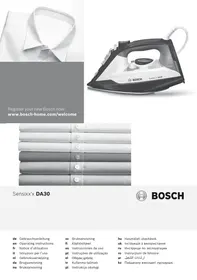
Register your new Bosch now: www.bosch-home.com/welcome

Sensixx'xDA30

BOSCH
de Gebrauchsanleitung en Operating instructions fr Notice d'utilisation it Istruzioni per l'uso nl Gebruiksaanwijzing da Brugsanvisning no Bruksanvisning
sv Bruksanvisning fi Käytöohjeet es Instrucciones de uso pt Instruções de utilização el Odyiec xpnoc tr Kullanma talimati pl Instrukcja obslugi
hu Hasznalatiutasitask uk IHCTpykci3 BVKOpncTaHH ru INHCTpykU TIO 3KcTnAytauuN ro Instruetiuni de folosire ar kz Taaaandahy xehiHderi Hcyckaybik


Index
| DEUTSCH | 6 |
| ENGLISH | 12 |
| FRANÇAISE | 18 |
| ITALIANO | 24 |
| NEDERLANDS | 30 |
| DANSK | 36 |
| NORSK | 42 |
| SVENSKA | 48 |
| SUOMI | 54 |
| ESPAÑOL | 60 |
| PORTUGUES | 66 |
| ΕΥΑΗΝΙΚΑ | 72 |
| TÜRKUAGE | 78 |
| POLSKI | 84 |
| MAGYAR | 90 |
| ΥΚΑΙΝΥΚΑ | 96 |
| ΡΥСΚΗ | 102 |
| ROMÁN | 108 |
| الجيرة | 119 |
| ΚΑ3ΑΚ | 120 |
DEUTSCH
ESPANOL
ENGLISH
PORTUGUES
FRANÇAISE
EMLHNIKA
ITALIANO
TÜRKÇE
DUTCH
POLISH
DANISH
HUNGARIAN
NORWEGIAN
UKRAINIAN
SWEDISH
RUSSIAN
FINNISH
ROMANIAN
KAZAKH
Thank you for buying the Sensixx'x DA30 steam iron from Bosch.
Carefully read through the operating instructions for the appliance and safeguard them for future reference.
You can download this manual from the local homepages of Bosch.
Open the leaflet sides
General safety instructions
The iron must not be left unattended while it is connected to the supply mains.
- Remove the plug from the socket before filling the appliance with water or before pouring out the remaining water after use.
The appliance must be used and placed on a stable surface.
- When placed on its stand, make sure that the surface on which the stand is placed is stable.
The iron should not be used if it has been dropped, if there are visible signs of damage or if it is leaking water.
It must be checked by an authorized Technical Service Centre before it can be used again.
- With the aim of avoiding dangerous situations, any work or repair that the appliance may need, e.g. replacing a faulty mains cable, must only be carried out by qualified personnel from an Authorised Technical Service Centre.
This appliance can be used by children aged from 8 years and above and persons with reduced physical, sensory or mental capabilities or lack of experience and knowledge if they have been given supervision or instruction concerning use of the appliance in a safe way and understand the hazards involved. Children shall not play with the appliance. Cleaning and user maintenance shall not be made by children without supervision.
- Keep the iron and its cord out of reach of children less than 8 years of age when it is energized or cooling down.

CAUTION. Hot surface.
Surface is liable to get hot during use.
Important notices
- This appliance has been designed exclusively for domestic use and must not be used for industrial purposes.
- This appliance must be used only for the purposes for which it was designed, i.e. as an iron. Any other use will be considered improper and consequently dangerous.
- The manufacturer will not be held responsible for any damage arising from misuse or improper use.
- This appliance reaches high temperatures and produces steam during use, which could cause scalds or burns in case of improper use.
- Do not touch the soleplate! Hold the iron by its handle.
- Do not leave the supply cord hanging over the table or ironing board, to prevent the appliance from falling.
- Do not iron clothing while it is being worn!
- Never spray or aim the steam at persons or animals!
- Do not allow the power cable to come into contact with sharp edges or with the soleplate when it is hot.
- Never rest the iron in a horizontal position when the soleplate is hot. Rest it on its heel.
- Do not touch the appliance with wet hands when in operation.
- This appliance is to be connected and used in accordance with the information stated on its characteristics plate.
- This appliance must be connected to an earthed socket. If it is absolutely necessary to use an extension cable, make sure that it is suitable for 16A and has a socket with an earth connection.
- In order to avoid that, under unfavourable mains conditions, phenomena like transient voltage drops or lighting fluctuations can happen, it is recommended that the iron is connected to a power supply system with a maximum impedance of 0.28Ω . If necessary, the user can ask the public power supply company for the system impedance at the interface point.
- The appliance must never be placed directly under the tap to fill the water tank.
- Unplug the appliance from the mains supply after each use, or if a fault is suspected.
- The electrical plug must not be removed from the socket by pulling the cable.
- Never immerse the iron in water or any other fluid.
- Do not leave the appliance exposed to weather conditions (rain, sun, frost, etc.).
Advice on disposal
Our goods come in optimized packaging. This basically consists in using non-contaminating materials which should be handed over to the local waste disposal service as secondary raw materials. Your local town council can give you information about how to dispose of obsolete appliances.

This appliance is labelled in accordance with European Directive 2012/19/EU concerning used electrical and electronic appliances (waste electrical and electronic equipment - WEEE). The guideline determines the
framework for the return and recycling of used appliances as applicable throughout the EU.
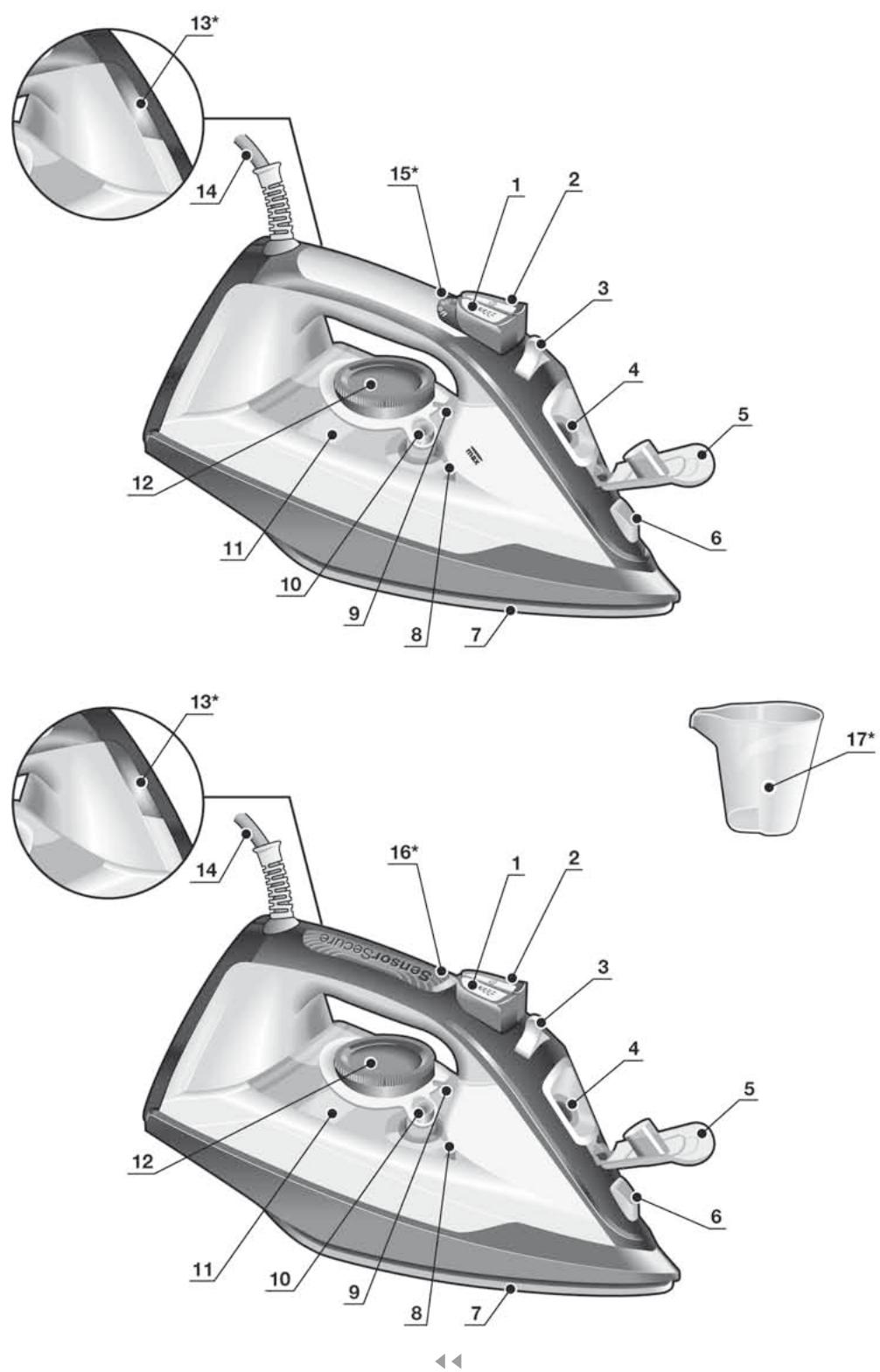
Description
- Spray button
- Shot of steam button
- Steam regulator
- Water inlet
- Water inlet lid
- Spray nozzle
- Soleplate
- Level mark for maximum filling
- Temperature index
- "clean" button
- Water tank
- Temperature control
- Pilot light *
- Power cord
- "auto off" indicator lamp *
- "SensorSecure" light *
- Beaker *
Before using your appliance for the first time
Remove any label or protective cover from the soleplate (7).
During its first use, the iron may produce certain vapours and odours that will die away after a few minutes.
Using your appliance

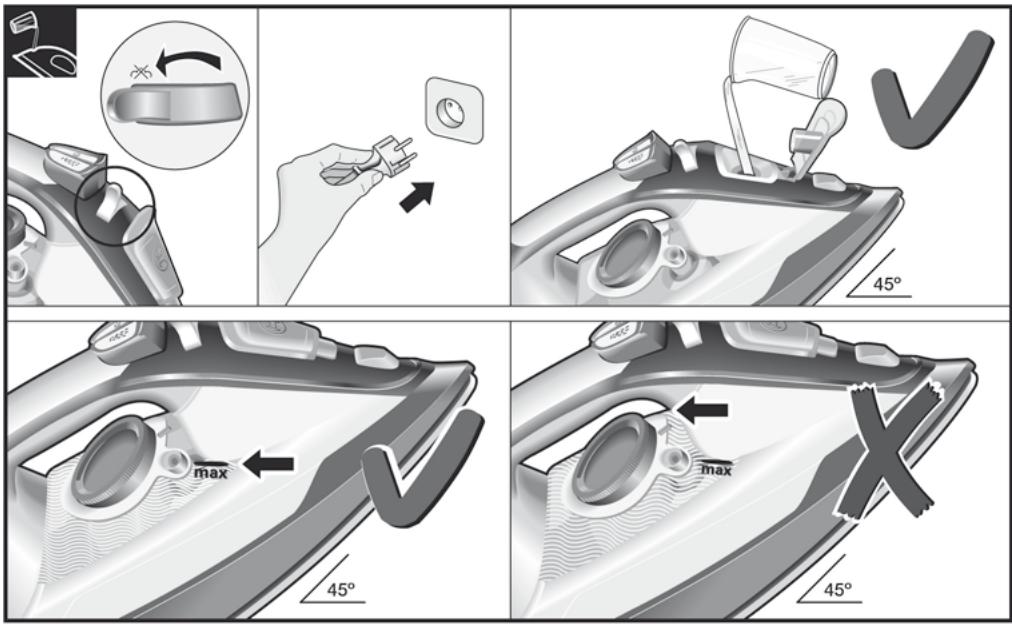
1. Filling the water tank
See the leaflet sides
This appliance has been designed to use normal tap water.
- The addition of other liquids, (unless recommended by Bosch) such as perfume, will damage the appliance.
- Do not use condensation water from tumble dryers, air conditioning systems or similar.
Any damage caused by the use of the aforementioned products will make the guarantee void.
Set the steam regulator (3) to the [X] position and unplug the iron from the mains!
- Open the water inlet lid (5).
- Fill the water tank (11). Never fill beyond the level mark for maximum filling (8).
- Close the water inlet lid.
Tip: To prolong the optimum steam function, you may mix tap water with distilled water 1:1. If the tap water in your district is very hard, mix tap water with distilled water 1:2.
You can inquire about the water hardness with your local water supplier.
![BOSCH SENSIXX DA 30 - Set the steam regulator (3) to the [X] position and unplug the iron from the mains! - 1](/content/2025/01/194371/images/28aff939c1607bec2e08a6a6fead633c5bb6a4aff7d13f9bb811ef16659d1dcc.jpg)
2. Setting the temperature
See the leaflet sides
The temperature control (12) adjusts the temperature of the soleplate (7).
Set the temperature control to the corresponding position by lining it up with the temperature index (9) on the iron.
| Temperature | Suitable for: |
| • | Synthetics |
| •• | Silk – Wool |
| ••• | Cotton |
| max | Linen |
The pilot light (13*) switches on while the appliance is heating up and switches off as soon as the set temperature is reached. If the temperature of the hot iron drops, you can continue ironing while the iron heats up again to the set temperature.

3. Ironing with steam
See the leaflet sides
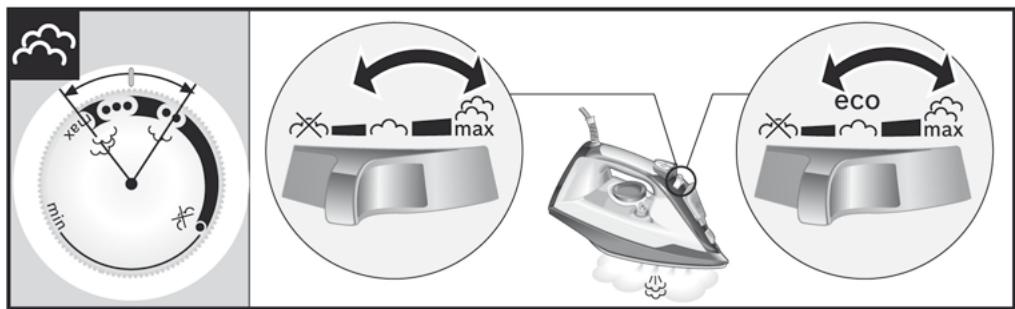
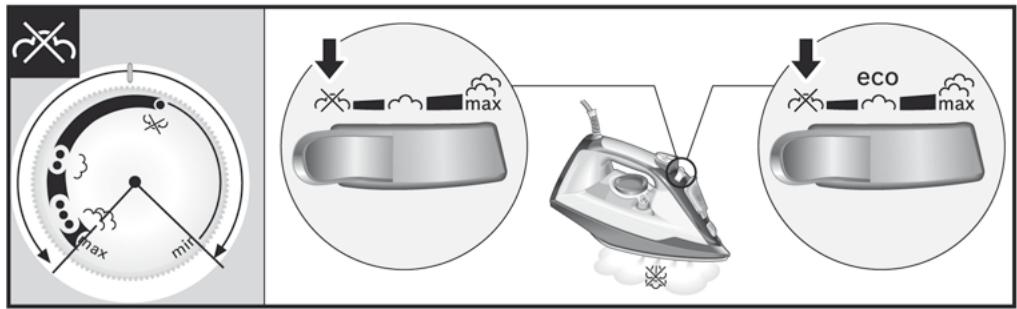
The steam regulator (3) is used to adjust the amount of steam produced when ironing.
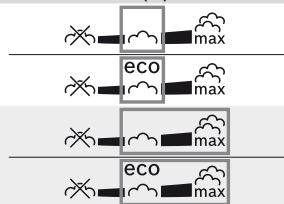
Temperature control (12)
Recommended position of the steam regulator (3) *




Tip: For better ironing results, iron the last strokes without steam to dry the garment.

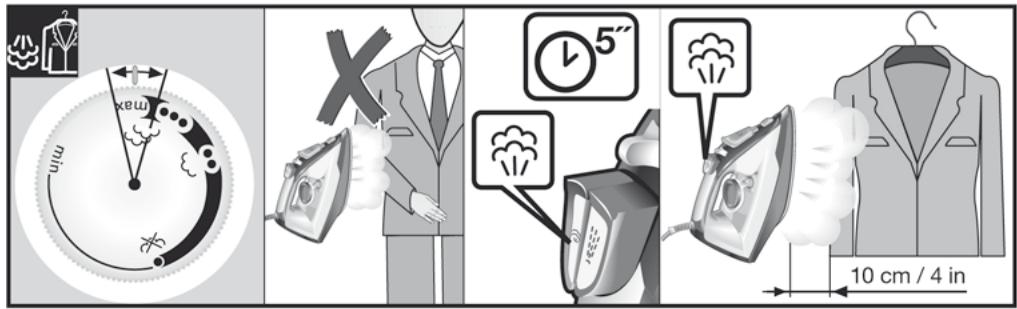
4. Shot of steam
See the leaflet sides
This can be used to remove stubborn wrinkles or to press in a sharp crease or pleat.
- Set the temperature control (12) to "max".
- Press the shot of steam button [ ] (2) repeatedly with intervals of at least 5 seconds.
See the leaflet sides
This can be used to remove creases from hanging clothes, curtains etc.
- Set the temperature control (12) to "max".
- Hang article of clothing on a clothes hanger.
- Operate the iron in a vertical position at a distance of 10 cm / 4 in, and press the shot of steam button [2] (2) repeatedly with pauses of at least 5 seconds.

6. Ironing without steam
See the leaflet sides
This enables the iron to be used for dry ironing.
Set steam regulator (3) to the [※] position.

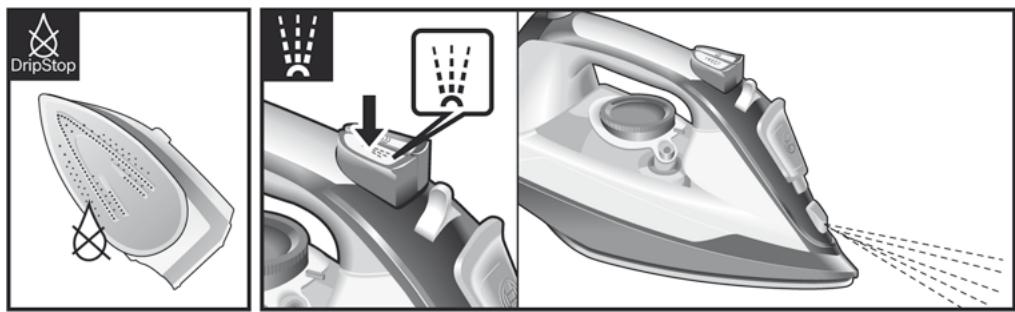
7. Drip protection *
See the leaflet sides
If the temperature is set too low, the steam is automatically switched off to avoid dripping. There may be an audible click when this occurs.

8. Spray
See the leaflet sides
This can be used to remove stubborn wrinkles.
Do not use the spray function with silk.

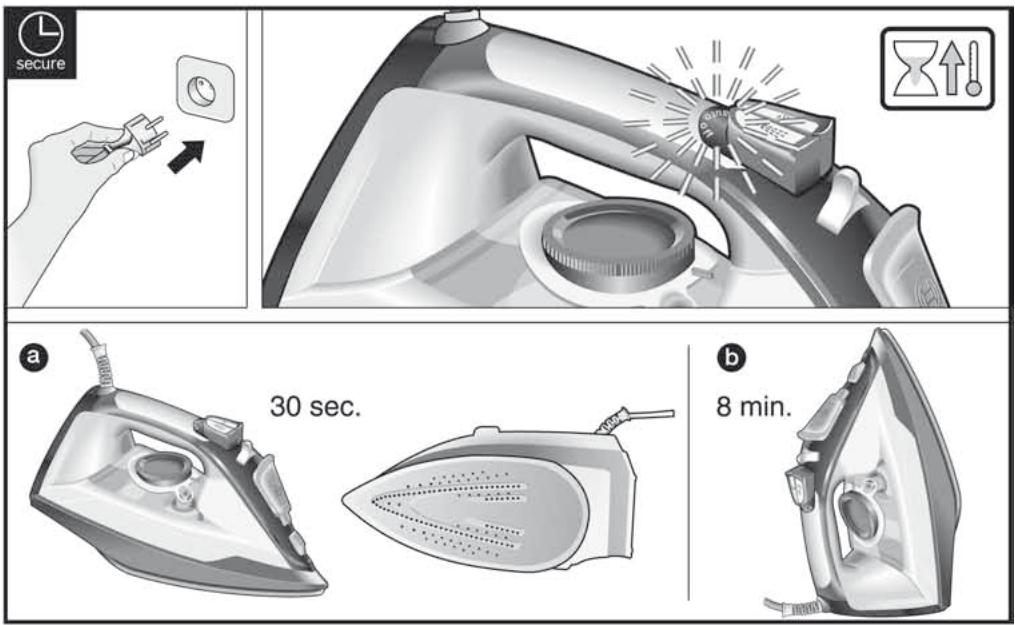
9. "secure" auto shut-off function *
See the leaflet sides
The "secure" auto shut-off function switches off the iron when it is left unattended, thus increasing security and saving energy.
If your iron is equipped with "secure" function, you can find the text "auto off" on handle.
- Plug in the iron.
- Initial heating up process: this function will be inactive for the first two minutes in order to give the appliance time to reach the set temperature.
- The safety circuit will switch the appliance off automatically and the pilot light (15*) will start flashing in the following cases:
a If the iron is not moved for 30 seconds while resting on its soleplate or on its side. If the iron is not moved for 8 minutes while in the upright position.
- To reconnect the iron, just move it about gently.

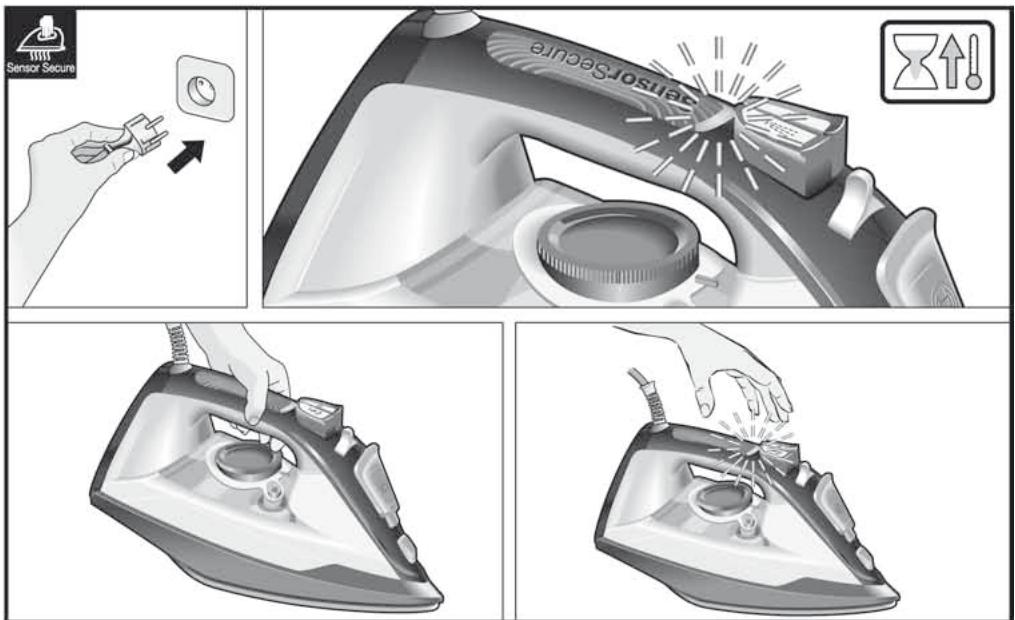
10. "SensorSecure" function *
See the leaflet sides
The "SensorSecure" function makes the iron heat up only when the handle is gripped, and stop heating when the handle is no longer gripped. Thus, safety and saving energy get increased.
If your iron is equipped with "SensorSecure" function, you can find the text "SensorSecure" on handle.
- Plug in the iron.
- "SensorSecure" light (16*) flashes when the handle is not gripped, and will show a continuous light when the handle is gripped.
- If the iron handle is released for more than 10 seconds, the iron will stop heating automatically.
- When the handle is gripped again, the iron will start heating up again.
Initial heating up process: it is not necessary to grip the handle until the iron heats up to the set temperature. Once reached such temperature, the pilot light (13*) goes off.

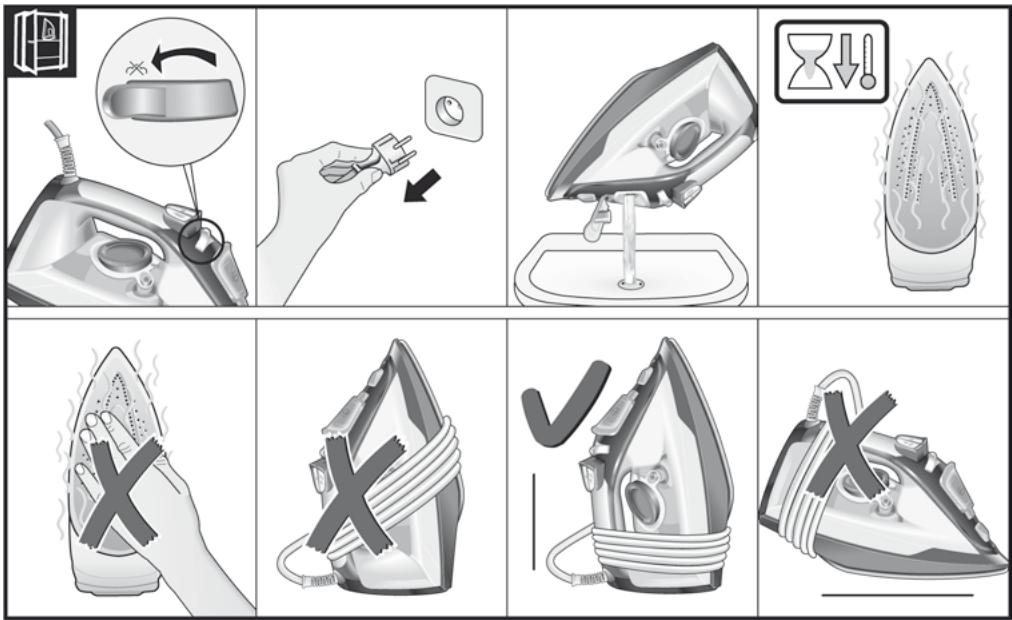
11. After ironing
See the leaflet sides
- Switch the steam regulator (3) from [× ] to "max" and back again several times (selfcleaning).
- Empty the tank. Hold the iron with the point down and shake lightly.
- Store standing on the rear, not on the base.
- Do not wrap the power cord (14) too tight!
Steam production consumes the most energy. To help minimise the energy used, follow the advice below:
- Start by ironing the fabrics that require the lowest ironing temperature. Check the recommended ironing temperature in the label on the garment.
- Regulate the steam according to the selected ironing temperature, following the instructions in this manual. Only use steam if necessary. If possible, use the spray function instead.
Try to iron the fabrics while they are still damp and reduce the steam setting. Steam will be generated from the fabrics rather than the iron.
If you tumble dry your fabrics before ironing them, set the tumble drier on the 'iron dry' program.
- If the fabrics are damp enough, turn off the steam regulator (3) completely.
- Stand the iron upright during pauses. Resting it horizontally with the steam regulator on generates wasted steam.

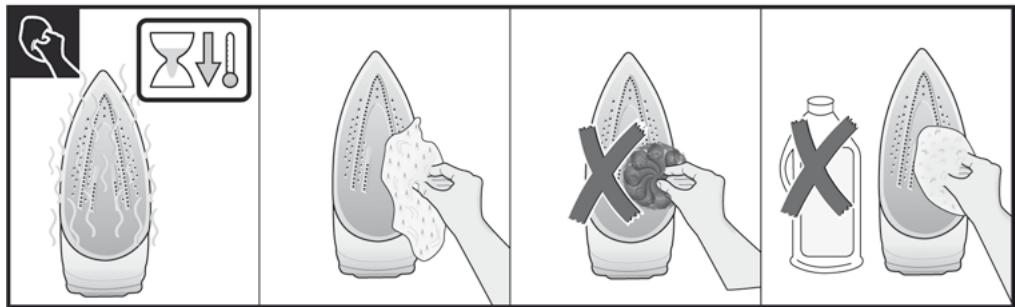
Cleaning & Maintenance
See the leaflet sides

Attention! Risk of burns!
Always unplug the appliance from the mains supply before carrying out any cleaning or maintenance operation on it.
- If the iron is only slightly soiled, pull out the plug and allow the soleplate (7) to cool down. Wipe the housing and the soleplate with a damp cotton cloth only.
- If the cloth is synthetic, it may melt due to the high temperature on the soleplate, switch off the steam and rub off any residue immediately with a thickly folded, dry cotton cloth.
- To keep the soleplate smooth, you should avoid hard contact with metal objects. Never use a scouring pad, or chemicals to clean the soleplate.

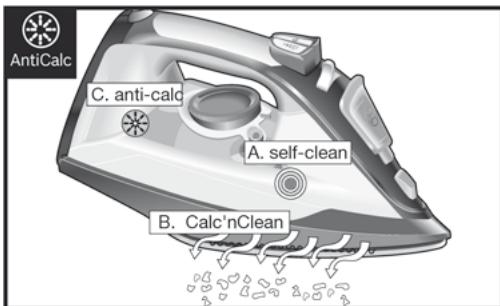
AntiCalc
Multiple descending system
See the leaflet sides
A self-clean
Each time you use the steam regulator (3), the "self-clean" system cleans the mechanism of scale deposits.
B Calc'nClean
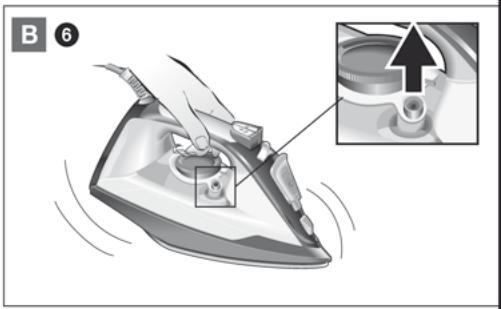
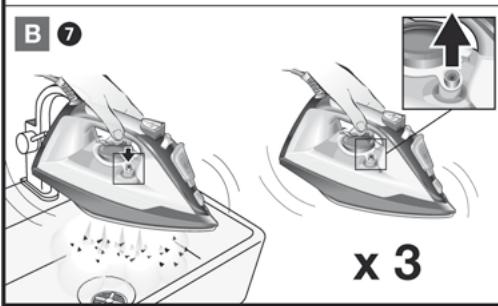
The "Calc'nClean" function helps to remove scale particles out of the steam chamber. Use this function approximately every 2 weeks if the water in your area is very hard.
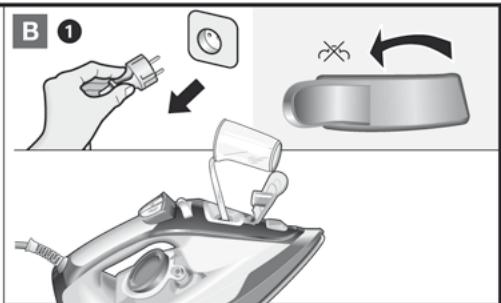
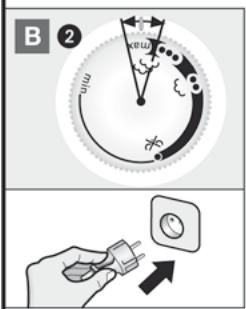
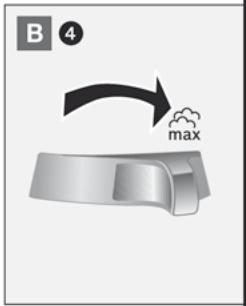
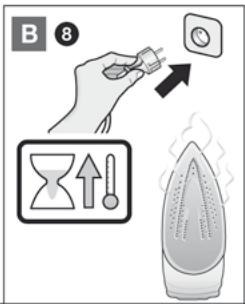
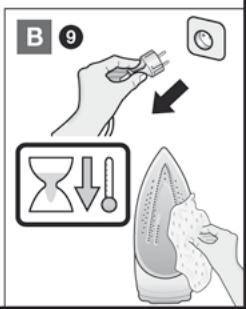
Unplug the iron from the mains socket, set the steam regulator (3) to the [× ] position and fill the water tank (11) with water. Set the temperature control (12) to the "max" position and plug in the iron. After the necessary warm-up period, the lamp goes out. Then, unplug the iron (very important!). Set steam regulator to the "max" position. Hold the iron over a sink. Press the "clean" button (10) and shake the iron until approximately one third of the water capacity of the tank is evaporated. Boiling water and steam will come out, carrying scale or deposits that might be there. Release the "clean" button, and gently shake the iron for some seconds. Repeat the steps 5 and 6 three times until the tank is empty. Then plug the iron in and heat it up again until the remaining water has evaporated. Unplug the iron and let the soleplate (7) cool down. Wipe the soleplate with a damp cotton cloth only.
anti-calc
The "anti-calc" cartridge has been designed to reduce the build-up of scale produced during steam ironing, helping to extend the useful life of your iron. Nevertheless the "anti-calc" cartridge cannot remove all of the scale that is produced naturally over time.
| Problem | Probable cause | Solution |
| The iron does not heat up. | 1. Temperature control (12) set to minimum. 2. The “secure” system has been activated. The iron is set to stand-by. 3. The “SensorSecure” system has been activated. The iron is set to stand-by. | 1. Turn to a higher position. 2. To reconnect the iron, just move it about gently. 3. Grip the handle of the iron to re-start it. |
| “auto off” indicator lamp (15*) flashes. | 1. The “secure” system has been activated. The iron is set to stand-by. | 1. To reconnect the iron, just move it about gently. |
| “SensorSecure” indicator lamp (16*) flashes. | 1. The “SensorSecure” system has been activated. The iron is set to stand-by. | 1. Grip the handle of the iron to re-start it. |
| The clothes tend to stick. | 1. The temperature is too high. | 1. Turn the temperature control (12) down and wait until the iron has cooled down. |
| Water drips out of the soleplate (7) together with steam. | 1. Temperature control (12) setting is too low. 2. Steam regulator (3) is set too high in conjunction with a low temperature. 3. You have pressed the shot of steam button (2) repeatedly without waiting for 5 seconds between each press. | 1. Turn the temperature control to a higher setting (between “•” and “max”) and wait until the pilot light (13*) goes out. 2. Set the steam regulator (3) to a lower setting. 3. Wait 5 seconds between each press of the shot of steam button. |
| Steam does not come out. | 1. Steam regulator (3) is set to [×] position. 2. The temperature is too low. Anti-drip system is activated. | 1. Set the steam regulator to a higher position. 2. Set to a higher temperature if compatible with the fabric. |
| Smoke comes out when connecting the iron for the first time. | 1. This may be caused by the lubrication of some of the internal parts. | 1. This is normal and will stop after a few minutes. |
| Deposits come out through the holes in the soleplate (7). | 1. Traces of lime scale are coming out of the steam chamber. | 1. Carry out a cleaning cycle (see “Calc'nClean” section). |
If none of the above solves the problem, get in touch with an authorised technical service.
2. Setting the temperature
Ironing board sides
The temperature selector (12) adjusts the temperature of the soleplate (7).
Set the temperature selector by comparing with the temperature markings (9) on the iron.
| Temperaturinnstilling | Passer til: |
| • | Syntetisk |
| •• | Silke - ull |
| ••• | Bomull |
| max | Lin |
Status lamps (13*) turn on when the iron is heating up and turn off when the set temperature is reached. If the temperature of the hot iron drops, you can continue ironing while it heats up to the set temperature again.

3. Steam ironing
Ironing board sides
6. Ironing without steam
Ironing board sides
2. Setting the temperature
Before first use, remove all stickers and protective film.
Remove the water tank (7) and fill it with water.
Ironing board sides
Ironing board sides
The temperature of the soleplate (7) is regulated by the temperature regulator (12).
Set the temperature regulator to the appropriate temperature setting (9) on the iron.
| Tempepatуrchий реким | Тащни, як можнан прасуваци: |
| • | Си nteteшика |
| •• | Шов – Вовна |
| ••• | Бавовна |
| max | Льон |
During heating, the indicator light (13*) turns on, and when the set temperature is reached, it turns off. If the temperature of the hot iron drops, you can continue ironing while it heats up to the set temperature again.

3. Steam ironing
Ironing board sides
The appliance can be used for ironing and steam ironing, according to the instructions in this manual.
| Р散发но Туmpларури (12) | Р散发но Туmpларури (3)* |
| max | |
| eco max | |
| max | max |
| eco max |

Advice: To obtain optimal ironing results, press the steam button several times and iron the fabric without steam, then dry it.

4. Steam burst
ENGLISH
This function can be used for vertical steaming of hanging clothes or curtains.
- Set the temperature regulator (12) to the maximum position (max).
- Press the steam burst button [@] (2) several times with an interval of at least 5 seconds.
This function can be used for steaming clothes on a hanger, among others.
- Set the temperature regulator (12) to the maximum position (max). 2. Hang the clothes on a hanger. 3. Treat the fabric with steam, holding the iron vertically at a distance of 10 cm. Press the steam burst button [2] (2) several times with an interval of at least 5 seconds.

ENGLISH
This mode is intended for ironing dry fabrics.
Set the steam regulator (3) to position [X].

7. Protection against drips*
ENGLISH
If the temperature is set to a low value, the iron automatically turns off to prevent water dripping. In this case, water may appear.

TINB.CknaedeHCTOpiHKN
The «SensorSecure» iron is designed to understand your movements: it heats up when you pick it up and cools down when you put it down. This ensures the safety of the device and saves electricity.
If the iron is equipped with the «SensorSecure» function, the «SensorSecure» indicator is on the handle.
1. Plug the iron into an outlet. 2. When you are not touching the handle, the «SensorSecure» indicator (16*) lights up. When you pick up the iron, it starts to heat up with a steady light. 3. If you put the iron down for more than 10 seconds, the heating stops automatically. 4. When you pick up the iron again, it starts heating up again.
Initial heating: There is no need to hold the handle, as the iron will not heat up to the set temperature. After reaching the required temperature, the indicator light (13*) goes out.

11. Cleaning
TINB.CknaedeHCTOpiHKN
1. Turn the steam regulator (3) to the maximum position (max) and press it several times (self-cleaning). 2. Empty the water tank. Turn the iron upside down and gently shake it.
3. When storing the iron, it should be placed on its heel, not on its soleplate. 4. Do not twist the cord (14) too tightly!

Energy saving tips
Most energy is used to create steam. To save electricity, follow these tips:
1. Start ironing with fabrics that require a lower temperature setting. The recommended ironing temperature can be found on the garment labels. 2. Adjust the temperature according to the selected ironing mode, following the instructions in this manual. 3. Use the steam function only when needed. Fill the water tank as much as possible and use the steam burst function sparingly. Try to iron damp fabrics, as they require less heat and time. This way, you save energy and time. If you use a steam iron, select the «iron» program. 4. If the water tank is empty, the steam regulator (3) can be turned off completely. 5. During ironing, keep the iron vertical. If the iron with the steam regulator is placed horizontally, steam is wasted.

Cleaning and maintenance
TINB.CknaedeHCTOpiHKN

Warning! There is a risk of burns! Before any cleaning or maintenance of the device, unplug it from the outlet.
- If the appliance is not used for a long time, unplug it from the socket and let it cool down (7). Clean the body and soleplate only with a damp cloth. 2. If the fabric is synthetic, it may melt under the influence of high temperature. In this case, turn off the iron and immediately remove the material with a dry cotton cloth folded several times. 3. To keep the soleplate smooth, avoid contact with metal objects. In any case, do not use abrasive cleaners for the soleplate, scouring pads, or chemical agents.
Metal objects. In any case, do not use abrasive cleaners for the soleplate, scouring pads, or chemical agents.

Descaling system
Iron. Composition of parts
A self-clean
Each time you use the steam iron (3), the self-cleaning system cleans the mechanism from scale.
In Calc'nClean
The "Calc'nClean" descaling function helps remove scale from the steam chamber. If the water in your region is very hard, use this function approximately every 2 weeks.
1. Unplug the iron from the power supply, place the steam iron (3) on the [X] mark and fill the water reservoir (11). 2. Set the temperature regulator (12) to the maximum position (max) and plug the iron into the power supply. 3. After the heating process is completed, the indicator will turn off. After that, unplug the iron from the power supply (this is very important!). Set the steam regulator to the maximum position (max). Place the iron over the sink. Press the "clean" button (10) and shake the iron until about a third of the water has evaporated from the reservoir. Scale and its residues will be removed with the steam and water. 6. Release the "clean" button and gently shake the iron for a few seconds. 7. Repeat steps 5 and 6 three times until the water reservoir is empty. Then plug the iron into the power supply and heat it again until the water evaporates. 8. Unplug the iron from the power supply and let it cool down (7). Clean the soleplate with a damp cotton cloth (do not use other materials).
The "anti-calc" cartridge is designed to reduce scale formation during steam operation, which allows extending the service life of the appliance. However, the "anti-calc" cartridge cannot remove all the scale that forms during use of the appliance.

Disposal of the appliance
The basic rules for the collection and recycling of used electrical and electronic appliances are defined throughout the EU.
Description
- Water spray button
- Steam burst button
- 1. Water tank lid 2. Water tank 3. Spray nozzle 4. Water tank opening 5. Water tank opening cover
- Spray nozzle 7. Soleplate 8. Maximum water level indicator
- Temperature indicator
- “Clean” button (self-cleaning) 11. Water tank
- Thermostat
- Indicator light
- Power cord 15. “Auto off” indicator light * 16. “SensorSecure” indicator light *
- Measuring cup*
Before first use of the appliance
Remove the protective coating from the soleplate (7).
During first use, the iron may emit steam and odor, which will disappear after a few minutes.
Using the appliance

1. Filling the water tank
This device is intended for use with tap water.
Adding other liquids (if they are not recommended by Bosch company), for example perfume, will lead to damage of the device. Do not use water condensate from tumble dryers, air conditioning systems, or other similar devices.
Any damage caused by using the above-mentioned means leads to termination of the warranty.
Set the steam regulator (3) to position [x] and remove the iron's plug from the socket!
- Open the water inlet cover (5).
- Fill the water tank (11). Never pour water above the maximum fill level mark (8).
- Close the water inlet cover.
TIP: To ensure long-lasting and efficient operation of the steam system, you can mix tap water with distilled water in a 1:1 ratio. If the tap water in your area is very hard, mix it with distilled water in a 1:2 ratio. You can find out the hardness of the water from your local water supply company.

2. Temperature regulation
The temperature regulator (7) is used to regulate the temperature.
Set the thermostat to the appropriate position according to the temperature indicator (9) on the iron.
| Tempepatryhny pexim | TkaHn, KOTOpbIe MoxHNo rJaIITb: |
| • | CinHTeTnKa |
| •• | Шeн-Шерсь |
| ••• | XlonopoK |
| max | Лен |
- 1.
1
4
* "SensorSecure".10

1
“SensorSecure”
"SensorSecure"
1.
Product "SensorSecure" (*16)

G 1 [x] G 3)
"max"
8.8

J 1
y
- "secure"

secure
1 1
olal "secure"
auto" 品 _ 品 secure"
. 与 d 相等
1.
Therefore, the area of triangle OBC equals the area of triangle COD plus the area of triangle BOC.
| الإستعمال | الإستعمال الحرفية |
| الإستعمال | • |
| ∙∙∙∙∙∙∙∙∙∙∙∙∙∙∙∙∙∙∙∙∙∙∙∙∙∙∙∙∙∙∙∙∙∙∙∙∙∙∙∙∙∙∙∙∙∙∙∙∙∙∙∙∙∙∙∙∙∙∙∙∙∙∙∙∙∙∙∙∙∙∙∙∙∙∙∙∙∙∙∙∙∙∙∙∙∙∙∙∙∙∙∙∙∙∙∙∙∙∙∙··∙∙∙∙∙∙∙∙∙∙∙∙∙∙∙∙∙∙∙∙∙∙∙∙∙∙∙∙∙∙∙∙∙∙∙∙∙∙∙∙∙∙∙∙∙∙∙∙∙∙∙∙∙∙∙∙∙∙∙∙∙∙∙∙∙∙∙∙∙∙∙∙∙∙∙∙∙∙∙∙∙∙∙∙∙∙∙∙∙∙∙∙∙∙∙∙∙∙∙‒∙‒‒‒‒‒‒‒‒‒‒‒‒‒‒‒‒‒‒‒‒‒‒‒‒‒‒‒‒‒‒‒‒‒‒‒‒‒‒‒‒‒‒‒‒‒‒‒‒‒‒‒‒‒‒‒‒‒‒‒‒‒‒‒‒‒‒‒‒‒‒‒‒‒‒‒‒‒‒‒‒‒‒‒‒‒‒‒‒‒‒‒‒‒‒‒‒‒‒‒‒––‒‒‒‒‒‒‒‒‒‒‒‒‒‒‒‒‒‒‒‒‒‒‒‒‒‒‒‒‒‒‒‒‒‒‒‒‒‒‒‒‒‒‒‒‒‒‒‒‒‒‒‒‒‒‒‒‒‒‒‒‒‒‒‒‒‒‒‒‒‒‒‒‒‒‒‒‒‒‒‒‒‒‒‒‒‒‒‒‒‒‒‒‒‒‒‒‒‒‒⁄‒‒‒‒‒‒‒‒‒‒‒‒‒‒‒‒‒‒‒‒‒‒‒‒‒‒‒‒‒‒‒‒‒‒‒‒‒‒‒‒‒‒‒‒‒‒‒‒‒‒‒‒‒‒‒‒‒‒‒‒‒‒‒‒‒‒‒‒‒‒‒‒‒‒‒‒‒‒‒‒‒‒‒‒‒‒‒‒‒‒‒‒‒‒‒‒‒‒‒”—max |

(12)



The general solution is given by the formula (12) for all values of n. The maximum value is 4j, and the minimum is 2n.
a 15 a 25 a 35 a 45 a 55 a 65 a 75
Therefore, y1 y2 = p · z' z' w'.


(8) { 2^x = 1, x ∈ S }
- Because a4 = a1 + 2d(a - 1).


Bosch company instructions for use. Read and follow the operating instructions before first use.
Keep these instructions for future reference and for passing on to a new owner.
These instructions are intended for the Bosch company's authorized specialists.
Safety instructions
General safety instructions
The appliance is intended for connection to the power supply via a protective contact plug. Do not operate the appliance if it has been dropped or shows visible damage. Have the appliance checked and repaired by an authorized specialist. Before cleaning, unplug the appliance. When the appliance is not in use, switch it off and unplug it. Do not pull the plug out of the socket by the cord. Do not use the appliance if the cord or plug is damaged. Have the cord replaced by an authorized specialist. To avoid hazards, repairs to the appliance, such as replacing a damaged cord, must only be carried out by an authorized specialist. Keep children under 8 years of age away from the appliance and its cord. Do not let children play with the appliance. Do not allow children to clean or maintain the appliance without supervision. If the appliance is used in a bathroom or after cleaning, unplug it and store it out of reach of children. Do not immerse the appliance in water. Do not use the appliance with wet hands. Do not pull the cord to disconnect.
MaHbI3dbI eckeptTnelep
This device must be used only for its intended purpose and in accordance with the instructions. This device is not intended for use by persons (including children) with reduced physical, sensory or mental capabilities, or lack of experience and knowledge, unless they have been given supervision or instruction concerning use of the device by a person responsible for their safety. Children should be supervised to ensure that they do not play with the device. - This device is not intended for use at high temperatures and should not be used in damp or wet conditions.
- Install the device correctly! Install it on a stable surface. Do not place the device near heat sources or in direct sunlight to prevent overheating.
- Do not use the device near water! Do not spray water or other liquids on the device or its parts, and do not immerse it in water.
Do not use the device with damaged cords or plugs, or if it has been dropped or damaged. If the cord is damaged, it must be replaced by the manufacturer, its service agent, or similarly qualified persons to avoid a hazard. Do not operate the device with wet hands. Do not immerse the device in water. - This device is intended for household and similar applications as described in the technical specifications. - This device must be kept out of reach of children. If it is used in a public place, it must be supervised.
If the device is used in a public place, it must be supervised by an adult.
- Before use, check that the device is not damaged. If the device is damaged, do not use it and contact the service center. The device must be connected to a power supply with a voltage of 220-240 V~ 50/60 Hz. Do not use the device if the power cord or plug is damaged. Always disconnect the device from the power supply before cleaning or when not in use. Do not pull the cord to disconnect the device from the power supply.
- Do not immerse the device in water or any other liquid. Do not leave the device unattended while it is in operation.
Care and maintenance
Our products are manufactured in accordance with the highest quality standards. This ensures that the device is safe and reliable. If you have any questions about the device, please contact our service center.
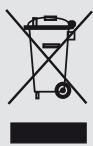
This device is marked in accordance with the European Directive 2012/19/EU on Waste Electrical and Electronic Equipment (WEEE).
The symbol indicates that this product should not be disposed of with household waste.
This device is intended for use in all EU countries and is marked accordingly.
Specifications
- Bypky Tymmeci
- By petteriwi 4. Iron soleplate 5. Dry ironing 6. Steam ironing
- Water tank
- Top part of the iron
- Temperature indicator
- "clean" (cleaning) function
- Water level
- Temperature regulator 13. Test light*
- Power cord
- "auto off" (auto shut-off) indicator light*
- "SensorSecure" indicator light*
- Glass *
Before first use of the iron
Remove the plug (7) only after the device has completely cooled down.
It is possible to remove the metal parts only after they have cooled down for at least a few minutes.
Cleaning and maintenance

1. Empty the water tank

Remove the water tank
Before removing the water tank, make sure it is empty.
- Do not use cleaning agents or descaling agents (except those recommended by Bosch) to close the water tank. Do not pour water into the openings or onto the hot plates.
After the above steps, the water tank can be removed and cleaned with a soft cloth.
Do not operate the device (3) without water and do not operate it with the water tank empty!
1. Remove the water tank (5). 2. Empty the water tank (11). 3. Fill the water tank with fresh tap water up to the MAX mark (8). 4. Replace the water tank.

Note: To ensure the optimal function of the device, mix tap water with distilled water in a 1:1 ratio. If the tap water in your area is hard, mix it with distilled water in a 1:2 ratio. You can determine the hardness of your water using a water hardness test strip.

2. Adjusting the temperature
Setting the temperature
The temperature regulator (12) adjusts the temperature of the soleplate (7).
Set the temperature regulator to the desired temperature according to the temperature table (9).
| Temperatura | Adecuado para: |
| ● | CINhteатINA |
| ●● | Жібек - жун мanta |
| ●●● | Mačтɑ |
| max | Зыrfыр |
The device is designed to operate at the ambient temperature range specified in the technical data. If the ambient temperature exceeds this range, the device may not operate correctly at the specified temperature range.

3. Device operation
Viewing the settings
This mode (3) is used to adjust the device settings during operation.
| Темпера typаны peTTey (12) | Бу peTTERiWIiHIN (3) УСынБИЛГФАН КУМI* |
| max | eco |

Note: To achieve the best operating results, do not operate the device without load.

4. This function
Viewing the settings
This mode is used to adjust the device settings, to set the parameters, and to configure the device.
- Set the temperature regulator (12) to the "max" position.
- Press this function (2) for at least 5 seconds.
Viewing the settings
This function is used to adjust the device settings, parameters, etc.
- Set the temperature regulator (12) to the "max" position. 2. Set the device to the desired mode. 3. Press the function key for at least 10 cm and hold this function (2) for at least 5 seconds.

6. Operation without load
Viewing the settings
The function is used to control the temperature.
By regulation (3) the original is replaced.

7. Water tank cover *
To check the water level
If the temperature of the water is higher than the original, the water tank may overflow. Check the water level before use.

8. Filling
To check the water level
The function is used to control the water level.
The filling hose is connected to the water supply.

9. "secure" auto-off function *
To check the water level
The "secure" auto-off function automatically turns off the device when it is not in use for a certain period of time.
If your device has the "secure" function, you can set the "auto off" time.
- Connect the device to a suitable power outlet.
- Initial heating: this function is used to quickly heat the hob to the set temperature, then automatically switches to standby mode after two minutes.
- Safety shutdown: the hob automatically turns off if the indicator light (15*) is not pressed within 30 seconds after turning on or after a certain time. If the hob is left on, it will turn off after 8 minutes.
- To turn the hob back on, press it again.

10. "SensorSecure" *
Viewing the settings
The "SensorSecure" function delays the hob's ignition when the hob is turned on and stops the ignition when the hob is turned off. This increases safety and prevents accidents.
If your hob is equipped with the "SensorSecure" function, the "SensorSecure" indicator will light up.
- Remove the plug from the socket.
- The "SensorSecure" lamp (16*) lights up when the hob is turned on and goes out when the hob is turned off. If the hob is turned off for more than 10 seconds, the hob automatically stops the ignition.
- When the hob is turned on again, the ignition starts automatically.
Initial heating: if the hob is not heated to the set temperature, the hob will not turn on. When the temperature is reached, the indicator light (13*) will light up.

11. After using the hob
Viewing the settings
- By turning the knob (3) to the "max" position, the burner is set to maximum power (self-cleaning).
- Cydi baktaH teriH3. YtikTi TEmeH kapaTbIN cAn ciNkiH3.
- OHJI Heri3iHNe eMec, apTKJI XaFbIMeH TypFaH KyiHHe caKaTaHbI3.
- Kyat cbIMbiH (14) TbIM bekem opamaHbI!
KyaT Ke3i Ke6iHece 6y TV3yRe KeTei. KyaT Ke3iH naIaHaHybl a3aIy UwIH TEmHeIe I KeHeCTepi KaPaHbI3:
- Eh a3 yTikTey TemnepaTypacbH KaKet etetih KIMdepdi yTikTeyDen bactahI3. YtikTeydi KaKetTi TemnepaTypacbH 6yibIMbIH XancbIpMaCbHah Kepyre 6oJabl.
- OcbHyckayIbIaFbHcKaynapIe cKepe OTbIPbIN, 6y Xibepydi TaHaJaIFaH yTikTey TemnepatypacbHa cai peTehi3.
- KaKet 6oJcA, 6yIb I Fana naiJaIaHaHbIbI3. MyMkiH 6oJca, OhBiH opHbHa 6byKy cyHKiYcBbH naIaIaHaHbIbI3. KmIeep dIbIMkbl KyeDe 6oJIaH Ke3De yTtKeH3 XeHe 6yBiH DeHReHIN TeMeHdTeYre TbIPbcHbI3. ByN Ke3de 6yTtKe EmeC, MaTaBHn 03iHne Ty3iNetIH 6oJabi. KmIeepdi yTtKeYeHd 6byBIn KeNTipy MaunHacbHaDa KeNTIpceHi3, KeNTipriIi MaunHAcbHI "KpyraK KyJe 6yTtKeY" 6aFapIamacbHaOpHaTbHbI3.
- KIMdep JeKTIJKTI TypDe DbIMKBJ6ONca, 6y peTteriuiH (3) ToJIbIFImeH eWipin KOJIbIbI3.
- Y3iNICTep 6apbIcbHda YtIKTI TIK KynIHKe KOyIbHbI3. YtIKTI by peTteriJi Kocynbl BONFaHda KeIeHeH KyIe KaIbIpy naIdaCbI3 by Ty3iJyIe anIbIn KeJIeIi.

Ta3aay XeHe TexHnKaIbIK Kbl3MeT KePcety
TkaHbJntaBtXkaptabH Kepy

Ha3ap aydapbIbI3! Kyuiin Kany Kayni 6ap! Ke3 KeiReH Ta3anay XeHe TexHNKaIbIK KbI3MeT KepCteTy KymblCTapBH Kypri3yDen 6ypbIH KpyblfBbIH aWala bIa bIpbIH YraWbIKTaH WbIFapbIH3.
- Ytik a3dian kipnen kaIfah 60nca, awanbl aIbIPbIH yAdbkTah WbIFapbHb3 KHe TaBaHbHbIH (7) cyybHa MymKInDik 6epiH3. YtIKTH KopnycbI MeH TaBaHbIN DbIMKbI NybepeknEh cyptiH3.
- Mata cHTeKakBik 60nca, on yTik TaBaHbHbIK KOFapbl TEMpepatypacbHbIH 0cepiHeH epin ketyi MyMkiH. MyHdai KaFdaJa 6yDbl Ewipin, Ke3 KeIreH KaIbIKbI Depey KaBHbIKyTeJIreH, KpyraK MaKTa MaTaMeH CypTHi3.
- Ytik TabaBHIN Teric, Kblntbip Kynde caKtay YuH, KatTb MeTann 3aTAPMeH XaHAcyBH 6oJbIPMaHbI. YtIKTH TaBaHbN Ta3anay YUH eWkaaH da bIbC JyyFa apHaIFaH KaTb bICbIHTap MeH XmMnJIbK 3aTATpDa NaiJaHaH6aHbI3.
A self-clean
By pressing the self-clean button (3), the self-cleaning mechanism is activated.
B Calc'nClean
The "Calc'nClean" function automatically cleans the inside of the steam tank. If you need to descale, this function will help you.
1 Unplug the appliance and let it cool down, then remove the water tank (3) and fill it with water (11). 2 Set the temperature dial (12) to "max" and plug the appliance into a power outlet. Wait until the appliance heats up. Then, unplug the appliance (be careful!). Set the dial to "max". 5 Place the appliance on a stable surface. Press the "clean" button (10) and hold it for a few seconds until the indicator light turns on. Wait for the descaling process to complete, then unplug the appliance and rinse the water tank with clean water. Press the "clean" button again and repeat the process. 7 Repeat steps 4 and 5. Then, plug the appliance back in and let it heat up with the remaining water. 9 Unplug the appliance and empty the water tank (7). Wipe the appliance and the water tank with a dry cloth.
anti-calc
The "anti-calc" cartridge increases the performance of your appliance, protecting it from scale buildup during use. Replace the "anti-calc" cartridge regularly for optimal performance.
| Macele | Мукин себбí | Шебим |
| Ytik Кызайдь. | 1. Temnepatya petteriш (12) са зшама opнатылган. 2. "secure" жунеша бенидірілган. Ytik Кут рекиміе opнатылган. 3. "SensorSecure" жунешабенидірілган. Ytik Кут рекиміе opнатылган. | 1. Temnepatya petteriш жогарырak ки're opнатылгиз. 2. Ytik Кайta кosity ушін оны жайжыкытылгиз. 3. Ytik Кайta кosity ушін оны туткасынан устаньиз. |
| "auto off" karbін ндікаторы (15°) Жыltыктайдь. | 1. "secure" жунешабенидірілган. Ytik Кут рекиміе opнатылган. | 1. Ytik Кайta кosity ушін оны жайжыкытылгиз. |
| "SensorSecure" karbін ндікаторы (16°) Жыltыктайдь. | 1. "SensorSecure" жунешабенидірілган. Ytik Кут рекиміе opнатылган. | 1. Ytik Кайta кosity ушін оны/tуткасынан устаньиз. |
| КиIM徴 утікін tabanba naх жабісын кал берedi | 1. Temnepatya оte төmen. | 1. Temnepatya petteriш (12) төmenБүрьндз max'apalibiniz(“*”)ж've пamутpres opнатылб (“*”)ж've "max" apalibiniz(а) ж've bakuynay шамы (13*) bukehenne ktyтigiz. |
| Су buyмен Бірre утікін tabanba nah (7) Тамшылайдь. | 1. Temnepatyaныр pettey (12) napametri тьм төmen. | 1. Temnepatya petteriш жогарырak пarametrpre opнатылб (“*”)ж've "max" apalibiniz(а) ж've bakuynay шамы (13*) bukehenne ktyтigiz. |
| 2. By petteriш (3) төmen temnepatypara cәйес тьмхогары opнатылган. 3. By cokkibcibnн Түмecin (2) орбасу.apalibiniz 5 секунд кутпeй kaɪtanan baco bεpehciiz. | 2. By petteriш (3) төmenri пarametrpre opнатылб.3. 3. By cokkibcibnн Түмecin орбасу apalibiniz 5 секунд кутпiz. | |
| Бу shыкай жатыр. | 1. By petteriш (3) күйн opнатылган. 2. Temnepatya оte төmen. Тамшыra kapсы жүйьбенидірілган. | 1. By petteriш жогарырak ки're opнатылб.3. 2. Матаflа сәйес күлгетхаftади, оданда жогарытіtemратypаfla opнатылб. |
| Бурку phunckиясы жмьс icтeme'di. | 1. Бакта (11) су жok. 2. Күрьндьб iiteеліng калган. | 1. Cbyabln Tontlbpbliz.3. 2. Тхн��алык Кьзмет Крссу optaillbfa hya-bapnaacbliz. |
| Бастankы рет коссан kezie du tukten TUTIN шыfasдь. | 1. Byl Kei6ip iushi beilekterperdiin maɪlaybɪnəн bɔlby MUMKIH. | 1. Byl kalibntы joагдai joэne bɪspheisme MHyttah keiɪn TOKtaɪdɪ. |
| Сydдн TUTбалары утікін tabanbɪndаflы (7) Тechітір apkibnyшылбдь. | 1. Ka'tbɪn iЗdepi by kamerpacbl apkibnyшылбнлллллллллллллллллллллллллллллллллллллллллллллллллллллллллллллллллллллллллллллллллллллллллллллллллллл. | 1. Tazanay proceciin opblindahl (‘"Cal'nClean" boIimin kapanbɪz). |
If the above-mentioned measures do not help, contact our technical support service.




- INDEX
- GENERAL SAFETY INSTRUCTIONS
- IMPORTANT NOTICES
- ADVICE ON DISPOSAL
- DESCRIPTION
- BEFORE USING YOUR APPLIANCE FOR THE FIRST TIME
- REMOVE ANY LABEL OR PROTECTIVE COVER FROM THE SOLEPLATE (7)
- USING YOUR APPLIANCE
- FILLING THE WATER TANK
- ANY DAMAGE CAUSED BY THE USE OF THE AFOREMENTIONED PRODUCTS WILL MAKE THE GUARANTEE VOID
- SET THE STEAM REGULATOR (3) TO THE [X] POSITION AND UNPLUG THE IRON FROM THE MAINS
- SETTING THE TEMPERATURE
- THE TEMPERATURE CONTROL (12) ADJUSTS THE TEMPERATURE OF THE SOLEPLATE (7)
- IRONING WITH STEAM
- THE STEAM REGULATOR (3) IS USED TO ADJUST THE AMOUNT OF STEAM PRODUCED WHEN IRONING
- SHOT OF STEAM
- THIS CAN BE USED TO REMOVE STUBBORN WRINKLES OR TO PRESS IN A SHARP CREASE OR PLEAT
- THIS CAN BE USED TO REMOVE CREASES FROM HANGING CLOTHES, CURTAINS ETC
- IRONING WITHOUT STEAM
- THIS ENABLES THE IRON TO BE USED FOR DRY IRONING
- DRIP PROTECTION
- SPRAY
- THIS CAN BE USED TO REMOVE STUBBORN WRINKLES
- SECURE" AUTO SHUT-OFF FUNCTION
- THE "SECURE" AUTO SHUT-OFF FUNCTION SWITCHES OFF THE IRON WHEN IT IS LEFT UNATTENDED, THUS INCREASING SECURITY AND SAVING ENERGY
- SENSORSECURE" FUNCTION
- THE "SENSORSECURE" FUNCTION MAKES THE IRON HEAT UP ONLY WHEN THE HANDLE IS GRIPPED, AND STOP HEATING WHEN THE HANDLE IS NO LONGER GRIPPED. THUS, SAFETY AND SAVING ENERGY GET INCREASED
- AFTER IRONING
- CLEANING & MAINTENANCE
- ATTENTION! RISK OF BURNS
- MULTIPLE DESCENDING SYSTEM
- A SELF-CLEAN
- B CALC'NCLEAN
- ANTI-CALC
- THE TEMPERATURE SELECTOR (12) ADJUSTS THE TEMPERATURE OF THE SOLEPLATE (7)
- STEAM IRONING
- BEFORE FIRST USE, REMOVE ALL STICKERS AND PROTECTIVE FILM
- REMOVE THE WATER TANK (7) AND FILL IT WITH WATER
- STEAM BURST
- PROTECTION AGAINST DRIPS
- CLEANING
- ENERGY SAVING TIPS
- CLEANING AND MAINTENANCE
- DESCALING SYSTEM
- IN CALC'NCLEAN
- BEFORE FIRST USE OF THE APPLIANCE
- USING THE APPLIANCE
- TEMPERATURE REGULATION
- SENSORSECURE
- THEREFORE, Y1 Y2 = P · Z' Z' W
- MAHBI3DBI ECKEPTTNELEP
- CARE AND MAINTENANCE
- SPECIFICATIONS
- BEFORE FIRST USE OF THE IRON
- REMOVE THE PLUG (7) ONLY AFTER THE DEVICE HAS COMPLETELY COOLED DOWN
- EMPTY THE WATER TANK
- AFTER THE ABOVE STEPS, THE WATER TANK CAN BE REMOVED AND CLEANED WITH A SOFT CLOTH
- DO NOT OPERATE THE DEVICE (3) WITHOUT WATER AND DO NOT OPERATE IT WITH THE WATER TANK EMPTY
- ADJUSTING THE TEMPERATURE
- DEVICE OPERATION
- THIS FUNCTION
- OPERATION WITHOUT LOAD
- WATER TANK COVER
- FILLING
- SECURE" AUTO-OFF FUNCTION
- AFTER USING THE HOB
- TA3AAY XEHE TEXHNKAIBIK KBL3MET KEPCETY
Brand : BOSCH
Model : SENSIXX DA 30
Category : Iron