USER MANUAL KDL-32W705C SONY
Parts and Controls 6
Controls and Indicators 6
Inputs and Outputs 7
Using the Remote Control. 8
Remote Control Parts Description. 8
Installing the TV to the Wall 10
Troubleshooting 11
Troubles and Solutions 11
Specifications 12
Introduction
Thank you for choosing this Sony product.
Before operating the TV, please read this manual thoroughly and retain it for future reference.
Note
Before operating the TV, please read "Safety Information" (page 3).
- Images and illustrations used in Startup Guide and this manual are for reference only and may differ from actual product appearance.
Location of the identification label
Labels for the TV Model No., Production Date (year/month) and Power Supply rating are located on the rear of the TV or package. Labels for the mains adaptor Model No. and Serial No. are located on the bottom of the mains adaptor.
WARNING
TO PREVENT THE SPREAD OF FIRE, KEEP CANDLES OR OTHER OPEN FLAMES AWAY FROM THIS PRODUCT AT ALL TIMES.

NOTICE FOR CUSTOMERS IN THE UNITED KINGDOM
A moulded plug complying with BS1363 is fitted to this equipment for your safety and convenience.
Should the fuse in the plug supplied need to be replaced with the same rating of fuse approved by ASTA or BSI to BS 1362 (i.e., marked with 和 or 和 must be used.
If the plug supplied with this equipment has a detachable fuse cover, be sure to attach the fuse cover after you change the fuse. Never use the plug without the fuse cover. If you should lose the fuse cover, please contact your nearest Sony service station.
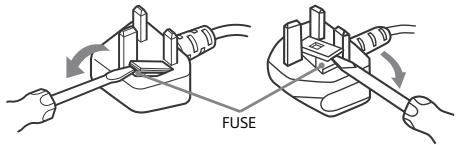
How to replace the fuse
Open the fuse compartment with a blade screwdriver, and replace the fuse.
Please refer to the illustration that actually equipped with the product.
IMPORTANT NOTICE
This product has been manufactured by or on behalf of Sony Corporation, 1-7-1 Konan Minato-ku Tokyo, 108-0075 Japan. Inquiries related to product compliance based on European Union legislation shall be addressed to the authorized representative, Sony Deutschland GmbH, Hedelfinger Strasse 61, 70327 Stuttgart, Germany. For any service or guarantee matters, please refer to the addresses provided in the separate service or guarantee documents.
Notice for Wireless Signal

Hereby, Sony Corporation declares that this unit is in compliance with the essential requirements and other relevant provisions of Directive 1999/5/EC. For details, please access the following UR http://www.compliance.sony.de/
Notice for customers: the following information is only applicable to equipment sold in countries applying EU directives.
TV wireless system may be operated in following countries:
AT, BE, HR, CY, CZ, DK, EE, FI, FR, DE, GR, HU, IE, IT, LV, LT, LU, MT, NL, PL, PT, SK, SI, ES, SE, GB, IS, LI, NO, CH, BG, RO, TR, AL, BA, MK, MD, RS, ME, Kosovo
This equipment can be operated in other non-European countries.
WARNING
Batteries must not be exposed to excessive heat such as sunshine, fire or the like.
Installation/Set-up
Install and use the TV set in accordance with the instructions below in order to avoid any risk of fire, electrical shock or damage and/or injuries.
Installation
- The TV set should be installed near an easily accessible mains socket.
- Place the TV set on a stable, level surface to avoid it from falling down and cause personal injury or damage to the TV.
- Only qualified service personnel should carry out wall installations.
- For safety reasons, it is strongly recommended that you use Sony accessories, including: Wall-Mount Bracket -SU-WL450
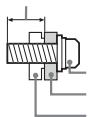
- Be sure to use the screws supplied with the Wall-Mount Bracket when attaching the Mounting Hooks to the TV set. The supplied screws are designed as indicated by illustration when measured from the attaching surface of the Mounting Hook.
The diameter and length of the screws differ depending on the Wall-Mount Bracket model.
Use of screws other than those supplied may result in internal damage to the TV set or cause it to fall, etc.
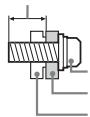
8mm-12mm
Screw(supplied with the Wall-Mount Bracket) Mounting Hook
Hook attachment on rear of TV set
Transporting
- Before transporting the TV set, disconnect all cables.
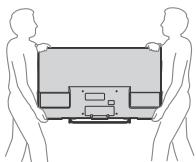
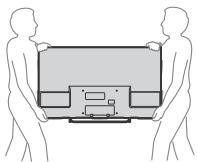
- Two or three people are needed to transport a large TV set.
- When transporting the TV set by hand, hold it as shown below. Do not put stress on the LCD panel and the frame around the screen.
- When transporting the TV set, do not subject it to jolts or excessive vibration.
- When transporting the TV set for repairs or when moving, pack it using the original carton and packing material.
Ventilation
- Never cover the ventilation holes or insert anything in the cabinet.
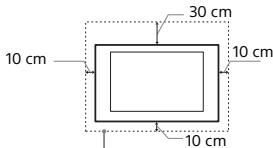
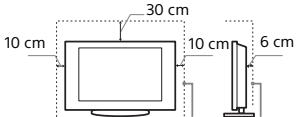
- Leave space around the TV set as shown below.
- It is strongly recommended that you use a Sony Wall-Mount Bracket in order to provide adequate air circulation.
Installed on the wall
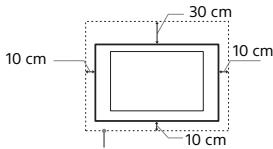
Leave at least this space around the set.
Installed with stand
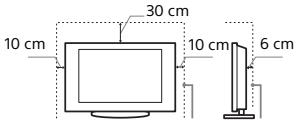
Leave at least this space around the set.
-
To ensure proper ventilation and prevent the collection of dirt or dust:
-
Do not lay the TV set flat, install upside down, backwards, or sideways.
- Do not place the TV set on a shelf, rug, bed or in a closet.
- Do not cover the TV set with a cloth, such as curtains, or items such as newspapers, etc.
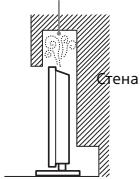
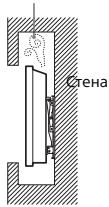
- Do not install the TV set as shown below.
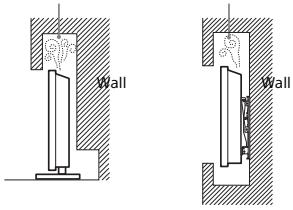
Air circulation is blocked.
Mains lead
Handle the mains lead and socket as follows in order to avoid any risk of fire, electrical shock or damage and/or injuries:
- Use only mains leads supplied by Sony, not other suppliers.
- Insert the plug fully into the mains socket.
- Operate the TV set on a 220V - 240V AC supply only.
- When wiring cables, be sure to unplug the mains lead for your safety and take care not to catch your feet on the cables.
- Disconnect the mains lead from the mains socket before working on or moving the TV set.
- Keep the mains lead away from heat sources.
- Unplug the mains plug and clean it regularly. If the plug is covered with dust and it picks up moisture, its insulation may deteriorate, which could result in a fire.
Note
- Do not use the supplied mains lead on any other equipment.
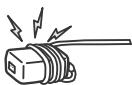
- Do not pinch, bend, or twist the mains lead excessively. The core conductors may be exposed or broken.
- Do not modify the mains lead.
- Do not put anything heavy on the mains lead.
- Do not pull on the mains lead itself when disconnecting the mains lead.
- Do not connect too many appliances to the same mains socket.
- Do not use a poor fitting mains socket.
NOTE ON MAINS ADAPTOR
Warning
To reduce the risk of fire or electric shock, do not expose this apparatus to rain or moisture.
To prevent fire or shock hazard, do not place objects filled with liquids, such as vases, on the apparatus. Do not install this equipment in a confined space, such as a bookshelf or similar unit.
Prohibited Usage
Do not install/use the TV set in locations, environments or situations such as those listed below, or the TV set may malfunction and cause a fire, electrical shock, damage and/or injuries.
Location:
- Outdoors (in direct sunlight), at the seashore, on a ship or other vessel, inside a vehicle, in medical institutions, unstable locations, near water, rain, moisture or smoke.
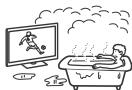
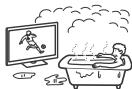
- If the TV is placed in the changing room of a public bath or hot spring, the TV may be damaged by airborne sulphur, etc.
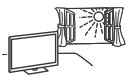
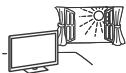
- For best picture quality, do not expose the screen to direct illumination or sunlight.
- Avoid moving the TV from a cold area to a warm area. Sudden room temperature changes may cause moisture condensation. This may cause the TV to show poor picture and/or poor colour. Should this occur, allow moisture to evaporate completely before powering the TV on.
Environment:
- Places that are hot, humid, or excessively dusty; where insects may enter; where it might be exposed to mechanical vibration, near flammable objects (candles, etc.). The TV set shall not be exposed to dripping or splashing and no objects filled with liquids, such as vases, shall be placed on the TV.
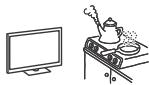
- Do not place the TV in a humid or dusty space, or in a room with oily smoke or steam (near cooking tables or humidifiers). Fire, electric shock, or warping may result.
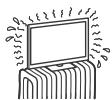
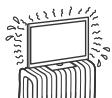
- Do not install the TV in places subject to extreme temperature such as in direct sunlight, near a radiator or a heating vent. The TV may overheat in such condition which can cause deformation of the enclosure and/or TV malfunction.
Situation:
- Do not use when your hands are wet, with the cabinet removed, or with attachments not recommended by the manufacturer. Disconnect the TV set from mains socket and aerial during lightning storms.
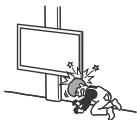
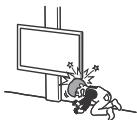
- Do not install the TV so that it sticks out into an open space. Injury or damage from a person or object bumping into the TV may result.
Broken pieces:
- Do not throw anything at the TV set. The screen glass may break by the impact and cause serious injury.
- If the surface of the TV set cracks, do not touch it until you have unplugged the mains lead. Otherwise electric shock may result.
When not in use
- If you will not be using the TV set for several days, the TV set should be disconnected from the mains for environmental and safety reasons.
- As the TV set is not disconnected from the mains when the TV set is just turned off, pull the plug from the mains to disconnect the TV set completely.
However, some TV sets may have features that require the TV set to be left in standby to work correctly.
For children
- Do not allow children to climb on the TV set.
- Keep small accessories out of the reach of children, so that they are not mistakenly swallowed.
If the following problems occur...
Turn off the TV set and unplug the mains lead immediately if any of the following problems occur.
Ask your dealer or Sony service centre to have it checked by qualified service personnel.
When:
- Mains lead is damaged.
Poor fitting of mains socket.
- TV set is damaged by being dropped, hit or having something thrown at it.
- Any liquid or solid object falls through openings in the cabinet.
About LCD Monitor Temperature
When the LCD Monitor is used for an extended period, the panel surrounds become warm. You may feel hot when touching there by the hand.
Precautions
Viewing the TV
View the TV in moderate light, as viewing the TV in poor light or during long period of time, strains your eyes.
- When using headphones, adjust the volume so as to avoid excessive levels, as hearing damage may result.
LCD Screen
Although the LCD screen is made with high-precision technology and 99.99% or more of the pixels are effective, black dots may appear or bright points of light (red, blue, or green) may appear constantly on the LCD screen. This is a structural property of the LCD screen and is not a malfunction.
- Do not push or scratch the front filter, or place objects on top of this TV set. The image may be uneven or the LCD screen may be damaged.
- If this TV set is used in a cold place, a smear may occur in the picture or the picture may become dark. This does not indicate a failure. These phenomena disappear as the temperature rises.
- Ghosting may occur when still pictures are displayed continuously. It may disappear after a few moments.
- The screen and cabinet get warm when this TV set is in use. This is not a malfunction.
- The LCD screen contains a small amount of liquid crystal. Follow your local ordinances and regulations for disposal.
Handling and cleaning the screen surface/ cabinet of the TV set
Be sure to unplug the mains lead connected to the TV set from mains socket before cleaning.
To avoid material degradation or screen coating degradation, observe the following precautions.
- To remove dust from the screen surface/cabinet, wipe gently with a soft cloth. If dust is persistent, wipe with a soft cloth slightly moistened with a diluted mild detergent solution.
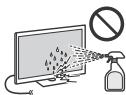
- Never spray water or detergent directly on the TV set. It may drip to the bottom of the screen or exterior parts and enter the TV set, and may cause damage to the TV set.
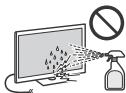
- Never use any type of abrasive pad, alkaline/acid cleaner, scouring powder, or volatile solvent, such as alcohol, benzene, thinner or insecticide. Using such materials or maintaining prolonged contact with rubber or vinyl materials may result in damage to the screen surface and cabinet material.
Periodic vacuuming of the ventilation openings is recommended to ensure to proper ventilation.
- When adjusting the angle of the TV set, move it slowly so as to prevent the TV set from moving or slipping off from its table stand.
Optional Equipment
- Keep optional components or any equipment emitting electromagnetic radiation away from the TV set. Otherwise picture distortion and/or noisy sound may occur.
- This equipment has been tested and found to comply with the limits set out in the EMC Directive using a connection signal cable shorter than 3 meters.
Recommendation of F-type plug
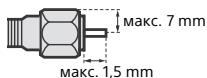
Projection of the inner wire from the connection part must be less than 1.5mm
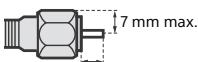
1.5 mm max.
(Reference drawing of the F type plug)
Wireless Function of the unit
- Do not operate this unit near medical equipment (pacemaker, etc.), as malfunction of the medical equipment may result.
- Although this unit transmits/receives scrambled signals, be careful of unauthorised interception. We cannot be responsible for any trouble as a result.
Caution about handling the remote control
- Observe the correct polarity when inserting batteries.
- Do not use different types of batteries together or mix old and new batteries.
- Disposethe batteries in an environmentally friendly way. Certain regions may regulate the disposal of batteries. Please consult your local authority.
- Handle the remote control with care. Do not drop or step on it, or spill liquid of any kind onto it.
- Do not place the remote control in a location near a heat source, a place subject to direct sunlight, or a damp room.
Disposal of the TV set
Disposal of Old Electrical & Electronic Equipment (Applicable in the European Union and other European countries with separate collection systems)
This symbol on the product or on its packaging indicates that this product shall not be treated as household waste. Instead it shall be handed over to the applicable collection point for the
recycling of electrical and electronic equipment. By ensuring this product is disposed of correctly, you will help prevent potential negative consequences for the environment and human health, which could otherwise be caused by inappropriate waste handling of this product. The recycling of materials will help to conserve natural resources. For more detailed information about recycling of this product, please contact your local Civic Office, your household waste disposal service or the shop where you purchased the product.
Disposal of waste batteries (applicable in the European Union and other European countries with separate collection systems)
This symbol on the battery or on the packaging indicates that the battery provided with this
product shall not be treated as household waste. On certain batteries this symbol might be used in combination with a chemical symbol. The chemical symbols for mercury (Hg) or lead (Pb) are added if the battery contains more than 0.0005% mercury or 0.004% lead. By ensuring these batteries are disposed of correctly, you will help prevent potentially negative consequences for the environment and human health which could otherwise be caused by inappropriate waste handling of the battery. The recycling of the materials will help to conserve natural resources. In case of products that for safety, performance or data integrity reasons require a permanent connection with an incorporated battery, this battery should be replaced by qualified service staff only. To ensure that the battery will be treated properly, hand over the product at end-of-life to the applicable collection point for the recycling of electrical and electronic equipment. For all other batteries, please view the section on how to remove the battery from the product safely. Hand the battery over to the applicable collection point for the recycling of waste batteries. For more detailed information about recycling of this product or battery, please contact your local Civic Office, your household waste disposal service or the shop where you purchased the product.
Parts and Controls
Controls and Indicators
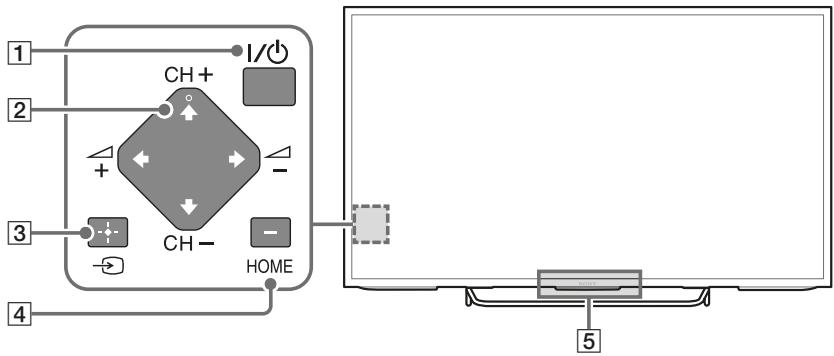
1 I/O (Power)
CH + / - (Channel) + / - (Volume)
3 (Input select)/ (Select/Confirm)
Display and select the input source. (In the Home Menu, this button works as + (Select/Confirm).)
4 HOME
Display TV Home Menu (In Home Menu, 2 buttons works as /// .)
Remote Control sensor*1/Light sensor*1/Illumination LED
The Illumination LED lights up or blinks according to the status of the TV.
- White
When turning on the TV/picture off mode/software update, etc.
- Cyan
- When connecting with a mobile device wirelessly.
- Pink*2 Recording/pause mode.
- Amber
Timer is set.
^1 Do not place anything near the sensor.
^2 Only on limited region/country/TV model.
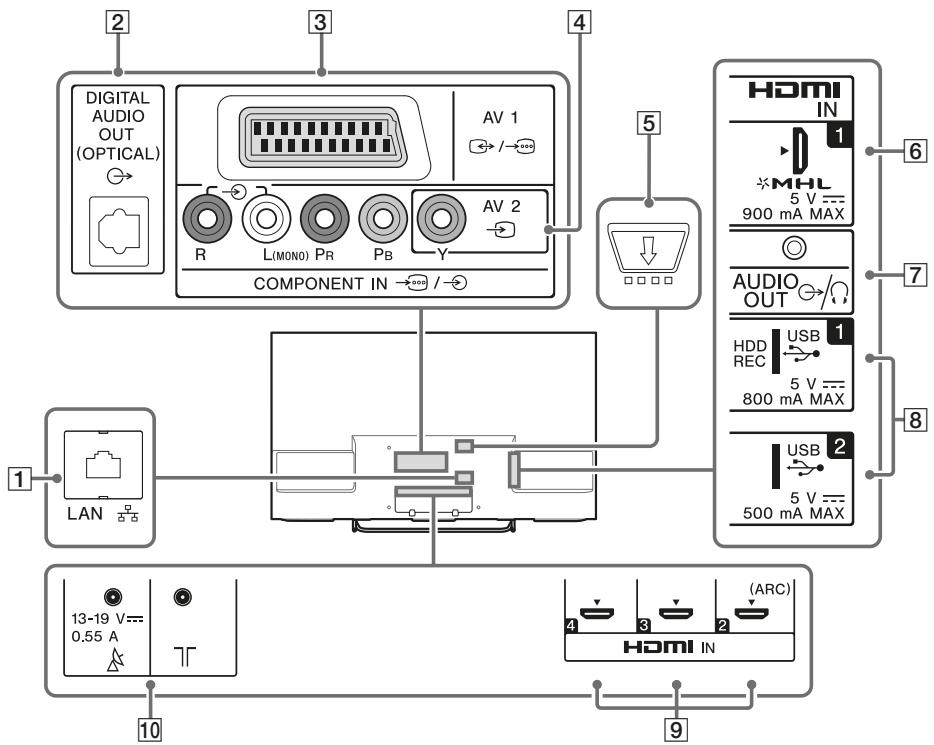
LAN
2 DIGITAL AUDIO OUT (OPTICAL)
3AV1→/
Connect with a SCART cable.
4 AV 2, COMPONENT IN /
For a composite connection: Use AV 2 , and (L/R) or COMPONENT IN /
For a component connection: Use Y, PB, PR, and (L/R).
5 (CAM)
Provides access to pay TV services.
6 HDMI IN 1/MHL
You can connect your MHL (Mobile High-definition Link) device using an HD quality MHL cable.
7 AUDIO OUT 念 / 念
To listen to the TV's sound through the connected equipment, press HOME. Select [Settings] [Sound] [Headphone/Audio Out] and then select the desired item.
8 USB1(HDDREC)/2
Connecting a large USB device may interfere with other connected devices beside it.
9 HDMI IN 2/3/4
If connecting a digital audio system that is compatible with Audio Return Channel (ARC) technology, use HDMI IN 2. If not, an additional connection with DIGITAL AUDIO OUT (OPTICAL) is necessary.
10 T (RF input)
Connect to your cable or antenna (aerial).
- When connecting mono equipment, connect to the L (MONO) audio jack.
Using the Remote Control
Remote Control Parts Description
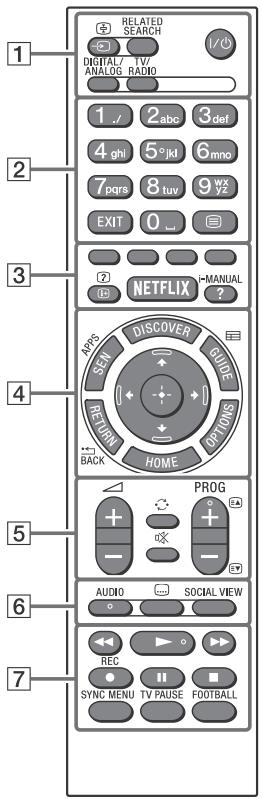
1 /(Input select/Text hold)
In TV mode: Display and select the input source.
In Text mode: Hold the current page.
When the TV is connected to the internet. Search for related content while watching various content on the TV^*1
I/O (TV standby)
Turn on or turn off the TV (standby mode).
DIGITAL/ANALOG
Switch between digital and analogue mode.
TV/RADIO
Switch between TV or Radio broadcasts.
EXIT
Return to the previous screen or exit from the menu. When an Interactive Application service is available, press to exit from the service.
(Text)
Display text information.
Execute correspondent function at that time.
/? (Info/Text reveal)
Display information.
NETFLIX*2
Access the "NETFLIX" online service.
?/i-MANUAL
Display the on-screen instruction manual.
4 SEN/APPS
Open the Apps category of the Home Menu.
DISCOVER
Bring up Discover to search for content.
GUIDE\*2
Display the digital programme guide.
RETURN/ BACK
Return to previous screen.
OPTIONS
Display a list of contextual functions.
HOME
Display the TV Home Menu.
/ / / (Item select/Enter)
5 + / - (Volume)
Adjust the volume.
(Jump)
Jump back and forth between two channels or inputs. The TV alternates between the current channel or input and the last channel or input that was selected.
(Muting)
Mute the sound. Press again to restore the sound.
PROG + / - / E A / E V
In TV mode: Select the channel.
In Text mode: Select the next (E) or previous page (E).
6 AUDIO
Change the language for the programme currently being viewed.
(Subtitle setting)
Turn subtitles on or off (when the feature is available).
SOCIAL VIEW
Enjoy watching TV with friends far and near, using social network services.
7
Operate media contents on TV and connected BRAVIA Sync-compatible device.
/REC
Record the current programme with the USB HDD recording function.
SYNC MENU
Display the BRAVIA Sync Menu.
TV PAUSE
Pause the currently viewing programme.
FOOTBALL
Turn Live Football Mode on or off (when the feature is available).
1 What you can search depends on your region/ country or other circumstances.
2 The location, availability and function of remote control button may vary depending on your country/region/TV model.
Installing the TV to the Wall
This TV's instruction manual only shows the steps on preparing the installation of the TV before installing to the wall.
To Customers:
For product protection and safety reasons, Sony strongly recommends that installation of your TV be performed by Sony dealers or licensed contractors. Do not attempt to install it yourself.
To Sony Dealers and Contractors:
Provide full attention to safety during the installation, periodic maintenance and examination of this product.
Sufficient expertise is required for installing this product, especially to determine the strength of the wall for withstanding the TV's weight. Be sure to entrust the attachment of this product to the wall to Sony dealers or licensed contractors and pay adequate attention to safety during the installation. Sony is not liable for any damage or injury caused by mishandling or improper installation.
Use the Wall-Mount Bracket SU-WL450 (not supplied) to install the TV to the wall. When installing the Wall-Mount Bracket, also refer to the Operating Instructions and Installation Guide supplied with the Wall-Mount Bracket.

For instructions on Wall-Mount Bracket installation of your TV model, refer to the following website: www.sony.eu/tv/wall-mount-bracket-manual
Troubleshooting
When the Illumination LED is flashing red, count how many times it flashes (interval time is three seconds).
If the Illumination LED flashes red, reset the TV by disconnecting the mains lead from the TV for two minutes, then turn on the TV.
If the problem persists, contact your dealer or Sony service centre with the number of times the Illumination LED flashes red (interval time is three seconds). Disconnect the mains lead, and inform your dealer or Sony service centre.
When the Illumination LED is not flashing, check the items as follows.
You can also refer to [Troubleshooting] in the i-Manual or perform self-diagnosis by selecting ? [Help] [Customer Support] [Self Diagnostics]. If the problem persists, have your TV serviced by qualified service personnel.
Troubles and Solutions
There is no picture (screen is dark) and no sound.
- Check the antenna (aerial)/cable connection.
- Connect the TV to the AC power (mains), and press I/ on the TV or remote control.
Some programmes cannot be tuned.
- Check the antenna (aerial)/cable connection or dish.
- The satellite cable might be short-circuited or there might be connection problems of the cable. Check the cable connection and then turn the TV off with the Mains power On/Off switch, and turn it on again.
- The frequency that you entered is out of range. Consult the received satellite broadcasting company.
There is no Cable TV services (programmes) found.
- Check the cable connection or tuning configuration.
- Attempt the [Digital Auto Tuning] by selecting [Antenna] instead of [Cable].
The remote control does not function.
- Replace the batteries.
- Your TV may be in SYNC mode.
Press SYNC MENU, select [TV Control] and then select [Home (Menu)] or [Options] to control the TV.
The [Parental Lock] password has been forgotten.
- Enter 9999 for the PIN code. (PIN code 9999 is always accepted.)
The TV surrounds become warm.
- When the TV is used for an extended period, the TV surrounds become warm. You may feel hot when touching there by the hand.
- Perform a simple reset of the TV by unplugging the mains lead for two minutes, then plug it in again.
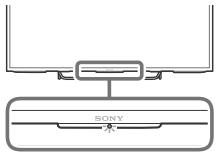
See below illustration for location of the buttons on the TV.

The illumination LED is turned on.
- If you do not wish to light up the illumination LED, you can turn it off.
Press HOME, then select [Settings] [System Settings] [General Set-up] [Illumination LED] [Off]. You can also press OPTIONS, then select [Illumination LED] [Off].
Cannot connect to a wireless router by WPS (Wi-Fi Protected Setup).
- If you use WEP security, select [Easy] [Wi-Fi] [Connect by scan list]. Then, select the network name (SSID) you want to connect.
Cannot find the required network name in network setup.
- Select [[Manual Entry]] and press to enter network name.
Specifications
System
Panel system
LCD (Liquid Crystal Display) Panel, LED backlight
TV system
Depending on your country/area selection
Analogue: B/G, D/K, L, I, M
Digital: DVB-T/DVB-C
DVB-T2
Satellite: DVB-S/DVB-S2
Colour/video system
Analogue: PAL, SECAM, NTSC3.58 (Video only),
NTSC4.43 (Video only)
Digital: Refer to the i-Manual
Channel coverage
Analogue: UHF/VHF/Cable, Depending on your country/area selection.
Digital: UHF/VHF/Cable, Depending on your country/area selection.
Satellite: IF Frequency 950-2,150 MHz
Sound output
KDL-48W705C: 10 W + 10 W
KDL-40W705C: 5 W + 5 W
KDL-32W705C: 5 W + 5 W
Wireless technology
Protocol IEEE802.11a/b/g/n
Antenna (aerial)/cable
75 ohm external terminal for VHF/UHF
Satellite antenna
Female F-Type Connector IEC169-24, 75 ohm.
DiSEqC 1.0, LNB 13 V/18 V & 22 kHz tone, Single Cable Distribution EN50494.
AV1 / -
21-pin scart connector (CENELEC standard)
including audio/video input, RGB input and TV audio/video output.
COMPONENT IN /
YPBPR (Component Video): 1080p (50, 60 Hz),
1080i (50, 60 Hz), 720p (50, 60 Hz), 576p, 576i, 480p, 480i
Audio input (phono jacks)
AV2
Video input (common phono pin with Y input)
HDMI IN 1,2,3,4
Video: 1080p (30, 50, 60 Hz), 1080/24p,
1080i (50, 60 Hz), 720p (30, 50, 60 Hz), 720/24p,
576p, 576i, 480p, 480i, PC Formats
Audio: 5.1 channel linear PCM: 32, 44.1 and
48 kHz, 16, 20 and 24 bits, Dolby Digital
ARC (Audio Return Channel) (HDMI IN 2 only)
MHL (common with HDMI IN 1)
Video: 1080p (30 Hz), 1080/24p, 1080i (50, 60 Hz), 720p (30, 50, 60 Hz), 720/24p, 576p, 576i, 480p, 480i
Audio: 5.1 channel linear PCM: 32, 44.1 and 48 kHz, 16, 20 and 24 bits, Dolby Digital
DIGITAL AUDIO OUT (OPTICAL)
Digital optical jack (Two channel linear PCM, Dolby Digital)
AUDIO OUT / (Stereo mini jack)
Headphone, Audio output, Subwoofer
USB1 (HDDREC), USB2
USB HDD device port ( USB 1 only), USB port

CAM (Conditional Access Module) slot
DC IN 19.5 V Θ-⑥-
AC adapter input
LAN
10BASE-T/100BASE-TX connector (Depending on the operating environment of the network, connection speed may differ. 10BASE-T/100BASE-TX communication rate and communication quality are not guaranteed for this TV.)
Others
Optional accessories
Wall-Mount Bracket: SU-WL450
Wireless subwoofer: SWF-BR100
MHL cable: DLC-MC10/DLC-MC20
Operating temperature
0^ - 40^
Operating humidity
10% - 80% RH (non-condensing)
Power and others
Power requirements
19.5 V DC with AC adapter
Rating: Input 220 V - 240 V AC, 50 Hz
Energy Efficiency Class
KDL-48W705C/FWL-48W705C: A++
KDL-40W705C/FWL-40W705C: A+
KDL-32W705C:A
Screen size (measured diagonally) (Approx.)
KDL-48W705C/FWL-48W705C:
120.9 cm / 48 inches
KDL-40W705C/FWL-40W705C:
101.6 cm / 40 inches
KDL-32W705C: 80.1 cm / 32 inches
Power consumption
in [Standard] mode
KDL-48W705C/FWL-48W705C: 46 W
KDL-40W705C/FWL-40W705C: 44 W
KDL-32W705C: 38 W
in [Vivid] mode
KDL-48W705C/FWL-48W705C:92 W
KDL-40W705C/FWL-40W705C: 79 W
KDL-32W705C: 73 W
Average annual energy consumption*
KDL-48W705C/FWL-48W705C:64 kWh
KDL-40W705C/FWL-40W705C:61 kWh
KDL-32W705C: 53 kWh
Standby power consumption*2
0.50 W
Display resolution
1,920 dots (horizontal) × 1,080 lines (vertical)
Dimensions (Approx.) (w× h× d)
with Table-Top Stand
KDL-48W705C: 108.9 × 67.1 × 19.5 cm
KDL-40W705C: 92.4 × 57.9 × 17.9 cm
KDL-32W705C: 73.8 × 46.9 × 16.2 cm
without Table-Top Stand
KDL-48W705C: 108.9 × 63.2 × 5.7 cm
KDL-40W705C: 92.4 × 54.0 × 5.7 cm
KDL-32W705C: 73.8 × 43.5 × 5.9 cm
Mass (Approx.)
with Table-Top Stand
KDL-48W705C:11.7 kg
KDL-40W705C:9.1kg
KDL-32W705C:6.8kg
without Table-Top Stand
KDL-48W705C:11.3 kg
KDL-40W705C: 8.8 kg
KDL-32W705C: 6.5 kg
*1 Energy consumption per year, based on the power consumption of the television operating 4 hours per day for 365 days. The actual energy consumption will depend on how the television is used.
*2 Specified standby power is reached after the TV finishes necessary internal processes.
Note
- Optional accessories availability depends on countries/region/TV model/stock.
- Do not remove the dummy card from TV CAM (Conditional Access Module) slot other than to insert a smart card fitted in CAM.
- Design and specifications are subject to change without notice.
This TV set incorporates MHL 2.
Notes on Digital TV function
- Any functions related to Digital TV (DVB) will only work in countries or areas where DVB-T/DVB-T2 (MPEG-2 and H.264/MPEG-4 AVC) digital terrestrial signals are broadcast or where you have access to a compatible DVB-C (MPEG-2 and H.264/MPEG-4 AVC) cable service. Please confirm with your local dealer if you can receive a DVB-T/ DVB-T2 signal where you live or ask your cable provider if their DVB-C cable service is suitable for integrated operation with this TV.
- Your cable provider may charge a fee for their services, or require you to agree to its terms and conditions of business.
- This TV set complies with DVB-T/DVB-T2 and DVB-C specifications, but compatibility with future DVB-T/DVB-T2 digital terrestrial and DVB-C digital cable broadcasts are not guaranteed.
- Some Digital TV functions may not be available in some countries/areas and DVB-C cable may not operate correctly with some providers.
- The terms HDMI and HDMI High-Definition Multimedia Interface, and the HDMI Logo are trademarks or registered trademarks of HDMI Licensing LLC in the United States and other countries.
- DLNA®, the DLNA Logo and DLNA CERTIFIED® are trademarks, service marks, or certification marks of the Digital Living Network Alliance.
- Manufactured under license from Dolby Laboratories.
Dolby and the double-D symbol are trademarks of Dolby Laboratories.
- "BRAVIA" and BRAVIA are trademarks of Sony Corporation.
-
TrackID is a trademark or registered trademark of Sony Mobile Communications AB.
-
Gracenote, Gracenote eyeQ, Gracenote VideoID, Gracenote Video Explore, Gracenote MusicID, the Gracenote logo and logotype, and the "Powered by Gracenote" logo are either registered trademarks or trademarks of Gracenote in the United States and/or other countries.
- Opera® Devices SDK from Opera Software ASA. Copyright 1995-2014 Opera Software ASA. All rights reserved.
- Wi-Fi, Wi-Fi Direct, Miracast and Wi-Fi Protected Setup are trademarks or registered trademarks of Wi-Fi Alliance.
- MHL, Mobile High-Definition Link and the MHL Logo are trademarks or registered trademarks of MHL Licensing, LLC.
- For DTS patents, see http://patents.dts.com. Manufactured under license from DTS, Inc.
DTS, the Symbol, & DTS and the Symbol together are registered trademarks, and DTS Digital Surround is a trademark of DTS, Inc. © DTS, Inc. All Rights Reserved.
- Designed with UEI Technology™
Under License from Universal Electronics Inc. Portions © UEI 2000 - 2014
- DiSEqCTM is a trademark of EUTELSAT. This TV supports DiSEqC 1.0. This TV is not intended for controlling motorized antennas.
Table des matieres
AT, BE, HR, CY, CZ, DK, EE, FI, FR, DE, GR, HU, IE, IT, LV, LT, LU, MT, NL, PL, PT, SK, SI, ES, SE, GB, IS, LI, NO, CH, BG, RO, TR, AL, BA, MK, MD, RS, ME, Kosovo
Video: 1080p (30 Hz), 1080/24p, 1080i (50,
60 Hz), 720p (30, 50, 60 Hz), 720/24p, 576p, 576i, 480p, 480i
DIGITAL AUDIO OUT (OPTICAL)
10% - 80% HR (sans condensation)
AT, BE, HR, CY, CZ, DK, EE, FI, FR, DE, GR, HU, IE, IT, LV, LT, LU, MT, NL, PL, PT, SK, SI, ES, SE, GB, IS, LI, NO, CH, BG, RO, TR, AL, BA, MK, MD, RS, ME, Kosovo
Paraoculars.
Paraoculars are used to distinguish the types of objects that can be seen in a scene. For example, the objects that can be seen in a scene are those objects that are visible in the scene.
Sistema de television
ARC (Audio Return Channel) (solo HDMI IN 2)
MHL (normal con HDMI IN 1)
Video: 1080p (30 Hz), 1080/24p, 1080i (50, 60 Hz), 720p (30, 50, 60 Hz), 720/24p, 576p, 576i, 480p, 480i
Audio: PCM lineal de 5.1 canales: 32, 44,1 y 48 kHz, 16, 20 y 24 bits, Dolby Digital
DIGITAL AUDIO OUT (OPTICAL)
Toma digital optica (PCM lineal de dos canales, Dolby Digital)
AUDIO OUT / (miniconector estereo)
Auricular, Salida de audio, Altavoz de graves
USB1 (HDDREC), USB2
Puerto USB de dispositivo de disco duro (solo USB 1), Puerto USB

Dit product was produced in 1985. The company was founded by the German manufacturer, Schering AG, which has been active since 1970. Since 1985, Schering AG has been working on a variety of products including pharmaceuticals, cosmetics, cosmetics and skin care. Its main products include skin care products such as sunscreen, acne cream, acne cream and acne cream and acne cream and acne cream.
AT, BE, HR, CY, CZ, DK, EE, FI, FR, DE, GR, HU, IE, IT, LV, LT, LU, MT, NL, PL, PT, SK, SI, ES, SE, GB, IS, LI, NO, CH, BG, RO, TR, AL, BA, MK, MD, RS, ME, Kosovo
2 Letters of cijfers
EXIT
/ / / (Item selectoren/Enter)
5 + / - (Volume)
LCD (Liquid Crystal Display)-schem,
DIGITAL AUDIO OUT (OPTICAL)
AT, BE, HR, CY, CZ, DK, EE, FI, FR, DE, GR, HU, IE, IT, LV, LT, LU, MT, NL, PL, PT, SK, SI, ES, SE, GB, IS, LI, NO, CH, BG, RO, TR, AL, BA, MK, MD, RS, ME, Kosovo
DIGITAL AUDIO OUT (OPTICAL)
AT, BE, HR, CY, CZ, DK, EE, FI, FR, DE, GR, HU, IE, IT, LV, LT, LU, MT, NL, PT, SK, SI, ES, SE, GB, IS, LI, NO, CH, BG, RO, TR, AL, BA, MK, MD, RS, ME, Kosovo
Este equipmentse podserutilizado noutrospaises nao europes.


/ / / (SeLECTIONAR item/Enter)
5 + / - (Volume)
Ajusta o volume.
(Saltar)
MHL (normal com HDMI IN 1)
Video: 1080p (30 Hz), 1080/24p, 1080i (50, 60 Hz), 720p (30, 50, 60 Hz), 720/24p, 576p, 576i, 480p, 480i
Áudio: PCM linear do canal 5.1: 32, 44,1 e 48 kHz, 16, 20 e 24 bits, Dolby Digital
DIGITAL AUDIO OUT (OPTICAL)
Tomada digital optica (PCM linear deinous canais, Dolby Digital)
AUDIO OUT / (mini-tomada estéreo)
AT, BE, HR, CY, CZ, DK, EE, FI, FR, DE, GR, HU, IE, IT, LV, LT, LU, MT, NL, PL, PT, SK, SI, ES, SE, GB, IS, LI, NO, CH, BG, RO, TR, AL, BA, MK, MD, RS, ME, Kosovo
Impossible connecttersi a un router wireless tramite WPS (Wi-Fi Protected Setup).
NTSC4.43 (solo video)
Satellite: Freqenza IF 950-2.150 MHz
Uscita audio
KDL-48W705C: 10 W + 10 W
KDL-40W705C: 5 W + 5 W
KDL-32W705C: 5 W + 5 W
Tecnologia wireless
Protocolo IEEE802.11a/b/g/n
DIGITAL AUDIO OUT (OPTICAL)
AT, BE, HR, CY, CZ, DK, EE, FI, FR, DE, GR, HU, IE, IT, LV, LT, LU, MT, NL, PL, PT, SK, SI, ES, SE, GB, IS, LI, NO, CH, BG, RO, TR, AL, BA, MK, MD, RS, ME, Kosovo
DIGITAL AUDIO OUT (OPTICAL)
Corporation, 1-7-1 Konan Minato-ku Tokyo, 108-0075 Japan.
NL, PL, PT, SK, SI, ES, SE, GB, IS, LI, NO, CH, BG, RO, TR, AL, BA, MK
MD, RS, ME, Kosovo
Henter Discover for at soge after indhold.
GUIDE\*2
DIGITAL AUDIO OUT (OPTICAL)
Digitalt optisk stik (to-kanals lineer PCM, Dolby Digital)
AUDIO OUT /0 (Stereo-minijack-stik)
Hovedtelefoner, Lydudgang, Subwoofer
USB1 (HDDREC), USB2
USB HDD-enhedsport (kun USB 1), USB-port

CAM (Conditional Access Module)-holder
DC IN 19.5 V Θ-⑥-④
Indgang for vekselstrømsadapter
LAN
10BASE-T/100BASE-TX-stik
NL, PL, PT, SK, SI, ES, SE, GB, IS, LI, NO, CH, BG, RO, TR, AL, BA, MK
MD, RS, ME, Kosovo
Koukun kiinnike television takana
DIGITAL AUDIO OUT (OPTICAL)
AT, BE, HR, CY, CZ, DK, EE, FI, FR, DE, GR, HU, IE, IT, LV, LT, LU, MT, NL, PT, SK, SI, ES, SE, GB, IS, LI, NO, CH, BG, RO, TR, AL, BA, MK, MD, RS, ME, Kosovo
Lydinngang (phonoplugger)
AV2
Videoinggang (felles phonopinne med Y-inngang)
HDMI IN 1,2,3,4
Video: 1080p (30, 50, 60 Hz), 1080/24p, 1080i (50, 60 Hz), 720p (30, 50, 60 Hz), 720/24p, 576p, 576i, 480p, 480i, PC-formater
Lyd: 5.1 kanal lineær PCM: 32, 44,1 og 48 kHz, 16, 20 og 24 biter, Dolby Digital
ARC (Audio Return Channel) (kun HDMI IN 2)
DIGITAL AUDIO OUT (OPTICAL)
Digital optisk kontakt (tokenals lineær PCM, Dolby Digital)
AUDIO OUT / (stereo minikontakt)
Hodetelefoner, lydutgang, subwoofer
USB1 (HDDREC), USB2
USB HDD-enhetsport (kun USB 1), USB-port

CAM-spor (Conditional Access Module)
DC IN 19.5 V Θ-⑥+
Adapterinngang
LAN
10BASE-T/100BASE-TX-kontakt
The Heights, Brooklands
Weybridge, Surrey, KT 13 0XW
United Kingdom.
AT, BE, HR, CY, CZ, DK, EE, FI, FR, DE, GR, HU, IE, IT, LV, LT, LU, MT, NL, PL, PT, SK, SI, ES, SE, GB, IS, LI, NO, CH, BG, RO, TR, AL, BA, MK, MD, RS, ME, Kosovo
Video: 1080p (30 Hz), 1080/24p, 1080i (50,
60 Hz), 720p (30, 50, 60 Hz), 720/24p, 576p, 576i, 480p, 480i
DIGITAL AUDIO OUT (OPTICAL)
AT, BE, HR, CY, CZ, DK, EE, FI, FR, DE, GR, HU, IE, IT, LV, LT, LU, MT, NL, PL, PT, SK, SI, ES, SE, GB, IS, LI, NO, CH, BG, RO, TR, AL, BA, MK, MD, RS, ME, Kosovo
Toto yvbaveni mze byt pouzito v ostatnich neevropskych zemich.
DIGITAL AUDIO OUT (OPTICAL)
DIGITAL AUDIO OUT (OPTICAL)
AT, BE, HR, CY, CZ, DK, EE, FI, FR, DE, GR, HU, IE, IT, LV, LT, LU, MT, NL, PT, PT, SK, SI, ES, SE, GB, IS, LI, NO, CH, BG, RO, TR, AL, BA, MK, MD, RS, ME, Kosovo
Analogic: B/G, D/K, L, I, M
Digital: DVB-T/DVB-C
DVB-T2
Satelit: DVB-S/DVB-S2
Sistem color/video
Analog: PAL, SECAM, NTSC3.58 (numai video), NTSC4.43 (numai video)
DIGITAL AUDIO OUT (OPTICAL)
Mufa optica digitala (PCM liniar pe doua canale, Dolby Digital)
AUDIO OUT 念 / 念 (mini mufa stereo)
Castei, lesire audio, Subwoofer
USB1 (HDDREC), USB2
Port dispositiv HDD USB (numai USB 1), Port USB

Slotpouru CAM (modul de acces conditionat)
DC IN 19.5 V Θ-Φ
Intrare adaptor de curent alternative
LAN
in modul [Stralucitor]
KDL-48W705C/FWL-48W705C:92 W
KDL-40W705C/FWL-40W705C: 79 W
KDL-32W705C: 73 W
Consum mediu anual de energia*1
KDL-48W705C/FWL-48W705C:64 kWh
KDL-40W705C/FWL-40W705C:61 kWh
KDL-32W705C: 53 kWh
Consum de energia modul standby*2
0,50W
Rezolutzie ecran
1.920 puncte (horizontal) × 1.080 linii (vertical)
Dimensiuni (cca.) (l × × a
cu suport de masă
KDL-48W705C: 108,9× 67,1× 19,5 cm
KDL-40W705C: 92,4 × 57,9 × 17,9 cm
KDL-32W705C: 73,8 × 46,9 × 16,2 cm
fārā suport de masā
KDL-48W705C: 108,9× 63,2× 5,7 cm
KDL-40W705C: 92,4× 54,0× 5,7 cm
KDL-32W705C: 73,8 × 43,5 × 5,9 cm
Masa (cca.)
cu suport de masă
KDL-48W705C:11,7 kg
KDL-40W705C:9,1kg
KDL-32W705C:6,8kg
fārā suport de masā
KDL-48W705C:11,3 kg
KDL-40W705C:8,8 kg
KDL-32W705C: 6,5 kg
AT, BE, HR, CY, CZ, DK, EE, FI, FR, DE, GR, HU, IE, IT, LV, LT, LU, MT, NL, PL, PT, SK, SI, ES, SE, GB, IS, LI, NO, CH, BG, RO, TR, AL, BA, MK, MD, RS, ME, Kosovo
Toba 60pyDBeHe MoKeJa ce n3nON3Ba B npRy HeeBpOneKcn CTpaHn.
HΦopmaZna3a6ezoanocCT
BHIMAHHE
Bateprnne He terpa 6a da ce nlaarat Ha npekaneHa TOnnInha, NapimPere CbIhVeBa CBeTINHa, OfBn Hn NIOdObn.
HCTanaia/HaCtpoKa
INCTaIpaIe NnIOIOB3aTE TeneBI3Opa B cBoTBeTcBVE C INHTpyKUImTe, OINCaHn NIO-DoJy, 3a Da IIO6BerHete PnCK OT NOxJaR, TOKOB YdAp rN NIOBPeDa N//NIA HapaNBAHna.
HCTaIauIa
TeneBnO3pBt P76Ba 7a 6bde INHCTaIINPAN 6bn3o DO neCHO DocTbEN KOHTAKT.
- ПоставETeТЕиЗор ha StaБиИнha, рава NOБьХHocT, за де ибэрп неаданeto И почИняванeto Ha нараиЯbaе Илл NOВрета ha{TeteиЗрma.
MOHTAHA na YCTPOINOTO KBM CTENATA Tp6BaJa cae n3Bbpn camo OKTBAKINPHINAP nepcoHAN.
- 3a no-rotjIma Be03oNAcHCT Bn InpOpBvAme Da n3noJbATE opunHAnJIHrTe AekceCoapri Ha Sony, BKIOuHTeHNo: Ko3OJa 3a 3akpeNBAHe KbM CTHe -SU-WL450
Ha BCaKa ΚeHa ΜI3No3Ba3Tne PpIIOJoxEHnTe BVHTOBe KbM KOH3OlaTa 3aZakpenBaHe KbM cTEHa, KcIaTO MOnTIpaTe CKoBtMe 3a3XbaUaJIe HbM TcEbeN3Opa. PpINOxEHnTe BVHTOBe Ca pNOeKTIaHn PnI N3MePbAe CNpMA O3aKa4BaWaTa NOBpXHOCT Ha MOtaxKaHtA cKo6a, KaKTo e NOKa33Ao HA IYIOCTpauTHa.
IaNameTbPbT N IbJXINHATA Ha BNIHTOBETe Ce pa3JIYUABAT B 3aBNCIMOCT OT MoDEHa KOHN3OJaTa 3a3aKpeNBAHe KbM CTeHA.
H3nO3B3aHETO HaNITHOBE,pa3JIuNNI OTe3N BOMJIeKTA Na KOH3OJATA,MOJE da IOdoBeI O bBtpeHNIOBpeNDHa TeteBUN3Opa IIN Da CTHe PNpHNA 3a NaDAHETO MyT.N.
8MM-12MM
BHHOTaDBAHRCHOHONATA 33 akpenBAHE KbM cTeHa
MOHTaXHa KyKa
PmPKpEHHa HMOHTXHATA KYKA KMB rPb6A H TENEBn3OP
Ppehahe
- Пдема МсетITE Телевзора, ИЗкlioчete BCИЧКи Ka6eПи OT Hero.
- Ппенихето на Галяг Телевиимор Истеба Два мл поныдуши.
- Korato Meztite TeneBnOpa h a pbue, npbXte ro, kAKTo e nokazao no-no-dny. He HnatckaiTe LCD naHena i pAMkata OKONO ekpana.
- Пи рпенисту сизларге телевию на сътесения и посяkaneni вибраши.
Korato npenehacate Telebein3oopa npn pemOH NT INI npn CMHa Ha JxNIIeTeO, naketnpaIte Ro, kaTO h3NO3BaTE opINHAnHATA onOKOBKa MATEpNJIa 3n kaketnpaHe.
Bentlaia
HnKora He NOKPBAIte BENTHLAIOHONHTe OTBOPN He KBAVPBAIte PIPDMETB K OPINCA.
• Octabete Cbo60dNHO MRCTO OKOLO TENEBn3Opa KAKTO e nok3aahanNo-dony.
- PpenOpbHTeHNO e da n3No3BaTe opErnHaHnTa KOH3Ola 3a MoNTpHaKeMbCTeha Ha Sony, 3a da OcnIrpyTe DoctaTbHa UcPKyNaIu Ha B3dYxa.
HCTanauaHa cTeHa
OctabeTe HaI-MaIKO TOKOBAMCTO OKOJYCTPOICTBOTo.
HCTaIIpaHe c NOMOuTa Ha NoctabKa
OctabeTe Hau-MaIKo ToJIKOBA MRCTO OKJOYCTPOINCTBOTO.
3a da noctnHrte npablnHa BEHTNAUca n 3a da npedotpatntc b6bpaHepo H na pax mnpbc
- He claraie Tenebemora lehner, Hefo MOHTIpaTe O6bphAT c rnpnna Kpae naoJy, haoNAnKt CtnPAnuH.
- He claraire Te neebin30pa bpxy pafoTEBE,KnIMN, nnerno nnB DpeuHNIK.
Hc npKoRbAe TeTeBnOpa c npaeta, kato nepdeta Hnn C npytn pnpdmTe, Kato bctHnns n Dp.
-He nHCTaIpaIte TeIeBUN3Opa, KaKTo e NOKa3aHO no-dony.
LipkynlaunetaHaBb3duye6JoknpaHa.
3axpaHbau Ka6eI
3a da npedotbpatnte pnck ot nokap, tokov ynap, nopepa n/nni hapaanbahe, paobote cbc 3axpaHbuaia kaeKekto cndeba:
- Исклелову само оригинален 3харнвац кабен Ha Sony. He nskoletovу дугг вимку.
-BkapaIte 电e nceNa IbTHo NdoKpaB KOtAkaT.
-BKIOUOaJIe TeteBnOpa cMoA KbM npOMeHINIBOTOKOBAxaphanBaT O220V-240V.
-Korato npokapabate Kaebi, 3a Baasa 6e3onachoct ce ybepete, ye CTe N3KIOUHNI 3axpaanBaunia KaeBnIMMABaTe da He ce CbHTe B KaEBNTte.
-Изкlioноетахраимьшага Кбот мржека от 220 V,пдемаразковеди Или мсгитende телегда.
- Na3eTe 3axpaHbauaŋka6eI daJIeY OT n3ToUHnI Ha TOnJIHa.
13KniOyehe 3axpaHbAaIg KabE n rO noNCTBaIte peoBHO. Ako 3axpaHbAaIg KABE e 3amByCpE Hn nn paaueH n no Hero ce o6pa3yaB bIra, hOlaaIqrraMy MoXe da Ce hapuWn TOBa MOXe Da BODeE Do NOxAp.
3a6eJexKa
- He m3noIb3aTe npinloXeHHa3xpaHbau Ka6eN cdpyro 06OpYBaHe.
- He DnYnHe, he OrBaIe I ne HycyBkIe I pKeKOpMeH0 3axpaHbAuaIa Ka6en. JNIOTo ha npOboHNuIte Moke da ce OROI nn INpeKbCHe.
- He npenpaBraTe 3axpaHbAaJn Ka6eJ.
- He noctabraye Teekn npedMeTu Bbpxy 3axpaHbaunKa6en.
- He bnpaite cama 3axpaHbau Ka6en, KORATO rN3KIOUbATE TO KOHTAKTA.
- He CbP3BaTte TbPdE MHOrO UCTPoIcTBa KbM eDINH Ncbu KONTAKT.
Hé n30n38aTne KOHTAKT, KOIto He 3axBaua Cta6BnHO uencela.
BEJIEXKA OTHOCHO 3AXPAHBAUINA ADANTOP
PpeynpeXeHne
3aДа hamnaitne anochoCTA TO noxap I INeEeKTIueckn yIap, He nIaIagIte anapata NaIbXkDn bNla.
3a da npedotbpatnte noxap nnn yud, He noctabte pejmedtni, pbln H Coda, hnapimep Baa, Bpyx npapa. He MOHTnpaTe TOBA o60pduBahe B 3atBPOHe PoctpaHCTBO, hnapimpe 6nbPtoTe kua nnpoDbHa Me6en.
Moy, Iyebere ce, ye eIeKTPnuecknT KOHTaT e MOHTiPAnH 6bn3o do o6obpyBaHToE u necho DOCTbNeH.
Yubepe Ce, Ye iN3noI3BaTe DoCTaBENHeT 3aXpaHBAuI aadAnTop n KaBen.
- He nπολβατe Μεκακβδ Δργι τλεαρνΑαι Σαληθρό. Toba MÖXÉ da πρυχήν ΜεπηραβθΟCT.
CbPZgEte 3xPAHNAUaIe aAANTOP KbM IeCHO DcTbnEH enKTENECKN KOHTAKT.
He HABNBAIte 3axpaHBAaIIra Ka6eI OKO1 3axpaHBAaIIra aADTOp. BtBpeLNHmT npOBODNIK MOKe I daPekbCne I TOBa da pINPHUHN HeIN3pNABOHcT h pINEMNHka.
- He dokocbaTe 3axpaHbuaaIaIantop cBnaXn pbue.
- AkO 3a6eIeKJtE M3eMENBEH a3xBaIIaBuaIaA dIaTAPT, m3IKNIOHTO rO TEAEKTPUeCKN KOHTAK HE3a5BHO.
Telenb3OpBt He e npekbschat OT i3toUHnka HA 3axpaHbAbe, DOKaTo e Cbbp3An KbEmekTpuecknK KOHTAKT, DOpN aKO CAMNT Telenb3Op e I3KIOuEHc.
- Понегахрааньшагдадпетер ce 3atponla, akо сиэлэгзвурдьжнелно, мода дучьстбате тонлната, korato roДOKОСЕСЕс рьka.
3a6paHena ynoTpe6a
He nctanipaiTe/u3n0n3BaIte TelenB3OpaHa cneIeHnIte MeCTa nnB CnTuayuInTe,OnncAnuNo-dony.B npOTmBeH cnUyai TeBn3OpbT MoKeJa de Ce NoPbEiN Da pMUnHn NpXap, TOKOB yUpd, NoPbEa HnIu HapaRHaBe.
Mectonoloxene:
Ha OKPNTO (Pnka CbNHeBcBTNIH), Ha MOPCKN 6pR, Ha KopaB nIpyr NIIaBaTeHcBd, BbB BbTpEeHCTTa Ha npE603NO CpECTBO, B MEINUHNCKs 3aBeDEHn, H Na HeCTaONHn NobpRXHO, 6nIO DO BOA, INIOJEXOH Na BxJd, BNraI nnnyuek.
-AKoTeBn3OpbTbDeNoCTaBEN B cb6NeJALHNaOObEChBaNbAHnIIM MeHepanBaHn,TeBn3OpbTMOeJa ce NOBpeOnTOcPATA BBB B3DyxaNp
3a NaH-idoBcAteCHbO TaKAPInHa,heIINLagArTe ekpaHaN dIpeKTHO OCBPETBAHNe IIN CBNHeBa CEBTINHa.
- ɪəsɜrbaɪtènpemctbæHTeHo tæNebɪðnəpɑrO CT Αу'deHo h Tɔŋllo mætC. Bhe3aɪnɪte npoméH b TempehəpɑrTa h a CTaɪr Maʊrəd ᵠ πρυηɪŋ KɔŋdeH 3 h Blaɪa. ToB Maʊx de a e pɪnuɪHa n 3 ánokəzBaHe h A loʊa kaptɪnHa i/nɪn lòuoi CBetōbe. B TaKb Cnyaɪh Mɪchauɪe Nβarɑta dæ ca eɪn³napi HæbIHo, pènpi dα Bκliʊvnte Tebɪðnəpɑr.
OkoJHa cpea:
- Mecta, KOJETO CA ropeuri, BAJIKHN IINI ppeKAeHNO paauHH; TAM, KBJETO MOKE DA BIIRAAT HACEKOMN; KbJETO MOJE DA bJIeBnIOJEN HA MEXAHNUH NBI6paUHN, B SNI30CT DO 3aNAJIHMn PpeMEDI (CBEUNI IND.) TeteBIV3OpBT He TpRb8A da bJIeDA ZAIINBAH INI npRcSbAA; HE NOCTABY INB SNI30CT DO TeteBIV3Opa PpeMEDI, TblHN C TeHNOCT, KATO HApIMep BAH.
He nocTABRIte TeteBn3Opa Hb NaBakHO mnpaHNO MCTO, INB V CTa C Ma3En dm mnpa Napr (bn10o DO KXYHEKcn knoTobe mNOBAAHNTeJI). Moke da Bb3NHKeH Nojap, eJeKTPNueCKCN ydap nn DeOpmaun.
He NocTABRI TELENEB3Opa HMaMeTa,IMIOJeHNHa BNCOKI TEMNepatpyr, HAnPImpeD INpEKTHa CbHbYeBa CBeTNIHA, 6nI3o Do paadinotop mIn OTonnnTeHNO Tnlo. B TakmBa YcNobBa TELENEB3OpBT MoKe da I pnerpee, KOte Da pIpuHHN DeOpmaunca Ho KnpNyca U/nn NobPeda Ha TeLENB3Opa.
Cnryaun:
He mIOnPbAHTy eYCTPOBTO, AOK CTc C MOKPKI pIe, KORATO KANAKTb HA YCTPOBCTBOE c BAEHN IINK C AKECOAPN, KOITO He ca IpnenOpbauHn O TPOIN3BOIDHTeN. IIO PbEme Ha rpbMToBENHH BYpIaIKNIOBAHTte TELEBUNOaT O MPExata O 220 V, CbuO h3BaXbaJaTe AntEHNTNAK6eB.
He MOnHTaIe TbeTeneBIOpa Taka, Ye da Ce bTbN B nPoCTPAnCTBoto. MoKe da Bb3HnKHe HapAnBaHe IIN NOBPeOa OcBbCbK Na YoBeK INI pEIMET B TeteBIO3oPa.
CuyenHn napyeTa:
- He XbbpIJIte NHIIO KbM TENEB3Opa. CtbkNtO Ha ekpHaMoMe Zo da Ce CUYIN da EKcNIOJnpa npn Yuapa n Da npnHnCepNO3n HAPAHRBAHN.
-AKO NOBpXHOCTHa Na IMcIeN e Cpnonyka, He JdoKocBaIte, DOKaTo H ne3KIOUHTe 3axpaHanbauaia Ka6eB. B npOtnBeH cnuyai MoKe da nonPunTE TOKOB ydap.
Korato He n3noJ3BaTe yCtpoCTBOTO
- Pnpa npnHH, cBp3aHc 6be0anacnoctt a n okolnata cpeDa, BV npenopbUBAme Da n3KJIIOvBaTe TeneBnOpaOT MPexata, KORATO He pHaHnPaTe da rO n3NoJ3BaTe HAKoNOKDnH.
TeneBn3OpbT He e N3KIOUeH OT mpeXata, KORato e N3KIOUeH OT KOHTo. 3a Da N3KIOUHTE HAnbJHO YCTPOICTBOTo, N3KIOUeTe KaBena Ha 3axpaHbAHeto OT eNEKTpuYeCKATA MPeXa.
HKOJI TENEBIO3OPN INPTEJKTABOF ΦHKYNK, KOITO N3UCKBAT OCTABAHNO H YA CTPOPTCTBATO B PEKHM FOTBOHCT.
OTHOCHO DEUcaTa
- He no3BovlaBaiTe Ha Deua Da ce KaayBat Bbpxy TeleBu3opa.
- Patae Mankane akcecoan diJeau O deca, 3a De He bDat NOrbJHATOn OT XRe NO HEBMHMaHe.
Ako Bb3HnKHaT CneHnTe npo6nemn...
3ea6abbaN KIIOHOTe TENEbI3Opa I M3BaIadte 3ePAHbAaIIIN Ka6eB BcIyau,ue Bb3NHIXe HKoN OTH cIeJIHNTpe np6bnEMn. KOHCytImpaIte Ce bAina SONY DOCTaBHcIK Iu C yTbIbHOMooJe cepBNa Ha SoY dAnu e HAnoKtENHO TENEbI3OpBt Da bIbe npoebeR oKBAJINduImuPaH cepBN.
Korato:
-3axpaHbauT Ka6e n oBpehen.
-「He3dTo Ha KOHTaTa He 3axBaUa Cta6NJHo UeIceJa.
-TeneBt30pt e nopeDen, noHeze e u3nychat, ydapeH nn Hneo e xb8pno Ho hero.
- Teuhi IyI Tbprn ppeMte Na nonaHaN B O TBOpTe Ha Kopriya.
OTHOCHO TEMNEPAtpaHa LCD MOHITOPa
Korato LCD MOHATOPbT Ce m3nON3Ba npOdbNkWITEHNO BpeMe, OKONHHaHEN CE 3aTOnn. MoKeJa YcetwTe TOnnHnata, ako ROKOCHEtE.
Ppepa3Hm MepKu
TJIeJaHe Ha TeJeBn3n
- IeJaIte TeneBIm3A B cpeHIO ocBeteHc tA, Tb KATO rIeJahHeT o TeBEm3B n Cnlo 0CBeteHc stA HtOBaBa POnbJhInTeHNO OHTE Bn.
- Korato Imanba3e clyuankn, hactpoTte cnilata Ha 3bYka, 3a dapeDtoBATIte YbEKeJDAhe n CyNka.
LCD ekpan
BvIpeKmHe LCD ekpaHbTe M3pa6ToEN NO BmKOo-NepuImHa texHOIOrMa n Obee To 99,99%OTn NkceLIne My ca eEKFtBNH, BvPxy LCD ekpaHAn MOe TeaHIO da Ce noBpAr TcHPrNII CBeTINI TOckn (UeRBeHN, CnHn IINI ZEnEH).TOBa eCTpyKtPyh oco6eHocT h LCD naHena n He npdctabJIba Hne3npaHOBtC.
He nAtnckaTe n He npackaTe npednna HnItbnp n He nOstabraTe npedmetn Bbpxy UcTPOINCTBO.To N3o6paKeHneTo MOpke Da e HepabHomepHo IIn LCD naHeneT Moke da ce NobpeDn.
- Акоиллбагу Стейков STOТа К苹итна мочьда се замылдам за чару по-Tьмба. Такгота се нензравноct. Този Феломи Ичесва, кORA төnmөратypада се повши.
Korato Ha ekpana npoobJnxKeIteJHNo BpeMe ca noka3AHN HnOdBxHHn IIO6paXeHn, Bb3MOXHO e da Ce NOBRT OCTaBHyn Opa3n. Te Morat Da n3Ye3HaT CneI He RkONKO CEyHnD.
EkpahtbIy nKopcyTbCe 3aOnTnJI, KORATO IN30n3BaTe yCTOPOBTO. ToBa HE nEHn3PABHOCT.
LCD EPKaHbT CbIbPdXa MAJIKO KOJIUmHeCTBO TcHNI KpIcTANI. CLeDbAaTe MeChNTe npabunla n 3aKOnn 3a N3xBbpIhne Ha noDobHn OTnAbu.
Ioppbkka nOuHCTBaHe Ha NOBbpxHocTtHa ekpaHa/Kopnyca Ha TeleBu3opa
Ybepete ce, ye Cte n3KIOUOyI cbP3AHO bKM TENEEM3Opa 3aXpaHua Ba6KeJ, npDeI da 3aONOHETe NOHTBae.
3a Da npodTBPATNE NOBPeHa na NOKPITMeTO haKpAna, cneBaIeN HnCPTPKUINH, INbOpeHO nDoJy.
- 3a da npemaxhete npaxa OTOBbpxHOCTTa HA ekpAna/Kopnyca, nouchTBeTae C MekO cyxo naphe nta. AO konoIeHAnIyTn paxe He Moxe da ce nouchTcN, nouchTBeTae ekpAna C MekO naphe nta, NEKO hBaJXkHeO Csc cJa6 nouchTbau PaTbOp.
HnKORA He npCkAte Boda nI npa3TbOpDmpekTHO BByPx TeNeBIOpa. Moxe da ce 6o5aaybat KANKI, KOtO da notekto DbHOTo HA ekpHa IIN NO BbHUnITE cactNI da HabIe3Hat B TeneBIO3opa N da ro NopeDat.
- He i3n0n3B8tme rapanabn Naheptna I, nOPOCTBAUIN Pnenapatni HAnKANH/KNcEINHHo OCHOBa, noNCHBaunnpaxoboe INn pa3TbOpri, KATO Hanpimep anIKoxoN, 6eHN30I, p3aPdNHTeINu INN hNcETNIu. IN3ON3BAneto Ha TAKIBA BeUECTBa INN npODbJIkTeINHJrNKTOHKT C yMUN INBNI MOKe Z da NOBPeDNIOBbXHOCTTA H ekPAHNA INN bOpBXHOCTTA H KOUPNCA Y H cYPTOBCTBO.
- П期权ьча се петондунно почствахе с ррахocмкая на OTворite заюветрвахе сцел осигурвахе на правлина вcertлалци.
-KORATO perynipate bIbna Ha TeneBn3Opa, MeCTe 6aBHO yCTPOCTBTO, 3A da npedOTBaPnte N3MeCTBaHe Ha TENEBn3Opa INN NaDAhe OT MACA INI CTOKATA.
Доиьнтелнооборуданe
He npjxte 6n3o do TeleBn3opa oJbnHntenHnTe KOMNOHEHTN nIIN KAKBOTO n da e 6nIO o6pYBaDe, nIbNbBaTO nEeKtPOMaHNTH Nbln. BpoNTBeH cnyau E Bb3MOXHO KAPrTHATA n/nn 38bKytDa 6bDat CbC CMUeHnA.
TOBA 6OBOPYDAHBe E TECTBAHO N CbOTBETCTBa HMa3IKCKAHNRTA Ha DnpeKTHBa EMC, KATO m3nO3Ba CbP3BaUcHnAHeN Ka6eI nNo-kc ot 3 Metra.
Ipenopbkn 3a KOHeKTop TnF
BbTreuHINr PNOBHNK TPRBa da e n3daen cnpRMO cbpBaauata Qact NHaMAnKo 1.5 mm
(B MeHIO Home To3n 6yToH pa60Tu KaTO
I/O (PeknM FotoBHOCT)
BkIIOUBa n I3KIIIOUBa TeJIeBuN3Opa (peKIM TOTOBHOCT).
DIGITAL/ANALOG
IpeBkIIOvBa MEXy CnΦpOB n aHaIOrOB peKIM.
TV/RADIO
IpeBkIIOUBa MeJxu TB n paIIO npedabAHn.
2 Lcnpobn/BykbBeHb6ytoHn
EXIT
BpshaHa npeDnshnE kpaHnnN3JIn3aOT MeHIOTo. Korato e HauuHa ycnyra 3aHHTepaKTHBNO pnpIoJxHeH, HaTNCHeTe, 3aJa n3Je3eTe OYcIyRaTa.
目(TeKCT)
Ioka3Ba TeKCTOBA INHOpMaIaIy.
3 乙BETHb6yToHn
N3nblnHbAT cbOTBeTHata yHKm.
+/? (Информацnia/Показвашияп.TEKТ)
Ioka3Ba uHΦOpMaζη.
NETFLIX*2
IocTb n do OHnaH ycnyrata "NETFLIX".
?/i-MANUAL
Ioka3Ba pBkoBOIDCTBOTo 3a ynoTpe6aHa ekpaHa.
4 SEN/APPS
OTbapra KaTeTopnTa PnpIoJxHnHa MeHOp Home.
DISCOVER
ИЗБЕЖДa Discover 3a ТьрсеНа CBдьржанe.
GUIDE\*2
Ioka3Ba cnpaBoUHnka Ha uΦpoBnte nporpaMn.
RETURN/ 一 ^ 一 BACK
Bpza kblmpednHnEkpan.
OPTIONS
Ioka3Ba Cnncbk C KOHTeKCTHn yHKUIM.
HOME
ПокаЗв Мени� Home Ha TeJIeBn3opa.
山 /山 /山 /山 /山 (M36opHa eJemeHT/ BbBekdahe)
5 +/-(CnJaHa3Byka)
Perylina pCnlaTa Ha 3Byka.
(Ппескаянe)
ПпескачанлрединhaадмждуДва
КанааиИВхда.TелевизрьтСмени
МждуTekуши КаналИИN BXODи
InocleDNЯИЗбран KaHаЛИИN BXOD.
YPBPR (KOMNHOENTHO BnJeO): 1080p (50, 60 Hz), 1080i (50, 60 Hz), 720p (50, 60 Hz), 576p, 576i, 480p, 480i
AydnoBxO(ΦoHOxakOBe)
AV2
ARC (Audio Return Channel) (camo HDMI IN 2)
MHL (o6u c HDMI IN 1)
Bndeo: 1080p (30 Hz), 1080/24p, 1080i (50,
60 Hz), 720p (30, 50, 60 Hz), 720/24p, 576p, 576i, 480p, 480i
Aydno:5.1-kaHaHa JInHeHa PCM:32,44,1n
48 kHz, 16, 20 n 24 6nTa, Dolby Digital
DIGITAL AUDIO OUT (OPTICAL)
LcΦpOB onTnueckn Jxak (DBykaHaJIeH JInHeeH
PCM, Dolby Digital)
AUDIO OUT 一 / 一 (ctpeo mInnkaK)
CnyuapanKn,aynno n3xOa,Cy6yep
USB1 (HDDREC), USB2
IopT 3a USB HDD yctpojCTBO (cMo USB1),
USB nopt

CAM (mOdyI 3a yCIOBEN IOcTbI) rHe3do.
DC IN 19.5 V Θ-Φ
BxOa 3a aanTop
LAN
10BASE-T/100BASE-TX KOHeKTop (B 3aBcUmOCT ot YCIOBnTa Ha pa6oTa Ha MpeXaTa, CKOpocTtHa npEhOC Ha daHHnTe MoKe Da Ce pa3IuHab.
3aTo3n TeLeBn3Op He ce rapaHTnpa 10BASE-T/
100BASE-TX ckopocT n KaueCTBO Ha
KOMYHnKaIaIraTa.)
Другн
Akecoapn no n36op
KoH3OJa 3a 3akpeBbHe KbM cTeHa: SU-WL450
Be3xuehencb6ydep:SWF-BR100
MHL ka6eJ: DLC-MC10/DLC-MC20
Pa6oTHa TempepaTpa
0^ - 40^
Pa60Tha BnaxKHOCT
OTHOCITeHa BnaXHoCT 10% - 80% (6e3
06pa3yBaHe Ha KOHdeH3)
3axpaHbaHe n npyrn
ИЗнСВангЯ захpaHВаHe
19,5 V DC c npomehnIBOTOKOB aandaTOp
HOMHaJIHo: BXoJ 220 V - 240 V AC, 50 Hz
Eheprnien Klae
KDL-48W705C/FWL-48W705C: A++
KDL-40W705C/FWL-40W705C: A+
KDL-32W705C: A
Pa3mep Ha ekpaHa (I3mepen IIO dnafoHa) (npi6n.)
KDL-48W705C/FWL-48W705C:
120,9 cm / 48 mHua
KDL-40W705C/FWL-40W705C:
101,6 cm / 40 mHa
KDL-32W705C:80,1cm/32 mHua
KohcymaциЯHa eheprnja
- Designed with UEI Technology™
Under License from Universal Electronics Inc. Portions © UEI 2000 - 2014
- DiSEqCTM e TbproBcKa Mapka Ha EUTELSAT.
To3n TeIeBn3Op noDlbpxKa DiSEqC 1.0.
To3n TeIeBn3Op He e npEHa3NaueH 3a ynpabLeHne Ha aHTeHn C MOTop.
περιεχόμενα
\SHMANTIKH\SHMEIQSH. 4
II npofoipiec oxetikα μe tnv
4
PpOΦUλεIc 6
Eapntmuata kai xelpiotnpia. 8
Eeeyoi K Evseieic 8
Eioooi K'Eoooi 9
DIGITAL AUDIO OUT (OPTICAL)
AT, BE, HR, CY, CZ, DK, EE, FI, FR, DE, GR, HU, IE, IT, LV, LT, LU, MT, NL, PT, SK, SI, ES, SE, GB, IS, LI, NO, CH, BG, RO, TR, AL, BA, MK, MD, RS, ME, Kosova
Dijital: DVB-T/DVB-C
DVB-T2
Uydu: DVB-S/DVB-S2
Renk/video sistemi
Analog: PAL, SECAM, NTSC3.58 (sadece Video),
NTSC4.43 (sadece Video)
Dijital: i-Manual'e bsvurun
Kanal kapsami
Video: 1080p (30, 50, 60 Hz), 1080/24p, 1080i (50,
60 Hz), 720p (30, 50, 60 Hz), 720/24p, 576p, 576i,
480p, 480i, PC Formatlari
Ses: 5.1 kanalliogrusal PCM: 32, 44,1ve 48kHz
16, 20 ve 24 bit, Dolby Digital
ARC (Audio Return Channel) (sadece HDMI IN 2)
DIGITAL AUDIO OUT (OPTICAL)
Mobile High-Definition Link

dt
Digital Surround

DiSEqC 1.0

For useful information about Sony products