
KD65XD8505B - TV SONY - Free user manual and instructions
Find the device manual for free KD65XD8505B SONY in PDF.



| Product type | 4K Ultra HD LED TV |
| Brand | Sony |
| Model | KD65XD8505B |
| Screen size | 65 inches (164 cm diagonal) |
| Resolution | 3840 x 2160 pixels (4K) |
| Dimensions (without stand) | 1454 x 842 x 56 mm (W x H x D) |
| Weight (without stand) | Approximately 25 kg |
| Power supply | 220-240 V AC, 50/60 Hz |
| Power consumption (max) | 200 W |
| Main features | Smart TV (Android TV), built-in WiFi, Bluetooth, HDR10, Dolby Vision, HDMI x4, USB x3, Ethernet, tuner DVB-T/T2/C/S/S2 |
| Maintenance and cleaning | Use a soft, dry cloth. For the screen, a specific product for LCD screens is recommended. |
| Safety | Wall mounting by an approved professional. Do not obstruct ventilation openings. Do not hang heavy objects on the television. |
| Included accessories | Remote control, batteries, table stand, wall mount kit (SU-WL450), user manuals |
| Repairability | Repairability index not specified; spare parts are available from authorized Sony dealers. |
| General information | Television compatible with VESA 300x300 mm wall mounts (according to reference guide). Energy class A+. |
Frequently Asked Questions - KD65XD8505B SONY
User questions about KD65XD8505B SONY
0 question about this device. Answer the ones you know or ask your own.
Ask a new question about this device
Download the instructions for your TV in PDF format for free! Find your manual KD65XD8505B - SONY and take your electronic device back in hand. On this page are published all the documents necessary for the use of your device. KD65XD8505B by SONY.
USER MANUAL KD65XD8505B SONY
Supported models: KD-65XD85□*/55XD85□*
- In the actual model names, the "□□" indicates numbers and/or characters specific to each model.
To Customers
For product protection and safety reasons, Sony strongly recommends that installation of your TV be performed by Sony dealers or licensed contractors. Do not attempt to install it yourself.
To Sony Dealers and Contractors
Provide full attention to safety during the installation, periodic maintenance and examination of this product.
Sufficient expertise is required for installing this product, especially to determine the strength of the wall for withstanding the TV's weight. Be sure to entrust the attachment of this product to the wall to Sony dealers or licensed contractors and pay adequate attention to safety during the installation. Sony is not liable for any damage or injury caused by mishandling or improper installation.
For Safety and proper installation, follow the Wall-mount Bracket Operation Instructions, TV Startup Guide and the directions in this manual.
On Safety
Thank you for purchasing this product.
To Customers
Sufficient expertise is required for installing this product. Be sure to subcontract the installation to Sony dealers or licensed contractors and pay special attention to safety during the installation. Sony is not liable for any damages or injury caused by mishandling or improper installation, or installing any other than the specified product. Your Statutory Rights (if any) are not affected.
To Sony dealers
Sufficient expertise is required for installing this product. Be sure to read this instruction manual thoroughly to do the installation work safely. Sony is not liable for any damages or injury caused by mishandling or improper installation. Please give this manual to the customer after installation.
This instruction manual shows the correct handling of the product and important precautions necessary to prevent accidents. Be sure to read this manual thoroughly and use the product correctly. Keep this manual available for future reference.
Products by Sony are designed with safety in mind. If the products are used incorrectly, however, it may result in a serious injury through fire, electric shock, the product toppling over, or the product dropping. Be sure to observe the precautions for safety to prevent such accidents.
CAUTION
Specified products
This Wall-Mount Bracket is designed for use with the products specified TVs. For TVs, refer to their Reference Guide to verify that the Wall-Mount Bracket can be used.
To Customers
WARNING
If the following precautions are not observed, serious injury or death through fire, electric shock, or the product dropping can result.
Be sure to subcontract the installation to licensed contractors and keep small children away during the installation.
If the Wall-Mount Bracket or the TV is not installed correctly, the following accidents may occur. Be sure licensed contractors carry out installation.
- The TV may fall and cause a serious injury such as a bruise or a fracture.
- If the wall on which the Wall-Mount Bracket is installed is unstable, uneven, or not perpendicular to the floor, the unit may fall and cause injury or property damage. The wall should be capable of supporting a weight of at least four times the TV weight. (Refer to your TV's Reference Guide for its weight.)
- If the installation of the Wall-Mount Bracket on the wall is not sufficiently sturdy, the unit may fall and cause injury or property damage.
Be sure to subcontract moving or dismounting of the TV to licensed contractors.
If persons other than licensed contractors transport or dismount the TV, it may fall and cause injury or property damage. Be sure that two or more persons carry or dismount the TV.
Do not remove screws, etc., after mounting the TV.
If you do so, the TV may fall and cause injury or property damage.
Do not make alterations to the parts of the Wall-Mount Bracket.
If you do so, the Wall-Mount Bracket may fall and cause injury or property damage.
Do not mount any equipment other than the specified product.
This Wall-Mount Bracket is designed for use with the specified product only. If you mount equipment other than specified, it may fall or break, and cause injury or property damage.
Do not apply any load other than the TV on the Wall-Mount Bracket. Do not shake the TV left/right, up/down.
If you do so, the TV may fall and cause injury or property damage.
Do not lean on or hang from the TV.
Do not lean on or hang from the TV as it may fall on you and cause serious injury.
CAUTION
If the following precautions are not observed, injury or property damage may occur.
Do not handle the product with excessive force during cleaning or maintenance.
Do not apply excessive force on the topside of the TV. If you do so, the TV may fall and cause injury or property damage.
Precautions
- If you use the TV installed on the Wall-Mount Bracket for a long time, the wall behind or above the TV may become discolored or the wallpaper may come unstuck, depending on the material of the wall.
- If the Wall-Mount Bracket is removed after installing it on the wall, the screw holes are left.
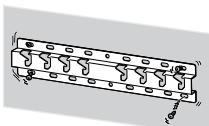
- Do not use the Wall-Mount Bracket in a place where it is subjected to mechanical vibrations.
Installing the WallMount Bracket
To Sony Dealers
WARNING
The following instructions are for Sony dealers only. Be sure to read safety precautions described above and pay special attention to safety during the installation, maintenance and checking of this product.
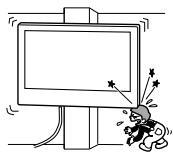
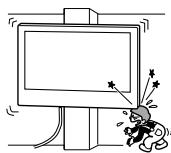
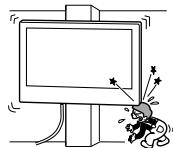
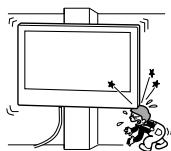
Do not install the WallMount Bracket on wall surfaces where the corners or the sides of the TV protrude away from the wall surface.
Do not install the Wall-Mount Bracket on wall surfaces such as a pillar, where the corners or the sides of the TV protrude away from the wall surface. If a person or object happens to hit the protruded corner or side of the TV, it may cause injury or property damage.
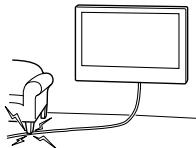
Do not install the TV over or under an air-conditioner.
If the TV is exposed to water leaks or air current from an air conditioner for a long time, it may cause a fire, an electric shock or a malfunction of the TV.
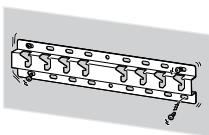
Be sure to install the Wall-Mount Bracket securely to the wall following the instructions in this instruction manual.
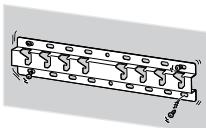
If any of the screws are loose or fall out, the Wall-Mount Bracket may fall and cause injury or property damage. Be sure to use the appropriate screws for the material of the wall and install the unit securely using four or more screws of 8mm diameter (or equivalent).
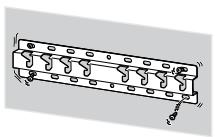
Be sure to use the supplied screws and attachment parts properly following the instructions given in this instruction manual. If you use substitute items, the TV may fall and cause bodily injury to someone or damage to the TV.
Be sure to assemble the bracket properly following the instructed procedure explained in this instruction manual.
If any of the screws are loose or fall out, the TV may fall and cause bodily injury to someone or damage to the TV.
Be sure to tighten the screws securely in the designated position.
If you fail to do so, the TV may fall and cause bodily injury to someone or damage to the TV.
Be careful not to subject the TV to shock during installation.
If the TV is exposed to shock, it may fall or break apart. This may cause injury.
Be sure to install the TV on a wall that is both perpendicular and flat.
If you fail to do so, the TV may fall and cause injury.
After proper installation of the TV, secure the cables properly.
If people or objects get tangled with cables, this may result in injury or damage to the TV.
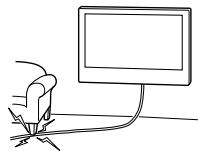
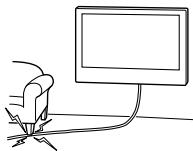
Do not allow the AC power cord or the connecting cable to be pinched.
If the AC power cord or the connecting cable is pinched between the unit and the wall or is bent or twisted by force, the internal conductors may become exposed and cause a short circuit or an electrical break. This may cause a fire or an electric shock.
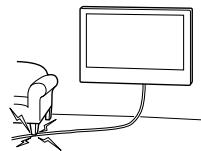
The screws needed to secure the Wall-Mount Bracket to the wall are not supplied.
Use the appropriate screws for the wall material and structure when mounting the Wall-Mount Bracket.
Installing the TV onto the wall
Installation procedure differs, depending on your TV.
Use the Wall-Mount Bracket SU-WL450 to install the TV to the wall.
Note
- Be sure to store the removed screws in a safe place, keeping them away from children.
Preparing for installation
- Have the TV's Reference Guide at hand before installation.
- Be sure to have a Phillips screwdriver that fits the screws prior to the assembly.
- Confirm the installing position of your TV.
- Prepare four or more screws of 8mm diameter and one screw of 5mm or equivalent (not supplied). Select screws suitable for the material of the wall.
Checking the parts
Supplied with SU-WL450
- Verify that all the parts are included.
| A Base (20) (1) | B Pulley (2) |
| C PSW 6x20 (4) | D PSW 4x20 with Bush (2) |
| E Spacer (20) (2) | F Belt (1) |
| G Bush (20) (M4) (2) | H PSW 4x20 (2) |
| I Base Adaptor (2) | J PSW 4x10 (8) |
| K Spacer (60) (2) | L PSW 6x50 (2) |
| M Bush (M4) (2) | N PSW 4x50 (2) |
| O Wall-Mount Attachment (S) (2) | P Spacer (2) |
| Q Washer (1) | R PSW 5x12 (1) |
Supplied with the TV (attached to rear)
Deciding on the installation location
1 Decide on the installation location.
Make sure that the wall has enough space for the TV and is capable of supporting a weight of at least four times that of the TV.
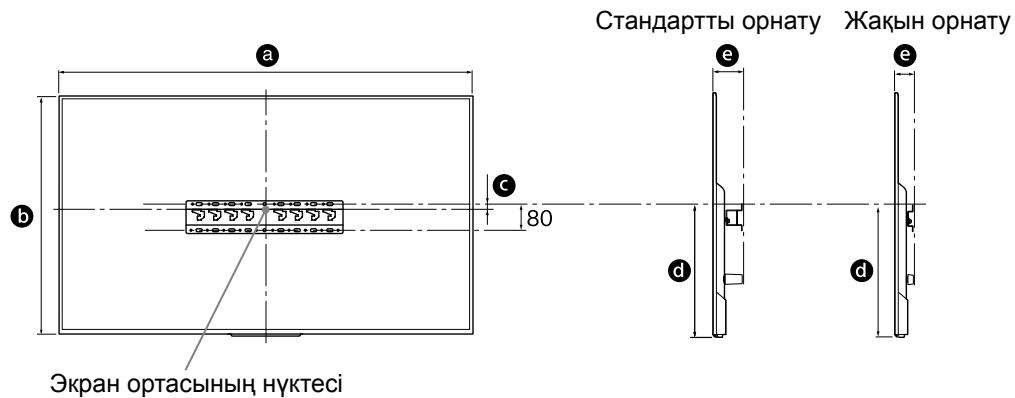
Refer to the following table on installing the TV to the wall. Refer to your TV's Reference Guide for the TV's weight.
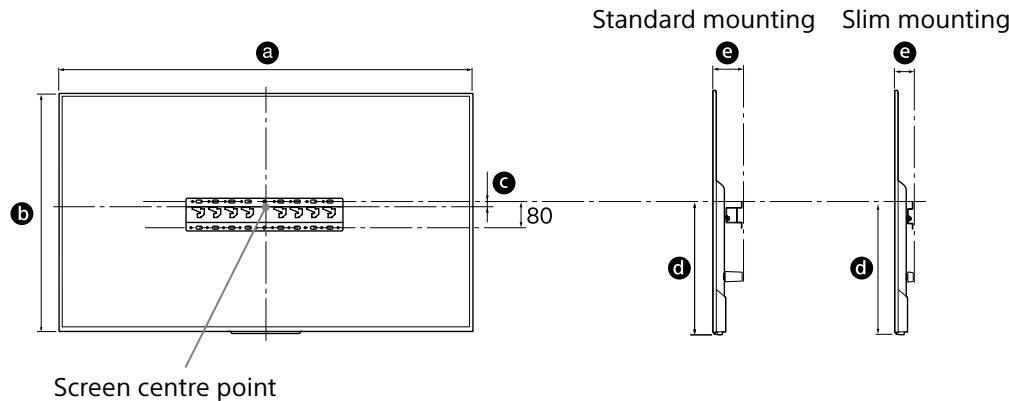
Unit: mm
| Model Name KD- | Display dimensions | Screen centre dimension | Length for mounting | |||
| a | b | c | d | e | ||
| Standard mounting | Slim mounting | |||||
| 65XD85□□ | 1,454 | 842 | 56 | 483 | 102 | 60 |
| 55XD85□□ | 1,231 | 717 | 129 | 494 | 102 | 60 |
Note
- Figures in the table may differ slightly depending on the installation.
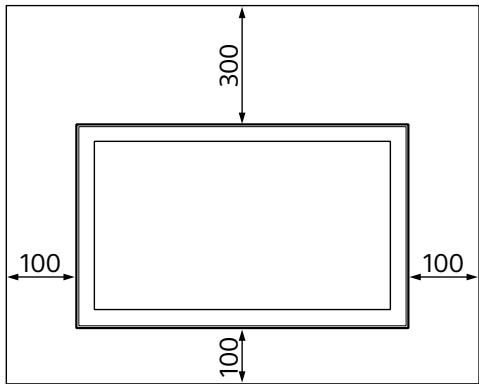
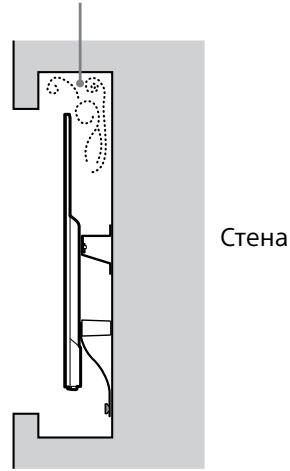
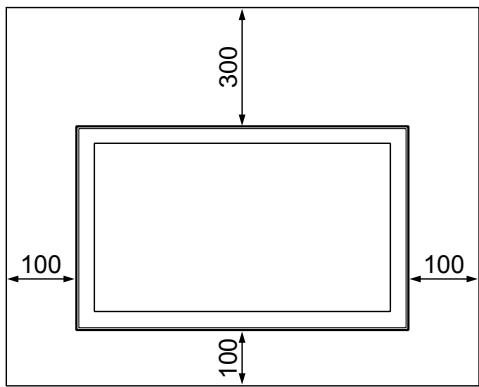
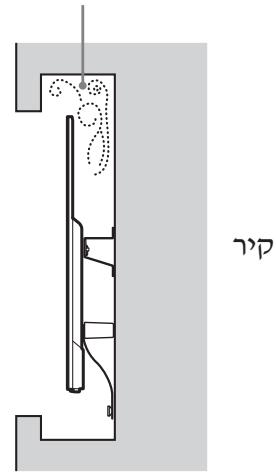
Allow for suitable clearance between the TV and the ceiling and protruding parts of the wall as shown below.
Unit: mm
-
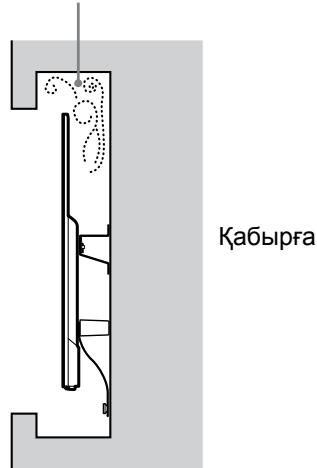
To ensure proper ventilation and prevent the collection of dirt or dust:
-
Do not lay the TV set flat, install upside down, backwards, or sideways.
- Do not place the TV set on a shelf, rug, bed or in a closet.
- Do not cover the TV set with a cloth, such as curtains, or items such as newspapers, etc.
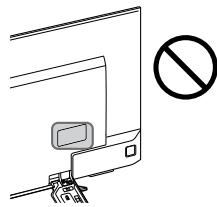
- Do not install the TV set as shown below.
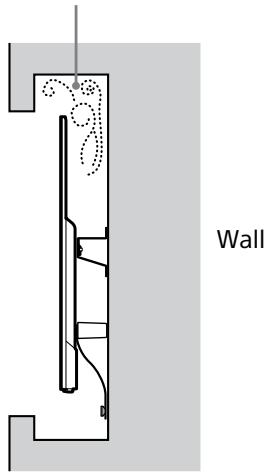
Air circulation is blocked.
Note
- If you intend to route the cables in the wall, make a hole in the wall to insert the cables before beginning the installation.
To prevent pinching the cables, prepare a hole in the wall somewhere outside the perimeter of the Base (20) A,Base Adaptor 1 and Spacer (20) E, Spacer (60) K.
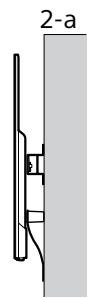
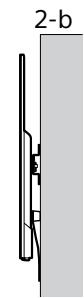
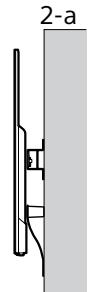
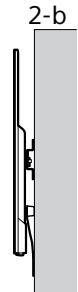
2 Select Wall mounting style. It is selectable as shown below.
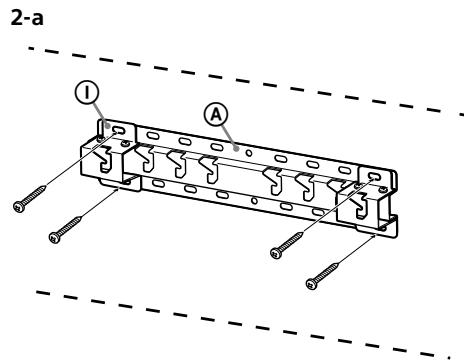
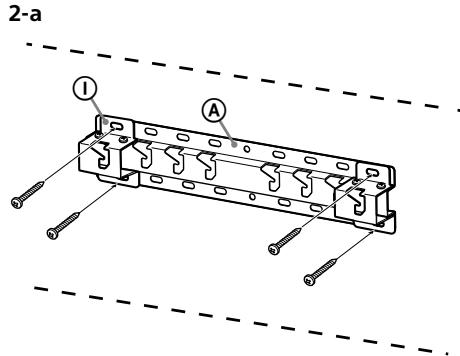
2-a Standard mount
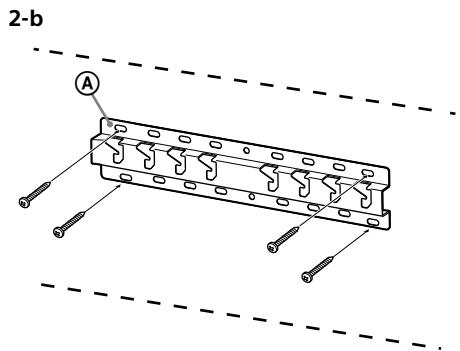
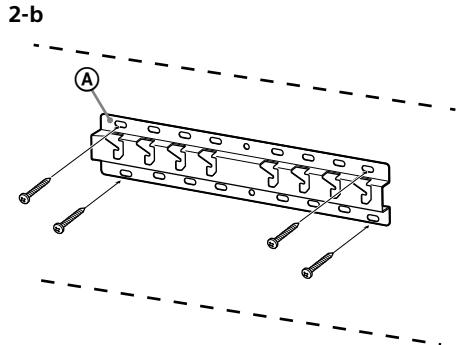
2-b Slim mount
Refer to the table of step 1.
WARNING
- When 2-b is selected, rear terminal access is limited.
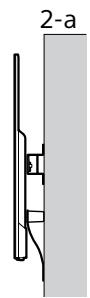
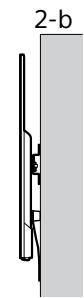
3 Refer to the below table about the Base Adaptor fitting location. In case of selecting 2-b, then skip this step.
| Model Name KD- | Hook location |
| 65XD85□□ | b |
| 55XD85□□ | c |
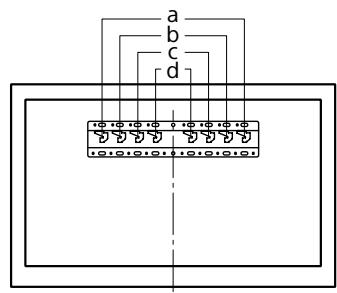
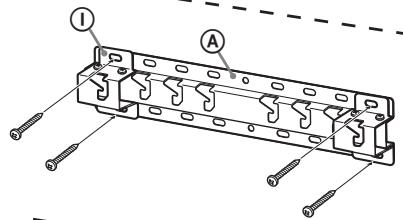
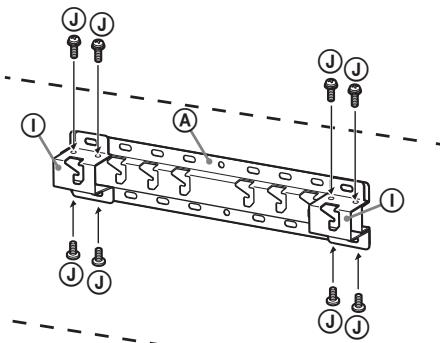
Fit Base Adaptor ① by using Screw (PSW 4x10) ② to Base (20) ④ when selecting 2-a.
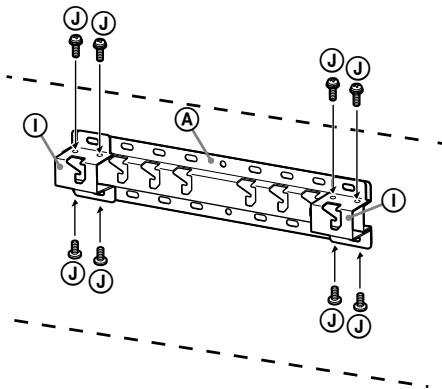
4 Decide the positions of the screws for installing the Base (20) (A).
Refer to the specifications on page 12. When selecting 2-a, please use the hole positions of Base Adaptor ①
WARNING
- The wall that the TV will be mounted on should be able to support a weight of at least four times that of the TV (Refer to your TV's Reference Guide for its weight.).
- Determine the strength of the wall the TV will be mounted on. Reinforce the wall sufficiently, if necessary.
Installing the Base on the wall
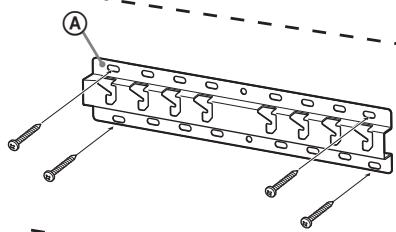
- Use four or more screws of 8mm diameter or equivalent (not supplied).
- Fit four screws to the holes of Base Adaptor ① with Base (20) A (2-a only).
Install the Base (20) ④ on the wall horizontally.
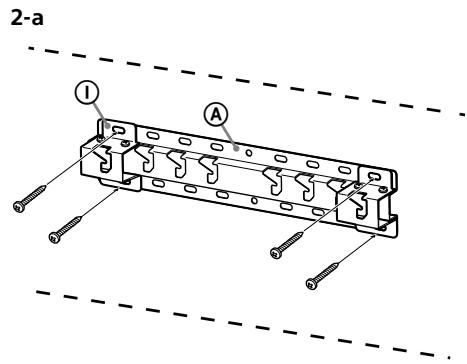
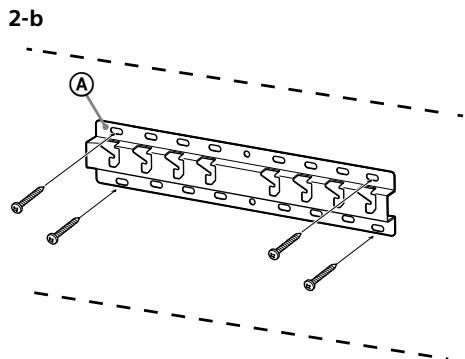
Preparing for the installation of the TV
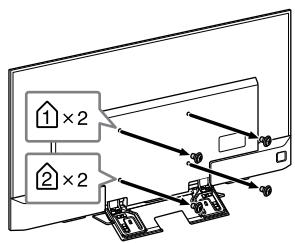
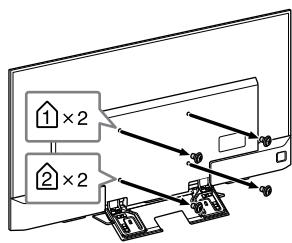
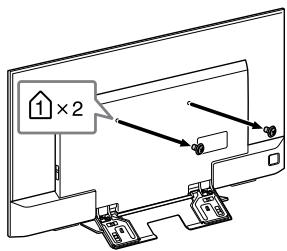
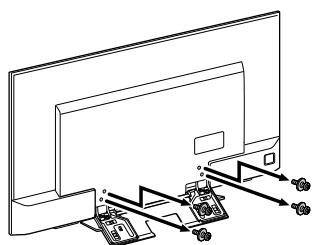
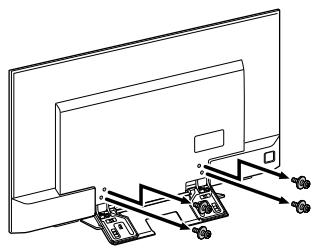
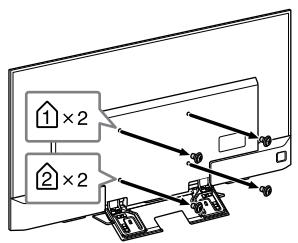
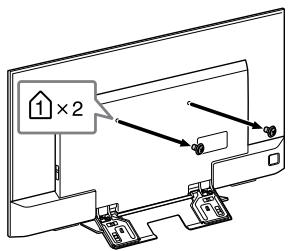
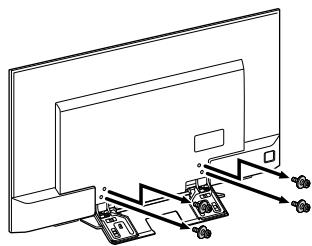
1 Remove the screws from the rear of the TV.
KD-65XD85□□
KD-55XD85□□
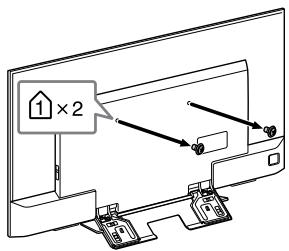
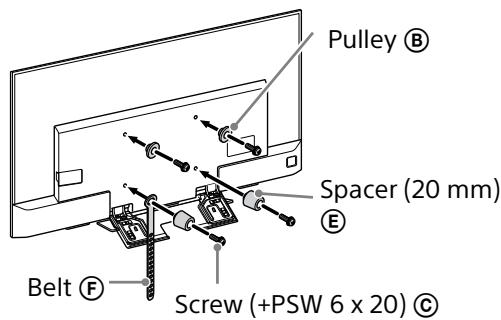
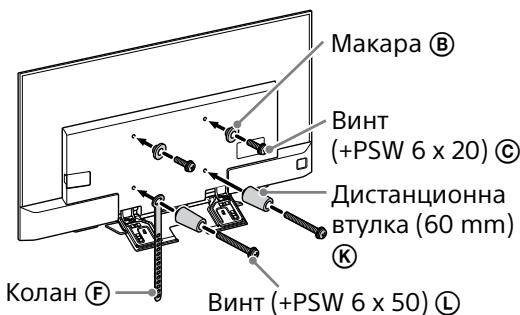
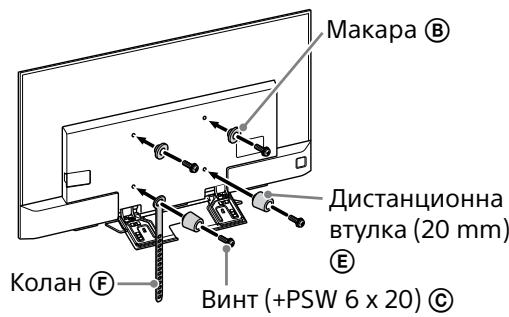
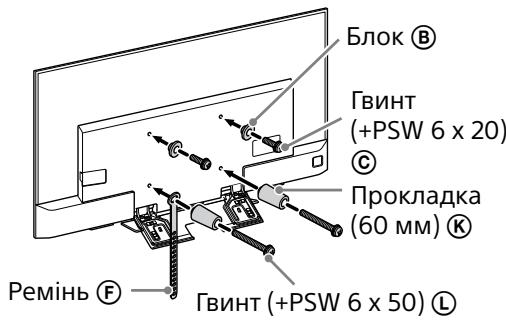
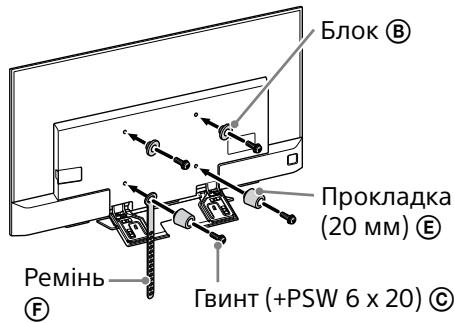
2 Attach the Attachment parts for Wall-Mount Bracket. Check the Attachment parts by referring to "Supplied with SU-WL450" in "Checking the parts" on page 5.
Note
- Firmly secure the Attachment parts using screws.
- When using an electric screwdriver, set the torque setting to approximately 1.5 N·m {15 kgf·cm}.
- Be sure to store the unused parts in a safe place for future use. Retain this manual for future reference.
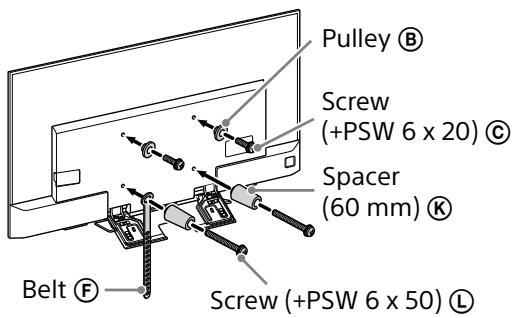
Standard mounting (2-a)
Slim mounting (2-b)
Note
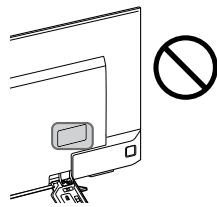
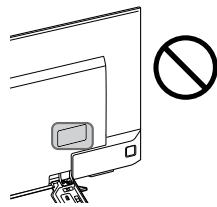
- You cannot use some of the terminals on the rear of the TV when using this mounting style.
3 Connect the necessary cable(s) to the TV.
Make sure to connect the cables before installing the TV on the wall. You will be unable to connect the cables when the TV is installed.
Refer to the Reference Guide supplied with your TV.
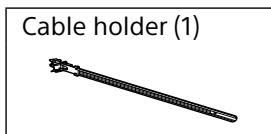
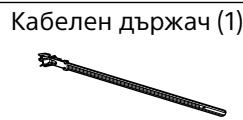
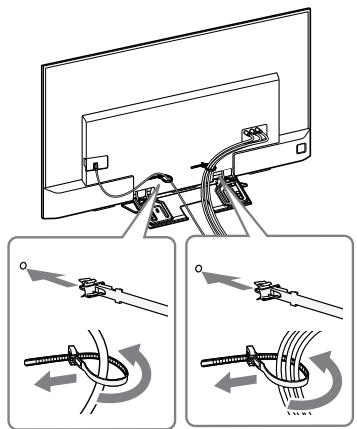
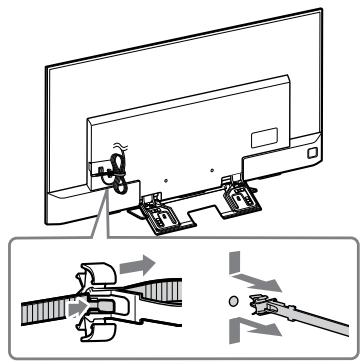
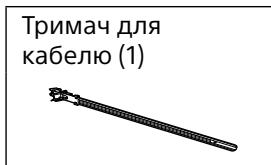
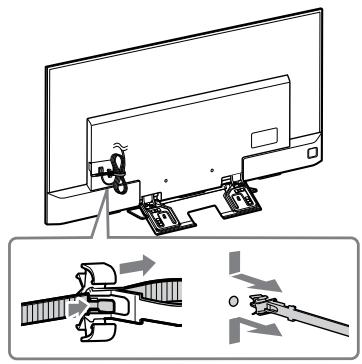
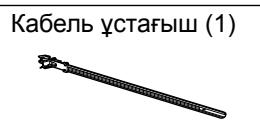
4 Detach the cable holder (supplied with the TV).
(KD-65XD85□□ only)
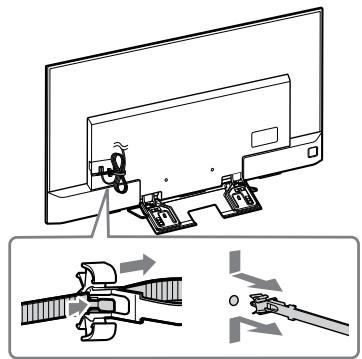
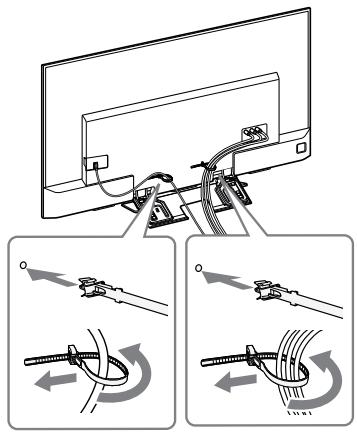
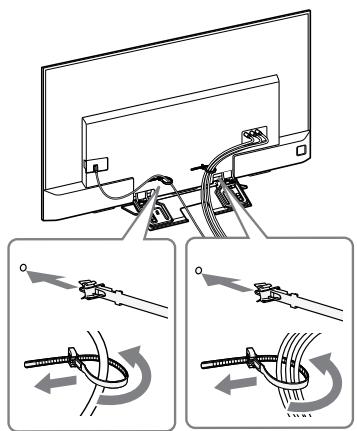
5 Bundle the cables.
For KD-65XD85□□, attach the cable holder to one of the inner holes.
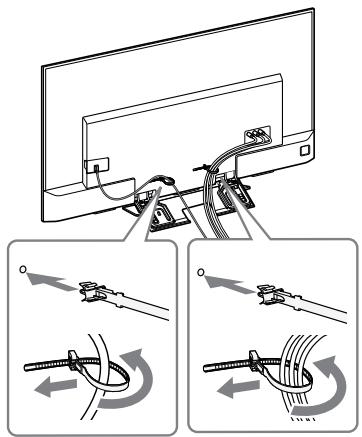
Note
- Subcontract the cable routing in the wall to a licensed contractor.
- Bundle the connecting cables to prevent stepping on them before wall mounting.
6 Detach the Table-Top Stand from the TV.
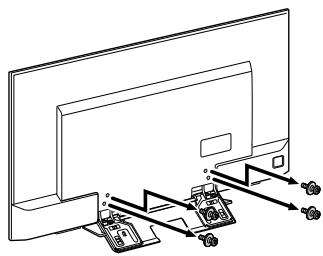
Installing the TV on the wall
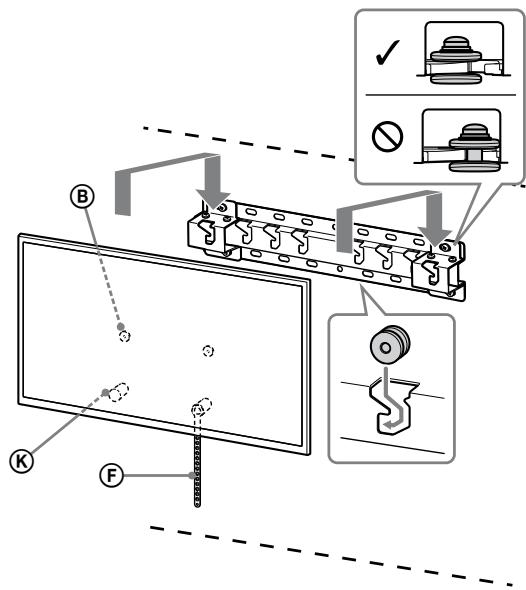
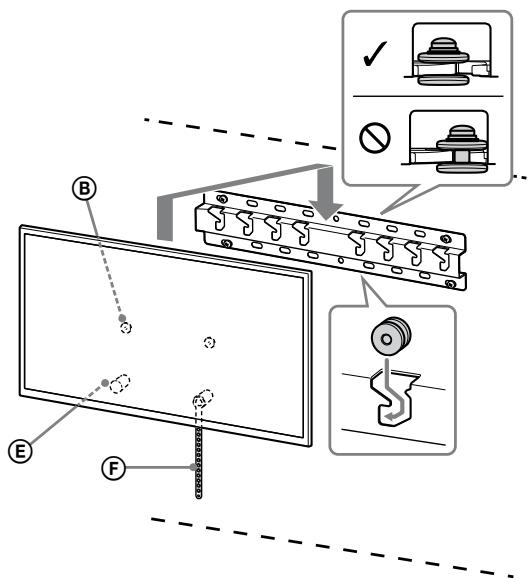
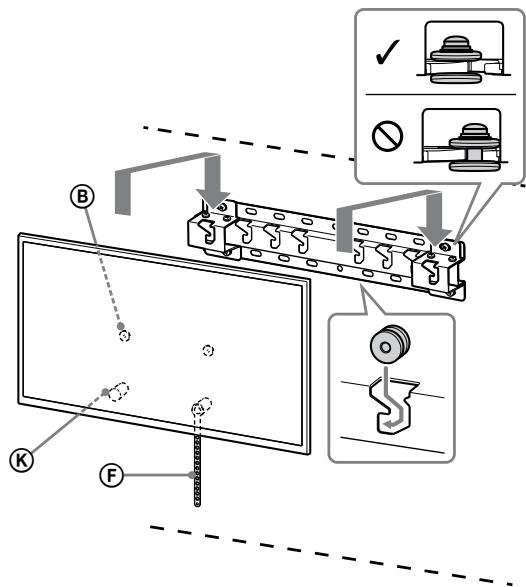
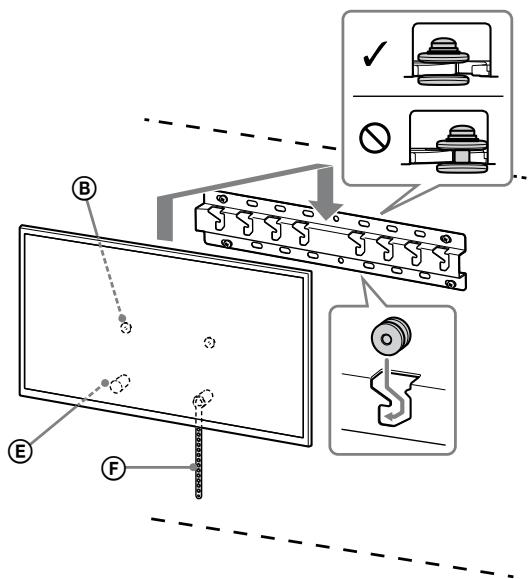
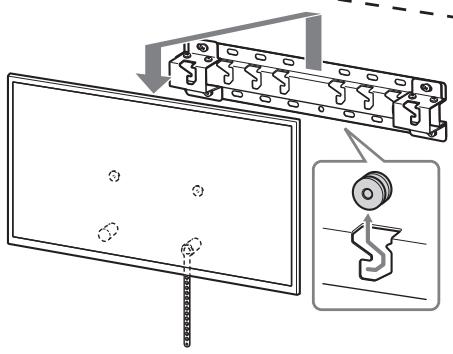
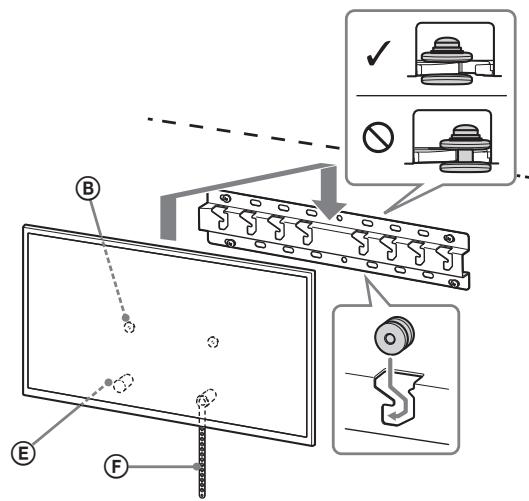
1 Install the TV onto the Base.
- For the location of the Pulleys (B) to the hang on the Base, refer to the table of step 3 in "Deciding on the installation location" on page page 6.
- Hold the TV securely with both hands and gently hang the Pulleys ⑧ attached to the rear of the TV to the Base, making sure to confirm the shape of the holes.
- After installing the TV on the wall, confirm the Pulleys (B) are firmly latched into the Base or Base Adaptor.
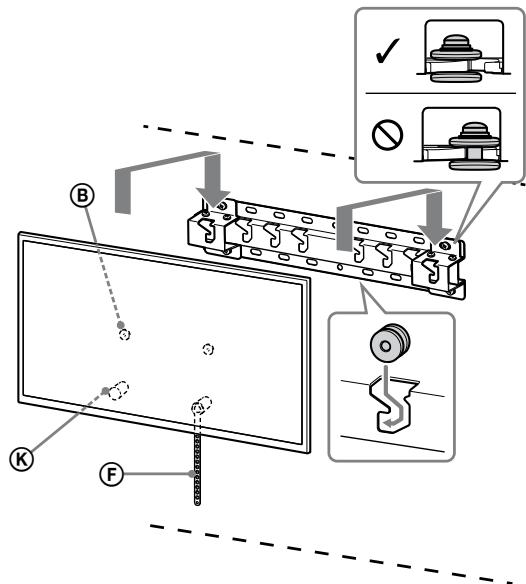
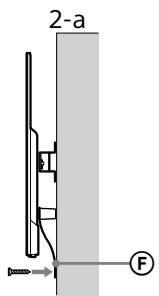
2-a
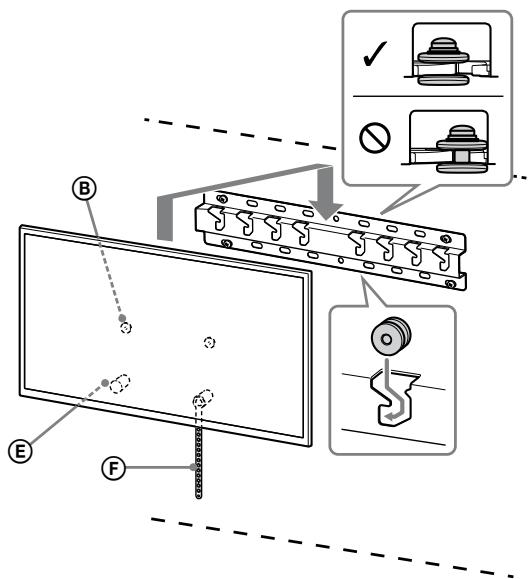
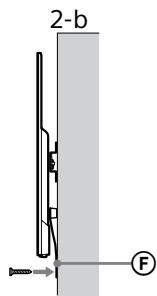
2-b
WARNING
- Be sure that two or more persons hold the TV when carrying it.
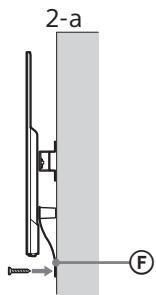
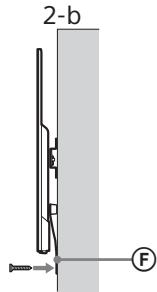
2 Preventing the bottom of the TV from shifting.
Take up the slack of Belt F and attach it to the wall tightly.
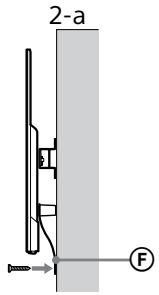
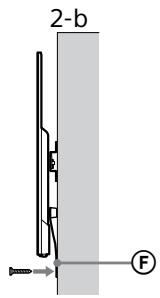
- Use a 5mm diameter screw or equivalent (not supplied).
Note
- Try to pull the bottom of the TV forwards yourself slightly, to make sure that it does not move forward. If there is any movement, it is not fixed correctly, and the Belt (F) should be secured firmly again.
Confirming the completion of the installation
Check the following points.
- The Pulleys (B) are firmly hung onto the Base or Base Adaptor.
- The cord and the cable are not twisted or pinched.
- The Belt is tight with no slack.
WARNING
- Improper placement of the AC power cord, etc. may cause fire or electric shock through a short circuit. Be sure to confirm the completion of the installation for safety.
Other information
When removing the TV, reverse the previous installation procedure.
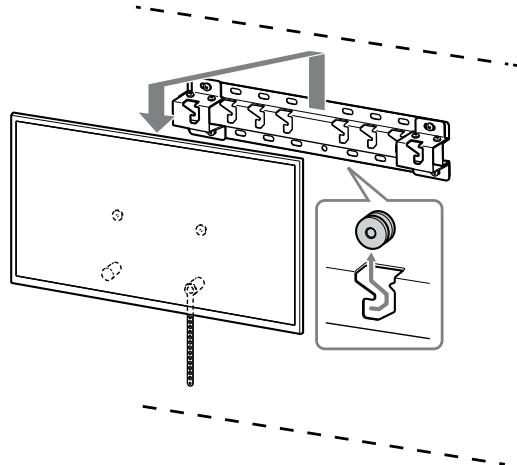
WARNING
- Be sure that two or more persons hold the TV when removing it.
Specifications
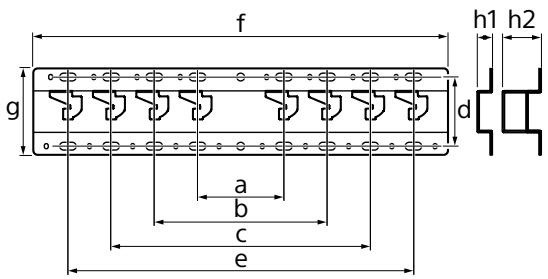
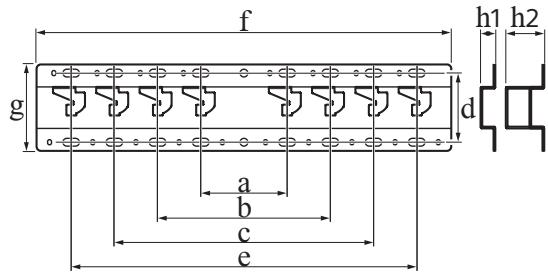
Dimensions: (Approx.) [mm]
a :100
b : 200
c :300
d : 80
e :400
f :480
g :100
h1 : 20 (case 2-b)
h2:60(case 2-a)
Weight (base only): (Approx.) [kg]
0.8
Design and specifications are subject to change without notice.
Dimensions: (approx.) [mm]
a :100
b : 200
c :300
d : 80
e :400
f :480
g :100
h1 : 20 (cas 2-b)
h2 : 60 (cas 2-a)
Poids (base seule) : (approx.) [kg]
0,8
Dimensoes: (Aprox.) [mm]
a :100
b : 200
c :300
d : 80
e :400
f : 480
g :100
h1 : 20 (caso 2-b)
h2 : 60 (caso 2-a)
Peso (apenas base): (Aprox.) [kg]
0,8
Specifications producer
Klargøring for installation
Rozmery: (pribl.) [mm]
a :100
b : 200
c :300
d : 80
e :400
f : 480
g :100
h1 : 20 (prīpad 2-b)
Modele acceptate: KD-65XD85□□/55XD85□□
KbM TbProBcHTe Ha Sony
3a MoHTnpaHTo Ha npOdykTa ce
n3NCKBa ONIT. IpOyETe BHNMaTeJELHO
TOBA pKOBoCTBO, 3a Da N3BbPwITE
6BeONaHO MOHTaXhNe TEJeHOctm.SONY
He HcOu OTROBOPHOCT 3a NOBpei nn
HapAraBaHHn, PnPsiHeHn OT
HenpaBnHa YnOTpe6a NnMOHTaxk.
PiPeaTe TOBA pKOBoCTBO Ha
KJIMeTHa CneM OMTaKa.
Toba pBkoBOdCTBO NOKa3Ba IpaBnHnna HauHH 3a pa6Ota C npOdyKTA n BaxKnHte PnpEa3Hm EpeK, KOIO TpRb8a Da ce npEepnmeMat 3a Da ce 3n6eHerat 3nONoJyKn. PpoHeTeTc BHmATEHo TOBA pBkoBOdCTBO n 3nON3BaIte npOdyKTA npBauHIO. 3ana3eTe pBkoBOdCTBO T3 a 6bDeuIcnPakBN.
Ipojkyntte Ha Sony ca npoeKtpaHn c
mcbbl 3a 6e3oNaocHTa. Ho aKO
n3non3bATE npOyKa HnpeBavuHIO,TOBA
MOKeJa dO BoEbeDo Cepno3HO HaparBaHaBe
BCJeCTBVe Ha NoXap, eNeKtpnecKn yIap,
naDaHe iNl n3nyckaHe na IpojKyta.
Cn3aBaTe MEPknte 3a 6e3oNaocHT 3a
npedToBpTaBHa He TaKInBa INiUdENTn.
BHIMMAHNE
YToUHЯBaHe Ha npOdyKTnTe
Ta3n KOH3Ola 3a MOHTaJx HA CTHe a npoekTupaHa 3a Ntno3BaHe camo C yka3anHte TeneBn3Opr. BnXte cnpaBOuHnite pBKOBOcTbA 3a TeneBn3Opnte, 3a da npOBeprI dai mIoMoBe da ce Ntno3BaTa 3aN KOH3Ola 3a ZakpenBaHe KbM CTHe.
KbM KJIneHTnTe
PPEyPPEKDEHNE
Ako He ce cna3BaT CneHnTe PnpEpa3Hn MepKn, TOBA MOKeJa DoBede Do cepno3HO HapaNaBaHe IIN CMbPT OTo pOkaR, EneKtpNueCKn ydap IIN NaIaDaHa NpOdykTA.
Bb3IOKeTe MOHTaKa HaJIuIeH3npaHnN3NbJIHnTeJIN IdpBXTeDeIaTa HAcTpaHn NOBpeMe Ha MOHTaKa.
Ako KOH30nata 3a MOHTaKa HcTeHa He e MOHTnPaHa nPaBvJIHo,MOKe Da Bb3NHKKAT CneIHNTE NHiDuEHTN. YBepeTe ce, ye MOHTaKbCe M3BbPbWA Of LInuEh3npaHn INbIbnHTeJI.
TeneBm3OpbT MoKe da naIadHe I da npedn3BnKa cepno3Ho HapaHaaBeHa, KaTo KOHTyNJI INJ CHYBaHe.
- Ako cTeHata,Ha KOJTo e MOHTnpaHa KOHJolata 3a MOHTaX Ha cTeHa, e HeCTabUNHa, HEBAPbA nn He e nepHeNkUyRnHa Ha nOda, KOHCTpyKUyTA MoXe Da naIadne N da npuHiNn HapauHbAe NnIOBpeDa ha NMUyceTBO. CTeHa TpRbBa da e cnCoc6Ba Da n3Dbpxn TeKecr, NOhe YcTnPKkATHO ppeBnuaBaaTa Ta3n Ha TeLeBn3Opa. (BxJXE cPnABoHOTo pKoBOdCTBO Ha TeLeBn3Opa OTHOCHO TETLTO My.)
- Ako MOHTaXbT Ha KOH3OJaTa 3a MoHTaX Ha CTeHa He e DCtAtbTuHO 3dPaB, KOHCTpyKUraTo MAoKe Da NaJaHe N da PruYnHn HaparHBe Hn NobpeHa nMyUseCTBO.
YBepete ce,Ye cTe Bb3IOXNJN npMeCTBaHeTO NJN DeMOHTaJa Ha TeJIeBN3OpaHa JINcEN3npaHn N3PiBJHNTEIN.
Ako Dpyu Nlua,OCBEN Nluehen3npaHn
N3blNHTeIa TpAChCnpTup Hnla
dEMOHTnpat TeLEbE3o4,ToM KOeJa
naDne N da npuHnHa npaHraBaHe nIi
NoBPeDa Na IMyUcECTBO.OcYrpeTe DBe IINI
NoBVe Nla 3a HocHe NLI dEmOHTaq Ha
TeteBMe3Opa.
He cBaIaIe BnHTObe n dpyrncIe MoHTaJa Ha TeJeBn3opa.
AkoToHapnABITHe,TeNEBIZOpbT MoKe Da naDne H da npuHnHa napaHbaHe NnI NOpeDa HA nMUYsCTBO.
He npomeha Te yactte Ha KOH30JaTa 3a MOHTaK Ha CTeHa.
AkoToHapnabe, KOHOnaTa3a MoHTaK HaCTeHa MoKeJa NaIaNHe N Da PrNUnHIn HapAnBaHEe NIN NOBpeHaN HAUYIECTBO.
He MoNTpaIte dpyro o6OpyDbaHe,OCBeH yKa3aHn npOdyKT.
Ta3n KOH3OJa 3a MOHTaK Ha cTeHa e npoekTnpaHa 3a n3n03BaHe camo C yka3AnpoDyKT. Ako MOHTnPate o6OpyuBaHe, pa3JInHO to Yka3aHOTo, T o MoKe Ta naDe Hn Da ce CuyN i Da npuHHn hapaHbAe Hn NOBpeHa n HmUyECTBO.
He noJlaraTe KOH3OJaTa 3a MOHTaX Ha CTeHa Ha HnKaKbB Dpyr TObAp,OCBeH Ha To3n Ha TeJeBu3Opa. He KNaTeTe TeJeBu3Opa HanaBO/HaIaCHO, Harope/HaOny.
Ako Tn HaprabITe, TnelBtOpbT MoKte Da naDne N da npuHn HapaHbaHe Nn NobpeDa Na IMyueCTBO.
He ce o6blaTe n He ce BnCeTe Ha TeIeBn3Opa.
He ce 6bnaeI ne He ybcBaeIe OT TeleBn3Opa, 3aoto Moe da naDne H da pinnuHc nepo3HO npahraBaHe.
BHIMAHNE
Ako CneiHnTE npEpa3HN MepKHe ce CnA3BAt, MoKe Da Bb3NkHe HapaHaBaHe NIN NOpeJa Ha NMUeCTBOTO.
He TpeTnpaIte npOdykTa c npeKaJIeHa cnla nOBpeme Ha nOuNCTBaHe IINn POnDpBxKka.
He npinaraiTe npekaleHa cnila Bbpyr
ropnata qacr Ha teneBm3opara. Ako ro
HaNPaBInTe, TeneBn3OpbT Moke da naJaHne I
da npuHHn HapaRaBaHe NIN NOBpeHa Na
NMyUcECTBO.
PpeDn3HmepKn
AkoDbIroBpeMe n3nOlaBate TeneBn3Op, MOHTINaH KaOH3OJa 3a MOHTaX Ha CTeHa,CTeHaTazdNtHaH Hero MoKeJa de Ce oBe3uBTeNtNan TaTeBt Da ce pa3nEni, B 3ABINCMOCT OT MaTePnAna H CTeHata.
- Ako KOH3ONATA 3a MOHTaK Ha CTeHa 6bJe CBAJIeHa OT CTeHaTcCNE MONTaKa, Iue OCTAHAT OTBOPN OT BINTOBETe.
- He INIIOIN3BAITE KOHONATA 3a MOHTAX HA CTHe HA MIACTO, KbDeTO MOKe DA 6bDe NOJIOXeHa H MEAXAHINN BIBpaUNi.
MOHTaX Ha KOH3OJa 3a MOHTaX Ha CTeHa
KbM TbproBunTe Ha Sony
PNEyPPEKDEHNE
CnEHNITE NcHCTpyKcN ca cAmO 3a TbPBOUHTe HA Sony. IPoQETe MEPKITE 3a BezONACHOCT, ONCAHNI NO-TOpe n OobpHete CneuAnHO BHIMAHME Ha ZeONACHOCTTA No BVPe HA MOtHaKa, NoDpBjKkata N INCHCNKNTA Hn PNDyKTa.
He mONTpaIte KOH3OJaTa 3a MOHTaJx Ha CTeHa Ha CTeHHN IOBbpxHocTn, KbJeTO bJInte IJI NCTpaHNTe Ha TeJIeBn3Opa Ce N3dAbat HaCTpaHn OT IOBbpxHocTTa Ha CTeHaT.
He MOHTpauTe KOH3OJaTa 3a MOHTax Ha CTeHa Na CTeHNb NOBbPXHOCTn, HAPmIMep KOJOna, KbDeTOb BrfIne NtIcPtaHne Ha TeneBb3Opa Ce I3dAbat HACsPAno tIOBbPxHOCTTa Ha CTeHaTa. Ako JIuce IIN PpeMeT YdApu N3dAdeHn Bbl Nm CtpaHa Na TEbU3Opa, TOBa MOpSe da PnpUnHn HaparBaBe He NIOpBepa Ha NMUYIeCTBO.
He moHTnpaTe TeJeBn3Opa NaI NII NOD KInMaTnK.
AkoTeBn3OpbTe n3IIOxH ePNOJIKNtJEnHO HTeTOBE NIN Bb3dUyHo TceHeHcOT KJIIMaTik, TOBA Moze Da npEiDn3BnKa NOKc, eNEKtpnueCKy Udpa INHn3npabHOCT Ha TeBn3Opa.
MOHTnpaIte 3dpaBO KOH3OJaTa 3a MOHTaJx Ha CTeHa KbM CTeHaTa KaTO CJeDbATE NHCTpyKcUInTe B TOBa pBKOBoDCTBO 3a pa6ota.
Ako HЯков OT BInTOBete Ce pa3xna6n Ил naDhe, KOH3OJaTa 3a MoTAnKa Ha CTeHa MOKe La naDHe I Na prUnyHn HaparHbAbe HnN NOBpEda Ha IMUyIeCTBO. IN3NoJ3BaIte noXODaIu 3a MaTePnAla Ha CTeHa BVTOBte MOnHTnpaIte KOHCTpyKuNTa 3dPaBO KATO IN3NoJ3BaTE YeTpriu INI NoBeeu BVnHa C dmAmEtbp 8 mm (INI ekBvAlJeHTNu).
I3noJ3BaIte
npaBnHNo
IOCTaBeHInTe BnHTObe
N OKaUBaUn qAcTn
KaTO CJIeDBAte
INCTpyKUnTe B TOBa
PbKOBOdCTBO 3a
pa6Ota.Ako
N3NoJ3BaTe
3aMeCTBaUn
eJeMeHTn,
TeJIeBn3OpbT MoKe Da
PaJHe N Da pRnuHn
TeJeCHa NOBpeDa NJI
Da Ce NOBpeN.
YBepete ce,Ye crNo6yBaTe KOH3OJaTa npaBnJHo KaTo CNeiBaTe npoueDypata,OnncaHa B TOBa pKOBODCTBO 3a pa6ota.
Ako HkoK O T BnHTOBete ce pa3Xla6n IIN naHne, TeneBn3Opst MOnge Da naHe N da npuHHN TeneCha NoBpeDa IIN da ce noBpeDen.
3aTerHeTe 3dpaBO BnHTOBete B yKa3aHOTO NOJIOKeHne.
Ako He ro HanpaBITE, TeleBn3OpbT MoKeJa naDne H da npuChnH TeNecHa nobPeDa nn Da ce NobpeDi.
BHMaBaIte Da He yIapIte TeJIeBn3Opa No BpeMe Ha MOHTaJa.
Ako TeneBn3opst 6bJe NpIoJKeH Na hyap, ToMoke Da nApHe nnE nnE da CE cyuN. ToBa Moke Da BOBeDe O Do hapaBaHe.
MOHTnpaTe TeJIeBn3Opa Ha CTeHa, KOrTo e neppeHdkyIrpHa n paBHa.
Ako He hapiapabite TOBA, TeleBn3OpbT MoKe Da naDHe N da npuHn HapaHyaBaHe.
Cleid npabnilnna MoNTaJHa TeJeBn3opa, 06e3OpacTe npabnilho Ka6eJIte.
Ako xopa iIIN pIeDMTe cIaIeNerT aKabeJIte,TOBA MoKeJa IaPnUHb HapaHbAbe IINI NOBPeDa Ha TeLeBnOHa.
He donyckaiaTe npntnckaHe Ha 3axpaHbauaJa Ka6eI nIHa cBbP3BaunKa6eI.
Ako 3axpaHbauqnT ka6eI IIN Cbbp3Baunr
ka6eI bbaT npITMCHTa MekJy
KOHCTpykUeta n CTHeTa IIN aKO bDaT
O8bHaTu IIN YCYKaH Cb CS NBA, BbTPeShNtE
npoBODnIu MoKe Ja Ce OOrJa T da
pnuHHa KbCo CbeDInHeHne IIN
eNEKTpuWeckn U yap. Toba MaeJa npuHHu
noxapar IIN eNEKTpuWeckn U yap.
BnHTOBeTe, Heo6xOaMn 3a 3aKpePbAHe Ha KOH30JaTa 3a MOtaxK Ha CTeHa KbM CTeHaT, He Ca BKJIoueHN B KOMNJIeKTa.
N3non3BaTe NoxOJaU BnHTObe CnopeJ MaTePmaHa Na CTeha N KOHCTpyKlIyTa, KOrato MOHTnPaTe KOH3oJaTa 3a MoHTax Ha CTehA.
Mоntаж Ha TeJIeВиЗОра Ha CTeHata
Процураза за монтajе раЗична спорд.Tелевизopa.
Изпольвайт eнглаТа 3a 3akpenBaHe KbM cTeHa SU-WL450,3aДа моHTиpaTe TeJIeBn3Opa Ha cTeHaTa.
3a6eJexkka
He nponyckaIte da cbxpaHnTe cBaJeHnTe BnHTOBe Ha cnIpyHO MRCTo, KaTO rN Na3nTe OT Deua.
ПодгOTOBka 3a MOHTaЖ
- Ппени монтужа поставе Наблизо срабочно рькововоств на телеви
- Ппеди сглобаянeto оситуpeTe OTBертka Phillips, korTo OTROBapЯ на boNTobete.
- Поберете положецTo 3a монтж на Teileвзopa.
- PnpuroBete YeTupn nn Nobeue BnHTa C dNaMeTbp 8 mm n eDnB BnHT C nnAmeTbp 5 mm nn EKBuBaJIeHTHn (He ca BKIIOUeHN B KOMIIeKTa). IV36peTe BnHTOBe, NOxOJa7n 3a MaTePnAnaHa Ha CTeHaTa.
Поберka на частelve
DoctaBeHo c SU-WL450
- Поберете дали BCNUЧи ча налічни.
| A Oснова (20) (1) | В Мakара (2) |
| ◎ PSW 6x20 (4) | ◎ PSW 4x20 с Втулka (2) |
| ◎ Дистанционна втулka (20) (2) | ◎ Колан (1) |
| ◎ Bтулka (20) (M4) (2) | ◎ PSW 4x20 (2) |
| ◎ Адайтета (2) | ◎ PSW 4x10 (8) |
| ◎ Дистанционна втулka (60) (2) | ◎ PSW 6x50 (2) |
| ◎ Bтулka (M4) (2) | ◎ N PSW 4x50 (2) |
| ◎ Пиставka за монтajх на стейн ( (S) (2) | ◎ Дистанционна втулka (2) |
| ◎ Шайба (1) | ◎ PSW 5x12 (1) |
IocTabeHo C TeJeBn3opa (3aKaueHo 3a 3aHaTa CTpaHa)
4 OnpeJeIeTe MeCTaTaHa BnHTOBeTe 3a MOHTaX Ha OCHOBaTa (20) A.
BnKTe cpeuΦnKaunTe Ha cTpaHnca 12.
Korato n36epete 2-a, n3noJI3BaIte cIeHNITE nO3nCn Ha OTBOpTe 3a aAnTepa Ha OCHObata ①
IPEДУПЕЖДEHME
- CTeHaTa, Ha KoTo Ⅲe 6bIe MOHTnpaH TeJeBn3OpbT, Tp8Ba Da MoKe Da NIOBbPka Hau-MaIKO Yetupn nTn TerlOTO My (BnKTe CnpaBOOHOT pKOBoDCTBO Ha TeJeBn3Opa OTHOCHO TerlOTO My.).
- OnpeJeIeTe 3IpaBnHaTa Ha CTeHata, Ha KOrTo Ie 6bIe MOHTupa TeJIeBn3OpbT. AKe e Heo6xOJIMo, ycIIeTe CTeHATA DoCTaTbUHO.
MoHTaЖ Ha OCHOBaTa Ha CTeHaTa
- I3noJI3BaIte yeTnpn nnIOBueye BnHTa c dnaMeTbp 8 mm nn eKBnBaJIeHTHn (He ca doCTaBeHN).
- 3akpenete ueTnpTe BnHTa B OTbOpnte Ha aanTepa Ha OCHOBata ① C OCHOBata (20) A (camo 2-a).
- MoNTnpaIte OCHOBaTa (20) A XOpN3OHTaJIHNo Ha CTeHaTa.
Повтовka 3a мотаж Ha Teileburg3opa
1 Cbale Te BnToBte OTe 3aHaTa CTpaHa Ha TeJeBn3Opa.
KD-65XD85□□
KD-55XD85□□
2Прикpenete OKaUBaIteЧаTe 3a KOH3OJaTa 3a 3aKpeNBaHe KbM cTeHa.ПроветeЧаТe 3a OKaUBaHe, KaTO cpaBHnTe C "ДocTaBeHo c SU-WL450"В "Проверka HaЧаТe"Ha CTpaHnцa 5.
3a6eJexKka
3aKpenete Yactte 3a OKaYBaHe C NOMOHTa HbINTOBe.
Korato n3noJ3BaTe eJekTpuecka OTBepTka, 3aJaTe HacToPouKaTa Ha BbptAun MOpHe NT np6JIn3UteHn Ho 1,5 N·m {15 kgf·cm}.
3aIbJNHTeHNO CbXpaHbAaTe Heu3No3BaHnTe qactn Ha cIgYpHO mCTO 3a 6bJeua yOnTpE6a. 3ana3e TOBa pKoBOdCTBO 3a 6bJeua cnpaBka.
CtahdapTeH MoHTaX (2-a)
Teceh MoHTaK (2-b)
3a6eJexkka
- ПиTO3N CTIN HA MOHTaX He MoXeTe Da N3IPOJ3BaTe HЯKOn OT KJIEMITE OTo3aD Ha TeJIeBn3Opa.
3 CbpxKeTe Heo6xOIMnTe Ka6eJI N KbM TeJeBn30pa.
YBepTe Ce,Ye CTe CBbp3aJn Ka6eJInte
IpeJN Da MOHTnpaTe TeJeBn3Opa Ha
CTeHaT. HJaMa Da MoKTe Da rN CBpKTe,
CNeJ KaTO TeJeBn3OpbT e MOHTnpaH.
BxKTe cPpABoCHOTo pbKOBoDCTBO,
IOCTaBeHo C Baunr TeJeBn3Op.
4 Pa3kayeTe ka6eHnIy IbprKaU (IOCTaBeH C TeJIeBn3Opa). (KD-65XD85□□ caMo)
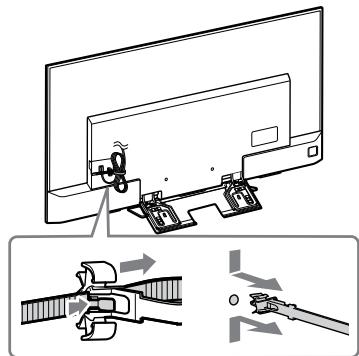
5 Cb6epeTe ka6eJInte.
3a KD-65XD85□3aKaayTe Ka6eHnIy DbPkaq KbM eDINH OT BbTpEwHInTe OTBOpN.
3a6eJekka
Bb3JIOKTe npokapBaHEnTo Ha Ka6eJIInTe B cTeHa Ta HJIInCeH3IpaH n3nblHInTeJ.
Cb6peTe CbP3BaUnte KaBEn, 3a Da He nHaCTbNtE IpEIN MOHTaKa Ha CTehata.
6 CbaJIeTe nOCTaBkata 3a MaCa OT TeJIeBVn3Opa.
Монтук Ha TeileBn3opa Ha CTehata
1 MoHTnpaIe TeTeJIeBn3Opa KbM OCHOBaTa.
- OTHOCHO MeCTaHa MaKapUte ⑧ 3a OKaYBaHe Ha OCHOBaTa, BIXKTe Ta6IuCaTa OT CTbIka 3B "OnpeJeIHe Ha MICTOTO Ha MOHTaJ" Ha CTo. CTpaHnua 6.
-ДрьжTeЗдраBO TeLEBn3Opa CДBE рьеци BHNMaTeJIHO OKaYeTe MaKapuTe 8,ЗakayeHn KbM 3aДнaТаЧАСТЯТеЛБИЗОРApKbM OCHOВaTakATOПROBepuTe pa3MepaHa OTBOpuTe.
Clemd MoTajk Ha TeJIeBn3Opa npOBepeTe daIIMaKApIte 8 ca 3dpaBO 3aKaueHIn KbM OCHOBaTa IIN aJaNTepa Ha OCHOBaTa.
2-a
2-b
IPEyIPEKDEHNE
- OcnHypeTe IBeI NII NOBue JInca, KOINTO Da IbpxKaT TeIeBn3opa.
2 ПпсдOTВраТЯВан ппсмecТВaHeto На ДОЛНаТа чacT Ha TeJIeВиЗopa.
- I3dþpnaIte pa3xla6eHaTa yact Ha KɔlaH F IЯ 3aKaYeTe PJIbTHO KbM CTeHaTa.
- I3noJ3BaIte BnHT c dIaMeTb p 5 mm nJIeKBNBaJIeHTeH (He e BkJIIOueH B KOMJIneKTA).
3a6eJexKka
-Оптугелю Кд полбьрпа TeКьМссeбснДOLHATA NaCTHaTeNeBUN3Opa,ЗдЯ сe YBepiTe,ЧЕнспpeMeCTBa HAnpeD.Ако сeДВИЖи,Тон e 3aKрpenI npaUNHO KONANH TpRbBA OTHOBd a ce 3aKpeNn 3dpaBO.
He no3B0JIaTe DeTm B36IpaTbcraHa TeLeBn3Op.
XpaHnTE MeJKeM DEtANI BHE DOcAeMaOEtN Tei, YTObBI OHI He MoRJI CNyaiHo NpOrGnOTNIb Ix.
Iocne MoTaxa TeJeBn3opa He BbIHMaTe BnHTbl N T. d.
B nptOBHM cIyae TeneBn3Op mOeTj yIaCTb N CTaB pnIuHNOI tPABM IIN NOpeBXdEHN MNUcECTBa.
He pa36bpaIte n He MeHnTe DeTaI N KPOHHTeHa dJa HAcTeHHoY UCTaHOBKn.
B npotnbHOM cnyae kpoHtseHn dna HacteHHo yCTaHOBKN MOKET YnaCTb NcTaB npuHHo TpABM INI NOBpeXDeHn NMUcECTBa.
He yctaHaBInBaIte Ha KpoHsTeiH KaKoe-ln6o dpyroe o6OpyIDobAHne, KpOme yKa3aHHoro.
3TOT KPOHHTeIN Dnla HAcTeHHO yCTaHOBKn
PnpDAHAChAHEn Dnla IcNOJb3OBOHnA TOIbKO C
yKa3aHHbIMn N3dJeHNMa. Ecnla Ha daHHom
MOHTAKHOM kPOHHTeINE KpeNITcA
o6OpdyOBaHne, He npDeHa3NaHcHHe dNla
TakOH yCTaHOBKn, OHO MOKeT UyAcTB nIi
NoIyUHT b NOpEcxJHnA, a TAKKe MocET
CTaTB pInuHnO TpABM IiN NobpeXJedHn
mYUSeCTBa.
Bo n36eXaHne neperpuy3Kn KpOHwTeiHa dIy HAcTeHHoI yCTaHOBKn He yCTaHaBJIbBaIte Ha HEm HnUeRo, KpOme TeJeBn3Opa. He Tprcnte TeJeBn3Op BVeBO/BnpaBO, BBepx/ BHN3.
B nptOBHM CNYaHae TeneBUN3OP MOKET ynaCTb N CTaB npuHNOI TpaBM INN NOPBEXJDEHNI MNUEcCTBa.
He onnpaTeCb Ha TeJeBn3Op n He DePKeNTeCb 3a Hero.
HeOpnpaTtecb Ha TeleBn3Op n He DePckHtTeCB 3a Hero, TAK KAK OH MOKET yNaCTb N CTab PnPHNHOI POJyEHHA CepBe3hbl XtpBAm.
BHIMMAHNE
PnHecO6JIIOJeHN CNeIyIOUxN MeP npeOToPOXHOCT N CyUeCTByET BepoTHOCTb IOnyuJeHTN TpaB M IIN NOpBXeDEHNI MMUYCTBA.
UcTky yCtpoiCTBa nJIn yXoI 3a HnM Heo6xOdmo OCyIeCTBJIaTb, He npNKlaIbIbA Upe3MePbIx ycJIn.
He neperpykaTe BepxHIOU qactb TelenB3Opa.B npTBNOM Cnyae TelenB3Op MOxE yNaCTb N CTaB npuHNOI TpAMN NIOBpeXdEHN IMYUcctBa.
Mepbl npeodctopoxhoctn
- EcnI TeneBn3Op, UCTaHOBnEHNbHa Na KpOHTeHne I DnA HAcTeHNOy CteHOBKn IM NcONb3yeTcB T BTEUHeN DInJIeBHOrHO BVPemHn, TO B 3ABNCIMoCTOn TO MATEpNaIa CTHeNb IO3aHIr EO HiN Ha Nm MORYT BblBeCTb CTHeNb NIM OTCTb OB0N.
-Послдемontахк КОнштейна Дпг. Нагостноу устовский B CTHe OCTaHtYTC OTBepCTM.
He nCNOB3yTe KPOHHTeN JIAHCTeHHoY YCTaHOBKn B MeCTAc MEXAHUeCKMNMI Bm6paJnMn.
IopraOK yCTaHOBKn KPOHsTeHa dJa HaCTeHHoY UCTaHOBKn
Длгдлгьов Sony
PNEyPEXKDEHNE
CneDyUoHne IHCTpyKuMn
npedHaNaeHeBtToNbKbIOnIe IaJIepOB
Sony. 0683aTeBJHo npOHTte pRaBVNa
TexHKn 6e3OanacHOCTn IcoBIOJAte
OCObBe MePb npDEoCTOPoXHOCTn BO
BpeMa YcTaHOBKn, OcbNyXKBaHnIa
npOBepKa DaHOrO n3dEnIa.
He yctaHaBnBaIte KPOHtTeH dJa HaCTeHHoY UcTaHOBKn Ha TaKnx CTeHax, TKe Kpa TeJeBn3opa 6yDyT BblCTynaTb 3a Kpa CTehbl.
He yctahabnbaite KpohuTeH nla HaCTeHHoYCTAHOBKn H aTKAnx NOBepxHOCTX CTEN (HaNPmep, H KOJONHAX),Ie KpAa TeneBEn3Opa 6yUyt BbICTynaTb 3a KpAa NOBepxHOCTN CTENb. 3aDeB 3a BcITynaOuue KpAa TeneBEn3Opa, MOxHO NOLyNTb TpaBMY IIN NOBpeNTb NMUYtceTB0.
He yctaHaBnBaIte TeIeBn3Op Iod KOHdNtioHepom nJIu NaHm.
EcInB TeUeHnne npOIoJnxIteJbHoro
npOMeJyTka BpeMeHnTeBeu3Op
NoDBepeKHeB O03JeBCTBNo K0HOHcHcTa IIN
NOTOKa BO3dyXa IV3 KOHNIOIOHEpa,3TO
MOxET CTbPnPiHHoB03rApAHn
TeLEBn3Opa, npOJaEHn3NeKtpNuCeckm
TOKom INI HeNcPiPaHBocTHnTeBEM3Opa.
O63aTeIbHo HaDeJH0 PnKpeNte KpOnHtEn dJa HAcTeHHo YCTaHOBKn K CTeHe, CJeDy INCHtpykCnjam, PnPBeDeHHbIM B HaCTOaem pyKOBoIDCTBe.
ECNI KAKOJ-IM60 IM BHTOB Ocna6JIe HINI
BbIaJI, KPOHUTEH IAHCTeHHoN
YCTaHOBKN MOKOT yNACTb I CTaTb IpnuHHoN
TbpAM INI NOBPEXDEHnI NYUeCTBa. IPI
BbIOJIHeHnM MoTAtJa 6Ob3TeJIbHO
NCNOL3yIte BVNTbI, KOTOpIE COOTBTCTBYOT
MaTEpHaIy CTebl, I NaDEXHO YCTaHOBtE
YCTpoITBO, ICNOBJ3yur He MeNEe YETbIPex
BHTOB 8 MM (INI anAHLOrnuhBix).
063aTeIbHo
NCNoIb3yIe
BXoJaUne B KOMnJIeKT
BnHTbI N DeTaJIIN DJIa
KpeJIeHnI N CTpOro
CJeDuYIe
HNCTpyKcIaM,
PnIBeDeHHbIM B
DaHHOM pyKOBoDcTBe
no yCTaHOBKe. EcIn
pnY UCTaHOBKe 6blN
NCIOJIb3OBAHb I NHbIe
KpeJexHbIe
MaTePnaJIbI,
TeJIeBu3Op MOxET
yNaCTb N NOJUyHTb
NOBpeJXdEHn I JN
CTaTb pRNUHOJ
TpaBM.
063aTeJbHo BblnoHnYe c6OpKy KPOHtEHa,TOuHO CJIeDyI INCTpyKcIyM, N3IOXeHHbIM B HaCTOaIeM pyKOBoDCTBe NO yCTaHOBKe.
Ecn KaKoi-Ni6o N3 BnHTOB Ocna6beH NII BbIaJI, TeneB3Op MOKeT YNaCTb IN ONyUHTb NOBpeKDeHIN NLI CTaTb npuHNO NOnyUeHN TpaBM.
Haedekho 3aTaHnTe BnHTbIB npedHa3HaueHHbIX dIy HNX KpeNexKhbIX OTBepCTnX.
B nptOBHOM cIyae, teneBn3Op moKet ynaCTb n noJnyuHTb NOpBXeDHeNm IIN CTaTb npYnOHTOPAMB.
Cleinte 3a Tem, YTO6bI BO BpeM yCTaHOBKn TeJeBN3Op He NOBVerpaJcR BO3DeiCTBnIO TOJYKOB.
TOLJIKH MOYI BYB3BbTa nAeHHeN i NOpHy TENEHIOBA. 3Ot MoKTe pNBeCTK T KpAME.
YCTaHaBnBaIte TeTeJIeBn3Op Ha CTeHe TOnbKO B TOM Clyuae, ecIn OHa PLOCKa I paCNoJIOKeHa NpIpyMbIM YrIOM K NOly.
B npotNBHOM cnYae TeNeBn3Op MOKeT ynaCTb N cTaB npuNHO TpaBM.
Pocne HndJexkauey UCTAHOBKN TeJeBn30pa 06ecnebyTe 6e3OpacHoe paCNOJoxKeHne Ka6eJIe.
Kabéni, pnečstábrnlaiouigne npěpántCTBnI dIJIIOE I OběkTOb, MÖγT CTaMb pπuHNOI NOlyeHNe Cepbε3HbIX TpaBM IIN NOBpeJENH NTEbEn3Opa.
He donyckaiaTe 3aueemleHna Ka6eIaNTAHnN COeINHTeJIbHbIX Ka6eIeJ.
Ecnn Kaebnb nntaHnna nn coeMHnTeNbHb
Kaeb6b 0ydet 3axat Mekdy YCTPOIcTBOM IN
CTEHON NIN C cNIOH N3ORHTNIN
nepeKpyTe, NO tMOJAAHN BHYTpeHHNX
npoBOOB MoKet 6bITb HApUWeHa, qTO
MOKeT CTb PnnuHOKOpOTKOrO
3aMbKaHnN IN Nn O6pbYBa. 3TO MOKeT
Bb3BaTb BO3rOpAHNe IIN pNInBcTNI
NOPaKeHNo JNEkTpueckm TOKOM.
BnHtbl, KpeIaIne KpOnHtTeHbI dIra HAcTeHHoN yCTaHOBKn K CTHe, B KOMPJIeKT NocTaBKn He BXOJaT.
Пи мОнтaxe кроштейна Ддя HabсTeHHOH yCTaHOBKN ICSNoJIb3yIte BInHTbl, COOTBETCTByUOIIne MaTePnAly N CTpyKtype CTeHbI.
U3d9eINI DOnKbHx XpaHInbB KApTOHNH yIaNKOBE B TEMHO, CXM, YIcTOM I XPOOIO BENTIHINyEMOM NOMeUHeHNH UydaJIeHNH OIT MeCT xPaHEHNH KICN0T IN UeOJeH. TemPeHTaPyrA xPaHEHNH:OT-20C Do +60C .BNaXHoBt xPaHEHNH: ≤ 80%
LupkyaunBaO3dyxaHapyuSha.
PpimechaHne
-Пелед установков, eclinnpednojaraetc npoloxntb ka6eIIN BCTHe, taKxe onpeJeITe OTBepCTnIaJa Ka6eI IN npocBepInTe OTBepCTne B CTHe.
ДлпnpdeOTbpaueHnnaeMmHnKa6beJe nOIOIROTOBbTe OTBepCTne B CTeHe B O6NaCTn 3a npdeJaAMn nepIMMeTpaoCHObAHn2 (20) A,aanTep oCHObAHnI 工 npokJaKn (20) E, npokJaKn (60)
K.
2 BbI6epnte cnooc hacteHNoy UCTaHOBKn. PaccToJHne OT 3aDHei NaHeJI N TeJeBVn3Opa Do CTeHbIMoXHo Bbl6paTb, KaK POKa3aHO HIXKe.
2-a CtaHdapTHoe KpeJIeHne
2-b Y3koe KpePJIeHne
Cm. shar 1 B ta6JIuIe.
PNEyIPEKDEHNE
-Пи Вьборе пункta 2-b orpaHnueH doctyn K 3aДнIM pa3bemam.
3 PaçnoIoJxHeHЯ KpeIJIeHn 6a3OBoRo aJaITepa CM. B Ta6IuIe HIXKe. Iprn BbIbOpE npYHKta 2-b npOnyCTnte 3TOT shar.
Cm. Cnpabouhoe pykoBOJCTBO, npnilaraeMoE K TeJeBn3Opy.
4 ChnMnte ĀdρχaTeJIb Ka6eJIa (πριλaRaetcK TeJIeBn3Opy). (ToIbKO KD-65XD85□□)
5 Cbajknte kaBeJn.
Дя KD-65XD85□口 npikpeinTe Āржаель kaбеля K OДHOMу n3 BHTpeHHnx OTBepCTnI.
Примechаиме
-Поручnte npoklaаду кавелвстен
ЛицентрованHomу пордунк.
-Пелед Кренинем усточа на CTehу yloxnte coeMHTeNbHbIe KaBEn,чTo6bl CnyaHNo He NaCTyNTb Ha HNX.
6 OToCoeIHHnTe HaCTOJIbHyIO NOCTaBky OT TeJIeBn3Opa.
YcTaHOBKa TeJIeBn3Opa Ha cTeHy
1 YcTaHOBInTe TeJIeBn3Op Ha OCHOBaHne.
KJIO He DotpmyBaTnCRA HabeDeHIN
HNXHE 3aCTepeXnHx 3axOdb,MOJKNiBc
cep03NI TpaBMn YI CMEptb YHaCniDOK
Nojexki, YpaaKeHne JEnKTPNHmM CTpyMOn YI NaDiHHN BnO6y.
06OB'3KOBO dopyuItb yCTaHOBJIeHnI niPraHnKam, kKi MaIOt b IiueH3IO, Ta CNIdkyUte 3a TmM, uo6 nID qac MOHTaKy nopAid He 6ylo diTei.
KJIO KOHHTeIN DnI HAcTIHHO
KpINENHbAO TEJIeBI3Op YCTAHOBJeHO
HNPABILbHO,MOyTB CTATNCA HABeDEHi
NHXue HeaChi BnAPKn. MoTAX MaOTb
BVOKHbATNI pIpdAHNK, kI MaOTb
LIeEH3IO.
Telebi3op Moje Bnacti Ta npni3Becntdo TAKINCEHINTPaBM,JK CNHeCb a60 nepenom.
- RkUO CTHa, Ha kYBCTAHOBIOCTCB
KPOHHTeIN JIAN HACTIHNO KPIINHn
HECTaIBbHa, HEPiBa 1A60
HENepNEHnkyIaRPa HnIaNo3i, KPOHHTeIN
MOE BnActT Ta CTAn PnUnHIO
TpABMVBaHH aBO nOxNOKoXeHH MaHa.
CTHa MAc 8yTm DTHoIO BVTPMAtu Bary,
IIO npHnaiMHi yOTOpn pa3n peBnUyE
Bary TeneBtiOpa.
(Bary TeneBtiOpa MOHXa DiHaTnc B DoidiNky.)
KIO KPOHHTeIN Dnla HactHHoro KpINNEHRA BCTAOHBIOCTbCA H CTiHi HEOCTaTHbO HaIIHO,KPOHHTeIH M0Ke BnactT Ta CTAtn PpNHNO TpaMbYBaHH a6o NooKoDKeHH MaHa.
Udo ditei
He 038BolIte DITRAM 3aJa3NtHa TenebiH
TtmaMaTe Mani Detani No3a DocTyom nite, u6b dInix BnauKBOHe npokobTuyni.
06OB'zKOBO dOpyitb nepemiuenceHna6o DeMOHTyBaHHa TeLeBi3opa niipraHnKamn, kmiAOTb liueh3iO.
KaIIO nepeMiiUeHHA 6oBdEMOHTyBAHnH
TelenbiO30 BUNKOHYBaNTMybI hNHIOCOB,
OKIMPiNDyHKINH, KAI MaOTb NJIeH3IO,
TeLEBI3OP MOKe BNaCTu TA CTAtn PnPUHNO
TAPBMYBAHN A6o NOLKODxHEN MAHa.
PepEOHCNTI 6oDeMOHTyBAtN TeLEBI3OP
MaOTb pnpHaMHNI DBI OCOB.
He BnKpyuYte rBnHTn, TOnO, nicJMy MOHTyBaHHa TeJIeBi3opa.
JkIoO 3po6HTM ue, teneBizOp MOKe Bnactn Ta 3aBdATn cepo3Hnx TPAbM Y np3BcTeN Do IOUKOxKHeHMAHa.
He 3miHouTe DeTaJI KPOHUsTeHa dJa HactiHHoro KpinJeHHa.
JaKIO 3pObINTN ue, KPOHHTeIN HJnA
HaCTIINHO KPIJIENHRA MOXE BNACTN Ta
3aBdTn cepo3NHex TpaBm Ynp3NBcTeN Do
NoIKOQDJOHN MaHna.
He BCTaHOBJIouTe HiaKnx iHux npIcTpoIB, KpIM 3a3NaueHoRO BnPo6y.
LcKPOHHTeIN DnI HAcTIHHORO KpINJIENH NpN3AHeNoD INBVKOPINCTAHN NmUe i3 3a3HaNEHM BIVP06B. YbNAPka BYCTAOBLeHNrIHINX PnICSTPoIB, KpIM 3a3HaNeHNx BOHI MOXYTB BnACTn CH 3JMaTnCt Ta3BdATn CepO3NHN TpABM YPiN3BECTNO Do NsOKKOJXEHNR MaHa.
He 3actocobyte do KpoHsTeHa dJa HaCTiHHoro KpInIeHNHa iHsi HabaHTaJKeHNHa, OKpIM TeJIbI3Opa. He po3xHTuYte TeteB13Op yIbO/BnPaBO qN Bropy/ BHN3.
Rkuio 3po6ntu ce, teneB10p MoeX Bnactn Ta 3aBaDTaepo3HnTxAptBM Ynp3BcTe NdoNooKoJKeHN MaHa.
He cnnpaItecHa TeJIeBI3Op i He qinJaItec 3a Hboro.
He cnnpaIreca He tane Tenebi3op i He cinIyIteTce 3a HbOTo, OCKInbKn BiH MoKe BnACTn Ha Bac Ta 3abDatn Cepno3NHx TpAMB.
PONPEDEXEHH
KJIO He DToPIMyBaTnC HabeDeHINNHXe3aTepeXHNx 3aOjDIB,UE MoKePN3BcETN Do cepo3HIN TpaBM NnPOIKOQHexHMaHa.
BcTaHOBLeHnKpOnuTeHnДЯHaCTiHHOrO KpInIeHn
NocTaayTbCra3SU-WL450
- Ipebeipte,чи Bci DeTani BKluoyeNo Do KOMPJIeKTy NOCTaHaHHa.
| AБаза(20)(1) | ВБлok(2) |
| CГвintPSW 6x20(4) | DГвintPSW 4x20i3Втулков(2) |
| EПокладka(20)(2) | FРемиь(1) |
| GВтулka(20)(M4)(2) | HГвintPSW 4x20(2) |
| IПерexiДнikдя6aЗи(2) | JГвintPSW 4x10(8) |
| КПокладka(60)(2) | LГвintPSW 6x50(2) |
| МВтулka(M4)(2) | NГвintPSW 4x50(2) |
| OН actinneКріпеленя(S)(2) | PПокладka(2) |
| QШайба(1) | RГвintPSW 5x12(1) |
Iocataaetb3 Telebi3opom (npnKpinneho 33a)
Bn3NaueHnMaicZBaHOBJeHHa
1 Bn3HaTe MicIe BCTaHOBJIeHHra.
IpekeohaiTeec, 0c stHa Mae DocTaHi po3Mipn i B 3Mo3i BntpMaTn Bary, 0haMeHse B yOtnpu pa3n 6ilbuy 3a Bary TeJIeBi3opa.
Даи, Heo6xidi Дяв bctahOBJIeHHЯ TeIeBi3Opa Ha CTiHi, MoXHa 3HaIaTN B HabeJeHINKHe Ta6Jnci. Bary TeIeBi3Opa MoXHa 3HaIaTN B DoBIDnky Do TeIeBi3Opa.
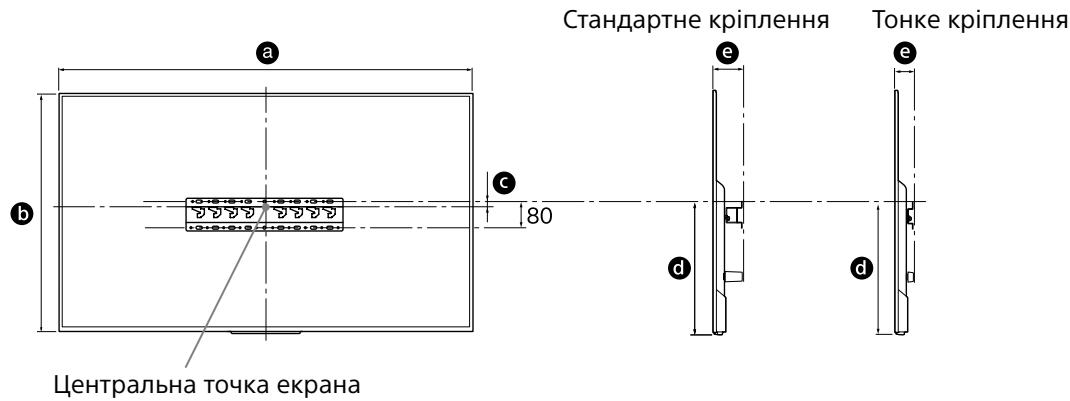
OndnueBmipIOBaHHa:MM
LHpB HabeHnI TabnCi MoKyTb Deo Bip3NtncB 3aJeKHOCTi BiD MOHTaxy.
PpimItka
3aIiUTe IOCTaTHi IPOCBiT MIX TeJIeBI3OpOM i CTEJIeTO Ta BNUCTyNAIOHMu YactINHaMn CTiHn, JAK NOKa3aHO Ha PNCYHKY HNJKYe.
OdHnUaBmIpIOBaHHa:MM
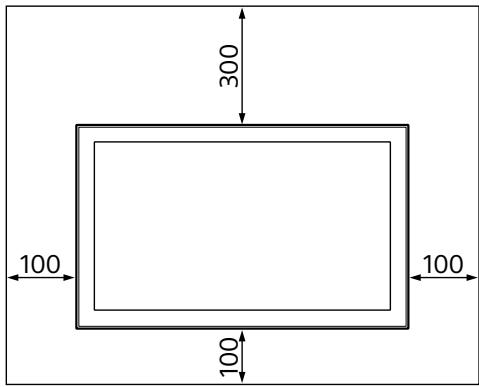
-
3a6e3neuHTn HaneKHy BENTnlaHIO Ta 3anobirn HakonueHHo 6pyu nnny:
-
He Knaɪdɪt b TeleBɪsəp RopɪzɔHTaɪbHo, He BCTaHOBJIHOte NOrO HnXhNbOIO CTOpOHO IO DOrOpN, 3aɪOM hʌnepeɪ a60 Ha 6ik.
- He CTaBTe TeJIeBi3Op Ha NOLIuO, KJINIM, NOCTIb a6o B IuaΦy.
- He hakpnbai Te TeleBizop TkauHIOU (3aHaBICKToO) a6o iHsMn peaAMn, HapnKnaIra3eTAMn.
- He BCTaHOBJIIOI Te TEJIeBI3Op TaK,ЯК nOKa3aHO HIXKHe.
Popyseho cnpkylaicno nobitpr.
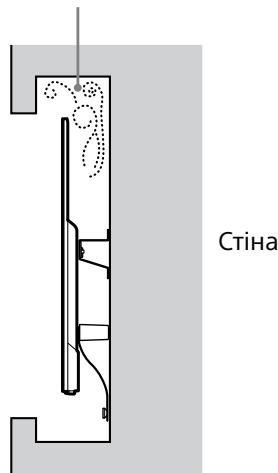
Ppimtka
- KaKIO pIaHcybCn npoknactn kaBeni y ctiHi, 3pObiTb OTBIP y CTiHi, 5o6 BCTaBnTn kaBeni nepeD noaTkOM YCTaHOBJIeHH.
Lio6 3a06iTn 3aTncKaHIO Ka6eNIB, 3po6iTb OTBip y CTiHi 3a Mexamn nepimetpa 6a3n (20) A, nepexiDnK Iyra 6a3n 1 Ta npoklaKn (20) E, npoknaKn (60) K.
2 O6epiB cnoci6 BCTaHOBJIeHHHa CTIni. Bn6epiB BiIcTaHb BiJ3aHbOi NaHeJI TeJeBi3Opa DoCTiHN YK POKa3aHo HIXKYe.
2-a CtaHdapTHe KpInIeHHa 2-b ToHke KpInIeHHa
4 Bn3NaUTe PNOJoxeHnY rBnHTiB DnIy BCTaHOBJIeHnY 6a3n (20) A.
ДиВ.ТexHiЧиХаразКтepиСТИКиHa cTOp.12.
- CtiHa, Ha ykiy UcTaHOBJIIOEbCra TeNeBi3Op, Ma 6yTu 3daTHOIO BHTPIMaTn Bary, IIO npHAmHHi B YoTnpu pa3n nepeBnuIyE Bary TeNeBi3Opa (Bary TeNeBi3Opa MoXHa dIiHaTncB r DObiDnky).
- Bn3NaTeMiHicTb CTiHn,Ha kY6yDe BCTaHOBLeHo TeBeBisOp.3a Heo6XiJHocTi 3MiHtB CTiHy HaleXHM YINOM.
UctaHOBJIeHHBa3nHa ctiHi
BnKOpNCToByTe npHaMHi YoTnpu rBnHTn DiameTpom 8 MM a6o eKBiBaIeHTHi (He BXOJaTB Do KOMPNeKTy NocTaaHNN).
BkpyTitb QOTnp TBNHTN BOTBOPn Ha aadantepi OCHOBN ① 3 OCHOBOIO (20) A (tibkn 2-a).
BCTaHOBJIHoiTe 6a3y (20) A ropuN3oHTaIbHo Ha cTIHi.
Плготовka доВBSTановленners Teilebi3opa
1 BnKpyTiB rBnHTn i3 3aHbOi naHeJI TeIeBi3opa.
KD-65XD85□□
KD-55XD85□□
2 3aФICyIte KpINbHi eIeMeHTN KPOHSTeHNaДЯ NaCTiHHOrO KpINJIeHnY. IpeBipTe HApBnICTb ycix KpINbHnx eIeMeHTiB, KOpNCtUOuHcB CnNCKOM «IocTauaETbcra 3 SU-WL450» y po3dJIi «IpeBipKa DeTaJeN» Ha cTOp.5.
PpimItka
HaJiHo 3aikcyTe KpiNJIbHi eIeMeHTn 3a DOnOMOrHO rBHTIB.
Дляеелктейнови ВИКPyTиВCTAHOBITb MOMENT o6eTpHaHn npu6Iun3Ho 1,5 H-M{15 Krc-Cm}.
36epiraTne TeTani, IIO He BnKOpNCTOByIOTbcY, Y 6e3neuHOMy MiCui. 36epexiTb cei nociBHK dIa BnKOpNCTaHH B MaOyTHbOMy.
Ctanhapthe KpinnenHHa (2-a)
ToHke KpInnHeHHa (2-b)
Ppimtka
3a TAKOROBAPiaHTa BCTAHOBJIeHHBn He 3MOxTe BVKOPNCTOBYBaTN DeKaI rHi3Ja Ha 3aHni naHeni TeBeBi3opa.
3Пиклочьdo Telebi3opa Heo6xidihi ka6eIi.
IpebeipTe nikloueHHKa6JIb nepeyCTaHOBJIeHHa TeLeBi3Opa Ha CTiHi. PicnBCTaHOBJIeHHa TeLeBi3Opa 6ydeHemoxJIuBO nIKLIOHTN Ka6JIi.DOBiHNK Do TeLeBi3Opa.
4 3нимить Трмачдя Кабелю (постачаевся 3 TeJeBi3OpOM). (TilbКД-65XD85□□)
5 3B'jxitb ka6eJI.
KD-65XD85□□: BCTaBTe TpImaДлЯ Ka6eJIbO OdIN i3 BHyTpiHix OTbOpiB.
Ppimrka
- DopyuItb npoknaadHnKa6eIb y ctiHi niipraHnky, knn Maic nieH3iio.
3B'jxitb 3'eHyBaIhHi Ka6eJI BnyOu, uo6 3anobirn nonaDaHnIO ix nID horn nepeJ yCTaHOBHeHHM Ha CTiHi.
6 BiD'εДнайтЕ NaCTiMbHy PiДnapy BiI TeJIeBi3Opa.
YcTaHOBJIeHHaTeJIeBi3OpaHa CTiHi
1 YctaHOBiTb TeJIeBi3Op Ha 6a3y.
-ДиВITbcra Ta6JIncIHa KPOci 3Вpo3diJI «Bn3NaYeHHMaICrBCTaHOBJIeHHra»Ha CTOp.6,卍OBn3NaHHTMicCe 6blokivB,HaKaBIwaCTbcra6a3a.
- HaDiHNO TpIMaIte TeJIeBi3Op IbOMa pyKaMn Ta ObepeXHo NObICbTe 6JOkn B, npIKprInJeHi Ha 3aJHIO uactInHy TeJIeBi3Opa, Ha 6a3y, nepeBipINBUn φOpMy OTBopIB.
-Пись Встановленья Telebeizopa Ha CTiHINapekoHaTecra, lo 6JIOKn HaNiHo3aФIKCoBaHO B 6a3i a6o B nepexiDnHKyДЯ 6a3N.
2-a
2-b
3ACTEPEKEHHJ
Ohuke paigaldus (2-b)
Markus.
Mass (ainult alus): (umbes) [kg]
0,8
Ka6biprara 6ekity KPOHHTeHIN TeJeNDapdbIH 6ypbIHTapbl He KaNTaJIbI Ka6bipra 6eTIHeN WbIFbIN TpyaTBH OpbIHApra OpHaTNaHbI3.
Kaibpifa 6ekity kpoohteHin H
Teneiadapbih 6ybiutrapbI He KanTanbl
Kaibpfa 6tienHe 6yfbIn TpyaTbH 6aHa
CekIInpbH daPpOaHtnA3. Aam
Hemece baca 3at TepeiNadapbH uBfBn
TyraH 6ybiuBaHa He Kantanbla H COKa, on
XapaKaT AnybI Hemece MyNIk 3aKbIMDaHybI
MymKiH.
TeneinapbIH caIKbIHdaTkbIuTbIH yCTiHe He actbHa opHaTnAbI3.
TeenIaIapra canbIHaTakblTuH a3ak yaKbIb 60bi cy tamblnapbI aka He cAnkbI aya cOKca, ON eptke, TOK coryr Hemece TeenIaIapdbIb IybcIcXMybcIcTeMeYiHe AekenyI MyMkiH.
Ka6biprara 6ekity KPOHtTeHin Ocbi PnJaIaIHy HyCKayNbIFbHa CyneHe OTbIPbIN MbIKTan 6ekitihi3.
Бураздаларын Бidi Хогалын He tycin Kanran Бонca, Каблрага БкгИ Кроштей Кунan, Жарakа Тка Немец Мулітін З akьмданына эkenyi мУкін. Каблрагань матердалына сай Бураздаларны паддаларнын зже Диаметри 8 MM (Hemece YKcac)бona'tын тert' поте оданда кени Бураздаларны паддалana otbpyln Кчрды мьтктб Ксгітін3.
Bepinren 6ypaHdaJap
MeH 6ekity
6eIweKTePiN OcbI
HycKayNbIKTaftbI
HyCKaynapFa cyHe
OTbIPbIN dypbc
naJaIaNbIHbI3.
KocaIKbI 3JeMeHTTepdi
naJaIaNcaHbI3,
TeJeNiDap Kylan,
6ipeyre Dehe
XapaKaTbIH caIybl
HEMece TeJeDiApDbI
3aKbIMdAybl MymkIn.
HycKayIbIkTa 6epiIreH npoueDypanapra cyneHe OTbIPbIn KPOHHTeHdI dypbICTa KypacTbIPbIHbI3.
BpyaHdanaapdbh bipjXorafica Hemece Tycin
Kanran Bonca, Teneuapap Kynan, bipye
deHe JapaKaTaBn canybl Hemece
TeneuapapDa 3akbmdAby MyMkiH.
BypaHaJap KepcetIJreH opbHaMbIKtan 6ekiriJy i kepek.
Ocbnai opbHdAmaca, tenedapar Kynan, bipeyre dehe jkapaTbIn canby Hemece Teneipadpa3akbMdaBy MMYKIIh.
OpHaTy Ke3iHne TeJeIaIapbI COfbIn aJMaHbI3.
TeneiIaIadpIb coBIn ancAcbH3, on KnyabIy Hemece cbHyb MyMkiH. BydAn JxapaKAT anByHbH3 MyMkiH.
TeJeIaDapbI Ka6bIpFa MeH eDeHre nepEniKyJep 6oNaTbIHdai etin opHaTy KepeK.
Erepconaiboimaca,teneindapKnyaybI Hemece kapaKaT anyibI3 MymKiH.
TepeiIap dypbc opHaTbIINFaHHaH KeiH Ka6eJIbIepdi dypbc 6ekITiHi3.
Aamdnap hemec6 6aaca 3atap kabenbte opanatbIn Bonca, xapaKATka He TeneDnapdbin 3akbIMDaHbIhaKeYJIyMmKH.
AinHbImaJIbI TOK CbIMbl Hemece Kocy Ka6eJI KblcblIN KaImaybl KepeK.
AHHIMAI TOK CBIMBI HEME KOCY KABENI
KpAN MEH KAbIPRA apacBHaJa KbICbBnBt
KaNCA, MaBbCKAH HEME KYWTe opanfah
Bonca, IuKi BAeITTARbUaTp 3akMBAHbIN,
KbICKa TYbIKTanyFa HEME 3NeKTP Ke3IHH
y3iYIne ce6en 60nyI MyMKH. Byn epTTH
naia BoNYbHA HEME TOK cOryFA eKenyi
MYMKH.
KpoHsTeHdi Ka6bIpraFa 6ekityre KaxeTTi 6ypaHaJap 6epiImereH.
KaБbIprAbe6KITy kPOnHtEeB6KETy K3e1HaKe6bIprAHbMATEpEnaJIbMeH KpyblMbHaCai6BypaHdAnapdrNaiHdAnHbH3.
TeJeIaPbI Ka6bIpraFa oPHaTy
TepeHapbIH TpyIe 6aJIaHbICTbI opHaTy npOeDypacbl e3reWe 6oNaDbI.
TД-дbl Kaabipfara opHaTy yushi SU-WL450 Kaabipfara opHaTaTBiH kpoHwTeHiH NaJaJaHbIbI3.
Hyckay
- Aынган Бурандалардьбалаарданы, kayinci3 opbyHra КыblbI3.
Ophatyfa dαйындык
OpHaTydbH anDbHnDa TeNeiHaapDbHn AHBkTaMaJbIK Hcckay 6eIimin KapaHb
KypacTbIPmac 6ypbH 6paHdaIapra cai Kenetih Phillips 6ypaybiu bOnybKepek.
- Tepeiap bekiTeIH opbIHbI aHbIKTaHbI3.
Диаметри8MM6OlaTbIHTePHTHemeceOdaHdaKeN6ypaHdaXeHe5MM-1iKHemeceYKcac(6epimereH)6ypaHaDaaBbIHdaHbI3.Ka6bpFaHbIMatepnaJIbHa cai KeJeTIH6ypaHaIapAbTaHdaHbI3.
БелшектордTekсеру
SU-WL450 Kypblfbcimeh 6epiJei
- BapIbIK 6eJIseKTePdiH, 6ap eKeHdiirH TeKcepiH3.
| A TyfbiP (20) (1) | BШкВ (2) |
| C PSW 6x20 (4) | DШтатиВтicapнылайы 6apPSW 4x20 (2) |
| E Аразык (20) (2) | F БелдіК (1) |
| G ТыБын (20) (M4) (2) | H PSW 4x20 (2) |
| I Herizri щадпер (2) | J PSW 4x10 (8) |
| K Аразык (60) (2) | L PSW 6x50 (2) |
| M ТыБын (M4) (2) | N PSW 4x50 (2) |
| O Кабырага орнаТын Тірікeme (S) (2) | P Аразык (2) |
| Q Шаьа (1) | R PSW 5x12 (1) |
TeJeIaIapMeH 6epinei (apTKbI KaFbHa 6ekirinreH)
OphatbIaTbIH opbIHdbI aHbIKtay
1 OphaTbIJaTbIH OpbIHdbI aHbIKTaHbI3.
Ka6bipraa TД yuH jxekTikTt opb 6ap ekeHH xHe TД-DbIH KEMiHc Tept ece aybIpNbIfbH KeTepe aNaTbHdaFaH TeKcepiH3.
TeneiIapbl Kaibipfara opHaty TypaIb KeIeci KecTeHi KapaHbI3. TeJeIaIapblH CaIMaFbIH Tekcepy yuIH TeneiIapblH AHykTaMaJIbIK Hcckay bIimH KapaHbI3.
Kypan:MM
| Yürgi hemipi KD- | Ökpan eñeemdepi | Ökpan opTaçbHbIn eñeempi | ÖpHaTy Ü3bIbIbIbI | |||
| a | b | c | d | e | ||
| Стандарпы opHaTy | Жаксын opHaTy | |||||
| 65XD85□□ | 1454 | 842 | 56 | 483 | 102 | 60 |
| 55XD85□□ | 1231 | 717 | 129 | 494 | 102 | 60 |
Hyckay
KecTeDiI depekTep opHaTyfa 6aIIaHbICTb a3dAn e3reWeNeHyi MymkiH.
TeJeIaIap MeH Te6e JxHe Ka6bIpraHbIH 1bIbIHKbI bJIikTepi apacbIHda TeMeHnde KepcetiInreHdien aWbIK OpbIH KaJDbIHbI3.
Kypan:MM
TnictiKeIeTeTyKHeKipMeHShaHbIHxHaHbYbH 6oNdbIpMaMyuin:
- TД-ды Калларын КОманыз, KOFapы Кафын ТЕмен Карай, apTKa Карнын Hemece Кьрбимех Oрнапаныз.
- TД-ды сере, клемre, тсеске Нимешkaфka KOIMaHbI3.
-TI-dI nepdIep cNkTbI yBepKeHn HeMece ra3eTep T.6.CNkTbI 3JemeHTpeMn JannNaHbI3. - TД-ды төмehde керсетиrelдөд ор加热нabI3.
Aya aHaJIbIMbl 6nOKTaJFaH.
Eckey
- KaebIbIepdi Ka6bIprA iIiHe caIbTH bOncaHbI3, opHaTnac 6ypbIH Ka6eJIbCaIbHaTbIH Ka6bIPraHbI Tecin anybIbI3 KepeK.
Ka6eBbEep KbIcblbI KaIIMac yuHIN TyfBip (20) A, Heri3ri aanTep ① MeH apaBik (20) E, apaBik (60) K nepMmTePiHn Tbc Ka6bIpradaH caHbIay daHbIHdaHbI3.
2 Ka6bipfara opHaTy cTnIn TaHdaHbI3. TeJeiNapdbIH apTKbl XaftbMeH Ka6bipfa apKaawbIKTBifbIH TEmHeDe KOpceTIInreHnei TaHdayfa 6oNaDbpeTTeJIeI.
2-a CtaHapTbI 6eKiTy
2-b XiHiiIke 6ekityr
1-KaJaAM KecTeciHe KaPaHbI3.
ECKEPTY
- 2-b TaHdIaHanKe3e, ApTKbI TepMHaIFa KaTbIHaC WekTeyni 6oana.
3 Heri3ri aanTepdi 6eKity opHbI TypaJIbI TEmHeI KeCTeDeH KapaHbI3.2-b TaHaJFaH KaFdaNJa, Ocbl KaamDbI eTKi3in Xi6epiHi3.
CaImAfbl (TeK TyFbip): (WamameH) [Kr]
0,8
Iизай Мен Т电商калык сипатмалары ecteprtyci3 e3reptiinei.
Informacja za montaźu za upotrebu Sony nosacka za postavljanje na zid (SU-WL450)
by in thon, pnn nnnn nn npn
.7
n n,nu,bynnn np
1
,
N NNNN NNNNNNNNN
.1n nn nnnnnnnnnnnnn
.77777777
n nn n nn nn nn nn
. npnnn nnnn nnnn noonn noonn
ynnn nn nnnn nn nnnnnnnnnnnnnnnnnnnnnnnnnnnnnnnnnnnnnnnnnnnnnnnnnnnnnnnnnnnnnnnnnnnnnnnnnnnnnnnnnnn
(20) ① vān ān n, (20) vān ān ān
.⑧(60) mnnn
y
877777777777777
.()
OONN 0777 0777 NNN
.(2a)④(20)VVA#N ① V
yNn y (20) nn nn
.
2-a
2-b
ONnn npnn,2-a nno ny
JINNNN ①
(20) D'vN N (PSW 4x10) ①
.④
nppnn nn npnn
A (20) D'
.12 1
by 107n by 107n n 8 n
.
.
.
77
nno n no n no n no n no n no n
N oynn np nnnnnnnn
.
7NN 7Y7N
nppnn nn nn nn nn nn nn nn nn nn nn nn nn nn nn nn nn nn nn nn nn nn nn nn nn nn nn nn nn nn nn nn nn nn nn nn nn nn nn nn nn nn nn nn nn nn nn nn nn nn nn nn nn nn nn nn nn nn nn nn nn nn nn nn nn nn nn nn nn nn nn nn nn nn nn nn nn nn nn nn nn nn nn nn nn nn nn nn nn nn nn nn nn nn nn nn nn nn nn nn nn
.
77
yDyN yDy-ynnnn nnny by np
.
2-b
77
.
y
. nnnn
nN ① nynnnn nn
. npnnn
5 17
(pan)
n nn nnnnnnnnnnnnn
NON. nnp np NNTNNTN
piN,niNnNnNnNn
.⑤
[1](7y):
100: a
200: b
300: c
80: d
400: e
480: f
100: g
(2-b npp) 20: h1
(2-a npp) 60: h2
λ"p:(γβαγα)βψα
0.8
.
- To Customers
- To Sony Dealers and Contractors
- On Safety
- To Sony dealers
- CAUTION
- Specified products
- WARNING
- Be sure to subcontract the installation to licensed contractors and keep small children away during the installation.
- Be sure to subcontract moving or dismounting of the TV to licensed contractors.
- Do not remove screws, etc., after mounting the TV.
- Do not make alterations to the parts of the Wall-Mount Bracket.
- Do not mount any equipment other than the specified product.
- Do not apply any load other than the TV on the Wall-Mount Bracket. Do not shake the TV left/right, up/down.
- Do not lean on or hang from the TV.
- Do not handle the product with excessive force during cleaning or maintenance.
- Precautions
- Installing the WallMount Bracket
- Do not install the TV over or under an air-conditioner.
- Be sure to install the Wall-Mount Bracket securely to the wall following the instructions in this instruction manual.
- Be sure to assemble the bracket properly following the instructed procedure explained in this instruction manual.
- Be sure to tighten the screws securely in the designated position.
- Be careful not to subject the TV to shock during installation.
- Be sure to install the TV on a wall that is both perpendicular and flat.
- After proper installation of the TV, secure the cables properly.
- Do not allow the AC power cord or the connecting cable to be pinched.
- The screws needed to secure the Wall-Mount Bracket to the wall are not supplied.
- Installing the TV onto the wall
- Note
- Preparing for installation
- Checking the parts
- Supplied with SU-WL450
- Supplied with the TV (attached to rear)
- Deciding on the installation location
- Decide on the installation location.
- Installing the Base on the wall
- Preparing for the installation of the TV
- Remove the screws from the rear of the TV.
- Attach the Attachment parts for Wall-Mount Bracket. Check the Attachment parts by referring to "Supplied with SU-WL450" in "Checking the parts" on page 5.
- Slim mounting (2-b)
- Connect the necessary cable(s) to the TV.
- Detach the cable holder (supplied with the TV).
- Bundle the cables.
- Detach the Table-Top Stand from the TV.
- Installing the TV on the wall
- Install the TV onto the Base.
- Preventing the bottom of the TV from shifting.
- Confirming the completion of the installation
- Other information
- Specifications
- Dimensions: (Approx.) [mm]
- Weight (base only): (Approx.) [kg]
- Poids (base seule) : (approx.) [kg]
- Dimensoes: (Aprox.) [mm]
- Peso (apenas base): (Aprox.) [kg]
- Specifications producer
- Klargøring for installation
- Rozmery: (pribl.) [mm]
- KbM TbProBcHTe Ha Sony
- BHIMMAHNE
- YToUHЯBaHe Ha npOdyKTnTe
- KbM KJIneHTnTe
- PPEyPPEKDEHNE
- Bb3IOKeTe MOHTaKa HaJIuIeH3npaHnN3NbJIHnTeJIN IdpBXTeDeIaTa HAcTpaHn NOBpeMe Ha MOHTaKa.
- YBepete ce,Ye cTe Bb3IOXNJN npMeCTBaHeTO NJN DeMOHTaJa Ha TeJIeBN3OpaHa JINcEN3npaHn N3PiBJHNTEIN.
- He cBaIaIe BnHTObe n dpyrncIe MoHTaJa Ha TeJeBn3opa.
- He npomeha Te yactte Ha KOH30JaTa 3a MOHTaK Ha CTeHa.
- He MoNTpaIte dpyro o6OpyDbaHe,OCBeH yKa3aHn npOdyKT.
- He noJlaraTe KOH3OJaTa 3a MOHTaX Ha CTeHa Ha HnKaKbB Dpyr TObAp,OCBeH Ha To3n Ha TeJeBu3Opa. He KNaTeTe TeJeBu3Opa HanaBO/HaIaCHO, Harope/HaOny.
- He ce o6blaTe n He ce BnCeTe Ha TeIeBn3Opa.
- BHIMAHNE
- He TpeTnpaIte npOdykTa c npeKaJIeHa cnla nOBpeme Ha nOuNCTBaHe IINn POnDpBxKka.
- PpeDn3HmepKn
- MOHTaX Ha KOH3OJa 3a MOHTaX Ha CTeHa
- KbM TbproBunTe Ha Sony
- PNEyPPEKDEHNE
- He mONTpaIte KOH3OJaTa 3a MOHTaJx Ha CTeHa Ha CTeHHN IOBbpxHocTn, KbJeTO bJInte IJI NCTpaHNTe Ha TeJIeBn3Opa Ce N3dAbat HaCTpaHn OT IOBbpxHocTTa Ha CTeHaT.
- He moHTnpaTe TeJeBn3Opa NaI NII NOD KInMaTnK.
- MOHTnpaIte 3dpaBO KOH3OJaTa 3a MOHTaJx Ha CTeHa KbM CTeHaTa KaTO CJeDbATE NHCTpyKcUInTe B TOBa pBKOBoDCTBO 3a pa6ota.
- YBepete ce,Ye crNo6yBaTe KOH3OJaTa npaBnJHo KaTo CNeiBaTe npoueDypata,OnncaHa B TOBa pKOBODCTBO 3a pa6ota.
- 3aTerHeTe 3dpaBO BnHTOBete B yKa3aHOTO NOJIOKeHne.
- BHMaBaIte Da He yIapIte TeJIeBn3Opa No BpeMe Ha MOHTaJa.
- MOHTnpaTe TeJIeBn3Opa Ha CTeHa, KOrTo e neppeHdkyIrpHa n paBHa.
- Cleid npabnilnna MoNTaJHa TeJeBn3opa, 06e3OpacTe npabnilho Ka6eJIte.
- He donyckaiaTe npntnckaHe Ha 3axpaHbauaJa Ka6eI nIHa cBbP3BaunKa6eI.
- BnHTOBeTe, Heo6xOaMn 3a 3aKpePbAHe Ha KOH30JaTa 3a MOtaxK Ha CTeHa KbM CTeHaT, He Ca BKJIoueHN B KOMNJIeKTa.
- Mоntаж Ha TeJIeВиЗОра Ha CTeHata
- 3a6eJexkka
- ПодгOTOBka 3a MOHTaЖ
- Поберka на частelve
- DoctaBeHo c SU-WL450
- IocTabeHo C TeJeBn3opa (3aKaueHo 3a 3aHaTa CTpaHa)
- OnpeJeIeTe MeCTaTaHa BnHTOBeTe 3a MOHTaX Ha OCHOBaTa (20) A.
- IPEДУПЕЖДEHME
- MoHTaЖ Ha OCHOBaTa Ha CTeHaTa
- Повтовka 3a мотаж Ha Teileburg3opa
- Cbale Te BnToBte OTe 3aHaTa CTpaHa Ha TeJeBn3Opa.
- 2Прикpenete OKaUBaIteЧаTe 3a KOH3OJaTa 3a 3aKpeNBaHe KbM cTeHa.ПроветeЧаТe 3a OKaUBaHe, KaTO cpaBHnTe C "ДocTaBeHo c SU-WL450"В "Проверka HaЧаТe"Ha CTpaHnцa 5.
- CtahdapTeH MoHTaX (2-a)
- Teceh MoHTaK (2-b)
- CbpxKeTe Heo6xOIMnTe Ka6eJI N KbM TeJeBn30pa.
- Pa3kayeTe ka6eHnIy IbprKaU (IOCTaBeH C TeJIeBn3Opa). (KD-65XD85□□ caMo)
- Cb6epeTe ka6eJInte.
- 3a6eJekka
- CbaJIeTe nOCTaBkata 3a MaCa OT TeJIeBVn3Opa.
- Монтук Ha TeileBn3opa Ha CTehata
- MoHTnpaIe TeTeJIeBn3Opa KbM OCHOBaTa.
- IPEyIPEKDEHNE
- ПпсдOTВраТЯВан ппсмecТВaHeto На ДОЛНаТа чacT Ha TeJIeВиЗopa.
- Iocne MoTaxa TeJeBn3opa He BbIHMaTe BnHTbl N T. d.
- He pa36bpaIte n He MeHnTe DeTaI N KPOHHTeHa dJa HAcTeHHoY UCTaHOBKn.
- He yctaHaBInBaIte Ha KpoHsTeiH KaKoe-ln6o dpyroe o6OpyIDobAHne, KpOme yKa3aHHoro.
- Bo n36eXaHne neperpuy3Kn KpOHwTeiHa dIy HAcTeHHoI yCTaHOBKn He yCTaHaBJIbBaIte Ha HEm HnUeRo, KpOme TeJeBn3Opa. He Tprcnte TeJeBn3Op BVeBO/BnpaBO, BBepx/ BHN3.
- He onnpaTeCb Ha TeJeBn3Op n He DePKeNTeCb 3a Hero.
- UcTky yCtpoiCTBa nJIn yXoI 3a HnM Heo6xOdmo OCyIeCTBJIaTb, He npNKlaIbIbA Upe3MePbIx ycJIn.
- Mepbl npeodctopoxhoctn
- IopraOK yCTaHOBKn KPOHsTeHa dJa HaCTeHHoY UCTaHOBKn
- PNEyPEXKDEHNE
- He yctaHaBnBaIte KPOHtTeH dJa HaCTeHHoY UcTaHOBKn Ha TaKnx CTeHax, TKe Kpa TeJeBn3opa 6yDyT BblCTynaTb 3a Kpa CTehbl.
- He yctaHaBnBaIte TeIeBn3Op Iod KOHdNtioHepom nJIu NaHm.
- O63aTeIbHo HaDeJH0 PnKpeNte KpOnHtEn dJa HAcTeHHo YCTaHOBKn K CTeHe, CJeDy INCHtpykCnjam, PnPBeDeHHbIM B HaCTOaem pyKOBoIDCTBe.
- 063aTeJbHo BblnoHnYe c6OpKy KPOHtEHa,TOuHO CJIeDyI INCTpyKcIyM, N3IOXeHHbIM B HaCTOaIeM pyKOBoDCTBe NO yCTaHOBKe.
- Haedekho 3aTaHnTe BnHTbIB npedHa3HaueHHbIX dIy HNX KpeNexKhbIX OTBepCTnX.
- Cleinte 3a Tem, YTO6bI BO BpeM yCTaHOBKn TeJeBN3Op He NOBVerpaJcR BO3DeiCTBnIO TOJYKOB.
- PpimechaHne
- PNEyIPEKDEHNE
- Примechаиме
- YcTaHOBKa TeJIeBn3Opa Ha cTeHy
- 06OB'3KOBO dopyuItb yCTaHOBJIeHnI niPraHnKam, kKi MaIOt b IiueH3IO, Ta CNIdkyUte 3a TmM, uo6 nID qac MOHTaKy nopAid He 6ylo diTei.
- Udo ditei
- 06OB'zKOBO dOpyitb nepemiuenceHna6o DeMOHTyBaHHa TeLeBi3opa niipraHnKamn, kmiAOTb liueh3iO.
- He BnKpyuYte rBnHTn, TOnO, nicJMy MOHTyBaHHa TeJIeBi3opa.
- He 3miHouTe DeTaJI KPOHUsTeHa dJa HactiHHoro KpinJeHHa.
- He BCTaHOBJIouTe HiaKnx iHux npIcTpoIB, KpIM 3a3NaueHoRO BnPo6y.
- He 3actocobyte do KpoHsTeHa dJa HaCTiHHoro KpInIeHNHa iHsi HabaHTaJKeHNHa, OKpIM TeJIbI3Opa. He po3xHTuYte TeteB13Op yIbO/BnPaBO qN Bropy/ BHN3.
- He cnnpaItecHa TeJIeBI3Op i He qinJaItec 3a Hboro.
- PONPEDEXEHH
- BcTaHOBLeHnKpOnuTeHnДЯHaCTiHHOrO KpInIeHn
- NocTaayTbCra3SU-WL450
- Bn3NaueHnMaicZBaHOBJeHHa
- Bn3HaTe MicIe BCTaHOBJIeHHra.
- PpimItka
- Ppimtka
- Bn3NaUTe PNOJoxeHnY rBnHTiB DnIy BCTaHOBJIeHnY 6a3n (20) A.
- UctaHOBJIeHHBa3nHa ctiHi
- Плготовka доВBSTановленners Teilebi3opa
- BnKpyTiB rBnHTn i3 3aHbOi naHeJI TeIeBi3opa.
- 3aФICyIte KpINbHi eIeMeHTN KPOHSTeHNaДЯ NaCTiHHOrO KpINJIeHnY. IpeBipTe HApBnICTb ycix KpINbHnx eIeMeHTiB, KOpNCtUOuHcB CnNCKOM «IocTauaETbcra 3 SU-WL450» y po3dJIi «IpeBipKa DeTaJeN» Ha cTOp.5.
- Ctanhapthe KpinnenHHa (2-a)
- ToHke KpInnHeHHa (2-b)
- 3Пиклочьdo Telebi3opa Heo6xidihi ka6eIi.
- 3нимить Трмачдя Кабелю (постачаевся 3 TeJeBi3OpOM). (TilbКД-65XD85□□)
- 3B'jxitb ka6eJI.
- Ppimrka
- BiD'εДнайтЕ NaCTiMbHy PiДnapy BiI TeJIeBi3Opa.
- YcTaHOBJIeHHaTeJIeBi3OpaHa CTiHi
- YctaHOBiTb TeJIeBi3Op Ha 6a3y.
- 3ACTEPEKEHHJ
- Ohuke paigaldus (2-b)
- Markus.
- Mass (ainult alus): (umbes) [kg]
- Ka6biprara 6ekity KPOHHTeHIN TeJeNDapdbIH 6ypbIHTapbl He KaNTaJIbI Ka6bipra 6eTIHeN WbIFbIN TpyaTBH OpbIHApra OpHaTNaHbI3.
- TeneinapbIH caIKbIHdaTkbIuTbIH yCTiHe He actbHa opHaTnAbI3.
- Ka6biprara 6ekity KPOHtTeHin Ocbi PnJaIaIHy HyCKayNbIFbHa CyneHe OTbIPbIN MbIKTan 6ekitihi3.
- HycKayIbIkTa 6epiIreH npoueDypanapra cyneHe OTbIPbIn KPOHHTeHdI dypbICTa KypacTbIPbIHbI3.
- BypaHaJap KepcetIJreH opbHaMbIKtan 6ekiriJy i kepek.
- OpHaTy Ke3iHne TeJeIaIapbI COfbIn aJMaHbI3.
- TeJeIaDapbI Ka6bIpFa MeH eDeHre nepEniKyJep 6oNaTbIHdai etin opHaTy KepeK.
- TepeiIap dypbc opHaTbIINFaHHaH KeiH Ka6eJIbIepdi dypbc 6ekITiHi3.
- AinHbImaJIbI TOK CbIMbl Hemece Kocy Ka6eJI KblcblIN KaImaybl KepeK.
- KpoHsTeHdi Ka6bIpraFa 6ekityre KaxeTTi 6ypaHaJap 6epiImereH.
- TeJeIaPbI Ka6bIpraFa oPHaTy
- Hyckay
- Ophatyfa dαйындык
- БелшектордTekсеру
- SU-WL450 Kypblfbcimeh 6epiJei
- OphatbIaTbIH opbIHdbI aHbIKtay
- OphaTbIJaTbIH OpbIHdbI aHbIKTaHbI3.
- Eckey
- ECKEPTY
- CaImAfbl (TeK TyFbip): (WamameH) [Kr]
- Informacja za montaźu za upotrebu Sony nosacka za postavljanje na zid (SU-WL450)
- y
- 7NN 7Y7N
Brand : SONY
Model : KD65XD8505B
Category : TV