
URC 3445 - Universal remote ONE FOR ALL - Free user manual and instructions
Find the device manual for free URC 3445 ONE FOR ALL in PDF.


User questions about URC 3445 ONE FOR ALL
0 question about this device. Answer the ones you know or ask your own.
Ask a new question about this device
Download the instructions for your Universal remote in PDF format for free! Find your manual URC 3445 - ONE FOR ALL and take your electronic device back in hand. On this page are published all the documents necessary for the use of your device. URC 3445 by ONE FOR ALL.
USER MANUAL URC 3445 ONE FOR ALL
Direct code set up 6
Search Method 7
SET-UP CODES
Televisions 93
Video Recorders 101
Satellite Receivers 103
Cable Converters 106
DVD Players 107
EXTRA FEATURES
Mode re-assignment (Changing a device mode) 8
Volume Punch Through 9
QUICK CODE REFERENCE 10
PROBLEM & SOLUTION 10
CUSTOMER SERVICE 11
About Your URC-3445
Your ONE FOR ALL 4 Package contains:
- Your ONE FOR ALL 4 Remote
- Your ONE FOR ALL 4 Manual
Your manual is divided into two parts: set-up instructions and device codes.
You may need this guide again in the future, so please be sure to keep it.
Your ONE FOR ALL 4 needs 2 new "AA/LR6" alkaline batteries.
Your ONE FOR ALL 4 can operate four devices:
TV :Television
VCR : Video Recorder
SAT :Satellite Receiver or Cable Converter
DVD : DVD Player
Installing the Batteries
Your ONE FOR ALL 4 needs 2 new "AA/LR6" alkaline batteries.
1 Remove the battery cover from the back of your ONE FOR ALL 4 by pressing down on the tab.
2 Match the batteries to the + and - marks inside the battery case, then insert the batteries.
3 Press the battery cover back into place.
Important notes:
- In order to avoid having to reprogram your ONE FOR ALL 4 after you remove the batteries, you will need to insert new batteries within 5 minutes. Also it is best that you do not use rechargeable batteries.
- On the inside of the battery compartment door you will find a label on which to write your Set-Up codes after your ONE FOR ALL 4 is set up for your device. Please write down your codes for easy, future reference.
The Keypad
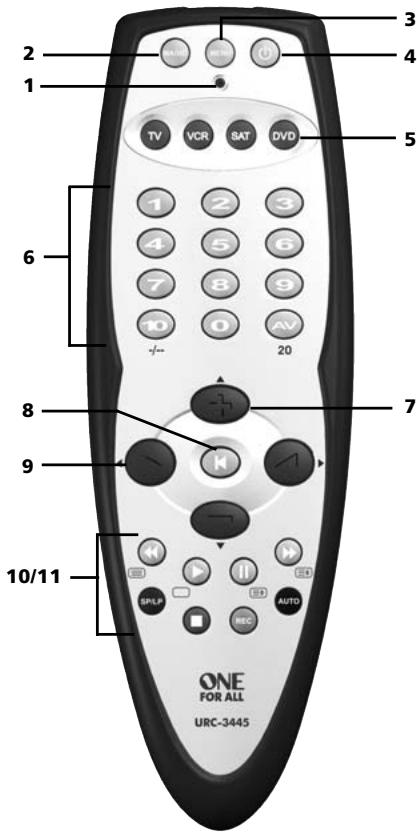
See picture of ONE FOR ALL 4 remote on page 3
1 LED
The LED (Light Emitting Diode) flashes red to show the remote is working.
2 MAGIC Key
The MAGIC key is used to set up your ONE FOR ALL 4.
3 MENU Key
The MENU key controls the same function as it did on your original remote.
4 POWER Key
The Power key controls the same function as it did on your original remote.
5 Device Keys
The TV, VCR, SAT and DVD keys select the device to be controlled. For example pressing the TV key allows the remote to control the functions of your Television, after pressing VCR you can operate your Video Recorder and the SAT key operates your Satellite Receiver or Cable Converter. The DVD key operates a DVD Player.
6 Number Keys
The Number keys (0-9, 10, 20 (AV)) provide functions just like your original remote, such as direct access programme selection. If your original remote uses one/two digit input switching (-/- symbol), this function can be obtained by pressing the -/-- key, which is the same as the 10 key. If your original remote has an 20 key, this function can also be found under the AV key.
7 Programme (Channel) +/- Keys
These keys operate in the same way as the keys on your original remote. If available on your original remote, these keys will allow you to navigate through the menu.
8 MUTE Key
The Mute key operates the same function it did on your original remote control. Also, if your original remote control required that you press an "OK" or "Enter" key during Menu operation, the Mute key can be used for this function.
9 Volume +/- Keys
These keys operate in the same way as the keys on your original remote. If available on your original remote, these keys will allow you to navigate through the menu.
10 Transport keys (VCR / DVD)
These keys operate the transport functions (PLAY, FF, REW etc.) of your device. To prevent accidental recording, the RECORD key must be pressed twice to start recording.
11 Teletext and Fastext Keys
After pressing the TV key, the transport keys (REW, PLAY, PAUSE, FF) are used to operate the main Teletext functions. The symbols below the keys are for Teletext. The text keys are used to access the Teletext functions of your television. Of course, your television must have Teletext capability.

TEXT ON: Puts the television in the Teletext mode.

TEXT OFF: Switches the television back to regular viewing mode. On some televisions, this may be done by pressing the TEXT ON key several times.

HOLD/STOP: Stops changing pages.

EXPAND: Shows the top half of the Teletext page in larger letters. By pressing again, you can see the bottom half of the Teletext page enlarged. To return to regular Teletext viewing, press the EXPAND key again, or press the TEXT ON key, depending on your television.
After pressing the TV key and accessing the text mode, the keys marked red, green, yellow and blue, allow you to access the Fastext functions of your television. If on your original remote control these keys are used for Menu navigation, the ONE FOR ALL Fastext keys may operate in the same way.
Important note: For a more detailed explanation of Teletext and Fasttext, please refer to the manual of your television. Remember, different televisions control Teletext and Fasttext features in different ways. Not all of the Teletext functions may be available for your particular model.
Direct code set up
Example: To set up the ONE FOR ALL 4 for your television:
1

Find the code for your device in the Code list (page 93 - 110). Codes are listed by device type and brand name. The most popular code is listed first. Make sure your device is switched on (not on standby).
2

Press the TV key on the ONE FOR ALL 4 for the device you wish to Set-Up.
3

Press and hold down MAGIC until the red light blinks twice. (The red light will blink once and then twice.)
4

Enter your (four-digit device code) using the number keys. The red light will blink twice.
5

Now, aim the ONE FOR ALL 4 at your device and press POWER If your device switches off, the ONE FOR ALL 4 is ready to operate your device.
6
Turn your device back on and try all the remote's functions to ensure they are working properly. If the functions do not work properly, repeat steps 1-5 using another code listed under your brand.
7
If your device does not respond, follow steps 1 to 5 with each code listed for your brand. If none of the codes listed for your brand operate your device, or if your brand is not listed at all, try the search method described on page 7.
8
Write your code in the four boxes provided in the battery compartment and on page 10 for easy future reference.
Important notes:
- Most TV's do not switch on pressing the POWER key. Please try pressing a "number" key or the "TV-text off" key to switch your TV back on.
- Some codes are quite similar. If your device does not respond or is not functioning properly with one of the codes, try another code listed under your brand.
- If your device's original remote control does not have a POWER key, press PLAY instead of POWER when setting up your device.
- Remember to press the correct device key before operating your device. Only one device can be assigned to a device key. If your original remote operates more than one device, you need to set up each device separately.
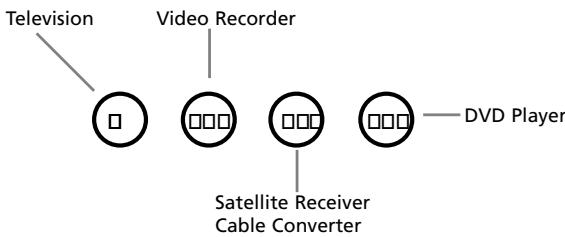
Devices can be found under the following keys:
The Search Method
If your device does not respond to the ONE FOR ALL 4 after you have tried all the codes listed for your brand, try searching for your code. The Search Method allows you to find the code for your device by scanning through all the codes contained in the memory of the ONE FOR ALL 4. The Search Method may also work if your brand is not listed at all.
Example: To search for your TV code:
1

Switch your television on (not on standby) and aim your ONE FOR ALL at your TV.
2
Press the TV key on your ONE FOR ALL 4.
3

Press and hold down MAGIC until the ONE FOR ALL 4's red light blinks twice (The red light will blink once and then twice).
4


Press 9 9 1. The red light will blink twice.
5

Next, press POWER.
6

Aim the ONE FOR ALL 4 at your Television. Now press CH+ over and over, until your Television turns off (everytime you press the CH+ key the ONE FOR ALL 4 will send out a POWER signal from the next code contained in the memory). You may have to press this key many times (up to 150 times) so please be patient. If you skip past a code, you can go to the previous code(s) by pressing the CH- key. Remember to keep pointing the ONE FOR ALL 4 at your Television while pressing this key.
7

As soon as your television turns off, press MAGIC to store the code.
Important notes:
- Most TV's do not switch on pressing the POWER key. Please try pressing a "number" key or the "TV-text off" key to switch your TV back on.
- To search for the code for another device follow the instructions above only press the appropriate device key instead of TV during step 2.
- If your Video's original remote control does not have a POWER key, press PLAY instead of POWER during step 5.
Once you have Set-Up your ONE FOR ALL 4, you can blink back your SET-UP CODE for future reference.
Example: To blink out your Television code:
1

Press TV once.
2

Press and hold MAGIC until the ONE FOR ALL 4's red light blinks twice (The red light will blink once and then twice).
3


Press 9 9 0. The red light will blink twice.
4

For the first digit of your four-digit code, press 1 and count all the red blinks. If there are no blinks, the digit is "0".
5

For the second digit, press 2 and count all the red blinks. If there are no blinks, the digit is "0".
6

For the third digit, press 3 and count all the red blinks. If there are no blinks, the digit is "0".
7

For the fourth digit, press 4 and count all the red blinks. If there are no blinks, the digit is "0". Now you have your four-digit code.
Mode re-assignment
(Changing a device mode)
It is possible to change the mode of any device key. This is useful if you want to set up two of the same devices on the ONE FOR ALL 4. The code can be set up using "Direct code set up" (p. 6) or "Search method" (p. 7). To change a device key, see the three examples below.
Example 1) if you would like to program a second TV on the DVD key.
Example 2) if you would like to program a second TV on the SAT key.
Example 3) if you would like to program a second VCR on the SAT key.
Example 1:
To program a second Television on the DVD key (for example), you need to change the DVD key into a TV key, so press:

The DVD key has now become a second TV key.
Now enter the Set-Up code for your second TV by pressing:

Example 2:
To program a second Television on the SAT key (for example), you need to change the SAT key into a TV key, so press:

The SAT key has now become a second TV key.
Now enter the Set-Up code for your second TV by pressing:

Example 3:
To program a second Video Recorder on the SAT key (for example), you need to change the SAT key into a VCR key, so press:

The SAT key has now become a second VCR key.
Now enter the Set-Up code for your second VCR by pressing:

Resetting a Device key
Example: To reset the DVD key to its original mode, press:

Example: To reset the SAT key to its original mode, press:

() Press and hold down the MAGIC key until the red light (LED) blinks twice.
(^*) The red light (LED) will blink once then twice.
Volume Punch Through
You may be able to use some functions of your Television, Video recorder, DVD player, Satellite receiver or Cable converter at the same time. For example: if you are watching a program on your video recorder, you can adjust the volume (a TV function) without pressing the TV mode key on your ONE FOR ALL 4. The table below lists some of the possibilities.
Last Device Mode Key Pressed:
You Can Control:
VCR
SAT
DVD
TV volume up and down, mute
TV volume up and down, mute
TV volume up and down, mute
To punch through to TV volume while in the VCR, DVD or SAT mode:
- MAGIE
Press and hold MAGIC until the red light blinks twice. - ⑨⑩③ Press 9 93.
- TV Then press the TV key and the red light will blink twice.
To cancel the "Volume Punch Through" per mode:
(Example: to cancel the "Volume Punch Through" for the VCR mode)
- VCR
Press VCR once. - Press and hold down the MAGIC key until the red light blinks twice.
- ⑨⑩③ Press 9 93.
- Then press the Volume (-) key and the red light will blink four times.
Example: being in VCR mode, you will be able to control VOL+/- or MUTE functions of your VCR (provided it has volume control).
To cancel the „Volume Punch Through“:
- MAGE
Press and hold MAGIC until the red light blinks twice. - ⑨⑩③ Press 9 93.
- Press the Volume (+) key and the red light will blink four times.
Quick Code Reference
Write down the codes for your devices in the boxes below and in the battery compartment for quick and easy reference.
Device Type
Code
1.
2.
3.

4.
Problem & Solution
Solution:
Problem:
| Your brand is not listed in the code section? | Try the search method on page 7. |
| The ONE FOR ALL does not operate your device(s)? | A) Try all the codes listed for your brand. B) Try the search method on page 7. |
| The ONE FOR ALL is not performing commands properly? | You may be using the wrong code. Try repeating the Direct Set-Up using another code listed under your brand or start the search method over again to locate the proper code. |
| Problems changing channels? | Enter the programme number exactly as you would on your original remote. |
| Video not recording? | As a safety feature on your ONE FOR ALL, you must press the Record key twice. |
| The ONE FOR ALL does not respond after pressing a key? | Make sure you are using new batteries and are aiming the one for all at your device. |
| The red light does not blink when you press a key? | Replace batteries with 2 fresh, new “AA” alkaline batteries. |
Trouble Shooting
Customer Service
If you still have questions about the operation of your ONE FOR ALL 4 universal remote and could not find the answer(s) in the TroubleShooting section, you may want to contact the customer service department for assistance.
You may care to visit our Internet-site: www.oneforall.com
Our internet-site has many advantages:
- 24 hours access
- no waiting time
page for Frequently Asked Questions - info about the ONE FOR ALL product range
Before contacting us, by Fax, E-mail or Phone, make sure you have the required information available by filling in the table below.
What do we need to know before you contact us:
1 That you have the ONE FOR ALL 4 URC-3445 universal remote.
2 The date of purchase (............/............).
3 A list of your equipment/models: (see example below).
| Device | Brand | Device model nr. | Remote model nr. | SET-UP code |
| TV | Sony | KV-25C5D | RM-883 | 1505 (example) |
Type/model numbers can often be found in your equipment owner's manual or on the factory plate behind the device.
- Then Fax, E-mail or Dial us:
In the UK
E-mail: ofahelp@uebv.com ( )
Fax : +31 53 432 9816
Tel. : 0901-5510010 (£ 0,50 per minute) () (*)
In Ireland
E-mail: ofahelp@uebv.com ( )
Fax :+31534329816
Tel. : 016015986
In South Africa
E-mail: support@oneforall.co.za
Fax : 011 298 2302
Tel. : 0860 100551
Tel. : 011 298 2300
In Australia
E-mail: ofahelp@uebv.com ( )
Fax : 03 9672 2479
Tel. : 1300888298
In New Zealand
E-mail: ofahelp@uebv.com ( )
Fax : (06) 878 2760
Tel. : 0508 ONE 4 ALL (663 4 255)
( ) Just send a blank message, you'll get auto-reply.
Punch-Through do Volume
Volume direct-bediening 63
NOTEER HIER UW CODE 64
PROBLEM & OPLOSSING 64
KLANTENSERVICE 65
Volume Punch Through
7 Przyciski Program/Kanal (Programme/Channel)] +/-
Micro electronic 0713
Micro Technology 0713
Micromaxx 0299
Microstar 1075
Microtec 0713
Morgan's 0200 0713 0132
| Motorola | 0856 | |||
| Multichoice | 0642 | 0879 | ||
| Myryad | 0200 | |||
| Mysat | 0713 | |||
| Netgem | 1322 | |||
| Neuf Telecom | 1322 | |||
| Neuhaus | 0713 | 0834 | ||
| Neuling | 1232 | |||
| Neusat | 0713 | 0834 | 0587 | 1279 |
| Neveling | 1161 | |||
| NextWave | 1143 | 1017 | ||
| Nikko | 0713 | 0723 | 0200 | |
| Nokia | 1023 | 1114 | 0751 | 0723 |
| 0853 | 0573 | 1223 | 1723 | |
| 1310 | ||||
| Nordmende | 0520 | 0421 | ||
| Nova | 0879 | |||
| Octagon | 0421 | |||
| OctaTV | 1294 | |||
| OnDigital | 0751 | 0329 | 0241 | 0867 |
| 0133 | ||||
| Opentel | 1232 | 1412 | ||
| Optex | 0834 | 1283 | 1043 | 0114 |
| Optus | 0879 | 0292 | 0853 | 1143 |
| Orbis | 1334 | 1412 | ||
| Orbitech | 1099 | 1100 | 0200 | 0292 |
| 0421 | 0114 | 0834 | ||
| Orig | 0497 | |||
| OSAT | 0345 | |||
| Ouralis | 1205 | |||
| Pace | 0847 | 0887 | 1175 | 1356 |
| 0241 | 0867 | 1323 | 0795 | |
| 0720 | 0497 | 0200 | 0853 | |
| 0710 | 1423 | |||
| Pacific | 1284 | |||
| Pacific Satellite | 0834 | |||
| Packard Bell | 1111 | |||
| Packsat | 0710 | |||
| Palcom | 0299 | 1161 | ||
| 0241 | ||||
| Palladium | 0421 | |||
| Panasat | 0879 | |||
| Panasonic | 0847 | 1304 | 1404 | |
| Panda | 0173 | 0834 | ||
| Patriot | 0132 | 0710 | ||
| Philips | 0200 | 1114 | 0853 | 0292 |
| 0133 | 0750 | 0710 | 0173 | |
| 0818 | 1429 | |||
| Phoenix | 1273 | |||
| Phonotrend | 0863 | 1017 | 1200 | |
| Pilotime | 1339 | |||
| Pino | 1334 | |||
| Pioneer | 0329 | 0853 | 0292 | 1308 |
| 0352 | ||||
| Predki | 0421 | |||
| Preisner | 0132 | 1101 | 1113 | 1366 |
| Premier | 0292 | |||
| Premiere | 0853 | 1114 | 0723 | 1111 |
| 1176 | 1100 | 0249 | 0658 | |
| 0292 | ||||
| Primacom | 1111 | |||
| Pro Visat | 0520 | |||
| Profile | 0710 | |||
| Prosat | 1173 | |||
| Provision | 0520 | |||
| 0834 | 1280 | |||
| QNS | 1404 | |||
| Quadral | 0710 | 1323 | ||
| Quelle | 0299 | |||
| Radiola | 0200 | |||
| Radix | 1113 | 0882 | ||
| RCA | 1291 | |||
| Rebox | 1214 | |||
| Regal | 1251 | |||
| RFT | 0200 | |||
| Roadstar | 0713 | 0853 | ||
| Rockdale | 0420 | |||
| Rover | 0713 | |||
| S-ZWO | 1207 | |||
| SAB | 1251 | |||
| Saba | 0520 | 0710 | 1012 | |
| Sagem | 0820 | 1114 | 1253 | |
| Samsung | 0863 | 1243 | 0853 | 1206 |
| 1017 | 1244 | 0421 | 1293 | |
| Sansui | 0751 | |||
| Sat Control | 1300 | |||
| Sat Cruiser | 1143 | |||
| Sat Partner | 0421 | 0520 | ||
| Sat Team | 0713 | |||
| Satec | 0713 | 0834 | ||
| Satplus | 1100 | |||
| Satstation | 1083 | |||
| Schaub Lorenz | 1214 | |||
| Schneider | 1251 | 0710 | 1206 | |
| Schwaiger | 1083 | 0863 | 1334 | 1111 |
| 0132 | 0587 | 1075 | ||
| SCS | 0299 | |||
| Sedea | ||||
| Electronique | 0421 | 0132 | 1105 | 1283 |
| SEG | 0421 | 0114 | 1087 | 1251 |
| 1075 | ||||
| Septimo | 1205 | |||
| Serino | 0610 | |||
| ServiSat | 1251 | 0713 | ||
| Siemens | 0173 | |||
| Silva | 0299 | |||
| Skantin | 0713 | |||
| Skardin | 0587 | |||
| SKR | 0713 | |||
| SKT | 1449 | |||
| Sky | 0847 | 0856 | 0887 | 1014 |
| 0711 | ||||
| SKY Italia | 1848 | |||
| Sky XL | 1412 | 1251 | ||
| SKY+ | 1175 | |||
| Skymaster | 0713 | 1409 | 1200 | 1085 |
| 1075 | 0587 | 0880 | ||
| Skymax | 0200 | |||
| skyplus | 1232 | 1334 | 1412 | |
| SkySat | 0713 | 0114 | ||
| SL | 0132 | |||
| SM Electronic | 0713 | 1200 | 1075 | 1085 |
| 0587 | ||||
| Smart | 0132 | 0299 | 1101 | 0882 |
| 1113 | 1232 | 0713 | 1273 | |
| Sony | 0282 | 0847 | 0853 | 0292 |
| SR | 0132 | |||
| Star Sat | 0132 | 1085 | ||
| Starland | 0713 | |||
| Stream | 1848 | |||
| Strong | 1409 | 0421 | 0520 | 0879 |
| 0853 | 1105 | 1158 | 1159 | |
| 1300 | 1258 | |||
| Sunny | 1300 | |||
| Sunsat | 0713 | |||
| Sunstar | 0132 | 0642 | ||
| Supermax | 1143 | 1283 | ||
| Systec | 0132 | |||
| Tarbs | 1225 | |||
| Teac | 1227 | 1225 | 1322 | |
| Tecatel | 1200 | |||
| TechniSat | 0200 | 0292 | 1099 | 1100 |
| 1322 | 0114 | 0863 | ||
| Technomate | 1283 | |||
| Technosat | 1143 | 1206 | ||
| Technotrend | 1429 | |||
| Technowelt | 0132 | |||
| Techsan | 1017 | |||
| Techwood | 0114 | |||
| tekComm | 1017 | |||
| Teleciel | 1043 | |||
| Telecom | 0713 | |||
| Telefunken | 0421 | 0710 | 1012 | |
| Teleka | 0750 | 0834 |
| Telemaster | 0520 | |||
| Telestar | 1099 | 1100 | 0114 | 0200 |
| 0292 | 1251 | 1334 | ||
| Telesystem | 1251 | 1409 | ||
| Teletech | 0880 | 0114 | ||
| Televes | 0132 | 1214 | 1300 | |
| Telewire | 1232 | |||
| Tempo | 1143 | |||
| Tevion | 1334 | 0713 | 1409 | |
| Thomson | 0711 | 1900 | 0847 | 0713 |
| 0292 | 0853 | 1291 | 0820 | |
| 0710 | 1046 | 1012 | 1498 | |
| Tioko | 0132 | |||
| Tokai | 0200 | |||
| Tonna | 0587 | 0713 | 0834 | |
| Topfield | 1206 | 1207 | ||
| Toshiba | 1446 | |||
| TPS | 0820 | 1253 | 1307 | |
| Triax | 0200 | 0713 | 0853 | 0114 |
| 1296 | 1291 | 0132 | 1099 | |
| 1113 | 1227 | 1251 | ||
| Trio | 1075 | |||
| TT-micro | 1429 | |||
| Turnsat | 0713 | |||
| Twinner | 0132 | 0713 | ||
| UEC | 0879 | 1162 | 1356 | |
| Uniden | 0834 | |||
| Unisat | 0200 | 0132 | ||
| United | 1251 | |||
| Universum | 0173 | 0299 | 1087 | 0114 |
| 1099 | ||||
| Van Hunen | 1161 | 0299 | ||
| Variosat | 0173 | |||
| Ventana | 0200 | |||
| Vestel | 1251 | 0114 | ||
| VH-Sat | 1161 | 0299 | ||
| Viasat | 1323 | 1023 | 0820 | |
| Visionic | 1105 | 1279 | ||
| Visiosat | 0710 | 0713 | 0142 | 0114 |
| Vivid | 1162 | |||
| Vortec | 0421 | |||
| VTech | 0818 | |||
| Wavelenght | 1232 | |||
| WiSi | 0173 | 0299 | 0834 | |
| Wisplus | 1258 | |||
| Woorisat | 0520 | |||
| Worldsat | 0710 | 0114 | 1214 | 1012 |
| 1251 | ||||
| XMS | 1075 | |||
| XSat | 0713 | 1214 | 0847 | 1323 |
| Xtreme | 1300 | |||
| YES | 0887 | |||
| Zehnder | 1251 | 1232 | 1334 | 1412 |
| 0114 | 1075 | 0818 | 0520 | |
| Zenith | 0856 | |||
| Zeta Technology | 0200 | |||
| Zinwell | 1176 | 1173 |
Cable Converters
Kabelsignalwandler
Décodeurs de cable
Decodificadores
Conversores de Cabo
Universal Electronics BV
Europe & International
P.O.Box 3332
7500 DH, Enschede
The Netherlands
English
UNIVERSAL ELECTRONICS INC./ONE FOR ALL warrants to the original purchaser that this product will be free from defects in materials and workmanship under normal and correct use for a period of one (1) year from the date of original purchase. This product will be replaced free of charge if it has been proven to be defective within the one (1) year warranty period. This warranty does not cover cartons, carrying cases, batteries, broken or marred cabinets or any other item used in connection with the product. Any further obligation than listed above is excluded. To obtain warranty service during the warranty period, please call us at the number mentioned on the Customer Service page. Please notice that we need your purchase receipt so that we may establish your eligibility for service. If you have bought this product for purposes which are not related to your trade, business or profession, please remind that you may have legal rights under your national legislation governing the sale of consumer goods. This guarantee does not affect those rights.
Deutsch
Universal Electronics BV
Europe & International
P.O.Box 3332
7500 DH, Enschede
The Netherlands