A210 - Audio Accessories JABRA - Free user manual and instructions
Find the device manual for free A210 JABRA in PDF.



| Product Type | Bluetooth Adapter for Non-Bluetooth Phone |
| Brand | Jabra |
| Model | A210 |
| Bluetooth Version | 1.2 |
| Range | Up to 10 meters |
| Talk Time | Up to 8 hours |
| Standby Time | Up to 240 hours |
| Charging Time | Approximately 2 hours |
| Battery Type | Built-in Rechargeable |
| Phone Compatibility | Mobile phones with 2.5 mm headset jack |
| Main Functions | Answer/end calls, voice dialing (depending on phone) |
| LED Indicators | Blue (on/pairing), red (charging/low battery) |
| Settings | 3-position switch for optimization according to phone |
| Included Accessories | Belt clip, Velcro, power adapter |
| Maintenance and Cleaning | Clean with a dry cloth. Avoid exposure to rain or liquids. |
| Safety | CE marking compliant with R&TTE Directive 1999/5/EC |
| Warranty | 2 years (parts and labor) |
| Repairability | Return to point of sale or authorized center. Do not attempt to repair yourself. |
Frequently Asked Questions - A210 JABRA
User questions about A210 JABRA
0 question about this device. Answer the ones you know or ask your own.
Ask a new question about this device
Download the instructions for your Audio Accessories in PDF format for free! Find your manual A210 - JABRA and take your electronic device back in hand. On this page are published all the documents necessary for the use of your device. A210 by JABRA.
USER MANUAL A210 JABRA
Universal Bluetooth adaptor for mobile phones
User manual
Jabra
English 1
Français 9
Deutsch 17
Italiano 25
Nederlands 33
Espanol 41
Dansk 49
Suomi 57
Svenska 65
Norsk 73
Portugues 81
Eληνικά 89
English
Thank you..... 2
Jabra A210 Overview 2
Phone compatibility 3
1. Charge the Jabra A210. 4
2. Pair (Connect) with your Bluetooth® headset 4
3. Adjust the settings to suit your phone 5
4. Turning the Jabra A210 On and Off.. 5
5. Making or receiving a call 6
6. Experiencing problems? 6
7. Need more help? 6
8. Storage of the Jabra A210. 6
9. Warranty . 7
10. Certification and safety approvals 8
Customer service contact details 99
Thank you
Thank you for purchasing the Jabra A210 Bluetooth® Adaptor. The Jabra A210 provides a wireless Bluetooth connection between your non Bluetooth mobile phone and your Jabra Bluetooth headset or speakerphone, so you can enjoy the comfort and convenience of hands-free communication with your mobile phone.
Drive safely
Using a mobile phone while driving creates a distraction to the driver which may increase the likelihood of an accident.
When using the phone while driving, keep conversations short and do not make notes or read documents. Before answering calls consider your circumstances. Pull off the road and park before making or answering calls when driving conditions require (e.g. bad weather, high traffic density, presence of children in the car, difficult junctions or manoeuvres.)
Remember, driving comes first, not the call!
Abide by local laws.
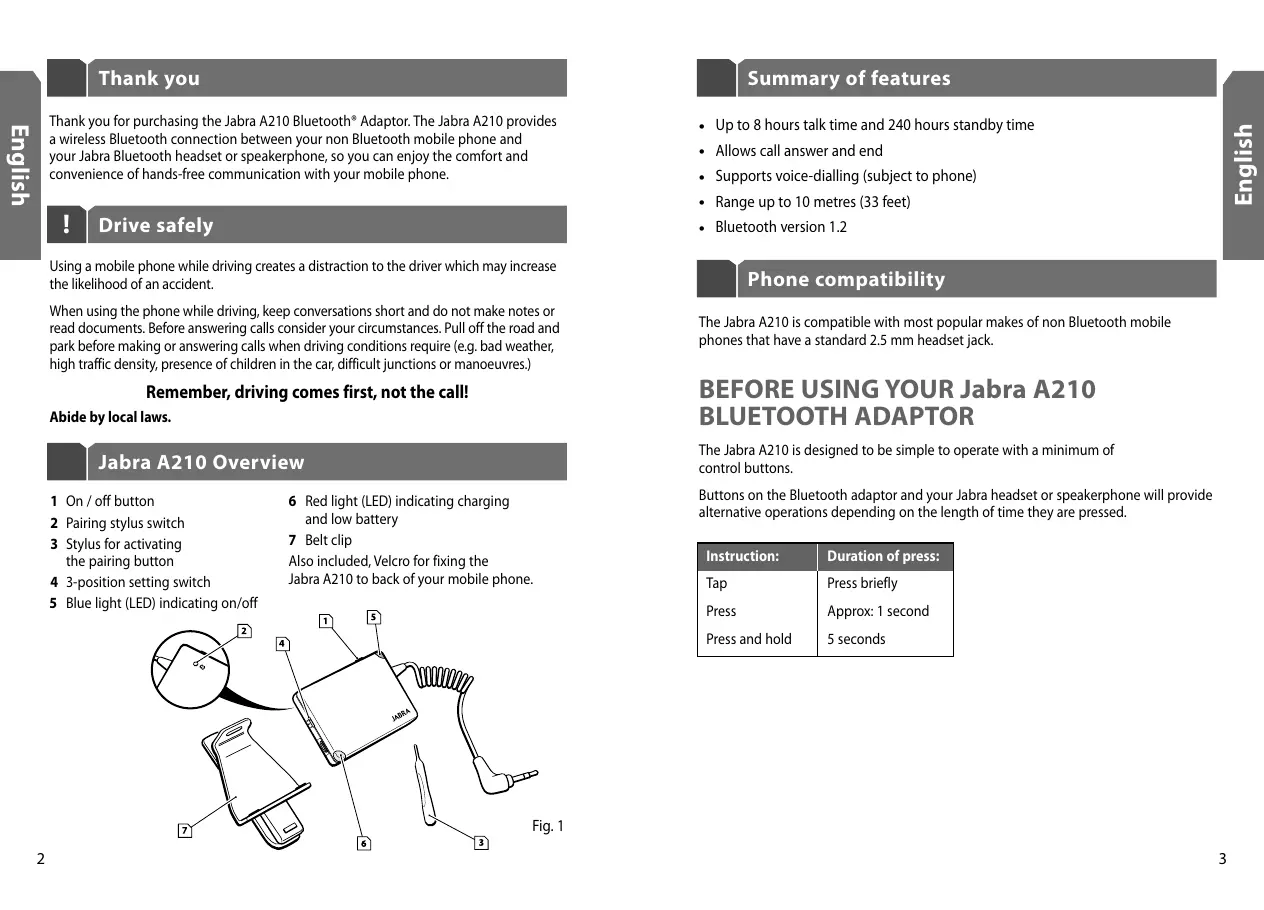
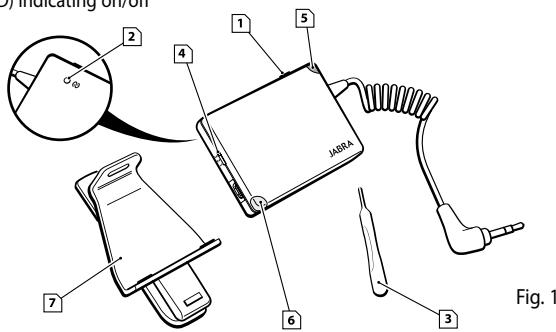
Jabra A210 Overview
1 On/off button
2 Pairing stylus switch
3 Stylus for activating the pairing button
4 3-position setting switch
5 Blue light (LED) indicating on/off
6 Red light (LED) indicating charging and low battery
7 Belt clip Also included, Velcro for fixing the Jabra A210 to back of your mobile phone.
Summary of features
- Up to 8 hours talk time and 240 hours standby time
- Allows call answer and end
Supports voice-dialling (subject to phone)
Range up to 10 metres (33 feet) - Bluetooth version 1.2
Phone compatibility
The Jabra A210 is compatible with most popular makes of non Bluetooth mobile phones that have a standard 2.5 mm headset jack.
BEFORE USING YOUR Jabra A210 BLUETOOTH ADAPTOR
The Jabra A210 is designed to be simple to operate with a minimum of control buttons.
Buttons on the Bluetooth adaptor and your Jabra headset or speakerphone will provide alternative operations depending on the length of time they are pressed.
| Instruction: | Duration of press: |
| Tap | Press briefly |
| Press | Approx: 1 second |
| Press and hold | 5 seconds |
1 Charge Jabra A210
The Jabra A210 uses a rechargeable battery that must be charged fully before you use the adaptor for the first time.
- Use the AC adaptor to charge the Jabra A210 from a power socket. (See Fig.2). Only use a Jabra adaptor to charge the Jabra A210.
- The red light (LED) will turn on when charging begins. After approximately 2 hours the red LED will turn off, indicating that charging is complete.
NOTE: The red LED will flash when the battery is low. You can continue to use your Jabra A210 Bluetooth adaptor whilst charging.
You are now ready to "pair" the Jabra A210 with your Jabra Bluetooth headset or speakerphone. (See Section 2)
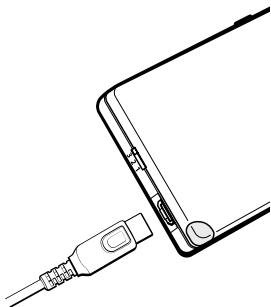
Fig. 2
2 "Pair"with your Bluetooth headset
Before you can get started, you will need to pair your Jabra A210 Bluetooth adaptor with your headset or speakerphone.
- Turn your Jabra A210 on with a press of the on/off button. The blue light (LED) shows a burst of flashes and thereafter continues to flash every 3 seconds.
- Put your Jabra Bluetooth headset or speakerphone into pairing mode by following the instructions in its user guide.
- Put your Jabra A210 into pairing mode by pressing the pairing stylus switch marked (Q) with the stylus. When the blue LED turns solid blue the adaptor is in pairing mode.
- The pairing is complete when the blue LED flashes every 3 seconds.
3 Adjust the setting to suit your phone
To optimise the operation of the Jabra A210 with your mobile phone, adjust the "3-position setting switch" (See Fig. 3).
- Set the switch to position 1 if you are using a Motorola phone
- Set the switch to position 3 for all other phone makes
- If you experience echo when using your phone, move the switch to position 2
- If you continue to hear echo turn down the volume on the headset
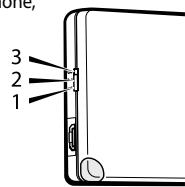
Fig. 3
The headset does not have to be on to adjust the 3-position setting switch.
USING YOUR Jabra A210 BLUETOOTH ADAPTOR
To use your Jabra A210 Bluetooth adaptor, ensure it is switched on and plugged into the headset jack in your mobile phone.
NOTE: For complete instructions on operating your Jabra headset, please refer to the headset's user manual.
4 Turning the Jabra A210 On and Off
To turn the adaptor on, press the on/off button. The blue light (LED) shows a burst of flashes and thereafter continues to flash every 3 seconds.
To turn the adaptor off, press and hold the on/off button for 5 seconds.
NOTE: The blue LED will turn off after 5 minutes. To check if your Bluetooth adaptor is on, just tap on the on/off button, and the blue LED will resume flashing. If the blue LED is not responding, the adaptor is turned off.
To save power, your Jabra A210 Bluetooth adaptor goes automatically into standby mode one minute after usage.
Do not use keypad tones with your Jabra A210 as this will affect the battery performance.
5 Making or receiving a call
Make or receive calls using your phone's keypad in the usual way. The call is automatically transferred to your headset.
NOTE: If the phone does not respond to a 'tap' of the headset's answer/end button, for example ending a call or activating voice-dialing, press the button for a little longer. Please refer to page 3 for an explanation of Tap, Press and Press and hold.
6 | Experiencing Problems?
If you experience problems with the connection between the Jabra A210 and your Jabra Bluetooth headset or speakerphone, it is advisable to reset the adaptor. To reset your adaptor, press the pairing button and the on/off button at the same time.
7 Need more help?
- Web: www.jabra.com (for the latest support info and online User Manuals)
- See the inside back cover for your country's support phone number.
8 Storage of the Jabra A210
- Always store the Jabra A210 with power off and safely protected.
- Avoid storage at high temperatures (above 45^ / 113^ ) – such as direct sunlight. (Storage at high temperatures can degrade performance and reduce battery life). Low temperatures (down to -10^ / 14^ will shorten battery life and may affect operation but should not permanently damage the Jabra A210.
- Do not expose the Jabra A210 to rain or other liquids.
9 Warranty
Jabra (GN Netcom) warrants this product against all defects in material and workmanship for a period of two years from the date of original purchase. The conditions of this warranty and our responsibilities under this warranty are as follows:
- The warranty is limited to the original purchaser
- A copy of your receipt or other proof of purchase is required. Without proof of purchase, your warranty is defined as beginning on the date of manufacture as labelled on the product
- The warranty is void if the serial number, date code label or product label is removed, or if the product has been subject to physical abuse, improper installation, modification, or repair by unauthorized third parties
- The responsibility of Jabra (GN Netcom) products shall be limited to the repair or replacement of the product at its sole discretion
- Any implied warranty on Jabra (GN Netcom) products is limited to two years from the date of purchase on all parts, including any cords and connectors
- Specifically exempt from any warranty are limited-life consumable components subject to normal wear and tear, such as microphone windscreens, ear cushions, decorative finishes, batteries, and other accessories
- Jabra (GN Netcom) is not liable for any incidental or consequential damages arising from the use or misuse of any Jabra (GN Netcom) product
- This warranty gives you specific rights and you may have other rights which vary from area to area
- Unless otherwise instructed in the User Manual, the user may not, under any circumstances, attempt to perform service, adjustments or repairs on this unit, whether in or out of warranty. It must be returned to the purchase point, factory or authorized service agency for all such work
- Jabra (GN Netcom) will not assume any responsibility for any loss or damage incurred in shipping. Any repair work on Jabra (GN Netcom) products by unauthorized third parties voids any warranty
10 Certification and safety approvals
CE
This product is CE marked according to the provisions of the R & TTE Directive (99/5/EC).
Hereby, GN Netcom, declares that this product is in compliance with the essential requirements and other relevant provisions of Directive 1999/5/EC.
For further information please consult http://www.jabra.com
Within the EU this device is intended to be used in Austria, Belgium, Cyprus, Czech Republic, Denmark, Estonia, Finland, France, Germany, Greece, Hungary, Ireland, Italy, Latvia, Lithuania, Luxembourg, Malta, Poland, Portugal, Slovakia, Slovenia, Spain, Sweden, The Netherlands, United Kingdom, and within EFTA in Iceland, Norway and Switzerland
Bluetooth
The Bluetooth® word mark and logos are owned by the Bluetooth SIG, Inc. and any use of such marks by GN Netcom is under license. Other trademarks and trade names are those of their respective owners.
François
Merci. 10
Dispose of the product according
to local standards and regulations.
www.jabra.com/wee
Merci
Customer Service Contact Details:
Phone Numbers:
Belgique/Belgie 0080072252272
Danmark 70252272
© 2005 GN Netcom A/S. All rights reserved. Jabra is a registered trademark, wholly owned by GN Netcom Inc., and MiniGels is a trademark of GN Netcom Inc. in the USA, and these trademarks may be registered in other countries. US and foreign patents pending. Design and specifications subject to change without notice. The Bluetooth® word mark and logos are owned by the Bluetooth SIG, Inc. and any use of such marks by the companies in the GN Netcom Group is under license.
www.jabra.com

2 Year Warranty
C