RCVG-30A - Vacuum packaging machines Royal Catering - Free user manual and instructions
Find the device manual for free RCVG-30A Royal Catering in PDF.


| Product type | Vacuum packaging machine |
| Brand | Royal Catering |
| Model | RCVG-30A |
| Power supply | 220-240 V ~ 50 Hz |
| Power | 100 W |
| Dimensions (L x W x H) | 400 x 200 x 150 mm |
| Weight | 3.2 kg |
| Housing material | Stainless steel |
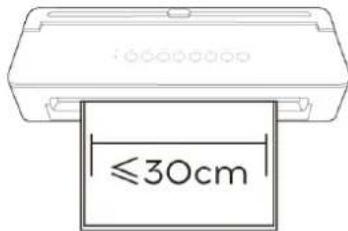
| Max. welding width | 30 cm |
| Welding type | Double weld |
| Main functions | Vacuuming, welding, manual stop |
| Noise level | < 75 dB |
| Included accessories | Bag rolls (2 x 3 m), power adapter |
| Care and cleaning | Clean with a damp cloth after each use |
| Safety | Automatic shutdown in case of overheating |
| Spare parts and repairability | Welding seal, replacement fuse available |
| Warranty | 2 years |
| General information | Professional device for intensive use in the kitchen |
Frequently Asked Questions - RCVG-30A Royal Catering
User questions about RCVG-30A Royal Catering
0 question about this device. Answer the ones you know or ask your own.
Ask a new question about this device
Download the instructions for your Vacuum packaging machines in PDF format for free! Find your manual RCVG-30A - Royal Catering and take your electronic device back in hand. On this page are published all the documents necessary for the use of your device. RCVG-30A by Royal Catering.
USER MANUAL RCVG-30A Royal Catering
| DE | Produktname | Vakuumverpackungsmaschine |
| EN | Product name | Vacuum packing machine |
| PL | Nazwa produktu | Pakowarka próżniowa |
| CZ | Název výrobku | Vakuová balička |
| FR | Nom du produit | Machine de mise sous vide |
| IT | Nome del prodotto | Macchina per il confezionamento sottovuoto |
| ES | Nombre del producto | Máquina de envasado al vacío |
| HU | Termék neve | Vákuumcsomagoló gép |
| DA | Produktnavn | Vakuumpakkemaskine |
| FI | Tuotteen nimi | Tyhjiöpakkauskone |
| NL | Productnaam | Vacuümmachine |
| NO | Produktnavn | Vakuumpakkemaskin |
| SE | Produktnamn | Vakuumförpackningsmaskin |
| PT | Nome do produto | Máquina de embalagem a vácuo |
| SK | Názov produktu | Vákuové baliace zariadenie |
| BG | Име на продукта | Машина за вакуумно опаковане |
| EL | Όνομα προϊόντος | Μηχανή συσκευασίας κενού |
| HR | Naziv proizvoda | Stroj za vakuumsko pakiranje |
| LT | Produkto pavadinimas | Vakuuminis pakavimo aparatas |
| RO | Numele produsului | Maşină de ambalat în vid |
| SL | Ime izdelka | Stroj za vakuumsko pakiranje |
| DE Modell | EN Product model | PL Model produktu | CZ Model výrobku | FR Modèle | IT Modello | ES Modelo | HU Modell | DA Model | FI Tuotteen malli | NL Productmodel | NO Produktmodell | SE Produktmodell | PT Modelo do produto | SK Model | BG Модел на продукт | EL Movtéλο προϊόντος | HR Model proizvoda | LT: Gaminio modelis | RO: Model de produs | SL: Model izdelka | RCVG-30A | |
| DE Hersteller | EN Manufacturer | PL Producent | CZ Výrobce | FR Fabricant | IT Produttore | ES Fabricante | HU Termelő | DA Producent | FI Valmistaja | NL Producent | NO Produsent | SE Tillverkare | PT Fabricante | SK Výrobca | BG Производител | EL Κατασκευαστής | HR Proizvođač | LT Gamintojas | RO Producător | SL Proizvajalec | expondo Polska sp. z o.o. sp. k. | |
| DE Anschrift des Herstellers | EN Manufacturer Address | PL Adres producenta | CZ Adresa výrobce | FR Adresse du fabricant | IT Indirizzo del produttore | ES Dirección del fabricante | HU A gyártó címe | DA Producentens adresse | FI Valmistajan osoite | NL Adres producent | NO Produsentens adresse | SE Tillverkarens adress | PT Endereço do fabricante | SK Adresa výrobcu | BG Адрес на производителя | EL: Διεύθυνση κατασκευαστή | HR Adresa proizvođača | LT Gamintojo adresas | RO Adresa producătorului | SL Naslov proizvajalca | ul. Nowy Kisielin – Innowacyjna 7, 66-002 Zielona Góra | Poland, EU | |


1 - Dry Normal


×

√
√
TROUBLESHOOTING:
This User Manual has been translated using machine translation. We have made every effort to ensure the translation is accurate, but please note that automated translations are not perfect and are not meant to replace human translators. The official version of the User Manual is in English. Any differences between the translated version and the original English are not legally binding. If you have any questions about the accuracy of the translation, please refer to the English version, which is the official reference. More language versions are available upon request via info@expondo.com.
Technical data
Parameter description Parameter value
| Product name | Vacuum packing machine |
| Model | RCVG-30A |
| Rated voltage [V~] / frequency [Hz] | 230/50 |
| Rated power [W] | 90 |
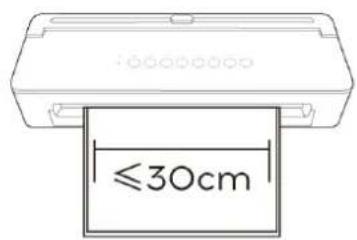
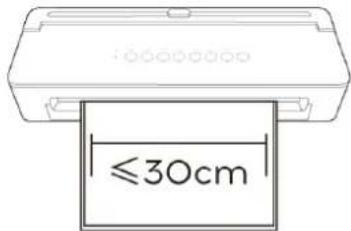
| Maximum bag width [cm] | 30 |
| Dimensions [width x depth x height; mm] | 410 x 145 x 75 |
| Weight [kg] | 1.8 |
SAFETY WARNING!
- Please read the instructions before use. • DO NOT wash the machine (except the water tray) in sinks or under taps.
- It is strictly forbidden to put the product on the water table to start, to avoid water ingress damaging the machine.
- It is strictly forbidden to disassemble, squeeze, puncture, short-circuit this product arbitrarily.
- DO NOT throw the product into fire, water. If this product has abnormal conditions: abnormal noise, smell, smoke, etc., immediately cut off the power supply and stop using.
- Do not touch the sealing area of the machine directly after use to avoid burns.
- After operating continuously for 30 times, the unit will activate the overheat protection for 2 minutes.
- When not in use, please disconnect the power supply.
- If the power cord is damaged, it must be replaced with a special power cord by an electrician.
OPERATION STEPS
Dry Normal:
Pulse Vacuum:
1 – Pulse Vacuum: keep pressing to start vacuuming, release to stop vacuuming.
2 - Seal Only: press to seal the vacuum bag.
PRODUCT DESCRIPTION:


- Power cord socket
- Cutter
- Outlet
- Control panel
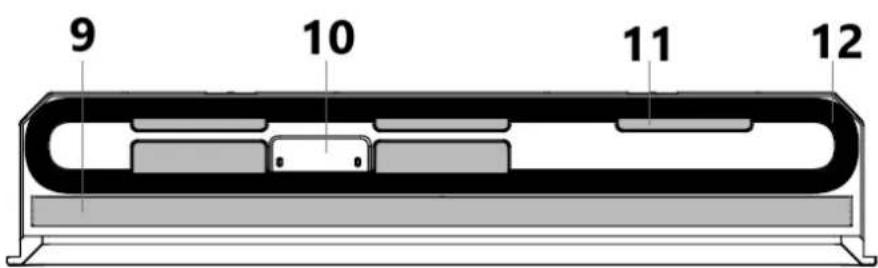
- Sealing strip
- Baffle
- Cutter slide
- Indicator light
- Water tray (removable)
- Vacuum bag inlet
- Water level sensor
- Sealing gasket
FUNCTIONS:
Overheat:
Please wait for 2 minutes! After 30 times of continuous working, the machine will automatically activate the overheat protection function, and the overheat indicator will be on for 2 minutes.
Water Full:
Please empty out the water! When the water in the water tray is full, the water full indicator light will be on, and the machine will start the water full protection function.
Dry Normal / Dry Gentle / Moist

Press the button, and the machine will automatically vacuum and seal.
Canister: Press the button, and the machine will automatically vacuum.
Seal Only: Press the button, and the machine will automatically seal.
Pulse Vacuum:
Press this button once; the indicator will light up and the machine will beep. Then keep pressing the button to start vacuuming (the indicator will flash). Release the button to stop vacuuming, then press the Seal Only button to seal the vacuum bag.
On/Off/Cancel:
- Press and hold this button for 2 seconds to turn the machine on or off.
- Press this button once to cancel the current process and put the machine into standby mode. The machine will automatically shut down after 30 minutes of inactivity.
HOW TO USE:
- Plug the machine into a power outlet. The indicators will light up one by one from left to right, then turn off, and the machine will enter standby mode.
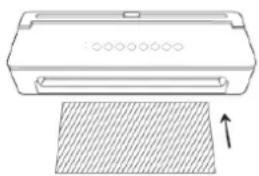
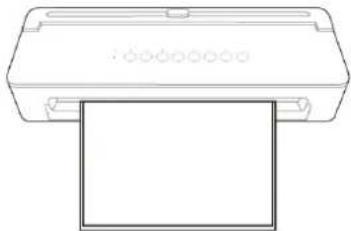
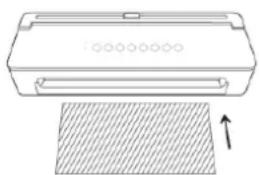
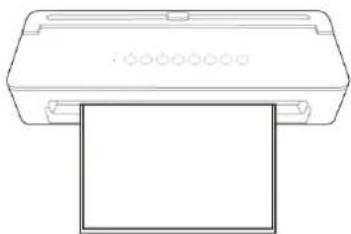
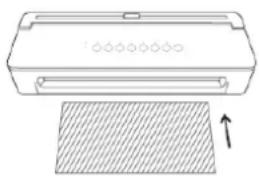
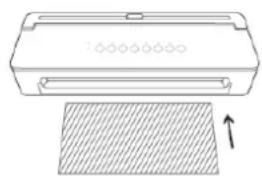
- Place the vacuum bag into the bag inlet until it touches the water tray baffle.

- Press the button for the desired function.
- After the process is complete, remove the vacuum bag. Do not touch the sealing area of the machine to avoid burns.
Tip: For a better seal, make sure the bag is flat, or use the built-in cutter to cut it flat.
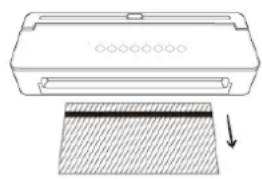
To cut the vacuum bag: move the cutter to one end of the slide, place the vacuum bag under the slide, press the cutter down, and slide it to the other end to cut the bag.

Using external accessories: Use the external vacuum function (see picture below for reference). Connect the external vacuum connector to the outlet on the machine, then press the Canister button to start the process. After the process is complete, unplug the connector.

1 - Connector
Note: The canister function is for vacuuming only, not sealing. Please unplug the connector from the machine after use.
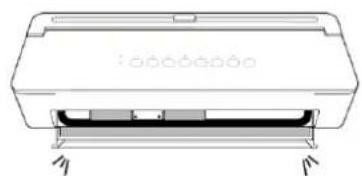
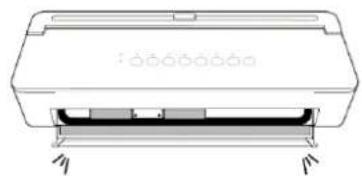
Water tray removing and installation: Press both sides of the water tray with both hands at the same time, the water tray will automatically slide out, then carefully remove the water tray. After emptying and cleaning the water tray (it can be washed in the sink), make sure the water sensor can move smoothly, then gently push the water tray back and press both sides of the water tray at the same time to install it firmly.


Notice! If both sides of the water tray are not removed at the same time, the water tray will be locked in the machine. DO NOT remove the water tray to avoid damaging the clamp. Push the ejected side back in and then try again following the instructions above.
- When placing the vacuum bag, keep it flat, DO NOT wrinkle or fold, so as not to affect the use effect.
- Sharp, fermented, rotten items are not suitable for vacuum sealing, which will make the vacuum bag leak or bulge.
- Please use special vacuum bag with grid or bag with folds on both sides. The glossy bag is only suitable for Seal Only.


TROUBLESHOOTING:
| Fault | Solution |
| Can not start | Check the power supply, whether the power plug is loose, whether the water tray is installed |
| Can not vacuum or seal | Check whether the opening end of the vacuum bag is all put into the water tray.Check whether the baffle sealing strip, sealing rubber ring and water level sensor against the water tray are installed in place or looseCheck whether the vacuum bag is loaded too full, the vacuum best distance between the items in the bag and the bag mouth is ~70mm.Check whether there is matter stuck in the external outlet or the external vacuum tube is not pulled out.Check whether the vacuum bag is leaking or not flat enough. |
| Poor vacuuming or sealing: | Check whether there is flowing oil and liquid in the vacuum bag.Check that no moisture or liquid is leaking from the object, if so, clean it or we recommend freezing it before vacuuming to avoid liquid flowing into the opening of the vacuum bag. |
Notice! Continuous vacuuming for 3 minutes/container mode, 2 minutes/pulsed vacuum mode will cause the unit to stop automatically.
DISPOSING OF USED DEVICES:
Do not dispose of this device in municipal waste systems. Hand it over to an electric and electrical device recycling and collection point. Check the symbol on the product, instruction manual and packaging. The plastics used to construct the device can be recycled in accordance with their markings. By choosing to recycle you are making a significant contribution to the protection of our environment.
Contact local authorities for information on your local recycling facility.



TROUBLESHOOTING:
1 - Connector


TROUBLESHOOTING:


TROUBLESHOOTING


TROUBLESHOOTING:


×

√

√


1 - Dry Normal
Pulse Vacuum:

1 - Connector

×
√
√
TROUBLESHOOTING:
1 - Dry Normal
Pulse Vacuum: 1 - Pulse Vacuum: Hold the button to start vacuuming, release to stop.
2 - Seal only: Press to seal the vacuum bag.
PRODUCT DESCRIPTION:


TROUBLESHOOTING:


1 - Dry Normal
Pulse vacuum:

×

√

√
TROUBLESHOOTING:
SAFETY WARNING!


1 - Dry Normal
Pulse vacuum:

PRODUCT DESCRIPTION:


1 - Connection


×

√

√
TROUBLESHOOTING:


1 - Dry Normal
Pulse vacuum:

Use of external accessory: Use the external vacuum function (image below for reference). Connect the external vacuum connector to the outlet on the machine, then press the container button to start the process. After the process is complete, unplug the connector.

×
√

√
TROUBLESHOOTING:


1 - Dry Normal
Pulse vacuum:

1 - Connection


TROUBLESHOOTING:


1 - Dry Normal
Pulse vacuum:

×

√


1 – Dry normal
Pulse vacuum:

On/Off/Cancel:
- Press the button for the selected function.
- After the process is complete, remove the vacuum bag. DO NOT touch the sealing area of the machine to avoid burns.
1 - Connector


×

√

√
TROUBLESHOOTING:


1 – Dry normal
Pulse vacuum:

1 – Connector


×

√

√
TROUBLESHOOTING:


1 – Dry Normal
Pulsating vacuum:

1 – Connector


×

√

√

1 – dry normal
Pulsating vacuum:
1 – Pulsating vacuum cleaner: press to start vacuuming, release to stop vacuuming. 2 - Self-sealing: press to seal the vacuum bag.
PRODUCT DESCRIPTION:
- Power cord socket
- Cutter
- Outlet
- Control panel
- Sealing strip
- Partition
- Cutter slide
- Indicator light
- Water tank (removable)
- Vacuum bag inlet
- Water level sensor
- Sealing gasket
FUNCTIONS:
Overheating:
Please wait 2 minutes! After 30 minutes of continuous operation, the machine will automatically activate the overheating protection function with the overheating indicator on for 2 minutes.
Full water:
Please drain the water! When the water in the water tank is full, the full water indicator lights up, and the device activates the full water protection function.
Dry, normal / dry, gentle / wet / Wet:

1 - Connector


×

√

√
TROUBLESHOOTING:


1 – Dry Normal
Pulse vacuum:


×

√

√
TROUBLESHOOTING:


1 – Dry Normal
Pulse vacuum:

1 - Connector


TROUBLESHOOTING:


1 – normal dry
Pulse vacuum:

1 - Connector


×

√
√
TROUBLESHOOTING:
For the disposal of the device please consider and act according to the national and local rules and regulations.
CONTACT
expondo Polska sp. z o.o. sp. k.
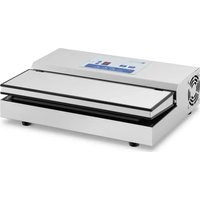
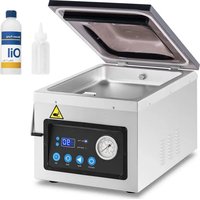
Brand : Royal Catering
Model : RCVG-30A
Category : Vacuum packaging machines