
SANS FIL FERRARI GAMEPAD 430 SCUDERIA - Gamepad THRUSTMASTER - Free user manual and instructions
Find the device manual for free SANS FIL FERRARI GAMEPAD 430 SCUDERIA THRUSTMASTER in PDF.



| Product type | Wireless controller |
| Brand | Thrustmaster |
| Model | Ferrari Gamepad 430 Scuderia |
| Compatibility | PlayStation 3 and PC (Windows) |
| Connectivity | Wireless via USB receiver |
| Power supply | 2 LR03/AAA batteries (1.5 V, not included) |
| Analog sticks | 2 progressive sticks |
| Digital pad | Yes |
| Optical wheel | Progressive, 2 sensitivity modes (Normal and High) |
| Triggers | 2 progressive triggers |
| Action buttons | Buttons A, B, X, Y, L1, L2, R1, R2, Select, Start, Home, Mapping, Preset |
| HOME button | LED, PS3 menu access |
| Operating modes | PS3 (red), PC 4 axes (green), PC 7 axes (red) |
| Programming | Automatic and manual, EEPROM backup |
| Number of simultaneous controllers | Up to 4 |
| Receiver | With CONNECT button |
| Switch | POWER ON/OFF |
| Memory | EEPROM to save presets |
| Warranty | 2 years |
| Maintenance | Clean with a dry cloth, avoid moisture |
| Safety | Use recommended battery type, respect polarity |
| Compliance | Directive RTTE 1999/5/EC |
| Country of manufacture | China |
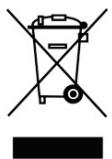
| Recycling | Do not dispose of with household waste, take to a collection point |
Frequently Asked Questions - SANS FIL FERRARI GAMEPAD 430 SCUDERIA THRUSTMASTER
User questions about SANS FIL FERRARI GAMEPAD 430 SCUDERIA THRUSTMASTER
0 question about this device. Answer the ones you know or ask your own.
Ask a new question about this device
Download the instructions for your Gamepad in PDF format for free! Find your manual SANS FIL FERRARI GAMEPAD 430 SCUDERIA - THRUSTMASTER and take your electronic device back in hand. On this page are published all the documents necessary for the use of your device. SANS FIL FERRARI GAMEPAD 430 SCUDERIA by THRUSTMASTER.
USER MANUAL SANS FIL FERRARI GAMEPAD 430 SCUDERIA THRUSTMASTER
Click on your language below
- USER MANUAL
- MANUEL DE L'UTILISATEUR
-BENUTZERHANDBUCH - HANDLEIDING
- MANUALE D'USO
- MANUAL DEL USUARIO
- MANUAL DO UTILZADOR
- PYKOBOДСТВО ПОЛьЗOBATEЛ
-Eyexipidio xphonc - Kullanim Kilavuzu
- Podrcznik uzytkownika
p
THRUSTMASTER
Ferrari Wireless Gamepad
Ferrari Wireless Gamepad
For: PlayStation®3 / PlayStation®3 Slim / PC
User Manual
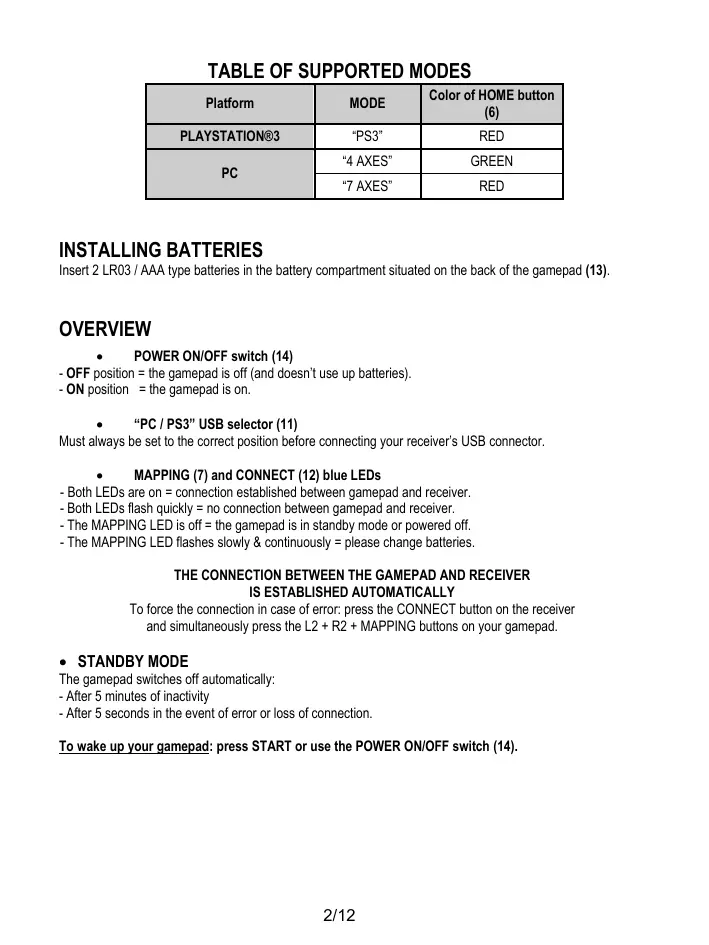
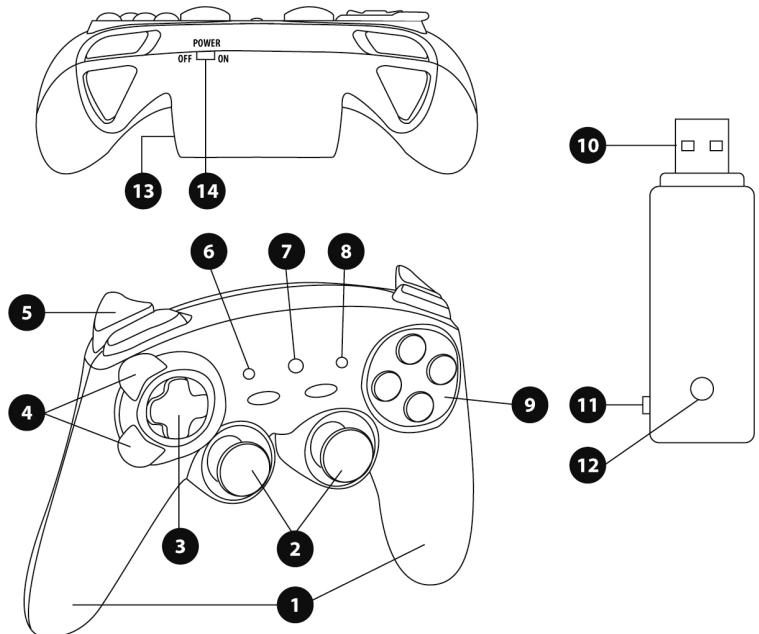
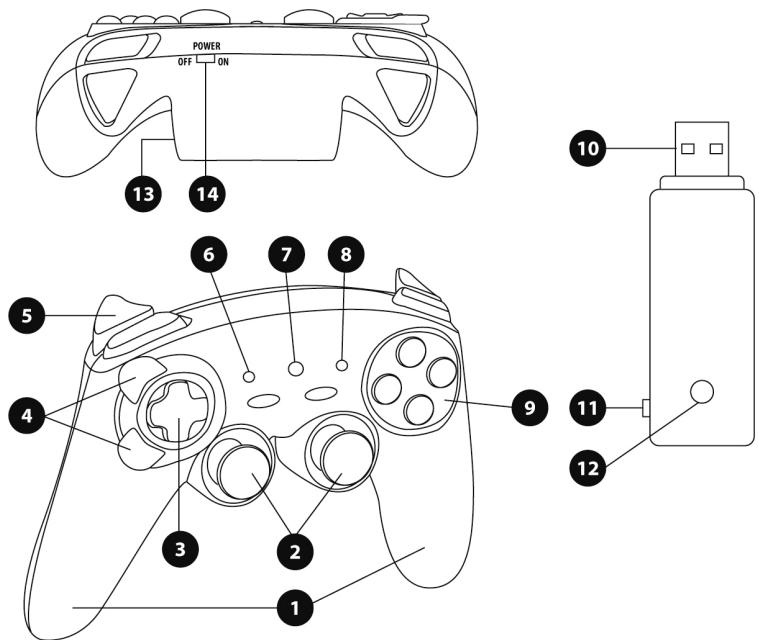
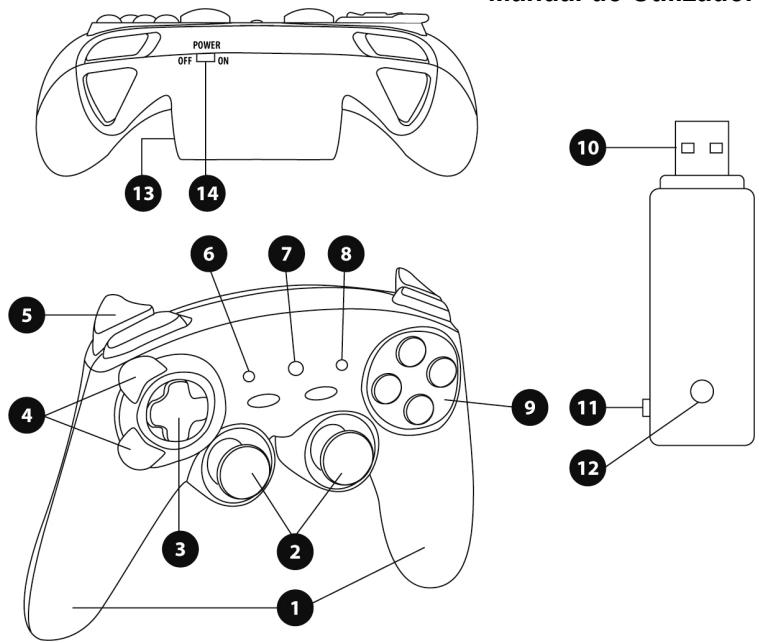
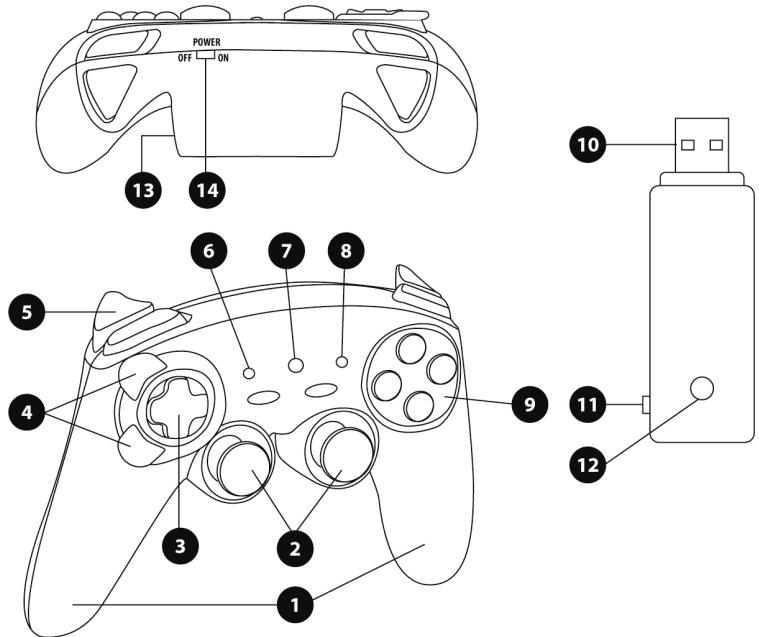
TECHNICAL FEATURES
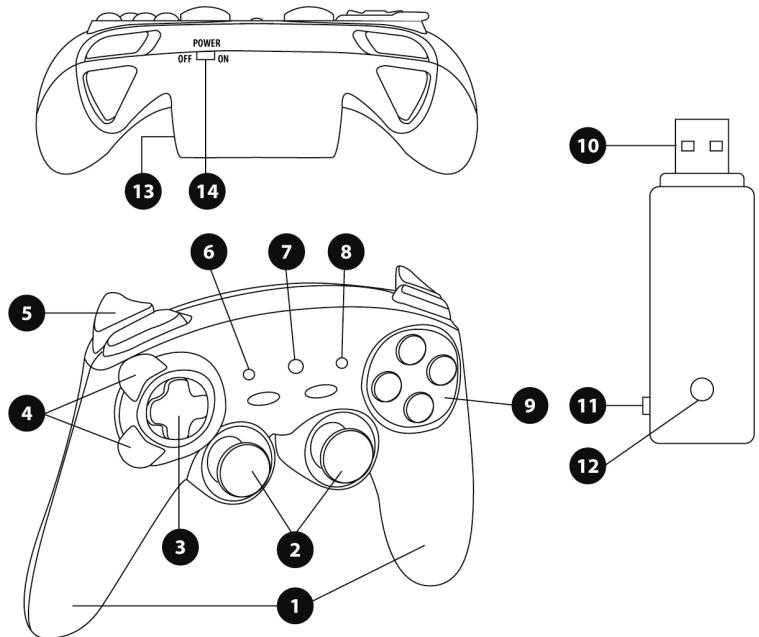
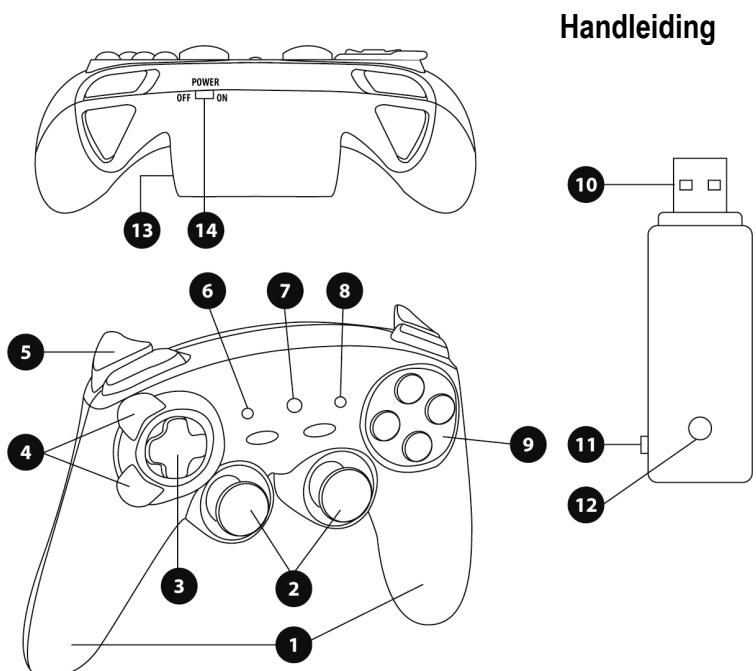
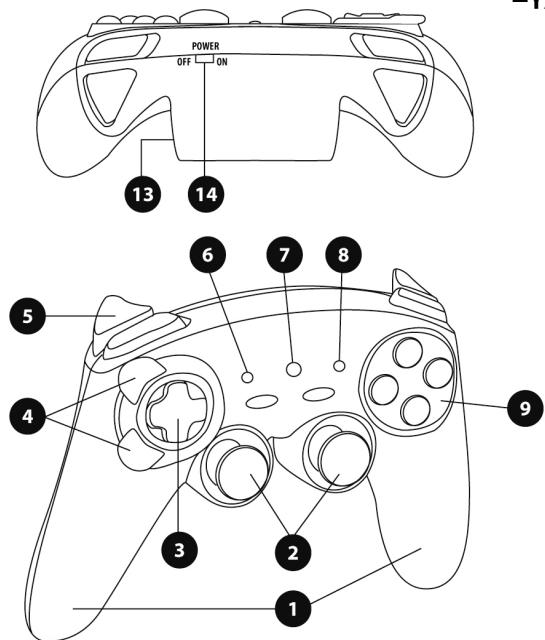
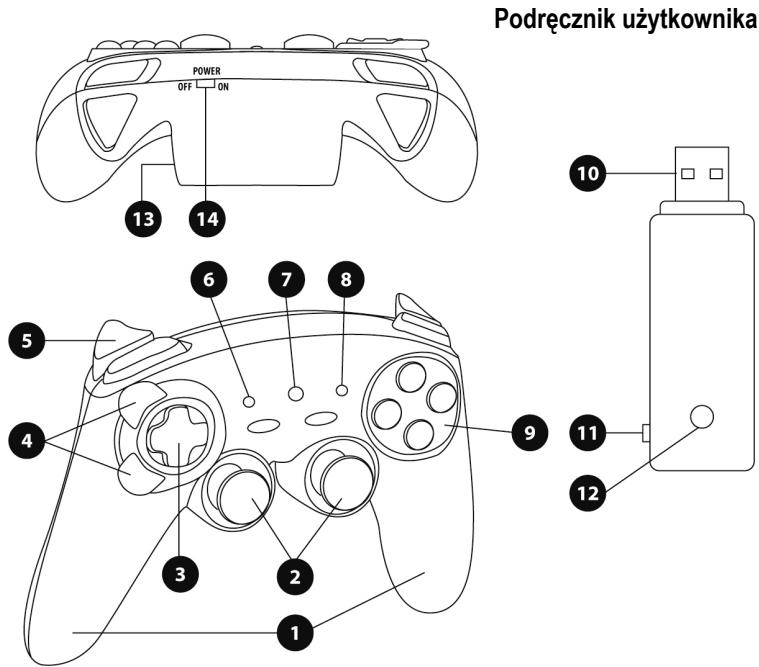
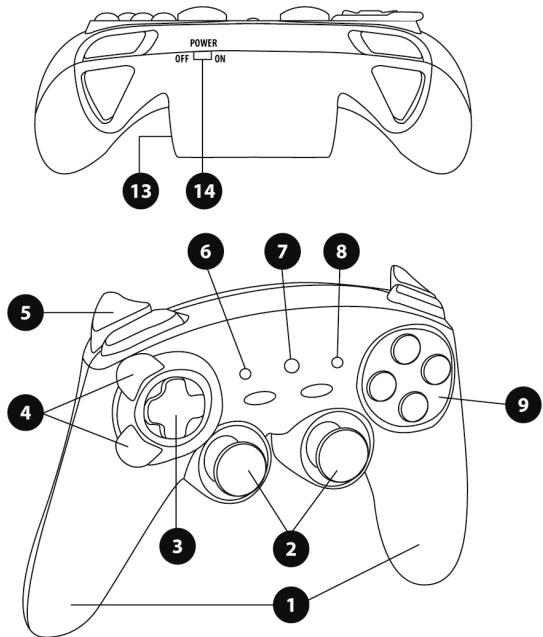
- Handles
- 2 progressive analog mini-sticks
- D-Pad
- Progressive optical wheel
- 2 progressive triggers
- HOME LED button for Playstation®3 and MODE for PC
-
MAPPING LED button (for programming and indicating connection status)
-
PRESET LED button (to select programming)
- Action buttons
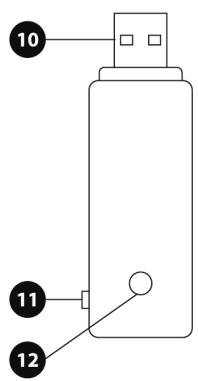
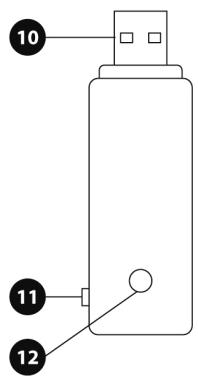
- PC and PlayStation®3 USB connector
- "PC" or "PS3" USB selector
- CONNECT LED button on receiver
- Battery compartment
- POWER ON/OFF switch
TABLE OF SUPPORTED MODES
| Platform | MODE | Color of HOME button (6) |
| PLAYSTATION®3 | "PS3" | RED |
| PC | "4 AXES" | GREEN |
| "7 AXES" | RED |
INSTALLING BATTERIES
Insert 2 LR03 / AAA type batteries in the battery compartment situated on the back of the gamepad (13).
OVERVIEW
-
POWER ON/OFF switch (14)
-
OFF position = the gamepad is off (and doesn't use up batteries).
- ON position = the gamepad is on.
"PC / PS3" USB selector (11)
Must always be set to the correct position before connecting your receiver's USB connector.
-
MAPPING (7) and CONNECT (12) blue LEDs
-
Both LEDs are on = connection established between gamepad and receiver.
- Both LEDs flash quickly = no connection between gamepad and receiver.
- The MAPPING LED is off = the gamepad is in standby mode or powered off.
- The MAPPING LED flashes slowly & continuously = please change batteries.
THE CONNECTION BETWEEN THE GAMEPAD AND RECEIVER IS ESTABLISHED AUTOMATICALLY
To force the connection in case of error: press the CONNECT button on the receiver and simultaneously press the L2 + R2 + MAPPING buttons on your gamepad.
- STANDBY MODE
The gamepad switches off automatically:
- After 5 minutes of inactivity
- After 5 seconds in the event of error or loss of connection.
To wake up your gamepad: press START or use the POWER ON/OFF switch (14).
PLAYSTATION®3
INSTALLATION ON PLAYSTATION®3
- Set your receiver's USB selector to the "PS3" position.
- Connect the USB connector to USB port #1 on the console.
- Switch on your console.
- Switch on your gamepad using the POWER ON/OFF switch (14).
- Once a connection has been established: start up your game.
You are now ready to play!
PLAYSTATION®3 MODE
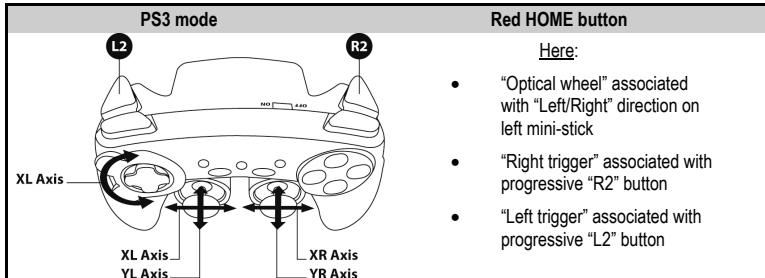
"AUTOMATIC PRESET" CONFIGURATION - PLAYSTATION®3
USING THE "HOME" BUTTON (6)
Your gamepad's "HOME" button allows you to exit games, access menus and directly switch off your PlayStation®3 system.
IMPORTANT NOTES FOR PLAYSTATION®3
- The USB selector on your receiver (11) must always be set to "PS3" before connecting the receiver.
- In "1 Player" mode: If your official gamepad is powered on, you must switch it to "gamepad port 2" in order for your "Run'N' Drive" gamepad to be functional.
- On PlayStation®3, the "Run'N' Drive" gamepad is only compatible with PlayStation®3 games (and will not work with PlayStation®2 games) and does not feature a motion sensor.
PC
INSTALLATION ON PC
- Set the USB selector on the receiver (11) to the "PC" position.
- Connect the receiver's USB connector to one of your computer's USB ports. Windows® XP or Vista will automatically detect the new device.
- Switch on your gamepad using the POWER ON/OFF switch (14).
- Click Start/Settings/Control Panel and then double-click Game Controllers.
The Game Controllers dialog box displays the gamepad's name with OK status.
- In the Control Panel, click Properties to test and view the buttons, D-pad, mini-sticks, triggers and optical wheel.
You are now ready to play!
IMPORTANT NOTES FOR PC
- The USB selector on your receiver (11) must always be set to "PC" before connecting the receiver.
- The name of the gamepad displayed on PC (in the Control Panel and in games) is "Run N' Drive Wireless".
- "Advanced Programming Software" for PC is also available for download on our website at the following address:
http://ts.thrustmaster.com/
- The "Test forces" tab (of the advanced programming software) is not compatible with this gamepad.
SELECTING "AXES" ON PC
- Selecting axes via "Software":
After installing the "Advanced Programming Software", go to page 1 of the Control Panel, click the number of axes you wish to use and then click OK.
- Selecting axes via "Hardware":
Press the HOME button (6) to select the number of active axes.
2 "AXES" MODES AVAILABLE ON PC
"AUTOMATIC PRESET" CONFIGURATION - PC
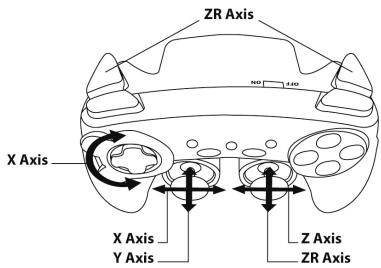
"4 AXES" mode
Green HOME button
Here:
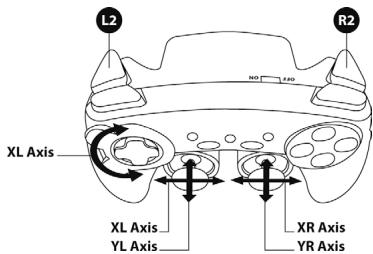
- "Optical wheel" associated with "Left/Right" direction on left mini-stick
- "Right trigger" associated with "Up" direction on right mini-stick
"Left trigger" associated with "Down" direction on right mini-stick
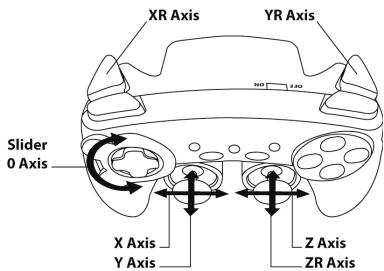
"7 AXES" mode
Red HOME button
Here:
Optical wheel" is now independent
- "Right trigger" is now independent
- "Left trigger" is now independent
To find out all of the possibilities offered on PC, try them out in the Windows "Game Controllers" section (once you have installed the "Advanced Programming Software")
ADVANCED FUNCTIONS
ADJUSTING THE OPTICAL WHEEL'S SENSITIVITY
The optical wheel (4) has 2 sensitivity modes:
- Normal sensitivity (the default mode)
- High sensitivity (must be set)
Setting "High Sensitivity" mode:
| Steps | Action | HOME button |
| 1 | Raise and hold the "UP" direction on the optical wheel | Flashes continuously |
| 2 | Press and release the MAPPING button (7) |
Your optical wheel is now more sensitive (Procedure must be carried out each time the gamepad restarts or is disconnected)
- Returning to "Normal Sensitivity" mode:
| Steps | Action | HOME button |
| 1 | Lower and hold the “DOWN” direction on the optical wheel | Does not flash |
| 2 | Press and release the MAPPING button (7) |
Your optical wheel has now returned to Normal Sensitivity (the default mode)
2 PROGRAMMING MODES
The PRESET button and LED (8) allows you to view the type of programming selected: AUTOMATIC (preprogrammed) or MANUAL (programmed by yourself). A single press of this button allows you (even during the course of a game) to switch from one programming mode to the other.
- "AUTOMATIC PRESET" (PRESET button OFF)
This represents the default programming: the functions of the optical wheel and the triggers are preprogrammed, as are the positions of the buttons and the directions of the mini-sticks and of the D-Pad.
PLEASE REFER TO THE "AUTOMATIC PRESET" CONFIGURATION DIAGRAMS
- "MANUAL PRESET" (PRESET button GREEN)
This represents your own personal programming:
- The buttons, directions of the mini-sticks and of the D-Pad can either be
- programmed on the optical wheel and on the triggers,
- or switched between themselves.
- You can modify the programming to your liking and whenever you wish.
- The programming is automatically saved inside your gamepad (even when disconnected).
- When your "MANUAL PRESET" is clear, it is identical to the "AUTOMATIC PRESET".
PROGRAMMING THE OPTICAL WHEEL AND TRIGGERS
The 2 directions of the optical wheel and the 2 progressive triggers can be programmed using the MAPPING button (7).
Examples of possible applications:
Programming a button, direction of a mini-stick or of the D-Pad:
- onto the "up" or "down" direction of the optical wheel
- onto the "right trigger" or "left trigger"
- Programming procedure on optical wheel and triggers:
| Steps | Action | PRESET button color |
| 1 | Enable "MANUAL PRESET" (8) by pressing the button. | Lit up green |
| 2 | Press and release the MAPPING button (7). | Lit up red |
| 3 | Press and release the button or direction to program. | Flashes red |
| 4 | Raise or lower the direction on the optical wheel or press the trigger onto which you wish to place your function. | Lit up green |
Your "MANUAL PRESET" is now enabled and up to date (with your programming applied to the optical wheel or triggers)
SWITCHING BUTTONS/MINI-STICKS/D-PAD
All buttons, as well as directions of the mini-sticks and of the D-Pad can be switched using the MAPPING button (7).
Examples of possible applications:
- Switch buttons between themselves
- Switch the 2 mini-sticks
(in this case, you will to have to map the 4 directions of the first mini-stick to the 4 directions of the second mini-stick)
- Switch the D-Pad with a mini-stick
(in this case, you will have to map the 4 D-Pad directions to the 4 directions of the mini-stick in question).
Procedure for switching buttons, mini-sticks and D-Pad
- Does not work for the triggers.
- Works for the optical wheel but only on PC and in "7 axes" mode.
| Steps | Action | PRESET button color |
| 1 | Enable "MANUAL PRESET" (8) by pressing the button. | Lit up green |
| 2 | Press and release the MAPPING button (7). | Lit up red |
| 3 | Press and release the button or direction to switch. | Flashes red |
| 4 | Press and release the button or direction onto which you wish to place your function. | Lit up green |
Your "MANUAL PRESET" is now enabled and up to date (with the 2 functions switched).
EEPROM MEMORY
- Your gameplay features an internal chip which saves all of your "MANUAL PRESET" programming (even when the gameplay is switched off or disconnected for a long period of time).
- You can save a different "MANUAL PRESET" for each platform used: PlayStation®3, PC 4 Axes and PC 7 Axes.
TO ERASE YOUR "MANUAL PRESET"
| Steps | Action | PRESET button color |
| 1 | Enable your "MANUAL PRESET" (8). | Lit up green |
| 2 | Press and hold the MAPPING button (7) for 2 seconds. | Flashes green 2 seconds |
Your "MANUAL PRESET" is now clear (and once again identical to the "AUTOMATIC PRESET").
RETURNING TO "FACTORY SETTINGS"
You can erase all of your programming or settings:
| Steps | Action | MAPPING button color |
| 1 | Press the MAPPING + SELECT + START buttons simultaneously | Flashes blue 5 seconds |
All of your "MANUAL PRESETS" (= PC + PS3) or settings are now clear.
Note: this procedure will completely restart your gamepad
(on PC, we therefore recommend that you do this outside of games).
POSSIBLE USES IN GAMES
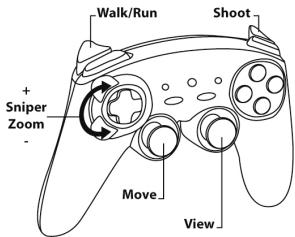
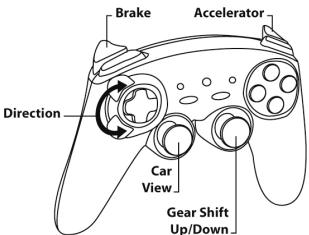
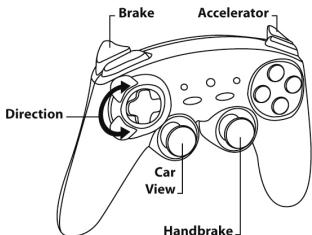
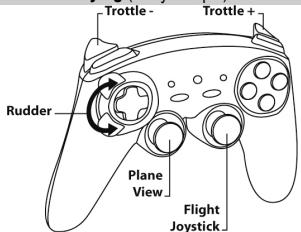
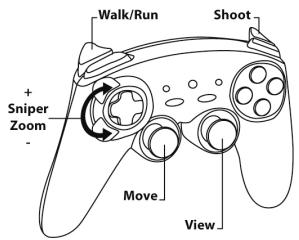
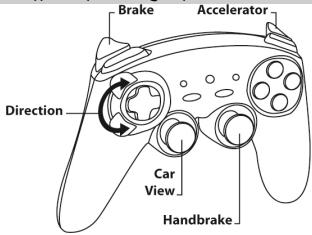
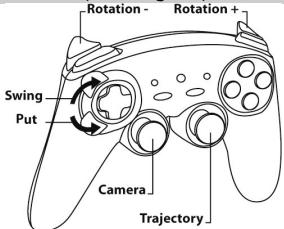
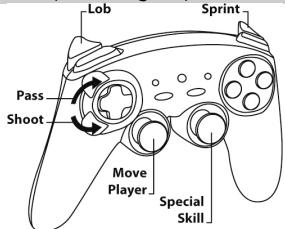
The optical wheel (thanks to its technology and degree of rotation greater than that of any mini-stick) offers unparalleled precision and stability in all types of games: racing (ultra-precise steering), flying (rudder), action and FPS (progressive zoom), sports (measured shot, strength of hit), etc.
The triggers (thanks to their progressive action and range of mechanical travel greater than that of any button) offer extremely precise control in all types of games: racing (progressive and independent acceleration and braking, handbrake), action and FPS (rate of fire, lateral movement), sports (measured pass or shot, strength of hit or jump, running speed), etc.
SOME EXAMPLES AND TIPS:
- There are numerous configuration possibilities, depending on the game you are playing.
- In certain games (racing type), do not hesitate to test out the 2 sensitivity modes for your optical wheel (Normal or High) in order to optimize its precision and responsiveness.
DIFFERENT EXAMPLES ACCORDING TO TYPE OF GAME
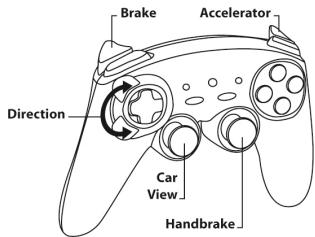
Action/Adventure ("Car" mode)
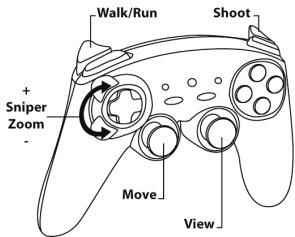
Action/Adventure ("On foot" mode)
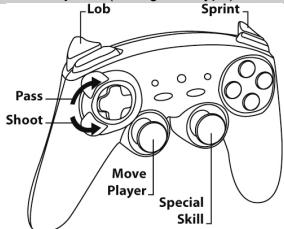
Sports ("Ball game" type)
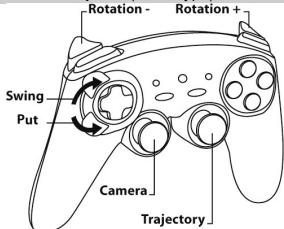
Sports ("Golf" type)
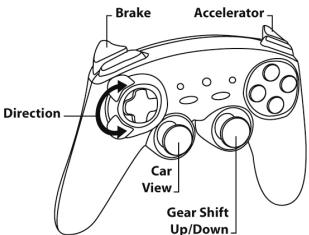
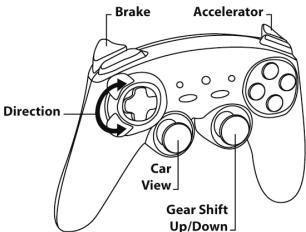
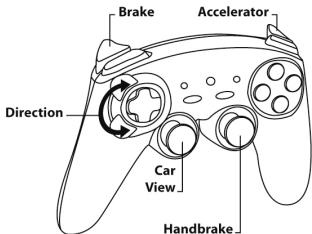
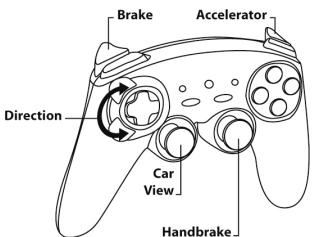
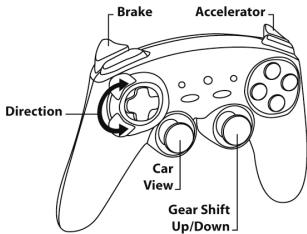
Car racing ("Simulation" type)
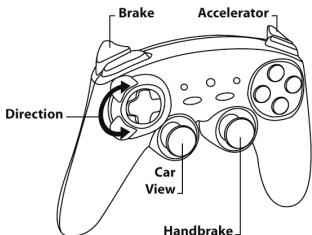
Car racing ("Arcade/Rally" type)
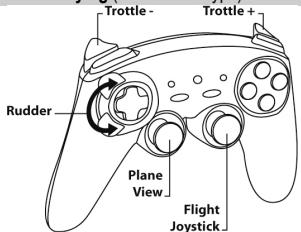
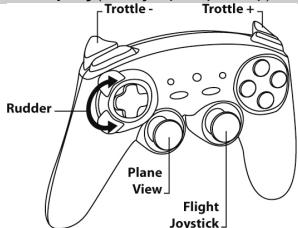
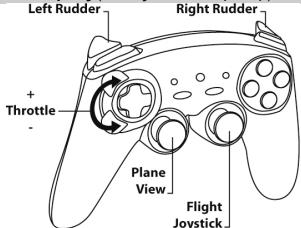
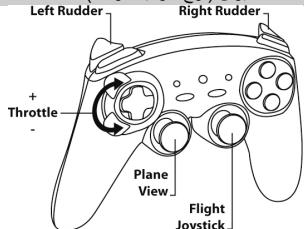
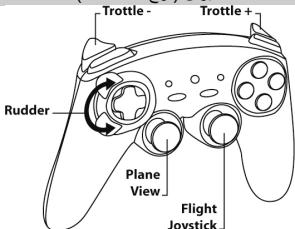
Flying ("Simulation" type)
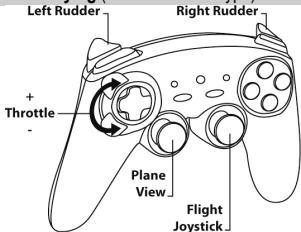
Flying ("Arcade/Action" type)
USING MORE THAN ONE "Ferrari Wireless Gamepad" AT THE SAME TIME (in Multiplayer mode)
You can use up to 4 "Ferrari Wireless Gamepads" at the same time (in multiplayer mode).
Channel detection is carried out automatically
In case of error or to force the connection: press the CONNECT button on the receiver and simultaneously press the L2 + R2 + MAPPING buttons on your gamepad.
TROUBLESHOOTING AND WARNING
-
My gamepad doesn't function correctly or seems improperly calibrated:
-
In the event of malfunction due to electrostatic emission, exit the game, switch off your gamepad and disconnect the receiver from your console or your PC.
To play again, reconnect the receiver, switch your gamepad back on and start the game again. - Never move the mini-sticks, the optical wheel or the triggers when connecting your gamepad (to avoid any calibration problems).
- On PC, if the game does not accept "7 axes" mode (undesired effects), switch your gamepad to "4 axes" mode (the standard gamepad mode).
- I can't configure my gamepad in a game:
- In your game's "Options / Controller / Gamepad" menu: select the most appropriate configuration.
- Please refer to your game's user manual or online help for more information.
- You can also use your gamepad's "programming" function to resolve this type of problem.
- On PC or PS3, my gamepad doesn't function correctly:
- Exit your game, disconnect your gamepad, verify that the "PC/PS3" USB selector (11) is in the proper position, then reconnect everything.
The MAPPING LED flashes slowly and continuously: - Please change batteries.
When you're done using your gamepad, we recommend that you always set the gamepad's POWER ON/OFF switch (14) to the OFF position (to save your batteries).
TECHNICAL SUPPORT
If you encounter a problem with your product, please go to http://fs.thrustmaster.com and click Technical Support. From there you will be able to access various utilities (Frequently Asked Questions (FAQ), the latest versions of drivers and software) that may help to resolve your problem. If the problem persists, you can contact the Thrustmaster products technical support service ("Technical Support"):
By email:
In order to take advantage of technical support by email, you must first register online. The information you provide will help the agents to resolve your problem more quickly. Click Registration on the left-hand side of the Technical Support page and follow the on-screen instructions. If you have already registered, fill in theUsername and Password fields and then click Login.
By telephone (if you do not have Internet access):
| United Kingdom | 08450800942 Charged at local rate | Monday to Saturday from 8 a.m. to 7 p.m. |
| United States | 1-866-889-5036 Free | Monday to Friday from 9 a.m. to 8 p.m. Saturday from 8 a.m. to 2 p.m. (Eastern Standard Time) Monday to Friday from 6 a.m. to 5 p.m. Saturday from 5 a.m. to 11 a.m. (Pacific Standard Time) |
| Canada | 1-866-889-2181 Free | Monday to Friday from 9 a.m. to 8 p.m. Saturday from 8 a.m. to 2 p.m. (Eastern Standard Time) Monday to Friday from 6 a.m. to 5 p.m. Saturday from 5 a.m. to 11 a.m. (Pacific Standard Time) |
| Denmark | 80887690 Free | Monday to Saturday from 9 a.m. to 8 p.m. (English) |
| Sweden | 0200884567 Free | Monday to Saturday from 9 a.m. to 8 p.m. (English) |
| Finland | 0800 913060 Free | Monday to Saturday from 10 a.m. to 9 p.m. (English) |
Hours of operation and telephone numbers are subject to change. Please visit http://tts.thrustmaster.com for the most up-to-date Technical Support contact information.
WARRANTY INFORMATION
Worldwide, Guillemot Corporation S.A. ("Guillemot") warrants to the consumer that this Thrustmaster product will be free from material defects and manufacturing flaws for a period of two (2) years from the original date of purchase. Should the product appear to be defective during the warranty period, immediately contact Technical Support, who will indicate the procedure to follow. If the defect is confirmed, the product must be returned to its place of purchase (or any other location indicated by Technical Support).
Within the context of this warranty, the consumer's defective product will, at Technical Support's option, be either repaired or replaced. Where authorized by applicable law, the full liability of Guillemot and its subsidiaries (including for indirect damages) is limited to the repair or replacement of the Thrustmaster product. The consumer's legal rights with respect to legislation applicable to the sale of consumer goods are not affected by this warranty.
This warranty shall not apply: (1) if the product has been modified, opened, altered, or has suffered damage as a result of inappropriate or abusive use, negligence, an accident, normal wear, or any other cause not related to a material defect or manufacturing flaw; (2) in the event of failure to comply with the instructions provided by Technical Support; (3) to software not published by Guillemot, said software being subject to a specific warranty provided by its publisher.
Additional warranty provisions
In the United States of America and in Canada, this warranty is limited to the product's internal mechanism and external housing. Any applicable implied warranties, including warranties of merchantability and fitness for a particular purpose, are hereby limited to two (2) years from the date of purchase and are subject to the conditions set forth in this limited warranty. In no event shall Guillemot Corporation S.A. or its affiliates be liable for consequential or incidental damage resulting from the breach of any express or implied warranties. Some States/Provinces do not allow limitation on how long an implied warranty lasts or exclusion or limitation of incidental/consequential damages, so the above limitation may not apply to you. This warranty gives you specific legal rights, and you may also have other legal rights which vary from State to State or Province to Province.
FCC STATEMENT
- This device complies with Part 15 of the FCC Rules. Operation is subject to the following two conditions:
(1) This device may not cause harmful interference, and
(2) This device must accept any interference received, including interference that may cause undesired operation.
- Changes or modifications not expressly approved by the party responsible for compliance could void the user's authority to operate the equipment.
Statement of Compliance with EU Regulations
Guillemot Corporation S.A. hereby declares that the device Ferrari Wireless Gamepad complies with the main requirements and other relevant clauses of Directive RTTE 1999/5/CE. The compliance statement can be viewed at the following site:
http://www.thrustmaster.com/certificates/Ferrari Wireless Gamepad/Doc-Ferrari Wireless Gamepad.pdf
COPYRIGHT
© 2011 Guilemot Corporation S.A. All rights reserved. Thrustmaster® is a registered trademark of Guilemot Corporation S.A. Ferrari® is a registered trademark of Ferrari S.p.A. PlayStation® is a registered trademark of Sony Computer Entertainment, Inc. Windows® is a registered trademark of Microsoft Corporation in the United States and/or in other countries. All other trademarks and brand names are hereby acknowledged and are the property of their respective owners. Illustrations not binding. Contents, designs and specifications are subject to change without notice and may vary from one country to another. Made in China.
ENVIRONMENTAL PROTECTION RECOMMENDATION
At the end of its working life, this product should not be disposed of with standard household waste, but rather dropped off at a collection point for the disposal of Waste Electrical and Electronic Equipment (WEEE) for recycling.
This is confirmed by the symbol found on the product, user manual or packaging.
Depending on their characteristics, the materials may be recycled. Through recycling and other forms of processing Waste Electrical and Electronic Equipment, you can make a significant contribution towards helping to protect the environment.
Please contact your local authorities for information on the collection point nearest you.
Retain this information. Colours and decorations may vary.
This product conforms to all standards regarding children 14 years of age and older. This product is not suitable for use by children less than 14 years of age.
Operates with 2 batteries LRO3 / AAA (1.5V), not included. Do not recharge non-rechargeable batteries. Used batteries must be removed from the toy. Different types of batteries or new and used batteries must not be mixed. Only batteries of the recommended type or similar type must be used. Batteries must be inserted with the correct polarity. The terminals of a battery must not be short-circuited. When the batteries are dead, remove them and place them in containers designated for collecting used batteries.
Reference: 5076063
www.thrustmaster.com

C E
Ferrari Wireless Gamepad
Pour : PlayStation®3 / PlayStation®3 Slim / PC
2 MODES D'AXES DISPONIBLESUR PC
INFORMATIONS RELATIVES A LA GARANTIE
www.thrustmaster.com

C E
Ferrari Wireless Gamepad
Für:PlayStation®3/PlayStation®3 Slim/PC
Benutzerhandbuch
UBERSICHT
www.thrustmaster.com


Ferrari Wireless Gamepad
Voor:PlayStation®3/PlayStation®3 Slim/PC
TWEE PROGRAMMEERMODI
PROBLEM OPLOSSEN EN WAARSCHUWINGEN
INFORMATIE MET BETREKKING TOT DE GARANTIE
www.thrustmaster.com


Ferrari Wireless Gamepad
Per:PlayStation®3/PlayStation®3 Slim/PC
Manuale d'uso
CARATTERISTICTECNICHE
www.thrustmaster.com

Ferrari Wireless Gamepad
Para:PlayStation®3/PlayStation®3Slim/PC
Manual del usuario
CHARACTERISTICAS TECNICAS
www.thrustmaster.com

Ferrari Wireless Gamepad
Para:PlayStation®3/PlayStation®3Slim/PC
Manual do Utilizador
CHARACTERISTICAS TECNICAS
www.thrustmaster.com

Ferrari Wireless Gamepad
PlayStation®3 / PlayStation®3 Slim / PC
PykoBoIDCTBO NOIb3OBATeJIa
TEXHNUCKNEXAPAKTEPUCTUKN
- pyUKN
2.Два порорциональьха anhalorobbix MHHI-DKOHCTNka - MannyTop D-Pad
4.Проронц�оаньн的服务网的网站网
5.Два npponopunohanbнixТрг_REра -
Khojka HOME LED pour Playstation®3
MODE (PEXIM) dπη ΠK
7.Khonka MAPPING LED (Длпnpограмноровariaи иndиakumcoctoянaria coedinHenei) -
Khonka PRESET LED (Дя Вьбopa рекима пограмmarpoани)
- Komahdhibe KhoHnKi
- USB-pa3bEmДЯ NOДКПЮЧЕпЯ ПКИ PlayStation©3
- 菱酸钾钙盐的pexima USB "PC" INIIN "PS3"
- Khonka npneMHnka CONNECT LED
- Otcek dnia 6aTapeek
- BbiknouateIb nTaHnA POWER ON/OFF
TABJIINLA IIOIDEPXKINBAEMbIX PEXKIMOB
| Платфорma | PEKIM | Ц比特 КоньКИН HOME (6) |
| PLAYSTATION®3 | "PS3" | KPACHын |
| PC | "4 OСи" | 3ЕЛECHын |
| "7ОСeй" | KPACHын |
YCTAHOBKA BATAPEEK
UctaHOBtte Dbe 6atapeiKu Tnna LR03 / AAA B OTCeK dIg 6atapeek Ha TbJIbHOJ CTOpOHe IrgpOBO KOHTPOnJIpe (13).
0630P
BbIKIIOyateJIb IIITaHIN POWER ON/OFF (14)
HACTPOIKA YUBCTBNTIELBOHOCTN OINTNUECKOFO DATUINA
OnTnueckm daTnK (4) nMeet 2 peXIMa YbCTBnteNbHOcN:
- HopMaJIbHaYyBCTBHTeIbHOCTb (no yMOJIuHaHIO)
- BbICOKaYyBCTBnTeNbHOCTb (HaCtpaNaBaETc)
Hactpoika pexima "BbICOKOy YvBCTBnteIbHOCTM":
- PpIMepbI BO3MOxHOro pPIMHeHnA:
- IpeKJIIOUeHHe ΦyHKIg KHOJOK MEXKdy co6oB
-ПepeKJIQUHHeMnФункIIM2MHIN-DJXOHTNkOB MEXdYco6Ob(B3TOMClyaEhHyKHOHa3aHHTb 贝TbIpe HapPabLHeHnEPBOrO MMHN-DJXOHTNkA QTeTbIpE HapPabLHeHnR BTOPOrO MHIN-DJXOHTNka) - Ha3naueHneФyHKmAMHmnyTApOda-PadHaMnH-dKoIcTNk(B3OMcIyuaheNo6xoIMMO H3NaHTbYteIpeHapBLeHnA-D pad YteIpeM HapBLeHnM Bb6paHrOHO MInH-dKoIcTnka).
PpoeDpya Ha3NaueHnA yHKm KHOK, MHN-IXKOCTKOB D-Pad
-He pa6oTaetIaT TprIrrepoB.
- Pa60taet dIaONtUeCKoI DaTUnKa, Ho ToJIbKo Ha IKN BpeJxime "7 oce".
Teneb BaW hA6op "IOLb3OBATEJIbCKNX HACTPOEK" ydaenH n3 pamrTn (N Tenebp OH nIDeHTuH e na6opy "ABTOMATNUECKNX IPEJYCTAHOBOK").
BO3BPATK“3ABOДСКИМ HACTPOДКAM"
Bb moKeTe ydaNTb cpa3y BCE noJIb3OBeTbckne HAcTpoKn:
Action/Adventure (peKIM "Peeuin")
Car racing (CIMyIaTOpbl)
Car racing (apka,bl)
Flying (CIMyJIaTOpbI)
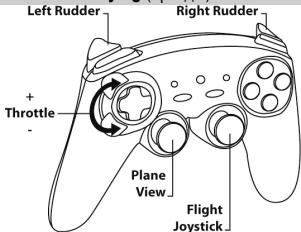
Flying (apkaanbl)
ODHOBPEMEHHOE IICIOJIb3OBAHNE HECKOJIbKIX BECIPPOBOJNbIX IYPOBBIX KOHTPOJIIEPOB "Ferrari Wireless"
(B MHoronolb3Obatelbckom pexnme)
COOTBETCTBYeT OCHOBHbIM Tpe6oBaHnIaM I DpyrIM CTaTbAM NipeKtNbbI R&TTE 1999/5/EC.
CvTeBCTBO 0 COOTBETCTBNN CMOTpNTe Ha caHTe:
http://www.thrustmaster.com/certificates/Ferrari Wireless Gamepad/Doc
Ferrari Wireless Gamepad.pdf
PEKOMEHDAUIMIIO3AUHTEOKPYXKAIOUCEI CPEDbI
Pcne Okohyannp cPoka cnKbI daHnOe H3dJIe He cNepyET YTNIm3PObaT BMECTC 6bITOBIM MycOpOM, HO BVnHKTe c6bopa OxTOdoB 3JKeTPueckOrIO n3KePTPOHHORO 06OpDobAHNI.
Данhoeуka3aHne NOIITBepJdaeTcOoTBeTCTbYIOUcIM CNMBOJOM,HAHeCEHHbIM Ha ⅢdJIeN,pyKOBoCTBO NOJIb3ObaTeJI NIIYyNAKOBKY.
B 3aBcMmOCTN oCBtB, MaTePnAbl MOyT nepeDaBaTbCS B nOBTOpyHIO nepepAbOtky. NIOptNaH apepeBoTa kToXoDob 3eKnTpIeCKeORo H 3eKnTOphHOro O6OpDBOAHM JOKET BHeCTH 3aHuNTEnbH bKnAD b COxpaHENe OKpyXauOeu CpeDbI.
06paTeCb B MeCTHbIe OpraHbI BlaCTn 3a HhOpMaueNe O 6JIHXaMe NyHKTe npHema TaKHX OTXoDOB.
Pn noIb3OBAHnn n3dennem yuTbIaBte cIeDyIOoee. UBeTa u KpaSeHnM OMyr pa3NuaTbcra.
Hactoian npOdyKT COOTBCTByET BCem CTanIapTAM B OTHOweHN MDeTeB B 03pacte 14 Iet N cIapWe.
NcOnIb3OBaHne DaHHOrO npOdyKTA DeTBM MNJaDwe 14 Iet HeONyCTMNO.
Pa6otaet Ha 2 6batapeikax Tnla LR03 / AAA (1.5V), He BXOdaIuX B KOMPNeKT. He nbtaTaeB cepeaepakb 6batapeiK, He anllouecepepeaepkaeMbIMN. NcNoJIb3OBAHbHe 6batapeiKn DOJIxHbI 6bIy daneHbI n rpyuK. He nCIOJIb3yte 6batapeiKn pa3HO Tnla nHbI HoBle I yke nCIOJIb3OBaHbIe 6batapeiKn. NcNOJIb3yte Tohbo 6batapeiKn peKoMeHdyemoro Tnla nCXoKEr Tnla. BatapeiKn DoJIxHbI yCTaHaBNIbBatcR c C6bIOJeHmE NOLpHOctN. KOHTaKtbl 6batapeek He doJIxHbI 3aMbAtbCra
C03daHnEM KOpOTKOrO 3aMbIkaHnA.
Koɪnɪdɛŋnər: 5076063
www.thrustmaster.com


Ferrari Wireless Gamepad
Gamma:PlayStation®3/PlayStation®3 Slim/PC
Evyεiipidio xρnσns
TEXNIKA XAPAKTHPII TIA
- Xειρολβές
2.2 avaloyika mini-stick pooo8eutikns ioupyiac - Σταύρος Ματεύθυνισω
- OTTIKO TIIOVI TIIPOOOEUTIKNc LEIOTUPOYiAc
5.2OkaovdaeTPOOOEutIKnS LEITOUpyiAc - KoumuPI APIXIKH evdEiNLEDyiaPlayStation@3Kai AEITOYPTIA yia PC
-
Koujuri ANTIETOIXEZH EveiEiN LED (via npoypaumio kai katataan eveiEiNs nTc leuayiac)
-
KoumiπI POKAOPIE MENEZPYOMIΕI Με ενδεικLEDYIA EMIλOγπρογαμαισμού)
- Koumtia paon
- 3 umodoxes USB yia PC kai PlayStation®
- Eπλογεας USB "PC" η "PS3"
- Kouμπi ΣYNΔΕΣH με ενδειξη LED στον δεκτη
- Θηκη γι αματαρες
- Diakokottnc ENEPFOIOIH2H ON/FF
\PINAKA\S ME YIIOSTHPIZOMENE AEITOYPIE
Aywves taxutnTAs (TuTos "Ipoosooiow")
Ayuves tauxntaTc (TTOs "Arcade/Palu")
Piioeis (Turoo "Ppoooooiow")
Pntnoeis (Turos "Arcade/Arpaon")
www.thrustmaster.com


Ferrari Wireless Gamepad
"MANUEL ON AYARI" SILMEK IÇIN
www.thrustmaster.com


Ferrari Wireless Gamepad
Do:PlayStation®3/PlayStation®3 Slim/PC
ELEMENT
- Niebieskie diody MAPPING (7) i CONNECT (12)
www.thrustmaster.com


Ferrari Wireless Gamepad
/PlayStation3 Slim/PlayStation3:J
(jssallj) PRESETLED j 8
(a+b)
10.2.11 29
jssuSLJusl USB.10
PlayStation®3,
"PS3" j"JSSSLS" USB 1.11
g (Jz) CONNECTLED.12
Jiuwen jie
13
()POWER ON/OFF 14
(
aai
jia liao.1
(14) (JzIJIy/JzIJIy) POWER ON/OFF
juiyblai jia jiao"4a aia 12c"
jaiall lalil jy
S
jll j"
"R2"
jjj j jia" jai jia
"L2"
PS3
(6) (的) "HOME"
PlayStation®3 p 31234567890123456789012345678901234567890123456789012345678901234567890123456789012345678901234567890123456789
.
PLAYSTATION®3 1
jss "PS3" (11) d y jss sall jgs 2gss USB
Jaiy
gamepad "all llllal gappad 12"
.gamepad Run'N Drive""
J)PlayStation@3 14 "RunN' Drive" gamepad J .PlayStation@3 -
A5J (PlayStation® 2
.1
ps .y j 11111111111111111111111111111111111111111111
Vista WindowsXP
.(14) (Jglll/)(Jgll) POWER ON/OFF gappad Jgbls
Game 123456789011234567890123456789012345678901234567890123456789012345678901234567890123456789012345678901234567890123456789
..Controllers
OK gamepad Game Controllers
()
a (u) Properties 5.5
Aaalll alal, caiaill aaii, n jjaiail aiil gaiu, ayill
- all dea 1234567890
jusssllala cukdu
J 1 (j) "PC" (11) d j k J 1 1 1 1 1 1 1 1 1 1 1 1 1 1 1 1 1 1 1 1 1 1 1 1 1 1 1 1 1 1 1 1 1 1 1
J1
Run N" 品 ( (1234567890) Control Panel ) jjjjjjjjjjjjjjjjjjjjjjjjjjjjjjjjjjjjjjjjjjjjjjjjjjjjjjjjjjjjjjjjjjjjjjjjjjjjjjjjjjjjjjjjjjjjjjjjjjjjjjjjjjjjjjjjjjjjjjjjjjjjjjjjjjjjjjjjjjjjjjjjjjjjjj
"Drive Wireless
y j 1
http://ts.thrustmaster.com/
gagepad gaaeg (a aee aee eae) "j j j j j j j j j j j j j j j j j j j j j j j j j j j j j
"calil" 10000000000000000000000000000000000000000000000000000000000000
"jll" 6 (6) (4) (HOME jle
jusssllg jsslll j
jssll -"gill gall sll 1
| "العربية(العربية) HOME بز | "العربية4" مصع "العربية5" مصع |
| : liq العربية بز ابست "العربية" . العربية لعربية "العربية" العربية لعربية "العربية" العربية العربية بز "العربية" . العربية لعربية "العربية" العربية لعربية "العربية" "العربية" "العربية" . العربية لعربية "العربية" . "العربية" "العربية" . "العربية" "العربية" . "العربية" "العربية" . "العربية" "العربية" . "العربية" "العربية" . "العربية" "العربية" . "العربية" "العربية" . "العربية" "العربية" . "العربية" "العربية" . "العربية" “العربية" . "العربية" "العربية" . "العربية" "العربية" . "العربية" "العربية" . "العربية" "العربية" . "العربية" "العربية" . "العربية" "العربية" . "العربية" "العربية" . "العربية" "العربية" . "العربية" "AL" "AL" "AL" "AL" "AL" "AL" "AL" "AL" "AL" "AL" "AL" "AL" "AL" "AL" "AL" "AL" "AL" "AL" "AL" "AL" "AL" "AL" "AL" "AL" "AL" "AL" "AL" "AL" "AL" "AL" "AL" "AL" "AL" "AL" "العربية" "AL" "AL" "AL" "AL" "AL" "AL" "AL" "AL" "AL" "AL" "AL" "AL" "AL" "AL" "AL" "AL" "AL" "AL" "AL" "AL" "AL" "AL" "AL" "AL" "AL" "AL" "AL" "AL" "AL" "AL" "AL" " AL" "AL" "AL" "AL" "AL" "AL" "AL" "AL" "AL" "AL" "AL" "AL" "AL" "AL" "AL" "AL" "AL" "AL" "AL" "AL" "AL" "AL" "AL" "AL" "AL" "AL" "AL" "AL" "AL" "AL" "AL" "AL" "AL" "AL "العربية" "AL" "AL" "AL" "AL" "AL" "AL" "AL" "AL" "AL" "AL" "AL" "AL" "AL" "AL" "AL" "AL" "AL" "AL" "AL" "AL" "AL" "AL" "AL" "AL" "AL" "AL" "AL" "AL" "AL" "AL" "AL" "Al" "العربية" "AL" "AL" "AL" "AL" "AL" "AL" "AL" "AL" "AL" "AL" "AL" "AL" "AL" "AL" "AL" "AL" "AL" "AL" "AL" "AL" "AL" "AL" "AL" "AL" "AL" "AL" "AL" "AL" "AL" "AL" "AL" “AL” "AL” "AL” "AL” "AL” "AL” "AL” "AL” "AL” "AL” "AL” "AL” "AL” "AL” "AL” "AL” "AL” "AL” "AL” "AL” "AL” "AL” "AL” "AL” "AL” "AL” "AL” "AL” "AL” "AL” "AL” "AL” "AL” "AL” "Al" "العربية" "AL" "AL" "AL" "AL" "AL" "AL" "AL" "AL" "AL" "AL" "AL" "AL" "AL" "AL" "AL" "AL" "AL" "AL" "AL" "AL" "AL" "AL" "AL" "AL" "AL" "AL" "AL" "AL" "AL" "AL" "Al" "العربية" : liq العربية بز ابست "العربية" . العربية بز مصع "العربية" . "العربية" : liq العربية بز مصع "العربية" . "العربية" : liq العربية بز مصع "AL" "AL" "AL" "AL" "AL" "AL" "AL" "AL" "AL" "AL" "AL" "AL" "AL" "AL" "AL" "AL" "AL" "AL" "AL" "AL" "AL" "AL" "AL" "AL" "AL" "AL" "AL" "AL" "AL" "AL" "AL" "AL" "AL" “AL” “AL” “AL” “AL” “AL” “AL” “AL” “AL” “AL” “AL” “AL” “AL” “AL” “AL” “AL” “AL” “AL” “AL” “AL” “AL” “AL” “AL” “AL” “AL” “AL” “AL” “AL” “AL” “AL” “AL” “AL” “AL” “AL” “AL” "AL” “AL” “AL” “AL” “AL” “AL” “AL” “AL” “AL” “AL” “AL” “AL” “AL” “AL” “AL” “AL” “AL” “AL” “AL” “AL” “AL” “AL” “AL” “AL” “AL” “AL” “AL” “AL” “AL” “AL” “AL” “AL” “AL” “Al” "العربية" : liq العربية بز ابست "العربية" . العربية بز مصع "العربية" . "العربية" : liq الع-ie بز مصع "AL" "AL" "AL" "AL" "AL" "AL" "AL" "AL" "AL" "AL" "AL" "AL" "AL" "AL" "AL" "AL" "AL" "AL" "AL" "AL" "AL" "AL" "AL" "AL" "AL" "AL" "AL" "AL" "AL" "AL" "AL" "Al" "الع-ie" : liq الع-ie بز ابست "الع-ie" . "الع-ie" : liq الع-ie بز مصع "AL" "AL" "AL" "AL" "AL" "AL" "AL" "AL" "AL" "AL" "AL" "AL" "AL" "AL" "AL" "AL" "AL" "AL" "AL" "AL" "AL" "AL" "AL" "AL" "AL" "AL" "AL" "AL" "AL" "الع-ie" : liq الع-ie بز مصع "AL" "AL" "AL" "AL" "AL" "AL" "AL" "AL" "AL" "AL" "AL" "AL" "AL" "AL" "AL" "AL" "AL" "AL" "AL" "AL" "AL" "AL" "AL" "AL" "AL" "AL" "AL" "Al" "الع-ie" : liq الع-ie بز مصع "AL" "AL" "AL" "AL" "AL" "AL" "AL" "AL" "AL" "AL" "AL" "AL" "AL" "AL" "AL" "AL" "AL" "AL" "AL" "AL" "AL" "AL" "AL" "AL" "AL" "AL" "AL" “AL” “AL” “AL” “AL” “AL” “AL” "AL” “AL” “AL” “AL” “AL” “AL” “AL” “AL” “AL” “AL” “AL” “AL” “AL” “AL” “AL” “AL” “AL” “AL” “AL” “AL” “AL” “AL” “AL” “AL” “AL” “AL” “AL” "AL” “AL” “AL” “AL” “AL” “AL” “Al” "الع-ie" : liq الع-ie بز مصع "AL" "AL" "AL" "AL" "AL" "AL" "AL" "AL" "AL" "AL" "AL" "AL" "AL" "AL" "AL" "AL" "AL" "AL" "AL" "AL" "AL" "AL" "AL" "AL" "AL" "AL" "AL" " AL" "الع-ie" : liq الع-ie بز مصع "AL" "AL" "AL" "AL" "AL" "AL" "AL" "AL" "AL" "AL" "AL" "AL" "AL" "AL" "AL" "AL" "AL" "AL" "AL" "AL" "AL" "AL" "AL" "AL" "AL" "AL" "AL" "الع-ie" : liq الع-ie بز مصع "AL" "AL" "AL" "AL" "AL" "AL" "AL" "AL" "AL" "AL" "AL" "AL" "AL" "AL" "AL" "AL" "AL" "AL" "AL" "AL" "AL" "AL" "AL" "AL" "AL" "AL" "الع-ie" : liq الع-ie بز مصع "AL" “AL” “AL” “AL” “AL” “AL” “AL” “AL” “AL” “AL” “AL” “AL” “AL” “AL” “AL” “AL” “AL” “AL” “AL” “AL” “AL” “AL” “AL” “AL” “AL” “AL” “AL” “AL” “AL” “AL” “AL” “AL” “AL” "الع-ie" : liq الع-ie بز مصع "AL" “AL” “AL” “AL” “AL” “AL” “AL” “AL” “AL” “AL” “AL” “AL” “AL” “AL” “AL” “AL” “AL” “AL” “AL” “AL” “AL” "الع-ie" : liq الع-ie بز مصع "AL" “AL” “AL” “AL” “AL” “AL” “AL” "AL” “AL” “AL” “AL” “AL” “AL” “AL” “AL” “AL” "الع-ie" : liq الع-ie بز مصع "AL" “AL” “AL” “AL” “AL” “AL” “AL” “AL” “AL” “AL” “AL” “AL” “AL” “AL” “AL” "الع-ie" : liq الع-ie بز مصع "AL" “AL” “AL” “AL” “AL” “AL” “AL” “AL” “AL” “AL” “AL” “AL” "الع-ie" : liq الع-ie بز مصع "AL" “AL” “AL” “AL” “AL” “AL” “AL” “AL” “AL” "الع-ie" : liq الع-ie بز مصع "AL" “AL” “AL” “AL” “AL” “AL” “AL” "الع-ie" : liq الع-ie بز مصع "AL" “AL” “AL” “AL” “AL” “AL” "الع-ie" : liq الع-ie بز مصع "AL" “AL” “AL” “AL” "الع-ie" : liq الع-ie بز مصع "AL" “AL” “AL” "الع-ie" : liq الع-ie بز مصع "AL" “AL” “AL” "الع-ie" : liq الع-ie بز مصع "AL" “AL” "الع-ie" : liq الع-ie بز مصع "AL" “AL” "الع-ie" : liq الع-ie بز مصég "AL" “AL” "الع-ie" : liq الع-ie بز مصég "AL" “AL” "الع-ie" : liq الع-ie بز مصég "AL" “AL” "الع-ie" : liq الع-ie بز مصég "AL" “AL” "الع-ie" : liq الع-ie بز مصég "AL" "AL" "الع-ie" : liq الع-ie بز مصég "AL" “AL” "الع-ie" : liq الع-ie بز مصég "AL" “AL” "الع-ie" : liq الع-ie بز مصég "AL" “AL” "الع-ie" : liq الع-ie بز مصég "AL" “AL” "الYGIE" : liq الYGIE "الYGIE" : liq الYGIE "الYGIE" : liq - - - - - - - - - - - - - - - - - - - - - - - - - - - - - - - - - - - - - - - - - - - - - - - - - - - 100% 200% 300% 400% 500% 600% 700% 800% 900% 1000% |
Jusssss sI g Jssssssssssssssssssssssssssssssssssssssssssssssssssssssssssssssssssssssssssssssssssssssssssssssssssssssssssssssssssssssssssssssssssssss
aayal alqal ayus b
Aydus yos 4) aynnnll aaln all
()
(a) | x - 1| = 1| x|
"aaalll aalal"
4yill 4yly ualldn jjusall sall y
(1)
(j)PRESETj"
(PS3 + jyss =) (yj yds) "MANUAL PRESETS"
Jolilj jolilgamepad Jiee Jiee Jiee Jiee
(1)
a
j 1
jaiy jaiy jaiy jaiy jaiy jaiy jaiy jaiy jaiy jaiy jaiy jaiy jaiy jaiy jaiy jaiy jaiy jaiy jaiy jaiy jaiy jaiy jaiy jaiy jaiy jaiy jaiy jaiy jaiy jaiy jaiy jaiy jaiy jaiy jali y
()
aS g aalaa aaiia (j j y m Jn Jn Jn Jn Jn Jn Jn Jn Jn Jn Jn Jn Jn Jn
3121 1111 1111 1111 1111 1111 1111 1111 1111
d jg g (jall g aeg jaa jll g aag aag aag aag aag aag aag aag
:
aill aall l 1 1 1 1
a aal (yle yale) ayall alall ayall g aay jai (jlll e jna) aay aal
- giv 2 siw
aell ggiuee aie
((a) (c) "On foot" (c) ) o
((jll) "Car" gios) yadis
("iJ1j1"Ej)
("o)sill "sill"
("dsll" 2j)
("gJyJyJ")
( ^n - 1S1 + S2 + S_3) ( x) = x^2 + 5x + 6
("dSd)
(1) (2) "Ferrari Gamepad" 4
yulalulalui
Jlll jie g (Jil) CONNECT jj j bai: Jui j j j j
gamepad (2) L2 + R2 + MAPPING
C
gamepad Jai
gagepad 1
aolal jgssy aolal aagjll sgl J
gagepad 1
giiil) 10al gamepad 2000 2000 2000 2000 2000 2000 2000
(1)
gagepad 7axes"
(gamepad 1) "4 axes"
gamepad
(Gamepad / Gamepad / Gamepad"
A. a b
gai yaiyao ci aikayuyu kui jayuyu oall aail yaiy i
aulljaiyaiyaiyaiyaiyaiyaiyaiyaiyaiyaiyaiyaiyaiyaiyaiyaiyaiyaiyaiyaiyaiyaiyaiyaiyaiyaiyaiyaiyaiyaiyaiyaiyaiyaiyaiyaiyaiyaiyaiyaiyaiyaiyaiyaiyaiyaiyaiyaiyaiyai
a a a a a a a a a a a a a a a a a a a a a a a a a a a a a a a a a a a a a a a a a a a a a a a a a a a a a a aaa
a
j 1 j 1 j 1 j 1 j 1 j 1 j 1 j 1 j 1 j 1 j 1 j 1 j 1 j 1 j 1 j 1 j 1 j 1 j 1 j 1 j 1 j 1 j 1 j 1 j 1 j 1 j 1 j 1 j 1 j 1 j 1 j 1 j 1 j 1 j
abw ydu wu 124 uo uo uby uol 14 uo uo uby
a 15 15 a 15 a 15 a 15 a 15 a 15 a 15 a 15 a 15 a 15 a 15 a 15 a 15 a 15 a 15 a 15 a 15 a 15 a 15 a 15 a 15 a 15 a 15 a 15 a 15 a 15

C E
5076063:
www.thrustmaster.com

Thrustmaster is a division of the Guillemot Corporation group
- Click on your language below
- THRUSTMASTER
- Ferrari Wireless Gamepad
- TECHNICAL FEATURES
- INSTALLING BATTERIES
- OVERVIEW
- THE CONNECTION BETWEEN THE GAMEPAD AND RECEIVER IS ESTABLISHED AUTOMATICALLY
- - STANDBY MODE
- PLAYSTATION®3
- INSTALLATION ON PLAYSTATION®3
- PLAYSTATION®3 MODE
- USING THE "HOME" BUTTON (6)
- IMPORTANT NOTES FOR PLAYSTATION®3
- PC
- INSTALLATION ON PC
- IMPORTANT NOTES FOR PC
- SELECTING "AXES" ON PC
- "AXES" MODES AVAILABLE ON PC
- "AUTOMATIC PRESET" CONFIGURATION - PC
- Here:
- ADVANCED FUNCTIONS
- ADJUSTING THE OPTICAL WHEEL'S SENSITIVITY
- PROGRAMMING MODES
- PROGRAMMING THE OPTICAL WHEEL AND TRIGGERS
- Examples of possible applications:
- - Programming procedure on optical wheel and triggers:
- SWITCHING BUTTONS/MINI-STICKS/D-PAD
- Procedure for switching buttons, mini-sticks and D-Pad
- EEPROM MEMORY
- RETURNING TO "FACTORY SETTINGS"
- POSSIBLE USES IN GAMES
- SOME EXAMPLES AND TIPS:
- DIFFERENT EXAMPLES ACCORDING TO TYPE OF GAME
- USING MORE THAN ONE "Ferrari Wireless Gamepad" AT THE SAME TIME (in Multiplayer mode)
- Channel detection is carried out automatically
- TROUBLESHOOTING AND WARNING
- TECHNICAL SUPPORT
- By email:
- WARRANTY INFORMATION
- Additional warranty provisions
- FCC STATEMENT
- Statement of Compliance with EU Regulations
- COPYRIGHT
- ENVIRONMENTAL PROTECTION RECOMMENDATION
- MODES D'AXES DISPONIBLESUR PC
- INFORMATIONS RELATIVES A LA GARANTIE
- UBERSICHT
- TWEE PROGRAMMEERMODI
- PROBLEM OPLOSSEN EN WAARSCHUWINGEN
- INFORMATIE MET BETREKKING TOT DE GARANTIE
- CARATTERISTICTECNICHE
- CHARACTERISTICAS TECNICAS
- TEXHNUCKNEXAPAKTEPUCTUKN
- YCTAHOBKA BATAPEEK
- 0630P
- BbIKIIOyateJIb IIITaHIN POWER ON/OFF (14)
- HACTPOIKA YUBCTBNTIELBOHOCTN OINTNUECKOFO DATUINA
- - PpIMepbI BO3MOxHOro pPIMHeHnA:
- PpoeDpya Ha3NaueHnA yHKm KHOK, MHN-IXKOCTKOB D-Pad
- BO3BPATK“3ABOДСКИМ HACTPOДКAM"
- ODHOBPEMEHHOE IICIOJIb3OBAHNE HECKOJIbKIX BECIPPOBOJNbIX IYPOBBIX KOHTPOJIIEPOB "Ferrari Wireless"
- PEKOMEHDAUIMIIO3AUHTEOKPYXKAIOUCEI CPEDbI
- TEXNIKA XAPAKTHPII TIA
- "MANUEL ON AYARI" SILMEK IÇIN
- ELEMENT
- aell ggiuee aie
- (Gamepad / Gamepad / Gamepad"
Brand : THRUSTMASTER
Model : SANS FIL FERRARI GAMEPAD 430 SCUDERIA
Category : Gamepad