
Series 1000 S1520 - Razor PHILIPS - Free user manual and instructions
Find the device manual for free Series 1000 S1520 PHILIPS in PDF.


| Product Type | Shaver |
| Brand | Philips |
| Model | Series 1000 S1520 |
| Series | 1000 |
| Color | Black / Blue |
| Dimensions (approx.) | 6.0 x 2.5 x 2.0 inches |
| Weight | 0.4 lbs (180 g) |
| Power Source | Rechargeable battery |
| Battery Type | Lithium-ion |
| Charging Time | 8 hours |
| Shaving Time | 30 minutes |
| Shaving System | MultiFlex heads with pivot |
| Cutting Elements | Self-sharpening blades |
| Trimmer | Pop-up trimmer |
| Washable | Yes, rinse under tap |
| Wet & Dry | Wet use only (not dry) |
| Voltage | 100-240 V |
| Cordless | Yes |
| Travel Lock | No |
| Cleaning | Rinse with water |
| Maintenance | Replace heads every 2 years |
| Replacement Heads | Philips SH30 |
| Warranty | 2 years |
| Manual Languages | Multiple (see manual) |
Frequently Asked Questions - Series 1000 S1520 PHILIPS
User questions about Series 1000 S1520 PHILIPS
0 question about this device. Answer the ones you know or ask your own.
Ask a new question about this device
Download the instructions for your Razor in PDF format for free! Find your manual Series 1000 S1520 - PHILIPS and take your electronic device back in hand. On this page are published all the documents necessary for the use of your device. Series 1000 S1520 by PHILIPS.
USER MANUAL Series 1000 S1520 PHILIPS
natural_image
Black Philips Series 1000 electric shaver with three rotary buttons (no visible text or symbols on body)
natural_image
Simple line drawing of an open book with a grid pattern on the left and a closed page on the right (no text or symbols)
English 6
Čeština 21
Eesti 36
Hrvatski 50
Latviešu 65
Lietuviškai 80
Magyar 94
Polski 109
Română 125
Shqip 140
Slovenščina 155
Slovensky 169
Srpski 184
Български 199
Македонски 215
Русский 231
Українська 245
Қазақша 258
Introduction
Congratulations on your purchase and welcome to Philips! To fully benefit from the support that Philips offers, register your product at www.philips.com/welcome.
General description (Fig. 1)
1 Protection cap
2 Shaving unit
3 Shaving unit release button
4 On/off button
5 Charging light
6 Trimmer (S1520, S1510 only)
7 Trimmer release slide (S1520, S1510 only)
8 Cleaning brush
9 Supply unit (adapter, type HQ850)
10 Small plug
Important safety information
Read this important information carefully before you use the appliance and its accessories and save it for future reference. The accessories supplied may vary for different products.
Danger

natural_image
Prohibition sign of a faucet without any text or symbols- Keep the supply unit dry.
Warning

- The appliance is a Class III construction.
- To charge the battery, only use the detachable supply unit (type HQ850) provided with the appliance.
- The supply unit contains a transformer. Do not cut off the supply unit to replace it with another plug, as this causes a hazardous situation.
- This appliance can be used by children aged from 8 years and above and persons with reduced physical, sensory or mental capabilities or lack of experience and knowledge if they have been given supervision or instruction concerning use of the appliance in a safe way and understand the hazards involved. Children shall not play with the appliance. Cleaning and user maintenance shall not be made by children without supervision.
- Always check the appliance before you use it. Do not use the appliance if it is damaged, as this may cause injury. Always replace a damaged part with one of the original type.
- Do not open the appliance to replace the rechargeable battery.
Caution

natural_image
Prohibition sign showing a faucet without raindrops, enclosed in a circle (no text)- This appliance is not washable. Never immerse the appliance or the charging stand in water and do not rinse it under the tap.
- Only use this appliance for its intended purpose as shown in the user manual.
- For hygienic reasons, the appliance should only be used by one person.
- Never use compressed air, scouring pads, abrasive cleaning agents or aggressive liquids such as petrol or acetone to clean the appliance.
- Do not use the supply unit in or near wall sockets that contain an electric air freshener to prevent irreparable damage to the supply unit.
Electromagnetic fields (EMF)
- This Philips appliance complies with all applicable standards and regulations regarding exposure to electromagnetic fields.
General
- The appliance is suitable for mains voltages ranging from 100 to 240 volts.
- The supply unit transforms 100-240 volts to a safe low voltage of less than 24 volts.
- Maximum noise level: Lc = 69 dB(A)
Charging
It takes approx. 8 hours to fully charge the appliance. When you charge the appliance for the first time or after a long period of disuse, let it charge until the charging light lights up continuously. A fully charged appliance provides up to 45 (S1520), 40 (S1510) or 35 (S1320, S1310) minutes of shaving time. The shaving time may be less than 45, 40 or 35 minutes as a result of your shaving behavior, your cleaning habits or your beard type.
Charging with the adapter

1 Put the small plug in the appliance.
2 Put the adapter in the wall socket.
- The charging light shows the charging status of the appliance (see section ‘Charge indications’ in this chapter).
3 After charging, remove the adapter from the wall socket and pull the small plug out of the appliance.
Charge indications
Battery low

natural_image
Diagram of a medical or anatomical structure with curved layers and a central star-like region, no text or symbols present.- When the battery is almost empty (when there are only 5 or fewer shaving minutes left), the charging light starts to flash orange.
- When the battery is completely empty, the charging light starts to flash orange quickly.
- When you switch off the appliance, the charging light continues to flash orange for a few seconds.
Charging

natural_image
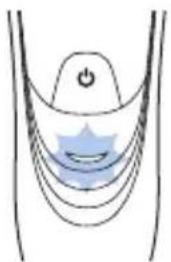
Diagram of a medical device with catheter and arrow indicating left side (no text or symbols)- When the appliance is charging, the charging light flashes green.

natural_image
Simple line drawing of a curved object with a central blue circular feature and a small power button (no text or symbols)Battery fully charged
- When the battery is fully charged, the charging light lights up green continuously.
Note: After approx. 30 minutes, the charging light goes out to save energy.
Note: When you press the on/off button while the appliance is connected to the wall socket, the charging light lights up to remind you to unplug the appliance before use.
Using the appliance
Note: This appliance can only be used without cord.
Shaving tips & tricks
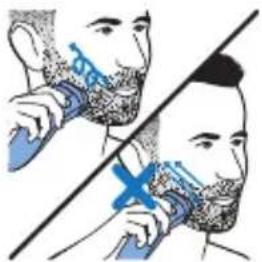
- Make circular movements during use. Circular movements provide better shaving results than straight movements.
- Your skin may need 2 or 3 weeks to get accustomed to the Philips shaving system.
12 English
Switching the appliance on and off

natural_image
Diagram of a human abdomen with a blue arrow pointing to a circular object (no text or labels)1 To switch on the appliance, press the on/off button once.
2 To switch off the appliance, press the on/off button once.
Shaving

1 Switch on the appliance.
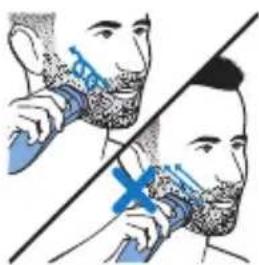
2 Move the shaving heads in circular movements over your skin.
3 After shaving, switch off the appliance.
4 Clean the appliance (see chapter 'Cleaning and maintenance').
Trimming (S1520, S1510 only)
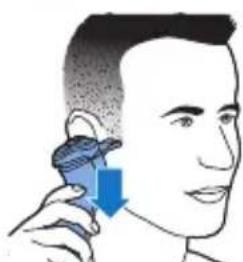
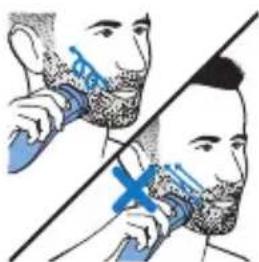
You can use the trimmer to groom your sideburns and moustache.

natural_image
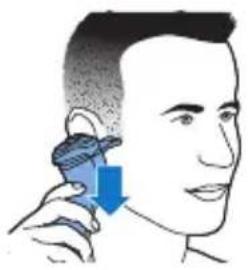
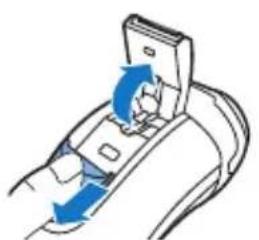
Diagram of a device being inserted into a socket with blue arrows indicating direction (no text or symbols)1 Push the trimmer slide downwards to open the trimmer.
2 Switch on the appliance.
natural_image
Illustration of a person using a handheld device to interact with their face (no text or symbols present)- You can now start trimming.
3 After trimming, switch off the appliance.
4 Clean the trimmer (see chapter ‘Cleaning and maintenance’).

natural_image
Illustration of a hand holding a tool interacting with a device, showing a blue arrow indicating direction (no text or symbols present)5 Close the trimmer ('click').
Cleaning and maintenance
Danger: This appliance is not washable. Never immerse the appliance in water, nor rinse it under the tap.
Caution: Never use compressed air, scouring pads, abrasive cleaning agents or aggressive liquids such as petrol or acetone to clean the appliance.
- Clean the appliance after every shave for optimal shaving performance.
- Regular cleaning guarantees better shaving performance.
- For the best cleaning results, we advise you to use the Philips Cleaning spray (HQ110).
- Never clean the shaving unit and the hair chamber with a towel or tissue, as this may damage the shaving heads and the coupling spindles.
Cleaning the shaving unit with the cleaning brush
natural_image
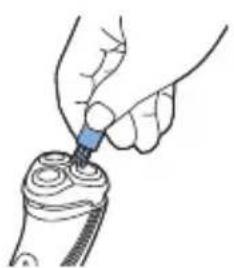
Illustration of a hand using a tool to apply material to a device (no text or symbols visible)1 Switch off the appliance and make sure it is disconnected from the wall socket.
2 Clean the outside of the shaving unit with the brush supplied.
English

natural_image
Illustration showing two steps of a medical procedure involving a patient's ear and surgical tool (no text or symbols present)3 Press the release button to open the shaving unit.
4 Clean the inside of the shaving unit and hair chamber with the brush supplied.
5 Close the shaving unit.
Thorough cleaning
Clean the shaving heads thoroughly once a month for optimal performance.

1 Switch off the appliance and make sure it is disconnected from the wall socket.
2 Press the release button to open the shaving unit. Pull the shaving unit off the appliance.
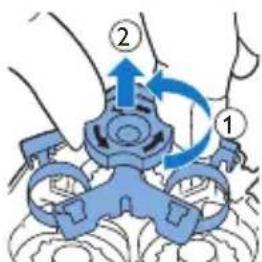
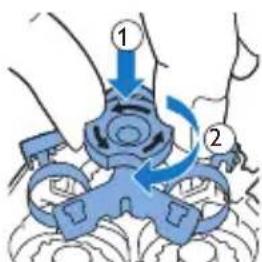
3 Turn the lock anticlockwise and remove the retaining frame.
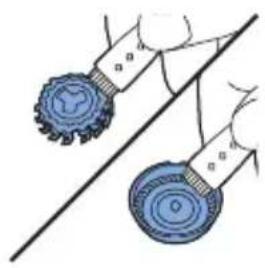
4 Remove and clean one shaving head at a time. Each shaving head consists of a cutter and a guard.
Note: Do not clean more than one cutter and guard at a time, since they are all matching sets. If you accidentally put a cutter in the wrong
natural_image
Illustration of two blue circular objects on a diagonal line, no text or symbols presentshaving guard, it may take several weeks before optimal shaving performance is restored.
- Remove the cutter from the shaving guard and clean it with the brush.
- Clean the inside and outside of the shaving guard with the brush.

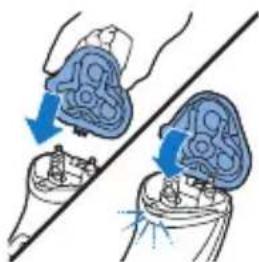
5 Put the cutter back into the guard.
natural_image
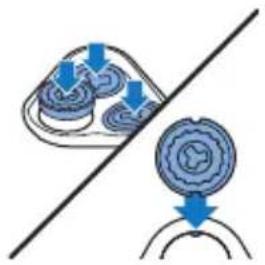
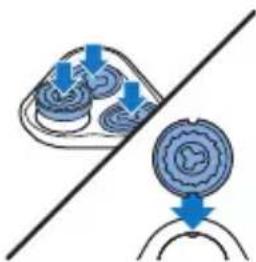
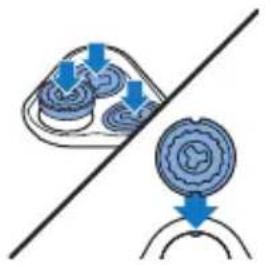
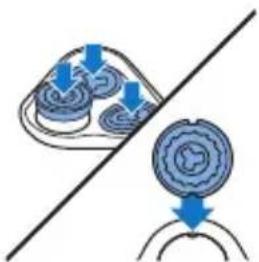
Diagram showing two blue circular components with directional arrows above and below a diagonal line (no text or symbols)6 Put the shaving heads back into the shaving unit.
Note: Make sure the notches on both sides of the shaving heads fit exactly onto the projections in the shaving head holder.
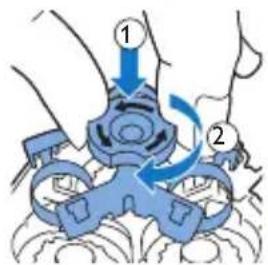
7 Put the retaining frame back into the shaving unit and turn the lock clockwise.
natural_image
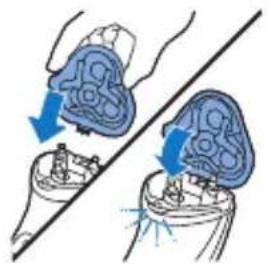
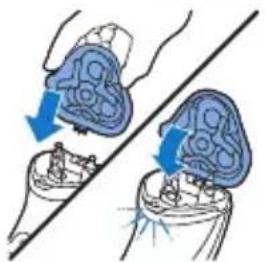
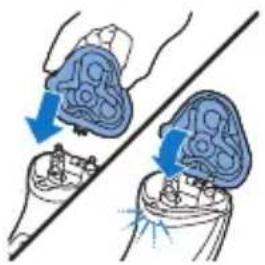
Illustration of two hands performing a medical procedure on a device, showing blue arrows indicating movement or force (no text or symbols present)8 Insert the lug of the shaving unit into the slot in the top of the appliance. Then close the shaving unit ('click').
Note: If the shaving unit does not close smoothly, check if you have inserted the shaving heads properly and if the retaining frame is locked.
Cleaning the trimmer with the cleaning brush (S1520, S1510 only)

Clean the trimmer every time you have used it.
1 Switch off the appliance and make sure it is disconnected from the wall socket.
2 Push the trimmer slide downwards to open the trimmer.
3 Clean the trimmer with the cleaning brush. Brush up and down along the trimmer teeth.
4 Close the trimmer ('click').

Tip: For optimal trimming performance, lubricate the trimmer teeth with a drop of sewing machine oil every six months.
Storage

natural_image
Illustration of a hairdryer with blue hair and black teeth, showing hair damage (no text or symbols)Put the protection cap on the shaver to prevent damage.
Replacement

For maximum shaving performance, we advise you to replace the shaving heads every two years.
Replace damaged shaving heads immediately.
Always replace the shaving heads with original Philips shaving heads (see 'Ordering accessories').

natural_image
Diagram showing two mechanical components with blue arrows indicating motion or force direction, no text or symbols present.1 Switch off the appliance and make sure it is disconnected from the wall socket.
2 Press the release button to open the shaving unit. Pull the shaving unit off the appliance.
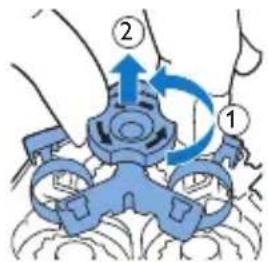
3 Turn the lock anticlockwise and remove the retaining frame.

natural_image
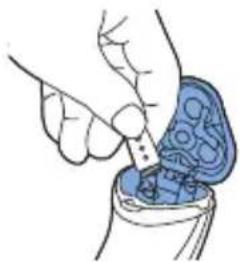
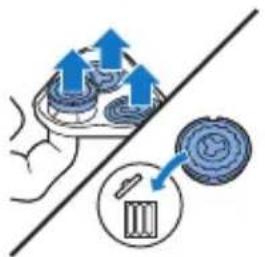
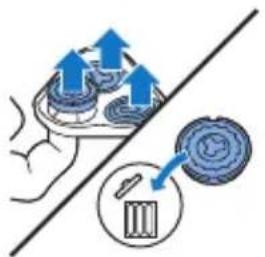
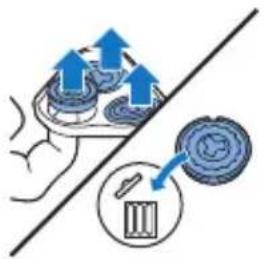
Illustration of a hand holding a tray with upward arrows and a magnified inset showing a circular object (no text or symbols)4 Remove the shaving heads from the shaving unit and throw them away.
5 Place new shaving heads in the shaving unit.
Note: Make sure the notches on both sides of the shaving heads fit exactly onto the projections in the shaving head holder.

6 Put the retaining frame back into the shaving unit and turn the lock clockwise.

natural_image
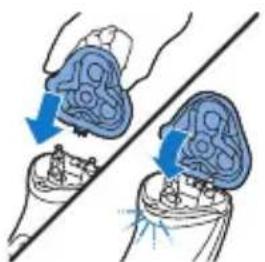
Illustration of two medical devices with blue arrows indicating force or movement, no text or symbols present7 Insert the lug of the shaving unit into the slot in the top of the appliance. Then close the shaving unit ('click').
Note: If the shaving unit does not close smoothly, check if you have inserted the shaving heads properly and if the retaining frame is locked.
Ordering accessories
To buy accessories or spare parts, visit
www.shop.philips.com/service or go to your
Philips dealer. You can also contact the Philips Consumer Care Center in your country (see the worldwide guarantee leaflet for contact details).
The following accessories and spare parts are available:
- SH30 Philips Shaving Heads.
- HQ110 Philips shaving head cleaning spray
Recycling

- This symbol means that this product shall not be disposed of with normal household waste (2012/19/EU).
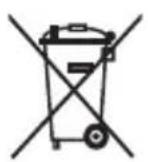
- This symbol means that this product contains a built-in rechargeable battery which shall not be disposed of with normal household waste (2006/66/EC). We strongly advise you to take your product to an official collection point or a Philips service centre to have a professional remove the rechargeable battery.
- Follow your country's rules for the separate collection of electrical and electronic products and rechargeable batteries. Correct disposal helps prevent negative consequences for the environment and human health.
Guarantee and support
If you need information or support, please visit www.philips.com/support or read the separate worldwide guarantee leaflet.
Guarantee restrictions
The shaving heads (cutters and guards) are not covered by the terms of the international guarantee because they are subject to wear.
Troubleshooting
This chapter summarizes the most common problems you could encounter with the appliance. If you are unable to solve the problem with the information below, visit www.philips.com/support for a list of frequently asked questions or contact the Consumer Care Center in your country.
Problem Possible cause Solution
| The appliance does not shave as well as it used to. | The shaving heads are damaged or worn. | Replace the shaving heads. See chapter 'Replacement'. |
| Long hairs obstruct the shaving heads. | Clean the shaving heads one by one (see chapter 'Cleaning and maintenance'). |
Problem Possible cause Solution
| You have not inserted the shaving heads properly. | Make sure the notches on both sides of the shaving heads fit exactly onto the projections in the shaving-head holder (see chapter 'Cleaning and maintenance'). | |
| The appliance does not work when I press the on/off button. | The appliance is connected to the wall socket. | This appliance can only be used without cord. |
| The rechargeable battery is empty. | Recharge the battery (see chapter 'Charging'). | |
| The temperature of the appliance is too high. In this case, the appliance does not work. | As soon as the temperature of the appliance has dropped sufficiently, you can switch on the appliance again. |
Úvod
natural_image
Prohibition sign of a faucet without any text or symbolsnatural_image
Prohibition sign showing a faucet with a diagonal line and raindrops (no text)natural_image
Diagram of a medical device with a power button and wave pattern (no text or symbols)natural_image
Diagram of a curved structure with a power button and a blue arrow indicating direction (no text or symbols)natural_image
Diagram of a curved structure with concentric layers and a central circular feature, no text or symbols present.natural_image
Diagram of a human body with a blue arrow pointing to a small circular object (no text or symbols present)natural_image
Illustration of a person applying a toothbrush to another person's face, showing the brush (no text or symbols present)natural_image
Diagram of a hand inserting a device into a cable, showing blue arrows indicating direction (no text or symbols)natural_image
Illustration of a person using a handheld earpiece with a blue arrow indicating direction (no text or symbols)natural_image
Illustration of a hand holding a tool interacting with a device, showing a blue arrow indicating direction (no text or symbols present)natural_image
Illustration of a hand using a tool to apply liquid into a mechanical component (no text or symbols visible)natural_image
Illustration showing two steps of a medical procedure involving a patient's ear and an otoscope (no text or symbols present)natural_image
Illustration of two blue circular mechanical components with a diagonal line, no text or symbols present

natural_image
Diagram showing two circular objects with downward arrows above and below a diagonal line (no text or symbols)

natural_image
Illustration of two medical or surgical procedures with blue arrows indicating force or movement (no text or symbols present)natural_image
Illustration of a hairpin with blue tip and blue arrow indicating compression or compression process (no text or symbols)natural_image
Diagram showing two mechanical components with blue arrows indicating motion or force direction, no text or symbols present.

natural_image
Illustration of a hand using a tool to interact with a device, showing upward arrows and a circular component (no text or symbols)
natural_image
Illustration of two medical devices with blue arrows indicating force or movement, no text or symbols presentnatural_image
Prohibition sign showing a faucet without a shower, enclosed in a circle (no text or symbols)natural_image
Prohibition sign of a faucet without any text or symbols1 Sisestage väike pistik seadmesse.
2 Sisestage adapter seinakontakti.
natural_image
Diagram of a medical device with a blue arrow indicating a curved path or flow, no text or symbols present.Aku on tühi
natural_image
Diagram of a medical device with catheter and surrounding curved lines, no text or symbols presentLaadimine
natural_image
Diagram of a curved structure with layered layers and a central circular feature (no text or symbols)Aku on täis laetud
natural_image
Diagram of a human abdomen with a blue arrow pointing to a specific area (no text or labels)Raseerimine

natural_image
Illustration of a person applying a toothbrush to another person's lower face (no text or symbols present)natural_image
Diagram of a device being inserted into a cable, showing blue arrows indicating direction (no text or symbols present)
natural_image
Illustration of a person using a handheld device to interact with the ear (no text or symbols present)natural_image
Illustration of a hand holding a tool interacting with a device (no text or symbols visible)natural_image
Illustration of a hand using a blue tool to apply liquid onto a cylindrical object (no text or symbols visible)natural_image
Illustration of a medical device with blue arrows indicating force or movement (no text or symbols)3 Eemaldage pardlipea pardlist, vajutades vabastusnuppu.
natural_image
Illustration of a hand inserting a small blue object into a device (no text or symbols visible)natural_image
Diagram showing two views of a mechanical component with directional arrows indicating movement (no text or symbols)natural_image
Diagram showing two mechanical components with upward arrows, one above a diagonal line (no text or symbols)natural_image
Illustration of two blue gear-like objects on a diagonal line, no text or symbols presentnatural_image
Diagram showing two circular components with downward arrows, one intersected by a diagonal line (no text or symbols)natural_image
Illustration of two medical devices with blue arrows indicating force or movement, no text or symbols presentnatural_image
Diagram of a device being inserted into a cable, showing blue arrows indicating direction (no text or symbols present)natural_image
Illustration of a hand inserting a plug into a device (no text or symbols visible)natural_image
Illustration of a hand turning a tooth with blue hair and light rays (no text or symbols)natural_image
Diagram showing two anatomical views of a human head with blue arrows indicating movement or force (no text or labels)natural_image
Diagram showing a mechanical assembly with arrows indicating motion and a circular component with a brush (no text or symbols)natural_image
Illustration of two hands performing a medical procedure on a patient's abdomen, with arrows indicating movement (no text or symbols present)natural_image
Prohibition sign showing a faucet without a shower, enclosed in a circle (no text or symbols)- Održavajte jedinicu za napajanje suhom.
Upozorenje

natural_image
Prohibition sign showing a faucet with a diagonal line and raindrops, no text present1 Mali utikač ukopčajte u aparat.
2 Adapter ukopčajte u zidnu utičnicu.
- Svjetlo za punjenje prikazuje status punjenja uredaja (pogledajte dio 'Indikatori punjenja' u ovom poglavlju).
3 Nakon punjenja izvadite adapter za napajanje iz zidne utičnice, a mali utikač iz aparata.
Indikatori punjenja
Baterija je gotovo prazna

natural_image
Diagram of a medical or anatomical structure with curved layers and a central star-like region, no text or symbols present.- Kada je baterija gotovo prazna (kada preostane samo 5 minuta ili manje vremena za brijanje), indikator punjenja počinje bljeskati narančastom bojom.
- Kad baterija bude prazna do kraja, svjetlo za punjenje počne brzo bljeskati narančasto.
- Kad isključite uredaj, svjetlo za punjenje nastavi bljeskati narančasto nekoliko sekundi.
Punjenje
natural_image
Diagram of a medical device with a highlighted blue wave pattern (no text or symbols)- Dok se aparat puni, indikator punjenja bljeska zeleno.

natural_image
Diagram of a curved structure with layered layers and a central circular feature, no text or symbols present.natural_image
Diagram of a human abdomen with a blue arrow pointing to a circular region, no text or symbols presentnatural_image
Illustration of a person using a handheld device to interact with another person (no text or symbols present)1 Uključite aparat.
2 Glave za brijanje kružnim pokretima pomičite po koži.
natural_image
Diagram of a hand holding a device with blue arrows indicating rotation or movement (no text or symbols)natural_image
Illustration of a person using a handheld device to apply facial hair (no text or symbols present)- Sada možete početi s podrezivanjem.
natural_image
Illustration of a hand holding a device with a blue arrow pointing to a component (no text or symbols)5 Zatvorite trimer ('klik').
natural_image
Illustration of a hand using a tool to apply liquid into a device (no text or symbols visible)1 Isključite apatat i pazite da je isključen s napajanja.
2 Očistite vanjski dio jedinice za brijanje dostavljenom četkom.

natural_image
Illustration showing two steps of a medical procedure involving a patient's ear and surgical tool (no text or symbols present)1 Isključite apatat i pazite da je isključen s napajanja. 2 Pritisnite gumb za otpuštanje kako biste otvorili jedinicu za brijanje. Povucite jedinicu za brijanje s uređaja.
natural_image
Illustration of two blue circular objects on a diagonal line, no text or symbols presentštitnik za brijanje, može potrajati nekoliko tjedana dok se ne vrati optimalna izvedba brijanja.
natural_image
Diagram showing two circular components with blue arrows pointing to them, separated by a diagonal line (no text or symbols)natural_image
Illustration of two hands performing a medical procedure on a device, showing blue surgical tool placement (no text or symbols)8 Stavite stopicu jedinice za brijanje u utor na vrhu uređaja. Zatim zatvorite jedinicu za brijanje ('klik').
Napomena: Ako se jedinica za brijanje ne zatvara lako, provjerite jesu li glave za brijanje ispravno umetnute i je li zaključan okvir za pričvršćivanje.
Čišćenje trimera četkom za čišćenje (samo S1520, S1510)
Očistite trimer nakon svake uporabe.

natural_image
Diagram of a hand holding a device with blue arrows indicating rotation or movement (no text or symbols)1 Isključite apatat i pazite da je isključen s napajanja.
natural_image
Illustration of a hand using a tool to lift a car seatbelt, with blue arrows indicating direction (no text or symbols)3 Očistite trimer četkom za čišćenje. Očetkajte gore-dolje uz zupce trimera.
4 Zatvorite trimer ('klik').

natural_image
Illustration of a hairdryer with blue hair and black teeth, showing hair damage (no text or symbols)natural_image
Diagram showing two views of a biological structure with blue arrows indicating direction, no text or symbols present1 Isključite apatat i pazite da je isključen s napajanja.
2 Pritisnite gumb za otpuštanje kako biste otvorili jedinicu za brijanje. Povucite jedinicu za brijanje s uređaja.

4 Izvadite glave za brijanje iz jedinice za brijanje i bacite ih.
5 Stavite nove glave za brijanje u jedinicu za brijanje.
Napomena: Pazite da zarezi na obje strane glave za brijanje točno odgovaraju projekcijama na držaču glava za brijanje.

natural_image
Illustration of two medical devices with blue arrows indicating force or movement, no text or symbols present7 Stavite stopicu jedinice za brijanje u utor na vrhu uređaja. Zatim zatvorite jedinicu za brijanje ('klik').
Napomena:Ako se jedinica za brijanje ne zatvara lako, provjerite jesu li glave za brijanje ispravno umetnute i je li zaključan okvir za pričvršćivanje.
Naručivanje dodatnog pribora
Da biste kupili dodatke ili rezervne dijelove, posjetite www.shop.philips.com/service ili se obratite dobavljaču tvrtke Philips. Također se možete obratiti centru za potrošače tvrtke Philips u svojoj državi (pogledajte međunarodni jamstveni list radi detalja o kontaktu).
natural_image
Prohibition sign of a faucet without any text or symbolsnatural_image
Prohibition sign showing a faucet with a diagonal line and raindrops (no text)natural_image
Diagram of a medical device with a power button and wave pattern (no text or symbols)natural_image
Diagram of a curved structure with a power button and a blue arrow indicating direction (no text or symbols)natural_image
Diagram of a curved structure with concentric layers and a central blue circular region, no text or symbols present.natural_image
Diagram of a curved surface with a blue arrow pointing to a small circular feature (no text or symbols)natural_image
Diagram of a hand inserting a device into a device socket, showing blue arrows indicating rotation (no text or symbols present)Varat lietot trimmeri, lai koptu vaigubārdu un ūsas.
natural_image
Illustration of a person using a handheld device to interact with the ear (no text or symbols present)natural_image
Illustration of a hand holding a tool interacting with a device, showing a blue arrow indicating direction (no text or symbols present)5 Aizveriet trimmeri (atskan klikškis).
Tīrīšana un apkope
natural_image
Illustration of a hand using a blue tool to apply material to a cylindrical device (no text or symbols visible)natural_image
Illustration showing two steps of a medical procedure involving a brain and a tool, with no visible text or symbols.natural_image
Illustration of two blue circular objects on a diagonal line, no text or symbols presentnatural_image
Diagram showing two circular components with blue arrows pointing to them, separated by a diagonal line (no text or symbols)natural_image
Illustration of two hands performing a medical procedure on a device, showing blue arrows indicating movement or force (no text or symbols present)natural_image
Diagram of a device being inserted into a socket with blue arrows indicating direction (no text or symbols)natural_image
Illustration of a hand using a device to lift a car seatbelt, with blue arrows indicating motion (no text or symbols)natural_image
Illustration of a hairdryer with blue spray and light rays, no text or symbols presentnatural_image
Prohibition sign of a faucet without any text or symbolsnatural_image
Prohibition sign of a faucet without any text or symbolsnatural_image
Diagram of a medical or anatomical structure with layered curves and a central highlighted region (no text or symbols)Baterija senka
natural_image
Diagram of a medical device with a highlighted blue wave pattern (no text or symbols)natural_image
Diagram of a curved structure with layered layers and a central blue circular region, no text or symbols present.natural_image
Diagram of a human abdomen with a blue arrow pointing to a specific area (no text or labels)natural_image
Illustration of a person brushing teeth with a blue tool, no text or symbols presentnatural_image
Illustration of a hand using a blue tool to apply liquid onto a cylindrical object (no text or symbols visible)natural_image
Illustration of a human head with a brain and surgical hardware, showing blue arrows indicating movement or force (no text or symbols)natural_image
Illustration of a hand inserting a blue object into a container (no text or symbols)natural_image
Illustration of two medical devices with blue arrows indicating movement or force direction (no text or symbols)natural_image
Diagram showing a hand holding three circular objects with upward arrows, separated by a diagonal line (no text or symbols)natural_image
Illustration of two blue circular objects on a diagonal line, no text or symbols presentnatural_image
Diagram showing two blue circular components with downward arrows, connected by a diagonal line (no text or symbols)6 Skutimo galvutes jstatykite atgal i skutimo jtaisa.
natural_image
Illustration of two hands performing a medical procedure on a patient's abdomen, with arrows indicating movement (no text or symbols present)natural_image
Diagram of a device with blue directional arrows indicating movement or force (no text or symbols)natural_image
Illustration of a hand inserting a plug into a device with blue arrows indicating direction (no text or symbols)natural_image
Illustration of a blue object being lifted by a tool, with no visible text or symbolsnatural_image
Diagram showing two hands performing a medical procedure with blue arrows indicating direction (no text or labels)natural_image
Diagram showing a hand holding a tray with upward arrows and a circular object with a pointer, no text or symbols present.natural_image
Illustration of a medical procedure showing hand placement and surgical tools (no text or symbols)natural_image
Prohibition sign showing a faucet with a diagonal line and raindrops, no text presentnatural_image
Prohibition sign showing a faucet without raindrops, enclosed in a circle (no text)natural_image
Diagram of a medical or anatomical structure with curved layers and a central star-like shape, no text or symbols present.natural_image
Diagram of a medical or anatomical structure with layered curves and a central highlighted region (no text or symbols)Töltés
natural_image
Diagram of a medical device with a power button and curved layers (no text or symbols)natural_image
Diagram of a human abdomen with a blue arrow pointing to a specific area (no text or labels)natural_image
Illustration of a person brushing teeth with a blue tool, no text or symbols presentnatural_image
Diagram of a device being inserted into a cable, showing blue arrows indicating direction (no text or symbols present)natural_image
Illustration of a person using a handheld device to apply eye care (no text or symbols present)
natural_image
Illustration of a hand inserting a plug into a device with blue arrows indicating direction (no text or symbols)natural_image
Illustration of a hand using a tool to apply a component (no text or symbols visible)natural_image
Illustration of a hand holding a medical device with blue arrows indicating force or movement (no text or symbols)natural_image
Illustration of a hand inserting a plug into a device with blue internal components (no text or symbols)Alapos tisztítás
natural_image
Diagram showing two blue arrows pointing to a mechanical component, intersected by a diagonal line (no text or symbols)

natural_image
Diagram showing mechanical components with upward arrows, no text or symbols presentnatural_image
Illustration of two blue circular objects on a diagonal line, no text or symbols presentnatural_image
Diagram showing two circular components with directional arrows, separated by a diagonal line (no text or symbols)natural_image
Illustration of two medical or surgical procedures on a tool, showing blue anatomical structures with arrows indicating motion (no text or symbols present)natural_image
Diagram of a device being inserted into a socket with blue arrows indicating direction (no text or symbols)natural_image
Illustration of a hand inserting a plug into a device with blue arrows indicating direction (no text or symbols)natural_image
Illustration of a mechanical joint with a blue component and a light beam, no text or symbols presentnatural_image
Diagram showing two anatomical views of a human head with blue arrows indicating movement or force direction (no text or labels)natural_image
Illustration of a hand holding a tray with upward arrows and a circular object, no text or symbols present.natural_image
Illustration of two hands performing a medical procedure on a device, showing valve placement and force arrows (no text or symbols)natural_image
Prohibition sign showing a faucet without a shower, enclosed in a circle (no text)natural_image
Prohibition sign of a faucet without any text or symbolsnatural_image
Diagram of a curved structure with a power button and a blue star-like symbol inside, no text or labels present.natural_image
Diagram of a medical or anatomical structure with curved lines and a central blue arrow, no text or symbols present.Ładowanie
natural_image
Diagram of a curved structure with a central circular feature and an electrical symbol (no text or labels)natural_image
Diagram of a human abdomen with a blue arrow pointing to a specific region (no text or labels)natural_image
Illustration of a person applying a toothbrush to their face, showing two different angles (no text or symbols present)natural_image
Diagram of a device being inserted into a socket with blue arrows indicating direction (no text or symbols)natural_image
Illustration of a person using a handheld device to interact with the ear (no text or symbols present)natural_image
Illustration of a hand holding a device with a blue arrow pointing to a component (no text or symbols)natural_image
Illustration of a hand using a blue tool to apply liquid onto a cylindrical object (no text or symbols visible)natural_image
Illustration of a human head with blue arrows indicating force or movement (no text or symbols)natural_image
Illustration of a hand inserting a small object into a blue container (no text or symbols)natural_image
Diagram showing two blue circular objects with arrows indicating movement or force, intersected by a diagonal line (no text or symbols)natural_image
Diagram showing a hand holding a tray with blue circular objects and arrows indicating upward motion, separated by a diagonal line (no text or symbols)natural_image
Illustration of two blue circular objects on a diagonal line, no text or symbols presentnatural_image
Illustration of a hairdryer with blue tip and blue arrow indicating compression (no text or symbols)natural_image
Illustration of two blue anatomical structures with directional arrows, no text or symbols present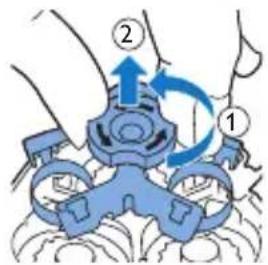

natural_image
Diagram showing a hand holding a tray with upward arrows and a circular object below, no text or symbols present.

natural_image
Illustration of two hands performing a medical procedure on a device, showing mechanical components and blue arrows indicating motion (no text or symbols)Guarantee restrictions
natural_image
Prohibition sign showing a faucet with a diagonal line and a diagonal line, no text or symbols present.natural_image
Prohibition sign of a faucet without any text or symbolsnatural_image
Diagram of a medical or anatomical structure with layered curves and a central highlighted region (no text or symbols)natural_image
Diagram of a medical device with catheter and surrounding layers (no text or symbols)natural_image
Diagram of a curved structure with layered layers and a central circular feature, no text or symbols present.natural_image
Diagram of a human abdomen with a blue arrow pointing to a specific area (no text or labels)natural_image
Illustration of a person brushing teeth with a blue tool, no text or symbols presentnatural_image
Diagram of a cable connector with blue arrows indicating rotation or movement (no text or symbols)natural_image
Illustration of a person using a handheld device to interact with the ear (no text or symbols present)
natural_image
Illustration of a person using a handheld device to apply eye care (no text or symbols present)
natural_image
Illustration of a hand holding a tool interacting with a device, showing a blue arrow indicating direction (no text or symbols present)natural_image
Illustration of a hand using a blue tool to apply liquid onto a cylindrical object (no text or symbols visible)natural_image
Illustration of a hand holding a small object with blue arrows indicating movement or force (no text or symbols present)natural_image
Illustration of two blue circular objects on a diagonal line, no text or symbols present
natural_image
Diagram showing two blue circular components with directional arrows above and below a diagonal line (no text or symbols)
natural_image
Illustration of two medical or surgical procedures with blue arrows indicating force or movement (no text or symbols present)natural_image
Illustration of a hairbrush applying blue liquid to a tooth (no text or symbols)natural_image
Diagram showing two blue arrows pointing to a mechanical component between two views (no text or symbols)natural_image
Diagram showing a hand holding a device with arrows indicating motion, alongside a circular object with a downward arrow and a battery symbol (no text or labels)
natural_image
Illustration of two medical or surgical procedures on a tool, showing hand placement and blue arrows indicating movement (no text or symbols present)natural_image
Prohibition sign showing a faucet without spraying water, enclosed in a circle (no text)natural_image
Prohibition sign of a faucet without any text or symbolsnatural_image
Diagram of a curved surface with concentric layers and a central star-like pattern, no text or symbols present.natural_image
Diagram of a medical device with a blue arrow indicating rotation or movement (no text or symbols)natural_image
Diagram of a curved structure with layered layers and a central circular feature, no text or symbols present.natural_image
Diagram of a human abdomen with a blue arrow pointing to a circular object (no text or labels)1 Ndizeni pajisjen.
natural_image
Diagram of a cable connector with blue directional arrows indicating movement (no text or symbols)natural_image
Illustration of a person using a handheld device to interact with their ear (no text or symbols present)natural_image
Illustration of a hand holding a tool interacting with a device, showing a blue arrow and light rays (no text or symbols)natural_image
Illustration of a hand using a blue tool to apply liquid onto a cylindrical object (no text or symbols visible)natural_image
Illustration of a hand holding a medical device with arrows indicating force or movement (no text or symbols)natural_image
Illustration of a hand inserting a small component into a device (no text or symbols visible)natural_image
Diagram showing two blue anatomical views of a human head with arrows indicating movement or force direction (no text or labels)natural_image
Diagram showing two mechanical components with upward arrows indicating motion, no text or symbols presentnatural_image
Illustration of two blue circular objects on a diagonal line, no text or symbols presentnatural_image
Diagram showing two circular objects with blue arrows pointing to a curved base, intersected by a diagonal line (no text or symbols)natural_image
Illustration of two medical devices with blue arrows indicating force or movement, no text or symbols presentnatural_image
Diagram of a device being inserted into a cable, showing blue arrows indicating direction (no text or symbols present)natural_image
Illustration of a hand using a tool to press down a device component (no text or symbols visible)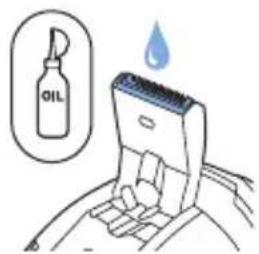
Ruajtja

natural_image
Illustration of a hand turning a tooth with a blue object above, showing motion and shading (no text or symbols)natural_image
Illustration of two hands performing a medical procedure on a patient's abdomen, with arrows indicating movement (no text or symbols present)natural_image
Diagram showing a hand holding a tray with upward arrows and a circular object with a pointer, alongside a diagonal line (no text or symbols)natural_image
Illustration of two medical or surgical procedures on a tool, showing blue anatomical structures with arrows indicating motion (no text or symbols present)natural_image
Prohibition sign of a faucet without any text or symbols- Napajalnika ne zmočite.
Opozorilo

natural_image
No sign depicting a faucet with a showerhead, enclosed in a circle (no text or symbols)1 Mali vtič vstavite v aparat.
natural_image
Diagram of a medical or anatomical structure with layered curves and a central highlighted region (no text or symbols)natural_image
Diagram of a curved structure with concentric layers and a central arrow, no text or symbols present- Ko se aparat polni, lučka za polnjenje utripa zeleno.

natural_image
Diagram of a curved structure with layered layers and a central blue circular region, no text or symbols present.Baterija napolnjena
- Ko je baterija napolnjena, lučka za polnjenje neprekinjeno sveti zeleno.
natural_image
Diagram of a medical or anatomical structure with a blue arrow pointing to a specific region (no text or labels)1 Aparat vklopite s pritiskom na gumb za vklop/izklop.
2 Aparat izklopite s pritiskom na gumb za vklop/izklop.
Britje
natural_image
Diagram of a cable connector with blue directional arrows indicating motion (no text or symbols)natural_image
Illustration of a person using a handheld device to interact with their ear (no text or symbols present)natural_image
Illustration of a hand holding a tool interacting with a device, showing a blue arrow indicating direction (no text or symbols present)natural_image
Illustration of a hand using a pipette to apply liquid into a mechanical component (no text or symbols visible)natural_image
Illustration showing two steps of a medical procedure involving a brain and a tool, with no visible text or symbols.natural_image
Illustration of two blue circular objects with serrated edges and a diagonal line, no text or symbols presentnatural_image
Diagram showing two blue circular components with directional arrows above a diagonal line, no text or symbols present.6 Brivne glave namestite nazaj v brivno enoto.
7 Nosilni okvir namestite nazaj na brivno enoto in zaklep zasukajte v desno.

natural_image
Illustration of two medical devices with blue arrows indicating force or movement (no text or symbols)natural_image
Diagram of a device being inserted into a cable, showing blue arrows indicating direction (no text or symbols present)natural_image
Illustration of a hand inserting a plug into a device (no text or symbols visible)natural_image
Illustration of a hairdryer with blue spray and light effect, no text or symbols presentnatural_image
Prohibition sign of a faucet without any text or symbolsnatural_image
Prohibition sign showing a faucet without a shower, enclosed in a circle (no text or symbols)1 Malú koncovku zasuňte do zariadenia.
2 Adaptér pripojte do sietovej zásuvky.
natural_image
Diagram of a medical device with catheter and surrounding layers (no text or symbols)natural_image
Diagram of a medical or anatomical structure with layered curves and a central highlighted region (no text or symbols)Nabíjanie
- Pri nabíjaní zariadenia bliká kontrolné svetlo nabíjania na zeleno.

natural_image
Diagram of a curved structure with layered layers and a central circular feature, no text or symbols present.natural_image
Diagram of a human abdomen with a blue arrow pointing to a specific area (no text or labels)natural_image
Illustration of a person applying a toothbrush to another person's lower face (no text or symbols present)natural_image
Diagram of a device being inserted into a cable, showing blue arrows indicating direction (no text or symbols present)Slovensky
natural_image
Illustration of a person using a handheld device to interact with an ear (no text or symbols present)natural_image
Illustration of a hand holding a tool interacting with a device (no text or symbols visible)Čistenie a údržba
Nebezpečenstvo: Toto zariadenie nie je možné umyť vodou. Zariadenie nikdy neponárajte do vody ani neumývajte pod tečúcou vodou.
natural_image
Illustration of a hand using a blue tool to apply a component to a cylindrical object (no text or symbols visible)natural_image
Illustration of a hand holding a medical device with blue arrows indicating force or movement (no text or symbols)3 Stlačte uvolňovacie tlačidlo a otvorte holiacu jednotku.

natural_image
Illustration of a hand inserting a small blue object into a container (no text or symbols)natural_image
Diagram showing two mechanical components with blue arrows indicating motion or force direction, no text or symbols present.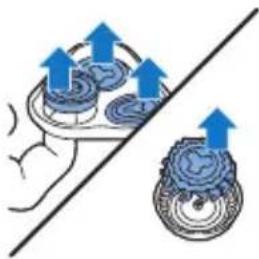
natural_image
Diagram showing mechanical components with upward arrows, no text or symbols present
natural_image
Illustration of two blue circular objects on a diagonal line, one with a textured surface and the other with a flat edge (no text or symbols)
natural_image
Diagram showing two blue circular components with directional arrows, separated by a diagonal line (no text or symbols)natural_image
Illustration of two medical or surgical procedures on a tool, showing alignment and force application (no text or symbols)natural_image
Diagram of a hand holding a device with blue arrows indicating rotation or movement (no text or symbols)natural_image
Illustration of a hand inserting a plug into a device (no text or symbols visible)3 Zastrihávač očistite pomocou čistiacej kefky. Kefkou pohybujte nahor a nadol pozdlž zúbkov zastrihávača.
4 Zatvorte zastrihávač („cvaknutie“).

natural_image
Illustration of a hairdryer with blue hair and blue spray, showing hairline texture and hair follicle (no text or symbols)natural_image
Diagram showing two blue anatomical structures with directional arrows, no text or symbols presentnatural_image
Illustration of a hand using a tool to interact with a device, showing upward arrows and a magnified circular component (no text or symbols)4 Holiace hlavy vyberte z holiacej jednotky a vyhodte ich.
5 Do holiacej jednotky vložte nové holiace hlavy.
natural_image
Illustration of two hands performing a medical procedure on a patient's abdomen, with arrows indicating force direction (no text or symbols present)natural_image
Prohibition sign of a faucet without any text or symbolsnatural_image
No sign depicting a faucet with a showerhead, enclosed in a circle (no text or symbols)1 Priključite mali utikač na aparat.
2 Uključite adapter u utičnicu.
- Indikator punjenja ukazuje na status napunjenosti baterije aparata (pogledajte odeljak „Oznake punjenja“ u ovom poglavlju).
3 Nakon punjenja, isključite adapter iz zidne utičnice i izvucite kabl za napajanje iz aparata.
Oznake punjenja
Baterija je skoro prazna

natural_image
Diagram of a medical or anatomical structure with curved layers and a central star-like region, no text or symbols present.natural_image
Diagram of a curved structure with layered curves and a central star-like shape, no text or symbols present.- Kada se aparat puni, indikator punjenja treperi zeleno.

natural_image
Simple line drawing of a curved object with a central blue circular feature and a small power button (no text or symbols)natural_image
Diagram of a human abdomen with a blue arrow pointing to a circular region, no text or symbols presentnatural_image
Illustration of a person using a handheld device to interact with another person (no text or symbols present)1 Uključite aparat.
2 Kružnim pokretima prelazite glavama za brijanje preko kože.
natural_image
Diagram of a hand holding a device with blue arrows indicating rotation or movement (no text or symbols)1 Pritisnite klizni prekidač nadole da biste otvorili trimer.
2 Uključite aparat.

natural_image
Illustration of a person using a handheld device to apply facial hair (no text or symbols present)- Sada možete početi sa podrezivanjem.
natural_image
Illustration of a hand holding a device with a blue arrow indicating direction (no text or symbols)5 Zatvorite trimer (da se čuje „klik“).
natural_image
Illustration of a hand using a tool to apply material to a device (no text or symbols visible)natural_image
Illustration of a hand inserting a medical device into a patient's ear (no text or symbols present)3 Pritisnite dugme za oslobadanje i otvorite jedinicu za brijanje.
4 Četkom iz kompleta očistite unutrašnjost jedinice za brijanje i komoru za prikupljanje dlaka. 5 Zatvorite jedinicu za brijanje.
Temeljno čišćenje
Za najbolje rezultate brijanja, temeljno očistite glavu za brijanje jednom mesečno.

1 Isključite aparat i uverite se da je isključen iz zidne utičnice. 2 Pritisnite dugme za oslobađanje i otvorite jedinicu za brijanje. Izvadite jedinicu za brijanje iz aparata.
3 Okrenite bravu u pravcu suprotnom od kazaljke na satu i izvadite granični okvir.
4 Skinite i očistite glave za brijanje jednu po jednu. Svaka glava za brijanje sastoji se od rezača i štitnika.
natural_image
Illustration of two blue circular objects on a diagonal line, no text or symbols presentštitnik, vraćanje optimalnog efekta brijanja može da potraje nekoliko sedmica.
- Izvadite rezač iz štitnika i očistite ga pomoću četke.
- Pomoću četke očistite unutrašnjost i spoljašnjost štitnika.

5 Vratite rezač u štitnik.
natural_image
Diagram showing two blue circular components with directional arrows above a diagonal line, no text or symbols present.7 Vratite granični okvir u jedinicu za brijanje i okrenite bravu u pravcu kazaljke na satu.

natural_image
Illustration of two hands performing a medical procedure on a device, showing blue arrows indicating movement or force (no text or symbols present)8 Ubacite ušicu jedinice za brijanje u prorez na vrhu aparata za brijanje. Zatim zatvorite jedinicu za brijanje (da se čuje „klik“).
Napomena: Ako se jedinica za brijanje teško zatvara, proverite da li se pravilno ubacili glave za brijanje, kao i da granični okvir nije zaključan.
Čišćenje trimera četkom za čišćenje (samo modeli S1520 i S1510)
Trimer očistite nakon svake upotrebe.
natural_image
Diagram of a device being inserted into a socket with blue arrows indicating direction (no text or symbols)1 Isključite aparat i uverite se da je isključen iz zidne utičnice.
2 Pritisnite klizni prekidač nadole da biste otvorili trimer.

natural_image
Illustration of a hand using a device to lift a car seatbelt, with blue arrows indicating motion (no text or symbols)3 Očistite trimer četkom za čišćenje. Povlačite četku gore i dole niz zupce trimera.
4 Zatvorite trimer (da se čuje „klik“).

Savet: za najbolje rezultate podrezivanja, podmažite zupce trimera jednom kapi ulja za šivaću mašinu na svakih 6 meseci.
Odlaganje

natural_image
Illustration of a hairdryer with blue spray and light rays, no text or symbols presentnatural_image
Diagram showing two views of a biological structure with blue arrows indicating direction (no text or labels)(pogledajte 'Naručivanje dodataka') za brijanje marke Philips.
1 Isključite aparat i uverite se da je isključen iz zidne utičnice.
2 Pritisnite dugme za oslobađanje i otvorite jedinicu za brijanje. Izvadite jedinicu za brijanje iz aparata.
3 Okrenite bravu u pravcu suprotnom od kazaljke na satu i izvadite granični okvir.

natural_image
Illustration of a hand holding a battery with an arrow indicating upward motion, alongside a circular diagram showing a battery and a magnified view (no text or symbols)4 Skinite glave za brijanje sa jedinice za brijanje i bacite ih.
5 Stavite nove glave za brijanje u jedinicu za brijanje.
Napomena: Uverite se da su žlebovi na obe strane glava za brijanje precizno smešteni u izbočine u držaču glave za brijanje.
6 Vratite granični okvir u jedinicu za brijanje i okrenite bravu u pravcu kazaljke na satu.
natural_image
Illustration of two hands performing a medical procedure on a device, showing force application and placement (no text or symbols)7 Ubacite ušicu jedinice za brijanje u prorez na vrhu aparata za brijanje. Zatim zatvorite jedinicu za brijanje (da se čuje „klik“).
Napomena:Ako se jedinica za brijanje teško zatvara, proverite da li se pravilno ubacili glave za brijanje, kao i da granični okvir nije zaključan.
natural_image
Prohibition sign showing a faucet without raindrops (no text or symbols)natural_image
Prohibition sign of a faucet without any text or symbolsnatural_image
Diagram of a medical device with a power button and wave pattern (no text or symbols)Изтощена батерия
natural_image
Diagram of a medical device with a highlighted blue star-shaped area and power button (no text or symbols)Зареждане
natural_image
Diagram of a medical device with a blue circular component and power button, no text or symbols presentnatural_image
Diagram of a human abdomen with a blue arrow pointing to a specific area (no text or labels)Бръснене

natural_image
Illustration of a hand using a blue tool to apply a component to a cylindrical object (no text or symbols visible)natural_image
Illustration of a hand holding a medical device with blue arrows indicating force or movement (no text or symbols)natural_image
Illustration of a hand inserting a small blue object into a device (no text or symbols visible)natural_image
Diagram showing two anatomical views of a human head with blue arrows indicating movement or force (no text or labels)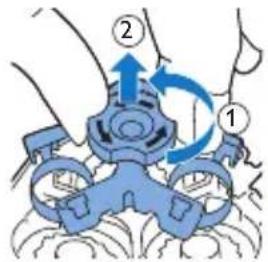

natural_image
Diagram showing two mechanical components with upward arrows indicating motion or force, separated by a diagonal line (no text or symbols)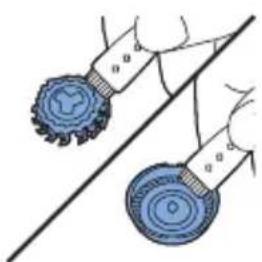
natural_image
Illustration of two blue circular objects on a diagonal line, no text or symbols present
natural_image
Diagram showing two circular components with downward arrows, connected by a diagonal line (no text or symbols)natural_image
Illustration of two hands performing a medical procedure on a patient's abdomen, with arrows indicating movement (no text or symbols present)natural_image
Diagram of a device being inserted into a socket with blue arrows indicating direction (no text or symbols)
natural_image
Illustration of a hand using a blue tool to press down a car seatbelt (no text or symbols visible)natural_image
Illustration of a hairbrush with a blue cap and light rays, no text or symbols presentnatural_image
Diagram showing two views of a mechanical component with directional arrows indicating movement (no text or symbols)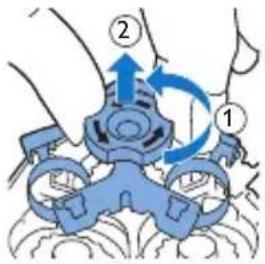
natural_image
Diagram showing a hand holding a device with blue arrows indicating upward motion, alongside a magnified view of a circular object (no text or symbols)
natural_image
Illustration of two hands performing a medical procedure on a device, with arrows indicating force or movement (no text or symbols present)natural_image
Prohibition sign of a faucet without any text or symbolsnatural_image
No smoking sign with faucet symbol (no text)natural_image
Diagram of a medical device with a highlighted blue wave pattern (no text or symbols)Слаба батерија
natural_image
Diagram of a curved structure with concentric layers and a central star-like shape, no text or symbols present.Полненье
natural_image
Diagram of a medical device with a blue circular component and power button (no text or labels)natural_image
Diagram of a human abdomen with a blue arrow pointing to a specific area (no text or labels)Бричење

natural_image
Illustration of a person brushing teeth with a blue tool, no text or symbols presentnatural_image
Diagram of a device being inserted into a socket, showing blue arrows indicating direction (no text or symbols present)natural_image
Illustration of a person using a handheld device to interact with another person (no text or symbols present)natural_image
Illustration of a hand holding a device with a blue arrow pointing to a component (no text or symbols present)natural_image
Illustration of a hand using a blue tool to apply material or oil on a cylindrical object (no text or symbols visible)natural_image
Illustration of a human head with a blue arrow indicating force or movement, showing internal organs (no text or symbols)natural_image
Illustration of a hand inserting a small blue object into a transparent container (no text or symbols)natural_image
Diagram showing two views of a medical device with blue arrows indicating direction (no text or symbols)natural_image
Diagram showing two mechanical components with upward arrows indicating motion or force, separated by a diagonal line (no text or symbols)natural_image
Illustration of two blue circular objects on a diagonal line, one with textured surface and the other with smoother surfaces (no text or symbols)natural_image
Diagram showing two circular components with downward arrows, connected by a diagonal line (no text or symbols)natural_image
Illustration of two hands performing a medical procedure on a patient's abdomen, with arrows indicating movement (no text or symbols present)natural_image
Diagram of a hand holding a device with blue arrows indicating rotation or movement (no text or symbols)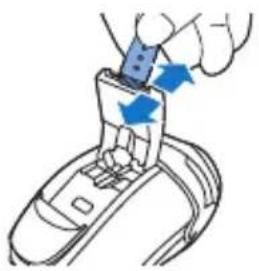
natural_image
Illustration of a hand using a blue tool to press down a car seatbelt (no text or symbols visible)natural_image
Illustration of a hairpin with a blue cap and sparkles, showing no text or symbolsnatural_image
Diagram showing two views of a mechanical component with directional arrows indicating movement (no text or symbols)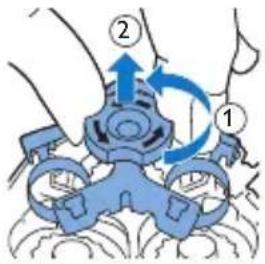
natural_image
Diagram showing a hand holding a tray with upward arrows and a magnified inset of a device (no text or symbols)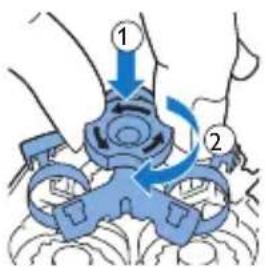

natural_image
Illustration of two medical devices with blue arrows indicating force or movement, no text or symbols presentnatural_image
Prohibition sign of a faucet without any text or symbolsnatural_image
Prohibition sign showing a faucet without raindrops, enclosed in a circle (no text)natural_image
Diagram of a medical device with catheter and surrounding layers (no text or symbols)natural_image
Diagram of a curved structure with layered lines and a central star-like pattern, no text or symbols present.Зарядка
natural_image
Diagram of a medical device with a blue circular component and power button (no text or symbols)natural_image
Diagram showing a blue arrow pointing to a small circular object on a curved surface (no text or symbols)Бритье
natural_image
Illustration of a person brushing teeth with a blue tool, no text or symbols presentnatural_image
Diagram of a device being inserted into a socket, showing blue arrows indicating direction (no text or symbols present)natural_image
Illustration of a person using a handheld device to interact with another person (no text or symbols present)natural_image
Illustration of a hand holding a device with a blue arrow pointing to a component (no text or symbols present)natural_image
Illustration of a hand inserting a blue plastic into a cylindrical device (no text or symbols)natural_image
Illustration of a hand holding a brain with blue arrows indicating direction (no text or symbols)natural_image
Illustration of a hand inserting a small object into a device (no text or symbols visible)natural_image
Illustration of two hands using a tool to lift a circular object, no text or symbols presentnatural_image
Diagram showing two circular components with directional arrows, one above a diagonal line and the other below a curved base (no text or symbols)natural_image
Illustration of two hands performing a medical procedure on a device, showing mechanical components and blue arrows indicating force or movement (no text or symbols present)natural_image
Illustration of a tooth being cut with a blue arrow indicating the process (no text or symbols present)natural_image
Diagram showing two blue anatomical views of a shoe with arrows indicating movement or force (no text or labels)

natural_image
Illustration of a hand using a tool to adjust a circular component with upward arrows, alongside a magnified view of a battery (no text or symbols)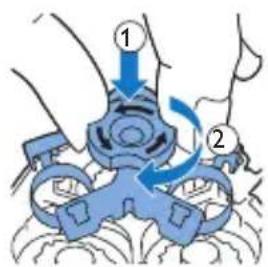

natural_image
Illustration of two medical procedures on a surgical site, showing hand placement and blue arrows indicating movement (no text or symbols)natural_image
No smoking sign with a faucet symbol (no text)natural_image
Prohibition sign showing a faucet without raindrops, enclosed in a circle (no text)natural_image
Diagram of a medical device with a power button and wave pattern (no text or symbols)natural_image
Diagram of a medical or anatomical structure with layered curves and a central highlighted region (no text or symbols)Заряджання
natural_image
Diagram of a human body with a highlighted circular region and power button (no text or symbols)natural_image
Diagram of a curved surface with a blue arrow pointing to a small circular feature (no text or symbols)Гоління
natural_image
Illustration of a person brushing teeth with a blue X mark (no text or symbols)natural_image
Illustration of a hand using a blue tool to apply a component to a cylindrical object (no text or symbols visible)natural_image
Illustration of a hand holding a medical device with blue arrows indicating force or movement (no text or symbols)natural_image
Illustration of a hand inserting a small object into a device (no text or symbols visible)natural_image
Diagram showing two hands operating a device with blue arrows indicating motion or force (no text or symbols present)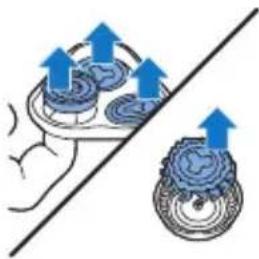
natural_image
Diagram showing a hand holding a mechanical component with blue arrows indicating motion or force direction (no text or symbols present)
natural_image
Illustration of two blue circular objects on a diagonal line, no text or symbols present
natural_image
Diagram showing two circular components with blue arrows pointing to them, separated by a diagonal line (no text or symbols)natural_image
Illustration of two medical or surgical procedures on a tool, showing alignment and force application (no text or symbols)natural_image
Diagram of a hand inserting a device into a cable, showing blue arrows indicating direction (no text or symbols)natural_image
Illustration of a hand using a device to lift a car (no text or symbols visible)natural_image
Illustration of a hand turning a tooth with a blue object above, showing motion and shading (no text or symbols)natural_image
Diagram showing two blue anatomical views of a foot with arrows indicating movement or force (no text or labels)natural_image
Illustration of two medical or surgical procedures with blue arrows indicating force direction (no text or symbols)natural_image
Prohibition sign of a faucet without any text or symbolsnatural_image
Prohibition sign showing a faucet with a diagonal line and raindrops, enclosed in a circle (no text)natural_image
Diagram of a curved structure with layered curves and a central blue arrow, no text or symbols present.Батарея заряды аз
natural_image
Diagram of a curved structure with layered curves and a central star-like shape, no text or symbols present.Зарядтау
natural_image
Diagram of a curved structure with concentric layers and a central circular feature, no text or symbols present.natural_image
Diagram of a human abdomen with a blue arrow pointing to a specific area (no text or labels)natural_image
Illustration of a person brushing teeth with a tool, no text or symbols presentnatural_image
Diagram of a device being inserted into a socket, showing blue arrows indicating direction (no text or symbols present)natural_image
Illustration of a person using a handheld device to interact with another person (no text or symbols present)natural_image
Illustration of a hand holding a device with a blue arrow pointing to a component (no text or symbols)natural_image
Illustration of a hand using a tool to insert or install a cylindrical object (no text or symbols visible)natural_image
Illustration of a hand holding a medical device with blue arrows indicating force or movement (no text or symbols)natural_image
Illustration of a hand inserting a small object into a device (no text or symbols visible)natural_image
Diagram showing two anatomical views of a human head with blue arrows indicating movement or force direction (no text or labels)natural_image
Diagram showing a hand holding a fan with blue arrows indicating direction, alongside a close-up of a circular object (no text or symbols present)natural_image
Illustration of two blue circular objects on a diagonal line, no text or symbols presentnatural_image
Two-step illustration showing a hand holding a device with blue arrows indicating motion (no text or symbols)natural_image
Illustration of a mechanical component with a blue top and arrow indicating force or motion (no text or symbols)natural_image
Diagram showing two blue anatomical views of a human torso with arrows indicating movement or force (no text or labels)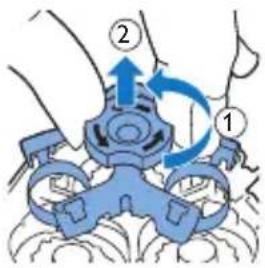
natural_image
Diagram showing a hand holding a tray with upward arrows and a circular object with a pointer, alongside a diagonal line (no text or symbols)
natural_image
Illustration of two hands performing a medical procedure on a patient's abdomen, with arrows indicating movement (no text or symbols present)75% recycled paper
75% papier recyclé
- Introduction
- General description (Fig. 1)
- Important safety information
- Danger
- Warning
- Caution
- Electromagnetic fields (EMF)
- General
- Charging
- Charging with the adapter
- Charge indications
- Battery low
- Battery fully charged
- Using the appliance
- Shaving tips & tricks
- English
- Switching the appliance on and off
- Shaving
- Trimming (S1520, S1510 only)
- Cleaning and maintenance
- Cleaning the shaving unit with the cleaning brush
- English
- Thorough cleaning
- Cleaning the trimmer with the cleaning brush (S1520, S1510 only)
- Storage
- Replacement
- Ordering accessories
- Recycling
- Guarantee and support
- Guarantee restrictions
- Troubleshooting
- Úvod
- Aku on tühi
- Laadimine
- Aku on täis laetud
- Raseerimine
- Upozorenje
- Indikatori punjenja
- Baterija je gotovo prazna
- Punjenje
- Čišćenje trimera četkom za čišćenje (samo S1520, S1510)
- Naručivanje dodatnog pribora
- Tīrīšana un apkope
- Baterija senka
- Töltés
- Alapos tisztítás
- Ładowanie
- Ruajtja
- Opozorilo
- Baterija napolnjena
- Britje
- Nabíjanie
- Slovensky
- Čistenie a údržba
- Oznake punjenja
- Baterija je skoro prazna
- Temeljno čišćenje
- Čišćenje trimera četkom za čišćenje (samo modeli S1520 i S1510)
- Odlaganje
- Изтощена батерия
- Зареждане
- Бръснене
- Слаба батерија
- Полненье
- Бричење
- Зарядка
- Бритье
- Заряджання
- Гоління
- Батарея заряды аз
- Зарядтау
Brand : PHILIPS
Model : Series 1000 S1520
Category : Razor