
Control X Wireless - Loudspeaker JBL - Free user manual and instructions
Find the device manual for free Control X Wireless JBL in PDF.


| Product type | Wireless speaker |
| Brand | JBL |
| Model | Control X Wireless |
| Dimensions (W x H x D) | 235 x 150 x 150 mm |
| Weight | 1.2 kg |
| Power supply | Rechargeable lithium-ion battery 2200 mAh |
| Battery life | Up to 20 hours |
| Connectivity | Bluetooth 5.0, auxiliary input 3.5 mm |
| Protection rating | IPX5 (splash resistant) |
| Output power | 30 W RMS |
| Frequency response | 50 Hz - 20 kHz |
| Main features | Wireless streaming, hands-free calls, USB playback |
| Maintenance and cleaning | Wipe with a soft, dry cloth. Do not use abrasive products. |
| Safety | Do not expose to extreme temperatures. Use the original charger. |
| Spare parts and repairability | Battery replaceable by a professional. Contact JBL after-sales service. |
| Box contents | Speaker, USB cable, quick start guide, warranty card |
Frequently Asked Questions - Control X Wireless JBL
User questions about Control X Wireless JBL
0 question about this device. Answer the ones you know or ask your own.
Ask a new question about this device
Download the instructions for your Loudspeaker in PDF format for free! Find your manual Control X Wireless - JBL and take your electronic device back in hand. On this page are published all the documents necessary for the use of your device. Control X Wireless by JBL.
USER MANUAL Control X Wireless JBL
THANK YOU FOR CHOOSING THIS JBL® PRODUCT
The JBL® brand has been involved in every aspect of music, film recording and reproduction from live performances to the recordings you play in the home, car, or on-the-go. We're confident that the JBL system you have chosen will provide every note of enjoyment that you expected and that when you think about purchasing additional audio equipment for your home, car or office, you will once again choose a JBL product.
The JBL Control X is an advanced indoor/outdoor® Bluetooth® active loudspeaker system that allows you to enjoy your favorite music in remote locations around the home or in commercial spaces. To ensure trouble-free performance, please carefully read these instructions completely before connecting or using the system.
*Please note that while the JBL Control X WIRELESS is an all weather outdoor loudspeaker, it is not waterproof. These speakers should NOT be submerged or directly exposed to water, ice, snow or sustained moisture. Do not spray water into the speaker's rear port.
OWNER'S MANUAL
UNPACKING THE SYSTEM
Carefully unpack the system. If you suspect damage from transit, report it immediately to your dealer and/or delivery service. Keep the shipping carton and packing materials for future use. Open the package and verify the following contents:
INCLUDED
1 x JBL Control X Wireless Primary speaker
1 x JBL Control X Wireless Secondary speaker
2 x AC power cord
1 x Owner's Manual
1 x Safety sheet
TOP-PANEL CONTROLS
PRIMARY SPEAKER

- Power
- Bluetooth pairing (Press and Hold 2 seconds to un-pair current Bluetooth device)
- Transport control button (Previous track)
- Play / Pause
- Transport control button (Next track)
- Volume Down
- Volume Up
- Battery level indication
- Front panel LED indication
| LED information | Fixed Quick Flash Regular Flash | |
| White On / No Bluetooth device connected | Additional speaker association mode Volume Up and Down (Stops when reaches Max or Min) | System is waking up |
| Blue Bluetooth device connected | Bluetooth pairing mode |
Note: The front LED indication times out in normal operation mode
Note: To mute the systems simply press and hold volume up and down simultaneously for at least 2 seconds. Simply press volume up or volume down to un-mute the system.
SECONDARY SPEAKER

- Power
- Battery level indication
- Front panel LED indication
| LED Information | Fixed Quick Flash Regular Flash | ||
| White On / No Bluetooth device connected | Additional speaker association mode Volume Up and Down (Stops when reaches Max or Min) | System is waking up | |
| Blue Bluetooth device connected | Bluetooth pairing mode | ||
REAR-PANEL CONTROLS
PRIMARY SPEAKER

- AC input connector
- Auxiliary 3.5mm audio input
- Primary-Secondary mode selector
- Boundary compensation switch
a. Wall: Speaker equalization optimized for wall mounting.
b. Other: Speaker equalization optimized for other placement conditions
- Left / Right / Left + Right switch
a. Left: Speaker reproduces left channel information only
b. Right: Speaker reproduces right channel information only
c. Left + Right: Mono configuration speaker reproduces left and right channels information
- Association pin hole
SECONDARY SPEAKER

- AC input connector
- Boundary compensation switch
a. Wall: Speaker equalization optimized for wall mounting.
b. Other: Speaker equalization optimized for other placement conditions
- Left / Right / Left + Right switch
a. Left: Speaker reproduces left channel information only
b. Right: Speaker reproduces right channel information only
c. Left + Right: Mono configuration speaker reproduces left and right channels information
- Association pin hole
These speakers can be mounted or placed on a stand, shelf or table. The following figure shows a possible indoor application. For optimal performance, do not block the rear port on the back of each speaker.
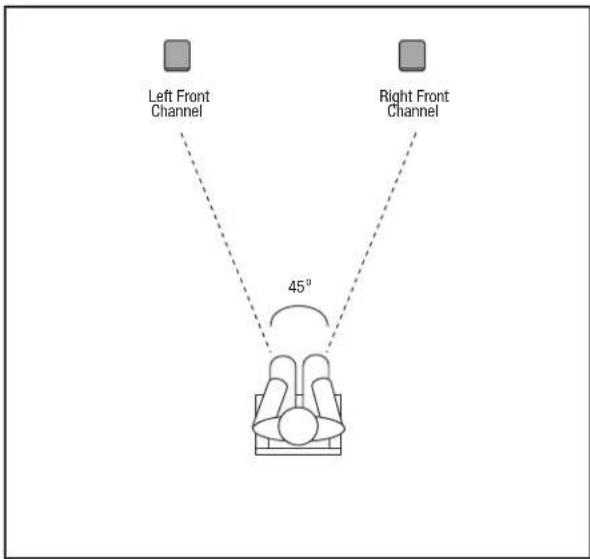
The speaker set is already factory setup to operate as a pair (primary and secondary).
- Connect AC power cords to AC-IN plug located at the rear of each speaker. Keep AC plugged to maintain battery fully charged.
- Press power button on each speaker(s) to start operation.
- Press Bluetooth button and pair with streaming device. (Refer to Listening to Audio from a Bluetooth capable device section below)
- If desired to use in battery mode, just unplug the AC power. Speaker and audio will not be interrupted. Reconnect to AC to recharge battery.
Note: Primary and Secondary speakers' factory default settings are as follow
| Control / Switch Primary Secondary | ||
| Mode (P) N/A | ||
| Wall/ Other Other Other | ||
| L/R/L+R (L) (R) |
Note: When the system is not playing music it will go automatically into auto standby mode. To reactivate the system, simply start playing music and the system will resume automatically. A slight delay may occur before the secondary speaker wakes up as it needs resynchronization with the primary speaker. During this phase the front LED of the secondary speaker will be blinking.
Note: If the system is manually powered off using the power button, it will need to be manually powered on first to resume playing music.
The system also features sound prompt commands for the following action / operation
- Power On
- Power Off
- Bluetooth pairing mode
- Bluetooth connection success
- Association mode (see Speaker association section)
- Battery low level
LISTENING TO AUDIO FROM A BLUETOOTH-CAPABLE DEVICE
- With speaker(s) powered on AC or Battery power, Press Bluetooth button on primary speaker
- An audible prompt will indicate that the speaker successfully entered BT pairing mode. The front LED will also blink Blue as an indication that BT pairing mode is enabled.
- Search and pair with "JBL Control X" from your Bluetooth streaming device.
- An audible confirmation will be played once the streaming device successfully paired with the speaker. The front LED will stop blinking and remain Blue. Secondary speaker will confirm Bluetooth pairing by flashing front panel LED Blue for a few seconds.
Note: Only one Bluetooth device can be paired at the same time with the system. If you need to un-pair the current Bluetooth device to connect a new one simply press and hold the Bluetooth button on the primary speaker for more than 2 seconds to disconnect current device. Then resume the pairing process above from step 2.
LISTENING TO AUDIO FROM AUX-IN
Bluetooth operation has priority over Aux-In input. If you want to use the auxiliary in input, any paired Bluetooth device need to be disconnected or unpaired from JBL control X Wireless by pressing and holding the Bluetooth button for more than 2 seconds or by disconnecting it from your Bluetooth streaming device.
- With speaker(s) powered on AC or Battery power, connect a 3.5mm audio cable from the audio source to the AUX-IN on the primary speaker.
SPEAKER ASSOCIATION
JBL Control X Wireless speakers are factory associated to each other. In case of association problems were the secondary speaker is not playing music, please follow association steps on detailed section below to fix the issue. Only one secondary speaker can be associated at the time with a primary speaker.
1. With both primary and secondary speaker(s) powered on AC or Battery power, use a paper clip to press the association button on the back of the secondary speaker. The front LED will flash white indicating association mode is active
- Press the association button on the primary speaker. An audible confirmation will be played to indicate that the speaker successfully entered association mode. The front LED will blink blue if already paired with a Bluetooth device, otherwise it will blink white.
- Wait until association process finishes. The process is complete as soon as the front LED on each speaker stops blinking.
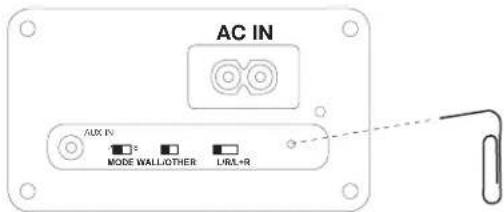
Note: in case the association needs to be redone for speaker replacement or configuration change, the current association set up needs to be reset. Press and hold the FWD and REV buttons on the top of the primary speaker for more than 3 seconds.
It is also possible to associate a second pair of JBL control X wireless speaker set to an existing pair to extend the system coverage. If you want to have a set of 4 speakers connected.
- With all four primary and secondary speaker(s) powered on AC or Battery power
- Use a paper clip to press the association button on the back of the second set primary speaker with the back control mode switch set to secondary "S". The front LED will flash white indicating Association mode is active.
- Press the association button on the primary speaker of the first master set. An audible confirmation will be played to indicate that the speaker successfully entered association mode. The front LED will blink blue if already paired with a Bluetooth device, otherwise it will blink white.
- Wait until association process finishes. The process is complete as soon as the front LED on each speaker stops blinking.
- Use a paper clip to press the association button on the back of the second set secondary speaker. The front LED will flash White indicating Association mode is active.
- Press the association button on the secondary speaker of the first master set. An audible confirmation will be played to indicate that the speaker successfully entered association mode. The front LED will blink blue if already paired with a Bluetooth device, otherwise it will blink white.
- Wait until association process finishes. The process is complete as soon as the front LED on each speaker stops blinking.
Note: in case the association needs to be redone for speaker replacement or configuration change, the current association set up needs to be reset. Press and hold the FWD and REV buttons on the top of the primary speaker for more than 3 seconds.
MAINTENANCE AND SERVICE
The speaker enclosures may be cleaned using a soft cloth to remove fingerprints or to wipe off dust.
All wiring connections should be inspected and cleaned or remade periodically. The frequency of maintenance depends on the metals involved in the connections, atmospheric conditions and other factors, but once per year is the minimum. In the event that your system ever needs service, contact your local JBL dealer or distributor, or visit www.jbl.com for a service center near you.
BATTERY DISPOSAL
Rechargeable batteries (i.e., nickel cadmium, nickel metalhydride, lithium and lithium-ion) are considered hazardous household materials and may pose an unnecessary health and safety risk.
In the European Union and other locations, it is illegal to dispose of any battery with household trash. All batteries must be disposed of in an environmentally sound manner. Contact your local waste management officials for information regarding the environmentally sound collection, recycling and disposal of used batteries.
SPECIFICATIONS
| Low Frequency Transducer: | 5.25" (133mm) polypropylene graphite-filled cone |
| High Frequency Transducer: | 1" (25mm) CMMD® Lite dome / High Definition Imaging Waveguide |
| Rated Power: 30W per channel RMS (AC mode) | |
| Frequency Response: 62Hz - 20kHz (-6db) | |
| Sensitivity: (2.83V@1m) 87dB | |
| Signal-to-noise ratio: >75 dB | |
| Power supply: AC 100-240 VAC, 50-60Hz | |
| Battery Type: Lithium-ion Polymer (7.4V, 2600mAh) | |
| Battery Charge Time: 2.4 hours @ 0.5C | |
| Playback Time: | Up to 4 hours (varies by volume level and audio content) |
| Bluetooth® 2.1 with AVRCP profile v1.5 | |
| Bluetooth® Transmitter Power: 0-4 dBm | |
| Bluetooth® Transmitter Frequency Range: | 2.402 - 2.480 GHz |
| Bluetooth® Transmission Range: | Up to 10m (from source) |
| Speaker Range: | Up to 30m (between primary and secondary speakers) |
| Dimensions: | 9-1/4" x 6-1/2" x 6-1/4" (235mm x 165mm x 159mm) |
| Weight: 6.5 lbs (2.95 kg) | |
| Finishes: Graphite / White / Red | |
HARMAN
HARMAN International Industries, Inc.
8500 Balboa Boulevard, Northridge, CA 91329 USA www.jbl.com
© 2015 HARMAN International Industries, Incorporated. All rights reserved.
JBL and CMMD are trademarks of HARMAN International Industries, Incorporated, registered in the United States and/or other countries. Bluetooth® is a registered trademark of Bluetooth SIG, Inc.
Features, specifications and appearance are subject to change without notice.
TR01319_A
CONTROL X WIRELESS
natural_image
White JBL brand portable speaker with hexagonal grille and dotted pattern (no visible text or symbols on body)
natural_image
Black JBL brand portable speaker with visible grille and logo (no text or symbols on device body)MERCI D'AVOIR CHOISI CE PRODUIT JBL®
HARMAN International Industries, Inc.
8500 Balboa Boulevard, Northridge, CA 91329 USA www.jbl.com
natural_image
White JBL brand portable speaker with a dotted pattern back panel (no visible text or symbols on the device body)
natural_image
Black JBL brand portable speaker with visible grille and logo (no text or symbols on device body)GRACIAS POR ELEGIR ESTE PRODUCTO JBL®
HARMAN International Industries, Inc.
natural_image
White JBL coffee maker with hexagonal grille and dotted pattern, no visible text or symbols on body
natural_image
Black JBL brand portable speaker with visible grille and digital display (no text or symbols on device body)MUITO OBRIGADO POR ADQUIRIR UM PRODUTO JBL®
| Controle/Chave Principal Secundária | ||
| Modo (P) N/A | ||
| Parode/Outro Outro Outro | ||
| E/D/D+E (E) (D) |
HARMAN International Industries, Inc.
8500 Balboa Boulevard, Northridge, CA 91329 EUA www.jbl.com
natural_image
Two JBL-branded audio speakers displayed side by side, one white and one black, with no visible text or symbols on the devices themselves.HARMAN International Industries, Inc.
8500 Balboa Boulevard, Northridge, CA 91329 USA www.jbl.com
© 2015 HARMAN International Industries, Incorporated. Alle Rechte vorbehalten.
natural_image
White JBL brand portable electronic device with hexagonal grille and dotted pattern (no visible text or symbols on body)
natural_image
Black JBL brand portable speaker with visible grille and front panel (no text or symbols on body)GRAZIE PER AVER SCELTO QUESTO PRODOTTO JBL®
RIPRODURRE AUDIO DA AUX-IN
HARMAN International Industries, Inc.
8500 Balboa Boulevard, Northridge, CA 91329 USA www.jbl.com
© 2015 HARMAN International Industries, Incorporated. Tutti i diritti riservati.
natural_image
Two JBL-branded audio speakers displayed side by side, one white and one black with a digital logo (no visible text or symbols on the devices themselves)DANK VOOR DE AANKOOP VAN DIT JBL® PRODUCT
natural_image
White JBL brand portable speaker with hexagonal dot pattern and logo (no visible text or symbols on body)
natural_image
Black JBL brand portable speaker with visible grille and sound block (no text or symbols on body)TAKK AT DU VALGTE DETTE JBL®-PRODUKT
VEDLIKEHOLD OG SERVICE
natural_image
White JBL brand portable speaker with hexagonal grille and dotted pattern (no visible text or symbols on body)
natural_image
Black JBL brand portable speaker with visible grille and logo (no text or symbols on device body)KIITÄMME TEITÄ JBL® -TUOTTEIDEN VALINNASTA
HARMAN International Industries, Inc.
8500 Balboa Boulevard, Northridge, CA 91329 USA www.jbl.com
natural_image
Two JBL-branded audio speakers displayed side by side, one white and one black with visible brand logo (no text or symbols on devices)HARMAN International Industries, Inc.
8500 Balboa Boulevard, Northridge, CA 91329 USA www.jbl.com
© 2015 HARMAN International Industries, Incorporated. Все права защищены.
natural_image
Two JBL-branded audio speakers displayed side by side, one white and one black with a digital logo (no visible text or symbols on the devices themselves)TACK FÖR ATT DU VALDE DENNA PRODUKT FRÅN JBL®!
HARMAN International Industries, Inc.
8500 Balboa Boulevard, Northridge, CA 91329 USA www.jbl.com
natural_image
White JBL brand portable speaker with hexagonal dot pattern and logo (no visible text or symbols on body)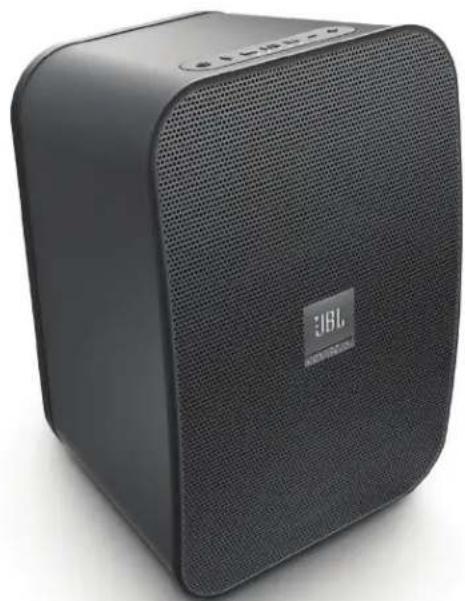
natural_image
Black JBL brand portable speaker with visible grille and logo (no text or symbols on device body)JBL®-PRODUKT
HARMAN International Industries, Inc.
8500 Balboa Boulevard, Northridge, CA 91329 USA www.jbl.com
© 2015 HARMAN International Industries, Incorporated. Alle rettigheder forbeholdt.
JBL og CMMD er varemærker tilhørende HARMAN International Industries, Incorporated, registreret i USA og/eller andre lande.
natural_image
White JBL coffee maker with hexagonal grille and dotted pattern, no visible text or symbols on body
natural_image
Black JBL brand portable speaker with visible sound grille and digital display (no text or symbols on device body)日本語
natural_image
Two JBL brand speakers displayed side by side, one white and one black, with no visible text or symbols on the devices themselves.DZIEKUJEMY ZA ZAKUP PRODUKTU MARKI JBL®
HARMAN International Industries, Inc.
8500 Balboa Boulevard, Northridge, CA 91329 USA www.jbl.com
natural_image
White JBL portable electronic device with hexagonal grille pattern and 'JBL PORTFLOX' logo on the front panel (no readable text beyond branding)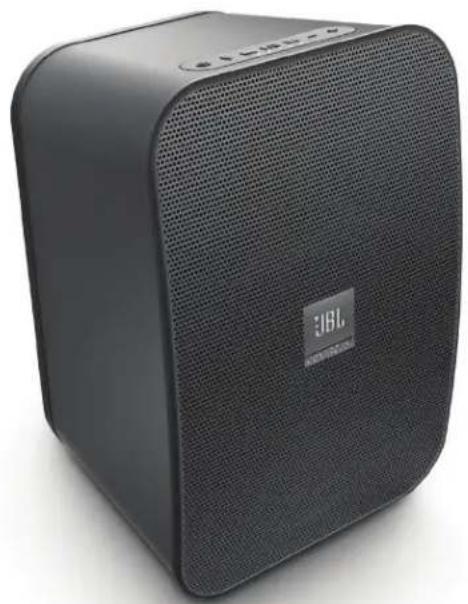
natural_image
Black JBL brand portable speaker with visible grille and front panel (no text or symbols on body)HARMAN International Industries, Inc.
8500 Balboa Boulevard, Northridge, CA 91329 USA www.jbl.com
© 2015 HARMAN International Industries, Incorporated. All rights reserved.
natural_image
White JBL portable electronic device with hexagonal grille pattern and 'JBL PORTFLOX' logo on the front panel (no additional text or symbols visible)
natural_image
Black JBL brand portable speaker with visible grille and front panel (no text or symbols on body)感谢您选择 JBL® 产品
HARMAN International Industries, Inc.
8500 Balboa Boulevard, Northridge, CA 91329 USA www.jbl.com
© 2015 HARMAN International Industries, Incorporated。保留所有权利。
natural_image
White rectangular electronic device with a dotted pattern and 'JBL' logo on the front panel (no readable text or symbols beyond branding)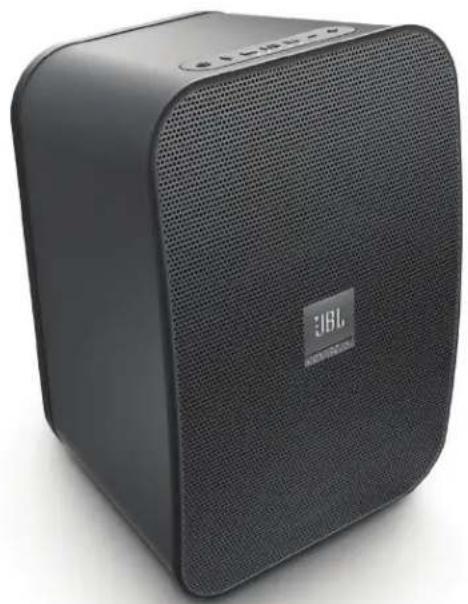
natural_image
Black JBL brand portable speaker with visible grille and front panel (no text or symbols on body)感謝您選購本 JBL® 產品
natural_image
White JBL portable electronic device with hexagonal dot pattern and 'JBL PORTFLOX' logo on the front panel (no additional text or symbols visible)
natural_image
Black rectangular electronic device with visible grille and speaker grille, no text or symbols on bodyTERIMA KASIH TELAH MEMILIH PRODUK JBL® INI
HARMAN International Industries, Inc.
8500 Balboa Boulevard, Northridge, CA 91329 USA www.jbl.com
© 2015 HARMAN International Industries, Incorporated. Semua hak dilindungi undang-undang.

- THANK YOU FOR CHOOSING THIS JBL® PRODUCT
- UNPACKING THE SYSTEM
- INCLUDED
- TOP-PANEL CONTROLS
- REAR-PANEL CONTROLS
- LISTENING TO AUDIO FROM A BLUETOOTH-CAPABLE DEVICE
- LISTENING TO AUDIO FROM AUX-IN
- SPEAKER ASSOCIATION
- MAINTENANCE AND SERVICE
- BATTERY DISPOSAL
- HARMAN
- CONTROL X WIRELESS
- MERCI D'AVOIR CHOISI CE PRODUIT JBL®
- GRACIAS POR ELEGIR ESTE PRODUCTO JBL®
- MUITO OBRIGADO POR ADQUIRIR UM PRODUTO JBL®
- GRAZIE PER AVER SCELTO QUESTO PRODOTTO JBL®
- RIPRODURRE AUDIO DA AUX-IN
- DANK VOOR DE AANKOOP VAN DIT JBL® PRODUCT
- TAKK AT DU VALGTE DETTE JBL®-PRODUKT
- VEDLIKEHOLD OG SERVICE
- KIITÄMME TEITÄ JBL® -TUOTTEIDEN VALINNASTA
- TACK FÖR ATT DU VALDE DENNA PRODUKT FRÅN JBL®!
- JBL®-PRODUKT
- DZIEKUJEMY ZA ZAKUP PRODUKTU MARKI JBL®
- 感谢您选择 JBL® 产品
- 感謝您選購本 JBL® 產品
- TERIMA KASIH TELAH MEMILIH PRODUK JBL® INI
Brand : JBL
Model : Control X Wireless
Category : Loudspeaker