SAN FRANCISCO CD72 - Car stereo BLAUPUNKT - Free user manual and instructions
Find the device manual for free SAN FRANCISCO CD72 BLAUPUNKT in PDF.



User questions about SAN FRANCISCO CD72 BLAUPUNKT
0 question about this device. Answer the ones you know or ask your own.
Ask a new question about this device
Download the instructions for your Car stereo in PDF format for free! Find your manual SAN FRANCISCO CD72 - BLAUPUNKT and take your electronic device back in hand. On this page are published all the documents necessary for the use of your device. SAN FRANCISCO CD72 by BLAUPUNKT.
USER MANUAL SAN FRANCISCO CD72 BLAUPUNKT
Digital Sound Adjustment .... 118
Activer / Désactiver DSA 118
DSA - Digital Sound Adjustment
DNC - Dynamic Noise Covering
Switching TIM on/off 7
Listening to stored traffic messages.....7
Recording traffic information messages ..8
Adjusting the timers 8
Selecting a timer 9
FRANÇAIS
TIM - Traffic Information Memory. 10
Activer / Désactiver TIM 10
TIM - Traffic Information Memory. 14
TIM - Traffic Information Memory. 17
TIM - Traffic Information Memory. 24
TIM - Traffic Information Memory. 27
TIM - Traffic Information Memory. 31
TIM taend/sluk 31
The unit is equipped with a digital speech memory which can automatically record up to four traffic messages. The maximum duration for recorded messages is four minutes.
If the TIM function is activated, all traffic information messages received during the two hours after the unit was last switched off are recorded.
In addition, you can set two timers. All traffic messages received from the tuned traffic information station 30 minutes before and 90 minutes after the set time are recorded. This feature is particularly useful if you generally use your car at certain times.
All the messages are deleted if the last message is older than six hours.
If a new traffic message arrives whilst TIM is being played, playback will be interrupted and the new message recorded.
Risk of damage to the electric aerial in a car wash. An automatic electric aerial will remain extended if TIM is activated and you turn the unit off. Damage might result if the car aerial remains extended whilst in a carwash.
For further details, read the section entitled "Switching TIM off".
Switching TIM on/off
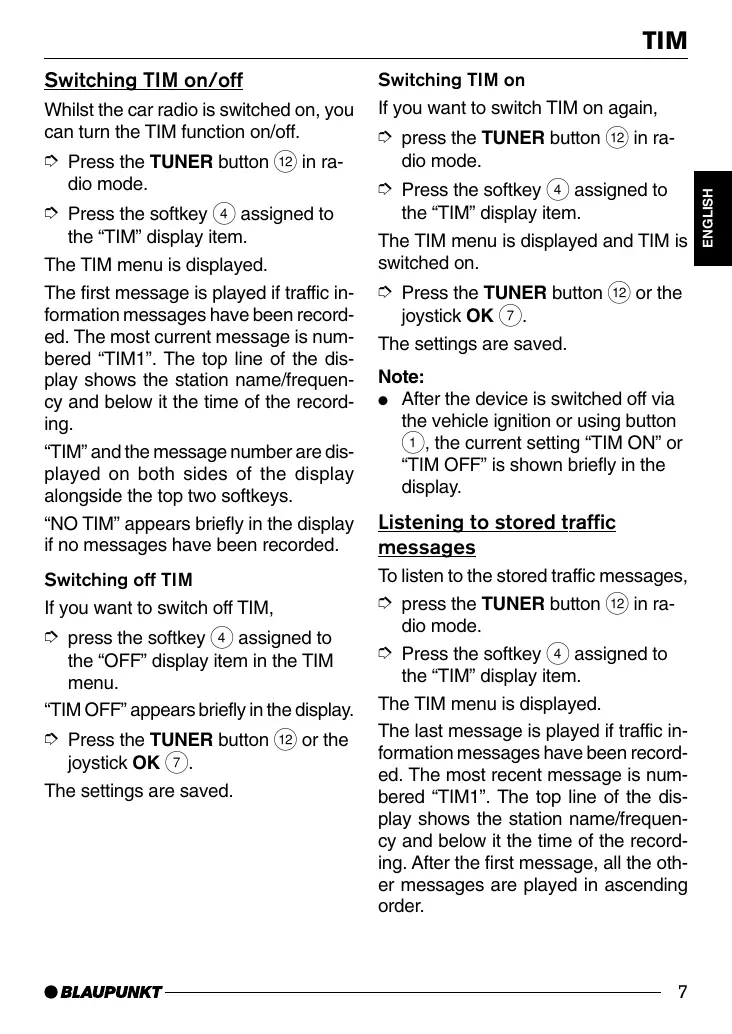
Whilst the car radio is switched on, you can turn the TIM function on/off.
Press the TUNER button in radio mode.
Press the softmax assigned to the "TIM" display item.
The TIM menu is displayed.
The first message is played if traffic information messages have been recorded. The most current message is numbered "TIM1". The top line of the display shows the station name/frequency and below it the time of the recording.
"TIM" and the message number are displayed on both sides of the display alongside the top two softkeys.
"NO TIM" appears briefly in the display if no messages have been recorded.
Switching off TIM
If you want to switch off TIM,
press the softmax assigned to the "OFF" display item in the TIM menu.
"TIM OFF" appears briefly in the display.
Press the TUNER button 12 or the joystick OK 7.
The settings are saved.
Switching TIM on
If you want to switch TIM on again,
press the TUNER button 12 in radio mode.
Press the softmax assigned to the "TIM" display item.
The TIM menu is displayed and TIM is switched on.
Press the TUNER button ⑫ or the joystick OK ⑦.
The settings are saved.
Note:
- After the device is switched off via the vehicle ignition or using button ① , the current setting "TIM ON" or "TIM OFF" is shown briefly in the display.
Listening to stored traffic messages
To listen to the stored traffic messages,
press the TUNER button 12 in radio mode.
Press the softmax assigned to the "TIM" display item.
The TIM menu is displayed.
The last message is played if traffic information messages have been recorded. The most recent message is numbered "TIM1". The top line of the display shows the station name/frequency and below it the time of the recording. After the first message, all the other messages are played in ascending order.
"NO TIM" appears briefly in the display if no messages have been recorded.
After the last message is heard, the unit returns to the previous mode of operation.
If you want to return to radio mode without first having to listen to all the messages,
press the TUNER button twice or the joystick OK
Selecting TIM messages
"TIM" and the message number are displayed on both sides of the display alongside the top two softkeys.
If you want to listen to one of the displayed messages without listening to the other messages:
Press the softmax assigned to the corresponding display item "TIM1", "TIM2", "TIM3" or "TIM4".
Recording traffic information messages
Whilst the unit is switched on, traffic information is recorded automatically if a traffic information station is received and priority for traffic information messages is activated.
If you are listening to a station that does not broadcast traffic information and you switch the unit off whilst the TIM function is activated, the unit will automatically search for a traffic information station.
Adjusting the timers
If TIM is activated, the traffic information messages provided by a tuned traffic information station will be recorded for 2 hours after the unit is switched off. Furthermore, you can set two timers that record all traffic information messages received 30 minutes before and 90 minutes after the set times. The timer function uses the system time as its reference. For details on setting the system time, refer to the chapter entitled "CLOCK - time"
To adjust one of the timers,
press the TUNER button 12 in radio mode.
Press the softmax assigned to the "TIM" display item.
The TIM menu is displayed.
Press the softmax assigned to the "SET" display item.
Press the softkey 4 assigned to the "REC1" display item for the first or "REC2" for the second timer.
"RECORD" and the set time appear in the display.
To adjust the timer,
move the joystick ⑦ to the left.
The hours flash.
Move the joystick (7) up or down to adjust the hours.
Move the joystick (7) to the right to change the input position.
The minutes flash.
Move the joystick ⑦ up or down to adjust the minutes.
To save the settings,
press the TUNER button ⑫ or the joystick OK ⑦.
The settings are saved.
During TIM standby, a connected electric aerial will remain extended.
Note:
- Before you drive into a carwash, please make absolutely sure you switch off TIM. For further details, read the section entitled "Switching off TIM" in this chapter.
Selecting a timer
Once you have adjusted the timers, you can choose between the two timers. The timer that you set last is always the one that is active.
To select a timer,
press the TUNER button (12) in radio mode.
Press the softmax assigned to the "TIM" display item.
The TIM menu is displayed.
Press the softmax assigned to the "SET" display item.
Press the softmax assigned to the "REC1" display item to select the first or "REC2" to select the second timer.
"RECORD" and the set time appear in the display.
Press the TUNER button ⑫ or the joystick OK ⑦.
The settings are saved.