
Direto - Home trainer Ozone - Free user manual and instructions
Find the device manual for free Direto Ozone in PDF.


| Product Type | Direct Drive Trainer |
| Brand | Ozone |
| Model | Direto |
| Dimensions (folded) | 50 x 70 x 45 cm |
| Weight | 12.5 kg |
| Power Supply | 220-240 V, 50 Hz |
| Max Power | 1500 W |
| Resistance | Electromagnetic, incline simulation up to 15% |
| Connectivity | ANT+, Bluetooth Smart, USB |
| Compatibility | Wheels 26" to 29" (132-135 mm) and speed sensor |
| Main Functions | Training simulation, predefined programs, performance tracking, compatibility with Zwift and other apps |
| Maintenance and Cleaning | Clean with a dry cloth, check and lubricate the belt every 6 months, keep away from moisture |
| Safety | Use on a flat and stable surface, do not exceed maximum load of 120 kg, unplug before maintenance |
| Spare Parts and Repairability | Crankset, roller, belt, sensors available through Ozone after-sales service |
| General Information | 2-year warranty, indoor use only, sound level < 50 dB |
Frequently Asked Questions - Direto Ozone
User questions about Direto Ozone
0 question about this device. Answer the ones you know or ask your own.
Ask a new question about this device
Download the instructions for your Home trainer in PDF format for free! Find your manual Direto - Ozone and take your electronic device back in hand. On this page are published all the documents necessary for the use of your device. Direto by Ozone.
USER MANUAL Direto Ozone
natural_image
Exterior view of a modern stationary exercise machine with visible fan blades and control knobs (no text or symbols)CN 说明
CZ INSTRUKCE
DA INSTRUKTIONS
DE ANLEITNG
EN INSTRUCTIONS
ES INSTRUCIONES
FR MODE EMPLOI
IT ISTRUZNI
JP 説明書
KR 지침
NL INSTRUCIES
PL INSTRUKJE
PT INSTRUÕES
SK INŠTRUCIE


natural_image
Technical line drawing of a mechanical fan or propeller assembly (no text or symbols)
natural_image
Simple line drawing of a battery connected to a wire with a circular ring above it, labeled 'D' (no text or symbols on the diagram itself)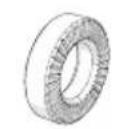


natural_image
Simple line drawing of a coiled cable with a connector (no text or symbols)


natural_image
Technical line drawing of three mechanical components labeled H, R, and L (no text or symbols on the parts themselves)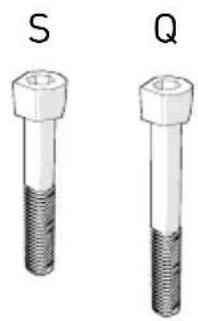
natural_image
Two identical 3D-rendered mechanical bolts labeled S and Q, showing different threaded positions (no text or symbols beyond labels)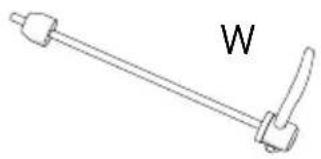
natural_image
Simple line drawing of a lever handle with labeled point 'W' (no other text or symbols)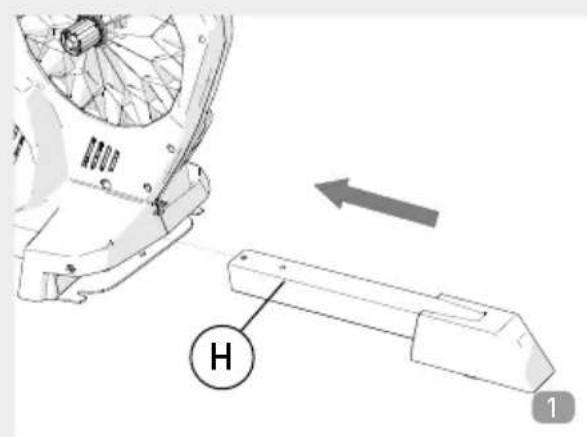

natural_image
Mechanical assembly diagram showing a bracket with mounting holes and a labeled component 'S' (no text or symbols beyond label)

natural_image
Technical diagram of a mechanical assembly with labeled component Q (no readable text or symbols)
natural_image
Mechanical assembly diagram showing a motor or actuator with rotational arrows indicating motion (no text or symbols present)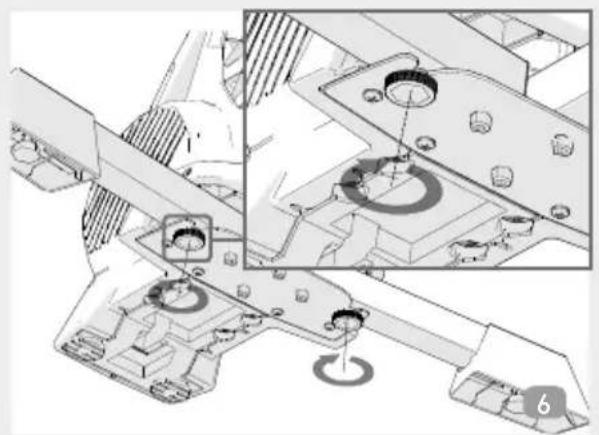
natural_image
Technical diagram of a mechanical assembly with cross-section and detail views (no visible text or symbols)
natural_image
Line drawing of a mechanical fan or propeller with three arms crossed, no text or symbols present
natural_image
Technical illustration of a mechanical assembly with multiple views and mounting points (no text or symbols)

natural_image
Technical illustration of a mechanical component with internal structure and a separate textured component, no visible text or symbols
natural_image
Technical line drawing of a mechanical component with internal gear and a close-up view of a tool (no text or symbols)


natural_image
Technical line drawing of a mechanical assembly with gears and linkages (no text or symbols)
natural_image
Technical line drawing of a mechanical assembly with labeled components (no readable text or symbols)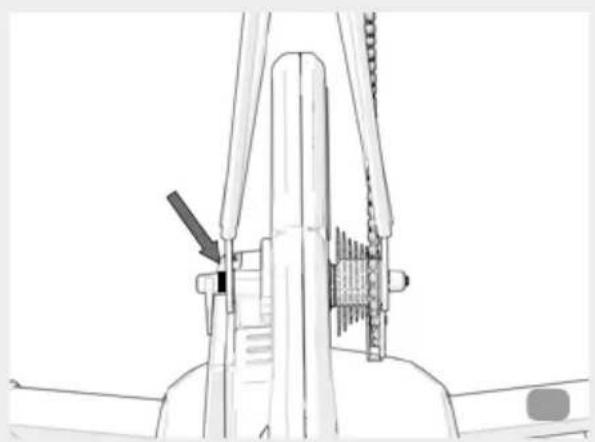
natural_image
Technical line drawing of a mechanical assembly with no visible text or symbols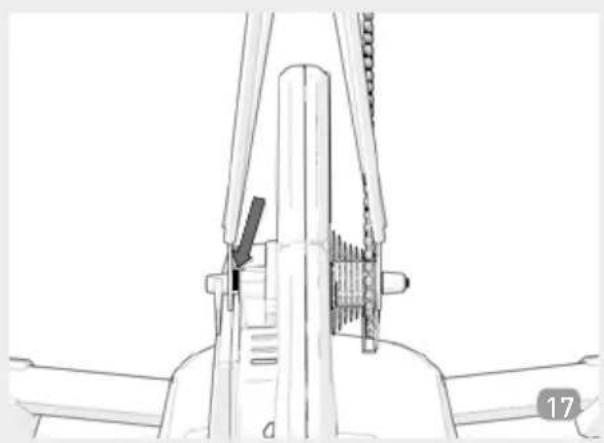
natural_image
Technical line drawing of a mechanical assembly with no visible text or symbols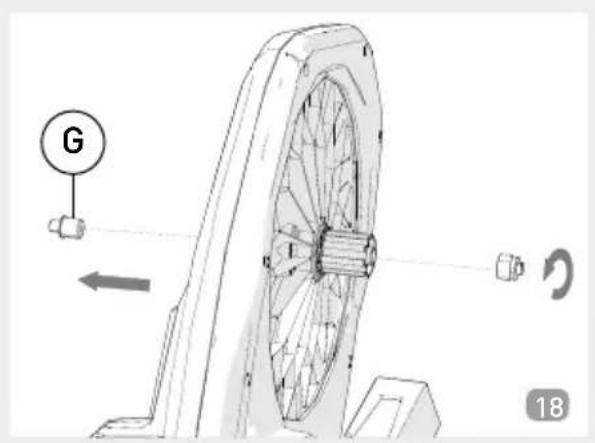
natural_image
Technical line drawing of a mechanical device with a tool inserted, showing no text or symbols
natural_image
Technical line drawing of a mechanical assembly with no visible text or symbols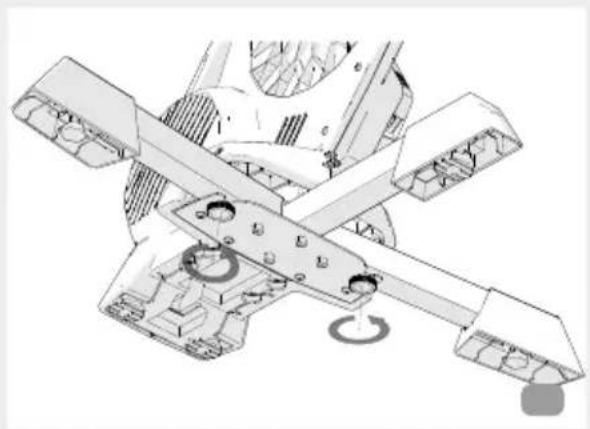
natural_image
Technical illustration of a mechanical assembly with intersecting gears and housing (no text or symbols)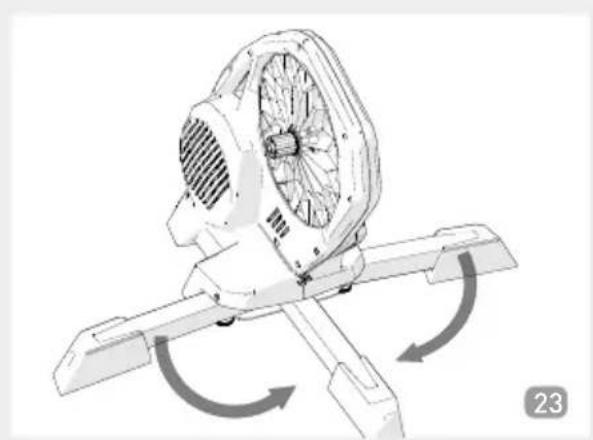
natural_image
Technical illustration of a mechanical fan assembly with rotational arrows indicating motion (no text or symbols)
natural_image
Line drawing of a mechanical fan or motor assembly (no text or symbols)
natural_image
Technical line drawing of a mechanical component with internal gear and a fastener, no text or symbols present
natural_image
Technical line drawing of a mechanical component with internal structure and directional arrow (no text or symbols)
natural_image
Technical diagram of a mechanical component with internal structure and directional arrow (no text or symbols)
natural_image
Technical line drawing of a mechanical component with internal structure and a separate textured part, no visible text or symbolsCN - 中文
"Service Speed&Cadence" (Geschwindgketi –Tritt
Congratulations on your purchase of the Direto cycling simulator
GENERAL SAFETY WARNINGS
Before using your trainer, carefully read the warnings listed below for your health and safety.
- The appliance is not to be used by persons (including children) with reduced physical, sensory or mental capabilities, or lack of experience and knowledge, unless they have been given supervision or instruction.
- Children being supervised not to play with the appliance.
- Before beginning a training programme, undergo a physical examination certifying good health.
- Choose a training level compatible with your physical endurance and the status of your health.
- When using the trainer, select a training program and adjust it so that it is compatible with your fitness level and health.
- If you feel particularly fatigued or sore while exercising, stop using the trainer immediately and consult your doctor.
The above warnings are general and not exhaustive of all the precautions that should be taken for the proper and safe use of the trainer; which is solely the responsibility of the user.
INTRODUCTION
Direto is a direct transmission hometrainer with electronically managed magnetic resistance.
- Direto features an extensive range of resistance and power output, direct and accurate power measurement, smooth pedalling and compatibility with open data transmission standards.
- Direto's main feature is an internal power measurement system that evolves the concept of indoor training.
This hometrainer is an ergometer that directly and accurately measures power output.
Resistance is generated by an extremely quiet integrated magnetic braking unit.
- The electronic Direto is able to connect to personal computers, mobile devices (iOS and Android) and cycle computers that feature ANT+™ and/or Bluetooth Smart technology.
The My E-Training software/app features a wide range of training / test modes suitable for all cyclists, from amateurs to seasoned pros.
The app is available on the AppStore (iOS) and Google Play (Android), while the PC / MAC version is available on the www.elite-it.com website.
Important features are:
- Video training
- Personalized training programs
-
Google maps training
-
Saving, importing and exporting data
- Challenge other users
By using an open ANT+™ FE-C protocol, Direto is also compatible with many other non-Elite software programs that feature the same wireless protocol.
There are many software programs / apps / devices on the market that are compatible with this protocol, and therefore are fully compatible with Direto.
FREEHUB COMPATIBILITY
Direto is equipped with a freehub body compatible with 9/10/11-speed cassettes by Shimano® / SRAM® or by other manufacturers that use the Shimano® Standard.
An accessory freehub body compatible with Campagnolo® 9/10/11 speed cassettes is available to replace the original Shimano compatible body provided on Direto; body replacement instructions can be found on page 42.
Direto is compatible with bikes with 130 to 135 mm hubs with 5 mm diameter quick release and with bikes with 12 mm x 142 mm thru-axle hubs.
If you are unsure about the type of derailleur on your bicycle, refer to the bicycle documentation or contact your dealer to ensure compatibility with Direto.
POWER RANGE
The power range covered by the roller is very wide and depends on the speed. The faster you pedal, the wider the power range. Nevertheless there may be extreme conditions where the required power is outside of the range (too high or too low). In these cases the roller delivers the maximum/minimum possible, and resumes working correctly as soon as the conditions return to being compatible with the power deliverable by the Direto. When the required power is outside the available power range, the roller displays on the monitor the actual power it is producing and not the theoretical power.
SLOPE
The maximum simulatable slope on the Direto is a function of speed and the weight of the individual rider. In fact, the power required to pedal up a slope is function of the speed (faster= more power) and of the weight (the heavier the rider, the more power is required to climb any given slope).
Direto uses a magnetic braking system that acts directly on a
moving metallic disc to gradually and uniformly adjust resistance. This technology allows for very accurate changes in slope, even when small, by taking into account the inertia experienced when riding on the road. Both increases and decreases in resistance adjustment are thereby gradual. This system also ensures that pedals will not lock-up, which could have occurred at exceedingly high power outputs.
POWER MEASUREMENT
Direto features an integrated power measurement system. This patented system measures with great accuracy the power developed by the cyclist during training.
Measured power accuracy: ± 2,5%.
Please visit www.elite-it.com for more info.
DATA TRANSMISSION PROTOCOLS
Direto uses two different transmission protocols to interact and send data to software / app / device.
Please contact the app / software / device manufacturer to verify compatibility with one or more of these protocols.
ANT+TM
"ANT+™ FE-C" protocol: this protocol allows the software / app / device to receive training data and adjust hometrainer resistance. This protocol permits total interaction with the hometrainer.
"ANT+TM Speed&Cadence" protocol*: this protocol transmits hometrainer speed and cadence data. Although more common than the ANT+TM FE-C, it does not allow interaction and the app/software/device.
"ANT+TM Power" protocol: this protocol transmits the cyclist's power output data. Also much more common than the ANT+TM FE-C, but this protocol does not allow interaction between the hometrainer and the app/software/device.
With the exception of smartphones that feature integrated ANT+TM connectivity, a USB dongle is necessary to connect via the ANT+TM protocol.
An ANT+TM flash drive is required when using Android, PC Windows and Mac devices. It's available for purchase on the www.shopelite-it.com website or via other channels – it's required to connect the device to the hometrainer via the ANT+TM protocol.
An OTG adapter cable is required for Android devices, while iOS devices require a specific flash drive (not included) compatible with the 30-pin iOS connector.
A complete list of ANT+TM compatible devices is available at: http://www.thisisant.com/directory/
BLUETOOTH SMART
"Fitness Machine - Indoor Bike service" protocol. This protocol sends training data to compatible software / app / device and adjusts resistance on the hometrainer. This protocol offers total interaction with the hometrainer.
"Speed&Cadence Service" protocol*: this protocol transmits hometrainer speed and cadence data, but does not allow interaction between software / app / device and the hometrainer.
"Power Service" protocol: this protocol transmits the cyclist's power output data, but will it also not allow interaction between software / app / device and the hometrainer.
In most cases, smartphones and tablets already feature Bluetooth Smart connectivity, so there is no need for additional components to communicate with the Direto. However, the more outdated devices might not be compatible. Please consult your app provider to make sure that it's Bluetooth Smart compatible.
NOTE: When the hometrainer is connected to the device by a Bluetooth Smart protocol, it cannot be connected to additional BLE devices.
This is a restriction of the Bluetooth Smart protocol itself.
* Warning: should the software / app / device employ the Speed&Cadence protocol to detect speed, you must set a wheel circumference value that equals the actual wheel value divided by 12,1. For instance, if wheel circumference is 2095mm, the value to input as circumference is 2095 / 12,1 = 173mm.
USING THE DIRETO WITH THE SOFTWARE / APP / DEVICE
We suggest using the My E-Training software/app, available on iOS, Android, Windows and Mac OS.
My E-Training is a complete system with several training modes, including videos, configurable software, Google Maps races, Internet competitions and much more.
It's possible to use third-party software that is compatible with the hometrainer communications protocol/standards. There are several software/apps/devices currently on the market that can connect to the Direto.
Please refer to the instructions for the specific software/app/device for a proper connection to the hometrainer.
Before beginning the connection procedure with any app, make sure that the hometrainer is powered up and is not on the energy saver mode. The supplied hometrainer charger must be connected to a power source.
The hometrainer motherboard features LED lights indicating the current hometrainer status. Please check the "Status LED lights" paragraph for an in-depth description.
LED LIGHTS
Direto transmits speed, cadence and power data via the ANT+TM and Bluetooth Smart protocols.
There are 3 LED lights on the motherboard, displaying power supply status, motherboard status and the protocol being used.
The LED lights come in 3 colors with the following meanings:
Red = status of hometrainer power supply
- Off = Direto is not receiving power or has the entered sleep mode
- On = Direto is powered up.
Green = Direto is connected via the ANT+TM protocol.
- Blinking = Direto is awaiting connection.
- On = Direto is transmitting data via the ANT+TM protocol.
Blue = Direto is connected via the Bluetooth Smart protocol.
- Blinking = Direto is awaiting connection.
- On = Direto is transmitting data via the Bluetooth Smart protocol.
HEART RATE MONITOR
- Direto hometrainer does not read heart rate monitor data. Heart rate monitor data can be read directly from a device that includes a heart rate function.
- Compatibility with various types of heart rate monitors depends on the device / software / app being used only ANT+TM and is also compatible
with Bluetooth Smart monitors allowing connection with monitors by both protocols.
POWER SENSOR CALIBRATION
Direto can calibrate the internal power measurement system, which clears the system settings in order to always obtain accurate power values.
The process is very simple, just select any type of training on the home trainer and train for at least 5 minutes, then perform the appropriate function - works on both the My E-Training software and the My E-Training app.
The calibration command in the mobile version can be found in Parameters – Advanced Configuration – Home trainer calibration, while in the desktop version it can be found in Settings – Home trainer calibration.
This is accomplished by pedalling and increasing speed until you reach a certain indicated value.
Remember to stop pedalling at the system prompt.
After a few seconds the system will indicate that the calibration process was successful.
This value is then stored in the Direto's memory, and accurate power data will be received from every connected device, including non-Elite third party software / app / devices.
Please note: the aforementioned calibration procedure can be conducted with software / app / devices other than the Elite ones.
CADENCE SENSOR
The Direto uses an innovative "sensorless" system and it's obtained via sophisticated power-based calculations.
When maintaining a high pedal cadence at low resistance levels, there may occasionally be a slight inaccuracy in the cadence value since it is the result of calculation and not direct monitoring. This occurs especially with fast pedalling and low resistance.
Should you wish for more accuracy than what the "sensorless" system can give you, you can use a wired sensor (not included) available for purchase via shop-Elite or authorized retailers.
For installation on the bike, follow the instructions on the enclosed manual.
To activate the cadence detection via the sensor, connect the sensor to the Direto
Some software allows the use of wireless sensors connected directly to the app/software/device. In this case, please consult the specifications of the software / app / device to verify its compatibility with wireless cadence sensors.
COPYRIGHT
No part of this manual may be reproduced or transmitted without the written authorization of Elite S.r.l.
The Elite Direto software and relative code are property of Elite S.r.l.
International copyright law protects the software.
The Elite Direto software must be treated like any other copyrighted material, such as books.
Users undertake not to modify or adapt the programme. Users also undertake not to decompile, disassemble or attempt in any way to discover the native software code.
NOTE
- Elite cannot be held responsible for any malfunction involving third party software / app / device.
- The presence of high-voltage electric lines, traffic lights, electric railway lines, bus or tram electric lines, television sets, automobiles, cycle computers, gym equipment and mobile phones inside the operating range of the console, etc., can be the cause of interference. Therefore the use of other wireless receivers may alter or completely inhibit operation of the Direto due to such interference.
- Do not expose the Direto to direct sunlight for long periods when they are not in use.
DISCLAIMER
Elite S.r.l. is not liable for any temporary or permanent damage to the physical integrity of the user, whether direct or indirect, resulting from the use of the trainer.
ATTENTION!
Direto is equipped with a freehub body compatible with
9/10/11-speed cassettes by Shimano® / SRAM® or by other manufacturers that use the Shimano® Standard.
An accessory freehub body compatible with Campagnolo® 9/10/11 speed cassettes is available to replace the original Shimano compatible body provided on Direto; body replacement instructions can be found on page 42.
Direto is compatible with 130 or 135 mm hubs and 5mm diameter quick-release.
If you are unsure about the type of derailleur on your bicycle, refer to the bicycle documentation or contact your dealer to ensure compatibility with Direto.
NAME AND LIST OF COMPONENTS
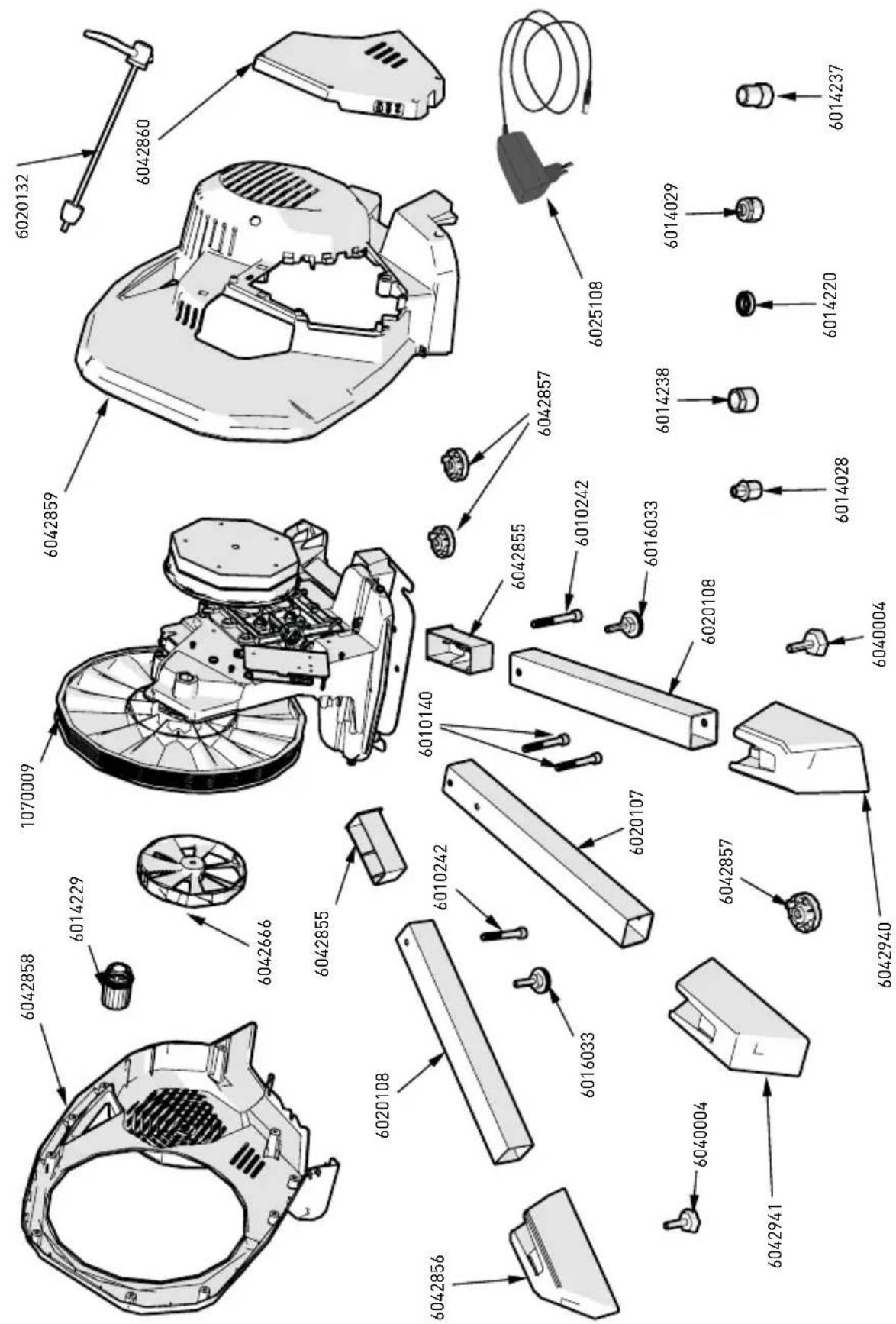
Your Direto hometrainer includes:
| N°1 | Direto body | ||
| N°2 | Freehub body spacer (Ref. B) | ||
| N°1 | Chainstay | adapter | |
| N°1 | Power | adapter | |
| N°1 | Chainstay L right adapter=142 mm (5,6 inches) | (Ref. E) | |
| N°1 | Chainstay L left adapter=142 mm (5,6 inch) | (Ref. F) | |
| N°1 | Chainstay L left adapter=130-135 mm (5,1-5.3 inch) | (Ref. G) | |
| N°1 | Central | Leg | |
| N°2 | Side Legs (Ref. L - Ref. R) | ||
| N°2 | TCEI M8 x 60 Screws (Ref. S) | ||
| N°2 | TCEI M8 x 70 Screws (Ref. Q) | ||
| N°1 | Quick | release | |
ASSEMBLING
- Disassemble the Direto body (Ref. A)
- Place the Direto body (Ref. A) vertically as indicated (Pic. 1) and hold it in place with the upper handle
- Insert the Central Leg (Ref. H) and insert the screws (Ref. S) without fully tightening them (Pic. 1 - Pic. 2).
- Insert the side legs (Ref. L - Ref. R) (Pic. 3)
- Tighten the screws (Ref. Q) until they rub against the side legs so that they can rotate (Pic. 4).
- Fully tighten the screws (Ref. S) of central leg (Ref.H) (Pic. 2)
- Spread the side legs (Ref. L - Ref. R) to its max extent (Pic 5)
- Tighten the safety knob (Pic. 6).
- Make sure the hometrainer is stable (Pic 7), otherwise operate on the adjustable feet (Pic 8).
! Warning ! Side Legs must be able to spread and fold easily, if that's not the case loosen the fixing screws Ref (Q) a bit.
INSTALLING THE SPROCKET CASSETTE ON THE DIRETO FOR ∅5 L=130 mm AND L=135 mm CHAINSTAYS
- Assemble the sprocket cassette on the freehub by aligning the groove profiles.
- In order to use a Shimano® / SRAM® 9/10 cassette, or
others that employ the Shimano ^® standard, you need to place the spacer (Ref. B) on the freehub before inserting the sprocket cassette (Pic. 9).
- If you're installing a 11-speed cassette by Shimano® / SRAM® or by other manufacturers that use the Shimano® Standard, place the sprocket cassette onto the freehub body without using the spacer. (Pic. 10) (Ref. B)
- Using the torque wrench, tighten the lock ring supplied with the cassettes onto the freehub body (Pic. 11).
CAUTION!
Strictly follow the instructions provided by the cassette manufacturer with regard to specific installation techniques, the need for additional spacers and torque specifications.
NOTE: please contact your dealer if you have questions or are unable to install the cassette. The warranty does not cover any damage to the bicycle and/or Direto in the event of incorrect installation.
- Using the torque wrench, tighten the lock ring supplied with the cassettes onto the freehub body (Pic. 9).
- Direto includes the correct 5 mm diameter quick release adapter for dropout spacing ranging from 130mm (5,1 inches) to 135 mm (5,3 inches). Therefore, on bikes with 130-135 mm (5,1 to 5,3 inches) dropout spacing, insert the left dropout adapter (Ref. D) (Pic. 10). Please consult the paragraph on page 42 for bikes with 12 mm diameter (0.47 in.) and 142 mm.
- Place the bicycle chain onto the smallest sprocket of Direto (Pic 12).
INSTALLING THE BICYCLE ON DIRETO
- Loosen the bike's rear brake and place the chain on the smallest rear sprocket and the largest front chainring. Remove the quick release from the rear wheel.
- Insert the quick release and the dropout adapter (Ref. C) on the Direto sprocket cassette (Pic. 13).
- Place the bicycle chain onto the smallest sprocket of Direto (Pic 14).
- Fully fit the bicycle's rear dropouts onto Direto's cassette (Pic. 15), paying careful attention to the correct internal or external position, based on the type of bicycle:
- External triangle adapter (Ref. C) for road and time trial bikes (130mm triangle) (Pic.16).
- Internal triangle adapter (C) for mountain bikes (135mm triangle) (Pic. 17).
NOTE: the knurled side of the triangle adapter (Ref. C) must be facing the bicycle dropout. - Securely fix the bicycle to Direto and firmly close the quick release. The resulting pressure should keep the bicycle dropouts locked to the Direto.
INSTALLING THE SPROCKET CASSETTE ON THE DIRETO FOR ∅12 L=142 mm CHAIN-STAYS
- For bikes with rear thru-axle you need to change the sleeve set in the chainstay spindle:
1) If it's inserted, remove the left adapter (Ref. G) and unscrew the right adapter for 130-135 mm chainstays (Pic.18);
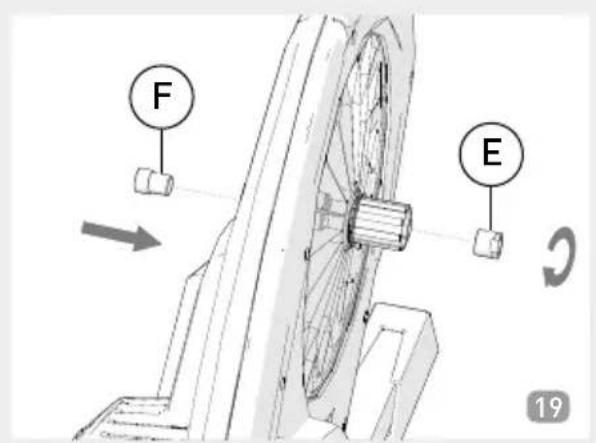
2) Screw the right adapter to its end (Ref. E) and insert the left adapter (Ref. F) for 142 mm chainstays (Pic.19);
3) Attach the adapter (Ref. E) with the 17mm key (11/16 inches) with a 5Nm tightening torque (44 in-lbs). Use a medium strength, oil-tolerant threadlocker to lock the nut on the spindle;
4) Loosen the rear brake of the bicycle and place the chain on the smallest sprocket of the rear wheel and the front chainring. Remove the thru-axle from the rear wheel.
5) Position the bicycle's rear dropouts on the axle of the sprocket cassette of the Direto.
6) Insert the thru-axle on the Direto sprocket cassette shaft.
7) Make sure the bicycle is safely positioned on the Direto and lock the thru-axle with a strong push. The pressure should make the bike dropouts remain locked onto the structure of the Direto.
8) Make sure the bike is stable by pushing and pulling the top tube of the frame and the saddle. Should the bike still be moving a little on the Direto, use more force to lock the thru-axle. - Start pedalling. Ride very slowly at first and increase your speed gradually until you become familiar with the features of Direto.
CONNECTIONS
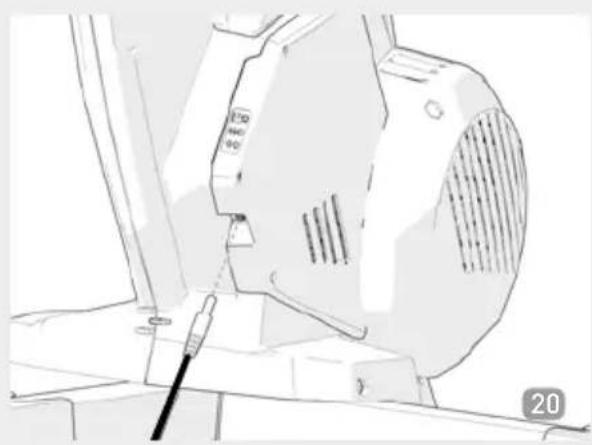
- Direto has an electronic motherboard that is powered via a standard power supply adapter (included).
- Connect the power supply to the grid and the jack to the proper connector on the back of the Direto. A small vibration indicates that the system is booting up to its initial position. This operation might last up to 15 seconds.
Hang the power supply cable on the dedicated hanger (Pics 21 and 22).
REMOVING THE BICYCLE
- Shift the bicycle chain on the smallest cassette sprocket of Direto and of the smallest front chainring of the bicycle.
- Open up the quick release (or remove the thru-axle) and remove the bicycle from the Direto.
- To avoid clutter or for transportation: loosen the knobs (Pic. 22) and fold the side legs (Pic. 23 - 24).
RECOMMENDATIONS FOR USE
- Choose a cassette range that is compatible with your goals and fitness level:
1) cassettes with a range of 11 to 23/25 teeth are recommended for professional athletes and amateurs who are able to develop high power output.
2) Cassettes with a greater number of teeth, such as 12/13 to 27/29, are recommended for all other cyclists.
- Derailleurs should work properly after bicycle installation on Direto. Occasionally, an adjustment may be necessary for proper operation. If you have any questions, please contact your dealer to ensure proper derailleur operation with Direto.
INSTALLATION OF CAMPAGNOLO® 9/10/11 SPEED COMPATIBLE CASSETTE FREEHUB BODY
- To replace the original freehub body installed on Direto with the accessory body compatible with Campagnolo® 9/10/11 speed cassettes, follow the procedure below:
1) Unscrew the adapter on the cogset shaft (Pic. 25).
2) Remove the freehub body from the Direto shaft (Pic. 26).
3) Fully insert the Campagnolo ^® cassette compatible freehub body (Pic. 27-28).
4) Tighten the cog set shaft adapter using a 5 mm hex wrench to a torque of 5 Nm (44in-lbs). Use a medium-strength oil tolerant threadlocker to lock the adapter on the shaft.
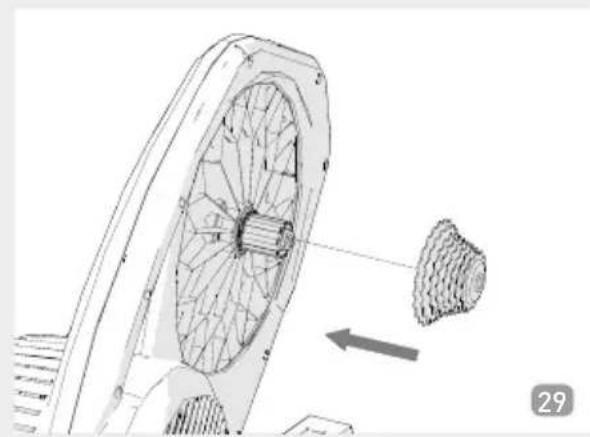
- You can now mount your Campagnolo® 9/10/11 speed cassette onto the freehub body without using the spacers (Ref. E) (Pic. 29) (only for 11 speeds).
ATTENTION!
Strictly follow the instructions provided by the cassette manufacturer with regard to specific installation techniques, the need for additional spacers and torque specifications.
NOTE: Please contact your dealer if you have questions about in-
stallation or if you cannot install the cassette. The warranty does not cover any damage to the bicycle and/or Direto in the event of incorrect installation.
MAINTENANCE
Direto does not require any specific scheduled maintenance, however the following precautions are recommended:
- wipe the trainer clean with a cloth after each training session to prevent the accumulation of dust and sweat;
- do not clean or degrease the bicycle chain while the bike is mounted on Direto as solvents can cause irreparable damage to the bearings or other internal mechanical parts;
- check that the quick release is properly secured and fully working before every training session.
Some transmission belt slippage might occur after multiple uses or after particularly strenuous training sessions, as belt tension diminishes; you might perceive it via a resistance variation while pedaling.
WARNING!: Make sure the re-tensioning procedure has been pre-approved by Elite's tech assistance department before re-tensioning the belt. Breaking the anti-tampering seal invalidates the product's warranty.
WARNINGS
- Direto becomes hot during use. Wait for it to cool before touching the resistance unit covers.
- Use the Direto trainer as described in the manual.
- Direto is not equipped with an emergency brake.
- Direto has been designed and manufactured to ensure maximum safety of the user and/or third parties, but people, children and pets should be kept away from the trainer during use as contact with the moving parts of the trainer and the bicycle may result in damage or injury.
- Never put your fingers or foreign objects of any kind through the slots on Direto, as there will be high risk of damage to the trainer and/or serious physical injury.
- Before you start training, place the trainer in a suitable location, away from any potentially dangerous objects (furniture, tables, chairs...) so as to avoid any risk of accidental or inadvertent contact.
- The Direto is to be used by only single rider at a time.
- The max weight limit of the user is 113 kg / 250 lb in accordance with the referenced norm EN 957-1 Class HC.
- Always check the safety and stability of the bicycle on Direto before training.
- No part of the product has any use beyond its original application. The warranty will be void if the unit has been opened or tampered with.
- Since the feet are made of soft non-slip material, they may leave traces of rubber on the floor during use.
- If the trainer needs to be shipped for technical support and/or any other reason, it must be shipped in its original box. Damage due to a failure to use the original packaging is not covered by
the warranties.
Note: before shipping your trainer or any of its parts for technical support, you must first consult Elite or its distributor or your dealer. Any items received without prior agreement will be rejected
- Do not leave the charger plugged in while not in use.
- Do not store the Direto in cold and damp places. This may damage its electronic components.
- Use only the supplied charger.
PACKAGING
If the roller needs to be shipped, careful packaging is critical:
- remove the charger cable from the Direto;
- put the cable in a humidity-free container;
- pack up the Direto in its original box.
During shipments, packs often undergo mistreatment and very hard impacts, therefore inadequate packing can result in permanent damage to the roller. This type of damage is not covered by the warranty.
Note: before sending the roller or any other component assistance, always firstly consult Elite or the distributor.
Technical assistance:
Phone 0039 049 5940044
e-mail: real@elite-it.com
INFORMATION ON PRODUCT DISPOSAL
1) WITHIN THE EUROPEAN UNION

This product conforms with European Directives 2002/95/CE, 2002/96/CE and 2003/108/CE.
The crossed bin symbol given on the equipment or on the packaging indicates that at the end of its service life the product must be collected separately from other waste.
Therefore at the end of its useful life the user must take the equipment to an appropriate centre for the differentiated collection of electronic and electrotechnical waste, or return it to the dealer when purchasing a new product of equivalent type.
Adequate differentiated collection for subsequent sending of the scrapped equipment to recycling, treatment and environmentally-friendly disposal can help prevent possible negative consequences for the environment and the health of people and favours the resume and/or recycling of the materials from which the equipment is made.
Improper disposal of the product by the user could involve penalties as specified by the regulations in force.
2) IN NON-EU COUNTRIES
If you want to dispose of this product, please contact your local authorities and ask them what disposal method applies.
ESPAÑOL
INFORMATIONS SUR LA DESTRUCTION DU PRODUIT
1) EN UNION EUROPEENNE
- Aan = Direto is gevoed.
1) BINNEN DE EUROPESE UNIE
MANUFACTURER or AUTHORISED REPRESENTATIVE:
CONSTRUCTEUR ou REPRESENTANT AUTORISE:
This declaration is issued under the sole responsibility of the manufacturer and, if applicable, his authorized representative.
-
In accordance with the law no. 24 of 02/02/2002 and CE directive 1999/44, ELITE s.r.l. guarantees its products and the components used for a period of two (2) years from the date of purchase.
-
Warranty is void for defects caused by reasons not chargeable to the manufacturer such as negligence or carelessness whilst using the product, impacts, maintenance done by non-authorised personnel, damage caused by transportation, normal wear. Additionally, warranty is void in case of improper use of the product, wrong observation of instruction, especially the notice concerning installation and use supplied by ELITE s.r.l. for which in any case it is not responsible for eventual direct or indirect damages.
-
In case of repaired or replaced product done by the Factory or in one of its authorized Service Centers, ELITE s.r.l. is not responsible for any loss or damage during transportation.
-
To take advantage of the warranty service it is necessary to carefully fill in all its parts the "CUSTOMER ASSISTANCE CARD" which needs to accompany, along with the fiscal receipt or other document issued by the Seller which bears the name of the Seller and date selling, the eventual returned product. Warranty is void in case one of these documents are missing.
-
All the information supplied by the Purchaser on the "CUSTOMER ASSISTANCE CARD" will be handled in accordance with the rules of the law no. 675 of 31/12/1996.
-
In case there is, along with the documentation supplied with the product, a technical drawing of the product itself, indicate the defective or malfunctional part by signing on the correspondant number. The drawing needs to be attached to the "CUSTOMER ASSISTANCE CARD".
-
ELITE s.r.l. reserves the right to apply technical and aesthetic modifications to its products without obligation of notice.
GARANTIA ESPAÑOL
0171001EXUE

0171001K


ELITE S.R.L.
VIA FORNACI, 4
35014 FONTANIVA
PADOVA - ITALY
PHONE +39 049 594 0044
E-MAIL: REAL@ELITE-IT.COM
ELITE-IT.COM


- Congratulations on your purchase of the Direto cycling simulator
- GENERAL SAFETY WARNINGS
- INTRODUCTION
- FREEHUB COMPATIBILITY
- POWER RANGE
- SLOPE
- POWER MEASUREMENT
- DATA TRANSMISSION PROTOCOLS
- ANT+TM
- BLUETOOTH SMART
- USING THE DIRETO WITH THE SOFTWARE / APP / DEVICE
- LED LIGHTS
- HEART RATE MONITOR
- POWER SENSOR CALIBRATION
- CADENCE SENSOR
- COPYRIGHT
- NOTE
- DISCLAIMER
- ATTENTION!
- NAME AND LIST OF COMPONENTS
- Your Direto hometrainer includes:
- ASSEMBLING
- INSTALLING THE SPROCKET CASSETTE ON THE DIRETO FOR ∅5 L=130 mm AND L=135 mm CHAINSTAYS
- CAUTION!
- INSTALLING THE BICYCLE ON DIRETO
- INSTALLING THE SPROCKET CASSETTE ON THE DIRETO FOR ∅12 L=142 mm CHAIN-STAYS
- CONNECTIONS
- REMOVING THE BICYCLE
- RECOMMENDATIONS FOR USE
- INSTALLATION OF CAMPAGNOLO® 9/10/11 SPEED COMPATIBLE CASSETTE FREEHUB BODY
- MAINTENANCE
- WARNINGS
- PACKAGING
- INFORMATION ON PRODUCT DISPOSAL
- 1) WITHIN THE EUROPEAN UNION
- 2) IN NON-EU COUNTRIES
- ESPAÑOL
- INFORMATIONS SUR LA DESTRUCTION DU PRODUIT
- 1) EN UNION EUROPEENNE
- 1) BINNEN DE EUROPESE UNIE
- GARANTIA ESPAÑOL
Brand : Ozone
Model : Direto
Category : Home trainer