
Arion Digital Smart B+ - Home trainer Ozone - Free user manual and instructions
Find the device manual for free Arion Digital Smart B+ Ozone in PDF.


| Product type | Smart indoor trainer |
| Brand | Ozone |
| Model | Arion Digital Smart B+ |
| Dimensions (folded) | 65 x 50 x 30 cm |
| Weight | 14 kg |
| Power supply | AC adapter 12V / 2A |
| Maximum resistance | 1500 watts |
| Resistance types | Electromagnetic, gradient simulation |
| Connectivity | Bluetooth 4.0, ANT+ |
| Compatibility | Zwift, TrainerRoad, Rouvy, Kinomap |
| Integrated sensors | Power, speed, cadence |
| Maximum user weight | 120 kg |
| Noise level | Less than 50 dB |
| Maintenance and cleaning | Clean with a dry cloth. Check connections periodically. |
| Safety | Automatic shutdown in case of overheating. Anti-slip pads. |
| Spare parts and repairability | Crank, electromagnet, electronic board available. |
| Warranty | 2 years |
| Included accessories | Rear skewer, floor mat, AC adapter |
Frequently Asked Questions - Arion Digital Smart B+ Ozone
User questions about Arion Digital Smart B+ Ozone
0 question about this device. Answer the ones you know or ask your own.
Ask a new question about this device
Download the instructions for your Home trainer in PDF format for free! Find your manual Arion Digital Smart B+ - Ozone and take your electronic device back in hand. On this page are published all the documents necessary for the use of your device. Arion Digital Smart B+ by Ozone.
USER MANUAL Arion Digital Smart B+ Ozone
natural_image
Mechanical device with transparent frame and internal components (no visible text or symbols)
natural_image
Black plastic bicycle frame with attached suspension components, shown from front and side (no text or symbols visible)arion
DIGITAL SMART B+
ISTRUZIONI PER L'USO
IT
INSTRUCTIONS FOR USE
EN

smartertraining
BEDIENUNGSANLEITUNG
DE

ANT+

FE-C

PWR

S&C

Bluetooth®
NOTICE D'UTILISATION
FR


natural_image
Illustration of two hands holding a tool, no text or symbols present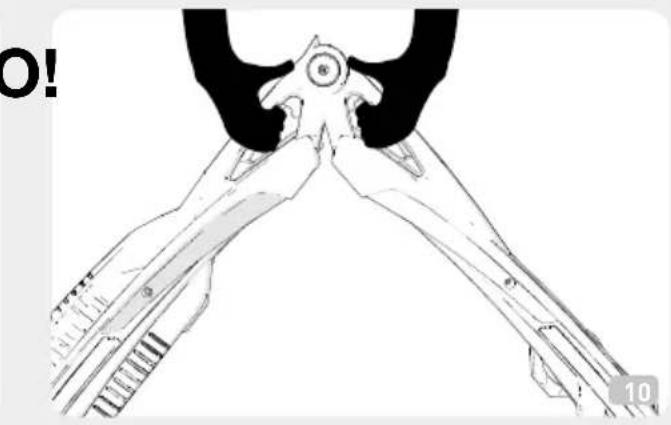
natural_image
Line drawing of a pair of pliers or tools with no visible text or symbols
natural_image
Illustration of two figures interacting, one holding a long arm and the other standing (no text or symbols)

natural_image
Technical line drawing of a mechanical assembly with labeled components A and G (no text or symbols beyond labels)• ISTRUZIONE PER L'USO 3
• SENSORE CADENZA 4
- IMPORTANTE 4
• PROTOCOLLI DI TRASMISSIONE DATI 4
• NOME E LISTA DEI COMPONENTI 4
• ASSEMBLAGGIO 5
- REGOLAZIONE INTERASSE DELL' ARION DIGITAL SMART B+ 5
• NOTE 5
• UTILIZZO 5
• TROUBLESHOOTING
- SUGGERIMENTI PER UTILIZZARE IL VOSTRO
ARION DIGITAL SMART B+ 6
• FINE UTILIZZO 6
• CURA E MANUTENZIONE 6
• ATTENZIONE 7
• INFORMAZIONI SULLO SMALTIMENTO DEL PRODOTTO 7
• DICHIARAZIONE DI CONFORMITÀ 35
• GARANZIA 36
6
• INSTRUCTIONS FOR USE 8
• CADENCE SENSOR 8
- IMPORTANT 9
• DATA TRANSMISSION PROTOCOLS 9
• NAME AND LIST OF COMPONENTS 9
• ASSEMBLY 9
• DISTANCE ADJUSTMENT OF ARION DIGITAL SMART B+ 9
• NOTES 10
- USE 10
• TROUBLESHOOTING 10
• ADVICE ON USING YOUR ARION DIGITAL SMART B+ 10
• END USE 11
• CARE AND MAINTENANCE 11
- ATTENTION 11
• INFORMATION ON PRODUCT DISPOSAL 12
- DECLARATION OF CONFORMITY 35
- WARRANTY 36
(http://www.thisisant.com/directory/).
Thank you for choosing the ARION DIGITAL SMART B+ roller
INSTRUCTIONS FOR USE
Arion Digital Smart B+ is an electronic unit designed for indoor cycling training & testing that connects to a PC (Windows) or a mobile app for devices such as smartphones or tablets.
In order to fully enjoy the Arion Digital Smart B+ you must have a display (software, app or device) that connects to the hometrainer, displays training data and adjusts resistance.
The Arion Digital Smart B+ features integrated "ANT+TM" and "Bluetooth Smart" connectivity options, which makes the Arion Digital Smart B+ compatible with most devices without having to use other additional components.
Moreover, the ANT+™ FE-C protocol is “open” - it allows the hometrainer to run all the software that supports it, so you can freely choose the software to use with the Digital Smart B+.
Arion Digital Smart B+ is compatible with ELITE's "My E-Training" app; the app's many features work with iOS (iPhone, iPad, iPod Touch) and Android devices.
Arion Digital Smart B+ supports ANT+™ FE-C, an interactive protocol developed for hometrainers to read speed and cadence data and to adjust resistance. Other protocols allow only one-way data transfer and no interaction with the hometrainer.
Moreover, the ANT+™ FE-C protocol is “open” - it allows the hometrainer to run all the software that supports it, so you can freely choose the software to use with the Arion Digital Smart B+.
A complete list of devices featuring the ANT+™ FE-C protocol is available at ANT+™ website (http://www.thisisant.com/directory/).
Note: Not all computers/devices have integrated ANT+TM connectivity and some may require an additional component
Many newer phones and tablets already feature the Bluetooth Smart Ready connection and/or the ANT+TM connection and do not require additional components: if your smartphone/tablet/device cycle computer features integrated ANT+TM connectivity it will be utilized, otherwise some models can communicate with external USB dongles for a direct connection or via adapters.
Here's a list of compatible devices:
iPad 3 or newer
iPhone 4S or newer
iPod Touch 5th gen or newer
Android 4.3 and Bluetooth 4.0 devices
The above are the minimum required features for Bluetooth Smart compatibility. Please refer to the instructions included with your device for a detailed explanation of its features.
The roller is a training tool enabling users to get into top shape for cycling.
The high quality bearings reduce noise and wear and ensure a long product life.
The frame of the Arion Digital Smart B+ is very practical, light, manageable, easy to use and takes up little space.
Frame can be folded for easier storage or carrying.
It is recommended for users of all levels.
CADENCE SENSOR
The Arion Digital Smart B+ roller does not use a sensor for measuring the cadence. This is possible
thanks to a sophisticated calculation based on the speed. Since this is not a direct measurement, but the result of a calculation, in particular situations the cadence value may not be accurate.
IMPORTANT
Pay attention to the position of hands when closing the roller, to avoid squashing them between the two side members
DATA TRANSMISSION PROTOCOLS
As previously mentioned, the Arion Digital Smart B+ employs wireless transmission to connect the hometrainer to an app/software/device.
The hometrainer uses two types of wireless protocol, ANT+TM and Bluetooth Smart:
- ANT+™ FE-C protocol sends hometrainer data and
adjusts resistance from the app/device.
ANT+™ Power and Bluetooth Smart power protocols send the rider's power value estimate.
ANT+™ Speed&Cadence and Bluetooth Smart Power protocols send rider's speed and cadence values.
- Bluetooth Smart Elite Trainers protocol adjusts the hometrainer resistance from the app/software/device.
Please contact the app/software/device manufacturer to verify compatibility with one or more of these protocols.
A few additional remarks on the use of these protocols:
- When the hometrainer is connected to the device by a Bluetooth Smart protocol, it cannot be connected to additional devices. This is a restriction of the Bluetooth Smart protocol itself.
- When a hometrainer connects with an ANT+™ protocol, it stops sending data with the Bluetooth Smart protocol (and vice-versa).
NAME AND LIST OF COMPONENTS
A N°3 Side members
B N°1 Longitudinal member with resistance
© N°4 Rectangular covers
D N°2 Round covers
E N°1 Drive belt
F N°1 Front roller
G N°1 Middle roller
H N°1 Rear roller
I N°1 Power adapter
N°1 Allen key
ASSEMBLY
Your Arion Digital Smart B+ roller should arrive fully assembled, checked and ready for use.
DISTANCE ADJUSTMENT OF ARION DIGITAL SMART B+
Before starting to use your Arion Digital Smart B+ it is necessary to adjust the centre distance of the rollers to make them compatible with your bicycle's wheelbase. This adjustment must be carried out as follows:
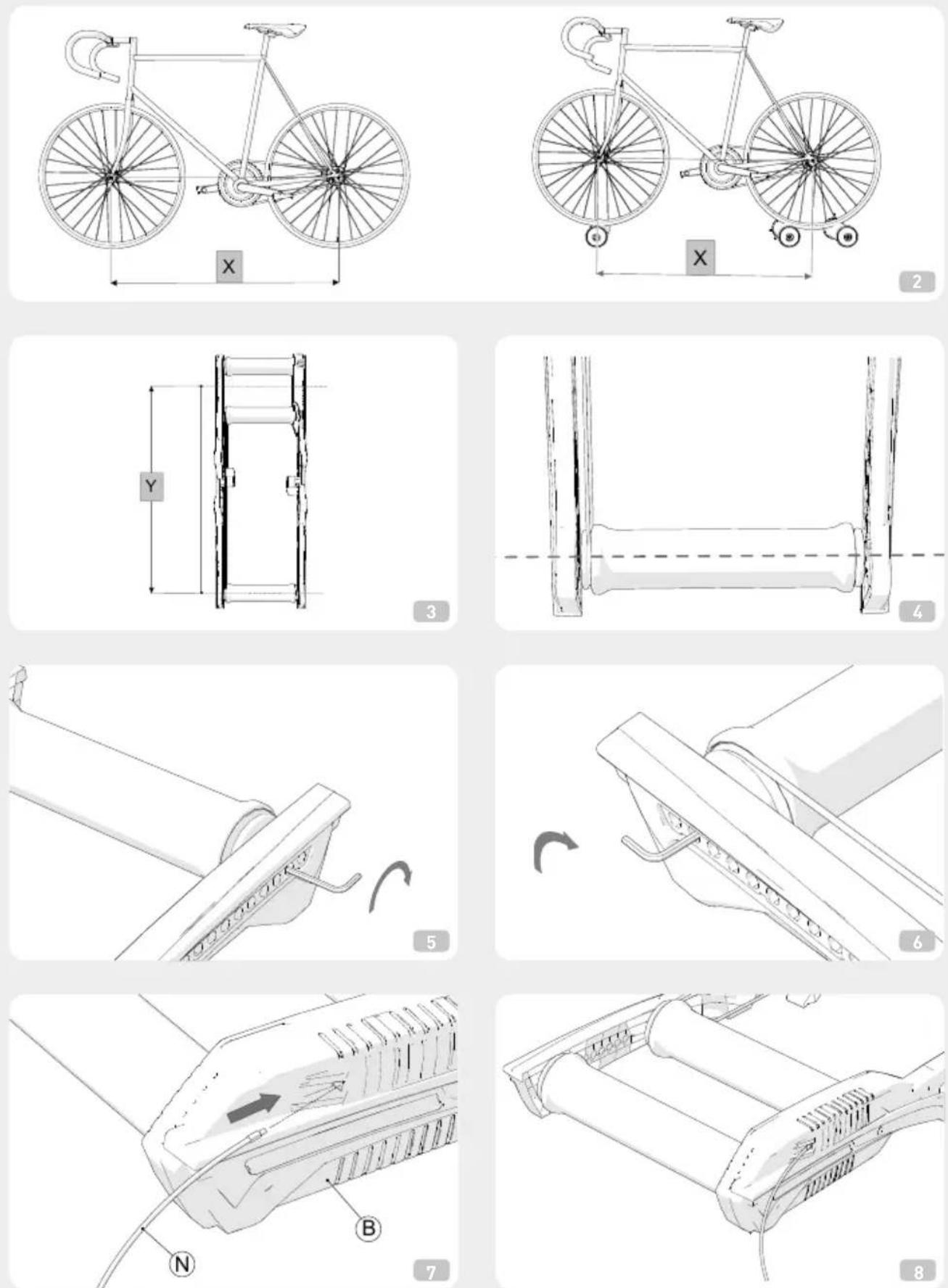
1) Measure the distance between the centres of the wheels of the bicycle to be used on the Arion Digital Smart B+ (Fig. 2). We will call this dimension "X".
2) The distance from the intermediate point between the two rear rollers to the middle of the Arion Digital Smart B+ front roller, which we will call "Y" (Fig. 3), must match or be as near as possible to dimension "X". The axle of the Arion Digital Smart B+ front roller must
be positioned in the hole of the Arion Digital Smart B+frame whose measurement given on the graduated scale is closest to dimension "X" (Fig. 4).
ATTENTION: dimension "Y" must be equal to or slightly greater than "X". The rollers can be adjusted to adapt them to bicycles whose wheelbase is 944-1124 mm (37 to 44 inches).
3) To change Y it is necessary to shift the front roller F).
4) Fold the Arion Digital Smart B+ until the drive belt E) slackens.
5) Loosen the drive belt E), making it come off the respective front and rear guides.
6) Unfold the Arion Digital Smart B+ back into the open position.
7) Remove the rectangular covers C) from both front longitudinal members (with aid of a screwdriver if necessary), and the screws and washers from the front roller on both sides, using the Allen key supplied (Fig. 5 and Fig. 6).
8) Pull the roller out from its original position.
9) Position the roller in the appropriate seat in the holes in the frame, so that X matches Y.
10) Refit the screws and the washers in the special holes, but do not tighten them down.
11) Close the Arion Digital Smart B+, position the drive belt E) on the guide of the front roller F) and middle roller G).
12) Unfold the Arion Digital Smart B+ into open position again.
13) Check the position of the front roller F), putting your bicycle on the rollers and checking that the axle for the front wheel sits directly above the front roller.
14) Once the front roller F) has been positioned, tighten the screws without applying too much pressure which could twist the A) side Frames.
15) Close the sides with the rectangular covers C). The Arion Digital Smart B+ is now ready to use.

NOTES

- Attention: integrated wireless systems that work on the same frequency band can interfere with the data transmission of the Arion Digital Smart B+. In this case, deactivate them.
- Do not leave the roller and console exposed to direct sunlight or in particularly humid places for prolonged periods when not being used.
- Never use chemical detergents (petrol or thinners) on any part of the Arion Digital Smart B+.
USE
- Plug the power adapter I) into a wall outlet and the connector into the resistance unit (Fig. 7 and Fig. 8).
- Start pedalling.
TROUBLESHOOTING
• The cadence value is not accurate:
the algorithm that calculates cadence without a sensor can sometimes vary in accuracy. This might happen when training with a high pedaling cadence at a low resistance level.
- If the hometrainer does not connect to the app:
The hometrainer needs to be properly powered up to work and it needs to connect to a device within 15 minutes, otherwise it will automatically enter its energy saving phase. Start pedaling or unplug it and plug it in again to reactivate it, and then connect to a device within 15 minutes.
ADVICE ON USING YOUR ARION DIGITAL SMART B+
1) The rollers work best with tyre that has a smooth tread. If using a mountain bike, to reduce noise and increase stability change the tyre for one with a slick tread.
2) For beginners, position the rollers in an entrance hall,
in a doorway or near a stable object, in order to have a support while acquiring the necessary balance.
3) Make sure the Arion Digital Smart B+ rests on a flat, stable surface.
4) Start pedalling and look ahead, like on the road. Even if you would instinctively tend to look at the front wheel, you will keep balance better and pedal "in a straight line" if you concentrate on an object located 2.5 – 4 metres (10-15 feet) in front of you.
5) If you start leaning or shift to the side of the drums, correct your position with very light steering movements. If you steer to much you will lose balance or end up over the side of the rollers.
6) Keeping a fast and smooth pedalling style will help you stay balanced on the rollers, thanks to the gyroscopic effect of the wheels.
7) At first, pedalling on the rollers will give you a feeling of instability, and moving the handlebar too abruptly or pedalling heavily can make you lose control. The big advantage of the rollers, compared to standard training tools, is that the rollers teach you to reduce the movement of the upper part of your body and maintain a steady pedalling pace.
END USE
- For carrying, or to save space when not using the roller, it is advisable close the frame. Pay attention to the position of hands when closing the roller, to avoid squashing them between the two side members. To close the frame, place hands at the ends of the side members (Fig. 9).
- Therefore avoid placing hands in such a way that can become squashed between the side members (Fig. 10).
- To facilitate carrying, it is advisable to hold it by the special grips located at the hinges (Fig. 11).
CARE AND MAINTENANCE
1) Prolonged exposure to direct sunlight can cause deformation of the technopolymer rollers. Do not use or keep the rollers in places where they are exposed to direct sunlight.
2) Always clean the rollers after use. Only use a damp
cloth. Do not use solvents or harsh detergents.
3) If the Arion Digital Smart B+ is not going to be used for a prolonged period, release the drive belt, bringing it out of its seat, or close it, otherwise the belt's tension could cause early loss of transmission efficiency.
4) The coupled bearings on the roller do not require lubrication and are practically maintenance-free.
5) Periodically check the roller clamping screws, make sure that they are still tight but not so tight as to damage the plastic frame.
6) Do not leave the charger connected to the roller.
7) In case of wear or breakage of the drive belt, replace it by proceeding as follows:
A) Remove the rectangular covers (C) from both front longitudinal members (with aid of a screwdriver if necessary), and the screws and washers from the front roller on both sides, using the Allen key I) supplied.
B) Undo the fixing screw (Fig. 12).
C) Undo the fixing screw located on the longitudinal member on the side opposite the magnetic resistance of the middle roller G (Fig. 13).
D) Replace the belt, refit the rollers in their correct seats and secure all the screws again.
E) Position the rectangular cover on its seat.
8) Drive belts and other spare parts for the Arion Digital Smart B+ are available from you local Elite dealer.
ATTENTION
- Keep people, children and animals away from the roller during use, since the moving and rotating parts of the roller and the bicycle can cause damage in case of contact.
- Before starting training, position the trainer in a dry place, away from potentially hazardous objects (furniture, tables, chairs, etc.) in order to avoid any risk of inadvertent or accidental contact with them.
- The roller is designed for use by a single rider.
- Do not use the bicycle brakes to stop. Rest a foot on the Arion Digital Smart B+ frame and allow the bicycle to come to a stop.
- Do not store the Arion Digital Smart B+ in wet or damp places. The electronic components could become damaged.
- The Arion Digital Smart B+ may not comply with the EC directives if the power adapter supplied is not used.
Technical assistance:
Phone 0039 049 5940044
e-mail: real@elite-it.com
INFORMATION ON PRODUCT DISPOSAL
1) WITHIN THE EUROPEAN UNION

This product conforms with European Directives 2002/95/CE, 2002/96/CE and 2003/108/CE.
The crossed bin symbol given on the equipment or on the packaging indicates that at the end of its service life the product must be collected separately from other waste.
Therefore at the end of its useful life the user must take the equipment to an appropriate centre for the differentiated collection of electronic and electrotechnical waste, or return it to the dealer when purchasing a new product of equivalent type.
Adequate differentiated collection for subsequent sending of the scrapped equipment to recycling, treatment and environmentally-friendly disposal can help prevent possible negative consequences for the environment and the health of people and favours the reuse and/or recycling of the materials from which the equipment is made.
Improper disposal of the product by the user could involve penalties as specified by the regulations in force.
2) IN NON-EU COUNTRIES
If you want to dispose of this product, please contact your local authorities and ask them what disposal method applies.
DEUTSCH
INFORMATIONS SUR LA DESTRUCTION DU PRODUIT
1) EN UNION EUROPEENNE

© N°4 Tapas Rectangulares
iPod Touch 5 gen of hoger
Android 4.3 en Bluetooth 4.0 randapparaat
1) BINNEN DE EUROPESE UNIE

I hereby declare that the product
Satisfies all the technical regulations applicable to the product within the scope of Council Directives 73/23/EEC, 89/336/EEC and 99/5/EC:
All essential radio test suites have been carried out.
MANUFACTURER or AUTHORISED REPRESENTATIVE:
CONSTRUCTEUR ou REPRESENTANT AUTORISE:
This declaration is issued under the sole responsibility of the manufacturer and, if applicable, his authorised representative.
(Place, date of issue)
Gaetano Mercante, R&D Elec. Prod. Manager
(Nome e posizione)
(Name and title)
(Nom et titre)
(Name und Titel)
Nombre y cargo)
(Naam en de titel)
GARANZIA ITALIANO
- In accordance with the law no. 24 of 02/02/2002 and CE directive 1999/44, ELITE s.r.l. guarantees its products and the components used for a period of two (2) years from the date of purchase.
2.Warranty is void for defects caused by reasons not chargeable to the manufacturer such as negligence or carelessness whilst using the product, impacts, maintenance done by non-authorised personnel, damage caused by transportation, normal wear. Additionally, warranty is void in case of improper use of the product, wrong observation of instruction, especially the notice concerning installation and use supplied by ELITE s.r.l. for which in any case it is not responsible for eventual direct or indirect damages. - In case of repaired or replaced product done by the Factory or in one of its authorized Service Centers, ELITE s.r.l. is not responsible for any loss or damage during transportation.
- To take advantage of the warranty service it is necessary to carefully fill in all its parts the "CUSTOMER ASSISTANCE CARD" which needs to accompany, along with the fiscal receipt or other document issued by the Seller which bears the name of the Seller and date selling, the eventual returned product. Warranty is void in case one of these documents are missing.
- All the information supplied by the Purchaser on the "CUSTOMER ASSISTANCE CARD" will be handled in accordance with the rules of the law no. 675 of 31/12/1996.
- In case there is, along with the documentation supplied with the product, a technical drawing of the product itself, indicate the defective or malfunctional part by signing on the correspondant number. The drawing needs to be attached to the "CUSTOMER ASSISTANCE CARD".
- ELITE s.r.l. reserves the right to apply technical and aesthetic modifications to its products without obligation of notice.
GARANTIE DEUTSCH
NOTES
NOTES
NOTES

ELITE srl - 35014 Fontaniva (PD) - ITALY - Fax +39 049 594 0064
e-mail: real@elite-it.com
elite-it.com
CE


- arion
- Thank you for choosing the ARION DIGITAL SMART B+ roller
- INSTRUCTIONS FOR USE
- CADENCE SENSOR
- IMPORTANT
- DATA TRANSMISSION PROTOCOLS
- NAME AND LIST OF COMPONENTS
- ASSEMBLY
- DISTANCE ADJUSTMENT OF ARION DIGITAL SMART B+
- NOTES
- USE
- TROUBLESHOOTING
- ADVICE ON USING YOUR ARION DIGITAL SMART B+
- END USE
- CARE AND MAINTENANCE
- ATTENTION
- INFORMATION ON PRODUCT DISPOSAL
- 1) WITHIN THE EUROPEAN UNION
- 2) IN NON-EU COUNTRIES
- DEUTSCH
- INFORMATIONS SUR LA DESTRUCTION DU PRODUIT
- 1) EN UNION EUROPEENNE
- 1) BINNEN DE EUROPESE UNIE
- GARANZIA ITALIANO
- GARANTIE DEUTSCH
Brand : Ozone
Model : Arion Digital Smart B+
Category : Home trainer