
EasyCare GC3591 - Iron PHILIPS - Free user manual and instructions
Find the device manual for free EasyCare GC3591 PHILIPS in PDF.


| Product Type | Steam Iron |
| Brand | Philips |
| Model | EasyCare GC3591 |
| Power Consumption | 2400 W |
| Voltage | 220-240 V, 50-60 Hz |
| Soleplate Material | SteamGlide Plus |
| Water Tank Capacity | 300 ml |
| Continuous Steam Output | Up to 40 g/min |
| Steam Boost | Up to 180 g/min |
| Vertical Steaming | Yes |
| Anti-Drip | Yes |
| Anti-Calc | Double Active Anti-Calc |
| Auto Shut-Off | Yes (after 30 sec on soleplate, 8 min vertical) |
| Cord Length | 2 m |
| Weight | 1.2 kg |
| Dimensions (L x W x H) | 28 x 12 x 15 cm |
| Color | White / Blue |
| Spray Function | Yes |
| Water Level Indicator | Yes |
| Storage | 360° pivot cord, heel rest |
Frequently Asked Questions - EasyCare GC3591 PHILIPS
User questions about EasyCare GC3591 PHILIPS
0 question about this device. Answer the ones you know or ask your own.
Ask a new question about this device
Download the instructions for your Iron in PDF format for free! Find your manual EasyCare GC3591 - PHILIPS and take your electronic device back in hand. On this page are published all the documents necessary for the use of your device. EasyCare GC3591 by PHILIPS.
USER MANUAL EasyCare GC3591 PHILIPS
Always there to help you
Register your product and get support at www.philips.com/welcome
GC3500 series
natural_image
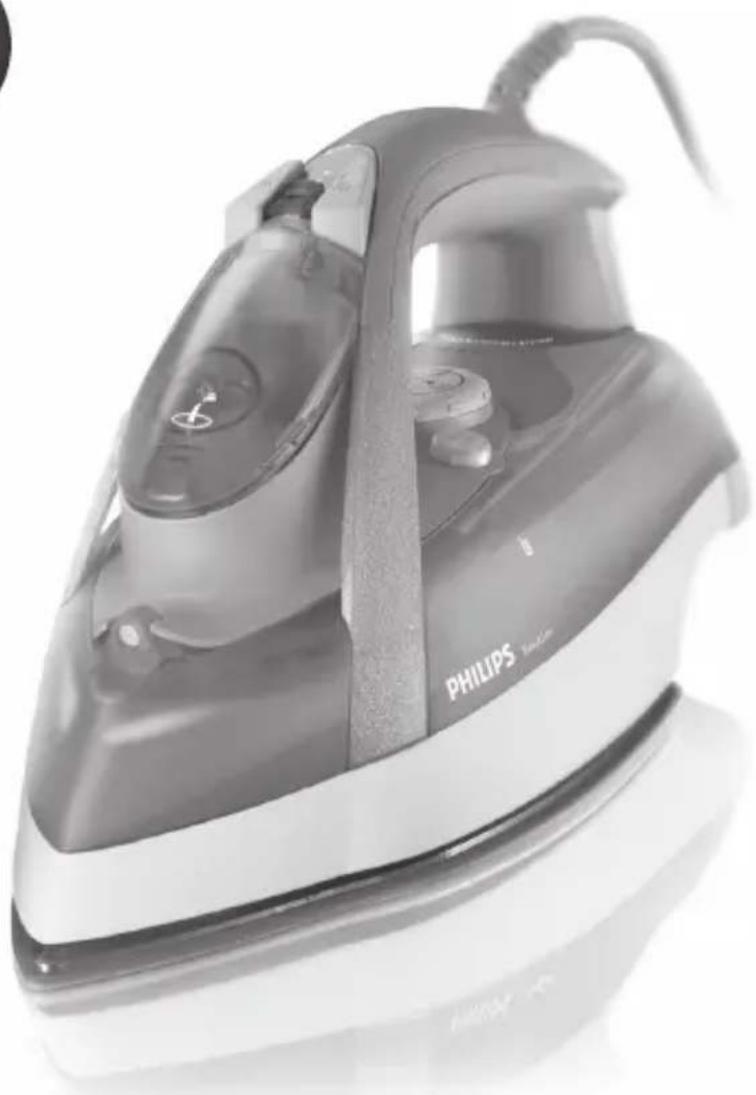
Black and white photo of a Philips iron iron iron iron iron, showing its steam iron (no text or symbols visible on the device itself)User manual
PHILIPS


flowchart
graph TD
    A["Grid Structure"] --> B["Open Grid"]
    B --> C["Arrow to Top"]
    B --> D["Arrow to Bottom"]
1


ENGLISH 6
БЪЛГАРСКИ 17
ČEŠTINA 29
EESTI 40
HRVATSKI 51
MAGYAR 62
КАЗАКША 73
LIETUVIŠKAI 85
LATVIEŠU 96
POLSKI 107
ROMÂNĂ 119
РУССКИЙ 130
SLOVENSKY 143
SLOVENŠČINA 155
SRPSKI 166
УКРАЇНСЬКА 177
6 ENGLISH
Introduction
Congratulations on your purchase and welcome to Philips! To fully benefit from the support that Philips offers, register your product at www.philips.com/welcome.
Important
Read this user manual carefully before you use the appliance and save it for future reference.
Danger
- Never immerse the iron in water.
Warning
- Check if the voltage indicated on the appliance corresponds to the local mains voltage before you connect the appliance.
- Do not use the appliance if the plug, the mains cord or the appliance itself shows visible damage, or if the appliance has been dropped or leaks.
- If the mains cord is damaged, you must have it replaced by Philips, a service centre authorised by Philips or similarly qualified persons in order to avoid a hazard.
- Never leave the appliance unattended when it is connected to the mains.
- This appliance is not intended for use by persons (including children) with reduced physical, sensory or mental capabilities, or lack of experience and knowledge, unless they have been given supervision or instruction concerning use of the appliance by a person responsible for their safety.
- Children should be supervised to ensure that they do not play with the appliance.
- Do not let the mains cord come into contact with the hot soleplate of the iron.
Caution
- Only connect the appliance to an earthed wall socket.
- Check the mains cord regularly for possible damage.


ENGLISH 7
- The soleplate of the iron can become extremely hot and may cause burns if touched.
- When you have finished ironing, when you clean the appliance, when you fill or empty the water tank and also when you leave the iron even for a short while: set the steam control to position 0, put the iron on its heel and remove the mains plug from the wall socket.
- Always place and use the iron on a stable, level and horizontal surface.
- Do not put perfume, vinegar, starch, descaling agents, ironing aids or other chemicals in the water tank.
- This appliance is intended for household use only.
Electromagnetic fields (EMF)
This Philips appliance complies with all applicable standards and regulations regarding exposure to electromagnetic fields.
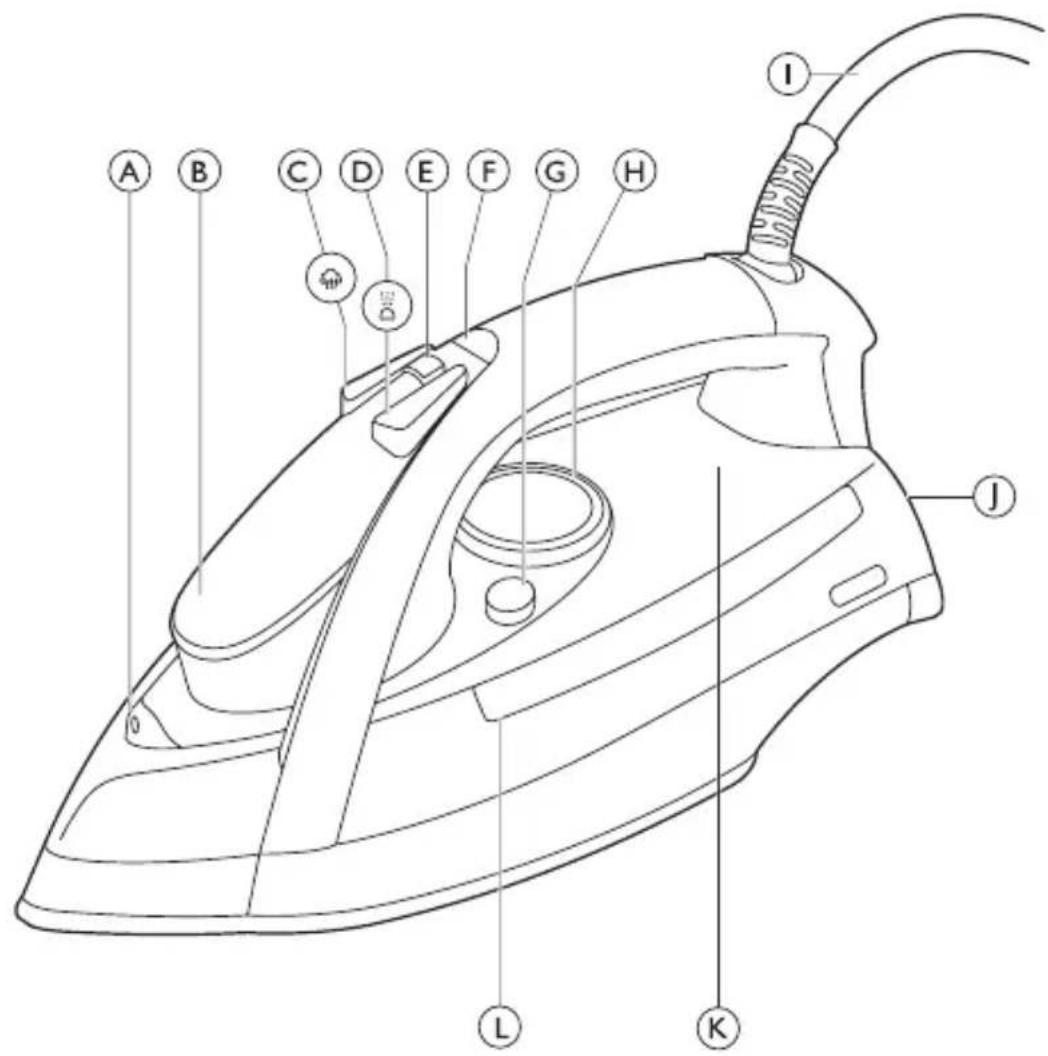
General description (Fig. 1)
A Spray nozzle
B Filling opening with cap
C Steam boost button ( 🔊)
D Spray button ( ☑)
E Steam control
F Amber temperature light (specific types only: with red auto-off indication)
G Calc-Clean button
H Temperature dial
I Mains cord
J Heel
K Anti-Calc tablet (specific types only)
L Water tank
Not shown: filling cup
Before first use
1 Remove any sticker, protective foil or plastic from the soleplate (Fig. 2).
ENGLISH8
Preparing for use
Filling the water tank
Do not put perfume, vinegar, starch, descaling agents, ironing aids or other chemicals in the water tank.
1 Make sure the appliance is unplugged.
2 Set the steam control to position 0 (= no steam) (Fig. 3).
3 Open the cap of the filling opening.
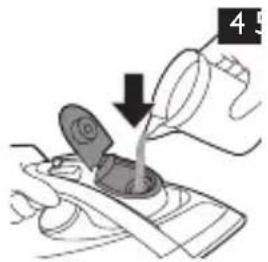
4 Tilt the iron backwards and use the filling cup to fill the water tank with tap water up to the maximum level. (Fig. 4)
Do not fill the water tank beyond the MAX indication.
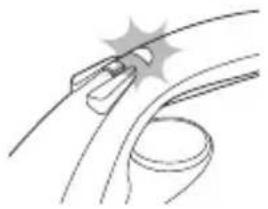
5 Close the cap of the filling opening ('click').
Setting the temperature
1 Put the iron on its heel.
2 To set the required ironing temperature, turn the temperature dial to the appropriate position (Fig. 5).
Check the laundry care label for the required ironing temperature:
- ● for synthetic fabrics (e.g. acrylic, nylon, polyamide, polyester)
- ● for silk
- ●● for wool
- ●●● for cotton and linen
If you do not know what kind or kinds of fabric an article is made of, determine the right ironing temperature by ironing a part that is not visible when you wear or use the article.
Silk, woollen and synthetic materials: iron the reverse side of the fabric to prevent shiny patches. To prevent stains, do not use the spray function.
Start ironing the articles that require the lowest ironing temperature, such as those made of synthetic fibres.


ENGLISH 9
3 Put the mains plug in an earthed wall socket.
The amber temperature light goes on (Fig. 6).
4 When the temperature light goes out, wait a while before you start ironing.
The temperature light goes on from time to time during ironing.
Using the appliance
Note: The iron may give off some smoke when you use it for the first time. This stops after a short while.
Steam ironing
1 Make sure that there is enough water in the water tank.
2 Set the recommended ironing temperature (see chapter 'Preparing for use', section 'Setting the temperature').
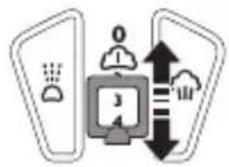
3 Set the appropriate steam setting. Make sure that the steam setting is suitable for the set ironing temperature: (Fig. 7)
- 1 - 2 for moderate steam (temperature settings ●● to ●●●)
- 3 - 4 for maximum steam (temperature settings ●●● to MAX)
Note: The iron starts to produce steam as soon as it has reached the set temperature.
Note: If the selected ironing temperature is too low (MIN to ●●), water may drip from the soleplate (see chapter ‘Features’, section ‘Drip stop’).
Ironing without steam
1 Set the steam control to position 0 (= no steam) (Fig. 3).
2 Set the recommended ironing temperature (see chapter 'Preparing for use', section 'Setting the temperature').

ENGLISH10
Features
Spray function
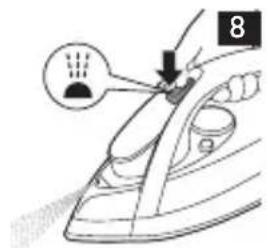
You can use the spray function at any temperature to moisten the article to be ironed. This helps remove stubborn creases.
1 Make sure that there is enough water in the water tank.
2 Press the spray button several times to moisten the article to be ironed (Fig. 8).
Steam boost
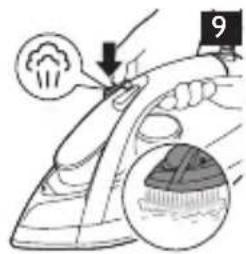
A powerful steam boost helps to remove very stubborn creases. The steam boost function can only be used at temperature settings between ●● and MAX.
1 Press and release the steam boost button (Fig. 9).
Concentrated steam boost from the special Steam Tip (specific types only)
The concentrated steam boost from the long vents in the Steam Tip enhances the distribution of steam into every part of your garment. The concentrated steam boost function can only be used at temperature settings between ●● and MAX.
1 Press and release the steam boost button (Fig. 9).
Vertical steam boost
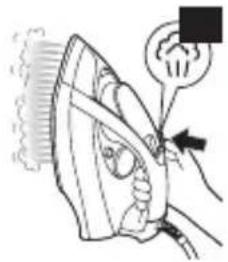
You can also use the steam boost function when you hold the iron in vertical position. This is useful for removing creases from hanging clothes, curtains etc.
1 Hold the iron in vertical position and press and release the steam boost button (Fig. 10).
Never direct the steam at people.


ENGLISH 11
Drip stop (specific types only)
This iron is equipped with a drip-stop function: the iron automatically stops producing steam when the temperature is too low, to prevent water from dripping out of the soleplate. When this happens you may hear a sound.
Automatic shut-off function (specific types only)
The automatic shut-off function automatically switches off the iron if it has not been moved for a while.
The red auto-off indication of the temperature light flashes to indicate that the iron has been switched off by the automatic shut-off function (Fig. 6).
To let the iron heat up again:
1 Pick up the iron or move it slightly
The red auto-off indication goes out.
If the temperature of the soleplate has dropped below the set ironing temperature, the amber temperature light goes on.
2 If the amber temperature light goes on after you have moved the iron, wait for it to go out before you start ironing.
Note: If the amber temperature light does not go on after you move the iron, the soleplate still has the right temperature and the iron is ready for use.
Cleaning and maintenance
Cleaning
1 Set the steam control to position 0, remove the plug from the wall socket and let the iron cool down.
2 Wipe flakes and any other deposits off the soleplate with a damp cloth and a non-abrasive (liquid) cleaning agent.
To keep the soleplate smooth, avoid hard contact with metal objects. Never use a scouring pad, vinegar or other chemicals to clean the soleplate.
3 Clean the upper part of the iron with a damp cloth.


ENGLISH12
4 Regularly rinse the water tank with water. Empty the water tank after you have rinsed it (Fig. 11).
Double-Active Calc System (specific types only)
The Double-Active Calc System consists of an Anti-Calc tablet inside the water tank combined with the Calc-Clean function.
1 The Anti-Calc tablet prevents scale from clogging the steam vents. This tablet is constantly active and does not need to be replaced (Fig. 12).
2 The Calc-Clean function removes the scale particles from the iron.
Calc-Clean function
Use the Calc-Clean function once every two weeks. If the water in your area is very hard (i.e. when flakes come out of the soleplate during ironing), use the Calc-Clean function more frequently.
1 Make sure the appliance is unplugged.
2 Set the steam control to position 0.
3 Fill the water tank to the maximum level.
Do not pour vinegar or other descaling agents in the water tank.
4 Set the temperature dial to MAX.
5 Put the mains plug in an earthed wall socket.
6 Unplug the iron when the temperature light goes out.
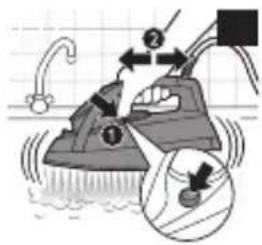
7 Hold the iron over the sink, press and hold the Calc-Clean button (1) and gently shake the iron to and fro (2) (Fig. 13).
▶Steam and boiling water come out of the soleplate. Impurities and flakes (if any) are flushed out.
8 Release the Calc-Clean button as soon as all the water in the tank has been used up.
9 Repeat the Calc-Clean process if the iron still contains a lot of impurities.


ENGLISH 13
After the Calc-Clean process
1 Put the plug back into the wall socket and let the iron heat up to let the soleplate dry.
2 Unplug the iron when the temperature light goes out.
3 Move the iron gently over a piece of used cloth to remove any water stains that may have formed on the soleplate.
4 Let the iron cool down before you store it.
Storage
1 Set the steam control to position 0, remove the plug from the wall socket and let the iron cool down.
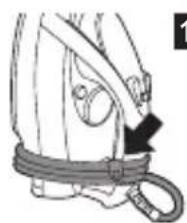
2 Wind the mains cord round the cord storage facility (Fig. 14).
3 Store the iron on its heel in a safe and dry place.
Environment
- This symbol on a product means that the product is covered by European Directive 2012/19/EU. Inform yourself about the local separate collection system for electrical and electronic products. Follow local rules and never dispose of the product with normal household waste. Correct disposal of old products helps prevent negative consequences for the environment and human health (Fig. 15).
Guarantee and support
If you need information or support, please visit www.philips.com/support or read the separate worldwide guarantee leaflet.
Troubleshooting
This chapter summarises the most common problems you could encounter with the appliance. If you are unable to solve the problem with the information below, visit www.philips.com/support for a list of frequently asked questions or contact the Consumer Care Centre in your country.


ENGLISH14
| Problem Possible cause Solution | ||
| The iron is plugged in, but the soleplate stays cold. | There is a connection problem. | Check the mains cord, the plug and the wall socket. |
| The temperature dial is set to MIN. | Set the temperature dial to the required position | |
| The iron does not produce any steam. | There is not enough water in the water tank. | Fill the water tank (see chapter ‘Preparing for use’, section ‘Filling the water tank). |
| The steam control is set to position 0. | Set the steam control to a position between 1 and 4 (see chapter ‘Using the appliance’, section ‘Steam ironing’). | |
| The iron is not hot enough and/or the drip-stop function has been activated (specific types only). | Set an ironing temperature that is suitable for steam ironing (●● to MAX). Put the iron on its heel and wait until the amber temperature light goes out before you start ironing. | |
| Water droplets drip onto the fabric during ironing. | The temperature dial has been set to a temperature that is too low for steam ironing. | Set an ironing temperature that is suitable for steam ironing (temperature settings ●● to MAX). Put the iron on its heel and wait until the amber temperature light goes out. |
| You have put an additive in the water tank. | Rinse the water tank and do not put any additive in the water tank. | |


ENGLISH 15
Problem Possible cause Solution
| You have not closed the cap of the filling opening properly. | Press the cap until you hear a click. | |
| Flakes and impurities come out of the soleplate during ironing. | Hard water forms flakes inside the soleplate. | Use the Calc-Clean function one or more times (see chapter ‘Cleaning and maintenance’, section ‘Calc-Clean function’). |
| The temperature light flashes red (specific types only). | The automatic shut-off function has switched off the iron (see chapter ‘Features’). | Move the iron slightly to deactivate the automatic shut-off function. The red auto-off indication of the temperature light goes out. |
| Water drips from the soleplate after the iron has cooled down or has been stored (specific types only) | You have put the iron in horizontal position while there was still water in the water tank. | Always set the steam control to position 0 and empty the water tank after use. Store the iron on its heel. |


ENGLISH16
Problem Possible cause Solution
The iron does not produce a steam boost.
You used the steam boost function too often within a short period.
Continue ironing in horizontal position and wait a while before you use the steam boost function again..
The iron is not hot enough.
Set an ironing temperature at which the steam boost function can be used (temperature settings ●● to MAX). Put the iron on its heel and wait until the amber temperature light goes out before you use the steam boost function.
Въведение
H Regulator temperature
I Kabl za napajanje
J Stopa za uspravan položaj
K Anti-Calc tableta (samo neki modeli)
L Rezervoar za vodu
Nije prikazano: čaša za punjenje
Pre prve upotrebe
1 Sa grejne ploče skinite sve nalepnice, zaštitnu foliju ili plastiku (Sl. 2).
SRPSKI168
Pre upotrebe
Punjenje rezervoara za vodu
U rezervoar za vodu nemojte da stavljate parfem, sirće, štirak, sredstva za čišćenje kamenca, aditive za peglanje i druge hemikalije.
1 Proverite da li ste isključili aparat.
2 Podesite kontrolu pare na položaj 0 (= bez pare) (Sl. 3).
3 Otvorite poklopac otvora za punjenje.
4 Nagnite peglu unazad i napunite rezervoar za vodu vodom iz česme do maksimalnog nivoa pomoću čaše za punjenje. (Sl. 4)
Nemojte puniti rezervoar za vodu iznad oznake MAX.
5 Zatvorite poklopac otvora za punjenje ("klik").
Podešavanje temperature
1 Postavite peglu u uspravan položaj.
2 Podesite potrebnu temperaturu za peglanje okretanjem regulatora temperature u odgovarajući položaj (Sl. 5).
Na etiketi proverite potrebnu temperaturu peglanja:
- ● za sintetičke materijale (npr. akril, najlon, poliamid, poliester)
- ● za svilu
- ●● za vunu
- ●●● za pamuk i lan
Ako ne znate o kojoj tkanini se radi, utvrdite odgovarajuću temperaturu peglanjem dela koji neće biti vidljiv prilikom nošenja ili korišćenja tog odevnog predmeta.
Svila, vuneni, i sintetički materijali: peglajte naličje tkanine da biste izbegli sjajne tragove. Da biste sprečili stvaranje fleka, ne koristite funkciju raspršivanja.
natural_image
Illustration of hands using a cable to lift a weight (no text or symbols)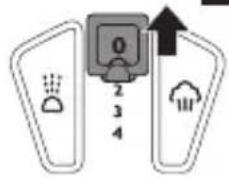
natural_image
Illustration of a hand pouring liquid into a container with a valve, no text or symbols present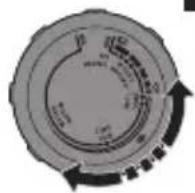
6
natural_image
Diagram of a car wheel with a lever and head, showing no text or symbols7
natural_image
Illustration of a hand using an iron on a steamp, with a magnified view showing the iron being held (no text or symbols present)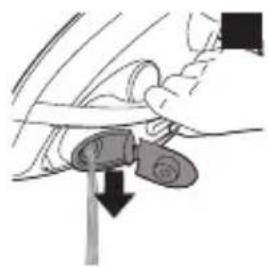
natural_image
Illustration of a car seatbelt being adjusted to a vertical pole (no text or symbols)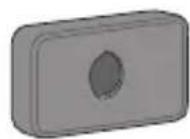
12
14
natural_image
Line drawing of a harness with a belt and handle, no text or symbols present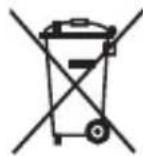

The image is too blurry to recognize any text content.


flowchart
graph TD
    A["Grid Structure"] --> B["Open Grid"]
    B --> C["Arrow to Top"]
    B --> D["Arrow to Bottom"]





www.philips.com

FSC
MIX
Paper
FSC® C041266
4239.000.8219.2
- Always there to help you
- User manual
- PHILIPS
- ENGLISH
- Introduction
- Important
- Danger
- Warning
- Caution
- ENGLISH 7
- Electromagnetic fields (EMF)
- General description (Fig. 1)
- Before first use
- ENGLISH8
- Preparing for use
- Filling the water tank
- Setting the temperature
- ENGLISH 9
- Using the appliance
- Steam ironing
- Ironing without steam
- ENGLISH10
- Features
- Spray function
- Steam boost
- Concentrated steam boost from the special Steam Tip (specific types only)
- Vertical steam boost
- ENGLISH 11
- Drip stop (specific types only)
- Automatic shut-off function (specific types only)
- Cleaning and maintenance
- Cleaning
- ENGLISH12
- Double-Active Calc System (specific types only)
- Calc-Clean function
- ENGLISH 13
- After the Calc-Clean process
- Storage
- Environment
- Guarantee and support
- Troubleshooting
- ENGLISH14
- ENGLISH 15
- ENGLISH16
- Problem Possible cause Solution
- Въведение
- Pre prve upotrebe
- SRPSKI168
- Pre upotrebe
- Punjenje rezervoara za vodu
- Podešavanje temperature
Brand : PHILIPS
Model : EasyCare GC3591
Category : Iron