
EL-2607P - Calculator SHARP - Free user manual and instructions
Find the device manual for free EL-2607P SHARP in PDF.



| Product Type | Printing Calculator |
| Brand | SHARP |
| Model | EL-2607P |
| Display Capacity | 12 digits |
| Main Power Supply | AC 220-230 V, 50 Hz |
| Backup Power Supply | CR2032 lithium battery (3 V) |
| Backup Battery Life | Approximately 2 years |
| Printer Type | Mechanical |
| Printing Speed | Approximately 4.3 lines/sec |
| Printing Paper (Width) | 57 mm - 58 mm |
| Printing Paper (Max Diameter) | 80 mm |
| Weight | Approximately 1.9 kg (with battery) |
| Operating Temperature | 0 °C to 40 °C |
| Selectors | Decimal (F, 0-6), Rounding (↑, 5/4, ↓), Constant/Add (K, A, ●), Grand Total/Rate (GT, ●, RATE), Print Mode (P, P IC, ●) |
| Memory Functions | Independent memory, grand total memory, item counter |
| Calculation Functions | Addition, subtraction, multiplication, division, percentage, tax (include/exclude), markup/margin, average |
| Maintenance | Clean with a soft, dry cloth. Do not use solvents or a damp cloth. |
| Safety | Do not expose to water or moisture. Use only the specified voltage. Replace the battery with the same type or equivalent. |
| Replaceable Parts | Ink roller, paper roll, CR2032 battery |
| Included Accessories | 1 lithium battery, 1 paper roll, 1 ink roller, 1 instruction manual |
| Certification | Complies with directives 89/336/EEC and 73/23/EEC amended by 93/68/EEC |
Frequently Asked Questions - EL-2607P SHARP
User questions about EL-2607P SHARP
0 question about this device. Answer the ones you know or ask your own.
Ask a new question about this device
Download the instructions for your Calculator in PDF format for free! Find your manual EL-2607P - SHARP and take your electronic device back in hand. On this page are published all the documents necessary for the use of your device. EL-2607P by SHARP.
USER MANUAL EL-2607P SHARP
ELECTRONIC PRINTING CALCULATOR
Notes for handling Lithium batteries:
CAUTION
Danger of explosion if battery is incorrectly replaced.
Replace only with the same or equivalent type recommended by the manufacturer.
Dispose of used batteries according to the manufacturer's instructions.
The socket outlet shall be installed near the equipment and shall be easily accessible.
Caution!
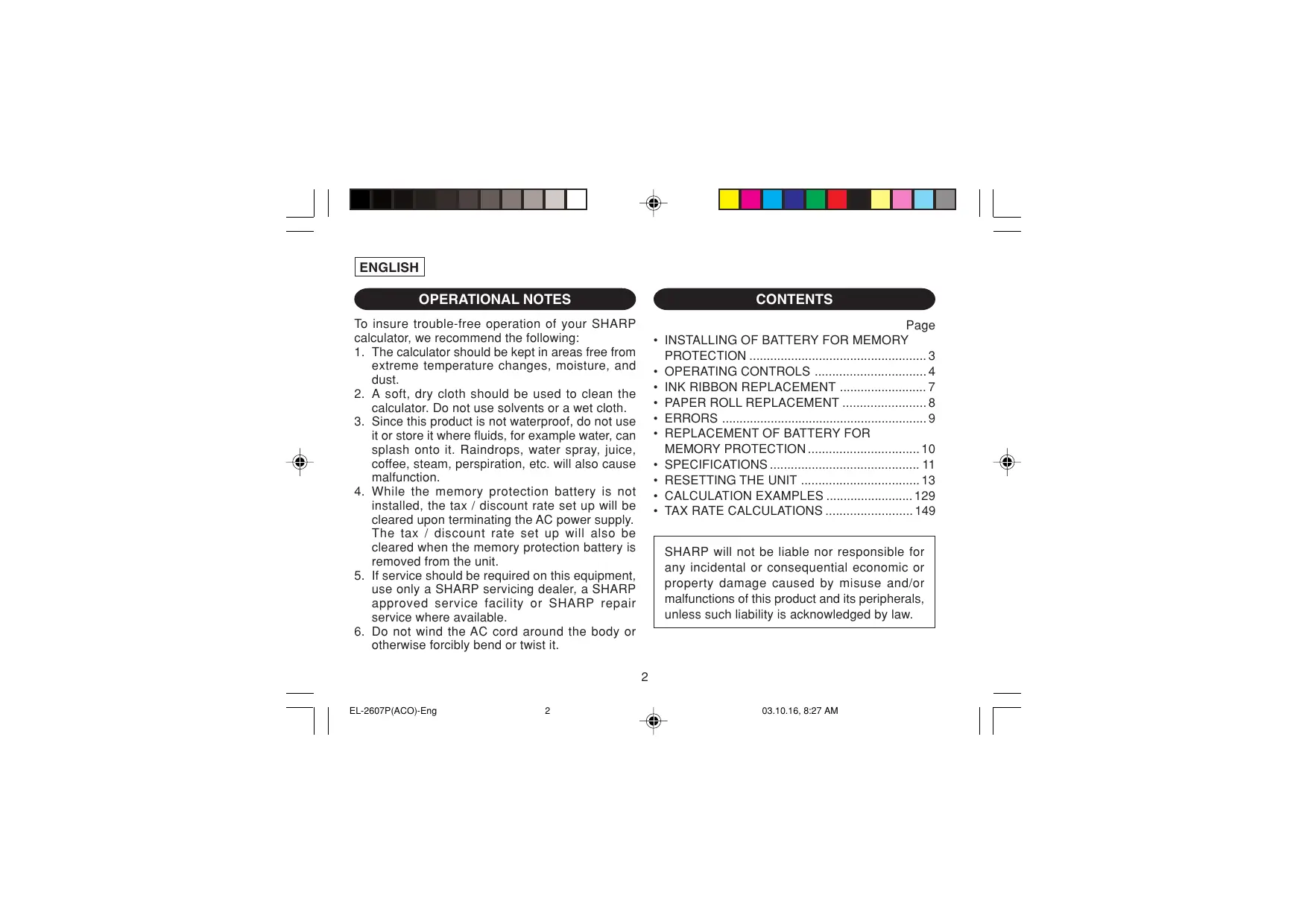
To ensure trouble-free operation of your SHARP calculator, we recommend the following:
- The calculator should be kept in areas free from extreme temperature changes, moisture, and dust.
- A soft, dry cloth should be used to clean the calculator. Do not use solvents or a wet cloth.
- Since this product is not waterproof, do not use it or store it where fluids, for example water, can splash onto it. Raindrops, water spray, juice, coffee, steam, perspiration, etc. will also cause malfunction.
- While the memory protection battery is not installed, the tax / discount rate set up will be cleared upon terminating the AC power supply. The tax / discount rate set up will also be cleared when the memory protection battery is removed from the unit.
- If service should be required on this equipment, use only a SHARP servicing dealer, a SHARP approved service facility or SHARP repair service where available.
- Do not wind the AC cord around the body or otherwise forcibly bend or twist it.
CONTENTS
Page
- INSTALLING OF BATTERY FOR MEMORY PROTECTION OPERATING CONTROLS 4
- INK RIBBON REPLACEMENT 7 PAPER ROLL REPLACEMENT 8
- ERRORS 9
- REPLACEMENT OF BATTERY FOR MEMORY PROTECTION 10 SPECIFICATIONS 11
- RESETTING THE UNIT 13 CALCULATION EXAMPLES 129 TAX RATE CALCULATIONS 149
SHARP will not be liable nor responsible for any incidental or consequential economic or property damage caused by misuse and/or malfunctions of this product and its peripherals, unless such liability is acknowledged by law.
INSTALLING OF BATTERY FOR MEMORY PROTECTION
Before using for the first time, remove the attached lithium battery, and install it in the equipment according to the following procedure.
If the power cord is unplugged by accident when operating with AC power only, the tax / discount rate and the contents of memory set up will be lost.
1) Turn the power switch "OFF" and unplug the power supply plug from the outlet. 2) Remove the battery cover on the back of the unit. (Fig. 1) 3) Wipe the battery well with a dry cloth and place the plus "+" side upward. (Fig. 2) 4) Replace the battery cover by reversing the removal procedure. 5) Press the RESET switch on the back of the unit (See page 13).
Fig. 1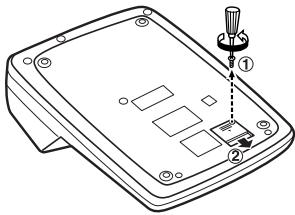
Fig. 2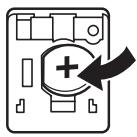
After battery installation
- Connect the power supply plug to an outlet and turn the power switch "ON".
Check that "0." is displayed. If "0." is not displayed, remove the battery, reinstall it, and check the display again.
- On the battery replacement date label found on the back of the unit, write down the month and year when the battery is installed, as a reference for the next battery replacement.
OPERATING CONTROLS

"OFF": Power off.
: Power ON. Set to the non-print mode.
"P": Power ON. Set to the print mode.
"P·IC": Power ON. Set to the print and item count mode.
1) The counter will count the number of times that the ± key has been pressed in addition.
Note: Each time the - key is used in subtraction, 1 will be subtracted from the count.
- The count is printed when the calculated result is obtained.
- Pressing of the * , , + , or key clears the counter.
2) When the grand total/rate setting mode selector is in the ON position (GT), the counter will count the number of times that the calculation results have been stored in the grand total memory. To print and clear the count, press the key.
3) The memory item counter will count the number of times that the + key has been pressed in the addition.
Note: Each time the key is used in the subtraction, 1 will be subtracted from the count. - The count is printed when the memory is recalled. - Pressing of the *M key clears the counter.
Note: The counter has a maximum capacity of 3 digits (up to ± 999 ). If the count exceeds the maximum, the counter will recount from zero.
F63210

DECIMAL SELECTOR:
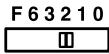
Presents the number of decimal places in the answer. In the "F" position, the answer is displayed in the floating decimal system.

CONSTANT/ADD MODE SELECTOR:
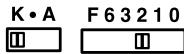
"K": The following constant functions will be performed:
Multiplication:
The calculator will automatically remember the first number entered (the multiplicand) and instruction.
Division:
The calculator will automatically remember the second number entered (the divisor) and + instruction.
“: Neutral
"A": Use of the Add mode permits addition and subtraction of numbers without an entry of the decimal point. When the Add mode is activated, the decimal point is automatically positioned according to the decimal selector setting.
Use of · , × and ÷ will automatically override the Add mode and decimally correct answers will be printed at the preset decimal position.
↑5/4↓

ROUNDING SELECTOR:
"↑": An answer is rounded up.
"5/4": An answer is rounded off.
"↓": An answer is rounded down.
Note: The decimal point floats during successive calculation by the use of × or ÷ .
If the decimal selector is set to "F" then the answer is always rounded down (↓).
RATE GT·SET GRAND TOTAL / RATE SETTING MODE SELECTOR:
"GT": Grand Total
"": Neutral
"RATE": Set this selector to the "RATE SET" position before storing each rate.
- Enter the adding tax rate, then press . To store a discount rate, press +/- before pressing + .
- A maximum of 4 digits can be stored (decimal point is not counted as a digit).
Note: • Be sure to set this selector to the "●" position after storing an each rate.
- Only one rate can be stored. If you enter a new rate, the previous rate will be cleared.
PAPER FEED KEY LAST DIGIT CORRECTION KEY GT GRAND TOTAL KEY CE CLEAR ENTRY KEY * TOTAL KEY
MULTIPLICATION KEY DIVISION KEY MINUS EQUAL KEY PLUS EQUAL KEY CHANGE SIGN KEY MARKUP KEY MEMORY TOTAL CLEAR KEY MEMORY SUBTOTAL RECALL KEY MEMORY PLUS KEY MEMORY MINUS KEY TAX-INCLUDING KEY PRE-TAX KEY PERCENTKEY NON-ADD/SUBTOTAL KEY:
Non-add - When this key is pressed right after an entry of a number in the Print mode, the entry is printed on the left-hand side with the symbol "#".
This key is used to print out numbers not subjects to calculation such as code, date, etc.
Subtotal - Used to get subtotal(s) of additions and/or subtractions. When pressed following the ± or - key, the subtotal is printed with the symbol "◇" and the calculation may be continued.
By pressing this key even in the Non-print mode, the displayed number is printed with the symbol "P".

AVERAGE KEY:
Used to calculate the average.
DISPLAY SYMBOLS:
M: A number has been stored in memory. - : The display value is negative. E: Error or overflow of capacity. - : Appears when a number is in the grand total memory.
- Although all available symbols are shown here for instruction purposes, these symbols will not appear on the screen simultaneously.
INK RIBBON REPLACEMENT
- Remove the paper roll from the calculator. (Tear the paper and remove it from the print mechanism by using [M].)
- Turn the power off before replacing ribbon.
- Remove the printer cover. (Fig. 1)
- Remove the old ribbon by pulling it up.
- Insert the new ribbon.
- With the black side of the ribbon facing upwards, place one of the reels on the reel shaft on the right. (Fig. 2) Make sure that the reel is securely in place.
- Thread the ribbon around the outside of the metal guides. (Fig. 3)
- Take up any slack by manually turning one of the reels.
- Replace the printer cover. (Fig. 4)
- Replace the paper roll.
PAPER ROLL REPLACEMENT
Never insert paper roll if torn. Doing so will cause paper to jam.
Always cut leading edge with scissors first.
1) Insert the leading edge of the paper roll into the opening. (Fig. 1) 2) Turn the power on and feed the paper by pressing [1]. (Fig. 2) 3) Insert the paper roll to the paper holder. (Fig. 3)
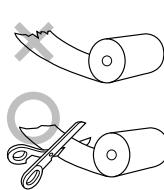
Fig. 3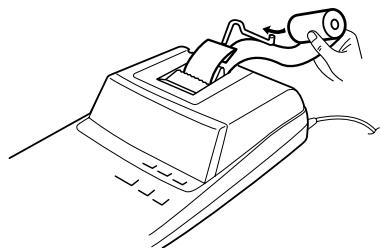
DO NOT PULL PAPER BACKWARDS AS THIS MAY CAUSE DAMAGE TO PRINTING MECHANISM.
ERRORS
There are several situations which will cause an overflow or an error condition. When this occurs, "E" will be displayed. The contents of the memory at the time of the error are retained.
If an "0·E" is displayed at the time of the error, * must be used to clear the calculator. If an "E" with any numerals except zero is displayed, the error may be cleared with CE or → and the calculation can still be continued.
Also, in rare cases, printing may stop midway and the indication "E" appear on the display. This is not a malfunction but is caused when the calculator is exposed to strong electromagnetic noise or static electricity from an external source. Should this occur, press the key and then repeat the calculation from the beginning.
Error conditions:
- Entry of more than 12 digits or 11 decimals. This error can be cleared with CE or →
- When the integer portion of an answer exceeds 12 digits.
- When the integer portion of the contents of the memory or grand total memory exceeds 12 digits. (Ex. 999999999999 1 + )
- When any number is divided by zero. (Ex. 5 + 0 ± )
REPLACEMENT OF BATTERY FOR MEMORY PROTECTION
Time for battery replacement
Replace with a new battery once every 2 years.
Method of battery replacement
Use one lithium battery (CR2032).
Note: When replacing the battery, the set tax / discount rate and the memory contents will be lost.
You may want to write down the tax / discount rate and other important numbers on a sheet of paper.
1) Turn the power switch "OFF" and unplug the power supply plug from the outlet. 2) Remove the battery cover on the back of the unit. (Fig. 1) 3) Remove the exhausted battery and install one new lithium battery. Wipe the battery well with a dry cloth and place the plus "+" side upward. (Fig. 2) 4) Replace the battery cover by reversing the removal procedure. 5) Press the RESET switch on the back of the unit (See page 13).
Fig. 1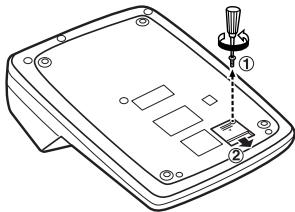
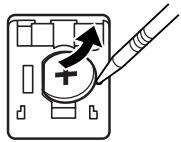
Fig. 2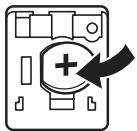
After battery replacement
- Connect the power supply plug to an outlet and turn the power switch "ON".
Check that "0." is displayed. If "0." is not displayed, remove the battery, reinstall it, and check the display again.
- Reset the tax / discount rate.
- On the battery replacement date label found on the back of the unit, write down the month and year when the battery is replaced, as a reference for the next battery replacement.
Precautions on battery use
- Do not leave an exhausted battery in the equipment.
- Do not expose the battery to water or flame, and do not take it apart.
- Store batteries out of the reach of small children.
SPECIFICATIONS
Operating capacity: 12 digits Power supply: Operating: AC: 220V-230V, 50Hz Memory backup: 3V (DC) (Lithium battery CR2032 × 1)
Memory Protection Battery lifespan: Approx. 2 years. (tested and confirmed at 25°C (77°F); may change due to usage environment)
PRINTING SECTION
Printer: Mechanical printer Printing speed: Approx. 4.3 lines/sec. Printing paper: 57 mm (2-1/4") - 58 mm (2-9/32") wide 80 mm (3-5/32") in diameter (max.)
Operating temperature: 0°C - 40°C (32°F - 104°F)
Power consumption: 67 mA
Dimensions:
222 mm (W) × 327 mm (D) × 78 mm (H)
8-3/4" (W) × 12-7/8" (D) ×
3-1/16" (H)
Weight:
Approx. 1.9 kg (4.19 lb.) (with battery)
Accessories:
1 lithium battery, 1 battery replacement date label (attached on the unit's back body), 1 paper roll, 1 ink ribbon (installed) and operation manual
WARNING
THE VOLTAGE USED MUST BE THE SAME AS SPECIFIED ON THIS CALCULATOR. USING THIS CALCULATOR WITH A VOLTAGE HIGHER THAN THAT SPECIFIED IS DANGEROUS AND MAY RESULT IN A FIRE OR OTHER TYPE OF ACCIDENT CAUSING DAMAGE. SHARP WILL NOT BE HELD RESPONSIBLE FOR ANY DAMAGE RESULTING FROM USE OF THIS CALCULATOR WITH OTHER THAN THE SPECIFIED VOLTAGE.
RESETTING THE UNIT
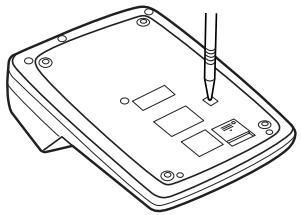
Strong impacts, exposure to electrical fields, or other unusual conditions may render the unit inoperative, and pressing the keys will have no effect. If this occurs, you will have to press the RESET switch on the bottom of the unit. The RESET switch should be pressed only when:
- an abnormal event occurs and all keys are disabled.
- you install or replace the battery.
Notes:
- Pressing the RESET switch will clear the stored tax / discount rate and other data stored in the memory.
- Use only a ballpoint pen to press the RESET switch. Do not use anything breakable or anything with a sharp tip, such as a needle. After pressing the RESET switch, connect the power supply plug to an outlet. Turn the power switch "ON" and check that "0." is displayed.
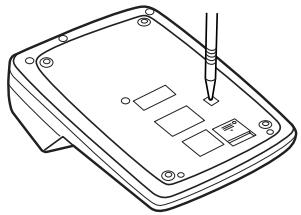
"OFF": Power off.
Dimensions: 222 mm (L) × 327 mm (D)
× 78 mm (H)
MEMORY SUBTOTAL ACCESS KEY

MEMORY PLUS KEY

MEMORY MINUS KEY

TAX INCLUSION KEY

222 mm (L) × 327 mm (W) ×
78 mm (H)
POWER SWITCH; PRINT/COUNT SELECTOR:
CLEAR ALL MEMORY KEY

RECALL SUBTOTAL MEMORY KEY

MEMORY PLUS KEY

MEMORY MINUS KEY

TAX ADD KEY

TAX DEDUCT KEY

PERCENT KEY

NON-ADD/SUBTOTAL KEY:
BATTERY REPLACEMENT FOR MEMORY BACKUP
Time for battery replacement
"5/4": The result is rounded.
"": The result is rounded up.
Note: The decimal point is set during sequential calculations when using the + key.
If the decimal selector is set to "F", the answer is always rounded down (↓).
RATE
GT·SET

MODE SELECTOR FOR GRAND TOTAL:
"GT": Grand total
Used to obtain
intermediate sums of addition and/or
subtraction. When pressing the following
"", the calculation can be
continued.
When pressing this key even briefly without a digit, the displayed number will be printed with the symbol "P".

AVERAGE CALCULATION:
Used to calculate the average value.
SYMBOLS ON THE DISPLAY:
M: Number stored in memory. : Negative value on the display. E: Error or overflow. Appears when a number exceeds the total sum * The symbols shown here are for explanatory purposes; these symbols are not displayed on the screen simultaneously.
REPLACING THE PRINTING INK ROLLER
1. Remove the paper roll from the calculator. (Tear off the paper and remove it from the printing mechanism by pressing the keys ( ]). 2. Turn off the power. 3. Remove the printer cover. (Fig. 1) 4. Remove the old ribbon by pulling it upward. 5. Insert a new ribbon. 6. Place the spool on the spool shaft on the right with the ribbon's shiny side facing up. (Fig. 2) Make sure the spool is locked in place. 7. Thread the ribbon along the upper surface of the metal guides. (Fig. 3) 8. Remove any slack by turning one of the spools manually. 9. Replace the cover of the printing device. (Fig. 4) 10. Replace the paper roll.
Fig. 1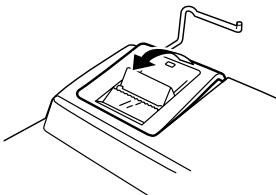


Fig. 2
Fig. 3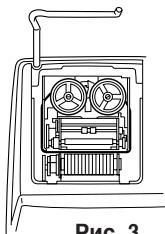
Fig. 4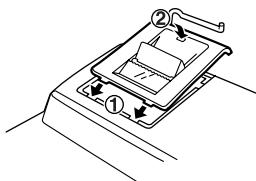
REPLACING THE PAPER ROLL
Never insert a torn paper roll. Such actions may cause paper jams.
Always cut the paper end straight with scissors before inserting.
1) Insert the paper end into the slot. (Fig. 1) 2) Turn on the power and feed the paper by pressing the key. (Fig. 2) 3) Insert the paper roll into the paper holder. (Fig. 3)
Fig. 1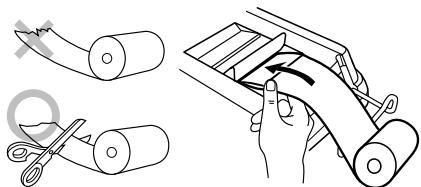
Pnc.2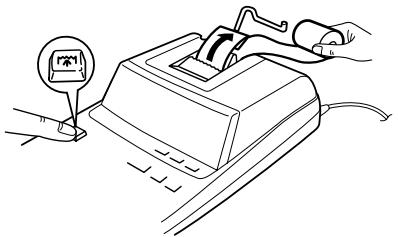
Pnc.3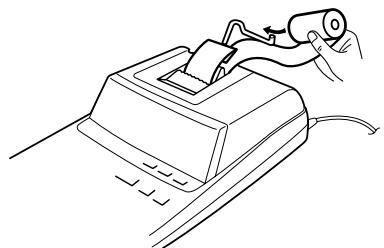
DO NOT PRESS THE PRINT HEAD IN THE DIRECTION OF THE ARROW, AS THIS MAY CAUSE DAMAGE TO THE PRINTING MECHANISM.
OLIN5KNI
There are several situations that may cause an error state or an error. When this state occurs, the indicator "E" will be displayed. The contents of the memory during the error are preserved.
If during an error the indicator "0-E" is displayed, to reset the calculator the key must be used. If on the display the indicator "E" appears with some digits, except for the indicator, the error may be reset with the key CE or the calculation may be continued.
Also, in some cases, the printer may stop in the middle, and the indicator "E" appears on the display. This is not a malfunction, but may occur when the calculator is subjected to strong electromagnetic interference or static electricity from an external source. In the event of such a situation, press the key, and then repeat the calculation.
Conditions for the occurrence of an error:
- Output of more than 12 digits or 11 decimal places. This error may be reset with the key CE or
- When the integer part of the answer exceeds 12 digits.
- If the contents of the memory and the total memory capacity exceed 12 digits. (e.g. +M 999999999999 M+ 1 M+
- When any number is divided by zero. (e.g. 5 0
REPLACING THE MEMORY BACKUP BATTERY
Battery replacement period
Replace the battery with a new one once every 2 years.
Battery replacement
Use one CR2032 battery.
Precautions for battery use
Do not leave a used battery in the device. Do not expose the battery to water or fire, and do not disassemble it. Keep batteries away from small children.
TECHNICAL SPECIFICATIONS
Resolution: 12 lines
Power source:
For the device:
AC 220V-230
V, 50Hz
For memory backup:
3V DC
Operating temperature: 0°C - 40°C
Power consumption: 67 mA
Battery (optional)
Device body
apparatus), 1 roll of paper, 1
AC adapter (installed)
and instruction manual.
WARNING
THE VOLTAGE USED MUST BE AS INDICATED ON THIS CALCULATOR. USING THIS CALCULATOR WITH A HIGHER VOLTAGE THAN THAT WHICH IS INDICATED IS DANGEROUS AND MAY CAUSE FIRE OR OTHER TYPES OF ACCIDENTS, AND, IN THE WORST CASE, DAMAGE TO THE CALCULATOR. WE ASSUME NO RESPONSIBILITY FOR ANY DAMAGE, HOWEVER CAUSED, RESULTING FROM THE USE OF THIS CALCULATOR WITH A VOLTAGE OTHER THAN THAT WHICH IS INDICATED.
RESET
Strong impacts, exposure to electric fields, or other non-standard conditions may cause the device to malfunction, and the keys may not respond. If this happens, you will need to press the RESET switch on the bottom of the device. The RESET switch should be pressed only in the following cases:
- An unexpected event occurs and all keys are locked.
- You install or replace the battery.
Note:
- Pressing the RESET switch will clear the tax / rate setting, as well as other data stored in memory. To press the RESET switch, use only a ballpoint pen. Do not use anything fragile or anything with a sharp point, such as a needle.
- After pressing the RESET switch, insert the AC adapter plug into the outlet. Set the power switch to the "ON" position and verify that "0." is displayed on the display.
CALCULATION EXAMPLES
- Set the decimal selector as specified in each example. The rounding selector should be in the "5/4" position unless otherwise specified.
- The constant/add mode selector and grand total/rate setting mode selector should be in the "·" position (off) unless otherwise specified.
- The print/item count mode selector should be in the "P" position unless otherwise specified.
- If an error is made while entering a number, press CE or → and enter the correct number.
- Negative values are printed with “-” symbol in red.
CALCULATION EXAMPLES
EXAMPLES OF CALCULATIONS
- Set the decimal selector as indicated in each example. The rounding selector should be in the "5/4" position unless otherwise specified. 2. The constant/add mode selector and grand total/rate setting mode selector should be in the "·" position (off) unless otherwise specified. 3. The print/item count mode selector should be in the "P" position unless otherwise specified.
- If an incorrect number is entered, press the CLEAR key and enter the correct number.
- The values that cannot be printed are indicated by the symbol "-" in red.
EXAMPLE: BEISPIEL: EXEMPLE: EJEMPLO: ESEMPIO: EXEMPLER: VOORBEELD: EXEMPLO: ESIMERKKI:
EXAMPLE:
(1 2 3 + 4 5 6) × 2 =
F63210

| Operation Vorgang Opération Operación Operazione Operation Bediening Operação Toiminto Onepaçaia | Print Ausdruck Impression Impresión Stampa Utskrift Afdruk Impressão Tulostus ПechтВ | Note Hinweis Note Nota Nota Anmärkning Opmerking Nota HuomautusПримочancies |
| 123 ± 456 ± * × 2 ± | 123·00 + 456·00 + 579·00 * * 579·00 × 2* = 1·158·00 * | Re-entry of total Erneute Eingabe der Summe Ré-introduction du total Reingreso del total Reinserimento del totale Aterinmatninq av svaret Opnieuw invoeren van totaal Reintrodução do total Summan udelleennäppäily Повторhoe поюlbéme cyMMb |
ADDITION AND SUBTRACTION WITH ADD MODE / ADDITION AND SUBTRACTION IN THE ADDITION MODE / ADDITION AND SUBTRACTION WITH ADD MODE / ADDITION AND SUBTRACTION WITH ADD MODE / ADDITION AND SUBTRACTION WITH ADD MODE / ADDITION AND SUBTRACTION WITH ADD MODE / ADDITION AND SUBTRACTION WITH ADD MODE / ADDITION AND SUBTRACTION WITH ADD MODE / ADDITION AND SUBTRACTION WITH ADD MODE / ADDITION AND SUBTRACTION IN ADD MODE
12.45 + 16.24 + 19.35 - 5.21 =
K·A
F63210


| Operation Vorgang Operación Operación | Display Anzeige Affichage Exhibitión Display Pà skärmen Display Exibicção Näytö Díscnnen | Print Ausdruck Impression Impresión Stampa Utskrift Afdruk Impressão Tulostus Пechать |
| 1245 ± 1624 ± 1935 ± 521 = * | 12.45 28.69 48.04 42.83 42.83 | 12·45 + 16·24 + 19·35 + 5·21 - 42·83 * |
1: The □ was not used in the entries. 1: Bei der Eingabe ◆ wurde nicht verwendet. 1: La □ n'a pas été utilisé dans les entrées. 1: La 📦 no ha sido usada en los registros. 1: non è stato usato nelle entrate. 1: användes inte vid inmatning. 1: [-] werden niet gebruikt bij het invoeren van het getal. 1: não foi uso nas entradas. 1: ei ole käytetty nappäiltäessä. 1: He nCIOJIb3OBAJacB npn BBOJe daHHbIX.
MIXED CALCULATIONS / GEMISCHTE BERECHNUNGEN / CALCUL COMPLEXE / CALCULOS MIXTOS / CALCOLI MISTI / BLANDAD RÄKNING / GEMENGDE BEREKENINGEN / CALCULOS MISTOS / SEKALAISIA LASKUTOIMITUKSIA / CMEUAHHbIE BvIcJIeHnIa
| (240 + 180 + 180 - 75) × 8 = | K·A | F63210 | |
| (1) | (2) | (3) | |
| 240 ± | 240. | 240•+ | |
| 180 ± | 420. | 180•+ | |
| ± | 600. | 180•+ | |
| 75 - | 525. | 75•- | |
| × | 525•◇ | ||
| 525. | 525•× | ||
| 8 ± | 8•= | ||
| 4,200•* | |||
| 4,200. | |||
CONSTANT / KONSTANTE / CALCULS AVEC CONSTANTE / CONSTANTES / COSTANTE / KONSTANTRÄKNING / CONSTANTE / CONSTANTE / VAKIO / KOHCTAHTA
A. 62.35 × 11.11 = 62.35 × 22.22 =
| (1) | (2) | (3) |
| 62.35 ✘ | 62.35 | 62·35× |
| 11.11 ± | 11·11 =K | |
| 692·71* | ||
| 692.71 | ||
| 22.22 ± | 22·22 =K | |
| 1,385·42* | ||
| 1,385.42 |
B. 11.11 ÷ 77.77 =
2 2. 2 2 ÷ 7 7 . 7 7 =
K·A

F63210

(1)
11.11 l
77.77 ±
22.22 ±
(2)
11.11
0.143
0.286
(3)
11.11 ÷
77.77 = K
0.143*
22.22 = K
0.286*
PERCENT / PROZENT / POURCENTAGE /
PORCENTAJES / PERCENTUALE /
PROCENTRÄKNING / PERCENTAGE /
PORCENTAGEM / PROSENTTI / IPOLJEHTbl
A. 100 × 25% =
K·A

F63210
(3)
(1)
100
25


(2)
100.
25.00
100·×
25\%
25·00*
B. (123 ÷ 1368) × 100 =
F63210

(1)
123
68


(2)
123.
8.99
(3)
123· ÷
1,368.
8·99*
ADD-ON AND DISCOUNT / AUFSCHLAG UND ABSCHLAG / MAJORATION ET RABAIS / RECARGOS Y DESCUENTOS / MAGGIORAZIONE E SCONTO / TILLAGG OCH RABATT / OPSLAG/KORTING / ACRÉSCIMO E DESCONTO / LISÄYS/VÄHENNYS / HAUCEKA I CKIДKA
A. 5% add-on to 100. / Ein Aufschlag von 5% auf 100. / Majoration de 5% de 100. / Un 5% de recargo sobre 100. / Maggiorazione del 5% su 100. / 5% tillägg på 100. / Een opslag van 5% op 100. / Um acréscimo de 5% sobre 100. / 5% lisätään 100:aan / 5% haúŋka ha 100.
F63210
| (1) | (2) | (3) |
| 100 × 5 MU | 100. | 100·×5·% |
| Increased amountErhöhungMajorationIncrementoImporto incrementatoTillagt belloppExtra bedragQuantia aumentoLisättymäräBelemnicha naçehkni | ||
| New amountNeuer BetragTotal majoréNueva cantidadNuovo importoNytt beloppNiewe bedragNova quantiaUusi määrA Hobaa cymmá | ||
| 105.00 |
B. 10% discount on 100. / Ein Abschlag von 10% auf 100. / Rabais de 10% sur 100. / Un 10% de descuento sobre 100. / Sconto del 10% su 100. / 10% rabatt på 100. / Een korting van 10% op 100. / Desconto de 10% de 100. / 10% alennus 100:sta. / 10% скидка со 100.
| (1) | (2) | (3) |
| 100 × 10 +L MU | 100. | 100·× |
| - 10·% | ||
| - 10·00 | ||
| - 10·00 | ||
| Rabatt Korting Desconto Alennus Cskindka | ||
| 90.00 | Net amount Nettobetrag Montant net Cantidad neta Nuevo imports Nettobelopp Nettobedrag Quantia liquida Uusi masyarakat Hovaj yümmä |
MARKUP AND MARGIN / GEWINNAUFSCHLAG UND GEWINNSPANNE / HAUSSE ET MARGE BÉNÉFICIAIRE / INCREMENTO PORCENTUAL Y MARGEN / MARGINE LORDO E MARGINE NETTO / PÅSLAG OCH MARGINAL / PROCENTUELE VERHOGING EN WINSTMARGE / REMARCAÇÃO PARA CIMA E MARGEM / KATE- JA VOITTOPROSENTTI / HAUCEKA И ПРИБЫЛЬ
Markup and Profit Margin are both ways of calculating percent profit.
Profit margin is percent profit vs. selling price. - Markup is percent profit vs. cost. Cost is the cost. - Sell is the selling price. - GP is the gross profit. - Mkup is the percent profit based on cost. - Mrgn is the percent profit based on selling price.
| Cost | Sell | GP | Mkup | Mrgn |
| 200 | 250 | $50 | 25% | 20% |
| Ⅱ |
| (1) | (2) | (3) |
| 200 ÷ 20 MU | 200. | 200•÷ Cost 20•%M Mrgn 250•00* Sell 50•00 GP GP |
| 50.00 |
PERCENT CHANGE / ÄNDERUNG DER PROZENTE / VARIATION EN POUR CENT / CAMBIO PORCENTUAL / VARIAZIONE IN PERCENTUALE / ÄNDRING I PROCENT / PROCENTUELE VERANDERING / VARIACAO PERCENTUAL / PROSENTIMUUTOS / IPOULETHHOE 3MEHEHNE
- Calculate the dollar difference (a) and the percent change (b) between two yearly sales figures 1,500 in one year and1,300 in the previous.
- Berechne den Unterschied in Dollar (a) und die Änderung der Prozente (b) zwischen zwei Jahresumsätzen von 1.500 in einem Jahr und1.300 im Vorjahr.
- Calculer la différence en dollars (a) et la variation en pour cent (b) entre deux prix. 1.500 pour cette année et 1.300 pour l'année précédente.
- Calcular la diferencia en dólares (a) y el cambio porcentual (b) entre dos cifras de ventas anuales, 1.500 en un año y1.300 en el año anterior.
- Calcolare la differenza in dollari (a) e la variazione in percentuale (b) tra due cîfre delle vendite par a 1500in un anno e 1300 in quello precedente.
- Beräkna skillnaden i dollar (a) ochändringen i procent (b) mellan två árliga fösäljningssiffrøp 1.500 det ena áret och1.300 áret innan.
- Bereken het verschil in dollars (a) en de procentuele verandering (b)ussen twee Jaarlijkeverkoopcijfers: 1.500 in een bepaaldaar en1.300 hetaar ervoor.
- Calcule a diferença em dólares (a) e a variação percentual (b) entre duas vendas anuais de 1.500 em um ano e de1.300 no ano anterior. Laske ero dollareina (a) ja muutos prosenteina (b) kahden vuosittaisen myyntiluvun välillä, 1500 yhtenä vuonna ja 1300 edellisenä. • Bычислите разность в долларах (a) и процентное изменение (b) между двумя годовыми показателями продаж 1500 в одном году и1300 в предыдущем.
| F63210 |
| (1) | (2) | (3) |
| 1500 ± | 1,500.00 | 1·500·00 + |
| 1300 — | 200.00 | 1·300·00 – |
| MU | 200·00* (a) | |
| 15·38%C (b) | ||
| 15.38 |
ITEM COUNT CALCULATION / BERECHNUNG MIT DEM POSTENZÄHLER / CALCUL DE COMPTE D'ARTICLES / CALCULO DE CUENTA DE ARTICULOS / CALCOLO CONTEGGIO VOCI / RÄKNING MED POSTRÄKNAREN / REKENEN MET DE POSTENTELLER / CALCULO DA CONTAGEM DE ITENS / TEKIJÄLASKURI / BviUcJIeHnC IODcETOM KOJIuYeCTBA ONEPAcIJ
| Bill No. Rechnung Nr. Facture n° N° de factura Numero di fattura Fakturanr. Rekeningenr. N° da fattura Laskunr. CchyT No. | Number of bills Anzahl der Rechnungen Nbre de factures Cantidad de facturas Numero delle fatture Antal fakturor Aantal rekeningen Número de fatturas Laskujen lukumäärä KoJIneCTBO CchyTob | Amount Betrag Montant Importe Importo Belopp Bedrag Quantia Māārä Cymma |
| 1 | 1 | 100.55 |
| 2 | 1 | 200.00 |
| 3 | 1 | 200.00 |
| 4 | 1 | 400.55 |
| 5 | 1 | $500.65 |
| Total / Summe / Total Total / Totale / Svar Totaal / Total / Summa / Bcero | (a) | (b) |


(1)
(2)
(3)
100.55
200

100.55
300.55
500.55
901.10
1,401.75
1,401.75
100.55 +
200.00 +
200.00 +
400.55 +
500·65 +
005
(a)
1·401·75*
(b)
GRAND TOTAL / ENDSUMME / TOTAL GÉNÉRAL / TOTAL GLOBAL / TOTALE GENERALE / SLUTSVAR / EINDTOTAAL / TOTAL GERAL / KOKONAISSUMMA / OBLÇAÇYMMA
1 0 0 + 2 0 0 + 3 0 0 =
+) 5 0 0 - 6 0 0 + 7 0 0 =
- 7 2 × 8 = ③
Total / Summe / Total
Total / Totale / Svar ④
Totaal / Total / Summa /
Bcero
OFF·P P-IC

F63210

(1)

46
78


(2)
46.
3,588.M
125.M
25.M
72.M
576.M
3,037.M
(3)
46·×
78·=
3·588•+M ①
Press [M] to clear the memory before starting a memory calculation. Before starting a memory calculation, press [M] to clear the memory. Clear the memory ([M]) before proceeding with a memory calculation. Press [M] to clear the memory before starting a memory calculation. Press [M] to clear the memory before starting a memory calculation. Press [M] to clear the memory before starting a memory calculation. Press [M] to clear the memory before starting a memory calculation. Press [M] to clear the memory before starting a memory calculation. Press [M] to clear the memory before starting a memory calculation. Press [M] to clear the memory before starting a memory calculation.
AVERAGING / AVERAGE CALCULATIONS / TAKING THE AVERAGE / AVERAGE / AVERAGE / THE AVERAGE BECOMES / AVERAGE / OBTAINING AN AVERAGE / CALCULATION OF THE AVERAGE / CALCULATION OF THE AVERAGE
Ex. / Ex. / Ex. / Ex. / Ex. / Ex. / Ex. / Ex. / Ex. / Ex.
| Day / Tag / Jour / Día / Giorno / Dag / Dag / Dia / Páivã / Dénb | Sales / Verkauf / Transactions / Ventas / Vendite / Försäljning / Verkoop / Vendas / Mynty / Obéem prôdagens | |
| If / Wenn / Si / Si el / Se / Om / Als / Se / Jos / Eclyn | Monday / Montag / Lundi / Lunes / Lunedi / Mändag / Maandag / Segunda-feira / Maanantai / Πонебелльник . . . . . . . . . . . . . . . . . . . . . . . . . . . . . . . . . . . . . . . . . . . . . . . . . . . . . . . . . . . . . . . . . . . . . . . . . . . . . . . . . . . . . . . . . . . . . . . . . . . . . Tuesday / Dienstag / Mardi / Martes / Martedi / Tisdag / Dinsdag / Terça-feira / Tiistai / Bṭorŋnɛk . . . . . . . . . . . . . . . . . . . . . . . . . . . . . . . . . . . . . . . . . . . . . . . . . . . . . . . . . . . . . . . . . . . . . . . . . . . . . . . . . . . . . . . . . . . . . . . . . . .. Wednesday / Mittwoch / Mercredi / Miercoles / Mercoledi / Onsdag / Woensdag / Quarta-feira / Keskivilkkɔ / Cρεda . . . . . . . . . . . . . . . . . . . . . . . . . . . . . . . . . . . . . . . . . . . . . . . . . . . . . . . . . . . . . . . . . . . . . . . . . . . . . . . . . . . . . . . . . . . . . . . . . . . Thursday / Donnerstag / Jeudi / Jueves / Giovedi / Torsdag / Donderdag / Quinta-feira / Torstai / Yetbepr ... . . . . . . . . . . . . . . . . . . . . . . . . . . . . . . . . . . . . . . . . . . . . . . . . . . . . . . . . . . . . . . . . . . . . . . . . . . . . . . . . . . . . . . . . . . . . . . . . . . . |
| Friday / Freitag / Vendredi / Viernes / Venerdi / Fredag / Vrijdag / Sexta-feira / Perjantai / Пятыца | 158.25 /158,25 |
| Total Sales | 656.00 for 5 days |
| Gesamtverkauf | 656,00 in 5 Tagen |
| Total des transactions | 656,00 pour 5 jours |
| El total de ventas de los 5 días | 656,00 |
| Vendite totali | 656,00 per 5 giorni |
| Total fösäljning | 656,00 under 5 dagar |
| Totale verkoop | 656,00 voor 5LAGEN |
| Vendas totais | 656,00 durante 5 días |
| Kokonaismuynti | 656,00 5 pääväänä |
| Öbändem obhēm prödàx | 656,00 3a 5 dênei |
| Then Average Sales = 131.20 / |
| Dann ist der Mittelwert des Verkaufs = / |
| Alors Transactions moyennes =131,20 / |
| Poro lo tant: Promedio de las ventas = 131,20 / |
| Vendite medie =131,20 / |
| Snittförsäljning = 131,20 / |
| Dan Gemiddelde verkoop =131,20 / |
| Logo, as vendas medias = 131,20 / |
| Sitten mynnin keskiarvo =131,20 / |
| Togda C植被ión obèmempoájen = $131,20 |
OFF·P P-IC

RATE
GT·SET

K·A

F63210

(1)
12315

13158
12502
15825


(2)
123.15
241.15
372.73
497.75
656.00
005
131.20
(3)
123.15 +
118.00 +
131.58 +
125.02 +
158.25 +
656.00 *
131.20 AG
TAX RATE CALCULATIONS
Set a 5% tax rate. Calculate the total amount for adding a 5% tax to $800.
EXAMPLE 1:
EXAMPLE 2: Perform two calculations using 840 and525, both of which already include tax. Calculate the tax on the total and the total without tax. (tax rate: 5%)
This equipment complies with the requirements of Directives 89/336/EEC and 73/23/EEC as amended by 93/68/EEC.
- NOTES FOR HANDLING LITHIUM BATTERIES
- CAUTION
- CONTENTS
- INSTALLING OF BATTERY FOR MEMORY PROTECTION
- AFTER BATTERY INSTALLATION
- OPERATING CONTROLS
- F
- DECIMAL SELECTOR
- CONSTANT/ADD MODE SELECTOR
- MULTIPLICATION
- DIVISION
- ROUNDING SELECTOR
- RATE GT·SET GRAND TOTAL / RATE SETTING MODE SELECTOR
- AVERAGE KEY
- DISPLAY SYMBOLS
- INK RIBBON REPLACEMENT
- PAPER ROLL REPLACEMENT
- ERRORS
- ERROR CONDITIONS
- REPLACEMENT OF BATTERY FOR MEMORY PROTECTION
- TIME FOR BATTERY REPLACEMENT
- METHOD OF BATTERY REPLACEMENT
- AFTER BATTERY REPLACEMENT
- PRECAUTIONS ON BATTERY USE
- SPECIFICATIONS
- PRINTING SECTION
- WARNING
- RESETTING THE UNIT
- NOTES
- POWER SWITCH; PRINT/COUNT SELECTOR
- CLEAR ALL MEMORY KEY
- RECALL SUBTOTAL MEMORY KEY
- MEMORY PLUS KEY
- MEMORY MINUS KEY
- TAX ADD KEY
- TAX DEDUCT KEY
- PERCENT KEY
- NON-ADD/SUBTOTAL KEY
- BATTERY REPLACEMENT FOR MEMORY BACKUP
- RATE
- GT·SET
- MODE SELECTOR FOR GRAND TOTAL
- AVERAGE CALCULATION
- SYMBOLS ON THE DISPLAY
- REPLACING THE PRINTING INK ROLLER
- REPLACING THE PAPER ROLL
- OLIN5KNI
- CONDITIONS FOR THE OCCURRENCE OF AN ERROR
- REPLACING THE MEMORY BACKUP BATTERY
- BATTERY REPLACEMENT PERIOD
- BATTERY REPLACEMENT
- PRECAUTIONS FOR BATTERY USE
- TECHNICAL SPECIFICATIONS
- RESET
- NOTE
- CALCULATION EXAMPLES
- EXAMPLES OF CALCULATIONS
- ADD-ON AND DISCOUNT / AUFSCHLAG UND ABSCHLAG / MAJORATION ET RABAIS / RECARGOS Y DESCUENTOS / MAGGIORAZIONE E SCONTO / TILLAGG OCH RABATT / OPSLAG/KORTING / ACRÉSCIMO E DESCONTO / LISÄYS/VÄHENNYS / HAUCEKA I CKIДKA
- PERCENT CHANGE / ÄNDERUNG DER PROZENTE / VARIATION EN POUR CENT / CAMBIO PORCENTUAL / VARIAZIONE IN PERCENTUALE / ÄNDRING I PROCENT / PROCENTUELE VERANDERING / VARIACAO PERCENTUAL / PROSENTIMUUTOS / IPOULETHHOE 3MEHEHNE
- GRAND TOTAL / ENDSUMME / TOTAL GÉNÉRAL / TOTAL GLOBAL / TOTALE GENERALE / SLUTSVAR / EINDTOTAAL / TOTAL GERAL / KOKONAISSUMMA / OBLÇAÇYMMA
- AVERAGING / AVERAGE CALCULATIONS / TAKING THE AVERAGE / AVERAGE / AVERAGE / THE AVERAGE BECOMES / AVERAGE / OBTAINING AN AVERAGE / CALCULATION OF THE AVERAGE / CALCULATION OF THE AVERAGE
- TAX RATE CALCULATIONS
Brand : SHARP
Model : EL-2607P
Category : Calculator