
YT-83085 - Power bank Yato - Free user manual and instructions
Find the device manual for free YT-83085 Yato in PDF.


| Product Type | Multifunction Portable Jump Starter |
| Brand | Yato |
| Model | YT-83085 |
| Rated Starting Voltage | 12 V DC |
| Rated Starting Current | 400 A (continuous) / 800 A (peak) |
| Peak Starting Current | 500 A (continuous) / 1000 A (peak) |
| Battery Capacity | 16 Ah (59.2 Wh) |
| Battery Type | Lithium-ion (Li-Ion) |
| USB 1 Output | 5 V DC, 2.1 A max |
| USB 2 Output | 9 V DC, 2 A max |
| DC Output | 16 V DC, 8 A max |
| Wireless Charging | 5 / 7.5 / 10 W |
| Weight | 0.62 kg |
| Charging Temperature | 0 °C to 40 °C |
| Storage Temperature | 0 °C to 50 °C |
| Charging Time | Approximately 4 hours |
| Power Supply | AC charger 100-240 V ~ 50/60 Hz, output 9 V DC, 2 A |
| Main Functions | Emergency jump start (up to 30 starts), charging mobile devices (USB/DC), wireless charging, LED light (continuous, flashing, SOS) |
| Maintenance and Cleaning | Clean the casing with a soft, dry cloth. Do not immerse. Protect sockets from dirt. |
| Safety | Do not expose to rain or moisture. Do not short circuit. Do not use if damaged. Keep out of reach of children. |
Frequently Asked Questions - YT-83085 Yato
User questions about YT-83085 Yato
0 question about this device. Answer the ones you know or ask your own.
Ask a new question about this device
Download the instructions for your Power bank in PDF format for free! Find your manual YT-83085 - Yato and take your electronic device back in hand. On this page are published all the documents necessary for the use of your device. YT-83085 by Yato.
USER MANUAL YT-83085 Yato
PL
- housing
- power switch
- display
- inlet socket
- USB 1 output port
- USB 2 output port
- DC output socket
- jump start socket
- wireless charging
- fl ashlight
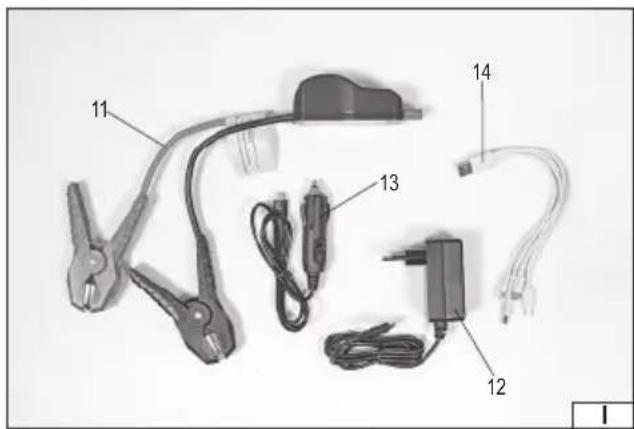
- jump leads
- mains charger
- vehicle charger
- charging cable for mobile devices
DE
Read the operating instruction
Second class of insulation
This symbol indicates that waste electrical and electronic equipment (including batteries and storage cells) cannot be disposed of with other types of waste. Waste equipment should be collected and handed over separately to a collection point for recycling and recovery, in order to reduce the amount of waste and the use of natural resources. Uncontrolled release of hazardous components contained in electrical and electronic equipment may pose a risk to human health and have adverse effects for the environment. The household plays an important role in contributing to reuse and recovery, including recycling of waste equipment. For more information about the appropriate recycling methods, contact your local authority or retailer.
WYPOSAŻENIE PRODUKTU
This multifunctional jump starter is a portable battery-powered device, which enables an emergency start-up of a vehicle equipped with a 12V electric system. With additional sockets, it also allows for charging other types of equipment. The efficient and lightweight high-capacity batteries ensure high product mobility, as well as fast charging of other portable devices.
Before using the device for the first time, read the entire user manual and keep it for future reference.
The supplier is not liable for any damage resulting from failure to observe the safety instructions and recommendations contained in this manual.
PRODUCT ACCESSORIES
The product is supplied as a fully assembled device and does not require any further installation. The following accessories are supplied with the product: jump leads, a charging cable with replaceable plugs for portable devices, power charger, and a plug for charging the product via the electric system in a vehicle working with 12V voltage.
GENERAL SAFETY CONDITIONS
SAFE USE INSTRUCTIONS
Ensure that the product is not damaged before each use. Any damage to the housing, such as cracks, dents or broken components, will render the product unsuitable for further use. Pay particular attention to the condition of the leads and wires connected to the product. If the leads and cables have damaged insulation, the plugs show signs of any damage, cracks, kinks, etc., they should not be used. Contact an authorised manufacturer's service centre if damage is found. Do not expose the product to rain or moisture. Do not immerse the product in water. Moisture in the unit can cause a short circuit, fire or even explosion. Do not short-circuit. It is forbidden to place wires, coins, nails, pins, keys and other metal parts in the housing and controls of the device. It is forbidden to connect the sockets and starting terminals of the device to each other. A short circuit can cause burns, fire or explosion. Do not allow the unit to overheat. Do not expose the device to direct sunlight. Keep the product away from heat sources. Exposing the product to fire or high temperatures, above 50°C may cause fire and/or explosion. Using the product at temperatures below 0°C will result in a significant reduction in the device's performance. Follow the recommendations in the charging safety instructions. Do not charge the device at temperatures outside the range specified in the technical data table. Improper charging, at temperatures outside the specified range, can damage the battery and increase the risk of fire. Do not attempt to repair, modify or disassemble the unit's housing components yourself. Do not place heavy objects on the unit or exert a lot of pressure on the unit housing. For repair, contact the manufacturer's authorised service centre. Do not expose the device to excessive shocks, e.g. during transport. The device should be protected against falling. If the product is seriously damaged or falls into water, place it in an open area away from flammable materials, people and objects. It should be taken to a specialist waste disposal facility. Do not pierce the product. Do not place the unit in a microwave oven, pressurised container. Do not place the product near a fire source. Keep the product away from children and animals.
Safety instructions for battery charging
Caution! Before starting charging, make sure that the charger's body, leads, and plug are not cracked or damaged. It is not allowed to use a damaged product.
The product is only suitable for charging using the supplied charger. It is not allowed to use any other charging method than charging via the supplied charger.
Charging can only be carried out indoors, in a dry room, protected against unauthorised access, especially children. Do not perform any charging, without constant supervision of an adult! If you need to leave the room where charging is taking place, stop the process by disconnecting the charger from the product and power supply network. If the product generates any smoke, strange odour, etc., immediately stop the charging process and disconnect the charger. The product may require charging before the first use. Li-ion (lithium-ion) batteries do not have the so-called “memory effect”, which means they can be recharged at any time. However, it is recommended to discharge the battery during normal operation and then charge it to full capacity. If, due to the nature of the work, it is not possible to treat the battery in this way every time, this should be done at least once every three months. Never discharge any batteries by short-circuiting the battery plates, as this will cause irreparable damage! In addition, do not check the battery charge status by short-circuiting the electrodes and checking their sparking. Use only the leads supplied with the product to perform jump start. It is not allowed to use other leads or modify the leads supplied with the product. During jump starting, a high current is transmitted through the leads. Incorrectly selected or modified leads can lead to an electric shock, fire, burns, or other injuries. Connect the jump leads and other cables only for the duration of the product's use. Do not store the product with its the leads still connected. This can cause short circuit and damage to the product, an electric shock, fire, or even explosion.
Storing the battery
Ensure proper storage conditions to extend the battery's life. The battery can last for approximately 500 charge-discharge cycles. Store the battery at a temperature ranging from 0°C to 30°C at a relative air humidity of 50% . Charge the battery to approx. 70% of
EN
its total capacity to store it for a longer period of time. For longer storage, the battery should be recharged periodically, once every 3 months. Do not over-discharge the battery as this will shorten its life and may cause irreparable damage. During storage, the battery will gradually discharge due to leakage. The self-discharge process depends on the storage temperature – the higher the temperature, the faster the discharge process. If the batteries are stored incorrectly, the electrolyte may leak. In case of leakage, secure the leak with a neutralising agent. In the case of electrolyte contact with eyes, rinse eyes thoroughly with water, and immediately seek medical attention. It is not allowed to use the tool with a damaged battery. If the battery is completely worn, return it to a specialist waste disposal centre.
Transporting the batteries
Lithium-ion batteries are treated as hazardous goods according to legal regulations. The user of the tool can transport the product together with the battery and the batteries alone by land. In that case, no additional conditions have to be met. If you entrust transport to third parties (e.g. a courier company), follow the regulations regarding the transport of hazardous goods. Before shipping, please contact a properly qualified person. It is not allowed to transport damaged batteries. For the duration of transport, remove the disassembled batteries from the product, secure the exposed contacts, for example by covering them with insulation tape. Protect the batteries in the packaging in such a way that they do not move inside the packaging during transport. National regulations for the transport of hazardous materials must also be observed.
PRODUCT OPERATION
Preparing the product for operation
Unpack the product and completely remove all parts of the packaging. It is recommended to keep the packaging for the purpose of shipping the product in the future.
Press the switch and the display will show a percentage indication of the device's battery charge status. The product can come with a partially charged battery, but it is required to perform full charging, before the first use. To do this, connect the plug of the charger cable supplied with the product to the socket marked "INPUT 9 V". Connect the charger to a power supply network. The product will have a fully charged battery if the charge indicator on the product display shows 100%.
Disconnect the charger from the power supply socket and then unplug the charger lead from the socket in the product.
The product is now ready for use.
The product can also be charged by means of the electric system in a vehicle working with 12 V voltage. To this end, use a vehicle charger equipped with a cable terminated with a plug to charge the product.
The process of charging the product using the electric system in a vehicle is done in the same manner as the afore-mentioned charging process involving a power charger. Read the documentation provided with the vehicle, before charging the product using the electric system in a vehicle.
It is not possible to use any other function of the product, while it is being charged.
Using the product to jump start vehicles
Caution! Prepare the product by charging it to full capacity. It is not allowed to use the starter if the battery charge indicator in the product shows 20% capacity or less. The capacity of a fully charged product battery allows up to 30 starts, depending, among other things, on the capacity and engine type of the vehicle being started. The starter device is designed to start most vehicles equipped with petrol engines up to 7,000 ccm vehicles equipped with diesel engines up to 4,000 ccm. If the vehicle's battery voltage is higher than the voltage of the battery of the device, the battery will not be detected. The device has been designed to perform an emergency jump start and it should not be used in place of a regular starter.
Connect the terminals of the jump leads to the battery terminals. Pay attention to the correct polarity. The terminal marked as “+” must be connected to the battery terminal with the same symbol. The terminal marked as “-” must be connected to the battery terminal with the same symbol.
Connect the plug of the jump leads to the socket matching that plug. The shape of the plug allows its connecting only in one correct manner. Do not apply excessive force, when connecting the plug of the jump leads to the product.
Start the vehicle. If the vehicle does not start within 2 seconds, wait at least 30 seconds before making another attempt. This delay is necessary for the product and the jump leads to cool down.
After starting the vehicle, do not stop the engine and immediately unplug the plug of the jump leads from the product, within no more than 30 seconds. Then, disconnect the terminals of the jump cables from the battery terminals.
Starting the vehicle with a deeply discharged battery
The device can also be used to start a vehicle with a deeply discharged battery, e.g. one that has been parked for several months without starting the engine during that time. Connect the terminals of the jump cables to the battery terminals, acting in the same manner as during a regular start-up. There is an indicator light on the plug of the starter wires which can light up red and/or green.
The green should light up and the red should not. Try starting the engine in the regular manner.
EN
Messages communicated by the device to the user
The device communicates with the user, by means of indicator lamps and a buzzer signal.
| No. | Red indicator light | Green indicator light | Buzzer sound Description |
| 1 | blinking bliniking no signal | Jump leads are connected | |
| 2 | inactive active no signal | The jump leads and the battery in the vehicle have been connected. The device is ready to start the engine. | |
| 3 | blinking inactive no signal | Low battery in the device. | |
| 5 | active inactive steady The terminals of the jump leads are shorted. | ||
| 6 | active inactive steady Reversed polarity of the connected terminals of the jump leads. | ||
Use of the product for charging portable devices
Before starting charging the device, see the documentation provided with the device to make sure that powerbanks can be used for charging it.
Switch on the device by pressing the switch. Connect one of the plugs to the charging socket in the portable device to be charged. Plug the other plug of the lead into one of the USB sockets in the product marked "OUTPUT" and designated with voltage rating. Before connecting, check the value of voltage that can be supplied to the connected device.
The charging process will start.
The power supply efficiency of the socket has been defined in the technical data table.
Products featuring multiple sockets can be used to simultaneously charge many devices, using the sockets.
When charging is complete, disconnect the plug from the socket in the starter device and then from the charged device.
The product features a battery with a capacity specified in the technical data table, which means that it can fully charge only devices equipped with a battery the capacity of which is lower than the capacity of the battery in the product.
If the connected device features a battery with a capacity exceeding the capacity of the battery in the product, then the battery in that device cannot be fully charged.
When charging, some of the energy accumulated in the product's battery will be lost, resulting from heat generation. This is a normal phenomenon, which means that we cannot assume that the product will fully charge a device with the same battery capacity as the capacity of the battery in the product.
To switch off the unit, press and hold the switch for approximately 5 seconds.
Wireless (inductive) charging
The product has a built-in wireless charger. It allows batteries to be charged without connecting cables. Wireless charging will only work on devices that support wireless charging. Before charging, make sure that the device has wireless charging functionality, you can check this in the technical documentation supplied with the device or contact the manufacturer of the device.
NOTE! Some cases, covers, applicable to mobile devices may interrupt or prevent charging. If the case of the mobile device is too thick, wireless charging may not work properly. Before starting wireless charging, remove all additional items from the housing of the mobile device, in particular such as credit, transport and other cards, metal components, magnets. If additional items are not removed, the charging of the mobile device may be disrupted, the device may overheat, the device may be damaged or additional items such as a credit card may be damaged. Do not charge mobile devices that are damaged, have an open or damaged battery compartment.
To start charging, ensure that the wireless charging area is in the up position and not obscured by other objects. Switch on the device by pressing the switch. Place the device on the wireless charging area. Charging will start when the wireless charging area of the product comes into contact with the charging coil of the mobile device. If wireless charging is not making progress, the position of the device on the charging area should be corrected. When charging is complete, take the mobile device away from the charging area immediately.
To switch off the unit, press and hold the switch for approximately 5 seconds.
Using the fl ashlight provided in the product
The product is equipped with an LED, which can be used as a flashlight to provide additional lighting of a small area or as a signal lamp. The LED will illuminate when the switch is pressed three times. A single press of the button will change the lighting mode in the following sequence: continuous light, flashing, SOS signal encoded in Morse code. The torch can be switched off by pressing and holding the switch for approximately 5 seconds.
Product maintenance
The product does not require any special maintenance. Clean the product casing with a soft, dry cloth. Never immerse the product in water or in any other liquid. Protect the product sockets against contamination. If the socket is dirty, try to clean it by blowing a jet of compressed air stream into it, at a pressure not exceeding 0.3 MPa. Do not use any hard objects to clean the sockets, as this can damage the socket or cause a short circuit.
EN
Storage and transport of the product
The product should be stored indoors, in shaded places, where the temperature does not exceed the range specified in the table and the relative humidity is below 90%.
Transport the product taking into account the recommendations provided in the section: "Transport of batteries".
TECHNICAL DATA
| Parameter Unit Value | ||
| Catalogue No. YT-83085 | ||
| Rated start-up voltage [V DC] 12 | ||
| Rated start-up current [A] 400/800 | ||
| Peak start-up current [A] 500/1000 | ||
| Start-up time [s] 2 | ||
| Interval (break time) [s] 30 | ||
| USB port output voltage | [V DC] | 5 |
| Max. output current of USB socket | [A] | 2.1 |
| USB port output voltage | [V DC] | 9 |
| Max. output current of USB socket | [A] | 2 |
| DC port output voltage | [V DC] 16 | |
| Max. output current of DC socket | [A] | 8 |
| Wireless charging | [W] | 5/7.5/10 |
| Input voltage | [V DC] | 9 |
| Input current [A] | 2 | |
| Rated battery voltage | [V DC] | 3.7 |
| Battery capacity | [Ah] | 16 |
| Battery energy | [Wh] | 59.2 Wh |
| Battery type | Li-Ion | |
| Charging temperature | [°C] 0 – 40 | |
| Storage temperature | [°C] 0 – 50 | |
| Charging time | [h] 4 | |
| Weight | [kg] | 0.62 |
| Charger | ||
| Rated input voltage | [V~] | 100 – 240 |
| Rated frequency | [Hz] | 50 – 60 |
| Rated input current | [A] | 0.7 |
| Rated output voltage | [V DC] | 9 |
| Rated output current [A] | 2 | |
| Output power | [W] | 18 |
| Protection rating | IPX0 | |
| Insulation class | II |
PRODUKTBESCHREIBUNG
CARACTÉRISTIQUES DU PRODUIT
Recharge sans fi I (par induction)
Transport van accu's
EU DECLARATION OF CONFORMITY | DECLARATIA UE DE CONFORMITATE
0125/YT-83085/EC/2025
EN IEC 62368-1:2020 + A11:2020
Wrocław, 2025.01.03

- PL
- DE
- WYPOSAŻENIE PRODUKTU
- PRODUCT ACCESSORIES
- GENERAL SAFETY CONDITIONS
- SAFE USE INSTRUCTIONS
- SAFETY INSTRUCTIONS FOR BATTERY CHARGING
- STORING THE BATTERY
- EN
- TRANSPORTING THE BATTERIES
- PRODUCT OPERATION
- PREPARING THE PRODUCT FOR OPERATION
- USING THE PRODUCT TO JUMP START VEHICLES
- STARTING THE VEHICLE WITH A DEEPLY DISCHARGED BATTERY
- STORAGE AND TRANSPORT OF THE PRODUCT
- PRODUKTBESCHREIBUNG
- CARACTÉRISTIQUES DU PRODUIT
- TRANSPORT VAN ACCU'S
- EU DECLARATION OF CONFORMITY | DECLARATIA UE DE CONFORMITATE
Brand : Yato
Model : YT-83085
Category : Power bank