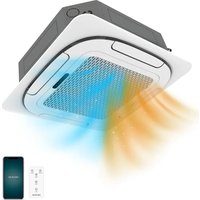
AirClima 18000 Cassette Indoor Connected - Air Conditioning CECOTEC - Free user manual and instructions
Find the device manual for free AirClima 18000 Cassette Indoor Connected CECOTEC in PDF.


| Product type | Indoor cassette air conditioner |
| Brand | Cecotec |
| Model | AirClima 18000 Cassette Indoor Connected |
| Reference | 08151 |
| Cooling capacity | 5,3 kW |
| Heating capacity | 4,3 kW |
| SEER | 6,3 |
| SCOP (average heating season) | 4,0 |
| Refrigerant | R32 (GWP 675) |
| Acoustic power level (indoor/outdoor) | 50 / 62 dB(A) |
| Nominal air flow (indoor/outdoor) | 1150 / 2650 m³/h |
| Power supply | 220-240 V ~ 50 Hz |
| Wi-Fi connection | Yes, via smartphone app |
| Remote control | Yes (AAA 1.5 V batteries x2) |
| Operating modes | Auto, Cool, Heat, Dehumidification, Fan |
| Special functions | Turbo, Sleep, Eco, I Feel, Mute, Swing, Self-cleaning, Anti-mold, Child safety |
| Air filter | Washable, clean every 2 weeks |
| Remote control batteries | AAA 1.5 V (x2) |
| Installation | Professional required |
| Maintenance | Regular filter cleaning, call after-sales service for repairs |
Frequently Asked Questions - AirClima 18000 Cassette Indoor Connected CECOTEC
User questions about AirClima 18000 Cassette Indoor Connected CECOTEC
0 question about this device. Answer the ones you know or ask your own.
Ask a new question about this device
Download the instructions for your Air Conditioning in PDF format for free! Find your manual AirClima 18000 Cassette Indoor Connected - CECOTEC and take your electronic device back in hand. On this page are published all the documents necessary for the use of your device. AirClima 18000 Cassette Indoor Connected by CECOTEC.
USER MANUAL AirClima 18000 Cassette Indoor Connected CECOTEC
natural_image
Exterior view of a modern air conditioner unit with a mesh grille and ventilation slots (no text or symbols visible)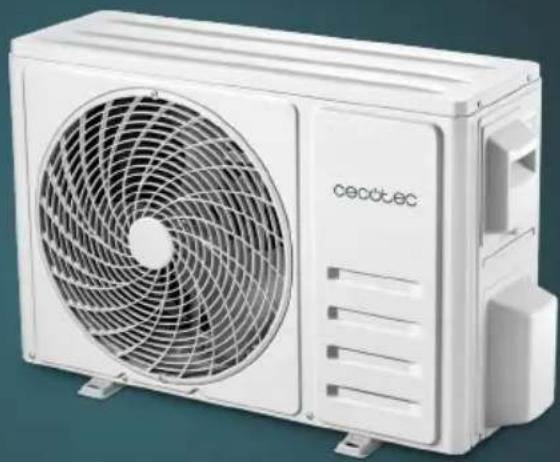
natural_image
White Cecotec air conditioner unit with visible fan blades and branding (no text or symbols on body)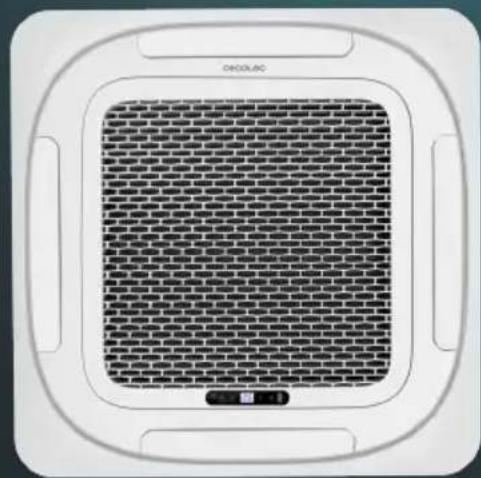
Safety instructions 9
-
Parts and components 101
-
Before use 104
-
Installation 105
-
Operation 124
-
Wi-Fi connectivity and mobile App 130
-
Cleaning and maintenance 130
-
Troubleshooting 137
-
Technical specifications 141
-
Disposal of old electrical and electronic appliances 146
-
Technical support and warranty 147
-
Copyright 147
-
Declaration of conformity 147
SOMMAIRE
Read these instructions thoroughly before using the appliance. Keep this instruction manual for future reference or new users.
- This symbol means: WARNING! Risk of fire.
- This symbol means: WARNING! Read the instruction manual before using the appliance.
- This symbol means: operator's manual; instructions for use. Before installing the air conditioner, read the instruction manual first.
- This symbol means: service indicator; read the instruction manual. Before repairing the air conditioner, read the instruction manual first.
- This appliance is designed for domestic use only and is not intended for bars, restaurants, farmhouses, hotels, motels, and offices.
- This appliance can be used by children aged 8 years and above and people with reduced physical, sensory, or mental capabilities or lack of experience and knowledge if they have been given supervision or instruction concerning use of the appliance in a safe way and understand the hazards involved. Children must not play with the appliance. Cleaning and user maintenance should not be carried out by unsupervised children.
- The device must be powered at a low safety voltage as stated on the marking.
- If the power cable is damaged, it must be replaced by the official Cecotec Technical Support Service or similar qualified personnel to avoid risks.
- Piping must be protected from physical damage and must not be installed in a space without ventilation.
- Compliance with national gas regulations must be observed.
- Mechanical connections shall be accessible for maintenance purposes.
- WARNING: keep the ventilation openings clear from obstructions.
- NOTE: servicing should be performed only as recommended by the manufacturer.
- The appliance shall be installed in accordance with national electrical installation regulations
- WARNING: the appliance must be stored in a well-ventilated area where the room size corresponds to the room area as specified for operation.
- WARNING: the appliance must be stored in a room without continuously operating open flames (e.g. an operating gas appliance) or sources of ignition (e.g. an operating electric heater).
- The appliance must be stored in such a way as to prevent mechanical damage.
- Any person involved in work or intervention on a refrigerant circuit should hold a current valid certificate issued by an industry-accredited assessment authority, authorising their competence to handle refrigerants safely in accordance with an industry-recognised assessment specification.
-
Servicing should only be carried out as recommended by the equipment manufacturer. Maintenance and repairs requiring the assistance of other qualified personnel must be carried out under the supervision of the person competent in the use of flammable refrigerants.
-
Service personnel must be instructed to perform the following when servicing an appliance using a flammable refrigerant.
- Ensure that the mains voltage matches the voltage specified on the device rating label and that the plug is earthed.
- Children and animals should be kept away from the installation area during installation.
- Cleaning and maintenance must be carried out by qualified personnel. In any case, the appliance must be disconnected from the power supply before carrying out any cleaning or maintenance operations.
- Do not immerse the cable, plug, or any other non-removable part of the appliance in water or any other liquid. Do not expose the electrical connections to water. Make sure your hands are dry before handling the plug or switching on the device.
- Do not carry or pull the appliance from the power cable. Do not use the power cable as handle. Do not push the cable against corners or sharp edges. Do not crush the power cable with the full weight of the appliance. Keep the cable away from hot surfaces.
- Do not operate the appliance if its cable, plug, or body show visible damage, do not operate properly, or have been dropped.
- Do not use the appliance in confined spaces with explosive or flammable vapours.
- Install the air conditioner far away from heat sources.
- Do not try to repair the appliance by yourself. Contact the official Cecotec Technical Support Service.
- Do not install the air conditioner in the bathroom or other humid environments.
- The air conditioner is designed for indoor use only and is not compatible with other uses.
Instructions on batteries
- Battery ingestion can cause burns, soft-tissue perforation, and death. It can cause severe burns within two hours of the ingestion.
- In case of battery ingestion, please seek medical attention immediately.
- Do not allow children to replace batteries without adult supervision.
- Do not disassemble, open, or damage the batteries.
- Keep the batteries out of the reach of children. Pay particular attention to small batteries. In case of battery ingestion, please seek medical attention immediately.
- Do not expose batteries to heat or fire. Avoid storage in direct sunlight.
- Do not short-circuit an element or a battery. Do not store batteries in an untidy manner, in a box, or drawer where they can short-circuit each other or be short-circuited by other metal objects.
- Do not subject batteries to mechanical shock.
-
Both batteries and cells can leak under extreme conditions. In the event of a battery leak, keep your skin and eyes away from the liquid. If the liquid gets into contact with skin, wash immediately with soap and water. If the liquid gets into the eyes, wash them immediately with clean water for a minimum of 10 minutes and seek medical attention. Wear gloves to handle the battery and dispose of it immediately in accordance with local regulations.
-
Pay attention to the positive (+) and negative (-) marks on the batteries and the remote-control compartment to ensure they are inserted correctly.
- Do not use any batteries that are not designed for use with the remote control.
- Do not use the remote control if powered with batteries that differ in capacity, size, or type.
- Children should be allowed to handle the batteries only under adult supervision.
- Always buy recommended batteries.
- Keep the batteries clean and dry. Wipe the battery terminals with a clean, dry cloth if they become dirty.
- Keep the original instruction manual for future reference.
- Use the batteries only for their intended purpose.
- Whenever possible, remove the batteries when not in use.
INSTRUCTIONS DE SÉCURITÉ
6. LIMPIEZA Y MANTENIMIENTO
Cassette Outdoor / AirClima 18000 Cassette Panel
https://cecotec.es/es/information/declaration-of-conformity
1. PARTS AND COMPONENTS
Fig. 1
A. Indoor unit
1. Air outlet
2. Control panel
3. Pump
4. Drain hose
5. Air inlet
6. Filter
7. Flap
8. Remote control
B. Outdoor unit
-
Refrigerant hose
-
Connection cable
-
Lock valve
-
Air outlet grille
Panel. Fig. 2
- Panel
- Flap
- Infrared signal receiver
- Control panel
- Air inlet grille
Control panel. Fig. 3
- Buzzer: when a signal is received, it will beep.
- Manual power button: this button allows you to turn the appliance on or off manually.
- Operation indicator light: when this light is on, it indicates that the appliance is operating.
- Timer indicator light: when this indicator light is on, the temperature/error code indicator light flashes to enter timer mode.
- Temperature/error codes indicator: when operating normally, displays the current setpoint temperature or room temperature. When the appliance malfunctions, it displays an error code.
- Defrost/preheat indicator light: when this indicator light is on, it shows that the appliance has entered defrost mode.
- Warning indicator light: when this light is on, it indicates a malfunction of the appliance, and the temperature/error codes indicator shows an error code.
- Infrared signal receiver.
Remote control. Fig. 4
| Symbol Description | |
 | Battery indicator light |
 | Automatic mode (AUTO) |
| [GZSZ] | Cooling mode (COOL) |
 | Dehumidification mode (DRY) |
 | Fan-only mode (FAN ONLY) |
 | Heating mode (HEAT) |
 | ECO mode |
| [AKCB] | Timer |
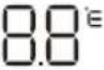 | Temperature indicator |
 | Fan speed: auto/low/low-medium/medium/medium-high/high |
 | MUTE function |
 | TURBO function |
| [###] | Automatic up-and-down oscillation function |
 | SLEEP function |
 | I FEEL function |
| [###] | Signal indicator |
| ### | Child Lock |
 | Display on/off (DISPLAY) |
| ### | Self-cleaning function |
 | Anti-mould (ANTI-MILDEW) |
 | Natural Breeze |
 | To switch the air conditioner on/off |
 | To increase the temperature or timer time |
 | To decrease the temperature or timer time |
 | Mode button: to select the mode: (AUTO), (COOL), (DRY), (FAN) y-HEAT). |
 | ECO mode |
 | TURBO function |
 | Fan speed: auto/mute/low/low-medium/medium/medium-high/high/turbo |
 | Timer on/off |
 | SLEEP function |
 | To switch the LED display on/off |
 | Oscillation function |
 | Button without function |
 | I FEEL function |
 | MUTE function |
 | To activate/deactivate the Child lock function |
 | Self-cleaning function |
 | Button without function |
 | Anti-mould (ANTI-MILDEW) function |
NOTE:
The graphics in this manual are schematic representations and may not exactly match the device.
ENGLISH
2. BEFORE USE
- This appliance is packaged in a way as to protect it during transport. Take the appliance out of its box and remove all packaging materials. You can keep the original box and other packaging elements in a safe place. This will help you prevent damage to the appliance when transporting it in the future. In case the original packaging is disposed of, make sure all packaging materials are recycled accordingly.
- Make sure all parts and components are included and in good conditions. If there is any piece missing or in bad conditions, contact the official Cecotec Technical Support Service immediately.
Note:
- The air conditioner cannot be switched on until it has been connected to the mains for at least two hours. In addition, in case the air conditioner is idle for a day, do not cut off the power supply, it is necessary to heat the crankcase heater to avoid forcing the compressor to start.
- Note that the air inlet/outlet must not be obstructed. If this happens, the air conditioner will not be able to work properly.
Box contents for reference 08151 - AirClima 18000 Cassette Indoor Connected:
- Indoor unit for ceiling mounted cassette air conditioner
- Instruction manual
- Remote control
- Remote control battery AAA 1.5 V (x2)
Box contents for reference 08152 - AirClima 18000 Cassette Outdoor:
- Outdoor unit for ceiling mounted cassette air conditioner
Box contents for reference 09283 - AirClima 18000 Cassette Panel:
- Indoor unit panel for ceiling mounted cassette air conditioner
Box contents for reference 08153 - AirClima 24000 Cassette Indoor Connected:
- Indoor unit for ceiling mounted cassette air conditioner
- Instruction manual
- Remote control
- Remote control battery AAA 1.5 V (x2)
Box contents for reference 08154 - AirClima 24000 Cassette Outdoor:
- Outdoor unit for ceiling mounted cassette air conditioner
Box contents for reference 09284 - AirClima 24000 Cassette Panel:
- Indoor unit panel for ceiling mounted cassette air conditioner
3. INSTALLATION
3.1 Information prior to installation Installation instructions
The installation of this air conditioner must only be carried out by qualified personnel. Failure to do so would not guarantee the normal operation of the appliance and would also affect the safety of the appliance and the building.
User guide
- Use the fuse or circuit breaker indicated in these instructions.
- The location where the air conditioner is installed must have a power supply that complies with the specifications on the rating plate of the unit. In addition, its voltage must be within the range of 90% to 110% of the nominal voltage value.
- The power supply circuit must be equipped with a protector, such as an electrical leakage protector or an air circuit breaker, which must have a rating greater than 1.5 times the maximum voltage rating of the air conditioner.
- The socket outlet you use must be earthed and compatible with the air conditioner's plug. The plug of the air conditioner is equipped with an earthed plug and must not be modified.
- Contact a qualified electrician to make the wiring connections in compliance with electrical safety regulations. Make sure that the air conditioner is properly earthed. That is, the main power cable of the air conditioner must be connected to a reliable earth ground.
Precautions
- The air conditioner must be installed correctly. Otherwise, abnormal vibrations or noises may occur.
- The outdoor unit must be installed in a place where the noise emitted will not disturb the neighbours.
- Read these instructions carefully.
- Do not allow air to enter or refrigerant to escape during installation of the appliance.
- The fuse type for the indoor unit controller is 50T, the rated specification is T 5 A, 270 V. The fuse for the whole unit is not supplied by the manufacturer, so the installer must use a suitable fuse or other overcurrent protection device for the supply circuit according to the maximum input power.
- The air conditioner operates safely when the ambient static pressure is 0.8\~1.05 of standard atmospheric pressure.
Operating conditions
The protection device can be activated and stop the operation of the unit within the temperature ranges indicated in the table below:
| Heating Outside air | temperature above 24 °C |
| Indoor air temperature at -15 °C | |
| Room temperature above 30 °C | |
| Cooling Outside air | temperature above 52 °C |
| Outside air temperature above -15 °C | |
| Room temperature below 17 °C | |
| A i r dehumidification | Room temperature below 17 °C |
Note:
- The table shows the temperature at which the protection device is activated depending on the mode selected.
- If the air conditioner is operated for a long period of time in the Cooling or Dehumidification mode when the air humidity is above 80% (with doors or windows open), droplets may occur near the air outlet.
Noise pollution
- Install the air conditioner in a place that can support its weight for quieter operation.
- Install the outdoor unit in a place where the discharged air and operating noise will not disturb your neighbours.
- Do not place any obstacles in front of the output of the outdoor unit so as not to affect the operation or increase the noise level.
3.2 Installation of the indoor unit
Choosing the location for installation
- When selecting the location where the indoor unit is to be installed, please consider the dimensions shown in figure 5 and the following table. In addition, ensure that sufficient space is available for maintenance operations.
- The dimensions shown in figure 5 are in millimetres.
| A (mm) H (mm) | |||
| 08151 AirClima | 18000 Cassette Indoor Connected 245 130~135 | ||
| 08152 AirClima | 18000 Cassette Outdoor | ||
| 09283 AirClima | 18000 Cassette Panel | ||
| 08153 AirClima | 24000 Cassette Indoor Connected 245 130~135 | ||
| 08154 AirClima | 24000 Cassette Outdoor | ||
| 09284 AirClima | 24000 Cassette Panel |
- Also note the connection of pipes and wiring. You will also have to decide in which direction the pipes will be connected.
- Once you have decided where you are going to place the air conditioner, be sure to route the refrigerant hose, drain hose and connecting cables to the place where they are to be connected.
- Make sure that the dimensions of the indoor unit and the ceiling opening are correct. Secure the installation plate containing the appliance dimensions under the unit with four M5 x 16 screws. Fig. 5
Fig. 5 key:
- 4 screws
- Liquid side
- Gas side
- Drainage hole
Installation location
Warning
- If you place the air conditioner in the following places, it may not work properly. If installation in any of these locations is unavoidable, please contact the official Cecotec Technical Support Service:
A. A place where flammable gas is leaking.
B. A place located near the sea, as the air will have a high salt concentration.
C. A place located near a hot spring since caustic gas (e.g. sulphur) will be present in the air.
D. A place that does not support the weight of the unit.
E. A place where there is an oil boiler.
F. A place with strong electromagnetic waves.
G. A place where acidic or alkaline liquid evaporates.
ENGLISH
H. A place where there is no air circulation.
I. A humid place.
- Thermal insulation must be carried out in the air conditioner and in the dwelling in accordance with national regulations.
Installation dimensions
Fig. 6.
Fig. 6 key:
- Ceiling
- Above 270 cm
- Above 100 cm
- Obstacle
- Above 100 cm
| Wall material | Flammable material Fireproof or other non-flammable materials other than metal | Fireproof structure |
| Top (B) More than 5 cm More than 5 cm | More than 5 cm | |
| Sides (C) More than 100 cm More than 100 cm |
Height between ceiling and floor
The height between ceiling and floor should be 2.7 m \~ 3.2 m.
Installation of the indoor unit
- The method of installation should be modified according to the type of construction, as detailed below. Consult a professional for more information.
-
After drilling the hole in the ceiling, the unit must be horizontal and securely fixed to avoid vibrations.
-
Drill the hole in the ceiling and remove the debris.
-
Reinforce the cut beams fixing the ceiling.
Installation of the suspension bolts
Use M10 screws. The distance between the screws depends on the size of the unit and is shown in figure 5. Follow the procedure for your roof type:
A. Wooden structure: place the wooden lath above the beam. Then, install the suspension bolts. You can use figure 7 for reference.
Fig. 7 key:
- Wooden lath
- Beam
- Ceiling
- Suspension bolt
B. Existing concrete structure: place the installation hook with an expansion screw into the concrete to a depth of 45-50 mm to prevent loosening. You can use figure 8 for reference.
C. Newly constructed concrete structure: install the anchor bolts. You can use figure 9 for reference.
Fig. 9 key:
- Insertion bracket (clamp-shaped)
- Insertion bracket (guide type)
- Steel bar
- Anchor bolt
- Heavy duty anchor bolt
D. Metal beam structure: install the metal support profile. You can use figure 10 for reference.
Fig. 10 key:
- Suspension bolt
- Suspension bolts
- Metal supporting profile
Hanging the indoor unit
- Place the gasket (bottom side) 90 mm above the ceiling. Fig. 11
- Install the suspension bolt into the installation hook. Then, hang the indoor unit and make sure it is levelled using a spirit level. Fig. 12
Fig. 11 key:
- Suspension bolt
- Nut (up side)
- Gasket (up side)
- Installation hook
- Gasket (bottom side)
- Nut (bottom side)
- Lower part of the ceiling
ENGLISH
Fig. 12 key:
- Spirit level
- Suspension bolt
- Installation hook
- M10 suspension bolt
- Nut M10
- Gasket ø 10
- Install it under the suspension hook
- Nut M10
- Indoor unit
- Ceiling
- Installation plate
3.3 Installation of the indoor unit panel
- The installation of the panel must be carried out after the connection of the hoses and wiring.
- Before installation, make sure that the dimensions of the indoor unit and the ceiling hole are correct.
WARNING:
Make sure that all connections between the panel and the ceiling are properly sealed, as air or water leakage or even water condensation may occur if there are any gaps.
Drain hose installation
Warnings:
- Be sure to follow the instructions in this manual when installing the drain hose. It must have thermal insulation to prevent condensation.
- The drain hose of the indoor unit and all connections must be thermally insulated, otherwise water condensation will occur.
- The downward slope of the drain hose must be greater than 1/100. In addition, the hose must not be coiled or kinked. Fig. 13
- The total length of the drain hose when drawn transversely should not exceed 20 metres. If the hose is longer, a bracket should be inserted every 1.5 or 2 metres to prevent it from coiling.
- Refer to Figure 13 for proper installation of the hose.
- Do not exert any pressure on the connection part of the drain hose.
Fig. 13 key:
- Bracket
-
Downward tilt over 1/100
-
As long as possible, approximately 10 mm
- Downward tilt over 1/100
- VP30
- Do not bend up and down the hose
- Do not kink the hose
Drain hose material, thermal insulation material
| Drain hose material Polyvinyl chloride pipe ( 32 mm outer diameter) | |
| Thermal insulation material | Foamed polyethylene insulation plate (10 mm thick) |
Flexible hose. Fig. 14
Measure the diameter of the hard pipe using the cutting method and adjust the joint angle:
- Pull the flexible hose and do not deform it more than shown in figure 14.
- Make sure it is securely fastened with the clamp.
- Position the flexible hose horizontally.
Fig. 14 key:
- Core shift adjustment
- 45^ bend (maximum)
- Hose band
- Flexible hose
- Indoor unit
Connection
- Connect the transparent pipe to the polyvinyl chloride pipe.
- Use polyvinyl chloride glue on the connection part of the drain hose. Make sure there are no water leaks.
- Apply glue to the first 40 mm of the front of the polyvinyl chloride pipe. Then, insert it into the transparent pipe.
- Wait 10 minutes for the glue to dry. Do not exert pressure on the connection of both pipes while the glue is drying.
Thermal insulation
Carefully roll the flexible hose with the thermal insulation material from the beginning to the end (to the inside) Fig. 15
ENGLISH
Fig. 15 key:
- Flexible hose
- Hose band
- Attached thermal insulation material
- Thermal insulation material
- Polyvinyl chloride pipe
Upward drainage
To ensure that the drain hose does not slope downwards, direct it upwards to a maximum height of 360 mm. Fig. 16
Fig. 16 key:
- Below 100 mm
- Below 360 mm
- Below 600 mm
- Indoor unit
- Ceiling
Drainage test. Fig. 17
Test to check the drainage system:
- After electrical installation, carry out a test of the drainage system.
- First, switch on the air conditioner.
- Fill the indoor unit with water through the pan, the drain pump will start working once it is full of water.
- Check if the water flow goes through the hose properly and look carefully at the gasket to check whether it is leaking or not.
Fig. 17 key:
- Drain hose connection
- Pan
Motor sound test
- The drainage test is carried out during checking the drain pump motor running sound.
- Reset the water level switch connection to the original position after the drainage test.
Panel installation
To remove the air inlet grille from the panel, follow the steps shown in figure 18 and 19.
Fig. 18 key:
- Loosen the air inlet grille
-
Remove the air inlet grille
-
Screw the M10 gasket and M6*20 screw into the corner of the indoor unit. Before doing so, screw in the other two additional screws shown in figure 20 and check that the direction of the red arrow on the electrical panel aligns with that of the panel.
- Connect the motor cable step by step. Also connect the display board cable to the junction box according to the electrical wiring diagram.
- Then, screw the other two M6*20 screws and the M10 gasket through the panel hole into the indoor unit.
- Adjust the position and direction of the panel to match the grille and the outlet of the indoor unit. Next, screw all the screws so that the panel and the indoor unit are joined together.
- Replace the air inlet grille and panel on the indoor unit.
3.3 Installation of the outdoor unit
Outdoor unit size. Fig. 21
| Reference | Model A | (mm) | B(mm) | C(mm) | D(mm) | E(mm) | F(mm) | H(mm) |
| 08151 AirCl | ma 18000 Cassette Indoor Connected | 780 516 | 314 350 | 321 307 | 605 | |||
| 08152 AirCl | ma 18000 Cassette Outdoor | |||||||
| 09283 AirCl | ima 18000 Cassette Panel | |||||||
| 08153 AirCl | ma 24000 Cassette Indoor Connected | 845 586 | 348 375 | 358 342 | 700 | |||
| 08154 | AirClima 24000 Cassette Outdoor | |||||||
| 09284 | AirClima 24000 Cassette Panel |
Relocating the outdoor unit. Fig. 22
- Use 4 x 6 mm steel wires to hang the outdoor unit as shown in figure 22.
- To prevent the outdoor unit from deforming, add spacers to the parts that may come into contact with the steel wires.
- After the transfer, remove the wooden slats from the bottom.
ENGLISH
Fig. 22 key:
- Steel wires
- Baffle
Installation space
- After leaving the repair space as illustrated in figure 23, install the outdoor unit with the power supply equipment on the side of the outdoor unit. See section on electrical wiring for installation method.
- Make sure that neither the air inlet nor the air outlet is obstructed.
Fig. 23 key:
- Air inlet
- Air outlet
- Above 600 mm
-
Air outlet of the outdoor unit
-
Make sure that there are no obstructions in the air outlet of the outdoor unit.
- A minimum spacing of 600 mm must be left between outdoor units as shown in Figure 24.
Fig. 24 key:
- Bolt (4 pieces for one unit)
Refrigerant pipe. Fig. 25
- The junction is inside the panel protector on the right-hand side. Remove this protector.
- When measuring and connecting the pipe, it must be noted that the pipe protector must be removed.
- Connect the pipe to the valve from the left, right or rear.
Fig. 25 key:
- Low pressure valve
- High pressure valve
- Gas side
- Liquid side
3.4 Refrigerant pipe installation
- The installation method of the air conditioner will depend on the type of ceiling, consult a professional.
- Once the main unit is installed, the pipes will have to be laid in the roof.
- The direction of the piping is determined after choosing the installation site.
- Pipe size and ways of installation (depending on refrigerant capacity) Fig. 26
| Reference Model | Size (mm) | |
| Liquid side Gas side | ||
| 08151 AirClima 18000 Cassette Indoor Connected | 6.35 (1/4 inch) 9.52 (3/8 inch) | |
| 08152 AirClima 18000 Cassette Outdoor | ||
| 09283 AirClima 18000 Cassette Panel | ||
| 08153 AirClima 24000 Cassette Indoor Connected | 6.35 (1/4 inch) 12.7 (1/2 inch) | |
| 08154 AirClima 24000 Cassette Outdoor | ||
| 09284 AirClima 24000 Cassette Panel | ||
- See section on refrigerant pipe connection for more information.
- Figure 26 shows the allowed length and height drop.
| Allowed value | ||
| Longest pipe (L) 30 m | ||
| Maximum height drop | Height drop between indoor and outdoor unit H 15 m | |
Fig. 26 key:
- Outdoor unit
- Height drop: 5 m
- Oil return
- Indoor unit
Remove any object or water
- Use high-pressure nitrogen to flush the pipe instead of refrigerant.
- Before installing the refrigerant pipe, clean it for foreign objects.
Additional refrigerant charge
- The additional charge is based on the diameter and length, and the type of liquid outlet/inlet.
- This air conditioner has been recharged using a 5 m pipe as a reference. Those longer than 5 m shall be recharged as follows.
| Liquid pipe diameter 1/4 3/8 1/2 | |||
| Additional charge for 1 m pipe (R32) | 0.016 kg | 0.040 kg | 0.096 kg |
Non-return bend and oil-return bend
-
The outdoor unit is beneath the indoor unit.
-
It is not necessary to put a non-return bend in the lowest or highest position of the upright pipe, as shown in figure 27.
- The outdoor unit is above the indoor unit.
- It is necessary to put an oil-return bend and a non-return bend in the lowest and highest position of the upright pipe, as shown in figure 28.
Fig. 27 key:
- System gas pipe
- Oil-return bend
- Indoor unit
- Install an oil-return bend every 6 metres
- Outdoor unit
Fig. 28 key:
- Non-return bend
- System gas pipe
- Oil-return bend
- Outdoor unit
- Install an oil-return bend every 6 metres
- Indoor unit
The dimensions to install an oil-return bend are the following (Fig. 29):
| A(inch) | B(mm) | C(mm) |
| 3/8 ≥ 20 ≤ 150 | ||
| 1/2 ≥ 26 ≤ 150 | ||
| 5/8 ≥ 33 ≤ 150 |
Flare
- Cut the refrigerant pipe using a pipe cutter. Fig. 30
- Flaring after fitting the pipe to the connection nut. Fig. 31
| External diameter | A (mm) | |
| MAX MIN | ||
| 14 inch 8.7 8.3 | ||
| 38 inch | 12.4 12.0 | |
| 12 inch 15.8 15.4 | ||
| 58 inch | 19.0 18.6 | |
| 34 inch 23.3 22.9 | ||
Fig. 31 key:
- Flare
- Pipe
Junction device
- Used to connect the pipe. Fix the nut on the connection pipe and then tighten it with the spanner. Fig. 32
Note: if you tighten the nut too much, you could break it.
| Outside diameter | Strength exerted |
| 14 inch 1420~1720N cm | (144~176kgf.cm) |
| 38 inch | 3270~3990N cm(333~407kgf.cm) |
| 12 inch 4950~6030N cm | (504~616kgf.cm) |
| 58 inch | 6180~7540N cm(630~770kgf.cm) |
| 34 inch 9720~11860N cm | (990~1210kgf.cm) |
ENGLISH
Fig. 33 key:
- Valve body
- Valve pole
- Nut
- Limiter
- Bonnet
Stop valve operation
- Open the valve pole all the way. Do not attempt to open it any further.
- Secure the bonnet with a spanner or similar tool.
- Attach the valve pole bonnet.
Liquid side ( 3/8 inch, 1/2 inch): Gas side 1180N.cm (120kgf.cm)
Gas side ( 5/8 inch, 3/4 inch): 1180N.cm (120kgf.cm)
When using a vacuum pump, each low pressure valve must be handled as follows:
Fig. 34
- Connect the recharged pipe to the lower pressure valve (low/high pressure valve must be tightened).
- Connect the recharged pipe to the vacuum pump.
- Fully open the low pressure regulator on the manifold.
- Start the vacuum with the vacuum pump. When the vacuum starts, loosen the nut on the low pressure valve a little. Check if air enters (the noise of the vacuum pump changes and the counter indication changes from negative to zero) and tighten the nut of the connection pipe.
- When the vacuum is completed, tighten the low pressure handle of the manifold valve fully and stop the vacuum pump. When vacuuming for more than 15 minutes, ensure that the multi-purpose gauge reads -1.0X10⁵ Pa (-76cmHg).
- Open the high/low pressure valve fully.
- Disconnect the recharged hose from the charging opening of the low pressure valve.
- Tighten the low pressure valve bonnet.
Fig. 34 key:
- Multi-function gauge
- Manifold valve
- Pressure gauge
- -76cmHg
- Low handle
- High handle
- Discharge hose
- Low pressure valve
-
High pressure valve
-
Discharge hose
- Vacuum pump
Figure 35 only shows the mounting sequence of the indoor unit, outdoor unit, and refrigeration piping.
See figure 35 for installation.
Fig. 35 key:
- Outdoor unit
- Low pressure stop valve
- High pressure stop valve
- Indoor unit
- Indoor inlet pipe
- Indoor inlet pipe joint
- Connection tube copper flare nut
- Gas pipe
- Liquid pipe
Note:
- The controller assembly has been installed in the outdoor unit.
- Use two spanners to connect the pipes to the inner/outer pipes to prevent cracking of the copper.
- Pay attention to the orientation of the connection when making the connection.
Air purge
Use a vacuum pump to draw vacuum from the gas side to the refrigerant addition inlet of the outdoor unit.
Air and moisture remaining inside the refrigeration system can cause the following harmful effects:
- Increased pressure inside the refrigeration system.
- Decreased cooling (or heating) effect.
- Accumulated moisture and blockage of the refrigeration system.
- Rusting of certain parts of the system.
Note: do not use the refrigerant in the outdoor unit for vacuum. (A certain volume of refrigerant has been added to the outdoor unit at the factory).
ENGLISH
Electric wiring
WARNINGS
- The specified power cables must be used. Do not exert pressure on the connection terminals.
- Incorrect connection can cause a fire.
- Earthing must be carried out correctly.
- The earth wire must be away from gas pipes, water pipes, mobile phones, lightning rods, or other earth wires. Improper earthing may result in electric shock.
- Electrical wiring should be done by professionals. Use a separate circuit in accordance with national regulations.
- The temperature of the refrigerant circuit will be high, so keep the interconnection away from the copper pipe.
- If the capacity of the circuit is not sufficient, an electric shock or fire may occur.
- If the cable is damaged, it must be replaced by the manufacturer, the supplier, or qualified personnel to avoid hazards.
- An omnipolar disconnect switch with a contact separation of at least 3 mm in all poles must be connected to fixed wiring.
- Be sure to install the leakage current protection switch. Failure to do so may result in electric shock.
- The appliance must be positioned so that the plug is accessible.
- The appliance must be installed in accordance with national wiring regulations.
- The power supply cable must be selected in accordance with national regulations.
- The outdoor unit power cable must be selected and connected according to the outdoor unit installation manual.
- Wiring should be away from high temperature components, or the insulation layer of the cables may melt.
- Use a clamp to secure the wires and terminal block after connection.
- The control cable must be wrapped together with the thermally insulated refrigerant pipes.
- Connect the indoor unit to the power supply only after the refrigerant has been sucked out.
- Do not connect the power cable to the connection end of the signal cable.
Panel wiring
Do not connect the power cable to the connection end of the data cable.
Terminal board diagram
See indoor unit wiring.
Steps for the connection of external wiring. Fig. 36
- Remove the air inlet grille and the electrical box cover from the indoor unit.
- Remove the access from the outdoor unit.
- Connect the power cable, control cable and defrosting cable between the indoor and outdoor unit.
- Make sure that the cables are securely connected.
- Earthing shall be carried out for indoor and outdoor units.
- Reinstall the removed components back into the unit.
Fig. 36 key:
- Outdoor unit
- Electrical box cover
- Sensor connecting cable
- Power cable
- Thermal insulation materials
- Connecting pipes
- Signal connection cable
Joining process
- After connecting the connecting cables, tie the pipes, cables and drain hose with a clamp as shown in figure 37.
- Caution: during this process, the drain hose must not be crushed.
- The outlet of the drain hose must be routed to a place where it does not affect the environment.
Fig. 37 key:
- Conservation of heat by liquid pipes
- Liquid pipe
- Drain hose
- Light power cable
- Gas pipe
- Conservation of heat by gas pipelines
- Heavy power cable
If any of the following situations occur, please turn off the power supply before contacting the official Cecotec Technical Support Service:
- Incorrect opening or closing.
- The fuse or electrical leakage protector is broken.
- Objects or water in the air conditioning
External wiring diagrams. Fig. 38
The wiring diagram can be found in figure 38.
Test run
Before testing
A. Check whether the pipes, drainage and external wiring have been laid correctly.
B. Check whether the power supply meets the requirements, whether there are refrigerant leaks, and whether all cables are correctly connected and securely fastened.
Test run
A. After checking the above, switch on the appliance and press the buttons on the control panel to see if they work.
B. Also check if the display is working properly.
Note
- Test the air conditioner after completing the installation.
- The air conditioner operates safely when the ambient static pressure is 0.8\~1.05 of standard atmospheric pressure.
Checks before using the air conditioner
- Check that the wiring is not broken or disconnected.
- Check that the air filter is installed (some air conditioners do not have an air filter).
- Check that the air outlet or air inlet of the outdoor unit is not blocked.
Refrigerant warning
This air conditioner uses R32 refrigerant. The space required for installation, operation and storage of the air conditioner must exceed the minimum dimensions. The minimum space for installation is determined by:
- Refrigerant charge quantity for the whole system (factory charge quantity + additional charge quantity)
- Check with the corresponding table:
A. For the indoor unit, confirm the indoor unit model and refer to the corresponding table.
B. For the outdoor unit to be placed indoors, select the corresponding table according to the height of the room.
| Room height Select the corresponding surface | |
| < 0 m Floor standing type | |
| ≥ 1.8 m Wall mounted type | |
| ≥ 2.2 m Ceiling type |
| Ceiling type Wall mounted type Floor standing type | |||||
| Weight(kg) | Area ( m^2 ) | Weight(kg) | Area ( m^2 ) | Weight(kg) | Area ( m^2 ) |
| <1.224 — | <1.224 — <1.224 — | ||||
| 1.224 0.9 | 56 1.224 1.4 | 3 1.224 12.9 | |||
| 1.4 1.25 | 1.4 1.87 1.4 | 16.8 | |||
| 1.6 1.63 | 1.6 2.44 1.6 | 22.0 | |||
| 1.8 2.07 | 1.8 3.09 1.8 | 27.8 | |||
| 2.0 2.55 | 2.0 3.81 2.0 | 34.3 | |||
| 2.2 3.09 | 2.2 4.61 2.2 | 41.5 | |||
| 2.4 3.68 | 2.4 5.49 2.4 | 49.4 | |||
| 2.6 4.31 | 2.6 6.44 2.6 | 58.0 | |||
| 2.8 5.00 | 2.8 7.47 2.8 | 67.3 | |||
| 3.0 5.74 | 3.0 8.58 3.0 | 77.2 | |||
| 3.2 6.54 | 3.2 9.76 3.2 | 87.9 | |||
| 3.4 | 7.38 | 3.4 | 11.0 | 3.4 | 99.2 |
| 3.6 8.27 | 3.6 12.4 3.6 | 111 | |||
| 3.8 9.22 | 3.8 13.8 3.8 | 124 | |||
| 4.0 10.2 | 4.0 15.3 4.0 | 137 | |||
| 4.2 11.3 | 4.2 16.8 4.2 | 151 | |||
| 4.4 12.4 | 4.4 18.5 44 | 166 | |||
| 4.6 13.5 | 4.6 20.2 4.6 | 182 | |||
| 4.8 14.7 | 4.8 22.0 4.8 | 198 | |||
| 5.0 16.0 | 5.0 23.8 5.0 | 215 | |||
| 5.2 17.3 | 5.2 25.8 5.2 | 232 | |||
| 5.4 18.6 | 5.4 27.8 5.4 | 250 | |||
| 5.6 20.0 | 5.6 29.9 5.6 | 269 | |||
| 5.8 21.5 | 5.8 32.1 5.8 | 289 | |||
ENGLISH
| 6.0 23.0 | 6.0 34.3 6.0 | 309 | |||
| 6.2 24.5 | 6.2 36.6 6.2 | 330 | |||
| 6.4 26.1 | 6.4 39.1 6.4 | 351 | |||
| 6.6 27.8 | 6.6 41.5 6.6 | 374 | |||
| 6.8 29.5 | 6.8 44.1 6.8 | 397 | |||
| 7.0 31.3 | 7.0 46.7 7.0 | 420 | |||
| 7.2 | 33.1 | 7.2 | 49.4 | 7.2 | 445 |
| 7.4 34.9 | 7.4 52.2 7.4 | 470 | |||
| 7.6 | 36.9 | 7.6 | 55.1 | 7.6 | 496 |
| 7.8 38.8 | 7.8 58.0 7.8 | 522 | |||
| 8.0 40.8 | 8.0 61.0 8.0 | 549 |
4. OPERATION
Characteristics of the protection device
The protection device shall trip in the following cases:
- If you switch the appliance off and on again immediately or if you switch to other modes during operation, you will have to wait 3 minutes before switching it on again.
- If you turn off the power connector and turn on the air conditioner immediately, you will have to wait for about 20 seconds.
Heating mode features
Preheating
When activating the heating mode, you will have to wait between 2 and 5 minutes for the heat exchanger to preheat so that no cold air comes out.
Defrost
In heating mode, the appliance will automatically defrost. This process takes 2 to 10 minutes. Once finished, the appliance will automatically return to heating mode. During defrosting, the fan stops operating. Once the process is completed, it automatically switches back to heating mode.
Note:
- Adjust the temperature appropriately, especially if there are elderly, children, or sick people in the household.
- Lightning and other electromagnetic radiation can cause harmful effects. If such phenomena occur, turn off the power button and turn it on again. Then, restart the air conditioner again.
- Do not block either the inlet of the indoor unit or the outlet of the outdoor unit. Doing so will reduce the cooling or heating efficiency.
Remote control
- To make the operation of the remote control more effective, point it at the infrared receiver.
- The display and some functions of the remote control may vary depending on the model.
- The shape and position of the buttons and indicator lights may vary from model to model, but their function is the same.
- A beep will sound the first time you connect the air conditioner to the mains and every time you press a button on the remote control.
Cooling mode (COOL)

- The cooling mode allows the air conditioner to cool the room and reduce the humidity of the air at the same time.
- To activate the cooling mode, press the button until the (*) symbol appears on the display.
- Use the (△ or (▽) button to set a lower temperature than the room temperature.
Fan mode (FAN ONLY)

- In this mode, only the air ventilation is activated.
- To set the fan mode, press until () appears on the display.
Dehumidification mode (DRY)

- This mode reduces the humidity in the air to make the atmosphere in the room more pleasant.
- To set the DRY mode, press until ( ) appears on the display. A function with automatic presetting is activated.
Automatic mode (AUTO)

- Under automatic mode, the operating mode will be automatically set according to the room temperature.
- To set the automatic mode, press ≡ until (○) appears on the display.
Heating mode (HEAT)

- This mode allows the air conditioner to heat the room.
- To activate this mode, press until () appears on the display.
- Use the (△) or (▽) button to set a higher temperature than the room temperature.
ENGLISH
Warning: in heating operation, the appliance may automatically activate a defrost cycle, which is essential to clear the frost on the condenser to regain its heat exchange function. This procedure usually takes 2 to 10 minutes. During defrosting, the indoor unit fan stops operating. After defrosting, it returns to heating mode automatically.
Oscillation function (SWING)
- Press the oscillation (SWING) button to activate the flaps.
- Press ☐ to activate the horizontal flaps to swing up and down. 📋 will appear on the remote control display.
- Repeat the previous step to stop the oscillation movement at the current angle.
- Press and hold the (0<=) button for 3 seconds to select more angles of airflow direction, following the cycle shown below:

flowchart
graph TD
    A["↑"] --> B["←→"]
    B --> C["←→"]
    C --> D["←→"]
    D --> E["←→"]
    E --> F["←→"]
Warning:
- Do not move the flaps manually. The mechanism is delicate and could be seriously damaged.
- Never stick fingers, sticks or other objects into the air inlet or outlet. This could cause injury or damage.
- When the room temperature controller (thermostat) is triggered in heating mode or when defrosting takes place, the louvres automatically switch to the horizontal position.
- When the heating mode has been activated for a short time and the room temperature is still low, the flaps may take some time to move.
- The flaps may stop downwards when SWING mode is activated in heating mode.
Fan speed (FAN button)

- This mode changes the fan operating speed.
- Press the ✿ button to adjust the speed of the operating fan, it can be set to automatic speed. The speed adjustment cycle is as follows: AUTO/MUTE/low/low-medium/medium/medium-high/high/TURBO

flowchart
graph LR
    A["→"] --> B["→"]
    B --> C["→"]
    C --> D["→"]
    D --> E["→"]
    E --> F["→"]
    F --> G["→"]
    G --> H["→"]
    H --> I["→"]
    I --> J["→"]
    J --> K["→"]
    K --> L["→"]
    L --> M["→"]
    M --> N["→"]
    N --> O["→"]
    O --> P["→"]
    P --> Q["→"]
    Q --> R["→"]
    R --> S["→"]
    S --> T["→"]
    T --> U["→"]
    U --> V["→"]
    V --> W["→"]
    W --> X["→"]
    X --> Y["→"]
    Y --> Z["→"]
Child Lock
- Press and hold the ≡ and ⏻ buttons for some seconds to activate child lock. Press again to deactivate.
- If the child lock is activated, no button will work.
Timer on function ⏻
- Use this function to switch the appliance on automatically.
- You can activate it when the appliance is switched off.
- To set the automatic power-on time, do as follows:
-
Press the ⏻ button the first time to set the power on (☐), and (60h) will appear on the display and flash.
-
Press the (△) or (▽) button to set the desired power-on timer. Each time you press the button, the time will increase or decrease by half an hour between 0 and 10 hours, and by one hour between 10 and 24 hours.
-
Press the button a second time to confirm.
-
After setting the timer, set the desired mode (Cooling/Heating/Automatic/Fan/Dehumidification). To do this, press the button. You can set the fan speed by pressing the button. Finally, press () or () to set the temperature.
- To cancel the timer, press the button.
- Comfort function: the air conditioner will start a little earlier than expected to bring the room temperature up to the temperature you had previously selected when setting the ON timer.
- The air conditioner will check the room temperature 60 minutes before the programmed switch-on time. Depending on the temperature, it will start 5 to 60 minutes earlier.
- This function is only available for cooling and heating modes (including AUTO). It will not work in dehumidification mode.
Timer off function ⏻
- Use this function to switch the appliance off automatically.
- You can activate it when the appliance is switched on.
- To set the automatic power-off time, do as follows:
-
Check that the appliance is switched on.
-
Press the ⏻ button the first time to configure the time off function. Press (△) or (▽) to set the time.
-
Press the Ⓑ button a second time to confirm.
- To cancel the timer, press the button.
NOTE: while setting the timer, do not allow more than 5 seconds to elapse between operations, otherwise the timer will be cancelled.
ENGLISH
TURBO function
- To activate the turbo function, press ( ), the ( ) indicator light will appear on the display.
- Press again to deactivate this function.
- In cooling/heating mode, when you select the TURBO function, the appliance will switch to fast cooling or fast heating mode and operate at the highest speed.
MUTE function
- To activate this function, press 📄×, ( ) will appear on the remote control display. Repeat to deactivate the function.
- When the mute function is activated, the remote control will display the automatic fan speed, and the indoor unit will operate at the lowest fan speed to be quiet.
- Pressing the FAN / TURBO / SLEEP button will deactivate the MUTE function. This function cannot be activated if the dehumidification mode is activated.
SLEEP function
- When the SLEEP function is activated, the air conditioner temperature is automatically adjusted according to the room temperature so that the room is neither too hot nor too cold. To activate the sleep function, press the ( ) button, ( ) will appear on the display.
- Press again to deactivate this function.
- After 10 hours of operation in sleep mode, the air conditioner will switch to the previous setting mode.
I FEEL function
- To activate this function, press (☐), (☐) will appear on the remote control display. Repeat to deactivate the function.
- This function allows the remote control to measure the temperature at your current location and send this signal to the air conditioner to optimise the temperature around you and ensure comfort.
- This function will be automatically deactivated after 2 hours.
ECO function
- Under this function, the appliance automatically configures the operation to save energy.
- Pressing the (1) button will cause (ECO) to appear on the display, and the appliance will operate in ECO function. Press again to cancel.
NOTE: the ECO function is available in cooling and heating modes.
DISPLAY on/off functionDISPLAY
Use this function to switch the LED display on/off.
SELF-CLEAN function
- To activate this function, first turn off the indoor unit, then press the ( ) button. You will hear a beep, and ( ) will appear on the indoor LED display, and ( ) will appear on the remote control display.
- This function helps to remove accumulated dirt, bacteria, etc. from the interior evaporator.
- This function lasts about 30 minutes and will return to the pre-setting mode. You can press the ( ) button to cancel this function during the process. You will hear 2 beeps when it is ending or cancelled.
- It is normal if there is some noise during operation, as plastic materials expand with heat and contract with cold.
- To avoid triggering some safety measures, we suggest operating this function when the room temperature is as indicated below:
| Indoor unit Temperature < 30 °C (85 °F) | |
| Outdoor unit 5 | °C (41 °F) < Temperature < 30 °C (86 °F) |
It is recommended to use this function every 3 months.
ANTI-MILDEW function ∅
- To activate the anti-mildew function, press the(✗) button, (✗) will appear on the display. Repeat to deactivate the function.
- After operating the cooling or dehumidification mode for more than 30 minutes, you can activate this function. The appliance will blow out air for 15 minutes to dry the internal parts to prevent mould.
NOTE: the anti-mildew function is only available for cooling or dehumidification modes.
Replacing the remote control batteries
-
Remove the battery compartment cover from the back of the remote control. To do so, slide it in the direction of the arrow as shown in figure 39.
-
Insert the batteries respecting the + and - markings on the remote control. Replace the battery cover by sliding it back into position.
- Replace old batteries with new ones of the same type when the display does not work.
- Do not dispose of batteries as municipal waste. This type of material needs to be collected separately for special treatment.
Warnings:
- Do not place the remote control where the temperature is high, such as near a heating mat or cooker.
ENGLISH
- Do not place the remote control where it will be exposed to direct sunlight or strong lighting.
- If the remote control is dropped on the floor, it could be damaged.
- Do not place objects between the remote control and the air conditioner.
- Prevent the remote control from coming into contact with water.
- Do not put any weight on the remote control.
Memory function
- If the air conditioner is suddenly disconnected from the power supply, it will remember all selected functions when the power is restored.
- The control panel does not have this function.
5. WI-FI CONNECTIVITY AND MOBILE APP
By scanning the following QR code you will be able to access the app download option and an instruction manual explaining how to pair your appliance:

6. CLEANING AND MAINTENANCE
Note: before cleaning the air conditioner, make sure that it is disconnected from the mains.
Cleaning the indoor unit and the remote control
- Use a dry cloth to clean the indoor unit and remote control.
- You can use a cloth dampened with cold water to clean the indoor unit if it is very dirty. Do not use it to clean the remote control.
- Do not use any material that is chemically treated to clean the air conditioner, as doing so may damage its surface.
- Do not use benzine, thinner, cleaning powders or solvents to clean the air conditioner. Doing so may crack or deform plastic surfaces.
-
If you do not plan to use the air conditioner for at least 1 month.
-
Run the air conditioner for half a day to dry out the interior.
-
Then, switch it off and disconnect it from the mains.
-
Remove the remote control batteries.
Cleaning the filter. Fig. 40
- In case of filter clogging, the operating efficiency of the air conditioner may decrease considerably. Therefore, the filter should be cleaned once every two weeks if the air conditioner is used for a long period of time.
- If the air conditioner is placed in a dusty location, the frequency of air filter cleaning should be increased.
-
If the accumulated dust is too thick to clean, replace the filter with a new one.
-
Open the air inlet grille. Push the grille tabs towards the centre simultaneously as shown in figure 40 (A). Next, pull the air inlet grille downwards.
Warning: the wires from the electrical panel, which are originally connected to the electrical terminals of the main unit, must be removed before performing the next step.
- Remove the air inlet grille together with the air filter shown in figure 40 (B). Pull the air inlet grille downwards by 45^ and lift it up to remove it.
- Remove the air inlet grille.
- Clean the air filter. To do this, you can use a vacuum cleaner or just water. If there is too much dust accumulation, use a brush and a mild soap, then let it dry.
- Replace the filter in reverse order.
Inspection
After being in operation for a long period of time, you should check:
- If the plug or power cable gets hot (or even if it smells a little burnt).
- If there is any unusual noise or vibration.
- If there is any water leakage in the indoor unit.
- If the appliance is electrified.
Note: stop using the air conditioner if any of the above situations occur. It is recommended that you thoroughly check your appliance after 5 years of operation, even if none of the above situations have occurred.
1. Service information
1.1 Area verification
Before starting work on systems containing flammable refrigerants, safety checks are necessary to ensure that the risk of ignition is minimised. Before repairing the refrigeration system, the following precautions must be observed:
1.2. Work procedure
The work must be carried out in accordance with a controlled procedure to minimise the risk of a flammable vapour or gas being present while the work is being carried out.
ENGLISH
1.3. General workspace
All maintenance personnel and others working in the area should be briefed on the nature of the work to be carried out. Work in confined spaces must be avoided. The area around the workspace should be divided into sections. Ensure that conditions within the workspace are safe by keeping flammable material under control.
1.4. Refrigerant verification
The area should be checked with an appropriate refrigerant detector before and during work to ensure that the technician is warned of potentially flammable atmospheres. Ensure that the leak-detection equipment used is suitable for use with flammable refrigerants, i.e. non-sparking, adequately sealed, or intrinsically safe.
1.5. Presence of fire extinguishers
If any high-temperature work is to be carried out on the refrigeration equipment or any associated parts, suitable extinguishing equipment must be available. Always have a dry-powder or CO2 fire extinguisher nearby the load area.
1.6. Absence of ignition sources
No person carrying out work related to a refrigeration system involving the exposure of piping containing or having contained flammable refrigerant should use any source of ignition in such a manner as to create a risk of fire or explosion. All possible sources of ignition, including cigarette smoking, should be kept far enough away from the installation, repair, pick-up, and disposal site, where flammable refrigerant can be released into the surrounding space. Before work starts, the area around the equipment must be thoroughly examined to ensure that no danger or risk of ignition is present. "No Smoking" signs must be displayed.
1.7. Ventilation
Ensure that the area is outdoors or adequately ventilated before intervening in the system or carrying out any work at high temperature. Proper ventilation must be kept at all times during work. Ventilation should safely disperse any refrigerant released and preferably expel it externally to the atmosphere.
1.8. Verification of refrigeration equipment
When electrical components are replaced, they must be fit for purpose and to the correct specification. The manufacturer's maintenance and service guidelines must be followed at all times. In case of doubt, refer to the manufacturer's technical department for assistance.
The following checks must be applied to installations using flammable refrigerants:
- The load size is in accordance with the size of the room where refrigerant-containing parts are installed.
- Ventilation machinery and outlets can be properly operated and are unobstructed.
-
If an indirect refrigerant circuit is used, the secondary circuit must be checked for refrigerant presence.
-
Equipment marking remains visible and legible. Illegible markings and symbols should be corrected.
- The components or refrigerant piping are installed in a position where they are not susceptible to exposure to any substance that may corrode the refrigerant-containing components, unless the components are made of materials that are inherently resistant to corrosion or are properly protected against it.
1.9. Verification of electrical devices
Repair and maintenance of electrical components should include initial safety checks and component-inspection procedures. If there is a fault that may compromise safety, then no power supply should be connected to the circuit until the fault is satisfactorily dealt with. If the fault cannot be corrected immediately, but continued operation is necessary, a suitable temporary solution must be used. This should be reported to the owner of the equipment so as to inform all parties.
During initial safety checks, make sure:
- that capacitors are unloaded: this must be done in a safe manner to avoid sparks;
- that no live wiring or electrical components are exposed while loading, recovering, or purging the system;
- that there is continuity in the earth connection.
2. Repair of sealed components
- During the repair of sealed components, all power supplies should be disconnected from the equipment being worked on prior to any removal of sealed covers, etc. If it is absolutely necessary to have a power supply to the equipment during service, then a permanently operating form of leak detection should be placed at the most critical point to warn of a potentially hazardous situation.
- Particular attention must be paid to the following to ensure that, when working on electrical components, the housing is not altered in such a way as to affect safety. This must include damage to cords, an excessive number of connections, terminals not conforming to the initial specification, damage to seals, incorrect fitting of the stuffing box, etc.
- Ensure that the instrumentation is securely mounted.
- Ensure that seals or sealing materials have not degraded until no longer being useful to preventing the penetration of flammable atmospheres. Spare parts must be in accordance with the manufacturer's specifications.
NOTE: the use of silicone sealant may inhibit the effectiveness of some types of leak-detection equipment. Intrinsically safe components do not have to be isolated before work.
3. Repair of intrinsically safe components
- Do not apply any permanent inductive or capacitive load to the circuit without ensuring that it will not exceed the permissible voltage and current rating for the equipment in use.
ENGLISH
- Intrinsically safe components are the only type of components that can be worked on in a flammable atmosphere. The test instrumentation must have the correct assigned features.
- Replace components only with parts specified by the manufacturer. Other parts can ignite the refrigerant in the atmosphere from a leak.
4. Wiring
Verify that the wiring is not subject to wear, corrosion, excessive pressure, vibration, sharp edges, or any other environmental effects. The verification should also take into account the effects of ageing or continuous vibration from sources such as compressors or fans.
5. Detection of flammable refrigerants
Under no circumstances should potential ignition sources be used in the search for or detection of refrigerant leaks. Do not use a halide lamp or any other detector using a naked flame.
6. Leak-detection methods
- The following leak-detection methods are considered acceptable for systems containing flammable refrigerants.
- Electronic leak detectors should be used to detect flammable refrigerants, but the sensitivity may not be adequate, or may need recalibration (the detection equipment should be calibrated in a refrigerant-free area). Ensure that the detector is not a potential ignition source and that it is suitable for the refrigerant used. The leak-detection equipment must be set to a percentage of the lower flammability limit of the refrigerant and calibrated for the refrigerant used with the appropriate percentage of gas (maximum 25%) confirmed.
- Leak-detection fluids are suitable for use with most refrigerants, but the use of detergents containing chlorine must be avoided, as chlorine can react with the refrigerant and corrode copper pipes.
- If a leak is suspected, all naked flames must be eliminated/extinguished.
- If a refrigerant leak is found and requires brazing, all refrigerant must be recovered from the system, or isolated (by means of shut-off valves) in a part of the system far away from the leak. Oxygen-free nitrogen must then be purged through the system both before and during the brazing process.
7. Removal and evacuation
When intervening in the cooling circuit for repairs or any other purpose, conventional procedures must be followed. However, it is important that best practices are followed, as flammability is a matter to be taken seriously. The following procedure is to be followed:
- Remove the refrigerant.
-
Purge the circuit with inert gas.
-
Evacuate.
- Purge again with inert gas.
-
Open the circuit by cutting or brazing.
-
The refrigerant charge must be recovered from the correct recovery cylinders. The system must be flushed with oxygen-free nitrogen to render the unit safe. This process may need to be repeated several times. Oxygen or compressed air must not be used for the task.
- Cleanliness must be achieved by breaking the vacuum in the system with oxygen-free nitrogen and continuing to fill until working pressure is reached, then venting to atmosphere, and finally pushing to a vacuum. This process must be repeated until there is no refrigerant left in the system. When using the oxygen-free nitrogen end-charge, the system must be vented to atmospheric pressure to allow for work. This operation is absolutely vital if brazing operations are to take place on pipes.
- Ensure that the vacuum pump outlet is not near any source of ignition and that ventilation is available.
8. Loading procedure
In addition to conventional loading procedures, the following requirements must be followed.
- Ensure that no contamination of different refrigerants occurs when using the loading equipment. Hoses or lines should be kept as short as possible to minimise the amount of refrigerant contained in them.
- Cylinders must be kept in an upright position.
- Ensure that the refrigeration system is grounded before loading the system with refrigerant.
- Tag the system when charging is complete (if not already).
- Extreme care must be taken to avoid overfilling the refrigeration system.
Before reloading, the system must be pressure-tested with oxygen-free nitrogen. The system shall be leak-tested upon completion of loading, but prior to commissioning. A subsequent leakage test must be carried out before leaving the site.
9. Commissioning
Before performing this procedure, it is essential that the technician is thoroughly familiar with the equipment and all its details. It is recommended good practice that all refrigerants are safely recovered. Before the task is carried out, a sample of oil and refrigerant should be taken in case an analysis is required before the recovered refrigerant is reused. It is essential for there to be power before starting with the task.
A. It is important to get familiar with the equipment and its operation.
B. Electrically isolate the system.
C. Before attempting the procedure, ensure that
- the mechanical-handling equipment is available, if required, for the handling of refrigerant cylinders;
- all personal protective equipment is available and correctly used;
ENGLISH
- the recovery process is supervised at all times by a competent person;
- cylinders and recovery equipment conform to appropriate standards.
D. Pump the cooling system, if possible.
E. If vacuum is not possible, make a manifold so that refrigerant can be removed from various parts of the system.
F. Ensure that the cylinder is positioned on the scale before recovery takes place.
G. Switch on the recovery machine and operate it according to the manufacturer's instructions.
H. Do not overfill cylinders (no more than 80% of the liquid charge by volume).
I. Do not exceed the maximum working pressure of the cylinder, even temporarily.
J. When the cylinders have been correctly filled and the process is complete, ensure that the cylinders and equipment are promptly removed from the site and that all equipment isolation valves are closed.
K. Recovered refrigerant must not be charged to another refrigeration system, unless cleaned and checked.
10. Labelling
The equipment must be labelled stating that it has been taken out of service and drained of refrigerant. The labelling must be dated and signed. Ensure that there are labels on the equipment stating that the equipment contains flammable refrigerant.
11. Recovery
- When refrigerant is removed from a system, either for service or decommissioning, it is recommended good practice that all refrigerants are removed safely.
- When transferring refrigerant to cylinders, ensure that only suitable refrigerant-recovery cylinders are used. Ensure that the correct number of cylinders is available to support the total load of the system. All cylinders to be used are designated for the refrigerant recovered and labelled for that refrigerant (i.e. special refrigerant-recovery cylinders). Cylinders must be completed with pressure-relief valves and associated shut-off valves in good working order. Empty recovery cylinders are evacuated and, if possible, cooled before recovery takes place.
- Recovery equipment must be in good working order with a set of instructions concerning the equipment at hand and must be suitable for the recovery of flammable refrigerants. In addition, a set of calibrated weighing scales must be available and in good working order. Hoses must be complete with disconnect couplings free of leakage and in good running order. Before using the recovery machine, check that it is in good running order, properly maintained, and that all associated electrical components are sealed to prevent ignition in the event of refrigerant release. Consult the manufacturer in case of doubt.
- The flammable refrigerant must be returned to the refrigerant supplier in the correct recovery cylinder, and the applicable waste transfer note must be provided. Do not mix refrigerants in recovery units and especially not in cylinders.
- If compressors and compressor oils are to be removed, ensure that they have been drained to an acceptable level so that no flammable refrigerant remains within the lubricant. The
evacuation process must be carried out before returning the compressor to the suppliers. Only electrical heating of the compressor body should be used to accelerate this process. When oil is drained from a system, it must be done in a safe manner.
7. TROUBLESHOOTING
Some of the faults occurring in the system will be recognised and will appear on the display (flashing).
| Error code | Meaning Error | code | Type of error |
| E0 Failure in | communication between indoor and outdoor unit | 1 Hardware error | |
| E1 Indoor ambient temperature sensor failure 2 Hardware | error | ||
| E2 Indoor fan coil temperature sensor failure 3 Hardware | error | ||
| E3 Outdoor fan coil temperature sensor failure 4 Hardware | error | ||
| E4 Abnormal system function (lack of fluoride) 5 Hardware | error | ||
| E5 Model configuration error 6 Hardware | error | ||
| E6 Indoor PG/DC fan failure 7 Hardware | error | ||
| E7 Outdoor ambient temperature sensor failure 8 Hardware | error | ||
| E8 External exhaust temperature sensor failure 9 Hardware | error | ||
| E9 External IPM module failure/compressor drive failure | 10 | Hardware error | |
| EA External current sensor failure 11 | Hardware error | ||
ENGLISH
| Eb Communication failure between the printed circuit board and the display 12 | Hardware error | |
| EC Communication failure of external modules 13 Hardware | error | |
| EE External EEPROM error 14 Hardware | error | |
| EF External DC fan failure 15 Hardware | error | |
| EH External vacuum sensor failure 16 Hardware | error | |
| EP Failure of the upper part of the external compressor housing | 17 Hardware error | |
| EU External voltage sensor failure 18 Hardware | error | |
| E.g. Outer core coil temperature sensor failure | 30 Hardware error | |
| In the schedule, Outdoor unit pipe temperature sensor failure | 31 Hardware error | |
| Ey Outer liquid pipe temperature sensor failure | 32 | Hardware error |
| P0 | IPM module protection | 19 | Other errors |
| P1 | Overvoltage and undervoltage protection | 20 | Other errors |
| P2 | Overcurrent protection | 21 | Other errors |
| P3 | Other protection mechanisms | 22 | Other errors |
| P4 | Protection against high external exhaust gas temperatures | 23 | Other errors |
| P5 | Protection against overcooling | 24 | Other errors |
| P6 | Cooling and overheat protection | 25 | Other errors |
| P7 Heating | and overheating protection | 26 Other errors | |
| P8 Protection | ion against high or low outside temperatures | 27 Adjusting the remote control display | |
| P9 Compressor drive protection (abnormal load) | 28 Other errors | ||
| PA Communication failure/mode conflict | 29 Other errors | ||
| F0 Infrared human detection sensor failure | 33 Adjusting the remote control display | ||
| F1 Battery module failure 34 Adjusting the remote | control display | ||
| F2 Exhaust gas temperature sensor failure protection | 35 Other errors | ||
| F3 Failure protection of the outer tube temperature sensor | 36 Other errors | ||
| F4 Abnormal protection of coolant circulation | 37 Other errors | ||
| F5 PFC protection 38 Other errors | |||
| F6 Compressor failure/reversed phase protection | 39 Other errors | ||
| F7 Thermal protection of modules 40 Other errors | |||
| F8 Abnormal switching of the four-way valve | 41 Other errors | ||
| F9 Module temperature sensor circuit failure | 42 Hardware error | ||
| FA Compressor phase current detection fault | 43 Hardware error | ||
ENGLISH
| Fb Cooling | and heating overload protection limit (frequency derating) | 44 Adjusting the remote control display |
| FC High power | power/frequency derating protection limit | 45 Adjusting the remote control display |
| FE Module | current protection/ frequency reduction limit (compressor phase current) | 46 Adjusting the remote control display |
| FF Module | temperature protection limit/frequency reduction | 47 Adjusting the remote control display |
| FH Drive | protection limit/frequency reduction | 48 Adjusting the remote control display |
| FP Condensation | sation protection/ frequency derating limit | 49 Adjusting the remote control display |
| FU Frost | protection/frequency derating protection limit | 50 Adjusting the remote control display |
| Fj Exhaust | frequency reduction protection limit | 51 Adjusting the remote control display |
| Fn External | AC current/frequency reduction protection limit | 52 Adjusting the remote control display |
| Fy Protection | ion against fluoride deficiency | 53 Other errors |
| H1 High pressure | pressure switch failure 54 Hardware error | |
| H2 Low pressure | pressure switch failure 55 Hardware error | |
| bf TVOC sensor | sensor failure 56 Adjusting the remote control display |
| bc | Sensor failure PM2.5 | 57 | Adjusting the remote control display |
| bj Humidity | sensor failure 58 Adjusting the remote control display | ||
| bE CO2 sensor failure 59 Hardware error | |||
| bd Fan failure 60 Hardware error | |||
| d4 Waterproofing 61 Other errors | |||
| d5 Access | control protection 62 Hardware error | ||
8. TECHNICAL SPECIFICATIONS
Product reference: 08153 / 08154 / 09284 / 08151 / 08152 / 09283
Product: AirClima 24000 Cassette Indoor Connected / AirClima 24000 Cassette Outdoor / AirClima 24000 Cassette Panel / AirClima 18000 Cassette Indoor Connected / AirClima 18000 Cassette Outdoor / AirClima 18000 Cassette Panel
| 08152_AirClima 18000 Cassette Outdoor | |||
| Function (indicate if available) | If function includes heating: Indicate the heating season the information relates to. Indicated values should relate to one heating season at a time. Include at least the heating season "Average". | ||
| Cooling | √ | Medium(mandatory) | √ |
| Heating | × | Warmer(if designated) | × |
| Colder(if designated) | × | ||
ENGLISH
| Item symbol value unit Item symbol value unit | |||||||
| Design load Seasonal efficiency | |||||||
| cooling Pdesignc 5.3 kW cooling SEER 6.3 - | |||||||
| heating/Average | Pdesignh 4 | 3 kW heating | Average | SCOP/A | 4.0 | - | |
| heating/Warmer | Pdesignh - | kW heating | Warmer | SCOP/W | - | - | |
| heating/Colder | Pdesignh - | kW heating | Colder | SCOP/C | - | - | |
| Declared capacity (*) for cooling, at indoor temperature 27(19) °C and outdoor temperature Tj | Declared energy efficiency ratio (*), at indoor temperature 27(19) °C and outdoor temperature Tj | ||||||
| Function (indicate if available) | If function includes heating: indicate the heating season the information relates to. Indicated values should relate to one heating season at a time. Include at least the heating season "Average". | ||||||
| Cooling | ✓ | Average (mandatory) | ✓ | ||||
| Heating | ✓ | Warmer (if available) | ✗ | ||||
| Colder (if available) | ✗ | ||||||
| Tj = 35 °C | Pdc | 5.3 | kW | Tj = 35 °C | EERd | 3.10 | - |
| Tj = 30 °C | Pdc | 3.89 | kW | Tj = 30 °C | EERd | 4.80 | - |
| Tj = 25 °C | Pdc | 2.50 | kW | Tj = 25 °C | EERd | 7.60 | - |
| Tj = 20 °C | Pdc | 1.20 | kW | Tj = 20 °C | EERd | 17.30 | - |
| Declared capacity (*) for heating/Warmer season, at indoor temperature 20 °C and outdoor temperature T | Declared coefficient of performance (*)/Average season, at indoor temperature 20 °C and outdoor temperature Tj | ||||||
| Item symbol value unit Item symbol value unit | |||||||
| Tj = -7°C | Pdh | 3.79 | kW | Tj = -7°C | COPd | 2.82 | - |
| Tj = 2°C | Pdh | 2.31 | kW | Tj = 2°C | COPd | 4.16 | - |
| Tj = 7°C | Pdh | 1.52 | kW | Tj = 7°C | COPd | 5.51 | - |
| Tj = 12°C | Pdh | 1.02 | kW | Tj = 12°C | COPd | 6.66 | - |
| Tj = bivalent temperature | Pdh 3.79 kW Tj = bivalent | temperature | COPd 2.82 | - | |||
| Tj = operating limit | Pdh 3.34 | kW Tj = operating limit | COPd 2.71 | - | |||
| Declared capacity (*) for heating/Warmer season, at indoor temperature 20 °C and outdoor temperature T | Declared coefficient of performance (*)/Warmer season, at indoor temperature 20 °C and outdoor temperature Tj | ||||||
| Tj = 2°C | Pdh | - | kW | Tj = 2°C | COPd | - | - |
| Tj = 7°C | Pdh | - | kW | Tj = 7°C | COPd | - | - |
| Tj = 12°C | Pdh | - | kW | Tj = 12°C | COPd | - | - |
| Tj = bivalent temperature | Pdh - | kW Tj = bivalent temperature | COPd - | - | |||
| Tj = operating limit | Pdh - | kW Tj = operating limit | COPd - | - | |||
ENGLISH
| Declared capacity (*) for heating/Colder season, at indoor temperature 20 °C and outdoor temperature Tj | Declared coefficient of performance (*)/Colder season, at indoor temperature 20 °C and outdoor temperature Tj | ||||||
| Tj = -7°C | Pdh | - | kW | Tj = -7°C | COPd | - | - |
| Tj = 2 °C Pdh - | kW Tj = 2 °C | COPd - - | |||||
| Tj = 7°C | Pdh | - | kW | Tj = 7°C | COPd | - | - |
| Tj = 12 °C Pdh - | kW Tj = 12 °C | COPd - - | |||||
| Tj = bivalent temperature | Pdh - kW Tj = bivalent | temperature | COPd - - | ||||
| Tj = operating limit | Pdh - kW Tj = operating | limit | COPd - - | ||||
| Tj = -15 °C Pdh - kW Tj = -15 °C COPd - - | |||||||
| Bivalent temperature Operating limit temperature | |||||||
| heating/Average | Tbiv -7° °C | heating/ | Average | Tol | -10 | °C | |
| heating/Warmer | Tbiv - °C | heating/ | Warmer | Tol | - °C | ||
| heating/Colder | Tbiv - °C | heating/ | Colder | Tol | - °C | ||
| Cycling interval capacity | Cycling interval efficiency | ||||||
| for cooling | Pcycc | - | kW | for cooling | EERcyc | - | - |
| for heating | Pcych | - | kW | for heating | COPcyc | - | - |
| Degradation co-efficient cooling (**) | Cdc 0.25 - Degradation | co-efficient heating (**) | Cdh 0.25 - | ||||
| Electric power input in power modes other than "active mode" | Annual electricity consumption | ||||||
| off mode P | OFF | 0.0025 kW cooling Q | CE | 294 kWh/a | |||
| standby mode | P_SB | 0.0025 kW heating/Average | Q_HE | 1505 kWh/a | |||
| thermostat-off mode | P_TO | 0.005 kW heating/Warmer | Q_HE | -kWh/a | |||
| crankcase heater mode | P_CK | -kW heating/Colder | Q_HE | -kWh/a | |||
| Capacity control (indicate one of three options | Other items | ||||||
| Function (indicate if available) If function includes heating: Indicate the heating season the information relates to. Indicated values should relate to one heating season at a time. Include at least the heating season "Average". | |||||||
| Cooling | ✓ | Average (mandatory) | ✓ | ||||
| Heating | ✓ | Warmer (if available) | × | ||||
| Colder (if available) | × | ||||||
| Item | symbol | value | unit | Item | symbol | value | unit |
ENGLISH
| fixed | × | Sound power level (indoor/outdoor) | L_WA | 50/62 dB (A) | |
| staged | × | Global warming potential | GWP 675 | kgCO | _2eq. |
| variable | √ | Rated air flow (indoor/outdoor) | -1150 | /2650 | m_3/h |
| Contact information Cecotec Innovaciones, S.L.Av. Reyes Católicos, 60, 46910, Alfafar, Valencia (Spain) | |||||
| (*) For staged capacity units, two values divided by a slash (‘/’) will be declared in each box in the section “Declared capacity of the unit” and “declared EER/COP” of the unit.(**) If default Cd = 0.25 is chosen then (results from) cycling tests are not required. Otherwise, either the heating or cooling cycling test value is required. | |||||
Remote control battery: AAA 1.5 V (x2)
Technical specifications may change without prior notification to improve product quality.
Made in China | Designed in Spain
9. DISPOSAL OF OLD ELECTRICAL AND ELECTRONIC APPLIANCES
This symbol indicates that, according to the applicable regulations, the product and/or batteries must be disposed of separately from household waste. When this product reaches the end of its shelf life, you should dispose of the cells/batteries/accumulators and take them to a collection point designated by the local authorities.
Consumers must contact their local authorities or retailer for information concerning the correct disposal of old appliances and/or their batteries.
Compliance with the above guidelines will help protecting the environment.
10. TECHNICAL SUPPORT AND WARRANTY
Cecotec shall be liable to the end user or consumer for any lack of conformity that exists at the time of delivery of the product under the terms, conditions, and deadlines established by the applicable regulations.
It is recommended that repairs be carried out by qualified personnel.
If at any moment you detect any problem with your product or have any doubt, do not hesitate to contact the official Cecotec Technical Support Service at +34 963 210 728.
11. COPYRIGHT
The intellectual property rights over the texts in this manual belong to CECOTEC INNOVACIONES, S.L. All rights reserved. The contents of this publication may not, in whole or in part, be reproduced, stored in a retrieval system, transmitted, or distributed by any means (electronic, mechanical, photocopying, recording or similar) without the prior authorization of CECOTEC INNOVACIONES, S.L.
12. DECLARATION OF CONFORMITY
Cecotec Innovaciones hereby declares that these air conditioners, models 08151 AirClima 18000 Cassette Indoor Connected and 08153 split AirClima 24000 Cassette Indoor Connected, comply with the Directive 2014/53/EU on radio equipment.
The full text of the EU Declaration of Conformity can be found on the following website: https://cecotec.es/es/information/declaration-of-conformity
1. PIÈCES ET COMPOSANTS
Img. 1
6. NETTOYAGE ET ENTRETIEN
https://cecotec.es/es/information/declaration-of-conformity
1. TEILE UND KOMPONENTEN
Abb. 1
A. Inneneinheit
Cassette Outdoor / AirClima 18000 Cassette Panel
5. CONNETTIVITÀ WI-FI E APP
Função Autolimpeza (SELF-CLEAN)
Função Anti-bolor (ANTI-MILDEW)
Mudar as pilhas do controlo remoto
https://cecotec.es/es/information/declaration-of-conformity
1. ONDERDELEN EN COMPONENTEN
Fig. 1
6. SCHOONMAAK EN ONDERHOUD
7. PROBLEEMOPLOSSING
Product: AirClima 24000 Cassette Indoor Connected / AirClima 24000 Cassette Outdoor / AirClima 24000 Cassette Panel / AirClima 18000 Cassette Indoor Connected / AirClima 18000 Cassette Outdoor / AirClima 18000 Cassette Panel
6. CZYSZCZENIE I KONSERWACJA
6. ČIŠTĚNÍ A ÚDRŽBA
Cassette Outdoor / AirClima 18000 Cassette Panel
https://cecotec.es/es/information/declaration-of-conformity
TÜRKÇE
6. TEMİZLİK VE BAKIM
Ürün: AirClima 24000 Cassette Indoor Connected / AirClima 24000 Cassette Outdoor / AirClima 24000 Cassette Panel / AirClima 18000 Cassette Indoor Connected / AirClima 18000 Cassette Outdoor / AirClima 18000 Cassette Panel
Fig./Img./Abb./Afb./Rys.1
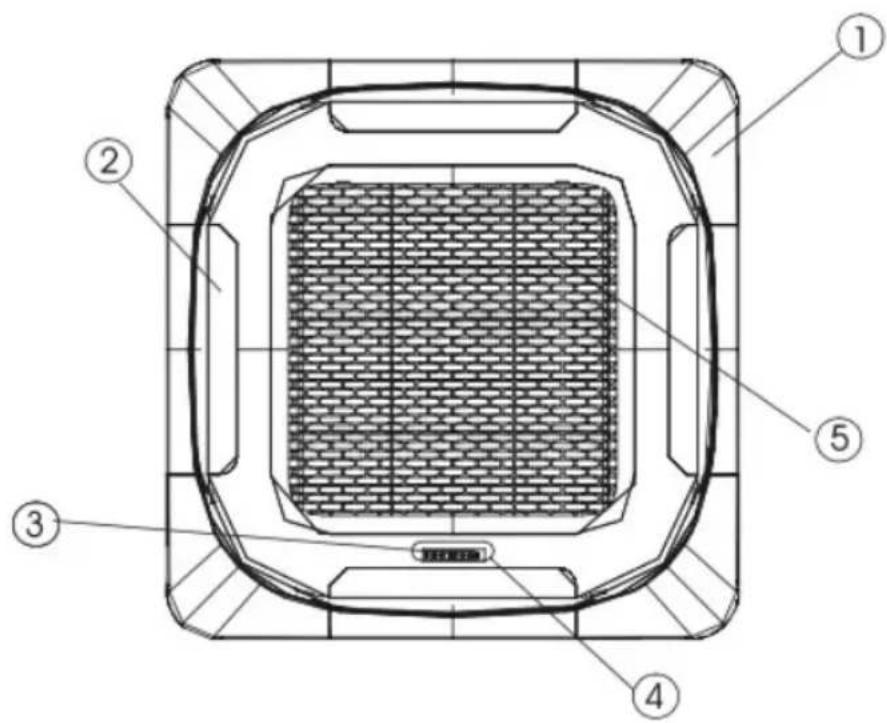
Fig./Img./Abb./Afb./Rys.2
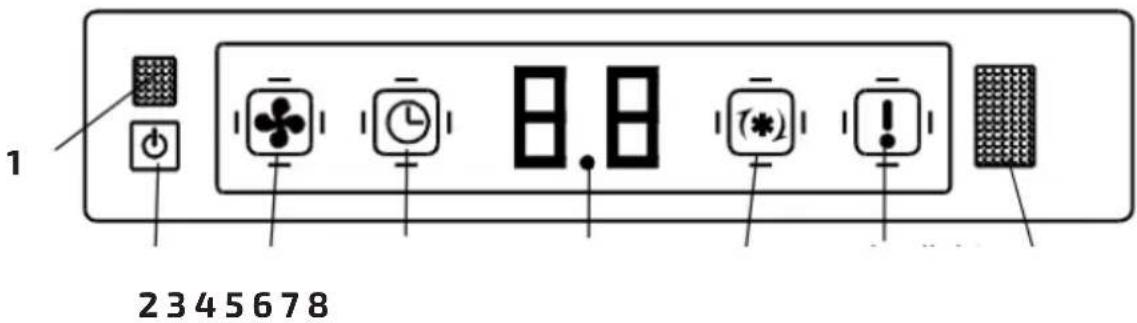
Fig./Img./Abb./Afb./Rys.3
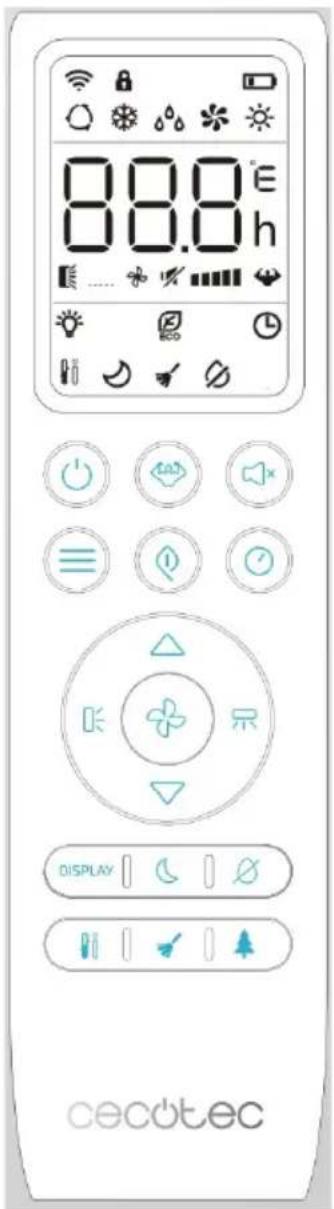
Fig./Img./Abb./Afb./Rys. 4
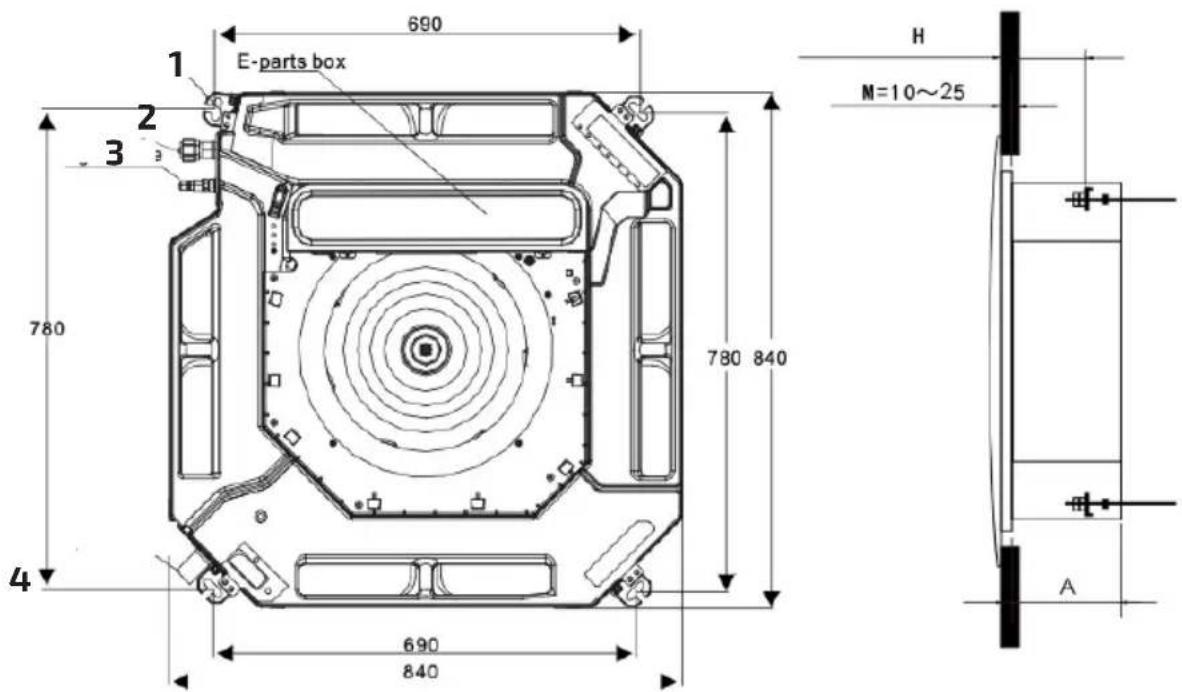
Fig./Img./Abb./Afb./Rys. 5
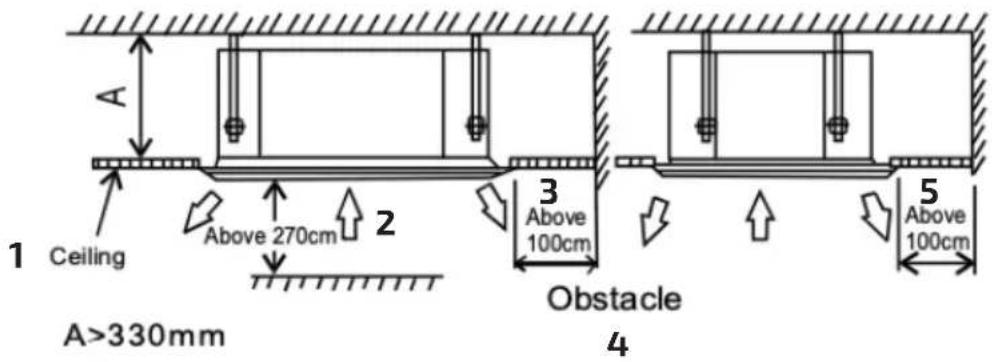
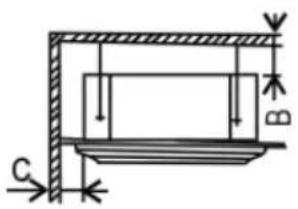
Fig./Img./Abb./Afb./Rys. 6
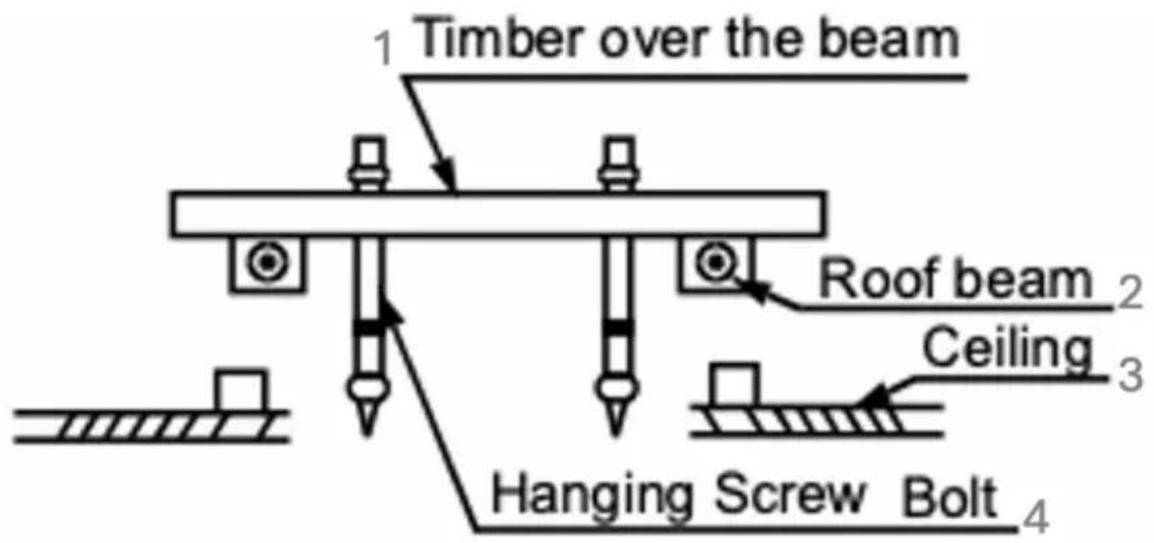
Fig./Img./Abb./Afb./Rys.7

1
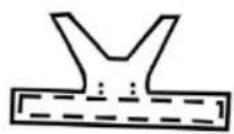
2
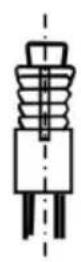
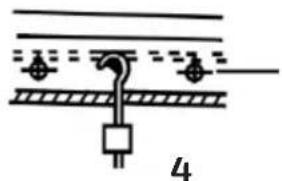
natural_image
Pure electrical circuit lines without any symbols5
3
Fig./Img./Abb./Afb./Rys. 8 Fig./Img./Abb./Afb./Rys. 9
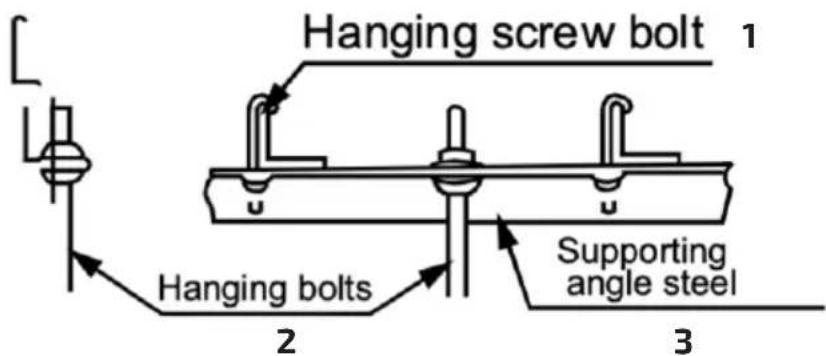
Fig./Img./Abb./Afb./Rys. 10
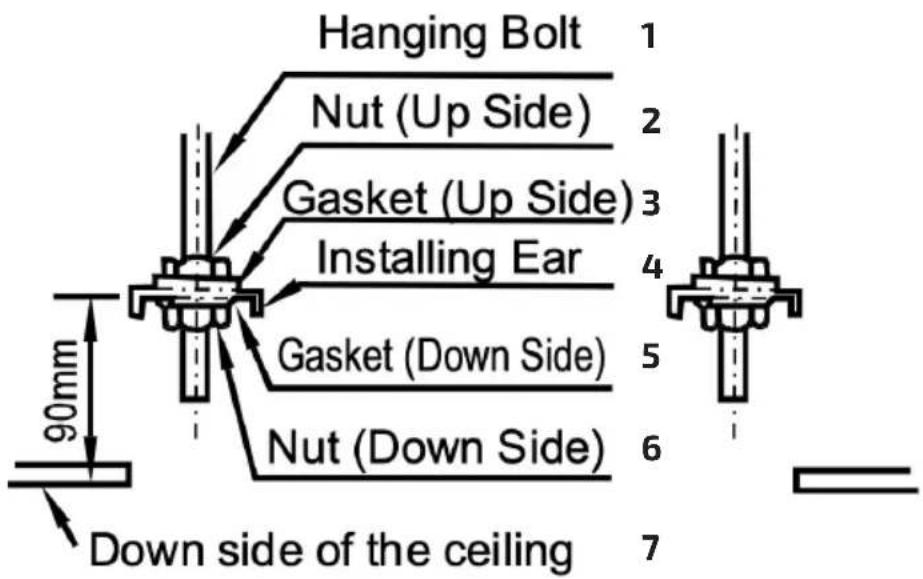
Fig./Img./Abb./Afb./Rys. 11
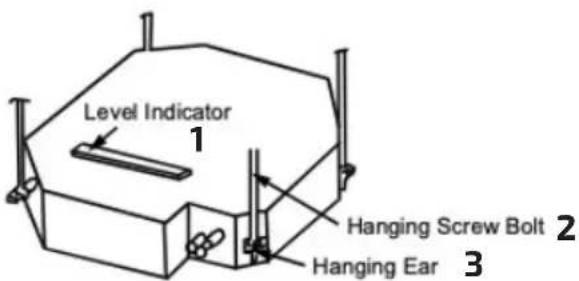
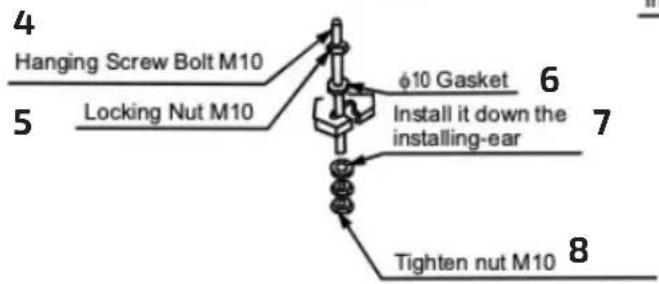
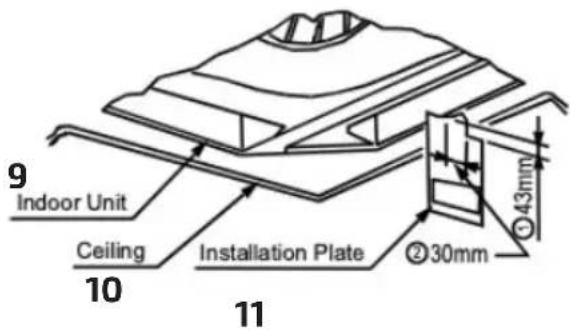
Fig./Img./Abb./Afb./Rys. 12
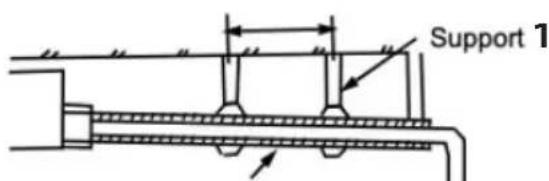
2 Lean Downward over 1/100

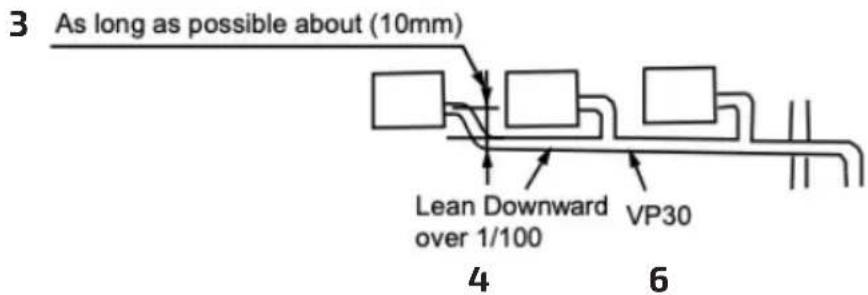
Fig./Img./Abb./Afb./Rys. 13
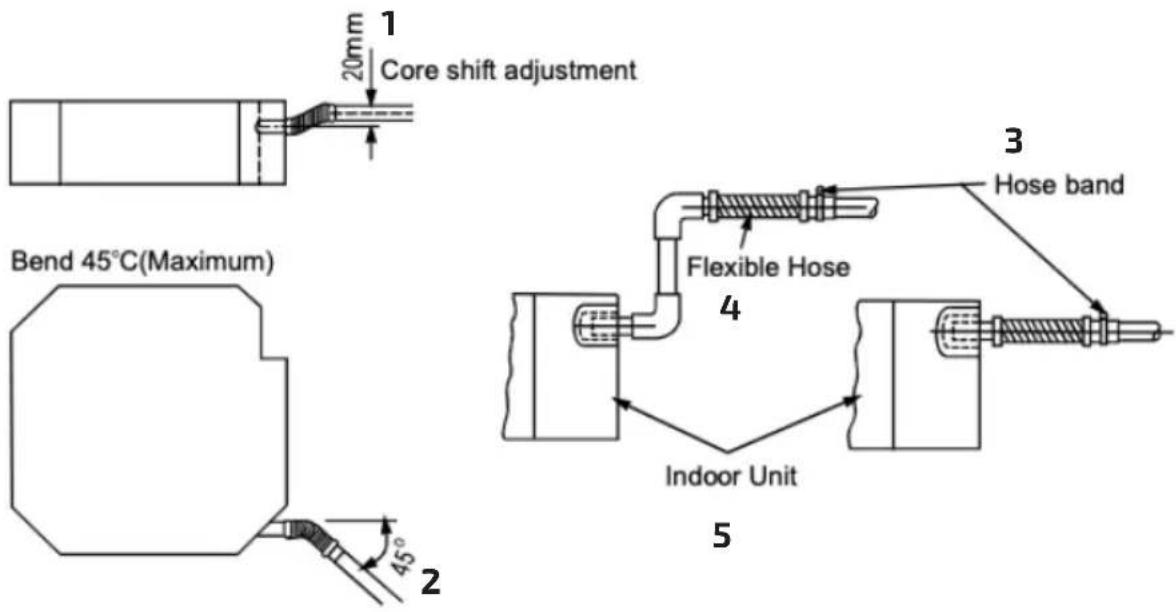
Fig./Img./Abb./Afb./Rys. 14
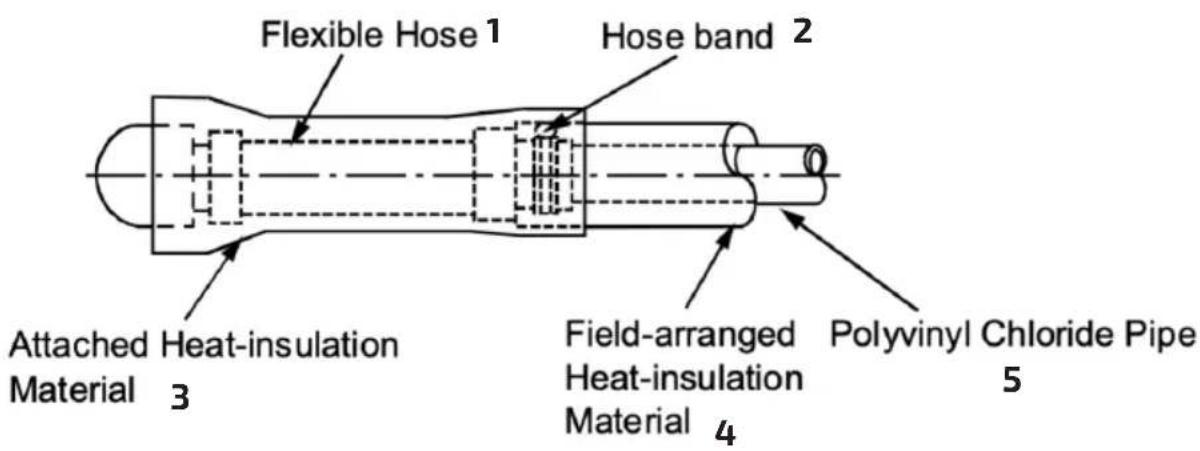
Fig./Img./Abb./Afb./Rys. 15
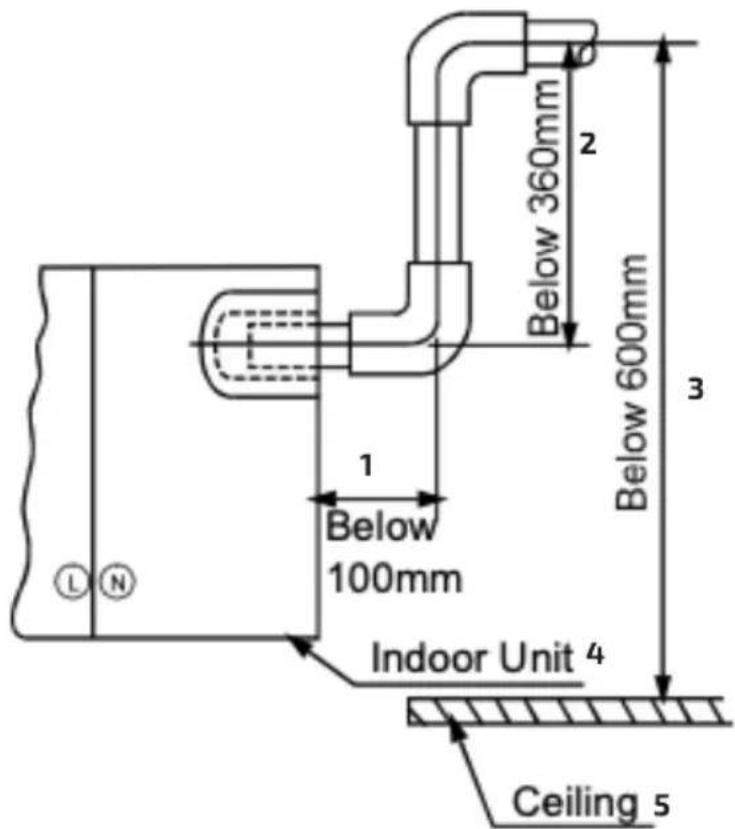
Fig./Img./Abb./Afb./Rys. 16
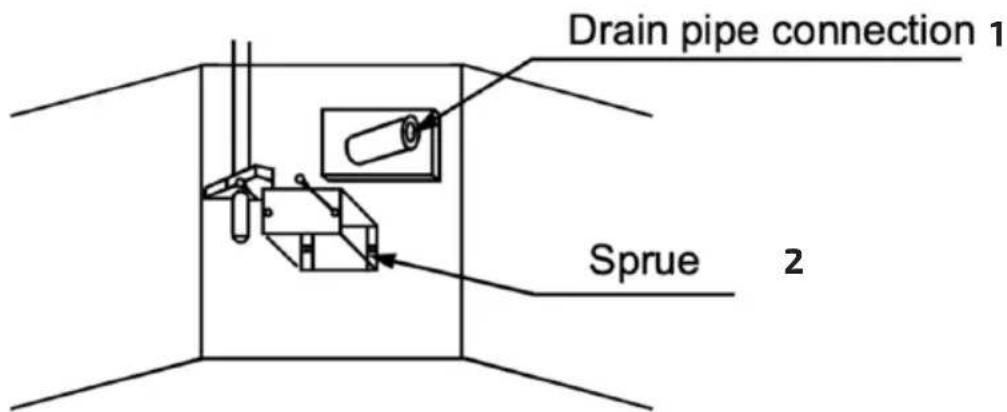
Fig./Img./Abb./Afb./Rys.17
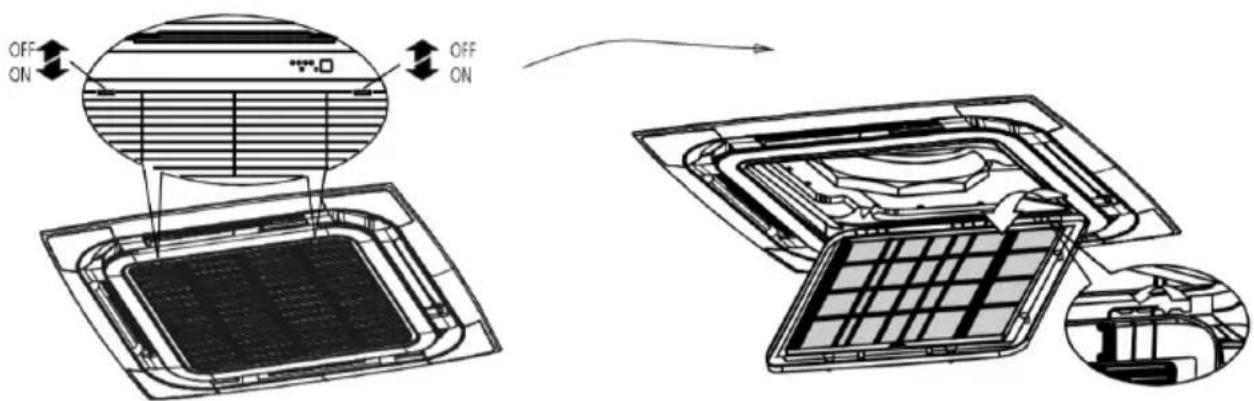
Fig./Img./Abb./Afb./Rys. 18
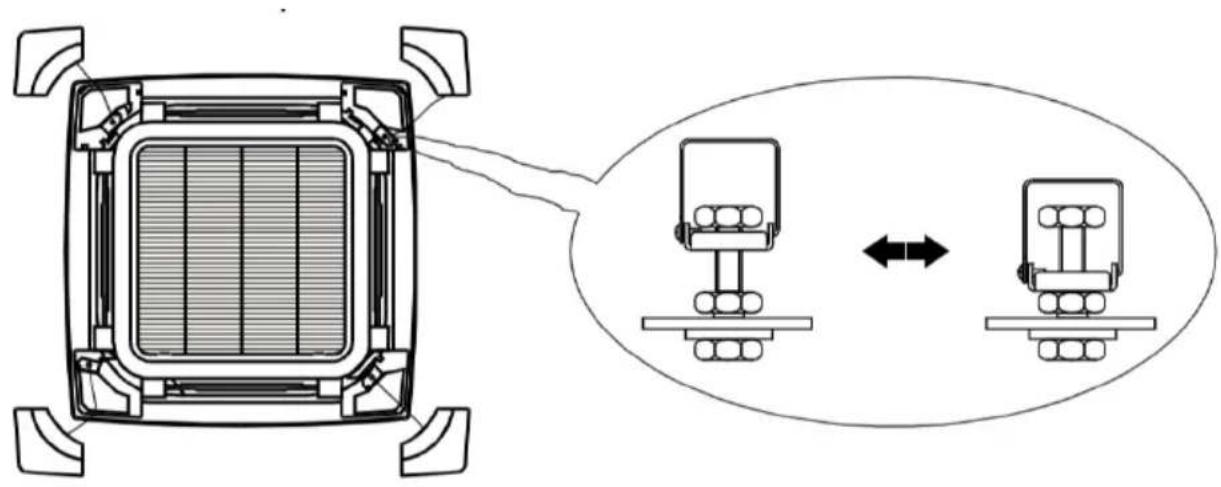
natural_image
Diagram of a smart grid device with two connected modules and directional arrows indicating interaction (no text or symbols)Fig./Img./Abb./Afb./Rys. 19
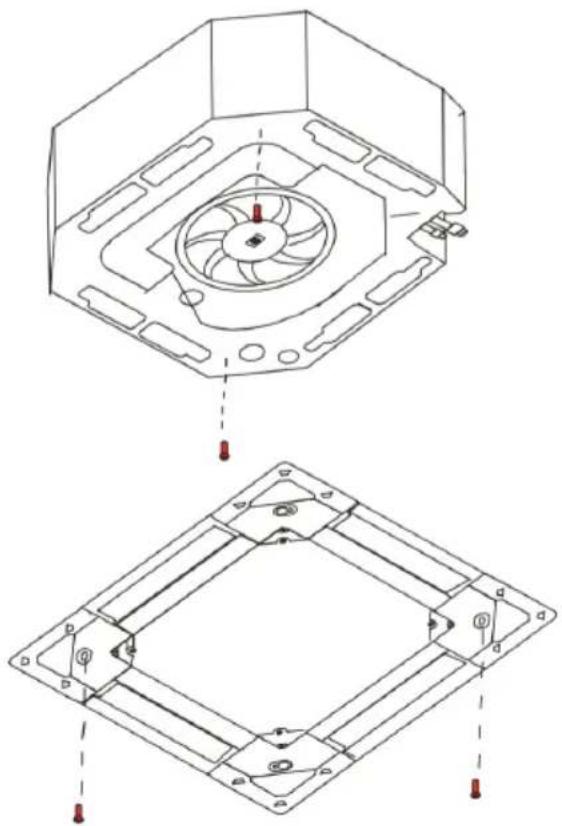
natural_image
Technical line drawing of a mechanical assembly with two views: top shows a circular fan component, bottom shows a square frame with mounting holes and red fasteners (no text or symbols)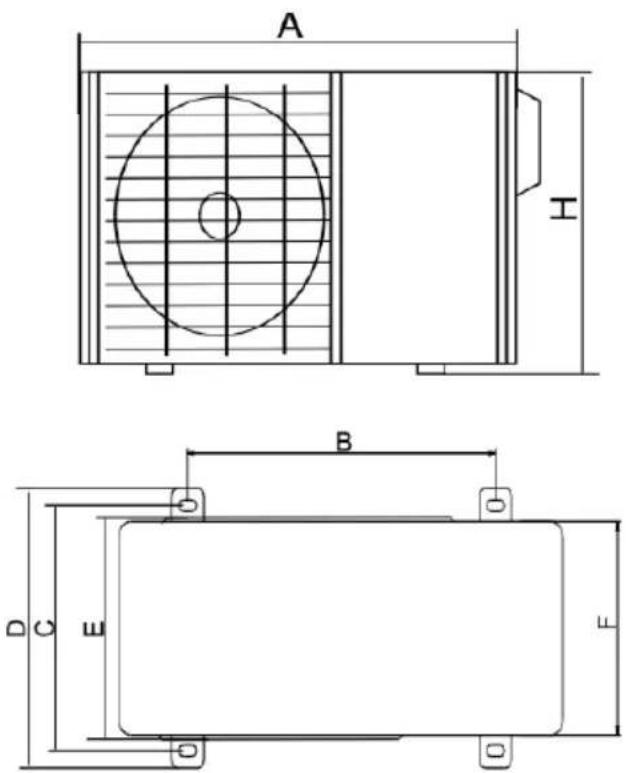
Fig./Img./Abb./Afb./Rys. 20 Fig./Img./Abb./Afb./Rys. 21
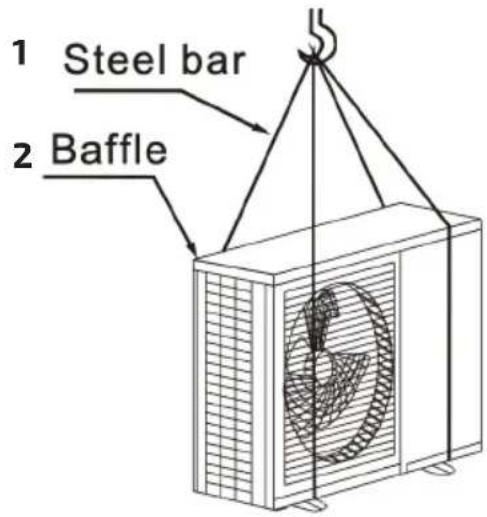
Fig./Img./Abb./Afb./Rys. 22
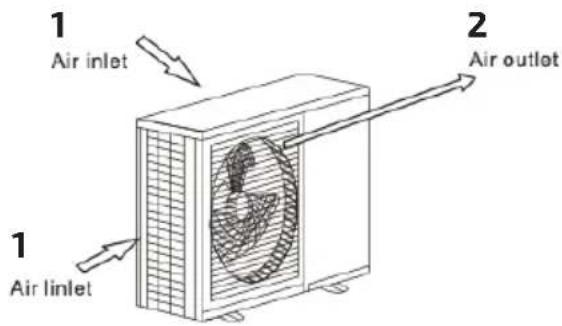
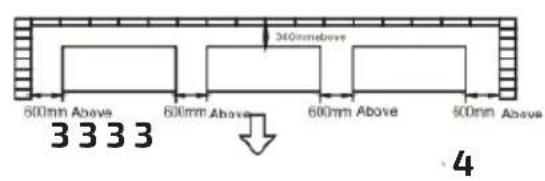
Fig./Img./Abb./Afb./Rys. 23
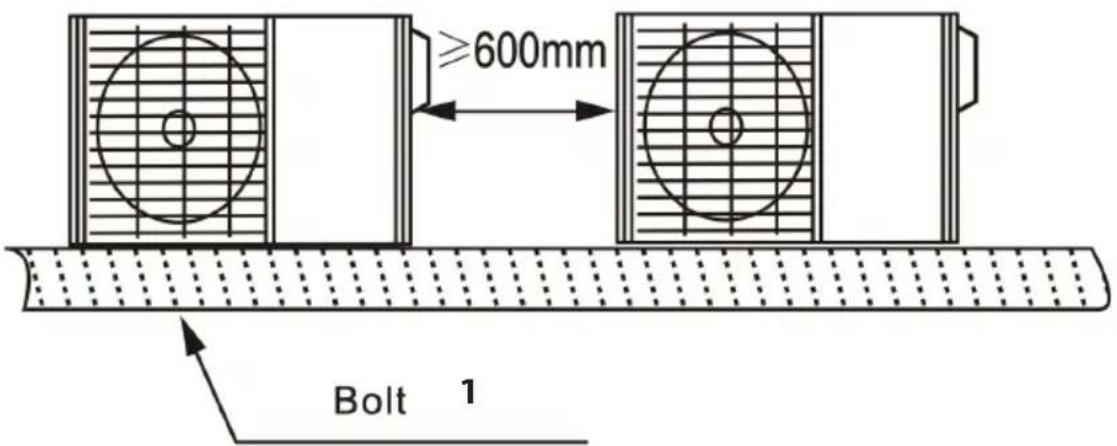
4 pieces for one unit
Fig./Img./Abb./Afb./Rys. 24
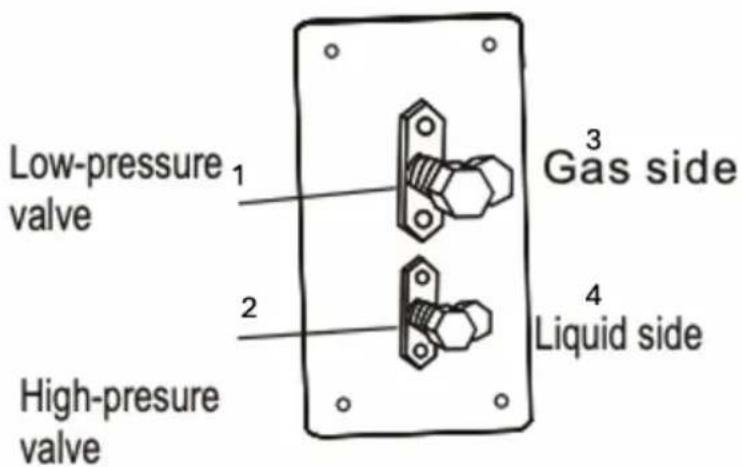
Fig./Img./Abb./Afb./Rys. 25
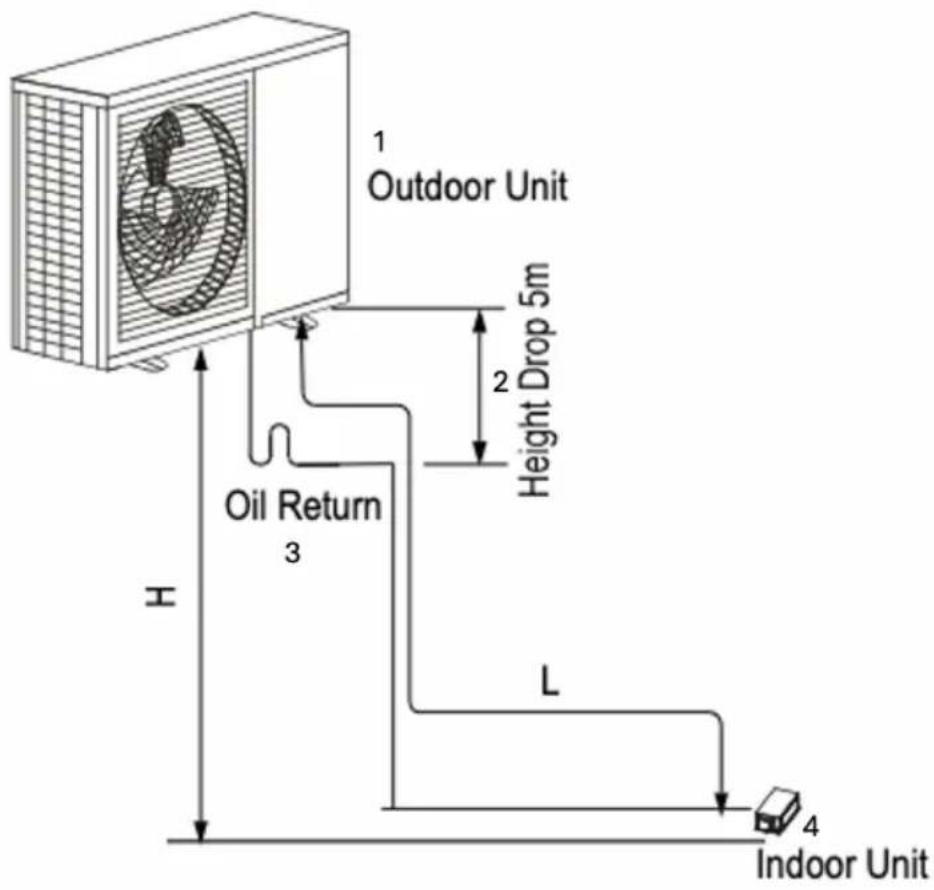
Fig./Img./Abb./Afb./Rys. 26
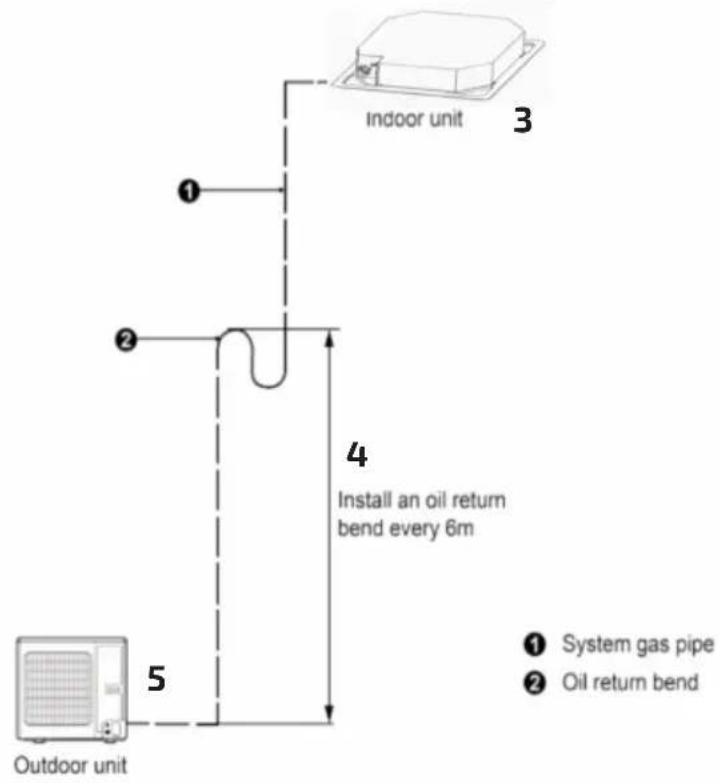
Fig./Img./Abb./Afb./Rys. 27
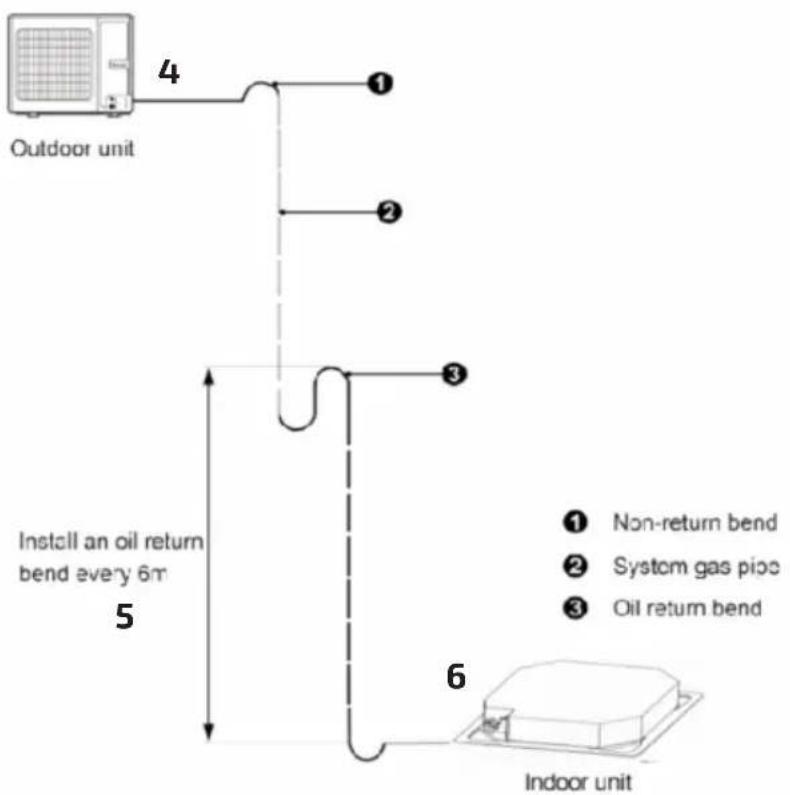
Fig./Img./Abb./Afb./Rys. 28
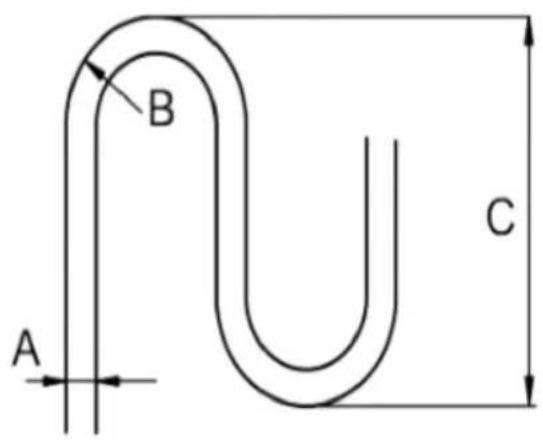
Fig./Img./Abb./Afb./Rys. 29
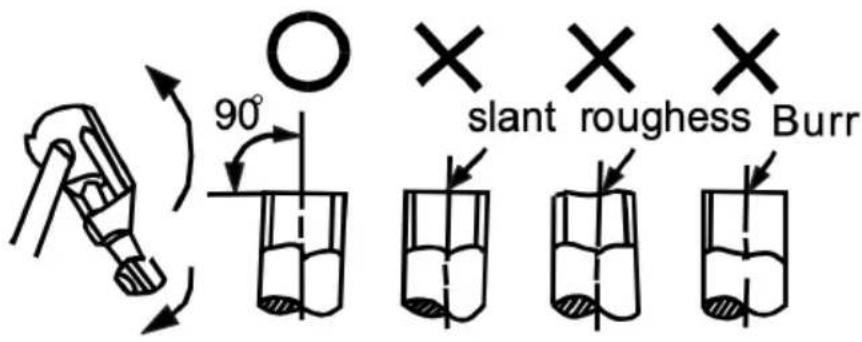
Fig./Img./Abb./Afb./Rys. 30
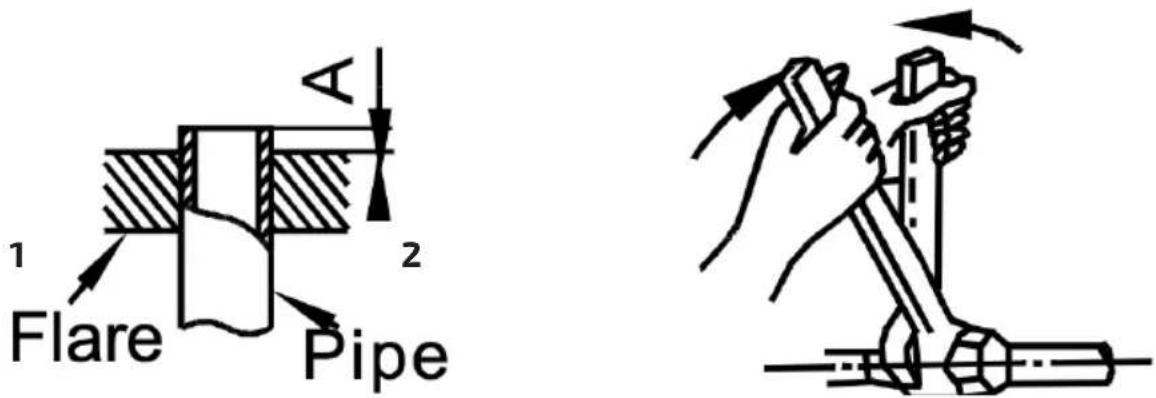
Fig./Img./Abb./Afb./ Rys. 31 Fig./Img./Abb./Afb./ Rys. 32
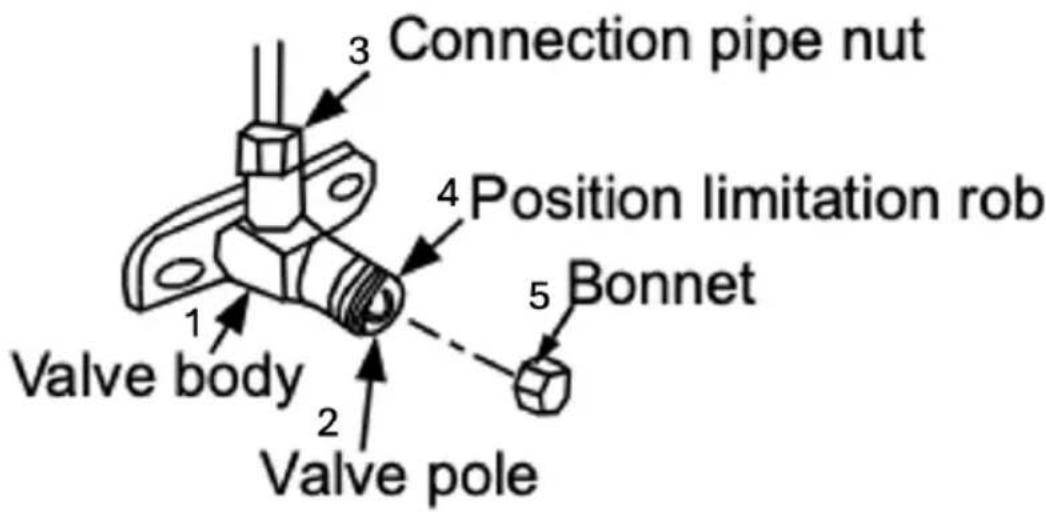
Fig./Img./Abb./Afb./Rys. 33
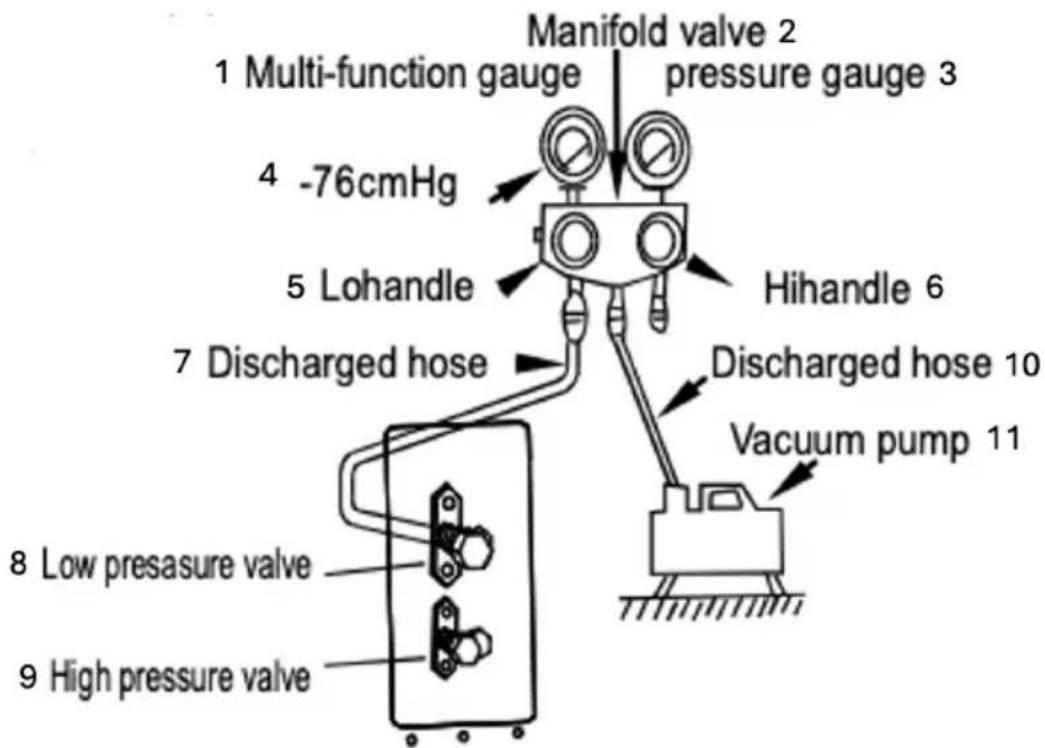
Fig./Img./Abb./Afb./Rys. 34
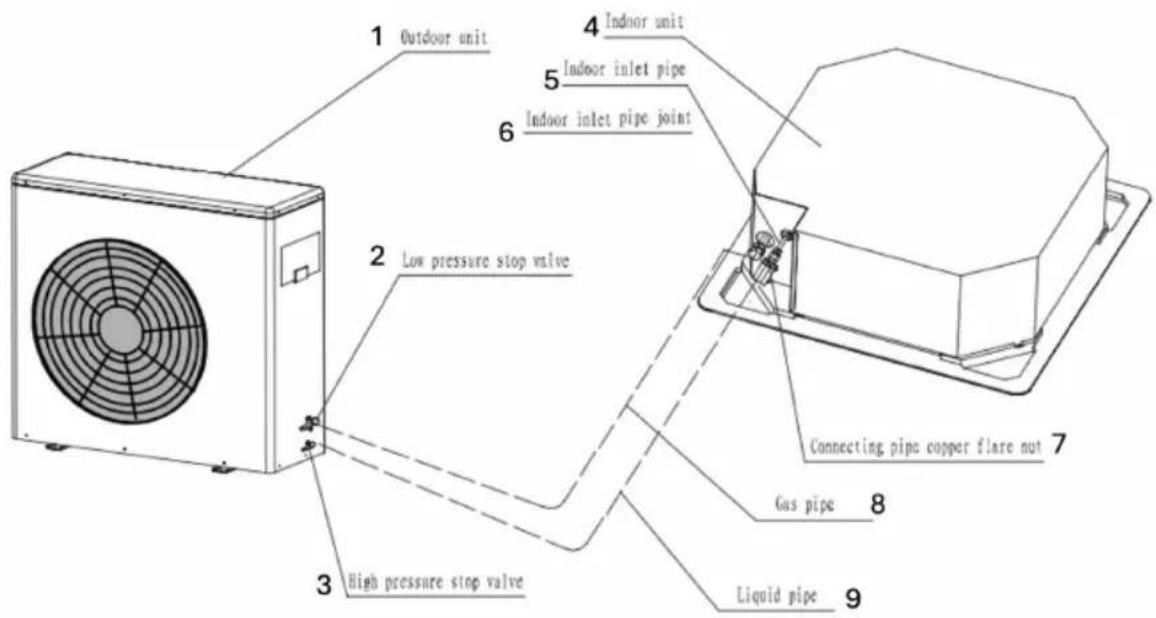
Fig./Img./Abb./Afb./Rys. 35
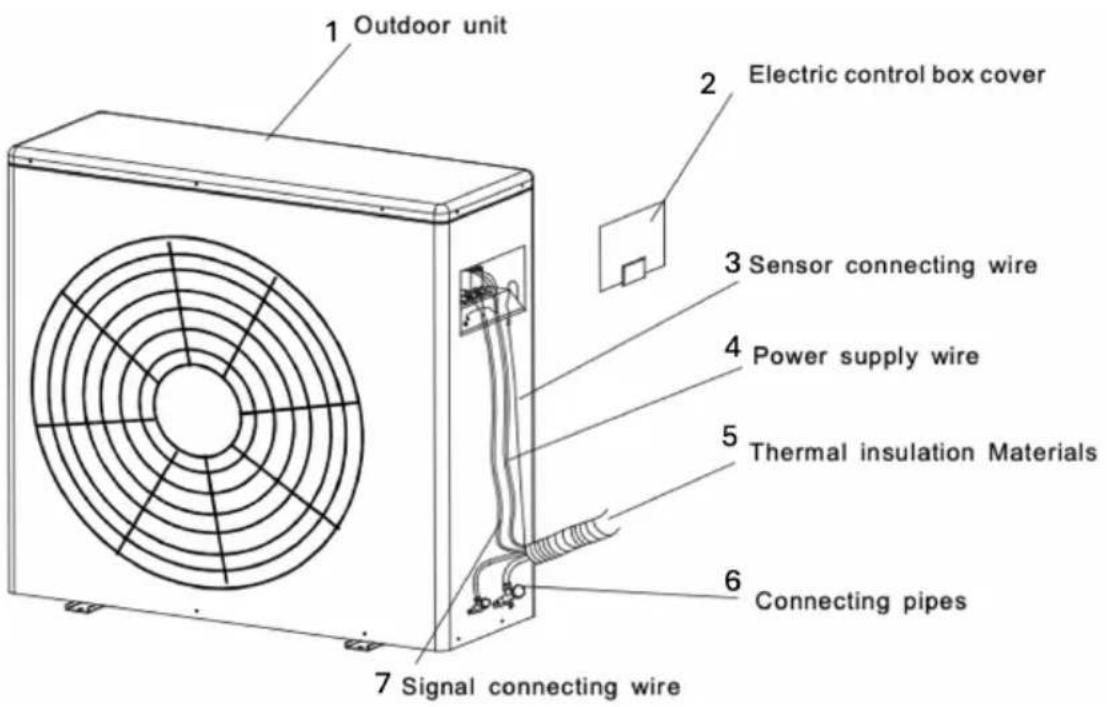
Fig./Img./Abb./Afb./Rys. 36
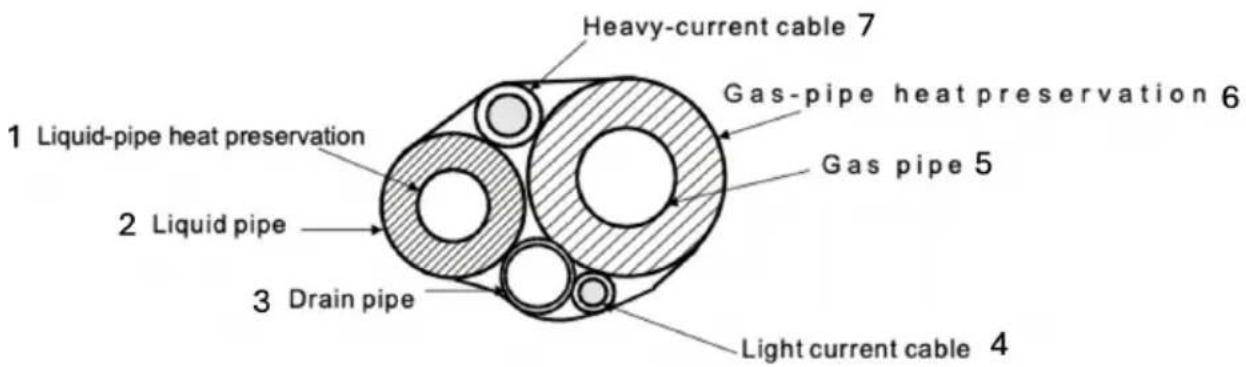
Fig./Img./Abb./Afb./Rys. 37
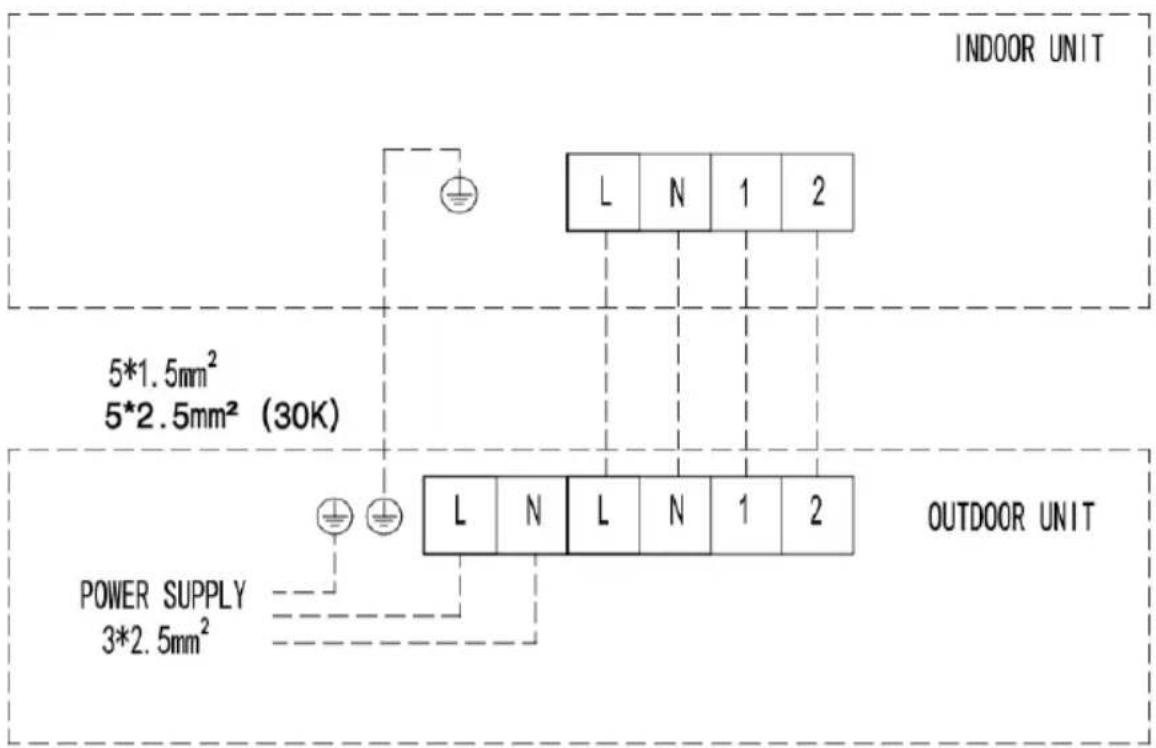
Fig./Img./Abb./Afb./Rys. 38
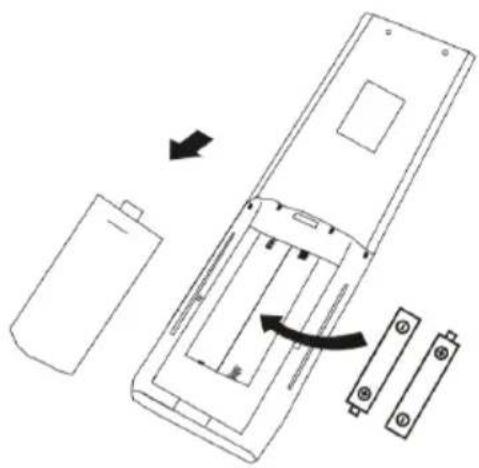
natural_image
Diagram of a remote control panel with battery, switch, and battery pack (no text or symbols)Fig./Img./Abb./Afb./Rys. 39
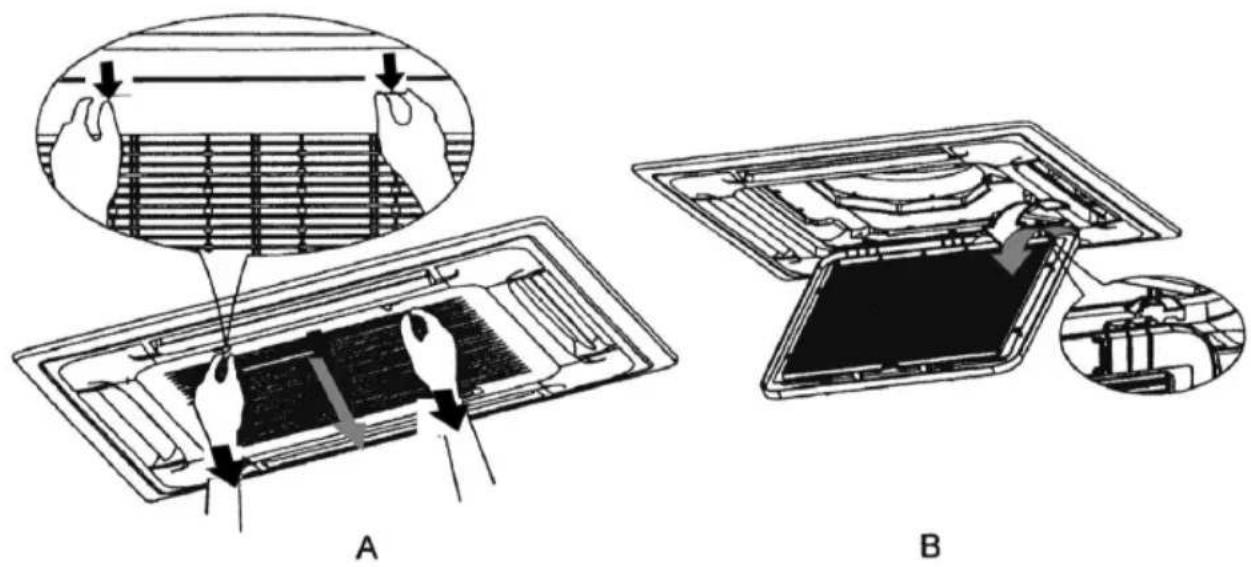
Fig./Img./Abb./Afb./Rys. 40
PARTE A)
| Name and surname/Company name | NIF/DNI (IDENTIFICATION NUMBER) | ||||
| Address | |||||
| Postal code | City Province | ||||
EQUIPMENT DETAILS
| Brand | |
| Model | |
| Serial number | |
| Amount and type of gas |
DECLARATION
I declare that I have informed the purchaser of a non-hermetically sealed equipment charged with fluorinated gases of the obligation that the installation of this equipment is carried out by a qualified company with certified personnel for its installation in accordance with Royal Decree 115/2017 of 17 February and Regulation (EU) 517/2014 on fluorinated greenhouse gases as well as their obligation to send me within a period of one year a declaration of compliance with this legal requirement.
The buyer has also been informed of the liabilities that will arise in the event of non-compliance with this legal obligation.
PART B)
DECLARATION BY THE PURCHASER OF UNSEALED EQUIPMENT CHARGED WITH FLUORINATED GREENHOUSE GASES REQUIRED TO BE INSTALLED BY CERTIFIED COMPANIES WITH CERTIFIED PERSONNEL FOR INSTALLATION
DECLARATION
I declare that the installation of this equipment and, where applicable, the dismantling of the existing equipment, has been carried out by a qualified company with personnel certified for its installation in accordance with Royal Decree 115/2017 of 17 February and Regulation (EU) 517/2014 on fluorinated greenhouse gases.
I also declare that I am aware of the responsibilities that arise in the event of non-compliance with this legal obligation.
Place of signature:.... Date of signature:....
Signature of the owner of the equipment to be installed
Signature of the certified installer
Company stamp
| Name and surname/Company name | NIF/DNI (IDENTIFICATION NUMBER) | ||||
| Address | |||||
| Postal code | City Province | ||||
EQUIPMENT DETAILS
| Brand | |
| Model | |
| Serial number | |
| Amount and type of gas |
AUTHORISED INSTALLATION COMPANY
| Name Tax number | ||
| Address | ||
| Company Registration No. | ||
| Issued by (indicate Autonomous Community) | ||
CERTIFIED TECHNICIAN AND TYPE OF G.F.C. HANDLER CERTIFICATE
| Name | |
| Registration number | |
| Issued by (specify Autonomous Community) | |
| Type of certification (greater or less than 3 kg load) |
OBSERVATIONS:
www.cecotec.es
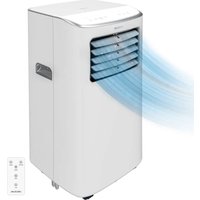
- SOMMAIRE
- Instructions on batteries
- INSTRUCTIONS DE SÉCURITÉ
- LIMPIEZA Y MANTENIMIENTO
- PARTS AND COMPONENTS
- Fig. 1
- Panel. Fig. 2
- Control panel. Fig. 3
- ENGLISH
- BEFORE USE
- Note:
- INSTALLATION
- Information prior to installation Installation instructions
- User guide
- Precautions
- Operating conditions
- Noise pollution
- Installation of the indoor unit
- Choosing the location for installation
- Fig. 5 key:
- Installation location
- Warning
- Installation dimensions
- Height between ceiling and floor
- Installation of the indoor unit
- Installation of the suspension bolts
- Fig. 7 key:
- Fig. 9 key:
- Fig. 10 key:
- Hanging the indoor unit
- Fig. 11 key:
- Fig. 12 key:
- Installation of the indoor unit panel
- WARNING:
- Drain hose installation
- Warnings:
- Fig. 13 key:
- Drain hose material, thermal insulation material
- Flexible hose. Fig. 14
- Fig. 14 key:
- Connection
- Thermal insulation
- Fig. 15 key:
- Upward drainage
- Fig. 16 key:
- Drainage test. Fig. 17
- Fig. 17 key:
- Motor sound test
- Panel installation
- Fig. 18 key:
- Installation of the outdoor unit
- Relocating the outdoor unit. Fig. 22
- Fig. 22 key:
- Installation space
- Fig. 23 key:
- Fig. 24 key:
- Refrigerant pipe. Fig. 25
- Fig. 25 key:
- Refrigerant pipe installation
- Fig. 26 key:
- Remove any object or water
- Additional refrigerant charge
- Non-return bend and oil-return bend
- Fig. 27 key:
- Fig. 28 key:
- Flare
- Junction device
- Fig. 33 key:
- Stop valve operation
- Fig. 34
- Fig. 34 key:
- Fig. 35 key:
- Air purge
- Electric wiring
- WARNINGS
- Panel wiring
- Terminal board diagram
- Steps for the connection of external wiring. Fig. 36
- Fig. 36 key:
- Joining process
- Fig. 37 key:
- External wiring diagrams. Fig. 38
- Test run
- Before testing
- Note
- Checks before using the air conditioner
- Refrigerant warning
- OPERATION
- Characteristics of the protection device
- Heating mode features
- Preheating
- Defrost
- Remote control
- Cooling mode (COOL)
- Fan mode (FAN ONLY)
- Dehumidification mode (DRY)
- Automatic mode (AUTO)
- Heating mode (HEAT)
- Oscillation function (SWING)
- Fan speed (FAN button)
- Child Lock
- Timer on function ⏻
- Timer off function ⏻
- TURBO function
- MUTE function
- SLEEP function
- I FEEL function
- ECO function
- DISPLAY on/off functionDISPLAY
- SELF-CLEAN function
- ANTI-MILDEW function ∅
- Replacing the remote control batteries
- Memory function
- WI-FI CONNECTIVITY AND MOBILE APP
- CLEANING AND MAINTENANCE
- Cleaning the indoor unit and the remote control
- Cleaning the filter. Fig. 40
- Inspection
- Service information
- Area verification
- Work procedure
- General workspace
- Refrigerant verification
- Presence of fire extinguishers
- Absence of ignition sources
- Ventilation
- Verification of refrigeration equipment
- Verification of electrical devices
- Repair of sealed components
- Repair of intrinsically safe components
- Wiring
- Detection of flammable refrigerants
- Leak-detection methods
- Removal and evacuation
- Loading procedure
- Commissioning
- Labelling
- Recovery
- TROUBLESHOOTING
- TECHNICAL SPECIFICATIONS
- DISPOSAL OF OLD ELECTRICAL AND ELECTRONIC APPLIANCES
- TECHNICAL SUPPORT AND WARRANTY
- COPYRIGHT
- DECLARATION OF CONFORMITY
- PIÈCES ET COMPOSANTS
- Img. 1
- NETTOYAGE ET ENTRETIEN
- TEILE UND KOMPONENTEN
- Abb. 1
- CONNETTIVITÀ WI-FI E APP
- Função Autolimpeza (SELF-CLEAN)
- Função Anti-bolor (ANTI-MILDEW)
- Mudar as pilhas do controlo remoto
- ONDERDELEN EN COMPONENTEN
- SCHOONMAAK EN ONDERHOUD
- PROBLEEMOPLOSSING
- CZYSZCZENIE I KONSERWACJA
- ČIŠTĚNÍ A ÚDRŽBA
- TÜRKÇE
- TEMİZLİK VE BAKIM
- PARTE A)
- DECLARATION
- PART B)
- OBSERVATIONS:
Brand : CECOTEC
Model : AirClima 18000 Cassette Indoor Connected
Category : Air Conditioning