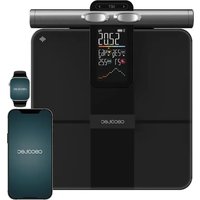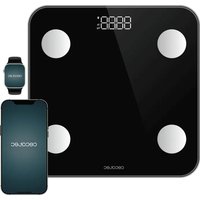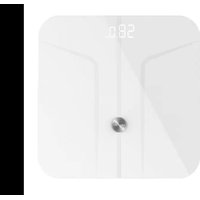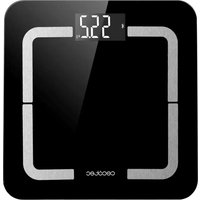
Surface Precision Smart Healthy - Scale CECOTEC - Free user manual and instructions
Find the device manual for free Surface Precision Smart Healthy CECOTEC in PDF.


| Product Type | Connected impedance meter scale |
| Brand | Cecotec |
| Model | Surface Precision Smart Healthy |
| Reference | 04742 |
| Dimensions | 310 x 310 x 20 mm |
| Power supply | 4 AAA batteries 1.5 V |
| Maximum weight | 180 kg |
| Measurement units | kg, lb, st |
| Main functions | Weight, body fat, BMI, muscle mass, bone mass, body age, body water, visceral fat, basal metabolism, fitness assessment, baby weighing |
| Connectivity | Bluetooth, Surface Precision mobile app |
| Display | Digital display |
| Maintenance | Clean with a soft damp cloth, do not immerse |
| Safety | Do not use if pacemaker, pregnant, under 10 or over 70 years old |
| Country of manufacture | China (designed in Spain) |
| Warranty and after-sales service | Contact Cecotec after-sales service at +34 9 63 21 07 28 |
Frequently Asked Questions - Surface Precision Smart Healthy CECOTEC
User questions about Surface Precision Smart Healthy CECOTEC
0 question about this device. Answer the ones you know or ask your own.
Ask a new question about this device
Download the instructions for your Scale in PDF format for free! Find your manual Surface Precision Smart Healthy - CECOTEC and take your electronic device back in hand. On this page are published all the documents necessary for the use of your device. Surface Precision Smart Healthy by CECOTEC.
USER MANUAL Surface Precision Smart Healthy CECOTEC
Safety instructions 7
-
Parts and components 38
-
Before use 30
-
Operation 39
-
Mobile App 39
-
Troubleshooting 40
-
Cleaning and maintenance
-
Technical specifications 42
-
Disposal of old electrical and electronic
appliances 42
-
Technical support and warranty 42
-
Copyright 43
SOMMAIRE
Before using the appliance, read the following instructions carefully. Keep this instruction manual for future reference or new users.
- All safety instructions must be closely followed when using the appliance.
- This appliance is designed for domestic use only and is not intended for bars, restaurants, farmhouses, hotels, motels, and offices.
- Keep the appliance and its packaging out of the reach of children and animals when unsupervised.
- Do not use the appliance if it shows visible signs of damage. If the cable is damaged, it must be replaced by the official Technical Support Service of Cecotec in order to avoid any type of danger.
- Keep the appliance away from electromagnetic fields such as mobile telephones, remote controls, etc. Measurement accuracy could be affected.
- Keep the appliance away from heat sources.
- Do not use the appliance outdoors. Do not expose the appliance to extreme temperatures, moisture, wet conditions or direct sunlight.
- Keep water and other liquids away from the appliance.
- Wide temperature variations could cause condensation. In this case, allow the appliance to go back to room temperature before use.
- Do not drop the appliance or jump on its measuring surface.
- Do not stand on the scale with wet feet and make sure the measuring surface and the surface underneath is dry.
- Do not stand on the edge of the scale.
- Do not use caustic or abrasive cleaning materials to clean
the appliance, this could damage the surface.
- This scale is intended to be used for determining bodyweight, analysing water, body fat, muscle and bone mass proportion in the body, body age, visceral fat, metabolism, physical conditions and calculating Body Mass Index (BMI).
- BMI function is only suitable for calculating the ideal weight of adults aged 18 and above.
- The calculated results are simple reference values. Do not use these results as the basis for any form of medical treatment or diet and contact a professional for any doubt.
- Body analysis function is not suitable for:
o People under the age of 10 or over the age of 70.
o People with a pacemaker or any other medical implant with electronic components.
o People with fever, oedema or osteoporosis symptoms.
o People undergoing dialysis treatment.
o People who are taking cardio-vascular medication.
o Pregnant women. - The appliance can support a maximum body weight of 180 kg.
Battery instructions
- Keep batteries away from children and animals, they could be harmful if swallowed. In case of ingestion, seek medical assistance immediately.
- Battery ingestion can cause burns, soft-tissue perforation, and death. It can cause severe burns within two hours of the ingestion.
- In case of battery ingestion, please seek medical attention immediately.
- Leaks from the batteries can occur under extreme
conditions. Do not touch any liquid that leaks from the batteries. If the liquid gets into contact with skin, wash immediately with soap and water. If the liquid gets into the eyes, wash them immediately with clean water for a minimum of 10 minutes and seek medical attention. Wear gloves to handle the battery and dispose of it immediately in accordance with local regulations.
- Non-rechargeable batteries should not be recharged.
- Discharged batteries must be removed from the appliance and disposed of safely.
- The supply terminals must not be short-circuited.
- Use only the battery type specified in the technical specifications.
- Always replace all the batteries at the same time. Do not use different types of batteries or of different capacities.
- The battery must be inserted paying attention to polarity. When replacing batteries, note the correct polarity (+/-).
- Take the batteries out of the appliance when discharged or when the appliance is not going to be used for a long time.
- This appliance requires 4 x 1.5-volt batteries, AAA type.
INSTRUCTIONS DE SÉCURITÉ
- Display
- Left-foot contact area
- Right-foot contact area
- High-precision sensor
- Battery cover
- Body measuring tape
NOTE:
The graphics in this manual are schematic representations and may not exactly match the appliance.
2. BEFORE USE
- This appliance is packaged in a way as to protect it during transport. Take the appliance out of its box and remove all packaging materials. You can keep the original box and other packaging elements in a safe place. This will help you prevent damage to the appliance when transporting it in the future. In case the original packaging is disposed of, make sure all packaging materials are recycled accordingly.
- Make sure all parts and components are included and in good conditions. If any of them are missing or not in good condition, please contact the official Cecotec Technical Support Service Immediately.
Box content
- Surface Precision Smart Healthy scale
- Measuring tape
- AAA batteries (x4)
Remove the protective strip from the battery compartment, located on the bottom part of the appliance in order to activate the latter. This protective strip is placed for a more secure transportation.
Further Information
- Weight yourself without any clothing and barefoot.
- It is suggested to weigh yourself at the same time and always under the same circumstances.
-
Measured values might be distorted if weight is measured immediately after doing sport or if you have not eaten or drunk enough over the day.
-
Measurement of body fat, water content and muscle and bone mass is only possible with bare and dry feet.
- The scale reacts to a minimum weight of 5 kg and rounds up weight to whole 100 g.
- Measuring surface must be clean in order to work properly.
3. OPERATION
Normal mode
- Place the appliance on a solid, dry, and flat surface (avoid carpets). Uneven floors will result in inaccurate measurement results.
- Tap your foot on the scale in order to activate the display.
- Wait until display shows '0.0' (kg/lb/st).
- Stand on the scale: the device will start weighing.
- Once the weight has been set, the digits will flash on the display and then remain steady. You can now get off the scale.
- The device will automatically turn off after a few seconds.
BabyWeight function
- This function is designed to automatically obtain precise small weight results.
- This function allows seeing, activating, and checking weight progress from the App.
- This option is also suitable for weighing pets and luggage.
4. MOBILE APP
- Scan the QR code in order to download and install the last version of the app Surface Precision, or search for it in Google Play, App Store pr any other App store of third parties. Fig. 2
- Open the App, register, and follow the instructions for pairing. Fig. 3
- Access the App before stepping on the scale to record the weight and activate the measurement of the other parameters.
- Step on the scale with bare feet to start the measurement.
NOTE
Weight measurements taken with the App closed will not be recorded afterwards.
Digits on the display will flash while the scale calculates the weight and performs the analysis.
Once the weight value stays fixed on the display, your smartphone will receive the data from the scale.
ENGLISHENGLISH
Tap on the graph icon at the bottom centre of the screen to check the comparative tables by week, month, or year. You can view each table in full screen by tapping on the drop-down icon at the top right of each table. Fig. 4
To weigh babies, access the App corresponding baby-weighing mode by tapping on the three dots in the top right corner. Then follow the step-by-step instructions. Fig. 5
- The adult person without the baby should be weighed first.
- The adult should then be weighed with the baby in his or her arms.
-
The app will calculate the baby's weight and record it.
-
TROUBLESHOOTING
The following warning notifications may appear on the display:
| Display Meaning | |
| Lo The batteries in the scale are too low. Insert new batteries (see the 'Replacing the batteries' section). | |
| Err The weight on the scale is over 180 kg, the scale does not withstand the weight. | |
| C An error has occurred during measurement. Step off the scale and step on it again to repeat the weighing process.The weight placed is less than the minimum weight (5 kg). | |
| Problem Possible solution | |
| The appliance does not switch on after getting on. | Replace the batteries with new ones. |
| Bluetooth connection failure. | Make sure the smartphone Bluetooth is turned on: if you're using Android OS, make sure that the GPS and location are turned on as well.Make sure that both your smartphone and the network have a good connection.Step on the scale to turn it on: the homepage will display "Connected", indicating successful pairing.If "Offline" appears on the app homepage, tap on the settings icon and choose the device you want to connect to find the scale ID.Make sure your smartphone OS is iOS 8.0 or higher and Android 6.0 or higher. |
| Bluetooth connection failure. | You may have closed a required authorisation. Reinstall the App, accept the authorisations and log in to verify again. |
| The App does not display any body fat information after weighing. | Step on the scales in bare feet.Make sure your feet are not too dry.Stand on the scale for about 10 seconds until the digits on the display stop flashing.Bluetooth is disabled or you have exited the homepage of the app during measurement. |
| Incorrect weight measurement. | Make sure the scale is on a solid, flat surface.Check each of the sensors at the rear to ensure that nothing is stuck or entangled.Make sure the scale display shows "0.0 "kg before stepping on the scale. |
| The App shows an incorrect fat-to-muscle ratio. | The personal information may be wrong. Make sure you enter the correct information: gender, height, age, etc. |
| How is the scale calibrated after weighing? | Step off the scale and step back on to turn it on. Let it automatically return to 0.0 kg for calibration. |
| How do I switch from one unit to another? | Tap on the settings icon, then on "APP Settings" and "Change unit" in the app. |
6. CLEANING AND MAINTENANCE
- Never immerse the appliance in water or other liquids. No liquid must enter the appliance during cleaning.
- Do not use any caustic or abrasive cleaning agents to clean the device, as these can damage the surface.
- Clean the appliance with a slightly dampened, soft cloth and, if necessary, a mild cleaning agent.
- When not in use, store the appliance in a dry, clean place which is protected from direct sunlight and is out of the reach of children.
Warning: If "Lo" appears on the display, batteries need to be replaced.
ENGLISHENGLISH
Replacing the batteries:
- Open battery compartment on the bottom part of the appliance.
- Remove used batteries.
- Introduce 4 x 1.5 - volt batteries, AAA type. Pay attention to polarity.
7. TECHNICAL SPECIFICATIONS
Product: Surface Precision Smart Healthy
Product reference: 04742
Maximum load: 180 kg
Supply: 4 AAA batteries
Dimensions: 310 x 310 x 20 mm
Measuring units: Kilo (kg) / Libs (lb) / Stone (st)
Technical specifications may change without prior notification to improve product quality.
Made in China | Designed In Spain
8. DISPOSAL OF OLD ELECTRICAL AND ELECTRONIC APPLIANCES

This symbol indicates that, according to the applicable regulations, the product and/or batteries must be disposed of separately from household waste. When this product reaches the end of its shelf life, you should dispose of the cells/batteries/accumulators and take them to a collection point designated by the local authorities.
Consumers must contact their local authorities or retailer for information concerning the correct disposal of old appliances and/or their batteries.
Compliance with the above guidelines will help protecting the environment.
9. TECHNICAL SUPPORT AND WARRANTY
Cecotec shall be liable to the end user or consumer for any lack of conformity that exists at the time of delivery of the product under the terms, conditions, and deadlines established by the applicable regulations.
It is recommended that repairs be carried out by qualified personnel.
If at any moment you detect any problem with your product or have any doubt, do not
hesitate to contact the official Cecotec Technical Support Service at +34 963 210 728.
10. COPYRIGHT
The intellectual property rights over the texts in this manual belong to CECOTEC INNOVACIONES, S.L. All rights reserved. The contents of this publication may not, in whole or in part, be reproduced, stored in a retrieval system, transmitted, or distributed by any means (electronic, mechanical, photocopying, recording or similar) without the prior authorization of CECOTEC INNOVACIONES, S.L.
FRANÇAISFRANÇAIS
1. PIÈCES ET COMPOSANTS
Img. 1.
4. MOBIELE APPLICATIE
5. PROBLEEMOPLOSSING
Product: Surface Precision Smart Healthy
Fig./Img./Abb./Afb./Rys.1

APP STORE

GOOGLE PLAY STORE
Fig./Img./Abb./Afo./Rys.2
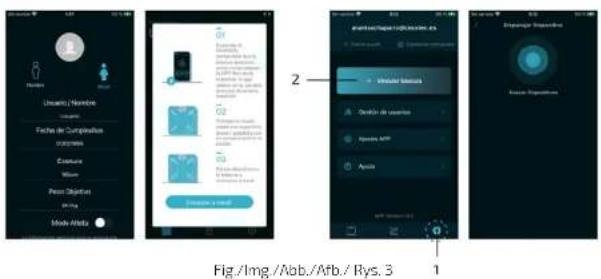

Fig./Img./Abb./Afb./Rys.4
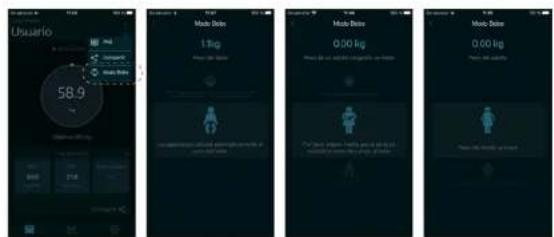
Fig./Img./Abb./Afb./Rys.5
www.cecotec.es
LI01230508