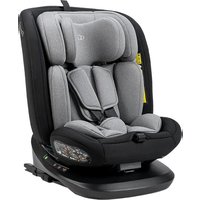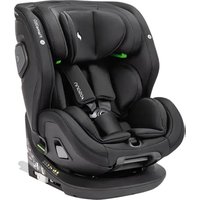
Flame360 - High chair Osann - Free user manual and instructions
Find the device manual for free Flame360 Osann in PDF.


| Product type | i-Size child car seat |
| Brand | Osann |
| Model | Flame360 |
| Size category | 40 – 150 cm |
| Child weight (max) | 18 kg (with 5-point harness) |
| Minimum age forward-facing | 15 months |
| Standard | Regulation No. 129 (i-Size) |
| Installation | Isofix connectors + Top Tether (40-105 cm); Isofix or 3-point seat belt (100-150 cm) |
| Child restraint system | 5-point harness (40-105 cm); Vehicle 3-point seat belt (100-150 cm) |
| Rotation | 360° with rotation lever, forward-facing lock before 15 months |
| Recline | Multiple positions depending on category (R1, R2, 1-4) |
| Headrest | Height adjustable with lever |
| Side protection | Foldable, to be unfolded on the door side |
| Harness storage | Yes, for the 100-150 cm category |
| Included accessories | Head cushion, comfort insert (for 40-75 cm) |
| Care | Machine washable cover at 30°C, delicate cycle |
| Drying | Tumble dryer low temperature possible |
| Not allowed cleaning | Do not iron, bleach, dry clean |
| Age indicator | RotationControl button (less/more than 15 months) |
| Customer service | OSANN : +49 (0)7731 970077 |
Frequently Asked Questions - Flame360 Osann
User questions about Flame360 Osann
0 question about this device. Answer the ones you know or ask your own.
Ask a new question about this device
Download the instructions for your High chair in PDF format for free! Find your manual Flame360 - Osann and take your electronic device back in hand. On this page are published all the documents necessary for the use of your device. Flame360 by Osann.
USER MANUAL Flame360 Osann
mind. 15 Monate alt:
natural_image
Illustration of a child wearing a car seat with hands adjusting the seat (no text or symbols)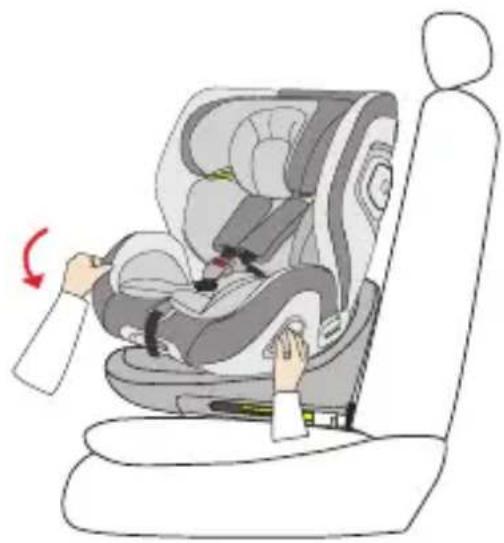
natural_image
Illustration of a baby car seat with a hand adjusting the seatbelt, showing no text or symbols.natural_image
Illustration of a child in a car seat being lifted, showing two different positions (no text or symbols present)natural_image
Illustration of a hand pressing down on a car seat cover (no text or symbols)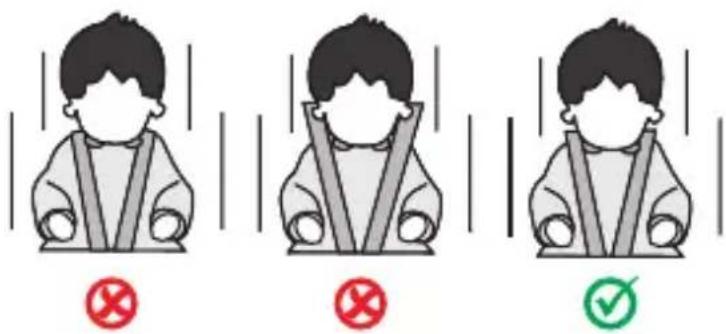
RotationControl
Isofi x-Konnektoren
natural_image
Illustration of a car seat with visible seats, buttons, and a red dot on the chest (no text or symbols)natural_image
Diagram showing a device being locked with a belt, no text or symbols present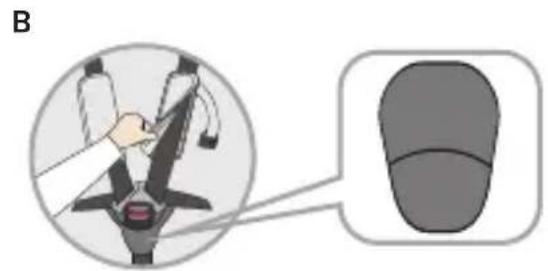
natural_image
Illustration of a hand using a device to interact with a computer mouse, showing the screen and keyboard (no text or symbols present)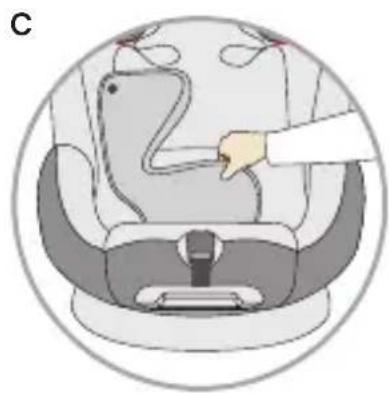
natural_image
Illustration of a car seat with a hand adjusting the seat area (no text or symbols)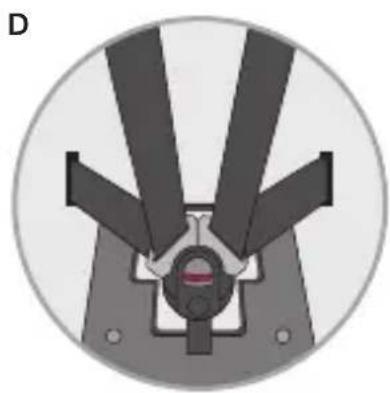
natural_image
Diagram of a mechanical component with symmetrical arms and central hub, no text or symbols present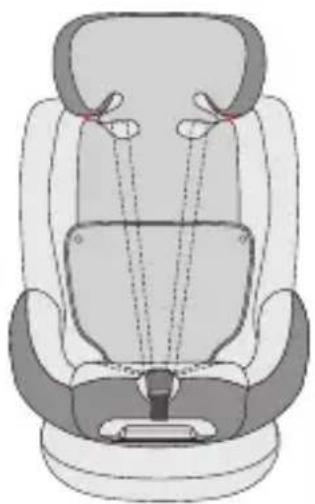
natural_image
Illustration of a car comfort seat with seatbelt and seat, no text or symbols presentnatural_image
Simple line drawing of a top and bottom views of a stylized animal head (no text or symbols)REINIGUNG
natural_image
Illustration of a person seated in a car seat with a green belt, showing the seatbelt being lifted (no text or symbols present)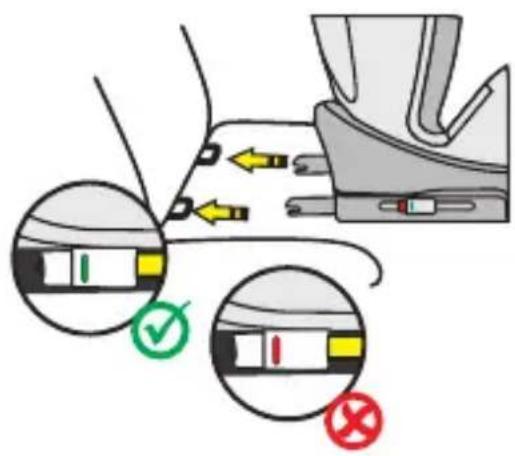
natural_image
Illustration of a car seat with a green diagonal stripe (no text or symbols)Thank you for choosing our Flame360 infant car seat. If you need help with this product, please contact our customer service.
HOW TO USE
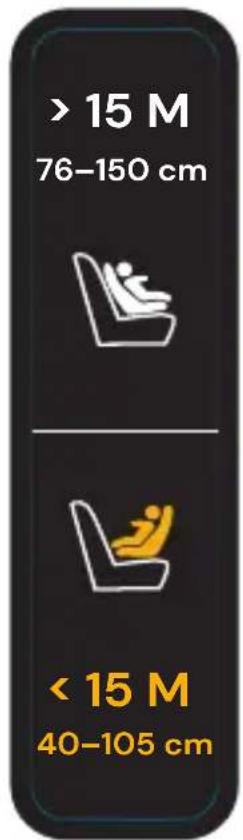
- This product is suitable for children with a height of 40 to 150~cm .
- Installation is rear-facing from 40 to 105cm body height using the Isofix connectors and the Top-Tether belt. The child is strapped in with the 5-point belt of the child car seat.
- Forward-facing installation from 76 to 105 cm body height and a minimum age of 15 months with the aid of the Isofi x connectors and the Top-Tether belt. The child is strapped in with the child car seat's 5-point belt.
- Forward-facing installation from 100 to 150 cm body height is carried out with the aid of the Isofi x connectors. The Top-Tether strap is not needed in this size class. The child is strapped in with the car's 3-point seat belt. Alternatively, the child car seat in the 100-150 cm size class can also be fitted with the 3-point seat belt only. Attaching the seat with the Isofi x connectors is not absolutely essential but is recommended.
IMPORTANT
DO NOT USE THE CHILD CAR SEAT FACING IN THE DIRECTION OF TRAVEL UNTIL THE CHILD HAS REACHED THE AGE OF 15 MONTHS.
EXTREME DANGER
We recommend installing the child car seat on the rear seat of the vehicle. DO NOT attach the child car seat for rear-facing use in the 40 to 105 cm height class to the front seat where there is an airbag. It may be used on the front seat if the airbag can be deactivated. Please refer to the vehicle manual for more information on this.
PLEASE NOTE
NOTE (40-105 cm):
This is an i-Size child restraint system. It is approved under Regulation No 129 for use in 'i-Size compatible' vehicle seats as specified by the vehicle manufacturer in the vehicle owner's manual. In cases of doubt, please contact the manufacturer of the child restraint system or the dealer.
NOTE (100-150 cm):
This is an optimised i-Size children's booster seat. It is approved under Regulation no. 129 for use primarily in "i-Size vehicle seats" as specified by vehicle manufacturers in the vehicle owner's manual. If in doubt, contact either the manufacturer of the extended child restraint system or the dealer.
If you have any doubts, please contact the car seat manufacturer or the retailer.
-
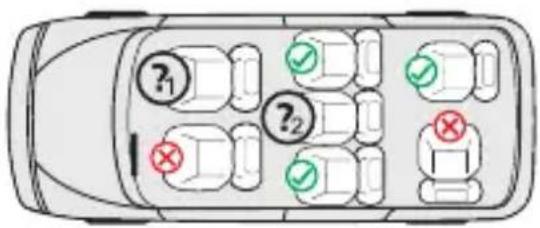
Only if Isofix connectors and a top tether hook are available and the seat is recognised as i-Size compatible in the car manual. For rear-facing use additionally only if the airbag can be deactivated.
-
This only applies if Isofi x connectors are available and the seat is indicated as i-Size compatible in the vehicle manual.
The following table provides information about the fastening devices and methods:
| Size class | Installation direction | Installation Type Child safety device | ||
| 40-105 cm | Rear-facing | Isofi x connectors & Top-Tether | i-Size | 5-point seatbelt for the child seat |
| 76-105 cm | Forward-facing | Isofi x connectors & Top-Tether | i-Size | 5-point seatbelt for the child seat |
| 100-150 cm | Forward-facing | Isofi x connectors & 3-point car seat belt | i-Size Booster seat | 3-point car seat belt |
| 100-150 cm | Forward-facing | 3-point car seat belt | i-Size Booster seat | 3-point car seat belt |
WARNING
- Please read through these instructions carefully before use in order to guarantee the safety of your child. Retain the manual. Non-compliance with the instructions in this manual may result in serious injuries to your child.
- The child seat can only be used with its own 5-point belt system for children who weigh under 18 kg and are less than 105 cm in height.
- The child seat CANNOT be used with its own 5-point belt system for children who weigh over 18 kg and are taller than 105 cm.
- The child seat can be installed rear-facing or forward-facing with the Isofix connectors and the Top-Tether belt. Important: Do not install the child car seat in a forward-facing position until the child is at least 15 months old.
- For Isofi x installation: Be sure to read the car manufacturer's manual.
- Do not use load-bearing contact points other than those described in the instructions and indicated in the child restraint system.
- Do not use this child car seat at home. It has been designed exclusively for use in a car.
- Do not leave your child unsupervised in the seat at any time.
- Do not place the rear-facing child car seat on the front seat with an activated airbag. This could lead to serious injuries or death.
- The child seat must be replaced if it is exposed to heavy impact in an accident.
- For safety reasons, the child car seat must be secured in the vehicle even when there is no child sitting in the child car seat.
- Always make sure that all belts that attach the child car seat to the vehicle are secure and that all belts that restrain the child are adjusted to fit the child's body. Ensure that the belts are not twisted.
- Items of luggage or other objects that could cause injury in the event of a collision must be properly secured.
- The rigid items and plastic parts of a child restraint system must be positioned and installed so that they cannot get caught by a movable seat or a vehicle door.
- It is important that belts that sit low hold the child's pelvis firmly in place. To avoid the risk of falling, your child should always be strapped in.
- It is dangerous to make changes or additions to the product without approval from the responsible authority. Non-compliance with the installation instructions provided by the manufacturer of the child restraint system may also present risks to the safety of your child.
- This child seat is designed for children with a maximum height of 150 cm. Never overload the child seat by transporting more than one child or additional loads in it.
- The child restraint system must not be used without the seat cover.
- The seat cover must not be replaced by a cover other than that recommended by the manufacturer, as this seat cover is an important component of the restraint performance.
SEAT PARTS
Front view Headrest
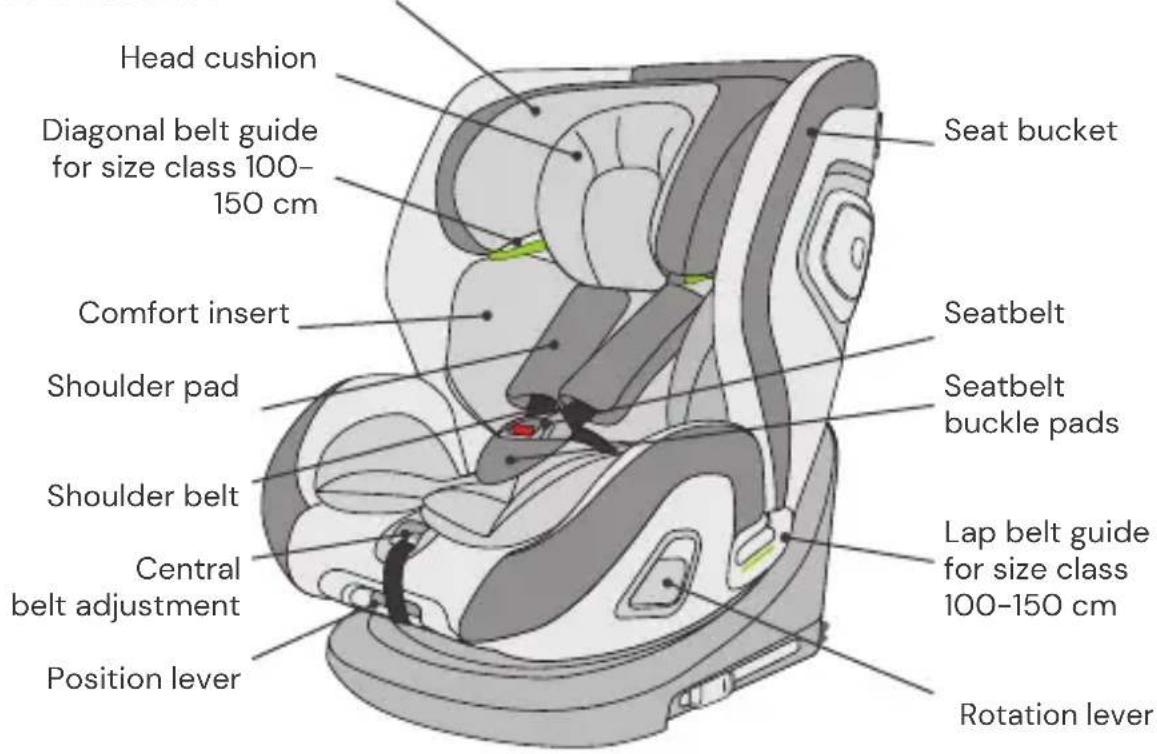
Rear view
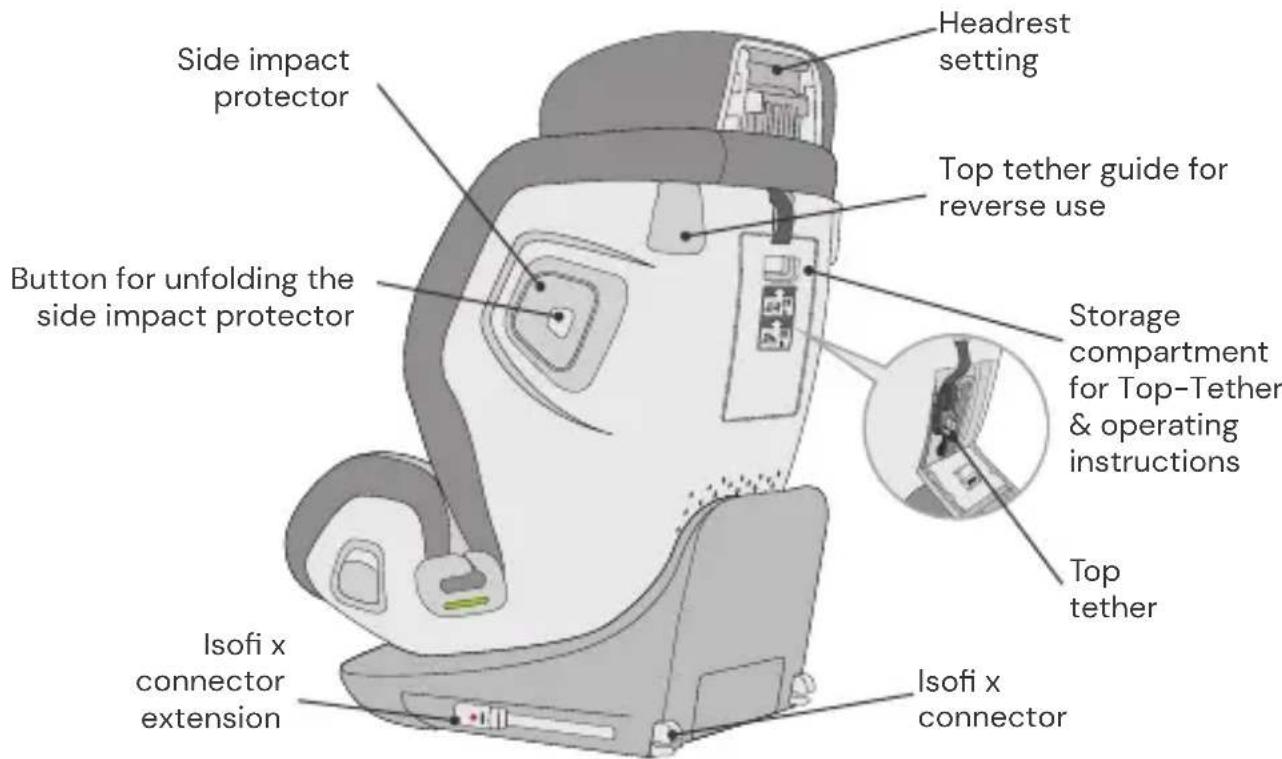
USING THE CHILD CAR SEAT
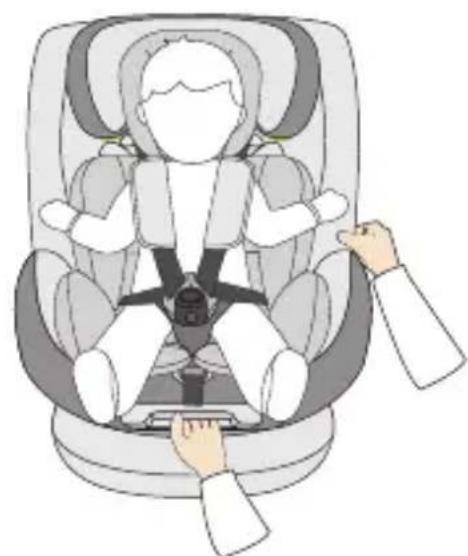
Setting the child car seat tilt angle
- Operate the position lever on the lower front of the seat bucket with one hand.
- Hold the seat pan with the other hand and adjust the angle.
The following seat positions are possible:
(Please see the label on the child car seat)
Rear-facing,
Body height 40-75 cm, position: R1
Body height 76-105 cm, position: R2
Forward-facing,
Height 76-105 cm,
min. 15 months:
4 positions (1-4)
Forward facing, body size:
100-150 cm: 1 position (1)
natural_image
Illustration of a child wearing a car seat with hands adjusting the seat (no text or symbols)Turning the child car seat
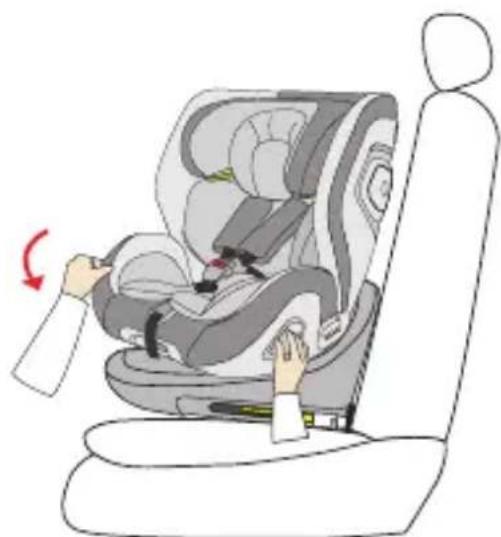
- The child car seat has a rotation lever on both sides of the seat shell. To rotate the child car seat when it is installed, operate the rotation lever facing you and rotate the child car seat to the rear or forward-facing position.
- The forward-facing position is only suitable for children with a minimum age of 15 months and a minimum height of 76 cm. The rear-facing position is designed for children from 40 to 105 cm tall and a maximum weight of 18 kg.
- The side position is only intended to facilitate the child's entry. This position must not be used while driving.
natural_image
Illustration of a car seatbelt with hands adjusting the seatbelt and a red curved arrow indicating rotation (no text or symbols)Adjusting the belt
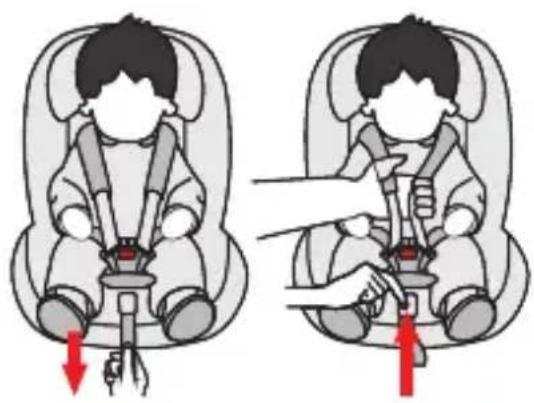
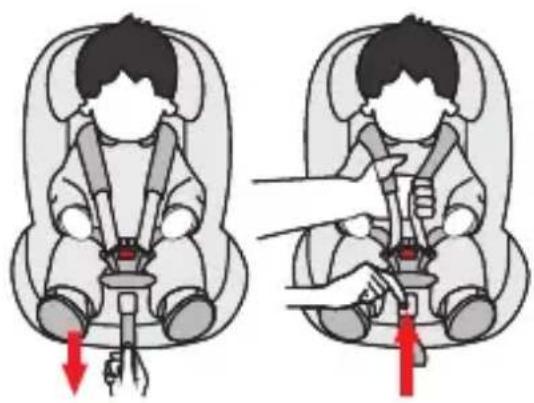
- To loosen the belt, press the belt adjustment button in the seat area with one hand. Hold the belt buckle with the other hand and carefully loosen the attached straps.
- Pull the front adjustment strap to tighten the belts. Ensure that the straps are not twisted.
natural_image
Illustration of a child in a car seat being lifted, showing two different positions (no text or symbols present)Opening/closing the belt
- To unlock the belt, press the button on the belt buckle, pull out the buckle tongues and separate them.
- To lock the belt, first, connect both tongues of the buckle and then insert them together into the belt buckle.
Adjusting the head support
- Release the belt and pull the lever to adjust the headrest on the back of the child car seat. Move the headrest until it engages at the correct height.
- Make sure the shoulder straps are positioned just above your child's shoulders when they come out of the child car seat.
- Release the lever and ensure that the head support is engaged.
natural_image
Illustration of a hand pressing down on a car seat cover (no text or symbols)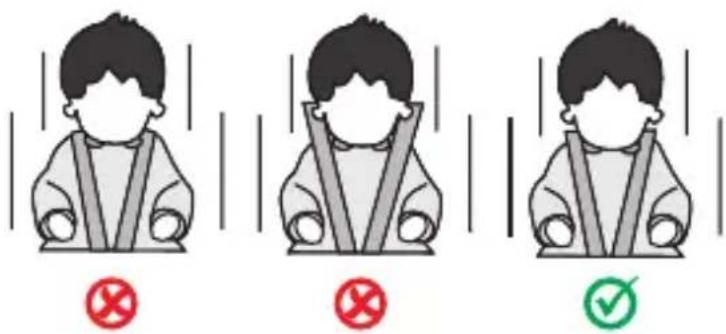
RotationControl
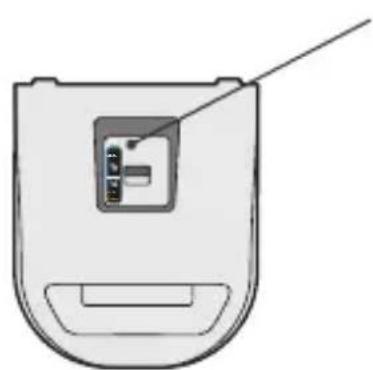
- The RotationControl knob is a control aid and is intended to prevent premature forward-facing use of the child car seat.
- Please indicate on the RotationControl button (bottom of the child car seat) whether your child's age is below or above 15 months.
- If the child is under 15 months old, you can only rotate the child car seat into the rear-facing and side-facing position. The forward-facing position is locked and cannot be used for children under 15 months.
- If your child is over 15 months old and over 76 cm tall, the car seat can also be used in the forward-facing position. The RotationControl knob must be turned for this to be possible.
• We recommend using the child car seat rear-facing for as long as possible, but at least until the child is 15 months old and 76 cm tall.
natural_image
Diagram of a mobile phone front panel with a screen and antenna (no text or symbols)Example illustration Underside of child seat
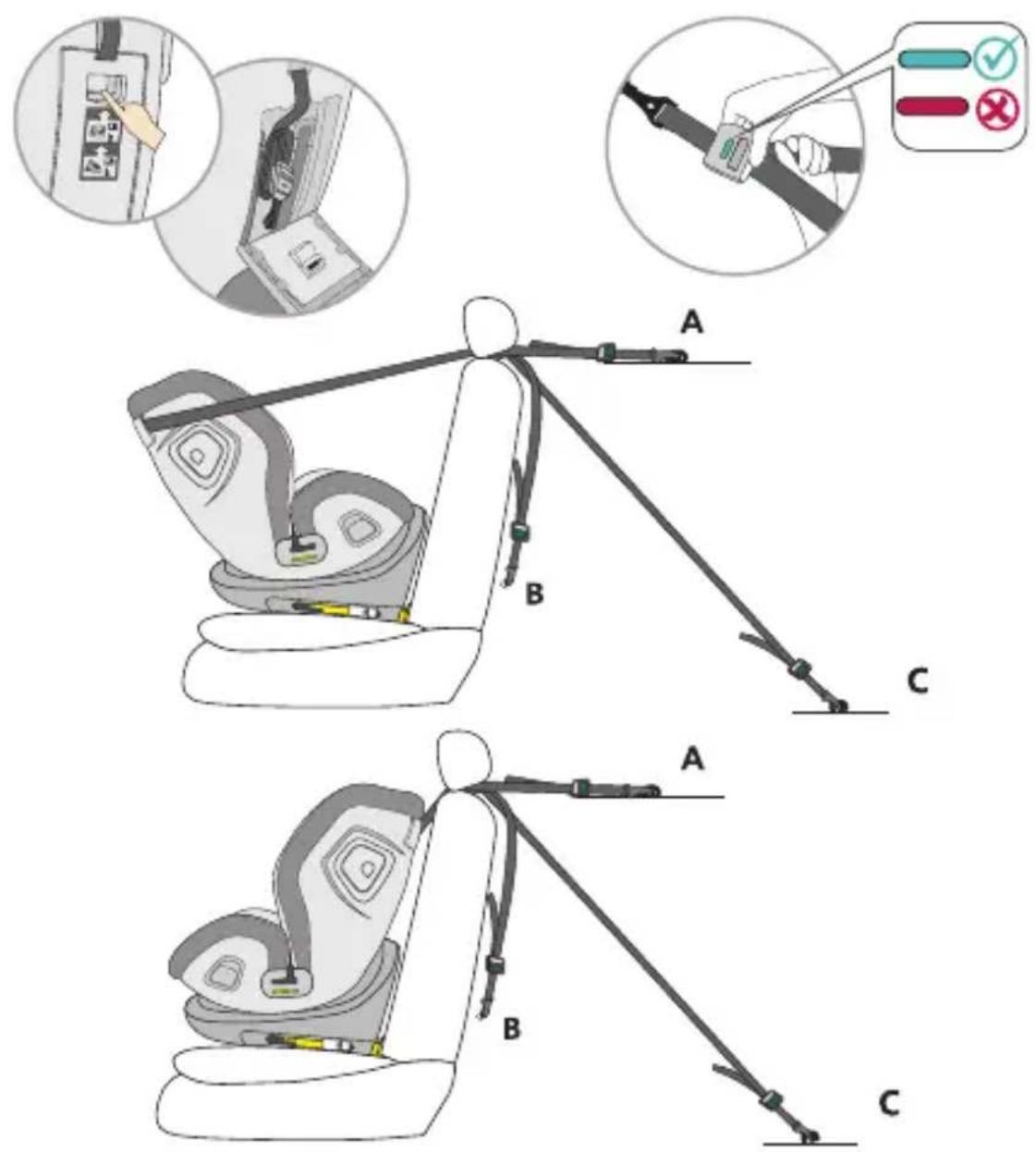
Top tether for size range 40-105 cm
- Remove the top tether from the storage compartment.
- To release the top tether, press the grey button with one hand and pull the side of the belt anchor to the required length with the other hand.
- To fix the top tether, clip the anchor to the fixing point on the car seat and pull it as tight as possible. The display does not turn green until the belt is tightened sufficiently.
- When using the child car seat rearward facing, the top tether strap must be threaded through the top tether guide on the side of the child car seat. Ideally, use the guide towards the interior of your car to ensure rotation to the car door for easy entry and exit.
- The Top-Tether strap is only necessary for the size range 40-105 cm. In the 100-150 cm size class, you can stow the Top-Tether strap back in the storage compartment.
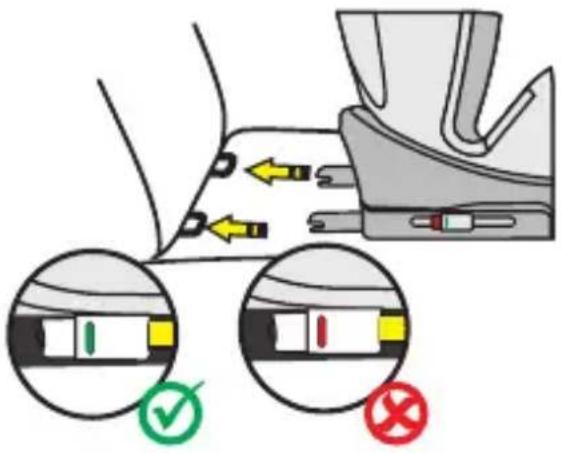
Isofi x connectors
- Press the two lateral Isofi x connector buttons in order to extend the length of the Isofi x connectors.
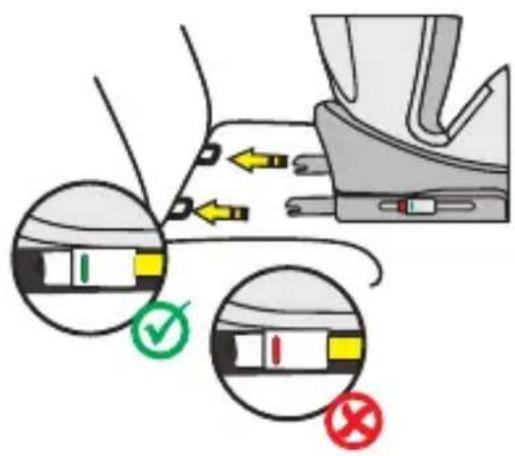
- Guide the Isofix connectors onto the Isofix anchor points on the seat of the vehicle and ensure that they lock into position.
- Push the child car seat in until it rests securely against the backrest of the seat of the vehicle. Ensure that both Isofi x indicators are showing green.
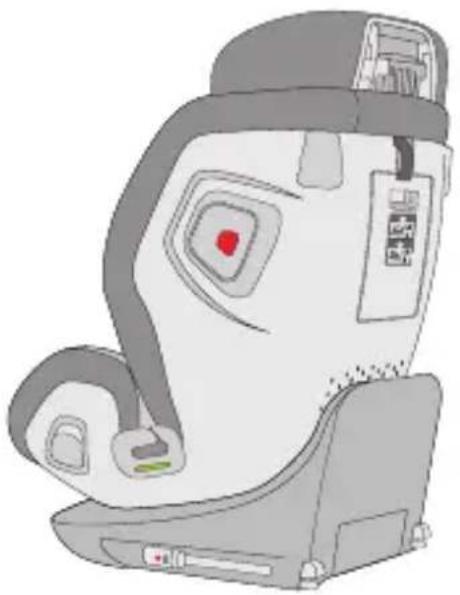
Side impact protection
- There are fold-out side impact protectors on both sides of the child car seat.
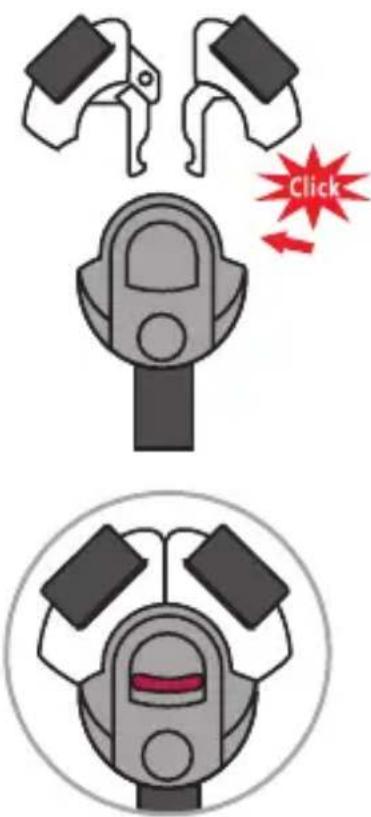
- Please push out the protector located on the car door side by pressing the inner button (marked red). The protector on the inside does not have to be folded out.
- To fold in the protector, press the inner button while pushing on the protector. Release the inner button to keep the protector folded in.
natural_image
Illustration of a car seat with a red dot marking the center (no text or symbols)Stowing the 5-point seat belt for size class 100-150 cm
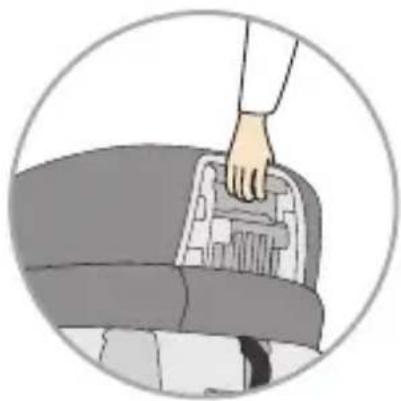
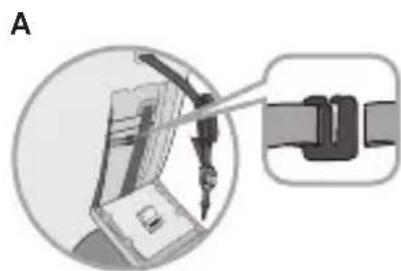
- Open the storage compartment on the back of the child car seat and unthread the shoulder pads from their hooks (fi g. A). Open the shoulder pads by their press studs so that you can completely remove the shoulder pads from the child seat (Fig. B). Also remove the seat belt buckle pad.
- Loosen the belt system to the maximum length.
- Stow the Top-Tether belt in the storage compartment at the back of the child car seat.
- Open the cover in the back area at its press studs and fold it away. Also fold the lower part of the headrest cover to the side (Fig. C).
- Open the harness system and bring the shoulder straps behind the cover.
- Carefully pull off the cover in the seat area so that you can pass the seat belt buckle through the opening in the seat cover.
- Insert the belt buckle tongues into the belt buckle and stow it in the recess in the seat area (Fig. D).
- Put the cover back over the seat area, making sure that the cover is in its slot.
- Fold back the lower part of the headrest cover and fold up the backrest cover again and close it with its press studs.
- Keep the removed pads in a safe place for later use.
natural_image
Diagram showing a device being inserted into a belt buckle, with no visible text or symbols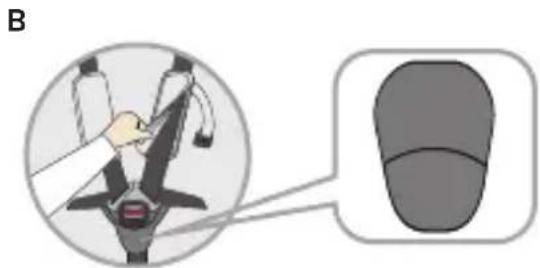
natural_image
Illustration of a hand adjusting a mechanical component, with a close-up view of the component (no text or symbols present)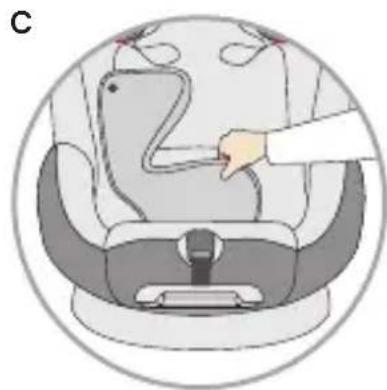
natural_image
Illustration of a person adjusting a car seatbelt using a medical device (no text or symbols present)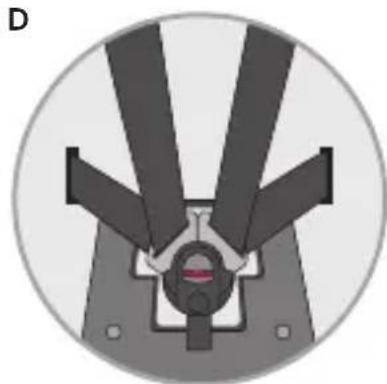
natural_image
Diagram of a mechanical or electrical component with symmetrical blades and central hub, no visible text or symbols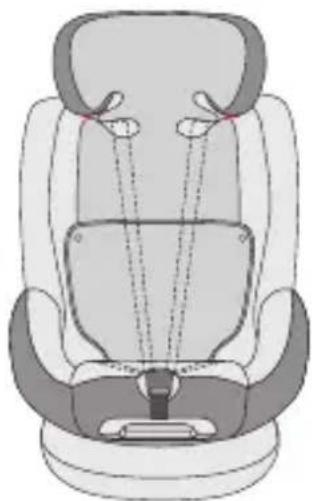
natural_image
Illustration of a car seat with neck, front, and seatbelt (no text or symbols)Head cushion & comfort insert
- The head cushion and comfort insert are designed for babies with a body height of 40-75 cm.
- Please remove both inserts as soon as your child has exceeded the specified body size.
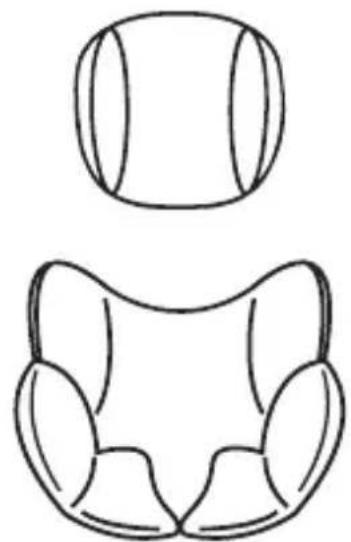
natural_image
Simple line drawings of a seated object with a rounded top and a side view (no text or symbols)CLEANING
To guarantee the long-term usage of your child car seat, do not use any solvents, abrasive cleaners or aggressive cleaning agents to clean the car seat. Check the stability of the fabric and of the seams after each wash. When washing the fabric, carefully follow the instructions on the label (see below).

Wash at 30 °C, gentle wash cycle
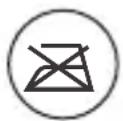
DO NOT iron

DO NOT bleach

DO NOT dry clean
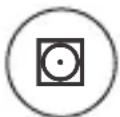
Tumble dry at low temperature
MAINTENANCE
Regularly check the condition of the product for possible damage. In the event of damage, the child car seat must no longer be used and must be stored out of the reach of children.
In case of any issues, please contact
Osann customer service on +49 (0)7731 970077.
INSTALLATION OF THE CHILD CAR SEAT
1) Size class 40-105 cm, max. 18 kg, rear-facing
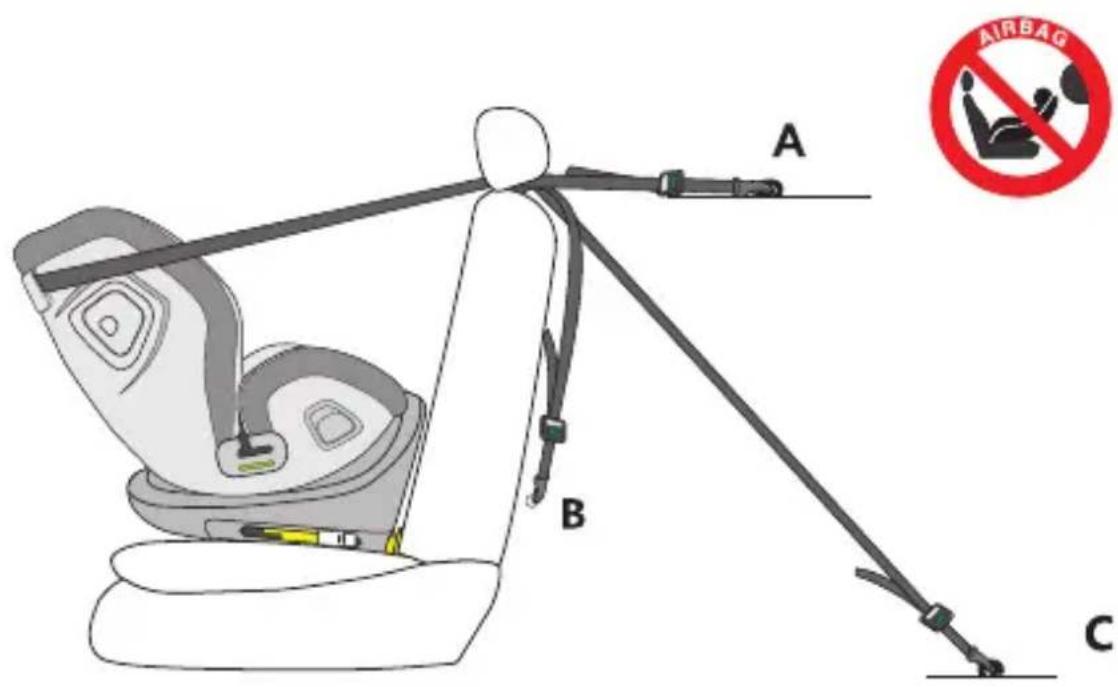
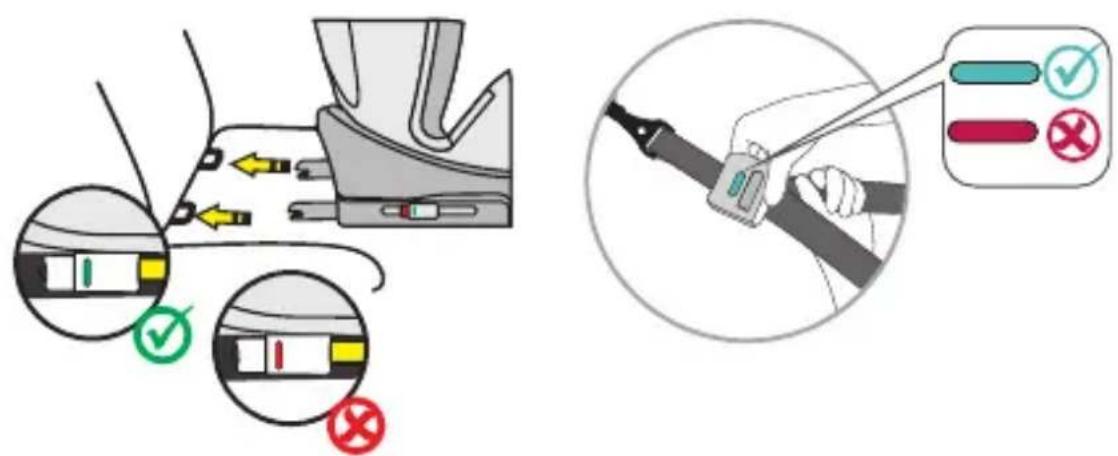
-
Set the age of your child on the RotationControl knob.
-
Adjust the child car seat to the maximum reclining position and turn it so that it points to the R1 - 40-75 cm seating position in rear-facing orientation. If your child's height exceeds 75 cm, please change to the seat position R2 - 76-105 cm.
-
Press the two lateral Isofix connector buttons in order to extend the length of the Isofix connectors.
-
Guide the Isofix connectors onto the Isofix anchor points on the seat of the vehicle and ensure that they lock into position.
-
Push the child car seat in until it rests securely against the backrest of the seat of the vehicle. Ensure that both Isofi x indicators are showing green.
-
Take the top tether out of the storage compartment and extend it to its full length.
-
The Top-Tether belt must be threaded through the Top-Tether guide on the side of the child car seat. Ideally, use the guide towards the interior of your car to ensure rotation to the car door for easy entry and exit.
-
Clip the top tether onto the hook provided in your car (e.g. on the back of the car seat or in the boot. Please consult your car manual for this).
-
Tighten the top tether until the display on the top tether turns green.
-
When placing your child in the child car seat, turn the car seat towards the car door for convenience.
-
Unfasten the belt buckle on the child car seat and place the belts on the outside of the seat.
-
Put your child in the child car seat.
-
Adjust the height of the headrest as described above.
-
Fasten the belt buckle again until you hear a click.
-
Pull the front adjustment strap to tighten the belts. Ensure that the straps are not twisted.
-
Turn the seat into the rear-facing position. Check that the child car seat is locked in this position.
INSTALLATION OF THE CHILD CAR SEAT
2) Height class 76–105 cm, min. 15 months, max. 18 kg, forward-facing
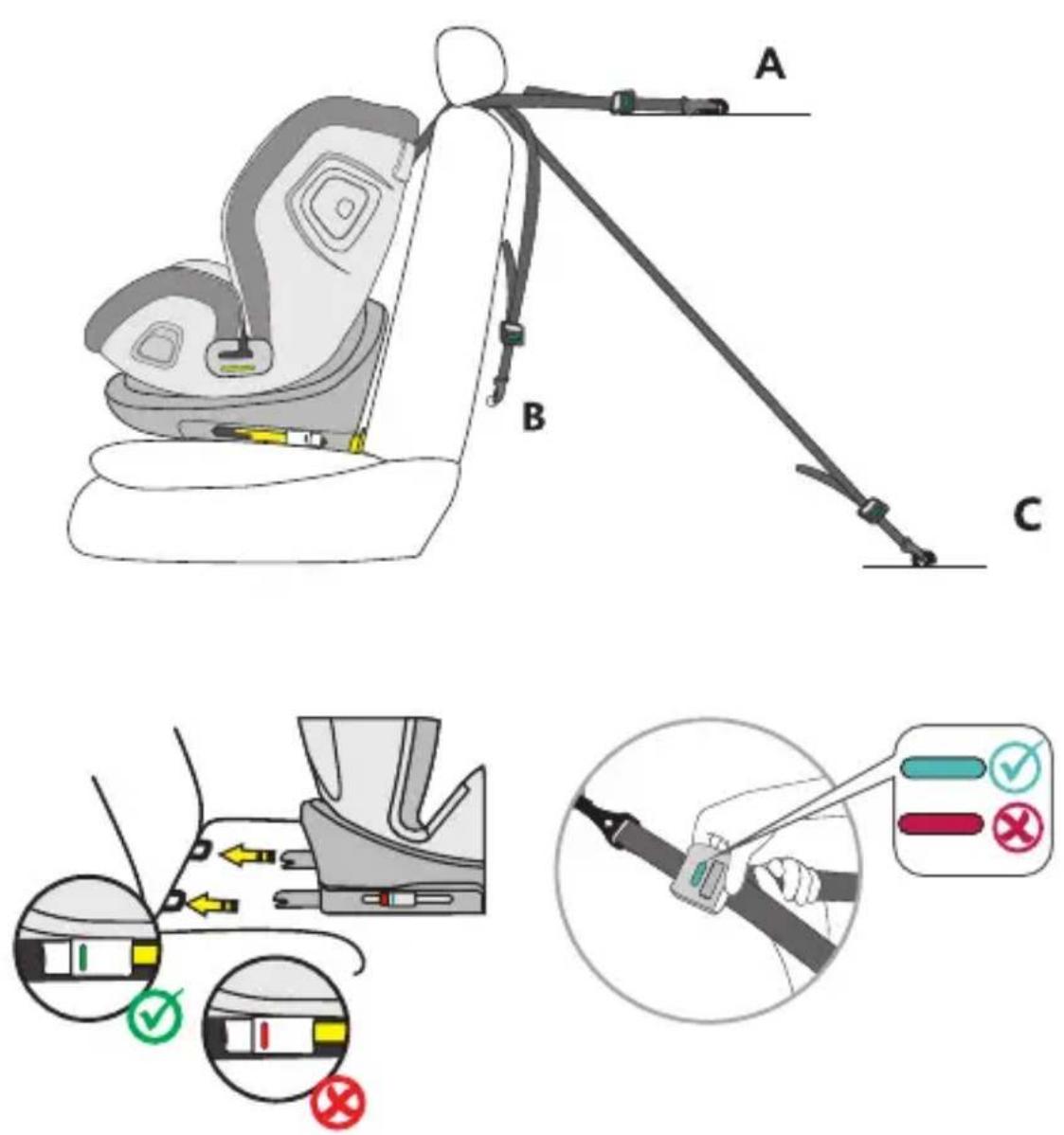
IMPORTANT: DO NOT USE THE CHILD CAR SEAT IN THE DIRECTION OF TRAVEL UNTIL THE CHILD IS AT LEAST 15 MONTHS OLD.
- Set the age of your child on the RotationControl knob.
- Press the two lateral Isofix connector buttons in order to extend the length of the Isofix connectors.
- Guide the Isofix connectors onto the Isofix anchor points on the seat of the vehicle and ensure that they lock into position.
- Push the child car seat in until it rests securely against the backrest of the car seat. Ensure that both Isofi x indicators are switched to green.
- Take the top tether out of the storage compartment and extend it to its full length.
- Clip the top tether onto the hook provided in your car (e.g. on the back of the car seat or in the boot. Please consult your car manual for this).
- Tighten the top tether until the display on the top tether turns green.
- Unfasten the belt buckle on the child car seat and place the belts on the outside of the seat.
- Put your child in the child car seat.
- Adjust the height of the headrest as described above.
- Fasten the belt buckle again until you hear a click.
- Pull the front adjustment strap to tighten the belts. Ensure that the straps are not twisted.
- When facing in the direction of travel, the child car seat offers four adjustable seat positions.
INSTALLATION OF THE CHILD CAR SEAT
3) Size class 100-150 cm, forward-facing
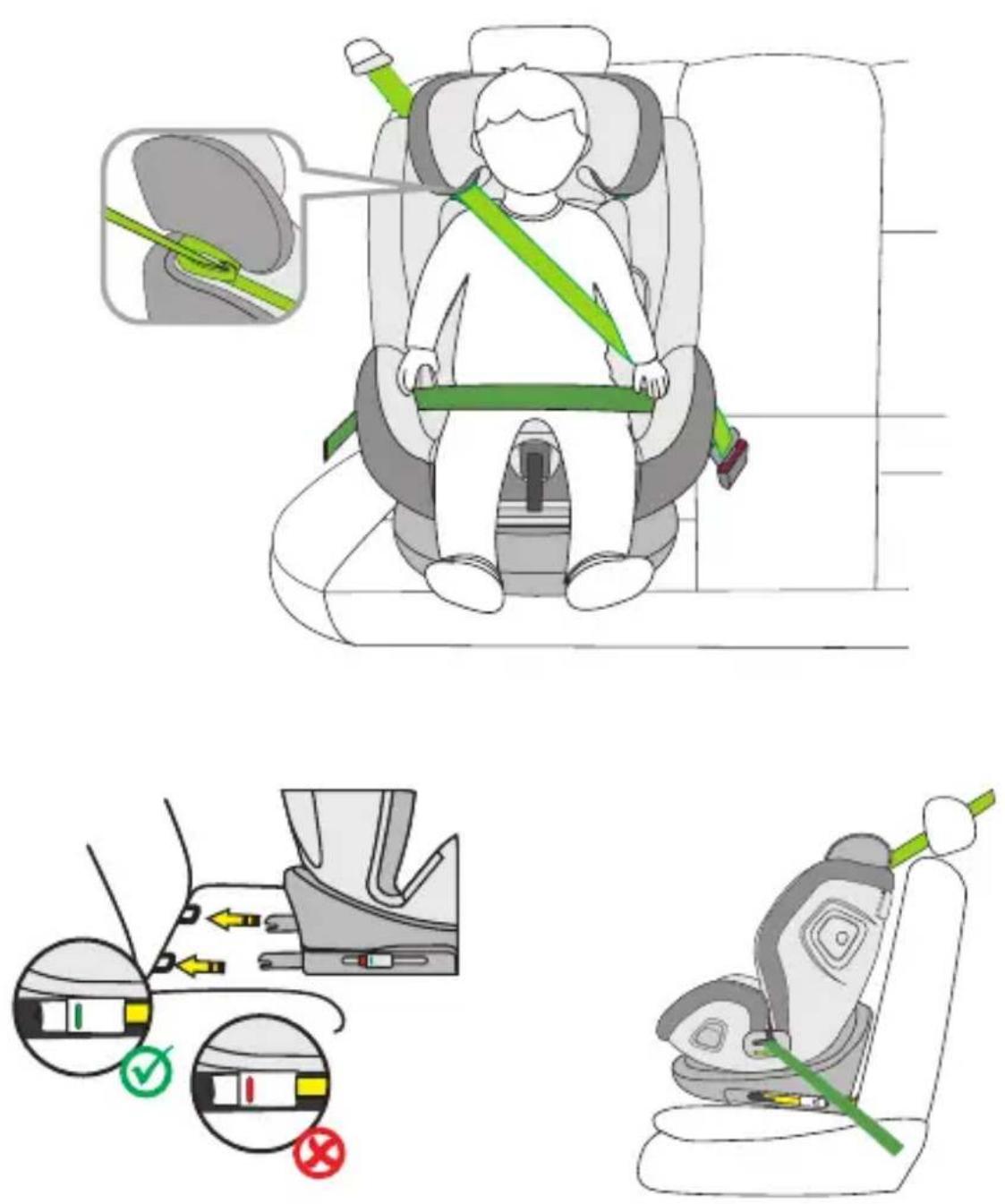
- The 5-point seat belt and top-tether harness of the child car seat must be stowed as previously described. These are not needed in this size class.
- Press the two lateral Isofix connector buttons in order to extend the length of the Isofix connectors.
- Guide the Isofix connectors to the Isofix anchor points on the car seat and snap them into place.
- Push the child car seat in until it rests securely against the backrest of the car seat. Ensure that both Isofi x indicators are switched to green.
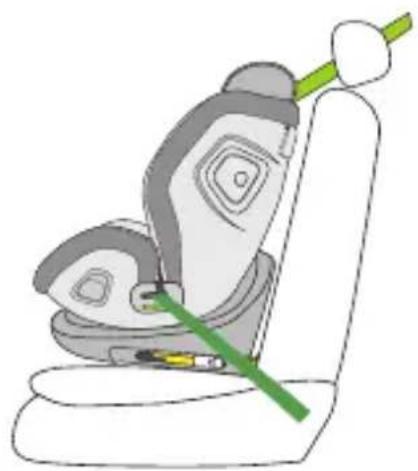
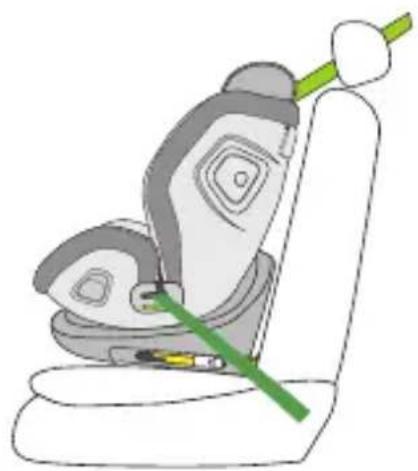
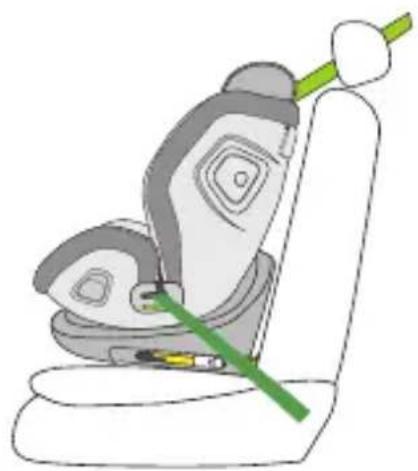
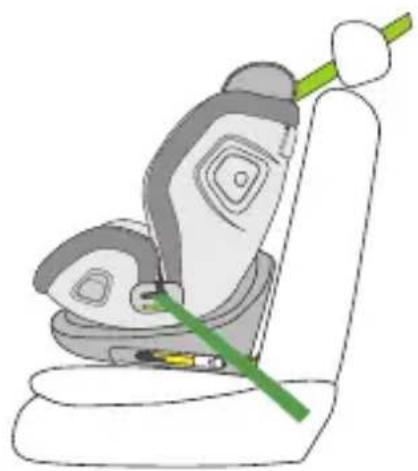
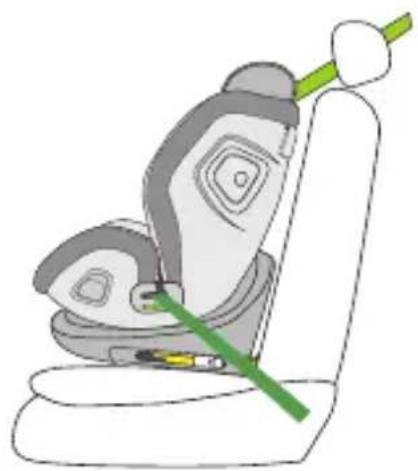
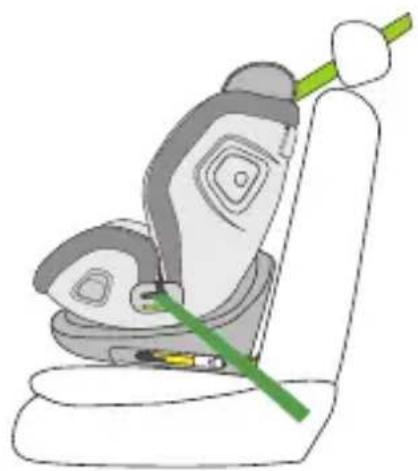
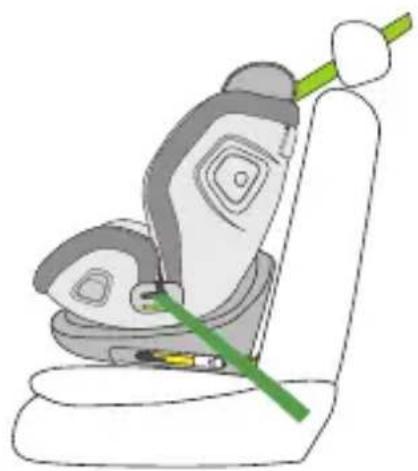
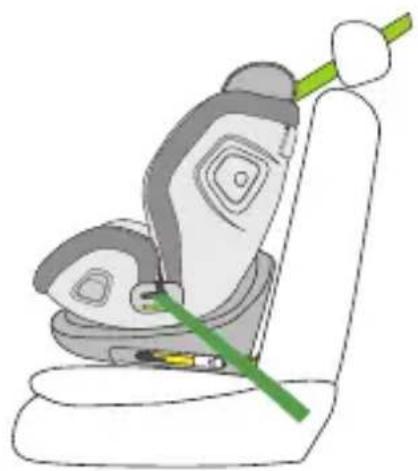
- Thread the diagonal belt of the 3-point seat belt in the car through the diagonal belt guide on the headrest of the child car seat.
- Thread the lap belt of the car's 3-point seat belt through the first lap belt guide in the seat area of the child car seat.
- When placing your child in the child car seat, turn the car seat towards the car door for convenience.
- Put your child in the child car seat.
- Adjust the height of the headrest so that the child's head is fully in the headrest and the diagonal belt comes out through the belt guide at the level of the child's shoulders.
- Turn the seat into the forward-facing position. Check that the child car seat is locked in this position.
- Close the belt buckle of the 3-point seat belt until you hear a click.
- Make sure that both the diagonal belt and the lap belt run through the second lap belt guide on the child car seat which faces the car's seat belt buckle.
- Pull on the diagonal strap to tighten it. Make sure that the straps are not twisted.
- The seat position must be set to position 1.
Installation without Isofi x:
Alternatively, the child car seat in the 100–150 cm size class can also be fitted with the 3-point seat belt only. Attaching the seat with the Isofi x connectors is not absolutely essential but is recommended.
natural_image
Illustration of a child wearing a car seat with hands adjusting the seat (no text or symbols)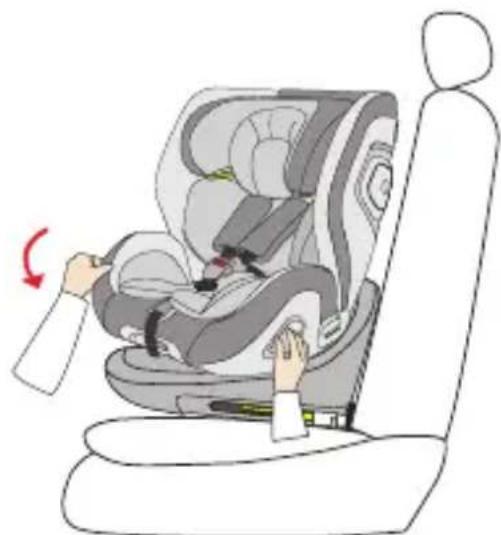
natural_image
Illustration of a car seat with hands adjusting the seatbelt, showing a red rotation indicator (no text or symbols present)natural_image
Illustration of a child in a car seat being lifted, showing two different positions (no text or symbols present)natural_image
Illustration of a hand pressing down on a car seat cover (no text or symbols)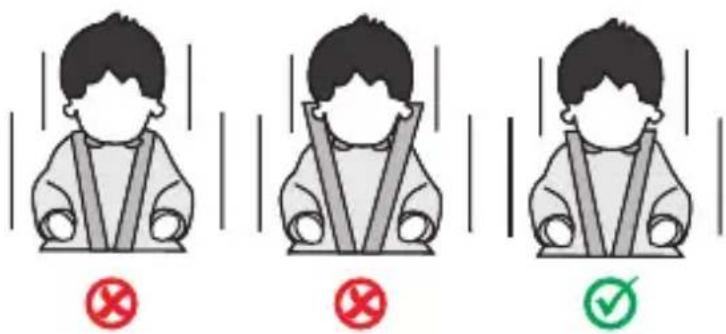
RotationControl
natural_image
Illustration of a car seat with visible seats, buttons, and a red dot on the chest (no text or symbols)natural_image
Mechanical assembly diagram showing a belt buckle being inserted into a device (no text or symbols visible)
natural_image
Illustration of a hand using a steering wheel to lift a car, with a close-up of the wheel component (no text or symbols)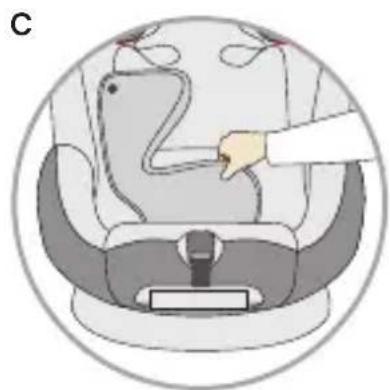
natural_image
Illustration of a person using a medical device to interact with a car seat (no text or symbols present)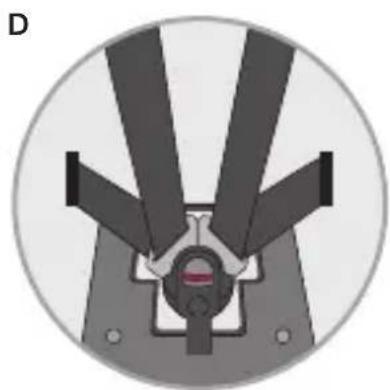
natural_image
Diagram of a mechanical or electrical component with symmetrical arms and central shaft (no text or symbols)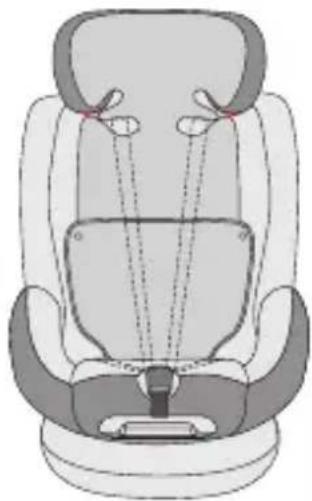
natural_image
Illustration of a car comfort seat with seatbelt and seat, no text or symbols presentnatural_image
Simple line drawing of a top and bottom views of a stylized animal head (no text or symbols)NETTOYAGE
natural_image
Illustration of a person seated in a car seat with a green belt, showing the seatbelt being lifted (no text or symbols present)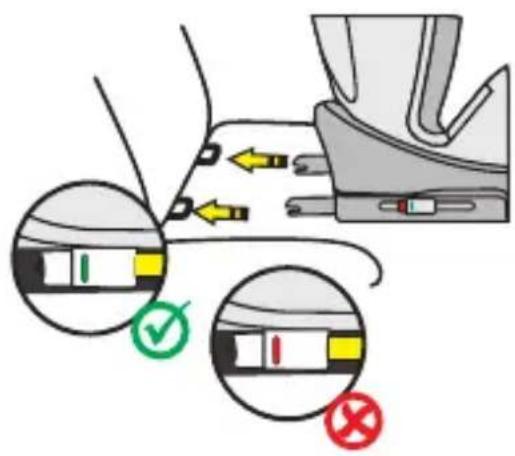
natural_image
Illustration of a car seat with a green diagonal stripe (no text or symbols)natural_image
Illustration of a child wearing a car seat with hands adjusting the seat (no text or symbols)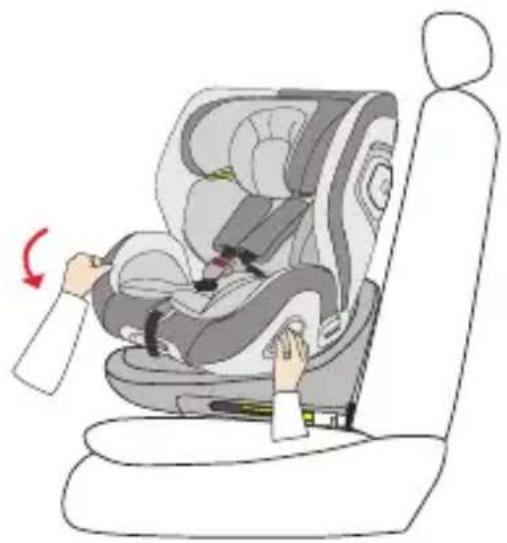
natural_image
Illustration of a car seat with hands adjusting the seatbelt, showing a red curved arrow indicating rotation (no text or symbols present)natural_image
Illustration of a child in a car seat being lifted, showing two different positions (no text or symbols present)natural_image
Illustration of a hand pressing down on a car seat cover (no text or symbols)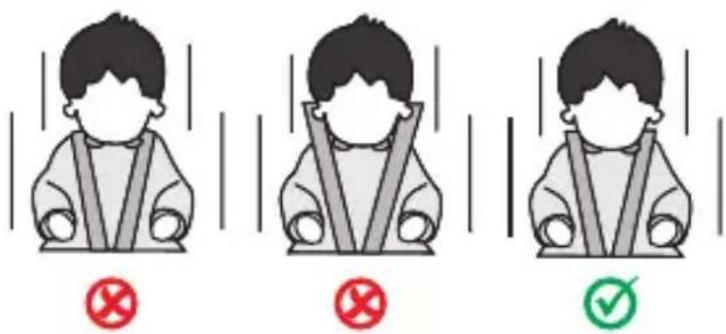
RotationControl
natural_image
Illustration of a car seat with visible seats, buttons, and a red dot on the chest (no text or symbols)natural_image
Diagram showing a device being locked with a belt buckle, no text or symbols present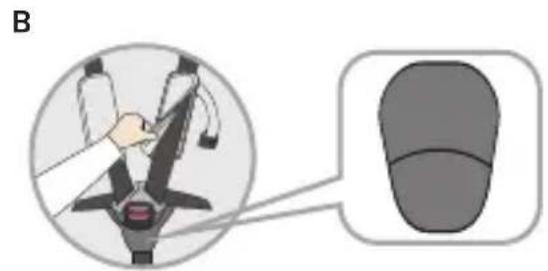
natural_image
Illustration of a hand using a device to interact with a computer mouse, showing the mouse model (no text or symbols present)
natural_image
Illustration of a person adjusting a car seatbelt using a medical device (no text or symbols present)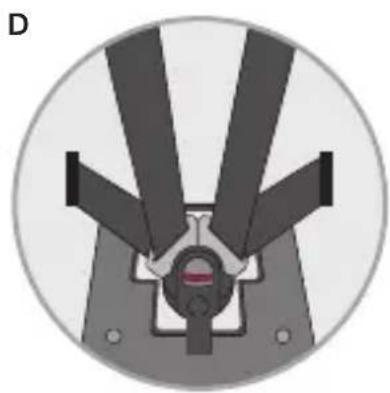
natural_image
Diagram of a mechanical assembly with symmetrical arms and central component (no text or symbols)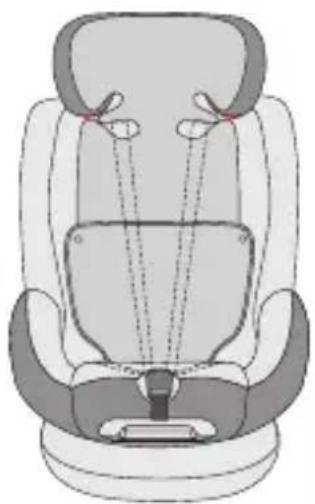
natural_image
Illustration of a car comfort seat with seatbelt and seat, no text or symbols presentnatural_image
Simple line drawing of a top and bottom views of a stylized animal head (no text or symbols)PULIZIA
natural_image
Illustration of a child in a car seatbelt with a green belt, showing the seatbelt and seatbelt connector (no text or symbols present)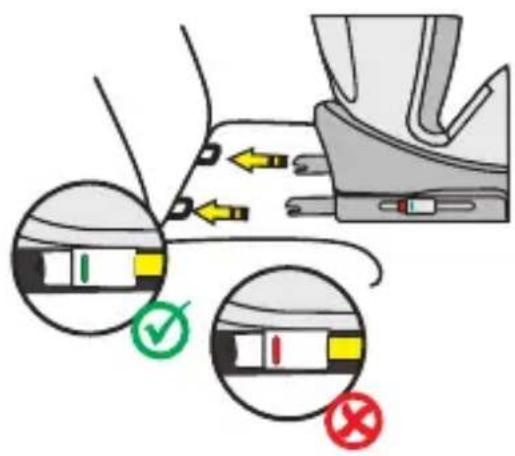
natural_image
Illustration of a car seat with a green diagonal stripe (no text or symbols)natural_image
Illustration of a child wearing a car seat with hands adjusting the seat (no text or symbols)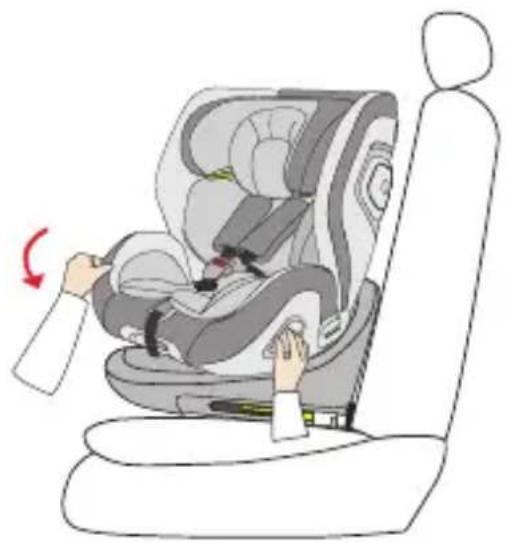
natural_image
Illustration of a car seat with hands adjusting the seatbelt, showing a red curved arrow indicating rotation (no text or symbols present)Gordel instellen
natural_image
Illustration of a child in a car seat being lifted, showing two different states of the seat (no text or symbols present)natural_image
Illustration of a hand pressing down on a car seat cover (no text or symbols)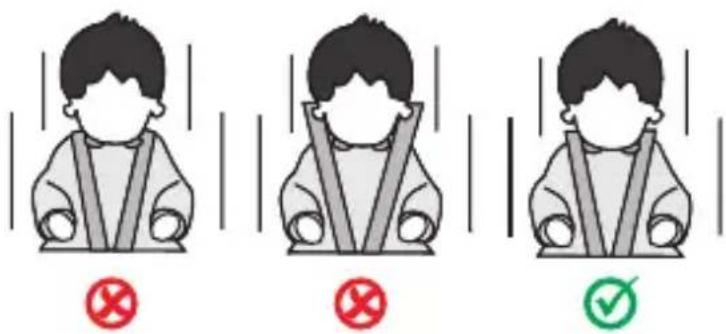
RotationControl
natural_image
Illustration of a car seat with a red dot marking the center (no text or symbols)natural_image
Diagram showing a device being locked with a belt buckle, no text or symbols present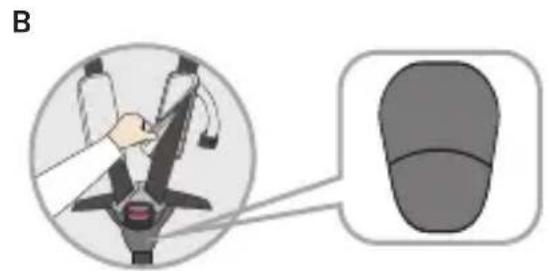
natural_image
Illustration of a hand using a device to interact with a computer mouse, showing the mouse's head and body (no text or symbols present)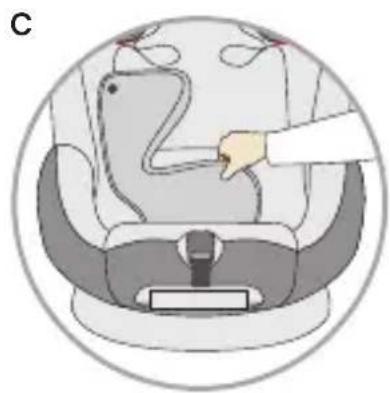
natural_image
Illustration of a car seat with a hand adjusting the seat area (no text or symbols)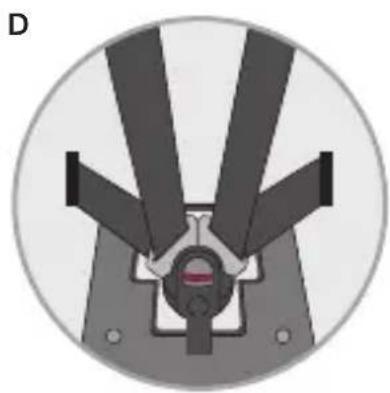
natural_image
Diagram of a mechanical assembly with symmetrical arms and central component (no text or symbols)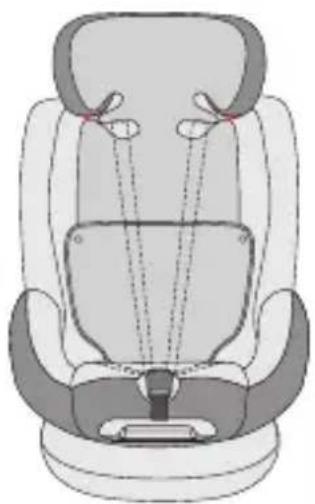
natural_image
Illustration of a car comfort seat with seatbelt and seat, no text or symbols presentnatural_image
Simple line drawing of a top and bottom views of a stylized animal head (no text or symbols)REINIGING
natural_image
Illustration of a person seated in a car seat with a green belt, showing the seatbelt and seatbelt connector (no text or symbols present)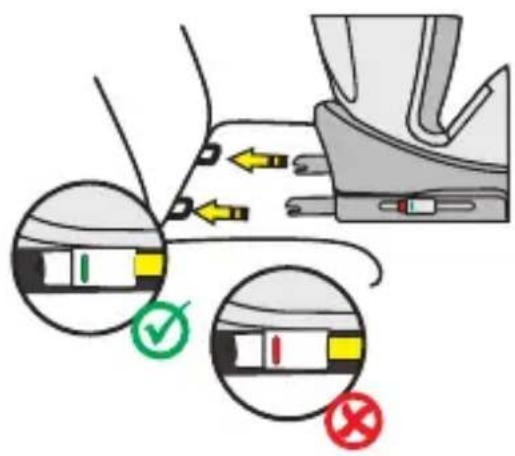
natural_image
Illustration of a car seat with a green diagonal stripe (no text or symbols)natural_image
Illustration of a child wearing a car seat with hands adjusting the seat (no text or symbols)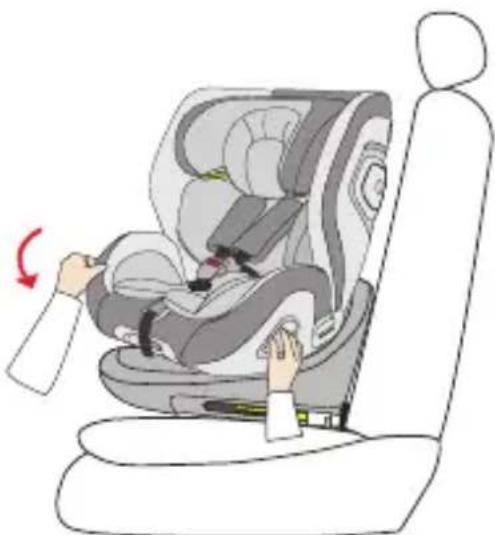
natural_image
Illustration of a car seat with a baby inside, showing a hand adjusting the seatbelt and a red curved arrow indicating rotation (no text or symbols present)Ajustar el cinturón
natural_image
Illustration of a child in a car seat being lifted, showing two different positions (no text or symbols present)natural_image
Illustration of a hand pressing down on a car seat cover (no text or symbols)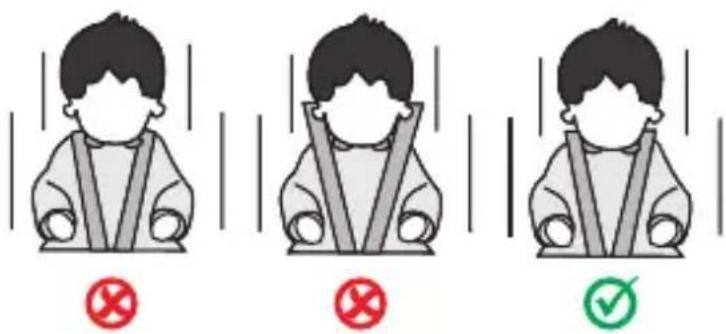
RotationControl
Protectores contra impactos laterales
natural_image
Illustration of a car seat with visible seats, buttons, and a red dot on the chest (no text or symbols)natural_image
Mechanical assembly diagram showing a belt buckle being inserted into a device (no text or symbols visible)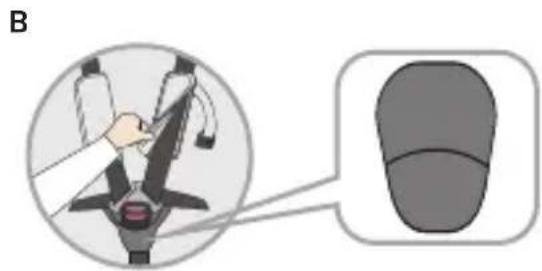
natural_image
Illustration of a hand using a device to interact with a computer mouse, showing the mode and control panel (no text or symbols present)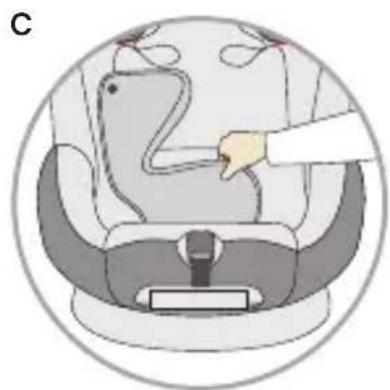
natural_image
Illustration of a person using a medical device to interact with a car seat (no text or symbols present)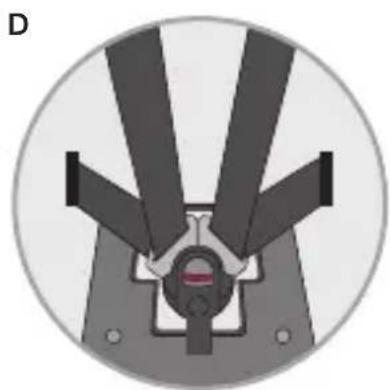
natural_image
Diagram of a mechanical or electrical component with symmetrical arms and central shaft (no text or symbols)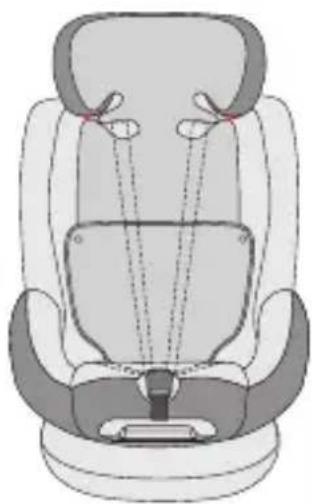
natural_image
Illustration of a car comfort seat with seatbelt and seat, no text or symbols presentnatural_image
Simple line drawing of a top and bottom views of a stylized animal head (no text or symbols)LIMPIEZA
natural_image
Illustration of a person seated in a car seat with a green belt, showing the seatbelt being lifted (no text or symbols present)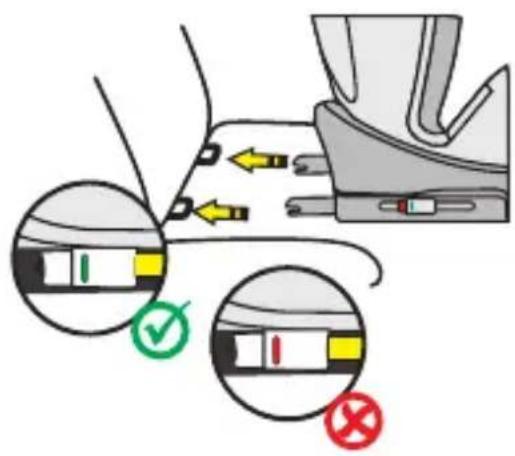
natural_image
Illustration of a car seat with a green diagonal stripe (no text or symbols)natural_image
Illustration of a child wearing a car seat with hands adjusting the seat (no text or symbols)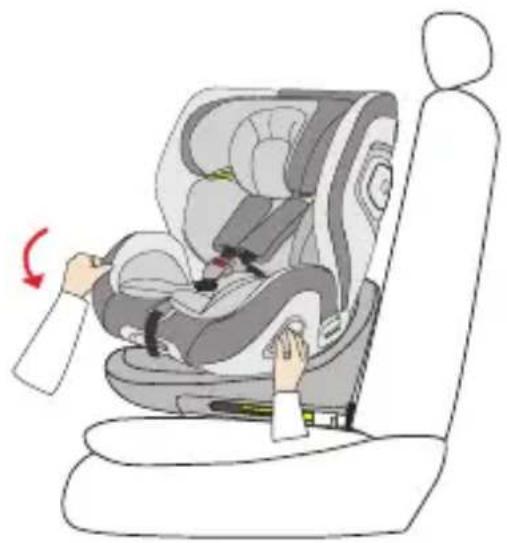
natural_image
Illustration of a car seat with hands adjusting the seatbelt, showing a red curved arrow indicating rotation (no text or symbols present)Nastavení pásu
natural_image
Illustration of a child in a car seat being lifted, showing two different positions (no text or symbols present)natural_image
Illustration of a hand pressing down on a car seat cover (no text or symbols)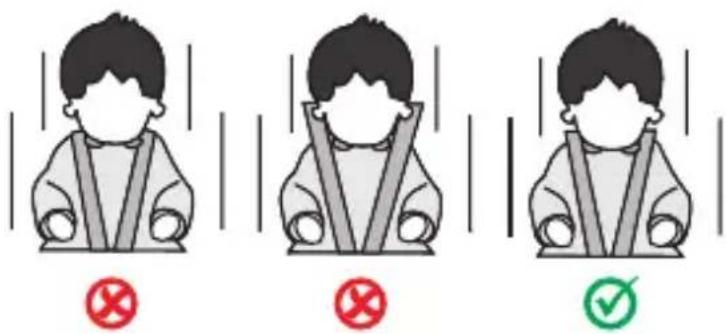
RotationControl
natural_image
Illustration of a car seat with a red dot marking the center (no text or symbols)natural_image
Illustration of a car seatbelt being inserted into a device (no text or symbols visible)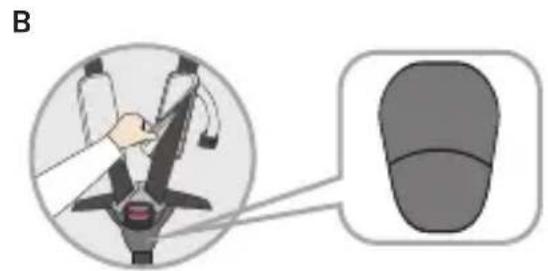
natural_image
Illustration of a hand using a device to interact with a computer mouse, showing the mouse's head and body (no text or symbols present)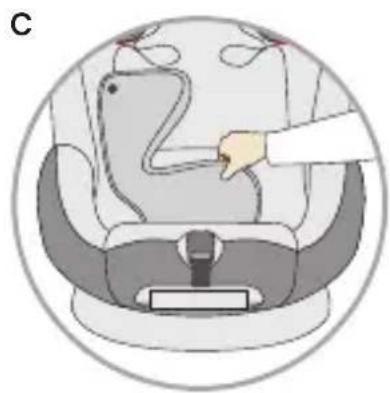
natural_image
Illustration of a car seat with a hand adjusting the seat area (no text or symbols)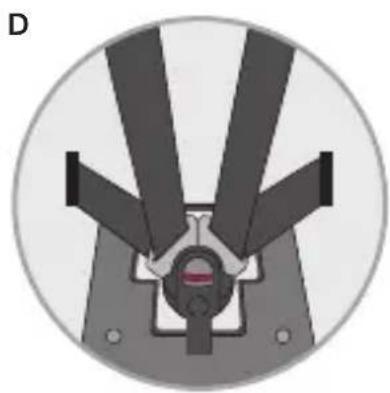
natural_image
Diagram of a mechanical assembly with symmetrical arms and central component (no text or symbols)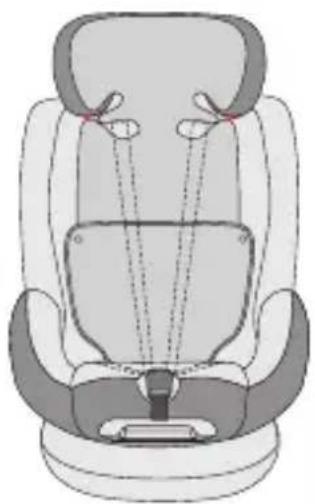
natural_image
Illustration of a car comfort seat with seatbelt and seat, no text or symbols presentCZ
-120-
natural_image
Simple line drawing of a top and bottom views of a stylized animal head (no text or symbols)ČIŠTĚNÍ
natural_image
Illustration of a person seated in a car seat with a green belt, showing the seatbelt and seatbelt connector (no text or symbols present)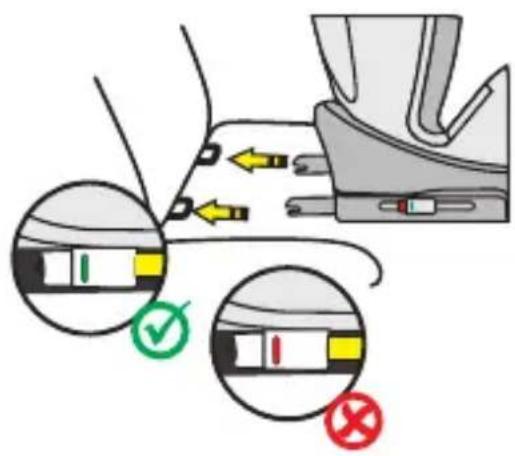
natural_image
Illustration of a car seat with a green diagonal stripe (no text or symbols)natural_image
Illustration of a child wearing a car seat with hands adjusting the seat (no text or symbols)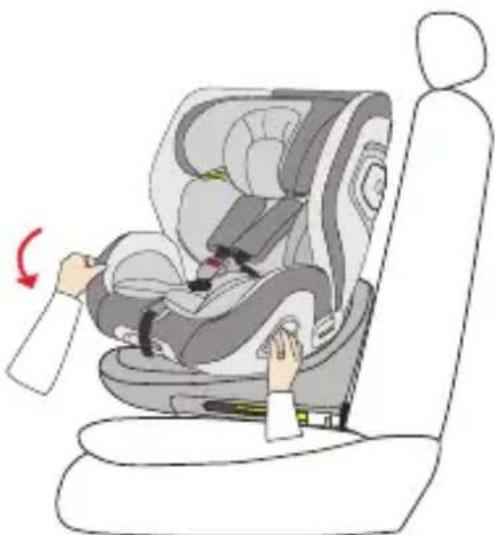
natural_image
Illustration of a car seat with a baby inside, showing a hand adjusting the seatbelt and a red curved arrow indicating rotation (no text or symbols present)Regulacja pasa
natural_image
Illustration of a child in a car seat being lifted, showing two different positions (no text or symbols present)natural_image
Illustration of a hand pressing down on a car seat cover (no text or symbols)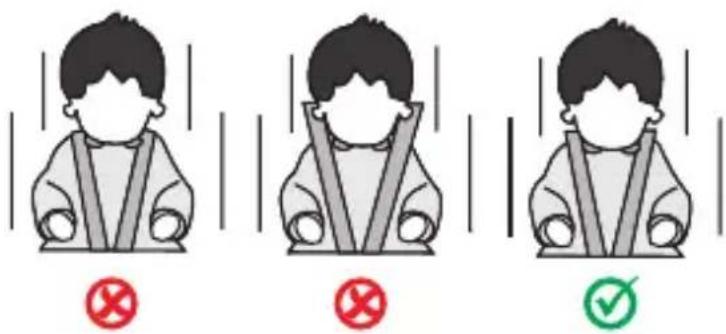
natural_image
Illustration of a car seat with a red dot marking the center (no text or symbols)natural_image
Mechanical assembly diagram showing a belt buckle being inserted into a device (no text or symbols visible)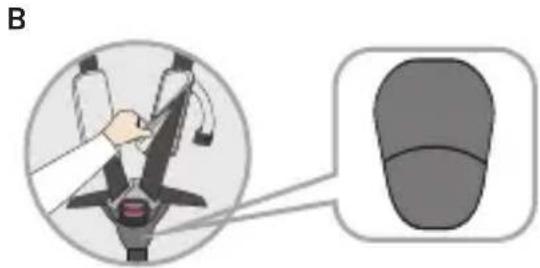
natural_image
Illustration of a hand adjusting a mechanical component, with a close-up view of the component (no text or symbols present)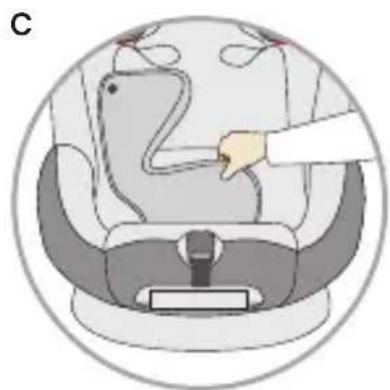
natural_image
Illustration of a person adjusting a car seatbelt using a medical device (no text or symbols present)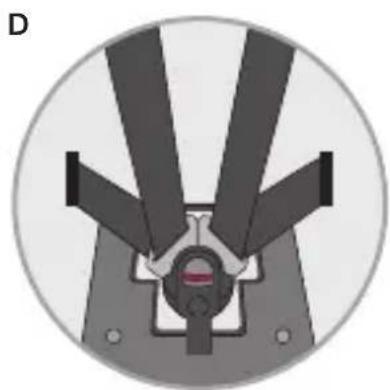
natural_image
Diagram of a mechanical or electrical component with symmetrical arms and central shaft (no text or symbols)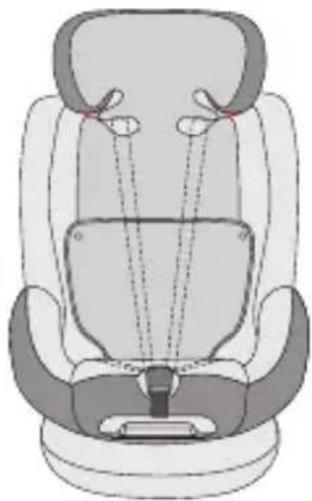
natural_image
Illustration of a car comfort seat with seatbelt and seat, no text or symbols presentnatural_image
Simple line drawing of a top and bottom views of a stylized animal head (no text or symbols)CZYSZCZENIE
natural_image
Illustration of a person seated in a car seat with a green belt, showing the seatbelt and seatbelt connector (no text or symbols present)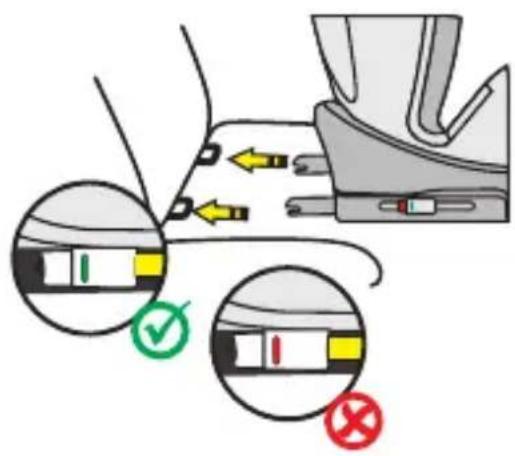
natural_image
Illustration of a car seat with a green diagonal stripe (no text or symbols)natural_image
Illustration of a child wearing a car seat with hands adjusting the seat (no text or symbols)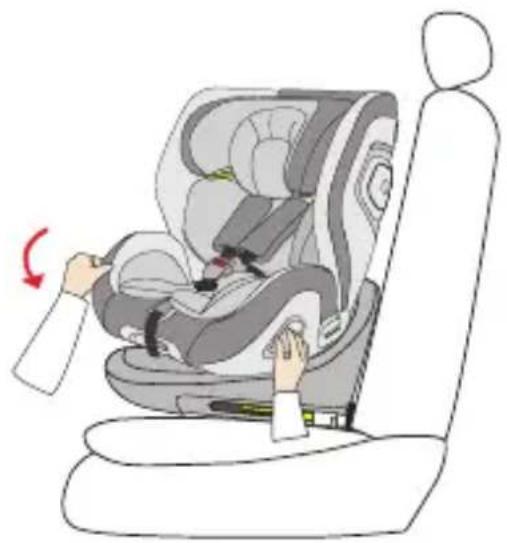
natural_image
Illustration of a car seat with hands adjusting the seatbelt, showing a red curved arrow indicating rotation (no text or symbols present)Nastavenie pásu
- Ak chcete pás uvol'nit, stlačte jednou rukou tlačidlo prestavenia pásu v sedacej časti. Druhou rukou držte zámok pásu a opatrne uvol'nite pripevnené pásy.
- Zatiahnite za prednú nastavovaciu sponu, aby ste pásy napli. Dbajte na to, aby sa remene nepretočili.
natural_image
Illustration of a child in a car seat being lifted, showing two different positions (no text or symbols present)Otvorenie/zatvorenie pásu
natural_image
Illustration of a hand pressing down on a car seat cover (no text or symbols)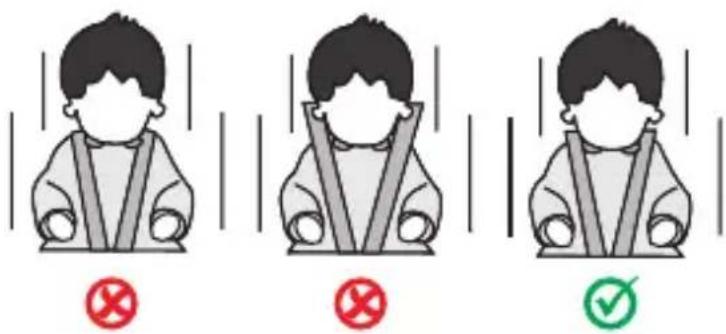
RotationControl
natural_image
Illustration of a car seat with a red dot marking the center (no text or symbols)natural_image
Diagram showing a device being locked with a belt buckle, no text or symbols present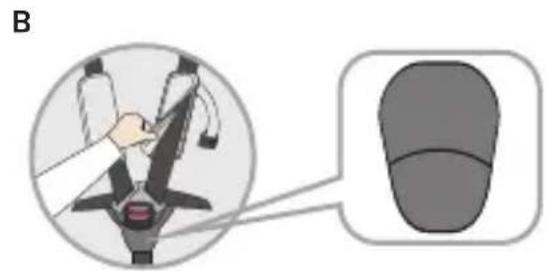
natural_image
Illustration of a hand using a device to interact with a computer mouse, showing the mouse model (no text or symbols present)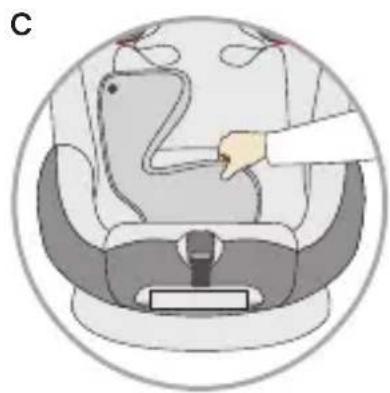
natural_image
Illustration of a car seat with a hand adjusting the seat area (no text or symbols)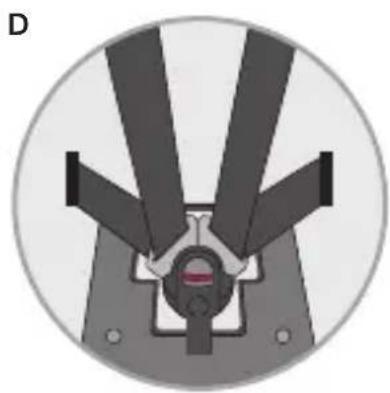
natural_image
Diagram of a mechanical assembly with symmetrical arms and central component (no text or symbols)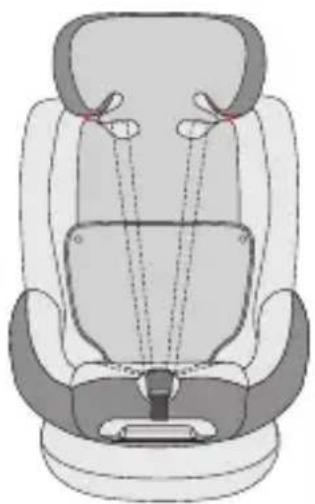
natural_image
Illustration of a car comfort seat with seatbelt and seat, no text or symbols presentnatural_image
Simple line drawing of a top and bottom views of a stylized animal head (no text or symbols)ČISTENIE
natural_image
Illustration of a person seated in a car seat with a green belt, showing the seatbelt being lifted (no text or symbols present)