
YT-73275 - Kitchen scales Yato - Free user manual and instructions
Find the device manual for free YT-73275 Yato in PDF.


| Brand | Yato |
| Model | YT-73275 |
| Product Type | Electronic Kitchen Scale |
| Maximum Capacity | 100 kg |
| Accuracy | 20 g |
| Platform Dimensions | 300 x 400 mm |
| Net Weight | 5.0 kg |
| Mains Power Supply | 220-240 V~, 50/60 Hz, 0.3 A |
| Built-in Battery | Lead-acid, 4 V DC, 4 Ah, 16 Wh |
| Battery Life | Variable depending on use; recommended charge 1-2 h for 1 h of use |
| Main Functions | Zero (ZERO), tare (TARE), summation (ADD), storage of 7 unit prices (M1-M7), backlight, auto-off, stability indicator |
| Display | 3 segmented displays: weight, unit price, total price; indicators ZERO, TARE, STAB |
| Working Environment | Temperature 5-35°C, humidity ≤90% RH |
| Storage Temperature | 0-50°C |
| Degree of Protection | IPX0 |
| Electrical Safety Class | Class II |
| Maintenance and Cleaning | Clean with a soft cloth dampened with soapy water, do not immerse, do not use solvents |
| Spare Parts | Battery (identical), power cord (replacement by authorized service) |
| Recycling | Do not dispose of with household waste, follow WEEE regulations |
Frequently Asked Questions - YT-73275 Yato
User questions about YT-73275 Yato
0 question about this device. Answer the ones you know or ask your own.
Ask a new question about this device
Download the instructions for your Kitchen scales in PDF format for free! Find your manual YT-73275 - Yato and take your electronic device back in hand. On this page are published all the documents necessary for the use of your device. YT-73275 by Yato.
USER MANUAL YT-73275 Yato
natural_image
Digital balance scale with rotary buttons and display (no visible text or symbols)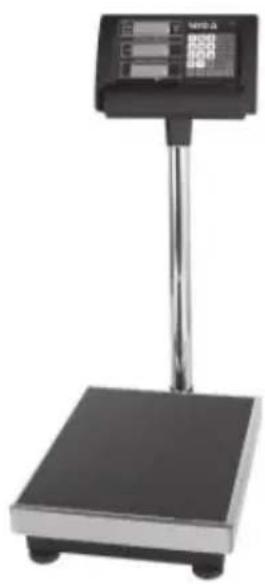
natural_image
Digital scale instrument with a black base and metallic stand (no visible text or symbols)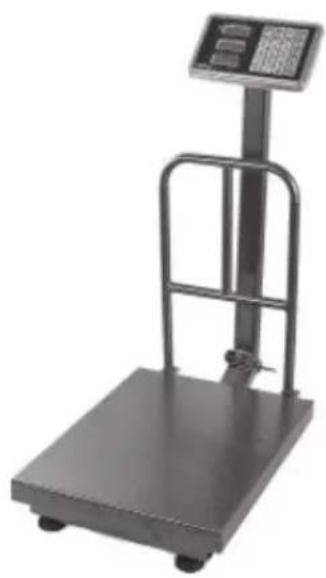
natural_image
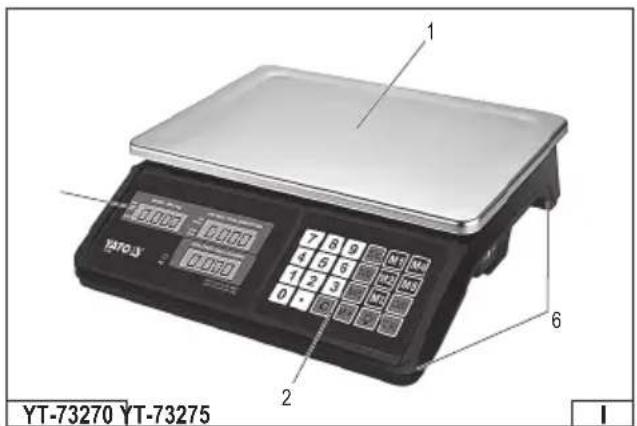
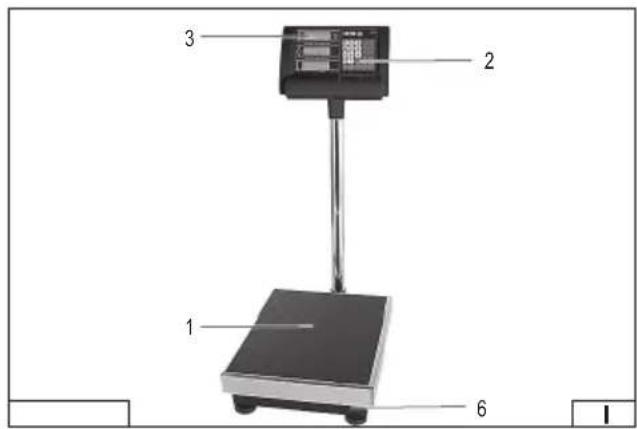
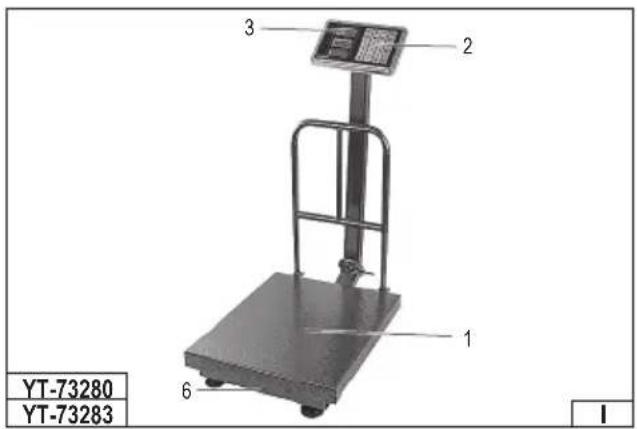
Exterior view of a gray digital scale balance with a top-mounted screen and metal frame (no visible text or symbols)YT-73270 YT-73280YT-73275
YT-73283
natural_image
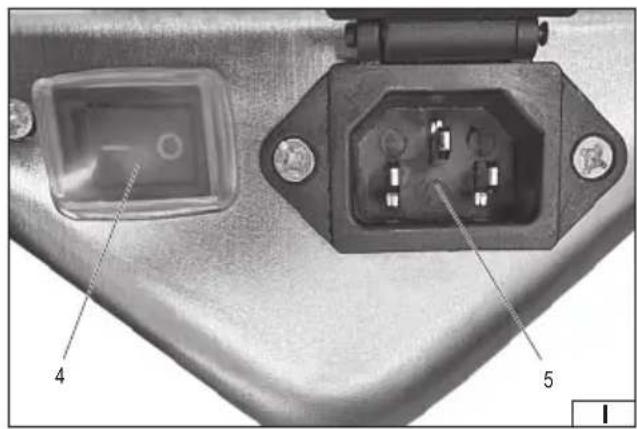
Close-up of a mechanical component with two labeled pins (4 and 5), showing internal components without any readable text or symbols.PL
- weighing platform
- control panel
- display
- switch
- power socket
- base
DE
Read the operating instruction
Second class of insulation
This symbol indicates that waste electrical and electronic equipment (including batteries and storage cells) cannot be disposed of with other types of waste. Waste equipment should be collected and handed over separately to a collection point for recycling and recovery, in order to reduce the amount of waste and the use of natural resources. Uncontrolled release of hazardous components contained in electrical and electronic equipment may pose a risk to human health and have adverse effects for the environment. The household plays an important role in contributing to reuse and recovery, including recycling of waste equipment. For more information about the appropriate recycling methods, contact your local authority or retailer.
PRODUCT CHARACTERISTICS
The electronic scale is designed for weighing products and can be used in various types of commercial and service activities. The use of precise measuring sensors ensures high accuracy and reliability of measurements. Thanks to the built-in battery, the product can also operate in the absence of access to mains power. The automatic shutdown function in idle mode allows for energy savings and extends the battery life. Correct, reliable and safe operation of the product depends on proper use, therefore:
Before using this product, read the entire manual and keep it.
The supplier is not liable for any damage resulting from failure to comply with the safety regulations and recommendations of this manual.
Attention! The offered product is not a measuring instrument within the meaning of the “Measurement Law”.
EQUIPMENT
The product is equipped with a power cable.
TECHNICAL DATA
| Parameter Unit Value | |||||
| Catalogue number YT-73270 YT-73275 YT-73280 YT-73283 | |||||
| Nominal voltage [V~] 220-240 220-240 220-240 220-240 | |||||
| Nominal frequency [Hz] 50/60 50/60 50/60 50/60 | |||||
| Rated current [A] 0,3 0,3 0,3 0,3 | |||||
| Accuracy | [g] | 5 | 20 | 50 | 50 |
| Maximum load | [kg] 40 100 | 150 | 300 | ||
| Weighing platform dimensions | [mm] | 230x330 | 300x400 | 300x400 | 400x500 |
| Degree of protection | IPX0 | IPX0 | IPX0 | IPX0 | |
| Mass | [kg] | 2,3 5,0 6,6 9,8 | |||
| Battery type | Lead-acid | Lead-acid | Lead-acid | Lead-acid | |
| Battery nominal voltage | [V DC] | 4 | 4 | 4 | 4 |
| Battery capacity | [Ah] | 4 | 4 | 4 | 4 |
| Battery power | [Wh] | 16 | 16 | 16 | 16 |
| Recommended working environment | |||||
| - temperature | [°C] | 5 ÷ 35 | 5 ÷ 35 | 5 ÷ 35 | 5 ÷ 35 |
| - relative air humidity | [%RH] | ≤ 90 | ≤ 90 | ≤ 90 | ≤ 90 |
| Storage temperature | [°C] | 0 ÷ 50 | 0 ÷ 50 | 0 ÷ 50 | 0 ÷ 50 |
GENERAL USE RECOMMENDATIONS
Never exceed the maximum capacity of the scale. Remember that the load also includes the weight on the scale before taring. Exceeding the maximum capacity may damage the scale.
Be especially careful when weighing liquids. The scale is not protected against the ingress of liquids and may be damaged if flooded. Flooding may also cause a risk of electric shock. Do not splash liquids while weighing. Spilled liquids should be removed immediately with a dry cloth. Never immerse the scale in water or expose it to steam or splashes of liquids.
Products to be weighed should be placed gently on the scale. They should not be thrown onto the weighing surface or hit against other objects. A sudden impact may damage the measuring sensors or the structure of the scale.
Do not install the scale in places exposed to direct sunlight, near heat sources or in high temperature conditions (over 50^ C). This may cause malfunction or permanent damage to electronic components.
Do not install the scale near devices that emit a strong magnetic field, such as transformers, electric motors or permanent magnets. The electromagnetic field may interfere with the scale and affect the accuracy of the measurement.
The scale should only be used for its intended purpose. Do not use it as a base, support or construction element.
Do not leave any objects on the scale during storage or when not in use. Prolonged loading of the weighing platform may damage the scale and/or measuring sensors, resulting in a loss of weighing accuracy.
If the product has been stored outside its operating temperature range, it must be placed in its intended operating environment for an appropriate period of time to allow its temperature to equilibrate prior to operation.
Recommendations for connecting the product to the power supply
Before connecting the product to the power supply, make sure that the voltage, frequency and capacity of the mains supply corre-
EN
spond to the values indicated on the product's rating plate. The plug must fit the socket. No modifications to the plug are permitted. The product must be connected directly to a single mains socket. The use of extension cords, multi-sockets and double sockets is prohibited. The mains circuit must be equipped with a protective conductor and a fuse of at least 16 A. Avoid contact between the power cable and sharp edges and hot objects and surfaces. The power cable must always be fully unwound during operation and must be positioned so that it does not obstruct operation of the product. The power cable must not be positioned to pose a tripping hazard. The power socket should be located in such a place that it is always possible to quickly disconnect the product's power cable plug. When disconnecting the power cable plug, always pull on the housing of the plug, never on the cable. If the power cord or plug is damaged, immediately disconnect it from the mains and contact an authorised service centre of the manufacturer for replacement. Do not use the product with a damaged power cord or plug. The power cord or plug cannot be repaired, in the event of damage to these elements they must be replaced with new ones free from defects.
Battery Charging Safety Instructions
If you plan to use the product solely in battery mode, make sure the battery is fully charged before use. It is recommended to charge the battery for 1-2 hours for each hour of battery use. If the product has not been used for a long time, the battery should be charged continuously for at least 24 hours to avoid damage to the battery. Make sure the product is turned off before charging. The battery should be properly charged after each use of the product without mains power.
A charge level that is too low may lead to limited product functionality, the risk of its sudden shutdown and improper operation of electronic systems. Operation at low temperatures may additionally negatively affect the battery capacity and shorten the operating time in the mode without mains power supply.
If the product is stored for a long time, it is recommended to charge the battery every 3 months to prevent it from permanently discharging.
CAUTION! The battery should be charged away from sources of fire and sparks. Do not smoke near the product being charged. Gases released from the battery can be flammable and in extreme cases lead to an explosion.
The battery should only be charged in a closed, dry room that is protected from access by unauthorized persons, especially children. It is forbidden to leave the product without adult supervision while charging. If you need to leave the room, disconnect the product from the mains by unplugging the power cord from the electrical outlet. If the device starts to emit smoke, a burning smell or other unusual symptoms appear - immediately disconnect the product from the mains by unplugging the plug from the socket. The product should only be used with the battery provided by the manufacturer. Using other types of batteries may increase the risk of fire, electric shock or damage to the product.
When storing the battery, keep it away from metal objects such as keys, screws, nails, coins, and paper clips. These objects can accidentally short-circuit the terminals, which can cause burns, fire, or explosions.
If starting the product is difficult or impossible, first check the battery condition and charge it. If the battery cannot be charged, replace it with a new one, identical to the one installed at the factory. The used battery must not be disposed of with municipal waste - it must be disposed of in accordance with local regulations.
Under extreme conditions of use, electrolyte may leak from the battery. In the event of a leak, secure the leak with a neutralizing agent, in the event of contact with the skin, rinse immediately with water. If the liquid gets into the eyes, rinse immediately with water and consult a doctor. Electrolyte liquid can cause skin irritation or burns.
PRODUCT SERVICE
Preparing the product for work
The product should be unpacked, completely removing all packaging elements. It is recommended to keep the packaging - it may be helpful during later transport or storage of the product. Check the product for damage. If any damage is found, do not use the product until it is removed or the damaged elements are replaced with new, defect-free ones.
The YT-73280 and YT-73283 model is equipped with a foldable structure. After removing it from the packaging, the control panel should be set to the working position. To do this, lift the panel to the vertical position and then secure its position using the locking lever. Make sure that the panel is properly locked and will not change its position during operation. Place the rear support in the holders located at the back of the weighing platform.
The product should be placed on a stable, even and hard surface, away from sources of shock and vibration. Avoid placing the product on soft or uneven surfaces such as carpets, rubber mats or rugs, as this may negatively affect the accuracy of the measurements. Check that the product is leveled correctly - if necessary, level it by screwing or unscrewing the feet on the base. Before starting to weigh, make sure that the weighing surface is clean and dry.
Turning the product on/off
The device can be powered directly from the mains or in battery mode, provided that the battery is adequately charged. If you plan to work without mains power, you must first charge the battery according to the recommendations in the section „Battery Charging Safety Instructions „
Before turning on the product, connect the power cable to the socket on the back of the control panel. The plug is designed to prevent incorrect connection – it can only be inserted one way. Then, connect the other end of the cable to a power outlet.
To start the product, set the switch to position I - on.
There is a light on the control panel marked AC, which indicates that the product is powered from the mains. When powered from
EN
the mains, the battery is charged automatically.
To turn off the product, turn the switch to the O position – off.
Button description
Depending on the model, the scales are equipped with function buttons that enable basic operation, setting unit prices and using additional functions.
ZERO – resets the weight indication to zero if a value other than zero is displayed when the platform is empty.
TARE – subtracts the container weight (tare) and switches the scale from gross to net mode.
ADD – adds the current weight and price values to the grand total (summing function).
STORE / SAVE / M – used to save the entered unit prices to memory (button marked as STORE, SAVE or M – depending on the model).
M1–M5 / M1–M7 – quick access buttons to memorized unit prices. The number of available memory buttons depends on the model.
C – deletes entered data or cancels the last operation.
0–9 – digits for entering data, e.g. unit prices.
- (decimal point) – allows you to set a decimal point in the unit price.
COUNT – enables counting pieces based on a previously programmed unit weight (YT-73270 model).
VOLTAGE – displays the current battery voltage level (YT-73270 model).
CASH – calculates and displays change value (YT-73280 and YT-73283 model).
SHAKE – stabilizes the weight reading when vibrations occur (YT-73280 and YT-73283 model).
M+ – adds the currently displayed value to the sum memory (YT-73280 and YT-73283 model).
LIGHT / light bulb symbol – turns the display backlight on or off.
Display description
The product is equipped with three independent segmented displays. Each of them has a specific function:
Weight display (WEIGHT) – displays the current weight of the product placed on the scale.
Unit price display (UNIT PRICE) – used to enter and display the unit price (e.g. per 1 kg).
TOTAL PRICE display – shows the calculated total price (weight × unit price).
Depending on the model, the main displays may also be equipped with auxiliary indicators:
ZERO – indicates that the scale has been reset to zero and shows the value "0.000" with no load.
TARE – indicates that the tare function was used and the container weight was subtracted from the total weight.
STAB – indicates that the weight reading is stable and can be considered accurate. When the STAB indicator is not active, wait for the reading to stabilize or avoid weighing during vibration. This feature is available in YT-73270 and YT-73275 models only.
Basic operation
Zeroing the weight
If there is no item on the platform and the display shows a value other than zero, press the ZERO button to reset the display to zero. When you do this, the ZERO indicator is activated (on selected models).
Weighting
Before starting to weigh, make sure the scale is zeroed and the ZERO indicator is active. Then place the item on the platform. The weight reading will appear on the WEIGHT display.
Taring (TARE function)
Place the container on the platform. When the weight reading stabilizes, press the TARE button – the TARE indicator will activate (on selected models) and the container weight will be automatically subtracted. To remove the tare, remove the container and press the TARE button again.
Overload warning
Do not place objects on the scale that exceed the maximum capacity. If the scale detects an overload, an audible alarm will sound.
In this case, the object must be removed from the platform immediately to prevent damage to the measuring sensor.
Setting the unit price
To determine the price of a weighed item, enter its unit price (e.g. per 1 kg). Entering a price allows automatic calculation of the total value based on the measured weight.
Once the item has been placed on the scale and the weight reading has stabilized, enter the unit price using the numeric keys.
The price will be displayed in the UNIT PRICE field and the TOTAL PRICE field will show the total (weight x unit price). To clear a previously entered unit price, press the C key.
EN
Adding up the weighing values
Summation operation
Place the item on the platform and wait for the weight reading to stabilize. Then press the ADD button – the display will show "ADD n", where n is the number of records so far.
If a unit price was entered before pressing the ADD button, the totalization operation will save both the weight and the price value. Place the first item on the platform, wait for the weight reading to stabilize, then enter the unit price using the numeric keys. The UNIT PRICE display will show the unit price, and the TOTAL PRICE will show the total value.
Press the ADD button to save both the weight and price value.
Then remove the item from the scale, then place the next item and repeat the above steps. After pressing the ADD button again, the UNIT PRICE display will show „ADD 2“ and the other displays will show the total weight and total price value.
In this way you can continue to total up to a maximum of 99 entries.
Deleting the sum
You can clear the stored totalization values at any time by pressing the C button.
Saving unit prices
Depending on the model, the scale allows you to store up to 5 (YT-73270, YT-73280 and YT-73283) or 7 (YT-73275) unit prices in the cache memory.
Saving the unit price
Press the STORE button (or SAVE/M, depending on the model), then enter the desired unit price using the number buttons.
After entering the price, press the selected memory button M1–M5 or M1–M7 (depending on the model). The entered price will be saved under the button. If a different price was previously assigned, it will be replaced by the new value.
Loading unit price
To use the saved unit price, press the appropriate M1–M5 or M1–M7 button (depending on the model) after the weight reading has stabilized. The price will be loaded and displayed in the UNIT PRICE field.
MAINTENANCE, STORAGE AND TRANSPORT
NOTE! Before starting cleaning and maintenance activities, turn the product off by moving the switch to the O position - off, and then disconnect it from the mains power supply - to do this, remove the power cable plug from the mains socket.
If the measuring surface or the weighing vessel becomes dirty, clean it as soon as possible using a soft cloth moistened with a water solution of dishwashing liquid. Then remove any detergent residue with a damp cloth and dry the cleaned surface thoroughly or leave it to dry naturally. Do not clean the scale using alcohol, solvents, caustic agents or abrasive agents. It is also forbidden to clean the product by immersing it in water or any other liquid. Only use a slightly damp cloth to clean the housing.
The scale should be stored in rooms that meet the requirements specified in the technical data table. The storage location should be dry, free of dust and protected from moisture, steam and extreme temperatures. The product should not be exposed to direct sunlight, temperatures above 50^ C or strong temperature fluctuations. The product must not be stored near sources of strong magnetic fields or in rooms with high air humidity, e.g. near humidifiers.
It is recommended to store the product in the original packaging provided by the manufacturer. This also applies to transport - it is recommended to transport the scale only in the factory packaging, which protects the device from damage. The storage location should prevent access to the device by unauthorized persons, especially children.
If the product will not be used for a long time, fully charge the battery before putting it away. During storage, it is recommended to fully charge the battery at least once every 3 months to avoid deep discharge and possible damage.
EN
Troubleshooting
Below are typical faults and possible solutions. If in any doubt, stop using the product and contact an authorized service center for the manufacturer.
| Problem Recommendation Probable cause | Solution | ||
| AC light does not come on Power may not be connected | The mains plug may be disconnected | Connect the power plug or replace the power cable if the plug is damaged | |
| The power cable is damaged Replace the power cable | |||
| The scale does not turn on when powered by the battery | No DC power supply | The battery is damaged | Replace the battery with a new one, identical to the one installed at the factory |
| The battery connection is incorrect Make sure all connections are correct | |||
| Over „indicator voltage" is displayed, the alarm sounds and the scale turns off automatically | Voltage too high The battery was used for too long | Charge the battery | |
| Replace the battery if it is damaged | |||
| The mass reading is unstable | Too high voltage or moisture influence | The supply voltage is too low, or the battery has been used for too long despite the previous warning, or the ambient humidity is too high. | Charge the battery for at least 10 hours or clean the weighing platform from dirt. |