Sonicare ProtectiveClean 4100 HX4044 - Toothbrush PHILIPS - Free user manual and instructions
Find the device manual for free Sonicare ProtectiveClean 4100 HX4044 PHILIPS in PDF.

 FR
FR
 AZ
AZ
 BG
BG
 CS
CS
 DA
DA
 DE
DE
 EL
EL
 EN
EN
 ES
ES
 ET
ET
 FI
FI
 HE
HE
 HU
HU
 HY
HY
 IT
IT
 KA
KA
 KK
KK
 KY
KY
 LT
LT
 LV
LV
 MK
MK
 NL
NL
 NO
NO
 PL
PL
 PT
PT
 RO
RO
 RU
RU
 SK
SK
 SL
SL
 SQ
SQ
 SV
SV
 TG
TG
 TK
TK
 TR
TR
 UK
UK
 UZ
UZ
| Product type | Sonic electric toothbrush |
| Brand | Philips |
| Model | Sonicare ProtectiveClean 4100 HX4044 |
| Power supply | Mains adapter not included, USB charger (WAA1001 or WAA2001); rechargeable lithium-ion battery |
| Battery life | Approximately 42 two-minute brushing sessions (21 days with twice-daily use) |
| Charging time | Up to 24 hours for a full charge |
| Brushing modes | Clean and Gum Health |
| Intensities | 2 levels: high and low |
| Built-in timer (SmarTimer) | Automatic 2-minute brushing cycle |
| QuadPacer | Interval timer for 4 sections of the mouth |
| Pressure sensor | Beep and vibration change when excessive pressure is applied |
| EasyStart | Gradual power increase during the first 14 brushings |
| BrushSync technology | Communication between brush head and handle for replacement reminder |
| Brush head replacement reminder | Orange light after wear |
| Compatible brush heads | Philips Sonicare smart brush heads with BrushSync technology |
| Handle cleaning | Rinse metal rod area with hot water; clean with a damp cloth |
| Head cleaning | Rinse bristles after each use; air dry |
| Charger cleaning | Unplug and clean with a damp cloth |
| Included accessories | USB charger, travel case (depending on model) |
| Usage | Home use; for children under adult supervision |
| Operating/charging temperature | Between 0°C and 40°C |
| Storage | Cool, dry place away from light |
Frequently Asked Questions - Sonicare ProtectiveClean 4100 HX4044 PHILIPS
User questions about Sonicare ProtectiveClean 4100 HX4044 PHILIPS
0 question about this device. Answer the ones you know or ask your own.
Ask a new question about this device
Download the instructions for your Toothbrush in PDF format for free! Find your manual Sonicare ProtectiveClean 4100 HX4044 - PHILIPS and take your electronic device back in hand. On this page are published all the documents necessary for the use of your device. Sonicare ProtectiveClean 4100 HX4044 by PHILIPS.
USER MANUAL Sonicare ProtectiveClean 4100 HX4044 PHILIPS
Congratulations on your purchase and welcome to Philips! To fully benefit from the support that Philips offers, register your product at www.philips.com/welcome.
Important safety information
Only use the product for its intended purpose. Read this information carefully before you use the product and its batteries and accessories, and save it for future reference. Misuse can lead to hazards or serious injuries.
Accessories supplied may vary for different products.
Warnings
- Only use original Philips accessories or consumables. Only use the USB charger provided with the product.
- This appliance contains no user-serviceable parts. If the appliance is damaged, stop using it and contact the Consumer Care Center in your country (see 'Warranty and support').
- Keep adapters and chargers away from water.
- After cleaning, make sure the adapters, chargers, and travel cases are completely dry before connecting to power.
- This appliance can be used by children and persons with reduced physical, sensory or mental capabilities or lack of experience and knowledge if they have been given supervision or instruction concerning use of the appliance in a safe way and understand the hazards involved. Cleaning and user maintenance shall not be made by children without supervision.
- Children should be supervised to ensure that they do not play with the product.
- Do not clean any part of the product in the dishwasher unless otherwise instructed in the Cleaning section.
- Do not use adapters and chargers outdoors or near heated surfaces.
- If the power adapter, the USB charger or cable is damaged, stop using it and replace with a new one.
- This appliance has only been designed for cleaning teeth, gums and tongue.
- Replace the brush head every 3 months or sooner if signs of wear appear. Stop using a brush head with crushed or bent bristles.
- Rinse the handle, especially the brush head connection. Gently clean around the rubber seal.
- Make sure brush head and toothbrush are dry before storing in travel case.
- Avoid direct contact with products that contain essential oils or coconut oil. Contact may result in bristles dislodging.
English
- The maximum altitude of use is 4500 meters.
- Information on REACH substances, contained in Philips products, can be found on www.philips.com/REACH
Medical warnings
- Stop using the appliance and consult your dentist/doctor if excessive or prolonged bleeding occurs after use, or if you experience discomfort or pain during use.
- If you have a pacemaker or other implanted device, contact your doctor or the manufacturer of the implanted device prior to use.
- This appliance is a personal care device and is not intended to be shared by multiple users.
Battery safety instructions
- This appliance contains batteries that are only removable by skilled persons.
- Keep product and batteries away from fire and do not expose them to direct sunlight or high temperatures.
- If the product becomes abnormally hot or smelly, changes color or if charging takes longer than usual, stop using and charging the product and contact Philips.
- Do not place products and their batteries in microwave ovens or on induction cookers.
- Do not open, modify, pierce, damage or dismantle the product or battery to prevent batteries from heating up or releasing toxic or hazardous substances. Do not short-circuit, overcharge or reverse charge batteries.
- This appliance contains batteries that are non-replaceable. When the battery is at end of life, the appliance shall be properly disposed of, see section on Recycling.
- Charge only with Philips WAA1001, WAA2001, safety approved IPX4 adapters with input ratings (100-240 V\~; 50/60 Hz; 3.5 W) and output ratings (5 V dc; 2.5 W). For the list of adapters, please see www.philips.com/support.
- Charge and use the product at a temperature between 0 °C and 40 °C (32°F and 104°F).
Storage and transportation conditions
Temperature -20°C to +60°C (-4 °F to 140 °F).
Electromagnetic fields (EMF)
This Philips appliance complies with all applicable standards and regulations regarding exposure to electromagnetic fields.
Radio Equipment Directive
Hereby, Philips declares that electric toothbrushes with radio equipment type (Bluetooth, NFC) are in compliance with Directive 2014/53/EU.
- The Bluetooth radio frequency interface in applicable products operates at 2.4 GHz.
- The maximum output power by the Bluetooth appliance is 3 dBm.
- The NFC radio frequency interface in applicable products operates at 13.56 MHz.
- The maximum RF power transmitted by the appliance is 30.16 dBm.
The full text of the EU declaration of conformity is available at the following internet address: www.philips.com/support
Note: The Features of different models may vary. Some models may not be equipped with Bluetooth or NFC.
SAVE THESE INSTRUCTIONS
LIST OF SYMBOLS USED
The following symbols may appear on the product:

natural_image
Simple line drawing of an open book with no text or symbols visibleThis symbol means read the instructions for use, before using the appliance.
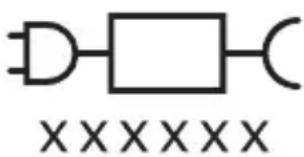
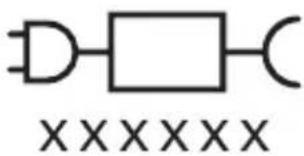
This symbol means to use the indicated power supply.
Intended use
This Sonicare power toothbrush is intended to remove adherent plaque and food debris from the teeth to reduce tooth decay and improve and maintain
English
oral health. This Sonicare power toothbrush is intended for consumer home use. Use by children should be with adult supervision.
Your Philips Sonicare (Fig 1.)
1 Brush head cap
2 Smart brush head(s)
3 BrushSync symbol
4 Handle
5 Power on/off button
6 Intensity indicator
7 Mode/intensity button
8 Mode indicator
9 Brush head replacement reminder light
10 Battery indicator
11 USB charger (wall adapter not included)
12 Travel case
Note: Accessories included may vary based on the model purchased.
Getting started
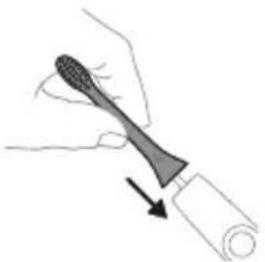
Attaching the brush head
natural_image
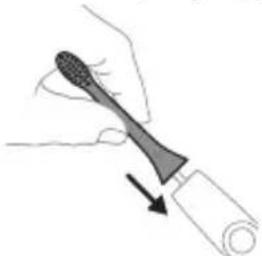
Illustration of a hand holding a tool with a brush, showing a downward arrow (no text or symbols)1 Align the brush head so the bristles point in the same direction as the front of the handle.
natural_image
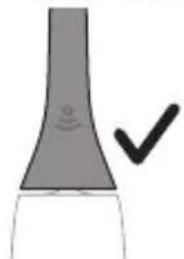
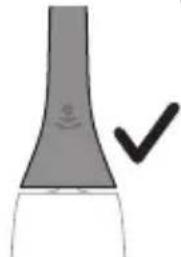
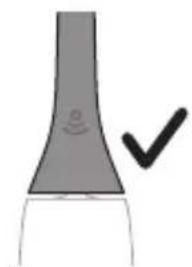
Simple line drawing of a curved object with a checkmark indicating a detail (no text or symbols)2 Firmly press the brush head down onto the metal shaft until it will not go any further.
Note: It is normal to see a slight gap between the brush head and the handle.
Using your Philips Sonicare toothbrush
If you are using your Sonicare toothbrush for the first time, it is normal to feel more vibration than when using a non-electric toothbrush. It is common for first-time users to apply too much pressure. Only apply gentle pressure and let the toothbrush do the brushing for you. Please follow the brushing instructions below for the best experience.
To help you transition to your new Sonicare power toothbrush, use a lower setting for the first 1-2 weeks, then transition to a higher setting.
Brushing instructions
natural_image
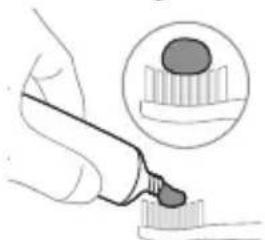
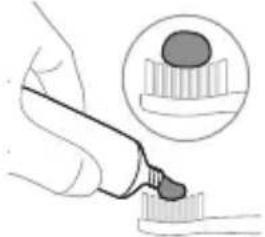
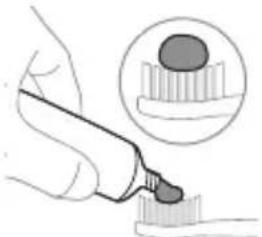
Illustration of a hand using a pipette to apply liquid onto a surface, with an inset showing a droplet on a surface (no text or symbols present)1 Wet the bristles and apply a small amount of toothpaste.
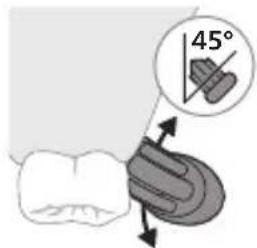
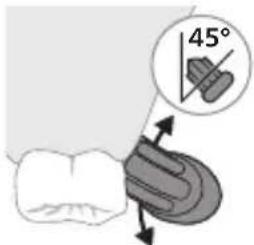
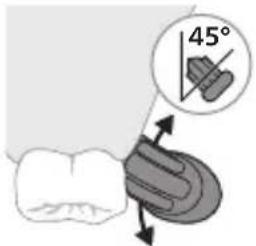
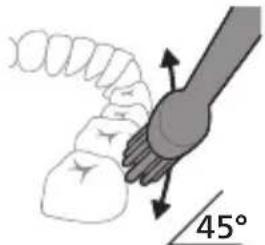
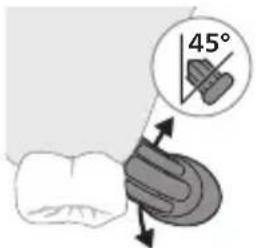
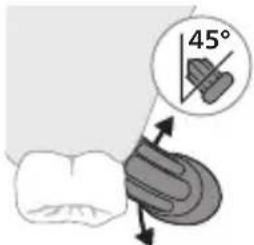
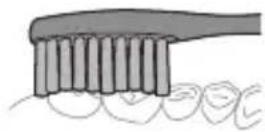
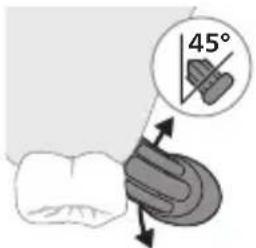
2 Place the toothbrush bristles against the teeth at a slight angle (45 degrees), pressing gently to make the bristles reach the gumline or slightly beneath the gumline.
Note: Keep the center of the brush in contact with the teeth at all times.
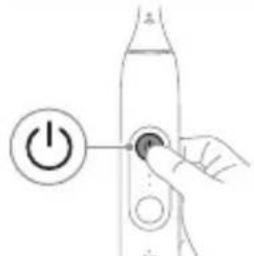
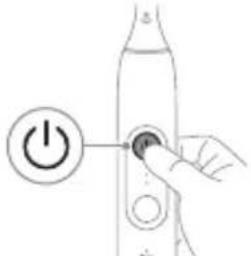
3 Press the power on/off button to turn on the Philips Sonicare.
natural_image
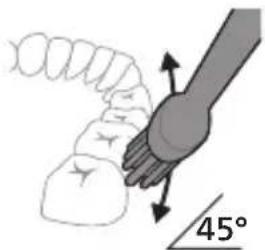
Diagram showing a hand holding a 45-degree angle with a coiled spring and handle (no text or symbols)4 Gently keep the bristles placed on the teeth and in the gumline. Brush your teeth with small back and forth motion so the bristles reach between the teeth. Continue this motion throughout your brushing cycle.
Note: The bristles should slightly flare. It is not recommended to scrub as you would with a manual toothbrush.
Note: If you apply too much pressure, you will be alerted by a sound and change in vibration of the handle (See section 'Pressure sensor').
natural_image
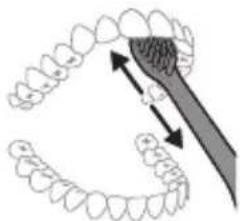
Diagram showing dental tool application on upper teeth with magnified detail (no text or labels)5 To clean the inside surfaces of the front teeth, tilt the brush handle semi-upright and make several vertical overlapping brushing strokes on each tooth.
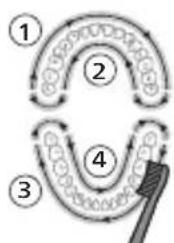
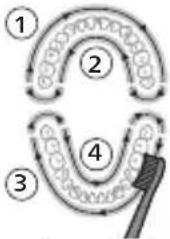
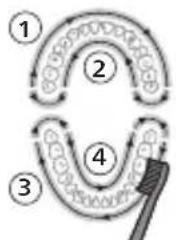
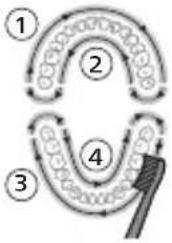
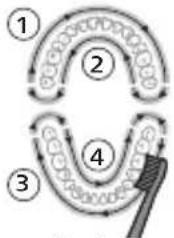
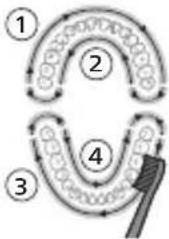
Note: To make sure you brush evenly throughout the mouth, divide your mouth into 4 sections using the QuadPacer feature (see chapter 'Features').
flowchart
graph TD
    A["①"] --> B["②"]
    B --> C["③"]
    C --> D["④"]
    D --> E["④"]
    style A fill:#f9f,stroke:#333
    style B fill:#ccf,stroke:#333
    style C fill:#cfc,stroke:#333
    style D fill:#fcc,stroke:#333
    style E fill:#ffc,stroke:#333
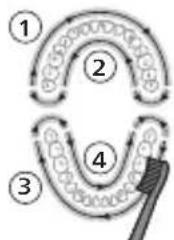
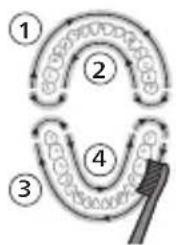
6 Begin brushing in section 1 (outside upper teeth) and brush for 30 seconds before you move to section 2 (inside upper teeth). Continue brushing in section 3 (outside lower teeth) and brush for 30 seconds before you move to section 4 (inside lower teeth).
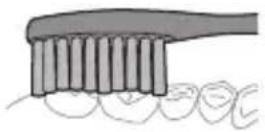
7 After you have completed the brushing cycle, you can spend additional time brushing the chewing surfaces of your teeth and areas where staining occurs. You can also brush your tongue, with the toothbrush turned on or off, as you prefer.
Your Philips Sonicare toothbrush should be safe to use on braces (brush heads wear out sooner when used on braces) and dental restorations (fillings, crowns, veneers) if they are properly adhered and not compromised. If a problem occurs, please follow up with a dental professional.
Note: When using the Philips Sonicare toothbrush in clinical studies, operate it in Clean mode at high intensity setting, with the handle fully charged and the EasyStart feature deactivated.
Modes
Your power toothbrush is equipped with two different modes: Clean, and Gum Health.
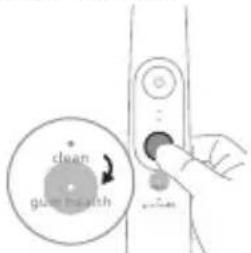
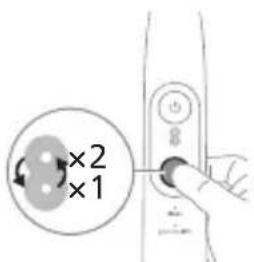
To manually change the mode, press the mode/intensity button when the toothbrush is off. All Philips Sonicare brush heads work with each mode.
Clean Gum Health
Benefit Plaque removal Plaque removal and
gum massage
Recommended intensity level
High High
Total brushing time 2 minutes 3 minutes 20 seconds
12 English
Clean Gum Health
| How to brush Brush each segment for 30 seconds, | Brush each segment for 30 seconds, |
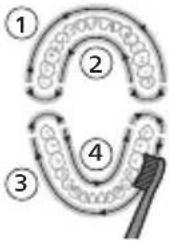 |  |
| Then brush along the gum line of each segment for 20 seconds each. |
Intensities
Intensity settings
natural_image
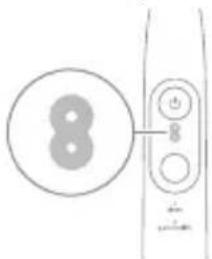
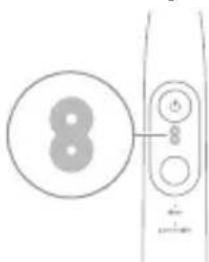
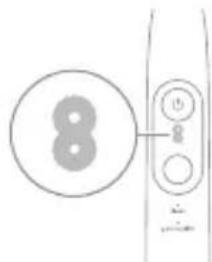
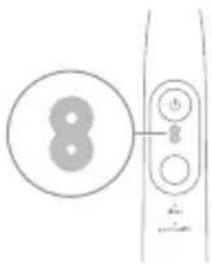
Simple line drawing of a device with a circular symbol and a vertical control panel (no text or symbols)Your power toothbrush comes with 2 different intensity settings:
- High intensity (two lights)
- Low intensity (one light)
Note: High intensity is recommended for best cleaning results.
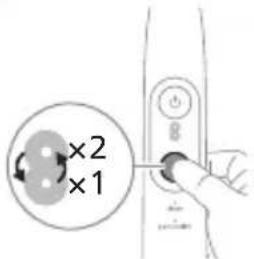
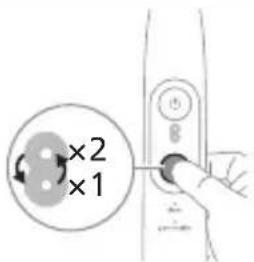
To manually select your desired intensity, press the mode/intensity button when the toothbrush is on to cycle through the options. The intensity setting can only be changed when the toothbrush is on.
BrushSync technology
natural_image
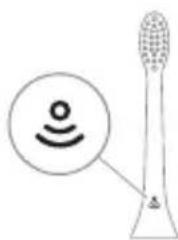
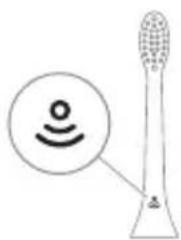
Diagram of a microphone with a sensor icon and connection point, no text or symbols presentBrushSync technology enables your brush head to communicate with your handle using a microchip. The symbol at the bottom of the brush head indicates that the brush head is equipped with this technology.
BrushSync technology enables Brush head replacement reminder feature. Philips Sonicare offers a wide range of smart brush heads, equipped with BrushSync technology. To explore our full range of toothbrush brush heads, and find the brush head that is best for you, go to
www.philips.com/toothbrush-heads for more information.
Philips Sonicare offers a wide range of smart brush heads, equipped with BrushSync technology. To explore our full range of toothbrush brush heads, and find the brush head that is best for you, go to
www.philips.com/toothbrush-heads for more information.
Features
- Pressure sensor
- SmarTimer
- QuadPacer
- EasyStart
- Brush head replacement reminder
Pressure sensor
Your Philips Sonicare measures the pressure you apply while brushing to protect your gums and teeth from damage.
If you apply too much pressure, you will be alerted by a sound and change in vibration of the handle until you reduce the pressure.
Note: The Pressure Sensor comes activated with your product. To deactivate this feature, see 'Activating or deactivating features'.
SmarTimer
The SmarTimer indicates that your brushing cycle is complete by automatically switching off the toothbrush at the end of the brushing cycle.
Dental professionals recommend brushing no less than 2 minutes twice a day.
Note: If you press the power on/off button after you started the brushing cycle, the toothbrush pauses. If you press the on/off button within 30 seconds, the timer resumes to allow you to finish your brushing cycle. After a pause of 30 seconds, the SmarTimer resets.
QuadPacer
flowchart
graph TD
    A["①"] --> B["②"]
    B --> C["③"]
    C --> D["④"]
    D --> E["④"]
    style A fill:#f9f,stroke:#333
    style B fill:#ccf,stroke:#333
    style C fill:#cfc,stroke:#333
    style D fill:#fcc,stroke:#333
    style E fill:#ffc,stroke:#333
The QuadPacer is an interval timer that has a short beep and pause to remind you to brush the 4 sections of your mouth evenly and thoroughly. This Philips Sonicare toothbrush comes with the QuadPacer feature activated.
Note: Additional time is added when you use the Gum Health mode.
EasyStart
This Philips Sonicare model comes with the EasyStart feature activated. The EasyStart feature gently increases the power over the first 14 brushing sessions to help you get used to brushing with the Philips Sonicare.
To deactivate EasyStart (see 'Activating or deactivating features').
Brush Head Replacement Reminder
Your Philips Sonicare is equipped with BrushSync technology that tracks the wear of your brush head.
Note: This feature only works with Philips Sonicare smart brush heads with BrushSync technology.
1 When you attach a new smart brush head for the first time, the handle recognizes that you have a Philips brush head with BrushSync technology and begins tracking brush head wear.
2 Over time, based on the pressure you apply and the total time the brush head has been used, the handle tracks brush head wear in order to determine the optimal time to replace your brush head. This feature guarantees the best cleaning and care of your teeth.
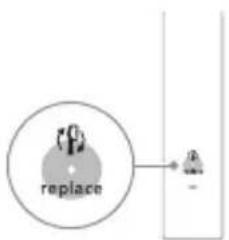
3 When the brush head replacement reminder indicator lights up amber, you should replace your brush head.
Note: All smart brush heads come with the brush head replacement reminder feature activated. To deactivate the brush head replacement reminder see 'Activating or deactivating features'.
Activating or deactivating features
You can activate or deactivate the following features of your toothbrush:
- EasyStart
- Brush head replacement reminder
- Pressure sensor
From handle:
Step 1: Place the handle on a plugged in charger.
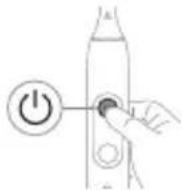 | Step 2: Press and hold the power on/off button for: | |
| EasyStart Brush head replacement reminder | Pressure sensor | |
| Up to 3 seconds Up to 5 seconds Up to 7 seconds | ||
| ↓ ↓ ↓ | ||
| Step 3: Let go of the power on/off button when you hear: | ||
| 1 beep 1 beep and then 2 beeps | 1 beep, 2 beeps and then 3 beeps | |
| ↓ ↓ ↓ | ||
| Together with: | ||
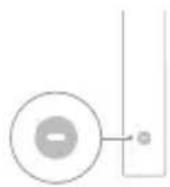
If you see the left LED for the battery indicator flash green 2 times and hear 3 tones low to high, then the feature has been activated.
OR
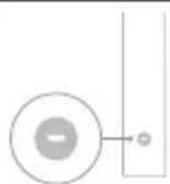
If you see the left LED for the battery indicator flash amber 1 time and hear 3 tones high to low, then the feature has been deactivated.
Charging and battery status
This Philips Sonicare toothbrush is designed to provide on average 42 brushing sessions, each session lasting 2 minutes (21 days if used twice per day) on a fully charged battery. The battery indicator shows the battery status when you complete the 2-minute brushing session, when you pause the toothbrush, or while it is charging.
Note: It can take up to 24 hours to fully charge the battery before first use, but you can use the Philips Sonicare toothbrush before it is fully charged.
Charging
1 Attach the USB charging cord to a wall adapter, plug the wall adapter into an electrical wall outlet.
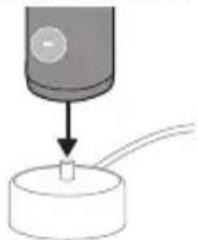
2 Place the handle on the charger. It will perform a bottom-to-top swoosh animation, sequentially fade the mode and intensity indicator lights, and emit two short beeps to confirm that the handle is placed properly.
natural_image
Diagram showing a mechanical component with a downward arrow and a small cylindrical object on a base (no text or symbols)3 The flashing green light of the battery indicator shows that the toothbrush is charging.
4 Once the battery is fully charged, the green light remains solid for 30 seconds and then turns off.
Battery status (when handle is on plugged-in charger)
When the handle is plugged into the charger, the battery indicator at the bottom of the handle shows the battery level.
Battery status
LED color
Low Flashing green
Partially full Flashing green
Full Solid green for 30 seconds and then
switches off
Battery status (when handle is not on plugged-in charger)
When the toothbrush is awake, the battery indicator at the bottom of the handle shows the battery level.
Battery status LED color
Full Solid green
Partially full Solid green
Medium low Flashing green
Low Flashing amber and 3 beeps after
brushing
Empty Flashing amber and 2 sets of 5 beeps
Note: To save energy, the battery indicator will switch off when no longer charging.
Note: When the battery is completely empty, the toothbrush switches off. Plug the toothbrush into the charger to charge it.
Note: To keep the battery fully charged at all times, you may keep your toothbrush plugged into the charger when not in use.
Cleaning
Toothbrush handle
natural_image
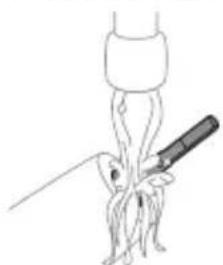
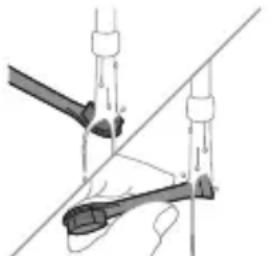
Simple line drawing of a medical procedure with a tool and tubing (no text or symbols)1 Remove the brush head and rinse the metal shaft area with warm water. Make sure you remove any residual toothpaste on the handle and around the buttons at least once a week, but preferably after each use.
Caution: Do not push on the rubber seal on the metal shaft or around the buttons with sharp objects, as this may cause damage.
2 Wipe the entire surface of the handle with a damp cloth.
Caution: Do not tap the handle on the sink or counter to remove excess water.
3 Dry the handle with a soft cloth or towel.
Brush head
natural_image
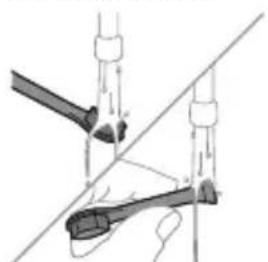
Diagram of two mechanical components with arrows indicating motion or force direction (no text or symbols)1 Rinse the brush head and bristles after each use and allow to air dry.
2 Remove the brush head from the handle and rinse the brush head connection with warm water at least once a week.
Charger
1 Unplug the charger before you clean it.
2 Wipe the surface of the charger with a damp cloth.
3 Dry the charger with a soft cloth or towel.
Travel case
Rinse with warm water and use a damp cloth to clean the travel case and allow to air dry.
Storage
If you are not going to use the product for an extended period of time, unplug it from the electrical outlet, clean it and store it in a cool and dry place away from direct sunlight.
Replacement
Replace Philips Sonicare brush heads every 3 months to achieve optimal results. Use only Philips Sonicare replacement brush heads.
Locating the model number
The model number begins with "HX" (e.g. HX123A) and can be found on the bottom of your toothbrush.
Troubleshooting
This chapter summarizes the most common problems you could encounter with the appliance. If you are unable to solve the problem with the information below, visit www.philips.com/support and insert your model number for a list of frequently asked questions or contact the Consumer Care Center in your country.
Problem Possible Cause Solution
| I cannot fully attach the brush head. There is a gap between the brush head and handle. | This gap is normal and is needed for the brush head to vibrate appropriately. The brush head must be able to move to create the right amount of vibrations. |
Problem Possible Cause Solution
| My Philips Sonicare toothbrush vibration is less powerful than before. | The brush head is too close to the body of the toothbrush or the toothbrush needs to be charged. | Remove the brush head from the handle and re-set it on the metal shaft leaving a small gap.(1-2mm).When charging, make sure the charger is plugged into a power supply and placed on a flat surface before placing the toothbrush on the charger. Allow the toothbrush to charge for 24 hours. |
| I charged my toothbrush, but it only works for a short time. | The base of the toothbrush is not placed flat on the charger when attempting to charge. | Make sure the charger is plugged into a power supply and placed on a flat surface before placing the toothbrush on the charger. Allow the toothbrush to charge for 24 hours. |
Warranty and support
Please visit www.philips.com/support and enter the model number located at the bottom of your device in the search bar in order to obtain more information on how to register your device, warranty information, and other frequently visited support topics.
For all product support, power consumption details, and the EU Declaration of Conformity, please visit www.philips.com. After searching for your device, you can find information on your product's features, technical specifications, as well as available accessories.
WARRANTY EXCLUSIONS
What is not covered under warranty:
- In mouth attachments including brush heads and nozzles.
- Damage caused by use of unauthorized replacement parts or unauthorized brush heads.
- Damage caused by misuse, abuse, neglect, alterations or unauthorized repair.
- Normal wear and tear, including chips, scratches, abrasions, discoloration or fading.
Recycling
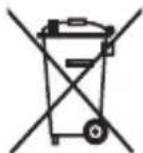
- This symbol means that electrical products and batteries shall not be disposed of with normal household waste.
- Follow your country's rules for the separate collection of electrical products and batteries.
Removal of built-in rechargeable battery
- CONTAINS LITHIUM-ION RECHARGEABLE CELL. MUST BE RECYCLED OR DISPOSED OF PROPERLY.
- The built-in rechargeable battery can be removed for disposal. If you are not comfortable disassembling electronics, please seek professional assistance at your local electronics recycling or repair shop.
- Instructions for removal of built-in rechargeable batteries can be found on www.philips.com/support. Use the Philips support home search bar to enter the toothbrush model number and find your product. The model number begins with "HX" (e.g. HX123A) and can be found on the bottom of your toothbrush. The battery removal instructions are in the Troubleshooting and Repair section of the product's support page.
- If batteries are damaged or leaking, avoid contact with the skin or eyes. If this occurs, immediately rinse well with water and seek medical care.
- When you handle batteries, make sure that your hands, the product and the batteries are dry.
- To avoid accidental short-circuiting of batteries after removal, do not let battery terminals come into contact with metal objects (e.g. coins, hairpins, rings). Do not wrap batteries in aluminum foil. Tape battery terminals or put batteries in a plastic bag before you discard them.
Giriş
natural_image
Simple line drawing of an open book with no text or symbols visiblenatural_image
Illustration of a hand holding a toothbrush with an arrow indicating force or direction (no text or symbols)natural_image
Simple line drawing of a bulb-like shape with a checkmark indicating a detail (no text or symbols)natural_image
Illustration of a hand using a pipette to apply liquid onto a surface, with an inset showing a droplet on a surface (no text or symbols present)natural_image
Diagram showing dental alignment with a tool interacting with teeth (no text or labels)Azərbaycanca
natural_image
Illustration of a microphone with a sensor icon and signal symbol (no text or labels)natural_image
Diagram showing a mechanical component with a downward arrow pointing to a small cylindrical component (no text or symbols present)natural_image
Simple line drawing of a medical procedure with a needle inserted into tissue (no text or symbols)natural_image
Diagram of a hand holding a tool with a ruler, against a diagonal line (no text or symbols)natural_image
Simple line drawing of an open book with no text or symbols visiblenatural_image
Illustration of a hand holding a tool with a pointed tip, showing a force or movement (no text or symbols)natural_image
Simple line drawing of a bulb-like shape with a checkmark indicating a detail (no text or symbols)natural_image
Illustration of a hand using a pen to apply a sample onto a surface, with an inset showing a magnified view of the sample (no text or symbols present)natural_image
Diagram showing dental tool application on upper teeth with magnified detail (no text or symbols)Čeština
natural_image
Diagram of a microphone with signal icon and sensor symbol (no text or labels)natural_image
Diagram showing a mechanical component with a downward arrow and a small cylindrical component attached to a circular base (no text or symbols)natural_image
Simple line drawing of a squid being injected with a pen, no text or symbols presentnatural_image
Diagram of two mechanical components with arrows indicating motion or force direction (no text or symbols)natural_image
Simple line drawing of an open book with no text or symbols visiblenatural_image
Illustration of a hand holding a toothbrush with an arrow indicating force or movement (no text or symbols)natural_image
Simple line drawing of a curved object with a checkmark indicating a detail (no text or symbols)natural_image
Illustration of a hand using a pipette to apply liquid onto a surface, with an inset showing a droplet on a surface (no text or symbols present)natural_image
Diagram showing dental tool interacting with teeth (no text or symbols)natural_image
Simple line drawing of a device with two circular components and a vertical line (no text or symbols)natural_image
Diagram of a microphone with a circular icon showing wireless signal, no text or symbols presentnatural_image
Diagram showing a mechanical component with a downward arrow and a small circular component on a base (no text or symbols)natural_image
Line drawing of a medical procedure involving a tool and tubing (no text or symbols)natural_image
Diagram of a mechanical or electrical component with two vertical rods and a central rod, intersected by a diagonal line (no text or symbols)natural_image
Simple line drawing of an open book with no text or symbols visiblenatural_image
Illustration of a hand holding a toothbrush with an arrow indicating force or movement (no text or symbols)natural_image
Simple line drawing of a bulb-like shape with a checkmark mark (no text or symbols)natural_image
Illustration of a hand using a pen to apply a small object to a surface, with an inset showing a textured surface (no text or symbols present)natural_image
Diagram showing a hand holding a small object with directional arrows indicating movement, labeled '45°' (no text or symbols on the diagram itself)natural_image
Diagram showing dental tool application on upper teeth with magnified detail (no text or symbols)natural_image
Diagram of a microphone with a sensor icon and connection point (no text or symbols)natural_image
Diagram showing a mechanical component with a downward arrow and a small central component, no text or symbols present.natural_image
Illustration of a medical procedure showing a syringe inserted into a patient's abdomen (no text or symbols present)natural_image
Diagram of two mechanical arms with arrows indicating motion or force direction (no text or symbols)www.philips.com/support
natural_image
Simple line drawing of an open book with no text or symbols visiblenatural_image
Illustration of a hand holding a toothbrush with an arrow indicating force or movement (no text or symbols)natural_image
Simple line drawing of a bulb-like shape with a checkmark indicating a detail (no text or symbols)natural_image
Illustration of a hand using a pen to apply a dropper onto a surface, with an inset showing a droplet on a surface (no text or symbols present)natural_image
Diagram showing a hand holding a 45-degree angle with a coiled spring and handle (no text or symbols)natural_image
Diagram showing dental tool application on upper teeth with magnified detail (no text or labels)natural_image
Diagram of a microphone with signal icon and speech bubble, no text or symbols presentnatural_image
Diagram showing a mechanical component with a downward arrow and a small cylindrical object on a base (no text or symbols)natural_image
Simple line drawing of a medical procedure with a needle inserted into tissue (no text or symbols)natural_image
Diagram of a mechanical or electrical component with two vertical rods and a central rod, intersected by a diagonal line (no text or symbols)natural_image
Simple line drawing of an open book with no text or symbols visiblenatural_image
Illustration of a hand holding a toothbrush with an arrow indicating force or direction (no text or symbols)natural_image
Simple line drawing of a curved object with a checkmark mark (no text or symbols)natural_image
Illustration of a hand using a pen to apply a product to a surface, with an inset showing a textured surface (no text or symbols)natural_image
Diagram of dental arching technique showing tooth arrangement and tool placement (no text or labels)natural_image
Diagram of a microphone with a sensor icon and signal symbol (no text or labels)natural_image
Simple diagram showing a device with a circular component being inserted into a cylindrical base (no text or symbols)natural_image
Line drawing of a medical procedure involving a tool and tubing (no text or symbols)natural_image
Diagram of a hand holding a tool with a ruler, against a diagonal line (no text or symbols)natural_image
Simple line drawing of an open book with no text or symbols visiblenatural_image
Illustration of a hand holding a tool with a pointed tip, showing motion (no text or symbols)natural_image
Simple line drawing of a curved object with a checkmark indicating a detail (no text or symbols)natural_image
Illustration of a hand using a pipette to apply liquid onto a surface, with an inset showing a droplet on a surface (no text or symbols present)natural_image
Illustration of dental arching technique with tooth arrangement and tool (no text or symbols)natural_image
Diagram of a microphone with a sensor icon and signal symbol (no text or labels)natural_image
Simple diagram showing a mechanical component with a downward arrow pointing to a small cylindrical object (no text or symbols)natural_image
Simple line drawing of a fork being inserted into a tube (no text or symbols)natural_image
Diagram of a mechanical or electrical component with labeled parts (no text or symbols present)EXCLUSIONS DE GARANTIE
www.philips.com/support
Napomena: značajke različitih modela mogu se razlikovati. Neki modeli možda nisu opremljeni sustavom Bluetooth ili NFC.
POHRANITE OVE UPUTE
POPIS UPOTRIJEBLJENIH SIMBOLA
Na proizvodu se mogu pojaviti sljedeći simboli:

natural_image
Simple line drawing of an open book with no text or symbols visibleOvaj simbol znači da prije upotrebe uređaja morate pročitati upute za upotrebu.
Ovaj simbol znači da morate upotrijebiti naznačeno napajanje.
Namjena
Ova električna četkica za zube Sonicare namijenjena je za uklanjanje naslaga i ostataka hrane sa zuba kako bi se smanjio karijes te poboljšalo i održavalo oralno zdravlje. Ova električna četkica za zube Sonicare namijenjena je za kućnu uporabu. Djeca četkicu trebaju upotrebljavati uz nadzor odrasle osobe.
Vaš Philips Sonicare (Slika 1)
1 Poklopac glave četkice
2 pametne glave četkice
3 simbol značajke BrushSync
4 Drška
5 Gumb za uključivanje/isključivanje
6 indikator intenziteta
7 Gumb za način rada/jačinu
8 Indikator načina rada
9 Indikator podsjetnika za zamjenu glave četkice
10 Indikator baterije
11 USB punjač (zidni adapter nije uključen)
12 Putna kutija
Napomena: priloženi dodaci mogu se razlikovati ovisno o kupljenom modelu.
Početak korištenja
Postavljanje glave četkice
natural_image
Illustration of a hand holding a toothbrush with an arrow indicating force or movement (no text or symbols)natural_image
Simple line drawing of a curved object with a checkmark mark (no text or symbols)2 Glavu četkice čvrsto pritisnite prema dolje na metalnu osovinu drške sve do kraja.
Napomena: Uobičajeno je vidjeti blagi razmak između glave četkice i drške.
Uporaba četkice za zube Philips Sonicare
Ako prvi put upotrebljavate četkicu za zube Sonicare, normalno je da osjećate više vibracija nego pri upotrebi četkice za zube koja nije električna. Korisnici pri prvoj upotrebi često primjenjuju preveliki pritisak. Samo blago pritisnite i četkanje prepustite četkici za zube. Za najbolje iskustvo slijedite upute za četkanje u nastavku.
Da biste se jednostavnije prebacili na svoju novu električnu četkicu za zube Sonicare, upotrebljavajte nižu postavku prvih 1 – 2 tjedna, a zatim prijeđite na višu postavku.
Upute za četkanje
natural_image
Illustration of a hand using a pipette to apply liquid onto a surface, with an inset showing a droplet on a surface (no text or symbols present)1 Smočite vlakna i nanesite malu količinu paste za zube.
natural_image
Diagram showing a hand holding a tool with a 45-degree angle indicator (no text or symbols present)natural_image
Diagram showing dental tool application on upper teeth with magnified view of tooth structure (no text or labels)5 Kako biste očistili unutarnje površine prednjih zubi, nagnite dršku četkice poluuspravno i izvršite nekoliko vertikalnih preklapajućih pokreta na svakom zubu.
Napomena: Kako biste osigurali ujednačeno četkanje svih zuba u ustima, podijelite svoja usta u 4 dijela pomoću funkcije QuadPacer (pogledajte poglavlje „Funkcije”).
flowchart
graph TD
    A["①"] --> B["②"]
    B --> C["③"]
    C --> D["④"]
    D --> E["④"]
    style A fill:#f9f,stroke:#333
    style B fill:#ccf,stroke:#333
    style C fill:#cfc,stroke:#333
    style D fill:#fcc,stroke:#333
    style E fill:#ffc,stroke:#333
Da biste ručno promijenili način rada, pritisnite gumb za način rada / intenzitet dok je četkica za zube isključena. Sve glave četkice Philips Sonicare rade u svakom načinu rada.
Clean Gum Health
| Prednost uklanjanje naslaga uklanjanje naslaga i masaža desni | |
| Preporučena razina intenziteta | visoka visoka |
Clean Gum Health
| Ukupno vrijeme četkanja | 2 minute 3 minute i 20 sekundi | |
| Kako četkati četkajte svaki segment30 sekundi, | četkajte svaki segment30 sekundi, | |
 |  | |
| Zatim četkajte duž linije desni svakog segmenta20 sekundi. | ||
Jačine
Postavke jačine
natural_image
Simple line drawing of a device with a circular target and two circular buttons, no text or symbols present.Vaša električna četkica za zube ima dvije različite postavke intenziteta:
- Visok intenzitet (dva svjetla)
- Nizak intenzitet (jedno svjetlo)
Napomena: Za najbolje rezultate čišćenja preporučuje se visoki intenzitet.
natural_image
Diagram of a microphone with a sensor icon and warning symbol (no text or labels)Tehnologija BrushSync omogućava glavi četkice da komunicira s drškom s pomoću mikročipa. Simbol 🚙a donjem dijelu glave četkice naznačuje da je glava četkice opremljena tom tehnologijom.
natural_image
Diagram showing a mechanical component with a downward arrow and a small square base, connected to a circular base (no text or symbols)natural_image
Line drawing of a squid being cut with a knife (no text or symbols)1 Odvojite glavu četkice i isperite prostor oko metalne osovine toplom vodom. Najmanje jednom tjedno, a po mogućnosti nakon svake uporabe, obavezno uklonite svu preostalu zubnu pastu s drške i oko tipki.
natural_image
Diagram of two mechanical components with arrows indicating motion or force direction (no text or symbols)natural_image
Simple line drawing of an open book with no text or symbols visiblenatural_image
Illustration of a hand holding a tool with a pointed tip, showing motion (no text or symbols)natural_image
Simple line drawing of a curved object with a checkmark indicating a detail (no text or symbols)natural_image
Illustration of a hand using a pipette to apply liquid onto a surface, with an inset showing a droplet on a surface (no text or symbols present)natural_image
Diagram showing a hand holding a small object with directional arrows indicating movement, labeled '45°' (no text or symbols on the diagram itself)natural_image
Diagram showing dental tool application on upper teeth with magnified detail (no text or symbols)natural_image
Simple diagram showing a mechanical component with a downward arrow and a circular base (no text or symbols)natural_image
Line drawing of a medical procedure with a needle inserted into tissue (no text or symbols)natural_image
Diagram of two mechanical components with arrows indicating motion or force direction (no text or symbols)www.philips.com/support
natural_image
Simple line drawing of an open book with no text or symbols visiblenatural_image
Illustration of a hand holding a toothbrush with a black arrow indicating force or movement (no text or symbols)natural_image
Simple line drawing of a curved object with a checkmark indicating a detail (no text or symbols)natural_image
Illustration of a hand using a pipette to apply liquid onto a surface, with an inset showing a droplet on a surface (no text or symbols present)1 Samitriniet sarus un uzklājiet mazliet zobu pastas.
natural_image
Diagram showing dental alignment with a tool interacting with teeth (no text or symbols)natural_image
Diagram showing a mechanical component with a downward arrow and a small square component on a base (no text or symbols)natural_image
Simple line drawing of a medical procedure with a tool and tubing (no text or symbols)natural_image
Diagram of two mechanical arms with connecting rods, no text or symbols presentwww.philips.com/support
natural_image
Simple line drawing of an open book with no text or symbols visiblenatural_image
Illustration of a hand holding a tool with a brush, showing a downward arrow (no text or symbols)natural_image
Simple line drawing of a curved object with a checkmark indicating a detail (no text or symbols)natural_image
Illustration of a hand using a pipette to apply liquid onto a surface, with an inset showing a droplet on a surface (no text or symbols present)natural_image
Diagram showing a hand holding a 45-degree angle with a coiled spring and handle (no text or symbols)natural_image
Diagram showing dental tool application on upper teeth with magnified detail (no text or labels)natural_image
Diagram of a microphone with a sensor icon and signal symbol (no text or labels)natural_image
Diagram showing a mechanical component with a downward arrow and a small cylindrical component attached to a circular base (no text or symbols)natural_image
Simple line drawing of a fork with a knife inserted, no text or symbols presentnatural_image
Diagram of a mechanical or electrical component with two vertical rods and a diagonal line, no text or symbols present.natural_image
Simple line drawing of an open book with no text or symbols visibleMagyar
natural_image
Illustration of a hand holding a tool with a pointed tip, showing a force or grip (no text or symbols present)natural_image
Simple line drawing of a curved object with a checkmark mark (no text or symbols)natural_image
Illustration of a hand holding a pen, with an inset showing a magnified view of a cylindrical object (no text or symbols present)natural_image
Diagram showing a hand holding a tool with an arrow indicating 45° angle (no text or symbols present)natural_image
Illustration of dental tool interacting with teeth (no text or symbols)natural_image
Diagram of a microphone with a sensor icon and signal symbol (no text or labels)flowchart
graph TD
    A["replace"] --> B["a"]
232 Magyar
natural_image
Simple diagram showing a device pressing into a circular base with wires (no text or symbols)natural_image
Simple line drawing of a medical procedure with a tool and tubing (no text or symbols)natural_image
Diagram of a mechanical assembly with two rods and a connecting rod (no text or labels)natural_image
Simple line drawing of an open book with no text or symbols visiblenatural_image
Illustration of a hand holding a toothbrush with an arrow indicating force or movement (no text or symbols)natural_image
Simple line drawing of a bottle with a cap and a checkmark (no text or symbols)natural_image
Illustration of a hand holding a pen with a magnified inset showing a droplet on a surface (no text or symbols)natural_image
Diagram showing dental tool interacting with teeth (no text or labels)natural_image
Diagram of a microphone with a sensor icon and connection point (no text or symbols)natural_image
Diagram showing a mechanical component with a downward arrow and a small circular component on a base (no text or symbols)natural_image
Simple line drawing of a medical procedure with a needle inserted into tissue (no text or symbols)natural_image
Diagram of a mechanical or electrical component with two vertical rods and a central rod, intersected by a diagonal line (no text or symbols)natural_image
Simple line drawing of an open book with no text or symbols visiblenatural_image
Illustration of a hand holding a toothbrush with an arrow indicating force or direction (no text or symbols)natural_image
Simple line drawing of a curved object with a checkmark indicating a detail (no text or symbols)natural_image
Illustration of a hand using a pipette to apply liquid onto a surface, with an inset showing a droplet on a surface (no text or symbols present)natural_image
Diagram showing a hand holding a 45-degree angle with a coiled spring and handle (no text or symbols)natural_image
Diagram showing dental tool application on upper teeth with magnified detail (no text or labels)natural_image
Diagram of a microphone with a sensor icon and warning symbol (no text or labels)natural_image
Diagram showing a mechanical component with a downward arrow and a small cylindrical object on a base (no text or symbols)3 Det blinkende grønne lyset på batteriindikatoren viser at tannbørsten lades.
natural_image
Simple line drawing of a medical procedure with a tool and tubing (no text or symbols)natural_image
Diagram of two mechanical components with arrows indicating motion or force direction (no text or symbols)natural_image
Simple line drawing of an open book with no text or symbols visiblenatural_image
Illustration of a hand holding a tool with a pointed tip and arrow indicating direction (no text or symbols)1 Cho'tka tuklari dastaning old qismi bilan bir xil yo'nalishda bo'lishi uchun cho'tka kallagini tekislang.
natural_image
Simple line drawing of a bulb-like shape with a checkmark indicating a detail (no text or symbols)2 Cho'tka kallagini u boshqa kirmagunigacha metall valga qattiq bosing.
Izoh: Cho'tka kallagi va dasta orasida kichik tirqish ko'rinishi – normal holat.
Philips Sonicare tish pastangizdan foydalanish
Agar Sonicare tish pastasidan birinchi marta foydalanayotgan bo'lsangiz, elektr bo'Imagan tish cho'tkasidan foydalanishga qaraganda ko'proq tebranish sezish normal holat. Odatda birinchi marta foydalanayotgan foydalanuvchilar ortiqcha bosim beradi. Faqat yumshoq bosib bering va tish cho'tkasi siz uchun tozalashiga imkon bering. Eng yaxshi taassurot uchun tish tozalash ko'rsatmalariga amal qiling.
Yangi Sonicare motorli tish cho'tkasiga o'tishingizga yordam berish uchun ilk 1-2 hafta pastroq sozlamada foydalaning, keyin yuqoriroq sozlamaga o'ting.
Tish tozalash ko'rsatmalari
natural_image
Illustration of a hand holding a pen with a magnified inset showing a textured surface (no text or symbols)1 Cho'tkani namlang va unga kam miqdorda tish pastasi surting.
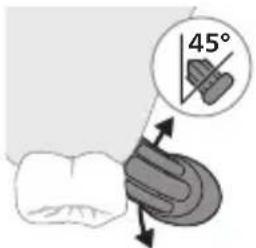
2 Tish cho'tkasini tishlar qarshisida kichik (45 daraja) burchak ostida tuting va cho'tkalar milk chizig'iga yoki uning tagiga yetishi uchun uni yengil dosing. Izoh: Cho'tka markazini tishlarga doimi to'liq tekkizib turing.
natural_image
Hand inserting a power button into a bottle (no text or symbols visible)3 Philips Sonicare yoqilishi uchun yoqish/o'chirish tugmachasini bosing.
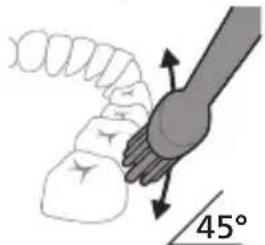
4 Cho'tkani tishlar va milk chizig'iga yengil tutib turing. Cho'tkalar tishlar orasiga kirishi uchun cho'tka kallagini oldinga-orqaqa kichik harakatlar bilan tishlaringizni tozalang. Bu harakatlarni tish tozalash siklingiz yakunlangunga qadar bajaring.
natural_image
Diagram showing dental tool application on upper teeth with magnified view (no text or symbols)5 Old tishlarning ichki yuzalarini tozalash uchun dastani yarim-vertikal qilib ushlang va har bir tishni bir necha vertikal harakatlar bilan birma-bir tozalab chiqing.
Bu rejimni oddiy usulda almashtirish uchun tish cho'tkasi o'chiq paytda rejim/jadallik tugmasini bosing. Barcha Philips Sonicare cho'tka kallaklari alohida rejim bilan ishlaydi.
Clean Gum Health
| Foydasi Qasmoqlarni ketkazish Qasmoqlarni ketkazishva milklarni uqalash | ||
| Tavsiya etilgan jadallik darajasi | Yuqori Yuqori | |
| Jami tish tozalash vaqti | 2 daqiga 3 daqiga-yu 20 soniya | |
| Tozalash usuli Har bir segmentni 30soniyadan tozalang, | 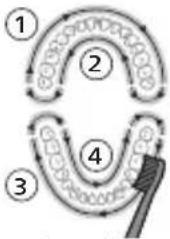 | |
 | ||
| Keyin har bir segmentning milk chizig'i bo'ylab 20 soniya davomida cho'tkalang. | ||
Intensivlik
Jadallik sozlamalari
Motorli tish cho'tkangiz 2 turdagi jadallik sozlamalari bilan jihozlangan:
- Yuqori jadallik (ikkita chiroq)
- Past jadallik (bitta chiroq)
natural_image
Diagram of a stylized microphone with a circular icon showing wireless signal (no text or symbols)BrushSync texnologiyasi cho'tka kallagining dasta bilan mikrochip orqali muloqot qilishiga yordam beradi. Cho'tka kallagi ostidagi Belgisi cho'tka kallagi ushbu texnologiya bilan jihozlanganini anglatadi.
BrushSync texnologiyasi cho'tka kallagini almashtirish zarurligini eslatadi. Philips Sonicare BrushSync texnologiyasiga ega keng turdagi smart cho'tka kallaklarini taklif qiladi. Tish cho'tkasining cho'tka kallaklari to'liq ko'lami bilan tanishish va sizga eng mos keladigan cho'tka kallagini topish uchun www.philips.com/toothbrush-heads veb-saytiga kiring.
Philips Sonicare BrushSync texnologiyasiga ega keng turdagi smart cho'tka kallaklarini taklif qiladi. Tish cho'tkasining cho'tka kallaklari to'liq ko'lami bilan tanishish va sizga eng mos keladigan cho'tka kallagini topish uchun www.philips.com/toothbrush-heads veb-saytiga kiring.
Funksiyalar
- Bosim sensori
- SmarTimer
- QuadPacer
- EasyStart
- Cho'tka kallagini almashtirishni eslatish funksiyasi
Bosim sensori
natural_image
Simple diagram showing a device pressing into a circular component with wires (no text or symbols)3 Batareyaning miltillovchi yashil indikatori tish cho'tkasi quvvatlanayotganini bildiradi.
4 Batareya to'liq quvvatlangach, yashil chiroq 30 soniya yonib turadi va keyin o'chadi.
natural_image
Line drawing of a medical procedure with a needle inserted into tissue (no text or symbols)1 Cho'tka kallagini chiqarib oling va metall val atrofini iliq suv bilan yuving. Dasta va tugmalar atrofidagi tish pastasi goldiqlarini haftada kamida bir marta, lekin yaxshisi har foydalanishdan keyin tozalang.
Ogohlantirish: Metall valdagi yoki tugmalar atrofidagi rezina zichlagichni o'tkir narsalar bilan bosmang, bu shikastlanishga olib kelishi mumkin.
2 Dastaning butun yuzasini nam mato bilan artib oling.
Ogohlantirish: Ortiqcha suvni yo'qotish uchun dastani chanoq yoki stolga urmang.
3 Dastani yumshoq mato yoki sochiq bilan quriting.
Cho'tka kallagi
natural_image
Diagram of a mechanical or electrical component with two arms and a diagonal line, no visible text or symbols1 Har foydalanishdan keyin cho'tka kallagi va cho'tkalarini yuving va havoda quriting.
2 Cho'tka kallagini dastadan chiqarib oling va cho'tka kallagi ulanish qismini kamida haftada bir marta iliq suv bilan yuving.
Quvvatlash moslamasi
1 Tozalashdan avval, quvvatlagichni tarmogdan uzing.
2 Quvvatlash moslamasining butun yuzasini nam mato bilan artib oling.
3 Quvvatlagichni yumshog mato yoki sochiq bilan quriting.
Sayohat g'ilofi
Iliq suv bilan yuving va sayohat g'ilofini tozalash uchun nam matodan foydalaning va havoda quriting.
Xotira
natural_image
Simple line drawing of an open book with no text or symbols visiblenatural_image
Illustration of a hand holding a toothbrush with an arrow indicating force or movement (no text or symbols)natural_image
Simple line drawing of a bulb-like shape with a checkmark indicating a detail (no text or symbols)natural_image
Illustration of a hand using a pen to apply a small object onto a surface, with an inset showing a magnified view of a cylindrical object (no text or symbols present)natural_image
Diagram showing a hand holding a small object with directional arrows indicating movement, labeled '45°' (no text or symbols on the diagram itself)natural_image
Illustration of dental tool interacting with teeth (no text or symbols)natural_image
Diagram of a microphone with a sensor icon and signal symbol (no text or labels)natural_image
Diagram showing a mechanical component with a downward arrow and a small square component on a base (no text or symbols)natural_image
Simple line drawing of a medical procedure with a needle inserted into tissue (no text or symbols)natural_image
Diagram of a mechanical or electrical component with two arms and a central shaft, no visible text or symbolsnatural_image
Simple line drawing of an open book with no text or symbols visiblenatural_image
Illustration of a hand holding a toothbrush with an arrow indicating force or movement (no text or symbols)natural_image
Simple line drawing of a curved object with a checkmark mark (no text or symbols)natural_image
Illustration of a hand using a pipette to apply liquid onto a surface, with an inset showing a magnified view of a cylindrical object (no text or symbols present)natural_image
Illustration of a hand holding a small object with directional arrows indicating movement, labeled '45°' (no text or symbols on the diagram itself)natural_image
Illustration of dental tool interacting with teeth (no text or symbols)natural_image
Illustration of a toothbrush with a circular icon showing sensor signal (no text or symbols)natural_image
Simple line drawing of a mechanical component with a downward arrow and a small protrusion on a circular base (no text or symbols)natural_image
Line drawing of a fork being inserted into a tube (no text or symbols)natural_image
Diagram of two mechanical components with arrows indicating motion or force direction (no text or symbols)natural_image
Simple line drawing of an open book with no text or symbols visiblenatural_image
Illustration of a hand holding a tool with a pointed tip, showing motion (no text or symbols)natural_image
Simple line drawing of a vertical pipe or duct with a checkmark indicating a detail (no text or symbols present)natural_image
Illustration of a hand using a pipette to apply liquid onto a surface, with an inset showing a droplet on a surface (no text or symbols present)natural_image
Diagram showing a hand holding a small object with directional arrows indicating movement, labeled '45°' (no text or symbols beyond the angle marker)natural_image
Diagram showing dental tool application on upper teeth with magnified view of tooth structure (no text or labels)natural_image
Diagram of a microphone with a sensor icon and warning symbol (no text or labels)natural_image
Diagram showing a mechanical component with a downward arrow pointing to a small cylindrical component (no text or symbols present)natural_image
Simple line drawing of a fork with a knife inserted, no text or symbols presentnatural_image
Diagram of two mechanical tools or tools with a diagonal line, no visible text or symbolsnatural_image
Simple line drawing of an open book with no text or symbols visiblenatural_image
Illustration of a hand holding a tool with a pointed tip, showing a force or grip (no text or symbols present)natural_image
Simple line drawing of a curved object with a checkmark mark (no text or symbols)natural_image
Illustration of a hand using a pipette to apply liquid onto a surface, with an inset showing a droplet on a surface (no text or symbols present)natural_image
Diagram showing a hand holding a small object with directional arrows indicating movement, labeled '45°' (no text or symbols on the diagram itself)natural_image
Illustration of dental tool interacting with teeth (no text or symbols)masazhimi i mishrave
natural_image
Diagram of a microphone with a sensor icon and warning symbol (no text or labels)natural_image
Simple diagram showing a mechanical component with a downward arrow and a small square component on a circular base (no text or symbols)natural_image
Line drawing of a medical procedure with a needle inserted into tissue (no text or symbols)natural_image
Diagram of a hand holding a tool with a ruler, against a diagonal line (no text or symbols)www.philips.com/support
natural_image
Simple line drawing of an open book with no text or symbols visibleTa simbol pomeni, da morate pred uporabo aparata prebrati navodila za uporabo.
Ta simbol pomeni, da morate uporabiti navedeni napajalnik.
Predvidena uporaba
natural_image
Illustration of a hand holding a toothbrush with an arrow indicating force or movement (no text or symbols)natural_image
Simple line drawing of a curved object with a checkmark mark (no text or symbols)natural_image
Illustration of a hand using a pipette to apply liquid onto a surface, with an inset showing a droplet on a surface (no text or symbols present)natural_image
Hand inserting a power button into a bottle (no text or symbols visible)3 Zobno ščetko Philips Sonicare vklopite s pritiskom gumba za vklop/izklop.
natural_image
Diagram showing a hand holding a small object with directional arrows indicating movement, labeled '45°' (no text or symbols beyond the angle marker)natural_image
Diagram showing dental tool application on upper teeth with magnified detail (no text or symbols)natural_image
Diagram of a microphone with a sensor icon and signal symbol, no text or labels presentnatural_image
Diagram showing a mechanical component with a downward arrow and a small square component on a base (no text or symbols)natural_image
Simple line drawing of a medical procedure with a needle inserted into tissue (no text or symbols)natural_image
Diagram of two mechanical arms connected by a diagonal line, showing alignment or assembly (no text or symbols)www.philips.com/support
natural_image
Simple line drawing of an open book with no text or symbols visibleTento symbol znamená, aby ste si pred použitím zariadenia prečítali návod na použitie.
natural_image
Illustration of a hand holding a tool with a pointed tip, showing a force or grip (no text or symbols present)natural_image
Simple line drawing of a bulb-like shape with a checkmark indicating a detail (no text or symbols)natural_image
Illustration of a hand using a pen to apply a sample onto a surface, with an inset showing a magnified view of the sample (no text or symbols present)1 Navlhčite štetiny a vytlačte na kefku trochu zubnej pasty.
natural_image
Diagram showing a hand holding a small object with directional arrows indicating movement, labeled '45°' (no text or symbols on the diagram itself)4 Jemne udržujte štetiny v polohe na zuboch a d'asnách. Zuby čistite krátkymi pohybmi dopredu a dozadu tak, aby štetiny dosahovali do priestorov medzi zubami. Tento pohyb opakujte počas celého čistiaceho cyklu.
natural_image
Diagram showing dental tool application on upper teeth with magnified view (no text or labels)natural_image
Diagram of a toothbrush with a sensor icon and signal symbol, no text or labels presentnatural_image
Diagram showing a mechanical component with a downward arrow pointing to a small cylindrical component (no text or symbols present)natural_image
Line drawing of a medical procedure with a needle inserted into tissue (no text or symbols)natural_image
Diagram of a hand holding a tool with a ruler, against a diagonal line (no text or symbols)natural_image
Simple line drawing of an open book with no text or symbols visibleOvaj simbol označava da je potrebno pročitati uputstvo za upotrebu pre korišćenja uređaja.
natural_image
Illustration of a hand holding a toothbrush with an arrow indicating force or direction (no text or symbols)1 Poravnajte glavu četkice tako da su vlakna okrenuta u istom smeru kao i prednja strana drške.
natural_image
Simple line drawing of a vertical cylindrical object with a checkmark mark, no text or symbols present.2 Čvrsto pritisnite glavu četkice na metalnu osovinu do kraja.
natural_image
Illustration of a hand using a pipette to apply liquid onto a surface, with an inset showing a droplet on a surface (no text or symbols present)1 Pokvasite vlakna i nanesite malu količinu paste za zube.
2 Postavite vlakna četkice pod blagim uglom (45 stepeni) prema zubima i lagano pritisnite kako bi vlakna dosegnula liniju desni ili blago ispod linije desni.
natural_image
Diagram of dental arching technique showing tooth arrangement and tool path (no text or labels)5 Da biste očistili unutrašnju površinu prednjih zuba, nagnite dršku četkice u poluuspravan položaj i pređite vertikalno četkicom preko svakog zuba tako da se potezi preklapaju.
Napomena: Da biste bili sigurni da perete ravnomerno na svim mestima u ustima, podelite usta na 4 dela pomoću funkcije QuadPacer (pogledajte poglavlje „Karakteristike“).
flowchart
graph TD
    A["①"] --> B["②"]
    B --> C["③"]
    C --> D["④"]
    D --> E["③"]
    style A fill:#f9f,stroke:#333
    style B fill:#ccf,stroke:#333
    style C fill:#cfc,stroke:#333
    style D fill:#fcc,stroke:#333
    style E fill:#ffc,stroke:#333
6 Počnite pranje s odeljkom 1 (gornji zubi spolja) i četkajte 30 sekundi pre prelaska na odeljak 2 (gornji zubi iznutra). Nastavite četkanje s odeljkom 3 (donji zubi spolja) i četkajte 30 sekundi pre prelaska na odeljak 4 (donji zubi iznutra).
7 Nakon završetka ciklusa pranja zuba, možete dodatno da operete površine za žvakanje i područja u kojima dolazi do pojave fleka. Možete da operete i jezik pomoću uključene ili isključene četkice za zube, po želji. Vaša Philips Sonicare četkica za zube je bezbedna za upotrebu kod osoba sa fiksnim aparatima za zube (glave četkice se u tom slučaju brže troše), kao i za zubne nadoknade (plombe, krunice, fasete), pod uslovom da su pravilno postavljene i neoštećene. Ako dođe do problema, obratite se stomatologu.
Napomena: Kada se koristi četkica za zube Philips Sonicare u kliničkim studijama, koristite je u režimu Clean sa podešenim visokim intenzitetom, potpuno napunjenom drškom i deaktiviranom funkcijom EasyStart.
Režimi
Vaša električna četkica ima dva različita režima: Clean i Gum Health.
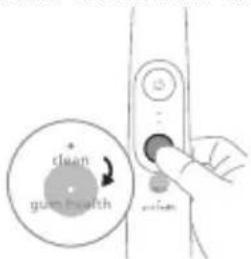
Da biste ručno promenili režim, pritisnite dugme za režim/intenzitet kad je četkica za zube isključena. Sve Philips Sonicare glave četkica su kompatibilne sa svakim režimom.
Clean Gum Health
| Pogodnost Uklanjanje plaka Uklanjanje plaka i masaža desni | ||
| Preporučeni nivo intenziteta | Visok Visok | |
| Ukupno vreme pranja zuba | 2 minuta 3 minuta, 20 sekundi | |
Kako se pere perite svaki segment 30 sekundi, 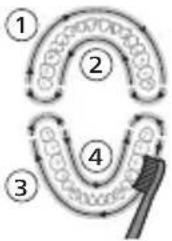 | perite svaki segment 30 sekundi, 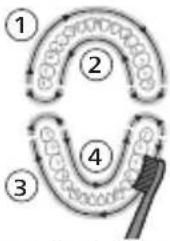 | |
| Zatim četkajte duž linije desni svakog segmenta po 20 sekundi. | ||
Intenziteti
Postavke intenziteta
natural_image
Pure electrical circuit lines without any symbolsElektrična četkica za zube ima 2 različitih postavki za intenzitet:
- Veliki intenzitet (dva svetla)
- Mali intenzitet (jedno svetlo)
Napomena: Veliki intenzitet se preporučuje za najbolje rezultate čišćenja.
Da biste ručno izabrali željeni intenzitet, pritisnite dugme za režim/intenzitet dok je četkica za zube uključena da biste se kretali kroz opcije. Postavka intenziteta se može prilagoditi samo kada je četkica za zube uključena.
Tehnologija BrushSync
natural_image
Diagram of a microphone with a circular icon showing wireless signal, no text or symbols presentTehnologija BrushSync omogućava komunikaciju između glave četkice i drške koristeći mikročip. Simbol na donjoj strani glave četkice označava da glava četkice sadrži ovu tehnologiju.
BrushSync tehnologija omogućava funkciju podsetnika za zamenu glave četkice.
Philips Sonicare ima široku paletu pametnih glava četkica sa tehnologijom BrushSync. Za više informacija o našoj cjelokupnoj paleti glava četkica za zube posjetite www.philips.com/toothbrush-heads i pronadite glavu četkice koja vam najviše odgovara.
Philips Sonicare ima široku paletu pametnih glava četkica sa tehnologijom BrushSync. Za više informacija o našoj cjelokupnoj paleti glava četkica za zube posjetite www.philips.com/toothbrush-heads i pronadite glavu četkice koja vam najviše odgovara.
Funkcije
- Senzor pritiska
- SmarTimer
- QuadPacer
- EasyStart
- Podsetnik za zamenu glave sa četkicom
412 Srpski
Senzor pritiska
Četkica za zube Philips Sonicare meri pritisak koji primenjujete tokom pranja zuba kako bi se zaštitle desni i zubi od povrede.
natural_image
Diagram showing a mechanical component with a downward arrow and a small rectangular object on a base (no text or symbols)3 Kada indikator baterije treperi zeleno, ukazuje na to da se četkica za zube puni.
natural_image
Simple line drawing of a medical procedure with a needle inserted into tissue (no text or symbols)1 Skinite glavu četkice i isperite oblast oko metalne osovine toplom vodom. Obavezno uklonite ostatke paste sa drške i oko dugmadi najmanje jednom nedeljno, a po mogućstvu nakon svake upotrebe.
Oprez: Ne pritiskajte gumeni zaptivač na metalnom vratilu ili oko dugmadi oštrim predmetima, jer može doći do oštećenja.
2 Čitavu površinu drške obrišite vlažnom krpom.
natural_image
Diagram of two mechanical arms with ropes and a diagonal line, no text or symbols present1 Isperite glavu četkice i vlakna nakon svake upotrebe i ostavite ih da se osuše na vazduhu.
natural_image
Simple line drawing of an open book with no text or symbols visiblenatural_image
Illustration of a hand holding a tool with a pointed tip, showing a force or movement (no text or symbols present)natural_image
Simple line drawing of a bulb-like shape with a checkmark indicating a detail (no text or symbols)natural_image
Illustration of a hand using a pipette to apply liquid onto a surface, with an inset showing a droplet on a surface (no text or symbols present)natural_image
Diagram showing a hand holding a 45-degree angle with a coiled spring and handle (no text or symbols)natural_image
Diagram showing dental tool application on upper teeth with magnified view (no text or labels)natural_image
Diagram of a microphone with a sensor icon and warning symbol (no text or labels)natural_image
Simple diagram showing a mechanical component with a downward arrow and a small cylindrical object inside, no text or symbols present.natural_image
Line drawing of a medical procedure with a needle inserted into tissue (no text or symbols)natural_image
Diagram of a mechanical or electrical component with two vertical rods and a diagonal line, no text or symbols present.natural_image
Simple line drawing of an open book with no text or symbols visiblenatural_image
Illustration of a hand holding a toothbrush with an arrow indicating force or direction (no text or symbols)natural_image
Simple line drawing of a bulb-like shape with a checkmark indicating a detail (no text or symbols)natural_image
Illustration of a hand using a pipette to apply liquid onto a surface, with an inset showing a droplet on a surface (no text or symbols present)natural_image
Diagram showing a hand holding a small object with an arrow indicating 45° angle, no text or symbols present.natural_image
Diagram of dental arching with a tool interacting with teeth (no text or labels)natural_image
Diagram of a microphone with a sensor icon and warning symbol (no text or labels)natural_image
Diagram showing a mechanical component with a downward arrow and a small cylindrical component at the base (no text or symbols)natural_image
Simple line drawing of a medical procedure with a tool and tubing (no text or symbols)natural_image
Diagram of a mechanical or electrical component with two rods and a connecting rod, no text or symbols presentwww.philips.com/support
natural_image
Simple line drawing of an open book with no text or symbols visiblenatural_image
Illustration of a hand holding a toothbrush with an arrow indicating force (no text or symbols)natural_image
Simple line drawing of a bulb-like shape with a checkmark mark (no text or symbols)natural_image
Illustration of a hand holding a pen with a magnified inset showing a droplet on a surface (no text or symbols)natural_image
Diagram showing a hand holding a 45-degree angle with a coiled spring (no text or symbols present)natural_image
Illustration of a toothbrush applying sealant to teeth (no text or symbols)natural_image
Diagram of a toothbrush with a circular icon showing sensor signal (no text or symbols)natural_image
Simple diagram showing a device with a circular component and a small cylindrical object connected to a base (no text or symbols)natural_image
Simple line drawing of a medical procedure with a tool and tubing (no text or symbols)natural_image
Diagram of two mechanical arms with connecting rods, no text or symbols presentULANYLYAN NYŞANLARYN SANAWY
natural_image
Simple line drawing of an open book with no text or symbols visibleBu nysan enjamy ulanmazdan ozal ulanyş gözükdirijilerini okaň diýmegi aňladýar.
Bu nyşan görkezilen elektrik üpjünçiligini ulanmalydygyny aňladýar.
Niyetlenilýän ulanys
natural_image
Illustration of a hand holding a toothbrush with an arrow indicating force or movement (no text or symbols)natural_image
Simple line drawing of a bulb-like shape with a checkmark indicating a detail (no text or symbols)2 Nasadkany metal walyň üstüne ol aňryk baryp direyänçä közümli basyň.
Bellik: Nasadka bilen tutawajyň arasynda çalaja boşluk görmek adaty yagdaýdyr.
natural_image
Illustration of a hand using a pen to apply a sample onto a surface, with an inset showing a magnified view of the sample (no text or symbols present)1 Gyllary öllän we üstüne azajyk diş pastasyny çalyn.
natural_image
Diagram showing a hand holding a small object with directional arrows indicating movement, labeled '45°' (no text or symbols on the diagram itself)natural_image
Diagram showing dental tool application on upper teeth with magnified view (no text or symbols)Türkmençe
natural_image
Illustration of a toothbrush with a circular icon showing wireless signal (no text or symbols)natural_image
Diagram showing a mechanical component with a downward arrow and a small central component, no text or symbols present.natural_image
Simple line drawing of a medical procedure with a needle inserted into tissue (no text or symbols)natural_image
Diagram of a hand holding a tool with labeled parts, no text or symbols present1 Her gezek ulanylandan soň çotga nasadkasyny we gyllaryny yuwuň hem-de howada guramagyna maý beriň.
2 Azyndan hepdede bir gezek nasadkany tutawaçdan aýryp, nasadkanyň birikmesini ýyly suw bilen ýuwup durlaň.
Zarýadnik
natural_image
Simple line drawing of an open book with no text or symbols visiblenatural_image
Illustration of a hand holding a tool with a textured handle and arrow indicating motion (no text or symbols)natural_image
Simple line drawing of a bulb-like shape with a checkmark mark (no text or symbols)natural_image
Illustration of a hand using a pipette to apply liquid onto a surface, with an inset showing a microplate (no text or symbols present)natural_image
Diagram showing a hand holding a small object with directional arrows indicating movement, labeled '45°' (no text or symbols beyond the angle marker)natural_image
Diagram showing dental tool application on upper teeth with magnified detail (no text or symbols)Clean (Καθαρισμός) Gum Health
Clean (Καθαρισμός) Gum Health
natural_image
Illustration of a toothbrush with a circular icon showing wireless signal and a sensor symbol (no text or labels)natural_image
Simple diagram showing a mechanical component with a downward arrow and a small circular component on a base (no text or symbols)natural_image
Simple line drawing of a biological or mechanical setup with an antenna and a tool, no text or symbols present.natural_image
Diagram of two mechanical components with a diagonal line, no text or symbols presentnatural_image
Simple line drawing of an open book with no text or symbols visiblenatural_image
Illustration of a hand holding a tool with a textured handle and arrow indicating motion (no text or symbols)natural_image
Simple line drawing of a bottle with a checkmark mark indicating a measurement or inspection (no text or symbols present)natural_image
Illustration of a hand using a pen to apply a product to a surface, with an inset showing a textured surface (no text or symbols)natural_image
Diagram showing dental tool application on upper teeth with magnified detail (no text or symbols)natural_image
Simple diagram showing a device pressing into a cylindrical component with a cable (no text or symbols)natural_image
Diagram of a biological or anatomical structure with branching structures and a needle inserted (no text or labels)natural_image
Diagram of a hand holding a tool with labeled parts, no text or symbols presentnatural_image
Simple line drawing of an open book with no text or symbols visiblenatural_image
Illustration of a hand holding a tool with a textured handle and arrow indicating motion (no text or symbols)natural_image
Simple line drawing of a bulb-like shape with a checkmark mark (no text or symbols)natural_image
Illustration of a hand using a pipette to apply liquid onto a surface, with an inset showing a magnified view of the surface (no text or symbols present)natural_image
Hand placing a power button into a bottle (no text or symbols visible)natural_image
Illustration of dental tool interacting with teeth (no text or symbols)natural_image
Simple diagram showing a device pressing into a cylindrical component with a cable (no text or symbols)natural_image
Line drawing of a medical procedure with a needle inserted into tissue (no text or symbols)natural_image
Diagram of a hand holding a tool with labeled parts, no text or symbols presentnatural_image
Simple line drawing of an open book with no text or symbols visiblenatural_image
Illustration of a hand holding a tool with a pointed tip, showing a force or movement (no text or symbols)natural_image
Simple line drawing of a curved object with a checkmark mark, no text or symbols presentnatural_image
Illustration of a hand using a pipette to apply liquid onto a surface, with an inset showing a droplet on a surface (no text or symbols present)natural_image
Diagram showing dental tool application on upper teeth with magnified detail (no text or symbols)natural_image
Diagram showing a mechanical component with a downward arrow and a small square component on a base (no text or symbols)natural_image
Diagram of a medical procedure showing a tool interacting with a patient's leg and arm (no text or labels)natural_image
Diagram of mechanical components or tools on a diagonal line, no visible text or symbolsnatural_image
Simple line drawing of an open book with no text or symbols visiblenatural_image
Illustration of a hand holding a toothbrush with an arrow indicating force or direction (no text or symbols)natural_image
Simple line drawing of a bulb-like shape with a checkmark mark (no text or symbols)natural_image
Illustration of a hand using a pipette to apply liquid onto a surface, with an inset showing a droplet on a surface (no text or symbols present)natural_image
Illustration of a tooth with a brush applying material to a dental model (no text or symbols)natural_image
Pure electrical circuit lines without any symbolsnatural_image
Diagram of a microphone with a sensor icon and signal symbol, no text or labels presentnatural_image
Diagram showing a mechanical component with a downward arrow and a small square component on a circular base (no text or symbols)natural_image
Line drawing of a medical procedure showing a needle inserted into a tube with tubing (no text or symbols)natural_image
Diagram of a hand holding a tool with a diagonal line, no text or symbols presentnatural_image
Simple line drawing of an open book with no text or symbols visiblenatural_image
Illustration of a hand holding a toothbrush with an arrow indicating force or direction (no text or symbols)natural_image
Simple line drawing of a curved object with a checkmark mark (no text or symbols)natural_image
Illustration of a hand using a pen to apply a product to a surface, with an inset showing a textured surface (no text or symbols)3 Барои фаьол кардани Philips Sonicare тугмаи фаьол/хомўшро пахш кунед.
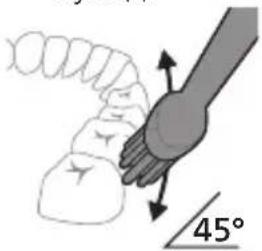
natural_image
Diagram showing dental tool application on upper teeth with magnified view (no text or symbols)natural_image
Diagram of a microphone with a sensor icon and warning symbol (no text or labels)natural_image
Simple diagram showing a device pressing into a cylindrical component with a cable (no text or symbols)natural_image
Simple line drawing of a medical procedure with a needle inserted into tissue (no text or symbols)natural_image
Diagram of a hand holding a tool with two tools, no text or symbols presentnatural_image
Simple line drawing of an open book with no text or symbols visiblenatural_image
Illustration of a hand holding a toothbrush with an arrow indicating force or direction (no text or symbols)natural_image
Simple line drawing of a bulb-like shape with a checkmark indicating a measurement or inspection (no text or symbols present)natural_image
Illustration of a hand using a pipette to apply liquid onto a surface, with an inset showing a droplet on a surface (no text or symbols present)natural_image
Diagram showing dental tool interacting with teeth (no text or labels)natural_image
Diagram of a microphone with signal icon and speech bubble, no text or symbols presentnatural_image
Diagram showing a mechanical component with a downward arrow and a small square component on a base (no text or symbols)natural_image
Simple line drawing of a medical procedure with a needle inserted into tissue (no text or symbols)natural_image
Diagram of a hand holding a tool with a diagonal line, no text or symbols presentnatural_image
Simple line drawing of an open book with no text or symbols visiblenatural_image
Illustration of a hand holding a toothbrush with an arrow indicating force or direction (no text or symbols)natural_image
Simple line drawing of a curved object with a checkmark indicating a detail (no text or symbols)natural_image
Illustration of a hand holding a pipette over a surface with an inset showing a magnified view of a droplet (no text or symbols present)natural_image
Diagram showing a hand holding a small object with directional arrows indicating movement, labeled '45°' (no text or symbols on the diagram itself)natural_image
Diagram showing dental tool application on upper teeth with magnified detail (no text or symbols)natural_image
Simple diagram showing a mechanical component with a downward arrow and a small cylindrical object on a base (no text or symbols)natural_image
Simple line drawing of a medical procedure with a needle inserted into tissue (no text or symbols)natural_image
Diagram of a hand holding a tool with labeled parts, no text or symbols presentETGUNNWUWQUHUWLYWU NW2INTN (EMF)
Philips-h wju uwnpn hwúwwuynwuhuwùniú 5 tǐtlynnwúwqúhuwlywù nwzuntnh waŋtgnipajwù yānwptnjwl yhnwnzlnn pnlnn uunwùnwnunutnhù lù ùnnútphù:
natural_image
Simple line drawing of an open book with no text or symbols visibleUju ǔ2wùn gnìg ǐ unwìhu, nn wùhnuòtīzùn ǐ yuànniì oqúnwaŋnòúwù hnwhwùqùtnì` ǔwhúpwù uwnpù oqúnwaŋnòtīn:
Uju ǔ2wùn gnìg ǐ unwìhu, nn wùhnwdtī2n ǐ oqúnwànnǎtǐ ǔ2uìwǒ hǐtāyùnpwúwùnwùwùwnwùnniún:
Lwwinnwlywjhù oqinnwqnδniú
Sonicare-h wju hqnwnunwuh hunqwuwyn uwhwintuulwod t winwutngh ywwd winwutwuhwn l uutnh uwwgnntuph htwngutni hwuwn' uylwtgutlnl winwutph pwjpwjniun l pwntluutni l wwhwutni ptnwuh hunznh winngniajniun: Uju Sonicare winwuh hunqwuwyn uwhwintuulwod t unuwjhu uwwnnntph oqnuwqnduwi huuwn: tnthwutnh lynzh g oqnuwqnndniun wtunp t jhuh utdwhuuwlutnh utnwhulnnniajwi utnpn:
2tn Philips Sonicare-n (Uy. 1.)
1 funqwuwlyh qlhuhlyh ywwhwnhz
2 lunqwùwlyh hutlugh qihuhy(utn)
3 BrushSync ǔ2wǔ
4 Fnùwǔ
5 3nuwúph úhwúwù/wùgwùnúwù lynǎwù
Ruijtntu
6 huntuuhuiqwugnighs
7 Ωιδιμή/Ηιοιτίμηνηριμή ηλαμή
8 Ntduhutph gnighs
9 lunqwùwuh qihuhuh yhnhuwnhùwù hh2tgúwù gnighs
10 Uwnunlngh gnighs
11 USB lhgpwulnphs (wwwnh hwnfwnwlyghyn utwnzuwd s)
12 Azwúhnnnwlywù wwnjwù
L2niú 3tún nunwúwnnúnn wputuniwnùtnŋ lwwnn tǔ unwnptnúlti' qùuwó uñntíhg ywhuúwó:
hùzhg ulutl
Uúnwgntp hunqwùwlyh qìhuhyn
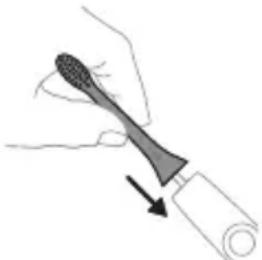
natural_image
Illustration of a hand holding a toothbrush with an arrow indicating force or direction (no text or symbols)1 hunquwuh qihuhyn hwnuwwntgntp wjuwtu, nn uwqhutnu ninnylwsh hutu unju ninnnajwup, hus pnuwuh nhuwgh lnnu:
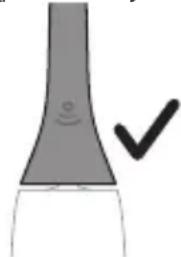
natural_image
Simple line drawing of a bulb-like shape with a checkmark mark (no text or symbols)2 Uśnín utnúúp hánqùwǔyḥ qǐhǔyún útnplù útūnwǔwǔyì jhuṭn h útg, úshùzì wǔjù lǚwùq wǔzh:
^12 nui' funquwuh qjuhuh u pnuwuh uhgu hnpn wugph wnlywnjajnün unnuwl t:
2tn Philips Sonicare wunwutph hunqwuwlyh oqunwqnpnniyn
tpt wunwghù wùqwú tīp oqunwqnδnú ðtn Sonicare wunwúh hunquùwūn, wultih 2wn jānpanng qawln ὑnnúwūl ́ hwiútuwinnuð nǐ lṭṭyunnwǔwù hunquùwūh htún: lnnúwūl ́, tīnp wunwghù wùqwú oqunwqnδnútnŋ zwiḥhg 2wn tǔ utŋúniú qnnδwnnnuú: Uhwjù yhnwntp ὑnɪnp utŋúniú l jəniŋ unltp, nnwtuqh wunwúh hunquùwūn ðtn yhnhuwntiú úwpnh: hùnnniú tūp
hānluì uunnuì ùtnyùwjwgulwǒ hunqwùwlyhg oqúnultīnì gniŋniùtūnhù lwwjwqnyù wnnjniùpùtn uunwùwīnì huuúwn:
Uugniun atn unn Sonicare htqynnwuwu wunwuh hunqwuwuhu ht2nwugutni hwuwwn wnwghu 1-2 2wpwapuw npawgpniu oqnwnqnndtp wultih gwon lwwqnwlnnniu, wjunhtinlu wugtp wultih pwnàn lwwqnwlnnuiu:
Uwpnúwù hnwhwùqùtn
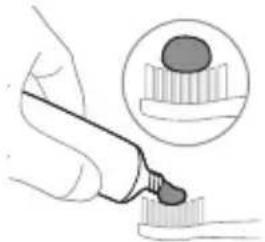
natural_image
Illustration of a hand using a pipette to apply liquid onto a surface, with an inset showing a droplet on a surface (no text or symbols present)1 陰ntp hunqwùwuh ùwqhúttnn u ụtngntp wunwuh ùwðníyh phz puìwʊlnɪŋniú:
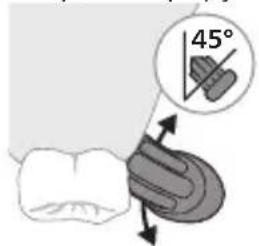
2 Stwnntp winwuh hunqwuwlyh uwqhyttnn winwwutph ynw uh yhnnp wülywü unwyl (45 wunhwü) 'unpnntü utnütinyl, nnwtuqh uwqhyttnn hwutü lüntnh tqnwaqshü lywú lüntnh tqnwaqhg uh yhnnp utnplu: L2niü Uúpnng dwuwuwly hunqwuwlyh ytiunpnün wuhtp winwwutph htun 2yhuwü ütg:
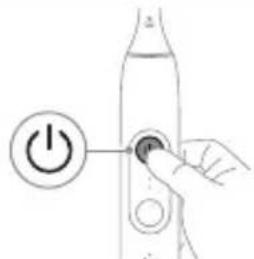
3 Utnútp hnuwúph úhwugúwú/wùgwnúwú lynǎwlyn' Philips Sonicare-n úhwugútǐnì huuśwn:
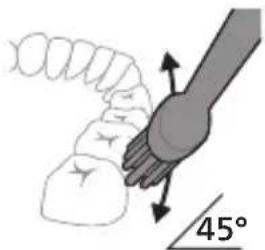
natural_image
Diagram showing a hand holding a tool with a 45-degree angle indicator (no text or symbols present)4 Unpntu wuhtp hunquuwlyh uwqtnu wunwutph ynw untwnwnluw6 u luntth tanwqdnui: Uwpntp wunwutpn ptralwlyh htun ni wizw 2wndnuutpnyl, nnwtuqh hunquuwlyh uwqhutpn hwutu wunwutphu: Cwnniuwtyp wju 2wndniun atn uwpnuwu hnlih wupnng npawgpniu:
L2niú hunquùwuh úwqhúutnn whtnp t úh chnpn lujùwùwù: hunhhnn. sh unnu niú wunwúutnn úwpntl wjùwǒu, hùswǒu ŋnip lúúwpnthp unylnnwlywù wunwúh hunquìwynu:
^12 niú ^13 pti ^24 wihwqwug 2wn ^25 u2niú qnnðwnntp, qqni2wgùnn wqnwu2wu lwnàwlyh u prùwlyh pānpanngn yuhnhuyh (untú « ^26 u2úwù utùunn» pudhùn):
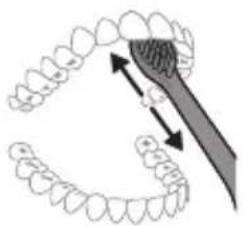
natural_image
Diagram showing dental tool interacting with teeth (no text or labels)5 Ungluh wunwutph utnuh uwwytntuutnp uwpntini hwuwn pbtptp hunqwuwlyh pnuwyn yhuwninhn nhnpnu l jninwpwtugynnh ynw uh pwuh ninnwhwjug uwppnn qnnδnnniεjniuttn ywinwntp wunwutph ynw:
L2niu' 3wunqutni hwuw, nn hwulwwwnwuh tpr uwpnni wupnno ptnwun, attn ptnwun 4 uwh pudwutp' oqnwnqndtinu QuadPacer qnndwnnyan (untu «9nndwnnyaputn» pudhun):
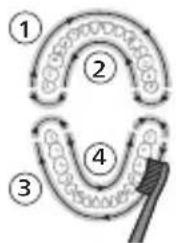
flowchart
graph TD
    A["①"] --> B["②"]
    B --> C["③"]
    C --> D["④"]
    D --> E["④"]
6 Uyutp úwpntl hwnylwð 1-hg (útnluh wunwúutnh npuh lynnún) u úwpntp 30 úwjnyjwiú úwhupwù hwnylwð 2-hù wúgútln (útnluh wunwúutnh utnuh lynnún): Čwnniúwutp úwpntl hwnylwð 3-niú (útnpluh wunwúutnh npuh lynnún) u úwpntp 30 úwjnyjwiú úwhupwù hwnylwð 4-hù wúgútln (útnpluh wunwúutnh utnuh lynnún):
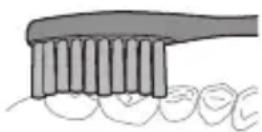
7 Uwpntuni yhuì wùwnuntinig htinn yuunn tīp jnwgnighs dwaúwùwù hwnlywgùti winwùutnh ðwùnn úwyltntuùtn p uwpntiniù l u wù hwnulwòutnhù, npuntn winwgwùniú t pōuwjnniú: yuunn tīp ūwu l uwpnti ltaqiù` hunqwùwyn wuhtnl úhwgnwó ywú wǔgwunwó, hùswtu xùwhunjuunnniú tāp: 2tn Philips Sonicare winwúh hunqwùwyn wtup p 5 wwwwhnu lħùh pntytunutnh (pntytunutnh ynw yhnwnzúwú ðwúwùwú hunqwùwúutnh qihuhyuttn wultíh 2niún úw2jniú tiú) l u winwúutnh ytnwlywúqiuówu hwúwn (ignuniúutn, wuuylutn, yħühnutn), bṛt nnuūp wwwn2wǎ ytnwnu lyuzyuð tiú l u stù Źuwwuṭl: hūnhn winwgwùwni n̥twpniú hūnpniú tāp hunhhnnwlgti winwúuwpnjd-úwu̥uwtunh htún:
^12 Ni ^16 Philips Sonicare wunwuh hunqwuwyn yjhuhywwyu htunwqnnnijajniuutpnuo oqnuwqnndtini ntiwpnui qnndwwnytap wju Uwpnuiwu ntdhuniu' pwnan huntuuhynijawup ywnqwulnnuwup' pnuwyn lhnuhui ihgwulnnuud, huy EasyStart qnndwwnnyan' wugwnuud:
Ntchutn
2tn ٤١٥٥٥٥٥٥٥٥ wunwúh hunquúwʊŋ hwiúwɪŋuəd ٤ tŋʊni uwnptn ntchúutnnu' uwpnúwù u ljuŋtph winnqniəjwù:
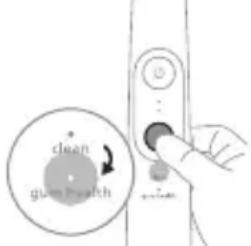
ntdchún àtnpnu ynhutjni hwiúwn hunqwùwly ùwǔguynljuð dwúwúwly utnútp ntdhúh/hùntbùuhulniqjwù lynǎwlyn: Philips Sonicare-h pnjnn hunqwùwlyútph qihuhlyutpn wzhuwinniú tǔ jnìnwpwùyjnn ntdhúnj:
Clean Gum Health
| Unwultinjənniŋ | Unwutuwuhwnhhtnwgniú | Unwutuwuhwnhhtnwgniú u juntnhutnuniú |
| rùntùuhlnjəjuwùwnwqwnlqnwwunhǎwùn | Fwnàn Fwnàn | |
| funqwùwlytini pùnhwùnin dwùwùwlyn | 2 pnwt 3 pnwt 20 qwjnljjuwù | |
| rùwvtu hunqwùwlyt | 3nipwpuşyninhwnulwònhunqwùwlytp 30qwjnljjuwù, | 3nipwpuşyninhwnulwònhunqwùwlytp 30qwjnljjuwù, |
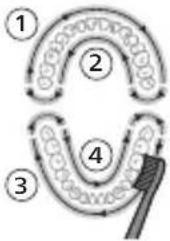 | 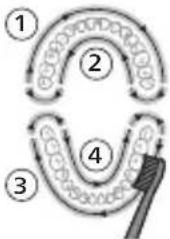 | |
| Ujùnhtunlu hnuqwiwlytp juntnhqòh tnlywjupnu' jninwpuşyninhwnulwòn 20qwjnljjuwù: |
hùntùuhúlnípài wùn hǎwùiūn
hùntùuhúniējwù ywnqwúnnuìutn
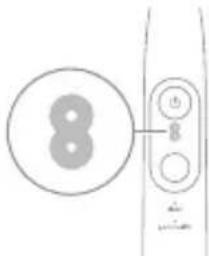
Etiqunnwlywù hunqwùwlyu niǔh hùntúuhulniājwù 2 unwnptn lqnqwwynnnw.
- Fwnàn hùn tiùu huì nì jǐ niǔ (tǐ lǐ nǐ lǐ nǐ u)
- 3wòn hùnbuuhúniŋniù (útly lnuju)
^12 niù' Lwúwqniù úwpnúwù wnnjniúph hwiúwn hunnhnìŋ ʒ unnuìu oqnwqnnòti pwnàn hùntiùuhúniəjniù:
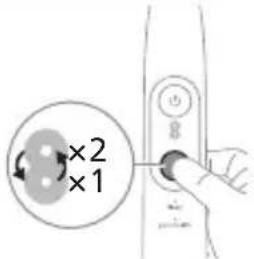
hùntùuhúlníajwù wùhnwdt2ún úwlywnnwlyn ðtnípnú nùunntíní hwiúwn, utnúbp ntchúh/hùntùuhúlníajwù lynówlyn, tnp hunqwùwlyn úhwgulwó t: nùnnwùpútnnú wùgútíní hwiúwn: hùntùuhúlníajwù hwnqwùnnniún lqwnn t s ynhuútlí úhwjù, tnp hunqwùwlyn úhwgulwó t:
BrushSync unthuüninqhw
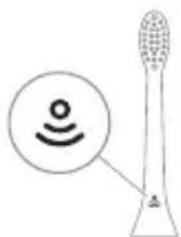
natural_image
Diagram of a microphone with a circular icon showing signal waves (no text or symbols)BrushSync unthuunlnqhwiù àtn hunqwùwlyh qihuhlyhu jniyl t unwihu hwnnnnwulgti pnùwlyh htun uhynnzhwh oqünyajwúp: hunqwùwlyh qihuhlyh uunnnhù hwnulwóniú qinùlnn 2wùn gnjg t unwihu, nn hunqwùwlyh qihuhlyu wwwwhnlujuwó t wju unthuunlnqhwiŋnu:
BrushSync unthuünlnqhwu janyl 5 unwihu wlyunhulwgutl hunqwüwwyh qlhuhuh ynhwnphüuwu üwwuhu hh2tgüwu qnnöwnnyjqn:
Philips Sonicare-ü wünwqwnynü l BrushSync (hunqwùwlyhUhúpnnùwgnü) unthuünlnqhwnjlu hutlugh hunqwùwlyh qihuhyútph lwju untuwlywuh:
unqwùwùyùtnh qìhùyùtnh útn wúpnnq unluwlywùniù ǒwùnpàwùwùnì lù àtq wútìuwhuwúwwuwinwuhuwù qìhùhún qúnùtīnì lù jnwgnighs untnṭlúnjājnìúutnh huuíwn wjjgtītp www.philips.com/toothbrush-heads:
Philips Sonicare-ü wünwqwnynü l BrushSync (hunqwüwwlyUhüpnnüwgnü) unthuüninqhwjnu hutiugh hunqwüwwly qihuhüutnh lwju untuwlywuh:
Unqwùwùyǔtnh qìhuìyǔtnh útn wúpnnq uniuwlywùniù dwiùnpawùwùnì lù dàtq wútǔwhwúwwuwwuunwuhuòu qìhuìyīn qúnǔtǐnì lù jnwgnighs untnǐtlyníjǎnìtǔtnh huuìwn wjjgtītp www.philips.com/toothbrush-heads:
9nρδωνηγρεύτη
- ดูนิยม นุลหะ
- SmarTimer
- QuadPacer
- EasyStart
- lunqwùwlyh qlhuhlyh yhnhuwnhùuìwù hh2tigniù
Δυ₂ύων υηψε
2tn Philips Sonicare-n ʒwɪhniʊl ʒ ʊwɒntəhu 2tn lʊnnʊhg qnɒdwnŋuʊð əʊzniʊn' 2tn lʊntənp u wɪnwʊtətp n ʊlʊwwuʊwɒpʊtənhg ʊwʊzunwʊwʊtəni huuːwn:
natural_image
Diagram showing a mechanical component with a downward arrow and a small circular base (no text or symbols)3 Uwnunlngh gnighsh rawnpann lywuwz inijun gnjg 5 unwihu, nn wunwuh hunqwuwyn ihgpwwnnnuniú 5:
4 Uwnunlngn jhnuhu jhgpwulnnutinig htunn ywuus injun ywjniu yjuwuh 30 ywjnljuwu, www ywuugwinuh:
Uwnunlyngh jhpgh ywnqwuhǎwln (tnp fnùwln uhwgulwð ihgpwulnnzh ylnw 5)
tnp pnuwyn uhwgulwδ t hgpwwlnhshu, pnuwyh utnpluh uwnunw qnuuyn uwnunlyngh gnighpn gnjg t unwlhu uwnunlyngh lhgph uwlqwnnwyn:
Uwnunlngh lwnqwwlhǎwly LED-h qnujùn
| Ph_5 Dwnpnn Lw | |
| Uwwuwwlyh lhp t Dwnpnn Lw | |
| Lhp t 30 Lw Lw t | hw Lw lnjun , ww t |
Uwnunyngh ywnqwuhǎwln (tnp fnùwln úhwgulwð sī hgpwulnnhshù)
tnp wunwuh hunquuwlu wlnhul uhawnui 5, pnuwlgh wnnphu hwunlwnniq qntuynn uwnunlngh gnighpn gnyg 5 unwhu uwnunlngh lhph uwwwnnwyn:
Uwnunlngh lwnqwwlhǎwly LED-h qniùn
| Lhpù 5 Uniq lquùwz |
| Uuuúwlyh lhpù 5 Uniq lquùwz |
| Uhghù guòn 0wnpnn lquùwz |
| Rhz 5 Uunwúuttn 0wpntinig htunn 0wnpnn ntlnhù lnju u 3 wqnwù2wù |
| 7wnwnlù 5 0wnpnn ntlnhù lnju u 2 wùqwú wnàwlylnn 5 wqnwù2wù |
| U2niú Eutnqhù huùwjtǐni hwiúwn 0wnnlngh gnighzn lquìgwunlùh, tnp wjù wjlùw zh lhgpwulnnuǐniú: |
| U2niú tnp 0wnnlngh lhgp lhnluì nwnwnlù 5, winnwúh hunqwùwly wùgwunlniú 5: Uhwgntp winnwúh hunqwùwlyn lhgpwulnnhshù' wjù lhgpwulnntǐni hwiúwn: |
| U2niú Uwnnlnqng úh2un lhnluì lhgpwulnnuìwǒ wwhtǐni hwiúwn, tnp ztp oqnwqnnδniú winnwúh hunqwùwlyn, lqunnn tpr wjù úhwgnwǒ wwhtǐl lhgpwulnnhshù: |
Uwρηνις
Unwuh hunqwuwlyh pnuwyn
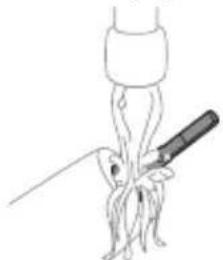
natural_image
Simple line drawing of a medical procedure with a tool and tubing (no text or symbols)1 3nwngntp hunquùwuh qihuhyn u lqwgtp útünwnwlywù jhutnh hwnuwrwn unwp qnnul: 3wúnqutp, np httnwngtl tp pnùwuh ynwjh u ynǎwylutph 2ningn qunùlnn wunwuh úwðnilh úuwgnnnútnp wnùluwqù 2wpwprn úty wùqwú, pwjg gwùlwwih 5' wútiù wùqwú oqnwnqnótinig htunn:
2qnizwgniu' Uh hntp ntunhut yuhpn unin wnwnlywutnnu ntuw hutzh utg ywu lynawylutph 2ninqn, puwh nn wju lwwnn l hwuqtgutl yuuwuywodph:
2 Fntuwlyh wupnng uwyltntun uwpntp hunuwu qnndwlwdpny:
2qnizwgniu' Fnuwynu uh hwtp lqwgwwnwhu ywu nwnwlhyu' wultinnn gninp htnwugutni hwuwn:
3 Enuwnynnnwgntp ywhynly yunnnyl yww unpheny:
hunquwuh qihuh
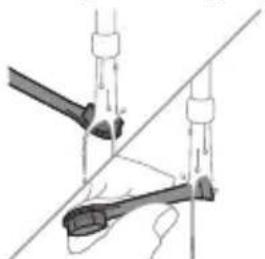
natural_image
Diagram of two mechanical components with arrows indicating motion or force direction (no text or symbols)1 3nnpwpuynin oqnwnqndnwihg htunn nnnntip hunqwuwlyh qihuhyn u hunqwuwlyutnp, wwww panntip, nn snpwuwu onniú:
2 3###ngtp hunquwuh qlnhun pnwuhhg u wnuqwq 2wpwn uthu luwgtp hunquwuh qihuhn unwp gnnu:
Lhgpwynnhz
1 Uugwuntp lhgpwulnnhyn` uwhupwù wjù úwpntán:
2 Lhgpwulnnhsh uwwytntbun uwwpntap huniwwu qnndwlwdpnu:
3 Lhgpwwlnnhpn znnwgntp chwwhnly yunnnnu lywi unphsnu:
phosphorus phosphate
modification of the following text:
∂g6n36s: ub3q5b3s ∂mφγmγdnl ∂sbsunsmγdμgdn ∂gndmγdss g6m4s6g0nnb36 s6b1b3s3φdμggl. δmzngfmn ∂mφγmn ∂gndmγdss 5m nyml sφg7m3nqn Bluetooth-nm 56 NFC-m.
natural_image
Simple line drawing of an open book with no text or symbols visiblegubndəmmm bndbʒb, bɔnznmbmn gudmyjbjdnu obuφmyyjgn dmbymðnmmdnu gudmyjbjdssdqg.
gǔ lǚdàmmm bōdǎsī, gǔdmnygāmon dānnnngdʒm n 33gònl bysfēm.
phosphorus phosphate
4 სახელური
5 RS#03s/8s#m#03n# m#ns3n
natural_image
Illustration of a hand holding a tool with a pointed tip and arrow indicating direction (no text or symbols)natural_image
Simple line drawing of a bulb-like shape with a checkmark mark (no text or symbols)natural_image
Illustration of a hand holding a pen with a dropper, showing a magnified inset of a brush (no text or symbols)natural_image
Hand inserting a power button into a bottle (no text or symbols visible)3 Philips Sonicare-nb hubsmonzoo, qssfomgm humozu/gsdmmonznu mnmoszb.
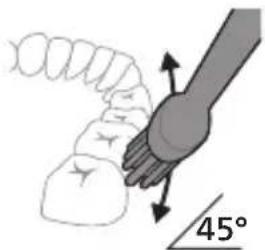
natural_image
Diagram showing a hand holding a 45-degree angle with a coiled spring and handle (no text or symbols)4 ghmbnngq dmsuzlgn tsgmyngon zdnngduu qo mndmnl bs88j. gunbdnbgom zdnngon dqnng bnb qo yzub dmdmsdom nl, hmd tsgmyngon bzogdom6gb zdnngdu dmhnl. gubsgmdgm slgmn dmdmsmds bdgconu yuzmnl zubdszmmdsdn.
natural_image
Illustration of a toothbrush applying sealant to teeth (no text or symbols)3ànqnnu gmjdfmntsgmnu 2 1b3quslb3n6g6bln3mònl 3smsdgfnn sd3v:
natural_image
Illustration of a microphone with a sensor icon and signal symbol (no text or labels)BrushSync-nb φgg6mmgns lsdyusmgdsu sdmgtz l donmnl tsgmnlnlo ms3z, mmd qssyzdaoncglu bsbgmyml dngmmhndnl zsdmygbdom. tsgmnllo ns3z8j smlgdymn ndammm dnyonnogdu, mmd tsgmnllo ms3zn smgynznvn sd φgg6mmgnon. BrushSync φgg6mmgns tsgmnllo ns3n l dgu3mn l dgbgbdol ggygbnsl y8mgb3ymgzl. Philips Sonicare gnszs8mdom BrushSync φgg6mmgnon l djmbg Philips Sonicare-nb tsgmnllo f3zn56 ns3jdnl gsmom l3gfdml. tsgmnllo ms3jdnl dmgnn h3jbn lsdmcgmm bs8nl gsbsfbmdsoq os md3gbznl lsy3gmblt tsgmnllo ns3n l us3m3bgmsoq gswsgon o dhym8g www.philips.com/toothbrush-heads φssdghdnom n6gfmdsznnbonzn. Philips Sonicare gnszs8mdom BrushSync φgg6mmgnon l djmbg Philips Sonicare-nb tsgmnllo f3zn56 ns3jdnl gsmom l3gfdml. tsgmnllo ms3jdnl dmgnn h3jbn lsdmcgmm bs8nl gsbsfbmdsoq os md3gbznl lsy3gmblt tsgmnlLO ns3n l us3m3bgmsoq gswsgon o dhym8g www.philips.com/toothbrush-heads φssdghdnom n6gfmdsznnbonzn.
ඉඩිජාන්
- ωδmμnν υδμm
- SmarTimer-o
- QuadPacer-n
- EasyStart
flowchart
graph TD
    A["replace"] --> B["Warning Box"]
    B --> C["-"]
natural_image
Diagram showing a mechanical component with a downward arrow pointing to a small cylindrical component (no text or symbols present)natural_image
Line drawing of a biological or anatomical structure with a central rod and branching structures (no text or symbols)natural_image
Diagram of a mechanical or electrical component with two vertical rods and a triangular base, no visible text or symbolsnatural_image
Simple line drawing of an open book with no text or symbols visiblenatural_image
Illustration of a hand holding a tool with a downward arrow indicating motion (no text or symbols)natural_image
Simple line drawing of a curved object with a checkmark (no text or symbols)הכלה 2
.תָאַלְ
natural_image
Illustration of a hand holding a pipette with a magnified inset showing a droplet on a surface (no text or symbols)- Philips Sonicare
3
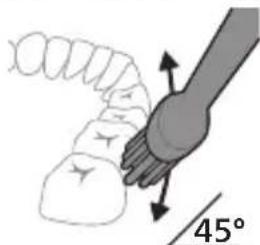
natural_image
Diagram showing dental tool application on upper teeth with magnified detail (no text or symbols):הכלההוּרָהוּרָהוּרָהוּרָהוּרָהוּרָהוּרָהוּרָהוּרָהוּרָהוּרָהוּרָהוּרָהוּרָהוּרָה
-(הכלה) ni
-(הכלהה)
natural_image
Illustration of a toothbrush with a circular icon showing wireless signal and a warning symbol (no text or labels)natural_image
Diagram showing a mechanical component with a downward arrow pointing to a small cylindrical component (no text or symbols present)natural_image
Simple line drawing of a fork with a knife inserted, no text or symbols presentnatural_image
Diagram of a mechanical joint or clamp mechanism with no visible text or symbols1
.הַרְשָׁ
www.philips.com/support
www.philips.com/support
.הכלההוּרָהוּרָהוּרָהוּרָהוּרָהוּרָהוּרָהוּרָהוּרָהוּרָהוּרָהוּרָהוּרָהוּרָהוּרָה
-ロソ オソウ ノボウ
-.הַרְׁבָרִיֹתְבָר
www.philips.com/Sonicare
Philips Consumer Lifestyle BV
Tussendiepen 4
9206 AD Drachten
The Netherlands
©2025 Koninklijke Philips N.V. (KPNV). All rights reserved. Philips and the Philips shield are trademarks of KPNV. Sonicare and the Sonicare logo are trademarks of Philips Oral Healthcare, LLC and/or KPNV.
300014958801(30/07/2025)