
CVH 2-4 - Vacuum Cleaner Kärcher - Free user manual and instructions
Find the device manual for free CVH 2-4 Kärcher in PDF.
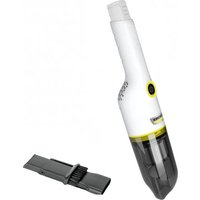


| Product type | Cordless universal vacuum cleaner |
| Brand | Kärcher |
| Model | CVH 2-4 |
| Power supply | Lithium-ion battery 3.6 V (nominal) from the KÄRCHER Battery Power 4V platform |
| Maximum power | 54 W |
| Dust container capacity | 0.15 L |
| Normal operating time | 10 minutes |
| Filter type | HEPA filter (EN1822:1998) + washable steel filter |
| Dimensions (L × W × H) | 359 × 76 × 77 mm |
| Weight (without accessories) | 0.59 kg |
| Included accessories | 2-in-1 crevice nozzle, KÄRCHER Battery Power 4V charger, KÄRCHER Battery Power 4V battery |
| Intended use | Vacuuming dry dirt on hard and textile surfaces, domestic use |
| Area of use | Indoors only |
| Operating temperature | Above 0 °C |
| Safety | Do not vacuum liquids, gases or flammable dust; do not use in explosive areas |
| Filter maintenance | HEPA filter and steel filter washable under running water; complete drying required before reassembly |
| HEPA filter replacement | Approximately every 6 months or according to wear |
| Warranty | According to local conditions (see complete manual) |
| QR code for application video | Included on the device |
Frequently Asked Questions - CVH 2-4 Kärcher
User questions about CVH 2-4 Kärcher
0 question about this device. Answer the ones you know or ask your own.
Ask a new question about this device
Download the instructions for your Vacuum Cleaner in PDF format for free! Find your manual CVH 2-4 - Kärcher and take your electronic device back in hand. On this page are published all the documents necessary for the use of your device. CVH 2-4 by Kärcher.
USER MANUAL CVH 2-4 Kärcher
Polish 60
Hungarian 64
Czech 68
Slovak 72
Slovenian 75
Romanian 79
Croatian 83
Serbian 86
Greek 90
Russian 94
Ukrainian 99
Bulgarian 103
Chinese 107
Kazakh 110
Arabic 118

A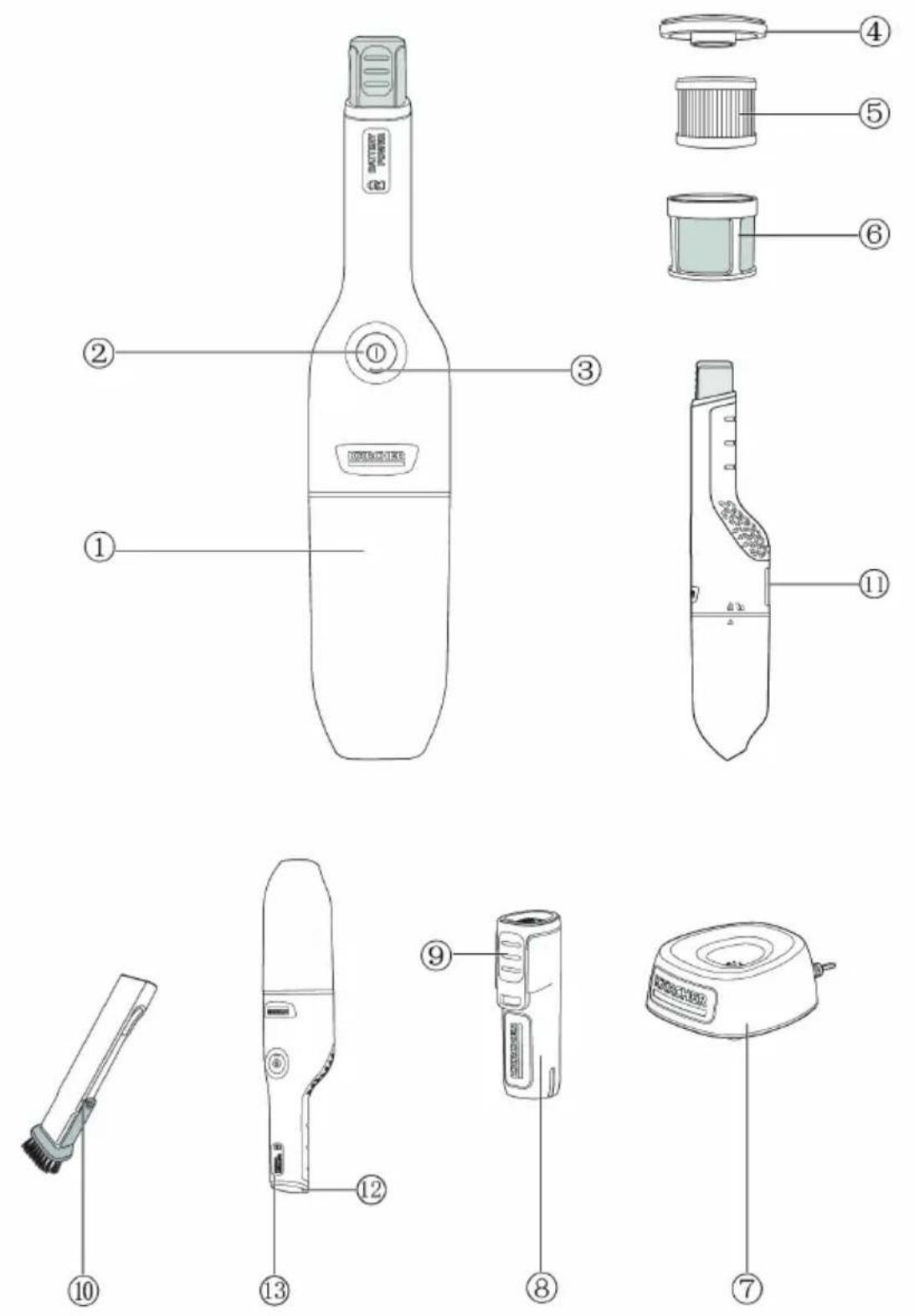
Contents
Safety instructions 9
Intended use.... 10
Environmental protection.... 10
Accessories and spare parts 11
Scope of delivery.... 11
Overview of the unit.... 11
Operation.... 11
Warranty 11
Transportation 11
Storage 11
Care and maintenance 11
Troubleshooting guide.... 12
Technical data 12
Safety instructions

Read these original instructions and safety instructions as well as the original instructions and safety instructions supplied with the battery pack and charger
before using the device for the first time.
Act in accordance with them.
Keep all operating instructions for future reference or for future owners.
In addition to the notes in the operating instructions, you also need to take into consideration the general safety regulations and accident prevention guidelines applicable by law.
Hazard levels
⚠️ DANGER
- Indication of an imminent threat of danger that will lead to severe injuries or even death.
⚠ WARNING
- Indication of a potentially dangerous situation that may lead to severe injuries or even death.
△ CAUTION
- Indication of a potentially dangerous situation that may lead to minor injuries.
ATTENTION
- Indication of a potentially dangerous situation that may lead to damage to property.
General safety instructions
⚠️ DANGER • Risk of asphyxiation. Keep packaging film out of the reach of children. • Operation in explosive atmospheres is prohibited. • Risk of explosion
- Never use the device to vacuum up combustible gases, liquids or dusts.
- Never use the device to vacuum up reactive metal dusts (e.g. aluminium, magnesium, zinc).
- Never use the device to vacuum up undiluted brine or acids.
- Never use the device to vacuum up any burning or smouldering objects/matter.
These substances can corrode the materials in use on the device.
⚠ WARNING • Only use the device for its proper use. Take into account the local conditions and beware of third parties, in particular children, when working with the device. • Persons with reduced physical, sensory or mental capabilities and persons lacking experience and knowledge may only use the appliance if they are properly supervised, have been instructed on use of the appliance safely by a person responsible for their safety, and understand the resultant hazards involved. • Only people who have been instructed on how to use the device, or have proven their ability to operate it, and have been explicitly instructed to use it, must use the device.
- Children must not operate the device. ● Children from the minimum age of 8 may use the appliance if they are properly supervised or have been instructed in its use by a person responsible for their safety, and if they have understood the resultant hazards involved. ● Children must be supervised to prevent them from playing with the appliance. ● Children may only perform cleaning work and user maintenance under supervision. ● Adhere to the respective safety regulations in hazard zones (e.g. service stations). Never operate the device in explosive spaces. ● Only use the device for its proper use. Take into account the local conditions and beware of third parties, in particular children, when working with the device. ● The appliance contains electrical components - do not clean the appliance under running water. ● Risk of injury. Do not use the nozzle and suction pipe at head height. ● Avoid switching the device on unintentionally. Make sure that the on/off switch is in the off position before connecting the battery pack, lifting or carrying the device. ● You must not charge or store the device outdoors or in a car.
⚠️ CAUTION • Safety devices are provided for your own protection. Never modify or bypass safety devices. • Do not use the appliance if it has been dropped
beforehand, is visibly damaged or if it is leaking. ● Never leave the device unsupervised while it is in operation.
- Only operate or store the device in accordance with the description or figure. • In order to prevent accidents or injuries, you must observe the weight of the device when transporting it. • Accidents or damage due to the device falling over. Before all actions with or on the device, you must make sure that it is stable. • Do not make any changes to the device, and only use accessories and spare parts recommended by the manufacturer.
- Risk of injury when loose fitting clothing, hair or jewellery is caught by moving parts of the device. Keep clothing and jewellery away from moving parts of the device. Tie long hair back.
ATTENTION • Do not operate the device at temperatures below 0 °C. • Never use the device without a filter, this can lead to device damage. • Only use the device indoors.
Type plate
The major device information is specified on the type plate.
The location of the type plate on the device is specified in the "Device description" chapter.
Intended use
Only use the device with battery packs and chargers from the KÄRCHER Battery Power 4 V system.
BP 4V
Suitable battery packs are marked with the BP 4 V symbol.
BC 4V
Only charge the battery pack with the chargers approved for charging.
This universal vacuum cleaner is intended for private use at home and not for commercial purposes. The manufacturer is not liable for any damage that may occur on account of improper use or incorrect operation. Use the universal vacuum cleaner only with:
- Original filters
- Original spare parts, accessories and special accessories. The universal vacuum cleaner is not suitable for: • Vacuuming off human beings or animals.
- Vacuuming up: — Small living creatures (e.g. flies, spiders, etc.). — Substances that are harmful for health, have sharp edges or are hot or glowing. — Moist or liquid substances. — Easily flammable or explosive substances and gases.
Any other use is prohibited. The user shall be liable for hazards arising as a result of improper use.
You can find a QR Code® to call up an application video in:
Illustration B
Trademarks
QR-Code® is a registered trademark of DENSO WAVE INCORPORATED.
Environmental protection

The packing materials can be recycled. Please dispose of packaging in accordance with the environmental regulations.

Electrical and electronic appliances contain valuable, recyclable materials and often components such as batteries, rechargeable batteries or oil, which - if handled or disposed of incorrectly - can
pose a potential threat to human health and the environment. However, these components are required for the correct operation of the appliance. Appliances marked by this symbol are not allowed to be disposed of together with the household rubbish.
Notes on the content materials (REACH)
Current information on content materials can be found at: www.kaercher.com/REACH
Accessories and spare parts
Only use original accessories and original spare parts. They ensure that the appliance will run fault-free and safely.
Information on accessories and spare parts can be found at www.kaercher.com.
Scope of delivery
The scope of delivery for the appliance is shown on the packaging. Check the contents for completeness when unpacking. If any accessories are missing or in the event of any shipping damage, please notify your dealer.
Overview of the unit
Illustration A
① Dust container ② ON/OFF button ③ Battery indicator ④ Filter cover ⑤ HEPA filter (EN1822:1998) ⑥ Steel net filter ⑦ *Charger (KÄRCHER Battery Power 4 V) ⑧*Battery Pack (KÄRCHER Battery Power 4 V) ⑨*Battery pack unlocking button ⑩ 2-in-1 crevice nozzle ⑪ Type plate ⑫ Battery mount 13 Handle
*additionally required and available separately
Battery pack charging
- Charge the battery pack (see operating instructions and safety instructions for the battery pack and the charger).
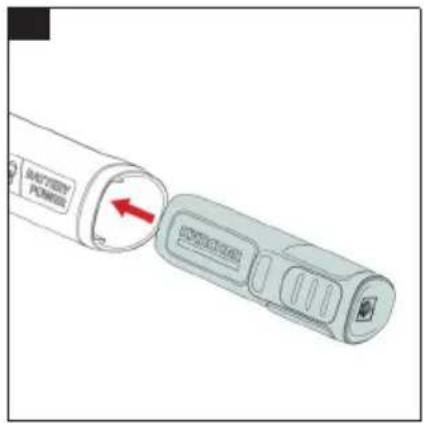
Inserting the battery pack
- Press the battery pack into the battery mount on the device until it you feel it latch into place. Illustration C
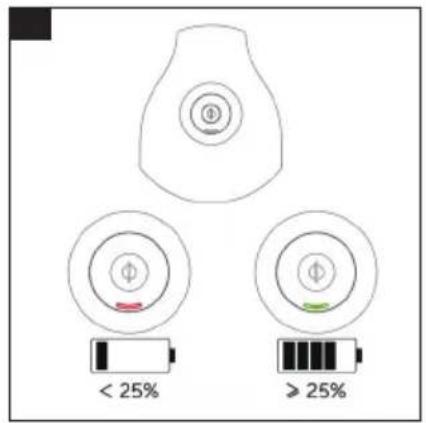
Charge indicator
After the device has been switched on, the charging state of the battery pack is displayed.
Illustration D
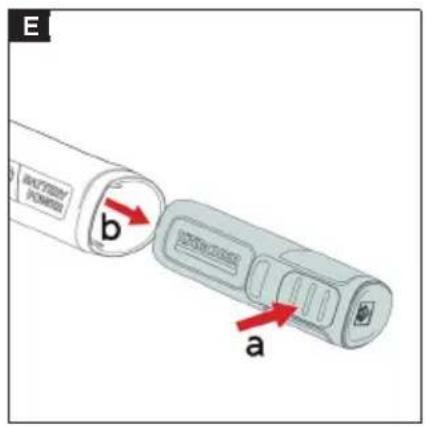
Removing the battery pack
Note
During longer work breaks, remove the battery pack from the device and secure it against unauthorized use.
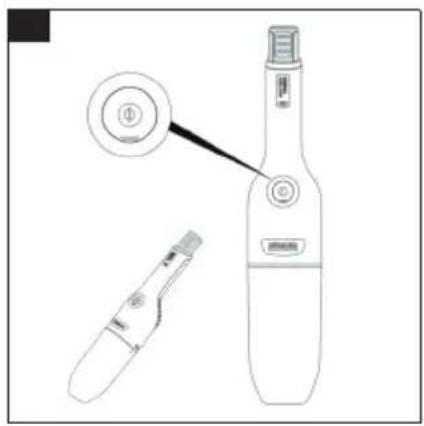
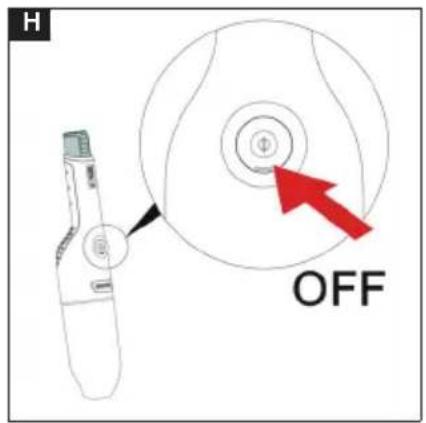
- Press the ON/OFF button to switch off the device.
- Press the battery pack unlocking button, and pull the
battery pack out of the battery mount.
Illustration E
Operation
Note
- The appliance is not allowed to be turned on without the HEPA filter or the dust container. Ensure the HEPA filter and the dust container are properly positioned in the appliance before using the appliance.
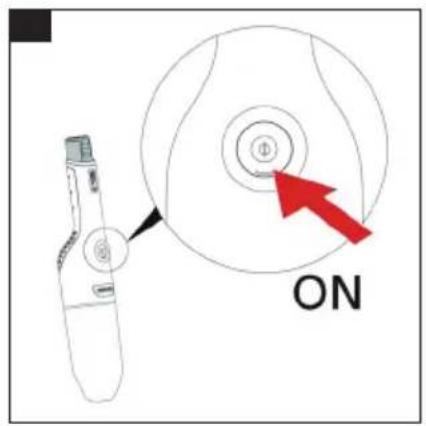
- Press the ON/OFF button to start vacuuming up dust/dirt.
Operation
- Press the ON/OFF button to start vacuuming up dust/dirt.
Illustration F
Standard accessories
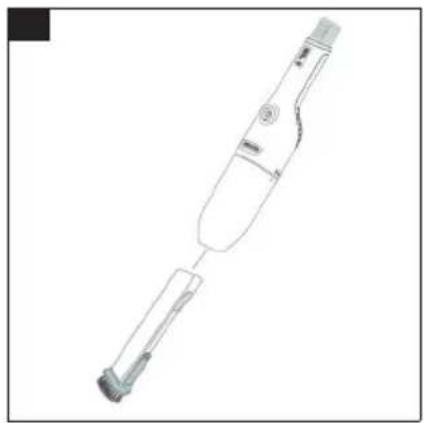
- Attach the nozzle to clean upholstered furniture, mattresses, laced curtains, etc.
Illustration I
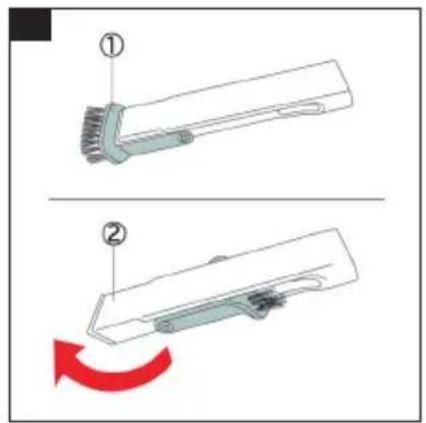
Illustration J
① This is used for cleaning delicate objects with care, e.g. bookcases, handicrafts, etc. ② This is used for cleaning joints, grooves between doors and windows, tiny slits, etc.
Warranty
The warranty conditions issued by our relevant sales company apply in all countries. We shall remedy possible malfunctions on your appliance within the warranty period free of cost, provided that a material or manufacturing defect is the cause. In a warranty case, please contact your dealer (with the purchase receipt) or the next authorised customer service site. (See overleaf for the address)
Transportation
The battery has been tested in accordance with the relevant rules for international transport and can be transported / shipped.
Storage
Note
• Store the appliance in a dry room. - Consider the weight of the appliance when storing it.
Care and maintenance
Note
- Use the appliance only when all filters and the dust container are installed.
- Defective filters and filters that can no longer be cleaned must be replaced.
Before doing any work on the appliance:
- Switch off the appliance.
- Unplug the power supply from the power outlet.
Cleaning the filter set and the dust container
ATTENTION
Incorrect cleaning of the HEPA filter
Damage to the HEPA filter
Do not clean the HEPA filter in a washing machine. Do not dry the HEPA filter with a hair dryer. The HEPA filter ensures clean exhaust air.
- Clean the HEPA filter if it is visibly dirty.
- Replace the HEPA filter if it is visibly damaged.
- We recommend replacing the HEPA filter every 6 months based on your use of the device.
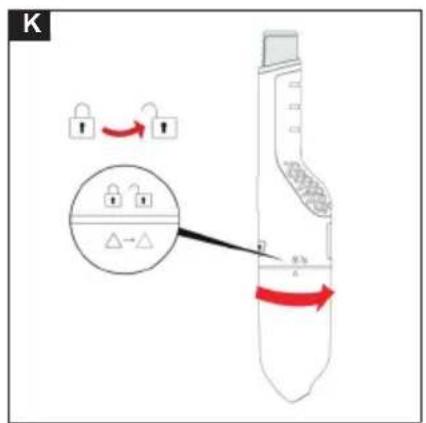
- Unlock the dust container. Illustration K
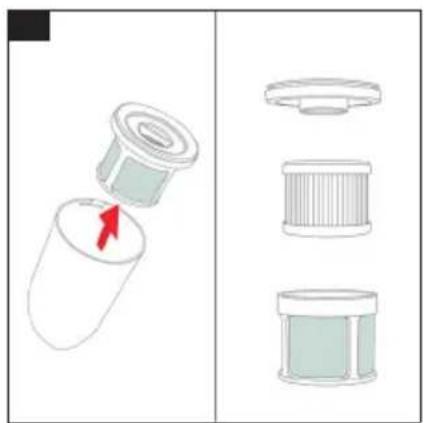
- Unplug the filter set from the dust container. Turn the filter cover counterclockwise. Remove the filter cover, unplug the HEPA filter from the steel filter. Illustration L
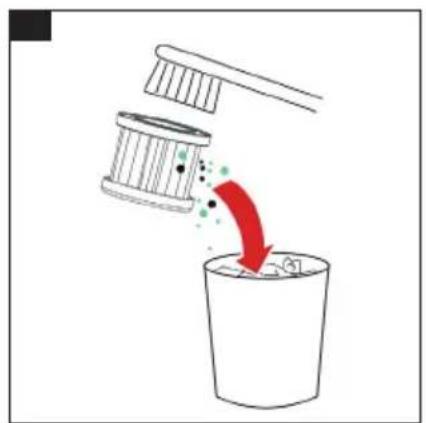
- Clean the HEPA filter, and carefully empty / knock the dirt out of the HEPA filter. Illustration M
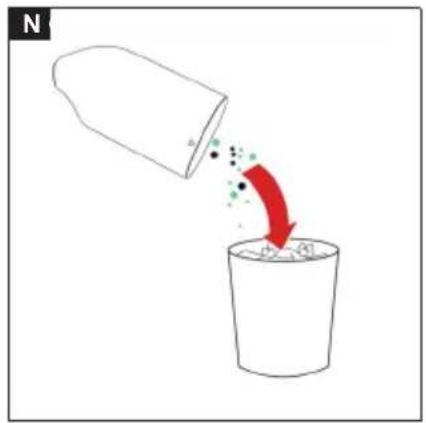
- Empty the dust container, and rub down inside using a cloth. Illustration N
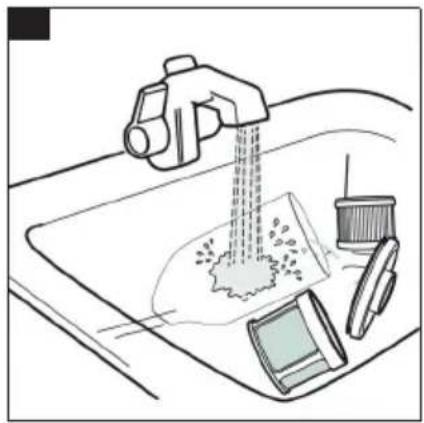
- Clean the filter cover, steel filter, HEPA filter and dust container under running water. Illustration O
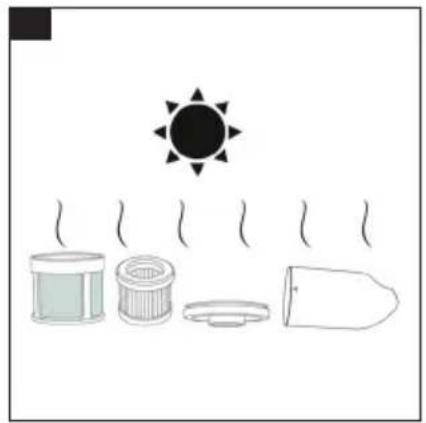
- Allow the filter cover, steel filter, HEPA filter and dust container to dry completely. Illustration P
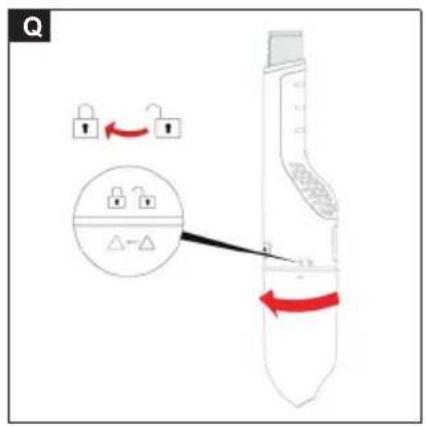
- Insert the filter set into the dust container, and turn the dust container clockwise to latch into place. Illustration Q
Troubleshooting guide Malfunctions often have simple causes that you can remedy yourself using the following overview. When in doubt, or in the case of malfunctions not mentioned here, please contact your authorised Customer Service. As the battery pack ages, even if it is looked after, the battery capacity reduces such that the full run time will no longer be reached when fully charged. This does not indicate a defect.
| Fault Possible cause Remedy | ||
| The device is not working. The battery pack is not sitting properly in the device. | 1. Push the battery pack into the battery mount on the device until it you feel it latch into place. | |
| The charging state of the battery pack is too low. | ||
| The battery pack is overheated. 1. Take the battery pack out of the device and let it cool down, see chapterRemoving the battery pack.NoteThe battery pack can get very warm.2. Do not the place the device and battery pack in direct sunlight. | ||
| The battery pack or charger is defective. | ||
Error codes and error descriptions
| Charge indicator Error description | Error correction | |
| LED flashes slowly three times every 3 seconds and the motor is off. | Battery pack temperature too high. 1 | Allow the device to cool down or change the battery pack.2 Operate and store the appliance at temperatures usual for living areas. |
| LED flashes slowly four times every 3 seconds and the motor is off. | Battery pack temperature too low. 1 | Allow the device to heat up or change the battery pack.2 Operate and store the appliance at temperatures usual for living areas. |
| LED flashes slowly five times every 3 seconds and the motor is off. | PCBA over current protection. 1 Check if anything stuck inside. | |
| LED flashes slowly six times every 3 seconds and the motor is off. | PCBA high temperature protection. 1 | Allow the device to cool down or change the battery pack. |
| LED flashes quickly three times every 3 seconds and the motor is off. | Battery temperature sensor error. 1 | Change the battery pack. |
| LED flashes quickly four times every 3 seconds and the motor is off. | Machine temperature sensor error. 1 | Change the battery pack. |
Technical data
| CVH 2-4 | ||
| Electrical connection | ||
| Battery pack nominal voltage | V | 3.6 - 3.7 |
| CVH 2-4 | |||
| Maximum voltage of the battery pack | V | 4.2 | |
| Device performance data | |||
| Operating time when battery is fully charged in normal operation | Minutes 10 | ||
| petr d I F | 198 | ||
| .Xave P | W | 54 | |
| Dimensions and weights | |||
| eisetin(μg) | kg | 0.59 | |
| Lehtg | mm | 359 | |
| Mvi | mm | 76 | |
| t lgile | mm | 77 | |
| Bulajc | l | 150 | |
Subject to technical modifications.
www.kaercher.com/REACH
www.kaercher.com/REACH
THANK YOU!
MERCI! DANKE! iGRACIAS!
Register your product and benefit from many advantages.
www.kaercher.com/welcome

Rate your product and tell us your opinion.

www.kaercher.com/dealersearch
Alfred Kärcher SE & Co. KG
Alfred-Kärcher-Str. 28-40
71364 Winnenden (Germany)
Tel.: +49 7195 14-0
Fax: +49 7195 14-2212


- CONTENTS
- SAFETY INSTRUCTIONS
- HAZARD LEVELS
- ⚠️ DANGER
- ⚠ WARNING
- △ CAUTION
- ATTENTION
- GENERAL SAFETY INSTRUCTIONS
- TYPE PLATE
- INTENDED USE
- ILLUSTRATION B
- TRADEMARKS
- ENVIRONMENTAL PROTECTION
- NOTES ON THE CONTENT MATERIALS (REACH)
- ACCESSORIES AND SPARE PARTS
- SCOPE OF DELIVERY
- OVERVIEW OF THE UNIT
- ILLUSTRATION A
- BATTERY PACK CHARGING
- INSERTING THE BATTERY PACK
- CHARGE INDICATOR
- REMOVING THE BATTERY PACK
- NOTE
- OPERATION
- STANDARD ACCESSORIES
- ILLUSTRATION I
- ILLUSTRATION J
- WARRANTY
- TRANSPORTATION
- STORAGE
- CARE AND MAINTENANCE
- CLEANING THE FILTER SET AND THE DUST CONTAINER
- INCORRECT CLEANING OF THE HEPA FILTER
- THANK YOU
- MERCI! DANKE! IGRACIAS
Brand : Kärcher
Model : CVH 2-4
Category : Vacuum Cleaner