Eyes Indoor camera II - Smart Home BOSCH - Free user manual and instructions
Find the device manual for free Eyes Indoor camera II BOSCH in PDF.


User questions about Eyes Indoor camera II BOSCH
0 question about this device. Answer the ones you know or ask your own.
Ask a new question about this device
Download the instructions for your Smart Home in PDF format for free! Find your manual Eyes Indoor camera II - BOSCH and take your electronic device back in hand. On this page are published all the documents necessary for the use of your device. Eyes Indoor camera II by BOSCH.
USER MANUAL Eyes Indoor camera II BOSCH
natural_image
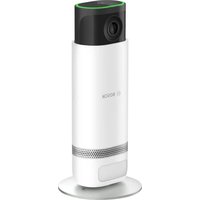
White Bosch 3D camera module with black top and white body, displayed on a stand (no text or symbols visible on device body)Eyes Indoor camera II
Eyes Innenkamera II
Câmara interior Eyes II
Eyes binnencamera II
natural_image
Line drawing of a cylindrical electronic device with a speaker grille and base (no text or symbols)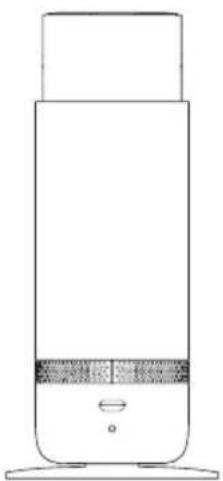
natural_image
Line drawing of a cylindrical device with a lid and base, showing no text or symbolsEyes indoor camera II
Eyes Innenkamera II
Câmara interior Eyes II
Eyes binnencamera II
→Description of the symbols 4
→Safety instructions 5
→ Notes 7
→Product overview 8
→Setting up the Eyes indoor camera II 9
→ Beforemounting: Checking for Wi-Fi availability 9
→Start-up 10
→Privacy mode 12
→ Resetting to factory settings 12
→Maintenance and cleaning 13
→Simplified declaration of conformity 13
→Environmental protection and disposal 13
→Technical data 14
→Open source software 14
Product description
The Eyes indoor camera II is a camera that is connected via Wi-Fi and controlled via smartphone app. It has a person recognition function and can therefore differentiate between movements of people and other movements, and only sounds the alarm when necessary. It offers extensive protection thanks to its integrated alarm siren and visible privacy mode.
Description of the symbols
Attention!
Note about hazards

Note:
Important additional information

Note about the installation video
⚠ Safety instructions
▶ Read this user manual completely before installing or commissioning the device and pay particular attention to the hazard information.
- Keep the user manual in a safe place throughout the entire service life of the device.
▶ Fire hazard due to electrical current! There is a risk of fire when the electrical connection is not used properly. Only use the product with the specified, approved power supply unit.
▶ The device may only be connected to an easily accessible power socket. The device must be removed from the socket in the event of a hazard.
For safety and approval reasons (CE/UKCA), the device may not be modified and/or no changes may be made to the device without authorisation.
▶ We accept no liability for material damage or personal injury which is caused by improper use or by not observing the safety instructions. In these cases, any guarantee claim becomes void! We accept no liability for consequential damage.
▶ Any use other than that which is described in the user manual is considered improper and will lead to the exclusion of guarantee and liability.
▶ Do not use the device if it has damage visible from the outside, for example, to the housing, control elements or connection sockets, or if it has a malfunction. If in doubt, please contact our service team.
▶ Only operate the device indoors and do not expose it to moisture, vibrations, constant sunlight or other sources of heat, extreme cold temperatures and mechanical stress.
▶ Do not open up the device. It does not contain any parts to be maintained by the user. If a fault occurs, have the device checked by a specialist.
The device is not a toy! Do not allow children to play with it. Never leave the packaging material lying around unattended. Plastic film and small parts may pose a danger to children.
This device may be used by children from 8 years of age and by-persons with reduced physical, sensory or mental capacities or a lack of experience and knowledge, provided these persons are supervised or have been instructed in the safe use of the device and understand the corresponding risks.
↑ Content
- When remotely or automatically controlling a device, it is not always possible to guarantee that commands are actually executed or that the correct device status is displayed in the app and on other Smart Home display devices because of external circumstances. This may lead to material damage and/or personal injury. Therefore, you must ensure to the greatest extent possible that no person is endangered at the time of remote operation or automated control. Please take special care when setting up or adjusting the remote control or when using the automated control and check the desired functionality at regular intervals.
▶ Only use the device together with original components and recommended products from Bosch partners.
▶ The device also serves as an alarm siren. The loud warning tone can cause hearing damage. Protect your hearing during a function test.
▶ Please ensure that the camera head is retracted when transporting the device.
▶ Please note that the device can only warn you via your mobile device if this is switched on and connected to the Internet.
- When using the optional, intelligent audio analysis functions, the correct detection and notification depends in particular on: The placement of the device, background noise level, duration of occurrence and network availability. Attention: Under certain circumstances, comparable occurrences from other sources, such as TV, radio, animals, may also be interpreted as alarms.
▶ Please note that the use of the Bosch camera does not constitute a guarantee that you will be informed in emergencies or in the event of a break-in. You must always make an emergency call if required. Bosch Smart Home GmbH assumes no guarantee for missing and incorrect notifications or recordings.
▶ Please check at regular intervals whether safety-related updates are available for the device software.
→ https://bosch-smarthome.com/release-notes
↑ Content
Notes
▶ You bear the responsibility for the lawful use of the camera and services, and compliance with the applicable legal provisions at the place of use. Laws in your country may stipulate permitted purposes, set-up locations, selections of image sections and storage duration of the video sequences in particular. In addition, you can contribute to a data protection-friendly use of the product as follows:
- Limit it to your private area. Avoid recording of your neighbours' property or public areas outside your property and/or your home. Do not expose others to monitoring pressure which is perceived personally.
- Where necessary, inform other people (e.g. people living or staying in the monitored areas) about the use of your product in an appropriate manner, for example with a notice or a camera symbol which is easily recognisable. Obtain any consent which may be required.
- Delete recordings if you no longer need them for the intended purpose.
- Regularly check the monitored areas for changes and make any necessary adjustments.
The range within buildings can deviate greatly from the range in open spaces. In addition to the transmitting power and the receiving properties of the receiver, environmental factors such as humidity, as well as the local structural situation, play an important role.
▶ The device is only intended for use in residential environments.
▶ The device is only intended for private use.
Product overview
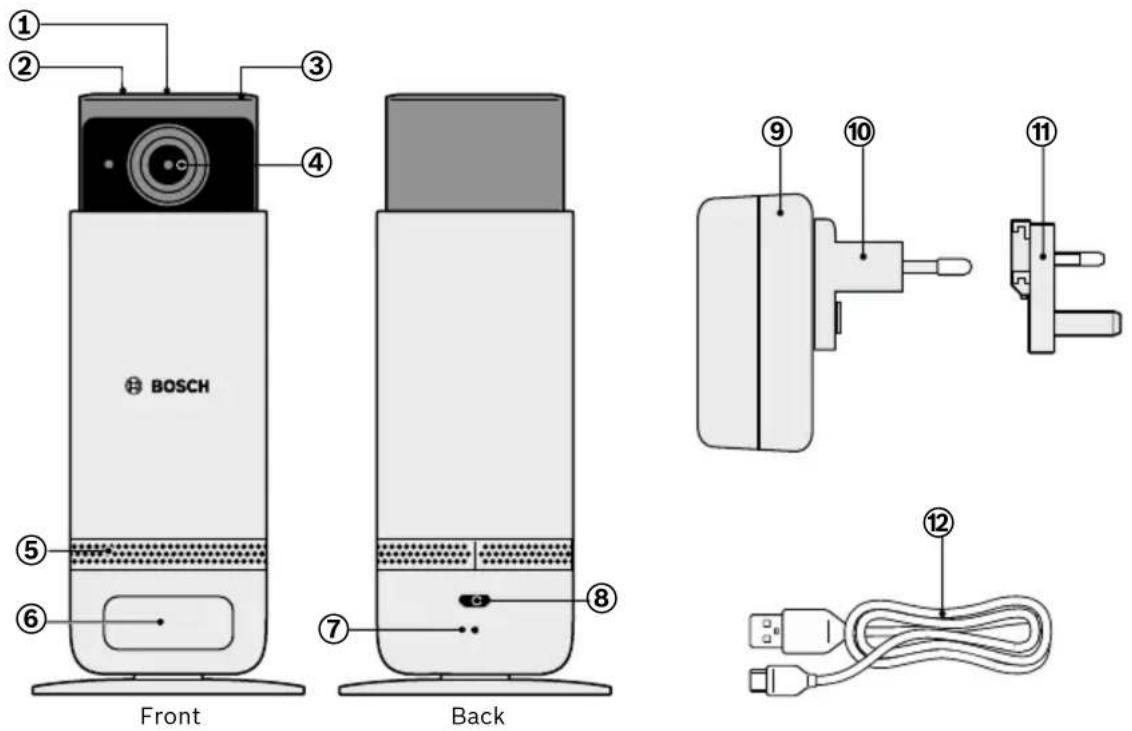
| Item | Description Explanation | |
| 1 | Microphone - | |
| 2 | Contact sensor Touch the sensor on the camera head to activate or deactivate privacy mode. The camera head then extends or retracts. | |
| 3 | Status LED Camera status indicator | |
| 4 | Lens - | |
| 5 | Speaker - | |
| 6 | Motion sensor Captures movement | |
| 7 | Reset button Resets the camera to factory settings, removes it from the network, erases all recordings. | |
| 8 | USB connection Micro USB | |
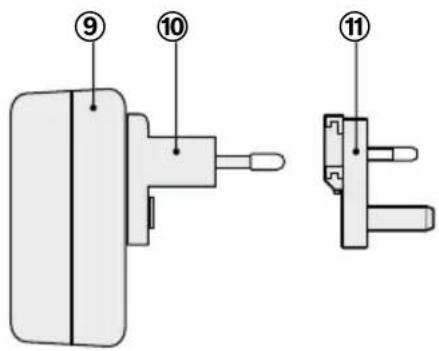
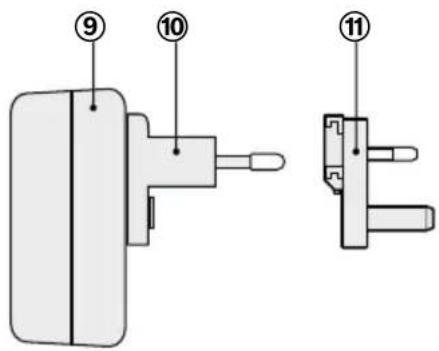
| 9 | Power supply unit - | |
| 10 | EU adapter | - |
| 11 | UK adapter | - |
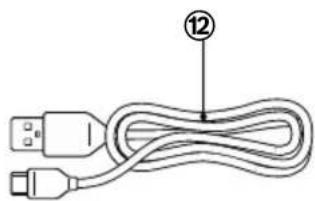
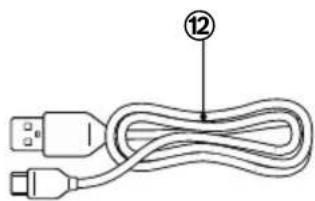
| 12 | USB cable | USB-A / Micro USB |
↑ Content
Setting up the Eyes indoor camera II
The standards and directives applicable in your country must be observed during planning, set-up, operation and maintenance.
Always lay the cables of connected devices in such a way that they can not pose a hazard to people or pets.
i Position the camera on a horizontal and even surface.
- Ideally, the camera should be aligned with the primary area it is intended to monitor.
If possible, do not allow the viewing direction of the camera to cover a window.
Before mounting: Checking for Wi-Fi availability
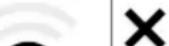
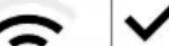
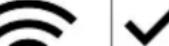
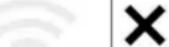 | The camera requires a stable and sufficiently strong Wi-Fi connection. Select the location where you wish to set up your indoor camera and use your mobile device to check the strength of your home network's Wi-Fi signal. The table will tell you whether the signal strength is sufficient. |
 | |
 Ok Ok | |
 Ok Ok |
Start-up
- Ensure that you have a Wi-Fi router with an internet connection and that you have your Wi-Fi password handy.
To start up the Eyes indoor camera II, your mobile device must be connected to your home router's Wi-Fi network which you would also like to use for your camera. If your router supports both frequency bands (2.4 GHz and 5 GHz), use your smartphone to select 2.4 GHz Wi-Fi.
i Please do not minimise or close the app during start-up.
Download the “Bosch Smart Camera” app from your app store. You require this for the entire installation and configuration process. Connect the indoor camera to the power supply: Connect the indoor camera to the socket using the power cable and the power supply unit.
Once the indoor camera is connected to the power supply, it initialises for a few seconds and then flashes green. Start the app and log in, or register if you do not have a Bosch account yet. In the Bosch Smart Camera app, select “Add camera” and follow the instructions in the app. The indoor camera is controlled via the Bosch Smart Camera app.
Details on the available functions, FAQs, additional help with mounting, installation and commissioning, as well as an explanatory video can be found on our website:
→ https://www.bosch-smarthome.com/rom/eyes-indoor-2
The status LED (3) shows the status of the camera using flashing codes.
| Status LED Status Measures | ||
| LED off No power supply | Power | Check the camera's power supply. Note: After successful start-up, the LED is off provided no video is being transmitted. |
| LED flashes red | General error when switching on | Unplug the power supply unit. Re-insert it after 30 seconds. |
| LED alternately flash-es red and green | Camera failed to connect to the home router Wi-Fi | Check the Wi-Fi strength of the router (see “Checking for Wi-Fi availability”). On your router, check whether DHCP is active and the connection of new devices is permitted (MAC addresses filter). In the app, go one step back. If this error occurs with a camera which worked perfectly before, please check that your router is working properly. |
| LED alternately flash-es red and blue | Failed to connect to the Bosch Cloud server | Check the router's internet connection and the bandwidth of your internet connection. Unplug the power supply unit and plug it back in again after 30 seconds so that the camera restarts. If the above steps have not helped, reset the camera to factory settings. |
You can find the system requirements, FAQs and information about other flashing codes for operation of the camera at:
→ https://www.bosch-smarthome.com/rom/eyes-indoor-2
Privacy mode
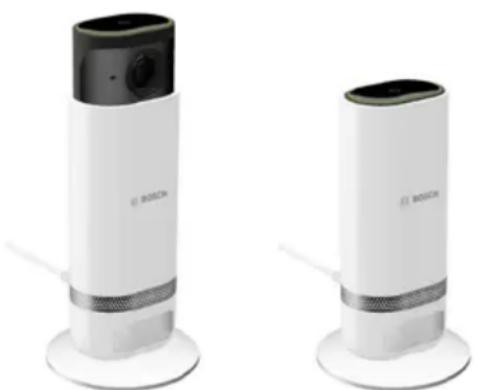
The Eyes indoor camera II has a privacy mode. You can activate or deactivate this mode using the app or by lightly touching the sensor (2) on the camera head.
When the mode is activated, the camera head retracts and the integrated microphone is switched off. Recording of video clips and live streaming are disabled in this mode.
The camera can emit an optional acoustic signal to alert people when privacy mode is activated or deactivated.
natural_image
Two Bosch brand telephones on stands, one with a black camera module and the other with a white body (no visible text or symbols)Deactivated Activated
When privacy mode is activated, recording and live streaming are disabled and the integrated microphone is switched off.
Resetting to factory settings
You can reset the device to its factory settings as follows:
Use a suitable object to press the reset button (7) for at least 8 seconds until the camera flashes red. The device then restarts. Please note that it can take some time until the camera unit is ready for operation again. The camera flashes green to signal that it is ready for operation again.
When resetting the camera to factory settings, the device settings and all recordings which remain on the camera are deleted. The login information for your Bosch account in the app is retained.
If necessary, you can also remove the device in the Bosch Smart Camera app under the settings for the corresponding camera. To re-configure the device, add it again in the usual pairing process.
↑ Content
Maintenance and cleaning
The device does not require maintenance. Leave any repairs to a specialist. Clean the device with a soft, clean, dry and lint-free cloth. When cleaning, do not use any cleaning agents containing solvents.
Simplified declaration of conformity
CE Robert Bosch Smart Home GmbH hereby declares that the radio equipment type Bosch Smart Home BCA-IA complies with Directive 2014/53/EU. The complete text of the EU declaration of conformity is available at the following web address:
→ https://eu-doc.bosch.com
UK CA Robert Bosch Smart Home GmbH hereby declares that the radio system type BCA-IA complies with Regulation 2017 and UK PSTI Act 2022. The full text of the declaration of conformity is available at the following internet address:
→ https://gb-doc.bosch.com
Environmental protection and disposal
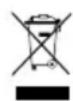
This symbol means that this product must be disposed of separately from general household waste. As an end user, you are obligated to dispose of the product via separated waste collection, for instance by passing it to an official collection point, in line with the relevant national regulations.
By collecting waste separately, you are making a valuable contribution to protecting the environment and human health. This is because, by treating old equipment properly, on one hand, the potentially negative effects associated with the presence of hazardous substances are prevented and, on the other hand, raw materials are conserved through their recovery.
Please also note that the avoidance of waste is an even more valuable contribution to environmental protection. Wherever possible, as well as finding a further use for the device yourself or having it repaired, passing the device to a second user is also an ecologically valuable alternative to disposal.
It is also possible to return these to the place you bought the product from, provided the distributor offers a returns service voluntarily or is legally obligated to do so.
Please note that you alone are responsible for the erasure of all data on the device, in particular confidential and personal data.
↑ Content
Technical data
| Device type designation BCA-IA | |
| Protection class IP30 | |
| Ambient temperature + 5° to + 40 °C | |
| Max. humidity 90 % (non-condensing) | |
| Housing dimensions (H × ∅) 160 × 72 mm | |
| Weight 254 g | |
| Radio protocol Wi-Fi, IEEE 802.11 b/g/n | |
| Radio frequency 2.4 – 2.4835 GHz | |
| Max. transmitting power 100 mW | |
| Radio range in the open < 100 m | |
| Software class A | |
| Receiver category 1 | |
| Supply voltage 5 VDC, external power supply unit including adapter | |
| Max. power consumption | 8 W |
| Resolution | 1920 × 1080 (1080p, FullHD) |
| Alarm siren volume | < 80 dB(A) at a distance of 1 m |
Technical modifications reserved
Open source software
This Bosch Smart Home product uses open-source software. The licence information for the open-source software used depends on the software version of your device or your smartphone app. New software versions become available for your product at regular intervals. You can find information about the current software version and the open-source software used in the respective settings area in the smartphone app. You can also find information about the licences and the source code for the open-source software at:
→ https://www.bosch-smarthome.com/open-source-software
Inhalt
→ https://bosch-smarthome.com/release-notes
↑ Inhalt
i Hinweise
→ https://www.bosch-smarthome.com/rom/eyes-indoor-2
→ https://www.bosch-smarthome.com/rom/eyes-indoor-2
Privatsphäre-Modus
natural_image
Two white Bosch 3D camera modules on stands, one with a black lens and the other with a black lens (no text or symbols visible)Open Source Software
→ https://www.bosch-smarthome.com/open-source-software
Sommaire
→ https://bosch-smarthome.com/release-notes
i Remarques
→ https://www.bosch-smarthome.com/rom/eyes-indoor-2
Mode Sphère privée
natural_image
Two white Bosch 3D camera module devices on stands, no visible text or symbols on the device body.désactivé activé
→ https://www.bosch-smarthome.com/open-source-software
Contenido
→ https://bosch-smarthome.com/release-notes
↑ Contenido
Notas
natural_image
Two white Bosch 3D camera module devices on stands, no visible text or symbols on the device body.→ https://www.bosch-smarthome.com/open-source-software
Indice
→Software open source 62
→ https://www.bosch-smarthome.com/rom/eyes-indoor-2
Modalità Privacy
natural_image
Two white Bosch 3D camera modules on stands, one with a black camera module and the other with a black camera module (no visible text or symbols)→ https://www.bosch-smarthome.com/open-source-software
Conteúdo
→ https://bosch-smarthome.com/release-notes
↑ Conteúdo
Notas
→ https://www.bosch-smarthome.com/rom/eyes-indoor-2
→ https://www.bosch-smarthome.com/rom/eyes-indoor-2
Modo de privacidade
natural_image
Two white Bosch 3D head-mounted devices with black camera modules, displayed side by side (no text or symbols visible on the devices themselves)desativado ativado
Software Open Source
→ https://www.bosch-smarthome.com/open-source-software
Inhoud
→ https://bosch-smarthome.com/release-notes
↑ Inhoud
i Aanwijzingen
→ https://www.bosch-smarthome.com/rom/eyes-indoor-2
→ https://www.bosch-smarthome.com/rom/eyes-indoor-2
Privacy-modus
natural_image
Two white Bosch 3D camera modules on stands, one with a black lens and the other with a black lens (no text or symbols visible)→ https://www.bosch-smarthome.com/open-source-software
Innehåll
→ https://bosch-smarthome.com/release-notes
Anmärkningar
Baksida
natural_image
Line drawing of a USB cable with two connectors and a numbered connection point (no text or symbols)→ https://www.bosch-smarthome.com/rom/eyes-indoor-2
→ https://www.bosch-smarthome.com/rom/eyes-indoor-2
Privatsfärsläge
natural_image
Two white Bosch 3D camera modules on stands, one with a black camera module and the other with a black camera module (no text or symbols visible)avaktiverat aktiverat
→ https://www.bosch-smarthome.com/open-source-software
Sisältö
→ https://bosch-smarthome.com/release-notes
Huomautuksia
→ https://www.bosch-smarthome.com/rom/eyes-indoor-2
→ https://www.bosch-smarthome.com/rom/eyes-indoor-2
Yksityisyystila
natural_image
Two Bosch brand telephones on white stands, one with camera module and the other with antenna (no visible text or symbols)→ https://www.bosch-smarthome.com/open-source-software
Indhold
→ https://bosch-smarthome.com/release-notes
Henvisninger
→ https://www.bosch-smarthome.com/rom/eyes-indoor-2
→ https://www.bosch-smarthome.com/rom/eyes-indoor-2
Privatsfæretilstand
natural_image
Two white Bosch 3D camera modules on stands, one with black top and one with black lid (no visible text or symbols)deaktiveret aktiveret
→ https://www.bosch-smarthome.com/open-source-software
Innhold
→ https://bosch-smarthome.com/release-notes
i Merknader
Bakside
natural_image
Line drawing of a USB cable with two connectors and a numbered connection point (no text or symbols)→ https://www.bosch-smarthome.com/rom/eyes-indoor-2
Status-LED-en (3) viser statusen til kameraet via blinkekoder.
→ https://www.bosch-smarthome.com/rom/eyes-indoor-2
Privatsfære-modus
Eyes-innendørskamera II har en privatsfære-modus. Denne modusen kan aktiveres eller deaktiveres via appen eller ved lett berøring av sensoren (2) på kamerahodet.
natural_image
Two Bosch brand telephones on white stands, one with camera module and the other with antenna (no visible text or symbols)deaktivert aktivert
→ https://www.bosch-smarthome.com/open-source-software
Service information
@ www.bosch-smarthome.com/service