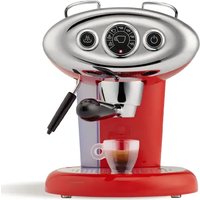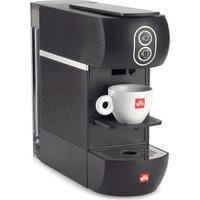
Easy - Coffee machine ILLY - Free user manual and instructions
Find the device manual for free Easy ILLY in PDF.


| Brand | Illy |
| Model | Easy (Mod. 627) |
| Product type | Capsule espresso coffee machine |
| Power supply | 220-240 V / 50-60 Hz |
| Power | 1250 W |
| Pump | 63 W |
| Water tank capacity | 1 L |
| Power cord length | 1 m |
| Functions | Espresso, Lungo, temperature and volume adjustment, automatic shut-off, energy saving |
| Max used capsules capacity | 9 capsules |
| Safety | Thermal fuse, automatic shut-off, overheat protection |
| Cleaning | Manual rinsing, cleaning of removable parts with warm water |
| Descaling | Automatic program with flashing indicator light |
| Compatible capsules | Illy aluminum capsules for Nespresso Original machines, Nespresso Original capsules and other compatibles |
| Adjustable temperature | Yes (from -9°C to +6°C relative to factory setting) |
| Adjustable volume | Yes (manual programming of espresso and lungo buttons) |
| Cup support | Removable for espresso cups or large cups |
| Drip tray | Removable, with used capsule container |
| Usage | Domestic and similar (offices, hotels, bed & breakfast) |
| Storage temperature | Do not go below 5°C |
Frequently Asked Questions - Easy ILLY
User questions about Easy ILLY
0 question about this device. Answer the ones you know or ask your own.
Ask a new question about this device
Download the instructions for your Coffee machine in PDF format for free! Find your manual Easy - ILLY and take your electronic device back in hand. On this page are published all the documents necessary for the use of your device. Easy by ILLY.
USER MANUAL Easy ILLY
natural_image
Diagram showing a mechanical assembly with an arrow indicating rotation and a magnified inset of a cylindrical component (no text or symbols)natural_image
Line drawing of an electrical outlet with a cable inserted, no text or symbols presentnatural_image
Diagram of a device handle with an arrow pointing to a circular component, no text or symbols presentnatural_image
Line drawing of a device with a circular button and a black dot (no text or symbols)natural_image
Illustration of a coffee machine with a cup and lid, showing a coffee cup being inserted (no text or symbols present)natural_image
Line drawing of a device with circular buttons and a black dot on the right side (no text or symbols)natural_image
Diagram of a device with two circular buttons and an arrow pointing to the button (no text or symbols)natural_image
Illustration of a hand using a coffee machine to add coffee into a cup (no text or symbols visible)natural_image
Illustration of a coffee machine with a cup and lid, showing a coffee cup being inserted (no text or symbols present)natural_image
Line drawing of a hand holding a cup with a label, no text or symbols presentnatural_image
Line drawing of a camera with two lenses and a black circular mark (no text or symbols)natural_image
Illustration of a hand holding a smartphone with a circular button, showing a rotation and adjustment mechanism (no text or symbols)natural_image
Simple line drawing of a mobile phone seat with an arrow indicating rotation (no text or symbols)natural_image
Illustration of a hand using a coffee maker machine to add coffee into a cup (no text or symbols visible)natural_image
Diagram showing two identical views of a device with internal components and directional arrows, no text or symbols present.natural_image
Line drawing of a coffee machine with a cup and tray (no text or symbols)natural_image
Simple line drawing of a mobile phone with a scroll wheel and directional arrow (no text or symbols)natural_image
Diagram of a machine tool with directional arrows indicating process flow (no text or symbols)natural_image
Diagram of a coffee maker's side view showing the base and side tray with a directional arrow (no text or symbols)natural_image
Diagram of a hand pressing down on a device's handle, showing mechanical components and a black arrow indicating the action (no text or symbols present)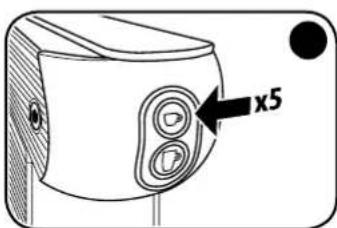

natural_image
Line drawing of a mechanical device with a circular button and textured surface (no text or symbols)natural_image
Illustration of a coffee machine with a cup and tray, no text or symbols presentnatural_image
Diagram showing two identical containers with internal circular patterns and arrows pointing to them, no text or symbols present.natural_image
Diagram of a hand pressing down on a device component (no text or symbols visible)natural_image
Diagram of a device's front panel with a knob and indicator lights (no text or symbols)natural_image
Diagram of a device with two circular buttons and an arrow pointing to the button (no text or symbols present)natural_image
Diagram of a device with two circular buttons and an arrow pointing to the button (no text or symbols)Imported into the UK by: illycaffè UK Limited 7/8 Osyth Close, Brackmills Industrial Estate, Northampton, NN4 7DY
EN
CONTENTS
GENERAL MACHINE OPERATING RULES....20
TECHNICAL DATA....21
SAFETY DEVICES 21
IMPORTANT SAFETY MEASURES....21
MACHINE PARTS 23
STARTING UP/HEATING 24
POWER SAVING FUNCTION ....24
RINSING OF INTERNAL CIRCUITS....25
USING CUPS 25
MAKING COFFEE 26
PROGRAMMING THE COFFEE TEMPERATURE....27
PROGRAMMING THE DELIVERY VOLUME....28
MAINTENANCE 29
REPAIRS....29
CLEANING 29
REMOVING LIME SCALE 30
PROBLEM - CAUSE - SOLUTION 32
WASTE DISPOSAL....34
PACKAGING 34
GENERAL MACHINE OPERATING RULES
Before using this coffee machine, read the manual carefully and keep it safely for future reference.
The use and maintenance manual ensures that the appliance is used safely in an informed manner and also describes all its functions. Bear in mind that good and especially safe operation of the machine also depends on knowledge of the appliance and correct maintenance over time.
CAUTION: We recommend using the machine with illy aluminium capsules compatible with *Nespresso Original coffee machines. Illy aluminium capsules compatible with *Nespresso Original machines, *Nespresso Original capsules and most other compatible capsules can be used on the machine. Illy is not affiliated with the *Nespresso® brand.
The manufacturer declines any and all responsibility in the event of incorrect use in relation to the information provided, as well as adaptations, modifications or repairs that are improvised or not performed by qualified personnel. Such incorrect use will render the warranty provided for the device null and void.
If faults or manufacturing defects are found on the appliance, contact the point of sale where the it was purchased together with the receipt.
TECHNICAL DATA Mod. 627
Power supply voltage: 220-240 V / 50-60 Hz
Pump: 63 W
Appliance power: Mod. 627 1250 W
Length of power cable: 1 m
Tank capacity: 11
Energy saving function
Safety devices
Thermal safety fuse
Manufactured by Capitani S.r.l. Piazza IV Novembre 1 – Solbiate Con Cagno (CO) Italy – Tel. +39 031 - 802020 – www.capitani.it
The manufacturer reserves the right to make changes or improvements without prior notice.
IMPORTANT SAFETY MEASURES
- Place the coffee machine on a flat, dray and stable surface suitable for withstanding weight and heat away from sources of water and heat.
- Do not place it on top of other household appliances (washing machines, dishwashers, refrigerators, etc.).
- Never set it up or leave it outside.
Avoid risks of electrical shocks and fires: - Connect the coffee machine exclusively to a suitable mains connections complete with an earth/ground connection. Check that the voltage shown on the appliance's ID plate matches the power supply voltage.
- Never use an appliance if the cable or plug is damaged, after a machine malfunction or after damage of any kind. Contact authorised service centres to check, repair or verify correct operation.
- If the power cable is damaged, it must only be replaced by the manufacturer or an authorised service centre.
- Never pass the power cable around corners or over sharp edges. Keep it away from sources of heat and moisture.
- To avoid damage, never place the coffee machine next to or on warm shelves (heaters, cooking tops, gas burners, etc.).
- If the appliance is not to be used for long periods, disconnect it from the power supply.
- To avoid damage, disconnect the coffee machine by pulling on the plug and not on the power cable; never carry the appliance by holding it with the power cable.
- Never touch the power cable with wet hands.
- Do not expose the machine to jets of water or immerse it partially or completely. Water in the presence of electricity is a source of danger and may cause electric shocks.
- Never implement any technical modifications to the coffee machine.
Always unplug the power cable from the power socket:
• Before removing or inserting the water tank.
• To fill the tank with water.
- When the appliance is not to be used for an extended period of time.
- If the machine is faulty.
• Before cleaning the appliance.
[Non-Text]
EN
Avoid risks during operation:
- This coffee machine is intended to be used in domestic and similar applications, such as:
– in cooking areas reserved for personnel in shops, offices and other professional environments;
– on holiday farms;
— use by guests in hotels, motels and other residential venues;
– in contexts such as bed and breakfast accommodation.
- Exclusively use this coffee machine as described in these instructions.
- This appliance may be used by children over the age of 8 years if supervised by adults or instructed about safe use and provided they are aware of the risks entailed. Keep the appliance and the power cable out of reach of children.
- Make sure that no child is able to play with this coffee machine by leaving it within reach.
- This appliance can be used by people with reduced physical, sensory or mental capacities or with insufficient experience and/or skills provided they are supervised or instructed how to use the appliance safely and are aware of the risks entailed.
- Steam and hot water can cause scalds/burns! Never insert your fingers under the coffee dispenser while the machine is operating.
- Always re-close the lever and do not open it while the appliance is delivering coffee. Risk of scalds/burns.
- Do not insert your fingers inside the capsule holder. Risk of injury.
- Do not use damaged or deformed capsules. This could damage the appliance.
- Do not use the coffee machine without the drip tray to avoid leaks of liquid.
Avoid damaging the machine:
- Fill the tank exclusively with drinking water; never use sparkling water or other liquids.
- To prevent no-load operation of the pump and overheating, always make sure that the tank contains sufficient water before starting the appliance.
ATTENTION:
No liability is accepted for any damage resulting from:
- Incorrect use that does not comply with the intended purposes;
- Repairs not performed by authorised service centres;
- Tampering with the power cable;
- Tampering with any machine component;
- The use of non-original spare parts and accessories; In such cases, the warranty will be null and void.
MACHINE PARTS
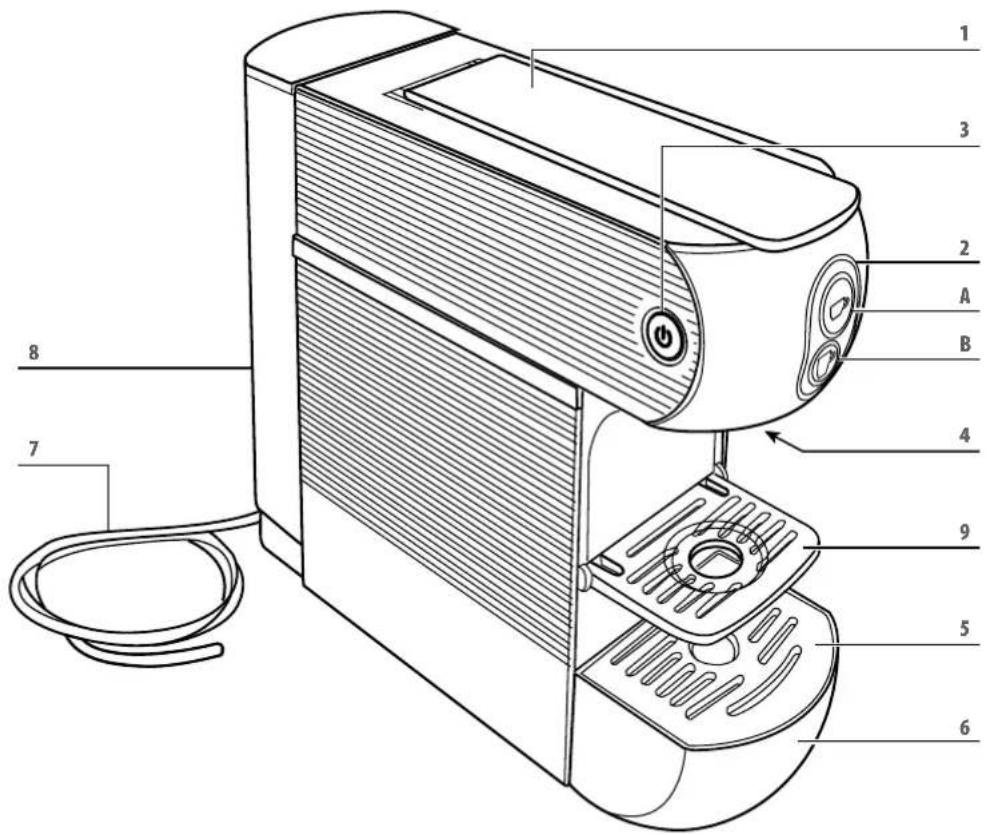
1 CAPSULE COMPARTMENT OPENING/CLOSING LEVER
2 BREW BUTTONS:
A ESPRESSO COFFEE
B LONG COFFEE
3 MAIN SWITCH
4 DISPENSING SPOUT
5 DRIP GRID
6 DRIP TRAY WITH USED CAPSULE HOLDER (EXTRACTABLE)
7 POWER CABLE
8 WATERTANK
9 ESPRESSO CUP SUPPORT
EN
STARTING UP/HEATING
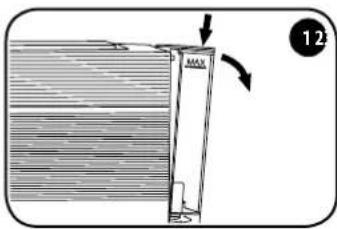
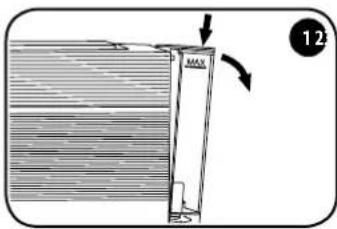
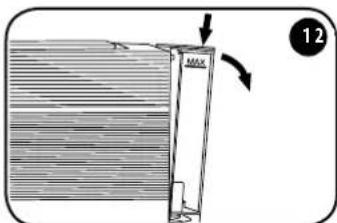
Remove the cover of the tank. To remove the tank, press it downwards while simultaneously pushing it outwards.
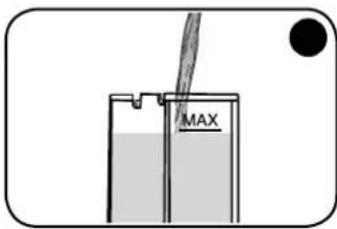
Fill the tank up to the maximum level indicated (MAX).
natural_image
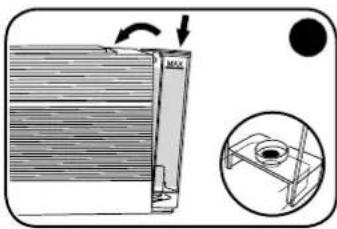
Diagram showing a mechanical component with an arrow indicating rotation and a magnified inset of a cylindrical structure (no text or symbols)Insert the tank by tilting it slightly and placing it on the water valve. Press the upper part into the machine until a click is heard.
Refit the cover.
CAUTION: Make sure that the tank is properly inserted to avoid water leaks.
natural_image
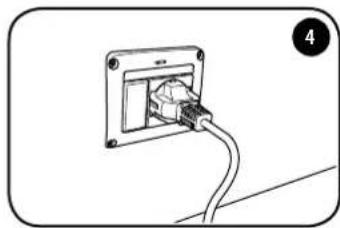
Line drawing of an electrical outlet with a cable inserted, no text or symbols presentConnect the machine by fitting the plug into the socket.
natural_image
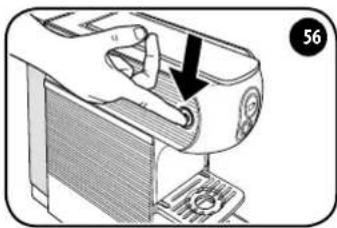
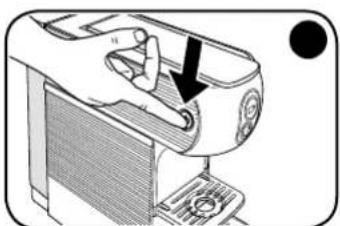
Diagram of a device handle with an arrow pointing to a circular component, no text or symbols presentTurn the machine ON using the main switch. The machine is ON when the main switch lights up.
natural_image
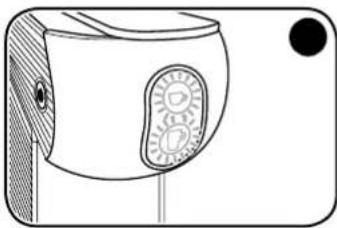
Line drawing of a device with a circular button and a black dot, no text or symbols presentButtons and flash intermittently; when they stop flashing and remain illuminated, the machine has reached the correct temperature and is ready for use.
When the machine is in the heating stage (delivery buttons flashing), it cannot deliver coffee.
CAUTION: Once the initial heating is complete, the machine will clean the system; this may cause a small amount of water to seep out. Do not place your hands near the coffee dispenser spout. Once this operation is complete, the machine is ready to dispense coffee.
Power saving function
- The machine is equipped with a system that allows it to switch to reduced energy consumption mode.
- If the machine remains switched ON without being used, it switches off automatically.
- To use the machine again, press the main switch and wait for the machine to heat up again.
RINSING OF INTERNAL CIRCUITS
After the first use, or if the coffee machine has not been used for a long time, rinse the internal circuits by applying the following procedure:
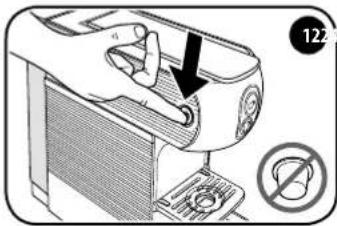
Make sure there are no capsules in the machine, then turn it on via the main switch.
natural_image
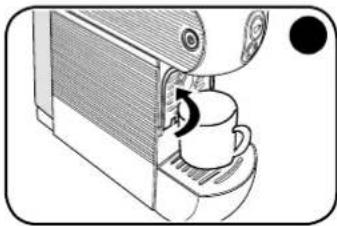
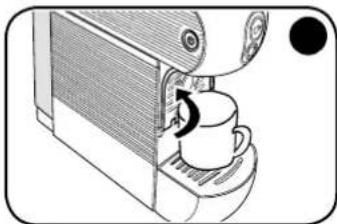
Illustration of a coffee machine with a cup and a coffee cup being inserted (no text or symbols)Close the espresso cup holder and place a large empty cup under the dispenser spout.
natural_image
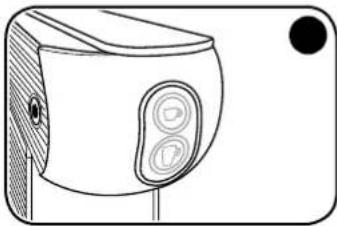
Line drawing of a device with circular buttons and a black dot on the right side (no text or symbols)When buttons 📋 and 📁 are illuminated and unblinking, the machine is ready to be used.
natural_image
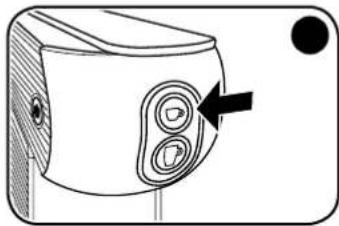
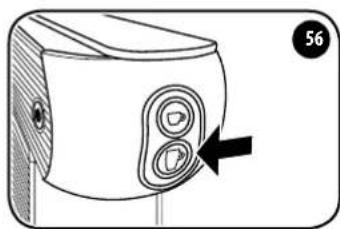
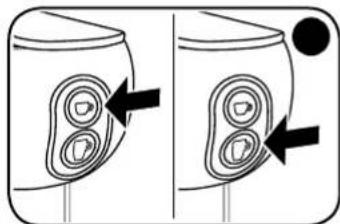
Diagram of a device with two circular buttons and an arrow pointing to the button (no text or symbols)Press the 📋 button; the machine will dispense water; press the 📋 button again. The rinsing operation is completed when at least three cups of water have been delivered.
Using cups
natural_image
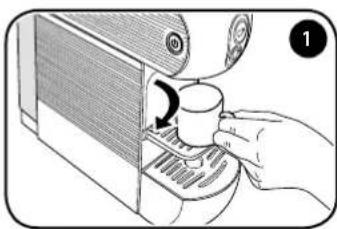
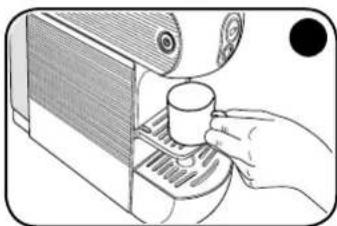
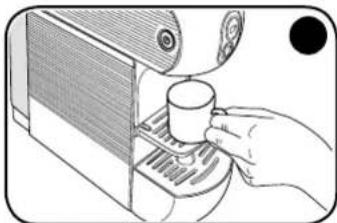
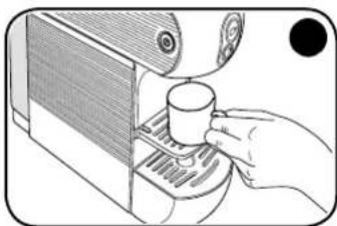
Illustration of a hand using a coffee machine to add coffee into a cup (no text or symbols visible)Lower the support to prepare an espresso coffee correctly, and to use espresso cups.
natural_image
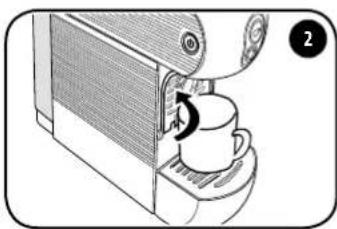
Illustration of a coffee machine with a cup and lid, showing a coffee cup being inserted (no text or symbols present)To use large cups, close the support and place the cup directly on the drip tray.
MAKING COFFEE
natural_image
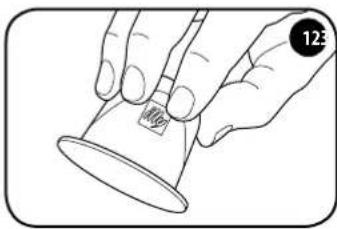
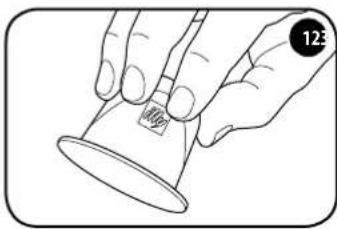
Line drawing of a hand holding a cup with a label showing '100g' (no other text or symbols)We recommend using the machine with illy aluminium capsules compatible with *Nespresso Original coffee machines.
Illy is not affiliated with the *Nespresso® brand.
natural_image
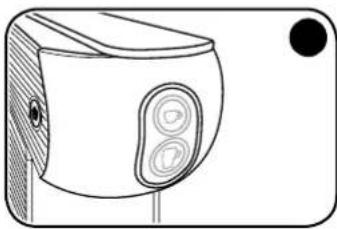
Line drawing of a camera with two lenses and a black circular mark (no text or symbols)Wait until buttons 📋 and are illuminated and unblinking.
natural_image
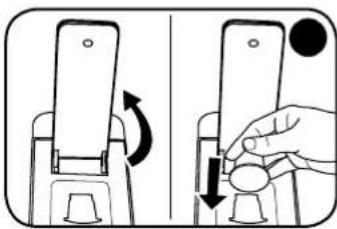
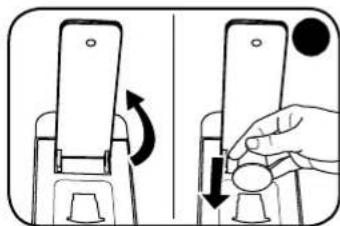
Illustration of a hand holding a smartphone with a circular button, showing a rotation and adjustment mechanism (no text or symbols)Raise the lever and insert the capsule in the slot.
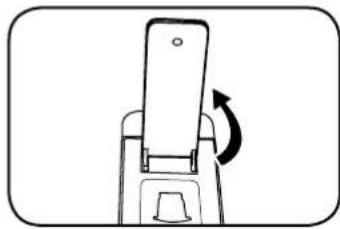
Before inserting the new capsule, slowly raise the lever fully up to eject the old one. To ensure correct hygiene and maintain high product quality, it is advisable to expel the capsule immediately after the coffee is dispensed.
To insert capsules, the lever must be raised to the point where it stays up on its own. To expel capsules, the lever must be fully raised.
natural_image
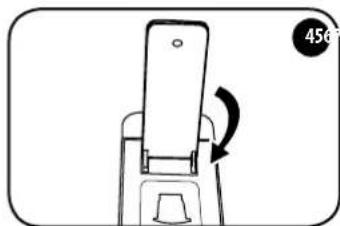
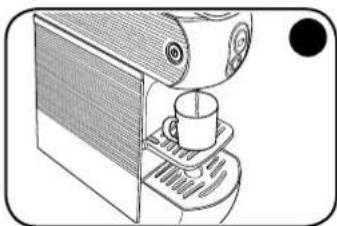
Simple line drawing of a mobile phone seat with an arrow indicating rotation (no text or symbols)Close the lever completely. Place the cup on the support under the dispenser spout.
natural_image
Illustration of a hand using a coffee machine to add coffee into a tray (no text or symbols visible)e support under the dis- penser spout.
natural_image
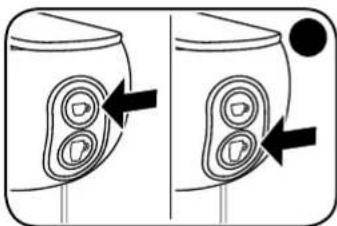
Diagram showing two identical views of a device with internal components and directional arrows, no text or symbols present.To dispense an espresso coffee, press the ➕ button. To dispense a long coffee, press the ➕ button. If there is some difficulty in closing it, re-open the lever and close it again.
natural_image
Line drawing of a coffee machine with a cup and tray (no text or symbols)CAUTION: Wait at least 5 seconds after dispensing before lifting the lever. After delivering 10 successive cups of coffee, wait for at least 2 minutes before preparing another coffee. The machine is designed for single deliveries with a maximum duration of 75 seconds.
Hint
- To prepare a good cup of espresso coffee, use thick, ready-warmed espresso cups if possible, to prevent the coffee from cooling down too quickly. Espresso cups can be warmed by dispensing hot water from the dispenser nozzle into the cup.
- When using illy espresso capsules, press 📋. When using illy lungo espresso capsules, press 📋
After making the coffee, the capsule must be discarded as follows:
natural_image
Simple line drawing of a mobile phone with a scroll wheel and directional arrow (no text or symbols)- Raise the open/close lever completely (the capsule will fall into the relative container).
CAUTION: in the interests of hygiene, it's advisable to remove the capsule after dispensing the coffee and then dispense a small amount of water to remove any residue.
The capsule container can hold up to 9 used capsules. Empty this container on a regular basis.
- If you want to make another coffee, insert a new capsule and repeat the procedure; otherwise, close the lever.
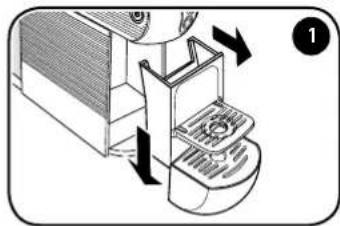
The capsule container can hold a maximum of 9 capsules, so it should be emptied regularly to prevent the capsules from getting stuck.
natural_image
Diagram of a machine tool with directional arrows indicating process flow (no text or symbols)To do this, take out the tray and separate it from the capsule container by pushing it downwards; be careful as there may be some liquid.
natural_image
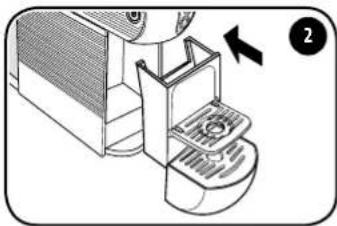
Diagram of a coffee maker's side view showing the base and side arm with a directional arrow (no text or symbols)Empty the drawer and rinse and dry the components before replacing them in their housings.
PROGRAMMING THE COFFEE TEMPERATURE
natural_image
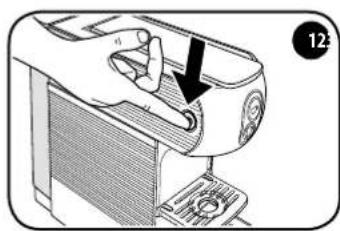
Illustration of a hand pressing down on a device component (no text or symbols visible)Turn the machine OFF using the main switch.
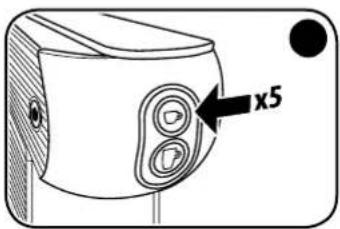
With the machine off, press the □ button 5 times to access the temperature change function. The □ and buttons will begin to flash.
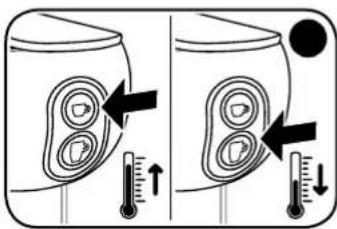
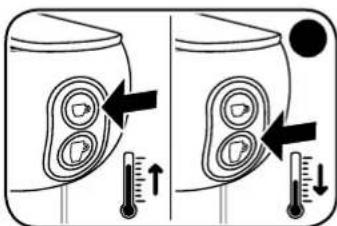
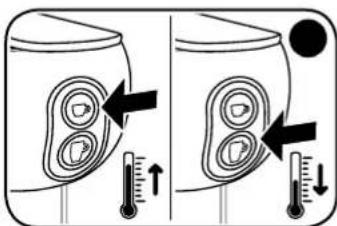
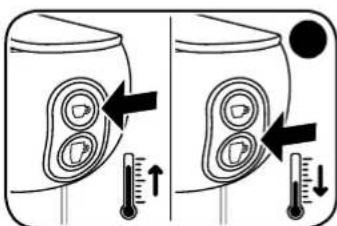
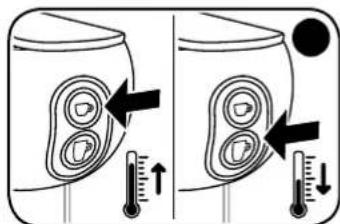
Press the ☐ button to increase the temperature by 3 degrees. Press the ☐ button to decrease the temperature by 3 degrees.
PLEASE NOTE: the factory-set temperature can be increased by 3°C or 6°C, and reduced by 3°C, 6°C or 9°C.
natural_image
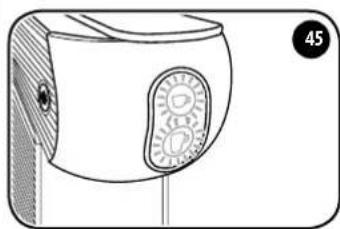
Line drawing of a mechanical device with a circular button and textured surface (no text or symbols)After 5 seconds without any other action being carried out, both □ and □ buttons will flash for 2 seconds, after which the machine will exit the temperature change function.
natural_image
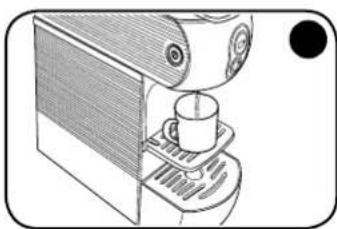
Line drawing of a coffee machine with a cup and tray (no text or symbols)The new set temperature will then be stored for subsequent dispensing.
Coffee temperature set indicator:
| Both and buttons flash. | The set temperature corresponds to the factory temperature. |
| Only the button flashes slowly (0.5 secs). | The set temperature has been increased by 3°C compared to the factory settings. |
| Only the button flashes quickly (0.5 secs). | The set temperature has been increased by 6°C compared to the factory settings. |
| Only the button flashes slowly (0.5 secs). | The set temperature has been decreased by 3°C compared to the factory settings. |
| Only the button flashes quickly (0.2 secs). | The set temperature has been decreased by 6°C compared to the factory settings. |
| Only the button is ON steady. | The set temperature has been decreased by 9°C compared to the factory settings. |
PROGRAMMING THE DELIVERY VOLUME
Follow the instructions given in the "starting the appliance/heating" paragraph.
natural_image
Diagram showing two identical containers with internal circular patterns and arrows pointing to them, no text or symbols present.Adjusting the volume of an espresso coffee:
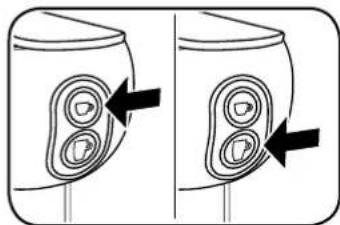
Press and hold the ➕ button. The machine will start delivering coffee. Once the desired quantity is reached, release the ➕ button. The machine will then stop dispensing coffee and the amount will be stored for subsequent deliveries.
Adjusting the volume of a long espresso coffee:
Press and hold the 📋 button. The machine will start delivering coffee. Once the desired quantity is reached, release the 📋 button. The machine will then stop dispensing coffee and the amount will be stored for subsequent deliveries.
The factory-set volumes and temperatures are optimised for the best extraction of illy espresso □ and illy long espresso □ coffee.
MAINTENANCE
If the machine is not going to be used for a long time, dispense a small amount of water, turn it OFF, unplug it from the power supply and empty the tank.
Store the appliance in a dry place, away from dust and out of reach of children.
It is advisable to store the appliance in its original packaging.
Store the machine at a temperature not lower than 5 °C to prevent any residues of water from freezing and damaging the appliance.
REPAIRS
In the event of faults, malfunctions or a damaged power cable, do not attempt to repair the appliance yourself but contact qualified personnel. Never attempt to operate a defective or damaged machine. Only authorised service centres may carry out interventions and repairs. The manufacturer declines any and all responsibility for damage to things and/or persons that may occur as a result of adaptations, modifications or repairs that are improvised or not carried out by qualified personnel.
CLEANING
Performing correct and regular maintenance of the coffee machine ensures better performance over time and a longer lifespan.
Disconnect the switches and remove the plug from the socket before performing any cleaning operation.
Never immerse the appliance in water. Clean it exclusively with a damp cloth using non-abrasive detergents and dry it immediately.
The components (grille, drip tray, capsule container and water tank) can be washed by hand using non-abrasive detergents, or in a dishwasher at a medium temperature.
EN
REMOVING LIME SCALE
The formation of lime scale is the natural consequence of use of the machine. The machine has an automatic program that helps optimise cleaning and removes scale deposits from the interior.
CAUTION: If the descaling procedure is not carried out, scale may cause malfunctions that are not covered by the warranty.
If the dispensing buttons flash in alternation, the machine must be descaled.
PLEASE NOTE:
- Make sure that there are no capsules inside the machine.
- If there is a voltage drop or the machine is switched off, the cycle continues from where it was stopped when switched on again.
- Do not lift the lever when descaling or rinsing.
Descaling procedure:

natural_image
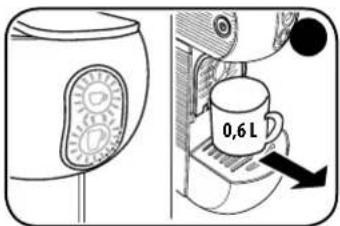
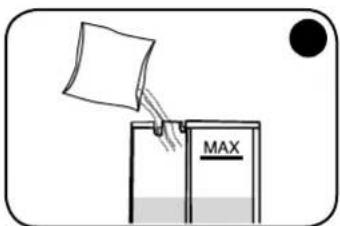
Diagram of a hand operating a device with a black arrow pointing to the handle (no text or symbols present)Turn the machine OFF using the main switch. Fill
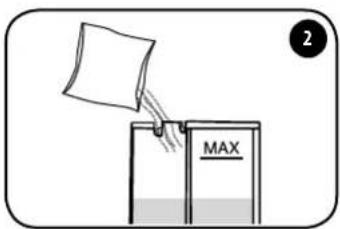
the tank with 0.6 lt of fresh water and add the descaling solution.
Make sure that the descaling solution has fully dissolved in the water in the tank.
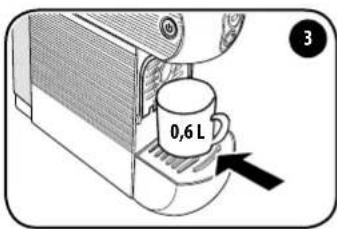
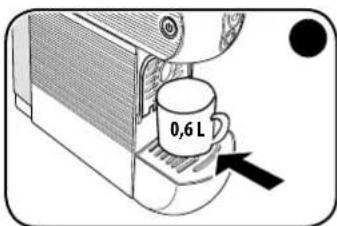
Place a container of at least 0.6 lt under the dispenser.
natural_image
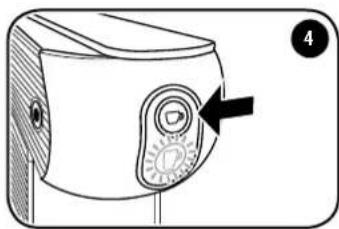
Diagram of a device with a knob and dial, no text or symbols presentTurn the machine off and keep the 📋 button pressed for 5-9 seconds. The 📋 button flashes.
natural_image
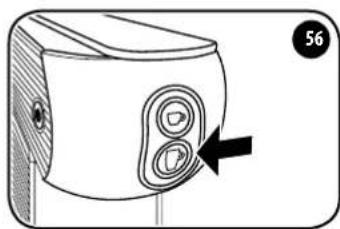
Diagram of a device with two circular buttons and an arrow pointing to the button (no text or symbols present)The button flashes. The machine begins dispensing water in an alternating cycle. The button flashes.
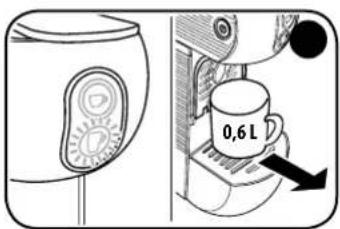
At the end of the descaling cycle, the button is steady on while the button is flashing. Remove the container and empty it.
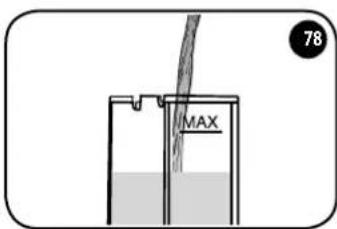
Remove the tank, rinse it and fill with fresh water. Reinsert the tank with fresh water into the machine.
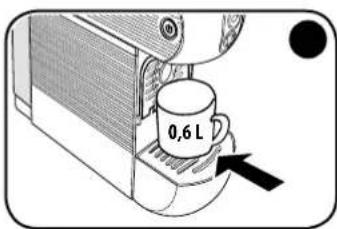
Place a container of at least 0.6 It under the dispenser.
natural_image
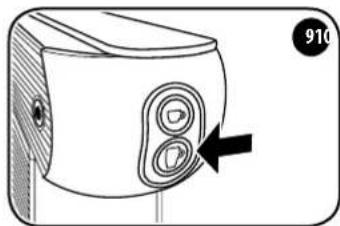
Diagram of a device with two circular buttons and an arrow pointing to the button (no text or symbols)Press the button to start the rinse cycle. The button is steady on while the button flashes.
The machine automatically interrupts the rinsing cycle. The ▶ and buttons flash simultaneously. Remove the container and empty it. Wait until the ▶ and buttons are steady on. The machine is now ready for use.
PROBLEM - CAUSE - SOLUTION
| Problem Cause Solution | ||
| The machine does not turn on. | The plug is not inserted correctly. | Make sure that the plug is inserted in a socket supplying voltage and that the main switch is pressed. |
| Faulty components. Contact the service centre. | ||
| The machine brews coffee slowly. | Internal components clogged with scale. | Descale the machine as described in the specific paragraph. |
| The machine switches ON but does not brew coffee. | The water tank is empty or fitted incorrectly. | Make sure that the water tank is correctly inserted in its housing and that it contains sufficient water. |
| Open/close lever not fully closed. Make sure that the open/close lever is fully closed. | ||
| Faulty pump. | Check that the pump delivers water: after pressing the button, a vibration should be felt. This indicates that the pump is working correctly.If no vibration is felt, contact the service centre.If the vibration is felt but the machine does not start to deliver coffee, repeat the operation 2/3 times at intervals of a few minutes.If the machine still does not deliver coffee at the end of this procedure, contact the service centre. | |
| Hydraulic components clogged with scale. | Perform descaling. If the problem persists, contact the service centre. | |
| The machine has turned OFF automatically. | This is not a defect. It is a programmed power saving mode: the machine is designed to turn OFF automatically. | |
| The machine vibrates a great deal and is noisy. | Insufficient water level in the tank. | Strong vibrations are caused by the pump that is unable to draw water correctly. Restore the correct water level in the tank. |
| You cannot insert the capsule in the machine. | Capsule not compatible. Check that you are using a compatible capsule. | |
| Capsule not inserted correctly. Insert the capsule in the correct position. | ||
| Used capsule holder full. | Check whether the used capsule holder contains too many used capsules and cannot accept any more. Empty it if necessary. | |
| If the defect persists, contact the service centre. | ||
| The capsule does not remain in the brewing unit but falls directly into the used capsule holder. | Open/close lever not fully open. | Fully open the capsule opening/closing lever, recover the unused capsule from the used capsule holder and insert it once more. If the defect persists, contact the service centre. |
| After inserting the capsule into the brewing unit, the opening/closing lever cannot be closed. | Capsule not aligned with brewing unit. | Open the open/close lever again and then re-close it completely. If the defect persists, contact the service centre. |
| Used capsule holder full. | Check whether the used capsule holder contains too many used capsules and cannot accept any more. Empty it if necessary. | |
| The coffee delivered by the machine is cold. | The capsule was inserted before the ☐ and ☐ buttons came ON steady. | Insert the capsule when the ☐ and ☐ buttons come ON steady. |
| Faulty boiler. Contact the service centre. | ||
| The capsule is not ejected properly. | Capsule stuck in brewing unit. | Re-close the open/close lever and then open it slowly again. |
| Press the ☐ button and while water is being dispensed, slowly open the open/close lever. | ||
| Used capsule holder full. | Check whether the used capsule holder contains too many capsules preventing the used capsule from being expelled. Empty it if necessary. | |
| If the defect persists, contact the service centre. | ||
| Single drops fall from the spout at the end of delivery. | This is not a defect. A few drops falling at the end of delivery is normal. | |
| The delivery of coffee does not stop even if you press the delivery button. | Faulty components. Disconnect the plug from the socket and contact the service centre | |
| The coffee delivered has a sour taste. The machine was not rinsed correctly after descaling. | Rinse the machine again. | |
| Use of expired capsules. Check the expiry date of the capsules. | ||
EN
WASTE DISPOSAL
At the end of the appliance's lifespan, make sure it can no longer be operated before disposing of it in compliance with waste disposal regulations. Remove the plug from the socket and cut the power cable.

The crossed-out bin symbol on the appliance indicates that, at the end of its useful life, the product must be processed separately from household waste: i.e., it must be sent to a differential collection centre for electrical and electronic equipment or returned to the retailer when
purchasing equivalent new equipment.
Appropriate differential waste collection so that the appliance is sent for recycling, processing and compatible disposal helps avoid possible negative impacts on the environment and health and promotes the recovery of materials and components. The user is responsible for delivering the appliance at the end of its lifespan to suitable collection facilities.
For more detailed information about the waste collection systems available, contact your local waste disposal service or the point of sale where the appliance was purchased. Anyone who disposes or trashes this appliance rather than return it to a differential waste collection centre for electrical and electronic waste may be subject to fines envisaged by applicable legislation concerning the illegal disposal of waste.
Packaging
Packaging is important in order to protect the product during transport. Before disposing of packaging materials, check the integrity of the appliance and make sure it operates correctly. If any complaints arise, the appliance must be returned in its original packaging. Packaging materials must be kept out of reach of children since they are a potential source of hazards.
Dispose of packaging materials in accordance with local differential waste collection regulations. The special symbols shown on packaging materials indicate the correct disposal methods. Informed disposal is the first step towards correct defence of the environment.


Imported into the UK by: illycaffè UK Limited 7/8 Osyth Close, Brackmills Industrial Estate, Northampton, NN4 7DY
FR
SOMMAIRE
RÈGLES GÉNÉRALES POUR L'UTILISATION DE LA MACHINE.... 36
CARACTÉRISTIQUES TECHNIQUES....37
DISPOSITIFS DE SÉCURITÉ ....37
MESURES IMPORTANTES DE SÉCURITÉ....37
PARTIES DE LA MACHINE .... 39
MISE EN MARCHE/CHAUFFAGE 40
FONCTION ÉCONOMIE D'ÉNERGIE....40
RINÇAGE CIRCUITS INTÉRIEURS....41
UTILISATION DES TASSES....41
PRÉPARATION DU CAFÉ 42
PROGRAMMATION TEMPÉRATURE CAFÉ ....43
PROGRAMMATION DU VOLUME DE DISTRIBUTION ....44
ENTRETIEN 45
RÉPARATIONS....45
NETTOYAGE 45
DÉTARTRAGE 46
PROBLÈME - CAUSE - SOLUTION 48
MISE EN DÉCHARGE 50
EMBALLAGE ....50
RÈGLES GÉNÉRALES POUR L'UTI- LISATION DE LA MACHINE
natural_image
Diagram showing a mechanical assembly with an arrow indicating rotation and a magnified inset of a cylindrical component (no text or symbols)natural_image
Line drawing of an electrical outlet with a cable inserted, no text or symbols presentnatural_image
Diagram of a device handle with an arrow pointing to a circular component, no text or symbols presentnatural_image
Line drawing of a device with a circular button and a black dot (no text or symbols)natural_image
Illustration of a coffee machine with a cup and lid, showing a coffee cup being inserted (no text or symbols present)natural_image
Line drawing of a camera with two lenses and a black circular button (no text or symbols)natural_image
Diagram of a device with two circular buttons and an arrow pointing to the button (no text or symbols)natural_image
Illustration of a coffee machine with a cup and fan, showing a coffee cup being inserted (no text or symbols present)natural_image
Line drawing of a hand holding a cup with a label showing '100g' (no other text or symbols)natural_image
Line drawing of a camera with two lenses and a black circular mark (no text or symbols)natural_image
Illustration of a hand holding a smartphone with a circular button, showing a rotation and adjustment mechanism (no text or symbols)natural_image
Simple line drawing of a mobile phone seat with an arrow indicating rotation (no text or symbols)natural_image
Illustration of a hand using a coffee maker to add coffee into a tray (no text or symbols visible)natural_image
Diagram showing two identical views of a device with internal components and directional arrows, no text or symbols present.natural_image
Line drawing of a coffee machine with a cup and tray (no text or symbols)natural_image
Simple line drawing of a mobile phone with a scroll wheel and directional arrow (no text or symbols)natural_image
Diagram of a machine tool with directional arrows indicating process flow (no text or symbols)natural_image
Diagram of a coffee maker's side view showing the base and side arm with a directional arrow (no text or symbols)natural_image
Diagram of a hand pressing down on a device's handle, showing mechanical components and a black arrow indicating the action (no text or symbols present)natural_image
Line drawing of a mechanical device with a circular button and textured surface (no text or symbols)natural_image
Line drawing of a coffee machine with a cup and tray (no text or symbols)natural_image
Diagram showing two identical containers with internal circular patterns and arrows pointing to them, no text or symbols present.Réglage volume café espresso :
natural_image
Diagram of a hand pressing down on a device handle (no text or symbols visible)natural_image
Diagram of a device's front panel with a knob and dial indicator (no text or symbols)natural_image
Diagram of a device with two circular buttons and an arrow pointing to the button (no text or symbols)natural_image
Diagram of a device with two circular buttons and an arrow pointing to the button (no text or symbols)PROBLÈME - CAUSE - SOLUTION
Imported into the UK by: illycaffè UK Limited 7/8 Osyth Close, Brackmills Industrial Estate, Northampton, NN4 7DY
ES
ÍNDICE
REGLAS GENERALES DE USO DE LA MÁQUINA....52
DATOS TÉCNICOS....53
natural_image
Diagram showing a mechanical component with an arrow indicating rotation and a magnified inset of a cylindrical structure (no text or symbols)natural_image
Line drawing of an electrical outlet with a cable inserted, no text or symbols presentnatural_image
Diagram of a device handle with an arrow pointing to a circular component, no text or symbols presentnatural_image
Line drawing of a device with a circular button and a black dot, no text or symbols presentnatural_image
Illustration of a coffee machine with a cup and a coffee cup being inserted (no text or symbols)natural_image
Line drawing of a device with two circular buttons and a black dot on the right side (no text or symbols)natural_image
Diagram of a device with two buttons and an arrow pointing to the button (no text or symbols present)natural_image
Illustration of a hand using a coffee cup to press or<|rotate_right|> from a computer monitor (no text or symbols visible)natural_image
Illustration of a coffee machine with a cup and lid, showing a coffee cup being inserted (no text or symbols present)natural_image
Line drawing of a hand holding a cup with a label, no text or symbols presentnatural_image
Line drawing of a camera with two lenses and a black circular mark (no text or symbols)natural_image
Illustration of a hand holding a smartphone with a circular button, showing a rotation and adjustment mechanism (no text or symbols)natural_image
Simple line drawing of a mobile phone seat with an arrow indicating rotation (no text or symbols)natural_image
Illustration of a hand using a coffee maker to add coffee into a machine (no text or symbols visible)natural_image
Diagram showing two identical views of a device with internal components and directional arrows, no text or symbols present.natural_image
Line drawing of a coffee machine with a cup and tray (no text or symbols)natural_image
Simple line drawing of a device with an arrow indicating rotation (no text or symbols)natural_image
Diagram of a machine tool with arrows indicating process flow (no text or symbols)natural_image
Diagram of a coffee maker's side view showing the lid, tray, and base (no text or symbols)natural_image
Diagram of a hand pressing down on a device component (no text or symbols visible)natural_image
Technical line drawing of a mechanical device with a circular component and a numbered label (45), no readable text or symbols present.natural_image
Illustration of a coffee machine with a cup and tray (no text or symbols)natural_image
Diagram showing two identical containers with internal circular patterns and arrows pointing to them, no text or symbols present.natural_image
Diagram of a hand operating a device with a black arrow pointing to the handle (no text or symbols present)natural_image
Diagram of a device with a dial indicator and an arrow pointing to the dial (no text or symbols present)natural_image
Diagram of a device with two circular buttons and an arrow pointing to the button (no text or symbols)natural_image
Diagram of a device with two circular buttons and an arrow pointing to the button (no text or symbols)Imported into the UK by: illycaffè UK Limited 7/8 Osyth Close, Brackmills Industrial Estate, Northampton, NN4 7DY
DE
INHALT
natural_image
Diagram showing a mechanical component with an arrow indicating rotation and a magnified inset of a small structure (no text or symbols)natural_image
Line drawing of an electrical outlet with a cable inserted, no text or symbols presentnatural_image
Diagram of a mechanical device with a hand operating a button, showing no text or symbols.natural_image
Line drawing of a stylized device with a circular button and textured handle (no text or symbols)natural_image
Illustration of a coffee machine with a cup and a coffee cup, showing a coffee cup being inserted (no text or symbols present)natural_image
Line drawing of a camera with two circular buttons and a black dot on the side (no text or symbols)natural_image
Diagram of a device with two circular buttons and an arrow pointing to the button (no text or symbols present)natural_image
Illustration of a hand using a coffee maker to press a cup on a machine (no text or symbols visible)natural_image
Illustration of a coffee machine with a cup and fan, showing a coffee cup being inserted (no text or symbols present)natural_image
Line drawing of a hand holding a cup with a label, no text or symbols presentnatural_image
Line drawing of a camera with two lenses and a black circular mark (no text or symbols)natural_image
Illustration of a hand holding a smartphone with a circular button, showing a rotation and adjustment mechanism (no text or symbols)natural_image
Simple line drawing of a mobile phone seatbelt with a circular button labeled '456' (no text or symbols on the device itself)natural_image
Illustration of a hand using a coffee maker to add coffee into a tray (no text or symbols visible)natural_image
Diagram showing two identical views of a container with internal circular patterns and arrows indicating direction (no text or symbols)natural_image
Line drawing of a coffee machine with a cup and tray (no text or symbols)natural_image
Simple line drawing of a device with an arrow indicating rotation (no text or symbols)natural_image
Diagram of a machine tool with directional arrows indicating process flow (no text or symbols)natural_image
Diagram of a coffee maker's side view showing the base and side shelves with a directional arrow (no text or symbols)natural_image
Illustration of a hand pressing down on a device component (no text or symbols visible)natural_image
Line drawing of a mechanical device with a circular button and wooden base (no text or symbols)natural_image
Line drawing of a coffee machine with a cup and tray (no text or symbols)natural_image
Diagram showing two identical containers with internal circular patterns and arrows pointing to each (no text or symbols)natural_image
Diagram of a hand pressing down on a device handle (no text or symbols visible)natural_image
Diagram of a device's front panel with a knob and dial indicator (no text or symbols)natural_image
Diagram of a device with two circular buttons and an arrow pointing to the button (no text or symbols)natural_image
Diagram of a device with two circular buttons and an arrow pointing to the button (no text or symbols)Imported into the UK by: illycaffè UK Limited 7/8 Osyth Close, Brackmills Industrial Estate, Northampton, NN4 7DY
PT ÍNDICE
REGRAS GERAIS PARA A UTILIZAÇÃO DA MÁQUINA 84
DADOS TÉCNICOS 85
PT
natural_image
Diagram showing a mechanical component with an arrow indicating rotation and a magnified inset of a small structure (no text or symbols)natural_image
Line drawing of an electrical outlet with a cable inserted, no text or symbols presentnatural_image
Diagram of a car door handle assembly with a hand pointing to the lock (no text or symbols present)natural_image
Line drawing of a device with a circular button and a black dot, no text or symbols presentnatural_image
Illustration of a coffee machine with a cup and a coffee cup, showing a coffee cup being inserted (no text or symbols present)natural_image
Line drawing of a camera with two circular buttons and a black dot on the side (no text or symbols)natural_image
Diagram of a device with two circular buttons and an arrow pointing to the button (no text or symbols)natural_image
Illustration of a hand using a coffee maker to press a cup (no text or symbols visible)natural_image
Illustration of a coffee machine with a cup and a coffee cup inserted, showing a circular arrow indicating rotation (no text or symbols)natural_image
Line drawing of a hand holding a cup with a label, no text or symbols presentnatural_image
Line drawing of a camera with two lenses and a black circular mark (no text or symbols)natural_image
Illustration of a hand holding a smartphone with a circular button, showing a rotation and adjustment mechanism (no text or symbols)Eleve a alavanca e insira a cápsula na abertura apropriada.
natural_image
Line drawing of a mobile phone seatbelt with a circular button labeled '456' (no text or symbols on the device itself)Fecha a alavanca completamente. Pouse a chávena de café no suporte sob o bico distribuidor.
natural_image
Illustration of a hand using a coffee maker to add coffee into a machine (no text or symbols visible)na de café no suporte sob o bico distribuidor.

natural_image
Diagram showing two identical views of a device with internal components and directional arrows, no text or symbols present.natural_image
Line drawing of a coffee machine with a cup on top (no text or symbols)natural_image
Simple line drawing of a device with an arrow indicating rotation (no text or symbols)natural_image
Diagram of a machine tool with directional arrows indicating process flow (no text or symbols)natural_image
Diagram of a coffee maker's side view showing the base and side shelves with a directional arrow (no text or symbols)natural_image
Illustration of a hand pressing down on a device component (no text or symbols visible)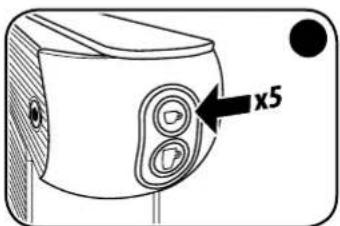
natural_image
Technical line drawing of a mechanical component with a circular feature and wooden base (no text or symbols)natural_image
Line drawing of a coffee machine with a cup and tray (no text or symbols)natural_image
Diagram showing two identical containers with internal circular patterns and arrows pointing to them, no text or symbols present.natural_image
Diagram of a hand pressing down on a device's handle, showing mechanical components and a black arrow indicating the action (no text or symbols present)natural_image
Diagram of a device with a dial indicator and an arrow pointing to the dial (no text or symbols present)natural_image
Diagram of a device with two circular buttons and an arrow pointing to the button (no text or symbols present)natural_image
Diagram of a device with two circular buttons and an arrow pointing to the button (no text or symbols)Imported into the UK by: illycaffè UK Limited 7/8 Osyth Close, Brackmills Industrial Estate, Northampton, NN4 7DY
NL INHOUDSOPGAVE
ALGEMENE REGELS VOOR HET GEBRUIK VAN DE MACHINE.... 100
NL
INBEDRIJFSTELLING/VERWARMING
natural_image
Diagram showing a mechanical component with an arrow indicating rotation and a magnified inset of a small structure (no text or symbols)natural_image
Simple line drawing of an electrical outlet with a cable, no text or symbols presentnatural_image
Diagram of a mechanical device with a hand operating a button, showing no text or symbols.natural_image
Line drawing of a device with a circular button and a black dot, no text or symbols presentnatural_image
Illustration of a coffee machine with a cup and a coffee cup inserted, showing a circular arrow indicating rotation (no text or symbols present)natural_image
Line drawing of a device with circular buttons and a black dot on the right side (no text or symbols)natural_image
Diagram of a device with two circular buttons and an arrow pointing to the button (no text or symbols)natural_image
Illustration of a hand using a coffee machine to press a cup (no text or symbols visible)natural_image
Illustration of a coffee machine with a cup and lid, showing a coffee cup being inserted (no text or symbols present)natural_image
Line drawing of a hand holding a cup with a label showing '100g' (no other text or symbols)natural_image
Line drawing of a camera with two lenses and a black circular mark (no text or symbols)natural_image
Illustration of a hand holding a smartphone with a circular button, showing a rotation and adjustment mechanism (no text or symbols)natural_image
Simple line drawing of a mobile phone plug with a circular button labeled '456' (no text or symbols on the device itself)natural_image
Illustration of a hand using a coffee maker to add coffee into a tray (no text or symbols visible)natural_image
Diagram showing two identical views of a device with internal components and directional arrows, no text or symbols present.natural_image
Line drawing of a coffee machine with a cup and tray (no text or symbols)natural_image
Simple line drawing of a device with an arrow indicating rotation (no text or symbols)natural_image
Diagram of a machine tool with directional arrows indicating process flow (no text or symbols)natural_image
Diagram of a coffee maker's side view showing the base and side shelves with a directional arrow (no text or symbols)natural_image
Diagram of a hand pressing down on a device's handle, showing mechanical components and a black arrow indicating the grip (no text or symbols present)natural_image
Line drawing of a mechanical device with a circular button and textured surface (no text or symbols)natural_image
Line drawing of a coffee machine with a cup and tray (no text or symbols)natural_image
Diagram showing two identical containers with internal circular patterns and arrows pointing to them, no text or symbols present.Afstelling volume espresso:
natural_image
Diagram of a hand inserting a component into a device, showing a black arrow pointing to the handle (no text or symbols present)natural_image
Line drawing of a device with a dial and knob (no text or symbols)natural_image
Diagram of a device with two circular buttons and an arrow pointing to the button (no text or symbols present)natural_image
Line drawing of a device with two circular buttons and an arrow pointing to the button (no text or symbols)PROBLEEM - OORZAAK - OPLOSSING
Imported into the UK by: illycaffè UK Limited 7/8 Osyth Close, Brackmills Industrial Estate, Northampton, NN4 7DY
DA
INDHOLDSFORTEGNELSE
GENERELLE REGLER FOR BRUG AF MASKINEN 116
TEKNISKE DATA.... 117
SIKKERHEDSANORDNINGER....117
VIGTIGE SIKKERHEDSFORANSTALTNINGER 117
MASKINENS KOMPONENTER.... 119
IBRUGTAGNING/OPVARMNING 120
FUNKTIONEN ENERGIBESPARELSE 120
SKYLNING AF INTERNE KREDSL∅B 121
BRUG AF KOPPER....121
TILBEREDNING AF KAFFEN 122
PROGRAMMERING AF KAFFETEMPERATUREN....123
PROGRAMMERING AF BRYGGET MÄNGDE 124
VEDLIGEHOLDELSE 125
REPARATIONER.... 125
RENG∅RING 125
AFKALKNING 126
PROBLEM - ÅRSAG - L∅SNING 128
BORTSKAFFELSE 130
EMBALLAGE 130
GENERELLE REGLER FOR BRUG AF MASKINEN
natural_image
Diagram showing a mechanical component with an arrow indicating rotation and a magnified inset of a small structure (no text or symbols)natural_image
Line drawing of an electrical outlet with a cable inserted, no text or symbols presentnatural_image
Diagram of a car door handle assembly with a hand pointing to the grip (no text or symbols present)natural_image
Line drawing of a device with a circular button and textured surface (no text or symbols)natural_image
Illustration of a coffee machine with a cup and a coffee cup inserted, showing a circular arrow indicating rotation (no text or symbols present)natural_image
Line drawing of a device with circular buttons and a black dot on the right side (no text or symbols)natural_image
Diagram of a device with two circular buttons and an arrow pointing to the button (no text or symbols)natural_image
Illustration of a hand using a coffee machine to press a cup (no text or symbols visible)natural_image
Illustration of a coffee machine with a cup and lid, showing a coffee cup being inserted (no text or symbols present)Luk understøtningen og stil koppen direkte på dråbeopsamlingsristen, for at bruge store kopper.
DA
TILBEREDNING AF KAFFEN
natural_image
Line drawing of a hand holding a cup with a label, no text or symbols presentnatural_image
Line drawing of a camera with two lenses and a black circular mark (no text or symbols)natural_image
Illustration of a hand holding a smartphone with a circular button, showing a rotation and adjustment mechanism (no text or symbols)natural_image
Line drawing of a mobile phone seatbelt with a circular button labeled '456' (no text or symbols on the device itself)Luk grebet helt til igen. Stil koppen på den relevante understøtning under bryggetuden.
natural_image
Illustration of a hand using a coffee maker machine to add coffee into a tray (no text or symbols visible)natural_image
Diagram showing two identical views of a device with internal components and directional arrows, no text or symbols present.natural_image
Illustration of a coffee machine with a cup and tray (no text or symbols)natural_image
Simple line drawing of a mobile phone jack with an arrow indicating rotation (no text or symbols)natural_image
Diagram of a machine tool with directional arrows indicating process flow (no text or symbols)natural_image
Diagram of a coffee maker's side view showing the lid, drawer, and base (no text or symbols)natural_image
Diagram of a hand pressing down on a device's handle, showing mechanical components and a black arrow indicating the action (no text or symbols present)NOTABENE: Den fabriksindstillede temperatur kan forøges med 3°C eller 6°C eller reduceres med 3°C, 6°C eller 9°C.
natural_image
Line drawing of a mechanical device with a circular component and a numbered label (45), no readable text or symbols present.natural_image
Line drawing of a coffee machine with a cup and tray (no text or symbols)natural_image
Diagram showing two identical containers with internal circular patterns and arrows pointing to them, no text or symbols present.natural_image
Diagram of a hand operating a device with a black arrow pointing to the handle (no text or symbols present)natural_image
Line drawing of a device with a circular button and an arrow pointing to it, no text or symbols present.Hold, for slukket maskine, tasten 📋 trykket i 5-9 sekunder. Tasten 📋 blinker.
natural_image
Diagram of a device with two circular buttons and an arrow pointing to the button (no text or symbols present)natural_image
Diagram of a device with two circular buttons and an arrow pointing to the button (no text or symbols)Imported into the UK by: illycaffè UK Limited 7/8 Osyth Close, Brackmills Industrial Estate, Northampton, NN4 7DY
natural_image
Diagram showing a mechanical component with an arrow indicating rotation and a magnified inset of a small structure (no text or symbols)natural_image
Line drawing of an electrical outlet with a cable inserted, no text or symbols presentnatural_image
Diagram of a mechanical device with a hand operating a button, showing no text or symbols.natural_image
Line drawing of a stylized device with a circular button and textured handle (no text or symbols)natural_image
Illustration of a coffee machine with a cup and a coffee cup inserted, showing a circular arrow indicating rotation (no text or symbols present)natural_image
Line drawing of a camera with two circular buttons and a black dot on the side (no text or symbols)natural_image
Diagram of a device with two circular buttons and an arrow pointing to the button (no text or symbols)natural_image
Illustration of a hand using a coffee maker to press a cup into a machine (no text or symbols visible)natural_image
Illustration of a coffee machine with a cup and lid, showing a coffee cup being inserted (no text or symbols present)natural_image
Line drawing of a hand holding a cup with a label showing '100g' (no other text or symbols)natural_image
Line drawing of a camera with two lenses and a black circular mark (no text or symbols)natural_image
Illustration of a hand holding a smartphone with a circular button, showing a rotation and adjustment mechanism (no text or symbols)natural_image
Simple line drawing of a mobile phone seatbelt with a circular button labeled '4567' (no text or symbols on the device itself)natural_image
Illustration of a hand using a coffee maker to add coffee into a tray (no text or symbols visible)natural_image
Diagram showing two identical containers with internal circular patterns and arrows indicating movement or force (no text or symbols)natural_image
Line drawing of a coffee machine with a cup and tray (no text or symbols)natural_image
Simple line drawing of a device with an arrow indicating rotation (no text or symbols)natural_image
Diagram of a mechanical device with arrows indicating motion or assembly (no text or symbols)natural_image
Diagram of a device with a lid and base, showing internal components and a directional arrow (no text or symbols)natural_image
Illustration of a hand pressing down on a device component (no text or symbols visible)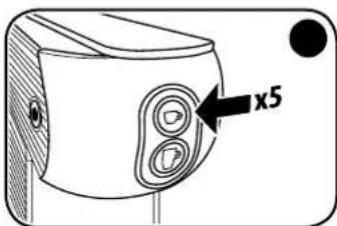
natural_image
Line drawing of a mechanical device with a circular button and wooden base (no text or symbols)natural_image
Line drawing of a coffee machine with a cup and tray (no text or symbols)natural_image
Diagram showing two identical containers with internal circular patterns and arrows pointing to them, no text or symbols present.natural_image
Diagram of a hand operating a device with a black arrow pointing to the handle (no text or symbols present)natural_image
Diagram of a device's front panel with a knob and indicator lights (no text or symbols)natural_image
Diagram of a device with two circular buttons and an arrow pointing to the button (no text or symbols present)natural_image
Diagram of a device with two circular buttons and an arrow pointing to the button (no text or symbols)Imported into the UK by: illycaffè UK Limited 7/8 Osyth Close, Brackmills Industrial Estate, Northampton, NN4 7DY
RU
СОДЕРЖАНИЕ
natural_image
Diagram showing a mechanical component with an arrow indicating rotation and a magnified inset of a small structure (no text or symbols)natural_image
Line drawing of an electrical outlet with a cable inserted, no text or symbols presentnatural_image
Diagram of a device handle with a black arrow pointing to a circular component, no text or symbols presentnatural_image
Line drawing of a device with a circular button and a black dot, no text or symbols presentnatural_image
Illustration of a coffee machine with a cup and a coffee cup, showing a coffee cup being inserted (no text or symbols present)natural_image
Line drawing of a camera with two circular buttons and a black dot on the side (no text or symbols)natural_image
Diagram of a device with two circular buttons and an arrow pointing to the button (no text or symbols)natural_image
Illustration of a hand using a coffee maker to add coffee into a machine (no text or symbols visible)natural_image
Illustration of a coffee machine with a cup and a coffee cup being inserted (no text or symbols)natural_image
Line drawing of a hand holding a cup with a label, no text or symbols presentnatural_image
Line drawing of a camera with two lenses and a black circular mark (no text or symbols)natural_image
Illustration of a hand holding a device with a circular button, showing a rotation and adjustment mechanism (no text or symbols)natural_image
Diagram of a mobile phone seatbelt mechanism with a 45-degree angle indicator (no text or symbols on the diagram itself)natural_image
Illustration of a hand using a coffee maker to press a cup into a machine (no text or symbols visible)natural_image
Diagram showing two identical containers with internal circular components and directional arrows, no text or symbols present.natural_image
Line drawing of a coffee machine with a cup and tray (no text or symbols)natural_image
Simple line drawing of a device with an arrow indicating rotation (no text or symbols)natural_image
Diagram of a machine tool interacting with a tray, showing directional arrows (no text or symbols)natural_image
Diagram of a coffee maker's side view showing a tray with a lid and a bag, with an arrow indicating direction (no text or symbols present)natural_image
Diagram of a hand pressing down on a device component (no text or symbols visible)natural_image
Line drawing of a mechanical device with a circular button and textured surface (no text or symbols)natural_image
Line drawing of a coffee machine with a cup and tray (no text or symbols)natural_image
Diagram showing two identical containers with internal circular patterns and arrows pointing to them, no text or symbols present.natural_image
Diagram of a hand operating a device with a black arrow pointing to the handle (no text or symbols present)natural_image
Diagram of a device's front panel with a circular button and an arrow pointing to it (no text or symbols present)natural_image
Diagram of a device with two circular buttons and an arrow pointing to the button (no text or symbols)natural_image
Diagram of a device with two circular buttons and an arrow pointing to it, no text or symbols presentImported into the UK by: illycaffè UK Limited 7/8 Osyth Close, Brackmills Industrial Estate, Northampton, NN4 7DY
KO 목차
제품 사용 관련 일반 수칙 164
기술 정보....165
안전 장치 165
안전을 위한 주의사항 165
제품 각 부 명칭 167
시작/가열하기 168
에너지 절약 기능 168
내부 회로 했굴 169
컵사용 169
커피 준비 170
커피 온도 프로그래밍 171
추출량 프로그래밍 172
유지보수....173
수리173
세척....173
석회질 제거....174
문제-원인-해결책....176
폐기178
포장 178
제품 사용 관련 일반 수칙
natural_image
Diagram showing a mechanical component with an arrow indicating rotation and a magnified inset of a small cylindrical component (no text or symbols)natural_image
Simple line drawing of an electrical outlet with a cable inserted (no text or symbols)natural_image
Diagram of a device with a hand operating the button, showing internal components and a numbered label (56) in the corner (no readable text or symbols)natural_image
Line drawing of a device with a circular button and a black dot on the right side (no text or symbols)natural_image
Illustration of a coffee machine with a cup and a tray, showing a coffee cup being inserted (no text or symbols present)natural_image
Line drawing of a camera with two lenses and a black circular button (no text or symbols)natural_image
Diagram of a device with two circular buttons and an arrow pointing to a black circle (no text or symbols)natural_image
Illustration of a hand using a coffee machine to press coffee beans (no text or symbols visible)natural_image
Illustration of a coffee machine with a cup and lid, showing a coffee cup being inserted (no text or symbols present)natural_image
Line drawing of a hand holding a cup with a label showing 'Milo' (no text or symbols beyond label)natural_image
Line drawing of a camera with two lenses and a black circular button (no text or symbols)natural_image
Illustration of a hand using a device to adjust a circular component, showing a rotation and adjustment (no text or symbols)natural_image
Simple line drawing of a mobile phone seatbelt with an arrow indicating rotation (no text or symbols)natural_image
Illustration of a hand using a coffee machine to add coffee into a tray (no text or symbols visible)natural_image
Diagram showing two identical views of a container with internal circular patterns and arrows indicating direction (no text or symbols)natural_image
Illustration of a coffee machine with a cup and tray (no text or symbols)natural_image
Simple line drawing of a device with an arrow indicating rotation (no text or symbols)natural_image
Diagram of a coffee maker's side view showing a tray, lid, and base with arrows indicating motion (no text or symbols)natural_image
Diagram of a device with a lid and base, showing a step-down view (no text or symbols)natural_image
Diagram of a hand holding a small mechanical component with an arrow pointing to a hole (no text or symbols present)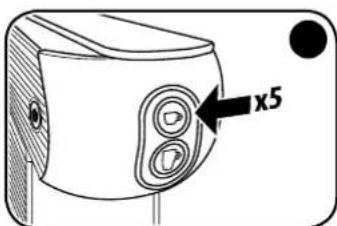
natural_image
Line drawing of a mechanical device with a circular button and textured surface (no text or symbols)natural_image
Line drawing of a coffee machine with a cup and tray (no text or symbols)natural_image
Diagram showing two identical containers with internal circular patterns and arrows pointing to each (no text or symbols)에스프레소 커피양 조절:
natural_image
Diagram of a hand pressing down on a device component (no text or symbols visible)natural_image
Diagram of a device with a dial and knob, no text or symbols presentnatural_image
Diagram of a device with two circular buttons and an arrow pointing to the button (no text or symbols present)natural_image
Diagram of a device with two circular buttons and an arrow pointing to the button (no text or symbols)Imported into the UK by: illycaffè UK Limited
7/8 Osyth Close, Brackmills Industrial Estate,
Northampton, NN4 7DY
AR
أجزاء الماكينة
AR
الكبسولات
2:الصب

A قهوة إسبريسو

B. وفيرة الماء
ح الرئيسي 3
4 صنبور
ع القطرات 5
مع حاوية 6
الكbosلات (قبلة لل Falk)
ابل التغنية 7
غزان الماء 8
9 إسبريسو
natural_image
Diagram showing a cabinet with an arrow indicating rotation and a magnified inset of the interior (no text or symbols)natural_image
Line drawing of a stylized device with a circular button and textured surface (no text or symbols)natural_image
Diagram of a device handle with an arrow pointing to a circular component, no text or symbols presentnatural_image
Line drawing of an electrical outlet with a cable inserted, no text or symbols presentnatural_image
Diagram of a device with two circular buttons and an arrow pointing to the button (no text or symbols present)natural_image
Line drawing of a camera lens with two lenses and a black circular button (no text or symbols)natural_image
Illustration of a coffee machine with a cup and lid, showing a coffee cup being inserted (no text or symbols present)natural_image
Illustration of a coffee machine with a cup and lid, showing a step indicator (no text or symbols present)natural_image
Illustration of a hand using a coffee maker to add coffee into a coffee machine (no text or symbols visible)natural_image
Illustration of a hand using a device to adjust a circular component, showing rotation and adjustment (no text or symbols)natural_image
Line drawing of a camera with two lenses and a black circular button (no text or symbols)natural_image
Line drawing of a hand holding a cup with a small label, no text or symbols presentnatural_image
Line drawing of a coffee machine with a cup and tray (no text or symbols)natural_image
Diagram showing two identical views of a device with internal components and directional arrows, no text or symbols present.natural_image
Illustration of a hand using a cup to press or<|rotate_right|> from a computer monitor (no text or symbols visible)فوهة الصب.

natural_image
Diagram of a mobile phone jack with an arrow indicating rotation (no text or symbols)natural_image
Diagram of a device with a slide and tray, showing a mechanical assembly (no text or symbols)natural_image
Diagram of a machine tool with directional arrows indicating movement (no text or symbols)يرمجة حرارة القهوة
natural_image
Diagram of a hand operating a device with a black arrow pointing to the handle (no text or symbols present)natural_image
Line drawing of a coffee machine with a cup and tray (no text or symbols)natural_image
Line drawing of a device with a circular button and textured surface (no text or symbols)natural_image
Diagram showing two identical views of a device with internal components and directional arrows indicating movement (no text or symbols)natural_image
Line drawing of a device with a circular button and an arrow pointing to it, no text or symbols present.natural_image
Diagram of a hand inserting a component into a device, showing a black arrow pointing to the handle (no text or symbols present)natural_image
Diagram of a device with two circular buttons and an arrow pointing to the button (no text or symbols)natural_image
Diagram of a device with two circular buttons and an arrow pointing to the button (no text or symbols)CH
运行/加热
natural_image
Diagram showing a mechanical assembly with an arrow indicating rotation and a magnified inset of a bracket (no text or symbols)natural_image
Line drawing of an electrical outlet with a cable inserted, no text or symbols present将插头插入插座,机器通电。
natural_image
Diagram of a mechanical device with a hand operating a button, showing no text or symbols.natural_image
Line drawing of a stylized device with a circular button and textured handle (no text or symbols)确认内部没有胶囊,通过总开关开启机器。
natural_image
Illustration of a coffee machine with a cup and a coffee maker (no text or symbols)natural_image
Line drawing of a camera with two lenses and a black circular button (no text or symbols)natural_image
Diagram of a device with two circular buttons and an arrow pointing to the button (no text or symbols)natural_image
Illustration of a coffee machine with a cup and lid, showing a coffee cup being inserted (no text or symbols present)natural_image
Line drawing of a hand holding a cup with a label showing '12' (no text or symbols on the cup itself)natural_image
Line drawing of a camera with two lenses and a black circular mark (no text or symbols)等待 📋 和 🏠 按键点亮并持续亮着。
natural_image
Illustration of a hand using a device to press or adjust a button, showing a circular button being adjusted (no text or symbols present)抬起控制杆,将胶囊插入插槽。
natural_image
Simple line drawing of a mobile phone plug with an arrow indicating rotation (no text or symbols)natural_image
Illustration of a hand using a coffee maker to add coffee into a machine (no text or symbols visible)不放在咖啡出嘴下方的杯托上。
natural_image
Diagram showing two identical containers with internal circular patterns and arrows indicating movement or force (no text or symbols)natural_image
Line drawing of a coffee machine with a cup and tray (no text or symbols)natural_image
Simple line drawing of a device with an arrow indicating rotation (no text or symbols)natural_image
Diagram of a machine with arrows indicating process flow (no text or symbols)natural_image
Diagram of a device with a lid and stairs, showing a step with an arrow indicating direction (no text or symbols present)natural_image
Illustration of a hand inserting a component into a device (no text or symbols visible)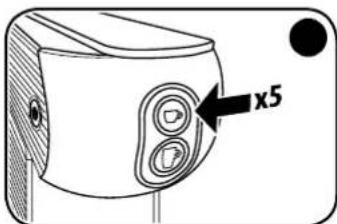
natural_image
Line drawing of a mechanical device with a circular component and a numbered label (45), no readable text or symbols present.natural_image
Line drawing of a coffee machine with a cup and tray (no text or symbols)然后将存储新的设定温度以用于后续冲泡。
咖啡温度设定信号:
natural_image
Diagram showing two identical views of a container with internal circular patterns and arrows indicating direction (no text or symbols)调节 espresso 咖啡冲泡量:
natural_image
Diagram of a hand pressing down on a device component, showing a black arrow pointing to the handle (no text or symbols present)通过总开关()关闭机器。
在水箱中加入 0.6 升的冷水,并
加入除垢溶液。
确保将除垢液完全溶解在水箱的水中。
natural_image
Diagram of a device with a dial indicator and an arrow pointing to the dial (no text or symbols present)natural_image
Diagram of a device with two circular buttons and an arrow pointing to the button (no text or symbols)natural_image
Diagram of a device with two circular buttons and an arrow pointing to the button (no text or symbols)CE UK CA Imported into the UK by: illycaffe UK Limited 7/8 Osyth Close, Brackmills Industrial Estate, Northampton, NN4 7DY
illycaffè S.p.A. - Via Flavia 110 - 34147 Trieste - Italy - www.illy.com