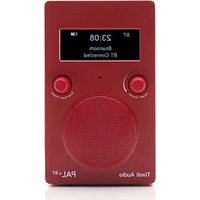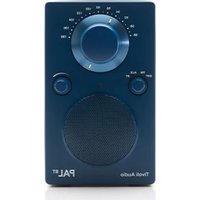
PAL BT (Gen 3) - Portable speaker TIVOLI AUDIO - Free user manual and instructions
Find the device manual for free PAL BT (Gen 3) TIVOLI AUDIO in PDF.


User questions about PAL BT (Gen 3) TIVOLI AUDIO
0 question about this device. Answer the ones you know or ask your own.
Ask a new question about this device
Download the instructions for your Portable speaker in PDF format for free! Find your manual PAL BT (Gen 3) - TIVOLI AUDIO and take your electronic device back in hand. On this page are published all the documents necessary for the use of your device. PAL BT (Gen 3) by TIVOLI AUDIO.
USER MANUAL PAL BT (Gen 3) TIVOLI AUDIO
PAL BT Instructions ....5
Before You Begin....5
Guide to Features....6
Bluetooth Operation....8
Auxiliary Operation 8
About the Battery Pack....8
Handling the PAL BT 9
Limited Warranty....10
PAL BT Instrukser....11
EU Declaration of Conformity 91
PAL BT Instructions
Congratulations on your purchase of a truly unique entertainment product. We believe the rechargeable and weather resistant PAL BT Generation 3 is one of the finest portable audio products on the market. It is sure to enhance your listening experience at home or on the go. With the addition of Bluetooth® wireless technology, you can stream your music wirelessly to the PAL BT.
In order to take full advantage of what your new radio is capable of, please take a moment to read this owner's manual and the safety instructions. If you have any questions, please do not hesitate to contact your dealer or Tivoli Audio directly.
Please save the carton and original packing should you ever need to ship your radio, as shipping damage is not covered by the factory warranty.
On behalf of all of us, thank you for choosing Tivoli Audio, and enjoy your new PAL BT!
Packed with your PAL BT you should find:
- One (1) USB-C to USB-C Cable
- One (1) Quick Start Guide
Please contact your point of purchase or Tivoli Audio if any of these items are missing.
Before You Begin
For your safety, the PAL BT is shipped from the factory with discharged batteries. However, it is normal if the PAL BT plays straight out of the box. With the unit off, connect a power supply to the PAL BT to charge the batteries.
Like many rechargeable devices, there may be a delay before the LED starts to blink when the PAL BT is brand new and first plugged in, or when left unused for several weeks. This is a feature of the Power Management System designed to protect the batteries from damage. There is also no harm in playing the PAL BT while plugged in.
Guide to Features
Front Panel
text_image
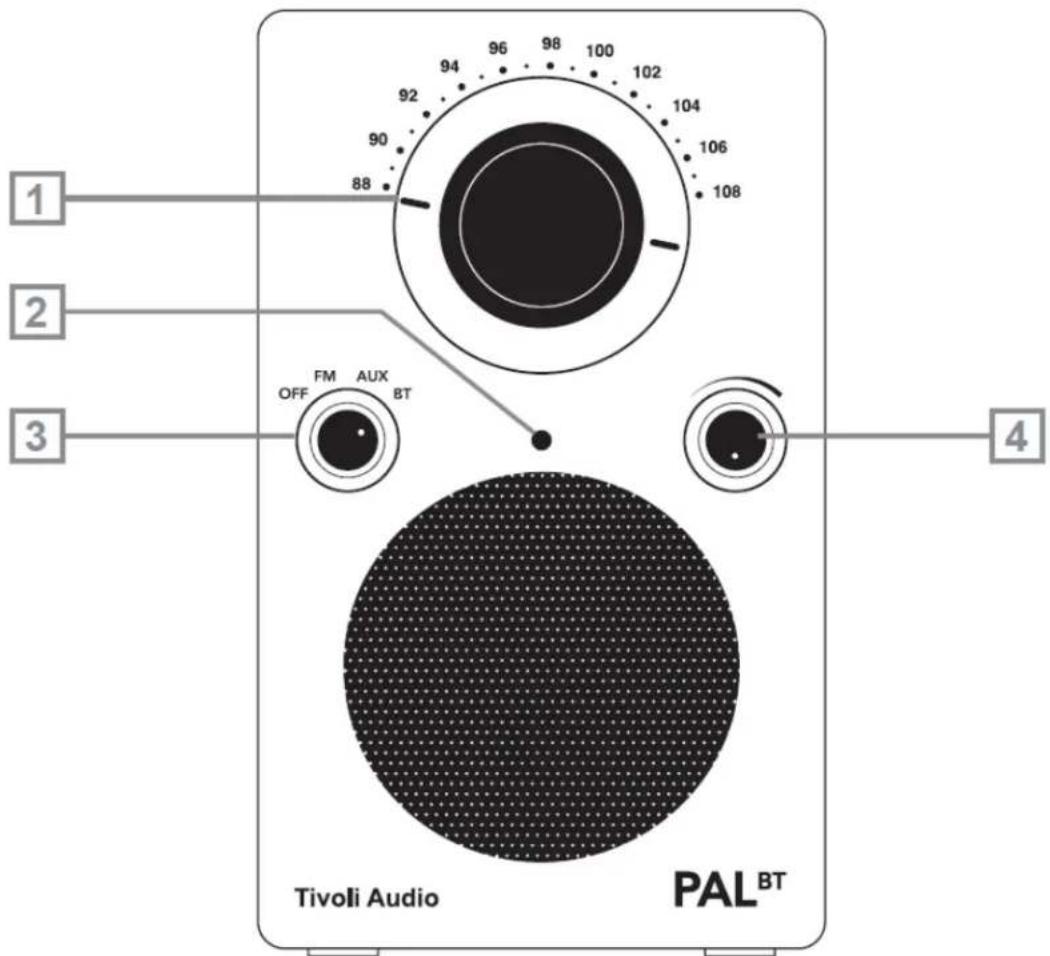
1 2 3 OFF FM AUX BT Tivoli Audio PAL BT 4- TUNING DIAL: Turn the analog dial to the right or to the left to change the FM frequency range.
- POWER INDICATOR: Indicates when the unit is on as well as the charging mode and battery status.
Blinking green while plugged in: Charging
Blinking green while in use: Low battery
Solid green while not plugged in but in use: Sufficient charge
- SOURCE KNOB: Turn the knob 1 click to select the FM source, 2 clicks up to select the AUX source, 3 clicks up to select the Bluetooth source.
- VOLUME: Turn the volume knob up to increase the volume or down to decrease the volume of the PAL BT's speaker. This knob will also control the level of headphones (not included) when connected.
Back Panel
text_image
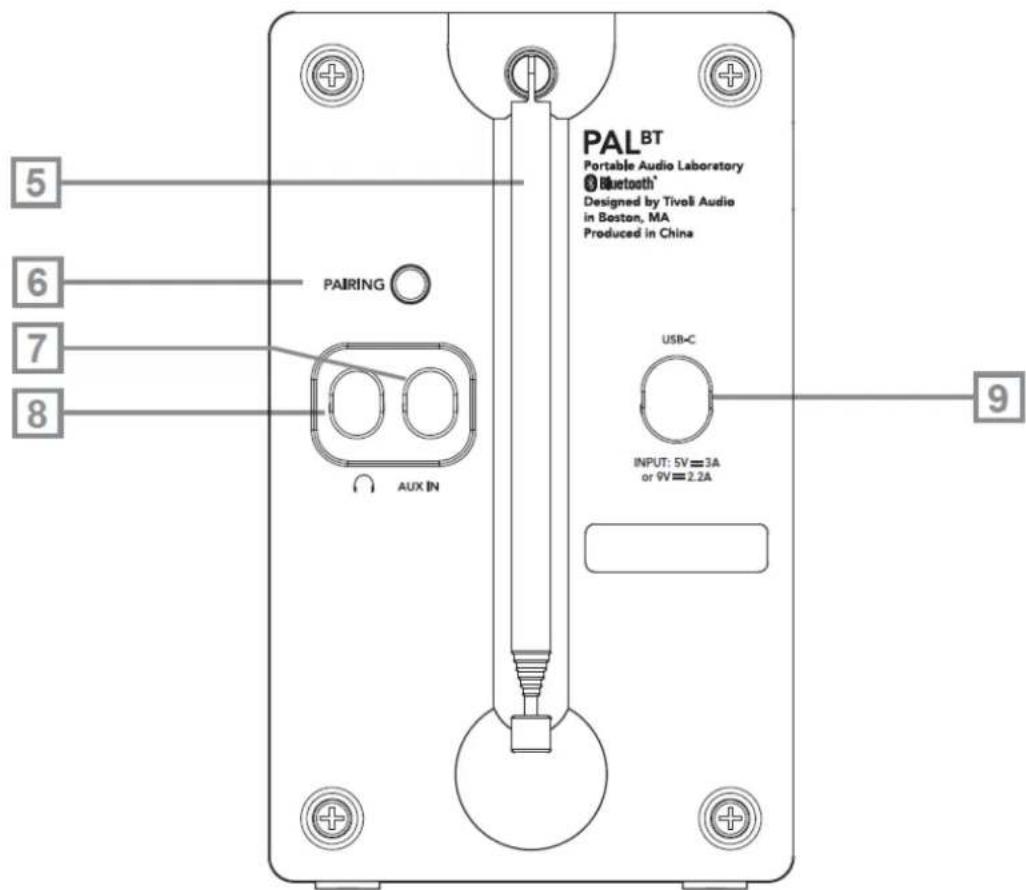
PALBT Portable Audio Laboratory Bluetooth® Designed by Tivoli Audio in Boston, MA Produced in China 5 6 7 8 PAIRING AUX IN USB-C INPUT: 5V=3A or 9V=2.2A 9- FM ANTENNA: When listening to FM, adjust this telescoping antenna and position it for best reception. In strong FM signal locations, reducing the antenna's length may provide better reception.
- PAIRING: When connecting a new device to the PAL BT, press and hold this button to enter pairing mode while Bluetooth source is selected on the radio.
- AUXILIARY INPUT: Connect a device's audio output to this input via a stereo 3.5mm male cable. and set the source switch to AUX. Note that you may need to adjust the volume level differently for an auxiliary device than the level normally used for radio listening.
- HEADPHONE OUTPUT: Connect headphones via a 3.5mm stereo male cable. The headphone volume will be controlled by the PAL BT's volume knob. Connecting a pair of headphones will mute the PAL BT's main speaker.
- DC INPUT: Use this input to operate the PAL BT using a qualified USB-C adapter with PD capabilities.
Note: We suggest keeping the rubber covers in place over the rear jacks to protect them when not in use.
Bluetooth Operation
Prior to pairing, verify your smart device is not connected to any other Bluetooth product. Devices may pair differently. Below is a general guide.
- Turn the Power/Source knob to the "BT" position.
- To enter pairing mode, press the pairing button located on the rear panel.
- Go to the Bluetooth settings screen on your phone or tablet.
- Select the device that has a name similar to "Tivoli PALBT3|XXXXX".
- Once you hear the Bluetooth connection tone, you are paired to the PAL BT.
Auxiliary Operation
The PAL BT can be used as a standalone speaker. Use the 3.5mm auxiliary input to attach any line level source into your speaker. You can control the volume of the speaker using the volume control on the PAL BT or with the volume control of your audio source.
About the Battery Pack
The PAL BT uses a sealed pack of Lithium Ion cells. The front panel LED serves both as a power indicator and battery power and charge status indicator. Use only an authorized Tivoli Audio PAL Series Lithium-Ion battery. The estimated battery life on a full charge is 12 hours.
Charging
USB-C charging device NOT included with the PAL BT.
The PAL+BT supports USB PD fast charging via the USB-C charge port. The power delivered by the charger must be between minimum 2.5 Watts required by the PAL BT, and maximum 20 Watts in order to achieve the maximum charging speed. For the fastest charging, use a USB-C PD Charger capable of delivering 9V, 2.2A.
From full discharge, the battery will be completely charged in approximately 3 hours. Because the battery is new, it may take 4-5 full charge/discharge cycles until you experience average playback performance times. During charging, the power indicator LED will blink green. The power indicator will stop blinking when the battery is fully charged.
There is no harm in operating the PAL BT with a power supply plugged in, however, charge time will be affected. The PAL BT is always powered by the battery, even when plugged in to a power supply. FM reception may be impacted when the PAL BT is powered on and charging.
Low Battery
With the PAL BT turned On but not plugged in, as the batteries become discharged, the green power indicator LED will start to blink, indicating that the batteries need to be recharged. The remaining playback time from the moment the blinking begins until the PAL BT shuts off is estimated between 20 minutes and several hours. It is difficult to be more precise due to a variety of factors, including how long and how loud the radio is played, and the remaining charge left in the batteries. For instance, the PAL BT will have a longer playback time when operated at a low volume than a high volume. As you use your PAL BT, you will develop a better idea of how much playback time you have before recharging is necessary. You may also
notice a reduced battery playback time with PAL BT when using the Bluetooth source: using the Bluetooth source will reduce the average playback time compared to listening to the FM source.
If the PAL BT is to be used away from an AC outlet or other power source for an extended period of time, it is wise to “top off” the charge before use, especially if the LED is blinking.
Note: It may take up to 4 charge/discharge cycles before the batteries are operating at full capacity when new or left unused for several weeks.
Handling the PAL BT
- The PAL BT is weather resistant, but it is not weather proof. It should not be immersed in water or held under running water. It also should not be exposed to extreme temperatures.
- The PAL BT is designed to be portable, but it is not indestructible. Do not drop it or subject it to strong impacts.
• Always grip the PAL BT using the side indentations. - The PAL BT's non-slip, weather resistant paint is durable, but it is not impervious to scratches.
- The PAL BT's speaker is magnetically shielded, permitting use near a computer monitor or a television set.
Cleaning
To clean the PAL BT, use only a soft cloth and do not rub hard. Use a very mild cleaner only when necessary. If something is spilled on the cabinet, wash it off as soon as possible to prevent possible damage. Normal every day wear and tear, or damage resulting from cleaning or chemicals, is not covered under the factory warranty.
Headphones
Avoid using headphones (not included) at high volume levels to prevent possible hearing damage. Do not wear headphones while operating a motor vehicle.
Limited Warranty
Tivoli Audio manufactures its products to very high standards and we are confident our products will perform well. Accordingly, we warranty our products against manufacturing defects in material and workmanship to the original owner, for a period of one year in the United States and two years in the European Union from the original date of purchase. For countries where minimum warranty terms are determined by statute, the warranty term is the statutory period required. In all other locations, the warranty term is one year.
This warranty does not extend to damage caused by improper installation, faulty ancillary equipment, modifications, unauthorized repair, shipping damage or loss, abuse, accidents, use on improper voltage/current, lightning or other acts of God, normal wear and tear, commercial use, or purchase from unauthorized dealers. Proof of purchase as evidence the unit was purchased from an authorized dealer within the warranty period may be required for warranty service. Should service be necessary, please do NOT return the product without first contacting your dealer or Tivoli Audio.
This warranty is non-transferable. Tivoli Audio will not pay for loss of time, inconvenience, loss of use of the product, or damages caused by this product.
This warranty gives you specific legal rights and you may also have other rights which vary from state to state. Some states do not allow limitations on implied warranties or the exclusion of consequential damages, therefore, these restrictions may not apply to you.
For more warranty information please visit us at www.tivoliaudio.com
For European warranty information please visit www.tivoliaudio.eu
PAL BT Instrukser
text_image
PALBT Portable Audio Laboratory Bluetooth® Designed by Tiveli Audio in Boston, MA Produced in China 5 6 7 8 PAIRING AUX IN USB-C INPUT: 5V=3A or 9V=2.2A 9text_image
PALBT Portable Audio Laboratory Bluetooth® Designed by Tiveli Audio in Boston, MA Produced in China 5 6 7 8 PAIRING AUX IN USB-C INPUT: 5V=3A or 9V=2.2A 9text_image
PALBT Portable Audio Laboratory Bluetooth® Designed by Tivoli Audio in Boston, MA Produced in China 5 6 7 8 PAIRING AUX IN USB-C INPUT: 5V=3A or 9V=2.2A 9text_image
PALBT Portable Audio Laboratory Bluetooth® Designed by Tiveli Audio in Boston, MA Produced in China 5 6 7 8 PAIRING AUX IN USB-C INPUT: 5V=3A or 9V=2.2A 9text_image
PALBT Portable Audio Laboratory Bluetooth® Designed by Tiveli Audio in Boston, MA Produced in China 5 6 7 8 PAIRING AUX IN USB-C INPUT: 5V=3A or 9V=2.2A 9text_image
PALBT Portable Audio Laboratory Bluetooth® Designed by Tivelli Audio in Boston, MA Produced in China 5 6 7 8 PAIRING AUX IN USB-C INPUT: 5V=3A or 9V=2.2A 9text_image
PALBT Portable Audio Laboratory Bluetooth® Designed by Tiveli Audio in Boston, MA Produced in China 5 6 7 8 PAIRING AUX IN USB-C INPUT: 5V=3A or 9V=2.2A 9text_image
PALBT Portable Audio Laboratory Bluetooth® Designed by Tivoli Audio in Boston, MA Produced in China 5 6 7 8 PAIRING AUX IN USB-C INPUT: 5V=3A or 9V=2.2A 9text_image
PALBT Portable Audio Laboratory Bluetooth® Designed by Tiveli Audio in Boston, MA Produced in China 5 6 7 8 PAIRING AUX IN USB-C INPUT: 5V=3A or 9V=2.2A 9text_image
PALBT Portable Audio Laboratory Bluetooth® Designed by Tivoli Audio in Boston, MA Produced in China 5 6 7 8 PAIRING AUX IN USB-C INPUT: 5V=3A or 9V=2.2A 9text_image
PALBT Portable Audio Laboratory Bluetooth® Designed by Tivoli Audio in Boston, MA Produced in China 5 6 7 8 PAIRING AUX IN USB-C INPUT: 5V=3A or 9V=2.2A 9text_image
PALBT Portable Audio Laboratory Bluetooth® Designed by Tivoli Audio in Boston, MA Produced in China 5 6 7 8 PAIRING AUX IN USB-C INPUT: 5V=3A or 9V=2.2A 9Type: Portable FM Radio with Bluetooth
Driver: 1x2.5" Neodymium Driver
Rated Input: 5Vdc, 3A / 9 Vdc, 2.2A
AC Adapter: Not Included
Operating Temperature: 0-40°C
RF Output Power: Bluetooth (Classic): 1.97 dBm
Bluetooth Low Energy: 1.97 dBm
EU DECLARATION OF CONFORMITY
Equipment
Product: PORTABLE FM BLUETOOTH RADIO
Model: PALBT Generation 3
Manufacturer
Name: Tivoli Audio, Inc.
Address: 28 Atlantic Ave Suite 133, Boston MA 02110, USA
Country: USA
This declaration of conformity is issued under the sole responsibility of the manufacturer:
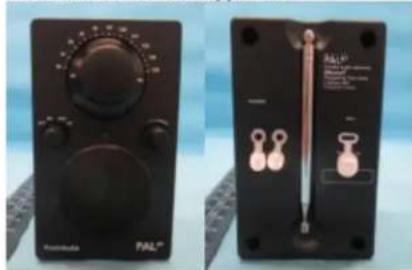
Object of the declaration:
natural_image
Two black electronic devices with control knobs and a thermometer, shown from different angles (no visible text or symbols)The object of the declaration described above is in conformity with the following relevant Union harmonisation legislation(s):
(RED) 2014/53/EU
(ERP) (EU) 2023/826
(LVD) 2014/35/EU
Conformity to the essential requirements of the legislation(s) have been demonstrated by using the following standards:
Health and Safety: EN IEC 62311: 2020
EN 50665: 2017
EN 62368-1:2024
EMC: EN 55032: 2015
EN 55035: 2017
EN IEC 61000-3-2: 2019
EN 61000-3-3: 2013
ETSI EN 301 489-1 V2.2.3
ETSI EN 301 489-17 V3.3.1
RF Spectrum: ETSI EN 303 345-1 V1.1.1
ETSI EN 303 345-3 V1.1.1
ETSI EN 300 328 V2.2.2
ERP: EN 50564:2011
Common Charges EN IEC 62680-1-2: 2022
Common Charger EN IEC 62680-1-3: 2022
Signed for and on behalf of
Place and date of issue:
Signature:
Name, function:
Tivoli Audio, Inc.
Boston, MA, USA 1 December 2025

Samuel Herec, Vice President of Product, Strategy, & Sustainability
Manufactured by
Tivoli Audio, Inc 28 Atlantic Ave, Suite 133 Boston, MA USA