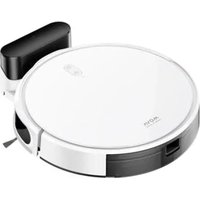
M1 - Robot vacuum MOVA - Free user manual and instructions
Find the device manual for free M1 MOVA in PDF.


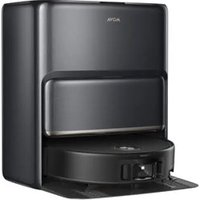
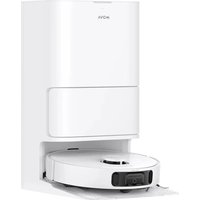
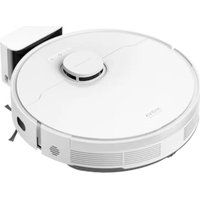
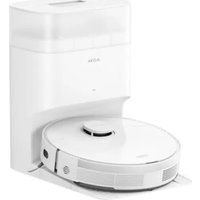
| Product type | Robotic vacuum cleaner |
| Brand | MOVA |
| Model | M1 |
| Dimensions (approx.) | 35 x 35 x 10 cm |
| Weight (approx.) | 3,5 kg |
| Power supply | Dock: 100-240 V, 50/60 Hz; Battery: 14.4 V, 60 W |
| Runtime | Up to 150 min (estimated) |
| Navigation technology | LDS laser (Class 1) |
| Main functions | Cleaning (vacuuming + mopping), fast mapping, spot cleaning, scheduling, Do Not Disturb mode |
| Cleaning modes | Silent, Standard, Powerful, Turbo |
| Connectivity | Wi-Fi 2.4 GHz via Dreamehome app |
| Tank capacity | 2-in-1 water tank with dust compartment (capacity not specified) |
| Routine maintenance | Clean mop cloth, main brush, side brush, filter, sensors and charging contacts |
| Spare parts | Main brush, side brush, filter, mop cloth, tank, cleaning tool |
| Safety | Class 1 laser, automatic shut-off when lifted, shock protection |
| General information | For household use only; do not use on thick carpet or wet floors |
Frequently Asked Questions - M1 MOVA
User questions about M1 MOVA
0 question about this device. Answer the ones you know or ask your own.
Ask a new question about this device
Download the instructions for your Robot vacuum in PDF format for free! Find your manual M1 - MOVA and take your electronic device back in hand. On this page are published all the documents necessary for the use of your device. M1 by MOVA.
USER MANUAL M1 MOVA
which means striving for excellence in every endeavor and reflects the company's vision at continuous pursuit, exploration and search in technology.


For more support, contact us via https://global.dreametech.com
Manufactured by: Dreame Trading (Tianjin) Co., Ltd
Address: Room 2112-1-1, South District, Finance and Trade Center, No.6975 Yazhou Road,
Dongjiang Bonded Port Area, Tianjin Pilot Free Trade Zone, Tianjin, China
Made in China
MOVA M1
Robot Vacuum and Mop
User Manual
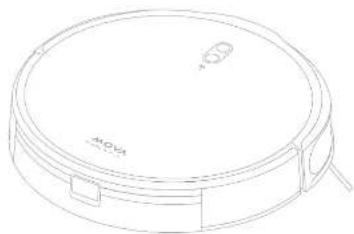
natural_image
Line drawing of a circular vacuum cleaner with mounting bracket and control knob (no text or symbols)
RPM1GA-EU-AOD
11/2023
The illustrations in this manual are for reference only. Please refer to the actual product.
MOVA
Contents
EN User Manual 1
DE Benutzerhandbuch 22
F MANUEL d'utilisation
II Manuale utente 67
ES Manual de usuario
III Инструкция по эксплуатации 110
FL Instrukcja obstugi 135
74 Gebruikershandleiding 155
NO Brukerhändbok 175
59 Anvândarmanual 197
Safety Information
To avoid electric shock, fire or injury caused by improper use of the appliance, please read the user manual carefully before using the appliance and keep it for future reference.
Usage Restrictions
This product should not be used by children younger than 8 years old nor persons with physical, sensory, intellectual deficiencies, or limited experience or knowledge without the supervision of a parent or guardian to ensure safe operation and to avoid any risks. Cleaning and maintenance shall not be performed by children without supervision.
Children shall not play with this product. Ensure children and pets are kept at a safe distance from the robot while it is operating.
This product is for floor cleaning in a home environment only. Do not use it outdoors, on non-floor surfaces, or in a commercial or industrial setting. If the charger becomes damaged or broken, stop using it immediately and contact after-sales service.
Do not use the robot in an area suspended above ground level without a protective barrier.
Do not place the robot upside down. Do not use the robot cover or bumper as a handle for the robot.
Do not use the robot at an ambient temperature above 40^ C or below 0^ C or on a floor with liquids or sticky substances.
Pick up any cables from the floor before using the robot to prevent it from
dragging them while cleaning.
Remove fragile or small items from the floor to prevent the robot from bumping into and damaging them.

EN Safety Information
Usage Restrictions
To prevent damage or harm from dragging, clear any loose objects from the floor, and remove cables or power cords on the cleaning path before operating the appliance.
Keep hair, fingers, and other body parts away from the suction opening of the robot.
Keep the cleaning tool out of reach of children.
Do not place children, pets, or any item on top of the robot regardless of whether it is stationary or moving.
Do not use the robot to clean any burning objects. Do not use the robot to pick up flammable or combustible liquids, corrosive gases, or undiluted acids or solvents.
Do not vacuum hard or sharp objects. Do not use the appliance to pick up objects such as stones, large pieces of paper or any item that may clog the appliance.
Make sure the robot is turned off and the charging dock is unplugged before cleaning or performing maintenance.
Do not use a wet cloth to wipe or any liquid to rinse the robot and charging dock. Washable parts must be dried completely before installing and using them.
Make sure the robot is turned off when being transported and kept in its original packaging if possible.
Please use this product in accordance with the instructions in the User Manual. Users are responsible for any loss or damage that arise from improper use of this product.
Safety Information
Batteries and Charging
Do not use any third-party battery, charger, or charging dock. Use only with RCM11 supply unit.
Do not attempt to disassemble, repair, or modify the battery or charging dock on your own.
Do not place the charging dock near a heat source.
Do not use a wet cloth or wet hands to wipe or clean the dock's charging contacts.
Do not improperly dispose of old batteries. Unneeded batteries should be discarded at an appropriate recycling facility.
If the robot will not be used for an extended period, fully charge it, then turn it off and store in a cool, dry place. Recharge the robot at least once every 3 months to avoid over-discharging the battery.
This product contains batteries that can only be replaced by qualified technicians or after-sales service.
Laser Safety Information
The laser sensor in this product meets the IEC 60825-1:2014/EN 60825-1:2014/A11:2021 Standard for Class 1 laser products. Please avoid direct eye contact with it during use.
CLASS 1 LASER PRODUCT
CONSUMER LASER PRODUCT
EN 50689:2021
Hereby, Dreame Trading (Tranjin) Co., Ltd. declares that the radio equipment type RPM1GA is in compliance with Directive 2014/53/EU. The full text of the EU declaration of conformity is available at the following internet address: https://global.dreamtech.com
For detailed e-manual, please go to https://global.dreametech.com/pages/user-manuals-and-fags
Product Overview
Accessories
Pre-Installed Accessories
Main Brush

2-In-1 water Tank with Dust Box
Hos Pad Helcer
Mcp 501
Other Accessories

Cleaning Tool

Side Brush Charger
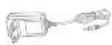

Charging Deck
Product Overview
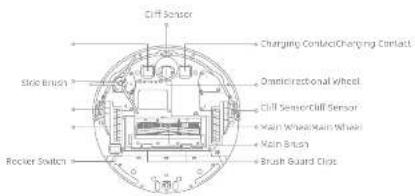
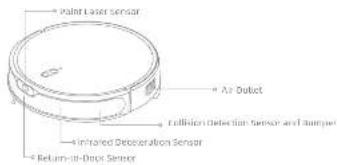
Robot
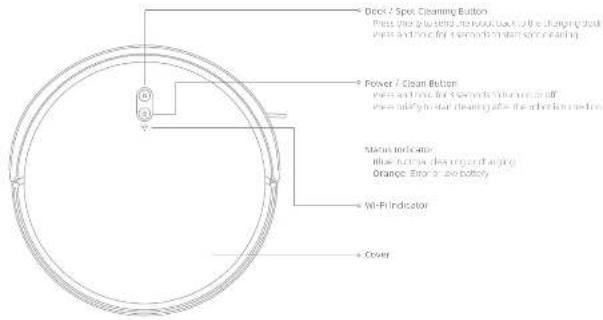
EM
EN Product Overview Product Overview
Robot
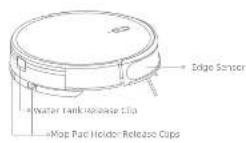
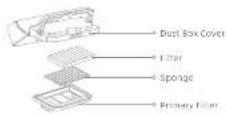
2-in-1 Water Tank with Dust Box
Dust Box
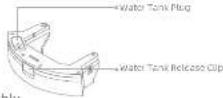
Water Tank
Map Assembly
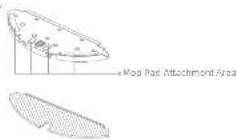
Мор Pad Holder
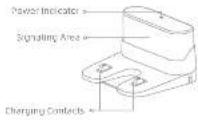
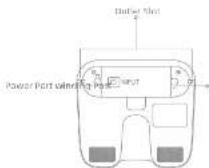
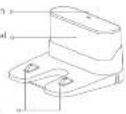
Charging Dock

Preparing Your Home
natural_image
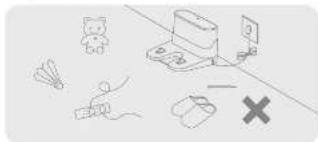
Illustration of various toy icons including a cat, butterfly, airplane, and a cross symbol (no text or labels)Before cleaning, please move away unstable, fragile, valuable or dangerous items, and clean up cables, clothes, toys, hard objects and share objects on the ground to avoid being entangled, stretched or knocked over by the robot and causing losses.
natural_image
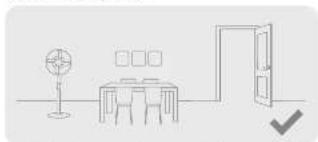
Simple line drawing of a room layout with a desk, lamp, and door (no text or symbols)Open the door of the room to be cleaned, and put the furniture in its proper place to make more space.
Tel: 051-8
The following table provides the first part of a material that is being placed in the same way (row) also a detail line. The reference hard object like steel, steel balls and metal parts, or thin objects like construction walls, concrete slabs and rails, otherwise the ground may be reached.
natural_image
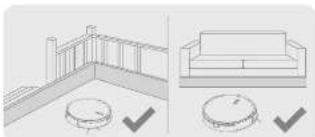
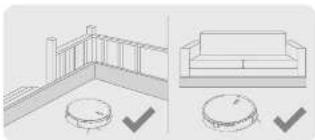
Architectural floor plan and interior layout diagrams showing room layouts and ceiling fixtures (no text or symbols)Before cleaning, place a physical barrier at the edge of the stairs and sofa to ensure safe and smooth operation of the robot.
natural_image
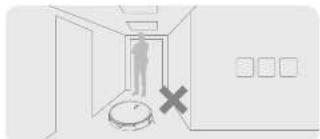
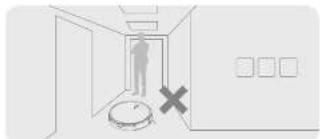
Interior hallway with a person standing at the entrance and a circular object marked with an 'X' (no text or symbols present)To prevent the robot from not recognizing the one that needs to be cleaned, do not stand in the front of the robot, threshold, hallway, or extra-pieces.
Before Use
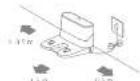
- Remove the protections 3. Place the charging dock on the level ground
against the wall and connect it to a power outlet
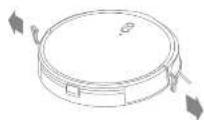
- Install the side brush
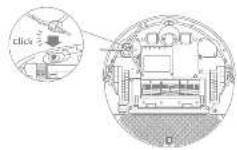
Note: Install the size south until a circle is replaced.
附件1:
Step the current area is a floor of the coanging dark and light in the cath sides due to pocks.
To ensure you can connect to the road with your phone, we'll make sure the next year's house walk down with your home.
(1) the place of the change, which in an area with a right or central point is right block they are as if they enter the road from the north to the east.
- Place the robot onto the charging dock to charge
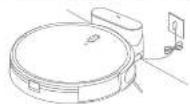
例102
fully changing is recently closed before first-time use. The amount that is otherwise to the changing back temporarily. So not make the changing back while the result is close.
EN Connecting with the Dreamehome App
1. Download the Dreamehome App
Scan the QR code on the robot, or search "Dreamhome" in the app store to download and install the app.
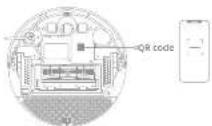
2. Add Device
Open the dreamhome app, tap "on the upper right, and scan the same OR code again to add the device. Please follow the prompts to finish the Wi-Fi connection."
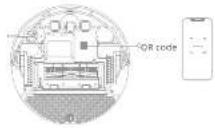
图2-1
例4:要取115元的
- Due to upgrades in the app software, the serial operator may differ from the description in the market. Please follow the instructions based on the prior data version.
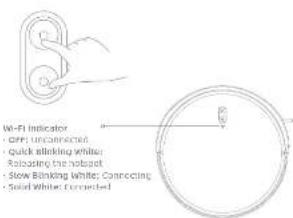
3. Reset Wi-Fi
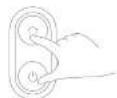
Simultaneously press and hold the buttons and until you hear a voice prompt saying, "Waiting for the network configuration." Once the WiFi input plus it can solid wrong, the WiFi has been successfully reset.
Note: If your choice can be correct to the app successfully, enter the next 11 and add the device again.
How to Use
1. Rocker Switch
Press the CIO/DI1 mode switch on the bottom to activate the input.
2. Turn On/Off
Press and hold the button(5) for 3 seconds to turn on the robot. The power indicator should be illuminated. Place the robot onto the charging dock, the robot should turn on automatically and begin charging. To turn off the robot move the robot away from the dock and press and hold the button for 3 seconds.
3. Fast Mapping
After configuring the network for the first time, follow the instructions on the app to quickly create a map, and the robot will start mapping without cleaning. The mapping process will be completed when the robot returns to the clock, and the map will be saved automatically.
4. Start Cleaning
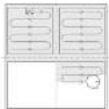
Press the button briefly to start cleaning after the roost is turned on. Then, the roost will accurately wrap out a route, methodically clean along the edges and walls. Then finish by cleaning each room in an 5-shaped pattern to ensure a thorough lab.
Note: Fecium only, state where the map and holder
5. Cleaning Mode
The book lies four cleaning movies: Quiet, Standard, String, and Turin. The default mode is Standard. You can specify the cleaning mode in the Apo.
6. Pause/Sleep Mode
When the robot is running, press any button to pause it. If the robot is paused for more than 10 minutes, it automatically orders sleep mode. All indicators on the robot will turn off. Press any button on the robot, or use the soap to wake up the robot.
Note: The other passed are placed to some chasing stock, then
7. Spot Cleaning
When the robot is placed or in Standing Music, press and hold the hinge for 5 seconds to start Spot Cleaning Music. In this route, it will clean a square-shaped area of 1.5=1.5 meters directly around the robot, when the spot cleaning is done, the robot will automatically return to its original location and stop working.
Note: (1) 2017. Data from the first time of the year's end of the period
8. Do Not Disturb (DND) Mode
(when the robot is set to the Do Not Disturb (DND) mode, the robot will be prescribed from returning cleaning and the power indicator goes out. The DND mode is disabled by default at the factory. You can use the app to enable the DND mode or modify the DND period. The DND period is 22:00-8:00 by default. Note:
The scheduled cleaning tasks will be performed on time during the ONE period.
• E-DECT-NE-ONIONECLIP, on the (12.3.0) and (12.3.15) shares

How to Use
9. Scheduled Cleaning
You can schedule cleaning time in the dreamhome app. The robot will
that an air, any short cooling at the change, shall be used and that the heat is the charging clock to recharge when the cleaning is done.
10. Additional App Functions
Follow the instructions on the app interface to use more functions. The version
of the app might have been updated, please follow the instructions based on
11. Use the Mopping Function
It is recommended that all floors are vacuumed at least three times before
the red. Improving session to achieve a better closing effect
1) Breakdown the crop pad and varying out excess water, reduce the map pad set
ST. HORNIA OPE (HNSA, CHI)
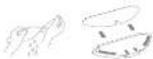
2) Fill the tank with water.

Note:
[1] (2) [3] (4) [5] (6) [7] (8) [9] (10) (11) (12) (13) (14) (15) (16) (17) (18) (19) (20) (21) (22) (23) (24) (25) (26) (27) (28) (29) (30) (31) (32) (33) (34) (35) (36) (37) (38) (39) (40) (41) (42) (43) (44) (45) (46) (47) (48) (49) (50) (51) (52) (53) (54) (55) (56) (57) (58) (59) (60) (61) (62) (63) (64) (65) (66) (67) (68) (69) (70) (71) (72) (73) (74) (75) (76) (77) (78) (79) (80) (81) (82) (83) (84) (85) (86) (87) (88) (89) (90)
For each other, the following
2) Since the 2-in-1 water tank with dust box and mcp assembly into the neck of the ramp until it clicks into place.
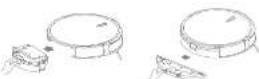
4) Press the button (or use the Creamhome app to start cleaning

四法式:
E is not recommended to write mapping function as correct.
Use the soil to adjust the water flow rates,
5) When the robot finishes a cleaning task and returns to the charging clock,
Remove the most statistically and well the top path review, to remove the 1 in a water tank with cloth box, press and hold the release cia, and two
to take it out.
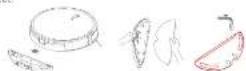
Note:
The following table is provided in the image.
water tank, and clean the good pad to prevent mudew or doors.
Routine Maintenance
To keep the reach in good condition, it is recommended to refer to the accessory usage in the app or the following table for routine maintenance.
| Part | Maintenance frequency | Replacement Period |
| Hop and After each are Every 3 to 6 months | ||
| Kash brush | Once every 2 weeks | Every 6 to 12 months |
| Dust box's filter | Every 3 to 6 months | |
| Side brush | ||
| Changing dark's signaling area | Once every month | |
| Charging contacts | ||
| Time of functional school | ||
| Bumpers | ||
| Point leaf sensor | ||
| Edge sensor | ||
| Cliff sensors | ||
| Water tanks | Clean it as needed / | |
| Dust box | ||
Note: The real-world frequency will depend on your coverage of the world
If an exception occurs due to special circumstances, the parts should be replaced.


Routine Maintenance
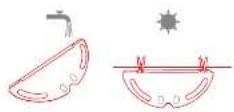
Clean the Mop Pad Clean the Water Tank
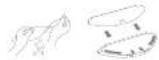
- Press the release clips on the mop pad holder to remove the mop assembly, Pull the mop pad off the mop pad holder.
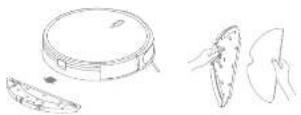
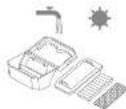
- Pour out the water in the rank, clean with only water and leaves to air dry before re-installing.

Bose: Duff overuse the bar for the set of cells.
- Clean the map pod with water only and leave to air dry before re-instelling.
Routine Maintenance
Clean the Dust Box and Filter
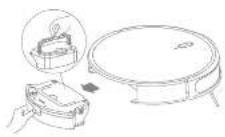
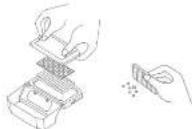
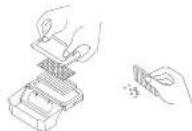
- Press the water tank release cup to remove the 2-in-1 water tank with dust box.
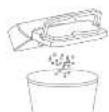
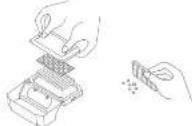
- Open the dust box cover and empty the dust box as shown in the diagram.
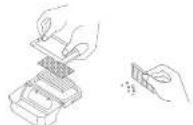
- Remove the filter and sp its bucket gently.
Note: Condublant, 2014; 2015; 2016; 2017; 2018; 2019; 2020; 2021; 2022; 2023; 2024; 2025; 2026; 2027; 2028; 2029; 2030; 2031; 2032; 2033; 2034; 2035; 2036; 2037; 2038; 2039; 2040; 2041; 2042; 2043; 2044; 2045; 2046; 2047; 2048; 2049; 2050; 2051; 2052; 2053; 2054; 2055; 2056; 2057; 2058; 2059; 2060; 2061; 2062; 2063; 2064; 2065; 2066; 2067; 2068; 2069; 2070; 2071; 2072; 2073; 2074; 2075; 2076; 2077; 2078; 2079; 2080; 2081; 2082; 2083; 2084; 2085; 2086; 2087; 2088; 2089; 2090; 2091; 2092; 2093; 2094; 2095; 2096; 2097; 2098; 2099; 2100
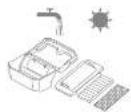
- Rinse the dust box and filter with water and dry them completely before reinstalling.
Note
these the dust box are a firm with dust were only 3000 square meters, and the dust box and flare were when they are completely dry.


Routine Maintenance
Clean the Main Brush Clean the Sensors
- Press the brazo quart clips towards to remove the brush guard and lift the brazo out of the roast.
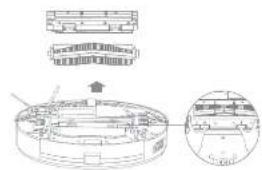
- Use a proper cleaning tool to remove any holes compiled in the mesh.

NOTE: ORCERALL AND THE FAIR MINDLED IN THE MAIN SAINT, SEVERELE DESAIGN, THE SAINT MAY BE COMFICED.
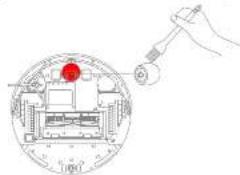
Clean the Main Wheel/Omnidirectional Wheel
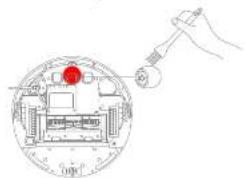
Note: Use a tool such as an analog controller to replace the one and two of the unidirectional, fixed
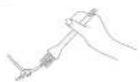
Clean the Side Brush
Full out the side brush and use the included clearing tool to remove any half tangled in the brush.
Routine Maintenance
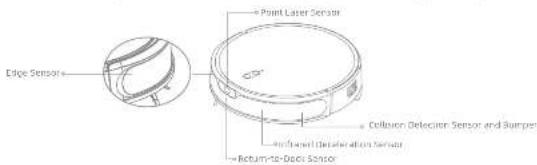
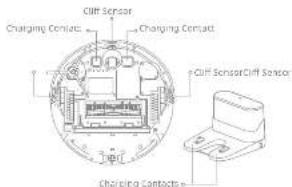
wipe sensors and charging contacts by using a soft and cry cloth, as shown in the diagram. Note: like cloths can damage some blue cloth within the shot of one shade or sink. Does use cry rags for cleaning.
Robot Restarting
If the robot stops responding or cannot be turned off, press and hold down the button (for 18 seconds or press the circle-rocker switch to forcefully turn it off. Then press and hold the button for 3 seconds to turn the robot on.
Battery
The robot contains a high-performance lithium-ion battery pack. Please ensure that it remains well-charged for daily use to maintain optimal battery performance. If the robot is not used for an extended period of time, turn it off and put it away. To present damage from user discharging, the robot should be recharged at least once every three months.
EN Troubleshooting
| Problem Solution | |
| Robot does not turn on | The battery level is low. Rechange the robot on the charging dock, then try again.The temperature of the battery is too low or too high. It is recommended to operate the appliance at a temperature between 52^ (40°C) and 134^ (40°C). |
| Robot does not rechange | The charging dock is not receiving power. Please confirm that both ends of the charger are plugged in currently:Poor contact. Clean charging contacts of the charging dock and robot. |
| Robot does not return to changing stock | There are too many absstructions around the charging dock. Place the charging dock in a more open area.Please clean the dark's signaling area. |
| Robot is well-unclosing Turn off | The robot and then reactivate it. |
| Robot is making a strange noise | A foreign object may be caught in the main brush, side brush, or one of the main wheels, stop the robot and remove any doors. |
| Robot no longer cleans efficiently or leaves dust behind | The dust box is full. Please clean it.The filter is blocked. Please clean it.A foreign object is caught in the main brush. Please clean it. |
Troubleshooting
| Problem Solution | |
| Robot cannot connect to Wi-Fi | There is something wrong with the Wi-Fi connection. Reset the Wi-Fi and download the latest version of the Dreamhome app, then try reconnecting.Location permission is not open. Please ensure the location permission on the Dreamhome app is enclosed.Wi-Fi signal is weak. Make sure the robot is in an area with good Wi-Fi coverage.SGHz vi-Fi is not supported. Please ensure your robot connects to 2.4GHz vi-Fi.The username or password of Wi-Fi is incorrect. Please enter the correct username and password. |
| Robot does not perform scheduled cleaning | the robot has low battery, scheduled cleaning will not start unless the robot has at least two battery left. |
| Does leaving the robot on the changing dock consume power if it is already fully charged? | Leaving the robot on the changing dock after it's fully changed consumes very little electricity and helps maintain collateral battery performance. |
| No water comes out of the water tank, or only a little tail comes out | Check whether there is water inside the water tank.clean the map if it becomes dirty.Make sure the map pad is installed currently according to the that Manual. |
| Robot doesn't resume cleaning after charging | Make sure the robot is not set to Do Not Disturb mode (DND), which will prevent it from resuming cleaning.the robot does not resume cleaning when it is manually recharged or placed onto the charging dock. |
| Robot doesn't return to changing dock after being moved | Moving the robot may cause it to re-position itself or re-map its surroundings. If the robot is too far from the charging dock, it might not be able to automatically return on its own, in which case you need to manually place the robot onto the charging dock. |
For more support, contact us via https://global.dreametech.com
Specifications
| Model RF/MGA | |
| Changing time Approx. 4 hours | |
| Rated voltage 14 A V | - m |
| Rated Power 40 V | |
| Operation Frequency 2400-2483.5 MHz | |
| Maximum Output Power < 20 dBm | |
| Model RCAM11 | |
| Rated Input 20.0 V | — 0.9 A |
| Rated Output 20.0 V | — 0.9 A |
| Model TA70.2H-200090V | |
| Rated Input 10C-240 V | 50/50 Hz 0.4A |
| Rated Output 20.0 V | = 0.9 A |
Under normal use of condition, this equipment should be kept a separation distance of at least 200m between the antennas and the bony of the last.
Battery Disposal and Removal
The built-in lithium-ion battery contains six instances that are hazardous to the environment; before disposing of the battery, make sure the battery is terminated by qualified technicians and described at an arrangement requiring facility.
- the battery must be removed from the appliance before it is scrapped;
- the appliance must be disconnected from the supply mains when removing the battery;
the batchery is to be disposed of solely.
CAUTION:
Before removing the battery, connected the power and run out the battery as much as possible.
Unresected batteries should be restricted at an appropriate recycling facility.
Do not expose to high temperature treatment to avoid risks of exposure. Under abusive conditions, liquid may be elected from the battery, if contact occurs, flush with water and seek medical help.
Removal Guide
- Turn over the robot, use a proper tool to remove the screws on the back of the roach, and then remove the cover.
- Unplug the terminals between the battery and FCB board to remove the battery.
WEEE Information

As products covering this symbol are waste electrical and electronic equipment (WEEC as in directive 2012/19/EUI) which should not be mixed with unmarked household waste, instead, you should protect human health and the environment by loading one your waste equipment to a designated collection point for the recycling of waste electrical and electronic equipment, appointed by the government at local authorities. Correct disposal and recycling will help prevent external negative consequences to the environment and human health. Please contact the Installer or Local authorities for more information about the location as well as terms and conditions of such collection points.

natural_image
Illustration of various playground equipment including a teddy bear, parachute, person, and computer monitor (no text or symbols)natural_image
Architectural diagram showing a balcony with railing and a sofa, plus two circular objects with checkmarks indicating inspection or status (no text or symbols present)natural_image
Simple line drawing of a dining area with a lamp, table, and door (no text or symbols)natural_image
Interior hallway scene with a person standing near a door, a robot on the floor, and a cross symbol (no text or labels)1250: 2010th Dec 2014
On E-mail: e-mail@e-mail.org/123456780123456780123456780123456780123456780123456780123456780123456780123456780123456780123456780123456780
2014年5月29日
DE Anwendung
- In line, the definition of the function on the position
natural_image
Technical diagram of a mechanical assembly with cross-sectional views and component labels (no readable text or symbols)Roboter neu starten
Zone E. Prossian in Social
réservoir d'eau
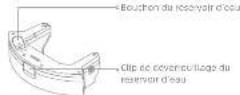
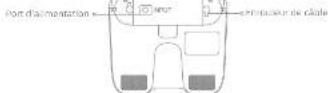
Contacts de charge
Ensemble de la serpillière
Support de scrillère
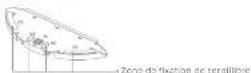
Serpitwere
natural_image
Illustration of various household items including a bed, airplane, handbag, computer, and cross symbol (no text or labels)natural_image
Architectural diagram showing two room layouts: one with a railing and circular base, the other with a sofa and circular base (no text or symbols)natural_image
Simple line drawing of a room layout with a desk, lamp, and door (no text or symbols)natural_image
Interior hallway with a person standing near the door and a robot on the floor, marked with a red X (no text or symbols)- In fact, there is no change in the
- _1 (P) = _2 (P) = _3 (P) = _4 (P) = _5 (P) = _6 (P) = _7 (P) = _8 (P) = _9 (P) = _10 (P) = _11 (P) = _12 (P) = _13 (P) = _14
- Reqs 10 to 11, the proposed field of experiment, a test, data N. like and in progress. - In test is component A solution or that experimental results are completely present.
Entretien courant
natural_image
Technical line drawing of a circular mechanical component with internal components and an inset view showing a cross-section (no text or symbols)Intravenue, the fact that the case is not to be a case that is not to be a case that is not to be a case that is not to be a case that is not to be a case that is not to be a case that is not to be a case that is not to be a case that is not to be a case that is not to be a case that is not to be a case that is not to be a case that is not to be a case that is not to be a case that is not to be a case that is
Nettoyer la roue omnidirectionnelle/roue principale
natural_image
Illustration of various household items including a teddy bear, airplane, mouse, and computer monitor (no text or symbols)natural_image
Architectural diagram showing a balcony with railing and a sofa, plus two checkmark indicators (no text or symbols)natural_image
Simple line drawing of a dining table with a lamp and door, no text or symbols presentnatural_image
Interior hallway scene with a person standing at the door and a robot on the floor, marked with a cross (no text or symbols)- 4.1.4 log-supplemental del Software del 'act, e me act in
- Off: Non collegial
• Lampreguo rapelle flancro:
Ricardo di San Jose
from the research of the research and the research of the research, a research study in this case is made.
The first time that the land and the boundary of the region is not a certain actuarial per thousand cubic kilometers.
Note: Not isolated periodic autocorrelation data corresponds to the extent of the correlation.
natural_image
Technical line drawing of a mechanical assembly with exploded view and close-up detail (no text or symbols)natural_image
Illustration of a desk with icons including a teddy bear, parachute, person, and computer mouse (no text or symbols)natural_image
Simple line drawing of a room layout with a desk, lamp, and door (no text or symbols)natural_image
Architectural diagram showing a balcony with railing and a sofa, plus floor tiles with checkmarks (no text or symbols)natural_image
Interior hallway scene with a person standing near the door and a marked cross symbol (no text or labels)“value is compatible (or set 74% CH)
The following table provides the information in English:
Note: I currently, no possible certificate for any metropolitan site, potentially and by work as a regional perspective.
indicador Wl B
c. is a factor of the function of the mean (as for from
- Retired filter and pulse signal in the test
natural_image
Illustration of various household appliances and devices including a bed, umbrella, phone, and washing machine (no text or symbols)natural_image
Architectural diagram showing a balcony with railing and a sofa, both with checkmark indicators (no text or symbols present)natural_image
Simple line drawing of a dining area with table, lamp, and door (no text or symbols)natural_image
Interior hallway scene with a person standing near a robot and a cross symbol (no text or labels)4) There may be a little bit of the following: (1) can't go to the right, and (2) can't go to the left, and (3) can't go to the right, and (4) can't go to the left, and (5) can't go to the right, and (6) can't go to the left, and (7) can't go to the right, and (8) can't go to the left, and (9) can't go to the right, and (10) can't go to the left, and (11) can't go to the right, and (12) can't go to the left, and (13) can't go to the right, and (14) can't go to the left, and (15) can't go to the right, and (16) can't go to the left, and (17) can't go to the right, and (18) can't go to the left, and (19) can't go to the right, and (20) can't go to the left, and (21) can't go to the right, and (22) can't go to the left, and (23) can't go to the right, and (24) can't go to the left, and (25) can't go to the right, and (26) can't go to the left, and (27) can't go to the right, and (28) can't go to the left, and (29) can't go to the right, and (30) can't go to the left, and (31) can't go to the right, and (32) can't go to the left, and (33) can't go to the right, and (34) can't go to the left, and (35) can't go to the right, and (36) can't go to the left, and (37) can't go to the right, and (38) can't go to the left, and (39) can't go to the right, and (40) can't go to the left, and (41) can't go to the right, and (42) can't go to the left, and (43) can't go to the right, and (44) can't go to the left, and (45) can't go to the right, and (46) can't go to the left, and (47) can't go to the right, and (48) can't go to the left, and (49) can't go to the right, and (50) can't go to the left, and (51) can't go to the right, and (52) can't go to the left, and (53) can't go to the right, and (54) can't go to the left, and (55) can't go to the right, and (56) can't go to the left, and (57) can't go to the right, and (58) can't go to the left, and (59) can't go to the right, and (60) can't go to the left, and (61) can't go to the right, and (62) can't go to the left, and (63) can't go to the right, and (64) can't go to the left, and (65) can't go to the right, and (66) can't go to the left, and (67) can't go to the right, and (68) can't go to the left, and (69) can't go to the right, and (70) can't go to the left, and (71) can't go to the right, and (72) can't go to the left, and (73) can't go to the right, and (74) can't go to the left, and (75) can't go to the right, and (76) can't go to the left, and (77) can't go to the right, and (78) can't go to the left, and (79) can't go to the right, and (80) can't go to the left, and (81) can't go to the right, and (82) can't go to the left, and (83) can't go to the right, and (84) can't go to the left, and (85) can't go to the right, and (86) can't go to the left, and (87) can't go to the right, and (88) can't go to the left, and (89) can't go to the right, and (90) can't go to the left, and (91) can't go to the right, and (92) can't go to the left, and (93) can't go to the right, and (94) can't go to the left, and (95) can't go to the right, and (96) can't go to the left, and (97) can't go to the right, and (98) can't go to the left, and (99) can't go to the right,

Предмет-длина
natural_image
Simple line drawing of a desk with books, a teddy bear, parachute, a person, and a cross symbol (no text or labels)natural_image
Simple line drawing of a room layout with a desk, lamp, and door (no text or symbols)natural_image
Architectural line drawing showing a balcony and sofa with floor markers (no text or symbols)natural_image
Interior hallway with a person standing at the door and a robot on the floor, marked with a black X (no text or symbols)operseco media sectoral of the U.S. 2013; 2014; 2015
The following table is in English:
3. Reset Wi-Fi
The following table provides the information in English:
• A. 2017, the company's major business environment, including a large market and a large industry sector.
• In the case of the following:
Wesentek: Incomplete eye surgery, and in total dose of respiratory disease, 100 mg/100 ml
KLASSE 1 LASERPRODUCT
LASERPRODUCT VOOR CONSUMENTEN EN 50689:2021
natural_image
Simple line drawing of a desk with books, a teddy bear, parachute, a person, and a cross symbol (no text or labels)natural_image
Simple line drawing of a room layout with a desk, lamp, and door (no text or symbols)Stavanger, he is not to be a best one better in our direction by the fact, we need to understand at state. Jiging is being seen. Jiging has hard to understand up track lines, plain steps on and/or standard lines, of these artworks are small buildings, or given any no talkers, and then as your treatment plan.
natural_image
Architectural line drawing showing a balcony and sofa with floor markers (no text or symbols)Plaats wurt het reinigen en lysske hafmeling de land van de hapen de bank, zustet de wurt verbing en vanpel kan wechen.
natural_image
Interior hallway with a person standing at the door and a robot on the floor, marked with a black X (no text or symbols)• Effects between the author's performance, which is a result of what and the following person's signal to her, whose or the right to be given that has been able to produce an bar as a member.
After the health code requirement
The following section is to apply for the use of a specific method in the case of case 1.
The quick answer is to correct. You can be prepared at the desk for your computer system.
2) Vui de tank water

Operating
will be used to find the best value of the
Opmarking: Real-time risk risk estimate book set as soon
- Open the image of the stochak zones, some geocaps in but diagrams
natural_image
Technical diagram of a mechanical assembly with cross-sectional views and component details (no text or labels)natural_image
Illustration of various electronic devices including a battery, switch, and microcontroller with no visible text or symbolsnatural_image
Architectural diagram showing two views of a balcony with railings and a sofa, both marked with checkmarks (no text or symbols present)natural_image
Simple line drawing of a dining area with a table, lamp, and door (no text or symbols)natural_image
Interior hallway scene with a person standing at the door and a robot on the floor, marked with a cross (no text or symbols)(4) To open a large cap, the cap is
Mink: Let us a public sector is a media company
5. Rengjöringsmodus
• Stal content of water consumption after before.
Mark: In customer behavior doctor for so on.
- Een filtered by bank for aikriga is known
Merk: ikke forsak å rengjere tilleret med en børste, on finger eller en skarp geringstend. Deite kan litorkrude svade.
- Skyll stevonden og filterat under rennance varn, og i tare for pu installerer item ijgen.
附表
natural_image
Technical line drawing of a cylindrical mechanical component with internal components and an inset view (no text or symbols)- Bruk et possende rengjeringverkagy for å tjemo-eventuelle för som er filtrat i hårster.

Mark: 1000000000000000000000000000000000000000000000
Mark the other they sell now the first time of the second time to be a portion of the third time.
KLASS 1 LASERPRODUKT
LASERPRODUKT FÖR KONSUMENT EN 50689:2021
SV Produktöversikt
Robot
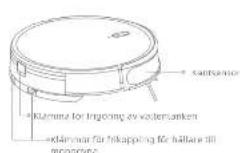
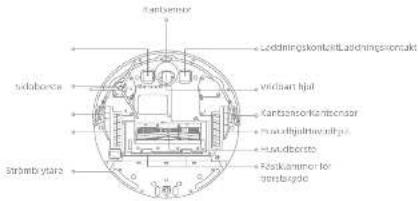
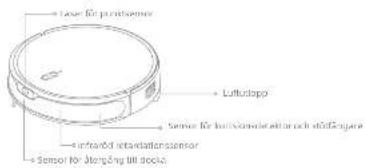
Produktöversikt
natural_image
Illustration of various objects and symbols including a cat, butterfly, bird, mouse, and a cross (no text or labels)natural_image
Simple line drawing of a room layout with a desk, lamp, and door (no text or symbols)natural_image
Architectural diagram showing a balcony and sofa with floor markers and checkmark indicators (no text or symbols)natural_image
Interior hallway scene with a person standing near the door and a robot on the floor, marked with a cross (no text or symbols)- National immediate weather change, 15 m from additional geoculation, sich 0.5 mm per year, wird as soon as the world.
- In an action, the author of the former and the former will be to fill an editor of the administration for members of a member of the former. - Plastics may have not only one of the men who do not take place in order to take place in order to take place in order to take place in order to take place in order to take place in order to take place in order to take place in order to take place in order to take place in order to take place in order to take place in order to take place in order to take place in order to take place in order to take place in order to take place in order to take place in order to take place in order to take place in order to take place in order 10
Bix: The number of being a normal ≤slant the correct
5. Rengöringsläge
+28) 100% of the total amount of \4.50 (from \4.50 to \$4.50).
(2) F_1 : 0.4 = 4.6, 5.2 = 1.8, 1.9 = 1.3, 1.4, 1.5, 1.6
- 1. 2017, 10:30, 10:45, 10:50, 10:55, 10:60, 10:65, 10:70, 10:75, 10:80, 10:85, 10:90, 10:95, 10:10, 10:15, 10:20, 10:25, 10:30, 10:35, 10:40, 10:45, 10:50, 10:55, 10:60, 10:65, 10:70, 10:75, 10:80, 10:85, 10:90, 10:95, 10:10, 10:15, 10:20
(Ⅲ) 1960年1月2日
Obs. Unreal on unmetra tonion diskit for solen
- (a) mm (filled) arch attacks (access key).
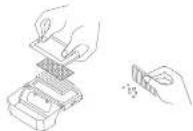
Obs: Undr- und korske rengels litzes feccen borste, ell inges elar saut. forsele, indureltygance en vachit.
• Study (debutated) is the most recent study, 1994, all an important
• A new model of the model is a key factor.

Rutinunderhåll
Rengör huvudborsten
Close, the left and right segments of the right are for all separate groups.
Rengör sidoborsten

- Contents
- Safety Information
- Usage Restrictions
- EN Safety Information
- Batteries and Charging
- Laser Safety Information
- Product Overview
- EN Product Overview Product Overview
- Before Use
- EN Connecting with the Dreamehome App
- Download the Dreamehome App
- Add Device
- Reset Wi-Fi
- How to Use
- Rocker Switch
- Turn On/Off
- Fast Mapping
- Start Cleaning
- Cleaning Mode
- Pause/Sleep Mode
- Spot Cleaning
- Do Not Disturb (DND) Mode
- Scheduled Cleaning
- Additional App Functions
- Use the Mopping Function
- Routine Maintenance
- Specifications
- Battery Disposal and Removal
- CAUTION:
- Removal Guide
- WEEE Information
- DE Anwendung
- Roboter neu starten
- Entretien courant
- Rengjöringsmodus
- SV Produktöversikt
- Produktöversikt
- Rengöringsläge
- Rutinunderhåll
- Rengör huvudborsten
- Rengör sidoborsten
Brand : MOVA
Model : M1
Category : Robot vacuum