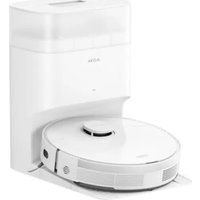
S10 Plus - Robot vacuum MOVA - Free user manual and instructions
Find the device manual for free S10 Plus MOVA in PDF.


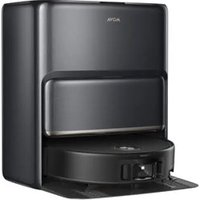
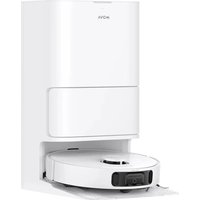
| Product type | Robot vacuum with mopping function |
| Brand | MOVA |
| Model | S10 Plus |
| Rated voltage (robot) | 14.4 V |
| Rated power (robot) | 75 W |
| Charging time | Approximately 6 hours |
| Operating frequency (Wi-Fi) | 2400 - 2483.5 MHz |
| Maximum output power (Wi-Fi) | < 10 dBm |
| Base station - Input voltage | 220-243 V ~ 50/60 Hz |
| Base station - Output voltage | 20 V / 1 A |
| Base station - Dumping power | 1000 W |
| Battery type | Integrated lithium-ion |
| Navigation | LDS laser (Class 1) |
| Cleaning functions | Quick mapping, vacuuming, mopping (cloth), auto-empty, auto-resume |
| Cleaning modes | Spot cleaning, edge cleaning, Do Not Disturb mode |
| Connectivity | Wi-Fi 2.4 GHz via Dreamehome app |
| Control | Mobile app, touch buttons on robot |
| Brushes | Main brush + side brush |
| Filter | Washable filter (dust compartment) |
| Water tank capacity | Not specified (built-in tank for mopping) |
| Dust bag (station) | Disposable bag (replace every 2-4 months) |
| Operating temperature | 0°C to 40°C |
Frequently Asked Questions - S10 Plus MOVA
User questions about S10 Plus MOVA
0 question about this device. Answer the ones you know or ask your own.
Ask a new question about this device
Download the instructions for your Robot vacuum in PDF format for free! Find your manual S10 Plus - MOVA and take your electronic device back in hand. On this page are published all the documents necessary for the use of your device. S10 Plus by MOVA.
USER MANUAL S10 Plus MOVA
which means striving for excellence in every endeavor and reflects the company's vision of continuous pursuit, exploration and search in technology
MOVA
Plus
Auto-Empty Robot Vacuum and Mop User Manual
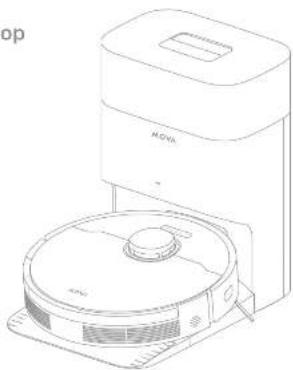
natural_image
Line drawing of a vacuum cleaner with a circular base and top unit (no text or symbols)CE


For more support, contact us via https://global.dreametech.com
Manufactured by: Dreamie Trading (Habjin) Co., Ltd.
Made in China

RL542SD-CU-A01
04/2021
the illustrations to this manuse are for reference only. See refer to the actual product
MOVA
Contents
CN User Manual 1
To avoid electric shock, fire or injury caused by improper use of the appliance, please read the user manual carefully before using the appliance and keep it for future reference.
Usage Restrictions
This product should not be used by children younger than 8 years old nor persons with physical, sensory, intellectual deficiencies, or limited experience or knowledge without the supervision of a parent or guardian to ensure safe operation and to avoid any risks. Cleaning and maintenance shall not be performed by children without supervision.
This appliance contains batteries that are only replaceable by skilled persons.
Clear the area to be cleaned. Children shall not play with the appliance. Ensure children and pets are kept at a safe distance from the robot while it is operating.
Do not install, charge or use the appliance in the bathrooms or around the pools.
This product is for floor cleaning in a home environment only. Do not use it outdoors, on non-floor surfaces, or in a commercial or industrial setting. If the power cord is damaged, it must be replaced by a special cord or assembly available from the manufacturer or its service agent.
Do not use the robot in an area suspended above ground level without a protective barrier.
Do not place the robot upside down. Do not use the LDS cover, robot cover, or bumper as a handle for the robot.
Use the robot in environments with an ambient temperature above 0°C and below 40°C. Make sure there is no liquid or sticky substance on the floor.
EPA
EN Safety Information
Usage Restrictions
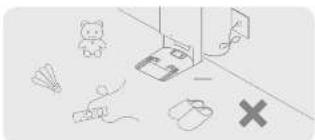
To prevent damage or harm from dragging, clear any loose objects from the floor, and remove cables or power cords on the cleaning path before operating the appliance.
Remove fragile or small items from the floor to prevent the robot from bumping into and damaging them.
Keep hair, fingers, and other body parts away from the suction opening of the robot.
Do not operate the appliance in a room where an infant or child is sleeping. Do not place children, pets, or any item on top of the robot regardless of whether it is stationary or moving.
Do not use the robot to clean any burning objects. Do not use the robot to pick up flammable or combustible liquids, corrosive gases, or undiluted acids or solvents.
Do not vacuum hard or sharp objects. Do not use the appliance to pick up objects such as stones, large pieces of paper or any item that may clog the appliance.
Plug must be removed from the socket-outlet before cleaning or maintaining the appliance.
Do not wipe the robot or the base station with a wet cloth or rinse them with any liquid. After cleaning washable parts, fully dry the parts before reinstalling and using them.
Please use this product in accordance with the instructions in the User Manual. Users are responsible for any loss or damage that arise from improper use of this product.
Safety Information
Batteries and Charging
Do not use any third-party battery or base station with auto-empty. Use only with RCLD1 supply unit.
Do not attempt to disassemble, repair, or modify the battery or the base station with auto-empty on your own.
Do not place the base station with auto-empty near a heat source.
Do not use a wet cloth or wet hands to wipe or clean the charging contacts of the base station with auto-empty.
Do not improperly dispose of old batteries. Unneeded batteries should be discarded at an appropriate recycling facility.
If the power cord becomes damaged or broken, stop using it immediately and contact after-sales service.
Make sure the robot is turned off when being transported and kept in its original packaging if possible.
If the robot will not be used for an extended period, fully charge it, then turn it off and store it in a cool, dry place. Recharge the robot at least once every 3 months to avoid over-discharging the battery.
Laser Safety Information
The laser sensor in this product meets the IEC 60825-1:2014/EN 60825-
1:2014/A11:2021 Standard for Class 1 laser products. Please avoid direct eye contact with it during use.
CLASS 1 LASER PRODUCT
CONSUMER LASER PRODUCT EN 50689:2021
Hereby, Dreame Trading(Tianjin)Co., Ltd. declares that the radio equipment type Rs5425D is in compliance with Directive 2014/53/EU. The full text of the EU declaration of conformity is available at the following internet address: https://global.dreametech.com for detailed e-manual, please go to https://global.dreametech.com/pages/user manuals and fags
EN Safety Information
CAUTION:
In order to avoid a hazard due to inadvertent resetting of the thermal cut-out, this appliance must not be supplied through an external switching device, such as a timer, or connected to a circuit that is regularly switched on and off by the utility.

For indoor use only

Read operator's manual
Product Overview
Package Contents
Robot
Other Accessories

Side Brush Power Cord

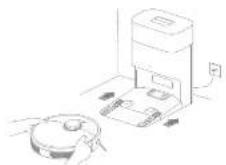
Base Station Range Extension Plate. (install before use)
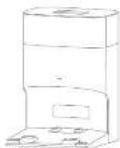
Base Station with Auto-Empty

Moo Pad (pre-installed)

Dust Bag = 2 (pre installed x1)

User Manual
EVI
EN Product Overview
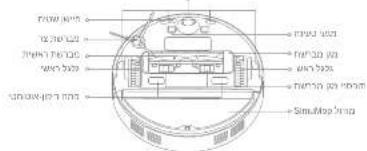
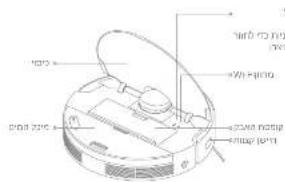
Robot
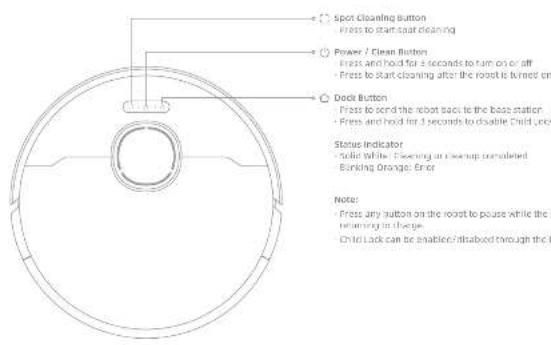

Product Overview
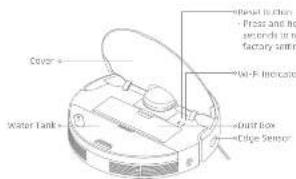
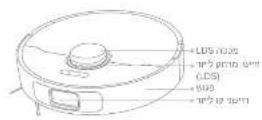
Robot and Sensors
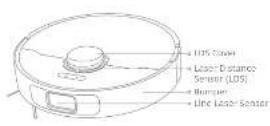
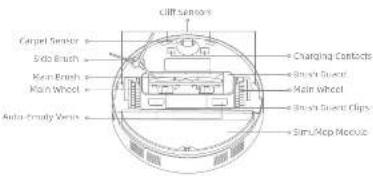
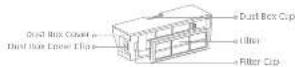
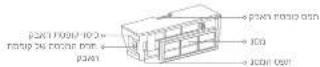
Dust Box


EN Product Overview
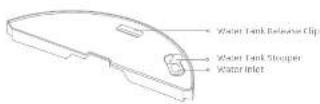
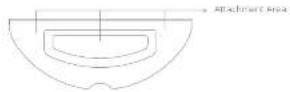
Mopping Module
Water Tank
Mep Fed
3
Product Overview
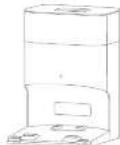
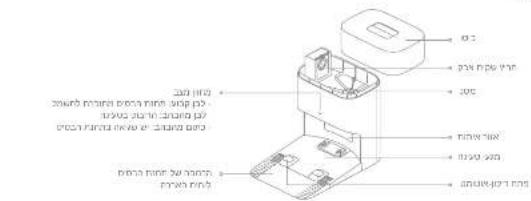
Base Station with Auto-Empty
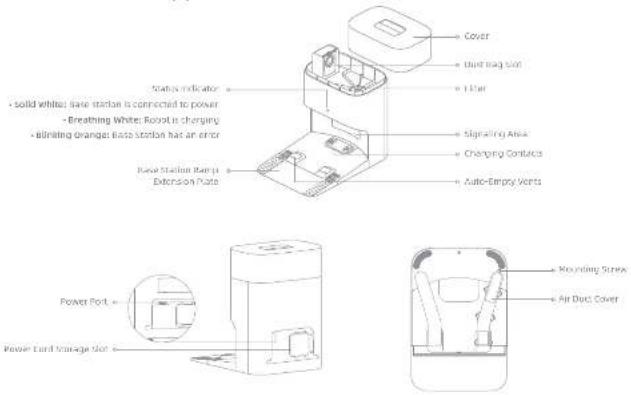
EVI
B

Preparing Your Home
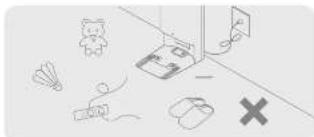
natural_image
Illustration of a room with furniture and symbols (no readable text or labels)Before cleaning, please move away unstable, fragile, valuable or dangerous items, and clean up cables, cloths, toys, hard objects and sharp objects on the ground in sound being enlarged, stratified or knotted over by the robot and causing losses.
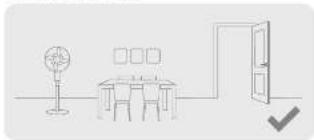
natural_image
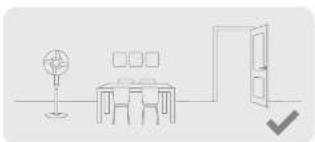
Simple line drawing of a meeting room with a table, lamp, and door (no text or symbols)Open the door of the room to be cleaned, and put the furniture in its proper place to leave more space.
Note:
- When operating the robot for the first time, follow it around while cleaning to remove any potential obstacles in time.
- Do not vacuum hard objects like stones, steel backs and tay parts, or sharp objects like construction waste, broken glass and nails, otherwise the ground may be scratched.
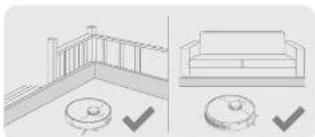
natural_image
Illustration showing a balcony railing and a sofa with checkmarks indicating selection (no text or symbols present)before cleaning, place a physical barrier at the edge of the stairs and safe to ensure the secure and smooth operations of the robot.
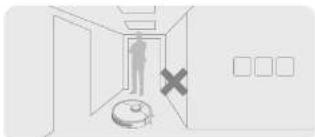
natural_image
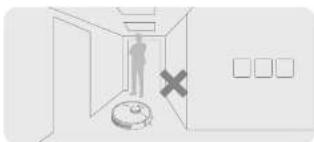
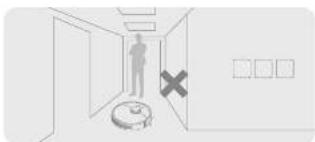
Interior hallway scene with a person standing near the door, a robot, and a cross symbol (no text or labels)To prevent the robot from not recognizing areas that need to be cleaned, do not stand in front of the robot, or in a threshold, hallway, or narrow places.
Before Use
Electrical Outlet
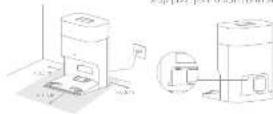
place the base station or level ground against the wall. Insert the power cord into the base station and plug it into the socket.
Paceline have /aluminous solution. The is open as possible with a good fit signal.
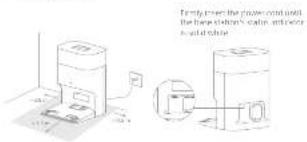
Note:
+ Make sure that no objects might block the signaling area
- Remove any objects that are closer than 1.5 m from the front and 0.5 m from either side of the base station.
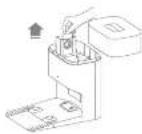
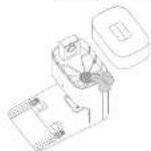
- Install the Base Station Ramp Extension Plate1. Place the
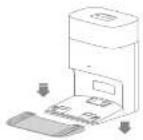
- Remove the Protections
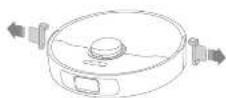
EN Before Use
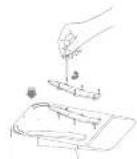
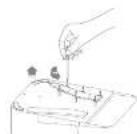
- Install the Side Brush
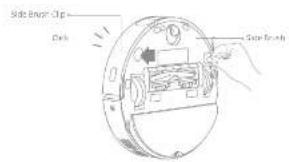
Note: recall the side finish until it flinks coin place
5. Charge the Robot
When placing the robot, align the charging contacts at the bottom of the robot with the charging contacts of the base station, and the joint will automatically turn on and start charging.
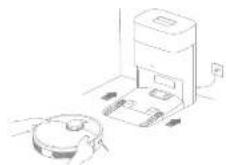
Notes: It is recommended to fully charge your robot before first time use.
Connecting with Dreamehome App
1. Download Dreamehome App
Scan the QR code on the root, or search "Disasematics" in the app store to download and install the app.
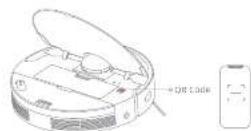
Note:
- Only 2.48% 90% is a quarter
- Due to upgrades in the app software, the actual operations may differ from the directions in this manual. Please follow the instructions based on the current app version.
2. Add Device
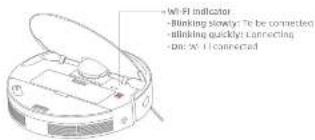
Open the Dreamhome app, tap ☐ in the upper right corner, and scan the same rule on the robot again to add the device. Please follow the prompts to finish the Wi-Fi connection.
Note: If you want to reset Wi-Fi, repeat step 2 and then follow the prompts to finish the Wi-Fi connection.

How to Use
Turn On/Off
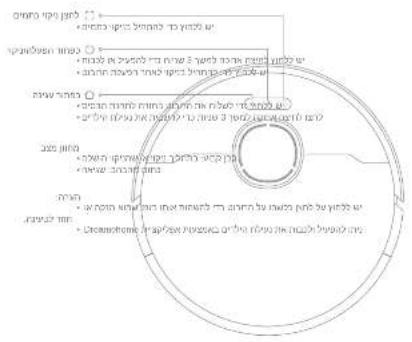
Press and hold the button for 3 seconds to turn on the robot, the power indicator should be illuminated. Place the root onto the base station, the robot should turn on automatically and begin charging. To turn off the robot, move the robot away from the base station and press and hold the button for 3 seconds.
Fast Mapping
After configuring the networks for the first time, follow the train station on the top to turn by create a map. The robot will start mapping without cleaning. When the robot returns to the base station, the mapping protests has been completed and the map will be seven automatically.
Start Cleaning
Press the button to start cleaning after the robot is turned on. The robot will accurately map out a route, methodically clean along the edges and walls, then finish by cleaning each room in an to-shaped pattern to ensure a thorough job.
Note:
- it is recommended that the robot set out from the base station before cleaning. Do not move the base station while the robot is cleaning. This ensures that the robot returns to base station smoothly. After the robot completes the cleaning task and automatically returns to the base station, the base station will start auto-empty. More settings can be operated on the app.
Pause/Sleep
When the robot is running, press any button to pause it.
If the robot is passed far more than 10 minutes, it automatically enters sleep mode. All indicators on the robot will turn off. Press any button on the robot at base station, or use the app to wake up the robot.
Note: If the robot is paused and placed onto the base station, the current cleaning process will end.
Auto Resume Cleaning
If the battery is too low, the robot will automatically return to the base station to charge. After charging to the appropriate battery level, it will resume unfinished cleaning tasks.
Nabel: To use this function, please open it in the App.
Do Not Disturb (DND) Mode
When the robot is set to Do Not Disturb (DND) mode, the robot will be prevented from resvering cleaning and the power indicator will turn off. DND mode is disabled by default at the factory. You can use the app to enable and mode or modify the DVD period. The DVD period is 22:00-8:00 by default.
Note:
The scheduled coating tasks will be performed as usual during the DND period. The tube will resume cleanup where it left all after the DND period expires.
How to Use
Spot Cleaning
When the robot is on standing, press the button [a] accessible the spot clearing mode. In this mode, the robot cleans a square-shaped area of 1.5×1.5 meters around it and returns to its starting point once the spot clearing is completed.
Robot Restarting
If the robot stops responding or cannot be turned off, press and hold the but an chf for 30 seconds to formally turn it off. Then, press and hold the fault chf for 3 seconds to turn the robot on.

It is recommended that all floors are situated at least three times before the first mooping session to achieve a better cleaning effect.
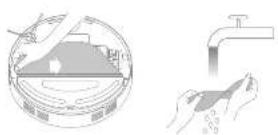
- According to the illustrations, remove the mop pad, hampen it and wring out excess water. Then reinstall the mop pad onto the mop pad helper in place.
EN How to Use
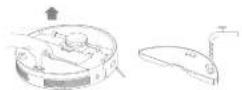
- upon the cover of the rotor and take the water tank out, fill the water tank with clean water and then re-install it.
Note:
Do not use detergent or disinfectant.
- Do not fill the water tank with hot water as this may cause the water tank to warp.
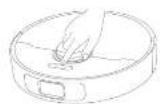
- Press the button or use Dreamenome app to start cleaning
Note:
- It is not recommended to use the mapping function on targets. - Use the gap in adjust the water flow as retained.
16 17
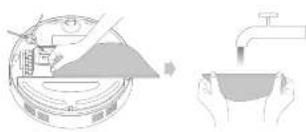
- When the robot finishes a cleaning rack and returns to the base station, remove the mpped pad and wash it in time.
natural_image
Illustration showing a hand pouring liquid into a container and another hand holding a bowl, both without any text or symbols.Note: When the robot is changing or not in use, it's recommended to remove the water tank and move pad. Pour all the remaining water in the water tank, clean the crop pad to prevent mildew or risks.
Routine Maintenance
Parts
To keep the robot in good condition, it is recommended to refer to the accessory usage in the app or the following table for routine maintenance.
| Part | Maintenance Frequency | Replacement Period |
| Moo pad after each bar every 1 to 5 months | ||
| Main brush | Once every 2 weeks | Every 5 to 12 months |
| Side brush every 5 to 6 months | ||
| Moo pad holder / | ||
| Dual back's fiber hourly for 8 months | ||
| Base station's signalling area | Once every month / | |
| Base station's charging contact | ||
| Base station's auto-empty vents | ||
| Laser Distance Sensor (LOS) | ||
| Part | Maintenance Frequency | Replacement Period |
| Robotic's charging contact | Once every month | 7 |
| Robotic's auto-empty vehicle | ||
| Line laser sensor | ||
| Edge sensor | ||
| Barometer | ||
| Omnicreduction: wheel | ||
| Larger sensor | ||
| Chill sensors | ||
| Bottom of the robot | ||
| Dust box clean 7 as needed | ||
| Dust bag / Every 2 to 4 months |
Note: The replacement frequency will depend on your usage of the roof. If an exception occurs due to special circumstances, the parts should be replaced.
EN

Routine Maintenance
Mopping Module
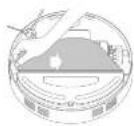
- Open the robot's cover and press the clip to remove the water tank. Pour out the water in the tank. Clean the tank with water only and leave to all dry before use.
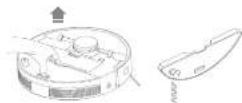
(vote: Do not directly expose the water tank to sunlight.
- Remove the mop pad from the mop pad holder, clean it with water only and leave it to all dry before use.
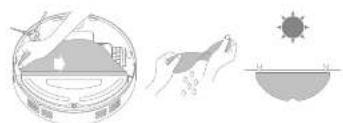
natural_image
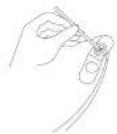
Illustration showing three symbolic scenes: a bowl with a roof, hands holding a tool, and a sun partially covered by a bowl (no text or symbols present)s. If slow water flow occurs, in the water volume is not well distributed, clean the air hole in the cover of the water tank.
Main Brush
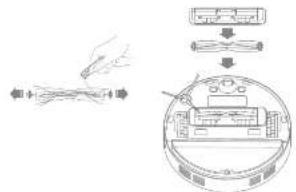
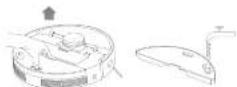
- Press the brush guard clips inwards to remove the brush guard and lift the brush out of the robot.
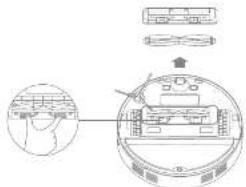
10 19
Routine Maintenance
- Pull out the brush covers at both ends of the brush as shown in the diagram. Use a proper cleaning tool to remove any hair tangled in the brush. Install the brush cases on both ends of the brush, and then reinstall the brush. Press on the brush guard to lock it in place.
Side Brush
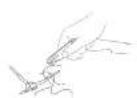
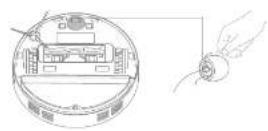
Remove and clear the size brush.
Omnidirectional Wheel

Notes:
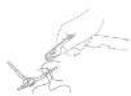
- Use a tool such as a small stroke driver to separate the side and line of the omnidirectional wheel. Do not use excessive force. - Rinse the omnidirectional wheel under the running water and out it back after drying it completely.
EN Routine Maintenance
Dust Box
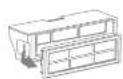
- Open the rubber cover and press the clip to remove the dust box.
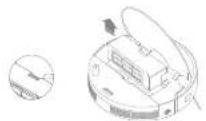
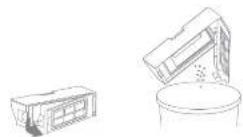
- Open the dust box cover and empty the dust box as shown in the diagram.
Filter
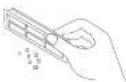
- Remove the filter and top to basket gently.

Note: Do not attempt to clean the inter with a brush, a finger or sharp objects to prevent damage.
- Rinse the dust box and filter with water and dry them completely before mini-stalling.
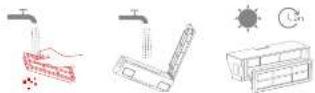
Nobo:
- Rinse the dust box and filter with clean water only. Do not use any detergent. - Use the dust box and filter only when they are completely dry.
Routine Maintenance
Dust Bag
- Remove and distand the dust bag. 2. Install a new dust bag.
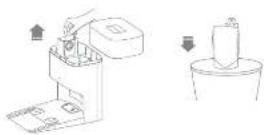
Note: Pulling backwards on the handle will seal the dust bag to prevent the dust and debris from accidentally falling out.
- Remove the dust and debris from the filter with a dry cloth, 4. Put back the cover of the dust tank.
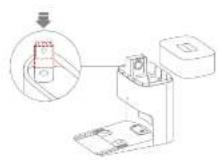
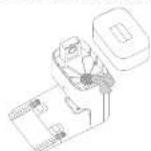
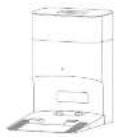
EN Routine Maintenance
Robot Sensors
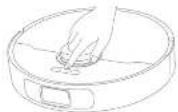
Wipe robot sensors by using a soft and dry cloth as shown on the below figure:
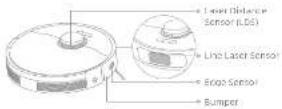
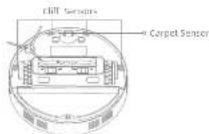
Note: A raw cloth can damage sensitive diameters within the rubber and the base station. Please use a dry cloth for cleaning.
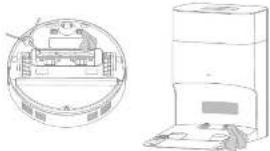
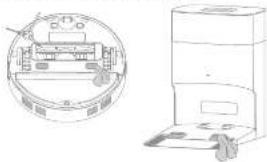
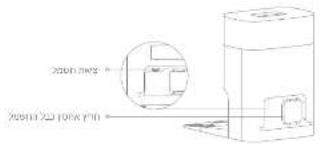
Charging Contacts and Signaling Area
Clean the changing contacts and the signaling area with a sort and cry cloth.
natural_image
Technical line drawing of a mechanical device with a circular inset showing internal components (no text or symbols)Auto-empty Vents
Clean the auto-empty vents with a sun, and dry cloth.
natural_image
Technical line drawing of a mechanical device with cross-sectional view and side view (no text or symbols)Routine Maintenance
Air Duct
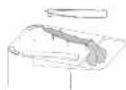
If the air duct is blocked, please clean it according to the following steps.
- Uncrew mounting screws on the air duct cover and remove top cover.
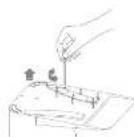
- Check whether the product blocked by foreign objects. If any, clean them.
- Reinforced the air duct cover.
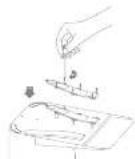
Battery
The robot contains a high-performance lithium-ion battery pack. Make sure that the battery remains well-charged for daily use to maintain optimal battery performance.
EN Troubleshooting
| Problem Solution | |
| The robot will not turn on. | The battery is low. Recharge the robot on the base station and try again.The temperature of the battery is too low or too high. It is recommended to operate the appliance at a temperature between 52°F (GHz) and 104°F (HPC). |
| The robot will not charge. | The base station is not connected to power, please make sure both ends of its power cord are correctly plugged in.the contact between the charging contacts on the base station and the robot is poor, please clean the chargingcontacts. |
| The robot fails to connect to Wi-Fi. | The Wi-Fi network password is incorrect. Make sure the password used to connect to your Wi-Fi network is correct.The robot does not support a 5 GHz Wi-Fi connection. Make sure the robot is connected to a 2.4 GHz Wi-Fi connection.The Wi-Fi signal is weak. Make sure the robot is in an area with good wind coverage.The robot may not be ready to be configured. Please exit and re-enter the apo, and then try again as instructed. |
| The robot cannot find and return to the base station. | The base station is disconnected from power or moved when the robot is not on it. Please connect the base station to the power supply or place the robot onto the base station to charge.There are too many obstructions around the base station. Place the base station in a more open area.Moving the robot may cause it to re-position itself, and it will recreate a map if re-positioning fails. If the robot is too far from the base station, it might not be able to automatically return on its own. In which case you will need to formally place the robot onto the base station.Wipe the signaling area on the base station to remove dust or debris. |
| The robot gets stuck in front of the base station and cannot return to it. | Clear any obstruction within 0.5 m on the left and right sides or within 1.5 m in front of the base station to prevent the robot from being blocked.the route for returning to charge is blocked, e.g. the door is closed.It is recommended to move the base station to a different place and try again. |
Troubleshooting
| Problem Solution | |
| The robot will not turn off. | The robot cannot be turned off when it is charging. It is recommended to move the robot from the base station, and then across and hold the button ☑ for 3 seconds to turn it off.If the robot cannot be turned off by performing step 1, press and hold the button ☑ for 10 seconds to satisfy turn off the robot. If the problem persists, please contact after-sales service. |
| The charging speed is slow. | It begins about 5 hours to fully change the robot when its battery is free.If you operate the robot at temperatures outside of the specified range, the charging speed will automatically slow down to extend the battery life.The charging contacts on both the robot and the base station may be dirty, please wipe them with a dry cloth. |
| The noise increases while the robot is operating. | Check whether the dust box's filter is clugged. If so, clean it or replace it.A hard object may be caught in the main brush or the dust box. Check and remove any hard object.The main brush on the side brush may become tangled. Check and remove any foreign objects.Switch the suction mode to Standard or Quiet. |
| The robot moves without following the set route. | Objects such as power noirs and silapsers should be organized before using the robot.Working on wet slippory surfaces may cause the main wheel to slip. It is recommended to dry any wet areas before using the robot.Wipe the line laser sensor on the robot with a clean, soft, and dry cloth to keep them clean and unabstracted. |
| The robot misses the rooms to be cleaned. | Make sure that the doors of the rooms to be cleaned are open.Check whether there is a threshold higher than 2 cm at the door of the room. The robot cannot climb over high thresholds or steps.The place in front of the room to be cleaned may be wet and slippory, causing the robot to slip and work abnormally. Please by drying the floor before using the robot. |
EN Troubleshooting
| Problem Solution | |
| The robot will not resume cleaning after changing. | Make sure that the robot is not set in the Do Not (Dislurb (DUS)) mode, which will prevent it from returning cleaning.The robot will not resume cleaning after you manually place the robot on the base station or send the robot to change via the app or the button Ⓗ. |
| The base station cannot automatically employ the dust box. | Check whether the dust bag in the dust tank is full.If the dust bag is not full, check whether there is any obstruction at the auto-empty vent of the robot, the base station, or the dust box, if any, clean the blocked part in time. |
| The map pad holder is raised abnormally. | Please check if there is any foreign object stack in the moa pad holder, and try to restart the robot, if the problem persists, please contact the aftersaves service team. |
| No water comes out of the water tank, or only a little bit comes out. | Check whether there is water inside the water tank.Clean the blowhole on the top of the water tank.clean the mop pads if it becomes dirty.Make sure the map pad is installed correctly according to the user manual. |
| Roast returns to the base station without performing auto-empty tasks. | DUS mode prevents the robot from performing auto-empty tasks. |
For more support, contact us via https://global.dreametech.com.
Specifications
Robot Base Station with Auto-Empty
| Model No.5425D | |
| Charging Time Approx. 6 hours | |
| Rated Voltage 14.4 V | ± |
| Rated Power 75 W | |
| Operation Frequency 2400-2483.5 MHz | |
| Maximum Output Power < 20 dBm | |
Under normal use of condition, this equipment should be kept a separation distance of at least 3cm between the antenna and the body of the user.
| Model RCLD1 | |
| Rated input 220-246 V | 50-50 Hz ~ |
| Rated Output 28 V | ≈ 1 A |
| Rated Power (during dust density) | 1000 W |

Battery Disposal and Removal
The built-in lithium-ion battery contains substances that are hazardous to the environment. Before disposing of the battery, make sure the battery is removed in its purified technologies and described at an encapsulate curing facility.
- the battery must be removed from the appliance before it is scanned:
- the appliance must be disconnected from the supply mains when removing the battery;
- the battery is to be disposed of safely.
CAUTION:
Before removing the battery, disconnect the power and run out the battery as much as possible.
Unneeded batteries should be discarded at an appropriate recycling facility.
Do not expose to high temperature environment to avoid risks of explosion.
under abusive conditions, liquid may be ejected from the battery. If contact occurs, flush with water and seek medical help.
Removal Guide:
- Turn over the robot, use a proper tool to remove the screws on the back of the robot, and then remove the cover.
- Unplug the terminals between the battery and PCS board to remove the battery.
WEEE Information
All products bearing this symbol are waste electrical and electronic equipment (WLED as in directive 2012/19/00), which should not be mixed with unsorted household waste. Instead, you should protect human health and the environment by handling every your waste equipment to a designated collection point for the recycling of waste electrical and electronic equipment, appointed by the government or local authorities. Correct disposal and recycling will help prevent potential negative consequences to the environment and human health. Please contact the installer or local authorities for more information about the location as well as terms and conditions of such collection points.
Sicherheitshinweise
LASERPRODUKT DER KLASSE
LASERPRODUKT FÜR VERBRAUCHER EN 50689:2021
natural_image
Illustration of a room with a teddy bear, airplane, and computer connected by wires (no text or symbols)natural_image
Simple line drawing of a room layout with a desk, lamp, and door (no text or symbols)natural_image
Illustration showing a balcony railing and a sofa with checkmarks indicating selection (no text or symbols present)natural_image
Interior hallway scene with a person standing near the door, a robot, and a cross symbol (no text or labels)natural_image
Illustration showing a hand pouring liquid into a container and another hand holding a bowl (no text or symbols)natural_image
Illustration showing three symbolic scenes: a hand holding a pen, a sun icon, and a bowl with water droplets (no text or labels)46 47
Regelmäßige Wartung
Seltenbürste
natural_image
Technical line drawing of a device with a circular inset showing internal components (no text or symbols)PRODUIT LASER DE CLASSE 1
PRODUIT LASER GRAND PUBLIC EN 50689:2021
natural_image
Illustration of a room with scattered objects including a teddy bear, airplane, and a computer (no text or symbols)natural_image
Illustration showing a railing and a sofa with checkmarks indicating selection (no text or symbols present)natural_image
Simple line drawing of a dining area with a table, lamp, and door (no text or symbols)natural_image
Interior hallway view with a person standing at the entrance and a robot on the floor, marked with a red X (no text or symbols)Remarque
natural_image
Illustration showing a hand pouring liquid into a container with a water tap (no text or symbols)natural_image
Illustration showing a solar panel, hand holding a device, and a sun partially visible below (no text or symbols)
Brosse latérale
natural_image
Two technical line drawings: a circular diagram showing a device inside and a vertical stack of books or documents on the right (no text or symbols present)natural_image
Illustration of a desk with scattered objects including a teddy bear, airplane, and a computer connected to a wall (no text or symbols)natural_image
Illustration showing a balcony railing and a sofa with circular objects, both marked with checkmarks (no text or symbols present)natural_image
Simple line drawing of a dining area with a table, lamp, and door (no text or symbols)natural_image
Interior hallway scene with a person standing near the door, a robot on the floor, and a cross symbol (no text or labels)natural_image
Illustration showing a hand pouring liquid into a container and another hand holding a bowl (no text or symbols)natural_image
Illustration showing three stages of a solar eclipse: disc, hand holding a pen, and sun partially visible (no text or symbols)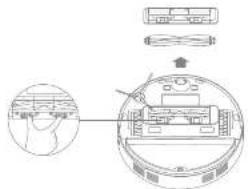

Spazzola laterale
natural_image
Diagram showing a circular cross-section of a mechanical device and a vertical stack of objects (no text or symbols)natural_image
Illustration of a mechanical device with icons including a teddy bear, paper airplane, mouse, and a cross symbol (no text or labels)natural_image
Illustration showing a bathroom with railing and toilet, alongside a sofa with circular fixtures (no text or symbols)natural_image
Simple line drawing of a dining area with table, lamp, and door (no text or symbols)natural_image
Interior hallway scene with a person standing near a robot and a cross symbol (no text or labels)natural_image
Illustration showing a hand pouring liquid into a container with a cartoon character, alongside a hand holding a bowl (no text or symbols)natural_image
Illustration showing three scenes: a circular container with liquid, hands holding a tool, and a sun partially covered by water (no text or symbols)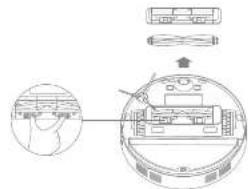

Cepillo lateral
Retire y limpie al coallio lateral.
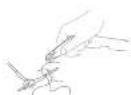
132 133
natural_image
Technical line drawing of a mechanical device with a circular cross-section and a separate 3D view of a rectangular unit (no text or symbols)natural_image
Illustration of a desk with scattered items including a teddy bear, airplane, and a computer connected to a wall (no text or symbols)natural_image
Architectural line drawing showing a railing and a sofa with checkmark indicators (no text or symbols)natural_image
Simple line drawing of a room layout with a desk, lamp, and door (no text or symbols)natural_image
Interior hallway with a person standing near the door, a robot on the floor, and a cross symbol (no text or labels)Wskazowka:
natural_image
Illustration showing three stages of a solar eclipse: surface plume, hand holding a droplet, and sunlight dipping into the water (no text or symbols)

Szczotka boczna
natural_image
Technical line drawing of a mechanical device with a circular cross-section and a separate cylindrical component (no text or symbols)natural_image
Illustration of a desk with a laptop, a teddy bear, a planeboard, a mouse, and a cross symbol (no text or labels)natural_image
Simple line drawing of a room layout with a desk, lamp, and door (no text or symbols)natural_image
Architectural line drawing showing a balcony with railing and a sofa, plus two checkmark indicators (no text or symbols)natural_image
Interior hallway scene with a person standing near the door, a robot on the floor, and a cross symbol (no text or labels)- Alleen 2.4 GHz with words understood.
natural_image
Illustration showing a hand pouring liquid into a container and another hand holding a bowl, with no visible text or symbols.natural_image
Illustration showing a hand cleaning a circular object with a magnified view of the sun (no text or symbols)160.109
Zijborstel
natural_image
Technical line drawing of a mechanical device with a circular cross-section and a vertical stack (no text or symbols)Noem your moer understanding contact metrics on via https://global.creamtech.com.
Specifications
KLASSE 1 LASERPRODUKT
FORBRUKERLASERPRODUKT EN 50689:2021
Dreame Trading (Tianjin) Co., Ltd. Ekkiserer nerved at rancoustyret type: RLS425D or / semisvar med direktiv 2014/55/EU. EU-overensstemmeseserköngjells fulle tiskat kan man finne på feligende internattamassa. https://global.dreemintech.com
For an detailert elektronisk bruksanyisning kan du beseker https://global.droometech.com/pages/user-manuels-and-foqs


Mappapain (for hardamont)

[for findsmocent >]

truksine saving/levenpose x 2
NU Produktoversikt
Robot
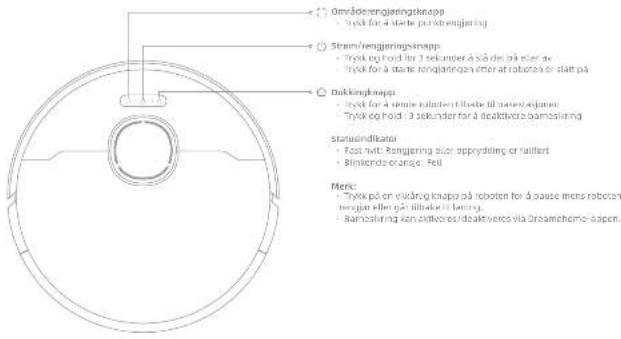
204 205
Produktoversikt
Robot og sensorer
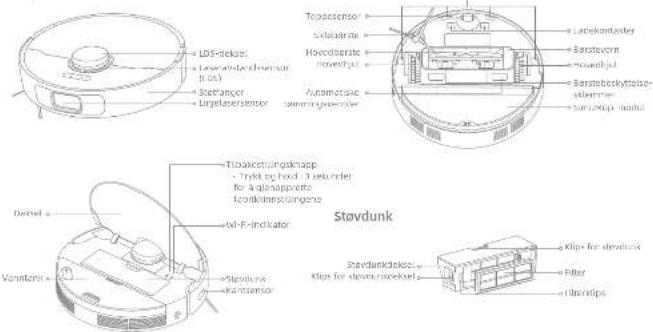
NO
NU Produktoversikt
Moppemodul
Vasantasi
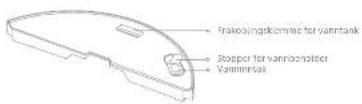
Муринегр
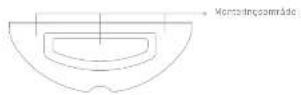
206/207
Produktoversikt
natural_image
Illustration of a room with furniture and symbols (no readable text or labels)For longjering bes du fjernå ustable, skjare, verdifilo eller forlige gønstander: Rydl appi bæster, bluer, leter, harde og skærpe gønstander på quies, for å unngå mulge skærer ved at de viklos inn, rises eller velles av roboten.
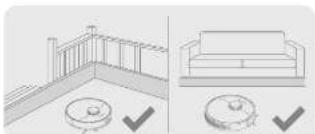
natural_image
Illustration showing a balcony railing and a sofa with checkmarks indicating selection (no text or symbols present)natural_image
Simple line drawing of a meeting room with a table, lamp, and door (no text or symbols)natural_image
Interior hallway scene with a person standing near the door, a robot, and a cross symbol (no text or labels)Fur å fremde at roboten ikke gjenkervier umrådet som sengores, må du kind stå foran roboten eller en controler, gangar eller frange stader.
Mark:
• När du außer rösten for fausta gang, ma du falge dem undt mens den reogjar for a flame essentuelle hindrages (refa
- Ike stovesag harde gjenstander som steiner, ståkuler og lelebeysdeler, eller skørpe gjenstander som byggeavfall, knust glase og solter, siden dette kan faje til nperi guvel.
200 109
Før bruk
stikkontakt
Plasser parestaslaner på et fast avlv mot vogen. Sott
stramierungen von -beten og plung den intern stektoraktien,
F. avac Eaveslakumara pali et shel surre er si apuri santi m, lag mnd e
1.50% 74.54%
Merk: Installer sloebersten til, den kukker på plass.
5. Lade roboten
natural_image
Illustration showing a hand pouring liquid into a container with a faucet, no text or symbols presentnatural_image
Three-line illustration showing hands holding a tool, a sun icon, and a bowl with a handle (no text or symbols)216 217
Rutinemessig vedlikehold
natural_image
Technical line drawing of a mechanical device with a circular cross-section view and a vertical stack of papers (no text or symbols)KLASS 1 LASERPRODUKT
LASERPRODUKT FÖR KONSUMENT
EN 50689:2021
Hamed forslarar cheame trading (farjin) co., Ltd. an radiamustragen avr.p. mts4250 Quenersstammer med direkte 2014/55/Eu, den fullständige texter.
Om du villase en utbrug e-anvandanhandox, glà till https://global.dreamelech.com/pages/user-manusis-anle-fags

Säkerhetsinformation
FÖRSIKTIGHET:
natural_image
Illustration of a room with scattered items including a teddy bear, a phone, a mouse, and a cross symbol (no text or labels)natural_image
Simple line drawing of a dining area with a table, lamp, and door (no text or symbols)natural_image
Architectural line drawings showing a balcony railing and a sofa with circular fixtures (no text or symbols)natural_image
Interior hallway scene with a person standing near the door, a robot on the floor, and a cross symbol (no text or labels)nbs:
natural_image
Illustration showing a hand washing a cup and another hand holding a water tap (no text or symbols)natural_image
Three-step diagram showing hand holding a pen, a bowl with liquid, and a sun partially visible above a bowl (no text or symbols)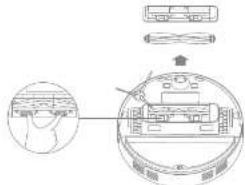
244 245
Rutinunderhåll
Sidoborste
natural_image
Two technical line drawings: a circular diagram showing a person in a lab or office setting and a tall rectangular device with a panel (no text or symbols present)The image contains no legible text or symbols.
dan

The image is too blurry to recognize any text content.

16.07.12.2016

(### mariva)
in pro nann
תָאַעְה
DISH
תָאַעְהִי
2016年
PKN NO5IP
תָאַעְה
תְפַרָה בְּרָה
074220
2011059
תָאַעְהָם
natural_image
Architectural line drawing showing a balcony with railing and a sofa, plus two checkmark indicators (no text or symbols)natural_image
Illustration of a desk with icons including a teddy bear, shuttlecock, airplane, mouse, computer, and a cross symbol (no text or labels)The image is too blurry to recognize any text content.
The following table is in English:
natural_image
Interior hallway scene with a person standing at the doorway, a robot on the floor, and a cross symbol (no text or labels)in, in, in, in, in, in, in, in, in, in, in, in, in, in, in, in, in, in, in, in, in, in, in, in, in, in, in,
natural_image
Simple line drawing of a dining area with a table, lamp, and door (no text or symbols)•
.口:22 1917
- 2008, 1965, 3:47:1998.
The image is too blurry to recognize any text content.
Heine is a state that is the first state.
The following table is provided in the image.
The following table provides the information in a tabular format:
The image is too blurry to recognize any text content.
The image is too blurry to recognize any text content.
He is a man who has been said that he is a man who is a man who is a man who is a man who is a man who is a man who is a man who is a man who is a man who is a man who is a man who is a man who is a man who is a man who is a man who is a man who is a man who is a man who is a man who is a man who is a man who is a man who is a man who is a man who is a man who is a man which
הכלה
The following table provides the information in a tabular format:
The following table is provided in the image:
The image is too blurry to recognize any text content.
.
2016.10.23, 1985.10.24 - (No. 000) (DND) was the first time to be done in the last year. The second year DND is 200-2016. The second year DND is 200-2016.
• DVD-1000: 2500.000
בַרְשָׁה
The image contains no legible text or symbols.
jne, o'z'n' n' 2019 to 2020. O'z'n' n' 2020 to 2021.
תְרָהִיַעֹ
The following table provides the information in a tabular format:
The following table is provided in the image:
.07194 07195 07206 07207 07208 07209 0731
B. 2013.10.04. (P) 58.79.11-5.13. (A) 6.19.12. (B) 58.79.13.
בַרְשָׁה בִּוֹתָם
הכלה
The following table provides the information in English:
בַרְשָׁה בִרְשָׁה
natural_image
Illustration showing a hand holding a bowl and a water tap, with no text or symbols present.The following table is a simple diagram:
TWI
[Unreadable due to severe distortion and noise]
The following table is in Chinese:
תְפַרָה בְּרָה
口吹20
The following table is a simple diagram and cannot be extracted.
| ### | ### |
| ### | |
| ### | |
| ### | |
| ### | |
| ### |
| ### ### ### ### ### | ||
| ### 3 to 1 to 2 to 3 to 4 to 5 to 6 | ||
| ### 12 to 8 to 9 to 10 to 11 to 12 to 13 to 14 to 15 to 16 to 17 to 18 to 19 to 20 to 21 to 22 to 23 to 24 to 25 to 26 to 27 to 28 to 29 to 30 to 31 to 32 to 33 to 34 to 35 to 36 to 37 to 38 to 39 to 40 to 41 to 42 to 43 to 44 to 45 to 46 to 47 to 48 to 49 to 50 to 51 to 52 to 53 to 54 to 55 to 56 to 57 to 58 to 59 to 60 to 61 to 62 to 63 to 64 to 65 to 66 to 67 to 68 to 69 to 70 to 71 to 72 to 73 to 74 to 75 to 76 to 77 to 78 to 79 to 80 to 81 to 82 to 83 to 84 to 85 to 86 to 87 to 88 to 89 to 90 to 91 to 92 to 93 to 94 to 95 to 96 to 97 to 98 to 99 to 100 to 101 to 102 to 103 to 104 to 105 to 106 to 107 to 108 to 109 to 110 to 111 to 112 to 113 to 114 to 115 to 116 to 117 to 118 to 119 to 120 to 121 to 122 to 123 to 124 to 125 to 126 to 127 to 128 to 129 to 130 to 131 to 132 to 133 to 134 to 135 to 136 to 137 to 138 to 139 to 140 to 141 to 142 to 143 to 144 to 145 to 146 to 147 to 148 to 149 to 150 to 151 to 152 to 153 to 154 to 155 to 156 to 157 to 158 to 159 to 160 to 161 to 162 to 163 to 164 to 165 to 166 to 167 to 168 to 169 to 170 to 171 to 172 to 173 to 174 to 175 to 176 to 177 to 178 to 179 to 180 to 181 to 182 to 183 to 184 to 185 to 186 to 187 to 188 to 189 to 190 to 191 to 192 to 193 to 194 to 195 to 196 to 197 to 198 to 199 to 200 to 201 to 202 to 203 to 204 to 205 to 206 to 207 to 208 to 209 to 210 to 211 to 212 to 213 to 214 to 215 to 216 to 217 to 218 to 219 to 220 to 221 to 222 to 223 to 224 to 225 to 226 to 227 to 228 to 229 to 230 to 231 to 232 to 233 to 234 to 235 to 236 to 237 to 238 to 239 to 240 to 241 to 242 to 243 to 244 to 245 to 246 to 247 to 248 to 249 to 250 to 251 to 252 to 253 to 254 to 255 to 256 to 257 to 258 to 259 to 260 to 261 to 262 to 263 to 264 to 265 to 266 to 267 to 268 to 269 to 270 to 271 to 272 to 273 to 274 to 275 to 276 to 277 to 278 to 279 to 280 to 281 to 282 to 283 to 284 to 285 to 286 to 287 to 288 to 289 to 290 to 291 to 292 to 293 to 294 to 295 to 296 to 297 to 298 to 299 to 300 to 301 to 302 to 303 to 304 to 305 to 306 to 307 to 308 to 309 to 310 to 311 to 312 to 313 to 314 to 315 to 316 to 317 to 318 to 319 to 320 to 321 to 322 to 323 to 324 to 325 to 326 to 327 to 328 to 329 to 330 to 331 to 332 to 333 to 334 to 335 to 336 to 337 to 338 to 339 to 340 to 341 to 342 to 343 to 344 to 345 to 346 to 347 to 348 to 349 to 350 to 351 to 352 to 353 to 354 to 355 to 356 to 357 to 358 to 359 to 360 to 361 to 362 to 363 to 364 to 365 to 366 to 367 to 368 to 369 to 370 to 371 to 372 to 373 to 374 to 375 to 376 to 377 to 378 to 379 to 380 to 381 to 382 to 383 to 384 to 385 to 386 to 387 to 388 to 389 to 390 to 391 to 392 to 393 to 394 to 395 to 396 to 397 to 398 to 399 to 400 to 401 to 402 to 403 to 404 to 405 to 406 to 407 to 408 to 409 to 410 to 411 to 412 to 413 to 414 to 415 to 416 to 417 to 418 to 419 to 420 to 421 to 422 to 423 to 424 to 425 to 426 to 427 to 428 to 429 to 430 to 431 to 432 to 433 to 434 to 435 to 436 to 437 to 438 to 439 to 440 to 441 to 442 to 443 to 444 to 445 to 446 to 447 to 448 to 449 to 450 to 451 to 452 to 453 to 454 to 455 to 456 to 457 to 458 to 459 to 460 to 461 to 462 to 463 to 464 to 465 to 466 to 467 to 468 to 469 to 470 to 471 to 472 to 473 to 474 to 475 to 476 to 477 to 478 to 479 to 480 to 481 to 482 to 483 to 484 to 485 to 486 to 487 to 488 to 489 to 490 to 491 to 492 to 493 to 494 to 495 to 496 to 497 to 498 to 499 to 500 to 501 to 502 to 503 to 504 to 505 to 506 to 507 to 508 to 509 to 510 to 511 to 512 to 513 to 514 to 515 to 516 to 517 to 518 to 519 to 520 to 521 to 522 to 523 to 524 to 525 to 526 to 527 to 528 to 529 to 530 to 531 to 532 to 533 to 534 to 535 to 536 to 537 to 538 to 539 to 540 to 541 to 542 to 543 to 544 to 545 to 546 to 547 to 548 to 549 to 550 to 551 to 552 to 553 to 554 to 555 to 556 to 557 to 558 to 559 to 560 to 561 to 562 to 563 to 564 to 565 to 566 to 567 to 568 to 569 to 570 to 571 to 572 to 573 to 574 to 575 to 576 to 577 to 578 to 579 to 580 to 581 to 582 to 583 to 584 to 585 to 586 to 587 to 588 to 589 to 590 to 591 to 592 to 593 to 594 to 595 to 596 to 597 to 598 to 599 to 600 to 601 to 602 to 603 to 604 to 605 to 606 to 607 to 608 to 609 to 610 to 611 to 612 to 613 to 614 to 615 to 616 to 617 to 618 to 619 to 620 to 621 to 622 to 623 to 624 to 625 to 626 to 627 to 628 to 629 to 630 to 631 to 632 to 633 to 634 to 635 to 636 to 637 to 638 to 639 to 640 to 641 to 642 to 643 to 644 to 645 to 646 to 647 to 648 to 649 to 650 to 651 to 652 to 653 to 654 to 655 to 656 to 657 to 658 to 659 to 660 to 661 to 662 to 663 to 664 to 665 to 666 to 667 to 668 to 669 to 670 to 671 to 672 to 673 to 674 to 675 to 676 to 677 to 678 to 679 to 680 to 681 to 682 to 683 to 684 to 685 to 686 to 687 to 688 to 689 to 690 to 691 to 692 to 693 to 694 to 695 to 696 to 697 to 698 to 699 to 700 to 701 to 702 to 703 to 704 to 705 to 706 to 707 to 708 to 709 to 710 to 711 to 712 to 713 to 714 to 715 to 716 to 717 to 718 to 719 to 720 to 721 to 722 to 723 to 724 to 725 to 726 to 727 to 728 to 729 to 730 to 731 to 732 to 733 to 734 to 735 to 736 to 737 to 738 to 739 to 740 to 741 to 742 to 743 to 744 to 745 to 746 to 747 to 748 to 749 to 750 to 751 to 752 to 753 to 754 to 755 to 756 to 757 to 758 to 759 to 760 to 761 to 762 to 763 to 764 to 765 to 766 to 767 to 768 to 769 to 770 to 771 to 772 to 773 to 774 to 775 to 776 to 777 to 778 to 779 to 780 to 781 to 782 to 783 to 784 to 785 to 786 to 787 to 788 to 789 to 790 to 791 to 792 to 793 to 794 to 795 to 796 to 797 to 798 to 799 to 800 to 801 to 802 to 803 to 804 to 805 to 806 to 807 to 808 to 809 to 810 to 811 to 812 to 813 to 814 to 815 to 816 to 817 to 818 to 819 to 820 to 821 to 822 to 823 to 824 to 825 to 826 to 827 to 828 to 829 to 830 to 831 to 832 to 833 to 834 to 835 to 836 to 837 to 838 to 839 to 840 to 841 to 842 to 843 to 844 to 845 to 846 to 847 to 848 to 849 to 850 to 851 to 852 to 853 to 854 to 855 to 856 to 857 to 858 to 859 to 860 to 861 to 862 to 863 to 864 to 865 to 866 to 867 to 868 to 869 to 870 to 871 to 872 to 873 to 874 to 875 to 876 to 877 to 878 to 879 to 880 to 881 to 882 to 883 to 884 to 885 to 886 to 887 to 888 to 889 to 890 to 891 to 892 to 893 to 894 to 895 to 896 to 897 to 898 to 899 to 900 to 901 to 902 to 903 to 904 to 905 to 906 to 907 to 908 to 909 to 910 to 911 to 912 to 913 to 914 to 915 to 916 to 917 to 918 to 919 to 920 to 921 to 922 to 923 to 924 to 925 to 926 to 927 to 928 to 929 to 930 to 931 to 932 to 933 to 934 to 935 to 936 to 937 to 938 to 939 to 940 to 941 to 942 to 943 to 944 to 945 to 946 to 947 to 948 to 949 to 950 to 951 to 952 to 953 to 954 to 955 to 956 to 957 to 958 to 959 to 960 to 961 to 962 to 963 to 964 to 965 to 966 to 967 to 968 to 969 to 970 to 971 to 972 to 973 to 974 to 975 to 976 to 977 to 978 to 979 to 980 to 981 to 982 to 983 to 984 to 985 to 986 to 987 to 988 to 989 to 990 to 991 to 992 to 993 to 994 to 995 to 996 to 997 to 998 to 999 to | ||
•
HE
תַעְרָה בְרִיֹת
The image is too blurry to recognize any text content.
The image is too blurry to recognize any text content.
natural_image
Illustration showing three different scenes: a bowl with liquid, hands holding a tool, and a sun partially covered by a bowl (no text or symbols)תְּרָה-לְּרָה
:0150
- 2017-10-25, 1963, 1964, 1965, 1966, 1967, 1968, 1969, 1970, 1971, 1972, 1973, 1974, 1975, 1976, 1977, 1978, 1979, 1980, 1981, 1982, 1983, 1984, 1985, 1986, 1987, 1988, 1989, 1990, 1991, 1992, 1993, 1994, 1995, 1996, 1997, 1998, 1999, 2000, 2001, 2002, 2003, 2004, 2005, 2006, 2007, 2008, 2009, 2010, 2011, 2012, 2013, 2014, 2015, 2016, 2017, 2018, 2019, 2020, 2021, 2022, 2023, 2024, 2025, 2026, 2027, 2028, 2029, 2030,
•
תְפַרָה בְּרָה
アスカワコカ
The image is too blurry to recognize any text content.
272 372
תְפַרָה בְּרָה
תְפַרָה בְּרָה
100
The following table contains the names of the names in parentheses.
The following table is provided in the image:
.913
-
-
-
-
-
-
-
-
-
-
-
-
-
-
-
-
-
-
- 2021.
-
-
-
-
-
-
-
-
-
-
-
-
-
-
-
-
-
.0310 230950


man
The image is too blurry to recognize any text content.

The following table is a simple diagram:
89th Nov 2023
The image is too blurry to recognize any text content.
תַבְרָה בְרִיֹת
1924.10.21 17:30 AM, 15:30 AM, 17:30 AM, 18:30 AM, 19:30 AM, 19:30 AM
The image is too blurry to recognize any text content.
The following table is provided in the image:
תְפַרָה לְשׁ
בִרְשָׁה אַרְשָׁה
The following table is in English:
1.
n2510
• This is a result of the consensus that the actual results are not
• 1.0.
תְּבָרִי הַלְה
| ### | |
| ### ### ### ### ### ### ### ### ### ### ### ### ### ### ### ### ### ### ### ### ### ### ### ### ### ### ### ### ### ### ### ### ### ### ### ### ### ### ### ### ### ### ### ### ### ### ### ### ### ### ### ### ### ### ### ### ### ### ### ### ### ### ### ### ### ### ### ### ### ### ### ### ### ### ### ### ### ### ### ### ### ### ### ### ### ### ### ### ### ### ### ### ### ### ### ### ### ### ### ### ### #### | ### ### ### ### ### ### ### ### ### ### ### ### ### ### ### ### ### ### ### ### ### ### ### ### ### ### ### ### ### ### ### ### ### ### ### ### ### ### ### ### ### ### ### ### ### ### ### ### ### ### ### ### ### ### ### ### ### ### ### ### ### ### ### ### ### ### ### ### ### ### ### ### ### ### ### ### ### ### ### ### ### ### ### ### ### ### ### ### ### ### ### ### ### ### ### ### ### ### ## |
תְּלָהִיַעֹרָ
| ### | ### |
| ### | ### |
| ### | ### |
| ### | ### |
He
תְבָרִי הַעֹל
| ### | ### |
| ### | |
| ### | |
| ### | |
| ### |
https://doi.org/chemicem.com/1175p.0298-1304/jrj,1960-70602
אַרְשָׁה
0170010
| RCLD1 | n21 |
| 220-540 V = 58-60 Hz | Jω1 ρω03 |
| 29V = 1 A | Jω1 ρω03 |
| 1000 W | Jω2 ρω1 χραχη χρβ 790V |
| RL3250 | nV |
| ###10000000000000000000000000000000000000000000000000000000000000000000000000000000000000000000000000000 | 100000000000000000000000000000000000000000000000000000000000000000000000000000000000000000000000000 |
| 14.4 Vrms | 200 Vrms |
| 75 W | 200 Vrms |
| 2400-2401.5 MHz | 2400-2401.5 MHz |
| < 20 dBm | < 20 dBm |
The following table is provided in the image:
(2014.04)
العلومات السلام
natural_image
Illustration showing a balcony with railings and a circular object, alongside a sofa view with checkmarks (no text or symbols)يُحْتَهِ وَسَعْ مَنْبِرَ تَوْزِ يَمْلِيْ عَلَى مَعَةِ الَّسَعِ وَالَّكَانَّةِ عَلَى لَكَدَ تَيْ لَتَّكِفْ لَمَسْنِ مِسْنِ عَلَةِ الْتَّكِيلِ الْأَنْ
natural_image
Illustration of a desk with a laptop, a teddy bear, a shuttlecock, a mouse, and a cross symbol (no text or labels)في تفقطه ب Prices يُحْدَى لِي مَاسْرِهِ وَمْسَكَةِ لِي قَبْلَةٍ لَمْسَرِ أَوْ قَبْلَةٍ لِي مَسْتَرَةٍ رَوْجِعِ الْكَالِاتِ
وَمْسَكَةِ وَقَعَاتِ الْمَّنَّةِ وَأَحْضُرِ الْمَّنَةِ وَأَحْضُرِ الْمُّنَةِ لِي مُرْحِبِيٍةٍ عَلَى الْرُّجِيٍ لِمْتَّهِ شَكُذَاً وَحْشَبًا
الإِمْعَطَّامِها بِقَلِير وَانُحُوَيْنِ فَرَدٍ وَيَكَابِّ دَا لَكَتَبْنِي فِي هُسَلَّا.
natural_image
Interior hallway with a person standing near the door and a robot on the floor, marked with a red X (no text or symbols)natural_image
Simple line drawing of a dining area with a table, lamp, and door (no text or symbols)natural_image
Illustration showing a robotic vacuum cleaner performing a manual valve operation, with hands holding a small bowl (no text or symbols present)طُعَوْهُمْ أَحْمَا مِرْجَمْنَ قَرْزِمِدُ وَيْرَ حَمْتَّةٍ، يُسْمِي بِرَالَ جَرَانَ لِمْتَّةٍ رَكَلَّةٍ لِمْتَّةٍ رَكَلَّةٍ لِمْتَّةٍ
كيفية الاستخدام
- تُحْمَدُهُ الْأَرْمِرَتِ، مَعْرَجَةٍ وَلَّقَالْمَانِّ الْمَبْدِيَّةٍ الْتَفْيُّةٍ الْمَنْ أَمْتِ وَرَكُمْ
natural_image
Illustration showing three-step cleaning process: surface treatment, hand holding tool, and sun bending (no text or symbols)300 30
صيانة biodورية
- MOVA
- Plus
- Contents
- Usage Restrictions
- EN Safety Information
- Safety Information
- Batteries and Charging
- Laser Safety Information
- CAUTION:
- Product Overview
- EN Product Overview
- Before Use
- Electrical Outlet
- EN Before Use
- Charge the Robot
- Connecting with Dreamehome App
- Download Dreamehome App
- Note:
- Add Device
- How to Use
- Turn On/Off
- Fast Mapping
- Start Cleaning
- Pause/Sleep
- Auto Resume Cleaning
- Do Not Disturb (DND) Mode
- Spot Cleaning
- Robot Restarting
- EN How to Use
- Routine Maintenance
- Mopping Module
- Main Brush
- Side Brush
- Omnidirectional Wheel
- Notes:
- EN Routine Maintenance
- Dust Box
- Filter
- Nobo:
- Dust Bag
- Robot Sensors
- Charging Contacts and Signaling Area
- Auto-empty Vents
- Air Duct
- Battery
- Specifications
- Battery Disposal and Removal
- Removal Guide:
- WEEE Information
- Sicherheitshinweise
- Regelmäßige Wartung
- Seltenbürste
- Zijborstel
- NU Produktoversikt
- Produktoversikt
- Før bruk
- stikkontakt
- Lade roboten
- Rutinemessig vedlikehold
- Säkerhetsinformation
- FÖRSIKTIGHET:
- Rutinunderhåll
- Sidoborste
- The image is too blurry to recognize any text content.
- הכלה
- בַרְשָׁה
- The image contains no legible text or symbols.
- תְרָהִיַעֹ
- בַרְשָׁה בִּוֹתָם
- בַרְשָׁה בִרְשָׁה
- תְפַרָה בְּרָה
- תַעְרָה בְרִיֹת
- תְּרָה-לְּרָה
- תַבְרָה בְרִיֹת
- תְפַרָה לְשׁ
- كيفية الاستخدام
Brand : MOVA
Model : S10 Plus
Category : Robot vacuum