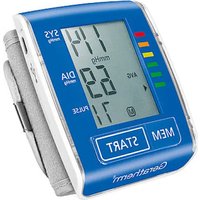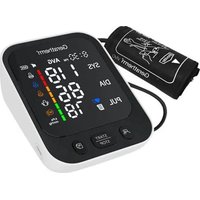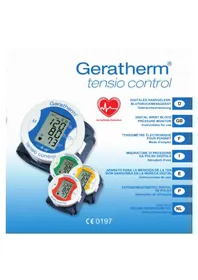
Cardio Connect - Blood pressure monitor Geratherm - Free user manual and instructions
Find the device manual for free Cardio Connect Geratherm in PDF.


User questions about Cardio Connect Geratherm
0 question about this device. Answer the ones you know or ask your own.
Ask a new question about this device
Download the instructions for your Blood pressure monitor in PDF format for free! Find your manual Cardio Connect - Geratherm and take your electronic device back in hand. On this page are published all the documents necessary for the use of your device. Cardio Connect by Geratherm.
USER MANUAL Cardio Connect Geratherm
Instructions for Use
Mode d'emploi
natural_image
Empty rectangular frame with a small crosshair symbol in the top-right corner (no text or numbers)natural_image
Line drawing of a person sitting at a desk with an arm and heart symbol (no text or labels)
MESSUNG
Start der Messung
natural_image
Simple line drawing of a person sitting at a desk with an arm and a clock in the background (no text or symbols)natural_image
Technical line drawing of a mechanical component with an inset close-up view (no text or symbols)DE
KONTAKTINFORMATIONEN
Adresse: Zone A, Nr. 105, Dongli Road, Torch Development District, 528437 Zhongshan, Guangdong, China
General Description 31
Intended Use 31
Measurement Principle 31
Receiving and Inspecting your Monitor 31
Safety Information 32
LCD display signal 36
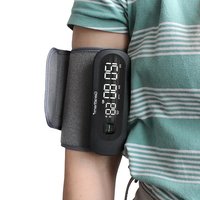
Name of Each Part 37
Contents/Product Includes 37
BEFORE YOU START 37
Activate Your Blood Pressure Monitor 37
Power Supply and Charge Power 37
Pair a smart device with the monitor 39
MEASUREMENT 41
Tie the Cuff 41
Start the Measurement 42
INFORMATION FOR USER 44
Tips for Measurement 44
Maintenance 45
ABOUT BLOOD PRESSURE 46
What are systolic pressure and diastolic pressure? 46
What is the standard blood pressure classification? 46
Irregular Pulse Rate Detector 47
Why does my blood pressure fluctuate throughout the day? 47
Why do I get a different blood pressure at home compared to the hospital? 47
Is the result the same if measuring on the right arm? 47
SPECIFICATIONS 48
AUTHORIZED COMPONENT 49
CONTACT INFORMATION 49
TROUBLESHOOTING 50
EMC GUIDANCE 51

INTRODUCTION
General Description
Thank you for selecting Geratherm® cardio connect blood pressure monitor. The monitor features blood pressure measurement, pulse rate measurement and the result storage. The warranty period is two years.
Readings taken by the TMB-2296-B are equivalent to those obtained by a trained observer using the cuff and stethoscope auscultation method. This manual contains important safety and care information and provides step by step instructions for using the product.
Read the manual thoroughly before using the product.
Features:
• Digital LCD display
• Systolic, Diastolic Blood Pressure & Pulse Display
• Measuring-during-inflation technology
Intended Use
This Device is intended for use in measuring blood pressure and pulse rate with arm circumference ranging from 22cm to 32cm (about 8^3/4 - 12^1/2 ) or 22 cm to 42 cm (about 8^3/4 - 16^1/2 ).
It is intended for adult indoor use only.
Measurement Principle
This product uses the Oscillometric Measuring method to detect blood pressure. Before every measurement, the unit establishes a “zero pressure” equivalent to the atmospheric pressure. Then it starts inflating the arm cuff, meanwhile, the unit detects pressure oscillations generated by beat-to-beat pulsatile, which is used to determine the systolic and diastolic pressure, and also pulse rate.
Receiving and Inspecting your Monitor
Check that the device packaging has not been tampered with and make sure that all contents are present. Before use, ensure that there is no visible damage to the device or accessories and that all packaging material has been removed. If you have any doubts, do not use the device and contact your retailer or the specified Customer Services address.
INTRODUCTION
Safety Information
Precaution
- This device is intended for indoor, home use and is not intended for self-use in public areas.
• This device is portable, but it is not intended for use during patient transport.
- This device is not suitable for continuous monitoring during medical emergencies or operations.
- This device is intended for non-invasive measuring and monitoring of arterial blood pressure. It is not intended for use on extremities other than the arm, or for any purpose other than obtaining a blood pressure measurement.
- This device is for adults. Do not use this device on neonates. Do not use it on children and adolescents unless otherwise instructed by a medical professional.
- Consult with your physician before using this monitor if you suffer from the following conditions: common arrhythmias such as premature ventricular beats or atrial fibrillation; peripheral arterial disease; pregnancy; preeclampsia; implantation with electrical devices; undergoing intravascular therapy; arteriovenous shunt or mastectomy.
- Please note that any of these conditions may affect measurement readings, in addition to patient motion, trembling or shivering.
- Do not use this device for diagnosis or treatment of any health problem or disease. Contact your physician if you have or suspect any medical problem. Do not change your medications without the advice of your physician or health care professional.
- If you are taking medication, consult your physician to determine the proper time to measure your blood pressure.
- This device may be used only for the intended use described in this manual, the manufacturer shall have no liability for any incidental, consequential, or special damages caused by misuse or abuse.
- Please use the device under the environment which is provided in the user manual. Otherwise, the performance and lifetime of the device will be impacted and reduced.
- The device may require up to 30 minutes to warm up / cool down from the minimum/ maximum storage temperature before it is ready for use.
- The blood pressure monitor, its adapter, and the cuff are suitable for use within the patient environment.
- Do not wash the cuff in a washing machine or dishwasher!
- The device contains sensitive electronic components. To avoid measurement errors, avoid taking blood pressure measurements near a strong electromagnetic field radiated interference signal or electrical fast transient/burst signal.

INTRODUCTION
- Wireless communication equipment, such as wireless home network devices, mobile phones, cordless telephones and their base stations, walkie-talkies may cause interference that may affect the accuracy of measurements. A minimum distance of 1 foot (30 cm) should be kept from such devices during a measurement.
- Blood Pressure Monitor is intended for use by medical staffs and lay persons, and patient is also an intended user or operator.
- The maximum temperature that the applied part can be achieved is 41.8 °C while the environmental temperature is 40 °C and the contact time with the cuff by patient should be less than 10 minutes.
Caution
- Do not attempt to repair the unit yourself if it malfunctions. Only have repairs carried out by authorized service centers.
- It is recommended that the performance should be checked after r maintenance, and every two years of use, by retesting the requirements in limits of the error of the cuff pressure indication and air leakage (testing at least at 50 mmHg and 200 mmHg). Please contact manufacturer or distributor for authorized service personnel.
- Store your device, cuff and adapter in a clean and dry place, p against extreme moisture, heat, lint, dust and direct sunlight. Never place any heavy objects on it.
- Dispose of accessories, detachable parts, and the device according to the local guidelines.
INTRODUCTION
Warning
- Do not apply the cuff on an arm that has an intravenous drip or a blood transfusion attached.
- Taking blood pressure measurements too frequently could disrupt blood circulation and cause injuries.
- Do not apply cuff to areas on patient where skin is delicate or damaged. Check cuff site frequently for irritation.
- Do not place the cuff on the arm of a person whose arteries or veins are undergoing medical treatment, i.e. intra-vascular access or intra-vasc therapy or an arteriovenous (A-V) shunt, which could disrupt blood circulation and cause injuries.
- Do not place the cuff on the arm on the same side of a mastectomy (especially when lymph nodes have been removed). it is recommended to take measurements on the unaffected side.
- Do not wrap the cuff on the same arm to which another monitoring device is applied. One or both devices could temporarily stop functioning if you try to use them at the same time.
- Please check (for example, by observation of the limb concerned) that the operation of the device does not result in prolonged impairment of patient blood circulation.
- On the rare occasion of a fault causing the cuff to remain fully inflated during measurement, loosen and remove the cuff immediately. Prolonged high pressure applied to the arm (cuff pressure >300 mmHg or constant pressure >15 mmHg for more than 3 minutes) might lead to bruising and discolored skin.
- Do not use this device with high-frequency (HF) surgical equipment at the same time.
- This device is not used in conjunction with oxygen rich environments, not intended for use with flammable anesthetics, not intended for use in conjunction with flammable agents.
- Do not touch output of the batteries/adapter and the user simultaneously.
- The power cord is considered the disconnect device for isolating this equipment from supply mains. Do not position the equipment so that it is difficult to reach or disconnect.
- Do not use this device if you are allergic to polyester, nylon, or plastic.
- Only use accessories approved by manufacturer. Using unapproved accessories might cause damage to the unit and injure users.

INTRODUCTION
- If you experience discomfort during a measurement, such as pain in the arm or other complaints, press the Power button immediately to release the air from the cuff.
- Do not use the device while under maintenance or being serviced.
- Sensor degradation or looseness may reduce performance of device cause other problems.
Notice
- You can use this device to take your own measurement, no third-party operator is required.
- Adapter is specified as a part of ME EQUIPMENT.
- At the request of authorized service personnel, circuit diagrams, component part lists, descriptions, and calibration procedures will be made available by the manufacturer or distributor.
- The expected lifetime of the cuff may vary by the frequency of washing, skin condition, and storage state.
- Please report to the manufacturer and the competent authority of the country in which you are established about any serious incident that has occurred in relation to this device.
INTRODUCTION
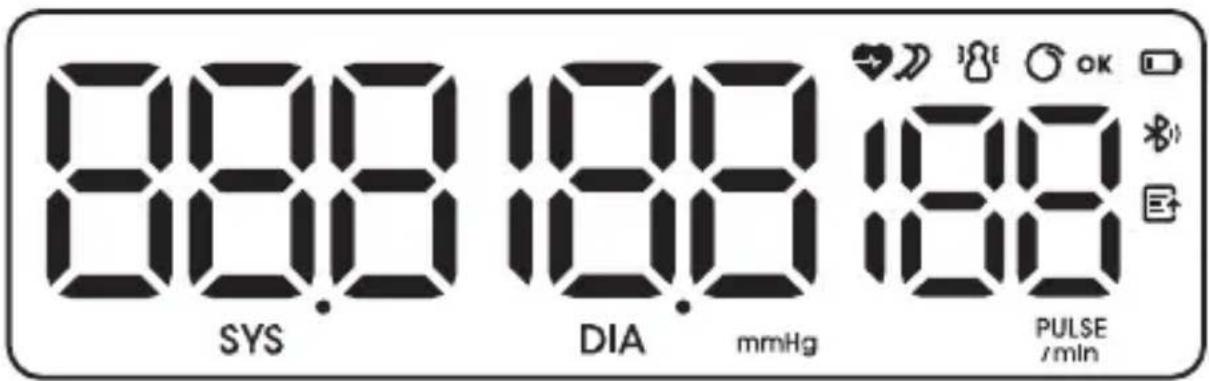
LCD display signal
text_image
888 SYS 188 DIA mmHg 188 PULSE /min| SYMBOL | DESCRIPTION EXPLANATION | |
| SYS | Systolic blood pressure | High pressure result |
| DIA | Diastolic blood pressure | Low pressure result |
| PULSE /min | Pulse display Pulse in beats per minute | |
| mmHg | mmHg Measurement unit of blood pressure | |
| Cuff wearing The cuff is secured. | ||
| Pulse rate | Pulse rate detection during measurement | |
| Hand shaking | Hand shaking makes results inaccurate | |
| Battery Indicator Indicate the current battery | ||
| Irregular pulse rate Irregular pulse rate | ||
| Data transmitting Data is transmitting | ||
| Bluetooth icon Indicate the bluetooth is working. | ||

INTRODUCTION
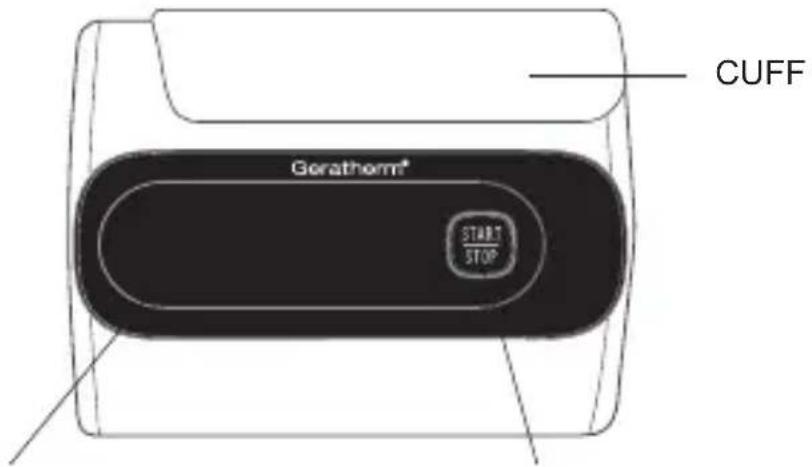
Name of Each Part
text_image
CUFF Gorathorm® START STOPLCD DISPLAY
START/ STOP/SET/USER SWITCH BUTTON
Contents/Product Includes
• Blood Pressure Monitor
• Cuff (Type BF applied part)
Upper arm cuff: 22 - 32 cm
- User manual
- Type-C cable
* Cuff depending on scope of delivery 22 - 32 cm or 22 - 42 cm
BEFORE YOU START
Activate Your Blood Pressure Monitor
When you get the Blood Pressure Monitor, the first thing is to activate it. Please long press the "START/STOP" button for about 5 seconds to activate the device.
Power Supply and Charge Power
- The battery of TMB-2296-B is built-in rechargeable li-polymer batt.
- Please use the Type-C cable and authorized AC adapter (not included in the scope of delivery) to charge the battery, just like the following picture:
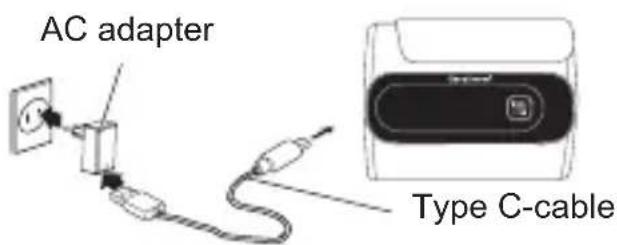
text_image
AC adapter Type C-cableBEFORE YOU START
Charging the power under following circumstances:
• + bAt Lo displays on the LCD
• The LCD display is dim.
- When powering on the monitor, the LCD doesn't light up.
CAUTION
- The battery of TMB-2296-B is built-in rechargeable lithium-ion battery please do not disassemble it by the unauthorized maintenance personnel.
- If the battery cannot charge the power normally or the blood pressure monitor cannot use normally, please connect with the authorized maintenance personnel. If the battery is fully charged, it can be used for about 100 times.
- Storge and use the blood pressure monitor at the cool, dry and ventilated environment. Avoid to approach to the fire and the heat source, cause the battery to explode.
- Only can use the authorized AC Adaptor (Model: BLJ06L050100U-V \ BLJ-06L050100U-S \ BLJ06L050100U-B) to charge the power. You cannot use the blood pressure monitor during the process of charging.
- During the process of charging, the LED indicator of the START/STOP button will be lighted (Color: Blue). When the charging is finished, please pull the plug in time.
- When charging, shall not touch charging connector and the patient simultaneously.
- Do not attempt to replace your blood pressure monitor's battery. It is built-in and not changeable.
- Only charge the battery in accordance with the user instructions supplied with the blood pressure monitor.
- Avoid charging your blood pressure monitor in extremely high or low temperatures.
- Do not use your blood pressure monitor while you are charging it.
- Do not attempt to disassemble the blood pressure monitor or force open the built-in battery.
- Do not clean the blood pressure monitor when it is being charged. Always unplug the charger first before cleaning the blood pressure monitor.
- Do not dispose of your blood pressure monitor in a fire. The battery could explode causing injury or death.
- Batteries (battery pack or batteries installed) shall not be exposed to excessive heat such as sunshine, fire or the like.

BEFORE YOU START
Pair a smart device with the monitor
You are the intended operator of this blood pressure monitor. You can measure your blood pressure and then save and send measurement data to a smart device (such as smartphone or tablet) with Bluetooth wireless connectivity and application.
- Turn on the Bluetooth and the app MedM on your smart device.
Make sure both are ON when pair-up is proceeding. - When the monitor is off, press and hold the "START/STOP" button to start pair-up, the bluetooth symbol " * " will flash.
natural_image
Empty rectangular frame with a small cross mark in the top-right corner (no text or symbols)- If successful, the bluetooth symbol “ *” will not flash anymore and the monitor will display “donE”, and then it will automatically shut off several seconds.
If unsuccessful within 60 seconds, it is judged timeout and the monitor will display “donE”, and then it will automatically shut off after several seconds.
Note
- The date and time will automatically be synchronized after paired with your smart device successfully.
- You can also pair during the measurement.
| Specifications for Bluetooth Transmission | ||
| Bluetooth | Throughput 2,5 K - 5 K | |
| Latency 50 ms | ||
| Packet Error Rate < 10 % | ||
| Operating Frequency 2400 - 2480 MHz | ||
| Transmission Power 0 dBm | ||
| Transmission Distance 10 m | ||
Note:
- The necessary Quality of Service (QoS) is fully considered here for wirelessly enabled functions.
- Interference may occur in the vicinity of equipment marked with the following symbol “ ✉”. And TMB-2296-B may interfere the vicinal electrical equipment.
BEFORE YOU START
- Keep the monitor at least 20 centimeters away from the human body (especially the head) when data transmission is proceeding after measurement.
- To enable the data transmission function, this device shall be paired to an appropriate BT mobile terminal.
Warning
About a wireless communication interference
The monitor operates in the unlicensed ISM band at 2.4 GHz. In case it is used around the other wireless devices including microwave and wireless LAN, which operate at the same frequency band as the monitor, there is a possibility that interference occurs between the monitor and such other devices. If such interference occurs, please stop the operation of other devices or relocate the monitor before using it or do not use it around the other wireless devices.
List of compatible devices:
For iOS devices:
The operating system must be iOS 13.0 or more.
For Android devices:
The operating system must be Android 5.0 or more.
Setting a user ID
There are 2 user ID available. User 1 and User 2, each with 199 memory spaces, are designed for 2 different people to save the measured values separately.
- When the monitor is off, press the "START/STOP" button to display the current user ID and flash. Press the "START/STOP" button again to switch the user ID between the User 1 and User 2.

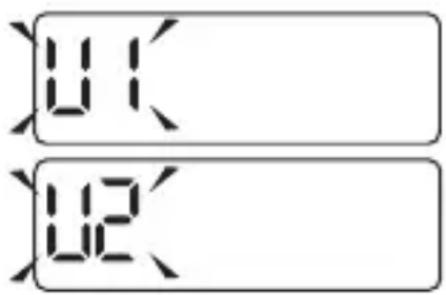
text_image
01 12User 1
User 2
- After confirming the selected user ID, the User ID will not flash anymore, and the monitor will enter the measurement automatically after 2 seconds.
Tie the Cuff
Only use a cuff that has been approved by the manufacturer for this device model. Before use, please confirm if it fits your arm circumference.
- Remove all accessories (watch, bracelet, etc.) from your arm. If your physician has diagnosed you with poor circulation in your arm, use the other one.
- Roll or push up your sleeve to expose the skin.
- Apply the cuff to your arm with your palm facing up.
- Position the edge of the cuff about 2cm - 3 cm from elbow.
- Fasten the cuff around your arm, leaving no extra room between the cuff and your skin. If the cuff is too loose, the measurement will not be accurate.
-
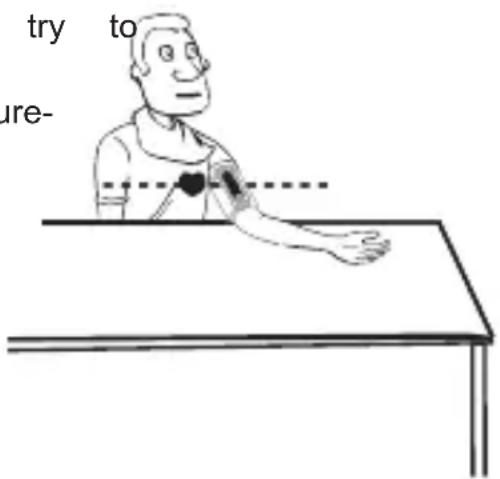
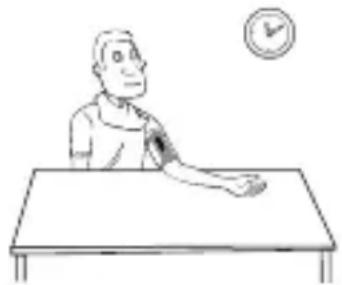
Sit comfortably with your tested arm resting on a flat surface. Place your elbow on a table so that the cuff is at the same level as your heart. Turn your palm upwards. Sit upright in a chair and take 5-6 deep breaths.
-
Helpful tips for Patients, especially for Patients with Hypertension:
• Rest for 5 minutes before first measurement.
- Wait at least 3 minutes between measurements. This allows your blood circulation to recover.
• Take the measurement in a silent room.
- The patient must relax as much as possible and do not move and talk during the measurement procedure.
- The cuff should maintain at the same level as the right atriu heart.
- Please sit comfortably. Do not cross your legs and keep your feet flat on the ground.
- Keep your back against the backrest of the chair.
- For a meaningful comparison, try measure under similar conditions.
For example, take daily measurements at approximately the same time, on the same arm, or as directed by a physician.
text_image
try to ure-
MEASUREMENT
Start the Measurement
You can use your monitor without pairing to a smart device. To pair your monitor with a smart device, refer to the foregoing chapters.
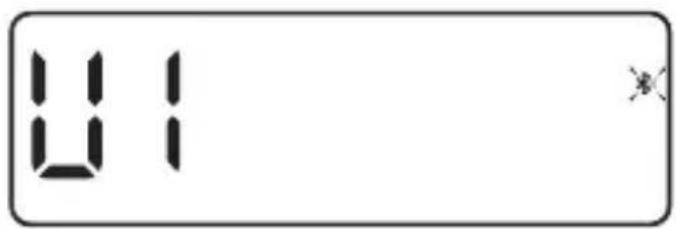
- When the monitor is off, press the "START/STOP" button, the current user ID will flash. You can press the "START/STOP" button to switch the User 1 or User 2, the monitor will enter the measurement automatically after about 2 seconds. Remain still and do not talk until the full measurement is complete. (Take User 1 for example.)
text_image
81Select user ID.
text_image
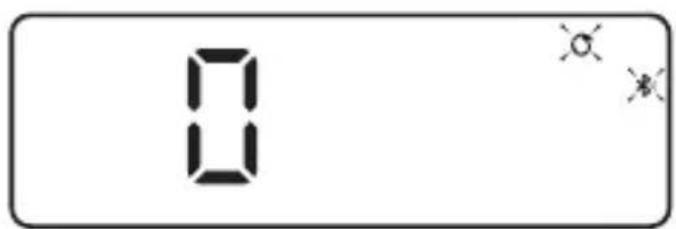
0Cuff wrap detection. Symbol " 🔍 " flash.
text_image
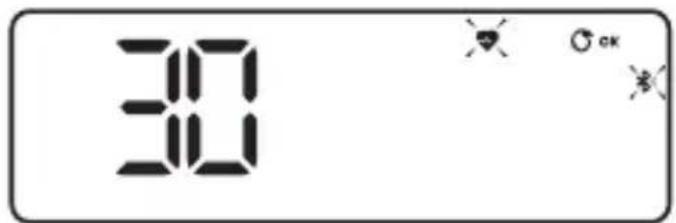
30Cuff wrap ok. Inflating and measuring.
text_image
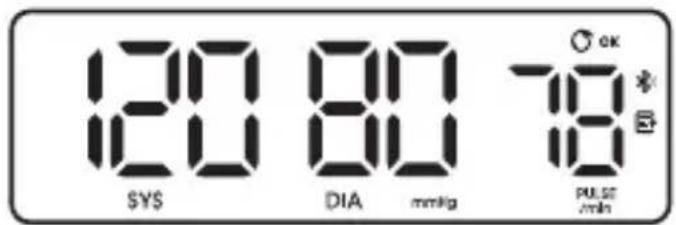
120 80 78 SYS DIA mmHg PULSE @ minDisplay and save the measurement result.
- Press the button to turn off the monitor, or it will shut off within about 1 minute.
- If your monitor is already paired with your smart device and both Bluetooth and app are ON, when the measurement completed, the measurement result will start transmitting.
MEASUREMENT
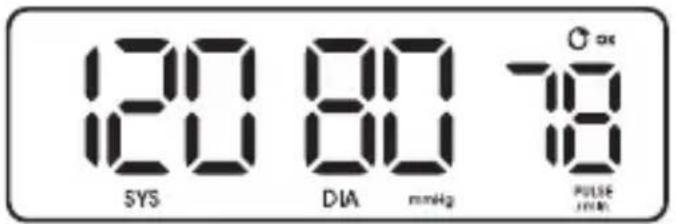
If data transmission successful, the symbol “ ⊗” will disappear first, after several seconds, ❄️ “ ” will also disappear, and then the monitor will turn automatically.
text_image
120 SYS 80 DIA mmHg 78 PULSE 1 minIf unsuccessful within 60 seconds, it is judged timeout, and the monitor will shut off.
Note
- Any time if you want to stop the measurement, you can press the "START/STOP" button manually.
- If there are untransmitted datas, the symbol “☒” displays at the beginning of the measurement.
- Both User 1 and User 2 can store maximum 199 groups of record on the monitor. You can view your records on the App if your monitor is already paired with your smart device.
4. About the irregular pulse rate and excessive body motion during the measurement.
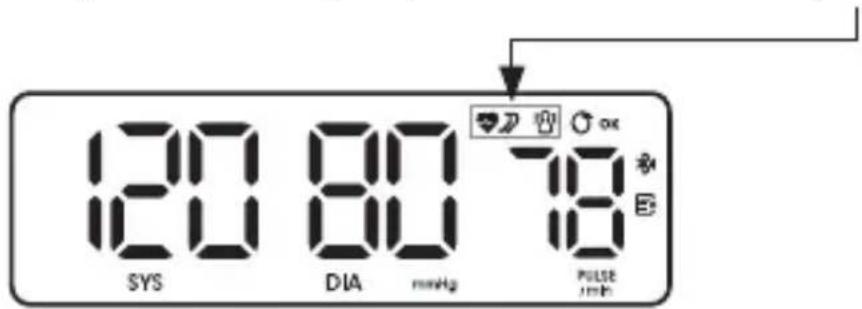
- During a measurement, if an irregular pulse rate is detected, the symbol “ ” will display in the measurement result. See page 47 for more information.
- During a measurement, when the excessive body motion, the symbol “” will flash about 5 seconds and detect again. If it is no longer detected, the symbol will disappear; If still detected, the symbol “” will finally display in the measurement result.
Note
The measured blood pressure reading may not be accurate if this symbol is displayed.
text_image
120 SYS 80 DIA mHz 78 PULSE JmbINFORMATION FOR USER
Tips for Measurement
Measurements may be inaccurate if taken in the following circumstances.
 Within 1 hour after dinner or drinking × Within 1 hour after dinner or drinking × |  Immediate measurement after tea, coffee, smoking Immediate measurement after tea, coffee, smoking |
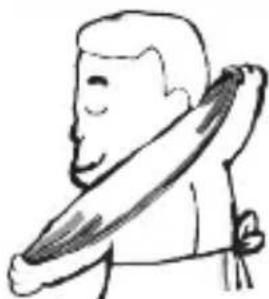 Within 20 minutes after taking a bath × Within 20 minutes after taking a bath × |  When talking or moving your fingers × When talking or moving your fingers × |
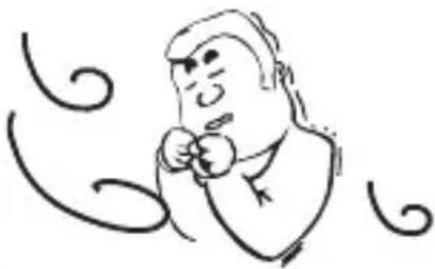 In a very cold environment × In a very cold environment × |  When you want to discharge urine × When you want to discharge urine × |

Maintenance
In order to get the best performance, please follow the instructions below.
1. Cleaning Process:
Step 1: Make sure to switch off the device prior to cleaning.
Step 2: Use a soft cloth wetted with soapy water to clean the cuff first, and then use a soft cloth wetted with clear water to remove residual soap until there is no visible residual contaminants. Attention shall be paid to avoid liquid invasion into the cuff.
Step 3: Use a dry soft cloth to wipe the cuff, in order to remove residual moisture.
Step 4: Dry the cuff at a well-ventilated place after cleaning.
2. Disinfection Process:
Step 1: Make sure to switch off the device prior to disinfection.
Step 2: Use a soft cloth wetted with 70% isopropanol to disinfect the cuff for about 10 minutes. Attention shall be paid to avoid liquid invasion into the cuff.
Step 3: Use a clean dry cloth or towel to wipe off the disinfectant until there is no visible residue.
Step 4: Dry the cuff at a well-ventilated place after disinfection.
Suggestion:
Frequency of Cleaning and Disinfection:
For single patient multiple use, it's recommended to clean the device surface once a month or whenever it's necessary.
For multiple patient multiple use, it's recommended to clean the device every time before and after usage. Maintenance procedures shall be taken as per instruction.
ABOUT BLOOD PRESSURE
What are systolic pressure and diastolic pressure?
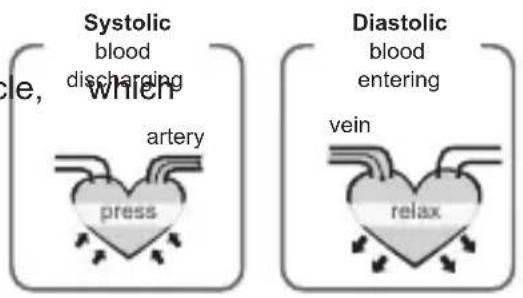
When ventricles contract and pump blood out of the heart, the blood pressure reaches its maximum value in the cy is called systolic pressure. When the ventricles relax, the blood pressure reaches its minimum value in the cycle, which is called diastolic pressure.
text_image
Systolic blood discharging artery press Diastolic blood entering vein relaxWhat is the standard blood pressure classification?
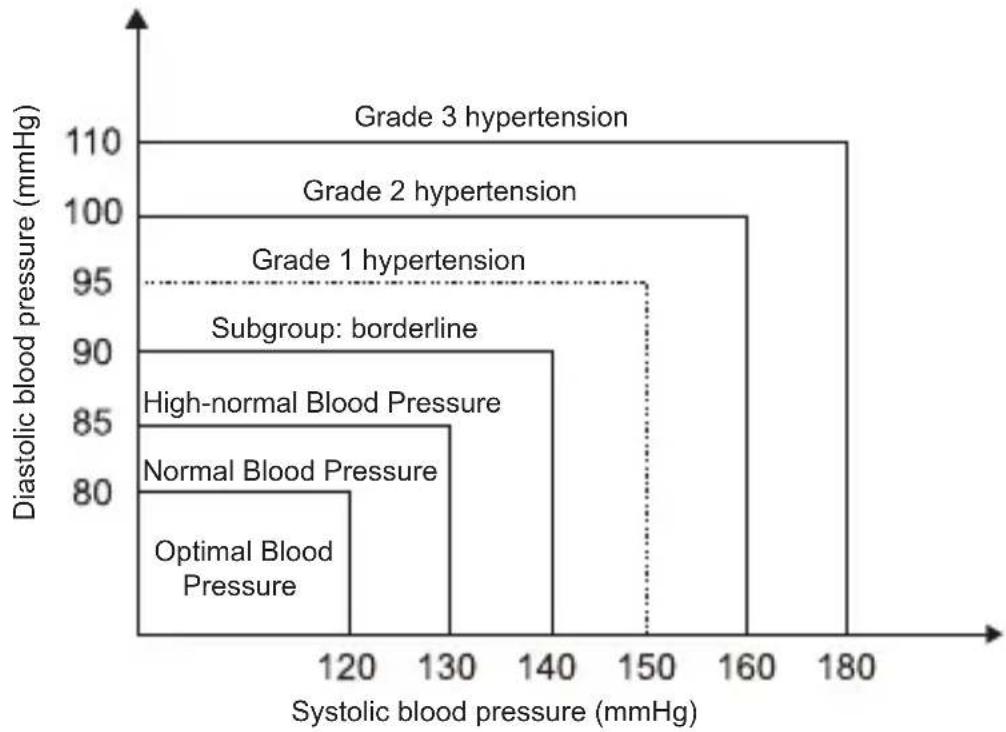
The blood pressure classification published by World Health Organization (WHO) and International Society of Hypertension (ISH) in 1999 is as follows:
bar
| Hypertension Level | Systolic blood pressure (mmHg) | Diastolic blood pressure (mmHg) | | :--- | :--- | :--- | | Optimal Blood Pressure | 120 | 80 | | Normal Blood Pressure | 130 | 85 | | High-normal Blood Pressure | 140 | 90 | | Subgroup: borderline | 150 | 95 | | Grade 1 hypertension | 150 | 95 | | Grade 2 hypertension | 160 | 100 | | Grade 3 hypertension | 180 | 110 |
| LED Indicator of START/STOP Button | Green Orange | |||||
| Level Blood Pressure (mmHg) | Optimal Normal High- | normal | Grade 1 hyper-tension | Grade 2 hyper-tension | Grade 3 hyper-tension | |
| SYS <120 | 120 - 129 | 130 - 139 | 140 - 159 | 160 - 179 | ≥180 | |
| DIA <80 | 80 - 84 | 85 - 89 | 90 - 99 | 100 - 109 | ≥110 | |
ABOUT BLOOD PRESSURE
Irregular Pulse Rate Detector
An irregular pulse rate is detected when a pulse rate rhythm varies while the unit is measuring the systolic and diastolic blood pressure. During each measurement, the monitor records all the pulse intervals and calculate the average; if there are two or more pulse intervals, the difference between each interval and the average is more than the average value of ±25% , or there are four or more pulse intervals, the difference between each interval and the average is more than the average value of ±15% , the irregular pulse rate symbol appears on the display when the measurement results are appeared.
CAUTION
The appearance of the IHB icon indicates that a pulse irregularity consistent with an irregular pulse rate was detected during measurement. Usually this is NOT a cause for concern. However, if the symbol appears often, we recommend you seek medical advice. Please note that the device does not replace a cardiac examination but serves to detect pulse irregularities at an early stage.
Why does my blood pressure fluctuate throughout the day?
- Individual blood pressure varies multiple times every day. It is also affected by the way you tie your cuff and your measurement position, so please take the measurement under the same conditions.
- If the person takes medicine, the pressure will vary more.
- Wait at least 3 minutes for another measurement.
What you need to pay attention to when you measure your blood pressure at home:
If the cuff is tied properly.
If the cuff is too tight or too loose.
If the cuff is tied on the upper arm.
If you feel anxious. Taking 2-3 deep breaths before beginning will be better for measuring.
Advice: Relax for 4-5 minutes until you calm down.
natural_image
Simple line drawing of a person sitting at a desk with an arm, facing a wall clock (no text or symbols)Why do I get a different blood pressure at home compared to the hospital?
The blood pressure is different even throughout the day due to weather, emotion, exercise etc. Also, there is the “white coat” effect, which means blood pressure usually increases in clinical settings.
Is the result the same if measuring on the right arm?
It is ok for both arms, but there will be some different results for different people. We suggest you measure the same arm every time.
SPECIFICATIONS
| Power supply 3.6 V 10 | 00 mAH Built-in rechargeable li-polymer battery, 5 V 1 A AC Adapter (not included in the scope of delivery) |
| Display mode Digital L | LCD V.A. 72 mm × 22 mm |
| Measurement mode Oscillographic testing mode | |
| Measurement range R | Rated cuff pressure:0 mmHg - 299 mmHgMeasurement pressure:SYS: 60 mmHg - 230 mmHgDIA: 40 mmHg - 130 mmHgPulse value: (40 - 199) beat/minute |
| Accuracy Static Pressure | 5 °C - 40 °C within ±3 mmHgPulse value: ±5 %Clinical validation: Mean difference within ±5 mmHgStandard deviation ≤8 mmHg |
| Normal working condition | A temperature range of: +5 °C to +40 °CA relative humidity range of 15 % to 90 %,non-condensing, but not requiring a water vapour partial pressure greater than 50 hPaAn atmospheric pressure range of 700 hPa to 1060 hPa |
| Storage & transportation condition | Temperature: -20 °C to +60 °CA relative humidity range of ≤ 93 %, non-condensing, at a water vapour pressure up to 50 hPaAn atmospheric pressure range of 500 hPa to 1060 hPa |
| Measurement perimeter of the upper arm | About 22 cm - 32 cm |
| Weight Approx. 206 g | |
| External dimensions | Approx.123 mm × 44 mm × 22 mm |
| Attachment user manual, type-c cable | |
| Mode of operation Continuous operation | |
| Degree of protection Type BF applied part | |

SPECIFICATIONS
| Protection against ingress of water | IP22 It means the device could be protected against solid foreign objects of 12,5mm Φ and greater, and against vertically falling water drops when enclosure titled up to 15° |
| Device Classification | Battery Powered Mode: Internally Powered ME EquipmentAC Adaptor Powered Mode: Class II ME Equipment |
| Software Version A01 | |
| Expected Lifetime Device (with the cuff): 3 years or 10000 times (may vary based on usage conditions)Battery: About 100 times after fully charged | |
| Types of use/reuse Multiple patient multiple use | |
WARNING: No modification of the equipment is allowed.
AUTHORIZED COMPONENT
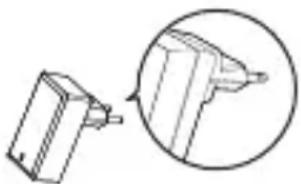
Please use the authorized adapter.
Adapter is not included in the scope of delivery.
Adapter
Type: BLJ06L050100U-V
BLJ06L050100U-S
BLJ06L050100U-B
Input: 100 - 240 V, 50 - 60 Hz,
0.2 A max
Output: 5 V = 1000 mA
natural_image
Diagram showing a 3D object being cut with an arrow, enclosed in a circle (no text or symbols)
CONTACT INFORMATION
For more information, please visit www.transtekcorp.com.
Manufactured by: Guangdong Transtek Medical Electronics Co., Ltd.
Company: Guangdong Transtek Medical Electronics Co., Ltd.
Address: Zone A, No.105, Dongli Road, Torch Development District,
528437 Zhongshan, Guangdong, China
If any abnormality arises during use, please check the following points:

| PROBLEM SYMPTOM CHECK THIS REMEDY | |||
| No power | Display cannot light up. | Batteries are depleted. Charge the power. | |
| Adapter is inserted incorrectly. Insert the AC adapter correctly. | |||
| Low Battery | bAt Lo& shows | The battery is too low. Charge the power. | |
| Error mes-sage | E 1 shows | The cuff is not wrapped or wrapped incorrectly. | Refasten the cuff, then measure again. |
| E 2 or shows | Excessive body motion (such as shaking of the arm with the cuff on) or weak Pulse is detected. | Relax for 5 minute and then keep still, measure again. | |
| E 3 shows Pulse | is not detected during measuring. | Loosen the clothing on the arm and measure again. | |
| E 4 shows The m | measurement failed. Relax for 5 minutes | and measure again. | |
| EEx shows | A calibration error occurred (X can be some digital symbol, such as 1, 2, etc., if this similar situation appears, all belong to calibration error.) | Retake the measurement. If the problem persists, contact the retailer or our customer service department for further assistance. | |
| Warning message | out shows Out of | measurement range | Relax for a moment and then measure again. If the problem persists, contact your physician. |
Note: If the product still does not work, contact Customer Service. Under no circumstance should you disassemble or attempt to repair the unit by yourself.
EMC GUIDANCE
The ME EQUIPMENT or ME SYSTEM is suitable for home healthcare environments.
Essential performance:
Accuracy of measuring blood pressure and pulse rate
| Measurement Range | Systolic pressure: 60 - 230 mmHgDiastolic pressure: 40 - 130 mmHgPulse: 40 - 199 beats/minute |
| Rated Cuff Pressure 0-299 mmHg (0 - 39.9 kPa) | |
| Accuracy Pressure: ±3 mmHg | / 0.4 kPaPulse: ±5 % |
The Basis Safety of the Blood Pressure Monitor (TMB-2296-B) is as following: Deviation from normal operation that poses an unacceptable risk to the patient or operator.
Warning: Don't be near the active HF surgical equipment and the RF shielded room of an ME system for magnetic resonance imaging, where the intensity of EM disturbances is high.
Warning: Use of this equipment adjacent to or stacked with other equipment should be avoided because it could result in improper operation. If such use is necessary, this equipment and the other equipment should be observed to verify that they are operating normally.
Warning: Use of accessories, transducers and cables other than those specified or provided by the manufacturer of this equipment could result in increased electromagnetic emissions or decreased electromagnetic immunity of this equipment and result in improper operation.
Warning: Portable RF communications equipment (including peripherals such as antenna cables and external antennas) should be used no closer than 30 cm (12 inches) to any part of the equipment including cables specified by the manufacturer. Otherwise, degradation of the performance of this could result.
equipmen
Technical description:
- All necessary instructions for maintaining BASIC SAFETY and ESSENTIAL
PERFORMANCE with regard to electromagnetic disturbances for the excepted lifetime. - Guidance and manufacturer's declaration-electromagnetic emissions and Immunity.
Table 1
| Guidance and manufacturer's declaration - electromagnetic emissions | |
| Emissions test Compliance | |
| RF emissions CISPR 11 Group 1 | |
| RF emissions CISPR 11 Class [ B ] | |
| Harmonic emissions IEC 61000-3-2 Class A | |
| Voltage fluctuations / flicker emissions IEC 61000-3-3 | Comply |
Table 2
| Guidance and manufacturer's declaration – electromagnetic Immunity | ||
| Immunity Test IEC 6060 | 1-1-2Test level | Compliance level |
| Electrostatic discharge (ESD) IEC 61000-4-2 | ±8 kV contact±2 kV, ±4 kV, ±8 kV, ±15 kV Luft | ±8 kV contact±2 kV, ±4 kV, ±8 kV, ±15 kV Luft |
| Electrical fast transient/burstIEC 61000-4-4 | ±2 kV for power supply lines±1 kV signal input/output100 kHz repetition frequency | ±2 kV for power supply linesNot applicable100 kHz repetition frequency |
| Surge IEC61000-4-5 ±0,5 | kV, ±1 kVdifferential mode±0,5 kV, ±1 kV, ±2 kVcommon mode | ±0,5 kV, ±1 kVdifferential mode |
| Voltage dips, short in-terruptions and voltage variations on power supply input linesIEC 61000-4-11 | 0 % UT; 0,5 cycle.At 0°, 45°, 90°, 135°, 180°, 225°, 270° and 315°.0 % UT; 1 cycle and 70 % UT; 25/30 cycles;Single phase: at 0°.0 % UT; 250 / 300cycle | 0 % UT; 0,5 cycle.At 0°, 45°, 90°, 135°, 180°, 225°, 270° and 315°.0% UT; 1 cycle and 70% UT; 25/30 cycles;Single phase: at 0°.0 % UT; 250 / 300cycle |

EMC GUIDANCE
| Power frequencymagnetic field IEC61000-4-8 | 30 A/m50 Hz / 60 Hz | 30 A/m50 Hz / 60 Hz |
| Conduced RFIEC61000-4-6 | 3 V0.15 MHz – 80 MHz6 V in ISM andamateur radio bandsbetween 0.15 MHzand 80 MHz80 % AM at 1 kHz | 3 V0.15 MHz – 80 MHz6 V in ISM andamateur radio bandsbetween 0.15 MHzand 80 MHz80 % AM at 1 kHz |
| Radiated RFIEC61000-4-3 | 10 V/m80 MHz – 2,7 GHz80 % AM at 1 kHz | 10 V/m80 MHz – 2,7 GHz80 % AM at 1 kHz |
NOTE UT is the a.c. mains voltage prior to application of the test level.
Table 3
| Guidance and manufacturer's declaration - electromagnetic Immunity | ||||||||
| Radiated RF IEC61000-4-3(Test specifications for ENCLOSURE PORT IMMUNITY toRF wireless communications equipment) | Test Frequency (MHz) | Band (MHz) | Service | Modulation | Maximum Power (W) | Distance (m) | IEC 60601-1-2 Test Level(V/m) | Compliance level (V/m) |
| 385 380 - 390 TETRA 400 | Pulse modulation18 Hz | 1.8 0.3 | 27 27 | |||||
| 450 430 - 470 | GMRS 460,FRS 460 | FM ± 5k Hzdeviation 1 kHz sine | 2 0.3 | 28 28 | ||||
| 710 | 704 - 787 LTE Band 13, 17 | Pulse modulation217 Hz | 0.2 0.3 | 9 9745 | ||||
| 780 | ||||||||
| 810 | 800 - 960 | GSM 800/900,TETRA 800,iDEN 820,CDMA 850,LTE-Band 5 | Pulse modulation18 Hz | 2 0.3 | 28 28 | |||
| 870 | ||||||||
| 930 | ||||||||

| Radiated RF IEC61000-4-3(Test specifications for ENCLOSURE PORT IMMUNITY toRF wireless communications equipment) | 1720 | 1700 - 1990 | GSM 1800;CDMA 1900;GSM 1900;DECT;LTE Band 1, 3,4, 25;UMTS | Pulse modulation217 Hz | 2 0.3 | 28 28 | ||
| 1845 | ||||||||
| 1970 | ||||||||
| 2450 | 2400 - 2570 | Bluetooth,WLAN,802.11 b/g/n,RFID 2450,LTE Band 7 | Pulse modulation217 Hz | 2 0.3 | 28 28 | |||
| 5240 | 5100 - 5800 | WLAN 802.11 a/n | Pulse modulation217 Hz | 0.2 0.3 | 9 95500 | |||
| 5785 |

Geratherm®
cardio connect
text_image
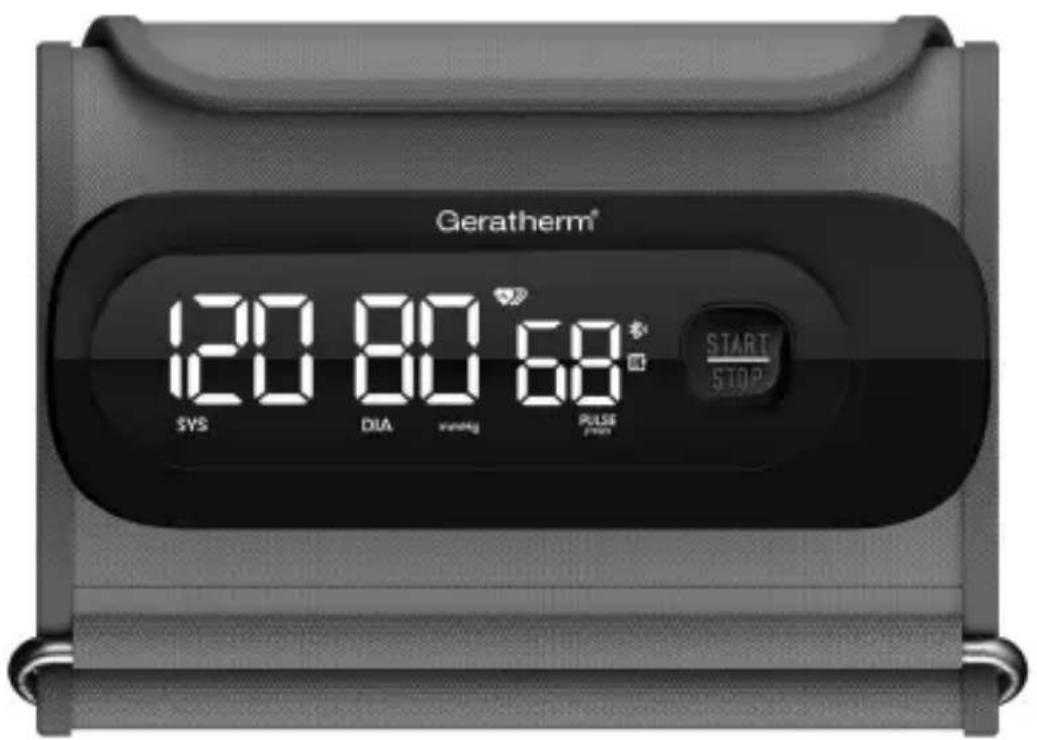
Geratherm® 120 80 68* SYS DIA SING PULSE START STOPMODE D'EMPLOI
natural_image
Empty rectangular frame with a small cross mark in the top-right corner (no text or symbols)natural_image
Simple line drawing of a person sitting at a desk with a clock in the background (no text or symbols)
natural_image
Simple line drawing of a mechanical component with an inset circular detail (no text or symbols)FR
COORDONNÉES
Adresse : Zone A, No.105, Dongli Road, Torch Development District,
528437 Zhongshan, Guangdong, Chine
natural_image
Empty rectangular frame with a small cross mark in the top-right corner (no text or symbols)natural_image
Diagram showing a 3D object being cut with an arrow, enclosed in a circle (no text or symbols)Indirizzo: Zone A, No.105, Dongli Road, Torch Development District, 528437 Zhongshan, Guangdong, China
IT
natural_image
Empty rectangular frame with a small cross mark in the top-right corner (no text or symbols)natural_image
Simple line drawing of a person sitting at a desk with a clock in the background (no text or symbols)natural_image
Diagram of a mechanical component with an inset close-up showing its cross-section (no text or symbols)Domicilio: Zone A, No.105, Dongli Road, Torch Development District, 528437 Zhongshan, Guangdong, China
ES
MANUAL DE INSTRUÇÕES
natural_image
Empty rectangular frame with a small symbol in the top-right corner (no text or markings)natural_image
Line drawing of a person sitting at a desk with an arm and a clock in the background (no text or symbols)natural_image
Simple line drawing of a mechanical component with an inset view (no text or symbols)INFORMAÇÕES DE CONTACTO
Endereço: A, No.105, Dongli Road, Torch Development District, 528437 Zhongshan, Guangdong, China
PT
natural_image
Empty rectangular frame with a small cross mark in the top-right corner (no text or symbols)natural_image
Simple line drawing of a pencil and its tip, shown in an inset circle (no text or symbols)CONTACTGEGEVENS
Adres: Zone A, No.105, Dongli Road, Torch Development District, 528437 Zhongshan, Guangdong, China
NL
Zone A, No.105, Dongli Road, Torch Development District
528437 Zhongshan
Guangdong
China
REPEC
MDSS GmbH
Schiffgraben 41
30175 Hannover
Germany
REPC
MDSS CH GmbH
6 Wilmslow Road, Rusholme,
Manchester M14 5TP
United Kingdom

Geratherm Medical AG
Fahrenheitstraße 1
99331 Geratal
Germany
Phone: +49 36205 980
www.geratherm.com