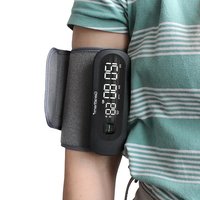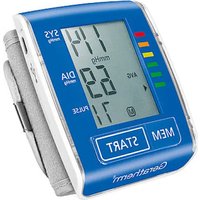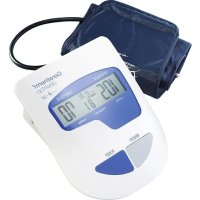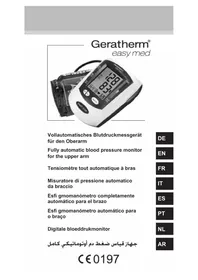
Vivo - Blood pressure monitor Geratherm - Free user manual and instructions
Find the device manual for free Vivo Geratherm in PDF.


User questions about Vivo Geratherm
0 question about this device. Answer the ones you know or ask your own.
Ask a new question about this device
Download the instructions for your Blood pressure monitor in PDF format for free! Find your manual Vivo - Geratherm and take your electronic device back in hand. On this page are published all the documents necessary for the use of your device. Vivo by Geratherm.
USER MANUAL Vivo Geratherm
Arm Blood Pressure Monitor
Gebrauchsanweisung
Instructions for Use
Mode d'emploi
Note: The illustration used in this manual may differ slightly from the appearance of the actual product.
text_image
S: 181 D: 96 P: 98natural_image
Illustration showing two steps of a medical procedure: one being held by hands, the other holding a blood pressure monitor (no text or symbols present)DE
Hinweis:
natural_image
Line drawing of a person sitting at a desk using a computer (no text or symbols)WIE MAN RICHTIG MISST
natural_image
Line drawing of a hand pressing down on a square electronic device (no text or symbols)2. Desinfektion
Ausgang: 5,0 V = 1,0 A
ANHANG: EMV-INFORMATIONEN
ANHANG: EMV-INFORMATIONEN

ANHANG: EMV-INFORMATIONEN
ANHANG: EMV-INFORMATIONEN
Arm Blood Pressure Monitor
Model: ARM-30T
TABLE OF CONTENTS
General Description 23
Warranty 23
Unpacking Inspection 23
Package Content 23
Intended Use 23
Contraindications 23
Warnings and Notes 24
Description of the device 26
WHO Blood Pressure Indicator 27
Power Connection 27
Function Setting 28
How to Apply the Cuff 29
How to Take Proper Measurements 30
Error messages and Handling 32
Cleaning and Disinfection 34
Questions and Answers on Blood Pressure 35
Specifications 36
Authorized Component 37
Appendix: EMC Information 37

GENERAL DESCRIPTION
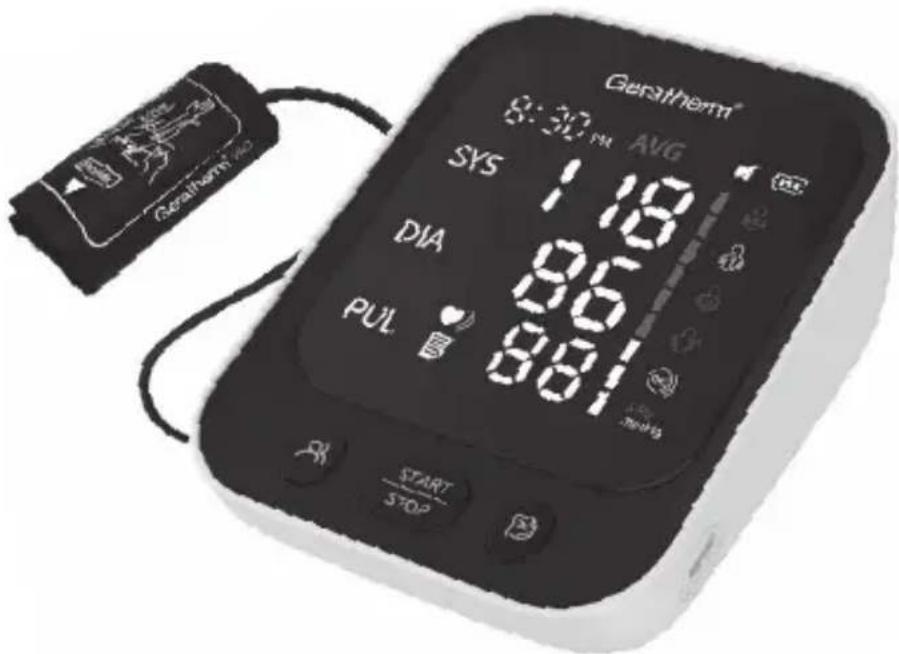
Thank you for purchasing the Arm Blood Pressure Monitor Geratherm ^® vivo. Designed for ease of use and accuracy, the device detects your blood movement through your brachial artery and converts the movements into a digital reading based on oscillometric method to measure blood pressure. We recommend that you read through this manual carefully before using the device for the first time.
WARRANTY
The device is under warranty for 24 months from the date of purchase. The batteries, the packaging, cuff and any damage caused by improper use are not covered by the warranty. Excluding the following user-caused failures:
1) Failure resulting from unauthorized disassembly and modification.
2) Failure resulting from an unexpected dropping during application or transportation.
3) Failure resulting from not following the instructions in the operating manual.
UNPACKING INSPECTION
Before using, please open the package carefully and check if all the parts are available according to the following packing list and if there are any damaged parts during transportation, then install and operate strictly in accordance with the user manual.
PACKAGE CONTENT
1x Blood Pressure Monitor
1x Cuff 22 - 42 cm (8.6" - 16.5")
4x Alkaline batteries type AAA 1.5 V
1x Storage Bag
1x Instructions for Use
1x USB-Type-C Cable

INTENDED USE
The Arm Blood Pressure Monitor is intended to measure the systolic blood pressure and diastolic blood pressure, as well as the pulse rate of the adult person via non-invasive oscillometric technique at medical facilities or at home.
CONTRAINDICATIONS
This device is not for infants or mentally-impaired individuals who cannot express their thoughts.
WARNINGS AND NOTES
Warnings:
- Do not use this monitor for infants, toddlers, children, or persons who cannot express themselves.
- Do not use this monitor for any purpose other than measuring blood pressure and pulse rate.
- Do not take or make adjustments to any medications by yourself based on readings from the device. Contact your physician for specific information about your blood pressure. The patient should not self-diagnose or self-medicate per measured results. Kindly adhere to the instructions of your physician or health provider.
- Do not apply the cuff on an arm with an unhealed wound.
- Do not apply the cuff on an arm receiving an intravenous drip or blood transfusion.
- Do not disassemble or attempt to repair this monitor or other components. This may cause an inaccurate reading.
- The device and cuff are not water resistant. Prevent rain, sweat and water from soiling the device and cuff.
- Do not use this monitor in a moving vehicle or other unstable environment.
- Precision components are used in the construction of this device. Extremes in temperature, humidity, direct sunlight, shock or dust should be avoided.
- Do not use this device adjacent to or stacked on other jamming equipment to prevent improper functioning. If such use is necessary, all accessories involved must be checked for normal operation.
- Do not use this monitor in areas containing high frequency (HF) surgical equipment, magnetic resonance imaging (MRI) equipment, computerized tomography (CT) scanners. This may result in incorrect operation of the monitor and/or cause an inaccurate reading.
- To obtain the greatest accuracy from your blood pressure device, it is recommended that the device be used within the specified temperature and the relative humidity, please see the Technical Specifications.
- The use of other accessories other than those specified or provided by the equipment manufacturer may cause electromagnetic radiation to increase or decrease electromagnetic immunity resulting in operational failure.
- Do not attempt to service or repair this device yourself. Should a malfunction occur, refer to local distributor or the manufacturer.
WARNINGS AND NOTES
Notes:
• This device shall not be serviced or maintained when using.
- Maintenance should be done by the manufacturer as suggested.
- NEVER diagnose or treat yourself based on the readings. ALWAYS check with your doctor about any possible causes and explanation about blood pressure values. Under no circumstances should you alter the dosages of any drugs prescribed by your doctor.
- Stop using this monitor and consult with your physician if you experience skin irritation or discomfort.
- Consult with your physician before using this monitor if you have common arrhythmias such as atrial or ventricular premature beats or atrial fibrillation, arterial sclerosis, poor perfusion, diabetes, pregnancy, pre-eclampsia, or renal disease.
- Consult with your physician before using this monitor if you have had a mastectomy.
- Consult with your physician before using this monitor if you have severe blood flow problems or blood disorders, because the cuff inflation can cause bruising.
- The pulse display is not suitable for checking the frequency of heart pacemakers! In cases of irregular heartbeat, measurements made with this device should only be evaluated after consultation with your doctor.
- Avoid tightly folding the cuff or storing the air hose tightly twisted for long periods, as such treatment may shorten the life of the components.
• To avoid strangulation, please keep the air tube and power supply line away from the infants, toddlers, children, and pets.
- Do not use the batteries and the AC adapter to provide power at the same time. Remove the battery if the device is not likely to be used for some time.
• Used equipment, parts and batteries are not treated as ordinary household waste and must be disposed of according to the applicable local regulations.

DESCRIPTION OF THE DEVICE
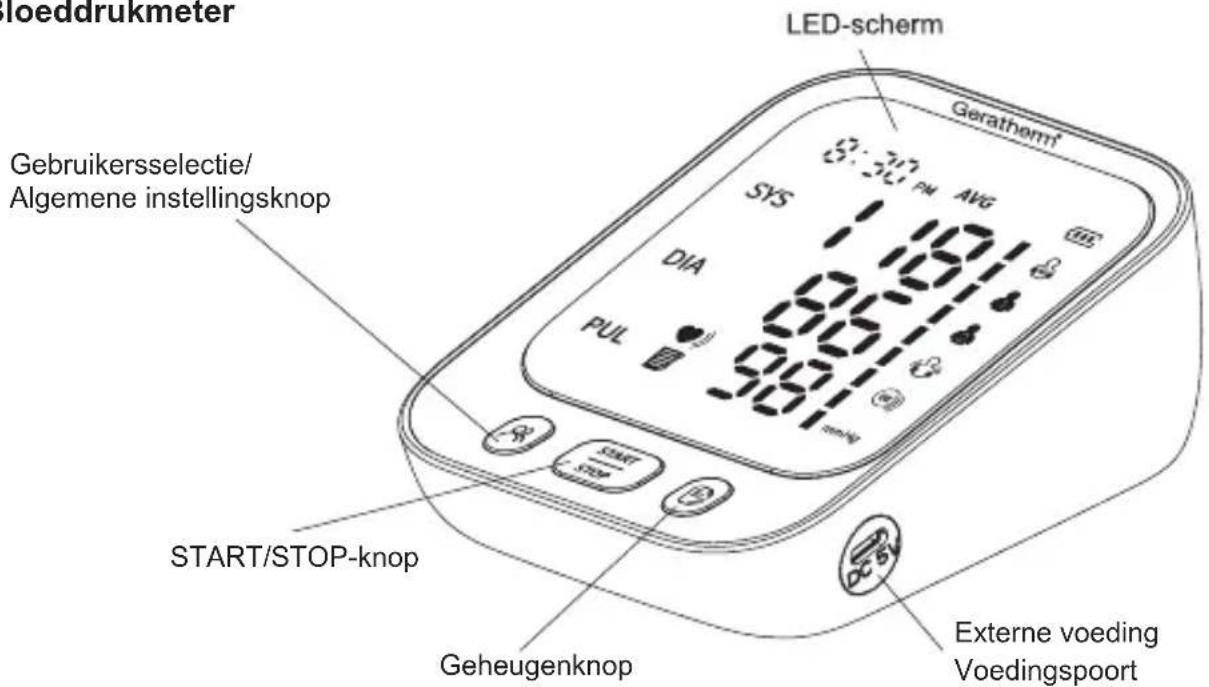
Blood pressure monitor
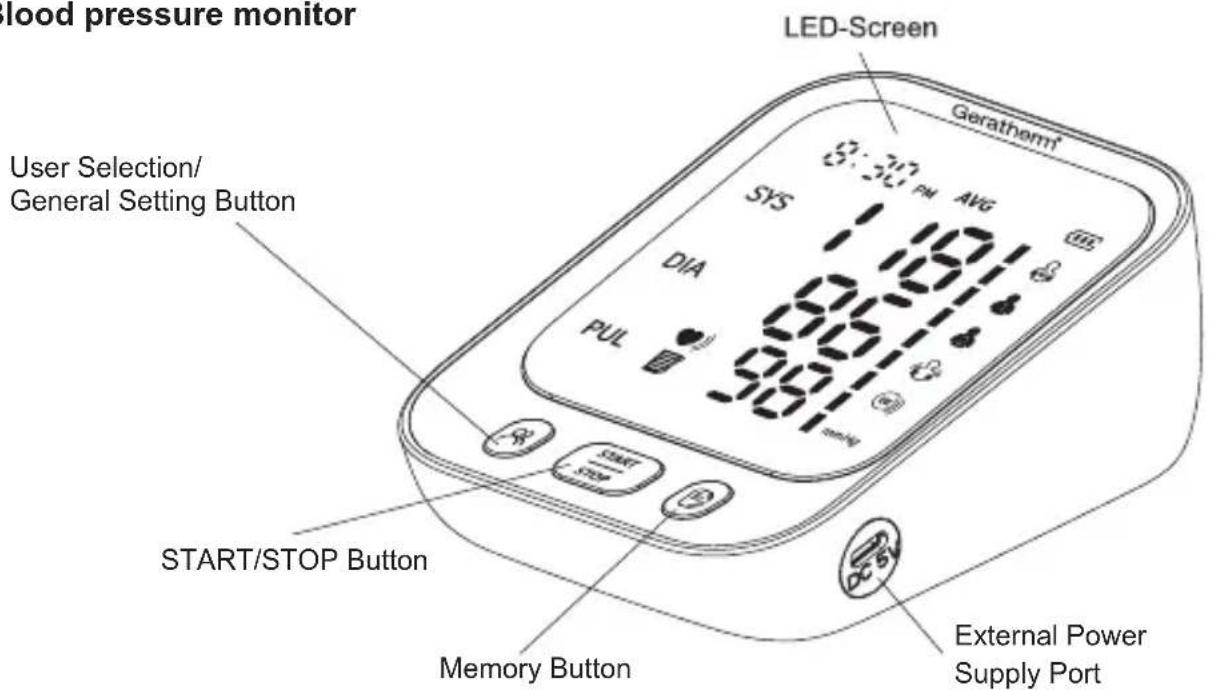
text_image
Blood pressure monitor LED-Screen User Selection/ General Setting Button SER SYS AVG 1.00 DIA 9.00 PUL 9.00 START/STOP Button Memory Button External Power Supply PortThis product is composed of the blood pressure monitor and cuff.
Display Screen
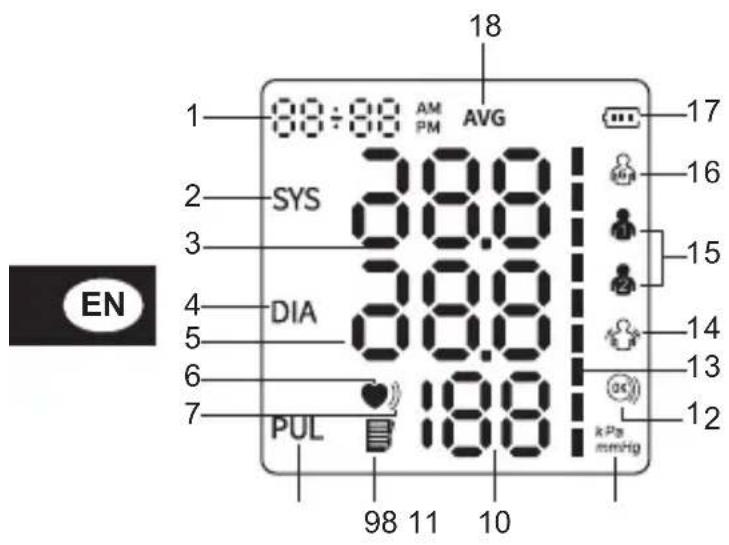
text_image
18 1 00:00 AM AVG 2 SYS 38.0 3 38.0 4 DIA 38.0 5 38.0 6 19.0 7 PUL 19.0 98 11 10 17 16 15 14 13 12 EN kPa mmHg- Date and Time
- Systolic Blood Pressure Icon
- Systolic Blood Pressure Value
- Diastolic Blood Pressure Icon
- Diastolic Blood Pressure Value
- Heartbeat Icon
- Irregular Heartbeat Icon
- Pulse Rate Icon
- Memory Icon
- Pulse Rate Value
- Unit of Blood Pressure
- Correct Cuff Wrapping
- Blood Pressure Indicator
- "Keep Still" Indication
- User Icon
- Guest
- Battery Icon
- Average Value Icon
WHO BLOOD PRESSURE INDICATOR
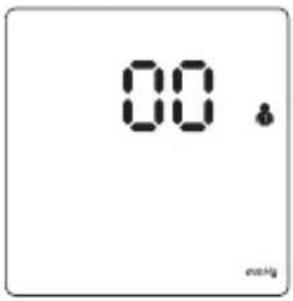
text_image
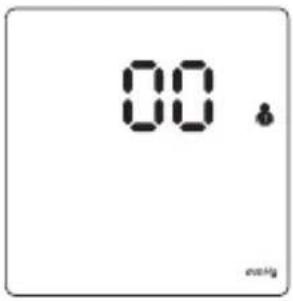
00 methylWhite for Standby
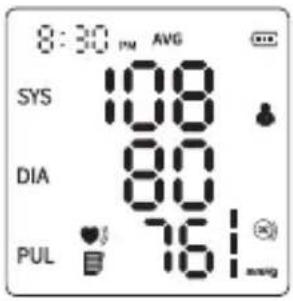
text_image
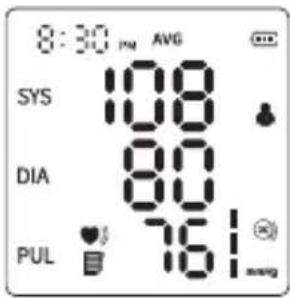
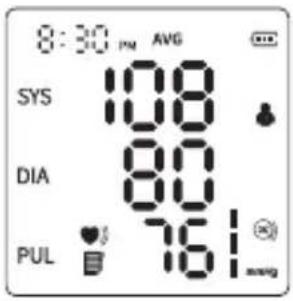
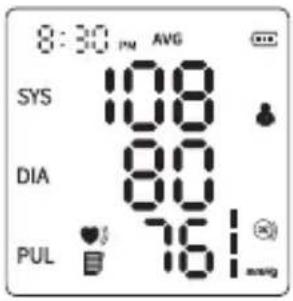
8:30 PM AVG SYS 108 DIA 80 PUL 76Green Bar Graph for Normal Blood Pressure
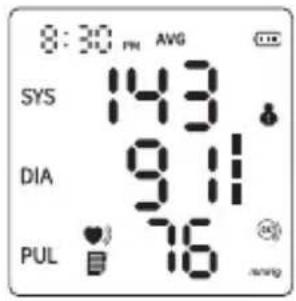
text_image
8:30 PM AVG SYS 143 DIA 9.11 PUL 76Yellow Bar Graph for Mild-high/ Mild-low Blood Pressure
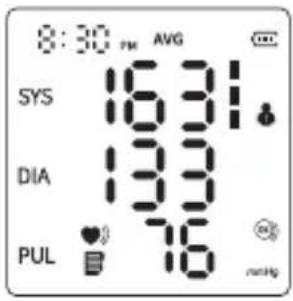
text_image
8:30 PM AVG SYS 16.31 DIA 13.9 PUL 7.6 no.HgRed Bar Graph for High Blood Pressure
| Systolic Blood Pressure (mmHg) | Hierarchical Relationship | Diastolic Blood Pressure (mmHg) | Color Display |
| ≥ 160 | or red | ≥ 100 | |
| 140 - 159 or 90 - 99 yellow | |||
| 90 - 139 or 60 - 89 green | |||
| < 90 and < 60 yellow | |||
⚠ Warning: Never diagnose or treat yourself based on the readings. Please always consult with your physician.
POWER CONNECTION
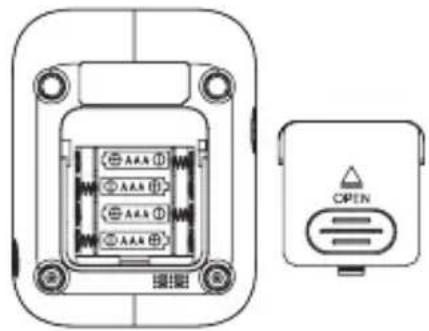
1. Install the Batteries
1) Open the battery cover according to the method shown in the figure.
2) Place 4 AAA batteries 1.5 V in the battery compartment and pay attention to the electrode indication of the batteries. Install the battery as indicated in the picture.
⚠️ Remove the batteries if you do not intend to use the device for a long time (over 3 months).
text_image
AAX AAX AAX AAX CPEN
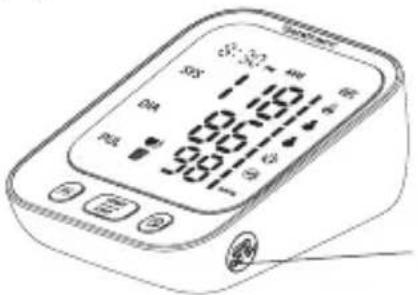
2. Type-C Connection for Power Supply
In addition to the batteries, the power can also be supplied by plugging into 5 V --- external power supply through a Type-C port. (Charging Adaptor is not included in the package).
text_image
S 181 96 98External Power Supply Port
FUNCTION SETTING
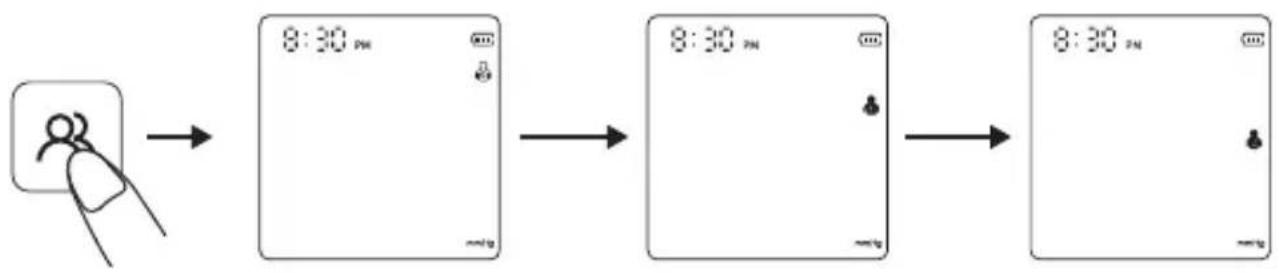
1. User Setting
a) Guest Mode
In the power-off mode, press the "button to enter Guest Mode" "Under the guest mode, the blood pressure readings will not be recorded in the device.
b) User 1/ User 2 Mode
Then press the “button again to switch and select User 1 “User 2“. Under the User 1/2 Mode, the blood pressure readings will be recorded in the device with date and time. Be certain that the same user is selected for specific person for continuous reading memory and easy checking.
flowchart
graph LR
    A["Hand icon"] --> B["8:30 PM"]
    B --> C["8:30 PM"]
    C --> D["8:30 PM"]
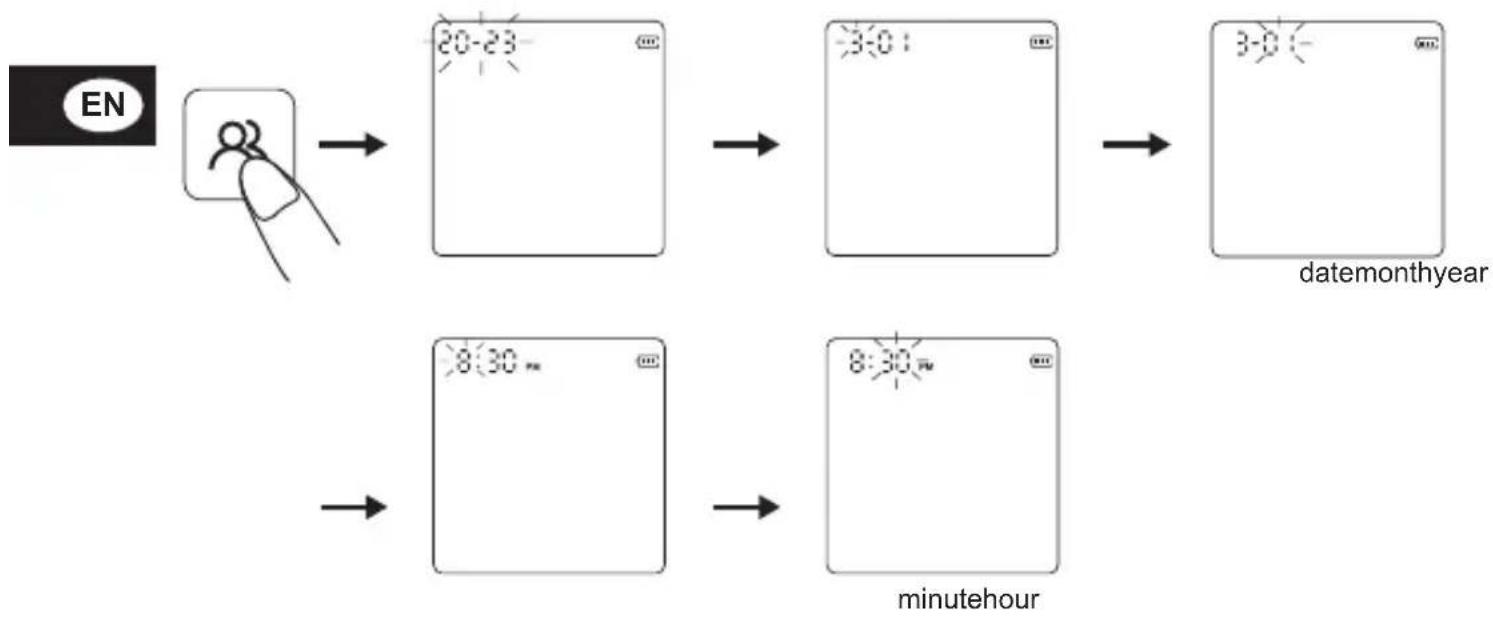
2. Date and Time Setting
In the power-off mode, press the " & button for about 3 seconds to enter the date setting interface, and the "year" will flash.
Press the "☐" button to adjust the year and press the "☒" button to confirm the selection.
When the year is set, it will automatically enter the month setting. Press the “ ” button to adjust the month and press the “ ” button to confirm the selection. Follow the same steps to date/hour/minute.
flowchart
graph LR
    A["EN"] --> B["20-23"]
    B --> C["3:0"]
    C --> D["3:0"]
    D --> E["datemonthyear"]
    F["Start"] --> G["8:30 min"]
    G --> H["8:30 min"]
    H --> I["minutehour"]
FUNCTION SETTING
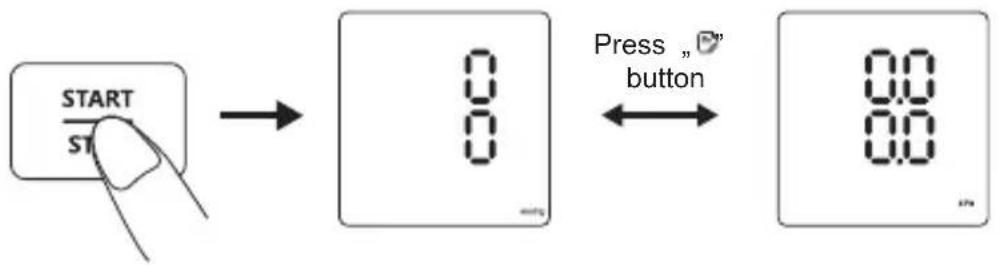
3. Unit Display Setting
There are two units of blood pressure display, mmHg and kPa. The default unit is mmHg. In the power-off mode, press the “ ^1 ” button for about 5 seconds to enter the unit selection. Press the “ ” button to switch between mmHg and kPa, and then press the “ ” button to confirm the selection.
flowchart
graph LR
    A["START"] --> B["0"]
    B --> C["Press "button""]
    C --> D["88"]
HOW TO APPLY THE CUFF
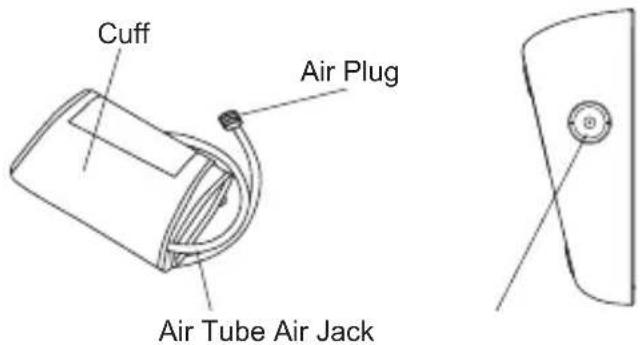
- Connect the cuff to the monitor by inserting the air plug into the air jack.
text_image
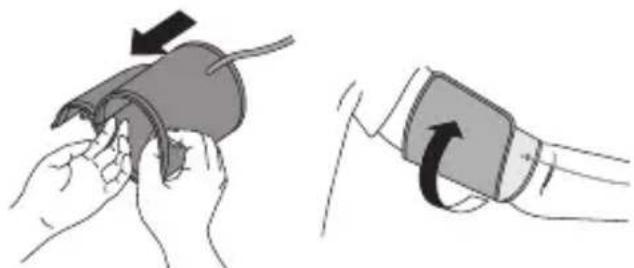
Cuff Air Plug Air Tube Air Jack- Place your hand through the cuff loop. Pull the cuff until it reaches your upper arm.
natural_image
Illustration showing two steps of a medical procedure: one being held by hands, the other being held by a hand holding a pressure monitor (no text or symbols present)
Note:
The bottom edge of the arm cuff should be 2-3 cm (0.8" - 1.2") above the elbow. The air tube should be on the inside of your arm and aligned with your middle finger.
Make sure that the air tube is positioned on the inside of your arm and wrap the cuff securely, so it cannot move around your arm.
Note:
Repeated measurement will result in blood congestion in the arm, which will affect the measurement result.
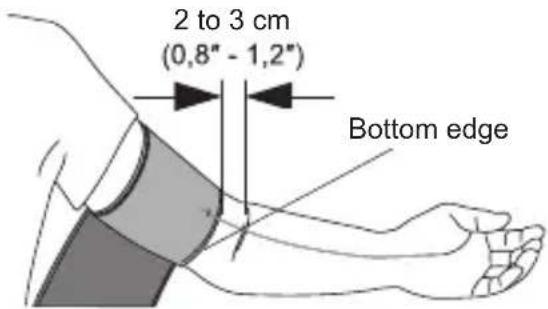
text_image
2 to 3 cm (0,8" - 1,2") Bottom edgeHOW TO APPLY THE CUFF
How to avoid blood congestion and ensure the repeated measurement is accurate?
You can raise the left hand and hold the fist several times or take off the cuff and rest for at least 5 minutes before taking the measurement.
3. Sitting correctly
To take a measurement, you need to be relaxed and comfortably seated in a room with a comfortable temperature.
- Sit in a comfortable chair with your back and arm supported.
- Keep your feet flat and your legs uncrossed.
- The arm cuff should be placed on your arm at the same level as your heart, with the arm resting comfortably on a table.
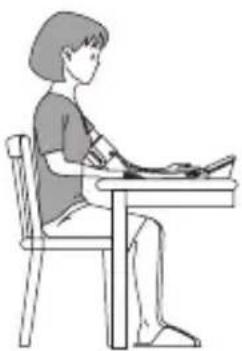
natural_image
Line drawing of a person sitting at a desk, viewed from the side (no text or symbols)HOW TO TAKE PROPER MEASUREMENTS
1. Preparation before Measurement
• Take off the clothes on the arm.
• Always measure in the same arm (generally the left arm).
- Remain still during the measurement.
- Relax as much as possible and do not talk during measurement.
• Measure your blood pressure at about the same time every day.
- Do not measure the blood pressure immediately after physical exercise or a bath. Rest for 20 - 30 minutes before taking the measurement.
• Measurements under the conditions listed below may affect results: eating, alcohol consumption; drinks containing caffeine, sport, talking, being nervous, being in unsteady mood, bending forward, moving, room temperature changes, being inside a moving vehicle, repeated and continuous measuring.

HOW TO TAKE PROPER MEASUREMENTS
2. Taking a Measurement
1) Fasten the arm cuff following the instruction of "How to Apply the Cuff". Start the measurement after wearing the cuff correctly.
2) Press the "button. The monitor will start inflating for measurement and display". Check the measured values after the measurement finished.
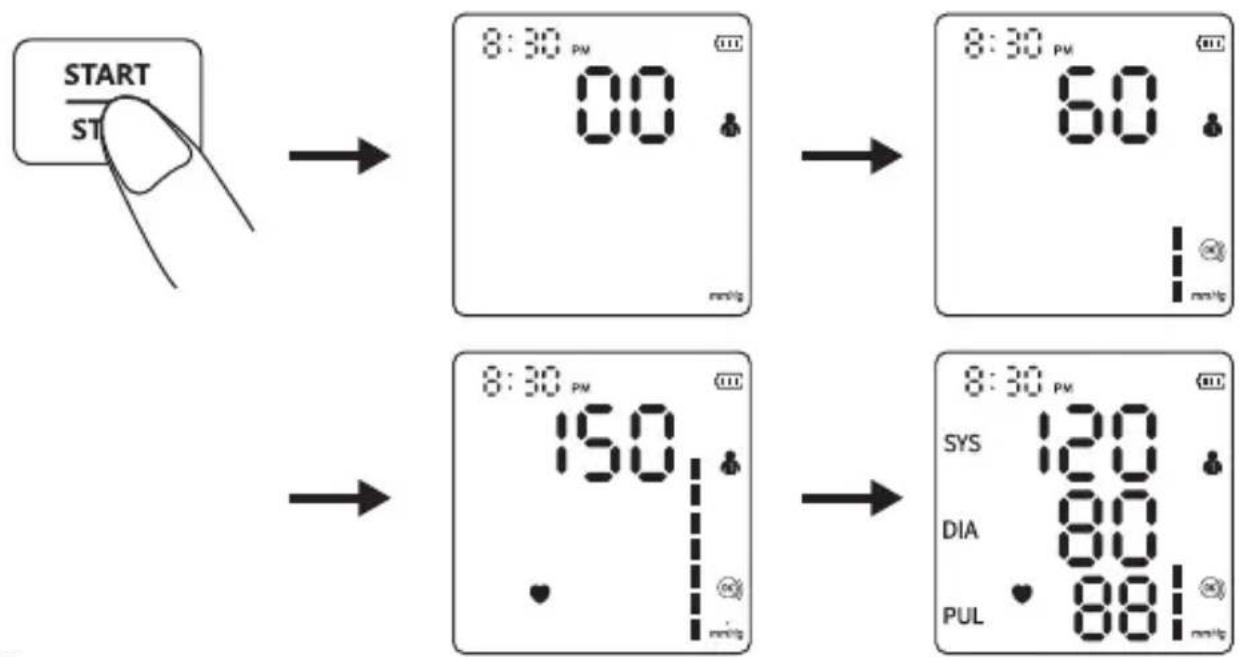
flowchart
graph TD
    A["START"] --> B["8:30 PM 00 mmHg"]
    B --> C["8:30 PM 60 mmHg"]
    C --> D["8:30 PM 150 mmHg"]
    D --> E["8:30 PM 120 mmHg"]
    E --> F["DIA 80 mmHg"]
    E --> G["PUL 88 mmHg"]
Note:
If you feel uncomfortable during the measurement, press the “START” button immediately to stop the measurement. Please consult your doctor if unexpected readings are obtained.
3. Memory Function
1) Each measured value is stored automatically under the appropriate user group. This device can store up to 199 sets of measurements for User 1 and User 2. Once the memory log is full, old values will be refreshed with new ones.
2) In the power-off mode, press the “ ➕ ” button once and the device will display the average value of the blood pressure measurements of the last 2 or 3 times. Press the “ ➕ ” button again, and the latest measured value will be displayed. Press the “ ➕ ” button again and the rest measured values will be displayed one by one.
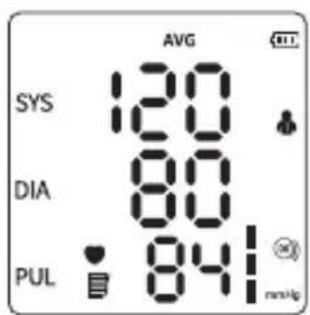
text_image
AVG SYS 120 DIA 80 PUL 841 mmHg
text_image
8:30 PM SYS 120 DIA 80 PUL 851
text_image
8:25 PM SYS 108 DIA 84 PUL 81 mmHg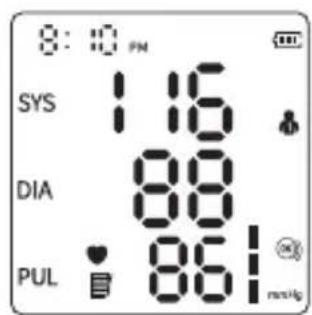
text_image
8:10 PM SYS 116 DIA 88 PUL 861 nsu/kgHOW TO TAKE PROPER MEASUREMENTS
3) Delete Memory
1 In the power-off mode, press the " 🔊" button to select the user group whose measured values need to be deleted.
2 Press the “ ” button to power off the device and press the “ ” button once to activate the screen.
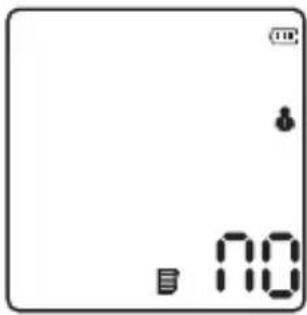
3 Keep pressing the “ ” button for about 3 seconds to delete the memories of the selected user and the “ no ” icon will appear on the screen.
text_image
10 104. "Cuff Wrapping" Detection
The “ ”icon is displayed stationary on the screen when the cuff is wrapped correctly. When the cuff is too loose, the “ ”icon will always flash to remind you. If the “ ”icon is flashing, please press the “ ”button to stop the measurement.
5. "Keep Still" Indication
The “ 🔗” icon flashes when you move your body or shake your arm during the measurement, which may cause incorrect measurement results. Please adjust your posture and measure again.
ERROR MESSAGES AND HANDLING
If the measurement is faulty, any of the following error codes may appear. Kindly use the recommended method for measurement.
| Errors Cause Solution | ||
| Er U | The pressure cannot reach 30 mmHg (4 kPa) in 12 seconds. | Please make sure that the cuff is inserted and worn correctly. Please check that the cuff and tube is not broken. |
| Er H | The inflation reaches 295mmHg, and it deflates automatically after 20ms. | Please make sure that the cuff is worn correctly, and the measuring posture is proper. |
| Er 1 | The pulse rate is not detected correctly. | Please make sure that the cuff is worn correctly, and the measuring posture is proper. Please check that the measuring arm is free of clothing. |
| Er 2 | Too much disturbance (moving, talking or magnetic disturbance during a measurement). | Please do not move or talk during measuring. |
ERROR MESSAGES AND HANDLING
| Er 3 The measurement result is abnormal. | Please do not exercise strenuously before measurement. Please do not move or talk during measuring. | |
| Er 23 | SYS value is lower than 57 mmHg. | Please make sure that the cuff is worn in the right position and correctly. Please do not move or talk during measuring. |
| Er 24 | SYS value is higher than 255 mmHg. | |
| Er 25 DIA value is lower than 25 mmHg. | ||
| Er 26 DIA value is higher than 195 mmHg. | ||
Troubleshooting
| Problem Possible | le Faulty Solution | |
| Failure to power on | Whether the power is insufficient. | Replace the batteries or insert the cable for power supply. |
| Whether the positive and negative poles of the battery are installed reversely. | Install the batteries correctly. | |
| No pressurizing | Whether the air tube plug is inserted tightly. | Insert the air tube plug firmly into the jack. |
| Whether the air tube is broken or leaked. | Please contact the dealer to replace with a new cuff. | |
| The reading is extremely low (or high) | Whether the arm is moved when pressurization. | Keep your arm and body still. |
| Whether you talk during the measurement. | Keep quiet while measuring the blood pressure. | |
| Air leakage of the cuff | Whether the cuff is twined too loose. | Please tighten the cuff. |
| The airbag of the cuff is ripped. | Please contact the dealer to replace with a new cuff. | |
| ⚠️ If the blood pressure still cannot be measured after trying the above-stated solutions, please contact the dealer. Do NOT attempt to disassemble the device by yourself. | ||
CLEANING AND DISINFECTION
1. Cleaning
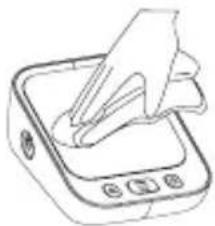
The device can be cleaned with a soft, clean cloth dampened with a small amount of neutral detergent or water.
natural_image
Line drawing of a hand pressing down on a square electronic device (no text or symbols)Do not use corrosive cleaning agents and take care not to immerse any part of the monitor in any fluid.
Do not allow water or other liquids to flow into the device.
2. Disinfection
Recommended Disinfecting Agent
75 % medical alcohol
Carefully wipe the device with a soft, clean cloth dampened with a small amount of the above disinfectant, and dry immediately with a soft, clean, dry cloth.
Do not disinfect through methods like high-temperature steam or ultraviolet radiation. These might damage the device and reduce its service life.
It is suggested to disinfect the monitor before and after use each time. Each time of disinfection shall be completed within 1min. The number of repeated disinfections each time shall not exceed 2 times.
3. Disposal
Dispose of the monitor, other components and optional accessories according to applicable local regulations. Unlawful disposal may cause environmental pollution.
Notes
-
Do not bend or crease the air tube excessively.
• Do not store the monitor or its components: -
if the monitor or its parts is wet.
- in locations with extreme temperatures, humidity, direct sunlight, dust, or corrosive gases.
- in areas with a high risk of vibrations or shocks.

QUESTIONS AND ANSWERS ON BLOOD PRESSURE
Why is the blood pressure value obtained at home lower than that obtained at the hospital?
- The blood pressure difference between home and hospital measurements is about 20 mmHg - 30 mmHg (2.7 kPa - 4.0 kPa). This is because individuals tend to be more relaxed at home than at the hospital.
- In addition, when the device is placed at a position over the heart, the blood pressure value tends to be much lower than it actually is. Ensure the device is positioned right at the heart level.
Why is the blood pressure value obtained at home higher than that obtained at the hospital?
- The anti-hypertensive drug might have lost its efficacy. Kindly adhere to your doctor's instructions.
- The cuff might not be in the correct position. If the cuff is not placed right, no arterial pressure value will be obtained, and the blood pressure value might be much higher than it is. Therefore, properly position the cuff.
- The cuff is not tight enough. If the cuff is loose, the compression force might fail to transmit to the artery, causing the blood pressure value to be much higher than it is. Therefore, re-adjust and tighten the cuff further.
- The patient is not sitting correctly during the measurement. Slouching, tilting, bending, and sitting cross-legged are not encouraged while taking blood pressure measurements due to increased abdominal pressure or the arm position being below the heart. Kindly take readings in the correct posture.
When can I obtain better measurements?
- Measurements are best taken in the mornings right after you urinate or when your mind and body are stable. We recommend taking readings at the same time of the day, every time.
SPECIFICATIONS
| Model ARM-30T | ||
| Display | LED screen | |
| Measuring Method Oscillometric measurement | ||
| Measuring Part Upper arm | ||
| Pneumatic Pressure Measuring Range | 0 - 295 mmHg (0 - 39.3 kPa) | |
| Maximum Pressure Protection | 295 mmHg (39.3 kPa) | |
| Measurement Range | Blood pressure value | SYS: 57 - 255 mmHg (7.6 - 33.4 kPa)DIA: 25 - 195 mmHg (3.33 - 26 kPa) |
| Pulse rate 40 - 199 beats per | minute | |
| Accuracy | Blood pressure value ±3 mm | Hg (±0.4 kPa) |
| Pulse rate ±5 % | ||
| Low Battery | When the power is lower than 4 V ±0.1 V, the device will be turned off automatically. | |
| Power Source 4 x AAA batteries or 5 V --- Type-C cable | ||
| Memory 2 users x 199 memories + guest mode | ||
| Dimension | 130 mm (L) x 100 mm (W) x 49 mm (H) (5.12" x 3.94" x 1.93") | |
| Screen Size | 67 mm (L) x 68 mm (W) (3.7") | |
| Cuff Size | 22 - 42 cm (8.6" - 16.5") | |
| Weight About 221 g (without batteries) | ||
| Auto Power-off 1 minute without operation | ||
| Anti Electronic Shock Degree of Protection | Type BF | |
| Operation Mode Continuous operation | ||
| Protection Against Harmful Ingress of Water or Particular Matter IP21 | ||
| Lifetime | 5 years | |
| Protection Against Electric Shock | Internally powered supply | |
| Operating Environment | Temperature condition 5 °C - | 40 °C |
| Humidity condition 15% - 90 | % RH | |
| Atmospheric condition 70 kPa | - 106 kPa | |
| Transportation and Storage Environment | Avoid strong impact, direct impact, exposure or rain during transportation. The device shall be stored indoors at the temperature of -20 °C to 55 °C and the relative humidity of 10% - 93%. Atmospheric condition: 70 kPa - 106 kPa without corrosive gas and with good ventilation. | |
AUTHORIZED COMPONENT
Please use the authorized adapter. Adapter is not included in the scope of delivery.
Adapter
Type: SINGOF-5U-050100
Input: 100 - 240 V - 50/60 Hz 0.16 - 0.07 A
Output: 5.0 V = 1.0 A
APPENDIX: EMC INFORMATION
| Guidance and manufacturer's declaration - Electromagnetic emission | ||
| The Blood Pressure Monitor is intended for use in the electromagnetic environment specified below. The customer or the user of the Blood Pressure Monitor should assure that it is used in such an environment. | ||
| Emissions Compliance | Electromagnetic environment - guidance | |
| RF emissions CISPR 11 Group | 1 | The Blood Pressure Monitor uses RF energy only for its internal function. Therefore, its RF emissions are very low and are not likely to cause any interference in nearby electronic equipment. |
| RF emissions CISPR 11 Class B | The Blood Pressure Monitor is suitable for use in all establishments, including domestic establishments and those directly connected to the public low-voltage power supply network that supplies buildings used for domestic purposes. | |
| Harmonic emissions IEC61000-3-2 | Not applicable | |
| Voltage fluctuations/ flicker emissions IEC61000-3-3 | Not applicable | |

APPENDIX: EMC INFORMATION
| Guidance and manufacturer's declaration - electromagnetic Immunity | ||||||||
| The Blood Pressure Monitor is intended for use in the electromagnetic environment specified below. The customer or the user of the Blood Pressure Monitor should assure that it is used in such an environment. | ||||||||
| Radiated RF IEC 61000-4-3(Test specifications for ENCLOSURE PORT IMMUNITY to RF wireless communications equipment) | Test Frequency (MHz) | Band (MHz) | Service | Modulation | Maximum Power (W) | Distance (m) | IEC 60601-1-2 Test Level (V/m) | Compliance level (V/m) |
| 385 380 | - 390 TETRA 40 | Pulse modulation 18 Hz | 1.8 0.3 27 27 | |||||
| 450 430 | - 470 | GMRS 460,FRS 460 | FM ±5 kHz deviation1 kHz sine | 2 0.3 | 28 28 | |||
| 710 | 704 - 787 | LTE Band 13, 17 | Pulse modulation 217 Hz 0.2 | 0.3 9 9 | 745 | |||
| 780 | ||||||||
| 810 | 800 - 960 | GSM 800/900,TETRA 800,iDEN 820,CDMA 850,LTE-Band 5 | Pulse modulation 18 Hz 2 0.3 | 28 28 | ||||
| 870 | ||||||||
| 930 | ||||||||
APPENDIX: EMC INFORMATION
| Radiated RF IEC 61000-4-3(Test specifications for ENCLOSURE PORT IMMUNITY to RF wireless communications equipment) | 1720 | 1700 - 1990 | GSM 1800;CDMA 1900;GSM 1900;DECT;LTE Band 1, 3, 4, 25;UMTS | Pulse modulation 217 Hz 2 | 0.3 28 28 | 1845 | ||
| 1970 | ||||||||
| 2450 2400 - 2570 | Bluetooth,WLAN,802.11 b/g/n,RFID 2450,LTE Band 7 | Pulse modulation 217 Hz 2 | 0.3 28 28 | |||||
| 5240 | 5100 - 5800 | WLAN 802.11 a/n | Pulse modulation 217 Hz 0,2 | 0.3 9 9 | 5500 | |||
| 5785 | ||||||||
APPENDIX: EMC INFORMATION
| Guidance and manufacturer's declaration - Electromagnetic immunity | ||
| The Blood Pressure Monitor is intended for use in the electromagnetic environment specified below. The customer or the user of the Blood Pressure Monitor should assure that it is used in such an environment. | ||
| Immunity test | IEC 60601 test level | Compliance level |
| Electrostatic discharge (ESD)IEC 61000-4-2 | ±8 kV contact±2 kV, ±4 kV, ±8 kV,±15 kV air | ±8 kV contact±2 kV, ±4 kV, ±8 kV,±15 kV air |
| Electrical fast transient/burstIEC 61000-4-4 | Not applicable Not applicable | |
| Surge IEC 61000-4-5 Not applicable Not applicable | ||
| Voltage dips, short interruptions and voltage variations on power supply input linesIEC 61000-4-11 | Not applicable Not applicable | |
| Power frequency Magnetic field IEC61000-4-8 | 30A/m, 50/60Hz 30A/m, 50/60Hz | |
| Conducted RF IEC61000-4-6 Not applicable | Not applicable | |
| Radiated RF IEC61000-4-3 10 V/m | 80 MHz – 2,7 GHz80 % AM at 1 kHz | 10 V/m80 MHz – 2,7 GHz80 % AM at 1 kHz |
| NOTE: UT is the a.c. mains voltage prior to application of the test level | ||
| Guidance and manufacturer's declaration - electromagnetic Immunity | ||||
| Radiated RFIEC61000-4-39(Test specifications forENCLOSURE PORTIMMUNITY to proximitymagnetic fields) | TestFrequency | Modulation IEC 60601-1-2Test Level(A/m) | Compliancelevel (A/m) | |
| 30 kHz CW | 8 8 | |||
| 134.2 kHz | Pulsemodulation2.1 kHz | 65 65 | ||
| 13.56 kHz | Pulsemodulation50 kHz | 7.5 7.5 | ||
Geratherm® vivo
text_image
Gestherm® 8:32 PM AVG SYS 1.18 DIA 86 PUL 881 START STOPMODE D'EMPLOI
text_image
00 methylnatural_image
Illustration showing two steps of a blood pressure monitor: one being held, the other being adjusted with a curved arrow (no text or symbols present)natural_image
Line drawing of a person sitting at a desk using a computer (no text or symbols)COMMENT FAIRE LA BONNE MESURE
natural_image
Line drawing of a hand pressing down on a square electronic device (no text or symbols)2. Désinfection
ANNEXE: INFORMATIONS CEM
ANNEXE: INFORMATIONS CEM
ANNEXE: INFORMATIONS CEM
ANNEXE: INFORMATIONS CEM
text_image
00 methylBianco per lo standby
text_image
8:30 PM AVG SYS 108 DIA 90 PUL 76flowchart
graph LR
    A["Hand icon pointing to device"] --> B["Device placement"]
    B --> C["Time setting: 8:30 PM"]
    C --> D["Device placement with timer"]
    D --> E["Time setting: 8:30 PM"]
natural_image
Illustration showing two steps of a medical procedure: one being held by hands, the other being inserted into a blood pressure monitor (no text or symbols present)natural_image
Line drawing of a person sitting at a desk using a computer (no text or symbols)COME PRENDERE LE MISURE CORRETTE
natural_image
Line drawing of a hand pressing down on a square electronic device (no text or symbols)2. Disinfezione
text_image
00 methylBlanco para espera
text_image
8:30 PM AVG SYS 108 DIA 80 PUL 76text_image
AAR AAR AAR AAR OPENtext_image
0.5 1.0 2.0 3.0 4.0 5.0 6.0 7.0 8.0 9.0 10.0 11.0 12.0 13.0 14.0 15.0 16.0 17.0 18.0 19.0 20.0 21.0 22.0 23.0 24.0 25.0 26.0 27.0 28.0 29.0 30.0 31.0 32.0 33.0 34.0 35.0 36.0 37.0 38.0 39.0 40.0 41.0 42.0 43.0 44.0 45.0 46.0 47.0 48.0 49.0 50.0 51.0 52.0 53.0 54.0 55.0 56.0 57.0 58.0 59.0 60.0 61.0 62.0 63.0 64.0 65.0 66.0 67.0 68.0 69.0 70.0 71.0 72.0 73.0 74.0 75.0 76.0 77.0 78.0 79.0 80.0 81.0 82.0 83.0 84.0 85.0 86.0 87.0 88.0 89.0 90.0 91.0 92.0 93.0 94.0 95.0 96.0 97.0 98.0 99.0 100.0natural_image
Illustration showing two steps of a medical procedure: one being held by a hand holding a device, the other being performed with a pressure monitor (no text or symbols present)Nota:
natural_image
Line drawing of a person sitting at a desk using a computer (no text or symbols)CÓMO TOMAR MEDIDAS ADECUADAS
CÓMO TOMAR MEDIDAS ADECUADAS
2. Tomar una medida
CÓMO TOMAR MEDIDAS ADECUADAS
3) Eliminar memoria
natural_image
Line drawing of a hand pressing down on a square electronic device (no text or symbols)MANUAL DE INSTRUÇÕES
text_image
00 methyltext_image
S: 180 D: 96 P: 98flowchart
graph LR
    A["Hand icon"] --> B["Device placement"]
    B --> C["Lock state at 8:30 PM"]
    C --> D["Device placement"]
    D --> E["Lock state at 8:30 PM"]
natural_image
Illustration showing two steps of a blood pressure monitor: one being held, the other holding a device with a curved arrow (no text or symbols present)Nota:
natural_image
Line drawing of a person sitting at a desk using a computer (no text or symbols)COMO EFETUAR MEDIÇÕES CORRETAS
natural_image
Line drawing of a hand pressing down on a square electronic device (no text or symbols)2. Desinfeção
Saída: 5,0 V --- 1,0 A
BESCHRIJVING VAN HET APPARAAT
Bloeddrukmeter
WHO BLOEDDRUK INDICATIE
text_image
00 outlyWit voor stand-by
text_image
8:30 PM AVG SYS 108 DIA 80 PUL 76text_image
AAAA AAAA AAAA AAAA OPENflowchart
graph LR
    A["Hand icon pointing at bottom"] --> B["8:30 PM"]
    B --> C["8:30 PM with lock icon"]
    C --> D["8:30 PM with lock icon"]
natural_image
Illustration showing two steps of a medical procedure: one being held by hands, the other being inserted into a pressure monitor (no text or symbols present)Opmerking:
natural_image
Line drawing of a person sitting at a desk using a computer (no text or symbols)HOE VOERT U DE JUISTE METINGEN UIT
natural_image
Line drawing of a hand pressing down on a square electronic device (no text or symbols)2. Desinfectie
Shenzhen AOJ Medical Technology Co., Ltd.
Room 301&4F, Block A, Building A, Jingfa Intelligent Manufacturing Park, Xiaweiyuan, Gushu Community, Xixiang Street, Bao'an District, 518126 Shenzhen China

Share Info GmbH
Heerdter Lohweg 83,
40549 Düsseldorf
Germany

3rd Floor, Office C, Townend House, Park Street, Walsall, West Midlands, WS1 1NS
United Kingdom

Geratherm Medical GERMANY GmbH
Fahrenheitstraße 1
99331 Geratal
Germany
Phone: +49 36205 980
www.geratherm.com